PTAUWIFI46 - Receiver Pyle - Free user manual and instructions
Find the device manual for free PTAUWIFI46 Pyle in PDF.


| Product Type | Home Audio Receiver |
| Brand | Pyle |
| Model | PTAUWIFI46 |
| Dimensions (W x H x D) | 17.3 x 5.5 x 12.2 inches |
| Weight | 10.2 lbs |
| Power Supply | 120V / 60Hz |
| Power Output | 100W per channel at 8 ohms |
| Supported Audio Formats | MP3, WMA, WAV, FLAC |
| Wireless Connectivity | Wi-Fi (802.11 b/g/n), Bluetooth 4.0 |
| Inputs | 2 x RCA, 1 x Optical, 1 x Coaxial, USB, AUX |
| Outputs | Speaker terminals, Subwoofer pre-out, Headphone jack |
| AM/FM Tuner | Yes, with 30 presets |
| Remote Control | Included |
| Dimensions of Remote | 6.5 x 1.8 x 0.7 inches |
| Cleaning Instructions | Wipe with dry cloth; avoid liquids and abrasives |
| Safety Instructions | Do not expose to moisture; ensure ventilation; unplug during storms |
| Spare Parts Availability | Contact Pyle support for replacement parts |
| Repair Information | Only qualified service personnel should attempt repairs |
| Operating Temperature | 32°F to 104°F (0°C to 40°C) |
| Warranty | 1 year limited warranty |
Frequently Asked Questions - PTAUWIFI46 Pyle
User questions about PTAUWIFI46 Pyle
0 question about this device. Answer the ones you know or ask your own.
Ask a new question about this device
Download the instructions for your Receiver in PDF format for free! Find your manual PTAUWIFI46 - Pyle and take your electronic device back in hand. On this page are published all the documents necessary for the use of your device. PTAUWIFI46 by Pyle.
USER MANUAL PTAUWIFI46 Pyle
Need service or repair?
Want to leave a comment?
PyleUSA.com/ContactUs

PYLE
PyleUSA.com
natural_image
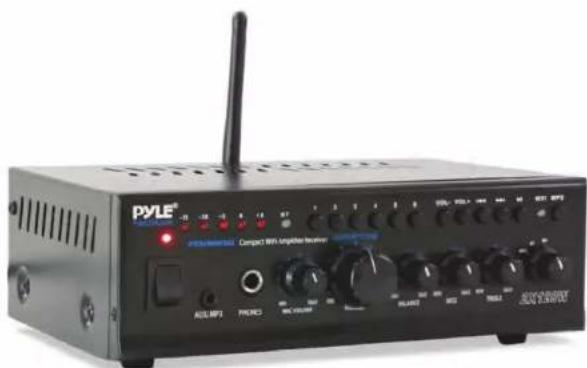
Black PYLE® portable audio amplifier with external antenna and control knobs (no visible text or symbols on main body)
□○□***★◆☆○□***□****
Wireless Music Streaming Amp System with Mic Paging/Mixing, 240 Watt
USER MANUAL
Introduction
Pyle's Compact WiFi Amplifier Receiver is the perfect solution for all of your audio needs, and is a easy way to get your music playing through a connected speaker system. Using the latest sound amplification technology and an impressive 240 Watt power output, this receiver is designed to allow you to stream your music wirelessly both by WIFI Wireless Network Audio and Bluetooth Wireless Audio; and is also designed to deliver pure stereo sounds via the unit's front panel AUX (3.5mm) Input Jackto all of your favorite devices (like Smartphones, Tablets, Laptops, Computers, etc.). Additional system features include 1/4" Microphone Input and 1/4 Headphone Input. Push Type Speaker Terminal connectors, RCA Stereo Inputs, RCA Rec. Output. Take control of your sound with the PTAUWIFI46 Compact WiFi Amplifier Receiver.
Enjoy versatile streaming ability wired and wireless with the PYLE Compact WiFi Amplifier Receiver
Wireless Setup & Connection:
There are (2) different types of wireless connection audio streaming methods, WiFi and Direct Connect. Please read the following method information and understand the difference between the connection types prior to connecting your device.
Method 1: Connecting via WiFi
This method is used for streaming internet radio services, through the Wall Plate Receiver, via your compatible device.
Method 2: Direct Connection (Streaming Music Saved on Your Device) This method is used for streaming compatible audio files, through the Wall Plate Receiver, that are saved directly on your device's memory.
Control & Function Layout
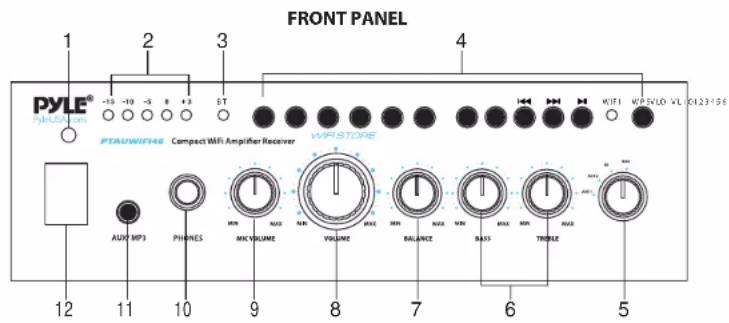
Features and Controls:
text_image
FRONT PANEL 1 2 3 4 PYLE® -10 -10 -5 8 +3 BT PTAUWIFI46 Compact WiFi Amplifier Receiver VIP STORE AUX MP3 PHONES MIN MAX VOLUME YOLUME MAX BALANCE MAX MAX TWOLE 12 11 10 9 8 7 6 5BACK PANEL
text_image
15 PAGER MIXING MIC 22 INPUT AUX1 AUX2 REC OUT L R 20 19 WIFI/BT ANT PYLE LAN CEC SPEAKER R L L+ - 18 17 VOLTAGE 16 13 FUSE AC IN1. Power ON/OFF LED Indicator
The Indicator Lights When the Amplifier is Turned On.
2. Blue LED Output Level Indicators
3. Bluetooth Signal Indicator
4. WIFI Control
*1/2/3/4/5/6 STORE Buttons
6 Pre-Store Folders, you can pre-store 6 Music Folders as your favorite ones, and can loop playback, or choose one of them by press the button.
Control & Function Layout
* VOL-/VOL+: Buttons for Volume + or Volume -
*◀/▶: Button Switches to Previous Song or Next Song
*▶: Button Switches to Play or Pause
*WIFI: WIFI Signal Indicator
*WPS: WIFI Protected Setup
5. WIFI/ BT/ AUX2/ AUX1 Input Selector
Lets you Select the Desired Input Music Source between WIFI / BT / AUX2 / AUX1
6. BASS and TREBLE Controls
Allows You to Boost or Attenuate Bass and Treble for the Desired Sound.
7. BALANCE
Lets you Adjust the Sound Balance Between the Left and Right of Amplifier Outputs.
8. MASTER Volume Control
Lets You Control the Overall Volume Level. It Doesn't Affect the Volume of MIC.
9. MIC Volume Control
Lets You Adjust the Volume of Connected MIC to the Proper Setting.
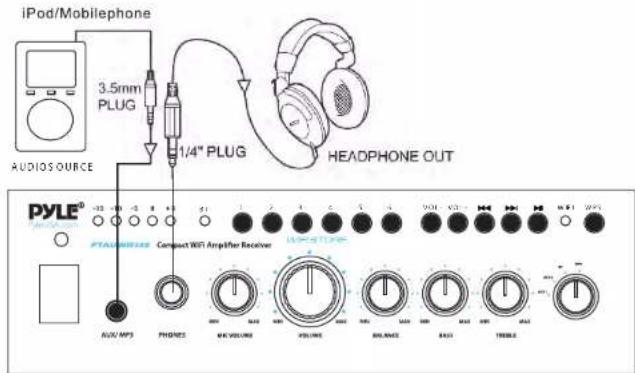
10. 1/4" PHONE Input Jack
Accepts Headphones with 1/4" Plug.
11. MP3 3.5mm AUX Input Jack
Let You Easily Connect the Computerized MP3 Device (Player) Sources, Such as Mobile Phone, Laptop, iPad, Walkman, etc.
12. POWER ON/OFF Switch
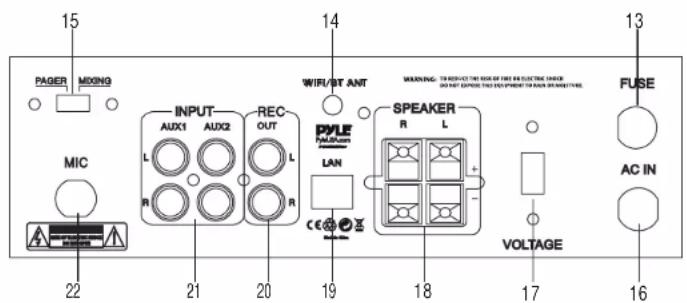
13. FUSE: Replaceable Power Fuse
The Amplifier Uses a Fuse for Protection Against Surges and Short Circuit. If the Amplifier Suddenly Turns Off and Will Not Turn On, Check the Fuse and If Necessary Replace it with a 1.5-Amp, 250-Volt, Fast-Acting, 5x20mm Fuse (Not Supplied).
Control & Function Layout
14. WIFI/BT Antenna
15. PAGER/MIXIG
Set to PAGER, the signal from AUX1 and AUX2 will be attenuated by - 12dB and the signal from MIC will override to page (Auto Talkover). It is good for Paging System, Set to Mixing, the signal from AUX1/AUX2 and MIC will be existed at the same time, It acts like playing at KARAOKE Event.
16. AC IN Power Plug
Connect to AC 110V/60Hz, or AC 230V/50Hz Outlet.
17. 115V/230V Voltage Selector
The amplifier has Selectable Input Voltage from 110V/60Hz (the standard in USA and CANADA) to 230V/50Hz (for EUROPEAN & some countries of SOUTH AMERICA Operation). Please make sure the switch is in the proper position before operating, otherwise, the severe damage will be incurred and not covered by warranty.
18. Push Type Speaker Terminal
Lets you easily connect speaker wires directly to the amplifier. The speaker impedance can be ranged from 4 to 8 ohms for the general stereo output. The total speaker impedance must be at least 4-ohm per channel at stereo mode.
19. LAN Input Port
LAN Interface Input by Router
20. REC. RCA Output
Lets you connect the amplifier to a recording unit or one more amplifier.
21. AUX1/ AUX2 Inputs
Lets you connect most high level audio sources such as CD/DVD Player, Tape Deck, Tuner, Camcorder, or VCR, etc.
22. 1/4" MIC Input Jack
Lets you connect a microphone with 1/4" Plug.
Important Notes & Troubleshooting Tips
- Please ensure you carefully read and understand all system instructions and functions to allow for optimum performance & safe operation.
- RESTORE DEFAULT SYSTEM SETTINGS: Press and hold down the WPS button for \~15 seconds to restore the unit to factory settings. (Any saved wireless networks will be forgotten and you will be able to re-establish and reconfigure new wireless connections).
(Please pay more attention: If the same mobile phone has finished the first wireless connection, then no need to press WPS button again.)
- Ensure all speaker and power wires/cables are connected securely.
- Before establishing any type of wired or wireless connection, ensure the unit is powered on.
- Blinking/flashing indicator lights indicate the receiver is ready for connection -- with regard the designated connection method.
- Once an indicator light stops blinking and remains solid, a successful connection has been established.
- The unit may fail to successfully establish a WiFi connection if the surrounded area is populated with multiple neighboring WiFi networks. If possible, deactivate neighboring WiFi networks or re-locate the WiFi wall plate receiver to an area free of WiFi networks.
- The 'MUZO Player' App is available for download on iOS and Android devices. Download and install the app before attempting to make any type of wireless connection.
- When you have connected to the Wall Plate via WiFi 'Method 2: Direct Connection (Streaming Music Saved on Your Device)' - the internet radio streaming services will be inaccessible. Since your device's WiFi connection has become dedicated to the WiFi wall plate, all mobile data to your device will be deactivated while connected Wall Plate via WiFi 'Method 2: Direct Connection'.
Bluetooth Setup
The In-Wall Amplifier has built—in Bluetooth receiver ability, allowing you to wirelessly stream audio to your connected speaker system. Follow these steps to get connected:
- Power ON the system and ensure the unit is in 'Bluetooth Mode'. You can enter Bluetooth Mode by pressing the 'MODE' button, until the Bluetooth Indicator Light begins to blink continuously -- indicating the unit is ready to pair with your smart device. You may also hear the voice prompts, 'Power ON' and 'Pairing', while the unit is in Bluetooth Mode.
- Then, from your compatible smart device, make sure Bluetooth ability is turned ON and search for the Wireless Network named 'BT—RY' from the pairing device list & connect.
- Upon successful pairing, you will hear the voice prompt, 'Your device is connected', and the Bluetooth Indicator Light will stop blinking and shine solid. (If your device fails to connect, reset the system to default settings by holding in the rotary knob dial/button and retry pairing.
Connect More External Devices
Aux (3.5mm) Input Audio Playback:
Once the unit is powered on, any device connected to the wall plate via Aux connection cable, will play automatically. As soon as the wall plate detects audio transmission, via Aux input, it will play -- overriding any Bluetooth or WiFi streaming audio.
* If you wish to playback audio using Bluetooth or WiFi Wireless options, please disconnect any Aux input to the wall pate.
The Muzo Player App

• Conveniently Access Your Music Library
- 'Multi—Room Mode'Connects Multiple Devices & Rooms
- Compatible with Spotify, iHeartRadio, Tidal, TuneIn & More
• Available for iOS and Android
- Free to Download
Connect your smart device to the Muzo Player App to unlock wireless music streaming ability. In-App prompts and instructions will provide a walk—through of the connection process.
Please refer to the 'Important Notes & Troubleshooting Tips' for help, or if you run into difficulties connecting.
See the next few pages for the desired connection methods for Android and Apple iOS.
Instructions for PTAUWIFI46 WIFI SET-UP on Smartphones
- Open the app "MUZO Player".
- Wait for the app to finish "Searching for MUZO Wireless HIFI System", and then click "Add device".
- The app will display two options: "Please select the category of speakers you want to add " and " MUZO Cobblestone", please select the "MUZO Cobblestone" option.
- You will then see the "SETUP" screen, at the bottom of the screen select "Settings".
- Your phone's "Wi-Fi Settings" should open up, then select the "raysound_8720" option and connect to it.
- Once connected to "raysound_8720" go back to the "MUZO Player" app.
- The app should display "select network" screen, now select the home Wi-Fi network you typically use, and input your network password, then click "Continue".
- It will display "Connecting" for a minute.
- Then it will display "Connected", please click "Next" to continue.
- On the "Name Device" screen, you can change the name of the PTAUWIFI46 as displayed on your home network or keep it the same.
- Now you'll see the "Connect phone back to router" screen, please click the "Wi-Fi Settings" text which will open up your phone's Wi-Fi settings again, and now connect back to your normal home Wi-Fi.
- After that, go back to the "MUZO Player" app and click "Continue to MUZO app", and the Wi-Fi setup is complete.
Listen to Songs in Different Ways to Enjoy Music
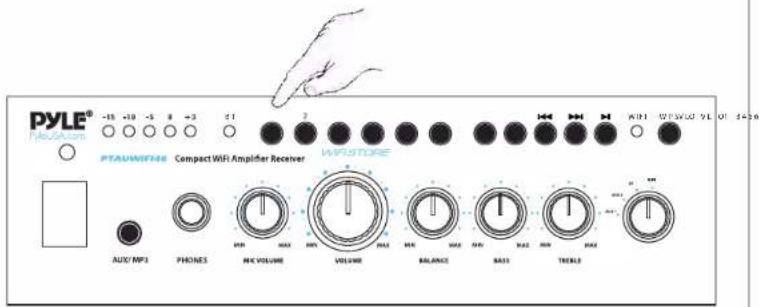
- You can listen songs directly through the PTAUWIFI46 by press "STORE" buttons(1/2/3/4/5/6) on it, no need mobile phone after presetting.
text_image
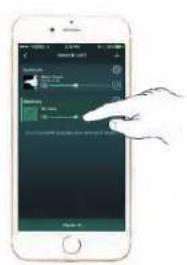
PYLE® NISOCOM -18 +10 -5 8 +3 C1 2 KIF WESCO VLD 01:44:56 PTAUNWIFM6 Compact WiFi Amplifier Receiver WRISTORE AUX/MP3 PHONES MAX VOLUME VOLUME BALANCE BASIS TRELLS- You can control the PTAUWIFI46 unit by two different mobile phones.
text_image
Screenshot of a mobile app interface showing a hand interacting with a green screen displaying audio playback controls and a green progress bar.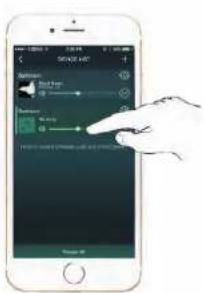
text_image
Screenshot of a mobile app interface showing a hand interacting with a music player, displaying controls and playback controls.10
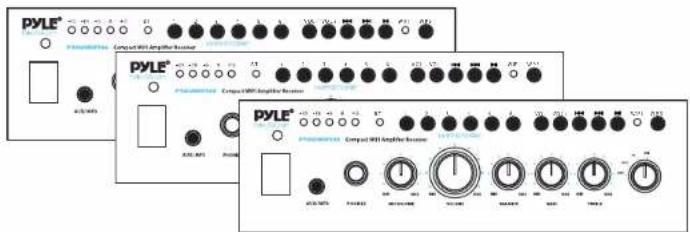
- You can add several PTAUWIFI46 units in a mobile phone, which can control the unit to play music in mono, combined and stereo mode.
text_image
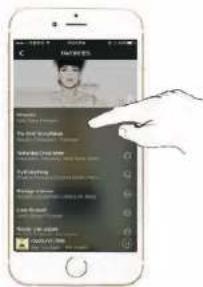
PYLE® Compact WBI Amplifier Receiver PYLE® Compact WBI Amplifier Receiver PYLE® Compact WBI Amplifier Receiver- The mobile phone can be connected with the PTAUWIFI46 to play local songs through phone WIFI.
text_image
Screenshot of a mobile app interface showing a user profile with a hand pointing to the profile section.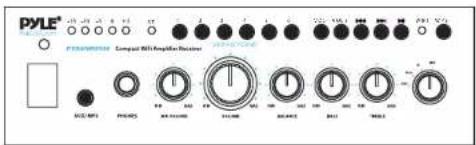
text_image
PYLE 1000 MHz P-Transistor Compound 300 MHz Amplifier Receiver ACU-MPS PHOSYS ACU-DCMS ACU-DCMS ACU-DCMS ACU-DCMS ACU-DCMS ACU-DCMS ACU-DCMS ACU-DCMS ACU-DCMS ACU-DCMS ACU-DCMS ACU-DCMS ACU-DCMS ACU-DCMS ACU-DCMS ACU-DCMS ACU-DCMS ACU- ACU- ACU- ACU- ACU- ACU- ACU- ACU- ACU- ACU- ACU- ACU- ACU- ACU- ACU- ACU- ACU- ACU- ACU- ACU- ACU- ACU- ACU- ACU- ACU- ACU- ACU- ACU- ACU- ACU- ACU- ACU- ACU- ACU- 300 MHz 300 MHz 300 MHz 300 MHz 300 MHz 300 MHz 300 MHz 300 MHz 300 MHz 300 MHz 300 MHz 300 MHz 300 MHz 300 MHz 300 MHz 300 MHz 300 MHz 300 MHz 300 MHz 300 MHz 300 MHz77
Connecting Diagram
text_image
iPod/Mobilephone 3.5mm PLUG 1/4" PLUG HEADPHONE OUT AUDIO SOURCE PYLE® -32 0 -3 8 6 #TAI/MP3 Compact WiFi Amplifier Receiver AVG MP3 PHONES MAC VOLUME VOLUME BLENZE BAS1 TREBLE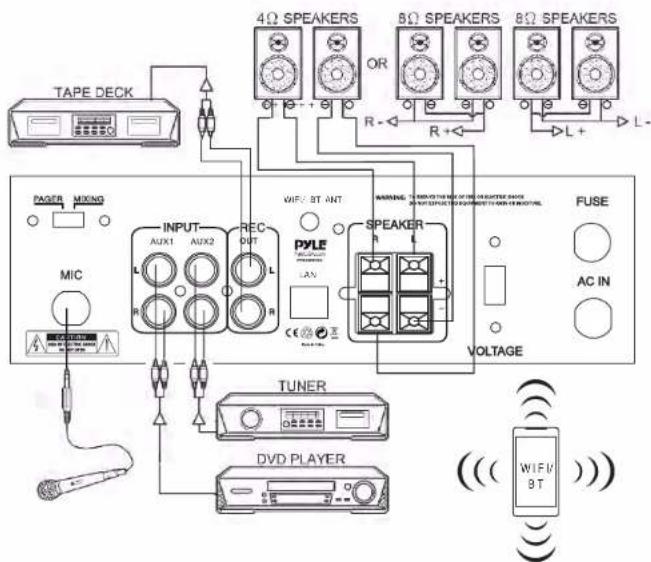
text_image
TAPE DECK PAGER MIXING MIC INPUT AUX1 AUX2 REC OUT R L R L WIF/ ST ANT PYLE LAV SPEAKER R VOLTAGE TUNER DVD PLAYER ( ((WIF/3T ) ) )1213
PTAUWIFI46
Compact WiFi Amplifier Receiver,
Wireless Music Streaming Amp System with Mic Paging/Mixing, 240 Watt
Features:
• Compact & Powerful Amp System
• Built-in WiFi Wireless Music Streaming Receiver
• WiFi Music Storage & Playback Ability
- Connect with Your Smart Device via the Free App
• Microphone Paging /Mixing Control Switch
• 1/4" Microphone Input
• 1/4" Headphone Input
• RCA (L/R) Audio Input
• RCA (L/R) Audio Output
• Speaker Terminal Connectors
- Aux (3.5mm) Input
- Connect & Stream Audio From External Devices
• Volume, Balance, Bass, Treble Adjustment
• Built-in Overload and Power Protection
• Front Panel Button Control Center
• Independent Source Selection
The 'MUZO Player' App:
• Conveniently Access Your Music Library
• 'Multi-Room Mode' Connects Multiple Devices & Rooms
• Compatible with Spotify, iHeartRadio, Tidal, TuneIn & More
• Available for iOS and Android
• Free to Download
Technical Specs:
• MAX Power: 240 Watt
T.H.D.: <1.0%
- Input Level: +4dB
• Signal/Noise Ratio: 102dB
• Frequency Response: 20Hz - 20kHz >±0.5dB
• Input Impedance: Balance 20kHz
• Power: 110/220V, Selectable
What's in the Box:
• Audio Control WiFi Amplifier
• Decorative Plate Frame Cover
- WiFi/Bluetooth Antenna
• Wall Power Adapter