EZA2880 - Security Camera EverFocus - Free user manual and instructions
Find the device manual for free EZA2880 EverFocus in PDF.


| Product Type | Security Camera |
| Brand | EverFocus |
| Model | EZA2880 |
| Sensor | 8MP CMOS |
| Lens | Motorized 3.6-11mm with ICR |
| IR Range | Up to 40m (131ft) with 4 LEDs |
| Wide Dynamic Range | True WDR (T-WDR) |
| Video Output | BNC (75 Ohm) |
| Power Supply | 12VDC / 24VAC (Dual) |
| Housing | Metal, IP66-rated |
| Mounting | 3-Axis rotation, wall or ceiling |
| Dimensions | 280 x 128 x 91.5 mm (L x W x H) |
| OSD Control | Joystick on cable |
| Languages | ENG, CHN, CHN(S), JPN, KOR, POR, ESP |
| Scanning System | NTSC/PAL auto detection |
| Shutter Speed | Auto / Manual up to 1/30000 s |
| Day/Night Mode | Auto, Color, B/W, External trigger |
| Privacy Mask | Yes (Box or Polygon zones) |
| Motion Detection | Yes (up to 4 zones, sensitivity adjustable) |
| Defog | Yes (Auto/Manual, High/Middle/Low) |
| Image Adjustment | Sharpness, Gamma, Mirror, Flip, ACE, DNR |
| Cleaning | Clean lens with soft, dry cloth |
| Accessories Included | Mounting sticker, L-type wrench, screws, user manual |
| Optional Accessory | BA-E320 wall mount bracket |
Frequently Asked Questions - EZA2880 EverFocus
User questions about EZA2880 EverFocus
0 question about this device. Answer the ones you know or ask your own.
Ask a new question about this device
Download the instructions for your Security Camera in PDF format for free! Find your manual EZA2880 - EverFocus and take your electronic device back in hand. On this page are published all the documents necessary for the use of your device. EZA2880 by EverFocus.
USER MANUAL EZA2880 EverFocus
EZA2880 eZ.HD Series
8MP Dual Power IP66 IR Bullet Camera
User's Manual
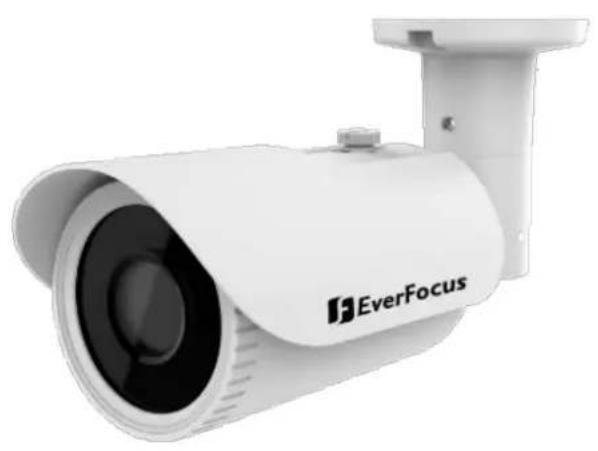
natural_image
Exterior view of a white surveillance camera with 'EverFocus' branding (no additional text or symbols visible)
EverFocus
Copyright © EverFocus Electronics Corp.
Release Date: May, 2020
All the images including product pictures or screen shots in this document are for example only. The images may vary depending on the product and software version. Information contained in this document is subject to change without notice.
EverFocus Taiwan:
2F., No.12, Ln. 270, Sec. 3, Beishen Rd., Shenkeng Dist., New Taipei City 222, Taiwan
TEL: +886 2 2662 2338 FAX: +886 2 2662 3632 www.everfocus.com.tw
1. Introduction
Equipped with a 8MP CMOS sensor, the EZA2880 deliver 8MP image quality. The model provides motorized 3.6-11mm lens with ICR. Featured with True Wide Dynamic Range (T-WDR), the camera can provide clear images even under backlight circumstances where intensity of illumination can vary excessively. The EZA2880 supports dual power (12VDC / 24VAC, depends on model) and supports both NTSC and PAL scanning systems (auto detection).
1.1 Packing List
- Camera x 1
-
Mounting Sticker x 1
• L-Type Wrench x 1 -
Screw & Screw Anchor x 3
- User Manual x 1
1.2 Features
• 8MP CMOS sensor, delivering amazing high sensitivity
- Motorized 3.6-11mm lens with ICR to capture the desired field of view
- Extended IR range of up to 40m / 131ft. with 4 LEDs (depends on scene IR reflectivity)
• T-WDR to improve the visibility under high contrast scene
• 3-Axis rotation design allows wall or ceiling mounting
• IP66-rated with metal housing
• Supports dual power (12VDC / 24VAC, depends on model)
- Supports UTC function: Control camera OSD settings directly from DVR end
1.3 Dimensions
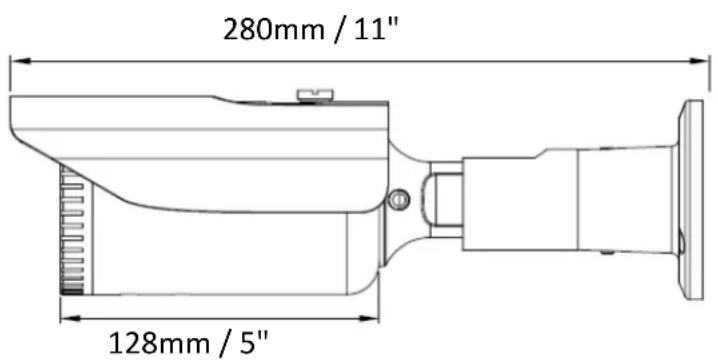
text_image
280mm / 11" 128mm / 5"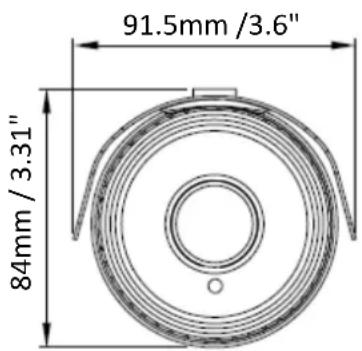
text_image
91.5mm /3.6" 84mm / 3.31"1.4 Optional Accessory
BA-E320
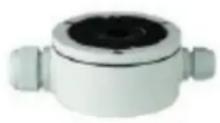
Color: White
Size (Φ x H): 138 x 54mm / 5.43" x 2.16"
Weight: 700g / 1.87
Material: Metal
1.5 Cable Description

text_image
12VDC or 24VAC Power Cable Video Output Cable (BNC, 75Ohm)2. Installation
- Stick the supplied Mounting Sticker to the surface to mark the 3 screw positions. Drill 3 holes on the surface and insert the supplied 3 Screw Anchors into the screw holes. If you want to run the cable through the surface, drill a hole within the 3 screw area.
- To mount the camera to the surface, screw the Camera Base to the surface using the supplied 3 Screws.
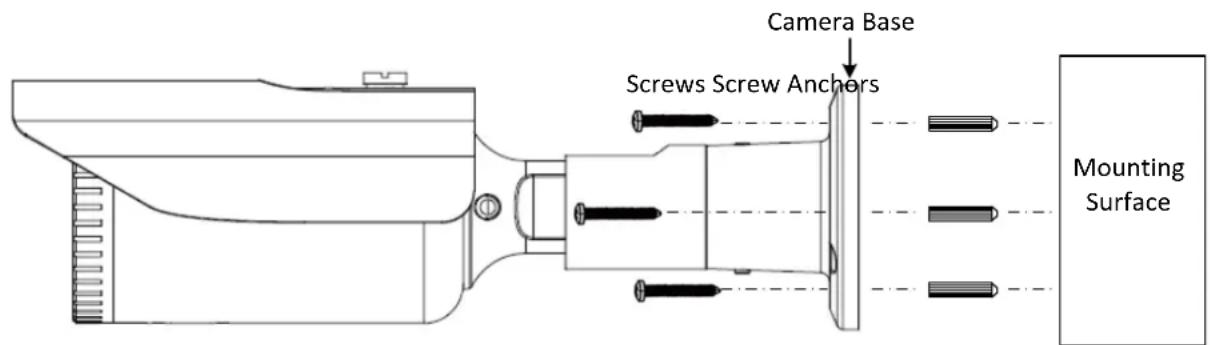
text_image
Camera Base Screws Screw Anchors Mounting Surface-
Connect the Power Cable to a 12VDC / 24VAC power source. Connect the Video Output Cable to a monitor or DVR.
-
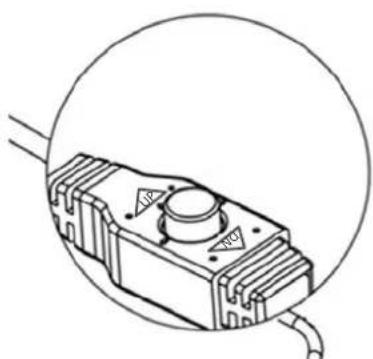
You can use the Joystick on the cable to configure camera OSD settings. Remove the Protection Cap from the Joystick before using it.
natural_image
Technical line drawing of a mechanical component with a circular outline (no text or symbols)Configuring OSD Settings:
- Push the Joystick up / down to select among menu items.
- Push the Joystick left / right to adjust the level of the selected item.
-
Press the Joystick to enter the submenu or exit the OSD Setup Menu.
-
You can optionally adjust camera angles. To do so, loosen the Tilt Screw or Rotate Screw on the bracket using the supplied L-Type Wrench to adjust camera angles. After adjusting camera angles, tightly screw back the Tilt/Rotate screws.
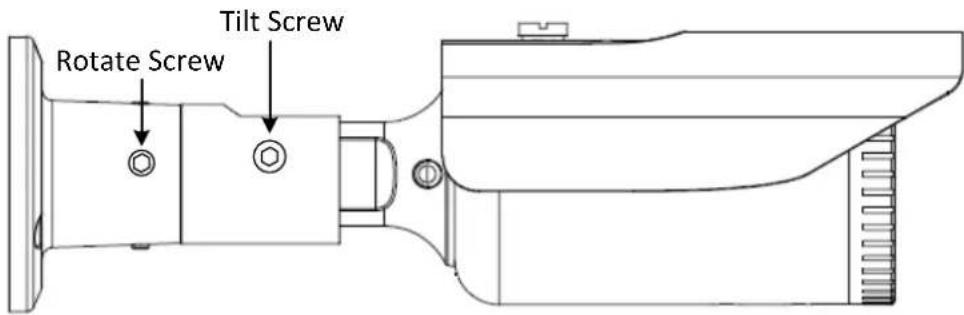
text_image
Rotate Screw Tilt Screw- Configuration in the OSD Menu
| No | Main | Sub Menu | Sub Menu / Function | ||||
| 1 | Motorized | AF Mode | One Shot, Manual | ||||
| D&N Filter | Sync On, Sync Off | ||||||
| Initial | On | ||||||
| 2 | Exposure | Brightness | 0-20 | ||||
| Shutter | Auto | Mode | Normal / Deblur | ||||
| Manual Speed | 1/30, 1/60, 1/120, 1/250, 1/500, 1/1000, 1/2000, 1/4000, 1/8000, 1/15000, 1/30000 | ||||||
| Flicker | |||||||
| Sens-Up | Not supported | ||||||
| AGC | 0-10 | ||||||
| 3 | Backlight | HLC | Level | 0-20 | |||
| Color | YEL, CYN, GRN, MAG, RED, BLU, BLK, WHT | ||||||
| BLC | H-POS | 0-38 | |||||
| V-POS | 0-35 | ||||||
| H-SIZE | 0-38 | ||||||
| V-SIZE | 0-35 | ||||||
| WDR | WDR Mode | Line | |||||
| ROI Mode | Box | Window Zone | 0-3 | ||||
| Window Use | On, Off | ||||||
| H-POS | 0-3856 | ||||||
| V-POS | 0-2176 | ||||||
| H-SIZE | 0-3856 | ||||||
| V-SIZE | 0-2176 | ||||||
| Polygon | Window Zone | 0-3 | |||||
| Window Use | On, Off | ||||||
| POS0-X | 0-935 | ||||||
| POS0-Y | 0-361 | ||||||
| POS1-X | 0-935 | ||||||
| POS1-Y | 0-361 | ||||||
| POS2-X | 0-935 | ||||||
| POS2-Y | 0-361 | ||||||
| POS3-X | 0-935 | ||||||
| POS3-Y | 0-361 | ||||||
| Off | |||||||
| Weight | High, Middle, Low | ||||||
| Off | |||||||
| 4 | Day/Night Mode | Auto | IR LED | Adaptive, Off | |||
| Anti-Sat. | 0-20 | ||||||
| D>N Thres | 0-20 | ||||||
| N>D Thres | 0-20 | ||||||
| Delay | High, Middle, Low | ||||||
| Color | |||||||
| B/W | IR LED | Adaptive, Off | |||||
| Anti-Sat. | 0-20 | ||||||
| D>N Thres | 0-20 | ||||||
| N>D Thres | 0-20 | ||||||
| Delay | High, Middle, Low | ||||||
| Extern | IR LED | Adaptive, Off | |||||
| Anti-Sat. | 0-20 | ||||||
| Extern SW | High, Low | ||||||
| D>N Thres | 0-20 | ||||||
| N>D Thres | 0-20 | ||||||
| Delay | High, Middle, Low | ||||||
| 5 Color | AWB | Auto | |||||
| Autoext | |||||||
| Preset | |||||||
| Manual | C-Temp | 3000K, 5000K, 8000K | |||||
| R-Gain | 0-20 | ||||||
| B-Gain | 0-20 | ||||||
| Color Gain | 0-20 | ||||||
| 6 | DNR | High, Middle, Low, Off | |||||
| 7 Image | Sharpness | 0-10 | |||||
| Gamma | 0.45, 0.55, 0.65, 0.75 | ||||||
| Mirror | On, Off | ||||||
| Flip | On, Off | ||||||
| D-Zoom | Not supported | ||||||
| ACE | High, Middle, Low | ||||||
| Defog | On | Mode | Auto, Manual | ||||
| Level | High, Middle, Low | ||||||
| Off | |||||||
| Shading | On | Weight | 0%-100% | ||||
| Off | |||||||
| Privacy | Box | On | Zone Num | 0-15 | |||
| Zone Disp | On, Off | ||||||
| H-POS | 0-120 | ||||||
| V-POS | 0-68 | ||||||
| H-Size | 0-80 | ||||||
| V-Size | 0-61 | ||||||
| Y Level | 0-20 | ||||||
| CB Level | 0-20 | ||||||
| CR Level | 0-20 | ||||||
| Trans | 0-3 | ||||||
| Off | |||||||
| Polygon On | Zone Num | 0-7 | |||||
| Zone Disp | On, Off | ||||||
| POS0-X | 0-240 | ||||||
| POS0-Y | 0-136 | ||||||
| POS1-X | 0-240 | ||||||
| POS1-Y | 0-136 | ||||||
| POS2-X | 0-240 | ||||||
| POS2-Y | 0-136 | ||||||
| POS3-X | 0-240 | ||||||
| POS3-Y | 0-136 | ||||||
| Y Level | 0-20 | ||||||
| CB Level | 0-20 | ||||||
| CR Level | 0-20 | ||||||
| Trans | 0-3 | ||||||
| Off | |||||||
| 8 Motion | On | Det Window | Window Use | 0-3 | |||
| Window Zone | On, Off | ||||||
| Det H-POS | 0-96 | ||||||
| Det V-POS | 0-56 | ||||||
| Det H-Size | 0-96 | ||||||
| Det V-Size | 0-56 | ||||||
| Sensitivity | 0-10 | ||||||
| Motion OSD | On, Off | ||||||
| Text Alarm | On, Off | ||||||
| Signal Out | On, Off | ||||||
| Off | |||||||
| 9 System | Output | Frame Rate | 4K/15fps, 4MP/30fps, 1080p/30fps | ||||
| Freq | 60Hz (Auto Detection) | ||||||
| SDI Mode | Not supported | ||||||
| SDI UCC Stop | Not supported | ||||||
| Analog Mode | AHD, TVI, CVI, CVBS | ||||||
| Confirm | Yes | ||||||
| Return | |||||||
| Image Range | Full | ||||||
| Comp | |||||||
| User | Offset | 0-32 | |||||
| Color Space | HD-CbCr, SD-CbCr, YUV | ||||||
| Audio Mic | Not supported | ||||||
| Color Bar | On, Off | ||||||
| Language | ENG, CHN, CHN(S), JPN, KOR, POR, ESP | ||||||
| Cam Title | Left-Down | ||||||
| Right-Up | |||||||
| Off | |||||||
| Reset | On | ||||||
| 10 | Exit | ||||||