
W126BC - Air-conditioner LG - Free user manual and instructions
Find the device manual for free W126BC LG in PDF.


User questions about W126BC LG
0 question about this device. Answer the ones you know or ask your own.
Ask a new question about this device
Download the instructions for your Air-conditioner in PDF format for free! Find your manual W126BC - LG and take your electronic device back in hand. On this page are published all the documents necessary for the use of your device. W126BC by LG.
USER MANUAL W126BC LG
Please read the operating instructions and safety precautions carefully and thoroughly before installing and operating your room air conditioner.
PRECAUTIONS
Pay close attention to precautions in order to prevent potential hazards and damage from misuse or improper installation. LG is not responsible for any damages caused by misuse of the product.
TABLE OF CONTENTS
Safety Precautions....3
Before Opeation 7
Introduction 8
Installation 9
Operating Instructions ....14
Maintenance and Service ......21

FOR YOUR RECORDS
Write the model and serial numbers here:
Model #
Serial #
You can find them on a label on the side of each unit.
Dealer's Name
Date Purchased
■ Staple your receipt to this page in the event you need it to prove date of purchase or for warranty issues.

READ THIS MANUAL
Inside you will find many helpful hints on how to use and maintain your air conditioner properly. Just a little preventive care on your part can save you a great deal of time and money over the life of your air conditioner.
You'll find many answers to common problems in the chart of troubleshooting tips. If you review our chart of
Troubleshooting Tips first, you may not need to service at all.

PRECAUTION
- Contact the authorized service technician for repair or maintenance of this unit.
- Contact the installer for installation of this unit.
- The air conditioner is not intended for use by young children or invalids without supervision.
- Young children should be supervised to ensure that they do not play with the air conditioner.
- When the power cord is to be replaced, replacement work shall be performed by authorized personnel only using only genuine replacement parts.
- Installation work must be performed in accordance with the National Electric Code by qualified and authorized personnel only.
natural_image
Simple line drawing of a family relaxing at a table with sun and palm trees in the background (no text or symbols)Safety Precautions
To prevent injury to the user or other people and property damage, the following instructions must be followed.
■ Incorrect operation due to ignoring instruction will cause harm or damage. The seriousness is classified by the following indications.

WARNING
This symbol indicates the possibility of death or serious injury.

CAUTION
This symbol indicates the possibility of injury or damage to properties only.
■ Meanings of symbols used in this manual are as shown below.

Be sure not to do.

Be sure to follow the instruction.

WARNING
Installation
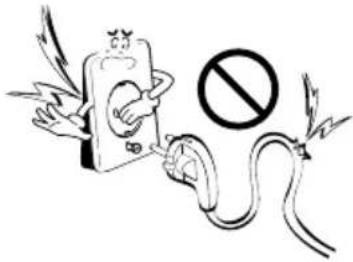
Don't use a power cord, a plug or a loose socket which is damaged.
- Otherwise, it may cause a fire or electrical shock.
text_image
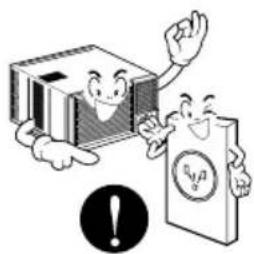
Illustration showing a cartoon electric plug with wings and a prohibition symbol, likely depicting an electric shock hazard.Always plug into a grounded outlet.
- Otherwise, it may cause a fire or electrical shock.
natural_image
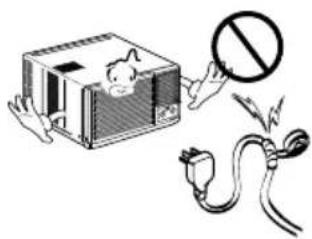
Cartoon illustration of two anthropomorphic books and a smiling document with a warning symbol (no text or symbols present)Do not modify or extend the power cord length.
- It will cause electric shock or fire due to heat generation.
text_image
Safety warning illustration showing a device with a prohibition symbol and electrical plug, indicating hazard or accident.Do not disassemble or modify products.
- It may cause failure and electric shock.
text_image
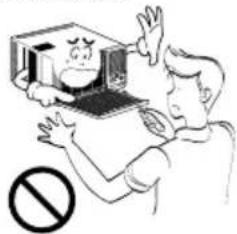
Illustration showing a person holding a computer with a warning symbol below, indicating no protection or absence of a device.Be caution when unpacking and installing.
- Sharp edges may cause injury.
natural_image
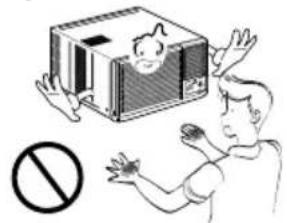
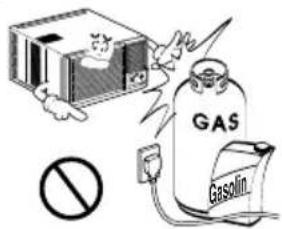
Illustration of a person reaching toward a device with a prohibition symbol below (no text or labels)Do not use the power cord near flammable gas or combustibles such as gasoline, benzene, thinner, etc.
- It may cause explosion or fire.
text_image
GAS GasolinOperation
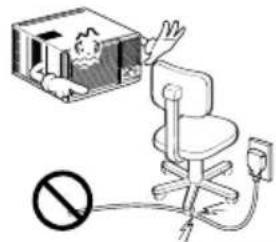
Do not place heavy object on the power cord and take care so that the cord should not be pressed.
• There is danger of fire or electric shock.
text_image
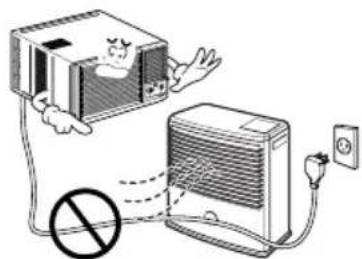
Safety warning illustration showing a child in a box connected to an office chair with a prohibition symbolDo not place the power cord near a heater.
- It may cause fire and electric shock.
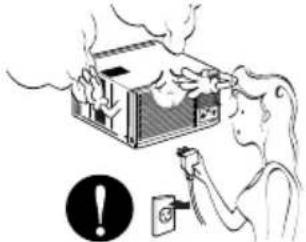
text_image
Illustration showing a computer connected to an air conditioner with a prohibition symbol, indicating no protection or disapproval.Unplug the unit if strange sounds, odors, or smoke come from it.
• Otherwise it may cause fire and electric shock accident.
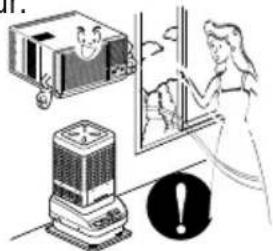
natural_image
Illustration of a person using a device to clean a house with steam rising (no text or symbols)Ventilate the room well when using this appliance together with a stove, etc.
• An oxygen shortage may occur.
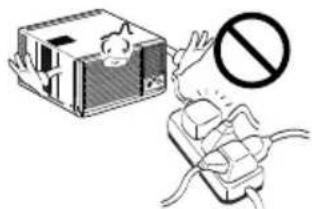
natural_image
Illustration of a person cleaning a window with a refrigerator and an electric heater, accompanied by a warning symbol (no text or labels present)Do not share the outlet with other appliances.
- It will cause electric shock or fire due to heat generation.
text_image
Safety warning illustration showing a device with a fuse and a prohibition symbolDo not allow water to run into electric parts.
- It will cause failure of machine or electric shock.
natural_image
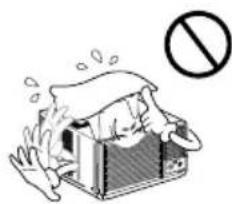
Cartoon illustration of a person in a box with steam rising, no text or symbols presentDo not open the suction inlet grill of the product during operation.
- Otherwise, it may electrical shock and failure.
text_image
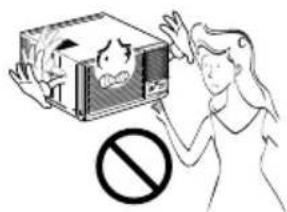
Illustration showing a person reacting to a device with a 'no' symbol, indicating no smoking or anti-smoking.Turn off the power and breaker firstly when cleansing the unit.
- Since the fan rotates at high speed during operation, it may cause injury.
text_image
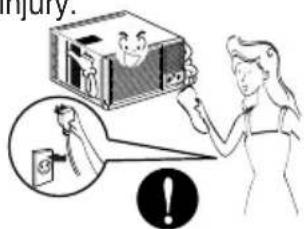
Injury.Take the power plug out if necessary, holding the head of the plug and do not touch it with wet hands.
• Otherwise, it may cause a fire or electrical shock.
text_image
Illustration showing a person holding a phone with a stop sign, indicating no chemical hazard or toxicity.Use a soft cloth to clean. Do not use wax, thinner, or a strong detergent.
• The appearance of the air conditioner may deteriorate, change color, or develop surface flaws.
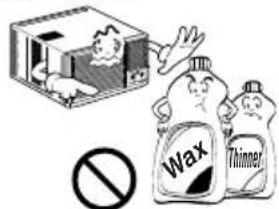
text_image
Wax ThinnerIf water enters the product, turn off the the power switch of the main body of appliance. Contact service center after taking the power-plug out from the socket.
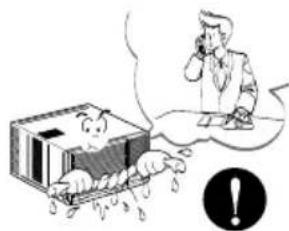
text_image
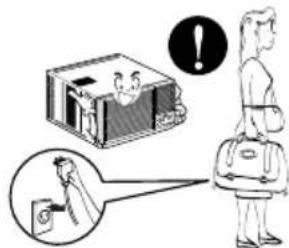
Cartoon illustration showing a person reacting to a falling object with a thought bubble, accompanied by a warning symbol.Turn off the main power switch when not using it for alongtime.
- Prevent accidental startup and the possibility of injury.
text_image
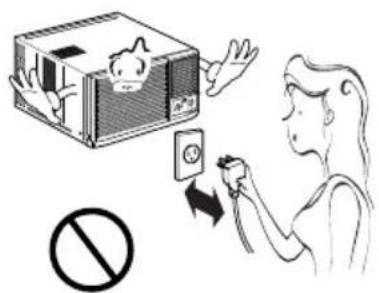
Illustration showing a person standing next to a box with a warning symbol and a magnified inset showing a device.Do not operate or stop the unit by inserting or pulling out the power plug.
- It will cause electric shock or fire due to heat generation.
Do not damage or use an unspecified power cord.
- It will cause electric shock or fire.
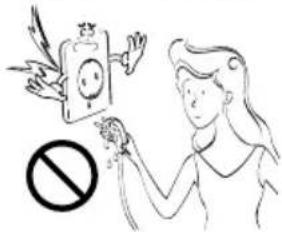
Do not operate with wet hands or in damp environment.
- It will cause electric shock.
text_image
Illustration showing a person using an electrical switch to clean a battery, with a prohibition symbol below.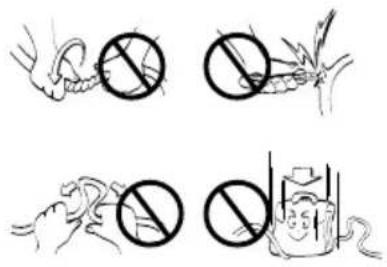
text_image
Illustration showing four different methods of removing a substance: hand, firecracker, hand holding a tool, and fire extinguisher.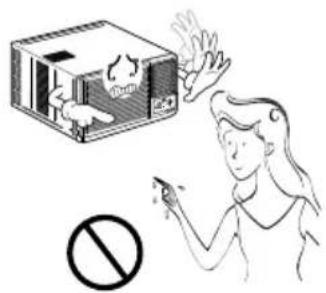
text_image
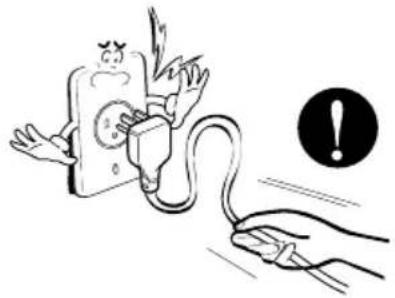
Illustration showing a person using a smoking device with a 'No' symbol below, and a smokestack emitting smoke from a tray.Hold the plug by the head when taking it out.
- It may cause electric shock and damage.
When gas leaks, open the window for ventilation before operating the unit.
• Otherwise, it may cause explosion, and a fire.
Never touch the metal parts of the unit when removing the filter.
• They are sharp and may cause injury.
natural_image
Illustration of a hand connecting an electrical plug to a fuse with an exclamation mark (no text or symbols on the diagram itself)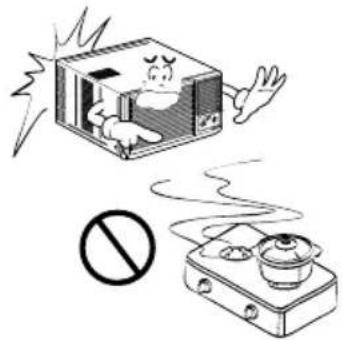
natural_image
Illustration of a cartoon-style electric stove with a smokestack emitting vapor and a crossed-out boiler nearby (no text or symbols)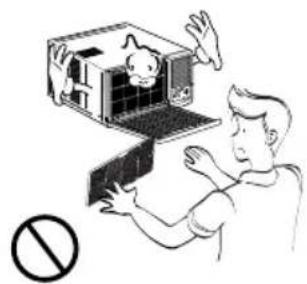
natural_image
Illustration of a person interacting with a small electronic device, no text or symbols presentCAUTION
■Installation
Install the product so that the noise or hot wind from the outdoor unit may not cause any damage to the neighbors.
- Otherwise, it may cause dispute with the neighbors.
natural_image
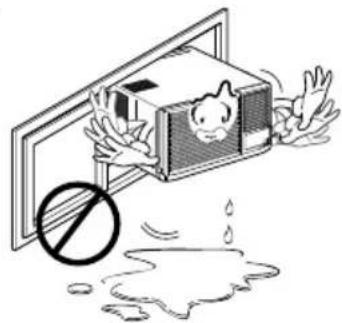
Illustration of a person opening a baby cage with a no-smoking symbol above (no text or symbols present)Keep level parallel in installing the product.
- Otherwise, it may cause vibration or water leakage.
natural_image
Illustration of a person falling into a box with a prohibition symbol below (no text or labels)Operation
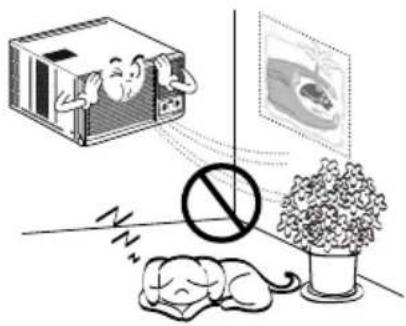
Do not put a pet or house plant where it will be exposed to direct air
Do not block the inlet or outlet of air flow. I o w .
Use as oft cloth to clean not use wax, thinner, or a strong detergent.
- It may cause injury.
- It may cause product failure.
• The appearance of the air conditioner may deteriorate, change color, or develop surface flaws.
natural_image
Illustration showing a sleeping person, a sleeping dog, a potted plant, and a device with a cartoon face (no text or symbols)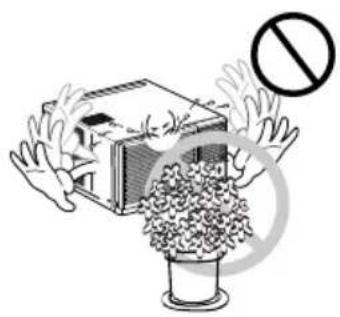
natural_image
Illustration of hands reaching toward a building with a prohibition symbol (no text or labels)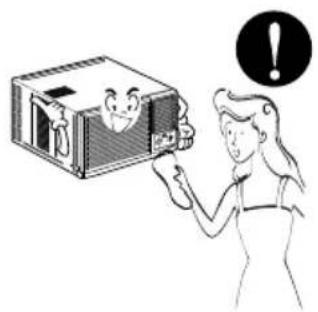
natural_image
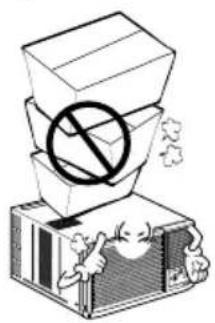
Illustration of a person holding a smiling box next to a black circular warning symbol (no text or symbols present)Do not step on the indoor/outdoor unit and do not put any thing on it
Always insert the filter securely. Clean it every two weeks.
Do not drink water drained from air conditioner.
- It may cause an injury through dropping of the unit or falling down.
• Operation without filters will cause failure.
- It contains containments and will make you sick.
natural_image
Illustration of stacked boxes with a prohibition symbol, no text or labels present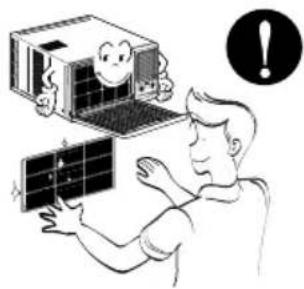
natural_image
Illustration of a person interacting with a computer and solar panel, with a warning symbol (no text or labels)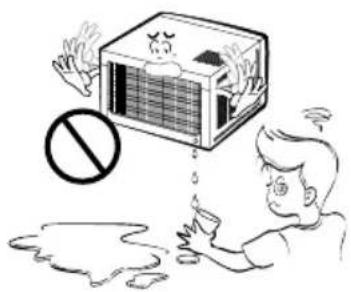
natural_image
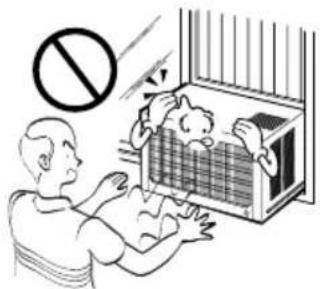
Illustration of a person reacting to a large box with a 'no' symbol, no text or symbols presentBe cautious not to touch the sharp edges when installing.
Avoid excessive cooling and perform ventilation sometimes.
Do not insert the hands or bars through the air inlet or outlet during operation.
- It may cause injury.
- Otherwise, it may do harm to your health.
• Otherwise, it may cause personal injury.
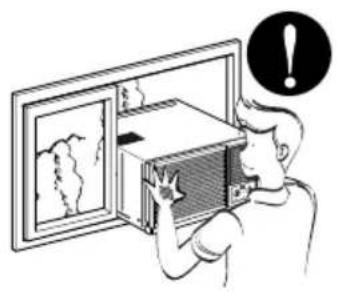
natural_image
Illustration of a person opening a wall-mounted device with a warning symbol (no text or labels present)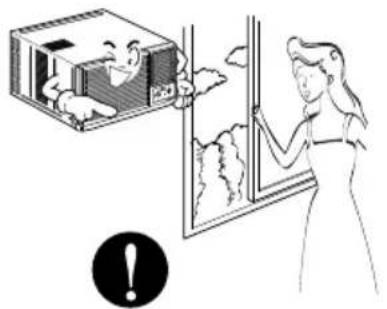
natural_image
Illustration of a person opening a window with a smiling face, no text or symbols present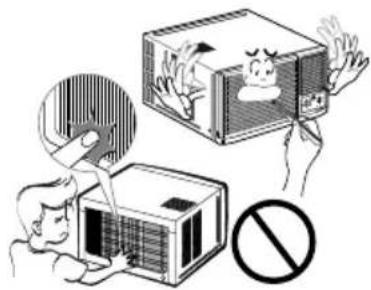
natural_image
Illustration of a person using a device to clean air from a box, with a prohibition symbol nearby (no text or labels)Before Operation
Preparing for Operation
- Contact an installation specialist for installation.
- Plug in the power plug properly.
- Use a dedicated circuit.
- Do not use an extension cord.
- Do not start/stop operation by plugging/unplugging the power cord.
- If the cord/plug is damaged, replace it with only an authorized replacement part.
Usage
- Being exposed to direct airflow for an extended period of time could be hazardous to your health. Do not expose occupants, pets, or plants to direct airflow for extended periods of time.
- Due to the possibility of oxygen deficiency, ventilate the room when used together with stoves or other heating devices.
- Do not use this air conditioner for non-specified special purposes (e.g. preserving precision devices, food, pets, plants, and art objects). Such usage could damage the items.
Cleaning and Maintenance
- Do not touch the metal parts of the unit when removing the filter. Injuries can occur when handling sharp metal edges.
- Do not use water to clean inside the air conditioner. Exposure to water can destroy the insulation, leading to possible electric shock.
- When cleaning the unit, first make sure that the power and breaker are turned off. The fan rotates at a very high speed during operation. There is a possibility of injury if the unit's power is accidentally triggered on while cleaning inner parts of the unit.
Service
For repair and maintenance, contact your authorized service dealer.
Introduction
Symbols Used in this Manual

This symbol alerts you to the risk of electric shock.

This symbol alerts you to hazards that could cause harm to the air conditioner.
NOTICE
This symbol indicates special notes.
Features
▲ WARNING
This appliance should be installed in accordance with the National Electric Code.
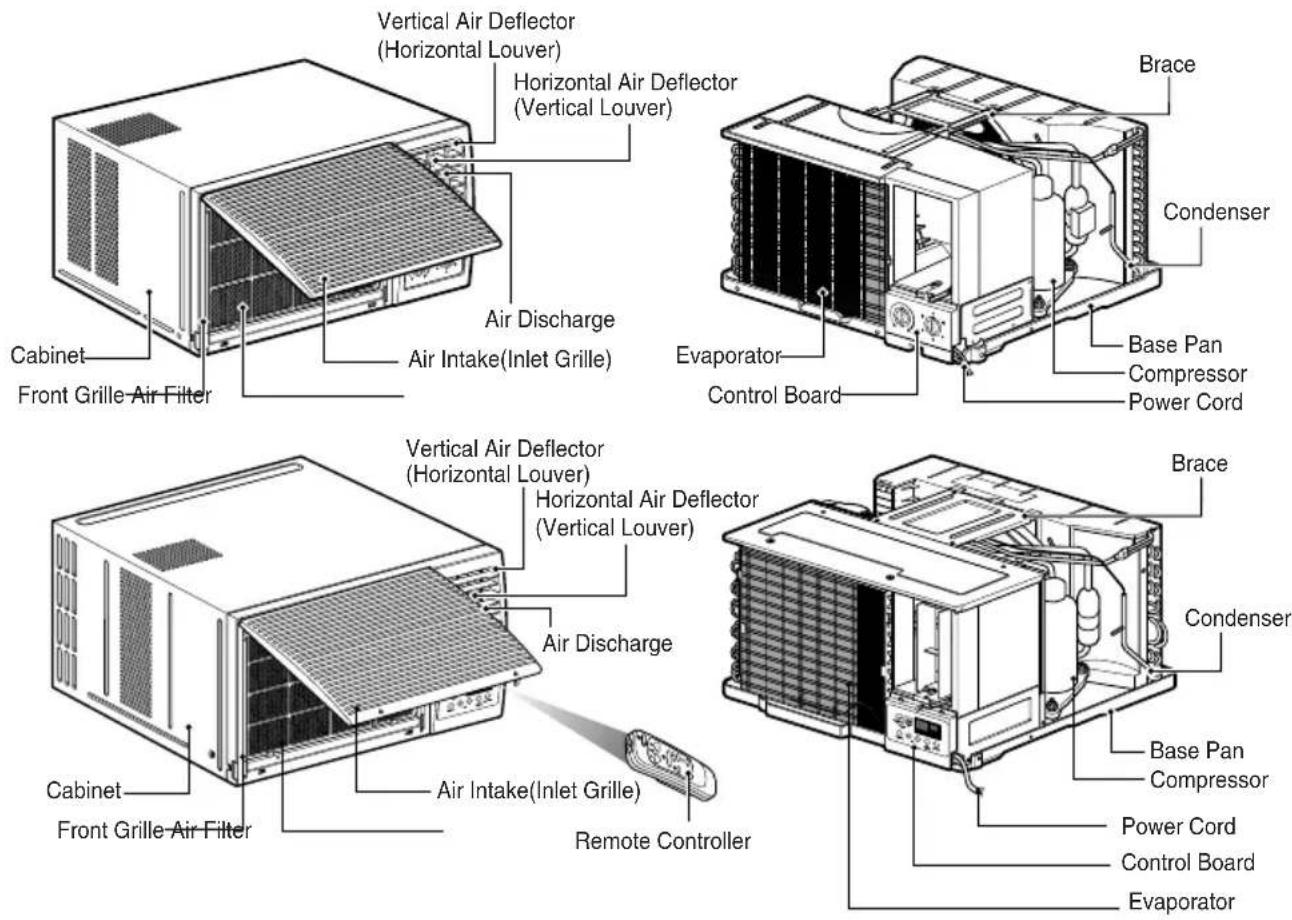
text_image
Vertical Air Deflector (Horizontal Louver) Horizontal Air Deflector (Vertical Louver) Air Discharge Air Intake(Inlet Grille) Cabinet Front Grille-Air Filter Brace Condenser Evaporator Control Board Base Pan Compressor Power Cord Vertical Air Deflector (Horizontal Louver) Horizontal Air Deflector (Vertical Louver) Air Discharge Cabinet Front Grille-Air Filter Air Intake(Inlet Grille) Remote Controller Brace Condenser Base Pan Compressor Power Cord Control Board EvaporatorInstallation
Select the Best Location
- Measure the space for installation to assure a good fit. The air conditioner must be installed firmly into place to prevent vibration and noise.
- Avoid exposure to direct sunlight.
- Remove all obstacles from the rear of the unit. There must be at least 50cm (20in.) of cleared space around the rear of the unit. Obstacles restricting the airflow may reduce the cooling efficiency of the unit.
- The unit should be installed with a slight tilt towards the outside (approx. 3°) to allow condensed water to drain. (About 10\~15mm or 1/4 bubble with level)
NOTICE
The external grille must be exposed outside for air discharge.
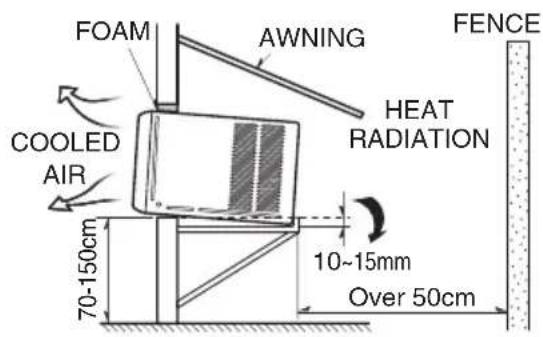
text_image
FOAM AWNING COOLED AIR HEAT RADIATION FENCE 70-150cm 10-15mm Over 50cm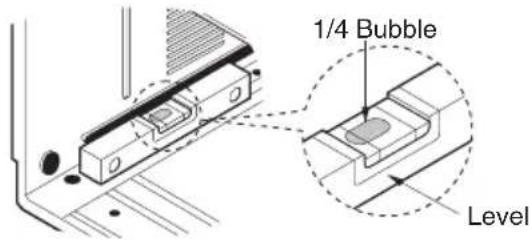
text_image
1/4 Bubble LevelRemove the Air Conditioner From the Case
- Remove 2 shipping screws from the back of the case.
- Remove the 2 screws on each side of the case. Keep these for later use.
- Slide out the air conditioner from the case by pulling the base-pan handle while bracing the case.
- Remove the white Styrofoam shipping block from the compressor. (Applicable for some models)
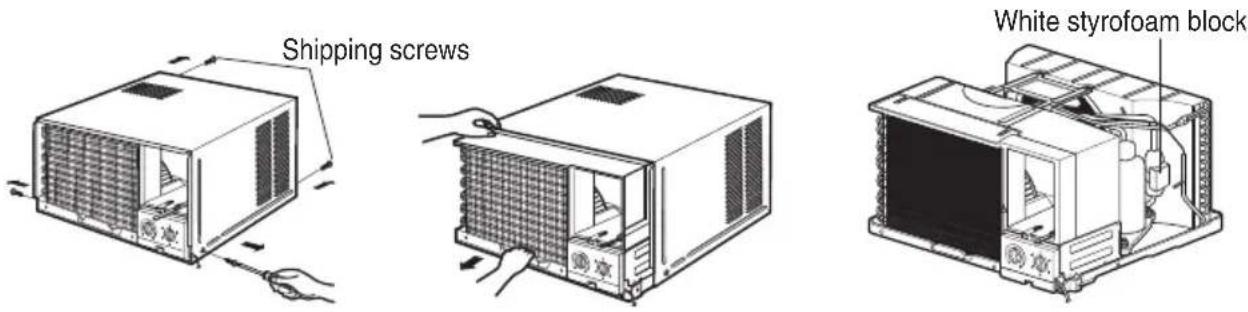
text_image
Shipping screws White styrofoam blockAttaching the Drain Pan (Optional)
The drain pan is used to collect condensed water.
The base-panmay overflow duetohighhumidity. The base-panmay alsocollecte reverse mode (in Reverse Cycle models only). To drain the excess water, remove the drain cap from the back of the unit and secure the drainpipe as follows:
- Remove the drain pan located in the air discharge or on the barrier.
- Remove the rubber cap from the hole on the base-pan. (Not applicable to all models)
- Install the drain pan to the left corner of the cabinet with 2-4 screws.
- Connect the drain hose to the hole located on the bottom of the drain pan.
You can purchase the drain hose or tubing locally to satisfy your particular needs. (Drain hose not included)
Installation of the Housing
Step 1
Remove the air conditioner from it's packaging and slide the air conditioner out of it's housing.
Step 2
Prepare the hole in the wall so that the bottom of the housing is well supported, the top has minimum clearance and the air inlet louveres have clearance as shown. Holes from the outside through to the cavity should be sealed. The housing should slope down towards the rear by about 5mm to allow water formed during operation to drain.
Step 3
Install the housing into the wall and secure. Ensure the foam seals are not damaged. Flash, seal or fill gaps around the inside and outside to provide satisfactory appearance and protection against the weather, insects and rodents.
NOTICE
UNIT MAY BE SUPPORTED BY A SOLID FRAME FROM BELOW OR BY A HANGER FROM A SOLID OVERHEAD SUPPORT.
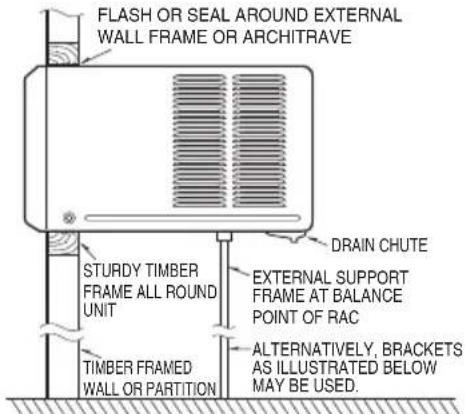
text_image
FLASH OR SEAL AROUND EXTERNAL WALL FRAME OR ARCHITRAVE STURDY TIMBER FRAME ALL ROUND UNIT TIMBER FRAMED WALL OR PARTITION DRAIN CHUTE EXTERNAL SUPPORT FRAME AT BALANCE POINT OF RAC ALTERNATIVELY, BRACKETS AS ILLUSTRATED BELOW MAY BE USED.Preferred method of installation into a timber framed wall, partition or window.
Installations of the unit into the Housing
- Slide the unit into the housing until it is firmly against the rear of the housing. Care is required to ensure the foam sealing strips on the housing remain in position.
- Connect the air conditioner to the power and coil excess cord length beneath the air conditioner base or control box.
- Engage the Chassis Lock into the bottom housing rail and secure to the base with the screw provided.
- Remove the front panel from i's carton and plastic bag and fit as per the Operating Instruction.
- Switch unit on. Check for operation of the unit and check for vibration in the installation.
- Fit the drain chute to the housing and run a drain line to a suitable location if required.
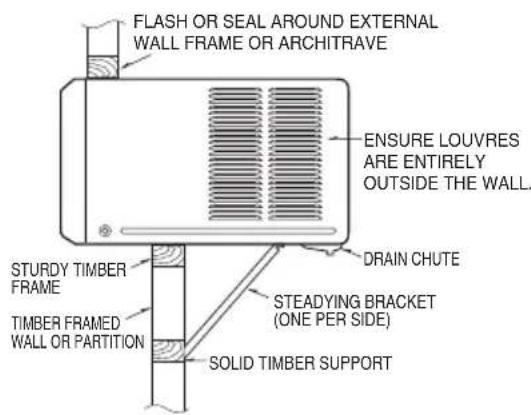
text_image
FLASH OR SEAL AROUND EXTERNAL WALL FRAME OR ARCHITRAVE ENSURE LOUVRES ARE ENTIRELY OUTSIDE THE WALL. STURDY TIMBER FRAME TIMBER FRAMED WALL OR PARTITION DRAIN CHUTE STEADYING BRACKET (ONE PER SIDE) SOLID TIMBER SUPPORTAlternative method of installation if external support cannot be provided.
Installations of the unit into the wall
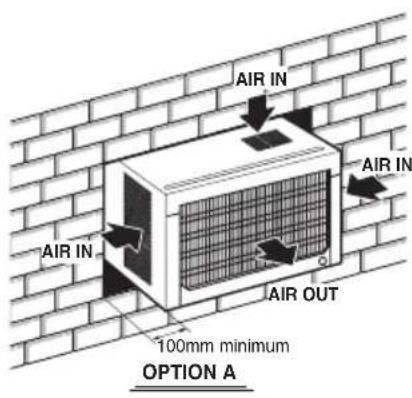
text_image
AIR IN AIR IN AIR OUT 100mm minimum OPTION A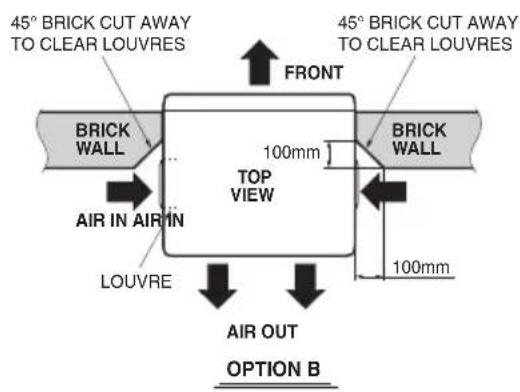
text_image
45° BRICK CUT AWAY TO CLEAR LOUVRES FRONT 45° BRICK CUT AWAY TO CLEAR LOUVRES BRICK WALL 100mm TOP VIEW BRICK WALL AIR IN AIR IN LOUVRE 100mm AIR OUT OPTION BInstall the Air Conditioner in the Case
- Slide the air conditioner into the case. Reinstall the 2 screws removed earlier on each side of the case.
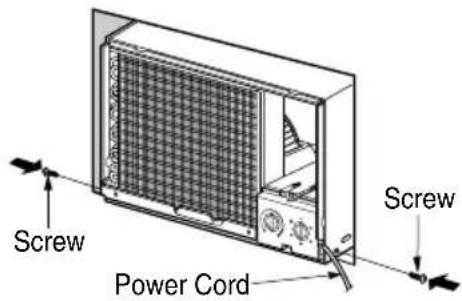
text_image
Screw Power Cord Screw▲ CAUTION
The power cord must be connected to an independent circuit.
The green wire must be grounded.
- Stuff the foam between the top of the unit and the wall to prevent air and insects from getting into the room.
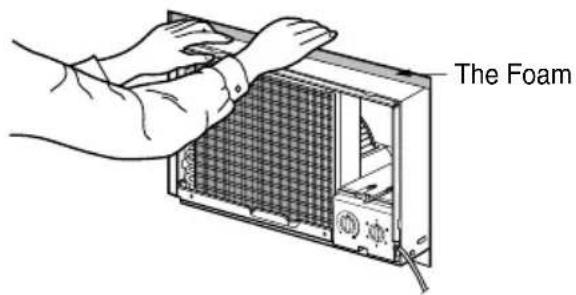
text_image
The Foam- Before installing the front grille, pull out the vent control lever located above the unit control knobs, as shown. (for some models)
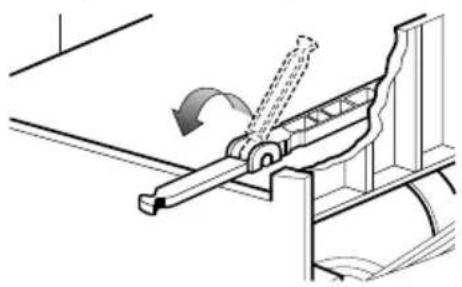
natural_image
Mechanical assembly diagram showing a lever mechanism with motion arrow (no text or symbols)- Attach the front grille to the case by inserting the tabs on the grille into the slots on the front of the case. Push the grille in until it snaps into place. When you detach the front grille from the case, push the grille to your right side and pull it toward you.
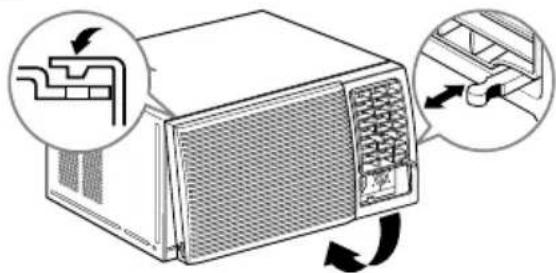
text_image
Diagram showing airflow or ventilation system around a device with labeled components and directional arrows
natural_image
Illustration of a microwave oven with a hand inserting a fan into the front panel (no text or symbols)- Lift the inlet grill and secure the front grille with a screw(L:10mm). Lower the inlet grille into place. (for some models)
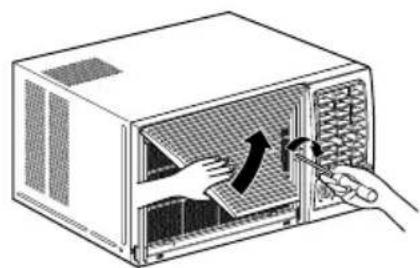
natural_image
Illustration of a microwave oven with hands inserting a fan into the interior (no text or symbols)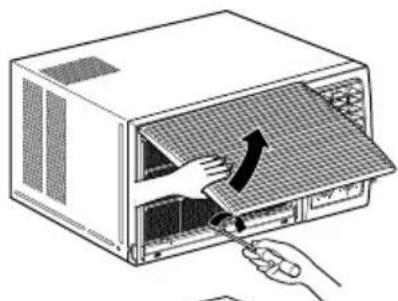
natural_image
Illustration of a hand inserting a fan into a microwave oven with a tool (no text or symbols)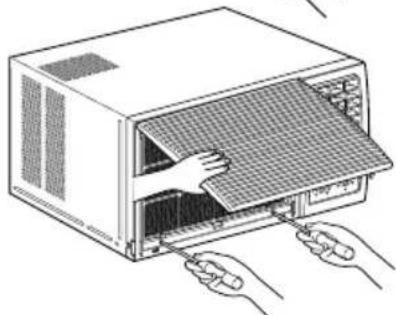
natural_image
Line drawing of a computer rack with hands inserting a fan into the rack (no text or symbols)How to Use the Reversible Inlet Grille(For Some Models)
The grille is designed to clean the filter both upward and downward.
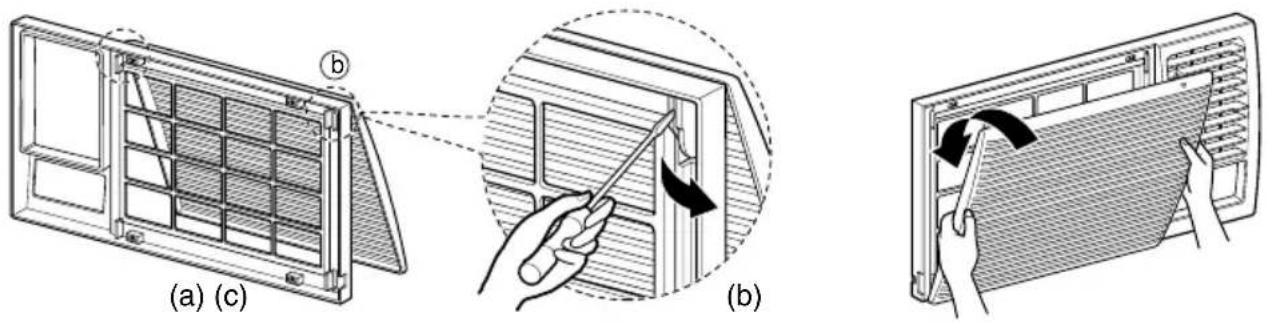
text_image
(a) (c) (b)A. Before attaching the front grille to the cabinet, if you want to pull out the filter upward;
- Open the inlet grille slightly (a).
- Turn inside out the front grille (a).
- Disassemble the inlet grille from the front grille with separating the hinged part by inserting a straight type screw-driver tip (b).
- Then, rotate the inlet grille 180 degrees and insert the hooks into bottom holes of the front grille.
- Insert the filter and attach the front grille to the cabinet.
B. If you want to pull out the filter downward;
The grille is already designed that way.
Circuit Breaker Installation and Parts for Installation
- Read thoroughly and follow all directions provided.
- A circuit breaker must be installed between the power source and the unit if the plug is not used (see illustration below).
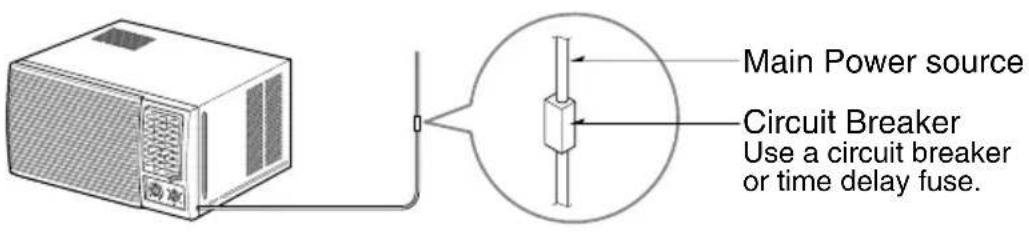
text_image
Main Power source Circuit Breaker Use a circuit breaker or time delay fuse.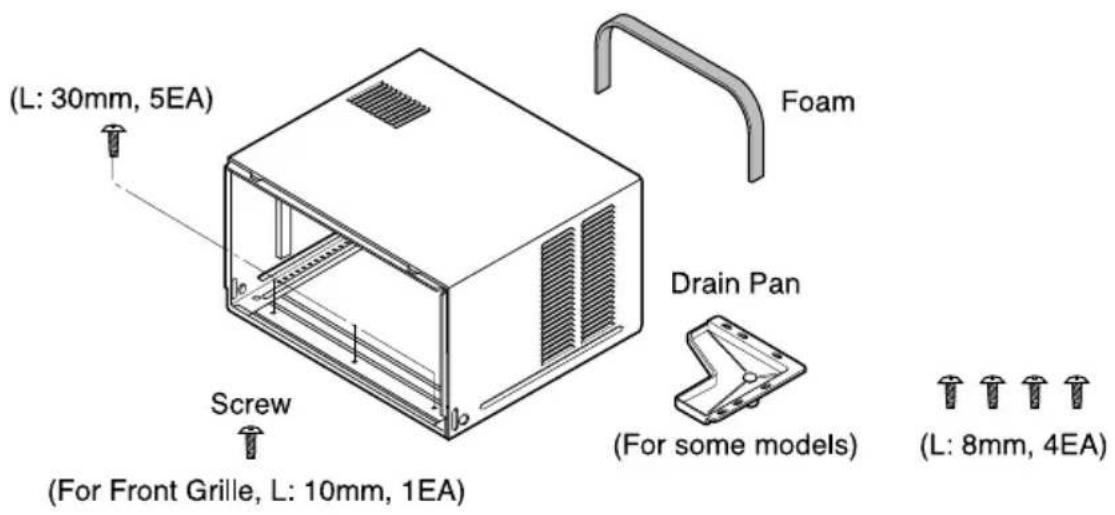
text_image
(L: 30mm, 5EA) Screw (For Front Grille, L: 10mm, 1EA) Foam Drain Pan (For some models) (L: 8mm, 4EA)
text_image
(L: 30mm, 5EA) Screw (For Front Grille, L: 10mm, 1EA) Foam Drain Pan (For some models) (L: 8mm, 4EA)Operating Instructions
Controls
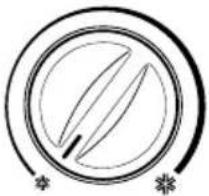
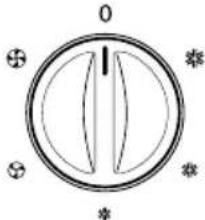
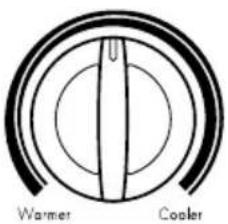
The controls will look like one of the following.
| Thermostat Operation | |
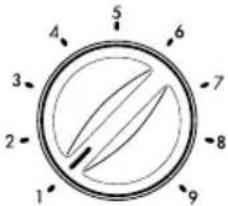 | 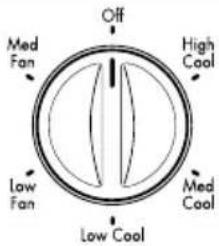 |
 |  |
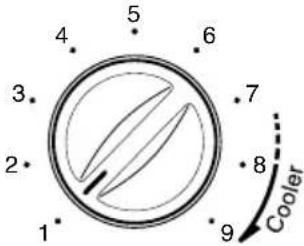 | 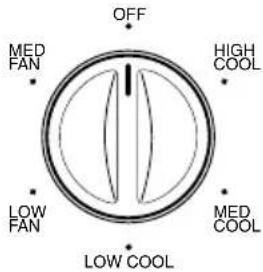 |
| Thermostat will automatically control the temperature of the room.Select higher number for lower room temperature.The temperature is selected by turning the knob to the desired position.The 5 or 6 position is a normal setting for average conditions. | OFF, No (0):Turns the air conditioner off.MED FAN (✗):Permits the medium fan speed operation without cooling.Low FAN (✗):Permits the low fan speed operation without cooling.HIGH COOL (✗):Permits cooling with the high fan speed operation.MED COOL (✗):Permits cooling with the medium fan speed operation.Low COOL (✗):Permits cooling with the low fan speed operation. |
Controls
The controls will look like one of the following.
| Thermostat Operation | |
 | 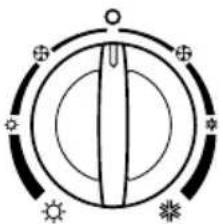 |
| ■THERMOSTATTurn the thermostat control to the desired setting. The control position is a normal setting for average conditions. You can change this setting, if necessary, in accordance with your temperature preference.The thermostat automatically controls cooling or heating, but the fan runs continuously whenever the air conditioner is in operation. If the room is too warm, turn the thermostat control clockwise. If the room is too cool, turn the thermostat control counterclockwise. | ■OPERATIONOFF ( ) : Turns the air conditioner off.LOW FAN ( ⚙ ) : Permits the low fan speed operation without cooling (heating).LOW COOL ( * ) : Permits cooling with the low fan speed operation.HIGH COOL ( * ) : Permits cooling with the high fan speed operation.LOW HEAT ( ⚙ ) : Permits heating with the low fan speed operation.HIGH HEAT ( ⚙ ) : Permits heating with the high fan speed operation. |
■HEATER ( ) LAMP
When the unit sets heating operation condition, the green lamp is lighted.
When the frost settles on the heat exchanger of the outside, defrosting is made automatically and the green lamp is turned off.
The unit may give a "hiss" and the fan motor stops for 1 to 10 minutes.
This should not be regarded as a problem.
After defrosting, the heating operation begins again.

Heater
■COOLING DESCRIPTIONS
For Normal Cooling - Select High Cool or Med Cool with the Operation knob at the midpoint of Thermostat knob.
For Maximum Cooling - Select High Cool with the Operation knob at the highest number available on your Thermostat knob.
For Quieter & Nighttime Cooling - Select Low Cool with the Operation knob at the midpoint of Thermostat knob.
■AUTO SWING (available in some models)
ON ( , SI): Air swing is operated while OPERATION knob is set to the COOL position.
OFF(↑, NO): Stops the operation of air swing.
▲ CAUTION
- When the air conditioner has been performed its cooling operation and is turned off or set to the fan position, wait at least 3 minutes before resetting to the cooling operation again.
Remote Control
The remote control and control panel will look like one of the following pictures.
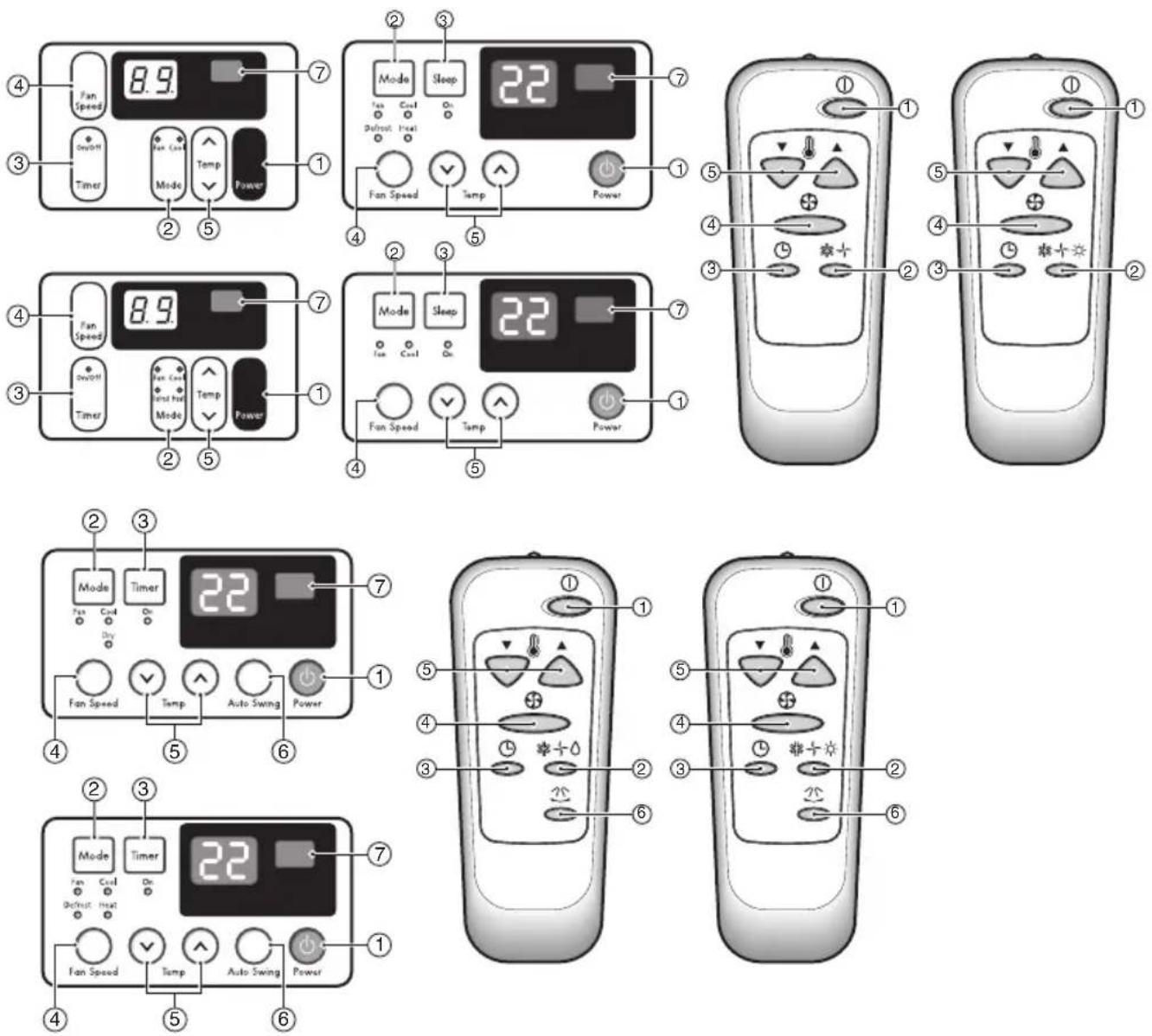
1. POWER
Operation starts when this button is pressed and stops when you press the button again.
2. OPERATION MODE SELECTOR
Heating function is only available in some models.
Select cooling mode to cool the room.
Select heating mode to heat the room.
Select fan mode for basic ventilating fan operation.
3. ON/OFF TIMER
The timer can be set to start and stop the unit in hourly increments (up to 12 hours).
Temperature increases only by 2^ C and no longer increase thereafter.
4. FAN SPEED SELECTOR
For increased power while cooling or heating, select a higher fan speed.
Cooling Model: 3 steps{High[F3] → Low[F1] → Med[F2]}
Heating Model: 2 steps{High[F2] → Low[F1]}
5. TEMPERATURE CONTROL
The thermostat monitors room temperature to maintain the desired temperature.
The thermostat can be set between 16^ C\~ 30^ C ( 61^ F\~ 81^ F).
The unit takes an average of 30 minutes to adjust the room temperature by 1^ C ( 1.8^ F).
6. AUTO SWING BUTTON (available in some models)
Allows the unit to automatically swing its louvers left and right during operation. If the option is de-selected, the louvers will stop in their last position and orient the airflow in the corresponding direction.
7. REMOTE SENSOR
Auto Restart
In case the power comes on again after a power failure, Auto Restarting Operation is the function to operate procedures automatically to the previous operating conditions.
Inserting the Remote Control Batteries
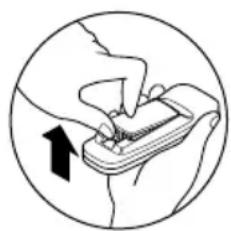
- Push out the cover on the back of the remote control with your thumb
- Pay attention to polarity and insert two new AAA 1.5V batteries.
- Reattach the cover.
NOTICE
Do not use rechargeable batteries. Make sure that both batteries are new.
- In order to prevent discharge, remove the batteries from the remote control if the air conditioner is not going to be used for an extended period of time
Keep the remote control away from extremely hot or humid places.
To maintain optimal operation of the remote control, the remote sensor should not be exposed to direct sunlight.
- The remote control can be mounted on a wall using the mountable holder.
natural_image
Illustration of hands holding a device with an arrow indicating motion (no text or symbols)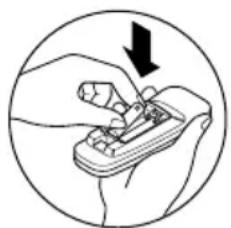
natural_image
Illustration of a hand using a tool to adjust or install a component, enclosed in a circle (no text or symbols)Ventilation
The ventilation lever must be in the CLOSE position in order to maintain the best cooling conditions. When fresh air is necessary in the room, set the ventilation lever to the OPEN position. The damper is opened and room air is drawn out.
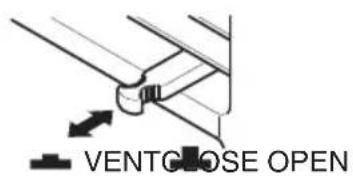
text_image
VENTCLOSE OPENNOTICE
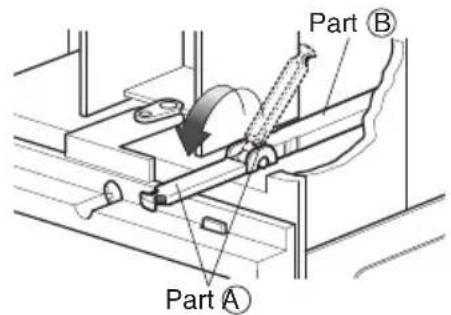
Before using the ventilation feature, position the lever, as shown. First, pull down part Ⓐ to horizontal line with part . Ⓑ
text_image
Part B Part AAir Direction
text_image
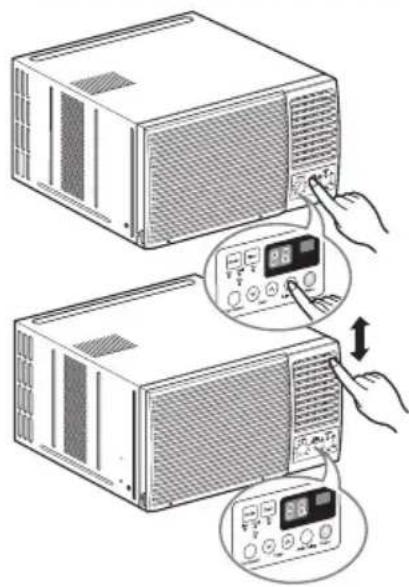
Diagram showing two devices connected to a control panel with a hand pointing to the screen, indicating a device operation or status change.The direction of air can be controlled wherever you want to cool by adjusting the horizontal louver and the vertical louver.
• HORIZONTAL AIR-DIRECTION CONTROL
To control horizontal direction of air flow, set to the ON position the air-swing switch and the air flow will be swept horizontally by the automatic air-swing system.
If you want to stop the air flow from moving, switch off the air swing switch at the desired position of the vane.
• VERTICAL AIR-DIRECTION CONTROL
The vertical air direction is adjusted by moving the horizontal louver.
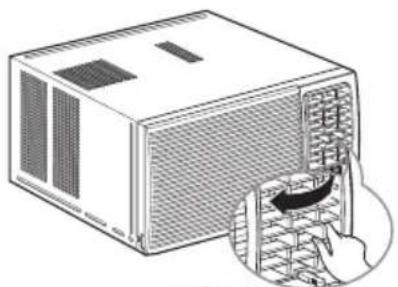
natural_image
Illustration of a microwave oven with a hand inserting a fan into the rack (no text or symbols)The direction of air can be controlled wherever you want to cool by adjusting the horizontal louver and the vertical louver.
• HORIZONTAL AIR-DIRECTION CONTROL
The horizontal air direction is adjusted by rotating the vertical louver right or left.
• VERTICAL AIR-DIRECTION CONTROL
The vertical air direction is adjusted by rotating the horizontal louver forward or backward.
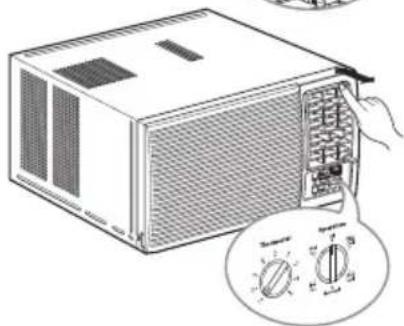
natural_image
Line drawing of a microwave oven with a hand inserting a fan into the front panel, showing its internal components and a circular dial (no text or symbols)How to Attach Drain Pan(Optional)
The air conditioner employs a proper drain method whereby the condensed water (moisture removed from the air) is drained to the outside.
In very humid weather, (and for reverse cycle models in the reverse mode) excessive condensate water removed from the air may cause some water to collect. To remove this excess water you can install the drain
pan as detailed below.
- Take the drain pan which is located in the air discharge.
- Remove the hole rubber from the base-pan (for some models).
- Install the drain pan to the right corner of the cabinet with 4 (or 2) screws.
- Connect the drain hose of 3/5" inside diameter to the outlet located at the bottom of the drain pan. You can purchase the drain hose or tubing locally to satisfy your particular needs. (Drain hose is not supplied).
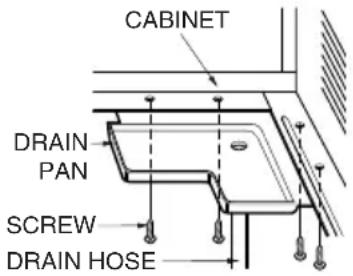
text_image
CABINET DRAIN PAN SCREW DRAIN HOSEHow to Connect a Drain Hose
A drain hole is provided at the rear of the air conditioner unit. Select a drain method according to the following.
- Remove the hole rubber from the base-pan. (for some models)
- Connect a drain hose of 916 " inside diameter to the drain pipe Fig. 1.
- Or connect a pipe elbow of 916 " inside diameter to the drain pipe, then connect a drain hose of 916 " inside diameter to the pipe elbow as shown in Fig. 2.
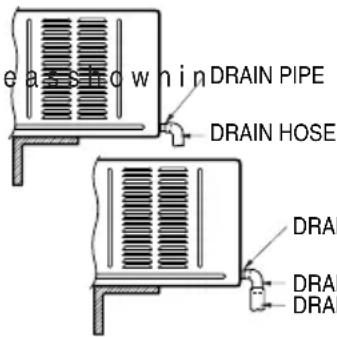
text_image
e a s o w n i n DRAIN PIPE DRAIN HOSE DRAI DRAI DRAIFig. 1
Fig. 2
DRAIN PIPE
DRAIN ELBOW
DRAIN HOSE
Maintenance and Service
TURN THE AIR CONDITIONER OFF AND REMOVE THE PLUG FROM THE POWER OUTLET.
Air Filter Cleaning
The air filter should be checked at least twice a month to see if cleaning is necessary. Trapped particles in the filter will build up and block the airflow. This reduces the cooling capacity and also causes an accumulation of frost on the cooling coils.
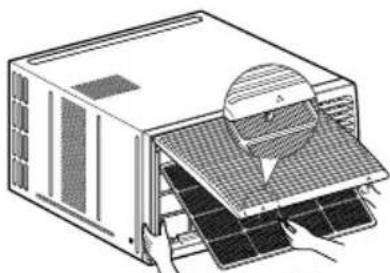
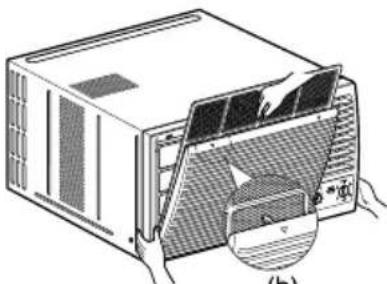
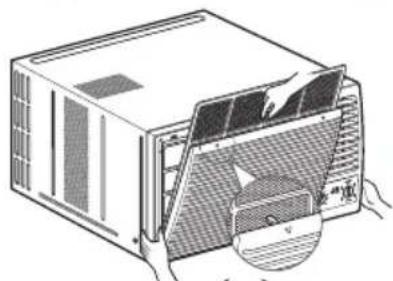
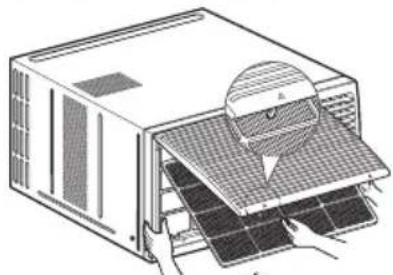
1 Open the inlet grille upward by pulling out the bottom of the inlet grille.(a)
In another case, you can open the inlet grille downward by pulling out the top of the inlet grille.(b)
2. Remove the air filter from the front grille assembly by pulling the air filter up or down slightly.
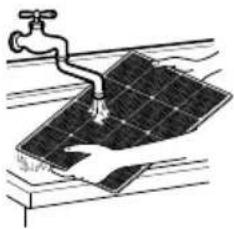
3. Wash the filter using lukewarm water below 40°C (104°F).(c)
4. Gently shake the excess water from the filter completely. Replace the filter.
natural_image
Diagram of a server unit with a magnified inset showing internal components (no text or symbols)(a)
natural_image
Diagram of an air conditioner unit with a partially open panel and hands inserting a fan (no text or symbols visible)(b)
natural_image
Illustration of a faucet spraying water onto a solar panel (no text or symbols)(c)
NOTICE
Mark of inlet grille means opening direction.
How to Attach Front Grille to Cabinet
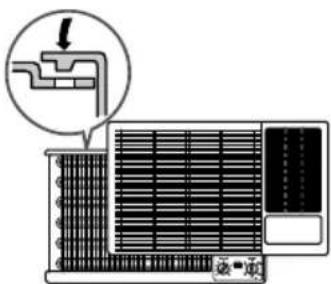
- Pull down front grille from the cabinet top.
-
Push front grille's tips toward the cabinet in order to insert front grille's tabs into the cabinet.
-
Open the inlet grille.
- Tighten the screw through the front grille into the plate of the evaporator or base pan.
- Close inlet grille.
text_image
Diagram showing airflow or ventilation system with a pipe and fan, labeled in Chinese.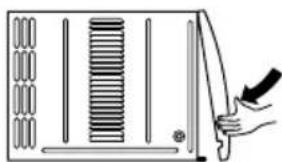
natural_image
Diagram of a hand holding a knife cutting through a panel with a rack and handle (no text or symbols)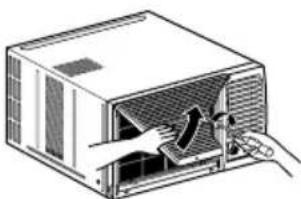
natural_image
Illustration of a computer oven with hands inserting a fan into the chamber (no text or symbols)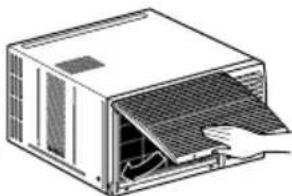
natural_image
Line drawing of a computer unit with a hand inserting a cable (no text or symbols)Troubleshooting
Normal Operating
- You may hear a pinging noise caused by water being picked up and thrown against the condenser on rainy days or when the humidity is high. This design feature helps remove moisture and improve efficiency.
- You may hear the thermostat click when the compressor cycles on and off.
- Water will collect in the base pan during high humidity or on rainy days. The water may overflow and drip from the outdoor side of the unit.
- The fan may run even when the compressor does not.
Abnormal Operation
| Problem Possible | Causes What To Do | |
| Air conditioner does not start | ■The air conditioner is unplugged. | ·Make sure the air conditioner plug is pushed completely into the outlet. |
| ■The fuse is blown/circuit breaker is tripped. | ·Check the house fuse/circuit breaker box and replace the fuse or reset the breaker. | |
| ■Power failure. | ·If power failure occurs, turn the mode control to OFF. When power is restored, wait 3 minutes to restart the air conditioner to prevent tripping of the compressor overload. | |
| Air conditioner does not cool as it should | ■Airflow is restricted. | ·Make sure there are no curtains, blinds, or furniture blocking the front of the air conditioner. |
| ■The THERMOSTAT may not be set high enough. | ·Turn the knob to a higher number. The highest setting provides maximum cooling. | |
| ■TEMP Control set to a higher number. | ·Set the TEMP Control to a lower number. | |
| ■The air filter is dirty. | ·Clean the filter at least every 2 weeks. See the operating instructions section. | |
| ■The room may have been hot. | ·When the air conditioner is first turned on you need to allow time for the room to cool down. | |
| ■Cold air is escaping. | ·Check for open furnace floor registers and cold air returns.·Set the air conditioner's vent to the closed position. | |
| ■Cooling coils have iced up. | ·See Air Conditioner Freezing Up below. | |
| Air conditioner freezing up | ■Ice blocks the air flow and stops the air conditioner from cooling the room. | ·Set the mode control at Med Fan or High Cool with the thermostat at 1 or 2.·Set the mode control at High Fan or High Cool with the high temperature. |
LG
مكيف هواء الغرفة
دليل المستخدم
LG
natural_image
Simple line drawing of three people sitting at a table with sun and palm trees in the background (no text or symbols)text_image
Diagram showing a device with a warning symbol and an electrical plug, indicating no protection or disconnection.
natural_image
Cartoon illustration of a smiling book character and a smiling document with a speech bubble, accompanied by an exclamation mark (no text or symbols on the figures)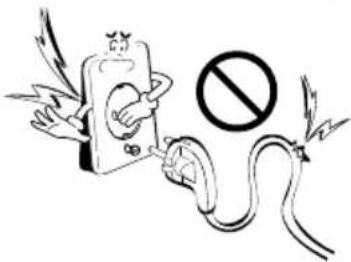
text_image
Safety warning illustration showing a hand holding an electric plug connected to a no-smoking symbolnatural_image
Illustration of a person reaching toward a device with a prohibition symbol (no text or labels)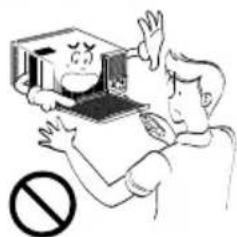
text_image
Cartoon illustration showing a person reacting to a computer screen displaying a warning symbol, with no text present.التشغيل
text_image
Safety warning illustration showing a device with a 'No' symbol and a person holding an electrical plug.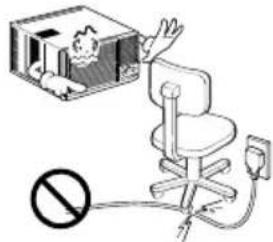
text_image
Diagram showing a person in an office chair connected to a wall-mounted power outlet, with a prohibition symbol below.natural_image
Illustration of a person in a box with steam rising, no text or symbols present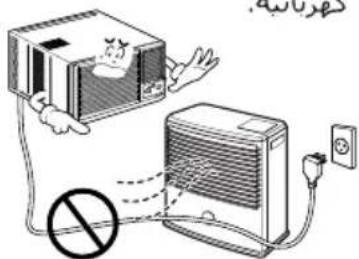
text_image
Diagram showing a cartoon character interacting with an air conditioner connected to a power outlet, with a prohibition symbol indicating no protection.text_image
Cartoon illustration showing a person reacting to a falling object with raindrops, while another person appears confused and holding a phone.text_image
Illustration showing a person reacting to a box with a 'no' symbol, indicating no chemical reaction or toxicity.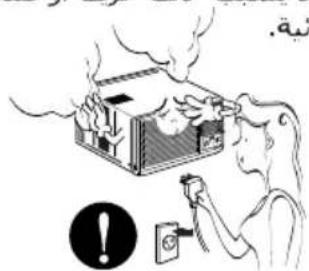
text_image
Illustration showing a person using a power switch to smoke from a building, with an exclamation mark and a warning symbol nearby.text_image
Illustration showing a person with luggage, a briefcase with a surprised face, and an exclamation mark pointing to a device.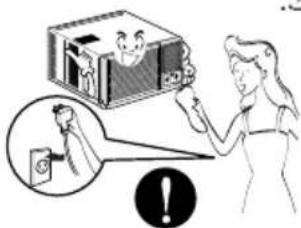
text_image
Illustration showing a person interacting with a box and a warning symbol, with an inset image of a person holding a device.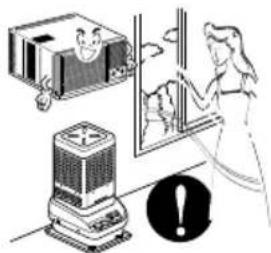
natural_image
Illustration of a person using a portable device to clean or watch a window, with a warning symbol nearby (no text or labels)text_image
Illustration showing a person reacting to a smoking box with smoke, accompanied by a prohibition symbol.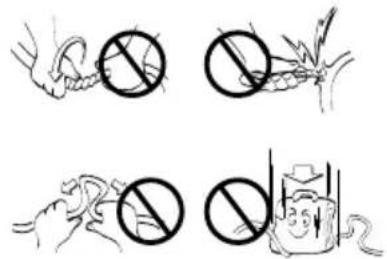
text_image
Illustration showing four different prohibition symbols: a hand holding a circle, a corn cob with a cross, a hand holding a flame, and a water bottle with a downward arrow.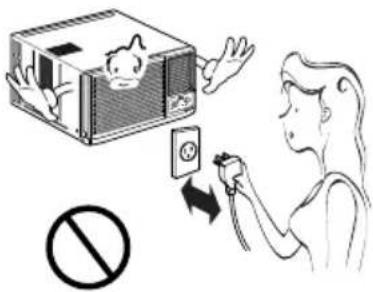
text_image
Illustration showing a person inserting a device into a box, with a prohibition symbol below.natural_image
Illustration of a person reacting to a device with a prohibition symbol (no text or labels present)
natural_image
Illustration of a hot air conditioner unit and a portable stove with a prohibition symbol (no text or labels)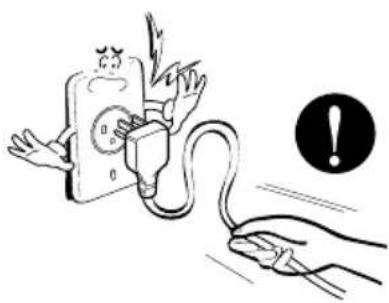
natural_image
Illustration of a hand holding an electrical plug connected to a fuse, with an exclamation mark symbol nearby (no text or labels)تنبيه
التركيب
natural_image
Illustration of a person falling into a TV with a prohibition symbol below (no text or symbols present)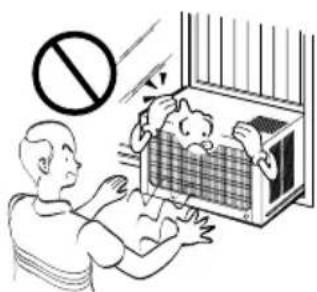
natural_image
Illustration of a person incubating a baby in a cage with a no-smoking symbol (no text or labels)natural_image
Illustration of a person holding a small box with a smiling face, accompanied by a black exclamation mark (no text or symbols on the box itself)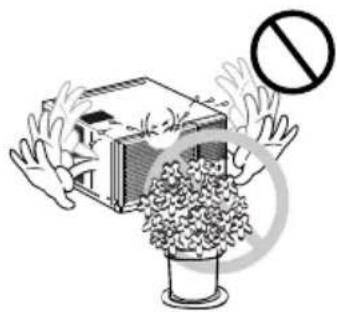
natural_image
Illustration of hands reaching toward a building with a prohibition symbol (no text or labels)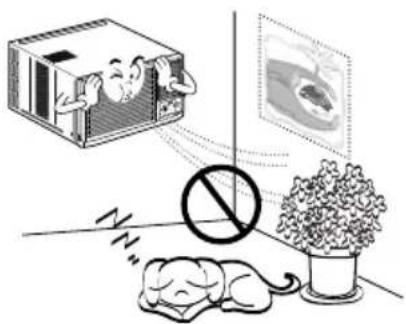
natural_image
Illustration of a sleeping dog, a sleeping cat in a room with a prohibition sign, and a TV screen showing a movie (no text or symbols)natural_image
Illustration of a person reacting to a large industrial machine with smoke and a prohibition symbol (no text or labels)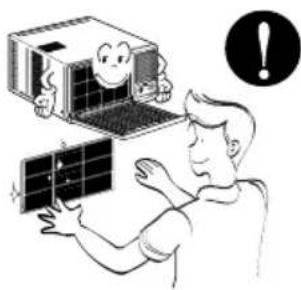
natural_image
Illustration of a person interacting with a small device and a cartoon character, with an exclamation mark in the corner (no text or symbols on the devices or background)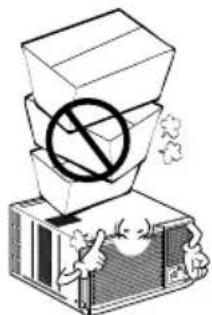
natural_image
Illustration of a box with a prohibition symbol and cartoon characters below (no text or symbols present)text_image
Illustration showing household appliances with a warning sign, including a child and a device with a cartoon face.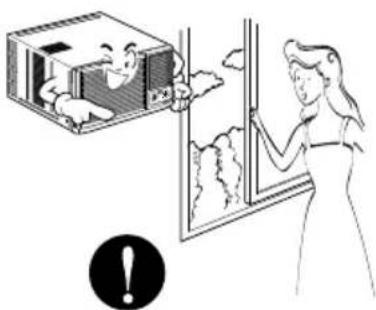
natural_image
Illustration of a woman opening a window with a smiling child inside, no text or symbols present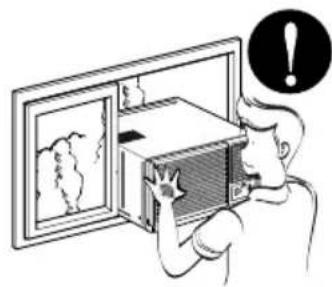
natural_image
Illustration of a person opening a wall-mounted air conditioner unit with a warning symbol (no text or labels)قبل التشفيل
الإعداد للسجيل
natural_image
Illustration of a computer oven with a grid-patterned front panel and open lid (no text or symbols)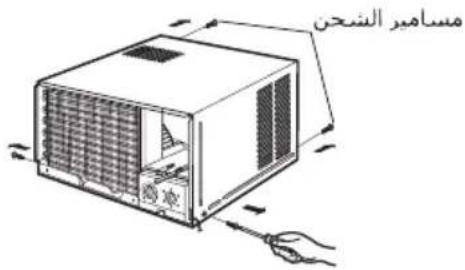
text_image
مسماءير_SHحنnatural_image
Diagram of a portable air conditioner unit with airflow arrows indicating internal components (no text or symbols)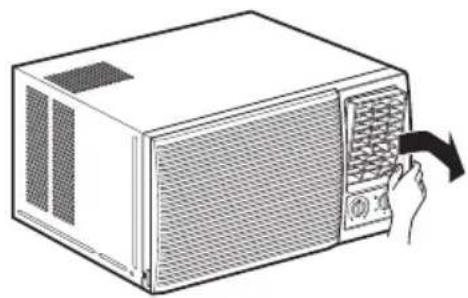
natural_image
Line drawing of a microwave oven with a hand inserting a fan into the front panel (no text or symbols)natural_image
Illustration of a microwave oven with a hand inserting a spring into the interior (no text or symbols)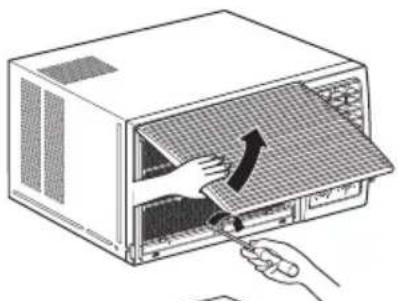
natural_image
Illustration of a hand inserting a fan into a microwave oven with a curved arrow indicating the process (no text or symbols present)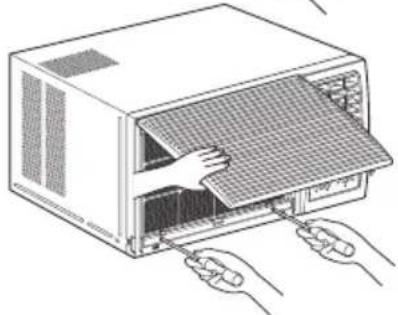
natural_image
Line drawing of a computer tower with hands connecting to its side panel (no text or symbols)natural_image
Technical line drawing of a mechanical assembly with a rotating lever and base plate (no text or symbols)natural_image
Illustration of hands holding a computer ventilation grille with a scroll, showing airflow direction (no text or symbols)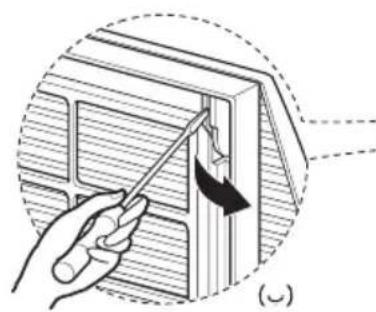
natural_image
Illustration of a hand using a tool to adjust or install a wall-mounted component, showing a curved arrow indicating rotation (no text or symbols present)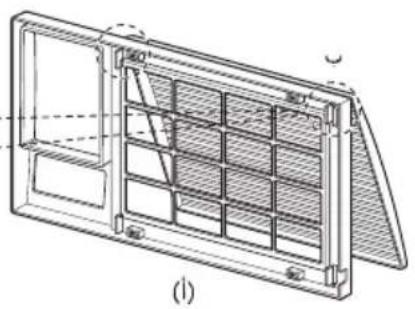
natural_image
Technical line drawing of a rectangular frame with internal grid structure (no text or symbols)natural_image
Illustration of a hand holding a small object with an arrow indicating direction (no text or symbols)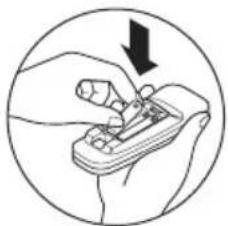
natural_image
Illustration of a hand using a tool to adjust or install a mechanical component, enclosed in a circle (no text or symbols)ملاحظة
text_image
Diagram showing two devices connected to a control panel with a hand pointing to the screen, indicating a device operation or status change.natural_image
Illustration of a microwave oven with a hand inserting a fan into the rack (no text or symbols)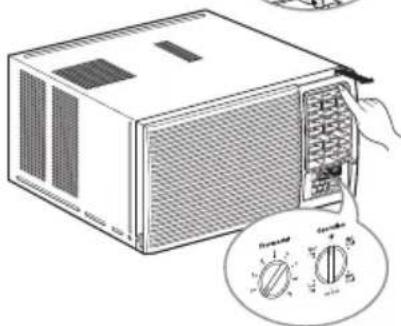
natural_image
Illustration of a microwave oven with a hand holding the top panel and a close-up of its dial (no text or symbols visible)natural_image
Illustration of a faucet spraying water onto a solar panel (no text or symbols)(乙)
natural_image
Diagram of an air conditioner unit with a partially open panel and a close-up view of its lid (no text or symbols present)(∪)
natural_image
Diagram of a solar panel installation with a dome-shaped component inserted into a housing (no text or symbols)(i)
ملاحظة
natural_image
Line drawing of a modular device with a mesh panel and ventilation slots (no text or symbols)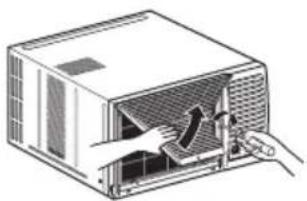
natural_image
Illustration of a computer oven with hands inserting a plug into the air (no text or symbols)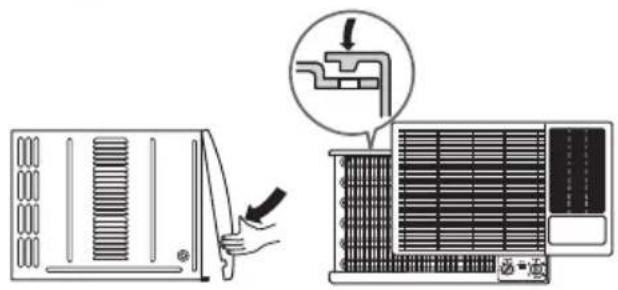
text_image
Diagram showing airflow or ventilation process of an air conditioner, with labeled components and directional arrow¡صلح الأعطال
الشيخ العادي
. .