
BSN18IBE - Air-conditioner LG - Free user manual and instructions
Find the device manual for free BSN18IBE LG in PDF.


User questions about BSN18IBE LG
0 question about this device. Answer the ones you know or ask your own.
Ask a new question about this device
Download the instructions for your Air-conditioner in PDF format for free! Find your manual BSN18IBE - LG and take your electronic device back in hand. On this page are published all the documents necessary for the use of your device. BSN18IBE by LG.
USER MANUAL BSN18IBE LG
Read this owner's manual thoroughly before operating the appliance and keep it handy for reference at all times.
TYPE : WALL MOUNTED
TABLE OF CONTENTS
This manual is produced for a group of products and may contain images or content different from the model you purchased.
This manual is subject to revision by the manufacturer.
SAFETY INSTRUCTIONS ....03
Important Safety Instructions....04
Disposal of your old appliance(as per e-waste Rules)....09
OPERATION 11
Notes for Operation 11
Parts and Functions.... 11
Wireless Remote Control....12
Restarting the Air Conditioner Automatically 16
Using the Mode Function....16
Using the Jet Mode Function....18
Using the Fan Speed Function....19
Using the Air Flow Direction Function....19
Setting the On/Off Timer....20
Using the Sleep Function(Optional)......21
Using the Simple Timer Function(Optional)....21
Using the Energy Display Function(Optional)....22
Using the Light Off Function(Optional)....22
Using the Comfort Air Function(Optional)....23
Using the Energy Saving Function(Optional) 23
Using the Energy Control Function(Optional)....24
Using the Mosquito Away Function(Optional)....24
Using Special Functions....25
Smart Appliance Connectivity....28
MAINTENANCE....29
Clean the Air Filter 30
Clean the 3M and Triple Filter(Optional)....31
TROUBLESHOOTING....32
Self-diagnosis Function 32
Before Calling for Service....32
SAFETY INSTRUCTIONS
The following safety guidelines are intended to prevent unforeseen risks or damage from unsafe or incorrect operation of the product.
The guidelines are separated into ‘WARNING’ and ‘CAUTION’ as described below.
This symbol is displayed to the indicate matters and operations that can cause risk. Read the part with this symbol carefully and follow the instructions in order to avoid risk.
WARNING - This indicates that the failure to follow the instructions can cause serious injury or death.
CAUTION - This indicates that the failure to follow the instructions can cause the minor injury or damage to the product.
WARNING
To reduce the risk of explosion, fire, death, electric shock, injury or scalding to persons when using this product, follow basic precautions, including the following:
Children in the Household
This appliance is not intended for use by persons (including children) with reduced physical, sensory or mental capabilities, or lack of experience and knowledge, unless they have been given supervision or instruction concerning use of the appliance by a person responsible for their safety. Children should be supervised to ensure that they do not play with the appliance.
Important Safety Instructions

WARNING
To reduce the risk of explosion, fire, death, electric shock, injury or scalding to persons when using this product, follow basic precautions, including the following:
Installation
- Do not install the air conditioner on an unstable surface or in a place where there is danger of it falling.
- Contact an authorized service center when installing or relocating the air conditioner.
• Install the panel and the cover of the control box safely. - Do not install the air conditioner in a place where flammable liquids or gases such as gasoline, propane, paint thinner, etc., are stored.
- Make sure that the pipe and the power cable connecting the indoor and outdoor units are not pulled too tight when installing the air conditioner.
- Use standard circuit breaker and fuse that conform to the rating of the air conditioner.
- Do not input air or gas into the system except with the specific refrigerant.
- Use non-flammable gas (nitrogen) to check for leak and to purge air; using compressed air or flammable gas may cause fire or explosion.
- The indoor/outdoor wiring connections must be secured tightly, and the cable should be routed properly so that there is no force pulling the cable from the connection terminals. Improper or loose connections can cause heat generation or fire.
• Install dedicated electric outlet and circuit breaker before using the air conditioner. - Do not connect the ground wire to a gas pipe, a lightning rod, or a telephone ground wire.
Operation
- Be sure to use only those parts listed in the service parts list. Never attempt to modify the equipment.
- Make sure that children do not climb on or hit the outdoor unit.
- Dispose of the batteries in a place where there is no danger of fire.
- Use only the refrigerant specified on the air conditioner label.
- Cut off the power supply if there is any noise, smell, or smoke coming from the air conditioner.
- Do not leave flammable substances such as gasoline, benzene, or thinner near the air conditioner.
- Contact an authorized service center when the air conditioner is submerged by flood waters.
- Do not use the air conditioner for an extended period time in a small place without proper ventilation.
- In the event of a gas leak (such as Freon, propane gas, LP gas, etc.) ventilate sufficiently before using the air conditioner again.
- To clean the interior, contact an authorized service center or dealer. Using harsh detergents may cause corrosion or damage to the unit.
- Be sure to ventilate sufficiently when the air conditioner and a heating appliance such as a heater are used simultaneously.
- Do not block the inlet or outlet of air flow.
- Do not insert hands or other objects through the air inlet or outlet while the air conditioner is operating.
- Make sure that the power cable is neither dirty, loose, nor broken.
- Never touch, operate, or repair the air conditioner with wet hands.
- Do not place any objects on the power cable.
- Do not place a heater or other heating appliances near the power cable.
- Do not modify or extend the power cable. Scratches or peeling insulation on the power cables may result in fire or electric shock, and should be replaced.
- Cut off the power supply immediately in the event of a blackout or a thunderstorm.
Maintenance
- Do not clean the appliance by spraying water directly onto the product.
- Before cleaning or performing maintenance, disconnect the power supply and wait until the fan stops.
Technical Safety
- Installation or repairs made by unauthorized persons can pose hazards to you and others.
- The information contained in the manual is intended for use by a qualified service technician who is familiar with the safety procedures and equipped with the proper tools and test instruments.
- Failure to read and follow all instructions in this manual can result in equipment malfunction, property damage, personal injury and/or death.
- The appliance shall be installed in accordance with national wiring regulations.
- When the power cord is to be replaced, the replacement work shall be performed by authorized personnel using only genuine replacement parts.
- This appliance must be properly grounded to minimize risk of electric shock.
- Do not cut or remove the grounding prong from the power plug.
- Attaching the adapter ground terminal to the wall receptacle cover screw does not ground the appliance unless the cover screw is metal, uninsulated, and the wall receptacle is grounded through house wiring.
- If you have any doubt whether the air conditioner is properly grounded, have the wall receptacle and circuit checked by a qualified electrician.
- The refrigerant and insulation blowing gas used in the appliance require special disposal procedures. Consult a service agent or a similarly qualified person before disposing of them.
- If the supply cord is damaged, it must be replaced by the manufacturer, its service agent or similarly qualified persons in order to avoid a hazard.

CAUTION
To reduce the risk of minor injury to persons, malfunction, or damage to the product or property when using this product, follow basic precautions, including the following:
Installation
- Do not install the air conditioner in an area where it is directly exposed to sea wind (salt spray).
• Install the drain hose properly for the smooth drainage of water condensation. - Exercise caution when unpacking or installing the air conditioner.
- Do not touch the leaking refrigerant during installation or repair.
- Transport the air conditioner with two or more people or use a forklift.
- Install the outdoor unit such that it is protected from direct sunlight. Do not place the indoor unit in a place where it is directly exposed to sunlight via the windows.
- Safely dispose of packing materials such as screws, nails or batteries using proper packaging after installation or repair.
- Install the air conditioner in a place where the noise from the outdoor unit or the exhaust fumes will not inconvenience the neighbors. Failure to do so may result in conflict with the neighbors.
Operation
- Remove the batteries if the remote control is not to be used for an extended period of time.
- Make sure that the filter is installed before operating the air conditioner.
- Be sure to check if there is a refrigerant leak after installing or repairing the air conditioner.
- Do not place any object on the air conditioner.
- Never mix different types of batteries, or old and new batteries for the remote control.
-
Do not let the air conditioner run for a long time when humidity is very high or when a door or a window has been left open.
-
Stop using the remote control if there is a fluid leak in the battery. If your clothes or skin are exposed to the leaking battery fluid, wash off with clean water.
- Do not expose people, animals, or plants to the cold or hot wind from the air conditioner for extended periods of time.
- If the leaking battery fluid has been swallowed, wash off the inside of the mouth thoroughly and consult a doctor.
- Do not drink the water drained from the air conditioner.
- Do not use the product for special purposes, such as preserving foods, works of art, and etc. It is an air conditioner for consumer purposes, not a precision refrigeration system. There is risk of damage or loss of property.
- Do not recharge or disassemble the batteries.
Maintenance
- Never touch the metal parts of the air conditioner when removing the air filter.
- Use a sturdy stool or ladder when cleaning, maintaining, or repairing the air conditioner at a height.
- Never use strong cleaning agents or solvents when cleaning the air conditioner or spray water. Use a smooth cloth.
Disposal of your old appliance(as per e-waste Rules)
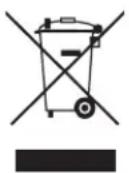
- When this crossed out wheeled bin symbol is depicted on the product and its operator's manual, it means the product is covered by the e-waste Management and Handling Rules, 2011 and are meant to be recycled, dismantled, refurbished or disposed off.
2. Dos
a. The product is required to be handed over only to the authorized recycle for disposal.
b. Keep the product in isolated area, after it becomes non-functional/un-repairable so as to prevent its accidental breakage.
Don't
a. The product should not be opened by the user himself/herself, but only by authorized service personnel.
b. The product is not meant for re-sale to any unauthorized agencies/scrap dealer/kabariwalah.
c. The product is not meant for mixing into household waste stream.
d. Do not keep any replaced spare part(s) from the product in exposed area.
- Any disposal through unauthorized agencies/person will attract action under Environment (Protection) Act 1986.
- This product is complied with the requirement of Hazardous Substances as specified under Rule 13 (1) & (2) of the E-Waste (Management & Handling) Rules, 2011.
- To locate a nearest collection centre or call for pick-up (limited area only) for disposal of this appliance, please contact Toll Free No. 1800-315-9999 / 1800-180-9999 for details. All collection centre and pick up facilities are done by third parties with LG Electronics India Pvt. Ltd. merely as a facilitator.
For more detailed information, please visit: http://www.lge.com/in.
Suggestion for Energy Saving
- Do not cool excessively indoors. This may be harmful for your health and may consume more electricity.
- Block sunlight with blinds or curtains while you are operating the air conditioner.
- Keep doors or windows closed tightly while you are operating the air conditioner.
- Adjust the direction of the air flow vertically or horizontally to circulate indoor air.
- Speed up the fan to cool or warm indoor air quickly, within a short period of time.
- Open windows regularly for ventilation. The indoor air quality may deteriorate if the air conditioner is used for long durations.
- Clean the air filter once every 2 weeks. Dust and impurities collected in the air filter may block the air flow or weaken the cooling / dehumidifying functions.
Parts and Functions
Indoor Unit
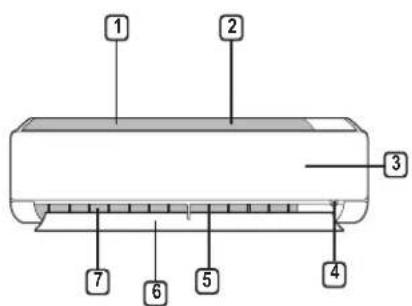
text_image
1 2 3 4 5 6 7Outdoor Unit
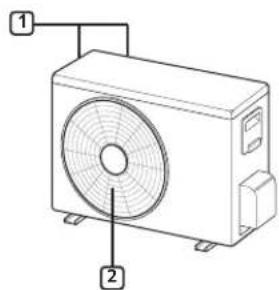
text_image
Diagram of an air conditioner unit with labeled parts 1 and 2① Air Filter(under the panel)
② Air Intake
③ Front Cover
④ On/Off Button
⑤ Air Deflector (Vertical louver)
⑥ Air Deflector (Horizontal vane)
7 Air Outlet
① Air Intake Vents
② Air Outlet Vents
NOTE
- The number and location of operation lamps may vary according to the model of the air conditioner.
- The feature may be changed according to the type of model.
Wireless Remote Control
Inserting Batteries
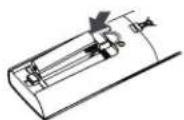
If the display screen of the remote control begins to fade, replace the batteries. Insert AAA (1.5 V) batteries before using the remote control.
1 Remove the battery cover.
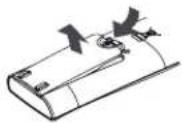
2 Insert the new batteries and make sure that the + and - terminals of the batteries are installed correctly.
Installing the Remote Control Holder
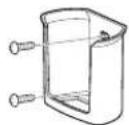
To protect the remote control, install the holder where there is no direct sunlight.
1 Choose a safe and easily accessible location.
2 Fix the holder by fastening 2 screws firmly with a screwdriver.
Operating Method
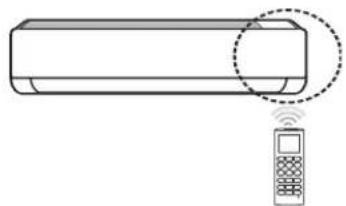
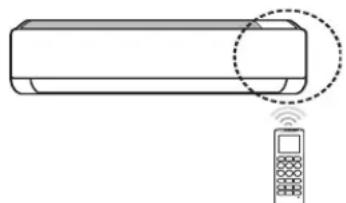
Point the remote control towards the signal receiver at the right side of the air conditioner to operate it.
natural_image
Line drawing of a rectangular device with a circular annotation highlighting its edge, connected to a mobile phone (no text or symbols present)NOTE
- The remote control may operate other electronic devices if it is directed towards them. Make sure to point the remote control towards the air conditioner signal receiver.
- For proper operation, use a soft cloth to clean the signal transmitter and receiver.
- In case of a function not provided in the product, no buzzer sound occurs from the product when a button for such function on the remote control is pressed.
Setting the Current Time
1 Insert batteries.
- The icon below blinks at the bottom of the display screen.

2 Press or button to select the minutes.
3 Press SET/CANCEL button to finish.
NOTE
- The On/Off Timer is available after setting the current time.
Using the °C/°F Conversion Function(Optional)
This function changes unit between ^ C and ^ F.
- Press and hold SWING button about 5 seconds.
Operating the Air Conditioner Without the Remote Control
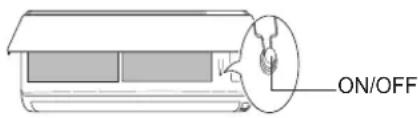
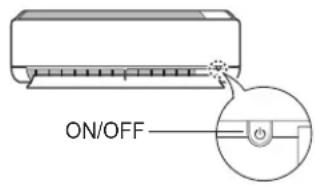
You can use the ON/OFF button of the indoor unit to operate the air conditioner when the remote control is unavailable.
1 Open the front cover(Type1) or horizontal vane(Type2).
2 Press the ON/OFF button.
Type1
text_image
ON/OFFType2
text_image
ON/OFFNOTE
- The stepping motor may be broken, if the horizontal vane opens rapidly.
- The fan speed is set to high.
- The feature may be changed according to the type of model.
- The temperature cannot be altered when using this emergency On/Off button.
- For cooling-only models, the temperature is set to 22 °C.
- For cooling & heating models, the temperature is set from 22 °C to 24 °C.
Using Wireless Remote Control
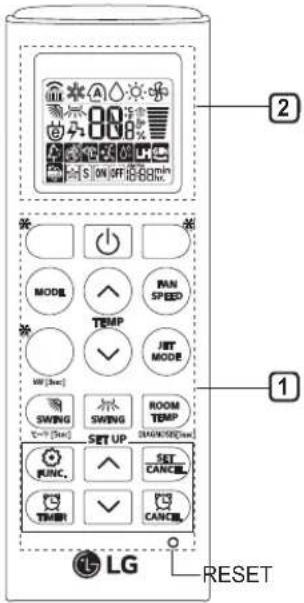
You can operate the air conditioner more conveniently with the remote control.
| 1 Button | 2 Display Screen | Description |
| - To turn on/off the air conditioner. | ||
| 88° | To adjust the desired room temperature in cooling, heating or auto changeover mode. | |
| MODE | To select the cooling mode. | |
| To select the heating mode. | ||
| To select the dehumidification mode. | ||
| To select the fan mode. | ||
| To select the auto changeover/auto operation mode. | ||
| JET MODE | Po | To change room temperature quickly. |
| FAN SPEED | To adjust the fan speed. | |
| To adjust the air flow direction vertically or horizontally. | ||
| ☆S ON OFF | To turn on/off the air conditioner automatically at desired time. | |
| SET/CANCEL | - To set/cancel the special functions and timer. | |
| - To cancel the timer settings. | ||
| - | To adjust time. | |
| * LIGHT OFF | - To set | the brightness of the display on the indoor unit. |
| ROOM TEMP | To display the room temperature. | |
| °C←°F[5sec] | °C°F | To change unit between °C and °F. |
NOTE
- * buttons may be changed according to the type of model.
text_image
2 MODE PAN SPEED TEMP JET MODE SWING ROOM TEMP SET UP SET CANCEL FUNC. CANCEL LG RESET| 1 Button | 2 Display Screen | Description |
| * ENERGY SAVING | To minimize power consumption. | |
| * COMFORT AIR | To adjust the air flow to deflect wind. | |
| kW[3sec] | - | To set whether or not to display information regarding energy. |
| * ENERGY CTRL | To bring the effect of the power saving. | |
| * COMFORT SLEEP | To make the comfortable sleep environment. | |
| DIAGNOSIS [5sec] | - | To conveniently check maintenance information of a product. |
| * | To fan away a mosquito. | |
| To purify the air by removing particles that enters the indoor unit. | ||
| To reduce noise from outdoor units. | ||
| To keep your skin moisturized by generating ion clusters. | ||
| To lower indoor humidity quickly. | ||
| To maintain a minimum room temperature and prevent objects in the room from freezing. | ||
| To operate air conditioner under the previously set power consumption. | ||
| To remove moisture generated inside the indoor unit. | ||
| To make the comfortable sleep environment. | ||
| RESET | - | To initialize the remote control settings. |
NOTE
- Some functions may not be supported, depending on the model.
- * buttons may be changed according to the type of model.
Restarting the Air Conditioner Automatically
When the air conditioner is turned on again after a power failure, this function restores the previous settings.
Disabling Auto Restart
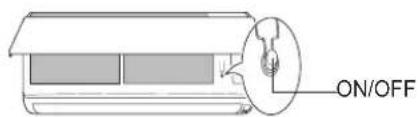
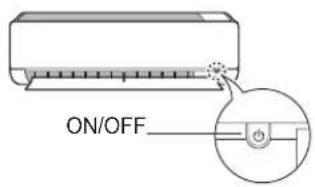
1 Open the front cover(Type1) or horizontal vane(Type2).
2 Press the ON/OFF button and hold it about 6 seconds, then the unit will beep twice and the lamp will blink twice 4 times.
- To re-enable the function, press the ON/OFF button and hold it for 6 seconds. The unit will beep twice and the lamp will blink 4 times.
Type1
text_image
ON/OFFType2
text_image
ON/OFFNOTE
- The feature may be changed according to the type of model.
- If you press and hold the ON/OFF button for 3 – 5 seconds, instead of 6 seconds, the unit will switch to the test operation. In the test operation, the unit blows out strong cooling air for 18 minutes and then returns to factory default settings.
Using the Mode Function
This function allows you to select the desired function.
Cooling Only Model
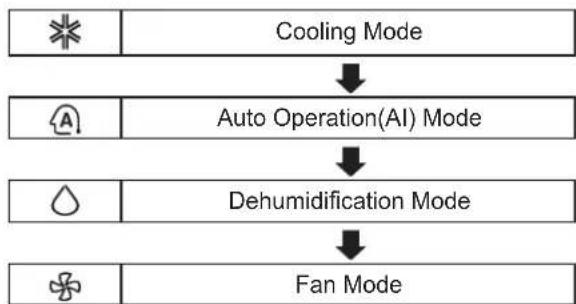
flowchart
graph TD
    A[" cooling Mode "] --> B[" Auto Operation(AI) Mode "]
    B --> C[" Dehumidification Mode "]
    C --> D[" Fan Mode "]
Cooling & Heating Model
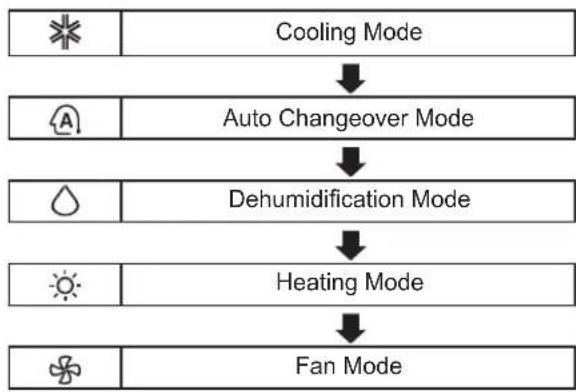
flowchart
graph TD
    A[" cooling Mode "] --> B[" Auto Changeover Mode "]
    B --> C[" Dehumidification Mode "]
    C --> D[" Heating Mode "]
    D --> E[" Fan Mode "]
Cooling Mode
1 Turn the appliance on.
2 Press MODE button repeatedly to select the Cooling Mode.
- * is displayed on the display screen.
3 Press or button to set the desired temperature.
Heating Mode
1 Turn the appliance on.
2 Press MODE button repeatedly to select the Heating Mode.
- is displayed on the display screen.
3 Press or button to set the desired temperature.
Dehumidification Mode
This mode removes excess moisture from a highly humid environment or during the rainy season, in order to prevent molding from setting in. This mode adjusts the room temperature and the fan speed automatically to maintain the optimal level of humidity.
1 Turn the appliance on.
2 Press MODE button repeatedly to select the Dehumidification Mode.
- is displayed on the display screen.
NOTE
- In this mode you cannot adjust the room temperature, it is adjusted automatically.
- The room temperature is not displayed on the display screen.
Fan Mode
This mode only circulates the indoor air without changing the room temperature.
1 Turn the appliance on.
2 Press MODE button repeatedly to select the Fan Mode.
• is displayed on the display screen.
3 Press FAN SPEED button to adjust the fan speed.
Auto Changeover Mode
Cooling & Heating Model
This mode changes the mode automatically to maintain the set temperature at ±2 ^ .
1 Turn the appliance on.
2 Press MODE button repeatedly to select the Auto Changeover Mode.
• A is displayed on the display screen.
3 Press or button to set the desired temperature.
4 Press FAN SPEED button repeatedly to select the fan speed.
Auto Operation(Artificial Intelligence)
Cooling Only Model
This mode automatically sets the fan speed and temperature depending on the room temperature.
1 Turn the appliance on.
2 Press MODE button repeatedly to select the Auto Operation.
• A is displayed on the display screen.
3 Press or button to select the desired operation code if the temperature is higher or lower than the desired temperature.
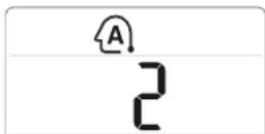
| Code Description | |
| 2 Cool | |
| 1 Cool slightly | |
| 0 Maintain room temperature | |
| -1 Heat slightly | |
| -2 Heat | |
NOTE
- In this mode, you cannot adjust the fan speed, but you can set the air deflector to rotate automatically.
Using the Jet Mode Function Changing Room Temperature Quickly
This function allows you to cool indoor air quickly during the summer or warm it quickly during winter.
- Cooling & Heating model: The Jet Mode function is available with Cooling, Heating and Dehumidification Mode.
- Cooling Only model: The Jet Mode function is available with Cooling, Dehumidification, Fan, Auto Operation Mode and Air Purification function.
1 Turn the appliance on.
2 Press MODE button repeatedly to select the desired mode.
3 Press JET MODE button.
- P_0 is displayed on the display screen.
NOTE
- Jet Heating Mode is not available on some models.
- In Jet Cooling Mode, strong air blows out at temperature of 18 °C for 30 minutes.
- In Jet Heating Mode, strong air blows out at temperature of 30 °C for 30 minutes.
- This function may operate differently from the remote control display.
Using the Fan Speed Function
Adjusting the Fan Speed
- Press FAN SPEED button repeatedly to adjust the fan speed.
| Display Screen | Speed |
 | High |
 | Medium - High |
 | Medium |
 | Medium - Low |
 | Low |
| - Natural | Wind |
NOTE
- The fan speed of natural air adjusts automatically.
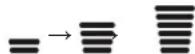
- The fan speed icons are displayed on some indoor units.
$$ F 1 \rightarrow F 2 \rightarrow F 3 \rightarrow F 4 \rightarrow F 5 $$
- Indoor unit display is displayed only 5 sec and return to the setting temperature on some models.
Using the Air Flow Direction Function
This function adjusts the direction of the air flow vertically (horizontally).
- Press 📄 button repeatedly and select the desired direction.
- Select to adjust the direction of the air flow automatically.
NOTE
- Adjusting the air flow direction horizontally may not be supported, depending on the model.
- Adjusting the air deflector arbitrarily may cause product failure.
- If you restart the air conditioner, it starts to operate with the previously set direction of air flow, so the air deflector may not match the icon displayed on the remote control. When this occurs, press button to adjust the direction of the air flow again.
- This function may operate differently from the remote control display.
Setting the On/Off Timer
This function sets the air conditioner to turn on/off automatically at desired time.
Setting the On Timer
1 Press TIMER button repeatedly.
- The icon below blinks at the bottom of the display screen.
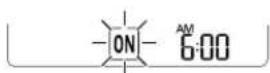
2 Press or button to select the minutes.
Press SET/CANCEL button to finish.
- After setting the timer, current time and ONcon are displayed on the display screen indicating that the desired time is set.
Canceling the On Timer
1 Press TIMER button repeatedly.
- The icon below blinks at the bottom of the display screen.
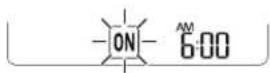
2 Press SET/CANCEL button to cancel the setting.
Setting the Off Timer
1 Press TIMER button repeatedly.
- The icon below blinks at the bottom of the display screen.
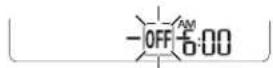
2 Press or button to select the minutes.
3 Press SET/CANCEL button to finish.
- After setting the timer, current time and OFF on are displayed on the display screen indicating that the desired time is set.
NOTE
- This function is disabled when you set Simple Timer.
Canceling the Off Timer
1 Press TIMER button repeatedly.
- The icon below blinks at the bottom of the display screen.
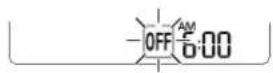
2 Press SET/CANCEL button to cancel the setting.
Canceling the Timer Setting
- Press CANCEL button to cancel all timer settings.
Using the Sleep Function(Optional)
This function turns off the air conditioner automatically when you go to sleep.
1 Turn the appliance on.
2 Press 📁 button repeatedly.
- The icon below blinks at the bottom of the display screen.
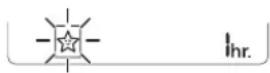
3 Press or button to select the hour (up to 7 hours).
4 Press SET/CANCEL button to finish.
• is displayed on the display screen.
NOTE
• H is displayed on some indoor units.
- Indoor unit display is displayed from 1H to 7H, which is displayed only 5 sec and then return to the setting temperature.
- In the Cooling and Dehumidification Mode, the temperature increases by 1 °C after 30 minutes and additional 1 °C after another 30 minutes for a more comfortable sleep.
- The temperature increases up to 2 °C from the preset temperature.
- Although the remark for fan speed on the display screen may be changed, the fan speed is adjusted automatically.
Using the Simple Timer Function(Optional)
This function turns off the air conditioner automatically when you go to sleep.
1 Turn the appliance on.
2 Press 📋 timer button repeatedly.
- The icon below blinks at the bottom of the display screen.
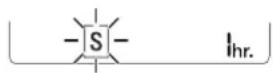
3 Press or button to select the hour (up to 7 hours).
4 Press SET/CANCEL button to finish.
- [S] is displayed on the display screen.
NOTE
- This function is disabled when you set Off Timer.
Using the Energy Display Function(Optional)
This function displays the amount of electricity generated on the indoor display as the product operates.
Display the Current Energy Usage
1 Turn the appliance on.
2 Press ○ button and hold it about 3 seconds.
- The instantaneous power consumption(83 or 88 ^+kW ) is displayed for a while on some indoor units.
Display the Cumulative Energy Usage(Optional)
1 Turn the appliance on.
2 Press ☐ button and hold it about 3 seconds twice.
- The cumulative power consumption (88_+kWh^kw) is displayed for a while on some indoor units.
NOTE
- It is not displayed on the wireless remote control.
- kW refers to instantaneous power consumption.
- kWh refers to cumulative power consumption.
- If it is more than 99 kW(h), which is the range of expression, maintain it as 99 kW(h).
• Power Off resets its value. - Display wattage under 10 W with 0.1 kW(h) unit, and display one over 10 W with 1 kW(h) unit.
- The actual power may differ from the power displayed.
Using the Light Off Function(Optional)
Display Screen Brightness
You can set the brightness of the indoor unit display screen.
- Press LIGHT OFF button.
Using the Comfort Air Function(Optional)
Comfort Vane Operation
This function conveniently sets the vane to a preset position to deflect the supply air away from blowing directly onto the occupants in the room.
1 Turn the appliance on.
2 Press COMFORT AIR button repeatedly and select the desired direction.
• or is displayed on the display screen.
NOTE
• or |is displayed on some indoor units.
- This function is disabled when you press MODE or JET MODE button.
- This function is disabled and auto swing of vertical direction is set up when you press button.
- When this function is off, the horizontal vane operates automatically depending on the set mode.
Using the Energy Saving Function(Optional)
This function minimizes power consumption during Cooling and increases the set temperature to the optimal level for a more comfortable environment. The temperature automatically settles at 22 °C, if room ambient temperature is below 22 °C. The temperature remains constant if it is above 22 °C.
1 Turn the appliance on.
2 Press MODE button repeatedly to select the Cooling Mode.
3 Press ENERGY SAVING button.
• e is displayed on the display screen.
Using the Energy Control Function(Optional)
This function brings on the power saving effect.
1 Turn the appliance on.
2 Press ENERGY CTRL button.
- Press ENERGY CTRL button repeatedly to select each step.
NOTE
- 1 step : The power Input is decreased by 20% compared to rated power input.
- is displayed on the display screen.
- 2 step: The power Input is decreased by 40% compared to rated power input.
- is displayed on the display screen.
- 3 step(Optional): The power Input is decreased by 60% compared to rated power input.
- 4 is displayed on the display screen.
- L(1 step), L(2 step) is displayed on some indoor units.
- This function is available with Cooling Mode.
- Capacity may decrease when Energy Control mode is selected.
- Desired temperature is displayed about 5 sec if you press FAN SPEED, ⬆ or button.
- Room temperature is displayed about 5 sec if you press ROOM TEMP button.
Using the Mosquito Away Function(Optional)
This function fans away mosquitoes by generating a high-frequency wave.
- Press button.
NOTE
- You can use this function without turning the air conditioner on.
Using Special Functions
1 Turn the appliance on.
2 Press FUNC button repeatedly to select the desired function.
3 Press SET/CANCEL button to finish.
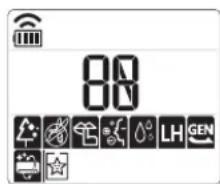
text_image
80 80 LH GEN| Display Screen | Description |
 | To purify the air by removing particles that enters the indoor unit. |
 | To reduce noise from outdoor unit. |
 | To keep your skin moisturized by generating ion clusters. |
 Po Po | To lower indoor humidity quickly. |
 LH LH | To maintain a minimum room temperature and prevent objects in the room from freezing. |
 | To operate air conditioner under the previously set power consumption. |
 | To remove moisture generated inside the indoor unit. |
 SL SL | To make the comfortable sleep environment. |
NOTE
- Some functions may not be supported, depending on the model.
- Some functions may operate differently from the remote control display.
Canceling Special Functions
1 Press FUNC button repeatedly to select the desired function.
2 Press SET/CANCEL button to cancel the function.
Using the Air Purification Function
These functions supply clean and fresh air by ion particles and filter.
| Function Display Description | ||
| Ionizer |  | Ion particles from Ionizer sterilize the aerial bacteria and other harmful substances. |
| Plasma | It removes microscopic contaminants from the intake air completely to supply clean and fresh air. | |
NOTE
- You can use this function without turning the air conditioner on.
- Both the plasma lamp and the cooling lamp light up while Smoke Away/Plasma is in operation on some models.
- Do not touch ionizer during operation.
- This function may operate differently from the remote control display.
Using the Silent Function
This function prevents potential claims by neighbors, reducing noise from outdoor units.
• is displayed on the display screen.
NOTE
- This function is disabled when you press MODE or ENERGY CTRL or JET MODE button.
- This function is available with Cooling, Heating, Auto Changeover, Auto Operation Mode.
Using the Ion Care Function
This function keeps your skin moisturized by generating ion clusters which is absorbed into the surface of skin.
- is displayed on the display screen about 3 seconds.
NOTE
- This function is available with Cooling, Fan Mode and Air Purification function.
Using the Jet Dry Function
This function maximizes the performance of dehumidification.
• 🐘, are displayed on the display screen.
NOTE
- This function is available with Cooling, Dehumidification, Auto Operation, Fan Mode and Air Purification Mode.
- This function is not available with Sleep function.
- This function is disabled when you press MODE button.
Using the Low Heating Function
This function operates the heating system to maintain a minimum room temperature and prevent objects in the room from freezing in a situation where there is no permanent resident, such as a vacation home.
- LH, LH are displayed on the display screen.
NOTE
- This function is available with Heating Mode.
- During LH operation, when you press buttons such as ⬆, ⬇ MODE, FAN SPEED, and then return to Heating Mode, 30 °C, high speed.
- If JET MODE button is pressed during LH operation, this function is disabled and Power Heating Mode is operated immediately. (only for power heating model)
- In case an error occurred, operation can be interrupted for the protection of the product.
- COMFORT AIR and SWING button cannot be used while the LH function is in operation.
Using the Auto Clean Function
In the Cooling and Dehumidification Mode, moisture is generated inside the indoor unit. This function removes such moisture.
• is displayed on the display screen.
NOTE
- Some buttons cannot be used while the Auto Clean function is in operation.
- If you turn off the power, the fan operates for 30 minutes and cleans the inside of the indoor unit.
Using the Comfort Sleep Function
This function operates the air conditioner automatically to make the comfortable sleep environment.
• ☆, SL are displayed on the display screen.
NOTE
- This function is available with Cooling Mode.
- The vane stops swing and sets indirect airflow angle, after 30 minutes from start even though the room temperature doesn't decrease to optimal temperature to sleep.
- It is possible that a comfortable sleep environment is different according to the people.
Smart Appliance Connectivity Using the Wi-Fi Pairing Function(Optional)
Once it is connected to the internet through a home Wi-Fi network, you can control the appliance remotely with the application for the smart phone.
- Press and hold the ⏻ and JET MODE button simultaneously about 3 seconds.
NOTE
- It is not displayed on the wireless remote control.
- For more information, read manual in Wi-Fi module.
Using the Smart Diagnosis Function(Optional)
Smart Diagnosis allows users to conveniently check maintenance information of a product.
- Easily checking operational status of the air conditioner.
- Easily understanding the error messages.
- Helping to improve device performance and expand product life.
1 Search and download LG A/C Smart Diagnosis in Google play or App store.
2 Click the Receive button on the main screen on your phone.
3 Press and hold the ROOM TEMP button about 5 seconds aim at the indoor unit.
natural_image
Line drawing of a horizontal cylinder with a circular annotation highlighting the cylinder, alongside a small mobile phone icon (no text or symbols)4 Hold your phone close to the indoor unit.
- Buzzer beeps will be received by your phone.
5 Confirm the received information on your phone.
NOTE
- Be sure to keep ambient noise to a minimum or the phone may not correctly receive the buzzer beeps from the indoor unit.
MAINTENANCE

WARNING
- Turn off the power and unplug the power cord before you perform any maintenance; otherwise it may cause electric shock.
If the air conditioner will not be used for an extended period of time, dry the air conditioner to maintain it in best condition. Clean the product regularly to maintain optimal performance and to prevent possible breakdown.
- Dry the air conditioner in Fan mode for 3 to 4 hours and disconnect the power. There may be internal damage if moisture is left in its components.
- Before using the air conditioner again, dry the inner components of the air conditioner in Fan mode for 3 to 4 hours. This will help to remove the odor generated from moisture.
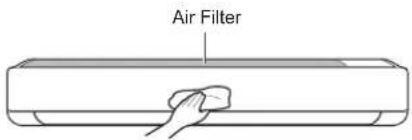
text_image
Air Filter* The feature may be changed according to the type of model.
| Type Description Interval | ||
| Air filter | Clean with a vacuum or hand wash. | 2weeks |
| Triple filter | Clean with a vaccum or brush. Every 3 months | |
| 3M filter | Clean with a vaccum or brush. | Every 6 months |
| Ionizer(Optional) | Use dry cotton bud to remove any dust. Every 6 months | |
| Indoor unit | Clean the Indoor unit surface by using a soft, dry cloth. | Regularly |
| Have a professional clean the condensate drain pan. Once a year | ||
| Have a professional clean the condensate drain pipe. | Every 4 months | |
| Replace the remote control batteries. Once a year | ||
| Outdoor unit | Have a professional clean the heat exchanger coils and the panel vents.(Consult with technician). | Once a year |
| Have a professional clean the fan. Once a year | ||
| Have a professional clean the condensate drain pan. | Once a year | |
| Have a professional verify that all the fan assembly is firmly tightened. | Once a year | |
| Verify that electric components with air. | Once a year | |
| Clean the electric components with air. Once a year | ||

CAUTION
- Never use water that is higher than 40^ when you clean the filters. It may cause deformation or discoloration.
- Never use volatile substances when you clean the filters. They may damage the surface of the product.
- Do not wash the 3M filter with water, because the filter can be damaged (Optional).
- Do not wash the Triple filter with water, because the filter can be damaged (Optional).
Clean the Air Filter
Clean the air filters once every 2 weeks, or more, if necessary.
NOTE
• The air filter can be broken when it is bended.
- When the air filter is not assembled correctly, dust and other substance come into the indoor unit.
Type1
1 Turn off the power and unplug the power cord.
2 Open the front cover.
- Lift up both sides of the cover slightly.
3 Hold the knobs of the air filters, pull them down slightly and remove them from the indoor unit.
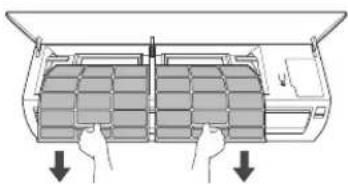
natural_image
Diagram of a car air conditioner unit with hands holding cooling panels (no text or labels)4 Clean the filters with a vacuum cleaner or with lukewarm water with neutral detergent.
5 Dry the filters in the shade.
6 Insert the hooks of the air filters into the front cover.
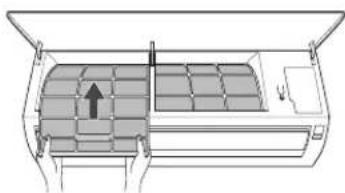
natural_image
Diagram of a car air conditioner unit showing internal compartments and airflow direction (no text or labels)7 Check the side of the front cover for correct assembly of the air filters.
Type2
If you look at the indoor unit from above it, can assemble the top filter easily.
1 Turn off the power and unplug the power cord.
2 Hold the knob of air filter, lift it up slightly.
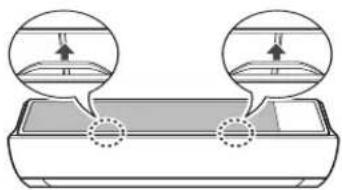
natural_image
Diagram showing two circular insets with upward arrows pointing to a rectangular object, no text or symbols present.3 Remove it from the indoor unit.
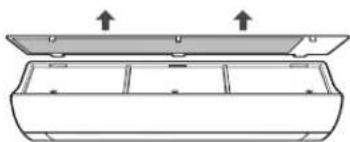
natural_image
Diagram of a rectangular container with internal compartments and two upward arrows indicating top-down orientation (no text or symbols)4 Clean the filter with a vacuum cleaner or with lukewarm water with neutral detergent.
5 Dry the filter in the shade.
6 Insert the hooks of the air filter into the front cover.
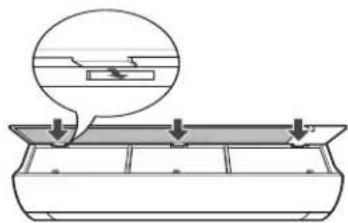
natural_image
Diagram of a mechanical component with arrows indicating assembly or force direction (no text or symbols)7 Push down hooks to assemble the air filter.
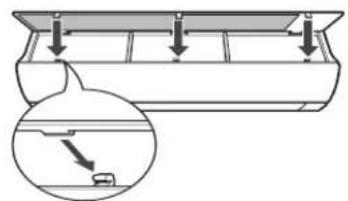
text_image
Diagram showing a mechanical or structural assembly with downward arrows and an inset magnified view of a component.8 Check the side of the front cover for correct assembly of the air filter.
Clean the 3M and Triple Filter(Optional)
1 Turn off the power and unplug the power cord.
2 Remove the air filters from the indoor unit.
3 Remove the 3M and Triple filters from the indoor unit.
Type1
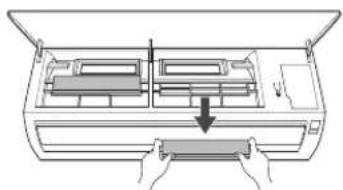
natural_image
Diagram of a device with hands holding a tray, showing internal compartments and a downward arrow (no text or symbols)Type2
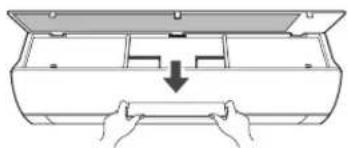
natural_image
Line drawing of hands installing or adjusting a mechanical component inside an open box (no text or symbols)4 Clean the filters with a vacuum cleaner
5 Insert the 3M and Triple filters.
Type1
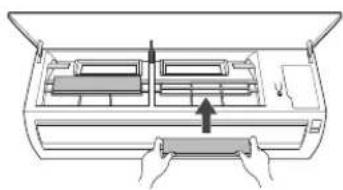
natural_image
Diagram of a hand inserting a component into a device casing (no text or symbols visible)Type2
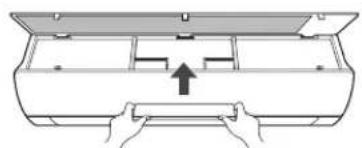
natural_image
Diagram of a mechanical device with hands holding a housing and an upward arrow indicating force or movement (no text or symbols)6 Assemble the air filters.
7 Check the side of the front cover for correct assembly of the air filters.
NOTE
- The feature and location of 3M and Triple filter may vary according to the type of model.
TROUBLESHOOTING
Self-diagnosis Function
This product has a built-in self-diagnosis function. If an error occurs, the lamp of the indoor unit will blink in 2 second intervals. If this occurs, contact your local dealer or service center.
Before Calling for Service
Please check the following before you contact the service center. If the problem persists, contact your local service center.
| Problem Possible | Causes Corrective Action | |
| The air conditioner does not work normally. | Burning smell and strange sounds are coming from the unit.Water leaks from the indoor unit even when the humidity level is low.The power cable is damaged or it is generating excessive heat.A switch, a circuit breaker (safety, ground), or a fuse is not operated properly.The unit generates an error code from its self-diagnosis. | Turn off the air conditioner, unplug the power cable or disconnect the power supply, and contact the service center. |
| The air conditioner does not work. | The air conditioner is unplugged.A fuse exploded, or the power supply is blocked.A power failure has occurred.The voltage is too high or too low.The air conditioner was turned off automatically at a preset time.The battery setting in the remote controller is incorrect. | Check whether the power cord is plugged into the outlet or the power isolators are switched on.Replace the fuse or check if the circuit breaker has tripped.Turn off the air conditioner when a power failure occurs.When the power is restored, wait 3 minutes, and then turn on the air conditioner.Check if the circuit breaker has tripped.Turn the air conditioner on.Make sure that the batteries are inserted correctly in your remote controller.If the batteries are placed correctly, but the air conditioner still does not operate, replace the batteries and try again. |
| The air conditioner does not emit cool air. | Air is not circulating properly.The air filter is dirty.The room temperature is too high.Cold air is escaping from the room.The desired temperature is higher than the set temperature.There is a heating source nearby.Fan Mode is selected.Outside temperature is too high. | Make sure that there are no curtains, blinds, or pieces of furniture blocking the front of the air conditioner.Clean the air filter once every 2 weeks.See “Cleaning Air Filter” for more information.In summer, cooling the indoor air fully may take some time. In this case, select the Jet Mode to cool the indoor air quickly.Make sure that no cold air is escaping through the ventilation points in the room.Set the desired temperature to a level lower than the current temperature.Avoid using heat generators like electric ovens or gas burners while the air conditioner is in operation.During Fan Mode, air blows from the air conditioner without cooling or heating the indoor air.Switch the operation mode to cooling operation.The cooling effect may not be sufficient. |
| The fan speed cannot be adjusted. | The Jet Mode, or Auto Operation Mode is selected. | In some operation modes, you cannot adjust the fan speed. Select an operation mode in which you can adjust the fan speed. |
| The temperature cannot be adjusted. | The Fan Mode or Jet Mode is selected. | In some operation modes, you cannot adjust the temperature. Select an operation mode in which you can adjust the temperature. |
| The air conditioner stops during operation. | The air conditioner is suddenly turned off.A power failure has occurred during operation. | The Timer Function may have timed out, which turns the unit off. Check the timer settingsWait for the power to come back. If you have the Auto Restart function enabled, your unit will resume its last operation several minutes after power is restored. |
| The indoor unit is still operating even when power has been turned off. | The Auto Clean function is being operated | Allow the Auto Clean function to continue since it removes any remaining moisture inside the indoor unit. If you do not want this feature, you can turn the unit off |
| The air outlet on the indoor unit is discharging mist. | The cooled air from the air conditioner makes mist. | When the room temperature decreases, this phenomenon will disappear. |
| Water leaks from the outdoor unit. | In the heating operations, condensed water drops from the heat exchanger. | This symptom requires installing a drain hose under the base pan. Contact the installer. |
| There is noise or vibration. | A clicking sound can be heard when the unit starts or stops due to movement of the reversing valve.Creaking sound: The plastic parts of the indoor unit creak when they shrink or expand due to sudden temperature changes.Flowing or Blowing sound: This is the flow of refrigerant through the air conditioner. | These are normal symptoms. The noise will stop. |
| The indoor unit gives off an odor. | Odors (such as cigarette smoke) may be absorbed into the indoor unit and discharged with airflow. | If the smell does not disappear, you need to wash the filter. If this does not work, contact the service center to clean your heat exchanger. |
| The air conditioner does not emit warm air. | When Heating Mode starts, the vane is almost closed, and no air comes out, even though the outdoor unit is operating.The outdoor unit is in Defrosting Mode.Outside temperature is too low. | This symptom is normal. Please wait until the unit has generated enough warm air to blow through the indoor unit.In Heating Mode, ice/frost is built up on the coils when the outside temperature falls. This function removes a layer of frost on the coil, and it should finish in approximately 15 minutes.The heating effect may not be sufficient. |
NOTE
- Some functions may not be supported, depending on the model.
Memo

LG
Life's Good