
LSN3CW2VF4 - Air-conditioner LG - Free user manual and instructions
Find the device manual for free LSN3CW2VF4 LG in PDF.


User questions about LSN3CW2VF4 LG
0 question about this device. Answer the ones you know or ask your own.
Ask a new question about this device
Download the instructions for your Air-conditioner in PDF format for free! Find your manual LSN3CW2VF4 - LG and take your electronic device back in hand. On this page are published all the documents necessary for the use of your device. LSN3CW2VF4 by LG.
USER MANUAL LSN3CW2VF4 LG
Please read this manual carefully before operating your set and retain it for future reference.
TYPE : WALL MOUNTED
text_image
LG 24 x 7 CALL CENTER 1800-180-9999 5757554 CALL (Toll Free) SMS (Send SMS) www.lg.com serviceindia@lge.comLG Electronics India Pvt. Ltd.
Registered Office: Plot No. 51, Surajpur Kasna Road,
Greater Noida - 201 306 (U.P.) INDIA
Tel: 0120-2560900 Fax: 0120-2560957
TIPS FOR SAVING ENERGY
Here are some tips that will help you minimize the power consumption when you use the air conditioner. You can use your air conditioner more efficiently by referring to the instructions below:
- Do not cool excessively indoors. This may be harmful for your health and may consume more electricity. (Recommended 24^ is suitable for human body)
- Block sunlight with blinds or curtains while you are operating the air conditioner.
- Keep doors or windows closed tightly while you are operating the air conditioner.
- Adjust the direction of the air flow vertically or horizontally to circulate indoor air.
- Speed up the fan to cool or warm indoor air quickly, in a short period of time.
- Open windows regularly for ventilation as the indoor air quality may deteriorate if the air conditioner is used for many hours.
- Clean the air filter once every 2 weeks. Dust and impurities collected in the air filter may block the air flow or weaken the cooling / dehumidifying functions. (Refer page no. 20 and 21 for details)
For your records
Staple your receipt to this page in case you need it to prove the date of purchase or for warranty purposes. Write the model number and the serial number here:
Model number :
Serial number :
You can find them on a label on the side of each unit.
Dealer's name :
Date of purchase :
IMPORTANT SAFETY INSTRUCTIONS
READ ALL INSTRUCTIONS BEFORE USING THE APPLIANCE.
Always comply with the following precautions to avoid dangerous situations and ensure peak performance of your product

WARNING
It can result in serious injury or death when the directions are ignored

CAUTION
It can result in minor injury or product damage when the directions are ignored

WARNING
• Installation or repairs made by unqualified persons can result in hazards to you and others.
- The information contained in the manual is intended for use by a qualified service technician familiar with safety procedures and equipped with the proper tools and test instruments.
- Failure to carefully read and follow all instructions in this manual can result in equipment malfunction, property damage, personal injury and/or death.
Power
- Unplug the power plug immediately in the event of a blackout or thunderstorm. Failure to do so may result in fire or electric shock.
- Always use a power plug and socket with a ground terminal. Failure to do so may result in electric shock or product failure.
• Install a dedicated electric outlet and circuit breaker before you use the air conditioner. Failure to do so may result in electric shock or product failure. - Do not connect the ground wire to a gas pipe, a lightning rod or a telephone ground wire. It may result in electric shock or product failure.
- Use a standard circuit breaker and fuse conforming with the rating of the air conditioner. Failure to do so may result in electric shock or product failure.
- Make sure to check that the power cable plug is not dirty, loose or broken and then only insert the plug completely. It may result in electric shock or product failure.
- Do not modify or extend the power cable. If the power cable or cord has scratches or skin peeled off or deteriorated then it must be replaced. It may result in fire or electric shock.
- Don't use a power cord, a plug or a loose socket which is damaged. It may result in fire or electric shock.
- Do not use a damaged power cord or plug. It may result in electric shock or product failure.
- Do not touch, operate or repair the air conditioner with wet hands. It may result in electric shock or product failure.
-
Make sure that the power plug is not damaged when you move the air conditioner. Failure to do so may result in electric shock or product failure.
-
Do not place a heater or other heating appliances near the power cable. It may result in fire, electric shock, or product failure.
- Make sure that the power cord is not pulled or damaged while the air conditioner is operating. Failure to do so may result in fire, electric shock, or product failure.
- Do not place any objects on the power cord. It may result in electric shock or product failure.
Installation
- Do not install the air conditioner on an unstable surface or where there may be a danger of it falling. It may result in death, serious injury, or product failure.
- Contact an authorized service center when you install or relocate the air conditioner. Failure to do so may result in serious injury or product failure.
- Indoor/outdoor wiring connections must be secured tightly and the cable should be routed properly so that there is no force pulling the cable from the connection terminals. Improper or loose connections can cause heat generation or fire.
- Install the panel and the cover of the control box safely. Failure to do so may result in explosion or fire.
- Do not install the air conditioner near a place with a danger of explosion or fire. It may result in explosion or fire.
- Make sure that the pipe and the power cable that connect the indoor unit and the outdoor unit are not pulled tight when you install the air conditioner. Failure to do so may result in electric shock or product failure.
- Do not mix air or gas in the system except for the specific refrigerant. If air enters the refrigerant system, it may result in an excessively high pressure that causes injury or damage to the equipment.
Use
- Be sure to use only those parts which are listed in the svc parts list. Never attempt to modify the equipment. It may result in death, serious injury, or product failure.
- Do not pull the power cord when you remove the power plug. It may result in death or electric shock.
- Discard the batteries where there is no danger of fire. Failure to do so may result in explosion or fire.
- Contact an authorized service center when the air conditioner is submerged into water due to flooding. Failure to do so may result in explosion or fire.
- Only use components that are approved by the manufacturer and do not repair or modify them. Failure to do so may result in electric shock or product failure.
- Only use the refrigerant specified on the air conditioner label. It may result in explosion or fire.
- Do not allow water to run into the air conditioner. It may result in explosion or fire.
- Do not leave flammable substances such as gasoline, benzene and thinner near the air conditioner. It may result in explosion or fire.
- Do not use the air conditioner for an extended period of time in a small place without ventilation. Ventilate the place regularly. Failure to do so may result in explosion or fire.
- Do not touch the electrostatic filter after opening the front grille. Failure to do so may result in electric shock or product failure.
- Unplug the power plug if there is a noise, smell or smoke coming from the air conditioner. Failure to do so may result in explosion or fire.
-
Make sure to ventilate sufficiently when this air conditioner and a heating appliance such as a heater are used simultaneously. Failure to do so may result in fire, serious injury, or product failure.
-
Make sure that children do not climb up the outdoor unit or impact it. Failure to do so may result in death or product failure.
- Do not turn on or off the air conditioner by plugging in or unplugging the power plug. It may result in fire or electric shock.
- When there is a gas leak, ventilate sufficiently before using the air conditioner again. Failure to do so may result in explosion or fire.
- Do not use the product for special purposes, such as preserving foods, works of art, etc. It is a consumer air conditioner, not a precision refrigeration system. It may result in death, fire or electric shock.
- Do not block the inlet or outlet of air flow. It may result in explosion or product failure.
- Do not insert hands or other objects through the air inlet or outlet while the air conditioner is operating. It may result in electric shock.
- Do not expose people, animals or plants to the cold or hot wind from the air conditioner. It may result in serious injury.
- Do not drink the water drained from the air conditioner. It may result in serious health complications.
Maintenance
- Turn the main power off and unplug the power plug when you clean or repair the air conditioner. Failure to do so may result in death, serious injury, or product failure.

CAUTION
Installation
- Do not install the air conditioner where there is direct sunlight. It may result in product failure.
- Safely dispose of packing materials such as screws, nails or batteries in a packing bag after installation or repair. It may result in serious injury.
- Do not install the air conditioner where it will be exposed to sea wind (salt spray) directly. It may result in product failure.
• Install the drain hose properly for smooth drainage of condensed water. Failure to do so may result in product failure.
• Install the air conditioner where the noise from the outdoor unit or the exhaust gas will not inconvenience the neighbors. Failure to do so may result in conflict between neighbors. - Be cautious when you unpack or install the air conditioner. Failure to do so may result in serious injury or product failure.
- Do not touch the refrigerant leakage during installation or repair. It may result in product failure.
- When transporting the equipment, there should be at least 2 or more people, or a forklift. It may result in serious injury.
Use
- Remove the batteries when the remote control is not in use for an extended period of time. Failure to do so may result in product failure.
- Make sure that the filter is installed before you operate the air conditioner. Failure to do so may result in product failure.
- Unplug the power plug when the air conditioner is not used for an extended period of time. Failure to do so may result in product failure.
- Make sure to check if there is a refrigerant leak after you install or repair the air conditioner. Failure to do so may result in product failure.
-
Do not place any objects on the air conditioner. It may result in product failure.
-
If there is a refrigerant leak during the installation of the air conditioner, ventilate the area immediately. Failure to do so may result in serious injury or product failure.
- Follow the standards of the corresponding region or country for handling the refrigerant and the air conditioner, and for disassembling the air conditioner. Failure to do so may result in product failure.
- Do not mix the batteries for the remote control with other types of batteries or mix new batteries with used batteries. Failure to do so may result in product failure.
- Do not recharge or disassemble the batteries. Failure to do so may result in explosion, fire or serious injury.
- Do not dispose of the batteries in fire. It may result in explosion or fire.
- Stop using the remote control if there is a battery fluid leak. If your cloth or skin is exposed to the battery fluid from a leak, wash it off with clean water. Failure to do so may result in serious injury.
- If you swallow the battery fluid from a leak, wash out the inside of your mouth thoroughly and then consult a doctor. Failure to do so may result in serious health complications.
- Do not let the air conditioner run for a long time when the humidity is very high or when a door or window has been left open. Failure to do so may result in product failure.
- Do not use the product for special purposes, such as preserving foods, works of art, etc. It is a consumer air conditioner, not a precision refrigeration system. There is risk of damage or loss of property.
Maintenance
- Do not use strong cleaning agents or solvents when you clean the air conditioner, or spray water. Use a smooth cloth. It may result in serious injury or product failure.
- Never touch the metal parts of the air conditioner when you remove the air filter. It may result in serious injury or product failure.
- Use a sturdy stool or ladder when you clean, maintain or repair the air conditioner at a height. Failure to do so may result in serious injury or product failure.
3 SAFETY PRECAUTIONS
8 BEFORE USE
- Product Introduction
- Electrical Safety
- Using the remote control
Inserting Batteries
- Installing the remote control holder
Wireless Remote Control
12 BASIC FUNCTIONS
Cooling your room
Heating your room
Removing humidity
Airing your room
Adjusting the fan speed
Adjusting the air flow direction
Setting the timer
- Setting the current time
- Turning on the air conditioner automatically at a set time
- Turning off the air conditioner automatically at a set time
- Cancelling the timer setting
Setting sleep mode
PRECAUTION
- Contact the authorized service technician for repair or maintenance of this unit.
- Please install your air-conditioner by company authorised service franchisee / authorised service and sales dealer.
- The air conditioner is not intended for use by young children or invalids without supervision.
- Young children should be supervised to ensure that they do not play with the air conditioner.
- When the power cord is to be replaced, replacement work shall be performed by authorized personnel only, using only genuine replacement parts.
15 ADVANCED FUNCTIONS
Changing room temperature quickly
Air Purification mode
Indoor air purification
- Auto Clean operation
- Plasma Purification operation
Auto operation
Quiet Mode (optional)
e-Saver mode
Dimmer
Operating the air conditioner without the remote control
Restarting the air conditioner
automatically
20 MAINTENANCE
- Cleaning the air filter
- Cleaning the anti-allergy filter and triple filter
- Cleaning the plasma filter
22 TROUBLESHOOTING
- Self-diagnosis function
- Before requesting service
We recommend usage of voltage stabilizer with high / low voltage cut off in areas having voltage fluctuations.
| AC TONNAGE | STABILIZER KVA(3-STEP STABILIZER) |
| 1.0 | 3 |
| 1.5 | 4 |
| 2.0 | 5 |
BEFORE USE
Production Introduction
Here is a brief introduction of the indoor and outdoor units.
The figure of product can be different according to the type of model.
Indoor Unit

text_image
Front Panel Virus & Allergy Safe Filter + Triple Filter Plasma Filter Horizontal Sub Vane Horizontal Main Vane Air Outlet Vertical Louver Signal Receiver ON/OFF Button
NOTE
The number of operation lamps and their locations may vary, depending on the model of the air conditioner
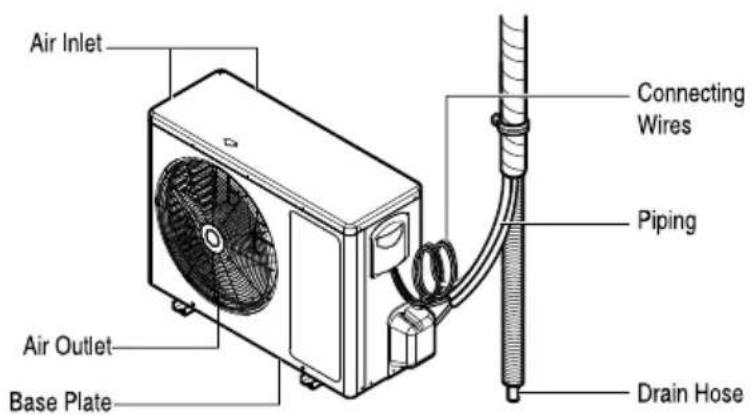
Outdoor Unit
text_image
Air Inlet Connecting Wires Piping Air Outlet Base Plate Drain HoseElectrical Safety
Warning
• This appliance must be properly grounded.
To minimize the risk of electric shock, you must always plug into a grounded outlet.
- Do not cut or remove the grounding prong from the power plug.
- Attaching the adapter ground terminal to the wall receptacle cover screw does not ground the appliance unless the cover screw is metal and not insulated, and the wall receptacle is grounded through the house wiring.
- If you have any doubt whether the air conditioner is properly grounded, have the wall receptacle and circuit checked by a qualified electrician.
Temporary Use of an Adapter
We strongly discourage the use of an adapter due to potential safety hazards. For temporary connections, use only a genuine adapter, available from most local hardware stores. Ensure that the large slot in the adapter is aligned with the large slot in the receptacle for a proper polarity connection.
To disconnect the power cord from the adapter, use one hand on each to avoid damaging the ground terminal. Avoid frequently unplugging the power cord as this can lead to eventual ground terminal damage.
Warning
- Never use the appliance with a broken adapter.
Temporary Use of an Extended Cord
We strongly discourage the use of an extension cord due to potential safety hazards.
Warning
This appliance should be installed in accordance with national wiring regulations. This manual acts as a guide to explaining product features.
Symbols used in this Manual

This symbol alerts you to the risk of electric sock.

This symbol alerts you to hazards that may cause harm to the air conditioner
NOTE
This symbol indicates special notes
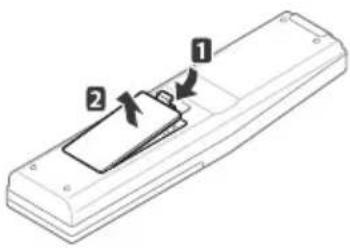
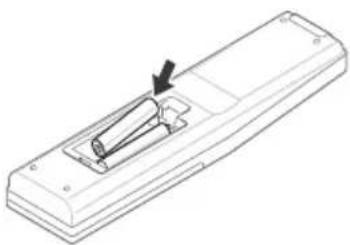
Inserting batteries
Insert batteries before using the remote control. The battery type used is AAA (1.5 V).
1 Remove the battery cover.
natural_image
Diagram of a remote control panel with labeled parts (1 and 2), showing no text or symbols beyond labels2 Insert the new batteries and make sure that the and terminals of the batteries are installed correctly.
natural_image
Line drawing of a remote control box with an arrow indicating the handle (no text or symbols)3 Reattach the battery cover.
NOTE
If the display screen of the remote control starts to fade, replace the batteries.
Installing the remote control holder
Install the holder where there is no direct sunlight to protect the remote control.
1 Choose a safe and easily-accessible place.
2 Remove the adhesive sticker protection film from the back of the holder before attaching it to the wall.
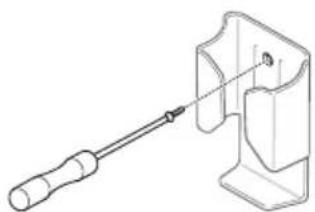
3 Fix the holder by fastening the 2 screws firmly with a screwdriver.
natural_image
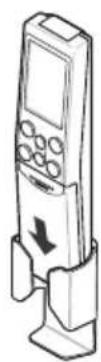
Technical line drawing of a screwdriver inserted into a mechanical component (no text or symbols)4 Slide the remote control into the holder.
Operating method
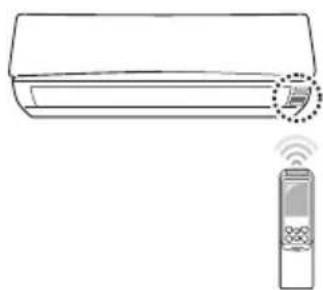
Point the remote control towards the signal receiver at the bottom of the air conditioner to operate it.
natural_image
Line drawing of a wall-mounted air conditioner with a remote control unit emitting signal waves (no text or symbols)NOTE
- The remote control may operate other electronic devices if pointed towards them. Make sure to point the remote control towards the signal receiver of the air conditioner.
- For proper operation, use a soft cloth to clean the signal transmitter and receiver.
Using the remote control
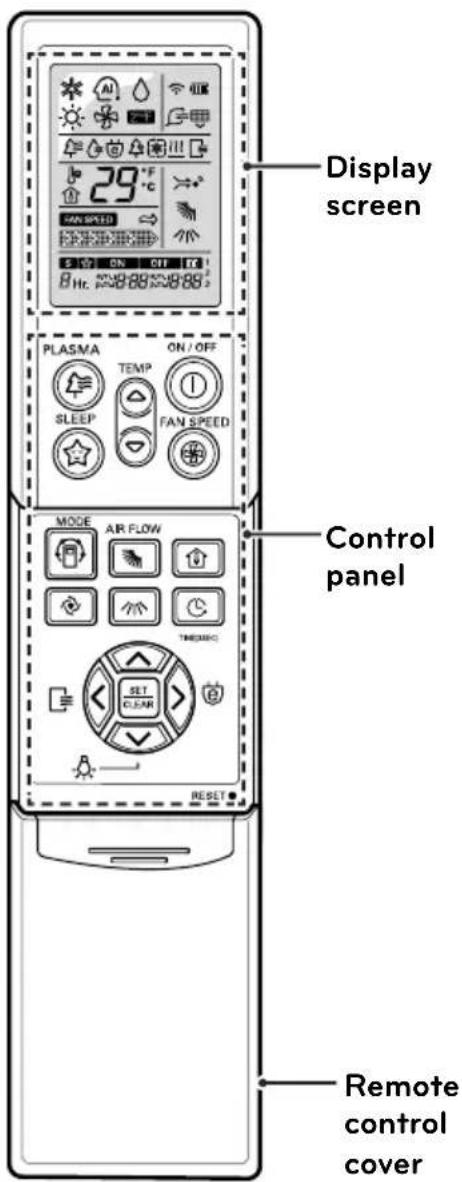
You can operate the air conditioner more conveniently with the remote control. You will find the buttons for the additional functions under the cover of the remote control.
Wireless remote control
text_image
Display screen PLASMA ON/OFF SLEEP FAN SPEED MODE AIR FLOW CONTROL panel SET C.C.A.N. RESET Remote control cover| Control panel | Display screen | Description |
 |  | Plasma button (Optional)* : Purifies the air by removing particles that enter the indoor unit. |
 |  | Sleep mode auto button* : Sets the sleep mode auto operation. |
 |  | Temperature adjustment buttons : Adjusts the room temperature when cooling and heating. |
 | - | On/Off button : Turns the power on/off. |
 | door fan speed button : Adjusts the fan speed. | |
 |  | Operation mode selection button* : Selects the operation mode.Cooling operation (*) Auto operation or auto changeover (*) / Dehumidifying operation (*) / Heating operation (*) / Air circulation (*) . |
 |  | Jet cooling/heating button* Warms up or cools down the indoor temperature within a short period of time. |
 | Air flow direction button: Adjusts the air flow direction vertically or horizontally. | |
| [CBD3] | Temperature display button: Displays the room temperature. | |
 |  | Timer button: Sets the current time and the start / end time. |
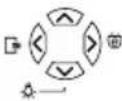 |  | Navigation and functions button*: Adjusts the time and sets the special functions.: Auto clean / Operates energy saving cooling / To set the Dimmer. |
| at/clear button: Sets or cancels functions. | ||
| RESET● | - | Reset button: Resets the air conditioner settings. |
BASIC FUNCTIONS
Cooling your room
(Cooling operation)
1 Press Ⓐ to turn on the power.
2 Open the remote control cover.
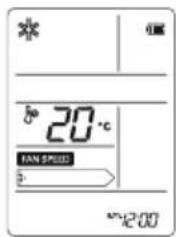
3 Press 📄 repeatedly to select the cooling operation.
- Following will be displayed on the display screen.
text_image
* 20°C TAN SPEED 5 12:004 Press ⊙ or ⊙ to set the desired temperature.
- The temperature range is 18°C - 30°C
Heating your room
(Heating operation / Heat Pump model only)
1 Press ① to turn on the power.
2 Open the remote control cover.
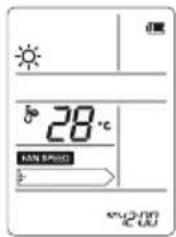
3 Press 📄 repeatedly to select the heating operation.
- Following will be displayed on the display screen.
text_image
28°C FAN SPEED MPV-0.017 AC LED4 Press ⬆ or ⬇ to set the desired temperature.
- The temperature range is 16°C - 30°C
NOTE
Cooling-only models do not support this function.
Removing humidity
(Dehumidification operation)
This mode removes excess moisture from an environment with high humidity or in the rainy season, in order to prevent mold from setting in. This mode adjusts the room temperature and the fan speed automatically to maintain the optimal level of humidity.
1 Press Ⓐ to turn on the power.
2 Open the remote control cover.
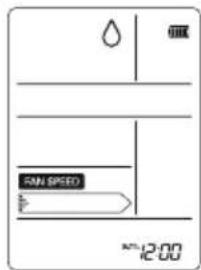
3 Press 📄 repeatedly to select the dehumidifying operation.
- △ is displayed on the display screen.
text_image
SAN SPEED 12:00NOTE
- In this mode you cannot adjust the room temperature, as it is adjusted automatically. Also, the room temperature is not displayed on the display screen.
- In this mode indoor unit fan and outdoor unit will be OFF when set temperature is achieved.
Airing your room (Air Circulation operation)
This mode only circulates the indoor air without changing the room temperature. The cooling lamp lights up in air circulation mode.
1 Press Ⓐ to turn on the power.
2 Open the remote control cover.
3 Press 📋 repeatedly to select the air circulation operation.
- Following will be displayed on the display screen.
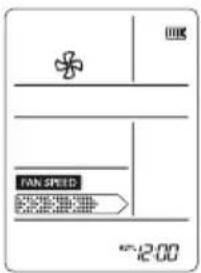
text_image
UK TAN SPEED 12:00 42.004 Press ☑ to adjust the fan speed.
Adjusting the fan speed
1 Open the remote control cover while the air conditioner is in operation.
2 Press ⑧ repeatedly to adjust the fan speed.
- Select if you want natural air. The fan speed adjusts automatically.
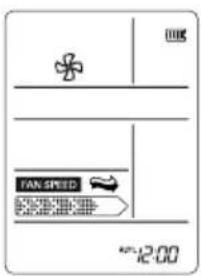
text_image
UK FAN SPEED 12:00Natural wind (CHAOS Logic)
For fresher feeling, press the INDOOR FAN SPEED SELECTION BUTTON and set to Natural wind mode.
In this mode, the wind blows like a natural breeze by automatically changing fan speed.
Adjusting the air flow direction
1 Open the remote control cover while the air conditioner is in operation.
2 To adjust the direction of the air flow horizontally, press 📄 repeatedly and select the desired direction.
- Select ⚡ to adjust the direction of the air flow automatically.
3 To adjust the direction of the air flow vertically, press 📄 repeatedly and select the desired direction.
- Select to adjust the direction of the air flow automatically.
NOTE
- Adjusting the air flow direction vertically may not be supported, depending on the model.
- Adjusting the air deflector arbitrarily may cause product failure.
- If you restart the air conditioner, it starts to operate with the previously set direction of air flow, so the air deflector may not match the icon displayed on the remote control. When this occurs, press or to adjust the direction of the air flow again.
Setting the timer
You can use the timer function to save energy and to use the air conditioner more efficiently.
Setting the current time
1 Open the remote control cover.
2 Press Ⓤ and hold it for longer than 3 seconds.
- The time icon flickers at the bottom of the display screen.
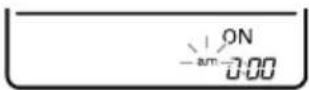
3 Press ⬆ or ⬇ to select AM or PM.
4 Press ⬇ to adjust the hour and press ⬇ or ⬇ to select the hour.
5 Press ⬇ to adjust the minutes and press ⬇ or ⬇ to select the minutes.
6 Press ☑ to finish.
Turning on the air conditioner automatically at a set time
1 Open the remote control cover.
2 Press ☎.
- The icon below flickers at the bottom of the display screen.
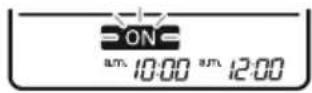
3 Set the time when you want the air conditioner to turn on automatically (see step 3 to 5 in "Setting Current Time").
4 Press ☐ to finish.
Turning off the air conditioner automatically at a set time
1 Open the remote control cover.
2 Press ☐ twice.
- The icon below flickers at the bottom of the display screen.
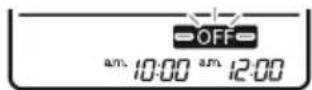
3 Set the time when you want the air conditioner to turn off automatically (see step 3 to 5 in "Setting Time").
4 Press ☑ to finish.
NOTE
• This function may not be supported, depending on the model.
- This mode does not have auto restart feature.
Canceling the timer setting
1 Open the remote control cover.
2 Press Ⓤ.
3 Press ◇ or ◇ to select the timer setting to cancel.
4 Press SET CLEAR.
- To cancel all timer settings, open the remote control cover and press ☑ ^45 CLEAN.
Setting sleep mode
Use the sleep mode to turn off the air conditioner automatically when you go to sleep. The fan speed is set to low in sleep mode.
1 Press Ⓓ to turn on the power.
2 Press 📋 repeatedly to select the desired mode.
3 Press Ⓡ repeatedly to select the desired number of hours (up to 7 hours).
- ☆ is displayed on the display screen in sleep mode.
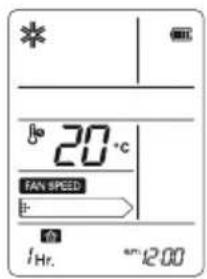
text_image
* #o 20 °C TAN SPEED #: #e 1/Hr. am 12.00NOTE
- The sleep mode will operat e indoor fan at super low spee d in coo ling mode and at low spee d in heating mode for pleasan t sleep. In cooling mod e or he alt hy dehumidifi cation mode
The setting temperature will rise automaticly two times by 1°C over next con secuti ve 30 minutes (Maxi mum 2°C) for a com fort abl e sleep.
This will be the final setting temperature as long as sleep mode is functioning.
After com pletion of set time uni t will switch OFF autom atical ly.
ADVANCED FUNCTION
The air conditioner offers some additional advanced functions.
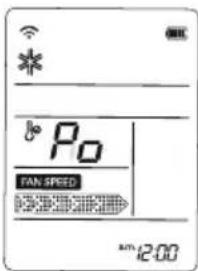
Changing room temperature quickly
(Jet Cool)
This mode allows you to cool indoor air quickly in summer or warm it quickly in winter.
1 Press Ⓓ to turn on the power.
2 Open the remote control cover.
3 Press
text_image
Po TAN SPEED 12:00- In jet cooling mode, strong air blows out at a temperature of 18°C for 30 minutes.
- In jet heating mode, strong air blows out at a temperature of 30^ C for 30 minutes.
NOTE
- In Air Circulation, Auto, or Auto Changeover mode, this function cannot be used.
- This function may not be supported, depending on the model.
Air Purification Mode (Optional)
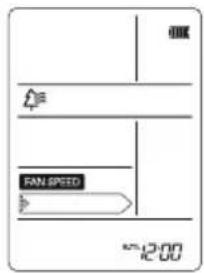
LG Air conditioner come with a variety of filters like Anti-Bacteria filter, Tripple Filter, Virus & Allergy safe filter, Plasma Filter, which enable you to use it as a Built-in Air purifier (Even when you are not using it for cooling, hence minimal electricity consumption).
1 Press "O" Key. The unit will turn ON, with only the fan operated and Built-in Air purifier function is activated.
- PLASMA is displayed on the display screen.
text_image
00K FAN SPEED 12:00NOTE
- In this mode the compressor will not operate, hence saves electricity.
• This function may not be supported, depending on the model.
Indoor air purification
Auto Clean operation
In the cooling and dehumidifying operations, moisture is generated inside the indoor unit. Use the auto cleaning function to remove such moisture.
1 Press Ⓓ to turn on the power.
2 Open the remote control cover.
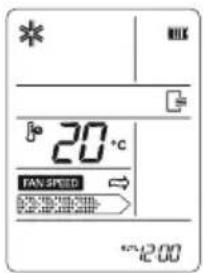
3 Press ≡.
- ≡ is displayed on the display screen.
text_image
* MILK 20°C FAN SPEED 4:12:00- If you turn off the power, the fan operates for 30 minutes and cleans the inside of the indoor unit.
NOTE
Some buttons cannot be used while the auto cleaning function is in operation.
Plasma Purification operation (Optional)
The plasma filter developed by LG removes microscopic contaminants from the intake air completely to supply clean and fresh air.
1 Press Ⓓ to turn on the power.
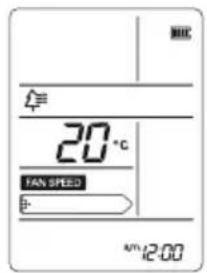
2 Press
- is displayed on the display screen.
text_image
MIC 20 °C TAN SPEED + A/12:00NOTE
- You can use this function by pressing without turning the air conditioner on.
- Both the plasma lamp and the power lamp light up while plasma purification is in operation.
- This function may not be supported, depending on the model.

Auto operation (Artificial intelligence)
Cooling-only models
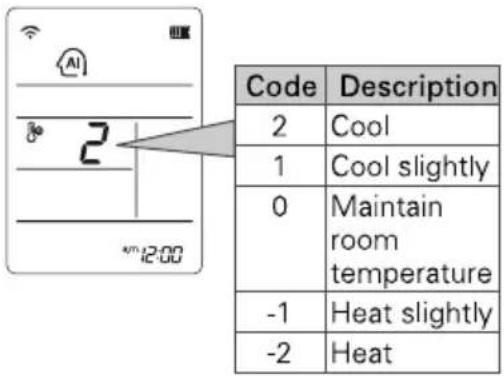
In this mode, the fan speed and the temperature adjust automatically, based on the room temperature.
1 Press Ⓓ to turn on the power.
2 Open the remote control cover.
3 Press 📋 repeatedly to select auto operation.
4 Press Ⓗ to select the desired operation code if the temperature is higher or lower than the desired temperature.
text_image
Code Description 2 Cool 1 Cool slightly 0 Maintain room temperature -1 Heat slightly -2 HeatNOTE
- In this mode, you cannot adjust the fan speed, but you can set the air deflector to rotate automatically.
- This function may not be supported, depending on the model.
e-Saver Mode
This mode minimizes power consumption during cooling and increases the set temperature to the optimal level for a more comfortable environment.
1 Press Ⓐ to turn the power on.
2 Open the remote control cover.
3 Press 📄 repeatedly to select the cooling operation.
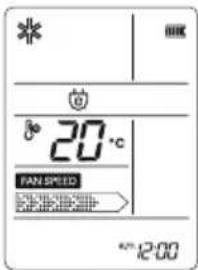
4 Press ⓔ.
- ⓔ is displayed on the display screen.
text_image
* 20°C FAN.SPEED 12:00Dimmer (Optional)
In Dimmer Mode Unit Display will be turned OFF completely but system will be in running state.
- Make sure that remote & Air conditioner are ON.
- Press ☐ Dimmer Key to activate/deactivate dimmer function.
NOTE
This mode has Auto Restart feature.
NOTE
In this mode temperature may increase after sometime but only upto 26°C.
NOTE
- This function may not be supported, depending on the model.
- This mode does not have auto restart feature.
Operating the air conditioner without the remote control
You can use the On/Off button of the indoor unit to operate the air conditioner when the remote control is unavailable. However, the fan speed is set to high.
1 Open the front cover.
- Lift up both sides of the cover slightly.
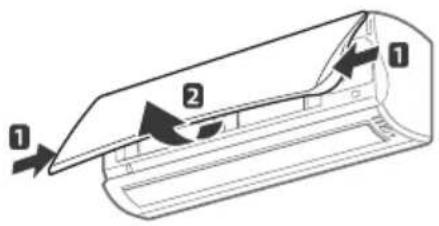
text_image
Diagram of a car airfoil cross-section with labeled parts 1 and 2, showing airflow direction arrows.2 Press the On/Off button.
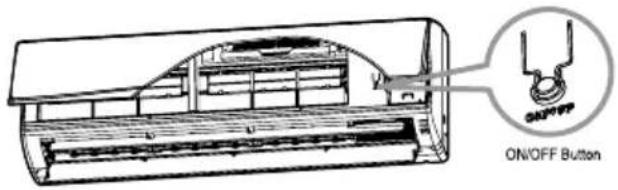
text_image
ON/OFF Button- For cooling and heating models, the operation mode changes, depending on the room temperature.
Restarting the air conditioner automatically
When the air conditioner is turned on again after a power failure, this function restores the previous settings. This function is a factory default setting.
Disabling auto restart
1 Open the front cover.
- Lift up both sides of the cover slightly.
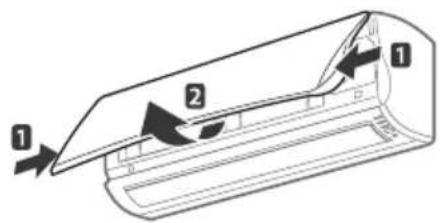
text_image
Diagram of a airflow or ventilation system with labeled components 1 and 2, showing directional flow arrows.2 Press the On/Off button and hold it for 6 seconds.
- The unit will beep twice and the lamp will blink 8 times.
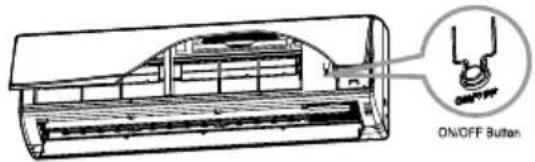
text_image
ON/OFF Button- To re-enable the function, press the On/Off button and hold it for 6 seconds. The unit will beep twice and the blue lamp will blink 4 times.
NOTE
If you press and hold the On/Off button for 3 – 5 seconds instead of 6 seconds, the unit will switch to the test operation. In the test operation, the unit blows out strong air for cooling for 18 minutes and then returns to the factory default settings.
| Cooling Model | Heat pump Model | |||
| Room Temp. ≥ 24°C | 21°C ≥ Room Temp. < 24°C | Room Temp. < 21°C | ||
| Operating mode | Cooling Cooling Healthy Dehumidification Heating | |||
| Indoor FAN Speed | High High High High | |||
| Setting Temperature | 22°C 22°C 23°C 24°C | |||
MAINTENANCE
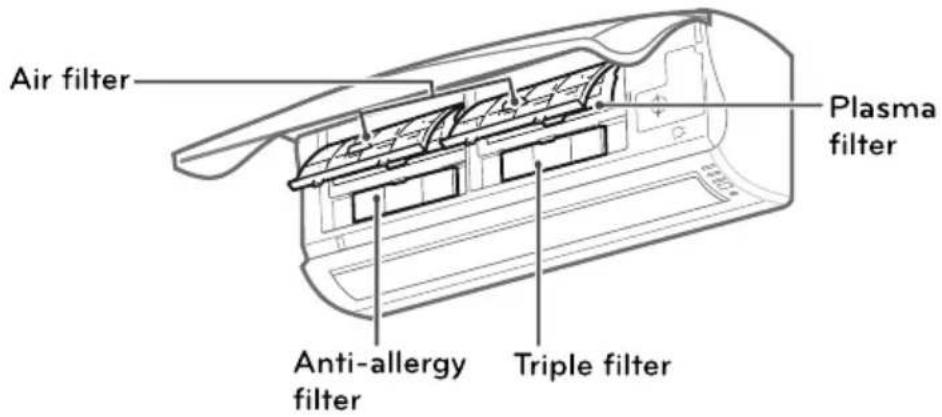
Clean the product regularly to maintain optimal performance and to prevent possible breakdown.
* This may not be provided, depending on the model.
text_image
Air filter Plasma filter Anti-allergy filter Triple filter| Item | Cleaning interval | Cleaning method |
| Air filter | 2 weeks | See “Cleaning air filter.” |
| Anti-allergy filter / Triple filter | 3 months | See “Cleaning anti-allergy filter and triple Filter.” |
| Plasma filter* | 3 months | See “Cleaning the plasma filter.” |
| Indoor unit surface | Regularly | Use a soft, dry cloth. Do not use bleach or abrasives. |
| Outdoor unit | Regularly | Use steam to clean the heat exchanger coils and the panel vents (consult with technician). |

CAUTION
- Turn off the power and unplug the power cord before you perform any maintenance; otherwise it may cause electric shock.
- Never use water that is hotter than (40°C) when you clean the filters. It may cause deformation or discoloration.
- Never use volatile substances when you clean the filters. They may damage the surface of the product.

NOTE
- The location and shape of the filters may differ, depending on the model.
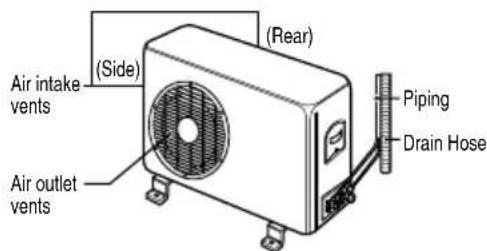
- Make sure to clean the heat exchanger coils of the outdoor unit regularly, as dirt collected in the coils may decrease the operational efficiency or increase energy costs.
Cleaning the air filter
Clean the air filter once every 2 weeks or more if necessary.
1 Turn off the power and unplug the power cord.
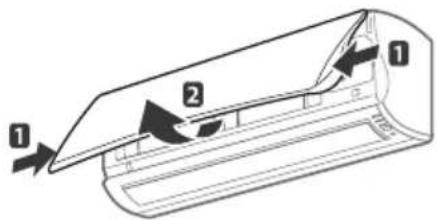
2 Open the front cover.
- Lift up both sides of the cover slightly.
text_image
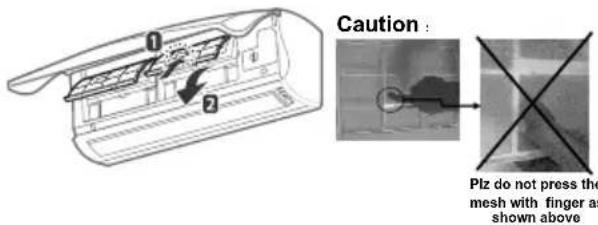
Diagram of a airflow or ventilation system with labeled components 1 and 2, showing directional flow arrows.3 Hold the knob of the air filter, lift it up slightly and remove it from the unit.
text_image
Caution : Plz do not press the mesh with finger as shown above4 Clean the filter with a vacuum cleaner or with warm water.
- If dirt is difficult to remove, wash the filter in lukewarm water with detergent.
5 Dry the filter in the shade.
Cleaning the anti-allergy filter and triple filter
1 Turn off the power and unplug the power cord.
2 Open the front cover and remove the air filter (see "Cleaning air filter").
Outdoor Unit
The heat exchanger coils and panel vents of the outdoor unit should be checked regularly. If clogged with dirt or soot, the heat exchanger and panel vents may be professionally steam cleaned.
NOTICE
Dirty or clogged coils will reduce the operating efficiency of the system and cause higher operating costs.
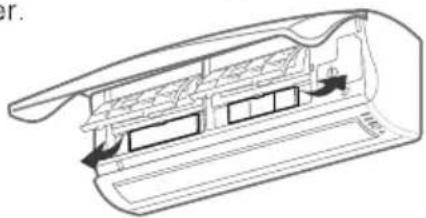
3 Pull out the anti-allergy filter and the triple filter.
natural_image
Technical line drawing of a mechanical component with internal channels and mounting holes (no text or symbols)4 Dry the filter in direct sunlight for 2 hours.
NOTE
The location and shape of the filters may differ, depending on the model.
Cleaning the plasma filter
1 Turn off the power and unplug the power cord.
2 Open the front cover and remove the air filter (see "Cleaning air filter").
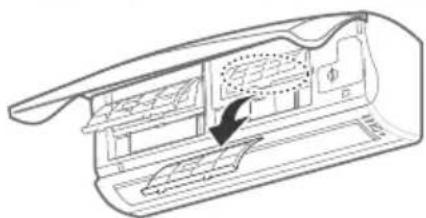
3 Remove the plasma filter in 10 seconds.
natural_image
Technical line drawing of a device casing with internal compartments and a highlighted section (no text or symbols)4 Use a vacuum cleaner to remove any dirt.
- If dirt is difficult to remove, wash the filter with lukewarm water.
5 Dry the filter in the shade.
NOTE
- The location of the filters may differ, depending on the model.
- The plasma filter may not be included in some models.
text_image
Air intake vents (Side) (Air outlet vents) (Rear) (Piping Drain Hose)
text_image
(Side) (Rear) Air intake vents Air outlet vents Piping Drain Hose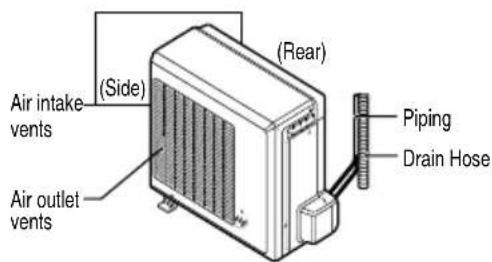
text_image
Air intake vents (Side) Air outlet vents (Rear) Piping Drain HoseTROUBLESHOOTING
Self-diagnosis function
This product has a built-in self-diagnosis function. If an error occurs, the lamp of the indoor unit will blink in 2 second intervals. If this occurs, contact your local dealer or service center.
Before requesting service
Please check the following before you contact the service center. If the problem persists, contact your local service center.
| Problem | Possible causes | Corrective action |
| There is a burning smell and a strange sound coming from the unit. | - | Turn off the air conditioner, unplug the power cord and contact the service center. |
| Water leaks from the indoor unit even when the humidity level is low. | ||
| The power cord is damaged or generating excessive heat. | ||
| A switch, a circuit breaker (safety, ground) or a fuse is not operated properly. | ||
| The air conditioner does not work. | The air conditioner is unplugged. | Check whether the power cord is plugged into the outlet. |
| A fuse is blown or the power supply is blocked. | Replace the fuse or check if the circuit breaker has tripped. | |
| A power failure has occurred. | Turn off the air conditioner when a power failure occurs. When the power is restored, wait 3 minutes, and then turn on the air conditioner. | |
| The voltage is too high or too low. | Check if the circuit breaker has tripped. | |
| The air conditioner turned off automatically at a preset time. | Press the power button again. | |
| The air conditioner does not generate cool air. | Air is not circulating properly. | Make sure that there are no curtains, blinds or furniture blocking the front of the air conditioner. |
| The air filter is dirty. | Clean the air filter once every 2 weeks. See “Cleaning Air Filter” for more information. | |
| The room temperature is too high. | In summer, it may take some time to cool indoor air. In this case, select the jet cool operation to cool indoor air quickly. | |
| Cold air is escaping from the room. | Make sure that no cold air is escaping through ventilation points in the room. | |
| The desired temperature is higher than the set temperature. | Set the desired temperature to a level lower than the current temperature. | |
| There is a heating source nearby. | Avoid using a heat generator such as an electric oven or a gas burner while the air conditioner is in operation. | |
| Air circulation operation is selected. | In the air circulation operation, air blows from the air conditioner without cooling or heating the indoor air. Switch the operation mode to the cooling operation. | |
| It is not possible to adjust the fan speed. | The auto operation, jet operation or dehumidifying operation is selected. | In some operation modes, such as the jet or dehumidifying operation modes, you cannot adjust the fan speed. Select an operation mode in which you can adjust the fan speed. |
| It is not possible to adjust the temperature. | The air circulation operation or jet operation is selected. | In some operation modes, such as the air circulation or jet operation mode, you cannot adjust the temperature. Select an operation mode in which you can adjust the temperature. |
When the air conditioner is not going to be used for a long time.
When air conditioner is not going to be used for a long time.

Operate the air conditioner on Air circulation mode (Refer to page 23) for 2 to 3 hours.
• This will dry out the internal mechanisms.

Turn off the circuit breaker, and disconnect the plug.

CAUTION
Turn off the circuit breaker when the air conditioner is not going to be used for a long time. Dirt may collect and may cause a fire.

Remove the batteries from the remote control.
When the air conditioner is to be used again.

Clean the air filter and install it in the indoor unit. (Refer to page 26 for cleaning filters.)

Check that the air inlet and outlet of the indoor/outdoor unit are not blocked.
BRANCH BRANCH OFFICE ADDRESS PHONE NO. / FAX NO.
| Ahmedabad | LGEIL, 233-234, Platinum Plaza, Nr. Judges Bunglow Cross Road, Bodakdev, Ahmedabad-54 | 40040013-14 |
| Asansol | LGEIL, Block-E, Ist Floor, P C Chattarjee Market, Rambandhu Tala, GT Road (E) Asansol-713303 | 3292009/3292010 (Fax) 2215170 |
| Aurangabad | LGEIL, 302 CIDCO No. 3, Opp. Hotel Ramgiri, Jalna Road, Aurangabad-431003 | 5625705 / (Fax) 2474055/32095436/32095437/32095438 |
| Bangalore | LGEIL, No. 914, 2nd Floor, Shri Venkateshwara Complex, Opp. IBP Petrol Bunk, 80ft Road, 6th Block, Koramangala - Bangalore - 560095 | 41145145/41144750/41144751 |
| Bhopal | LG Electronics India Private Limited, 2nd Floor, Alankar Complex, Plot No. 10, M.P. Nagar, Zone-II, Bhopal-462011 | 4262847/4229861 (Fax) 4262848 |
| Bhubaneshwar | LGEIL, Plot No. 02,1st Flr., Bapuji Nagar, Bhubaneshwar-751009 | 2531430, 2534280 |
| Calcutta | LGEIL, 1, Ho-Chi-Min-Sarani, 6th Floor, Metro Towers, Calcutta-700071 | 22883254 (51) Fax |
| Chandigarh | LGEIL, SCO No. 142-143, 3rd Floor, Sector-34A, Chandigarh-160002 | 5087389/90 (Fax) 5089107 |
| Chennai | LGEIL, AA11, 2nd Avenue, Fatima Tower, Anna Nagar West, Chennai-600040 | 65510501~04 (Fax) 26203506 |
| Cochin | LGEIL, 40/1270, Vasudeva Buildings, T.D. Road, Ernakulam Cochin-682011 | 2369765/2369743/2370744/4027444/4027555/2360977 (Fax) |
| Coimbatore | LGEIL, 250A, Sanganur Main Road, Kannappa Nagar, Coimbatore-641027 | 2332197, 2332195 |
| Delhi | LGEIL, A-27, Mohan Co-operative, Industrial Estate, New Delhi | 26991412/11/13 (Fax) 26991410 |
| Dehradun | LGEIL, M-22, Commercial Motors Compound, Mohabewala Indl. Area, Delhi-Saharan Road, Dehradun (Uttarakhand) | 2644213/283 |
| Gurgaon | LGEIL, lInd Flr, A Block, Centre Point Bldg, Sushant Lok , Ph-I, Gurgaon-122001 | 4047461-62 - 63/4272867, 4047460 (Fax) |
| Ghaziabad | LGEIL, J-10, RDC Rajnagar, Ghaziabad - 201001 | 9811354152/3/64/65/266 |
| Guwahati | LGEIL, Shantineer Bhawan, C K Aggarwal Path, Chenikurthi, Guwahati-781003 | 2663895/2666958/2665983/2668984 (Telefax) |
| Hyderabad | LGEIL, 1st Floor, Survey No. 54, Pulla Reddy Building, Vikarampuri, Main Road, Kharkhana, Secunderabad-500009 | 27207504, 05, 06/27204094 27201462 (Fax) |
| Hubli | LGEIL, 1 Floor, Above Bellad & Co., Near Bannigida Busstop, Gokul Road, Hubli-580030 | 4250251/52 |
| Indore | LGEIL, 3rd flr., 304 Bansi Trade Centre, 581/5 M.G. Road, Indore-452003 | 4065523~24, 4082157 (Fax) |
| Jaipur | LGEIL, B-71, Sahakar Marg, Lal Kothi Scheme, Jaipur-302015 | 5111118/5113028/5105392, 5111540 (Fax) |
| Jammu | LGEIL, Plot No. 52, Yard No. 6,Transport Nagar, Narwal, Jammu-180006 | 2477420, 2477419, 2474396, 2474384 |
| Jodhpur | LGEIL, 22(1-A)/21(2-B)/2, RIICO Heavy Industrial Area, Jodhpur-342003 | 2742384, 392 / 5120030 (Fax) |
| Karnal | LG Electronics India Pvt Ltd, Super Tyre Building, Near New Anaj Mandi, Opp. New World Restauramt, G.T. Road Karnal, Haryana | 2219201, 2219202 (Telefax) |
| Lucknow | LGEIL, B-537, Hari Kunj, Keshav Nagar, Sitapur Road, Lucknow-226020 | 2757538,39,2759121 (Fax) 2757559 |
| Ludhiana | LGEIL, Village Jhande, Near Badowal Railway Station, Opp. Ferozpur Road, Ludhiana. | 2804412 - 19 |
| Mumbai(N & S) | LGEIL, Trade Star, 4th Floor, A Wing, J.B. Nagar, Andheri Kurla Road, Andheri (E) Mumbai-400059 | 28352882-2887 / 28352889 (Fax) |
| Nagpur | LGEIL, 5A, Road No.13, Behind Msrtc Workshop, MIDC Hinga, Nagpur-440016 | 235120, 235122, Fax : 234401 |
| Patna | LGEIL, 2nd Floor, Ankit Chandra Deep Complex, Bander Bageecha, Near Samrat Hotel, Patna-800001. | 3298714, 2541845 (Fax) |
| Pune | LGEIL, 105/106, Premium Point, GM Road, Opp. Modern High School, Illrd Floor, Shivaji Marg, Pune-411005 | 66030100,732/733/734/735, 66030740 (Fax) |
| Rajkot | LGEIL, Sanskruti Apartment, Opp. Dr. Ambedkar Bhawan, Near Atithi Chowk, Akshar Road , Rajkot - 360004 | 2481499,2467692 (Fax) |
| Raipur | 613 to 616 , 6th Floor, Offizo, Magneto - The Mall, GE Road, Raipur - 492001 | 4053171/4037470 (Fax) 4038426/10/11 |
| Ranchi | LGEIL, 402, Commerce Tower, Opp. Gel Church Complex, Main Road, Ranchi | 3294026, 2331815 |
| Surat | LGEIL, 1001-1004, Ascon Plaza, lInd Flr, Anand Mahal Road, Behind Bhulka Bhavan School, Adajan, Surat-395009 | 2730982/83, 2730984 (Fax) |
| Thane | LGEIL, Gall Shop No - 206,207, 2nd Floor, Sai Plaza , Above Vijay Sales Opp. Cine Wonder Mall, Ghodbunder Road , Thane(West)-400607 | 25472633/2637 25472602(Fax) |
| Varanasi | LGEIL, Pama Complex, DLW, Lahartara Road, Shivdaspur, Manduadih, Varanasi, UP-221002 | 2373432/36/37 |
| Vijaywada | LGEIL, Door No. 32-2/1-7, Ratnamamba Street, Prajasakti Nagar, Vijaywada-520010, Andhra Pradesh | 2497283/87, (Fax) 2497284 |
| Warangal | LGEIL, House No. 1-8-598/1, First Floor, Beside HDFC Bank, Nakkalgutta, Hanamakonda-506001 (Warangal) | 2551453 |
| Kozhikode | 3/568, Thripuri Building, Wayanadu Road, First Floor,Near K.S.F.E, East Nadakkavu, Calicut-673011 | 2366755, 2366756, 2366678, (Fax) 2766678 |