
SoundControl Hearing Aids - Earphones BOSE - Free user manual and instructions
Find the device manual for free SoundControl Hearing Aids BOSE in PDF.


| Product Type | Self-fitting air conduction hearing aids |
| Model | Bose SoundControl™ Hearing Aids (BMD0012) |
| Intended Use | For individuals 18 years and older with perceived mild to moderate hearing impairment |
| Dimensions (with cable) | 33 mm × 23 mm × 18 mm (per hearing aid) |
| Dimensions (without cable) | 30 mm × 14 mm × 8 mm (per hearing aid) |
| Power Source | Size 312 zinc-air batteries (provided) |
| Battery Life | Up to 4 days (14 hours/day use) |
| Wireless Connectivity | Bluetooth Low Energy (BLE) for app control |
| App Compatibility | Bose Hear app (iOS 10+, Android 5.0+) |
| Key Features | World Volume, Treble & Bass, Focus (Everywhere/Front), Left/Right Balance, Modes, 12-channel WDRC, Noise Reduction, Feedback Control |
| Fit Customization | User-adjustable via on-device buttons or app; three eartip sizes (open/closed) and three cable sizes |
| Eartip Types | Open and closed eartips (sizes 1, 2, 3) |
| Cable Sizes | Sizes 1, 2, 3 (replaceable) |
| Maintenance | Daily: clean eartips and microphones with brush; Quarterly: replace eartips and wax guards; Yearly: replace cables |
| Wax Guard Replacement | Every 3 months or if blocked |
| Storage | In case with battery doors partially open; remove batteries for extended storage |
| Operating Conditions | 32°F to 104°F (0°C to 40°C); 0-95% RH; 70-110 kPa |
| Safety Notices | Not hearing protection; keep away from children; battery ingestion hazard; do not submerge or use in explosive atmospheres |
| In the Box | Hearing aids (pair), carrying case, size 312 batteries (8), open eartips (3 pairs), closed eartips (3 pairs), cable sizing tool, hearing aid brush |
| Warranty | Limited warranty; see global.Bose.com/warranty |
| Return Policy | Satisfaction guaranteed with trial period (for direct Bose purchases) |
Frequently Asked Questions - SoundControl Hearing Aids BOSE
User questions about SoundControl Hearing Aids BOSE
0 question about this device. Answer the ones you know or ask your own.
Ask a new question about this device
Download the instructions for your Earphones in PDF format for free! Find your manual SoundControl Hearing Aids - BOSE and take your electronic device back in hand. On this page are published all the documents necessary for the use of your device. SoundControl Hearing Aids by BOSE.
USER MANUAL SoundControl Hearing Aids BOSE
BOSE SOUNDCONTROL™ HEARING AIDS
Owner's Guide
1. Safety and health information
Intended use 7
Indications for use 7
Clinical data 7
Hearing health care information 8
Important safety instructions 11
Warnings 12
Cautions 13
2. Set up the hearing aids
What's in the box 16
Hearing aid overview 17
Connect your phone 18
Download the Bose Hear app 19
Insert the batteries 20
3. How to wear
Put on the hearing aids 24
Check your fit 27
4. Hearing aid and app controls
Power on 31
Power off 31
World Volume 32
Treble and bass 34
Focus 35
Left/Right Ear Balance 37
Modes 39
5. Adjusting to the hearing aids
What to expect 41
6. Battery management
When to replace batteries 44
Remove the batteries 44
Battery life 45
Purchase batteries 46
7. Bluetooth® connections
Connect your phone 48
Connect a different phone 49
Clear the hearing aid device lists 49
8. Care and maintenance
Store the hearing aids 52
Maintain the hearing aids 53
Replacement components 56
Limited warranty 56
Returns and exchanges 57
Update the hearing aids 57
9. Troubleshooting
Try these solutions first 59
Other solutions 60
Eartip troubleshooting 73
Cable size troubleshooting 79
10. Regulatory and legal information
Symbols and descriptions 99
1 Safety and health information
Intended use
Indications for use
Clinical data
Hearing health care information
Important safety instructions
Warnings
Cautions
Intended use
The Bose SoundControl™ hearing aids are a pair of user- fitted wireless air conduction hearing aids intended for use by individuals 18 years and older with perceived mild to moderate hearing impairment.
Indications for use
The Bose SoundControl™ hearing aids are intended to amplify sound for individuals 18 years of age or older with perceived mild to moderate hearing impairment. They are adjusted by the user to meet the user's hearing needs. No pre-programming or hearing test is necessary. The device is intended for direct-to-consumer sale and use without the assistance of a hearing care professional.
Clinical data
In a clinical study, people with mild to moderate hearing impairment generally experienced similar hearing benefit, and were more satisfied, when using the Bose self-fitting technology compared with professional fitting of the same device. There were no adverse events encountered during this study.
Hearing health care information
This product may help you hear better if you:
- Strain to follow conversations when others don’t, especially in noisy places.
- Have trouble understanding the TV.
This product may not be right for you if you:
- Consistently experience feedback (whistling) of the hearing aid when you turn up World Volume to a level that is comfortable for you, even after you have followed the suggestions in these Instructions for Use to make sure your hearing aid fits properly.
- Feel the hearing aid is not providing enough amplification even at the highest World Volume setting.
A hearing health care professional may be able to help you select a different hearing aid solution to meet your needs.
You should see a hearing health care professional if you:
- Have a visible deformity of the ear.
- Have a current ear infection or a history of active discharge from one or both ears within the past 90 days.
- Have sudden or rapid progression of hearing loss within the past 90 days in one or both ears.
- Have acute or chronic dizziness, poor dexterity, poor vision, or significant dementia.
- Suspect that you have significant ear wax accumulation or a foreign object in the ear canal. Symptoms of significant ear wax accumulation can include itching in your ear, a feeling of fullness in your ear, and/or reduced hearing.
- Experience pain or discomfort in the ear.
- Have a noticeable difference in hearing between ears.
- Have sudden onset or rapid worsening of tinnitus (ringing in the ear) in one or both ears within the past 90 days.
This product will not restore normal hearing and will not prevent or improve a hearing impairment resulting from organic conditions. This product is designed to help you make greater use of your remaining hearing ability. You should keep in mind that it can take time to become accustomed to hearing new sounds.
For best results, practice using the hearing aids as much as possible. In most cases, infrequent use of the hearing aids doesn't permit you to attain full benefit from them.
The use of a hearing aid is only part of hearing habilitation and may need to be supplemented by auditory training and instruction in lipreading.
It is good health practice for a person with a hearing loss to have a medical evaluation by a licensed physician (preferably a physician who specializes in diseases of the ear). Licensed physicians who specialize in diseases of the ear are often referred to as otolaryngologists, otologists, or otorhinolaryngologists. The purpose of a medical evaluation is to assure that all medically treatable conditions that may affect hearing are identified and treated.
Please read and keep all safety and use instructions.
Important safety instructions
Only use attachments/components specified by the manufacturer.
The battery provided with this product may present a risk of chemical burn if mishandled.
Please dispose of used batteries properly, following local regulations.
When a replacement is needed, use only size 312 zinc-air batteries.
Do NOT use the hearing aids without the supplied eartips attached.
This product contains magnetic material. Consult your physician on whether this might affect your implantable medical device.

WARNINGS
- Do NOT store or replace batteries near where you store medication or near children. Battery ingestion can cause serious harm. If you think that you or someone else has swallowed a battery or placed a battery inside any part of the body, seek immediate medical attention.
Keep and store device and components out of reach of children. Contains small parts which may be a choking hazard.
• To prevent hearing damage:
- Use appropriate hearing protection in loud environments. The hearing aids are NOT hearing protection devices.
- Remove the hearing aids if you encounter any overly loud sounds.
- Do NOT use the hearing aids in explosive or oxygen-enrichedatmospheres. Otherwise, a fire or explosion could occur.

WARNINGS
- Check before using the hearing aids in areas where electronics or wireless devices are restricted. This may cause interference.
- Do NOT resell the hearing aids or share them with others. They are intended for use by a single user. Using resold or shared hearing aids may lead to infection.
- Keep the product away from fire and excessive heat (e.g., from storage in direct sunlight, near candles, or in a hot car) to avoid burns or damage to product.
- Do NOT submerge in water, wear in the shower, or wear while participating in water sports, e.g., swimming, waterskiing, surfing, etc. Prolonged exposure to water may damage the hearing aids.

CAUTIONS
- Be aware that some sounds may sound different when you’re using the hearing aids. Keep this in mind when you need to be aware of your surroundings. You should adjust to this over time.

CAUTIONS
- Consult a hearing care professional if you experience any unusual side effects like skin irritation, excessive accumulation of ear wax, dizziness, change in your hearing, or if you think there may be a foreign object in your ear canal.
- When adjusting the World Volume, turn up gradually until you reach a comfortable listening level.
- Do NOT use the hearing aids or their components if any part of them is damaged, if they emit any loud unusual noise, if you experience a warming sensation, or if you experience loss of audio. If this happens, remove and power off the hearing aids immediately, then contact the Bose Hear Better Team.
Visit: worldwide.Bose.com/HearContact
- Do NOT make unauthorized alterations to this product.
- If the battery leaks, do NOT allow the liquid to come in contact with the skin or eyes. If contact is made, seek medical advice.
2
Set up the hearing aids
What's in the box
Hearing aid overview
Connect your phone
Download the Bose Hear app
Insert the batteries
2
Set up the hearing aids
What's in the box
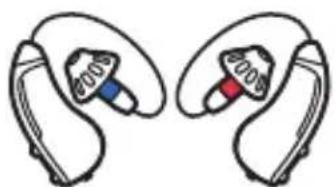
natural_image
Illustration of two earbuds with color-coded buttons (blue, red) and earments, no text or symbols present.BoseSoundControl™ hearing aids (1 pair)
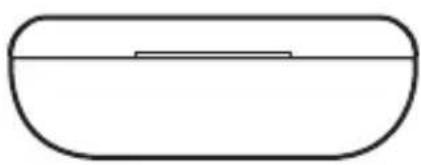
natural_image
Simple line drawing of a rounded rectangular shape with a horizontal line inside (no text or symbols)Carrying case (1) Size 312
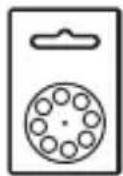
batteries(8)

Open eartips (3 pairs): Sizes 1 and 3*
natural_image
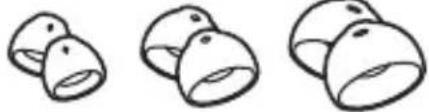
Three identical hand-drawn 3D-rendered objects resembling stylized faces or containers, with no text or symbols.Closed eartips (3 pairs): Sizes 1, 2, and 3
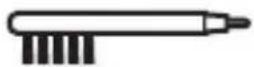
Hearing aid brush (1)
*Size 2 open eartips are attached to the hearing aids.
note If any part of the product is damaged, don't use it. Contact your authorized Bose dealer or the Bose Hear Better Team.
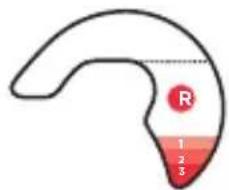
Cable sizing tool (1) (see page 79)
Visit: worldwide.Bose.com/Support/SoundControl
Hearing aid overview
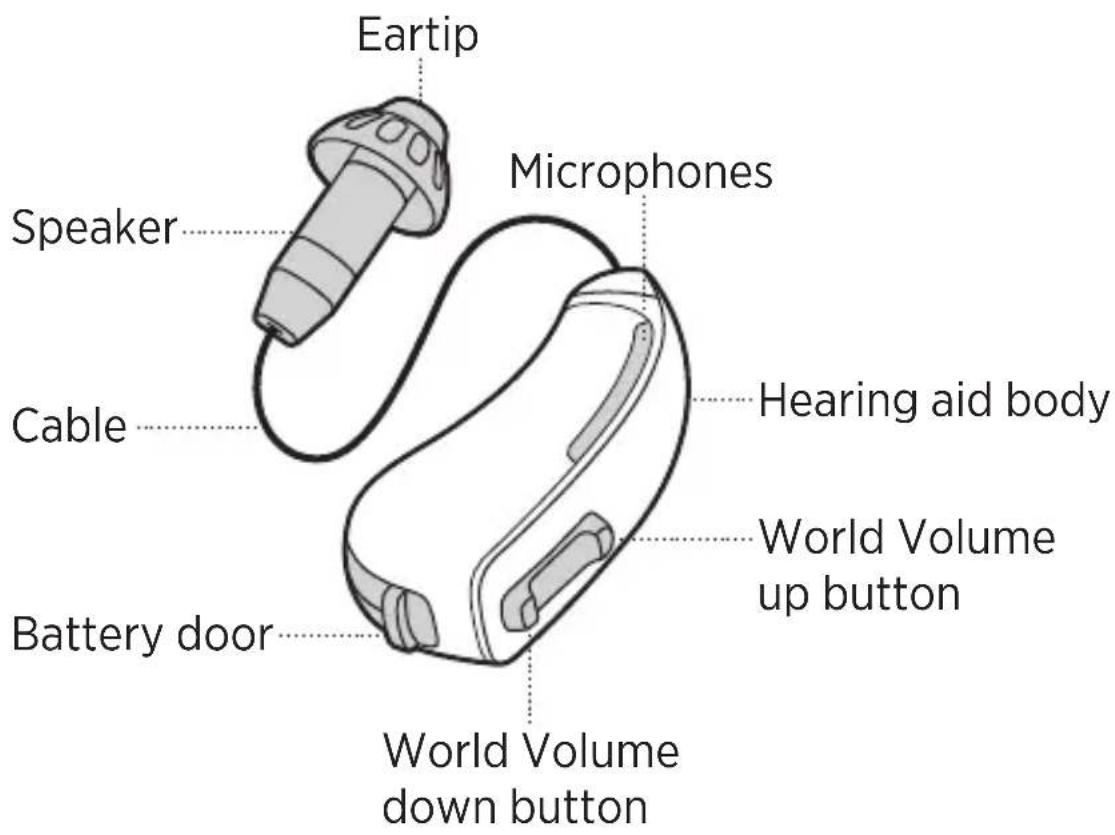
2
Set up the hearing aids
Connect your phone
To control the hearing aids using the Bose Hear app, you must connect your phone with the hearing aids.
To connect your phone, follow the steps below.
Step 1:
Download the Bose Hear app (see page 19).
Step 2:
Insert the batteries and fully close the battery doors to power on the hearing aids (see page 20).
Step 3:
Follow the app instructions to connect the hearing aids and learn how to wear and use them with video tutorials.
note For the best experience, connect the hearing aids to your phone using the Bose Hear app instead of the Bluetooth menu on your phone.
Download the Bose Hear app
The Bose Hear app lets you set up the hearing aids, adjust them to fit your hearing needs, and manage settings.
Step 1:
On your smartphone, use your web browser to visit app.Bose.com/SC and download the Bose Hear app. Or, download from the App Store or Google Play store.
note There are many apps from Bose. Make sure to download the Bose Hear app.
Step 2:
Insert the batteries so the app can find the hearing aids (see page 20).
2
Set up the hearing aids
Insert the batteries
note Wash and dry your hands before handling the batteries. Grease and dirt can reduce battery life and damage the hearing aids.
Step 1:
Gently pull the tab on the bottom of the hearing aid until the battery door fully opens.
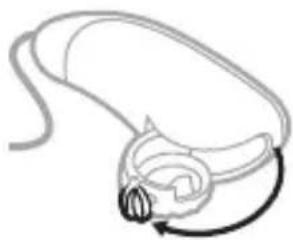
natural_image
Simple line drawing of a medical device with a curved arrow indicating rotation (no text or symbols)Step 2:
Insert one of the provided size 312 batteries in the door with the sticker facing up and the rounded side facing down.
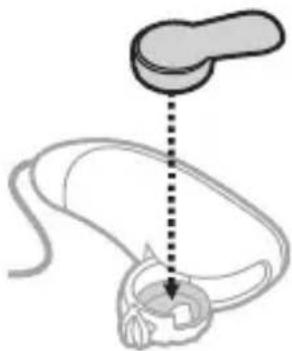
natural_image
Diagram of a medical device with a vertical dotted line indicating a connection point (no text or symbols present)Step 3:
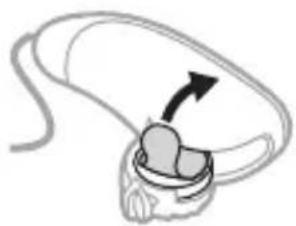
Peel the sticker off the battery, securing it with your other hand.
This activates the battery.
natural_image
Diagram of a biological structure with an arrow indicating direction (no text or symbols)
TIP: To extend battery life, leave the battery in the open battery door for 5 minutes. This exposes it to the air and gives it time to fully activate.
Step 4:
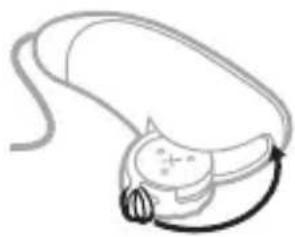
Fully close the battery door.
You feel two clicks, and after a short delay, the hearing aid powers on.
natural_image
Simple line drawing of a medical device with a curved arm and circular head (no text or symbols)note After powering on, the hearing aids enter Bluetooth pairing mode for 3 minutes. If it takes longer than that to connect them to your phone using the app, power the hearing aids off and on again to reset the timer (see page 31).
2
Set up the hearing aids
Step 5:
Repeat steps 1 - 4 for the other hearing aid.
Step 6:
Follow the app instructions to connect the hearing aids and learn how to wear and use them with video tutorials.
note After completing the app tutorials, if you’d like more information about wearing or using the hearing aids, see “How to wear” on page 23 or “Hearing aid and app controls” on page 30.
3
How to wear
Put on the hearing aids
Check your fit
Put on the hearing aids
TIPS:
• If you have long hair, put your hair up.
- If you wear glasses, keep your glasses on.
- Consider using a mirror to check your fit.
Step 1:
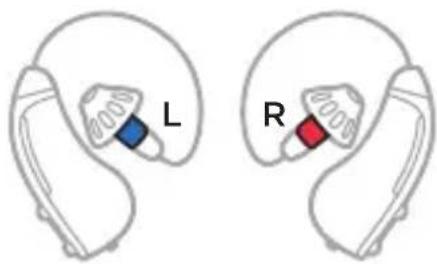
Compare the left and right hearing aids. The left hearing aid has a blue speaker, and the right hearing aid has a red speaker.
Step 2:
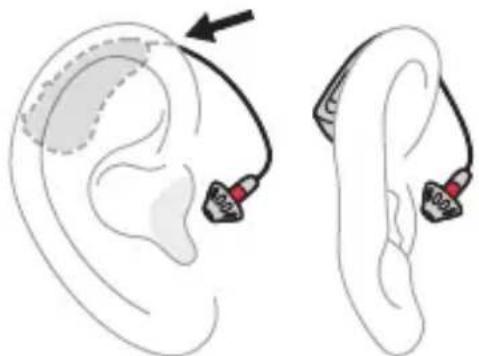
Place the right hearing aid on your right ear.
The hearing aid body should sit near the top of your ear. The curved section of cable should wrap around the front of your ear.
natural_image
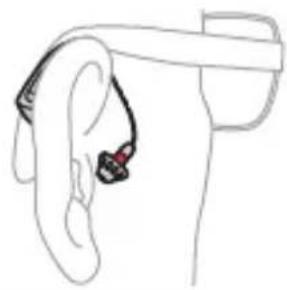
Illustration of ear ear with two earbuds and a medical device, showing ear anatomy (no text or symbols)TIP: If you wear glasses, place the hearing aid between your glasses and your ear.
natural_image
Line drawing of a ear with an earbuds and antenna, no text or symbols presentStep 3:
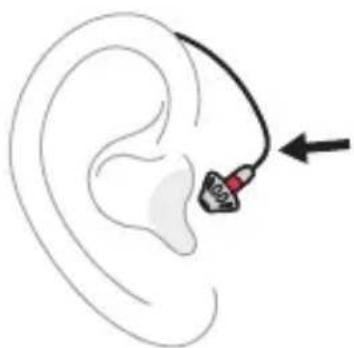
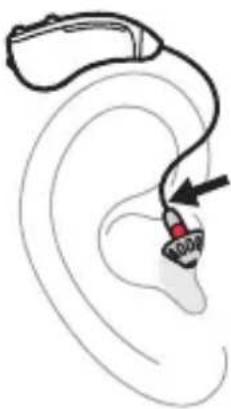
Hold the hearing aid by the bend in the cable close to the eartip.
natural_image
Illustration of an ear with a medical device inserted, showing ear anatomy and needle insertion (no text or symbols)Step 4:
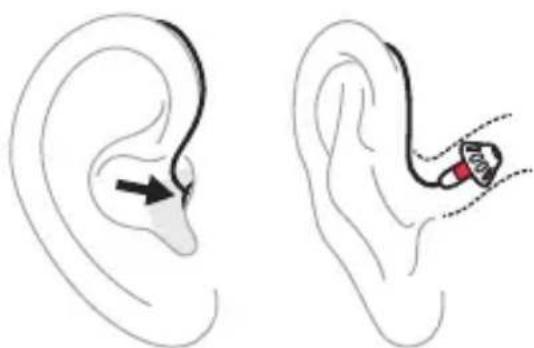
Fully insert the eartip into your ear canal until the cable is flat against your ear and the eartip feels secure.
natural_image
Illustration of a human ear with an inserted insole and a close-up of the ear with a red device (no text or symbols)note The eartip may feel
strange or itchy inside your ear canal at first. If you're uncomfortable, check whether your eartip size is correct (see page 28).
Step 5:
Check to make sure that all parts of the cable run close to the side of your head.
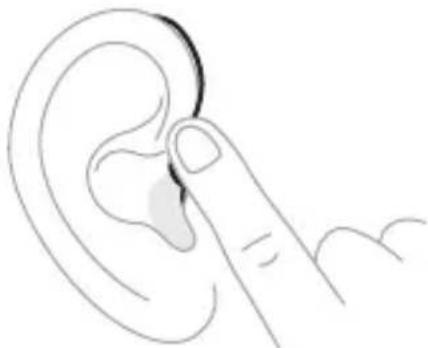
natural_image
Line drawing of a finger pointing to the ear area (no text or symbols)Step 6:
Repeat steps 2 - 5 for the left hearing aid.
Step 7:
Check your fit (see page 27).
To remove the hearing aids
Hold the cable close to the eartip and gently remove the eartip from your ear canal. Then, pull the hearing aid body out from behind your ear.
natural_image
Line drawing of an ear with a medical device attached, showing ear anatomy and needle insertion (no text or symbols)Check your fit
Use a mirror to make sure that the hearing aids are on correctly and that they fit your ears properly.
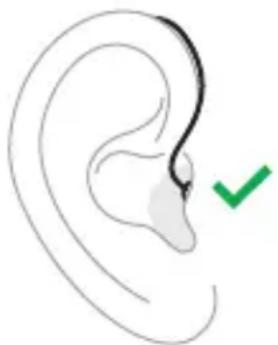
Are the hearing aids on correctly?

Correct:
- The hearing aid body is behind your ear.
- The eartip is deep in your ear canal.
- If you look straight in a mirror, you can't see the eartip or speaker.
natural_image
Simple line drawing of a human ear with a green checkmark indicating a specific point (no text or symbols present)Is the eartip size correct for each ear?
The size of the eartip affects comfort and stability.

Correct size:
- The eartip feels secure, though it may feel strange at first (see “Adjusting to the hearing aids” on page 40).
- If you shake your head and open your mouth, the eartip feels comfortable and doesn't move.
If the eartip feels uncomfortable or loose: Check whether the eartip is too big or too small (see page 73). If it is, you can replace it with a different size.
Is the cable size correct for each ear?
The size of the cable determines the position and angle of the hearing aid behind your ear. This affects audio performance, comfort, and stability.
The provided cables will fit most ears. However, you might need longer or shorter cables or a different size for each ear.
note Don't try to modify the shape of the cable to force the hearing aid to fit.

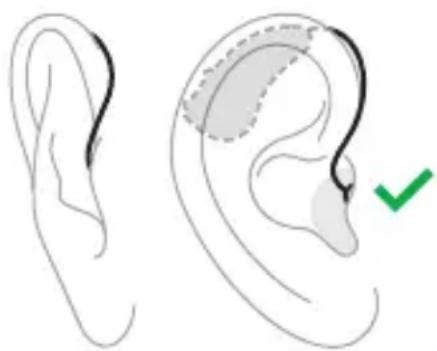
Correct size:
- If you shake your head, the hearing aid body feels secure.
- The cable runs close to the side of your head.
- The hearing aid body sits near the top of your ear.
natural_image
Illustration of a human ear with shaded areas and a green checkmark indicating a medical or diagnostic step (no text or symbols present)If the hearing aid body feels loose or the cable feels tight:
Check whether the cable is too long or too short (see page 79). If it is, you can order a free replacement.
4
Hearing aid and app controls
Power on
Power off
World Volume
Treble and bass
Focus
Left/Right Ear Balance
Modes
Power on
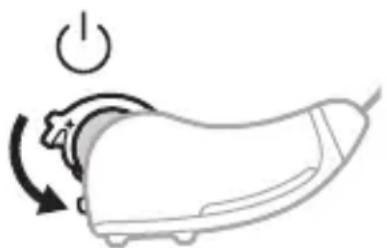
To power on, fully close the battery door on each hearing aid.
natural_image
Line drawing of a device with a power button and rotating arrow (no text or symbols)You feel two clicks as each door closes.
If you're wearing the hearing aids, after 3 seconds, you hear a tone; 6 seconds later, the hearing aids power on.
note This delay gives you time to put on the hearing aids before the microphones turn on. This helps prevent the hearing aids from whistling.
Power off
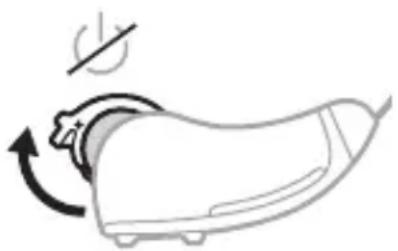
To power off, partially open the battery door on each hearing aid until you feel a click.
natural_image
Line drawing of a shoe with a curved arrow indicating rotation or motion (no text or symbols)notes
- Partially opening the battery doors prevents the batteries from falling out.
- When not using the hearing aids, make sure to partially open the battery doors to disconnect the batteries.
4
Hearing aid and app controls
World Volume
You can make sounds louder or quieter by adjusting World Volume.
Adjust World Volume using the hearing aid controls
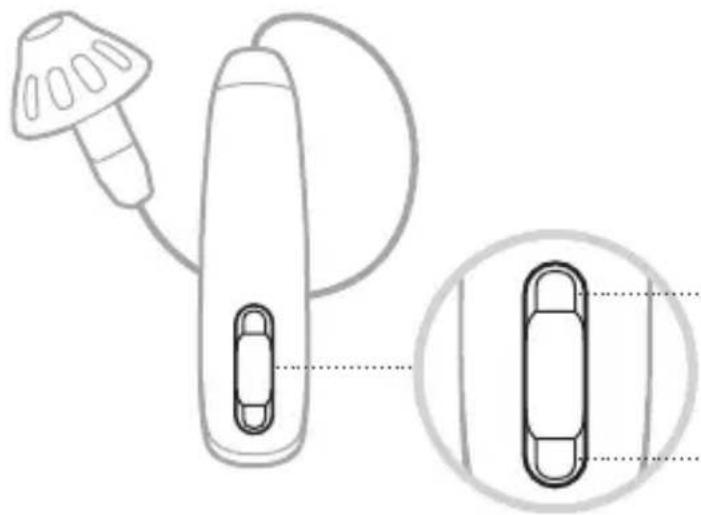
The World Volume buttons are located on the back of each hearing aid.
natural_image
Diagram of a handheld device with a bulb and connector, shown in two views: one close-up and one magnified (no text or symbols)Increase World Volume
(make sounds louder)
Decrease World Volume
(make sounds quieter)
notes
- Pressing the World Volume buttons on either hearing aid adjusts World Volume in both ears.
• To quickly adjust World Volume, press and release either World Volume button multiple times.
Adjust World Volume using the Bose Hear app
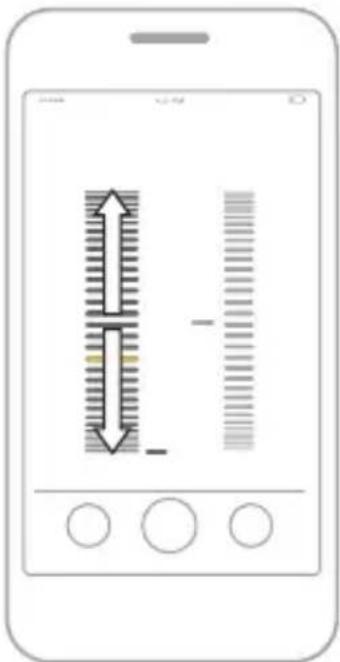
In the Bose Hear app, from the home screen, do one of the following:
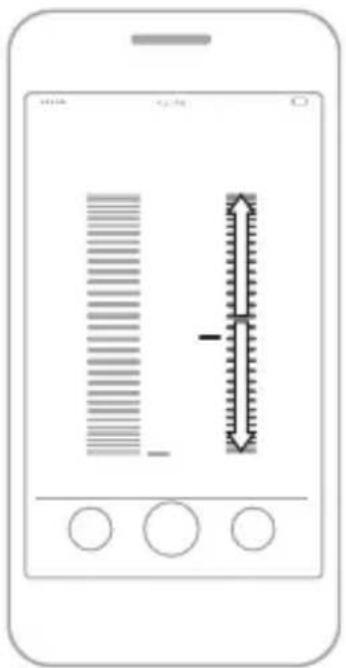
• To increase World Volume (make sounds louder): Drag the World Volume wheel up.
- To decrease World Volume (make sounds quieter): Drag the World Volume wheel down.
4
Hearing aid and app controls
Treble and bass
You can make voices sound clearer using the treble and bass controls in the Bose Hear app.
Adjust treble and bass
In the Bose Hear app, from the home screen, do one of the following:
• To increase treble (make sounds brighter): Drag the Treble and Bass wheel up.
- To increase bass (make sounds deeper): Drag the Treble and Bass wheel down.
Focus
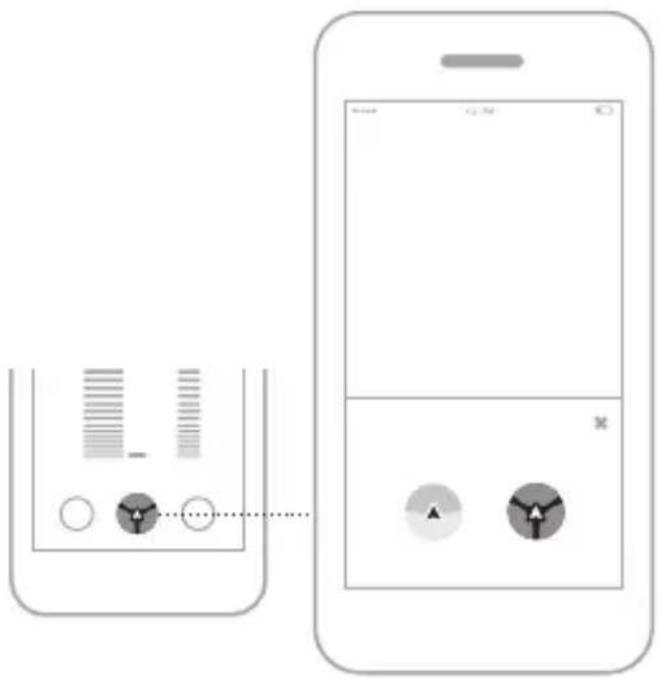
You can adjust Focus settings so that the microphones focus on sounds coming from different areas around you.
When to use each Focus setting
Each Focus setting is best for different situations.
Focus setting Description When to use
 Everywhere Everywhere | Helps you hear sounds from all directions. Best for general awareness and listening. | Use in most cases, including crossing the street, watching TV,orlistening to music. |
 Front Front | Helps you hear sounds in front of you. Better for conversations when background noise is present. | Use when having a conversation in a noisy environment, like a restaurant or a party. |
4
Hearing aid and app controls
Select a Focus setting
Step 1:
In the Bose Hear app, from the home screen, tap the Focus button.
The Focus menu appears.
Step 2:
Tap your preferred Focus setting.
Left/Right Ear Balance
If sound seems uneven between your ears (one ear is louder than the other), you can even things out using the Ear Balance controls in the Bose Hear app.
Adjust Ear Balance
Step 1:
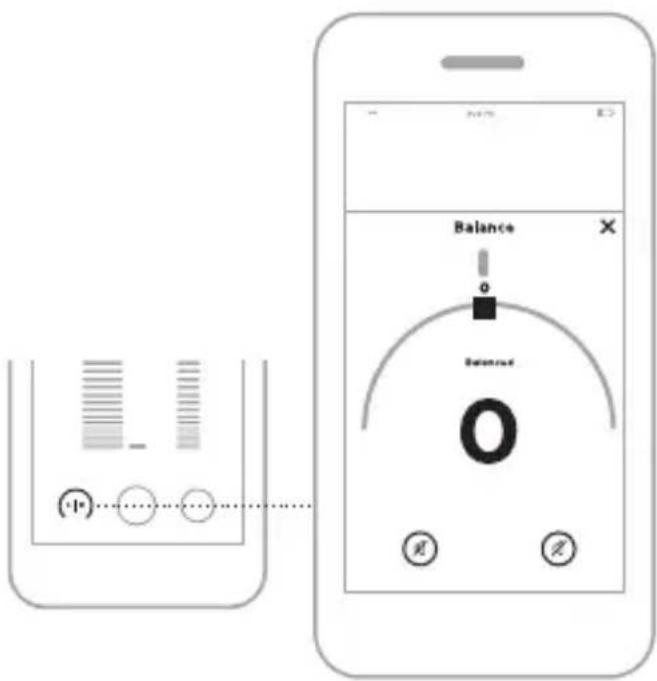
In the Bose Hear app, from the home screen, tap the Balance button.
The Ear Balance menu appears.
4
Hearing aid and app controls
Step 2:
Do one of the following:
- To make sounds louder in your left ear: Drag your finger to the left along the semicircle.
- To make sounds louder in your right ear: Drag your finger to the right along the semicircle.
The number in the center shows the new setting. The higher the number, the louder that sounds are in that ear.
note To easily reset the Ear Balance to zero, tap the line at the top of the semicircle.
Modes
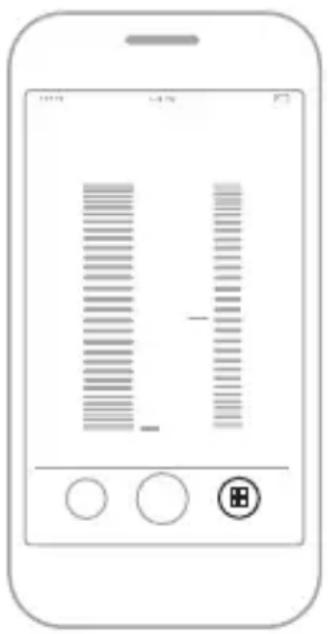
Modes are groups of settings that you can create and quickly switch between depending on your situation. You can customize the suggested Modes — Focused Conversation, Outdoors, Music, and Television — or create your own.
note The suggested Modes are NOT personalized for your hearing needs. After selecting a suggested Mode, adjust the settings according to your preference, then save yourchanges.
Access Modes
In the Bose Hear app, from the home screen, tap the Modes button.
5
Adjusting to the hearing aids
What to expect
What to expect
Adjusting to a new hearing aid can feel overwhelming at first, and it can take time to feel fully comfortable. With patience, though, you'll soon be enjoying better hearing.
Here's what you can expect during the first few days and weeks of using the hearing aids.
Comfort and fit
- The eartips may feel strange or itchy inside your ear canal at first. This is normal, and you’ll get used to the feeling over time. However, if they feel painful, try a different eartip size (see page 75).
- The hearing aids might feel slightly uncomfortable to start. Try to wear them as much as possible to give yourself time to get used to the feeling.
TIP: If you aren't comfortable wearing the hearing aids all day, try wearing them for a few hours at a time and gradually work up to longer use.
5
Adjusting to the hearing aids
Adjusting to new sounds
- Sounds may seem loud or different. You may also notice background noises that you haven’t heard before. As your brain learns to recognize and filter out these sounds, they’ll become less apparent over time.
TIP: Wear the hearing aids as much as possible to become more quickly accustomed to new sounds.
- Your voice may seem loud at first. To help, practice talking with a friend in a familiar environment before using the hearing aids for other conversations. - You might need to experiment with different hearing aid settings as you try the hearing aids in new environments. Over time, you’ll find settings that work for you and won’t need to adjust them as often.
TIP: Be patient! It can take some people up to several months to fully adjust to their hearing aids.
6
Battery management
When to replace batteries
Remove the batteries
Battery life
Purchase batteries
When to replace batteries
When you hear “Low battery,” from one of the hearing aids, replace the battery in that hearing aid.
Remove the batteries
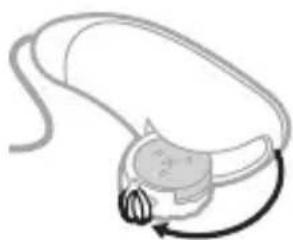
Step 1:
Gently pull the tab on the bottom of the hearing aid until the battery door fully opens.
natural_image
Simple line drawing of a medical device with a curved arrow indicating rotation (no text or symbols)Step 2:
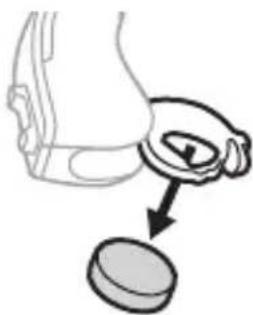
Push the battery out through the back of the battery door.
TIP: You can use the magnetic end of the hearing aid brush to easily remove the battery.
natural_image
Simple line drawing of a hand holding a circular object with an arrow pointing to it (no text or symbols)
WARNING
Do NOT store or replace batteries near where you store medication or near children. Battery ingestion can cause serious harm. If you think that you or someone else has swallowed a battery or placed a battery inside any part of the body, seek immediate medical attention.
Battery life
Each battery can provide up to 4 days of use, assuming that you use both hearing aids for 14 hours per day.
note Battery life may vary by battery brand, age, chemistry, and frequency of use, or if you use a single hearing aid. When a replacement is needed, use only size 312 zinc-air batteries.
TIP: To extend battery life, when replacing batteries, leave the new batteries exposed to the air for 5 minutes before closing the battery doors (see page 20).
Purchase batteries
You can purchase more batteries through the Bose Hear Better Team (see page 56) or from your local pharmacy. Search for size 312 zinc-air batteries.
7
Bluetooth connections
Connect your phone
Connect a different phone
Clear the hearing aid device lists
7 Bluetooth connections
Bluetooth Low Energy wireless technology lets you control the hearing aids using the Bose Hear app. Before you can control the hearing aids, you must download the app and connect your phone with the hearing aids.
note Although connecting your phone lets you control the hearing aids using the app, it doesn't let you wirelessly stream music or phone calls from your phone.
Connect your phone
For first-time connection instructions, see page 18.
notes
- After powering on, the hearing aids enter Bluetooth pairing mode for 3 minutes. If it takes longer than that for you to connect a new phone using the app, power the hearing aids off and on again to reset the timer (see page 31).
- For the best experience, connect the hearing aids to your phone using the Bose Hear app instead of the Bluetooth menu on your phone.
Connect a different phone
You can store up to 20 phones in the hearing aid device lists.
To connect a different phone, see page 18.
note If a previously-connected phone is within range of the hearing aids, turn the Bluetooth feature off on that phone before connecting a different phone.
Clear the hearing aid device lists
Step 1:
Power on and wear both hearing aids (see page 31 and page 24).
7 Bluetooth connections
Step 2:
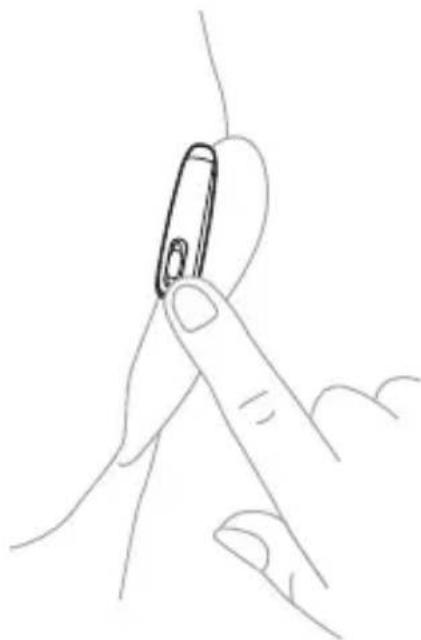
On one of the hearing aids, press and hold the World Volume down button for 15 seconds until you hear "Bluetooth device list cleared."
natural_image
Line drawing of a finger holding a small object, no text or symbols presentStep 3:
Repeat step 2 for the other hearing aid.
Step 4:
Delete the hearing aids from the Bluetooth list on your phone.
All devices are cleared, and the hearing aids are ready to connect.
8
Care and maintenance
Store the hearing aids
Maintain the hearing aids
Replacement components
Limited warranty
Returns and exchanges
Update the hearing aids
Store the hearing aids
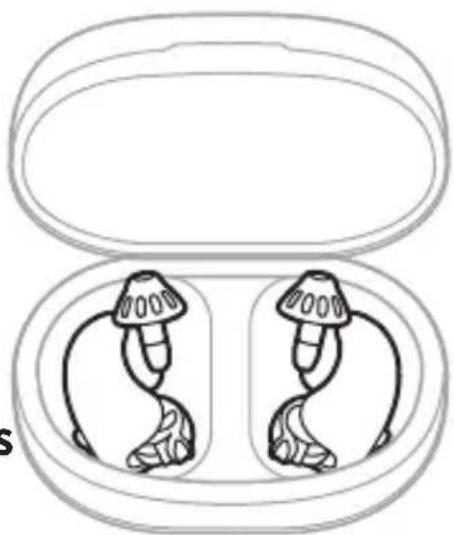
To protect the hearing aids, store them in the case with the battery doors partially open when you're not using them.

WARNINGS
- Do NOT store or replace batteries near where you store medication or near children. Battery ingestion
can cause serious harm. If you think that you or someone else has swallowed a battery or placed a battery inside any part of the body, seek immediate medical attention.
natural_image
Line drawing of two wireless earbuds with exposed internal components, enclosed in an open case (no text or symbols)
Keep and store device and components out of reach of children. Contains small parts which may be a choking hazard.
note Before storing the hearing aids for an extended period of time, make sure to completely remove the batteries.
Maintain the hearing aids
To prevent damage and preserve sound quality, it's important to regularly maintain the hearing aids and replacecomponents.
Moisture
Moisture can damage the hearing aids or cause them to fail.
Keep the hearing aids dry
- Never wear the hearing aids in the shower, bath, or pool.
- Protect the hearing aids from prolonged exposure to rain.
- Never apply hairspray, cologne, creams, or other cosmetics while wearing the hearing aids.
If the hearing aids become excessively wet
- Open both battery doors, remove the batteries, and leave the hearing aids and batteries in the case overnight with the lid open to dry.
- To thoroughly dry the hearing aids, store them in a container with desiccants or in a hearing aid drying case. This can help if you live in a humid climate or sweat often.
Daily maintenance
Maintain the eartips and microphones: After removing the hearing aids, remove earwax and debris from the eartips and microphones using the provided hearing aid brush or a soft, lint-free cloth.
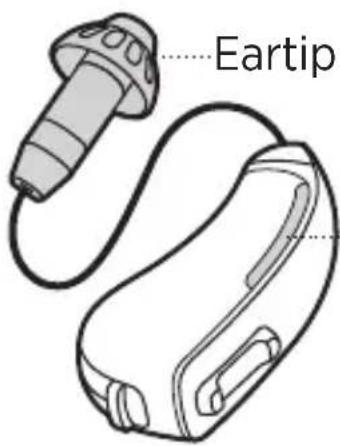
Microphones
Weekly maintenance
Maintain the cable and hearing aid body: Wipe the outside of the cable and hearing aid body with a soft, lint-free cloth.
Quarterly maintenance
Replace the eartips: Replace the eartips every 3 months (see page 56). If they become discolored or stiff or if they fall off when you remove the hearing aids, replace them immediately.
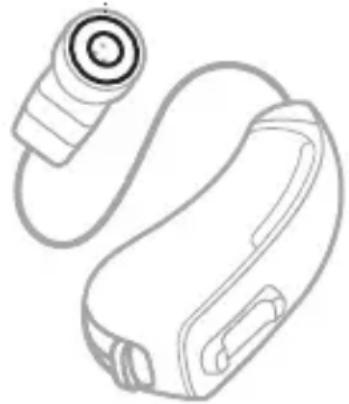
Replace the wax guards: Replace the white plastic screens at the ends of each speaker every 3 months. To order replacement wax guards, call the Bose Hear Better Team. For contact information, visit: worldwide.Bose.com/HearContact
If the wax guards get blocked by earwax buildup or you notice that the hearing aids sound quieter than usual, replace the wax guards and the eartips immediately.
Wax guard
natural_image
Line drawing of a handheld device with a circular head and cable (no text or symbols)Yearly maintenance
Replace the cables: Replace the cables every year (see page 56). If the hearing aids sound quieter than usual or if audio is crackly or intermittent, replace the cables immediately.
Replacement components
Replacement components can be ordered through the Bose Hear Better Team.
Visit: worldwide.Bose.com/Support/SoundControl
- Open or closed eartips, size 1, 2, or 3
- Cable, size 1, 2, or 3
- Carrying case
- Hearing aid brush
- Batteries, size 312
Limited warranty
The hearing aids are covered by a limited warranty. Visit our website at global.Bose.com/warranty for details of the limited warranty.
To register your product, visit global.Bose.com/register for instructions. Failure to register will not affect your limited warranty rights.
Returns and exchanges
Satisfaction is guaranteed on all Bose products purchased by consumers directly from Bose. We want you to be thrilled, so if you're not satisfied with your purchase for any reason, simply return it within the trial period for a full refund. Please see the Bose Product Support page at worldwide.Bose.com/Support/SoundControl for details.
If you did not purchase your product directly from Bose, please see the store from which you purchased your product for their policies.
Update the hearing aids
The hearing aids update automatically when connected to the Bose Hear app. Follow the app instructions.
9
Troubleshooting
Try these solutions first
Other solutions
Eartip troubleshooting
Cable size troubleshooting
Try these solutions first
If you experience problems with the hearing aids, try these general solutions first:
- Open and fully close the battery doors (see page 31).
- Replace the batteries (see page 20).
- Download the Bose Hear app and run available software updates (see page 19).
- Make sure that your phone supports Bluetooth Low Energy (also called Bluetooth Smart). All phones that are compatible with iOS 10 and newer and most phones that are compatible with Android™ 5.0 and newer support Bluetooth Low Energy.
- If Bluetooth communication is disrupted while in proximity to a Wi-Fi® device or other 2.4 GHz ISM band emitter, move away from the potential interfering source by at least 10 feet (3 meters) to help regain connectivity.
- If your hearing aids do not operate as intended, including with the Bose Hear app, please ensure that they are paired with the appropriate phone.
Other solutions
If you could not resolve your issue, see the table below to identify symptoms and solutions to common problems. If you are unable to resolve your issue, contact the Bose Hear Better Team.
Visit: worldwide.Bose.com/HearContact
Problem Solutions
| Hearing aids don’t power on (no amplification) | Make sure both battery doors are fully closed. You should feel two clicks.While wearing the hearing aids, close the battery doors and wait 3 seconds.If you hear a tone, the hearing aids are powering on (see page 31).Make sure both batteries are inserted correctly (see page 20).Clear any debris or grease from the batteries.Replace the batteries (see page 20). |
Problem Solutions
| Unable to locatethe Bose Hear app | Type app.Bose.com/SC into the address bar of your phone's web browser, not a search bar or separate search application.On your phone, open the App Store or Google Play store and search for “Bose Hear.”note There are many apps from Bose. Make sure to download the Bose Hear app.Visit: worldwide.Bose.com/Support/ SoundControl to see how-to videos. |
Problem Solutions
| Hearing aids don’t connect to phone | On your phone:Turn theBluetoothfeature off and then on.Delete the hearing aids from the Bluetoothlist on your phone. Connect again.Open and fully close both battery doors (see page 31). This causes the hearing aids to enterBluetoothpairing mode for 3 minutes. If it takes longer than that to connect them to your phone using the app, repeat to reset the timer.Move your phone closer to the hearing aids and away from any interference or obstructions.(continued on next page) |
Problem Solutions
| Hearing aids don’t connect to phone | (continued from previous page)If another previously-connected phone is within range, turn the Bluetooth feature off on that phone.Clear the hearing aid device lists (see page 49).Connect the hearing aids to a different phone (see page 19).Replace the batteries (see page 20).Visit: worldwide.Bose.com/Support/ SoundControl to see how-to videos. |
Problem Solutions
| Bose Hear app doesn’t work on phone | Restart your phone.Make sure the Bose Hear app is compatible with your phone.Visit the Bose Hear page on the App Store or Google Play store for compatibility information.Uninstall the Bose Hear app on your phone, then reinstall the app (see page 19). |
| WorldVolume doesn’t adjust | Try adjusting World Volume using the hearing aid controls (see page 32).Try adjusting World Volume using the Bose Hear app (see page 33).Open and fully close both battery doors (see page 31). |
Problem Solutions
| Poor sound quality | Clear any debris or wax buildup from the eartips and microphones (see page 53).Dry the hearing aids: Open both battery doors, remove the batteries, and leave the hearing aids and batteries in the case overnight with the lid open (see page 53).Replace the batteries (see page 20).Make sure that the Ear Balance controls are adjusted to your desired settings (see page 37).Replace the wax guards (see page 55).Replace the cables (see page 56). |
Problem Solutions
| Hearing aids aren’t loud enough (not enough amplification) | Increase World Volume(see page 32).Clear any debris or wax buildup from the eartips and microphones(see page 53).If you’re using open eartips, try replacing them with the same size closed eartips (see page 76).Replace the wax guards(see page 55).Replace the cables (see page 56). |
Problem Solutions
| Hearing aids are uncomfortable | Make sure that you're putting the hearing aids on correctly (see page 24).Choose another eartip size (see page 75). You may need a different size for each ear.Check whether you need a different size cable (see page 29).It can take time to get used to the feeling of wearing hearing aids. If necessary, you can wear them for a few hours at a time to start (see page 41). |
Problem Solutions
| Hearing aids fallingout of ears | Make sure that you're placing the eartips in your ears correctly.Remember to insert each eartip deep into your ear canal until the cable is flat against your ear and the eartip feels secure (see page 24).Choose another eartip size (see page 75). You may need a different size for each ear. |
| Eartips falling off | Securely fasten the eartips to the speakers (see page 77).Replace the eartips (see page 56). |
| Eartips discolored or stiff | Replace the eartips (see page 56). |
Problem Solutions
| Eartip stuck in ear | Contact a hearing health care professional for removal. |
| Lost eartips | Contact the Bose Hear Better Team for replacement eartips (see page 56). |
| Cable detachedfrom hearing aid | Refer to the replacement cable quick start guide for instructions on reattaching the cable. Visit: worldwide.Bose.com/Support/ SoundControl |
Problem Solutions
| Hearing aids whistle | Make sure that you're placing the eartips in your ears correctly.Remember to insert each eartip deep into your ear canal until the cable is flat against your ear and the eartip feels secure (see page 24).Choose another eartip size (see page 75). You may need a different size for each ear.If you're using open eartips, try replacing them with the same size closed eartips (see page 76).Decrease World Volume (see page 32). |
Problem Solutions
| Can’t hear phone call | On your phone, increase the volume.If you’re in private, turn on speakerphone and hold your phone in front of you.Make sure you’re not pressing your phone too hard against your ear. This can block the hearing aid microphones and cause the call to sound muffled.Try holding your phone so that the phone speaker is slightly above and behind your ear. This puts it closer to the hearing aid microphones.noteIt can take some practice to learn how to hold your phone relative to the hearing aid. Experiment with different positions to find what works best for you. |
Problem Solutions
| Hearing aids whistle when on the phone | Tilt your phone speaker slightly away from the hearing aid on that ear. |
| Hearing aids sound differentfrom each other | Adjust World Volume (see page 32). This syncs audio settings between the hearing aids. |
| Sound of own voice is too loud | Practice listening to new sounds and talking with a friend in a familiar environment before you use the hearing aids for conversation (see page 41).If you’re using closed eartips, try replacing them with the same size open eartips (see page 76). |
Eartip troubleshooting
Check if the eartips are too big or too small
If one or both eartips match the descriptions below, try a different eartip size (see page 75).
✗ Too big:
- The eartip feels painful or uncomfortable.
- It’s difficult to insert the eartip into your ear canal.
- The bend in the cable close to the eartip doesn't sit flat against your ear.
✗ Too small:
- The eartip feels loose or insecure.
- If you shake your head and open your mouth, the eartip feels painful or moves.
√ Correct size:
- The eartip feels secure, though it may feel strange at first.
- If you shake your head and open your mouth, the eartip feels comfortable and doesn’t move.
9
Troubleshooting
Eartip sizes
The eartip size is marked on the eartip packaging as size 1, size 2, or size 3.
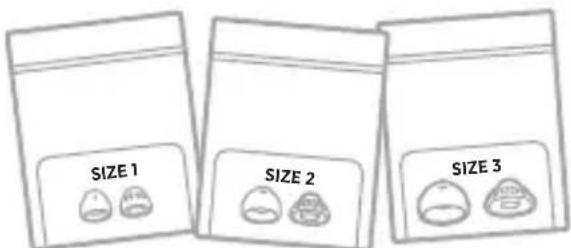
Size 2 open eartips come attached to the hearing aids.
note Eartip size doesn't relate to cable length. You might have a different eartip size and cable size for the same hearing aid.
Try another eartip size
If the eartips don't feel comfortable or secure, choose another eartip size.
note You may need to try all three eartip sizes or use a different size eartip for each ear.
Step 1:
Based on the sizing information on page 73, if the default size 2 eartips are too big, try size 1. If they're too small, try size 3 (see page 74).
Step 2:
From the eartip packaging, select the pair of eartips that matches your current eartip type (see page 76).
Step 3:
Change the eartips (see page 77).
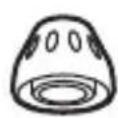
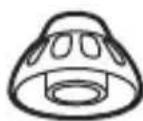
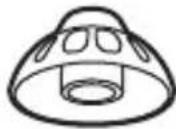
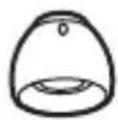
Eartip types
Within each eartip size, there are two types of eartips: open and closed.
Open eartips (attached to the hearing aids) help your voice sound more natural. They have holes around the center of the eartip.
Closed eartips provide more bass and allow you to comfortably use a higher World Volume setting.
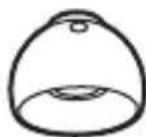
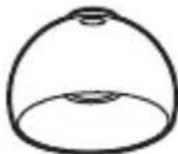
Try another eartip type
During first-time setup, use the default open eartips and focus on finding the correct size for each ear.
After using the hearing aids for some time, though, if you feel like you need more amplification or hear whistling at higher World Volume settings, consider trying closed eartips.
Change the eartips
Step 1:
Hold the speaker and firmly pull the current eartip off.
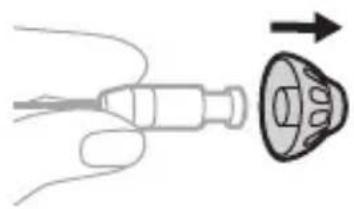
natural_image
Diagram showing a hand holding a medical device with an arrow pointing to a circular component (no text or symbols)Step 2:
Choose a new eartip size (see page 75) and/or eartip type (see page 76).
note Each eartip can work with either the left or right hearingaid.
Step 3:
Align the opening of the new eartip with the speaker and slide the eartip onto the speaker.
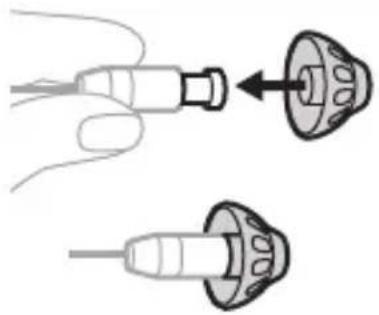
natural_image
Illustration of two medical or surgical tool tips with a pointed tip, showing different angles (no text or symbols present)9
Troubleshooting
Step 4:
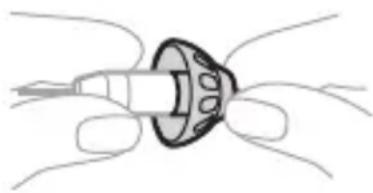
Gently tug the eartip to make sure that it's securely fastened on the speaker.
natural_image
Diagram of a mechanical component with no visible text or symbolsnote Don't wear the hearing aid if
the eartip isn't secure. Otherwise, the eartip could become stuck in your ear canal (see page 69).
Step 5:
Repeat steps 1 - 4 for the other hearing aid, if necessary.
Step 6:
Put on the hearing aids (see page 24).
Step 7:
Check your fit (see page 28).
Cable size troubleshooting
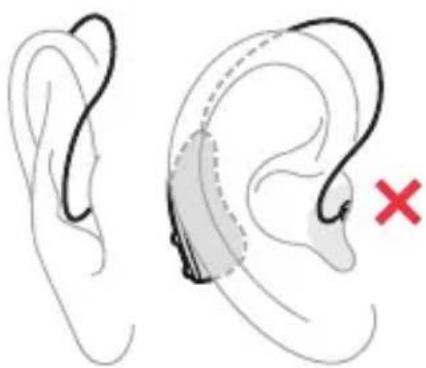
Check if the cables are too long or too short
If one or both cables match the descriptions below, use the provided cable sizing tool to measure your exact size (see page 81). If you need a different size, you can order a freereplacement.
× Too long:
• The cable bends away from your head or hangs above your ear.
• The hearing aid body sits far back behind your ear or feels loose.
× Too short:
- The cable feels tight or pulls the eartip partially out of your ear canal.
- If you look straight in a mirror, you see the hearing aid body over the top of your ear.
natural_image
Illustration of a human ear with a medical device inside, marked with a red X (no text or symbols present)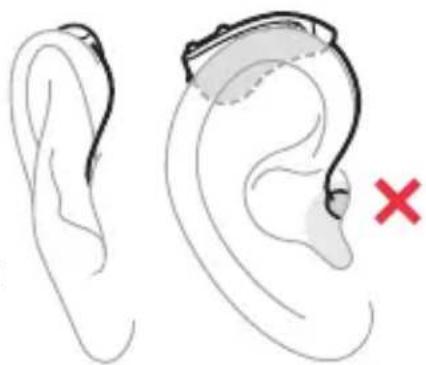
natural_image
Illustration of a human ear with a highlighted ear device and a red X mark indicating a medical or diagnostic marker (no text or symbols present)9
Troubleshooting

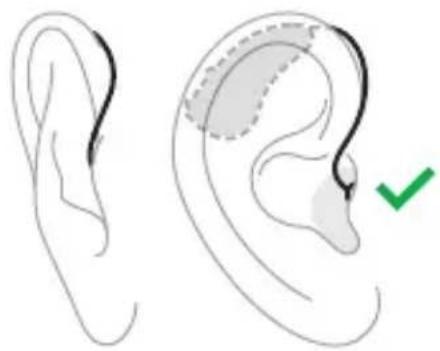
Correct size:
- If you shake your head, the hearing aid body feels secure.
- The cable runs close to the side of your head.
• The hearing aid body sits near the top of your ear.
natural_image
Illustration of a human ear with shaded areas and a green checkmark indicating a specific point (no text or symbols present)Measure your cable size
Step 1:
Ask a friend or family member to help (recommended).
They can make things easier by checking that the cable sizing tool is on your ear correctly and taking a photo for you.
note If nobody's around to help, you can use a mirror to check the cable sizing tool and use your phone camera to take a photo.
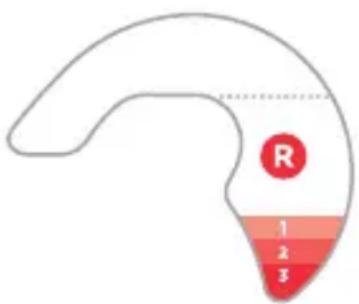
Step 2:
Locate the cable sizing tool provided in the box.
You'll use it to measure which cable size you need for each ear.
Step 3:
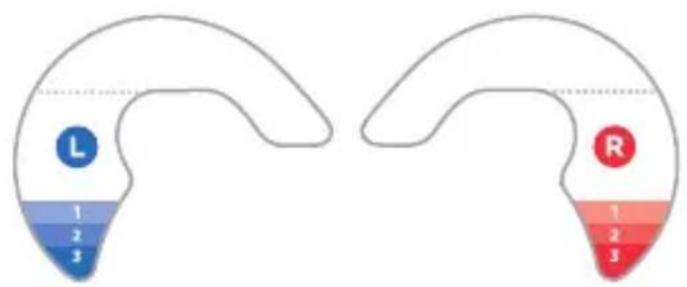
Compare the red and blue sides of the tool.
Use the red side to measure your right ear and the blue side to measure your left ear.
Step 4:
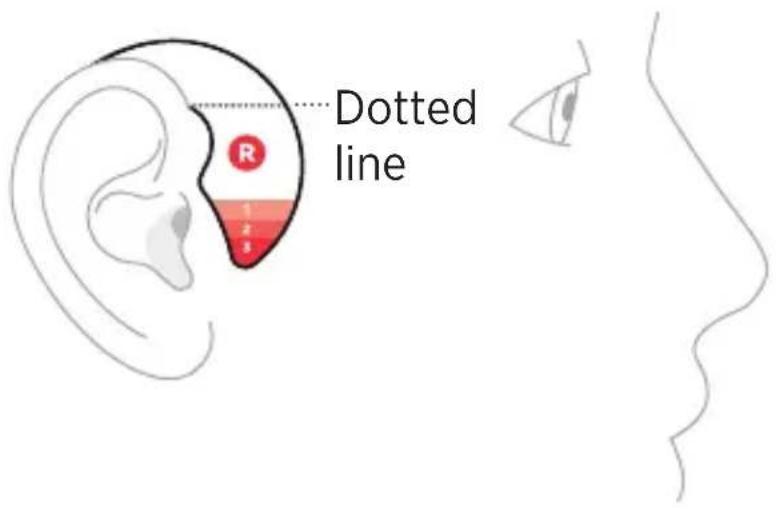
Place the tool on your right ear. It should hook around the front of your ear and lie flat against the side of your head.
Make sure that the dotted line near the top of the tool is level and aligned with the top of your ear.
Step 5:
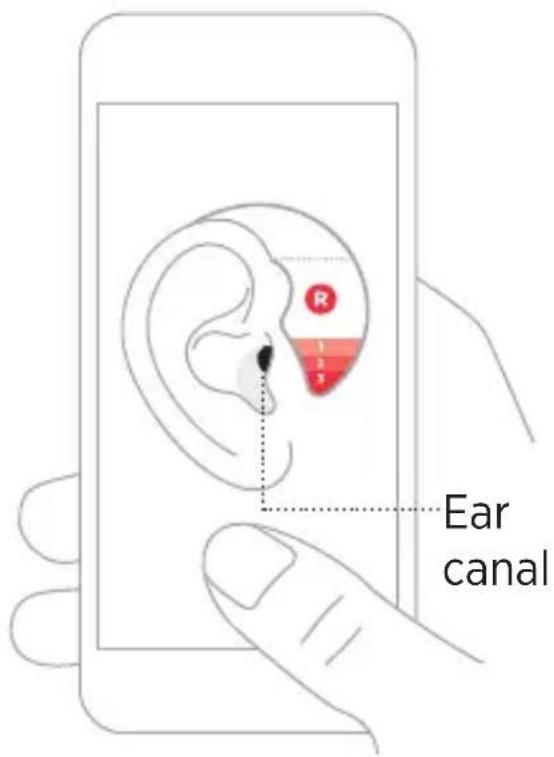
Ask a friend or family member to take a photo of your ear.
Make sure that you can see your ear canal in the photo.
note If you're taking the photo yourself, rest your elbow on a surface and hold your phone facing you.
Position yourself so that you can see your face in your phone's front-facing camera display. Then, turn your head and take a photo of your ear.
9
Troubleshooting
Step 6:
Look at the photo and see which colored band aligns with the top of your ear canal.
The number in the band is the cable size you need.
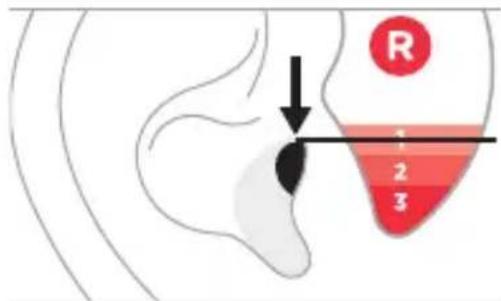
Size 1
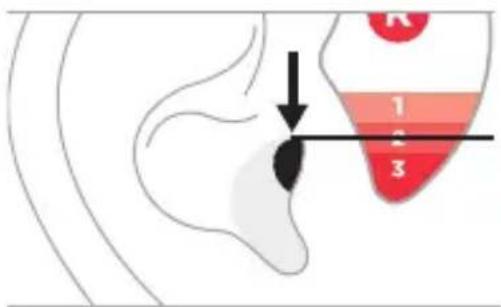
Size 2
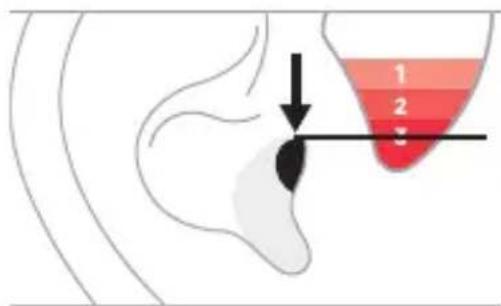
Size 3
Step 7:
Repeat steps 4 - 6 for your left ear.
note You may need a different cable size for each ear.
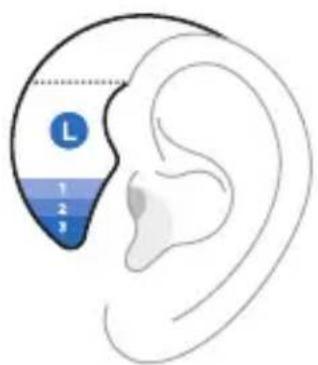
Step 8:
Compare your measurements for each ear.
- If you need size 2: Size 2 cables come attached to the hearing aids, so you already have the correct size for that ear.
- If you need size 1 or 3: Order a free replacement cable through the Bose Hear Better Team.
Visit: worldwide.Bose.com/Support/SoundControl
10
Regulatory and legal information
Symbols and descriptions
This equipment has been tested and found to comply with the limits for a Class B digital device, pursuant to Part 15 of the FCC Rules. These limits are designed to provide reasonable protection against harmful interference in a residential installation. This equipment generates, uses, and can radiate radio frequency energy and, if not installed and used in accordance with the instructions, may cause harmful interference to radio communications. However, there is no guarantee that interference will not occur in a particular installation. If this equipment does cause harmful interference to radio or television reception, which can be determined by turning the equipment off and on, the user is encouraged to try to correct the interference by one or more of the following measures:
- Reorient or relocate the receiving antenna.
- Increase the separation between the equipment and receiver.
- Connect the equipment into an outlet on a circuit different from that to which the receiver is connected.
- Consult the dealer or an experienced radio/TV technician for help.
Changes or modifications not expressly approved by Bose Corporation could void the user's authority to operate this equipment.
10 regulatory and legal information
This device complies with part 15 of the FCC Rules. Operation is subject to the following two conditions: (1) This device may not cause harmful interference, and (2) this device must accept any interference received, including interference that may cause undesired operation.
This device complies with FCC radiation exposure limits set forth for general population. This transmitter must not be co-located or operating in conjunction with any other antenna or transmitter.
FCC ID: A94BMD0012
Radio Technology: Bluetooth Low Energy (BLE) and proprietary technologies.
Radio Transceiver Frequency Range: 2.4 to 2.4835 GHz
Radio Receiver Bandwidth: 2 MHz
Modulation Type: 1 Mb/s and 2 Mb/s GFSK
Peak Effective Isotropic Radiated Power: 0 dBm
This equipment has been tested and found to comply with the limits per CISPR 11 class B.
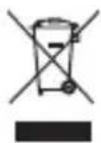
This symbol means the product must not be discarded as household waste, and should be delivered to an appropriate collection facility for recycling. Proper disposal and recycling helps protect natural resources, human health and the environment. For more information on disposal and recycling of this product, contact your local municipality, disposal service, or the shop where you bought this product.
Operating Conditions:
Temperature Range: 32°F - 104°F (0°C - 40°C)
Humidity Range: 0 - 95% RH
Pressure Range: 70 - 110 kPa
Storage/Transport Conditions:
Temperature Range: -13°F - 158°F (-25°C - 70°C)
Humidity Range: 0 - 90% RH
Pressure Range: 70 - 110 kPa
Time to warm from minimum storage temperature before use:
1 hour (ambient temperature 68°F or 20°C)
Time to cool from maximum storage temperature before use:
1 hour (ambient temperature 68°F or 20°C)
Dimensions (Single Hearing Aid):
Overall with cable: 33 mm long x 23 mm wide x 18 mm thick
Overall without cable: 30 mm long x 14 mm wide x 8 mm thick
Disposal: The Bose SoundControl™ hearing aids and components are electronic components which should be discarded in accordance with national, regional, and local regulations.
Expected Service Life of Product and Components: 2 Years
Classification: The hearing aids are classified as a Type B Applied Part, IEC 60601-2-66

This product does not contain natural rubber latex.

This product is provided non-sterile.

Do NOT use if package is damaged.
The Bose SoundControl™ hearing aids comply with the following domestic and international regulations for medical devices:
IEC 60601-1:2005/A1:2012
IEC 60601-1-6:2010
IEC 60601-1-2:2014
FCC 47 Part 15.247
IEC 60601-2-66:2019
Features per ANSI/CTA-2051:2017
| Feature Category The Bose SoundControlTM hearing aids | |
| Fixed or Level-Dependent FrequencyEqualization | have level-dependent frequency equalization that is adjusted via user controls. |
| Level-Dependent Gain/Compression | utilize 12-channel wide dynamic range compression to make conversation easier without making loud sounds too loud. |
| Noise Reduction | make steady noises (like vacuum cleaners, air conditioners, etc.) less loud. |
| Signal-to-Noise Ratio Enhancement | have user-selectable directional microphones to emphasize sounds from in front, making conversations in noisy places easier. |
| Feedback Control reduce feedback (whistling). | |
| Personalization | are self-tuned by the user either via an app on a smart device (phone or tablet) or by using the on-device controls. Individual hearing thresholds are not required to personalize the amplification settings. |
| Coupling to the Ear | have a user-adjustable fit for greater comfort and better sound quality. The eartip is a soft, conical, open or closed tip that rests deep in the ear canal. |
| WirelessConnectivity | use Bluetooth technology to control the hearing aids via a paired smart device. |
10 regulatory and legal information
| Guidance and Manufacturer's Declaration – Electromagnetic Emissions | |||
| The hearing aid is intended for use in the electromagnetic environment specified below. The user of the hearing aid should assure that it is used in such anenvironment. | |||
| Emissions Test | IEC60601Test Level | ComplianceLevel | ElectromagneticEnvironmentGuidance |
| RF emissionsCISPR 11 | Group 1 Group 1 | The hearing aid uses RF energy only for its internal function. Therefore, its RF emissions are very low and are not likely to cause any interference in nearby electronicequipment. | |
| RF emissionsCISPR 11 | Class B Class B | The hearing aid is suitable for use in all establishments, including domestic establishments and those directly connected to the public low-voltage power supply network that supplies buildings used for domestic purposes. | |
| Guidance and Manufacturer's Declaration – Electromagnetic Immunity | ||
| The hearing aid is intended for use in the electromagnetic environment specified below. The user of the hearing aid should assure that it is used in such anenvironment. | ||
| Immunity Test IEC60601 Test Level Compliance Level | ||
| Electrostatic discharge (ESD)IEC 61000-4-2 | +/- 8 kV contact+/- 15 kV air | +/- 8 kV contact+/- 15 kV air |
| Radiated RF EM FieldsIEC 61000-4-3 | 10 V/m80 MHz – 2.7 GHz80% AM at 1 kHz | 10 V/m80 MHz – 2.7 GHz80% AM at 1 kHz |
10 regulatory and legal information
| Immunity Test IEC 60601 Test Level Compliance Level | ||
| Proximity fields from RF wireless communications equipmentIEC 61000-4-3 | 9 V/m; 710, 745, 780 MHz; Pulse modulation 18 Hz9 V/m; 5240, 5500, 5785 MHz; Pulse modulation 217 Hz27 V/m; 385 MHz; Pulse modulation 18 Hz28 V/m; 450 MHz FM +/- 5 kHz deviation; 1 kHz sine28 V/m; 810, 870, 930 MHz; Pulse modulation 18 Hz28 V/m; 1720, 1845, 1970, 2450 MHz; Pulse modulation 217 Hz | 9 V/m; 710, 745, 780 MHz; Pulse modulation 18 Hz9 V/m; 5240, 5500, 5785 MHz; Pulse modulation 217 Hz27 V/m; 385 MHz; Pulse modulation 18 Hz28 V/m; 450 MHz FM +/- 5 kHz deviation; 1 kHz sine28 V/m: 810, 870, 930 MHz; Pulse modulation 18 Hz28 V/m; 1720, 1845, 1970, 2450 MHz; Pulse modulation 217 Hz |
| Measurements per ANSI S3.22:2014 (or per ANSI/CTA-2051:2017 where denoted with *) | Result |
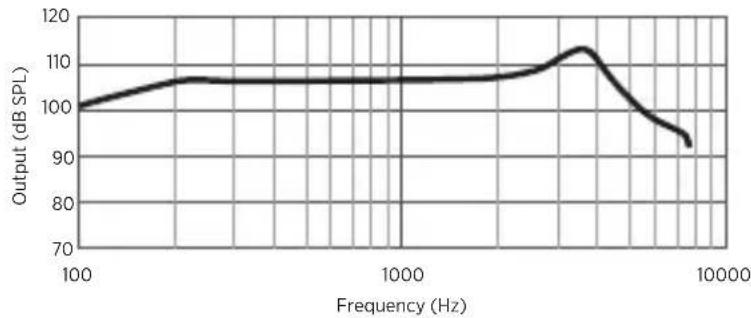
| Maximum output (OSPL90) curve See Figure 1 | |
| Maximum output (OSPL90) 113 dB SPL | |
| Fitted OSPL90 Up to 108 dB SPL | |
| High-frequency average (HFA) OSPL90 106 dB SPL | |
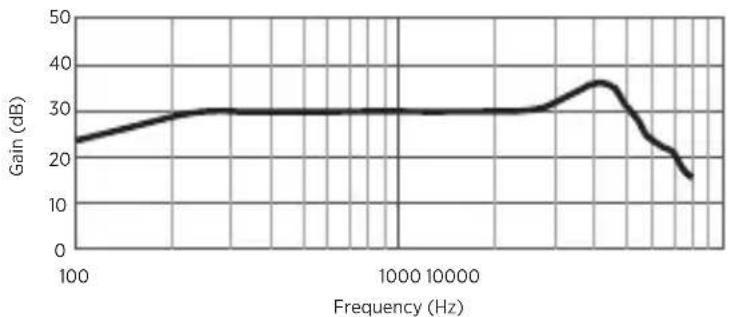
| High-frequency average full-on gain (HFA-FOG) 30 dB | |
| Reference test gain 29 dB | |
| Frequency response curve See Figure 2 | |
| Frequency range < 200 – 8000 Hz | |
| Harmonic distortion < 0.5% typical, < 1% max | |
| Equivalent input noise | < 23 dB SPL typical,< 27 dB SPL max |
| Battery current drain 2.8 mA | |
| Latency* 5.5 ms |
10 regulatory and legal information
Maximum Output (OSPL90)
line
| Frequency (Hz) | Output (dB SPL) | | -------------- | --------------- | | 100 | 100 | | 1000 | 105 | | 10000 | 95 |Figure 1: Nominal OSPL90 curve as measured in a 2 cc coupler.
Full-On Gain (FOG50)
line
| Frequency (Hz) | Gain (dB) | | -------------- | --------- | | 100 | 24 | | 1000 | 30 | | 10000 | 30 | | 100000 | 36 | | 1000000 | 18 |Figure 2: Nominal frequency response curve as measured in a 2 cc coupler.
Please complete and retain for your records
The serial numbers are located on the bottom of each hearing aid.
Serial number: ____
Model number: BMD0012
Please keep your receipt with this document. Now is a good time to register your Bose product. You can easily do this by going to global.Bose.com/register
Proper operation of your Bose product requires a safe, private, and secure operating environment. To ensure your security, Bose recommends following best practices for securing your home network and mobile device. For more information, refer to the US Federal Trade Commission's guidance on online security.
Visit: consumer.ftc.gov/topics/online-security
10 regulatory and legal information
The Bose Privacy Policy is available at worldwide.bose.com/privacypolicy
Apple and the Apple logo are trademarks of Apple Inc., registered in the U.S. and other countries. App Store is a service mark of Apple Inc.
The Bluetooth ^® word mark and logos are registered trademarks owned by Bluetooth SIG, Inc. and any use of such marks by Bose Corporation is underlicense.
Android and Google Play are trademarks of Google LLC.
Wi-Fi is a registered trademark of Wi-Fi Alliance®.
Bose, SoundControl, and the Bose Hear app icon are trademarks of Bose Corporation.
©2021 Bose Corporation. No part of this work may be reproduced, modified, distributed, or otherwise used without prior written permission.
REF BMD0012
Symbols and descriptions
Symbol Description
| LOT | Batch code |
| Bluetooth | |
| REF | Catalogue number |
| Caution | |
| Choking hazard | |
| Consultinstructions for use | |
| Customer support | |
| Date of Manufacture |
Symbol Description
 | Does not containlatex |
 | Do not use if packageisdamaged |
 | Downloads |
 | Forum |
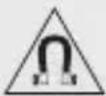 | Magnetic material |
 | Manufacturer |
 | Non-sterile |
 | Note |
10 regulatory and legal information
Symbol Description
 | Phone |
 | Serial number |
| 312 | Size 312zinc-air battery |
 | Type Bapplied part |
 | Videos |
 | Waste Electrical and Electronic Equipment Directivesymbol |
10 regulatory and legal information

worldwide.Bose.com/Support/SoundControl



global.Bose.com/warranty
- BOSE SOUNDCONTROL™ HEARING AIDS
- Owner's Guide
- Safety and health information
- Set up the hearing aids
- How to wear
- Hearing aid and app controls
- Adjusting to the hearing aids
- Battery management
- Bluetooth® connections
- Care and maintenance
- Troubleshooting
- Regulatory and legal information
- Safety and health information
- Intended use
- Indications for use
- Clinical data
- Hearing health care information
- This product may help you hear better if you:
- This product may not be right for you if you:
- You should see a hearing health care professional if you:
- Please read and keep all safety and use instructions.
- Important safety instructions
- WARNINGS
- CAUTIONS
- 2
- Set up the hearing aids
- What's in the box
- Hearing aid overview
- Connect your phone
- Step 1:
- Step 2:
- Step 3:
- Download the Bose Hear app
- Insert the batteries
- Step 4:
- Step 5:
- Step 6:
- 3
- How to wear
- Put on the hearing aids
- TIPS:
- note The eartip may feel
- Step 7:
- To remove the hearing aids
- Check your fit
- Are the hearing aids on correctly?
- Correct:
- Is the eartip size correct for each ear?
- Correct size:
- Is the cable size correct for each ear?
- If the hearing aid body feels loose or the cable feels tight:
- 4
- Hearing aid and app controls
- Power on
- Power off
- notes
- World Volume
- Adjust World Volume using the hearing aid controls
- Adjust World Volume using the Bose Hear app
- Treble and bass
- Adjust treble and bass
- Focus
- When to use each Focus setting
- Select a Focus setting
- Left/Right Ear Balance
- Adjust Ear Balance
- Modes
- Access Modes
- 5
- Adjusting to the hearing aids
- What to expect
- Comfort and fit
- Adjusting to new sounds
- 6
- Battery management
- When to replace batteries
- Remove the batteries
- WARNING
- Battery life
- Purchase batteries
- 7
- Bluetooth connections
- Bluetooth connections
- Connect a different phone
- Clear the hearing aid device lists
- 8
- Care and maintenance
- Store the hearing aids
- Maintain the hearing aids
- Moisture
- Keep the hearing aids dry
- If the hearing aids become excessively wet
- Daily maintenance
- Weekly maintenance
- Quarterly maintenance
- Yearly maintenance
- Replacement components
- Limited warranty
- Returns and exchanges
- Update the hearing aids
- 9
- Troubleshooting
- Try these solutions first
- Other solutions
- Problem Solutions
- Eartip troubleshooting
- Check if the eartips are too big or too small
- ✗ Too big:
- ✗ Too small:
- √ Correct size:
- Eartip sizes
- Try another eartip size
- Eartip types
- Try another eartip type
- Change the eartips
- note Don't wear the hearing aid if
- Cable size troubleshooting
- Check if the cables are too long or too short
- × Too long:
- × Too short:
- Measure your cable size
- Step 8:
- 10
- Regulatory and legal information
- regulatory and legal information
- Operating Conditions:
- Storage/Transport Conditions:
- Time to warm from minimum storage temperature before use:
- Time to cool from maximum storage temperature before use:
- Dimensions (Single Hearing Aid):
- Expected Service Life of Product and Components: 2 Years
- Please complete and retain for your records
- Symbols and descriptions
- worldwide.Bose.com/Support/SoundControl
- global.Bose.com/warranty
Brand : BOSE
Model : SoundControl Hearing Aids
Category : Earphones