
ZCI66280WA - Cooker ZANUSSI - Free user manual and instructions
Find the device manual for free ZCI66280WA ZANUSSI in PDF.


User questions about ZCI66280WA ZANUSSI
0 question about this device. Answer the ones you know or ask your own.
Ask a new question about this device
Download the instructions for your Cooker in PDF format for free! Find your manual ZCI66280WA - ZANUSSI and take your electronic device back in hand. On this page are published all the documents necessary for the use of your device. ZCI66280WA by ZANUSSI.
USER MANUAL ZCI66280WA ZANUSSI
natural_image
Abstract geometric design with white lines and shapes on dark background, no text or symbols presentUser Manual
GETTING STARTED? EASY.
natural_image
Simple line drawing of a kitchen oven on a dark background (no text or symbols)ZCI66280WA
ZCI66280BA
ZCI66280XA
EN User Manual
Cooker
ZANUSSI
SAFETY INFORMATION
Before the installation and use of the appliance, carefully read the supplied instructions. The manufacturer is not responsible for any injuries or damage that are the result of incorrect installation or usage. Always keep the instructions in a safe and accessible location for future reference.
CHILDREN AND VULNERABLE PEOPLE SAFETY

WARNING!
Risk of suffocation, injury or permanent disability.
- This appliance can be used by children aged from 8 years and above and persons with reduced physical, sensory or mental capabilities or lack of experience and knowledge if they have been given supervision or instruction concerning the use of the appliance in a safe way and understand the hazards involved. Children of less than 8 years of age and persons with very extensive and complex disabilities shall be kept away from the appliance unless continuously supervised.
- Do not let children play with the appliance.
- Keep all packaging away from children and dispose of it appropriately.
- WARNING: Keep children and pets away from the appliance when it operates or when it cools down. Accessible parts become hot during use.
- If the appliance has a child safety device, it should be activated.
- Children shall not carry out cleaning and user maintenance of the appliance without supervision.
GENERAL SAFETY
- Only a qualified person must install this appliance and replace the cable.
- This appliance must be connected to the mains with a H05VV-F type cable to withstand the temperature of the rear panel.
- This appliance is intended for use up to an altitude of 2000 m above sea level.
- This appliance is not intended to be used on ships, boats or vessels.
- Do not install the appliance behind a decorative door in order to avoid overheating.
- Do not install the appliance on a platform.
- Do not operate the appliance by means of an external timer or separate remote-control system.
- WARNING: Unattended cooking on a hob with fat or oil can be dangerous and may result in fire.
- NEVER try to extinguish a fire with water, but switch off the appliance and then cover flame e.g. with a lid or a fire blanket.
- CAUTION: The cooking process has to be supervised. A short term cooking process has to be supervised continuously.
- WARNING: Danger of fire: Do not store items on the cooking surfaces.
- Do not use a steam cleaner to clean the appliance.
- Do not use harsh abrasive cleaners or sharp metal scrapers to clean the glass door or the glass of hinged lids of the hob since they can scratch the surface, which may result in shattering of the glass.
- Metallic objects such as knives, forks, spoons and lids should not be placed on the hob surface since they can get hot.
- If the glass ceramic surface / glass surface is cracked, switch off the appliance and unplug it from the mains. In case the appliance is connected to the mains directly using junction box, remove the fuse to disconnect the appliance from power supply. In either case contact the Authorised Service Centre.
- After use, switch off the hob element by its control and do not rely on the pan detector.
- WARNING: The appliance and its accessible parts become hot during use. Care should be taken to avoid touching heating elements.
- Always use oven gloves to remove or put in accessories or ovenware.
- Before maintenance, cut the power supply.
- WARNING: Ensure that the appliance is switched off before replacing the lamp to avoid the possibility of electric shock.
- If the mains power supply cable is damaged, it must be replaced by the manufacturer, its Authorised Service Centre or similarly qualified persons to avoid an electrical hazard.
- To remove the shelf supports first pull the front of the shelf support and then the rear end away from the side walls. Install the shelf supports in the opposite sequence.
- The means for disconnection must be incorporated in the fixed wiring in accordance with the wiring rules.
- WARNING: Use only hob guards designed by the manufacturer of the cooking appliance or indicated by the manufacturer of the appliance in the instructions for use as suitable or hob guards incorporated in the appliance. The use of inappropriate guards can cause accidents.
SAFETY INSTRUCTIONS
INSTALLATION

WARNING! Only a qualified person must install this appliance.
- Remove all the packaging.
- Do not install or use a damaged appliance.
- Follow the installation instructions supplied with the appliance.
- Always take care when moving the appliance as it is heavy. Always use safety gloves and enclosed footwear.
- Do not pull the appliance by the handle.
- The kitchen cabinet and the recess must have suitable dimensions.
- Keep the minimum distance from other appliances and units.
- Install the appliance in a safe and suitable place that meets installation requirements.
- Parts of the appliance carry current. Close the appliance with furniture to prevent touching the dangerous parts.
- The sides of the appliance must stay next to appliances or units with the same height.
- Do not install the appliance adjacent to a door or under a window. This prevents hot cookware
to fall from the appliance when the door or the window is opened.
- Make sure to install a stabilizing means in order to prevent tipping of the appliance. Refer to Installation chapter.
ELECTRICAL CONNECTION

WARNING! Risk of fire and electric shock.
- All electrical connections should be made by a qualified electrician.
- The appliance must be earthed.
- Make sure that the parameters on the rating plate are compatible with the electrical ratings of the mains power supply.
- Always use a correctly installed shockproof socket.
- Do not use multi-plug adapters and extension cables.
-
Do not let mains cables touch or come near the appliance door or the niche below the appliance, especially when it operates or the door is hot.
-
The shock protection of live and insulated parts must be fastened in such a way that it cannot be removed without tools.
- Connect the mains plug to the mains socket only at the end of the installation. Make sure that there is access to the mains plug after the installation.
- If the mains socket is loose, do not connect the mains plug.
- Do not pull the mains cable to disconnect the appliance. Always pull the mains plug.
- Use only correct isolation devices: line protecting cut-outs, fuses (screw type fuses removed from the holder), earth leakage trips and contactors.
- The electrical installation must have an isolation device which lets you disconnect the appliance from the mains at all poles. The isolation device must have a contact opening width of minimum 3 mm.
- Fully close the appliance door before you connect the mains plug to the mains socket.
USE

WARNING! Risk of injury and burns. Risk of electrical shock.
- This appliance is for household use only.
- Do not change the specification of this appliance.
- Make sure that the ventilation openings are not blocked.
- Do not let the appliance stay unattended during operation.
- Deactivate the appliance after each use.
- Be careful when you open the appliance door while the appliance is in operation. Hot air can release.
- Do not operate the appliance with wet hands or when it has contact with water.
- Do not use the appliance as a work surface or as a storage surface.
- Users with a pacemaker must keep a distance of minimum 30 cm from the induction cooking zones when the appliance is in operation.

WARNING! Risk of fire and explosion
- Fats and oil when heated can release flammable vapours. Keep flames or heated objects away from fats and oils when you cook with them.
- The vapours that very hot oil releases can cause spontaneous combustion.
-
Used oil, that can contain food remnants, can cause fire at a lower temperature than oil used for the first time.
-
Do not put flammable products or items that are wet with flammable products in, near or on the appliance.
- Do not let sparks or open flames to come in contact with the appliance when you open the door.
- Open the appliance door carefully. The use of ingredients with alcohol can cause a mixture of alcohol and air.

WARNING! Risk of damage to the appliance.
- To prevent damage or discoloration to the enamel:
- do not put ovenware or other objects in the appliance directly on the bottom.
- do not put aluminium foil on the appliance or directly on the bottom of cavity.
- do not put water directly into the hot appliance.
- do not keep moist dishes and food in the appliance after you finish the cooking.
- be careful when you remove or install the accessories.
- Discoloration of the enamel or stainless steel has no effect on the performance of the appliance.
- Use a deep pan for moist cakes. Fruit juices cause stains that can be permanent.
- Do not keep hot cookware on the control panel.
- Do not let cookware boil dry.
- Be careful not to let objects or cookware fall on the appliance. The surface can be damaged.
- Do not activate the cooking zones with empty cookware or without cookware.
- Cookware made of cast iron, aluminium or with a damaged bottom can cause scratches. Always lift these objects up when you have to move them on the cooking surface.
- This appliance is for cooking purposes only. It must not be used for other purposes, for example room heating.
CARE AND CLEANING

WARNING! Risk of injury, fire, or damage to the appliance.
- Before maintenance, deactivate the appliance. Disconnect the mains plug from the mains socket.
- Make sure the appliance is cold. There is the risk that the glass panels can break.
-
Replace immediately the door glass panels when they are damaged. Contact the Authorised Service Centre.
-
Be careful when you remove the door from the appliance. The door is heavy!
- Fat and food remaining in the appliance can cause fire.
- Clean regularly the appliance to prevent the deterioration of the surface material.
- Make sure the cavity and the door are wiped dry after each use. Steam produced during the operation of the appliance condensates on cavity walls and can cause corrosion. To decrease the condensation operate the appliance for 10 minutes before cooking.
- Clean the appliance with a moist soft cloth. Use only neutral detergents. Do not use abrasive products, abrasive cleaning pads, solvents or metal objects.
- If you use an oven spray, follow the safety instructions on the packaging.
- Do not clean the catalytic enamel (if applicable) with any kind of detergent.
INTERNAL LIGHTING

WARNING! Risk of electric shock.
- Concerning the lamp(s) inside this product and spare part lamps sold separately: These lamps
INSTALLATION

WARNING! Refer to Safety chapters.
TECHNICAL DATA
Dimensions
| Height 894 - 912 mm | |
| Width 600 mm | |
| Depth 600 mm |
LOCATION OF THE APPLIANCE
You can install your freestanding appliance with cabinets on one or two sides and in the corner.
are intended to withstand extreme physical conditions in household appliances, such as temperature, vibration, humidity, or are intended to signal information about the operational status of the appliance. They are not intended to be used in other applications and are not suitable for household room illumination.
- Use only lamps with the same specifications.
SERVICE
- To repair the appliance contact the Authorised Service Centre.
- Use original spare parts only.
DISPOSAL

WARNING! Risk of injury or suffocation.
- Disconnect the appliance from the mains supply.
- Cut off the mains electrical cable close to the appliance and dispose of it.
- Remove the door catch to prevent children or pets from becoming trapped in the appliance.
text_image
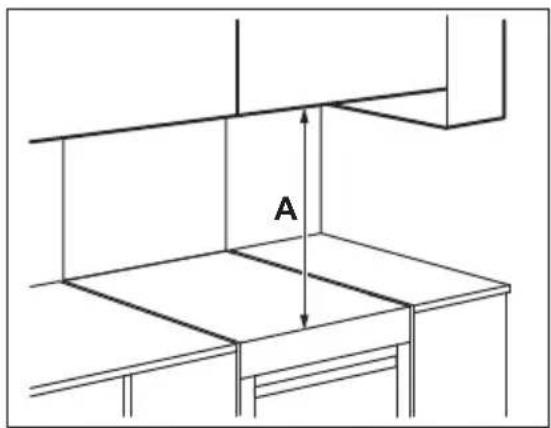
AMinimum distances
| Dimension mm | |
| A 685 |
LEVELLING OF THE APPLIANCE
natural_image
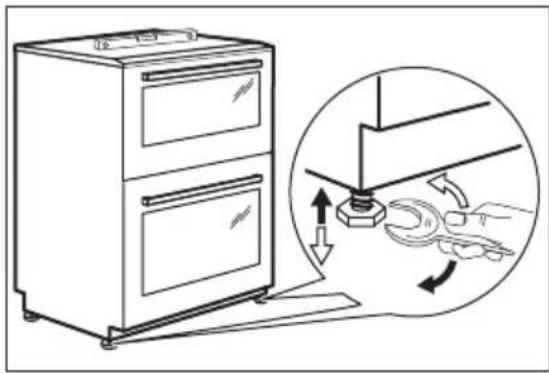
Line drawing of a double-door oven with an inset showing hand cleaning steps (no text or symbols)Use small feet on the bottom of appliance to set the appliance top surface level with other surfaces.
ELECTRICAL INSTALLATION

WARNING! The manufacturer is not responsible if you do not follow the safety precautions from Safety chapters.
This appliance is supplied without a main plug or a main cable.
Applicable types of cables for different phases:
| Phase Min. size cable | |
| 1 3x6.0 mm2 | |
| 3 with neutral 5x1.5 mm2 | |

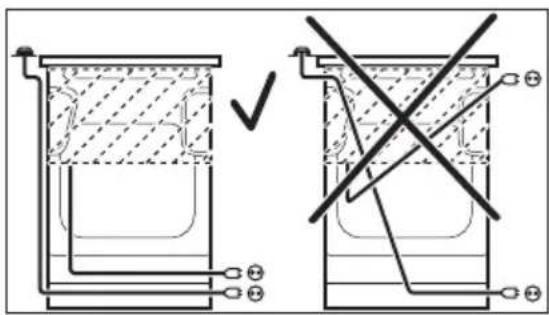
WARNING! The power cable must not touch the part of the appliance shaded in the illustration.
text_image
Technical diagram showing two cross-sectional views of a container with labeled components and a checkmark indicating a validation or modification point.COVERING TERMINAL BOARD
natural_image
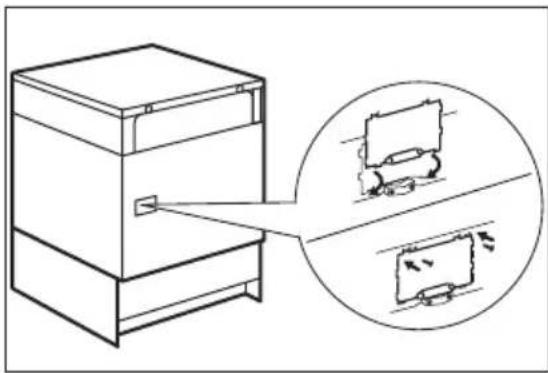
Line drawing of a cabinet with an arrow pointing to its side panel, showing internal components (no text or symbols present)- The recommended cross-section area is six square millimetres (6 mm ^2 ).
- When you refit the mains terminal cover, make sure that the lower tabs are located inside the bottom edge of the aperture, before you fix the two screws into the top edge of the mains terminal cover.
- Make sure that the cover is securely fastened.

To open the cover of terminal board obey the procedure in opposite sequence.
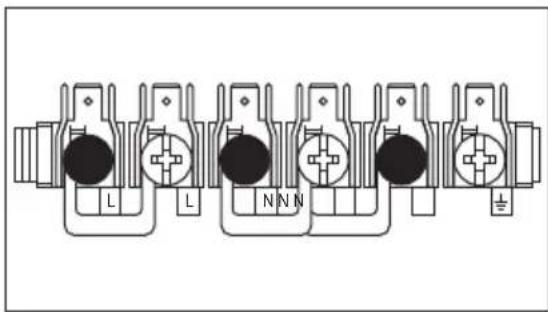
TERMINAL BOARD

Do not remove blanking plates.
Make sure that the links are fitted as shown.
natural_image
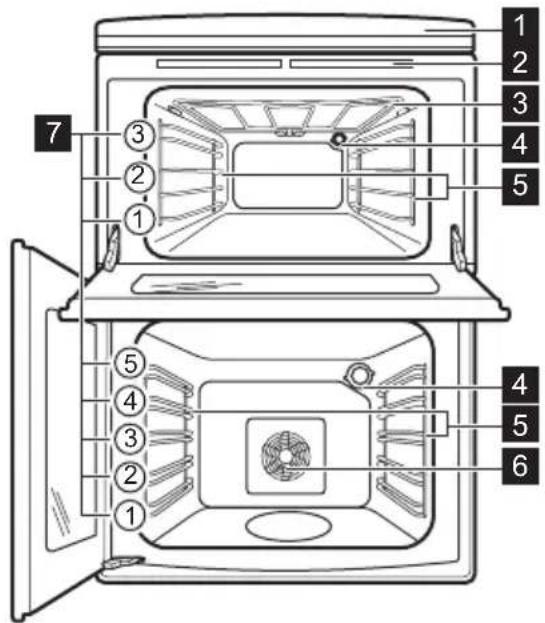
Pure electrical connector diagram without any text, numbers, or symbolsGENERAL OVERVIEW
text_image
1 2 3 4 5 7 ③ ② ① ⑤ ④ ③ ② ① 4 5 6HOB OVERVIEW
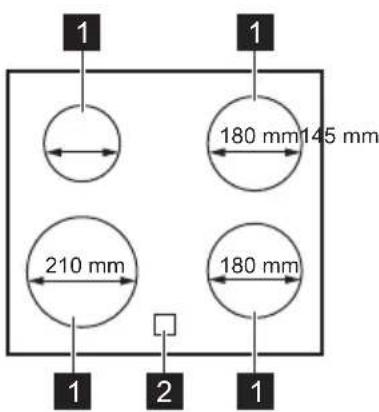
text_image
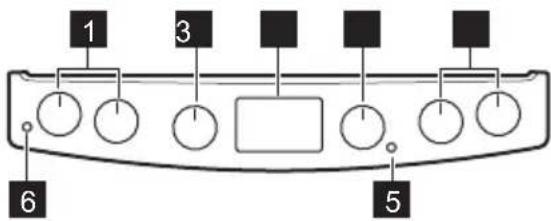
1 1 180 mm145 mm 210 mm 180 mm 1 2 1COOKER CONTROL PANEL
text_image
1 3 5 6ACCESSORIES
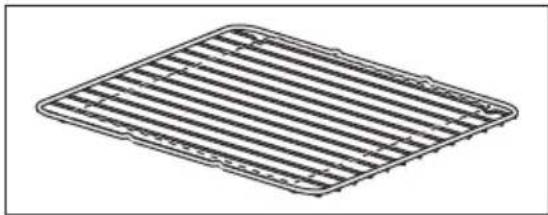
- Wire shelf
For cookware, cake tins, roasts.
- Grill- / Roasting pan
1 Control panel and hob
2 Air vents for the cooling fan
3 Heating element
4 Lamp
5 Shelf support, removable
6 Fan
7 Shelf positions
1 Induction cooking zone
2 Control Panel
1 Knobs for the hob
2 Knob for the top oven functions
3 Display
4 Knob for the main oven functions
5 Temperature indicator / symbol for the main oven
6 Temperature indicator / symbol for the top oven
To bake and roast or as pan to collect fat.
- Trivet
For roasting and grilling.

Use the trivet only with the Grill-/roasting pan.
BEFORE FIRST USE

WARNING! Refer to Safety chapters.
INITIAL CLEANING
Remove all accessories and removable shelf supports from the appliance.

Refer to "Care and cleaning" chapter.
Clean the appliance and the accessories before first use.
Put the accessories and the removable shelf supports back to their initial position.
USING THE SENSOR FIELDS
To activate the function press and hold the selected symbol on the display for at least 1 second.
SETTING AND CHANGING THE TIME
You must set the time before you operate the oven. When you connect the appliance to the electrical supply or after a power cut, ⏻ flashes.
HOB - DAILY USE

WARNING! Refer to Safety chapters.
Press the + to set the correct time.
After approximately 5 seconds, the flashing stops and the display shows the time of day.
To change the time, press ⏻ again and again until ⏻ starts to flash.
PREHEATING
Preheat the empty appliance before first use.

Preheat the two ovens. Heat up one oven at a time.
- Set the maximum temperature.
- Let the appliance operate for 1 hour.
- Set the function .
- Let the appliance operate for 15 minutes.
Accessories can become hotter than usual. The appliance can emit an odour and smoke. This is normal. Make sure that the airflow is sufficient.
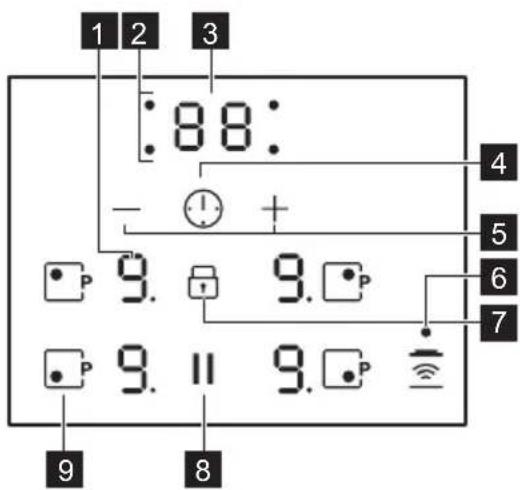
HOB CONTROL PANEL
text_image
1 2 3 :88: - + 4 5 6 7 9. 9. 9. 9. 9. 9. II 9. PUse the sensor fields to operate the appliance. The displays, indicators and sounds tell which functions operate.
| Sensor field | Function Comment | ||
| 1 | - Heat setting display To show the heat setting. | ||
| 2 | - Timer indicators of cooking zones | To show for which zone you set the time. | |
| 3 | - Timer display To show the time in minutes. | ||
| 4 | - To select the cooking zone. | ||
| 5 |  | - To increase or decrease the time. | |
| 6 | [SY7W] | Hob ^2 Hood To activate and deactivate the manual mode of the function. | |
| 7 | [1H43] | Lock / Child Safety Device To lock / unlock the control panel. | |
| 8 | Pause To activate and deactivate the function. | ||
| 9 | [3W15] | PowerBoost To activate and deactivate the function. | |
HEAT SETTING DISPLAYS
| Display Description | |
| 0 | The cooking zone is deactivated. |
| 1 - 9 - 2 6 | The cooking zone operates.The dot means a change by half of a heating level. |
| u | Pause operates. |
| A | Automatic Heat Up operates. |
| P | PowerBoost operates. |
| E + digit | There is a malfunction. |
| = / 7 = | OptiHeat Control (3 step Residual heat indicator): continue cooking / keep warm / residual heat. |
| L | Lock / Child Safety Device operates. |
| F | Incorrect or too small cookware or no cookware on the cooking zone. |
| - | Automatic Switch Off operates. |
OPTIHEAT CONTROL (3 STEP RESIDUAL HEAT INDICATOR)

WARNING! ☑ / ☐ There is a risk of burns from residual heat.
The indicators show the level of the residual heat for the cooking zones you are currently using. The indicators may also come on for the neighbouring cooking zones even if you are not using them.
The induction cooking zones produce the heat necessary for the cooking process directly in the bottom of the cookware. The glass ceramic is heated by the heat of the cookware.
THE HEAT SETTING
Turn the knob for the heating functions to select a heating function. To deactivate it turn the knob to the off position 0.
AUTOMATIC SWITCH OFF
The function deactivates the hob automatically if:
- all cooking zones are deactivated,
- you do not set the heat setting after you activate the hob,
-
you spill something or put something on the control panel for more than 10 seconds (a pan, a cloth, etc.). An acoustic signal sounds and the hob deactivates. Remove the object or clean the control panel.
-
the hob gets too hot (e.g. when a saucepan boils dry). Let the cooking zone cool down before you use the hob again.
- you use incorrect cookware. The symbol comes on and the cooking zone deactivates automatically after 2 minutes.
- you do not deactivate a cooking zone or change the heat setting. After some time comes on and the hob deactivates.
The relation between the heat setting and the time after which the hob deactivates:
| Heat setting | The hob deactivates after |
| u, 1 - 2 | 6 hours |
| 3 - 4 5 hours | |
| 5 4 hours | |
| 6 - 9 1.5 hour |
AUTOMATIC HEAT UP
If you activate this function you can get a necessary heat setting faster. The function sets the highest heat setting for some time and then decreases to the correct heat setting.

To activate the function a cooking zone must be cold.
To activate the function for a cooking zone:
turn the knob for a cooking zone to the A position. A shows on the display. Immediately set the correct heat setting.
To deactivate the function: turn the knob to the off position.
POWERBOOST
This function makes more power available to the induction cooking zones. The function can be activated for the induction cooking zone only for a limited period of time. After this time the induction cooking zone automatically sets back to the highest heat setting.
To activate the function for a cooking zone:
touch comes on.
To deactivate the function: change the heat setting.
TIMER
Count Down Timer
You can use this function to set how long the cooking zone should operate for a single cooking session.
First set the heat setting for the cooking zone then set the function.
To set the cooking zone: touch again and again until the indicator of a necessary cooking zone comes on.
To activate the function: touch + of the timer to set the time (00 - 99 minutes). When the indicator of the cooking zone starts to flash slowly the time counts down.
To see the remaining time: set the cooking zone with ⚪The indicator of the cooking zone starts to flash quickly. The display shows the remaining time.
To change the time: set the cooking zone with ⚠. Touch for . —
To deactivate the function: set the cooking zone with and touch. The remaining time counts back to 00. The indicator of the cooking zone goes out.

When the time comes to an end, the sound operates and 00 flashes. The cooking zone deactivates.
To stop the sound: touch ⏻
CountUp Timer
You can use this function to monitor how long the cooking zone operates.
To set the cooking zone: touch ⚠️ again and again until the indicator of a necessary cooking zone comes on.
To activate the function: touch of the timer. UP comes on. When the indicator of the cooking zone starts to flash slowly the time counts up. The display switches between UP and counted time (minutes).
To see how long the cooking zone operates:
set the cooking zone with ⚠The indicator of the cooking zone starts to flash quickly. The display shows how long the zone operates.
To deactivate the function: set the cooking zone with ⏻ and touch on. The indicator of the cooking zone goes out.
Minute Minder
You can use this function as a Minute Minder when the hob is activated and the cooking zones do not operate. The heat setting display shows
To activate the function: touch ⚠ Touch or
— of the timer to set the time. Cooking zones display deactivates automatically after 10 seconds. When the time comes to an end, the sound operates and 00 flashes.
To stop the sound: touch
To deactivate the function: activate for a short time and deactivate left front cooking zone.

The function has no effect on the operation of the cooking zones.
PAUSE
The function does not stop the timer functions.
Touch || to activate the function.
u comes on. The heat setting is lowered to 1.
To deactivate the function, touch ||The previous heat setting comes on.

If you change the heat setting, the function stops and the display shows the new heat setting.
LOCK
You can lock the sensors on the hob while cooking zones operate.
Set the heat setting first.
To activate the function: touch comes on for 4 seconds. The Timer stays on.
To deactivate the function: touch 🔍. The previous heat setting comes on.

When you deactivate the hob, you also deactivate this function.
CHILD SAFETY DEVICE
This function prevents an accidental operation of the hob.
To activate the function: the hob must be deactivated. Touch for 4 seconds until flashes. Touch comes on for 4 seconds.
To deactivate the function: the hob must be deactivated. Touch for 4 seconds until flashes. Touch comes on for 4 seconds.
To override the function for only one cooking time: activate a cooking zone. comes on. Touch for 4 seconds until comes on for all zones.
Set the heat setting in 4 seconds. You can operate the hob. When you deactivate the appliance the function operates again.
OFFSOUND CONTROL (DEACTIVATION AND ACTIVATION OF THE SOUNDS)
Deactivate the hob. Touch for 3 seconds. Touch for 3 seconds. or comes on. Touch of the timer to choose one of the following:
- the sounds are off
- the sounds are on.
To confirm your selection wait until the hob deactivates automatically.
When the function is set to ☐ you can hear the sounds only when:
- Minute Minder comes down
- Count Down Timer comes down
- you put something on the control panel.
HOB ^2 HOOD
It is an advanced automatic function which connects the hob to a special hood. Both the hob and the hood have an infrared signal communicator. Speed of the fan is defined automatically on basis of mode setting and temperature of the hottest cookware on the hob. You can also operate the fan from the hob manually.

For most of the hoods the remote system is originally deactivated. Activate it before you use the function. For more information refer to hood user manual.
Operating the function automatically
To operate the function automatically set the automatic mode to H1 – H6. The hob is originally set to H5. The hood reacts whenever you operate the hob. The hob recognizes temperature of the cookware automatically and adjusts the speed of the fan.
Automatic modes
| Automatic light | Boiling1) | Frying2) | |
| Mode H0 | Off Off Off | ||
| Mode H1 | On Off Off | ||
| Mode H23) | On Fan | speed 1 | Fan speed 1 |
| Mode H3 | On Off Fan | speed 1 | |
| Mode H4 | On Fan | speed 1 | Fan speed 1 |
| Mode H5 | On Fan | speed 1 | Fan speed 2 |
| Mode H6 | On Fan | speed 2 | Fan speed 3 |
1) The hob detects the boiling process and activates fan speed in accordance with automatic mode.
2) The hob detects the frying process and activates fan speed in accordance with automatic mode.
3) This mode activates the fan and the light and does not rely on the temperature.
Changing the automatic mode
- Deactivate the appliance.
- Touch until you hear a beep and keep it pressed until you hear the second beep.
- Touch for 3 seconds until or comes on.
-
Touch until H and a digit (0 - 6) comes on. H5 is the default setting.
-
Touch of the Timer to select the desired mode (H0 - H6). The chosen mode activates automatically after 10 seconds.

To operate the hood directly on the hood panel deactivate the automatic mode of the function.

When you finish cooking and deactivate the hob, the hood fan may still operate for a certain period of time. After that time the system deactivates the fan automatically and prevents you from accidental activation of the fan for the next 30 seconds.
Operating the fan speed manually
You can also operate the function manually. To do that touch when the hob is active. This deactivates automatic operation of the function and allows you to change the fan speed manually. When you press you raise the fan speed by one. When you reach an intensive level and press again you will set fan speed to 0 which deactivates the hood fan. To start the fan again with fan speed 1 touch.

To activate automatic operation of the function, deactivate the hob and activate it again.
Activating the light
You can set the hob to activate the light automatically whenever you activate the hob. To do so set the automatic mode to H1 - H6.
HOB - HINTS AND TIPS

WARNING! Refer to Safety chapters.
COOKWARE

For induction cooking zones a strong electro-magnetic field creates the heat in the cookware very quickly.

Use the induction cooking zones with suitable cookware.
Cookware material

The light on the hood deactivates 2 minutes after deactivating the hob.
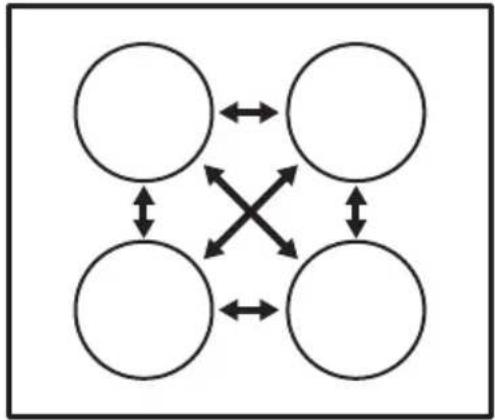
POWER MANAGEMENT FUNCTION
- All cooking zones are connected. See the illustration.
- The hob and both ovens are connected to one phase.
- The phase has a maximum electricity load.
- The function divides the power in the appliance. The oven is more important than the hob.
- The function activates when the total electricity load in the appliance is exceeded.
- The function reduces the power of the cooking zones to prevent a circuit overload.
- The heat setting display of the reduced zones changes between two levels.
flowchart
graph TD
    A[" "] <--> B[" "]
    C[" "] <--> D[" "]
    E[" "] <--> F[" "]
    G[" "] <--> H[" "]
    I["X"] --> B
    I["X"] --> C
    I["X"] --> D
    I["X"] --> E
    I["X"] --> F
- correct: cast iron, steel, enamelled steel, stainless steel, multi-layer bottom (with a correct marking from a manufacturer).
- not correct: aluminium, copper, brass, glass, ceramic, porcelain.
Cookware is suitable for an induction hob if:
- water boils very quickly on a zone set to the highest heat setting.
- a magnet pulls on to the bottom of the cookware.

The bottom of the cookware must be as thick and flat as possible.
Ensure pan bases are clean and dry before placing on the hob surface.
Cookware dimensions
Induction cooking zones adapt to the dimension of the bottom of the cookware automatically.
The cooking zone efficiency is related to the diameter of the cookware. The cookware with a diameter smaller than the minimum receives only a part of the power generated by the cooking zone.
MINIMUM COOKWARE DIAMETER
| Cooking zone | Cookware diameter (mm) | Power (W) |
| Left rear 125 | -140 | 1400/2500 |
| Right rear 145 | -180 | 1800/2800 |
| Right front 145 | -180 | 1800/2800 |
| Left front 180 | -210 | 2300/3600 |
THE NOISES DURING OPERATION If you can hear:
- crack noise: cookware is made of different materials (a sandwich construction).
- whistle sound: you use a cooking zone with a high power level and the cookware is made of different materials (a sandwich construction).
- humming: you use a high power level.
- clicking: electric switching occurs.
- hissing, buzzing: the fan operates.
The noises are normal and do not indicate any malfunction.
ÖKO TIMER (ECO TIMER)
To save energy, the heater of the cooking zone deactivates before the count down timer sounds. The difference in the operation time depends on the heat setting level and the length of the cooking operation.
EXAMPLES OF COOKING APPLICATIONS
The correlation between the heat setting of a zone and its consumption of power is not linear. When you increase the heat setting, it is not proportional to the increase of the consumption of power. It means that a cooking zone with the medium heat setting uses less than a half of its power.

The data in the table is for guidance only.
| Heat setting Use to: | Time (min) | Hints | |
| u- 1 | Keep cooked food warm. as necessary | essary | Put a lid on the cookware. |
| 1 - 2. Hollandaise sauce, melt: butter, chocolate, gelatine. | 5 - 25 Mix from time to time. | ||
| 1 - 2. Solidify: fluffy omelettes, baked eggs. | 10 - 40 | Cook with a lid on. | |
| 2. - 3. Simmer rice and milkbased dishes, heat up ready-cooked meals. | 25 - 50 | Add at least twice as much liquid as rice, mix milk dishes halfway through the procedure. | |
| 3. - 4. Steam vegetables, fish, meat. 20 - | 45 | Add a couple of tablespoons of liquid. | |
| 4. - 5. Steam potatoes. 20 - | 60 | Use max. 14 l of water for 750 g of potatoes. | |
| 4. - 5. Cook larger quantities of food, stews and soups. | 60 - 150 | Up to 3 l of liquid plus ingredients. | |
| 5. - 7 Gentle fry: | escalope, veal cordon bleu, cutlets, rissoles, sausages, liver, roux, eggs, pancakes, doughnuts. | as necessary | Turn halfway through. |
| 7 - 8 Heavy fry, | hash browns, loin steaks, steaks. | 5 - 15 Turn halfway through. | |
| 9 Boil water, cook pasta, sear meat (goulash, pot roast), deep-fry chips. | |||
| Boil large quantities of water. PowerBoost is activated. | |||
HOB - CARE AND CLEANING

WARNING! Refer to Safety chapters.
GENERAL INFORMATION
- Clean the hob after each use.
- Always use cookware with a clean base.
- Scratches or dark stains on the surface have no effect on how the hob operates.
- Use a special cleaner suitable for the surface of the hob.
- Use a special scraper for the glass.
CLEANING THE HOB
- Remove immediately: melted plastic, plastic foil, sugar and food with sugar, otherwise, the
OVEN - DAILY USE
dirt can cause damage to the hob. Take care to avoid burns. Use a special hob scraper on the glass surface at an acute angle and move the blade on the surface.
- Remove when the hob is sufficiently cool:
limescale rings, water rings, fat stains, shiny metallic discoloration. Clean the hob with a moist cloth and a non-abrasive detergent. After cleaning, wipe the hob dry with a soft cloth. - Remove shiny metallic discoloration: use a solution of water with vinegar and clean the glass surface with a cloth.

WARNING! Refer to Safety chapters.
TOP OVEN FUNCTIONS
| Symbol Oven function Application | ||
 | Off position The oven is off. | |
 | Oven Lamp To turn on the lamp without a cooking function. | |
| 100 - 250 Conventional Cooking To bake and roast food on one shelf position. | ||
 | Dual Circuit Grill To grill flat food in medium quantities in the middle of the shelf. To make toasts. | |
 | Full Grill To grill flat food and to toast bread. | |
MAIN OVEN FUNCTIONS

WARNING! Do not pour any liquids into the cavity embossment before and during the cooking process. There is a risk of damage.
| Symbol Oven function Application | ||
| [6842] | Off position The oven is off. | |
 | Oven Lamp To turn on the lamp without a cooking function. | |
| [D705] | Defrost To defrost food (vegetables and fruit). The defrosting time depends on the amount and size of the frozen food. | |
| 100 - 250 | Thermaflow® | To bake on up to three shelf positions at the same time and to dry food. |
ACTIVATING AND DEACTIVATING THE TOP / MAIN OVEN

It depends on the model if your appliance has knob symbols, indicators or lamps:
- The indicator comes on when the oven heats up.
- The lamp comes on when the oven operates.
-
The symbol shows whether the knob controls one of the cooking zones, the oven functions or the temperature.
-
Turn the knob for the top / main oven functions to select an oven function.
- To deactivate the oven turn the knob for the top / main oven functions to the off position.
COOLING FAN
When the oven operates, the cooling fan turns on automatically to keep the surfaces of the oven cool. If you turn off the oven, the cooling fan continues to operate until the oven cools down.
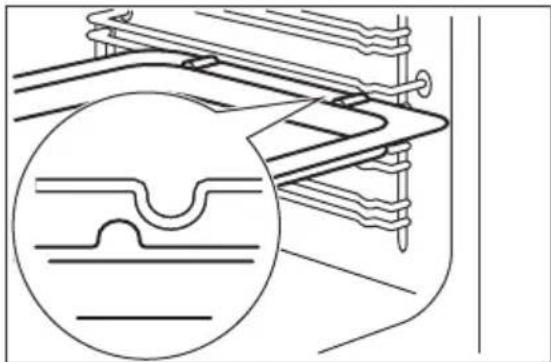
INSERTING THE OVEN ACCESSORIES
Deep pan:
Push the deep pan between the guide bars of the shelf support.
natural_image
Technical line drawing of a mechanical component with a magnified inset showing internal structure (no text or symbols)Wire shelf and the deep pan together:
Push the deep pan between the guide bars of the shelf support and the wire shelf on the guide bars above.
natural_image
Technical line drawing of a roof structure with two circular insets showing detailed cross-sections (no text or symbols)i
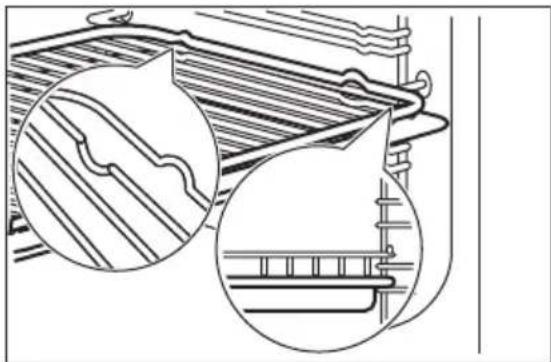
- All accessories have small indentations at the top of the right and left side to increase safety. The indentations are also anti-tip devices.
- The high rim around the shelf is a device which prevents cookware from slipping.
OVEN - CLOCK FUNCTIONS
DISPLAY
text_image
A B C 88:00TRIVET AND GRILL- / ROASTING PAN
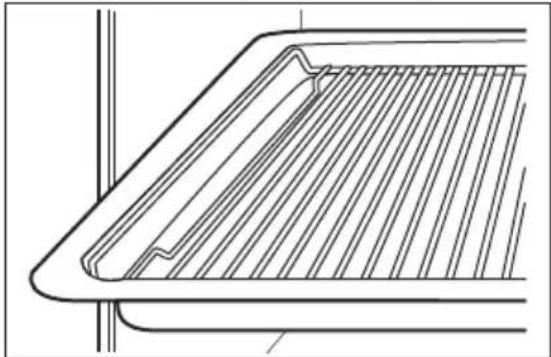
You can use the trivet to roast larger pieces of meat or poultry on one shelf position.
- Put the trivet into the deep pan so that the supports of the wire shelf point up.
natural_image
Technical line drawing of a structural component with diagonal bracing and vertical supports (no text or symbols)- Put the deep pan into the oven on the necessary shelf position.
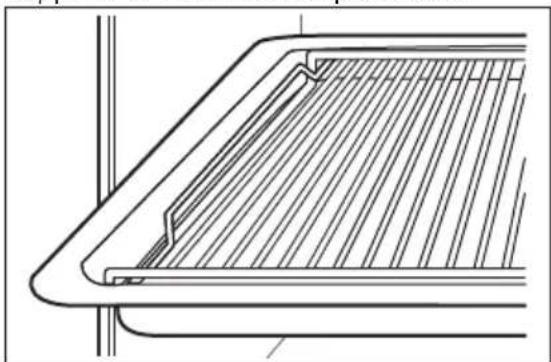
You can use the trivet to grill flat dishes in large quantities and to toast.
- Put the trivet into the deep pan so that the supports of the wire shelf point down.
natural_image
Technical line drawing of a structural panel or frame with diagonal bracing (no text or symbols)- Put the deep pan into the oven on the necessary shelf position.
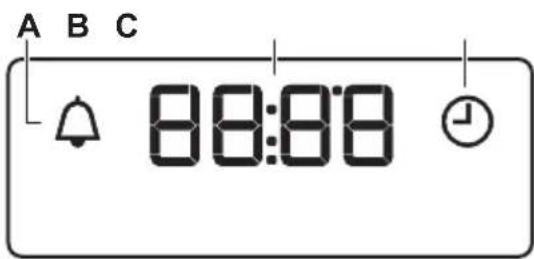
A. Minute minder indicator
B. Time display
C. Time of day indicator
BUTTONS
| Button Function Description | ||
| — | MINUS To set the time. | |
| 💡 | CLOCK To set a clock function. | |
| + | PLUS To set the time. | |
SETTING THE MINUTE MINDER
- Press again and again until starts to flash.
- Press or to set the necessary time.
The Minute Minder starts automatically after 5 seconds. -
When the set time ends, an acoustic signal sounds. Press any button to stop the acoustic signal.
-
Turn the knob for the oven functions to the off position.
CANCELLING THE CLOCK FUNCTIONS
- Press the again and again until the necessary function indicator starts to flash.
- Press and hold .
The clock function goes out after some seconds.
OVEN - HINTS AND TIPS

WARNING! Refer to Safety chapters.

The temperature and baking times in the tables are guidelines only. They depend on the recipes and the quality and quantity of the ingredients used.
TOP OVEN
The top oven is smaller than the main oven. It has 3 shelf positions. Use it to cook smaller quantities of food. It is especially good for baking fruitcakes, cookies, savoury flans or quiche.
MAIN OVEN
The main oven is particularly suitable for cooking larger quantities of food.
TIPS ON BAKING
| Baking results Possible cause Remedy | |
| The bottom of the cake is not baked sufficiently. | The shelf position is incorrect. Put the cake on a lower shelf. |
BAKING
For the first baking, use the lower temperature. You can extend the baking time by 10 – 15 minutes if you bake cakes on more than one shelf position.
Cakes and pastries at different heights do not always brown equally. There is no need to change the temperature setting if an unequal browning occurs. The differences equalize during baking.
Trays in the oven can distort during baking. When the trays are cold again, the distortions disappear.
| Baking results Possible cause Remedy | ||
| The cake sinks and becomes soggy or streaky. | The oven temperature is too high. | Next time set slightly lower oven temperature. |
| The oven temperature is too high and the baking time is too short. | Next time set a longer baking time and lower oven temperature. | |
| The cake is too dry. The oven temperature is too low. | Next time set higher oven temperature. | |
| The cake bakes unevenly. The oven temperature is too high and the baking time is too short. | Next time set a longer baking time and lower oven temperature. | |
| The cake is not ready in the baking time specified in a recipe. | The oven temperature is too low. | Next time set a slightly higher oven temperature. |
CONVENTIONAL BAKING - TOP OVEN
| Food Temperature (°C) | Time (min) Shelf position | ||
| Biscuits 170 - 190 10 - 20 2 | |||
| Bread 200 - 220 30 - 35 | 2 | ||
| Bread rolls / buns | 200 - 220 10 - 15 2 | ||
| Cakes: Victoria Sandwich | 160 - 170 18 - 25 | 2 | |
| Cakes: Madeira | 140 - 150 | 75 - 90 | 2 |
| Cakes: Rich Fruit | 140 - 150 | 120 - 150 | 2 |
| Cakes: Gingerbread | 140 - 150 | 80 - 90 | 2 |
| Cakes: Meringues | 90 - 100 | 150 - 180 | 2 |
| Cakes: Flapjack | 160 - 170 25 - 30 | 2 | |
| Casseroles: Beef / Lamb 160 - 170 | 150 - 180 2 | ||
| Casseroles: Chicken | 160 - 180 | 80 - 90 | 2 |
| Convenience Foods | Follow manufacturer's instructions. | 2 | |
| Fish | 170 - 190 20 - 30 | 2 | |
| Fish Pie (Potato Topped) | 190 - 200 20 - 30 | 2 | |
| Fruit Pies, Crumbles | 190 - 200 30 - 50 | 2 | |
| Milk Puddings | 150 - 170 90 - 120 | 2 | |
| Food Temperature (°C) Time (min) Shelf position | |||
| Pasta Lasagne etc. 170 - 180 40 - 50 2 | |||
| Pastry: Choux 180 - 190 30 - 40 2 | |||
| Pastry: Eclairs, Profiteroles180 - 190 30 - 40 2 | |||
| Pastry: Flaky / Puff Pies 210 - 220 30 - 40 2 | |||
| Shortcrusts: Mince Pies 190 - 200 15 - 20 2 | |||
| Shortcrusts: Meat Pies | 190 - 210 25 - 35 2 | ||
| Shortcrusts: Quiche, Tarts, Flans | 180 - 200 25 - 50 2 | ||
| Scones | 220 - 230 8 - 12 | 3 | |
| Shepard's Pie | 190 - 200 30 - 40 2 | ||
| Souffles | 170 - 180 20 - 30 2 | ||
| Vegetables: Baked Jacket Potatos | 180 - 190 60 - 90 2 | ||
| Vegetables: Roast Potatos | 180 - 190 60 - 90 2 | ||
| Yorkshire Pudding Large | 220 - 210 | 25 - 40 | 2 |
| Yorkshire Pudding Individual | 210 - 220 | 15 - 25 | 2 |
| Roasting Meat, Poultry | Refer to the Roasting table. | 2 | |
THERMAFLOW® BAKING - MAIN OVEN

Shelf positions are not critical but ensure that the oven accessories are evenly spaced when more than one is used.
| Food Temperature (°C) | Time (min) | Shelf position | |
| Biscuits | 180 - 190 | 10 - 20 | 1 - 3 |
| Bread | 190 - 210 30 - 35 2 | ||
| Cakes: Small & Queen | 150 - 170 18 - 25 1 | -3 | |
| Cakes: Sponges | 160 - 170 20 - 25 3 | ||
| Cakes: Madeira | 140 - 160 | 60 - 80 | 3 |
| Cakes: Rich Fruit | 130 - 140 | 120 - 150 | 3 |
| Cakes: Christmas | 130 - 140 | 180 - 270 | 3 |
| Cakes: Apple Pie | 160 - 170 50 - 60 | 3 | |
| - Shortbread | 130 - 150 | 45 - 60 1 - 3 | |
| Food Temperature (°C) | Time (min) Shelf position | ||
| Fish 160 - 180 30 - 40 3 | |||
| Fruit Pies, Crumbles 170 - 180 30 - 50 3 | |||
| Milk Puddings 140 - 160 60 - 90 3 | |||
| Pastry: Choux 180 - 190 30 - 40 3 | |||
| Pastry: Shortcrust 180 - 190 25 - 35 3 | |||
| Pastry: Flaky 180 - 190 30 - 40 3 | |||
| Pastry: Puff | Follow manufacturer's instructions. Reduce the temperature for Fan oven by 20 °C. | 3 | |
| Plate Tarts | 180 - 190 25 - 45 3 | ||
| Quiches / Flans | 170 - 180 25 - 45 3 | ||
| Scones | 210 - 230 8 - 12 | 1 - 3 | |
| Roasting: Meat, Poultry | 160 - 180 Refer to the Roasting table. | 2 | |
TIPS ON ROASTING
Use heat-resistant ovenware.
Roast lean meat covered (you can use aluminium foil).
Roast large meat joints directly in the tray or on the wire shelf placed above the tray.
Put some water in the tray to prevent dripping fat from burning.
Turn the roast after 1/2 - 2/3 of the cooking time.
Baste meat joints with their own juice several times during roasting.
THERMAFLOW® - MAIN OVEN
Roasting
| Food | Temperature (°C) | Time (min) |
| Beef / Beef boned | 170 - 190 | 20 - 35 minutes per 0.5 kg (1 lb) and 20 - 30 minutes over |
| Mutton / Lamb | 170 - 190 | 20 - 35 minutes per 0.5 kg (1 lb) and 25 - 35 minutes over |
| Pork / Veal / Ham | 170 - 190 | 30 - 40 minutes per 0.5 kg (1 lb) and 30 - 40 minutes over |
| Chicken | 180 - 200 | 20 - 25 minutes per 0.5 kg (1 lb) and 20 minutes over |
| Turkey / Goose | 170 - 190 | 15 - 20 minutes per 0.5 kg (1 lb) up to 3.5 kg (7 lb) then 10 minutes per 0.5 kg (1 lb) over 3.5 kg (7 lb) |
| Duck | 180 - 200 | 25 - 35 minutes per 0.5 kg (1 lb) and 25 - 30 minutes over |
| Food Temperature (°C) Time (min) | ||
| Pheasant 170 - 190 | 35 - 40 minutes per 0.5 | kg (1 lb) and 35 - 40 min-utes over |
| Rabbit 170 - 190 20 | minutes per 0.5 kg (1 lb) | and 20 minutes over |
GRILLING IN GENERAL

WARNING! Always grill with the oven door closed.
- Always grill with the maximum temperature setting.
- Set the shelf into the shelf position as recommended in the grilling table.
- Always set the deep pan to collect the fat into the first shelf position.
- Grill only flat pieces of meat or fish.
natural_image
Technical line drawing of a rectangular grid structure with horizontal slats (no text or symbols)The grilling area is set in centre of the shelf.
DUAL GRILL - TOP OVEN
| Food Time (min) Shelf position | ||
| Bacon Rashers 5 - 6 3 | ||
| Chicken Joints 20 - 40 2 | ||
| Chops - Lamb 15 - 25 2 - 3 | ||
| Chops - Pork | 20 - 25 2 - 3 | |
| Fish - Whole / Trout / Makarel | 10 - 12 | 2 |
| Fillets - Plaice / Cod | 4 - 6 2 | |
| Kebabs | 12 - 18 2 - 3 | |
| Kidneys - Lamb / Pig | 6 - 10 | 2 - 3 |
| Sausages | 20 - 30 3 | |
| Steaks: Rare | 4 - 6 3 | |
| Steaks: Medium | 6 - 8 3 | |
| Steaks: Well Done | 12 - 15 3 |
DEFROST
- Remove the food packaging. Put the food on a plate.
- Do not cover it with a bowl or a plate. This can extend the defrost time.
- Use the first shelf position. The one on the bottom.
INFORMATION FOR TEST INSTITUTES
Main oven
| Food Function | Temperature (°C) | Time (min) | Accessories | Shelf position | |
| Small cakes (20 small cakes per tray) | Conventional Cooking | 170 25 - | 35 Tray 3 | ||
| Small cakes (20 small cakes per tray) | Thermaflow®150 25 - 35 Tray 3 | ||||
| Small cakes (20 small cakes per tray) | Thermaflow®150 25 - 35 Tray 1 | /4 | |||
| Apple pie, 2 tins (ø 20 cm) on the grid, diagonally shifted | Conventional Cooking | 200 80 - | 100 Grid 1 | ||
| Apple pie, 2 tins (ø 20 cm) on the grid, diagonally shifted | Thermaflow®170 80 - 100 Grid | 2 | |||
| Apple pie, 2 tins (ø 20 cm) on the grid, diagonally shifted 1) | Steam Bake 160 70 - 80 Tray 2 | ||||
| Fatless sponge cake, 1 tin (ø 26 cm) on the grid | Conventional Cooking | 200 25 - | 35 Grid 2 | ||
| Fatless sponge cake, 1 tin (ø 26 cm) on the grid | Thermaflow®170 25 - 35 Grid 2 | ||||
| Fatless sponge cake, 1 tin (ø 26 cm) on the grid | Thermaflow®170 30 - 40 Grid 1 | /4 | |||
| Shortbread/Pastry strip | Conventional Cooking | 160 20 - | 30 Tray 3 | ||
| Shortbread/Pastry strip | Thermaflow®140 20 - 30 Tray 3 | ||||
| Shortbread/Pastry strip | Thermaflow®140 15 - 25 Tray 1 | /4 |
1) Add 150 ml of water to the cavity embossment.
Top oven
| Food Function | Temperature (°C) | Time (min) | Accessories | Shelf position | |
| Small cakes (20 small cakes per tray) | Conventional Cooking | 150 25 - | 35 Tray 2 | ||
| Apple pie, 2 tins ( 20 cm) on the grid, diagonally shifted | Conventional Cooking | 170 60 - | 80 Grid 1 | ||
| Fatless sponge cake, 1 tin ( 26 cm) on the grid | Conventional Cooking | 170 20 - | 30 Grid 2 | ||
| Shortbread/Pastry strip | Conventional Cooking | 140 15 - | 25 Tray 2 | ||
| Toast Full Grill - 3 - 8 Grid 2 | |||||
| Beef burger Dual Circuit | Grill - 15 - 25 (first | side)10 - 20 (second side) | Grid / Roasting pan | 2 | |
OVEN - CARE AND CLEANING

WARNING! Refer to Safety chapters.
NOTES ON CLEANING
 Cleaning Agents Cleaning Agents | Clean the front of the oven with a soft cloth with warm water and a mild detergent. |
| Use a cleaning solution to clean metal surfaces. | |
| Clean stains with a mild detergent. Do not apply it on the catalytic surfaces. | |
 Everyday Use Everyday Use | Clean the cavity after each use. Fat accumulation or other residue may cause fire. |
| Do not store the food in the oven for longer than 20 minutes. Dry the cavity with a soft cloth after each use. | |
 Accessories Accessories | Clean all accessories after each use and let them dry. Use a soft cloth with warm water and a mild detergent. Do not clean the accessories in a dishwasher. |
| Do not clean the non-stick accessories using abrasive cleaner or sharp-edged objects. | |
CATALYTIC CLEANING

CAUTION! Do not clean the catalytic surface with oven sprays, soap or other cleaning agents. It will damage the catalytic surface.

CAUTION! Always turn the oven light on while using the catalytic cleaning (if applicable).

WARNING! Keep children away when you clean the oven at a high temperature. The oven surface becomes very hot and there is a risk of burns.

Spots or discolouration of the catalytic surface have no effect on catalytic properties.

Before activating the catalytic cleaning remove all the accessories from the oven.
The walls with catalytic coating are self-cleaning. They absorb fat which collects on the walls while the appliance operates.
To support the self-cleaning procedure, heat the empty oven on a regular basis.
The oven cavities must be cleaned separately.
- Clean the oven floor with warm water and washing-up liquid, then dry it.
- Set the oven temperature to 250^ C and let the oven operate for 1 hour.
- When the appliance is cool, clean it with a soft and moist sponge.
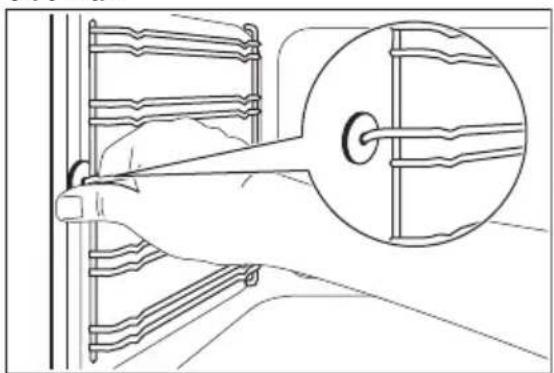
REMOVING THE SHELF SUPPORTS
To clean the oven, remove the shelf supports.
- Pull the front of the shelf support away from the side wall.
natural_image
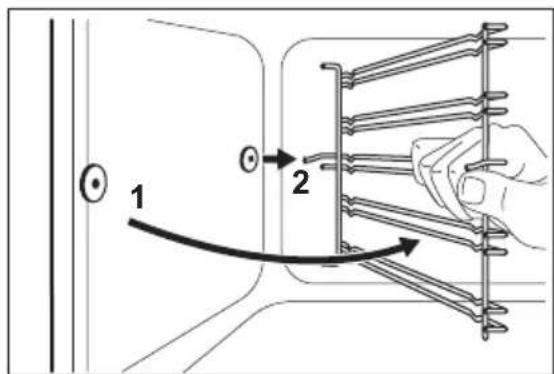
Line drawing of a hand holding a wall-mounted device with a magnified inset showing internal components (no text or symbols)- Pull the rear end of the shelf support away from the side wall and remove it.
text_image
1 2Install the shelf supports in the opposite sequence.

CAUTION! Make sure that the longer fixing wire is in the front. The ends of the two wires must point to the rear. Incorrect installation can cause damage to the enamel.
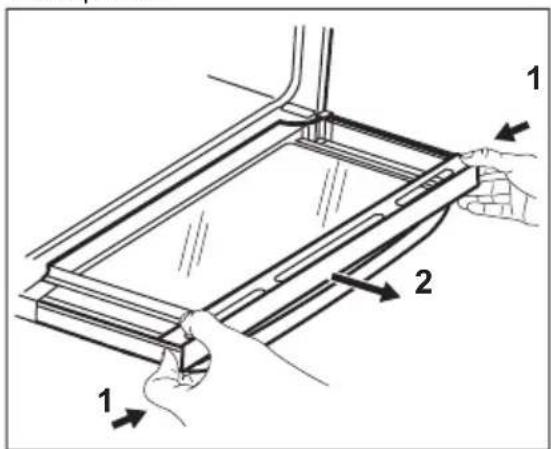
REMOVING AND CLEANING THE DOOR GLASSES - TOP OVEN

The door glass in your product can be different in type and shape from the examples you see in the image. The number of glasses can also be different.
- Open the door.
- Hold the door trim on the top edge of the door at the two sides and push inwards to release the clip seal.
text_image
Technical diagram showing a mechanical assembly with labeled parts 1 and 2, indicating directional movement or assembly steps.- Pull the door trim to the front to remove it.
- Remove the glass panels.
To install the panels, do the same steps in reverse.
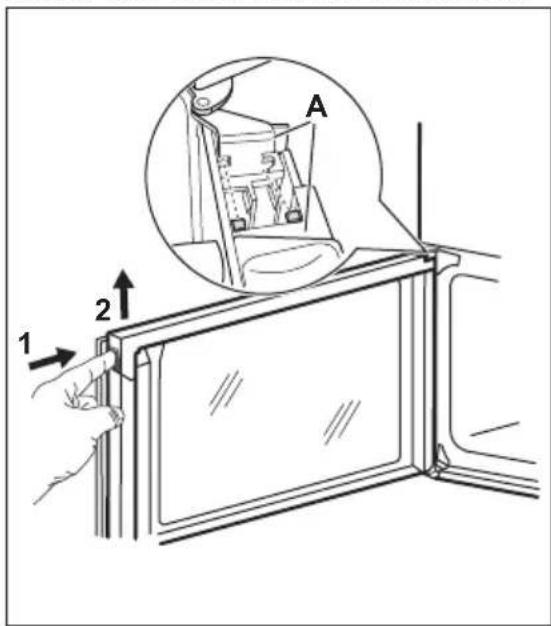
REMOVING AND CLEANING THE DOOR GLASSES - MAIN OVEN

The door glass in your product can be different in type and shape from the example you see in the image. The number of glasses can also be different.
- Push the door trim at one side to remove it.
text_image
A 1 2- Pull up the trim.
- Remove the glass panels.

To replace the glass panels, do the same steps in reverse. Before you lower the trim, attach the A trim part to the door. Refer to the image.
REPLACING THE LAMP

WARNING! Risk of electric shock. The lamp can be hot.
- Turn off the oven. Wait until the oven is cold.
- Disconnect the oven from the mains.
- Put a cloth on the bottom of the cavity.
The back lamp

The lamp glass cover is at the back of the cavity.
- Turn the lamp glass cover counterclockwise to remove it.
- Clean the glass cover.
- Replace the oven lamp with a suitable 300^ C heat-resistant oven lamp. Use the same oven lamp type.
- Install the glass cover.
TROUBLESHOOTING

WARNING! Refer to Safety chapters.
WHAT TO DO IF...
| Problem Possible cause Remedy | ||
| You cannot activate the appli-ance. | The appliance is not connected to an electrical supply or it is connected incorrectly. | Check if the appliance is cor-rectly connected to the electri-cal supply. |
| You cannot activate the appli-ance. | The fuse is blown. Make sure that the fuse is the cause of the malfunction. If the fuse is blown again and again, contact a qualified electrician. | |
| You cannot activate or operate the hob. | You touched 2 or more sensor fields at the same time. | Touch only one sensor field. |
| You cannot activate or operate the hob. | There is water or fat stains on the control panel. | Clean the control panel. |
| An acoustic signal sounds and the hob deactivates.An acoustic signal sounds when the hob is deactivated. | You put something on one or more sensor fields. | Remove the object from the sensor fields. |
| Residual heat indicator does not come on. | The zone is not hot because it operated only for a short time. | If the zone operated sufficiently long to be hot, speak to an Authorised Service Centre. |
| Automatic Heat Up function does not operate. | The zone is hot. Let the zone become sufficiently cool. | |
| Automatic Heat Up function does not operate. | The highest heat setting is set. The highest heat setting has the same power as the function. | |
| The sensor fields become hot. The cookware is too large or you put it too near to the controls. | Put large cookware on the rear zones if possible. | |
| There is no signal when you touch the panel sensor fields. | The signals are deactivated. Activate the signals. Refer to "Hob - Daily use" chapter. | |
| - comes on the hob display. | Automatic Switch Off operates. | Deactivate the hob and activate it again. |
| L comes on the hob display. | The Child Safety Device or the Lock function operates. | Refer to "Hob - Daily use" chapter. |
| F comes on the hob display. | There is no cookware on the zone. | Put cookware on the zone. |
| F comes on the hob display. | The cookware is incorrect. Use the correct cookware. Refer to "Hob - Hints and tips" chapter. | |
| F comes on the hob display. | The diameter of the bottom of the cookware is too small for the zone. | Use cookware with correct dimensions. Refer to "Hob - Hints and tips" chapter. |
| The oven does not heat up. The oven is deactivated. Activate the oven. | ||
| The oven does not heat up. The clock is not set. Set the clock. | ||
| The oven does not heat up. The necessary settings are not set. | Make sure that the settings are correct. | |
| The lamp does not operate. The lamp is defective. Replace the lamp. | ||
| The display shows "12.00". There was a power cut. Reset the clock | ||
| Steam and condensation settle on the food and in the cavity of the oven. | You left the dish in the oven for too long. | Do not leave the dishes in the oven for longer than 15 - 20 minutes after the cooking process ends. |
SERVICE DATA
If you cannot find a solution to the problem yourself, contact your dealer or an Authorised Service Centre.
The necessary data for the service centre is on the rating plate. The rating plate is on the front frame of
the oven cavity. Do not remove the rating plate from the oven cavity.
We recommend that you write the data here:
| Model (MOD.) | |
| Product number (PNC) | |
| Serial number (S.N.) |
ENERGY EFFICIENCY
PRODUCT INFORMATION FOR HOB ACCORDING TO EU 66/2014
| Model identificationZCI66280WA | ZCI66280BAZCI66280XA | |
| Type of hob Hob inside Freestanding Cooker | ||
| Number of cooking zones 4 | ||
| Heating technology Induction | ||
| Diameter of circular cooking zones (∅) | Left frontLeft rearRight frontRight rear | 21.0 cm14.0 cm18.0 cm18.0 cm |
| Energy consumption per cooking zone (EC electric cooking) | Left frontLeft rearRight frontRight rear | 178.0 Wh/kg179.0 Wh/kg181.0 Wh/kg181.0 Wh/kg |
| Energy consumption of the hob (EC electric hob) 179.8 Wh/kg | ||
EN 60350-2 - Household electric cooking appliances - Part 2: Hobs - Methods for measuring performance.
HOB - ENERGY SAVING
You can save energy during everyday cooking if you follow below hints.
- When you heat up water, use only the amount you need.
- If it is possible, always put the lids on the cookware.
- Before you activate the cooking zone put the cookware on it.
- Put the smaller cookware on the smaller cooking zones.
- Put the cookware directly in the centre of the cooking zone.
- Use the residual heat to keep the food warm or to melt it.
PRODUCT INFORMATION FOR OVENS AND PRODUCT INFORMATION SHEET*
| Supplier's name Zanussi | ||
| Model identification | ZCI66280WAZCI66280BAZCI66280XA | |
| Energy Efficiency Index | Top oven: 105.6Main oven: 95.4 | |
| Energy efficiency class | Top oven: AMain oven: A | |
| Energy consumption with a standard load, conventional mode | Top oven: 0.75 kWh/cycleMain oven: not applicable | |
| Energy consumption with a standard load, fan-forced mode | Top oven: not applicableMain oven: 0.83 kWh/cycle | |
| Number of cavities 2 | ||
| Heat source Electricity | ||
| Volume | Top oven: 39 lMain oven: 77 l | |
| Type of oven Oven inside Freestanding Cooker | ||
| Mass | ZCI66280WA 61.7 kg | |
| ZCI66280BA 61.5 kg | ||
| ZCI66280XA 61.5 kg | ||
| * For European Union according to EU Regulations 65/2014 and 66/2014.For Republic of Belarus according to STB 2478-2017, Appendix G; STB 2477-2017, Annexes A and B.For Ukraine according to 568/32020. | ||
| Energy efficiency class is not applicable for Russia. | ||
| EN 60350-1 - Household electric cooking appliances - Part 1: Ranges, ovens, steam ovens and grills- Methods for measuring performance. | ||
OVEN - ENERGY SAVING

The oven has features which help you save energy during everyday cooking.
Make sure that the oven door is closed when the oven operates. Do not open the oven door too often during cooking. Keep the door gasket clean and make sure it is well fixed in its position.
Use metal cookware to improve energy saving.
When possible, do not preheat the oven before cooking.
Keep breaks between baking as short as possible when you prepare a few dishes at one time.
Cooking with fan
When possible, use the cooking functions with fan to save energy.
Residual heat
When the cooking duration is longer than 30 min, reduce the oven temperature to minimum 3 - 10 min before the end of cooking. The residual heat inside the oven will continue to cook.
Use the residual heat to warm up other dishes.
Keep food warm
Choose the lowest possible temperature setting to use residual heat and keep a meal warm.
Moist Fan Baking
Function designed to save energy during cooking.
Recycle materials with the symbol Put the packaging in relevant containers to recycle it. Help protect the environment and human health by recycling waste of electrical and electronic appliances. Do not dispose of appliances marked
with the symbol with the household waste. Return the product to your local recycling facility or contact your municipal office.
WWW.ZANUSSI.COM/SHOP