
ASNW182CRW0 - Air-conditioner LG - Free user manual and instructions
Find the device manual for free ASNW182CRW0 LG in PDF.


User questions about ASNW182CRW0 LG
0 question about this device. Answer the ones you know or ask your own.
Ask a new question about this device
Download the instructions for your Air-conditioner in PDF format for free! Find your manual ASNW182CRW0 - LG and take your electronic device back in hand. On this page are published all the documents necessary for the use of your device. ASNW182CRW0 by LG.
USER MANUAL ASNW182CRW0 LG
Please read this manual carefully before operating your set and retain it for future reference.
TYPE : WALL MOUNTED
TIPS FOR SAVING ENERGY
Here are some tips that will help you minimize the power consumption when you use the air conditioner. You can use your air conditioner more efficiently by referring to the instructions below:
- Do not cool excessively indoors. This may be harmful for your health and may consume more electricity.
- Block sunlight with blinds or curtains while you are operating the air conditioner.
- Keep doors or windows closed tightly while you are operating the air conditioner.
- Adjust the direction of the air flow vertically or horizontally to circulate indoor air.
- Speed up the fan to cool or warm indoor air quickly, in a short period of time.
- Open windows regularly for ventilation as the indoor air quality may deteriorate if the air conditioner is used for many hours.
- Clean the air filter once every 2 weeks. Dust and impurities collected in the air filter may block the air flow or weaken the cooling / dehumidifying functions.
For your records
Staple your receipt to this page in case you need it to prove the date of purchase or for warranty purposes. Write the model number and the serial number here:
Model number :
Serial number :
You can find them on a label on the side of each unit.
Dealer's name :
Date of purchase :
IMPORTANT SAFETY INSTRUCTIONS
READ ALL INSTRUCTIONS BEFORE USING THE APPLIANCE.
Always comply with the following precautions to avoid dangerous situations and ensure peak performance of your product

WARNING
It can result in serious injury or death when the directions are ignored

CAUTION
It can result in minor injury or product damage when the directions are ignored

WARNING
- Installation or repairs made by unqualified persons can result in hazards to you and others.
- Installation MUST conform with local building codes or, in the absence of local codes, with the Nation Electrical Code NFPA 70/ANSI C1-1003 or current edition and Canadian Electrical Code Part1 CSA C.22.1.
- The information contained in the manual is intended for use by a qualified service technician familiar with safety procedures and equipped with the proper tools and test instruments.
- Failure to carefully read and follow all instructions in this manual can result in equipment malfunction, property damage, personal injury and/or death.
Installation
- Use a standard circuit breaker and fuse conforming with the rating of the air conditioner. Failure to do so may result in electric shock or product failure.
- Contact an authorized service center when you install or relocate the air conditioner. Failure to do so may result in serious injury or product failure.
- Always use a power plug and socket with a ground terminal. Failure to do so may result in electric shock or product failure
- Install the panel and the cover of the control box safely. Failure to do so may result in explosion or fire.
- Install a dedicated electric outlet and circuit breaker before you use the air conditioner. Failure to do so may result in electric shock or product failure.
- Use a standard circuit breaker and fuse conforming with the rating of the air conditioner. Failure to do so may result in electric shock or product failure.
- Do not modify or extend the power cable. If the power cable or cord has scratches or skin peeled off or deteriorated then it must be replaced. It may result in fire or electric shock.
- Be cautious when you unpack or install the air conditioner. Failure to do so may result in serious injury or product failure.
- Contact an authorized service center when you install or relocate the air conditioner. Failure to do so may result in serious injury or product failure.
- Do not install the air conditioner on an unstable surface or where there may be a danger of it falling. It may result in death, serious injury, or product failure.
Operation
- Do not let the air conditioner run for a long time when the humidity is very high or when a door or window has been left open. Failure to do so may result in product failure.
- Make sure that the power cord is not pulled or damaged while the air conditioner is operating. Failure to do so may result in fire, electric shock, or product failure.
- Do not place any objects on the power cord. It may result in electric shock or product failure.
- Do not turn on or off the air conditioner by plugging in or unplugging the power plug. It may result in fire or electric shock.
- Do not touch, operate or repair the air conditioner with wet hands. It may result in electric shock or product failure.
- Do not place a heater or other heating appliances near the power cable. It may result in fire, electric shock, or product failure.
- Do not allow water to run into the air conditioner. It may result in explosion or fire.
- Do not leave flammable substances such as gasoline, benzene and thinner near the air conditioner. It may result in explosion or fire.
- Do not use the air conditioner for an extended period of time in a small place without ventilation. Ventilate the place regularly. Failure to do so may result in explosion or fire.
- When there is a gas leak, ventilate sufficiently before using the air conditioner again. Failure to do so may result in explosion or fire.
- Unplug the power plug if there is a noise, smell or smoke coming from the air conditioner. Failure to do so may result in explosion or fire.
- Stop operating and close the window in strom or hurricane. If possible remove the product from the window before hurricane arrives
- Do not touch the electrostatic filter after opening the front grille. Failure to do so may result in electric shock or product failure.
- Contact an authorized service center when the air conditioner is submerged into water due to flooding. Failure to do so may result in explosion or fire.
- Be cautious water could not enter the product
- Make sure to ventilate sufficiently when this air conditioner and a heating appliance such as a heater are used simultaneously. Failure to do so may result in fire, serious injury, or product failure.
- Turn the main power off and unplug the power plug when you clean or repair the air conditioner. Failure to do so may result in death, serious injury, or product failure.
- Unplug the power plug when the air conditioner is not used for an extended period of time. Failure to do so may result in product failure.
- Do not place any objects on the air conditioner. It may result in product failure.

CAUTION
Installation
- Make sure to check if there is a refrigerant leak after you install or repair the air conditioner. Failure to do so may result in product failure.
• Install the drain hose properly for smooth drainage of condensed water. Failure to do so may result in product failure. - Keep level even when installing the product.
• Install the air conditioner where the noise from the outdoor unit or the exhaust gas will not inconvenience the neighbors. Failure to do so may result in conflict between neighbors. - When transporting the equipment, there should be at least 2 or more people, or a forklift. It may result in serious injury.
- Do not install the air conditioner where it will be exposed to sea wind (salt spray) directly. It may result in product failure.
Operation
- Do not expose people, animals or plants to the cold or hot wind from the air conditioner. It may result in serious injury.
- Do not use the product for special purposes, such as preserving foods, works of art, etc. It is a consumer air conditioner, not a precision refrigeration system. It may result in death, fire or electric shock.
- Do not block the inlet or outlet of air flow. It may result in explosion or product failure.
- Do not use strong cleaning agents or solvents when you clean the air conditioner, or spray water. Use a smooth cloth. It may result in serious injury or product failure.
- Never touch the metal parts of the air conditioner when you remove the air filter. It may result in serious injury or product failure.
- Do not place any objects on the air conditioner. It may result in product failure.
- Always insert the filter securely after cleaning. Clean the filter every two weeks or more often if necessary.
- Do not insert hands or other objects through the air inlet or outlet while the air conditioner is operating. It may result in electric shock.
- Do not drink the water drained from the air conditioner. It may result in serious health complications.
- Use a sturdy stool or ladder when you clean, maintain or repair the air conditioner at a height. Failure to do so may result in serious injury or product failure.
- Do not mix the batteries for the remote control with other types of batteries or mix new batteries with used batteries. Failure to do so may result in product failure.
- Do not recharge or disassemble the batteries. Failure to do so may result in explosion, fire or serious injury.
- Stop using the remote control if there is a battery fluid leak. If your cloth or skin is exposed to the battery fluid from a leak, wash it off with clean water. Failure to do so may result in serious injury.
- If you swallow the battery fluid from a leak, wash out the inside of your mouth thoroughly and then consult a doctor. Failure to do so may result in serious health complications.
TABLE OF CONTENTS
2 TIPS FOR SAVING ENERGY
3 IMPORTANT SAFETY INSTRUCTIONS
7 BEFORE USE
7 Components
8 Using the remote control
9 - Inserting batteries
9 - Installing the remote control holder
10 BASIC FUNCTIONS
10 Cooling your room
10 Heating your room
10 Removing humidity
11 Airing your room
11 Adjusting the fan speed
11 Adjusting the air flow direction
11 Setting the timer
11 - Setting the current time
12 - Turning on the air conditioner automatically at a set time
12 - Turning off the air conditioner automatically at a set time
12 - Canceling the timer setting
12 Setting sleep mode
13 ADVANCED FUNCTIONS
13 Changing room temperature quickly
13 Indoor air purification
13 - Auto Clean operation
14 Auto operation
14 Auto Changeover operation
15 Energy saving cooling mode
15 Display screen brightness
15 Operating the air conditioner without the remote control
16 Restarting the air conditioner automatically
17 MAINTENANCE
18 Cleaning the air filter
18 Cleaning the anti-allergy filter and triple filter
18 Cleaning the plasma filter
19 TROUBLESHOOTING
19 Self-diagnosis function
19 Before requesting service
BEFORE USE
Components
Indoor unit
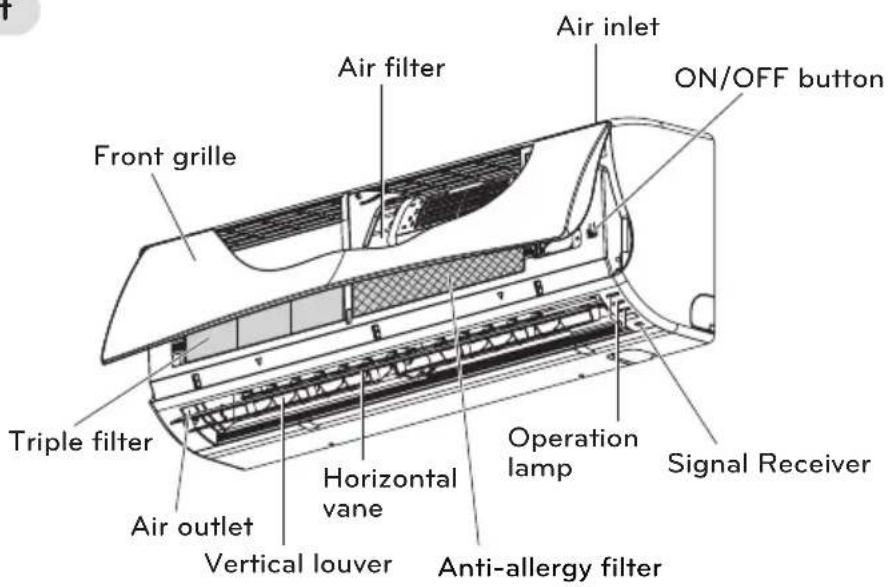
text_image
Air inlet ON/OFF button Air filter Front grille Triple filter Operation lamp Signal Receiver Horizontal vane Anti-allergy filter Vertical louver Air outletNOTE
- The number of operation lamps and their locations may vary, depending on the model of the air conditioner.
- The feature can be changed according a type of model.
Outdoor unit
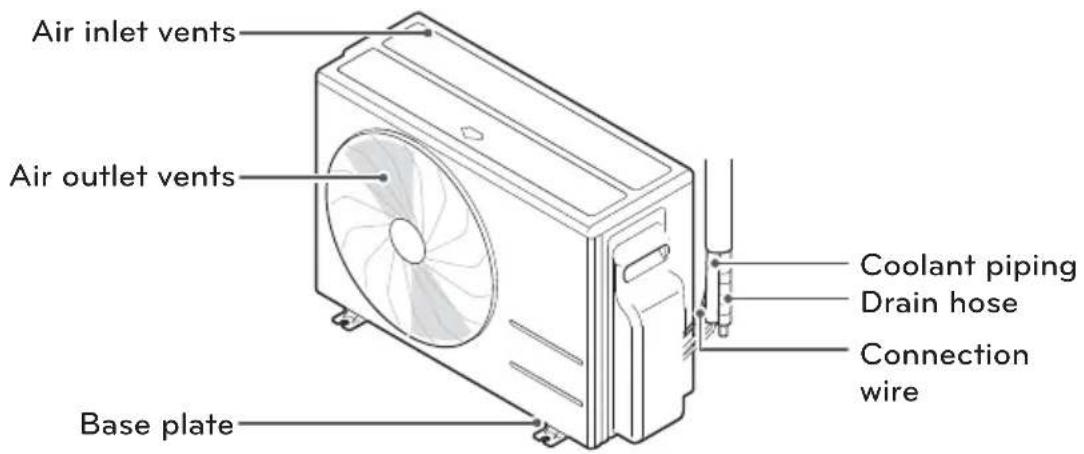
text_image
Air inlet vents Air outlet vents Base plate Coolant piping Drain hose Connection wireNOTE
- The feature can be changed according a type of model.
Using the remote control
You can operate the air conditioner more conveniently with the remote control. You will find the buttons for the additional functions under the cover of the remote control.
Wireless remote control
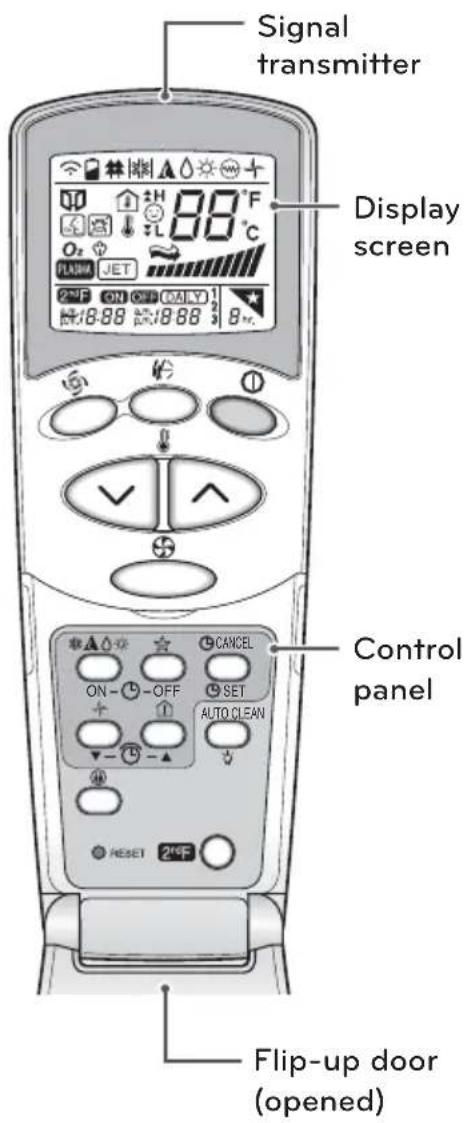
text_image
Signal transmitter Display screen Control panel Flip-up door (opened)| Control panel | Display screen | Description |
| 1 | - | START/STOP BUTTONUsed to turn off/on the unit. |
| ★▲◇☆ | ★▲◇☆ | OPERATION MODE SELECTION BUTTON*Used to select the operation mode. |
| 88°C | ROOM TEMPERATURE SETTING BUTTONSUsed to select the room temperature. | |
| INDOOR FAN SPEED SELECTOR BUTTONUsed to select fan speed in four stepslow, medium, high and CHAOS. | ||
| Po | JET COOL/HEAT BUTTON*Used to start or stop the speed cooling/heating.(It operates fan in super high speed) | |
| - | CHAOS SWING BUTTONUsed to stop or start louver movement and setthe desired up/down airflow direction. | |
| ON-9-OFF | a.m.600 | ON/OFF TIMER BUTTONSUsed to set the time of starting and stoppingoperation. |
| ▼-1-▲ | - | TIME SETTING BUTTONSUsed to adjust the time. |
| CANCELETSET | - | TIMER SET/CANCEL BUTTONUsed to set and to cancel the timer operation. |
| SLEEP MODE AUTO BUTTON*Used to set sleep mode auto operation. | ||
| + | + | AIR CIRCULATION BUTTONUsed to circulate the room air without coolingor heating. |
| - | ENERGY-SAVING COOLING MODE BUTTON* | |
| ROOM TEMPERATURE CHECKING BUTTONUsed to check the room temperature. | ||
| RESET | - | RESET BUTTONUsed prior to resetting time. |
| 2ndF | 2ndF | 2ND F BUTTONUsed prior to using modes printed in blue at thebottom of buttons. |
| AUTO CLEAN | AUTO CLEAN BUTTONUsed to set auto clean mode.In some models this button has a 2nd functionof display luminosity |
* Some functions may not be supported, depending on the model.
Inserting batteries
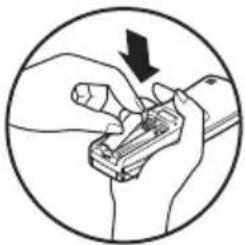
Insert batteries before using the remote control. The battery type used is AAA (1.5 V).
1 Remove the battery cover.
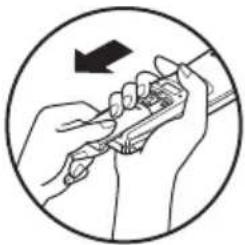
natural_image
Illustration of hands using a tool to adjust or install a component, enclosed in a circle (no text or symbols)2 Insert the new batteries and make sure that the + and - terminals of the batteries are installed correctly.
natural_image
Illustration of hands using a tool to adjust or install a component, enclosed in a circle (no text or symbols)3 Reattach the battery cover.

NOTE
- If the display screen of the remote control starts to fade, replace the batteries.
- The feature can be changed according to type of model.
Installing the remote control holder
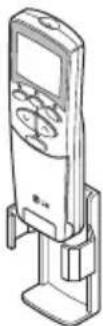
Install the holder where there is no direct sunlight to protect the remote control.
1 Choose a safe and easily-accessible place.
2 Remove the adhesive sticker protection film from the back of the holder before attaching it to the wall.
3 Fix the holder by fastening the 2 screws firmly with a screwdriver.

natural_image
Line drawing of a hand using a tool to adjust or install a mechanical component (no text or symbols present)4 Slide the remote control into the holder.
Operating method
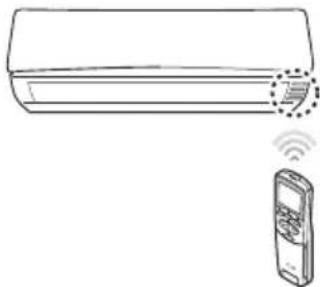
Point the remote control towards the signal receiver at the bottom of the air conditioner to operate it.
natural_image
Line drawing of a wall-mounted air conditioner with a remote control unit and wireless signal icon (no text or symbols)
NOTE
- The remote control may operate other electronic devices if pointed towards them. Make sure to point the remote control towards the signal receiver of the air conditioner.
- For proper operation, use a soft cloth to clean the signal transmitter and receiver.
BASIC FUNCTIONS
Cooling your room
(Cooling operation)
1 Press Ⓐ to turn on the power.
2 Open the remote control cover.
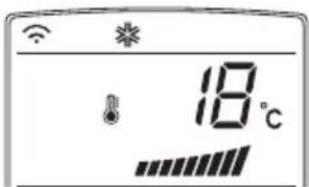
3 Press repeatedly to select the cooling operation.
- *is displayed on the display screen.
text_image
18°C4 Press ⬇ or ⬇ to set the desired temperature.
- The temperature range is 18^ C - 30^ C.
Heating your room
(Heating operation)
1 Press Ⓑ to turn on the power.
2 Open the remote control cover.
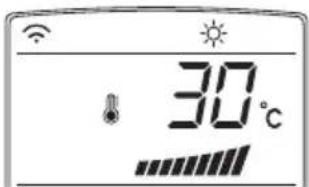
3 Press repeatedly to select the heating operation.
- is displayed on the display screen.
text_image
30°C4 Press ⬆ or ▽ to set the desired temperature.
- The temperature range is 16^ C - 30^ C

NOTE
Cooling-only models do not support this function.
Removing humidity (Dehumidification operation)
This mode removes excess moisture from an environment with high humidity or in the rainy season, in order to prevent mold from setting in. This mode adjusts the room temperature and the fan speed automatically to maintain the optimal level of humidity.
1 Press Ⓐ to turn on the power.
2 Open the remote control cover.
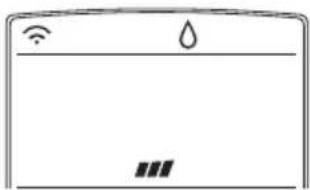
3 Press repeatedly to select the de-humidifying operation.
- ⬇is displayed on the display screen.
natural_image
Simple line drawing of a refrigerator front panel with icons for Wi-Fi, water drop, and battery (no text or symbols)
NOTE
- In this mode you cannot adjust the room temperature, as it is adjusted automatically. Also, the room temperature is not displayed on the display screen.
- In this mode you cannot adjust the fan speed.
Airing your room (Air Circulation operation)
This mode only circulates the indoor air without changing the room temperature. The cooling lamp lights up in air circulation mode.
1 Press Ⓐto turn on the power.
2 Open the remote control cover.
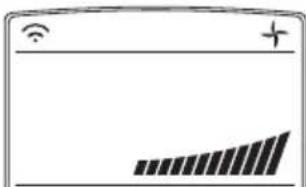
3 Press to select the air circulation operation.
- is displayed on the display screen.
text_image
Battery display screen showing Wi-Fi icon, battery symbol, and progress bar with upward arrow4 Press to adjust the fan speed.
Adjusting the fan speed
1 Press repeatedly to adjust the fan speed.
- Select ↗ if you want natural air.
The fan speed adjusts automatically.
Adjusting the air flow direc- tion
1 Open the remote control cover while the air conditioner is in operation.
2 To adjust the direction of the air flow horizontally, press and the louvers will swing up & down automatically.
- To stop the louver at a desired angle, press again.
3 To adjust the direction of the air flow vertically, press and the louvers will swing left & right automatically.
- To stop the louver at a desired angle, press 🤡 again.
NOTE
- Adjusting the air flow direction vertically may not be supported, depending on the model.
- Adjusting the air deflector arbitrarily may cause product failure.
- If you restart the air conditioner, it starts to operate with the previously set direction of air flow, so the air deflector may not match the icon displayed on the remote control. When this occurs, press or to adjust the direction of the air flow again.
Setting the timer
You can use the timer function to save energy and to use the air conditioner more efficiently.
Setting the current time
1 Open the remote control cover and press RESET.
2 Press ① to turn on the power.
3 Press 2nd F button and check if iczF is on.
- The time icon flickers at the bottom of the display screen.

4 Press until the desired time is set.
5 Press Ⓤ SET to finish.

NOTE
Check the indicator for A.M. and P.M.
Turning on the air conditioner automatically at a set time
1 Open the remote control cover.
2 Press 2nd F button and check if icon is on.

3 Press ON-(L)-OFF.
- The icon below flickers at the bottom of the display screen.
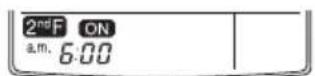
4 Set the time when you want the air conditioner to turn on automatically (see step 4 to 5 in "Setting Current Time").
Turning off the air conditioner automatically at a set time
1 Open the remote control cover.
2 Press 2nd F button and check if icon is on.

3 Press ON-(L)-OFF.
- The icon below flickers at the bottom of the display screen.
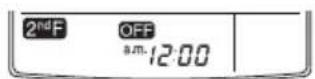
4 Set the time when you want the air conditioner to turn off automatically (see step 4 to 5 in "Setting Time").
Canceling the timer setting
1 Open the remote control cover.
2 Check if icow is off.
3 Press CANCEL to cancel.
- The timer lamp on the air conditioner and the display will go off.
Setting sleep mode
Use the sleep mode to turn off the air conditioner automatically when you go to sleep. The fan speed is set to low in sleep mode.
1 Press Ⓐ to turn on the power.
2 Press repeatedly to select the desired mode.
3 Press repeatedly to select the desired number of hours (up to 7 hours).
- is displayed on the display screen in sleep mode.
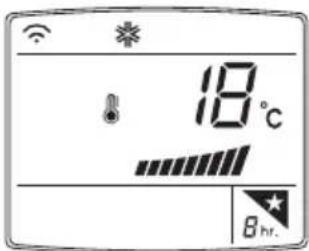
text_image
18°C 8 hr.
NOTE
In the Cooling and Dehumidifying modes, the temperature increases by 1°C after 30 minutes and by a further 1°C after another 30 minutes for a more comfortable sleep. The temperature increases with up to 2°C from the preset temperature.
ADVANCED FUNCTIONS
The air conditioner offers some additional advanced functions.
Changing room temperature quickly
(Jet Cool/Heat operation)
This mode allows you to cool indoor air quickly in summer or warm it quickly in winter.
1 Press Ⓐ to turn on the power.
2 Press
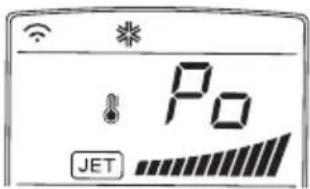
text_image
P0 JET- In jet cooling mode, strong air blows out at a temperature of 18^ C for 30 minutes.
- In jet heating mode, strong air blows out at a temperature of 30^ C for 30 minutes.
NOTE
- In Air Circulation, Auto, or Auto Changeover mode, this function cannot be used.
- This function may not be supported, depending on the model.
Indoor air purification
Auto Clean operation
In the cooling and dehumidifying operations, moisture is generated inside the indoor unit. Use the auto cleaning function to remove such moisture.
1 Press Ⓐto turn on the power.
2 Open the remote control cover.
3 Press AUTO CLEAN-
- is displayed on the display screen.
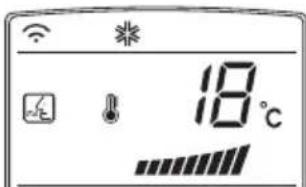
text_image
18°C- If you turn off the power, the fan operates for 30 minutes and cleans the inside of the indoor unit.
NOTE
Some buttons cannot be used while the auto cleaning function is in operation.
Auto operation (Artificial intelligence)
Cooling-only models
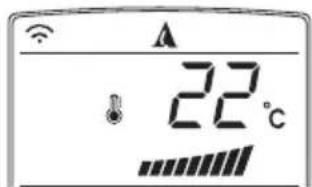
In this mode, the fan speed and the temperature adjust automatically, based on the room temperature.
1 Press Ⓐto turn on the power.
2 Open the remote control cover.
3 Press repeatedly to select auto operation.
- is displayed on the display screen.
text_image
22°CNOTE
- In this mode, you cannot adjust the fan speed, but you can set the air deflector to rotate automatically.
- This function may not be supported, depending on the model.
Cooling and heating models
1 Press Ⓑ to turn on the power.
2 Open the remote control cover.
3 Press repeatedly to select auto operation.
- is displayed on the display screen.

text_image
A 22°C4 Press ⬇ or ▽ to set the desired temperature.
- The temperature range is 18^ C - 30^ C.
5 Press repeatedly to select the fan speed.
NOTE
This function may not be supported, depending on the model.
Auto Changeover operation (Artificial intelligence)
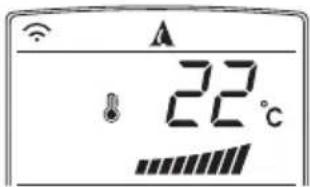
This mode changes the operation mode automatically to maintain the set temperature at ±2^ .
1 Press Ⓓ to turn on the power.
2 Open the remote control cover.
3 Press repeatedly to select the auto changeover operation.
- is displayed on the display screen.
text_image
22°CNOTE
This function may not be supported, depending on the model.
Energy saving cooling mode
This mode minimizes power consumption during cooling and increases the set temperature to the optimal level for a more comfortable environment.
1 Press Ⓑ to turn the power on.
2 Open the remote control cover.
3 Press repeatedly to select the cooling operation.
4 Press.

NOTE
This function may not be supported, depending on the model.
Display screen brightness
You can adjust the brightness of the indoor unit display screen.
1 Open the remote control cover.
2 Press 2nd F. button and check if is on.
3 Press repeatedly to set the brightness to the desired level.

NOTE
This function may not be supported, depending on the model.
Operating the air conditioner without the remote control
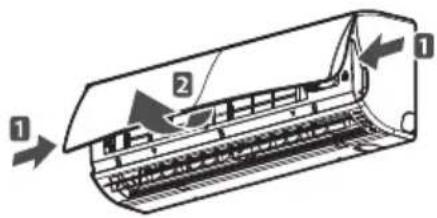
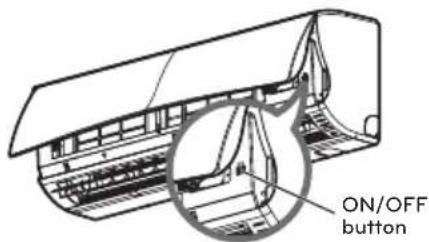
You can use the On/Off button of the indoor unit to operate the air conditioner when the remote control is unavailable. However, the fan speed is set to high.
1 Open the front grille.
- Lift up both sides of the cover slightly.
text_image
Diagram of an air conditioner unit with labeled parts and airflow direction arrows2 Press the On/Off button.
text_image
ON/OFF button- For cooling and heating models, the operation mode changes, depending on the room temperature.
* The feature can be changed according to type of model.
| Room temp. | Set temp. | Operation mode |
| Below 21°C 24°C | Heating operation | |
| Above 21°C and below 24°C | 23°C | Dehumidifying operation |
| Above 24°C 22°C | Cooling operation | |
- For cooling-only models, the temperature is set to 22^ C ( 71.6^ F).
Restarting the air conditioner automatically
When the air conditioner is turned on again after a power failure, this function restores the previous settings. This function is a factory default setting.
Disabling auto restart
1 Open the front grille.
- Lift up both sides of the cover slightly.

text_image
Diagram of an air conditioner unit with labeled parts and airflow direction arrows2 Press the On/Off button and hold it for 6 seconds.
- The unit will beep twice and the lamp will blink 6 times.
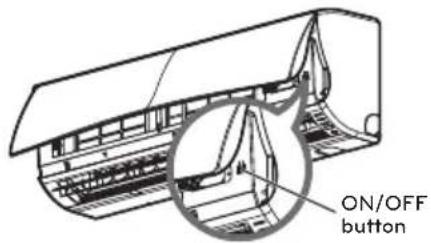
text_image
ON/OFF button- To re-enable the function, press the On/Off button and hold it for 6 seconds. The unit will beep twice and the blue lamp will blink 4 times.
* The feature can be changed according to type of model.
NOTE
If you press and hold the On/Off button for 3 – 5 seconds instead of 6 seconds, the unit will switch to the test operation. In the test operation, the unit blows out strong air for cooling for 18 minutes and then returns to the factory default settings.
MAINTENANCE
Clean the product regularly to maintain optimal performance and to prevent possible breakdown.
* This may not be provided, depending on the model.
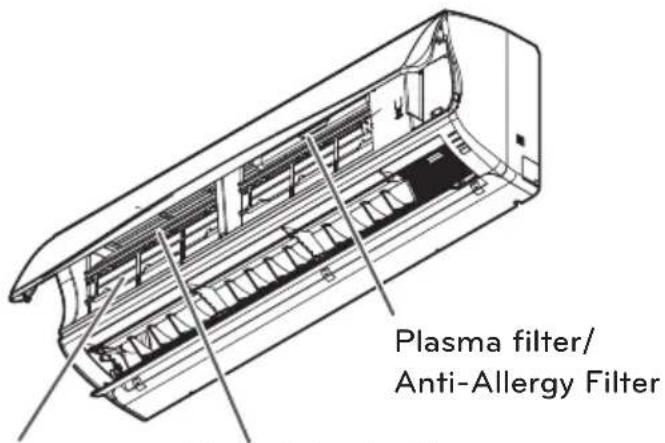
text_image
Plasma filter/ Anti-Allergy FilterTriple FilterAir filter
| Item Cleaning interval Cleaning method | ||
| Air filter 2 weeks See “Cleaning air filter.” | ||
| Anti-allergy filter / Triple filter | 3 months | See “Cleaning anti-allergy filter and triple Filter.” |
| Plasma filter* 3 months See | “Cleaning the plasma filter.” | |
| Indoor unit surface Regularly | Use a soft, dry cloth. Do not use bleach or abrasives. | |
| Outdoor unit Regularly | Use steam to clean the heat exchanger coils and the panel vents (consult with technician). | |

CAUTION
- Turn off the power and unplug the power cord before you perform any maintenance; otherwise it may cause electric shock.
- Never use water that is hotter than 40°C when you clean the filters. It may cause deformation or discoloration.
- Never use volatile substances when you clean the filters. They may damage the surface of the product.

NOTE
- The location and shape of the filters may differ, depending on the model.
- Make sure to clean the heat exchanger coils of the outdoor unit regularly, as dirt collected in the coils may decrease the operational efficiency or increase energy costs.
- The feature can be changed according a type of model.
Cleaning the air filter
Clean the air filter once every 2 weeks or more if necessary.
1 Turn off the power and unplug the power cord.
2 Open the front grille. - Lift up both sides of the cover slightly.
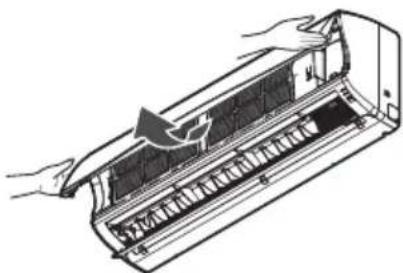
natural_image
Illustration of a hand opening a refrigerated air conditioner into a rack (no text or symbols visible)3 Hold the knob of the air filter, lift it up slightly and remove it from the unit.
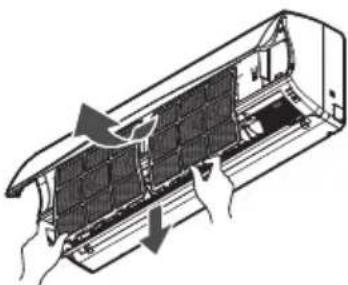
natural_image
Diagram of a car air conditioner unit with hands installing or adjusting the panel (no text or symbols visible)4 Clean the filter with a vacuum cleaner or with warm water.
- If dirt is difficult to remove, wash the filter in lukewarm water with detergent.
5 Dry the filter in the shade.
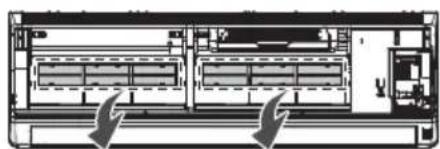
Cleaning the anti-allergy filter and triple filter
1 Turn off the power and unplug the power cord.
2 Open the front grille and remove the air filter (see "Cleaning air filter").
3 Pull out the anti-allergy filter and the triple filter.
natural_image
Architectural cross-section diagram of a multi-level building or storage unit with no visible text or symbols4 Dry the filter in direct sunlight for 2 hours.
NOTE
- The location and shape of the filters may differ, depending on the model.
- The feature can be changed according a type of model.
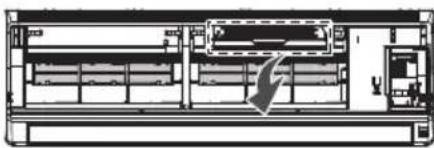
Cleaning the plasma filter
1 Turn off the power and unplug the power cord.
2 Open the front grille and remove the air filter (see "Cleaning air filter").
3 Remove the plasma filter in 10 seconds.
natural_image
Architectural floor plan view showing room layouts and structural elements (no text or labels)4 Use a vacuum cleaner to remove any dirt.
- If dirt is difficult to remove, wash the filter with lukewarm water.
5 Dry the filter in the shade.
NOTE
- The location of the filters may differ, depending on the model.
- The plasma filter may not be included in some models.
- The feature can be changed according to type of model.
TROUBLESHOOTING
Self-diagnosis function
This product has a built-in self-diagnosis function. If an error occurs, the lamp of the indoor unit will blink in 2 second intervals. If this occurs, contact your local dealer or service center.
Before requesting service
Please check the following before you contact the service center. If the problem persists, contact your local service center.
| Problem Possible | causes Corrective action | |
| There is a burning smell and a strange sound coming from the unit. | - | Turn off the air conditioner, unplug the power cord and contact the service center. |
| Water leaks from the indoor unit even when the humidity level is low. | ||
| The power cord is damaged or generating excessive heat. | ||
| A switch, a circuit breaker (safety, ground) or a fuse is not operated properly. | ||
| The air conditioner does not work. | The air conditioner is unplugged. | Check whether the power cord is plugged into the outlet. |
| A fuse is blown or the power supply is blocked. | Replace the fuse or check if the circuit breaker has tripped. | |
| A power failure has occurred. | Turn off the air conditioner when a power failure occurs. When the power is restored, wait 3 minutes, and then turn on the air conditioner. | |
| The voltage is too high or too low. | Check if the circuit breaker has tripped. | |
| The air conditioner turned off automatically at a preset time. | Press the power button again. | |
| The air conditioner does not generate cool air. | Air is not circulating properly. | Make sure that there are no curtains, blinds or furniture blocking the front of the air conditioner. |
| The air filter is dirty. | Clean the air filter once every 2 weeks. See “Cleaning Air Filter” for more information. | |
| The room temperature is too high. | In summer, it may take some time to cool indoor air. In this case, select the jet cool operation to cool indoor air quickly. | |
| Cold air is escaping from the room. | Make sure that no cold air is escaping through ventilation points in the room. | |
| The desired temperature is higher than the set temperature. | Set the desired temperature to a level lower than the current temperature. | |
| There is a heating source nearby. | Avoid using a heat generator such as an electric oven or a gas burner while the air conditioner is in operation. | |
| Air circulation operation is selected. | In the air circulation operation, air blows from the air conditioner without cooling or heating the indoor air. Switch the operation mode to the cooling operation. | |
| It is not possible to adjust the fan speed. | The auto operation, jet operation or dehumidifying operation is selected. | In some operation modes, such as the jet or dehumidifying operation modes, you cannot adjust the fan speed. Select an operation mode in which you can adjust the fan speed. |
| It is not possible to adjust the temperature. | The air circulation operation or jet operation is selected. | In some operation modes, such as the air circulation or jet operation mode, you cannot adjust the temperature. Select an operation mode in which you can adjust the temperature. |

LG
Life's Good