LS-T186ADG - Air-conditioner LG - Free user manual and instructions
Find the device manual for free LS-T186ADG LG in PDF.


User questions about LS-T186ADG LG
0 question about this device. Answer the ones you know or ask your own.
Ask a new question about this device
Download the instructions for your Air-conditioner in PDF format for free! Find your manual LS-T186ADG - LG and take your electronic device back in hand. On this page are published all the documents necessary for the use of your device. LS-T186ADG by LG.
USER MANUAL LS-T186ADG LG
Room Air Conditioner OWNER'S MANUAL
- Please read carefully and thoroughly this manual before operating this unit.
- Contact the authorized SVC man for repair or maintenance of this unit.
- Contact the installer for installation of this unit.
• The appliance is not intended for use by young children or infirm persons without supervision. - Young children should be supervised to ensure that they do not play with the appliance.
MODELS: LS-Q07_Series
LS-J07_Series
LS-Q09_Series
LS-J09_Series
LS-R12_Series
LS-L12_Series
LS-T18_Series
LS-K18_Series
LS-T24_Series
LS-K24_Series
Prior to installation, the unit-conditioning unit must be submitted for approval by the utility service which provides electricity (EN 61000-3 Norm).
text_image
Safety with Casual Construction Preparation before Safety with Casual ConstructionSafety precautions
To prevent injury and property damage, follow these instructions. ⚠ Incorrect operation due to ignoring instructions will cause harm or damage, the seriousness of which is indicated by the following symbols.


WARNING

This symbol shows the possibility of death or serious injury.


CAUTION

This symbol indicates the possibility of injury or damage to property.

The following items are classified by these symblos.
 | Never Do This |
 | Always Do This |

WARNING

- Otherwise, it will cause electric shock or fire due to heat generation or electric shock.

- It will cause electric shock or fire due to heat generation.

- It will cause electric shock or fire. - In the supply cord is damaged, it must be replaced by the manufacturer or its service agent or a similarly qualified person in order to avoid a hazard. (Y Attachment)
- It will cause electric shock or fire due to heat generation.
• It may cause electric shock.
• This could damage your health.

- No grounding may cause electric shock.

- It may cause failure of machine or electric shock.

- No installation may cause fire and electric shock accident.
text_image
The unit's strategy S. S. S. S. S.• It may cause fire and electric shock accident.
text_image
Use the socket it is (1) 100%• It may cause fire and electric shock.
text_image
“你”的 opening the entrance do you go to me• It may cause electric shock.
natural_image
Abstract grayscale image with curved lines and circular patterns, no visible text or symbols- It may cause fire.
text_image
The power is the power out of close to the power of the power of the power of the power of the power of the power of the power of the power of the power of the power of the power of the power of the power of the power of the power of the power of the power of the power of the power of the power of the power of the power of the power of the power of the power of the power of the power of the power of the power of the power of the• It may cause fire and electric shock.
text_image
Scanned text fragment with partially visible Chinese characters, likely from a document or sign.- It may cause an explosion or fire.

WARNING

text_image
2. "Before operation air conditioner" Yes to get out• It may cause explosion, fire and, burn.

text_image
① Plant disassemble of quality products• It may cause failure and electric shock.

CAUTION
text_image
Q: touch the metal parts• They are sharp and may cause injury.
text_image
clean the air• Water may enter the unit and degrade the insulation. It may cause an electric shock.
text_image
① Whole well when used the well with• An oxygen shortage may occur.
text_image
Scanned text fragment mentioning cleaning unit and safety notes• Since the fan rotates at high speed during operation, it may cause injury.
text_image
Scanned text fragment with partial OCR artifacts and fragmented characters• This could injure the pet or plant.
text_image
Scanned text snippet mentioning appliance use and application scope- It may cause damage of animals or vegetables or loss of property.
text_image
Scanned text snippet with partial OCR artifacts and a grayscale background image• Operation with windows opened may cause wetting of indoor and soaking of household furniture.

text_image
The plug by the bead of the lead• It may cause electric shock and damage.

text_image
① The main power of the main power- It may cause failure of product or fire.
text_image
Place obstacles- It may cause failure of appliance or accident.
text_image
The following is an installer on console of car and vehicle.• If leaving appliance damaged, there is concern of damage due to the falling of product.

text_image
Insert the Blues• Operation without filters may cause failure.

text_image
Scanned text fragment with partially visible Chinese characters, likely from a document or sign• Appearance may be deteriorated due to change of product color or scratching of its surface.
text_image
Scanned text fragment with partial OCR, showing fragmented characters and a circular emblem-like graphic.• There is danger of fire or electric shock.
text_image
Drink water Water drop• It contains contaminants and will make you sick.
text_image
To a caution when unpackaging and installing separation, it's could cause the unknown risk.
text_image
Powder enters the product turn the power plant, which is the main body of the power plant after in addition. The power plant is well located.Preparation before operation
How to Insert the Batteries
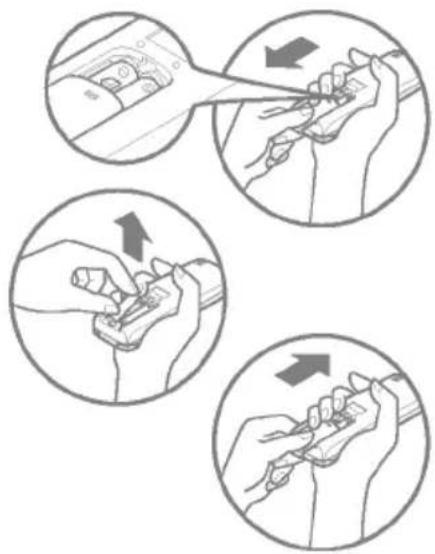
Remove the battery cover by pulling it according to the arrow direction.
2 Insert new batteries making sure that the (+) and (-) of battery are installed correctly.
Reattach the cover by sliding it back into position.
NOTES:
- Use 2 AAA(1.5volt) batteries. Do not use rechargeable batteries
natural_image
Illustration showing four steps of a hand tool application, with arrows indicating direction (no text or symbols present)Storage and Tips For Using the Remote Control
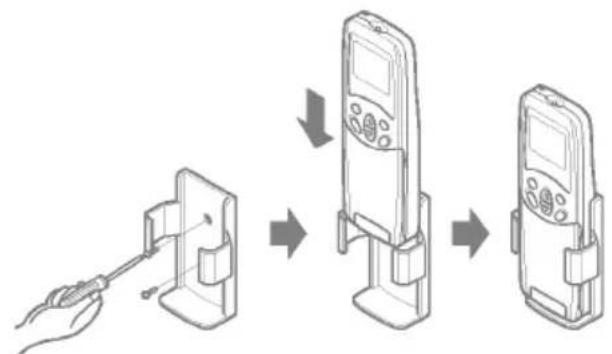
- The remote control may be stored by mounting it on a wall.
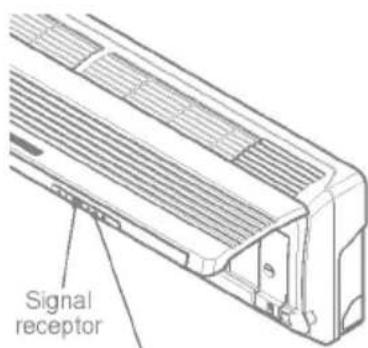
• To operate the room air conditioner, aim the remote control at the signal receptor.
flowchart
graph TD
    A["Hand holding screwdriver"] --> B["Inserted device with cable"]
    B --> C["Add instructions to screen"]
    C --> D["Remove screen"]
    D --> E["Remove screen"]

natural_image
Line drawing of a car air conditioner with a handle and ventilation grille (no text or symbols)Signal Receptor
Receives the signals from the remote control.(Signal receiving sound: two short beeps or one long beep.)
Operation Indication Lamps
| 1 | On/Off | : Lights up during the system operation. |
| Sleep Mode | : Lights up during Sleep Mode Auto operation. | |
| Timer | : Lights up during Timer operation. | |
| Defrost Mode | : Lights up during Defrost Mode or Hot Start operation (Heat pump model only) | |
| OUT DOOR | OUTDOOR UNIT OPERATION | : Lights up during outdoor unit operation.(Cooling model only) |
text_image
Signal receptor
Operation indication lamps
Plasma : The function illustrates its dynamic mode by using a multiple lighting system.
About the remote control on the system
The remote control transmits the signals to the system.

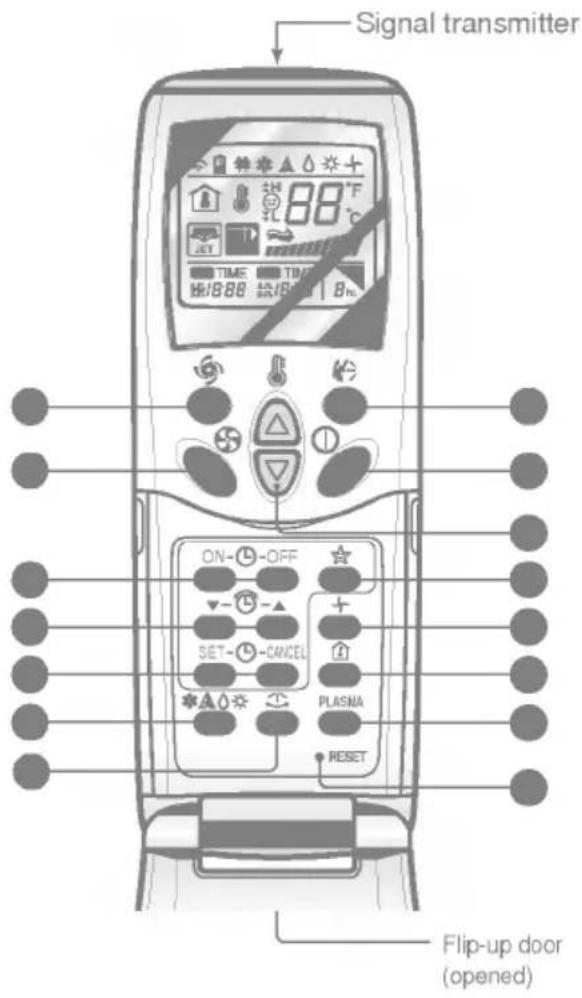
Features of the Remote Control- Door Opened
text_image
Signal transmitter ON- OFF SET- CANCEL PLASNA RESET Flip-up door (opened)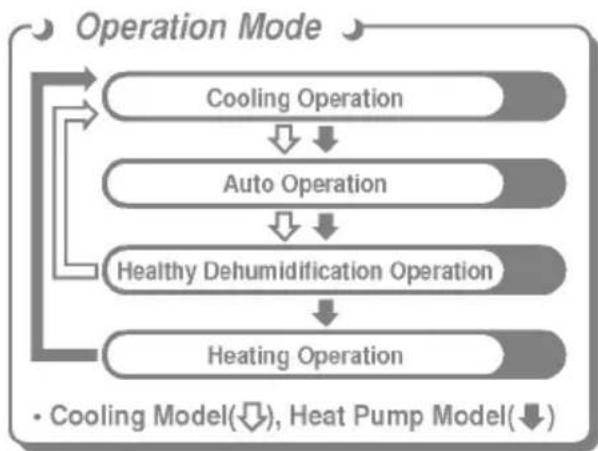
flowchart
graph TD
    A["Operation Mode"] --> B["Cooling Operation"]
    B --> C["Auto Operation"]
    C --> D["Healthy Dehumidification Operation"]
    D --> E["Heating Operation"]
    style A fill:#f9f,stroke:#333
    style B fill:#ccf,stroke:#333
    style C fill:#cfc,stroke:#333
    style D fill:#fcc,stroke:#333
    style E fill:#cff,stroke:#333
START/STOP BUTTON
Operation starts when this button is pressed and stops when the button is pressed again.
OPERATION MODE SELECTION BUTTON
Used to select the operation mode.
ROOM TEMPERATURE SETTING BUTTONS
Used to select the room temperature.
INDOOR FAN SPEED SELECTOR
Used to select fan speed in four steps low, medium, high and CHAOS.
JET COOL
Used to start or stop the speed cooling. (Speed cooling operates super high fan speed in cooling mode.)
CHAOS SWING BUTTON
Used to stop or start louver movement and set the desired up/down airflow direction.
ON/OFF TIMER BUTTONS
Used to set the time of starting and stopping operation.
TIME SETTING BUTTONS
Used to adjust the time. (See page 12)
TIMER SET/CANCEL BUTTONS
Used to set the timer when the desired time is obtained and to cancel the Timer operation. (See page 12)
SLEEP MODE AUTO BUTTON
Used to set Sleep Mode Auto operation.
(See page 12)
AIR CIRCULATION BUTTON
Used to circulate the room air without cooling or heating. (See page 13)
ROOM TEMPERATURE CHECKING BUTTON
Used to check the room temperature.
PLASMA(OPTION)
Used to start or stop the plasma-purification function. (See page 11)
HORIZONTAL AIRFLOW DIRECTION CONTROL BUTTON (NOT ON ALL MODELS)
Used to set the desired horizontal airflow direction. (See page 13)
RESET BUTTON
Used prior to resetting time or after replacing batteries.




How to use the Operation Mode Selection button

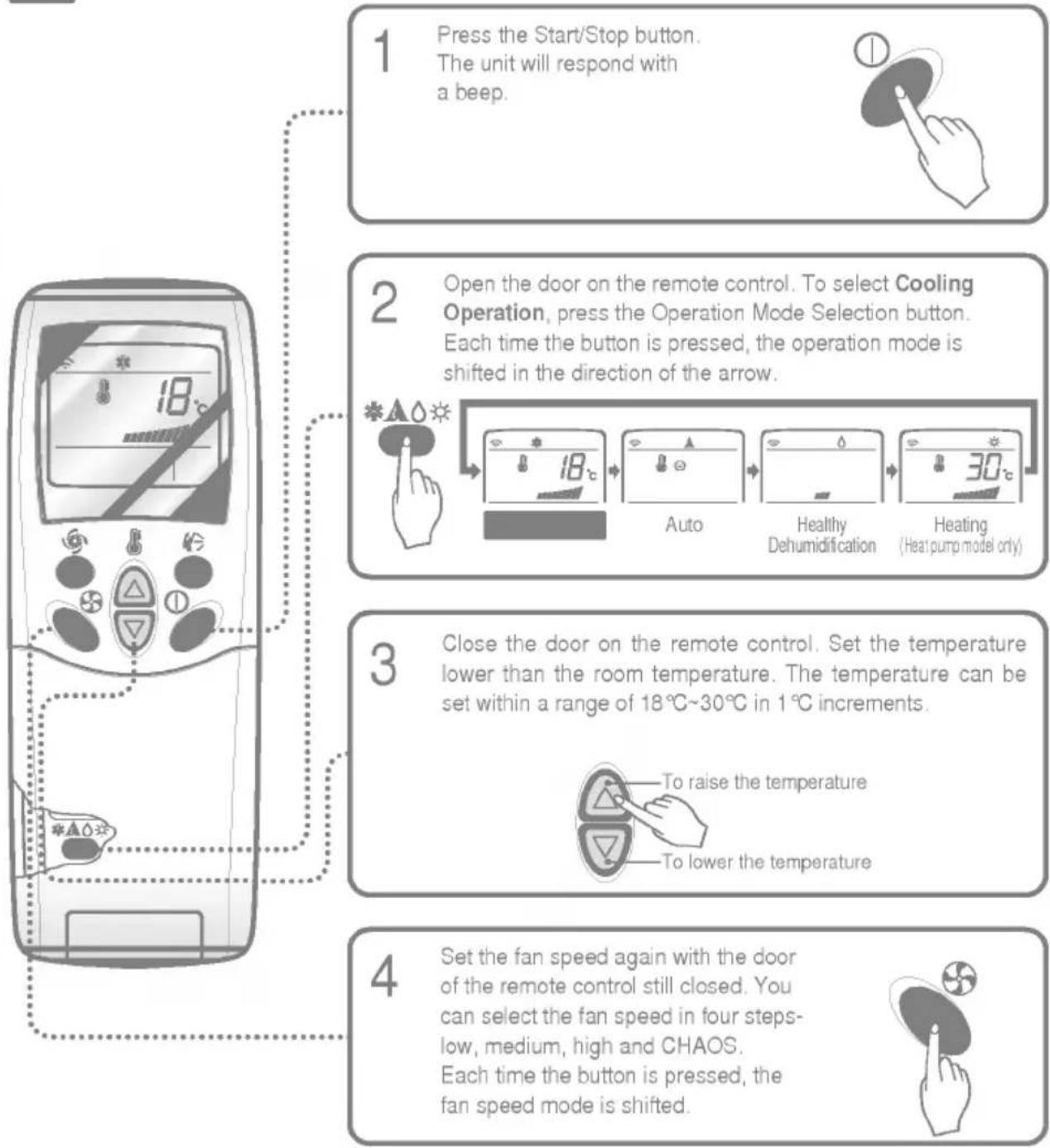
Cooling Operation
flowchart
graph TD
    A["1 Press the Start/Stop button.<br>The unit will respond with a beep."] --> B["2 Open the door on the remote control. To select Cooling Operation, press the Operation Mode Selection button.<br>Each time the button is pressed, the operation mode is shifted in the direction of the arrow."]
    B --> C["3 Close the door on the remote control. Set the temperature lower than the room temperature. The temperature can be set within a range of 18°C~30°C in 1°C increments.<br>To raise the temperature<br>To lower the temperature"]
    C --> D["4 Set the fan speed again with the door of the remote control still closed. You can select the fan speed in four steps-low, medium, high and CHAOS.<br>Each time the button is pressed, the fan speed mode is shifted."]
Natural wind by the CHAOS logic
☐ For more fresh feeling than other fan speed, press the Indoor Fan Speed Selector and set to CHAOS mode. In this mode, the wind blows like natural breeze by automatically changing fan speed according to the CHAOS logic.

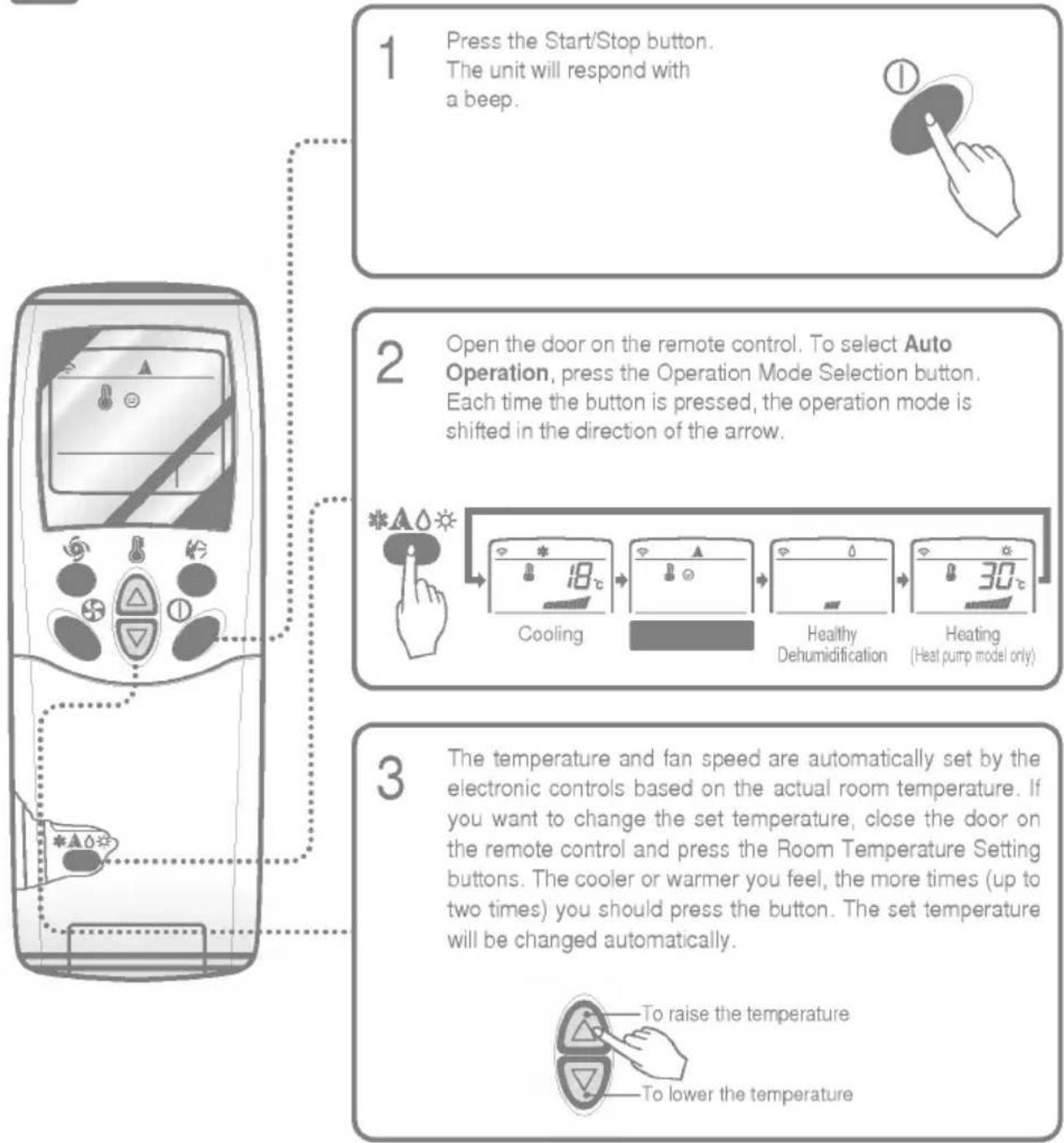
Auto Operation
flowchart
graph TD
    A["1 Press the Start/Stop button.<br>The unit will respond with a beep."] --> B["2 Open the door on the remote control. To select Auto Operation, press the Operation Mode Selection button.<br>Each time the button is pressed, the operation mode is shifted in the direction of the arrow."]
    B --> C["3 The temperature and fan speed are automatically set by the electronic controls based on the actual room temperature. If you want to change the set temperature, close the door on the remote control and press the Room Temperature Setting buttons. The cooler or warmer you feel, the more times (up to two times) you should press the button. The set temperature will be changed automatically."]
During Auto Operation:
☐ You cannot switch the indoor fan speed. It has already been set by the Fuzzy rule.
☐ If the system is not operating as desired, manually switch to another mode. The system will not automatically switch from the cooling mode to the heating mode, or from heating mode to cooling mode, it must be done by manually resetting.
During Auto Operation, pressing the chaos swing button makes the horizontal louvers swing up and down automatically. If you want to stop auto-swing, press the chaos swing button again.

Healthy Dehumidification Operation
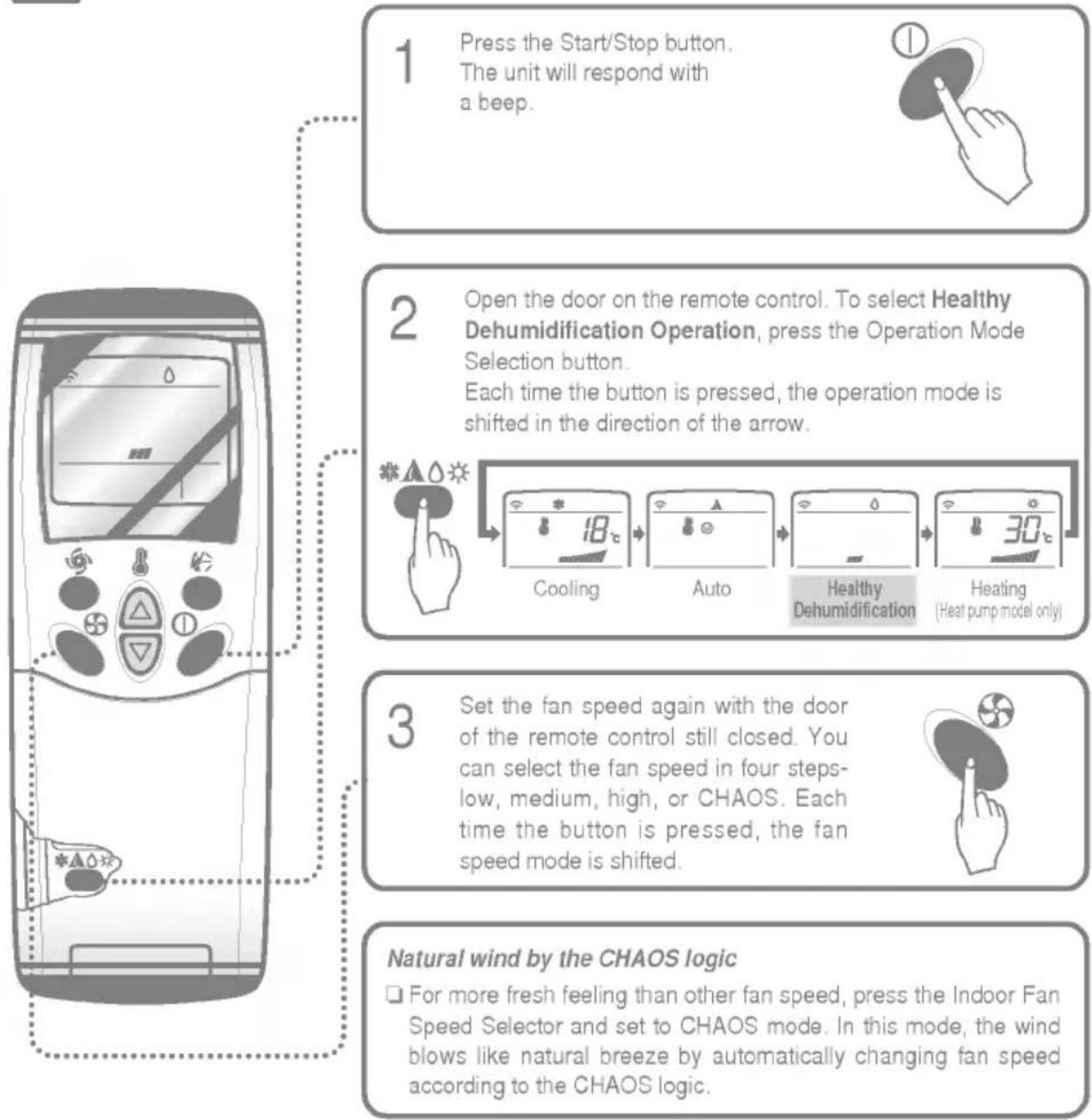
flowchart
graph TD
    A["1 Press the Start/Stop button.<br>The unit will respond with a beep."] --> B["2 Open the door on the remote control. To select Healthy Dehumidification Operation, press the Operation Mode Selection button.<br>Each time the button is pressed, the operation mode is shifted in the direction of the arrow."]
    B --> C["3 Set the fan speed again with the door of the remote control still closed. You can select the fan speed in four steps-low, medium, high, or CHAOS. Each time the button is pressed, the fan speed mode is shifted."]
    C --> D["Natural wind by the CHAOS logic<br>☐ For more fresh feeling than other fan speed, press the Indoor Fan Speed Selector and set to CHAOS mode. In this mode, the wind blows like natural breeze by automatically changing fan speed according to the CHAOS logic."]
During Healthy Dehumidification Operation:
☐ If you select the dehumidification mode on the operation selection button, the A/C starts to run the dehumidification function. It automatically sets the room temp. and airflow volume to the best condition for dehumidification, based on the sensed current room temp.
In this case, however, the setting temp. is not displayed in the remote control and you are not able to control the room temp. either.
☐ During the healthy dehumidification function, the airflow volume is automatically set according to the optimization algorithm responding to the current room temp. status which makes the room condition healthy and comfortable even in the high humidity season.

Heating Operation(Heat pump model only)
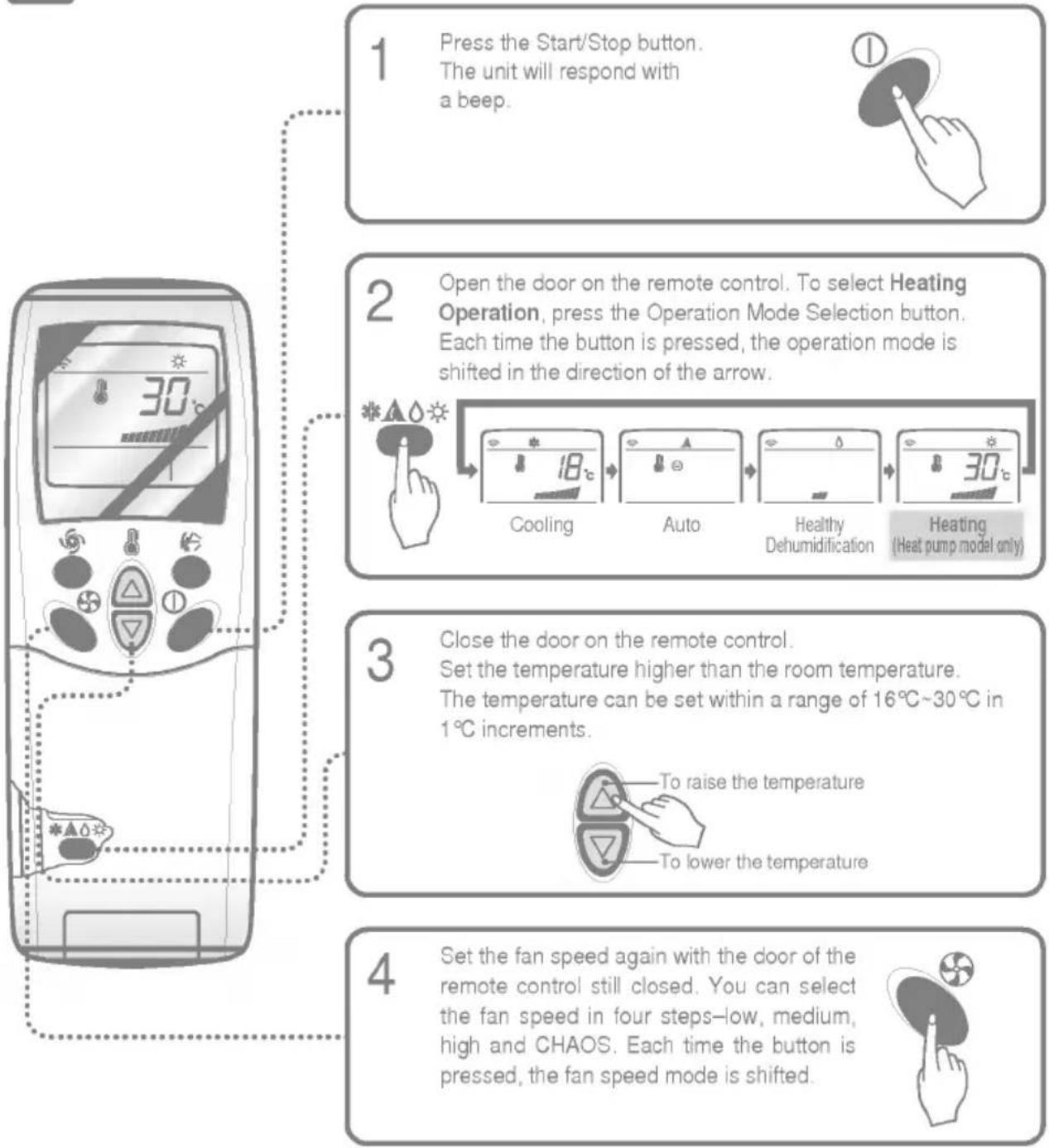
flowchart
graph TD
    A["1 Press the Start/Stop button.<br>The unit will respond with a beep."] --> B["2 Open the door on the remote control. To select Heating Operation, press the Operation Mode Selection button.<br>Each time the button is pressed, the operation mode is shifted in the direction of the arrow."]
    B --> C["3 Close the door on the remote control.<br>Set the temperature higher than the room temperature.<br>The temperature can be set within a range of 16°C~30°C in 1°C increments.<br>To raise the temperature<br>To lower the temperature"]
    C --> D["4 Set the fan speed again with the door of the remote control still closed. You can select the fan speed in four steps—low, medium, high and CHAOS. Each time the button is pressed, the fan speed mode is shifted."]
Natural wind by the CHAOS logic
☐ For more fresh feeling than other fan speed, press the Indoor Fan Speed Selector and set to CHAOS mode. In this mode, the wind blows like natural breeze by automatically changing fan speed according to the CHAOS logic.

Jet Cool Operation
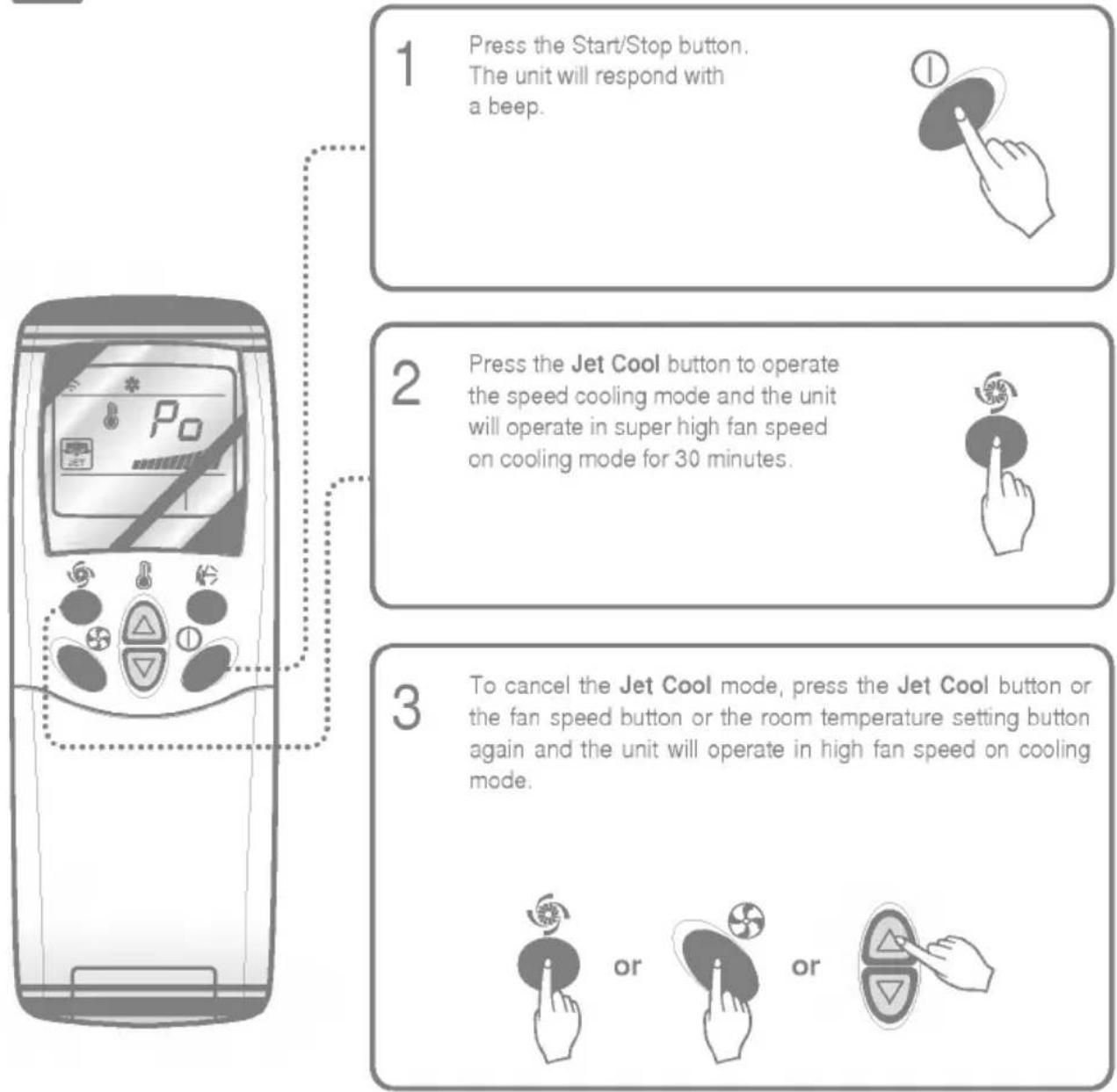
flowchart
graph TD
    A["1 Press the Start/Stop button.<br>The unit will respond with a beep."] --> B["2 Press the Jet Cool button to operate the speed cooling mode and the unit will operate in super high fan speed on cooling mode for 30 minutes."]
    B --> C["3 To cancel the Jet Cool mode, press the Jet Cool button or the fan speed button or the room temperature setting button again and the unit will operate in high fan speed on cooling mode."]
NOTE:
During the JET COOL function at any moment, the A/C starts to blow the cool air at extremely high speed for 30 minutes setting the room temp. automatically to 18^ . It is especially used to cool the room temp. in the shortest time in a hot summer.
In heat pump mode or neuro fuzzy mode, however, the JET COOL function is not available.
☐ In order to return to the normal cooling mode from the JET COOL mode, you just press either the operation mode selection button, airflow volume selection or temp. setting button or the JET COOL button again.

PLASMA Purification Operation(Optional)

flowchart
graph TD
    A["1 Press the Start/Stop button.<br>The unit will respond with a beep."] --> B["2 Open the door on the remote control.<br>Press the PLASMA air purifying operation ON/OFF button.<br>Operation will start when the button is pressed and stop when the button is pressed again."]
    B --> C["3 Set the fan speed again with door of the remote control closed. You can select the fan speed in four steps-low, medium, high or CHAOS. Each time the button is pressed, the fan speed mode is shifted.<br>* Air purifying operation (PLASMA) can be with cooling.<br>Heating or any other operations."]
PLASMA Air Purifying Operation only
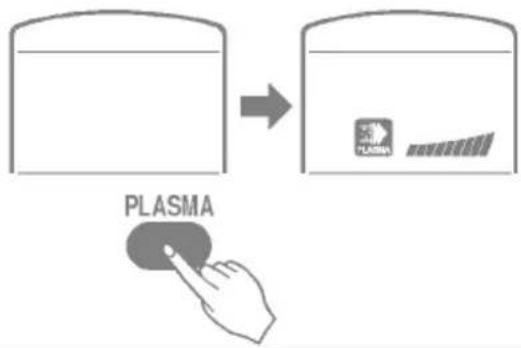
text_image
PLASMAIf you press the only PLASMA button, only PLASMA air purifying operates.
Then, fan speed is low. You can select the fan speed in four steps-low, medium, high or CHAOS.
Each time the button ( ) is pressed, the fan speed mode is shifed.
Additional features

Sleep Mode
Press the Sleep Mode Auto button to set the time you want the unit to turn off automatically.
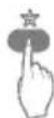
The Timer is programmed in one-hour increments by pressing the Sleep Mode Auto button 1 to 7 times. The sleep mode is available for 1 to 7 times. To alter the time period in steps of 1 hour, press the Sleep Mode Button while aiming at air conditioner.
Make sure the Sleep Mode Auto LED lights up.
To cancel the Sleep Mode, press the sleep Mode Auto button several times until the star (☆) disappears from the operation display.
Note: The Sleep Mode will be operated at slow fan speed (cooling) or medium fan speed (heat pump only) for quiet sleeping.
IN COOLING MODE OR HEALTHY DEHUMIDIFICATION MODE:
The temperature will automatically rise by 1°C over the next 30 minutes and by 2°C in 1 hour for comfortable sleeping.

Setting the Time
Time can be set only when you have pressed the Reset button. If you have just replaced the batteries, the Reset button should be pressed to reset the time.
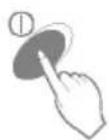
Press the Start/Stop button.
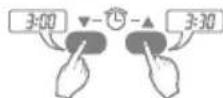
Press the Time Setting buttons until the desired time is set.
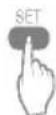
Press the Timer SET button.
Note: Check the indicator for A.M. and P.M.

Delay Start/Pre-Set Stop
Make sure the time is set correctly on the remote control display.
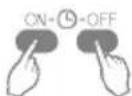
Press the ON/OFF Timer buttons to turn Timer on or off.
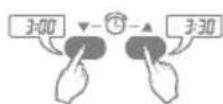
Press the Time Setting buttons until the desired time is set.
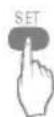
- Press the selected on/off setting by pressing the Timer SET button while aiming the remote control at the signal receptor.
To cancel the timer setting

Press the Timer Cancel button while aiming remote control at the signal receptor. (The timer lamp on the air conditioner and the display will go out.)
NOTE: Select one of the following four types of operation.
with the unit running
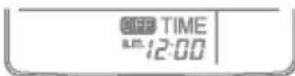
Delay OFF Timer
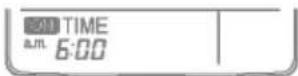
Delay ON Timer
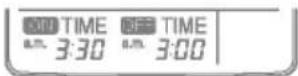
Delay OFF and ON Timer
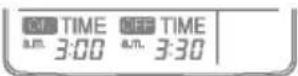
Delay ON and OFF Timer

Vertical Airflow Direction Control
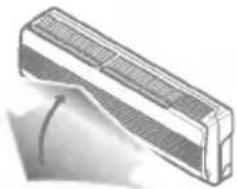
The up/down airflow (Vertical Airflow) can be adjusted by using the remote control.
natural_image
Illustration of a rectangular air conditioner unit with ventilation grilles and a curved arrow indicating airflow direction (no text or symbols)
Press the Start/Stop button to start the unit.

Press Chaos Swing button and the louvers will swing up and down. Press the Chaos Swing button again to set the vertical louver at the desired airflow direction.
Note:
☐ If you press the CHAOS swing button, the horizontal airflow direction is changed automatically based on the CHAOS algorithm to distribute the air in the room evenly and at the same time to make the human body feel most comfortable, as if enjoying a natural breeze.
□ Always use the remote control to adjust the up/down airflow direction. Manually moving the vertical airflow direction louver by hand, could damage the air conditioner.
☐ When the unit is shut off, the up/down airflow direction louver will close the air outlet vent of the system.
To adjust left/right(Horizontal Airflow) direction
Caution: Ensure that the unit is turned off before adjusting the horizontal airflow direction control. Carefully
open vertical louver to allow access to the horizontal airflow direction.
Adjust the left/right airflow direction by hand.

natural_image
Diagram of a car air conditioner unit with airflow arrows indicating movement (no text or symbols)
Horizontal Airflow Direction Control (Option)
The left/right(Horizontal Airflow) can be adjusted by using the remote control. Press the Start/Stop button to start the unit.
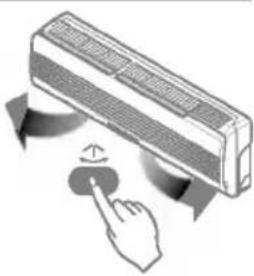
Open the door on the remote control. Press the Airflow Direction Start/Stop button and the louvers will swing left and right. Press the Horizontal Airflow Direction Control Button again to set the horizontal louver at the desired airflow direction.
natural_image
Illustration of a hand pressing a button on a wall-mounted air conditioner (no text or symbols)
Air Circulation Mode
Circulates the room air without cooling or heating.

Press the Start/Stop button. the unit will respond with a beep.

Open the door on the remote control. Press the Air Circulation button. Close the door on the remote control. Now each time that you press the Indoor Fan Speed Selector, the fan speed is shifted from low to CHAOS and back to low again.

flowchart
graph LR
    A["Power Supply"] --> B["Battery"]
    B --> C["Charging Station"]
    C --> D["Battery"]
    D --> E["Charging Station"]
CHAOS Air
Fan speed is on low.
Fan speed is on medium.
Fan speed is on high.
Note:
☐ CHAOS Air economizes power consumption and prevents overcooling. The fan speed is automatically changed from high to low or vice versa, depending on the ambient temperature.

Forced Operation
Operation procedures when the remote control can't be used.
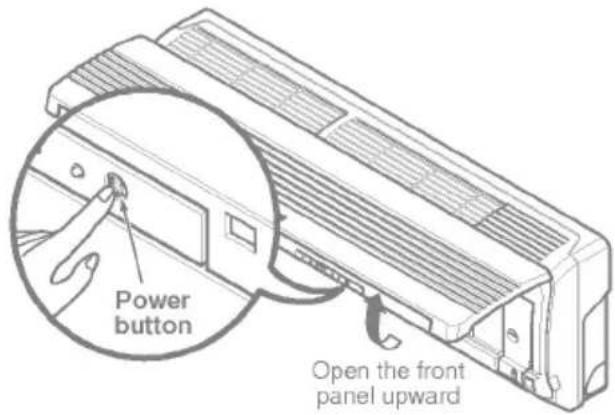
The operation will be started if the power button is pressed.
If you want to stop operation, re-press the button.
text_image
Power button Open the front panel upward| Cooling Model | Heat pump Model | |||
| Room Temp. ≥ 24°C | 21°C ≤ Room Temp. < 24°C | Room Temp. < 21°C | ||
| Operating mode | Cooling | Cooling | Healthy Dehumidification | Heating |
| Indoor FAN Speed | High | High | High | High |
| Setting Temperature | 22°C | 22°C | 23°C | 24°C |
Test operation
During the TEST OPERATION, the unit operates in cooling mode at high speed fan, regardless of room temperature and resets in 18 minutes.
During test operation, if remote controller signal is received, the unit operates as remote controller sets. If you want to use this operation, open the front panel upward and Press the power button let it be pressed for about 3 seconds.
If you want to stop the operation, re-press the button.
Auto restart
In case the power comes on again after a power failure, Auto Restarting Operation is the function to operate procedures automatically to the previous operating conditions.
So there is no need of activating this function by pressing any key or button.
In the initial mode, the fan operates at a low speed and the compressor starts 2.5\~3 minutes later.
As the compressor starts, the fan speed also resumes its previous setting mode.
Helpful information
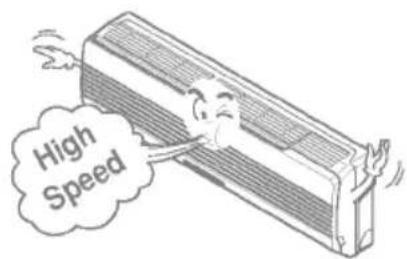
Fan speed and cooling capacity.
The cooling capacity indicated in the specification is the value when the fan speed is set to high, and the capacity will be lower at low or medium fan speed.
High fan speed is recommended when you wish to cool the room quickly.
text_image
High Speed
Telephone Control Operation
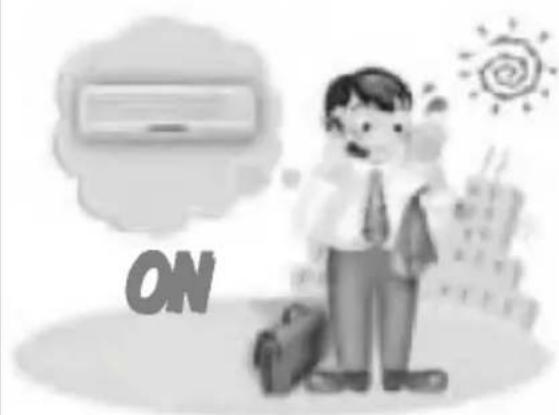
Calling from outside, you can start the air conditioner to keep the room comfortable.
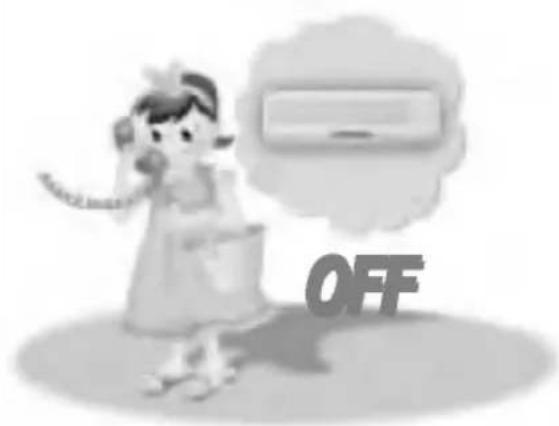
Even though you went out with the air conditioner on, you can turn it off using the phone outside.

TURN ON
natural_image
Illustration of a man in business attire with a thought bubble showing an air conditioner, and a 'ON' sign in the foreground (no text or symbols on main subjects)/ Dial the number which is connected with the air conditioner.
2 After ringing 5 times.
You can hear the "Beep" sound (if the air conditioner is off), then press "0" "0" "7" "8" accordingly.
2 OGM guide is provided after signal sound rings four times and then "Beep"(sounds from telephone itself) sounds so that outside recording can be done.
3 Slowly press password "0" "0" "7" and "8" in order.
With the sound "Beep, Beep" the air conditioner starts on.
5 Hang up the phone.

TURN OFF
text_image
OFF/ Dial the number which is connected with the air conditioner.
2 After ringing 5 times.
You can hear the "Beep Beep" sound (if the air conditioner is on), then press "0" "0" "7" "9" accordingly.
2 OGM guide is provided after signal sound rings four times and then "Beep"(sounds from telephone itself) sounds so that outside recording can be done.
Slowly press password "0" "0" "7" and "9" in order.
With the sound "Beep---" the air conditioner is turned off.
Hang up the phone.
Note:
☐ This product works after telephone rings 5 times.
☐ If internal user picks up the phone before 5 rings, Telephone control function does not work.
□ If user doesn't push the telephone button 25 seconds after beep, Telephone control function doesn't work.
☐ The numbers of response bell should be adjusted to four times if pressing "Out-of-office" button or taking other action for automatic response.
☐ The recording time of OGM (Outgoing Message) should be less than approximately 15 seconds.
☐ If it is connected to key phone, it cannot be worked.
Care and maintenance of the air conditioner
CAUTION: Before performing any maintenance, turn off the main power to the system.
Indoor Unit
Grille, Case, and Remote Control
☐ Turn the system off before cleaning. To clean, wipe with a soft, dry cloth. Do not use bleach or abrasives.
NOTE:
Supply power must be disconnected before cleaning the indoor unit.
text_image
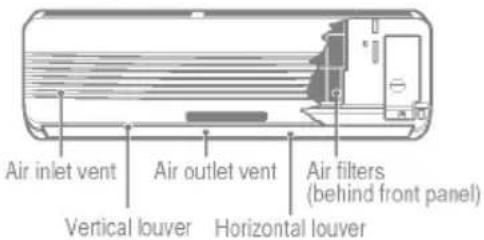
Air inlet vent Air outlet vent Air filters (behind front panel) Vertical louver Horizontal louverAIR FILTERS
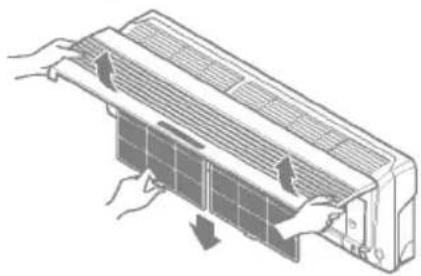
The air filters behind the front grille should be checked and cleaned once in every 2 weeks or more often if necessary.
natural_image
Diagram of airflow or ventilation system inside a fan or air duct, showing hand placement and airflow direction (no text or symbols)PLASMA FILTER, DEODORIZER FILTER(OPTIONAL)
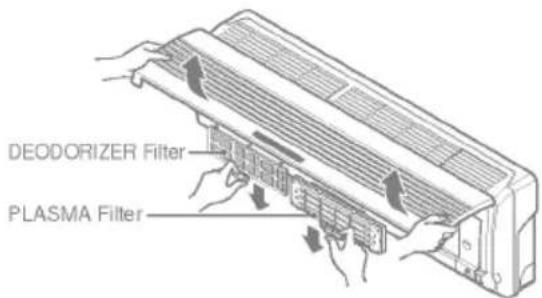
The PLASMA filter behind the air filters should be checked and cleaned once in every 3 months or more often if necessary.
text_image
DEODORIZER Filter PLASMA Filter
Don't touch this PLASMA Filter within 10 seconds after opening the inlet grille, it may cause an electric shock.
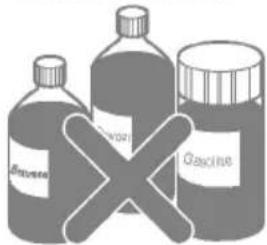
□ Never use any of the followings:
• Water hotter than 40°C Could cause deformation and/or discoloration.
• Volatile substances Could damage the surfaces of the air conditioner.
text_image
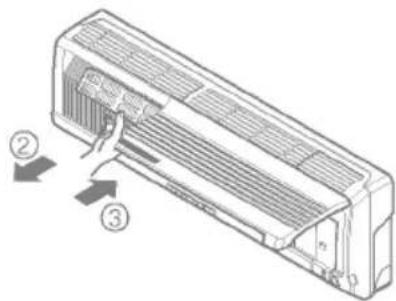
Biosorbent Gasoline- Lift the front access panel and pull the filter tab slightly forward to remove the filter.
Clean the filter with a vacuum cleaner or warm, soapy water.
- If dirt is conspicuous, wash with a solution of detergent in lukewarm water. - If hot water (40 °C or more) is used, it may be deformed.
After washing with water, dry well in the shade.
Re-install the air filter.
After removing the air filters, pull slightly forward to remove the PLASMA filter.
Dip the PLASMA filter into the water mixed with neutral detergent, for 20\~30 minutes.
Dry the PLASMA filter in the shade for a day (Especially, the humidity must be removed perfectly on this parts).
Note the cuts of electric discharge lines.
Re-install the PLASMA filter to the original position.
After removing the air filters, pull slightly forward to remove the DEODORIZER filter.
Dry in the sunlight for two hours.
Re-install the DEODORIZER filter to the original position.
Replacement of Purifying Filter(Option)
• Recommended use period : About 2 years
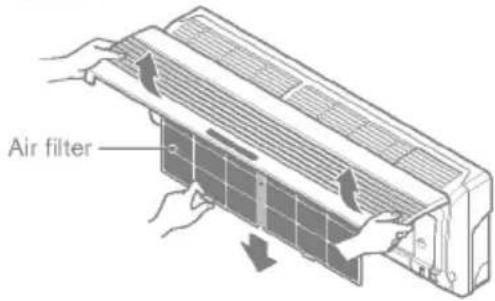
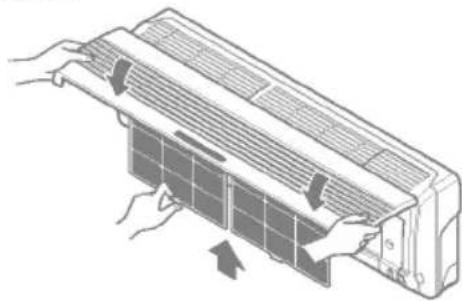
Open front panel and remove air filters.
text_image
Air filter- Remove air purifying filters.
Insert new air purifying filters.
text_image
Diagram of a airflow system with labeled parts and directional arrows indicating airflow directionReinsert air filters and close front panel.
natural_image
Illustration of hands installing or adjusting a panel on an air conditioner (no text or symbols visible)
natural_image
Technical line drawing of a mechanical component with grid-like cutouts and a central mounting bracket (no text or symbols)Air purifying filter
Outdoor Unit
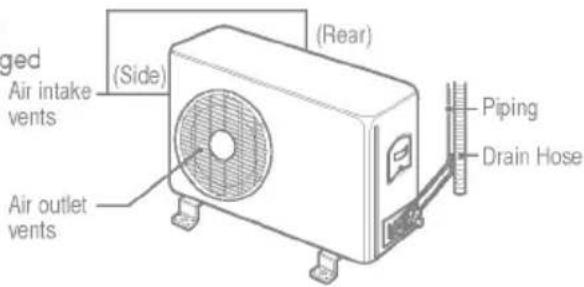
The heat exchanger coils and panel vents of the outdoor unit should be checked regularly. If clogged with dirt or soot, the heat exchanger and panel vents may be professionally steam cleaned. Air in vent
NOTE:
Dirty or clogged coils will reduce the operating efficiency of the system and cause higher operating costs.
text_image
gged Air intake vents (Side) (Air outlet vents) (Rear) Piping Drain Hose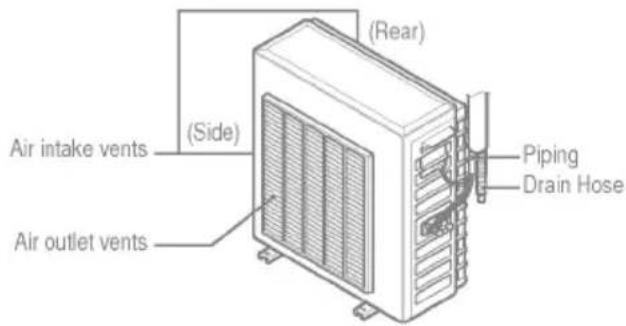
text_image
Air intake vents (Side) Air outlet vents (Rear) Piping Drain Hose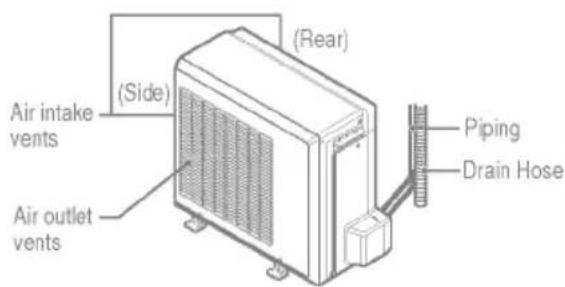
text_image
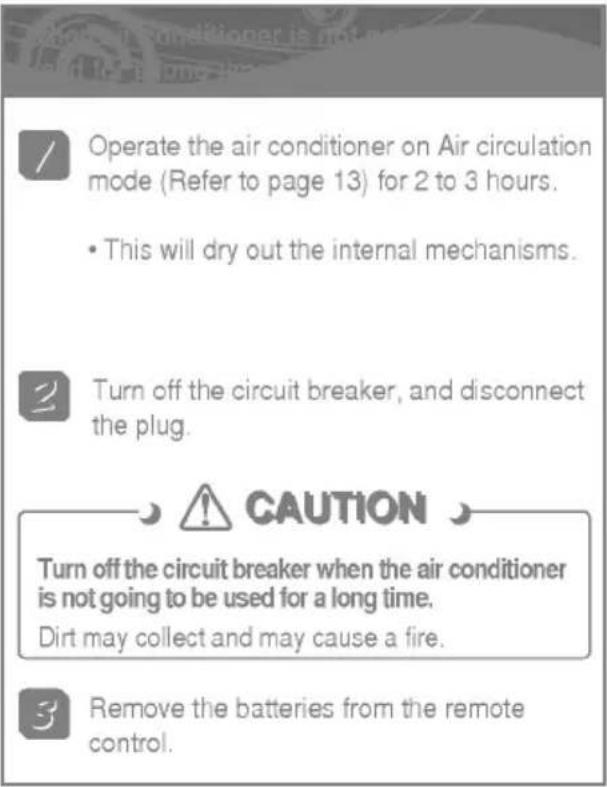
Air intake vents (Side) (Air outlet vents) (Rear) Piping Drain HoseWhen the air conditioner is not going to be used for a long time.
text_image
Operate the air conditioner on Air circulation mode (Refer to page 13) for 2 to 3 hours. • This will dry out the internal mechanisms. Turn off the circuit breaker, and disconnect the plug. CAUTION Turn off the circuit breaker when the air conditioner is not going to be used for a long time. Dirt may collect and may cause a fire. Remove the batteries from the remote control.
text_image
/ Clean the air filter and install it in the indoor unit. (Refer to page 16 for cleaning filters.) Check that the air inlet and outlet of the indoor/outdoor unit are not blocked.Operation Tips
text_image
This is not good for the health and wastes electricity. Avoid opening doors and windows as much as possible to keep the cool air in the room.
text_image
Do not let direct sunshine enter the room when the air conditioner is in operation. Blockages in the air filter reduces the airflow and lowers the cooling and dehumidifying effects. Clean at least once in every two weeks.
text_image
Adjust the vertical and horizontal airflow direction to ensure a uniform temperature in the room. Since windows are kept closed, it is a good idea to open them and ventilate the room now and then.
Troubleshooting Tips! Save time and money!
Check the following points before requesting repairs or service.... If the fault persists, please contact your dealer or service center.
| Case | Explanation | See page |
| The air conditioner does not operate. | Have you made a mistake in timer operation? | 12 |
| Has the fuse blown or has the circuit breaker been tripped? | - | |
| The room has a peculiar odor. | Check that this is not a damp smell exuded by the walls, carpet, furniture, or cloth items in the room. | - |
| It seems that condensation is leaking from the air conditioner. | Condensation occurs when the airflow from the air conditioner cools the warm room air. | - |
| Air conditioner does not operate for about 3 minutes when restarted. | This is the protector of the mechanism.Wait about three minutes and operation will begin. | - |
| Does not cool or heat effectively. | Is the air filter dirty? See air filter cleaning instructions. | 16 |
| Has the temperature been set incorrectly? | 6,9 | |
| Are the indoor unit's air inlet or outlet vents obstructed? | - | |
| The air conditioner operation is noisy. | For a noise that sounds like water flowing.-This is the sound of freon flowing inside the air conditioner unit.For a noise that sounds like the compressed air releasing into atmosphere.-This is the sound of the dehumidifying water being processed inside the air conditioning unit. | - |
| Remote control display is faint, or no display at all. | Are the batteries depleted?Are the batteries inserted in the opposite (+) and (-) directions? | 4 |
| Crack sound is heard. | This sound is generated by the expansion/constriction of the front panel, etc. due to changes of temperature. | - |
NOTE
WATER RESISTANT: The outdoor side of this appliance is WATER RESISTANT.
The indoor side is not water resistant and should not be exposed to excess water.
natural_image
Decorative border design with dotted lines and a wavy border (no text or symbols)