
GBT 10 - Marine radar GARMIN - Free user manual and instructions
Find the device manual for free GBT 10 GARMIN in PDF.


| Product Type | NMEA 2000 Trim Tab Adapter |
| Brand | Garmin |
| Model | GBT 10 |
| Dimensions (W × H × L) | 24.7 × 17.0 × 78.6 mm |
| Weight | 365 g (12.85 oz) |
| Total Cable Length | 4.9 m (16 ft) |
| Case Material | Thermoplastic rubber (PCB overmold); PVC jacket (cable); PVC overmold (connectors/strain reliefs) |
| Waterproof Rating | IPX7 (submersible up to 1 m for 30 minutes) |
| Operating Temperature Range | -15°C to 70°C (5°F to 158°F) |
| Compass Safe Distance | 5 cm (2 in) |
| Power Input Source | 9–16 Vdc from NMEA 2000 bus |
| Power Usage | 0.9 W max |
| NMEA 2000 Load Equivalency Number (LEN) | 1 (50 mA) |
| Main Function | Adapts analog Bennett trim tab position info to NMEA 2000 for display on compatible Garmin devices |
| Installation Location | Within 4.4 m (173 in) of Bennett TPI or trim tab sensors; between NMEA 2000 backbone and sensors |
| Wiring Options | Directly to Bennett Trim Tab Display (TPI) or directly to trim tab sensors |
| Calibration | Required via compatible Garmin display device; supports 2 to 16 trim tab positions |
| NMEA 2000 Certification | Certified; transmits and receives multiple PGNs (059392, 060928, 126208, 126464, 126996, 130576) |
| Maintenance & Cleaning | No specific instructions; keep connections dry and clean; avoid regular submersion |
| Safety Precautions | Wear safety goggles, ear protection, and dust mask when drilling; check opposite side before cutting; install at least 5 cm from magnetic compass |
| Spare Parts & Repairability | Not specified; contact Garmin dealer for replacement |
| General Information | Includes one T-connector; optional drop cable up to 6 m; NMEA 2000 network must be powered |
Frequently Asked Questions - GBT 10 GARMIN
User questions about GBT 10 GARMIN
0 question about this device. Answer the ones you know or ask your own.
Ask a new question about this device
Download the instructions for your Marine radar in PDF format for free! Find your manual GBT 10 - GARMIN and take your electronic device back in hand. On this page are published all the documents necessary for the use of your device. GBT 10 by GARMIN.
USER MANUAL GBT 10 GARMIN
GBT ^TM 10 Installation and Configuration Instructions
Use the Garmin ^® GBT 10 Bennett Trim Tab Adapter to adapt analog information provided by a Bennett Trim Tab Position Indicator (Bennett TPI), or by the Bennett trim tab sensors on your boat, to your NMEA 2000 ^® network. Your GBT 10 adapter allows you to observe trim tab information on the compatible Garmin display devices connected to your NMEA 2000 network. For a list of compatible Garmin chartplotters and devices, visit www.garmin.com.
Compare the contents of this package with the packing list on the box. If any pieces are missing, contact your Garmin dealer immediately.
Product Registration
Help us better support you by completing our online registration today. Go to http://my.garmin.com. Keep the original sales receipt, or a photocopy, in a safe place.
Contact Garmin
Contact Garmin Product Support if you have any questions while using your GBT 10 adapter. In the USA, go to www.garmin.com/support, or contact Garmin USA by phone at (913) 397.8200 or (800) 800.1020.
In the UK, contact Garmin (Europe) Ltd. by phone at 0808 2380000.
In Europe, go to www.garmin.com/support and click Contact Support for in-country support information, or contact Garmin (Europe) Ltd. by phone at +44 (0) 870.8501241.

See the Important Safety and Product Information guide in the compatible Garmin display device box for product warnings and other important information.

CAUTION: Always wear safety goggles, ear protection, and a dust mask when drilling, cutting, or sanding.

NOTICE: When drilling or cutting, always check the opposite side of the drilling or cutting surface.
Needed Tools and Supplies
• Heat-shrink tubing and a heat gun
- Cable ties
• Additional NMEA 2000 cabling and connectors (optional)
Determining an Installation Location
When you are selecting a location to install the GBT 10 adapter, consider the following:
- During installation, you connect the GBT 10 adapter to the Bennett TPI (or directly to the Bennett trim tab sensors), and to the NMEA 2000 network. Therefore:
- Choose a location that is within 173 in. (4.4 m) of the Bennett TPI (or the Bennett trim tab sensors) to avoid splicing bare wires.
- Choose a location between the NMEA 2000 backbone and the Bennett TPI (or the Bennett trim tab sensors).
- If you cannot connect the adapter directly to the NMEA 2000 network, add a drop cable. See page 3 for more information.
- The adapter is IEC 60529 IPX7 waterproof, and can be submerged up to 30 minutes at 1 meter. Do not install the adapter in a location where it will be submerged regularly, though the location can be subject to wash-down.
- You can use cable ties (not included) to secure the adapter to an existing structure on your boat.
- You can use mounted-head cable ties (not included) and screws (not included) to secure the adapter to a bulkhead or other suitable surface on your boat.
- Install the adapter at least 2 in. (5 cm) from a magnetic compass to prevent electromagnetic interference, which can cause inaccurate compass readings.
Wiring the GBT 10 Adapter
Connect the GBT 10 adapter either to the Bennett TPI or to the Bennett trim tab sensors directly using the bare wires on the wiring harness.
Wiring the GBT 10 Adapter to the Bennett Trim Tab Display
You can wire the GBT 10 adapter directly to the Bennett TPI. Do not remove any wires from the back of the Bennett TPI, and wire the GBT 10 adapter to the TPI according to the following table. Use only the wires listed for the GBT 10 adapter. Cut and tape any unused wires.
| Bennett TPI Connector Label | GBT 10 Adapter Wire Color |
| + None | |
| - None | |
| BRG None | |
| RED None* | |
| RED Blue | |
| SHLD Black | |
| GRN Yellow | |
| GRN None* |
*When wiring the GBT 10 adapter to the Bennett TPI, it is important that you do not connect wires to the RED and GRN connections farthest from the SHLD connection. Connecting the GBT 10 adapter wires to the connections farthest from the SHLD connection will interfere with the operation of the Bennett TPI.
Wiring the GBT 10 Adapter Directly to the Sensors on the Trim Tabs
You can wire the adapter directly to the Bennett trim tab sensors where the trim tabs are installed. Wire the GBT 10 adapter to the sensors according to the following table.
| GBT 10 Adapter Wire Bennett Trim Tab Sensors | |
| Blue Port sensor wire 1** | |
| White Port sensor wire 2** | |
| Yellow Starboard sensor wire 1** | |
| Drain Sensor drain wires | |
| Red Starboard sensor wire 2** | |
**When wiring the GBT 10 adapter directly to the trim tab sensors, the connection order of the GBT 10 adapter port wires (blue/white) and the GBT 10 adapter starboard wires (yellow/red) to the two wires on the respective trim tab sensor is not important.

NOTICE: After connecting the adapter to the Bennett TPI or to the Bennett trim tab sensors, cover any exposed wires with heat-shrink tubing.
Connecting the GBT 10 Adapter to a NMEA 2000 Network
After you have connected the GBT 10 adapter to the Bennett TPI or to the Bennett trim tab sensors, connect it to the existing NMEA 2000 network on your boat. If you do not have a NMEA 2000 network on your boat, you must build one. For more information on NMEA 2000 and to purchase additional connectors and cables, go to www.garmin.com.
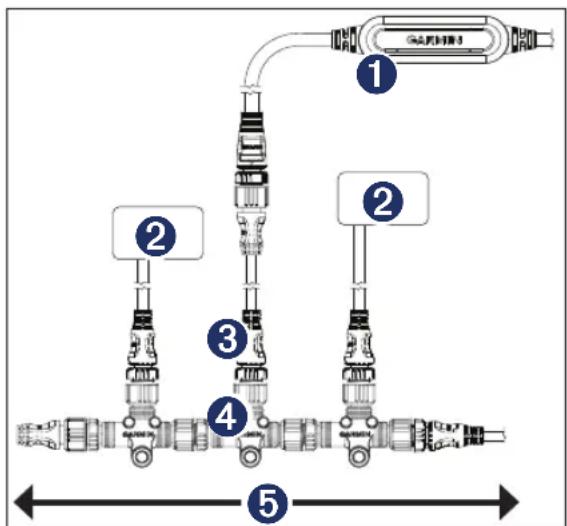
Connecting the GBT 10 Adapter to an Existing NMEA 2000 Network
① GBT 10 adapter
② NMEA 2000 device (not included)
③ Drop cable (optional - not included)
4 T-connector (one included)
⑤ Existing NMEA 2000 network
To connect the GBT 10 adapter to your existing NMEA 2000 network:
- Determine where to connect the GBT 10 adapter to your existing NMEA 2000 backbone.
- Disconnect one side of a NMEA 2000 T-connector from the backbone. To extend the NMEA 2000 backbone, connect a NMEA 2000 backbone extension cable to the side of the disconnected T-connector.
- Add the included T-connector for the GBT 10 adapter to the NMEA 2000 backbone by connecting it to the side of the disconnected T-connector.
-
Connect the NMEA 2000 connector on the GBT 10 adapter to the T-connector added in step 3.
-
(Optional) If the GBT 10 adapter cannot connect directly to the NMEA 2000 backbone, route a NMEA 2000 drop cable (not included) to the bottom of the T-connector added in step 3. Use a drop cable with a length up to 20 ft. (6 m). Connect the drop cable to the T-connector and to the NMEA 2000 connector on the adapter.

NOTICE: If you have an existing NMEA 2000 network on your boat, it should already be connected to power. Do not connect an additional NMEA 2000 power cable to an existing NMEA 2000 network, because only one power source should be connected to a NMEA 2000 network.
Configuring the GBT 10 Adapter
NOTE: This section provides specific configuration information for the GBT 10 adapter using your compatible Garmin display device. To access the NMEA 2000 configuration menu on your display device, consult the documentation provided with your display device.
Calibrating the Trim Tab Position
To use the GBT 10 adapter, you must calibrate the position of the trim tabs the adapter is associated with.
NOTE: If you only adjust your trim tabs within a limited range of motion on a regular basis, calibrate the GBT 10 adapter using your normal range instead of the full range. Only the calibrated range will be displayed on your chartplotter or marine instrument.
- From the NMEA 2000 Devices list, select the GBT 10 device.
-
Select an option:
-
For most Garmin chartplotters, select Review > Trim Tab Calibration.
-
For other Garmin marine devices, select Config > Trim Tab Calibration.
-
Follow the on-screen instructions to calibrate the trim tab position.
Configuring the GBT 10 Adapter if the Trim Tab Calibration Selection Is Not Displayed
Depending on the version of software loaded on your Garmin marine instrument, the specific configuration options may not be displayed on the configuration screens.
To calibrate the trim tab position if the menu option is not displayed:
To use the GBT 10 adapter, you must calibrate the position of the trim tabs that the adapter is associated with. You can enter a minimum of two, and a maximum of sixteen, trim tab positions. For greater accuracy, enter more trim tab positions.
- While viewing the NMEA 2000 configuration menu, select the GBT 10 device.
- Select Config > Generic Configuration.
- Enter the following command: "CALIBRATION=1"
- Move both trim tabs to the highest position. When the trim tabs are in the highest position, they should be at or near 0% of their full range of motion.
- Enter the following command: "TRIMTABPOS="
- After the command, enter the percentage of the highest trim tab position as a whole number between 0 and 100, and select Done. For example, TRIMTABPOS=0Done.
- Move both trim tabs to the lowest position. When the trim tabs are in the lowest position, they should be at or near 100% of their full range of motion.
- Enter the following command: "TRIMTABPOS="
-
After the command, enter the percentage of the lowest trim tab position as a whole number between 0 and 100, and select Done. For example, TRIMTABPOS=100Done.
-
To enter an additional, optional trim tab position, move both trim tabs to a new position, and observe the trim tab position as a percentage of the full range of motion of the trim tab.
- Enter the following command: "TRIMTABPOS="
- After the command, enter the percentage of the trim tab position as a whole number between 0 and 100, and select Done. For example, TRIMTABPOS=50Done.
- Repeat steps 10 through 12 to enter additional, optional trim tab positions.
Restoring Factory Default Settings
You will lose all custom configuration settings when you restore factory default settings.
- From the NMEA 2000 Devices list, select the GBT 10 device.
- Select an option:
- For most Garmin chartplotters, select Review > Factory Defaults.
- For other Garmin marine devices, select Config > Factory Defaults.
- Select Yes.
Specifications
Physical
Weight: 12.85 oz. (365 g)
Size: (W × H × L)^31/32 × ^43/_64 × 3^3/32 in. (24.7 × 17.0 × 78.6 ~mm)
Total Cable Length: 16 ft. (4.9 m)
Case Material: Thermoplastic rubber (PCB overmold); PVC jacket (cable); PVC overmold (connectors/strain reliefs). Waterproof to IEC 529 IPX7 standards.
Temperature Range: From 5°F to 158°F (from -15°C to 70°C)
Compass Safe Distance: 2 in. (5 cm)
Electrical
Power Input Source: 9–16 Vdc from the NMEA 2000 bus
NMEA 2000 Power Usage: 0.9 W max
NMEA 2000 Load Equivalency Number (LEN): 1 (50 mA)
Communications
Use this table to determine the approved NMEA 2000 PGN information that is transmitted and received the GBT 10 adapter during communication with a NMEA 2000-compliant device.
| Transmit Receive | |||
| 059392 ISO | Acknowledgment 059392 ISO Acknowledgment | ||
| 060928 ISO | Address Claim 059904 ISO Request | ||
| 126208 NMEA - Command/Request/Acknowledge Group Function | 060928 ISO Address Claim | ||
| 126464 Transmit/Receive PGN List Group Function | 126208 NMEA - Command/Request/Acknowledge Group Function | ||
| 126996 Product Information | The GBT 10 is NMEA 2000 | ||
| 130576 Small Craft Status | |||

The GBT 10 is NMEA 2000 certified
All rights reserved. Except as expressly provided herein, no part of this manual may be reproduced, copied, transmitted, disseminated, downloaded or stored in any storage medium, for any purpose without the express prior written consent of Garmin. Garmin hereby grants permission to download a single copy of this manual onto a hard drive or other electronic storage medium to be viewed and to print one copy of this manual or of any revision hereto, provided that such electronic or printed copy of this manual must contain the complete text of this copyright notice and provided further that any unauthorized commercial distribution of this manual or any revision hereto is strictly prohibited.
Information in this document is subject to change without notice. Garmin reserves the right to change or improve its products and to make changes in the content without obligation to notify any person or organization of such changes or improvements. Visit the Garmin Web site (www.garmin.com) for current updates and supplemental information concerning the use and operation of this and other Garmin products.
Garmin ^® , and the Garmin logo are trademarks of Garmin Ltd. or its subsidiaries, registered in the USA and other countries. GBT ^™ 10 is a trademark of Garmin Ltd. or its subsidiaries. These trademarks may not be used without the express permission of Garmin.
NMEA 2000 ^® and the NMEA 2000 logo are registered trademarks of the National Marine Electronics Association.
CE
For the latest free software updates (excluding map data) throughout the life of your Garmin products, visit the Garmin Web site at www.garmin.com.

© 2009 Garmin Ltd. or its subsidiaries
Garmin International, Inc.
1200 East 151 ^st Street, Olathe, Kansas 66062, USA
Garmin (Europe) Ltd.
Liberty House, Houndown Business Park, Southampton, Hampshire, SO40 9LR UK
Garmin Corporation
No. 68, Jangshu 2 ^nd Road, Shijr, Taipei County, Taiwan
www.garmin.com