
V-500-PRE - Lens VIVITAR - Free user manual and instructions
Find the device manual for free V-500-PRE VIVITAR in PDF.


| Product Type | Telephoto Lens |
| Model | V-500-PRE |
| Brand | Vivitar |
| Focal Length | 500mm |
| Maximum Aperture | f/8 |
| Lens Mount | Compatible with various SLR mounts via T-mount adapter |
| Focus Type | Manual focus |
| Aperture Control | Preset aperture ring |
| Lens Construction | Multi-element coated glass |
| Filter Thread | 72mm |
| Dimensions (Diameter x Length) | Approx. 76mm x 100mm |
| Weight | Approx. 450g |
| Power Source | None (fully mechanical) |
| Main Functions | Telephoto photography, wildlife, sports, moon shots |
| Care & Cleaning | Use a lens brush or blower to remove dust. Clean glass with a microfiber cloth and lens cleaning solution if needed. |
| Safety | Do not point directly at the sun to avoid eye injury or camera damage. |
| Spare Parts & Repairability | No spare parts available; consult a camera repair specialist for issues. |
| General Information | Preset telephoto lens designed for manual focus SLR cameras. Includes a lens hood and carrying case. |
Frequently Asked Questions - V-500-PRE VIVITAR
User questions about V-500-PRE VIVITAR
0 question about this device. Answer the ones you know or ask your own.
Ask a new question about this device
Download the instructions for your Lens in PDF format for free! Find your manual V-500-PRE - VIVITAR and take your electronic device back in hand. On this page are published all the documents necessary for the use of your device. V-500-PRE by VIVITAR.
USER MANUAL V-500-PRE VIVITAR
text_image
500mm F/8.0 Telephoto Lens INSTRUCTION MANUAL V-500-PRE
text_image
Vivitar SERIES 1
bar
| Category | Value | | -------- | ----- | | Group 1 | 100 | | Group 2 | 100 | | Group 3 | 100 | | Group 4 | 100 | | Group 5 | 100 | | Group 6 | 100 | | Group 7 | 100 | | Group 8 | 100 | | Group 9 | 100 | | Group 10 | 100 | | Group 11 | 100 | | Group 12 | 100 | | Group 13 | 100 | | Group 14 | 100 | | Group 15 | 100 | | Group 16 | 100 | | Group 17 | 100 | | Group 18 | 100 | | Group 19 | 100 | | Group 20 | 100 | | Group 21 | 100 | | Group 22 | 100 | | Group 23 | 100 | | Group 24 | 100 | | Group 25 | 100 | | Group 26 | 100 | | Group 27 | 100 | | Group 28 | 100 | | Group 29 | 100 | | Group 30 | 100 | | Group 31 | 100 | | Group 32 | 100 | | Group 33 | 100 | | Group 34 | 100 | | Group 35 | 100 | | Group 36 | 100 | | Group 37 | 100 | | Group 38 | 100 | | Group 39 | 100 | | Group 40 | 100 | | Group 41 | 100 | | Group 42 | 100 | | Group 43 | 100 | | Group 44 | 100 | | Group 45 | 100 | | Group 46 | 100 | | Group 47 | 100 | | Group 48 | 100 | | Group 49 | 100 | | Group 50 | 100 | | Group 51 | 100 | | Group 52 | 100 | | Group 53 | 100 | | Group 54 | 100 | | Group 55 | 100 | | Group 56 | 100 | | Group 57 | 100 | | Group 58 | 100 | | Group 59 | 100 | | Group 60 | 100 | | Group 61 | 100 | | Group 62 | 100 | | Group 63 | 100 | | Group 64 | 100 | | Group 65 | 100 | | Group 66 | 100 | | Group 67 | 100 | | Group 68 | 100 | | Group 69 | 100 | | Group 70 | 100 | | Group 71 | 100 | | Group 72 | 100 | | Group 73 | 100 | | Group 74 | 100 | | Group 75 | 100 | | Group 76 | 100 | | Group 77 | 100 | | Group 78 | 100 | | Group 79 | 100 | | Group 80 | 100 | | Group 81 | 100 | | Group 82 | 100 | | Group 83 | 100 | | Group 84 | 100 | | Group 85 | 100 | | Group 86 | 100 | | Group 87 | 100 | | Group 88 | 100 | | Group 89 | 100 | | Group 90 | 100 | | Group 91 | 100 | | Group 92 | 100 | | Group 93 | 100 | | Group 94 | 100 | | Group 95 | 100 | | Group 96 | 100 | | Group 97 | 100 | | Group 98 | 100 | | Group 99 | 100 | | Group A5 | - | | Group A6 | - | | Group A7 | - | | Group A8 | - | | Group A9 | - | | Group B5 | - | | Group B6 | - | | Group B7 | - | | Group B8 | - | | Group B9 | - | | Group C5 | - | | Group C6 | - | | Group C7 | - | | Group C8 | - | | Group C9 | - | | Group D5 | - | | Group D6 | - | | Group D7 | - | | Group D8 | - | | Group D9 | - | | Group E5 | - | | Group E6 | - | | Group E7 | - | | Group E8 | - | | Group E9 | - | | Group F5 | - | | Group F6 | - | | Group F7 | - | | Group F8 | - | | Group F9 | - | | Group G5 | - | | Group G6 | - | | Group G7 | - | | Group G8 | - | | Group G9 | - | | Group H5 | - | | Group H6 | - | | Group H7 | - | | Group H8 | - | | Group H9 | - | | Region A5 to Region B5 in the range of values from approximately - to +2.5, respectively. The values in the range of values are estimated based on the provided code. There is no additional data series present in the code. The values in the chart are estimated based on the provided code. The chart type is a bar chart.Limited Five Year Warranty
Vivitar warrants this quality product to be free of defects in material and workmanship for a period of five years from the date of purchase. During the period, Vivitar will repair or replace the product at no charge for parts or labor.
TIME PERIOD OF THIS WARRANTY
The time period of this warranty starts from the date of the original purchase and expires on the fifth anniversary date of purchase.
WHAT IS NOT COVERED BY THIS WARRANTY
No express or implied warranty is made for any defects in this product which result from accident, abuse, misuse, failure to operate the product in accordance with relevant instructions, neglect, immersion in or exposure to chemicals or liquids, extremes of climate, fungus, excessive wear and tear/cosmetic damage and defects resulting from other extraneous causes such as unauthorised disassembly, repair or modification.
This warranty shall not extend to any incidental or consequential damages arising from the purchase, use or inability to use this product even if Vivitar has been advised of such damages. The laws of some countries and some States thereof do not allow the limitation of incidental or consequential damages, so the above limitation or exclusion may apply to you.
WHAT TO DO WHEN SERVICE IS NEEDED
STEP 1. Package the product and relevant accessories carefully, using ample padding materials and a sturdy mailing container to prevent damage in transit.
STEP 2. Include in package:
a) Evidence of date and place of original purchase (for example, a copy of your sales receipt).
b) Detailed description of your problem.
c) When possible, a sample evidencing the problem.
STEP 3. Return item (insured) to: (in the U.S.): (in the U.K.)
Vivitar
Sakar UK
Attn: Technical Support
2D Siskin Parkway East
195 Carter Drive
CV3 4PE, UK
Edison NJ 08817
When service is complete, the product will be returned to you shipping prepaid. In the event the product is deemed to be not faulty or the defect is a result in wear and tear, Vivitar may levy a handling charge for the return of the product. This warranty gives you specific legal rights. You may also have other rights which vary from country and State to State thereof. For more information visit our website www.vivitar.com
TECHNICAL SUPPORT
For technical support issues please visit our website at www.vivitar.com. You can find manuals, software and FAQ's at the website. Can't find what you are looking for? E-mail us at support@vivitar.com and one of our technical support team members will answer your questions. For phone support in the US please call 1-800-592-9541, in the UK call 0800 917 4831. If you would like to call from anywhere else, please visit www.vivitar.com for your local toll free number.
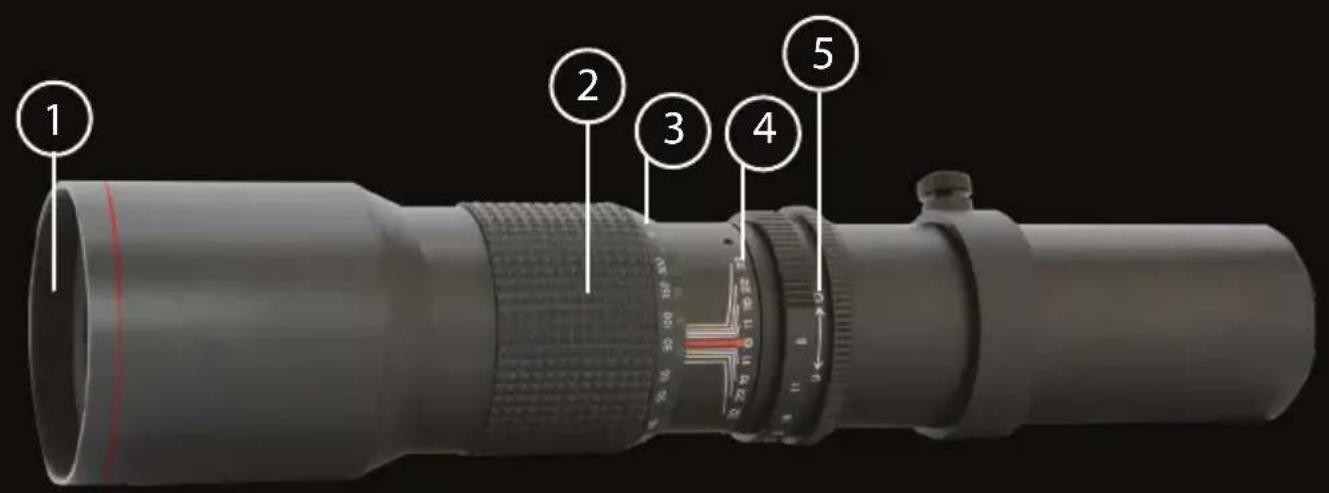
text_image
Labeled diagram of a professional optical lens with numbered parts for identification500mm F/8.0 Lens
- Filter Rings
- Focusing Ring
-
Diaphragm Scale
-
Index for Distance and Diaphragm Scale
- Diaphragm Ring
Specifications
| Filter Size | : 67mm |
| Aperture Ranges | : F8.0, 11, 16, 22, 32 |
| Minimum Focus Distance | : 33 feet (10m) |
| Angle of View | : 5 Degrees |
| Groups/Elements | : 4/4 |
| Length | : 11.75 inches (298.0mm) |
| Maximum Diameter | : 70mm |
| Weight | : 22.5oz (640g) |
| Lens Coating | : Multi-Coated |
Your 500mm preset lens is fly automatic and incorporates not only computerized optical design but also the latest in optical multi-coating techniques. The process of multi-coating assures virtually flare free photographs even under adverse lighting conditions resulting in crisp, high contrast pictures. Preset lenses are designed to retain a full range of exposure, automation and metering capabilities of the camera on which they are mounted.
MOUNTING THE LENS
Your preset lens utilizes a universal mounting ring (t-mount) which allows your lens to fit practically all SLR cameras manufactured since 1960. Simply attach the specific t-mount for your model camera to the preset lens and then mount it to the body of your camera in the same way as you would with the lens included with your camera. After mounting your t-mount lens adapter to the lens, you may have to adjust the t-mounts so that the top of the lens faces upwards. If this is necessary, loosen the three screws so that you can make the needed adjustments. Remember to retighten them after you have made your adjustments.
SETTING THE STOP
Your 650-1300 lens has a changeable F-stop according to the focal length. (Non-auto-Iris lens) F-stop according to the focal length is marked on the lens barrel. (Refer to the index for the distance and diaphragm scale)
FOCUSING THE LENS
In order to get a sharp and clear image, look through the viewfinder of your camera, and then rotate the focus ring which is marked "FAR <-> NEAR" until you can see a clear image through the viewfinder.
USING THE VIEWFINDER WITH THE TELEPHOTO LENSES
The effectiveness of different types of focusing screens varies with the focal length and maximum aperture of the lens. The range finder of microgrid prisms built into the ground glass do not work as well with longer focal length lenses as they do with the normal camera lens and most wide angle lenses, and may partially or full blackout the center focusing spot. When such a condition exists, focusing is best done on the ground glass portion of the viewing screen. On some SLR cameras, long telephoto lenses appear to produce a cutoff image in the upper corners or along the entire upper edge of the viewfinder. Such viewing cutoff is actually caused by the size of the camera's mirror which is more adequate for the shorter focal length lenses only. The exposed slide or negative will be unaffected by this viewing deficiency.
PROPER CARE OF YOUR LENS
Your lens should always be capped to protect it when not in use. Like other precision optics it should never be simply wiped with tissues since this may damage the surface with dust on the lens. Use a soft brush to clean the lens surface or polish very gently in a circular motion with high quality, moist lens tissue. Use lens cleaning fluid to moisten the tissue sparingly and only when necessary by applying one or two drops on the lens tissue. After the lens surface has dried, clean the lens with a dry tissue and blow away other particles with a soft brush.

bar
| Category | Value | | -------- | ----- | | Group 1 | 100 | | Group 2 | 100 | | Group 3 | 100 | | Group 4 | 100 | | Group 5 | 100 | | Group 6 | 100 | | Group 7 | 100 | | Group 8 | 100 | | Group 9 | 100 | | Group 10 | 100 | | Group 11 | 100 | | Group 12 | 100 | | Group 13 | 100 | | Group 14 | 100 | | Group 15 | 100 | | Group 16 | 100 | | Group 17 | 100 | | Group 18 | 100 | | Group 19 | 100 | | Group 20 | 100 | | Group 21 | 100 | | Group 22 | 100 | | Group 23 | 100 | | Group 24 | 100 | | Group 25 | 100 | | Group 26 | 100 | | Group 27 | 100 | | Group 28 | 100 | | Group 29 | 100 | | Group 30 | 100 | | Group 31 | 100 | | Group 32 | 100 | | Group 33 | 100 | | Group 34 | 100 | | Group 35 | 100 | | Group 36 | 100 | | Group 37 | 100 | | Group 38 | 100 | | Group 39 | 100 | | Group 40 | 100 | | Group 41 | 100 | | Group 42 | 100 | | Group 43 | 100 | | Group 44 | 100 | | Group 45 | 100 | | Group 46 | 100 | | Group 47 | 100 | | Group 48 | 100 | | Group 49 | 100 | | Group 50 | 100 | | Group 51 | 100 | | Group 52 | 100 | | Group 53 | 100 | | Group 54 | 100 | | Group 55 | 100 | | Group 56 | 100 | | Group 57 | 100 | | Group 58 | 100 | | Group 59 | 100 | | Group 60 | 100 | | Group 61 | 100 | | Group 62 | 100 | | Group 63 | 100 | | Group 64 | 100 | | Group 65 | 100 | | Group 66 | 100 | | Group 67 | 100 | | Group 68 | 100 | | Group 69 | 100 | | Group 70 | 100 | | Group 71 | 100 | | Group 72 | 100 | | Group 73 | 100 | | Group 74 | 100 | | Group 75 | 100 | | Group 76 | 100 | | Group 77 | 100 | | Group 78 | 100 | | Group 79 | 100 | | Group 80 | 100 | | Group 81 | 100 | | Group 82 | 100 | | Group 83 | 100 | | Group 84 | 100 | | Group 85 | 100 | | Group 86 | 100 | | Group 87 | 100 | | Group 88 | 100 | | Group 89 | 100 | | Group 90 | 100 | | Group 91 | 100 | | Group 92 | 100 | | Group 93 | 100 | | Group 94 | 100 | | Group 95 | 100 | | Group 96 | 100 | | Group 97 | 100 | | Group 98 | 100 | | Group 99 | 100 | | Group A5 | - | | Group A6 | - | | Group A7 | - | | Group A8 | - | | Group A9 | - | | Group B5 | - | | Group B6 | - | | Group B7 | - | | Group B8 | - | | Group B9 | - | | Group C5 | - | | Group C6 | - | | Group C7 | - | | Group C8 | - | | Group C9 | - | | Group D5 | - | | Group D6 | - | | Group D7 | - | | Group D8 | - | | Group D9 | - | | Group E5 | - | | Group E6 | - | | Group E7 | - | | Group E8 | - | | Group E9 | - | | Group F5 | - | | Group F6 | - | | Group F7 | - | | Group F8 | - | | Group F9 | - | | Group G5 | - | | Group G6 | - | | Group G7 | - | | Group G8 | - | | Group G9 | - | | Group H5 | - | | Group H6 | - | | Group H7 | - | | Group H8 | - | | Group H9 | - | | Region A5 to Region B5 in the range of values from approximately - to +2.5, respectively. The values in the range of values are estimated based on the provided code. There is no additional data series present in the code. The values in the chart are estimated based on the provided code. The chart type is a bar chart.