
Veer - Smartphone HP - Free user manual and instructions
Find the device manual for free Veer HP in PDF.


| Product Type | Smartphone |
| Dimensions | 84.5 x 54.5 x 15.1 mm (3.33 x 2.15 x 0.59 in) |
| Weight | 103 g (3.63 oz) |
| Display | 2.6 inch TFT touchscreen, 320x400 pixels |
| Processor | 800 MHz ARM Cortex-A8 |
| RAM | 512 MB |
| Internal Storage | 8 GB |
| Camera | 5 MP, fixed focus, LED flash |
| Operating System | HP webOS 2.6 (upgradable to 2.6.1) |
| Keyboard | Slide-out QWERTY keyboard |
| Battery | Removable Li-Ion 910 mAh |
| Connectivity | Wi-Fi 802.11 b/g, Bluetooth 2.1+EDR, GPS, microUSB 2.0, 3.5mm headphone jack |
| Power Supply | MicroUSB charger (5V, 1A) |
| Main Functions | Phone calls, SMS/MMS, email, web browsing, app installation, music/video playback, camera, GPS navigation |
| Care and Cleaning | Wipe with a dry, soft cloth. Avoid liquids and abrasive cleaners. |
| Safety | Use only approved chargers and accessories. Do not expose to extreme temperatures. Keep away from water. |
| Spare Parts | Replacement battery, charging cable, USB adapter, headset |
| Repairability | Battery is user-replaceable. Other repairs should be performed by a qualified technician. |
| General Information | Manufacturer: HP, Model: Veer, Released in 2011, SAR: 1.12 W/kg (head) |
Frequently Asked Questions - Veer HP
User questions about Veer HP
0 question about this device. Answer the ones you know or ask your own.
Ask a new question about this device
Download the instructions for your Smartphone in PDF format for free! Find your manual Veer - HP and take your electronic device back in hand. On this page are published all the documents necessary for the use of your device. Veer by HP.
USER MANUAL Veer HP
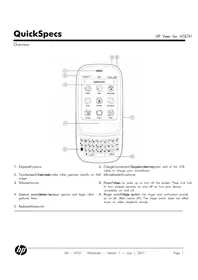
- Earpiece
- Touchscreen: Tap the screen to make other gestures directly on screen.
- Volume
- Gesture area: Make the back gesture and begin other gestures here.
- Keyboard
- Charger/connector: Charge to the electromagnetic end of the USB cable to charge your smartphone.
Microphone
- Power: Press to wake up or turn off the screen. Press and hold to turn wireless services on and off or turn your device completely on and off.
- Ringer switch: Slide to turn the ringer and notification sounds on or off. (Red means off.) The ringer switch does not affect music or video playback sounds.
Overview
At a Glance
- Size and weight: 84 x 54.5 x 15.1 mm (3.31 x 2.15 x 0.5 in.), 103 g (3.63 oz.) Bluetooth®: 2.1 + EDR with A2DP stereo Bluetooth support
- Network1: HSDPA Cat 10/HSUPA Cat 6, Quad-band GSM/EDGE: 850/900/1800/1900
- Battery life: Up to 5 hours talk time; up to 300 hours standby time2
- Display: 2.6-inch multitouch screen with vibrant 18-bit color
- Memory: 8GB (~6.1GB user available) • GPS navigation: Built-in GPS4 (A-GPS)
- Text input: Slide-out physical QWERTY keyboard
- Operating system: HP webOS
- Camera: 5-megapixel camera with extended depth of field, geotagging, and video capture
Model
HP Veer for AT&T
FB325AA#ABA (Black)
FB326AA#ABA (White)
Options
| NOTE: No Offons sold separately. | ||
| Power/syncPower/sync | HP Touchstone Charging Kit | FB335AA#ABA |
| Magnetic USB Cable, 5ft. | FB328AA#AC3 | |
| Power Charger | FB329AA#ABA | |
| Vehicle Power Charger | FB330AA#AC3 | |
| AudioAudio | 3.5mm Stereo Headset | FB333AA#AC3 |
| 3.5mm Audio Adapter | FB327AA#AC3 | |
| TTY Audio Adapter | FB374AA#AC3 | |
Travel accessories: Travel data@tational AC Power Charger Kit FB331AA#AC3
Specifications
| ColorColor | Black, white | |
| Operating systemOperatingSystemOS | ||
| Size and weightSize and WeightSionsD(https://www.wns.d)WeightWeight | 84 x 54.5 x 15.1 mm/3.31 x 2.15 x 0.59 in.103 g (3.63 oz.) | |
| NetworksNetworks | Frequency bandsFrequencyHSDAIsCat 10/HSUPA Cat 6;Quad-band GSM/EDGE 850/900/1800/1900EmailEmailMicrosoft® Exchange email with Microsoft Direct Push TechnologyPOP3/IMAP (Yahoo! ® Mail, GmailTM, AOL, Hotmail®, etc.)MessagingMessagingIntegrated IM, SMS (Short Message Service), and MMS (Multimedia Message Service) | |
| Battery and chargingBatteryTalkandChagidogy timeTalkandstandby to 500 hours; standby time up to 300 hoursTechnologyTechnology910 mAh (non-removable) batteryCharging and syncChargICharged/magnetic connector with USB 2.0 Hi-SpeedHP TouchstoneHP TouchsCompatible | ||
| DisplayDisplay | SizeSize2.6-inch diagonalTouchscreenTouchscreenYes, multitouchColor depth18-bit colorResolution (WxH)320x400 pixelsSensorsAccelerometer, ambient light, and proximity | |
| Data input andData inputKeyboard navigation | Slide-out physical QWERTY keyboard | |
| Commerceandvideo recording | Resolution5 megapixelsFeaturesExtended depth of field, geotagging, and video capturePicturefiledomainsGIF, JPEG, PNG, BMPVideofiledomainsMPEG-4, H.263, H.264 | |
| Audio | AudioformatssupportedMP3, AAC, AAC+, eAAC+, AMR, QCELP, WAVHeadphone supportMagnetic connector with 3.5mm stereo headset adapter (included) | |
Specifications
| WirelessWirelessconnectivityconnectivity | TechnologyTechnology | Wi-Fi 802.11b/g/n with WPA, WPA2, WEP, 802.1X authenticationBluetooth® wireless technology 2.1 + EDR with A2DP stereo Bluetooth supportWi-Fi router functionality for up to five devices using HP mobile hotspot. |
| GPS(Global Positioning System) navigation | Built-in GPSNavigation | |
| Voice input and output | OutputInput and output | Microphone on the bottom of device |
| OutputOutput | Built-in speakerphone on the backMagnetic connector with 3.5mm stereo headset adapter | |
| Memory and storage | Storage | 8GB (~6.1GB user available) |
| StorageStorage | USB mass storage support | |
| ProcessorProcessor | Qualcomm MSM7230, 800MhzNOTE: No Processor numbering is not a measurement of higher performance. | |
| Temperature and Temperature humidity limit | temperatureTemperatureOperating: 32° to 113° F (0° to 45°C)Operating humidityOperating humidity RH | |
| Intheebbox | Hardware: HP Veer smartphone, AC phone charger, charging and sync cable with magnetic connection 3.5mm stereo headset adapterPrint materialQuickstart Guide, Limited Warranty, General User Guide: Important Safety and Legal Information | |
Specifications
Applications: Included HP webOS applications (at time of purchase)
| App Catalog | Mobile Hotspot |
| Calculator | Music |
| Calendar | PDF View |
| Camera | Phone |
| Clock | Photos |
| Contacts | SIM Toolkit |
| Tasks | |
| Memos | Videos |
| Messaging (integrated SMS, MMS, and IM) | Voice Dial |
| Web |
Included third-party applications (at time of purchase)
- AT&T Navigator
- Amazon MP3
- Google Maps
- Quickoffice
- YouTube
- YP Mobile
HP webOS App Catalog
The HP webOS App Catalog gives you access to thousands of apps—including the most popular ones—so you can customize your phone to fit your interests. It contains both free and paid apps, but you can find many essentials for free.
* Third-party software available separately. Within wireless coverage area only. Requires data services at additional cost. Not all apps available on all devices.
Service and support: Service and support under warranty.
Within wireless coverage area only. Actual speeds may vary. Email, mobile number, and related information required for setup activation. Required data services sold separately; unlimited plan recommended and may be required. Not all web content may be available.
- Wireless connection requires wireless data service contract, network support, and is not available in all areas. Contact service provider to determine coverage area and availability. Connection speeds will vary due to location, environment, network conditions, and other factors.
- All talk and standby times are approximate and depend on network configuration, usage patterns of the individual user, and the configuration of the handheld. Use of wireless capabilities and backlight will significantly decrease battery run time.
- Estimate subject to change based on system software and application usage.
- Within wireless coverage area only. Voice-activated, as-you-go, turn-by-turn directions sold separately.
- Within wireless coverage area only. Microsoft Exchange email, contacts, and calendar available for ActiveSync only; requires Microsoft Outlook using Microsoft Exchange Server 2003 with SP2, Exchange Server 2007, or Exchange Server 2010.
- Within wireless coverage area only. SMS, MMS, and IM require data services at additional cost. Availability of IM functionality may vary by carrier.
- HP Touchstone sold separately.
- Wi-Fi within range of 802.11b/g/n Wi-Fi network. Some Wi-Fi hotspots may require a fee for usage.
- The mobile hotspot application requires a special data plan and is separate from your smartphone data feature. While HP Hotspot is active, on-device applications will continue to work and will use the same data plan as the mobile hotspot. Mobile data usage may incur additional charges. Check with your carrier for plan details.
Specifications
For more information, visit http://www.hp.com.
© Copyright 2011 Hewlett-Packard Development Company, L.P. The information contained herein is subject to change without notice. The only warranties for HP products and services are set forth in the express warranty statements accompanying such products and services. Nothing herein should be construed as constituting an additional warranty. HP shall not be liable for technical or editorial errors or omissions contained herein. Bluetooth is a trademark owned by its proprietor and used by Hewlett Packard Company under license. Google, Gmail, Google Maps, and YouTube are trademarks of Google, Inc. Microsoft, ActiveSync, Hotmail, and Outlook are trademarks of the Microsoft group of companies. Yahoo! is a registered trademark of Yahoo! Inc. Not all apps available on all devices. All screen images simulated.


Brand : HP
Model : Veer
Category : Smartphone