
KQD1327PX - Fridge BLOMBERG - Free user manual and instructions
Find the device manual for free KQD1327PX BLOMBERG in PDF.


| Product Type | Refrigerator with Freezer |
| Brand | Blomberg |
| Model | KQD1327PX |
| Refrigerant | R600a (flammable) |
| Fridge Temperature Range | 1°C to 8°C (33°F to 47°F) |
| Freezer Temperature Range | -18°C to -24°C (0°F to -12°F) |
| Quick Freeze | Yes, automatic deactivation after 4 hours |
| Quick Cool | Yes, automatic deactivation after 8 hours |
| Vacation Mode | Yes, keeps freezer at set temp while fridge runs warmer |
| Eco Fuzzy Function | Yes, optimizes energy consumption |
| Water Dispenser | Internal and door models available |
| Icematic | Yes, automatic ice maker with water tank |
| Humidity-Controlled Crisper | Yes |
| Blue Light / HarvestFresh | Yes, preserves vitamins in fruits and vegetables |
| Odour Filter | Yes, reduces unpleasant smells |
| Door Open Alarm | Yes, sounds after 1 minute |
| Key Lock (Child Lock) | Yes, prevents accidental settings change |
| Adjustable Feet | Yes, front leveling |
| Cool Control Storage Compartment | Multizone compartment with adjustable temperature (fridge or freezer mode) |
| Maintenance | Clean with mild detergent and water; defrost automatically |
Frequently Asked Questions - KQD1327PX BLOMBERG
User questions about KQD1327PX BLOMBERG
0 question about this device. Answer the ones you know or ask your own.
Ask a new question about this device
Download the instructions for your Fridge in PDF format for free! Find your manual KQD1327PX - BLOMBERG and take your electronic device back in hand. On this page are published all the documents necessary for the use of your device. KQD1327PX by BLOMBERG.
USER MANUAL KQD1327PX BLOMBERG
natural_image
Simple line drawing of a pear and a carrot (no text or symbols)KQD 1327 PX
Please read these instructions first before using your appliance
Thank you for choosing a Beko appliance.
Please take some time to read this user manual before using your appliance, to ensure you know how to safely operate the controls and functions.
Carefully follow all unpacking and installation instructions to ensure the appliance is correctly connected and fitted prior to use.
Please write your product model and serial number on the last page of this user manual, and store in a safe location close to the appliance for easy future reference.
This user manual may also be applicable for several other models. Differences between models will be listed.
If you have any questions or concerns, please call our contact centre or find help and information online at www.beko.co.uk
Symbols and their descriptions
This instruction manual contains the following symbols:

Important information or useful usage tips.

Warning against dangerous conditions for life and property.
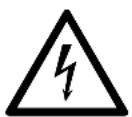
Warning against electric voltage.

INFORMATION

ENERG

SUPPLIER'S NAME
MODEL IDENTIFIER → (*)
A

. The model information as stored in the product data base can be reached by entering following website and searching for your model identifier (*) found on energy label.
https://eprel.ec.europa.eu/
1. Safety and environment instructions 3
2 Your Refrigerator 6
3 Installation 7
3.1 Appropriate location for installation .....7
3.2 Installing the plastic wedges .....7
3.3* Adjusting the feet .....8
3.4 Electric connection .....8
3.5 Adjusting the gap between the upper door. . .9
4 Preparation 10
4.1 Things to be done for saving energy .....10
4.2 Recommendations about the fresh food compartment.....10
4.3 Initial use.....11
5 Operating the product 12
5.1 Indicator panel ..... 12
5.2 Indicator panel.....17
5.3 Freezing fresh food.....19
5.4 Recommendations for preserving the frozen food .....19
5.5 Deep-freeze information .....19
5.6 Placing the food .....20
5.7 Door open warning .....20
5.8 Chiller compartment .....20
5.9 Crisper....20
5.10 Humidity-controlled crisper .....20
5.11 Egg tray .....21
5.12 Movable Middle Section .....21
5.13 Cool Control Storage Compartment .....21
5.14Blue light/HarvestFresh .....21
5.15 Odour filter.....21
5.16 Use of internal water dispenser and water dispenser at the door .....22
5.17 Dispensing water .....22
5.18 For using water dispenser....23
5.19 Icematic .....23
5.20 Icematic and ice storage container .....24
6 Maintenance and Cleaning 25
7. Troubleshooting 26
1. Safety and environment instructions
This section provides the safety instructions necessary to prevent the risk of injury and material damage. Failure to observe these instructions will invalidate all types of product warranty.
Intended use
| WARNING:Keep ventilation openings, in the appliance enclosure or in the built-instructure, clear of obstruction. | |
 | |
 | WARNING:Do not use mechanical devices or other means to accelerate the defrosting process, other than those recommended by the manufacturer. |
 | WARNING:Do not damage the refrigerant circuit. |
 | WARNING:Do not use electrical appliances inside the food storage compartments of the appliance, unless they are of the type recommended by the manufacturer. |
1.1. General safety
- This appliance can be used by children aged from 8 years and above and persons with reduced physical, sensory or mental capabilities or lack of experience and knowledge if they have been given supervision or instruction concerning use of the appliance in a safe way and understand the hazards involved. Children shall not play with the appliance.
- In case of malfunction, unplug the device.
• After unplugging, wait at least 5 minutes before plugging in again.
• Unplug the product when not in use.
- Do not touch the plug with wet hands! Do not pull the cable to plug off, always hold the plug.
- Do not plug in the refrigerator if the socket is loose.
- Unplug the product during installation, maintenance, cleaning and repair.
- If the product will not be used for a while, unplug the product and remove any food inside.
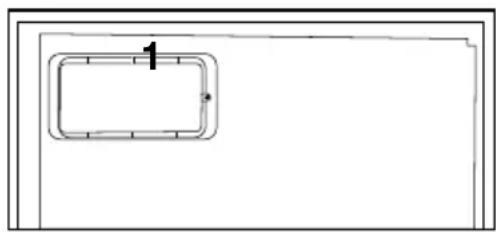
- Do not use the product when the compartment with circuit cards located on the upper back part of the product (electrical card box cover) (1) is open.
natural_image
Simple line drawing of a rectangular frame with a numbered label '1' and an arrow pointing to it (no text or symbols beyond the label)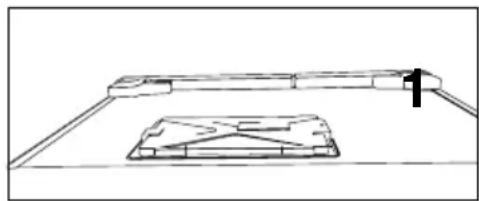
natural_image
Simple line drawing of a laptop with a screen and keyboard (no text or symbols)- Do not use steam or steamed cleaning materials for cleaning the refrigerator and melting the ice inside. Steam may contact the electrified areas and cause short circuit or electric shock!
- Do not wash the product by spraying or pouring water on it! Danger of electric shock!
- In case of malfunction, do not use the product, as it may cause electric shock. Contact the authorised service as soon as possible.
Important instructions regarding safety and environment
- Plug the product into an earthed socket. Earthing must be done by a qualified electrician.
- If the product has LED type lighting, contact the authorised service for replacing or in case of any problem.
- Do not touch frozen food with wet hands! It may adhere to your hands!
- Do not place liquids in bottles and cans into the freezer compartment. They may burst.
- Place liquids in upright position after tightly closing the lid.
- Do not spray flammable substances near the product, as it may burn or explode.
- Do not keep flammable materials and products with flammable gas (sprays, etc.) in the refrigerator.
- Do not place containers holding liquids on top of the product. Splashing water on an electrified part may cause electric shock and risk of fire.
- Exposing the product to rain, snow, sunlight and wind will cause electrical danger. When relocating the product, do not pull by holding the door handle. The handle may come off.
- Take care to avoid trapping any part of your hands or body in any of the moving parts inside the product.
- Do not step or lean on the door, drawers and similar parts of the refrigerator. This will cause the product to fall down and cause damage to the parts.
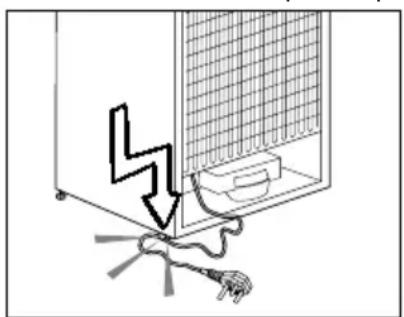
• Take care not to trap the power cable.
natural_image
Diagram showing a lightning bolt striking a wall-mounted device with wires and a plug, no text or symbols present1.1.1 HC warning
If the product comprises a cooling system using R600a gas, take care to avoid damaging the cooling system and its pipe while using and moving the product. This gas is flammable. If the cooling system is damaged, keep the product away from sources of fire and ventilate the room immediately.

The label on the inner left side indicates the type of gas used in the product.
1.1.2 For models with water dispenser
- Pressure for cold water inlet shall be maximum 90 psi (6.2 bar). If your water pressure exceeds 80 psi (5.5 bar), use a pressure limiting valve in your mains system. If you do not know how to check your water pressure, ask for the help of a professional plumber.
- If there is a risk of water hammer effect in your installation. Consult a plumber.
- Do not install on the hot water inlet. Take precautions against of the risk of freezing of the hoses. Water temperature operating interval shall be 33^ F ( 0.6^ C) minimum and 100^ F ( 38^ C) maximum.
• Use drinking water only.
1.2. Intended use
- This product is designed for home use. It is not intended for commercial use.
- The product should be used to store food and beverages only.
Important instructions regarding safety and environment
- Do not keep sensitive products requiring controlled temperatures (vaccines, heat sensitive medication, medical supplies, etc.) in the refrigerator.
- The manufacturer assumes no responsibility for any damage due to misuse or mishandling.
1.3. Child safety
- Keep packaging materials out of children's reach.
- Do not allow the children to play with the product.
- If the product's door comprises a lock, break off the lock when eventually disposing of the product.
1.4. Compliance with the WEEE Directive and Disposing of the Waste Product:
This product complies with EU WEEE Directive (2012/19/EU). This product bears a classification symbol for waste electrical and electronic equipment (WEEE).
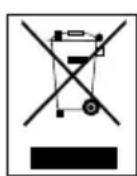
This symbol indicates that this product shall not be disposed with other household wastes at the end of its service life. Used device must be returned to official collection point for recycling of electrical and electronic devices. To find these collection systems please contact to your local authorities or retailer where the product was purchased. Each household performs important role in recovering and recycling of old appliance. Appropriate disposal of used appliance helps prevent potential negative consequences for the environment and human health.
1.5. Compliance with RoHS Directive
The product you have purchased complies with EU RoHS Directive (2011/65/EU). It does not contain harmful and prohibited materials specified in the Directive.
1.6. Package information

Packaging materials of the product are manufactured from recyclable materials in accordance with our National Environment Regulations. Do not dispose of the packaging materials together with the domestic or other wastes. Take them to the packaging material collection points designated by the local authorities.
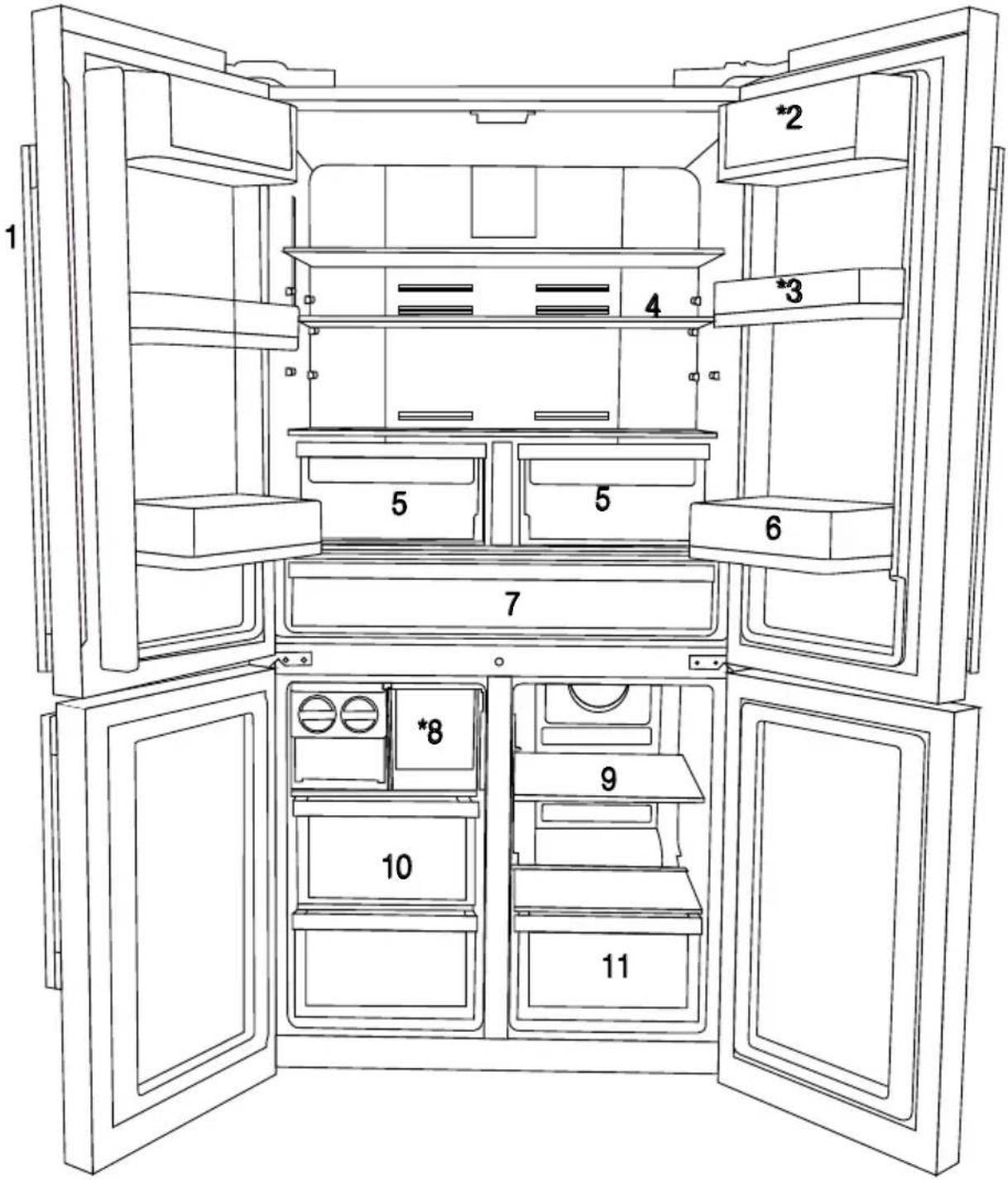
2 Your Refrigerator
text_image
Technical diagram of an open refrigerator with numbered compartments and doors, showing internal compartments and doorways.1- Control and indicator panel
2- Butter & Cheese section
3- Movable door shelf
4- Fridge compartment glass shelf
5- Fridge compartment crisper
6- Bottle shelf
7- Chiller compartment
8- Icebox drawer
9- Multizone compartment glass shelf/cooler
10- Freezer compartment drawers
11- Multizone Compartment's drawer
* OPTIONAL

Figures in this user manual are schematic and may not match the product exactly. If the subject parts are not included in the product you have purchased, then those parts are valid for other models.
3 Installation
3.1 Appropriate location for installation
In order to prepare the product for use, refer the information in the user manual and ensure that electrical installation and water installation are appropriate. If not, call a qualified electrician and technician to have any necessary arrangements carried out.
 | WARNING: Manufacturer shall not be held liable for damages that may arise from procedures carried out by unauthorized persons. |
 | WARNING: Product must not be plugged in during installation. Otherwise, there is the risk of death or serious injury! |
 | WARNING: : If the door clearance of the room where the product shall be placed is so tight to prevent passing of the product, remove the door of the room and pass the product through the door by turning it to its side; if this does not work, contact the authorized service. |
- Place the product on a level floor surface to prevent jolts.
- Install the product at least 30 cm away from heat sources such as hobs, heater cores and stoves and at least 5 cm away from electrical ovens.
- Product must not be subjected to direct sun light and kept in humid places.
- Appropriate air ventilation must be provided around your product in order to achieve an efficient operation. If the product is to be placed in a recess in the wall, pay attention to leave at least 5 cm distance with the ceiling and side walls.
- Do not install the product in places where the temperature falls below -5°C.
3.2 Installing the plastic wedges
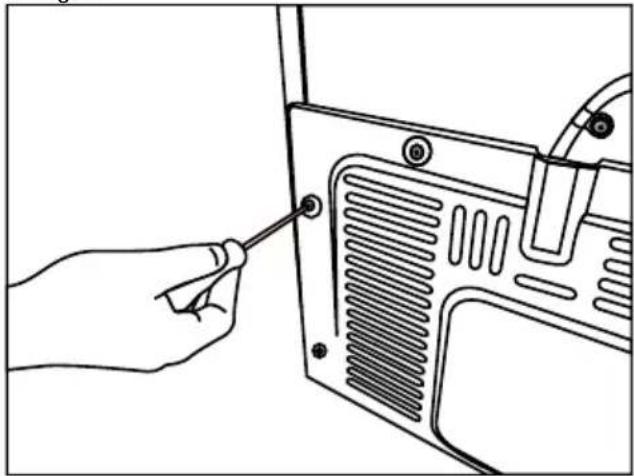
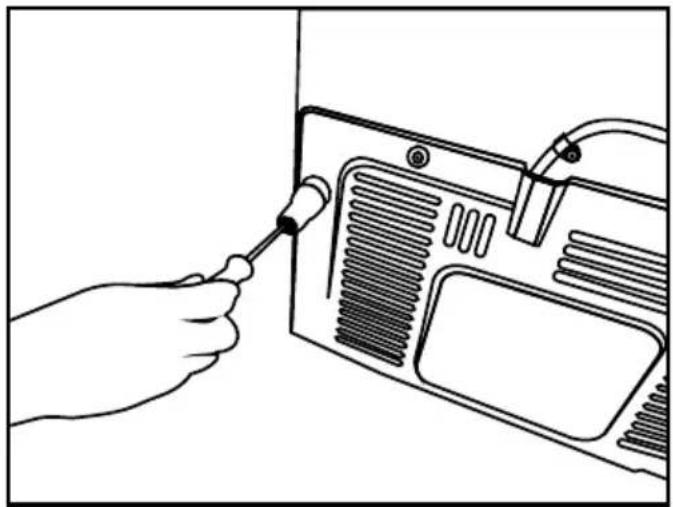
Plastic wedges supplied with the product are used to create the distance for the air circulation between the product and the rear wall.
- To install the wedges, remove the screws on the product and use the screws supplied together with the wedges.
natural_image
Line drawing of a hand inserting a screwdriver into a device panel (no text or symbols)- Insert the 2 plastic wedges onto the rear ventilation cover as illustrated in the figure.
natural_image
Line drawing of a hand using a screwdriver to adjust or install a device panel (no text or symbols visible)Installation
3.3\* Adjusting the feet
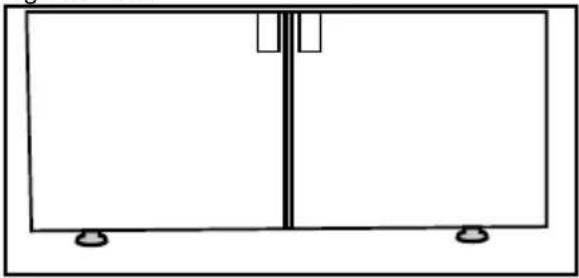
If the product stands unbalanced after installation, adjust the feet on the front by rotating them to the right or left.
natural_image
Simple line drawing of a two-panel cabinet or enclosure with mounting feet (no text or symbols)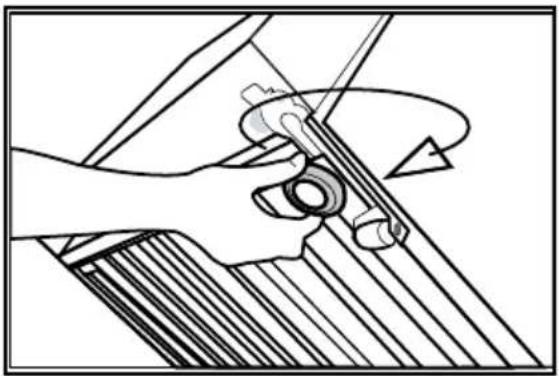
natural_image
Mechanical assembly diagram showing hands operating a tool with a curved handle (no text or symbols)3.4 Electric connection
| WARNING: Do not make connections via extension cables or multi-plugs. | |
| WARNING: Damaged power cable must be replaced by the Authorized Service Agent. | |
| If two coolers are to be installed side by side, there should be at least 4 cm distance between them. |
- Our company shall not be liable for any damages that will arise when the product is used without grounding and electrical connection in accordance with the national regulations.
- Power cable plug must be within easy reach after installation.
- Do not use extension cords or multiple socket outlets.
Installation
3.5 Adjusting the gap between the upper door
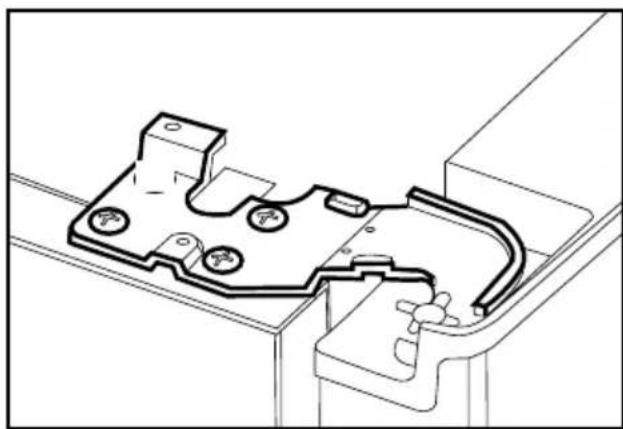
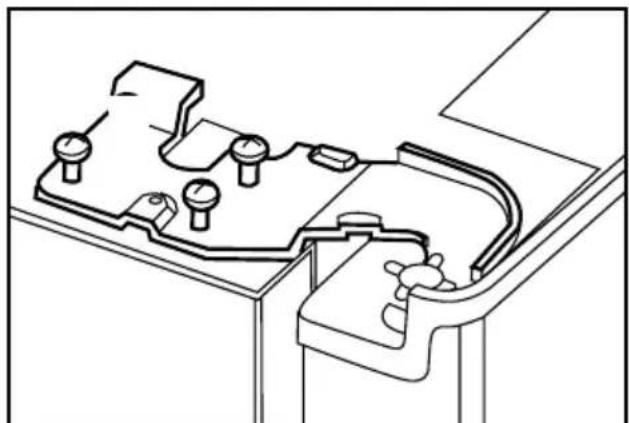
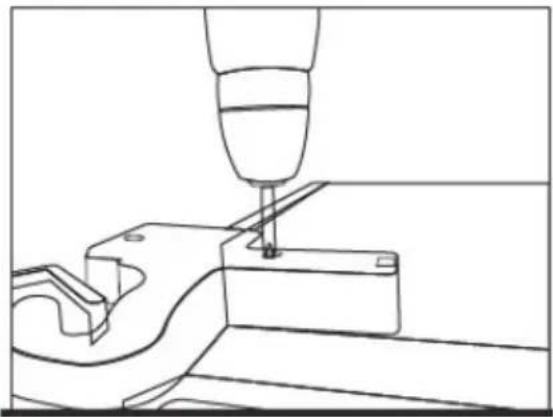
- You can adjust the gap between the fridge compartment doors as illustrated in the figures.
natural_image
Technical line drawing of a mechanical component with mounting holes and internal channels (no text or symbols)- Adjust the door as you desire by loosing the screws.
natural_image
Technical line drawing of a mechanical assembly with no visible text or symbols- Fix the door you have adjusted by tightening the screws without changing the position of the door.
natural_image
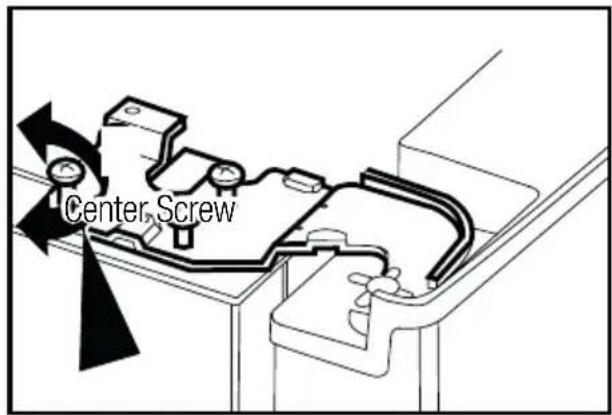
Technical line drawing of a mechanical assembly with a tool inserted into a component (no text or symbols)Door shelves should be empty when adjusting the door height.
Using a screwdriver, remove two screws of upper hinge cover of the door you want to adjust.
text_image
Center Screw
natural_image
Line drawing of a hand holding wires and components, no text or symbols presentThe hinge cover is attached after the sockets are installed.
Replace the hinge cover and fix with two screws.
4 Preparation
4.1 Things to be done for saving energy

Connecting your refrigerator to systems that save energy is dangerous as they may cause damage on the product.
- For a freestanding appliance; ‘this refrigerating appliance is not intended to be used as a built-in appliance.
- Do not leave the doors of your refrigerator open for a long time.
- Do not put hot food or drinks in your refrigerator.
- Do not overload the refrigerator. Cooling capacity will fall when the air circulation in the refrigerator is hindered.
- Do not place the refrigerator in places subject to direct sunlight. Install the product at least 30 cm away from heat sources such as hobs, ovens, heater units and stoves and at least 5 cm away from electrical ovens.
- Pay attention to store your food in refrigerator in closed containers.
- For storage flexibility it is OK to remove some freezer compartment drawers. Power consumption stated for your refrigerator has been determined after removing the icematic and the upper drawers as to allow maximum loading.
- Since hot and humid air will not directly penetrate into your product when the doors are not opened, your product will optimize itself in conditions sufficient to protect your food. Functions and components such as compressor, fan, heater, defrost, lighting, display and so on will operate according to the needs to consume minimum energy under these circumstances.
- Airflow should not be blocked by placing foods in front of the freezer and the multizone compartment fans. Foods should be loaded by leaving minimum 5 cm space in front of the protective fan grid.
- Thawing the frozen foods in the fridge compartment both saves energy and reserves the quality of the foods.
Temperature of the room where your refrigerator is located should at least be 10^ C /50°F. Operating your refrigerator under cooler conditions is not recommended with regard to its efficiency.

Inside of your refrigerator must be cleaned thoroughly.

If two coolers are to be installed side by side, there should be at least 4 cm distance between them.
4.2 Recommendations about the fresh food compartment
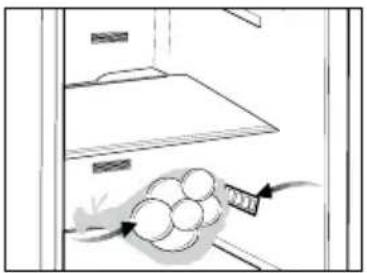
- Make sure that the food does not touch the temperature sensor in fresh food compartment. To allow the fresh food compartment to keep its ideal storage temperature, the sensor must not be hindered by food.
- Do not place hot foods or beverages inside the product.
Preparation
natural_image
Illustration of a kitchen appliance with a bag and handle, showing no text or symbols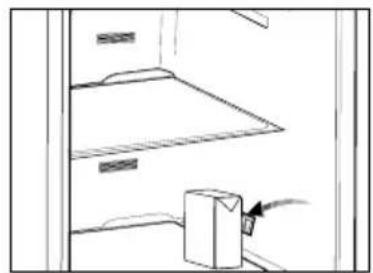
natural_image
Simple line drawing of a cabinet shelf with an arrow pointing to a box (no text or symbols)4.3 Initial use
Before using the product, make sure that all preparations have been made in accordance with the instructions given in the "Important instructions regarding safety and environment" and "Installation" chapters.
- Clean the interior of the refrigerator as recommended in the “Maintenance and cleaning” section. Before you start the refrigerator, make sure that the interior is dry.
- Plug the refrigerator in a grounded socket. The interior illumination is lit when the door of the refrigerator is opened.
- Operate the refrigerator for 6 hours without placing any food in it and do not open its door during this time unless it is necessary.
 | You will hear a noise when the compressor starts up. The liquids and gases sealed within the refrigeration system may also give rise to noise, even if the compressor is not running and this is quite normal. |
 | Front edges of the refrigerator may feel warm. This is normal. These areas are designed to be warm to avoid condensation. |
5 Operating the product
5.1 Indicator panel
Touch-controlled indicator panel allows you to set the temperature and control the other functions related to the refrigerator without opening the door of the product. Just press the relevant buttons for function settings.
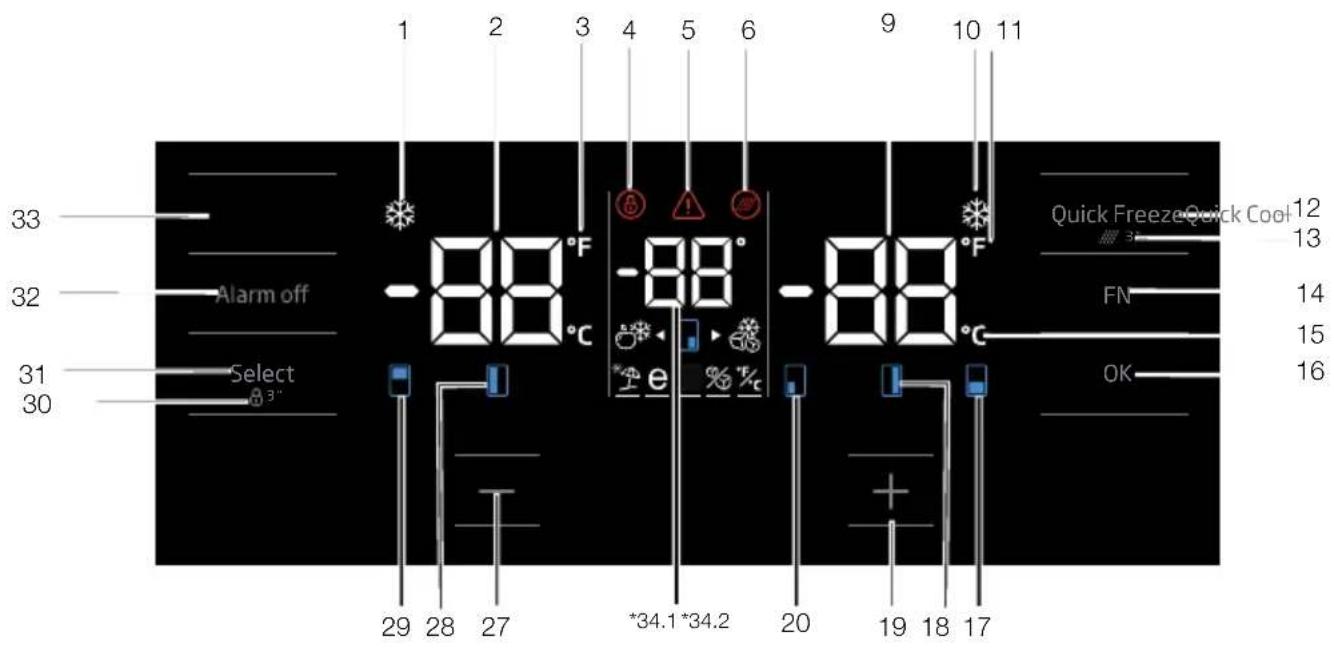
text_image
1 2 3 4 5 6 9 10 11 33 -88°F -88°C -88°C 32 Alarm off e OK 31 Select 30 29 28 27 *34.1*34.2 20 19 18 17 12 13 FN 14 15 16 Quick Freeze Quick Cool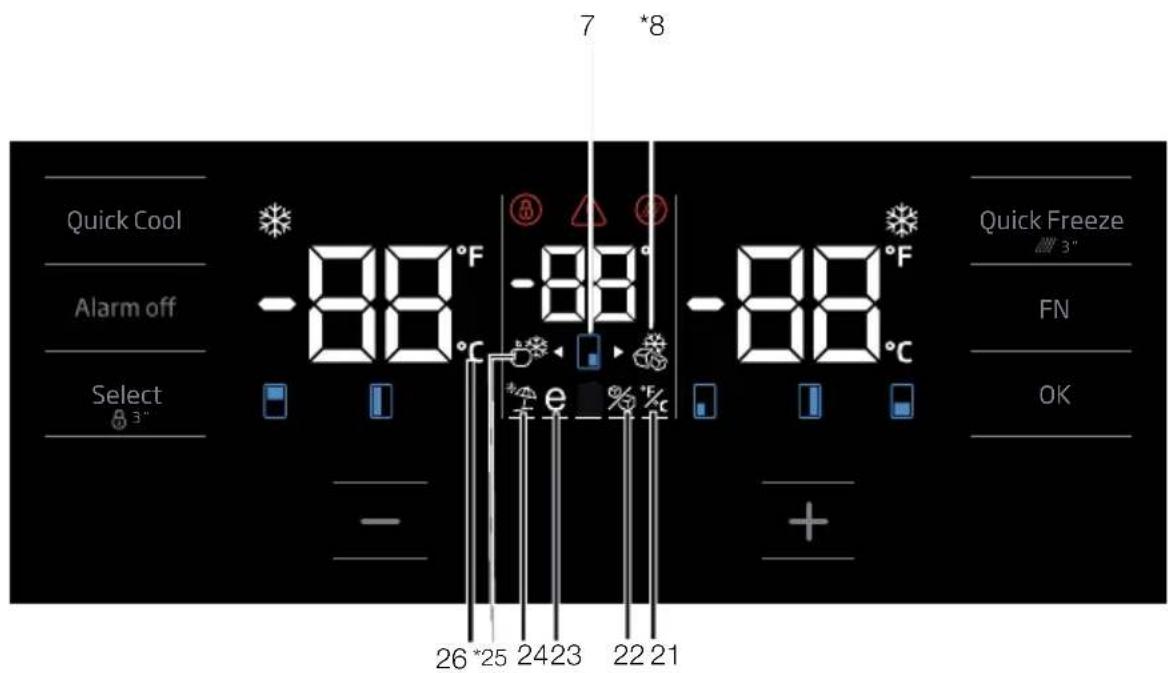
text_image
7 *8 Quick Cool -88°F -88°F -88°C Alarm off Select 3" - 26*25 2423 2221 Quick Freeze 3" FN OK
Figures in this user manual are schematic and may not match the product exactly. If the subject parts are not included in the product you have purchased, then those parts are valid for other models.
Operating the product
1. Quick cooling function indicator
It turns on when the quick fridge function is activated.
2. Fridge compartment temperature indicator
Temperature of the fridge compartment is shown; it can be set to 8,7,6,5,4,3,2,1.
It is a Fahrenheit indicator. When the Fahrenheit indication is activated, the temperature set values are shown in Fahrenheit and the relevant icon turns on.
4. Key lock
Press key lock button continually for 3 seconds. Key lock symbol
will light up and key lock mode will be activated. Buttons will not function if the Key lock mode is active. Press key lock button continually for 3 seconds again. Key lock symbol will turn off and the key lock mode will be exited.
Press the key lock button if you want to prevent changing of the temperature setting of the refrigerator.
5. Power failure/High temperature / error warning
This indicator illuminates during power failure, high temperature failures and error warnings. During long-term power failures, the highest temperature value that the freezer compartment reaches will blink on the digital display. After checking the food located in the freezer compartment, press the alarm off button to clear the warning.
Please refer to "solutions recommended for troubleshooting" section on your manual if you observe that this indicator is illuminated.
6. Filter reset icon
This icon turns on when the filter needs to be reset.
7. Temperature change cabin icon
Indicates the cabin whose temperature is to be changed. When the temperature change cabin icon starts flashing, it is understood that the relevant cabin has been selected.
8. Multizone freezer icon
Illuminate the Multizone freezer icon using the FN button; the icon will start to flash. When you press the OK key, Multizone cabin freezer icon turn on and operates as a freezer.
9. Freezer compartment temperature indicator
Temperature of the fridge compartment is shown; it can be set to -18, -19, -20, -21, -22, -23, -24.
10. Quick freeze function indicator
It turns on when the quick freeze function is activated.
11. Fahrenheit indicator
It is a Fahrenheit indicator. When the Fahrenheit indication is activated, the temperature set values are shown in Fahrenheit and the relevant icon turns on.
12. Quick freeze function button
Press this button to activate or deactivate the quick freeze function. When you activate the function, the freezer compartment will be cooled to a temperature lower than the set value.

Use the quick freeze function when you want to quickly freeze the food placed in freezer compartment. If you want to freeze large amounts of fresh food, activate this function before putting the food into the product.

If you do not cancel it, Quick Freeze will cancel itself automatically after 4 hours at the most or when the fridge compartment reaches to the required temperature.

This function is not recalled when power restores after a power failure.
13. Filter reset
The filter is reset when the quick freeze button is pressed for 3 seconds. Filter reset icon goes off.
14. FN button
Using this key, you can switch between the functions that you want to select. Upon pressing this key, the icon, whose function is required to be
Operating the product
activated or deactivated, and this icon's indicator starts flashing. The FN button gets deactivated if not pressed for 20 seconds. You need to press this button to change the functions again.
15. Celsius indicator
It is a Celsius indicator. When the Celsius indication is activated, the temperature set values are shown in Celsius and the relevant icon turns on.
16. OK button
After navigating the functions using the FN button, when the function is cancelled via the OK button, the relevant icon and the indicator flashes. When the function is activated, it remains on. The indicator continues to flash in order to show the icon it is on.
17. Temperature change cabin icon
Indicates the cabin whose temperature is to be changed. When the temperature change cabin icon starts flashing, it is understood that the relevant cabin has been selected.
18. Temperature change cabin icon
Indicates the cabin whose temperature is to be changed. When the temperature change cabin icon starts flashing, it is understood that the relevant cabin has been selected.
19. Set increasing button
Select the relevant cabin with the select button; the cabin icon representing the relevant cabin will start to flash. If you press the set increasing button during this process, the set value gets increased. If you keep pressing it in a loop, the set value returns to the beginning.
20. Temperature change cabin icon
Indicates the cabin whose temperature is to be changed. When the temperature change cabin icon starts flashing, it is understood that the relevant cabin has been selected.
21. Setting the Celsius and Fahrenheit indicator
Illuminate this key using the FN key and select Fahrenheit and Celsius via the OK key. When the relevant temperature type is selected, the Fahrenheit and Celsius indicator turns on.
22. Ice machine off icon
Press the FN key (until it reaches the ice icon and the lower line) to switch off the ice machine. The ice machine off icon and the ice machine function indicator start flashing when you illuminate them, thus you can understand whether the ice machine will be turned on or off. When you press the OK button, the ice machine icon lights continuously and the Indicator continues to flash during this process. If you do not press any button after 20 seconds, the icon and the indicator remains on. Thus, the ice machine is switched off. In order to switch on the ice machine again, Illuminate the icon and the indicator; thus, both the ice machine off icon and the indicator will start flashing. If you do not press any button within 20 seconds, the icon and the indicator will go off and thus the ice machine will be switched on again.
Indicates whether the icematic is on or off.
Water flow from water tank will stop when this function is selected. However, ice made previously can be taken from the icematic.
23. Eco fuzzy function icon
Press the FN key (until it reaches the letter e icon and the lower line) to activate the eco fuzzy. When you Illuminate the eco fuzzy icon and the eco fuzzy function indicator, they start flashing. Thus, you can understand whether the eco fuzzy function will be activated or deactivated. When you press the OK button, the eco fuzzy function icon lights continuously and the Indicator continues to flash during this process. If you do not press any button after 20 seconds, the icon and the indicator remains on. Thus, the eco fuzzy function is activated. In order to cancel the eco fuzzy function, Illuminate the icon and the indicator again and press the OK key. Thus, both the eco fuzzy function icon and the indicator will start flashing. If you do not press any button within 20 seconds, the icon and the indicator will go off and the eco fuzzy function will be cancelled.
Operating the product
24. Vacation function icon
Press the FN key (until it reaches the umbrella icon and the lower line) to activate the vacation function. When you illuminate the vacation function icon and the vacation function indicator, they start flashing. Thus, you can understand whether the vacation function will be activated or deactivated. When you press the OK button, the vacation function icon lights continuously and thus the Vacation function is activated. The Indicator continues to flash during this process. Press the OK key to cancel the vacation function. Thus, both the vacation function icon and the indicator will start flashing and the vacation function will be cancelled.
25. Multizone fridge icon
When you select the Multizone fridge icon using the FN button and press the OK key, the Multizone cabin turns into a fridge cabin and operates as a cooler.
26. Celsius indicator
It is a Celsius indicator. When the Celsius indication is activated, the temperature set values are shown in Celsius and the relevant icon turns on.
27. Set decreasing function
Select the relevant cabin with the select button; the cabin icon representing the relevant cabin will start to flash. If you press the set decreasing button during this process, the set value gets decreased. If you keep pressing it in a loop, the set value returns to the beginning.
28. Temperature change cabin icon
Indicates the cabin whose temperature is to be changed. When the temperature change cabin icon starts flashing, it is understood that the relevant cabin has been selected.
29. Temperature change cabin icon
Indicates the cabin whose temperature is to be changed. When the temperature change cabin icon starts flashing, it is understood that the relevant cabin has been selected.
30. Key lock
Press key lock button simultaneously for 3 seconds. Key lock symbol
will light up and key lock mode will be activated. Buttons will not function if the Key lock mode is active. Press key lock button simultaneously for 3 seconds again. Key lock symbol will turn off and the key lock mode will be exited.
Press the key lock button if you want to prevent changing of the temperature setting of the refrigerator.
31. Select button
Use this button to select the cabin whose temperature you want to change. Switch between the cabins by pressing this button. The selected cabin can be understood from the cabin icons (7,17,18,20,28,29). Whichever cabin icon is flashing, the cabin, whose temperature set value you want to change, is selected. Then, you can change the set value by pressing the cabin set value decreasing button (27) and the cabin set value increasing button (19). If you do not press the select button for 20 seconds, the cabin icons will go off. You need to press this key to select a cabin again.
32. Alarm off warning
In case of power failure/high temperature alarm, after checking the foods in the freezer compartment, press the alarm off button to clear the warning.
33. Quick cooling function button
The button has two functions. To activate or deactivate the quick cool function, press it briefly. Quick Cool indicator will turn off and the product will return to its normal settings.

Use quick cooling function when you want to quickly cool the food placed in the fridge compartment. If you want to cool large amounts of fresh food, activate this function before putting the food into the product.
Operating the product

If you do not cancel it, quick cooling will cancel itself automatically after 8 hours at the most or when the fridge compartment reaches to the required temperature.

If you press the quick cooling button repeatedly with short intervals, the electronic circuit protection will be activated and the compressor will not start up immediately.

This function is not recalled when power restores after a power failure.
34. 1 Multizone temperature indicator
Temperature set values of the Multizone cabin are displayed.
5.2 Indicator panel
Touch-control indicator panel allows you to set the temperature and control the other functions related to the refrigerator. Just press the relevant buttons for function settings.
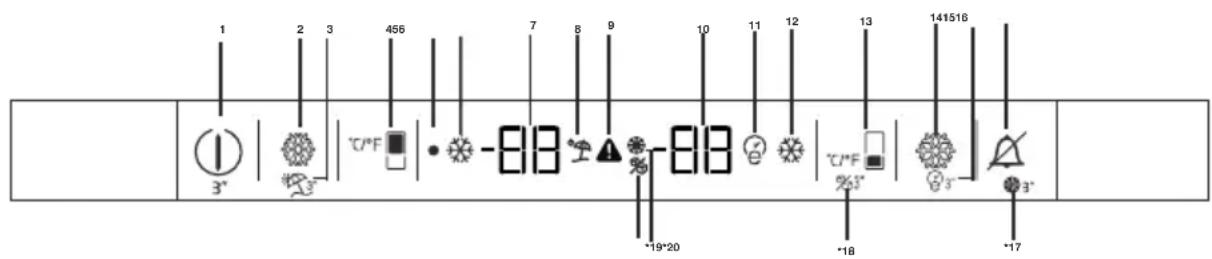
text_image
1 2 3 456 7 8 9 10 11 12 13 141516 - 3* -818 -818 -19*20 -18 -171-0n/Off function
Press the On/Off button for 3 seconds to turn off or turn on the fridge.
2-Quick Fridge Function
When you press Quick Fridge button, the temperature of the compartment will be colder than the adjusted values.
This function can be used for food placed in the fridge compartment and required to be cooled down rapidly.
If you want to cool large amounts of fresh food, it is recommended to active this feature before putting the food into the fridge. Quick Fridge indicator will remain lit when the Quick Fridge function is enabled. To cancel this function press Quick Fridge button again. Quick Fridge indicator will turn off and return to its normal settings.
If you do not cancel it, Quick Fridge will cancel itself automatically after 2 hours or when the fridge compartment reaches to the required temperature. This function is not recalled when power restores after a power failure.
3-Vacation Function
Press the Quick Fridge\Vacation button for 3 seconds to activate Vacation function."--" icon comes on when the function is active. Function is deactivated by pressing the same button for 3 seconds again or by pressing Fridge set button.
When vacation mode is activated, set values does not seem for fresh food cabin. Line is occurred on segments of fresh food.
When vacation mode is activated, tempature of fresh food is hotter than 50 Fahrenheit degree(10 celcius degree) so please do not keep foods in fresh food cabinet. Tempature of freezer is not affected.
4-Fridge Set Function
This function allows you to make the fridge compartment temperature setting. Press this button to set the temperature of the fridge compartment to 47, 45, 43, 41, 39, 37, 35 or 33° respectively.
5-Off Indicator
Off Indicator lits when the fridge is "Off" mode.
6-Quick Fridge Indicator
This icon lits when the Quick Fridge function is active.
7-Fridge Compartment Temperature Setting Indicator
Indicates the temperature set for the Fridge Compartment.
8-Vacation Indicator
This icon lits when the Vacation function is active.

Figures in this user manual are schematic and may not match the product exactly. If the subject parts are not included in the product you have purchased, then those parts are valid for other models.
Operating the product
9-High Temperature Error / Warning Indicator
This icon comes on during high temperature failures and error warnings.
10-Freezer Compartment
Temperature Setting Indicator Indicates the temperature set for the Freezer Compartment.
11-Eco-Extra Indicator
Eco-Extra Indicator lits when the Eco Extra function is active.
12-Quick Freeze Indicator
This indicator lits when the Quick Freezer function is active.
13-Freezer Set Function
This function allows you to make the freezer compartment temperature setting. Press this button to set the temperature of the freezer compartment to 0, -2, -4, -6, -8, -10 and -12 respectively.
14-Quick Freeze Function
Quick Freeze indicator turns on when the Quick Freeze function is on. To cancel this function press Quick Freeze button again. Quick Freeze indicator will turn off and return to its normal settings. If you do not cancel it, Quick Freeze will cancel itself automatically after 4 hours or when the freezer compartment reaches to the required temperature. If you want to freeze large amounts of fresh food, press the Quick Freeze button before putting the food into the freezer compartment. If you press the Quick Freeze button repeatedly with short intervals, the electronic circuit protection will be activated immediately. This function is not recalled when power restores after a power failure.
15-Eco-Extra (Special Economic Usage) Function
Press the Quick Freeze\Eco Extra button for 3 seconds to activate the Eco Extra Function. Refrigerator will start operating in the most economic mode at least 6 hours later and the economic usage indicator will turn on when the function is active. Press the Quick Freeze button for 3 seconds again to deactivate the Eco Fuzzy Function.
16-Alarm Off
When the fridge door is opened for 2 minutes or when there a sensor failure, a sound alarm turns on. Alarm can be turned off by pressing “Alarm Off” button.
Sensor failure alarm will not sound till power failure. If you close the door and then open again "Door open alarm" will be activated again after 2 minutes later.
17-Filter reset button (\*optional)
The filter is reset when the alarm off button is pressed for 3 seconds. Filter reset icon goes off.
18-Ice machine off button (\*optional)
Ice machine active or deactive when freezer set button is pressed for 3 seconds.
19. Filter reset icon (\*optional)
This icon turns on when the filter needs to be reset.
20-Ice machine off icon (\*optional)
This icon lits when the ice machine is deactive, this icon power off when the ice machine is active.
Operating the product
5.3 Freezing fresh food
- In order to preserve the quality of the food, it shall be frozen as quickly as possible when it is placed in the freezer compartment, use the fast freezing feature for this purpose.
- You may store the food longer in freezer compartment when you freeze them while they are fresh.
- Pack the food to be frozen and close the packing so that it would not allow entrance of air.
- Ensure that you pack your food before putting them in the freezer. Use freezer containers, foils and moisture-proof papers, plastic bags and other packing materials instead of traditional packing papers.
- Label each pack of food by adding the date before freezing. You may distinguish the freshness of each food pack in this way when you open your freezer each time. Store the food frozen before in the front side of compartment to ensure that they are used first.
- Frozen food must be used immediately after they are thawed and they should not be re-frozen.
- Do not freeze too large quantities of food at one time.
5.4 Recommendations for preserving the frozen food
Compartment shall be set to -18^ at least.
- Put packages in the freezer as quickly as possible after purchase without allowing the to thaw.
- Check whether the "Use By" and "Best Before" dates on the packaging are expired or not before freezing it.
- Ensure that the package of the food is not damaged.
5.5 Deep-freeze information
According to IEC 62552 standards, the product shall freeze at least 4.5 kg of food at 25^ C ambient temperature to -18^ C or lower within 24 hours for every 100-litres of freezer volume. It is possible to preserve the food for a long time only at -18^ C or lower temperatures.
You can keep the freshness of food for many months (at -18^ C or lower temperatures in the deep freeze).
Foods to be frozen should not be allowed to come in contact with the previously frozen items to prevent them from getting thawed partially.
Boil the vegetables and drain their water in order to store vegetables for a longer time as frozen.
| Freezer Compartment Setting | Fridge Compartment Setting | Remarks |
| -18°C 4°C This is the normal recommended setting. | ||
| -20, -22 or -24°C | 4°C | These settings are recommended when the ambient temperature exceeds 30°C. |
| Quick Freeze 4°C | Use when you wish to freeze your food in a short time. Your product will return to its previous mode when the process is over. | |
| -18°C or colder | 2°C | Use these settings if you think that your fridge compartment is not cold enough because of the hot ambient conditions or frequent opening and closing of the door. |
Operating the product
After draining their water, put them in air-proof packages and place them inside the freezer. Food such as bananas, tomatoes, lettuce, celery, boiled eggs, potatoes are not suitable for freezing. When these foods are frozen, only their nutritional value and taste shall be affected negatively. They shall not be spoiled so that they would create a risk for human health.
5.6 Placing the food
| Freezer compartment shelves | Various frozen food such as meat, fish, ice cream, vegetables and etc. |
| Refrigerator compartment shelves | Food in pans, covered plates and closed containers, eggs (in closed container) |
| Door shelves of fridge compartment | Small and packaged food or beverage |
| Crisper Vegetables and fruits | |
| Fresh zone compartment | Delicatessen (breakfast food, meat products that shall be consumed in a short time) |
5.7 Door open warning
(This feature is optional)
An audio warning signal will be given when the door of your product is left open for 1 minute. This warning will be muted when the door is closed or any of the display buttons (if any) are pressed.
5.8 Chiller compartment
Chiller compartments allow you to prepare the food for freezing. You can also use these compartments to store your food at a temperature a few degrees below the fridge compartment.
You can increase the inner volume of your refrigerator by removing any of the chiller compartments:
- Pull the compartment towards yourself until it stops.
- Lift the compartment about 1 cm up and pull towards yourself to remove it from its seating.
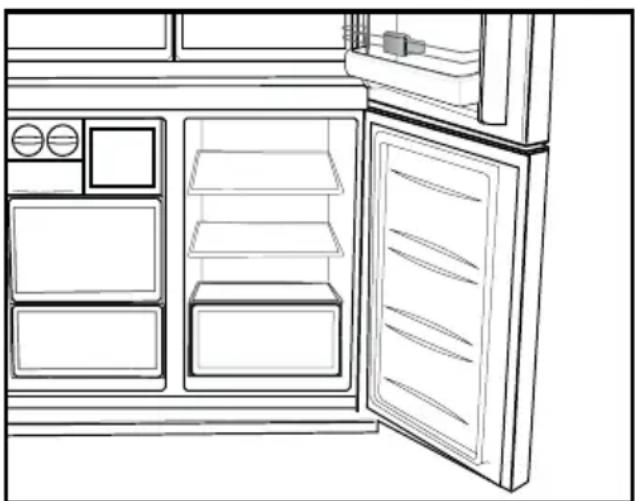
5.9 Crisper
Crisper of the refrigerator is designed specially to keep the vegetables fresh without loosing their humidity. For this purpose, cool air circulation is intensified around the crisper in general. Remove the door shelves that stand against the crisper before removing the crisper.
natural_image
Line drawing of an open refrigerator with doors, shelves, and a door (no text or symbols)5.10 Humidity-controlled crisper
Humidity rates of fruits and vegetables are kept under control thanks to the humidity-controlled crisper and thus the food is ensured to stay fresh for a longer period.
We recommend that you place leafy vegetables such as lettuce and spinach and vegetables sensitive to humidity loss as horizontally as possible when putting them in the crisper; not in a horizontal position on their roots.
While the vegetables are being replaced, their specific weights should be taken into consideration. Heavy and hard vegetables must be placed at the bottom of the crisper and light and soft vegetables must be on the upper part.
Never leave the vegetables in their plastic bags in the crisper. If they are left in their plastic bags, this will cause them to rot in a little while. If you not prefer the vegetable to get in contact with other vegetables for hygienic reasons, use perforated paper or a similar material instead of plastic bags.
Do not place pears, apricots, peaches etc., especially those fruits that generate large amounts of ethylene, in the same crisper with other fruits and vegetables. The ethylene gas emitted by these fruits cause other fruits to ripen sooner and to rot in a shorter span of time.
Operating the product
5.11 Egg tray
You can install the egg holder to the desired door or body shelf.
Never keep the egg holder in the freezer compartment.
5.12 Movable Middle Section
Movable middle section is intended to prevent the cold air inside your refrigerator from escaping outside.
1- Sealing is provided when the gaskets on the door presses on the surface of the movable middle section while the fridge compartment doors are closed.
2- Another reason that your refrigerator is equipped with a movable middle section is that it increases the net volume of the fridge compartment. Standard middle sections occupy some non-usable volume in the refrigerator.
3-Movable middle section is closed when the left door of the fridge compartment is opened.
4-It must not be opened manually. It moves under the guidance of the plastic part on the body while the door is closed.
5.13 Cool Control Storage Compartment
The Cool Control Storage Compartment of your refrigerator may be used in any desired mode by adjusting it to fridge (2/4/6/8 °C) or freezer (-18/-20/-22/-24) temperatures. You can keep the compartment at the desired temperature with the Cool Control Storage Compartment's Temperature Setting Button. The temperature of the Cool Control Storage Compartment may be set to 0 and 10 degrees in addition to the fridge compartment temperatures and to -6 degrees in addition to the freezer compartment temperatures. 0 degree is used to store the deli products longer, and -6 degrees is used to keep the meats up to 2 weeks in an easily sliceable condition.
The feature of switching to a Fridge or Freezer compartment is provided by a cooling element located in the closed section (Compressor Compartment) behind the refrigerator. During
operation of this element, sounds similar to the sound of seconds heard from an analogue clock may be heard. This is normal and is not fault cause.
5.14Blue light/HarvestFresh
\*May not be available in all models
For the blue light,
Fruits and vegetables stored in the crispers that are illuminated with a blue light continue their photosynthesis by means of the wavelength effect of blue light and thus preserve their vitamin content.
ForHarvestFresh,
Fruits and vegetables stored in crispers illuminated with the HarvestFresh technology preserve their vitamins for a longer time thanks to the blue, green, red lights and dark cycles, which simulate a day cycle.
If you open the door of the refrigerator during the dark period of the HarvestFresh technology, the refrigerator will automatically detect this and enable the blue-green or red light to illuminate the crisper for your convenience. After you have closed the door of the refrigerator, the dark period will continue, representing the night time in a day cycle.
5.15 Odour filter
Odour filter in the air duct of the fridge compartment prevents build-up of unpleasant odours in the refrigerator.
Operating the product
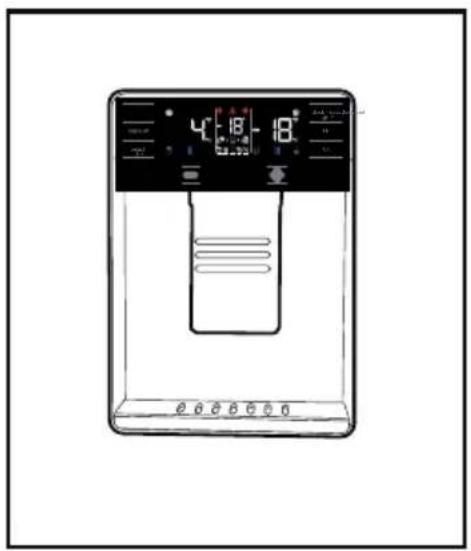
5.16 Use of internal water dispenser and water dispenser at the door (in some models)
After connecting the refrigerator to a water source or replacing the water filter, flush the water system. Use a sturdy container to depress and hold the water dispenser lever for 5 seconds, then release it for 5 seconds. Repeat until water begins to flow. Once water begins to flow, continue depressing and releasing the dispenser paddle (5 seconds on, 5 seconds off) until a total of 4 gal. (15L) has been dispensed. This will flush air from the filter and water dispensing system, and prepare the water filter for use. Additional flushing may be required in some households. As air is cleared from the system, water may spurt out of the dispenser.
Allow 24 hours for the refrigerator to cool down and chill water. Dispense enough water every week to maintain a fresh supply.
Water dispenser at the door (in some models)
natural_image
Line drawing of a water level control device with digital display and control buttons (no text or symbols)
After 5 minutes of continuous dispensing, the dispenser will stop dispensing water to avoid flooding. To continue dispensing, press the dispenser paddle again.
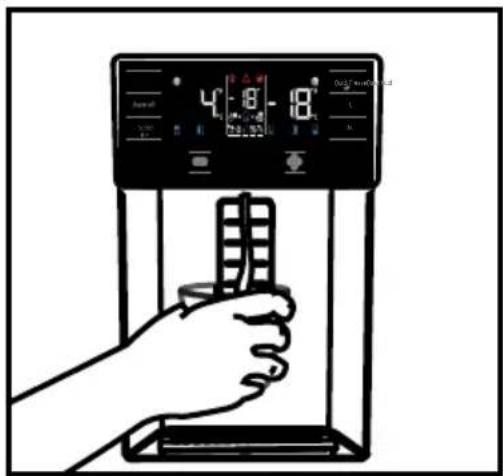
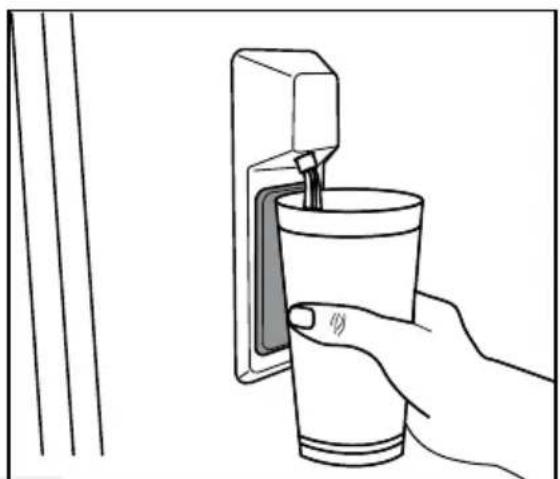
5.17 Dispensing water
Hold a container under the dispenser spout while pressing the dispenser pad.
Release the dispenser pad to stop dispensing.

It is normal for the first few glasses of water taken from the dispenser to be warm.

If the water dispenser is not used for a long period of time, dispose of first few glasses of water to obtain fresh water.
During initial use, you will have to wait approximately 24 hours for the water to cool down. Take out the glass a little while after you pull the trigger.
text_image
Diagram of a hand holding a digital water heater with temperature reading and control panel visibleBuilt-in water dispenser (in some models)
natural_image
Line drawing of a hand inserting a straw into a cup on a wall-mounted device (no text or symbols)Operating the product
5.18 For using water dispenser

Before using your fridge first time and after replacing your water filter, water dispenser may drip drops of water. To prevent water dripping or leaking from dispenser, please bleed the air from the system by dispensing 5-6 gallons (about 20 liter) of water through the water dispenser before the first use and every time after you change the water filter. This will remove any air trapped in the system and stop the water dispenser from leaking. Checking coupler position and the straightness of water line at the back of the unit will be required if there's an obstruction in water flow.

If your water dispenser is leaking just a few drops of water after you have dispensed some water, this is normal.
5.19 Icematic
(in some models)
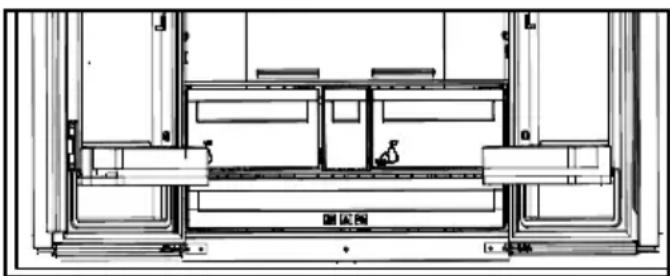
To get ice from the icematic, fill the water tank in the fridge compartment with water up to the maximum level.
Ice cubes in the ice drawer may stick to each other and become a bulk due to hot and humid air in approximately 15 days. This is normal. If you cannot break the bulk apart, you can empty the ice container and make ice again.
It is recommended to change the water in the water tank if it remains in the water tank for more than 2-3 weeks.

Strange noises you hear from the refrigerator at 120-minute intervals are the sounds of ice-making and pouring. This is normal.

If you do not want to make ice, press the ice off icon to stop the icematic to save energy and prolong the service life of your refrigerator.

It is normal that a few drops of water drop from the dispenser after you have taken water.
natural_image
Architectural floor plan showing room layouts and structural elements (no text or labels)Operating the product
5.20 Icematic and ice storage container
(in some models)
Using the Icematic
Fill the Icematic with water and place it into its seat. Your ice will be ready approximately in two hours. Do not remove the Icematic from its seating to take ice.
Turn the knobs on the ice reservoirs clockwise by 90 degrees.
Ice cubes in the reservoirs will fall down into the ice storage container below.
You may take out the ice storage container and serve the ice cubes.
If you wish, you may keep the ice cubes in the ice storage container.
Ice storage container
Ice storage container is only intended for accumulating the ice cubes. Do not put water in it. Otherwise, it will break.
6 Maintenance and Cleaning
Cleaning the product regularly will prolong its service life.
WARNING: Disconnect the power before cleaning the refrigerator.
- Do not use sharp and abrasive tools, soap, house cleaning materials, detergents, gas, gasoline, varnish and similar substances for cleaning.
- Melt a teaspoonful of carbonate in the water. Moisten a piece of cloth in the water and wring out. Wipe the device with this cloth and dry off thoroughly.
- Take care to keep water away from the lamp's cover and other electrical parts.
- Clean the door using a wet cloth. Remove all items inside to detach the door and chassis shelves. Lift the door shelves up to detach. Clean and dry the shelves, then attach back in place by sliding from above.
- Do not use chloric water or cleaning products on the exterior surface and chrome-coated parts of the product.
Chlorine will cause rust on such metallic surfaces.
- Do not use sharp, abrasive tools, soap, household cleaning agents, detergents, kerosene, fuel oil, varnish etc. to prevent removal and deformation of the prints on the plastic part. Use lukewarm water and a soft cloth for cleaning and then wipe it dry.
6.1. Preventing Bad Odour
The product is manufactured free of any odorous materials. However, keeping the food in inappropriate sections and improper cleaning of internal surfaces may lead to malodour.
To avoid this, clean the inside with carbonated water every 15 days.
- Keep the foods in sealed holders. Microorganisms may spread out of unsealed food items and cause malodour.
- Do not keep expired and spoilt foods in the refrigerator.
6.2. Protecting Plastic Surfaces
Oil spilled on plastic surfaces may damage the surface and must be cleaned immediately with warm water.
7. Troubleshooting
Check this list before contacting the service. Doing so will save you time and money. This list includes frequent complaints that are not related to faulty workmanship or materials. Certain features mentioned herein may not apply to your product.
The refrigerator is not working.
- The power plug is not fully settled. >>> Plug it in to settle completely into the socket.
- The fuse connected to the socket powering the product or the main fuse is blown. >>> Check the fuses.
Condensation on the side wall of the cooler compartment (MULTI ZONE, COOL, CONTROL and FLEXI ZONE).
- The door is opened too frequently >>> Take care not to open the product's door too frequently.
- The environment is too humid. >>> Do not install the product in humid environments.
- Foods containing liquids are kept in unsealed holders. >>> Keep the foods containing liquids in sealed holders.
- The product's door is left open. >>> Do not keep the product's door open for long periods.
- The thermostat is set to too low temperature. >>> Set the thermostat to appropriate temperature.
Compressor is not working.
- In case of sudden power failure or pulling the power plug off and putting back on, the gas pressure in the product's cooling system is not balanced, which triggers the compressor thermic safeguard. The product will restart after approximately 6 minutes. If the product does not restart after this period, contact the service.
- Defrosting is active. >>> This is normal for a fully-automatic defrosting product. The defrosting is carried out periodically.
- The product is not plugged in. >>> Make sure the power cord is plugged in.
- The temperature setting is incorrect. >>> Select the appropriate temperature setting.
- The power is out. >>> The product will continue to operate normally once the power is restored.
The refrigerator's operating noise is increasing while in use.
- The product's operating performance may vary depending on the ambient temperature variations. This is normal and not a malfunction.
The refrigerator runs too often or for too long.
Troubleshooting
- The new product may be larger than the previous one. Larger products will run for longer periods.
- The room temperature may be high. >>> The product will normally run for long periods in higher room temperature.
- The product may have been recently plugged in or a new food item is placed inside. >>>The product will take longer to reach the set temperature when recently plugged in or a new food item is placed inside. This is normal.
- Large quantities of hot food may have been recently placed into the product. >>> Do not place hot food into the product.
- The doors were opened frequently or kept open for long periods. >>> The warm air moving inside will cause the product to run longer. Do not open the doors too frequently.
- The freezer or cooler door may be ajar. >>> Check that the doors are fully closed.
- The product may be set to temperature too low. >>> Set the temperature to a higher degree and wait for the product to reach the adjusted temperature.
- The cooler or freezer door washer may be dirty, worn out, broken or not properly settled. >>> Clean or replace the washer. Damaged / torn door washer will cause the product to run for longer periods to preserve the current temperature.
The freezer temperature is very low, but the cooler temperature is adequate.
- The freezer compartment temperature is set to a very low degree. >>> Set the freezer compartment temperature to a higher degree and check again.
The cooler temperature is very low, but the freezer temperature is adequate.
- The cooler compartment temperature is set to a very low degree. >>> Set the freezer compartment temperature to a higher degree and check again.
The food items kept in cooler compartment drawers are frozen.
- The cooler compartment temperature is set to a very low degree. >>> Set the freezer compartment temperature to a higher degree and check again.
The temperature in the cooler or the freezer is too high.
- The cooler compartment temperature is set to a very high degree. >>> Temperature setting of the cooler compartment has an effect on the temperature in the freezer compartment. Wait until the temperature of relevant parts reach the sufficient level by changing the temperature of cooler or freezer compartments.
- The doors were opened frequently or kept open for long periods. >>> Do not open the doors too frequently.
• The door may be ajar. >>> Fully close the door. - The product may have been recently plugged in or a new food item is placed inside. >>> This is normal. The product will take longer to reach the set temperature when recently plugged in or a new food item is placed inside.
- Large quantities of hot food may have been recently placed into the product. >>> Do not place hot food into the product.
Shaking or noise.
- The ground is not level or durable. >>> If the product is shaking when moved slowly, adjust the stands to balance the product. Also make sure the ground is sufficiently durable to bear the product.
- Any items placed on the product may cause noise. >>> Remove any items placed on the product.
Troubleshooting
The product is making noise of liquid flowing, spraying etc.
- The product's operating principles involve liquid and gas flows. >>> This is normal and not a malfunction.
There is sound of wind blowing coming from the product.
- The product uses a fan for the cooling process. This is normal and not a malfunction.
There is condensation on the product's internal walls.
- Hot or humid weather will increase icing and condensation. This is normal and not a malfunction.
- The doors were opened frequently or kept open for long periods. >>> Do not open the doors too frequently; if open, close the door.
• The door may be ajar. >>> Fully close the door.
There is condensation on the product's exterior or between the doors.
- The ambient weather may be humid, this is quite normal in humid weather. >>> The condensation will dissipate when the humidity is reduced.
The interior smells bad.
- The product is not cleaned regularly. >>> Clean the interior regularly using sponge, warm water and carbonated water.
- Certain holders and packaging materials may cause odour. >>> Use holders and packaging materials without free of odour.
- The foods were placed in unsealed holders. >>> Keep the foods in sealed holders. Micro-organisms may spread out of unsealed food items and cause malodour. Remove any expired or spoilt foods from the product.
The door is not closing.
- Food packages may be blocking the door. >>> Relocate any items blocking the doors.
- The product is not standing in full upright position on the ground. >>>Adjust the stands to balance the product.
- The ground is not level or durable. >>> Make sure the ground is level and sufficiently durable to bear the product.
The vegetable bin is jammed.
- The food items may be in contact with the upper section of the drawer. >>> Reorganize the food items in the drawer.
If The Surface Of The Product Is Hot.
- High temperatures may be observed between the two doors, on the side panels and at the rear grill while the product is operating. This is normal and does not require service maintenance! Be careful when touching these areas.
WARNING:
If the problem persists after following the instructions in this section, contact your vendor or an Authorised Service. Do not try to repair the product.
BLOMBERG UK AND IRELAND STANDARD MANUFACTURER GUARANTEE TERMS AND CONDITIONS
Your new Blomberg product is guaranteed against faulty materials, defective components or manufacturing defects.
The standard guarantee starts from the date of original purchase of the product, and lasts for a period of thirty six (36) months unless Beko plc (the “Manufacturer”) agrees to extend the guarantee for the product in writing.
If you have any questions about the guarantee on your product (including how long it is valid), please contact your retailer or our contact centre on 0333 207 9870 (UK and Northern Ireland) or 01 691 0160 (Republic of Ireland)
This guarantee does not in any way diminish or affect your statutory rights in connection with the product. This guarantee is in addition to your statutory rights as a consumer. If you have any questions about these rights, please contact the retailer from which you purchased the product. In certain circumstances, it is possible that your statutory rights may offer additional or higher levels of protection than those offered under the terms of this guarantee.
What is covered by this guarantee?
- Repairs to the product required as a result of faulty materials, defective components or manufacturing defects.
• Functional replacement parts to repair a product.
• The costs of a Blomberg Approved Engineer to carry out the repair.
What is not covered?
• Transit and delivery damage.
- Cabinet or appearance parts, including but not limited to control knobs, flaps and handles.
- Accessories and/or consumable items including but not limited to ice trays, scrapers, cutlery baskets, filters and light bulbs.
• Repairs necessary as a direct or indirect result of:
Accidental damage, misuse or abuse of a product.
An attempted repair of a product by anyone other than a Blomberg Approved Engineer (the "Engineer").
Installation or use of a product where such installation or use fails to meet the requirements contained in this guarantee or the User Instructions Booklet.
- Repairs to a product operated at any time on commercial or non-residential household premises (unless we have previously agreed to the installation environment).
This guarantee is limited to the cost of repairing the product. To the extent permitted by law, the Manufacturer does not accept and will not be held liable for any financial loss incurred in connection with the failure of any product to operate in accordance with the expected standards. Such financial loss includes but is not limited to loss arising from:
• Time taken off work.
• Damaged food, clothing or other items.
• Meals taken at restaurants or from takeaways.
• General compensation for inconvenience.
Important Notes
- Your product is designed and built for domestic household use only.
- The guarantee will automatically be void if the product is installed or is used in commercial or non-residential domestic household premises, unless we have previously agreed to the installation environment.
- The product must be correctly installed, located and operated in accordance with the instructions contained in the User Instructions Booklet provided with your product.
- Professional installation by a qualified Electrical Domestic Appliance Installer is recommended for all Washing Machines, Dishwashers and Electric Cookers (as incorrect installation may result in you having to pay for the cost of repairing the product).
- Gas Cookers must be professionally installed by a Gas Safe (or Gas Networks Ireland for Republic of Ireland) registered gas installer.
- This guarantee is given in respect of products purchased and used within the United Kingdom and the Republic of Ireland.
- This guarantee is effective from the initial date of purchase of a new product from an authorised retailer and will be void if the product is resold.
- This guarantee does not apply to graded sales (where the product is purchased as a "second").
- Possession of a copy of these terms and conditions does not necessarily mean that a product has the benefit of this guarantee. If you have any questions, please call our Call Centre on the number set out above.
- The Manufacturer reserves the right to terminate the guarantee if its staff or representatives are subjected to physical or verbal abuse in the course of carrying out their duties.
- Optional extras, where available (i.e. extendable feet) are supplied on a chargeable basis only.
Does Blomberg offer replacements?
This is a repair-only guarantee. On occasion, the Manufacturer may at its sole discretion, replace your product with a new product instead of carrying out a repair. Where a replacement is offered, this would normally be an identical model but when this is not possible, a model of similar specification will be provided. The Manufacturer will cover the costs and arrange for the delivery of the new product and for the return of the old product. Any costs related to disconnecting the faulty product and installing the replacement product will not be borne by the Manufacturer unless previously agreed to in writing. The original guarantee will continue to apply to the replacement product; the new product will not come with a new guarantee.
When will the repair take place?
Our Engineers work Monday to Friday 9.00am to 5.00pm. Appointments outside these hours may be possible at the sole discretion of the Manufacturer but cannot be guaranteed. Whilst our Engineers will endeavour to minimize inconvenience and to meet requests for specific timed appointments, this cannot be guaranteed. We will not be liable for delays or if it is unable to carry out a repair because a convenient appointment cannot be arranged.
Will there be any charge for the repairs?
It is your responsibility to provide evidence to the Engineer that your product is covered by this guarantee with a proof of purchase. The Manufacturer reserves the right to charge for the reasonable cost of any service call if:
- You cannot provide evidence that your product is covered by this guarantee.
- Where a service call has been made and the engineer finds that there is no fault with your product.
- That your product has not been installed or operated in accordance with the User Instructions Booklet.
- That the fault was caused by something other than faulty materials, defective components or manufacturing defects.
• For missed appointments.
Payment of these costs are due immediately upon the Engineer providing you with an invoice. The Manufacturer reserves the right to terminate the guarantee if you fail to pay the costs for the service call in a timely manner.
If you are a resident of the United Kingdom, this guarantee will be governed by English law and subject to the English Courts, save where you live in another part of the United Kingdom, in which case the law and courts of that location will apply.
If you are resident in the Republic of Ireland, this guarantee will be governed by Irish law and the Irish courts will have jurisdiction.
This guarantee is provided by Beko plc. Beko House, 1 Greenhill Crescent, Watford, Hertfordshire. WD188QU.
Beko plc is registered in England and Wales with company registration number 02415578.
All Blomberg appliances come with a 3 year parts and labour guarantee as standard. When you register your appliance for the Optima Inverter Motor 10 year guarantee, you are also registering your appliance for the standard 3 year parts and labour guarantee.
Blomberg built-in or integrated products purchased from Euronics agents come with a 3 year parts and labour guarantee which is extended to 5 years, free of charge, upon registration of the appliance. When you register your appliance for this additional 2 years, you will automatically activate the Optima Inverter Motor 10 year guarantee. You do not need to register twice. To make a claim against your Blomberg Optima Inverter Motor Guarantee (the “Guarantee”), all customer and product details must be registered with Beko plc using the procedure outlined below.
- This extra 7 years or 5 years (for built-in appliances from Euronics agents) Guarantee is only effective after the expiration of the standard manufacturer's guarantee.
- It is only valid for the Optima Inverter motors of selected washing machines, washer-dryers, tumble dryers and dishwashers. It does not cover any labour charge or any other components of the product. In addition, it is only valid for one replacement of the Optima motor during the extra 9-year (for free standing appliances) or 8 year (for built-in appliances) guarantee period.
-
To activate your guarantee, you MUST register your appliance within 90 days of the original purchase date, by visiting blomberguk.com/register.
-
Customers will receive a unique reference code as proof of guarantee validation by email or post, which must be quoted at the time of a claim being made.
- Any repair/replacement of the Optima Inverter motor must only be carried out by an authorised Blomberg Service Agent (the "Service Agent").
- Labour for the repair/replacement of the Optima Inverter motor is not included in this guarantee and is chargeable directly by the Service Agent
- Any additional components fitted to the product at any time will not be covered by this guarantee and will be chargeable directly by the Service Agent.
- The guarantee is not transferable and cannot be exchanged for cash.
- There are no alternative or additional offers to this Guarantee.
- The guarantee is exclusive of the manufacturer's standard guarantee
- The Terms and Conditions shown above are in addition to the standard terms and conditions of your product guarantee. Please read and refer to such Terms and Conditions when making any claim.
- We may use the information you provide for marketing purposes and to analyse your purchasing preferences. We may keep your information for a reasonable period for these purposes in accordance with the applicable Data Protection Laws and General Data Protection Regulations (GDPR). You can opt into this service during the registration process. Further details are available at http://www.blomberguk.com/cookie-and-privacy.
- These Terms and Conditions are governed by the laws of England and Wales; manufacturer: Beko plc, Beko House, 1 Greenhill Crescent, Watford WD18 8QU. Company Registration Number: 02415578.
HOW TO OBTAIN SERVICE FOR YOUR APPLIANCE
Please keep your purchase receipt or other proof of purchase details in a safe place; you will need to have this documentation available should the product require attention under guarantee.
Please take a few moments to complete the details below, as you will need this information when you call us, or to use our online services. When you call us you may be required to input your serial number into your telephone keypad. For help please visit Blomberguk.com/support/model-finder
- The product model number is printed on the Operating Instruction Booklet / User guide
- The product model and serial number is printed on the Rating Label affixed to the appliance.
- The Retailer (Purchased from) and Date of purchase will be printed on your purchase receipt or other proof of purchase paperwork
Recording of these details alone will not count as proof of purchase. A valid proof of purchase is required for requesting service under guarantee.
| Model number Serial number Purchased from Date of purchase | |||
For service under guarantee or for product advice please call our Contact centre
Before requesting service please check the troubleshooting guide in the Operating Instructions booklet, as a charge may be levied where no fault is found, and even though your product may still be under guarantee.
After arranging service the area around the product must be easily accessible to the Engineer, without the need for cabinets or furniture to be removed or moved.
It is your responsibility to ensure our Engineers have a clean and safe environment to carry out any repairs.
Please have your Model number and Serial number available when you call us, as you may be required to input your serial number into your telephone keypad during your call.
UK Mainland & Northern Ireland:
0333 207 9870
Landline or mobile calls to 0333 numbers cost no more than calls to geographic numbers 01 or 02, and are charged at the basic rate. Calls from landlines and mobiles are included in free call packages but please check with your telephone service provider for exact call charges.
Republic of Ireland:
01 691 0160
Service once the manufacturers guarantee has expired
If you have purchased an extended guarantee please refer to the instructions contained within the extended guarantee agreement document, otherwise please call us using the appropriate number above, where service can be obtained at a charge.
Should you experience any difficulty in obtaining service please call us on
0333 207 9870 or 01 691 0160
Contact us though our website
Send us a secure message through our online contact us form. Please visit our website, click Contact Us and choose a product support topic from the list of options. Complete the required details and click send message.
Product registrations
For UK and Republic of Ireland product registrations please visit blomberguk.com/register