
HCB 2061 - Fridge LIEBHERR - Free user manual and instructions
Find the device manual for free HCB 2061 LIEBHERR in PDF.


User questions about HCB 2061 LIEBHERR
0 question about this device. Answer the ones you know or ask your own.
Ask a new question about this device
Download the instructions for your Fridge in PDF format for free! Find your manual HCB 2061 - LIEBHERR and take your electronic device back in hand. On this page are published all the documents necessary for the use of your device. HCB 2061 by LIEBHERR.
USER MANUAL HCB 2061 LIEBHERR
For "NoFrost" Combined
Refrigerator-Freezers with IceMaker
natural_image
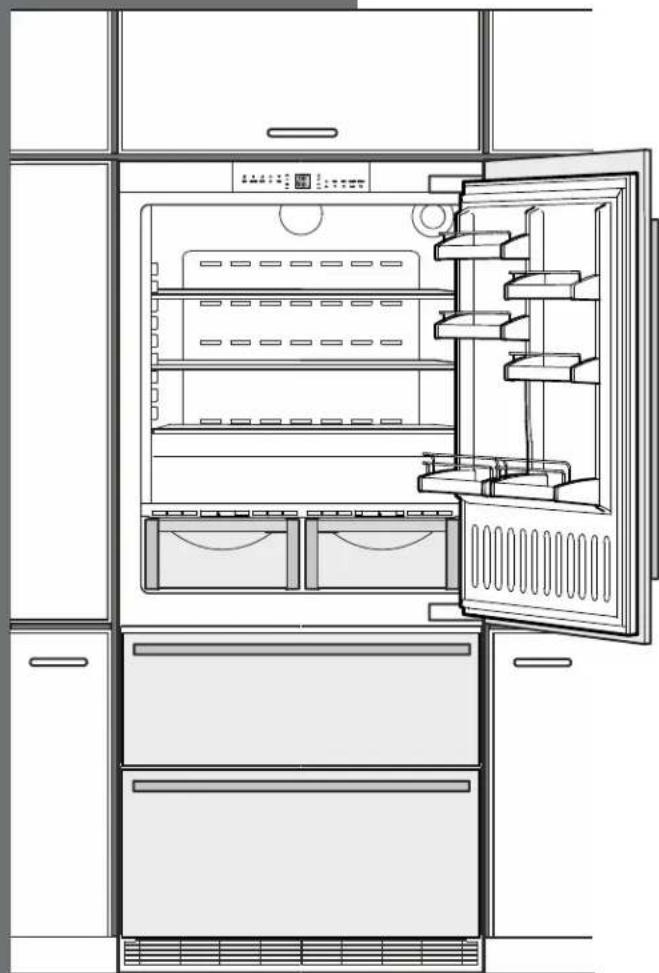
Line drawing of an open refrigerator with doors, shelves, and storage compartments (no text or symbols)HCB 2060/2061
7084 345-00
Congratulations on your purchase. Choosing this appliance means you want all the benefits of state-of-the-art refrigeration technology, guaranteeing you top quality, a long appliance life span and excellent reliability.
The features on your appliance have been designed to ensure maximum convenience - day in, day out.
This appliance has been manufactured with recyclable materials using an environmentally friendly process, so together we're making an active contribution to the preservation of our environment.
To get to know all the benefits of your new appliance, please read the information contained in these operating instructions carefully.
We know you will be pleased with your new appliance.
Additional Benefits
- CFC-free
• Energy-optimized refrigerant circuit
• Energy-efficient insulation
• Low energy consumption
• User-friendly electronic controls
• Display of functions switched on - Temperature can be controlled within climate rating range, regardless of room temperature
- Refrigerator and freezer compartments defrost automatically - no need to spend time defrosting
• Big net refrigerator capacity
• Variable and practical features
• Safety-glass storage shelves
• Big net freezer capacity
• Automatic ice maker
• Water filter for good water quality ice production
• Freezer temperature increase alarm
• Audible door open alarm
• Power failure/"frost-control" display
• Fresh food can be fast-frozen as required
• All drawers suitable for fast freezing
• Integrated transport grips on appliance housing - Transport castors
- Easy to clean
- This unit is certified as Sabbath compliant by the Star-K organization, thus allowing the appliance to be used during religious holidays. For more information, please visit Star-K on the web at www.star-k.org.
Contents Page
Disposal of Old Appliance 4
Disposal of this appliance 4
Disposal of Carton 4
R600a Refrigerant 4
Setting up....4
Important Safety Information 5
Electrical Safety 6
Safety Regulations....6
Water Filter 7
Installing the Water Filter 7
Removing the Water Filter 7
Description of Appliance and Equipment 8
Operating and Control Elements....9
Turning the Appliance On and Off 10
Power Failure/Frost-Control Display 11
Setup Mode....12
Arranging Food 16
Shelf Arrangement....16
Interior Light 17
BioFresh Compartment 18
Storage Times....19
Freezer Compartment Description 20
Removing the Freezer Compartment Containers.....20
Freezing 21
Freezing with SuperFrost.... 21
Freezing and Storage 21
Safety Instructions and Warnings for the
Automatic Ice Maker 22
Turning the Ice Maker On and Off 22
Ice Maker Description 22
Defrosting....23
Cleaning 23
Cleaning the Air Filter 24
Vacation Tips 25
Troubleshooting 26
Ice Maker Troubleshooting 27
Appliance Information 27
Liebherr Warranty Plan....28
Please Read and Follow these Instructions
These instructions contain Danger, Warning and Caution statements.
This information is important for safe and efficient installation and operation.
Always read and follow all Danger, Warning and Caution statements!
DANGER!
Danger indicates a hazard which will cause serious injury or death if precautions are not followed.
WARNING!
Warning indicates a potentially hazardous situation which, if not avoided, could result in death or serious injury.
CAUTION!
Caution indicates a potentially hazardous situation which, if not avoided, may result in minor or moderate injury.
IMPORTANT
This highlights information that is especially relevant to a problem-free installation and operation.
IMPORTANT
All types and models are subject to continuous improvement. The manufacturer reserves the right to make modifications in the shape, equipment and technology.
Disposal of Old Appliance
DANGER!
Risk of child entrapment.
Child entrapment and suffocation are not problems of the past.
Junked or abandoned refrigerators are still dangerous – even if they will sit for "just a few days."
If you are getting rid of your old refrigerator, please follow these instructions to help prevent accidents.
Before you discard old appliances:
- Remove the doors.
- Leave the shelves in place so that children may not easily climb inside.
- Cut off the power cable from the discarded appliance. Discard separately from the appliance.
- Be sure to follow your local requirements for disposal of appliances.
Contact the trash collection agency in your area for additional information.
Disposal of this appliance
This appliance contains flammable gases within the refrigeration circuit and insulation foam.
Contact the Municipality or Disposal Company in your area for information on approved recycling or disposal.
Disposal of Carton
The packaging is designed to protect the appliance and individual components during moving and is made of recyclable materials.
WARNING!
Keep packaging materials away from children. Polythene sheets and bags can cause suffocation!
Please recycle packaging material where facilities are available.
R600a Refrigerant
WARNING!
The refrigerant contained within the appliance R600a is environmentally friendly, but flammable. Leaking refrigerant can ignite.
To prevent possible ignition follow the warnings below:
natural_image
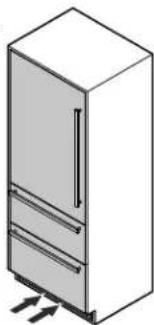
Isometric line drawing of a refrigerator with doors, drawers, and ventilation slots (no text or symbols)- Keep ventilation openings, in the appliance enclosure or in the built-in structure, clear of obstruction.
- Do not use mechanical devices or other means to accelerate the defrosting process, other than those recommended by the manufacturer.
• Do not damage the refrigerant circuit. - Any repairs and work on the appliance should only be performed by the customer service department.
- Do not use electrical appliances inside the food storage compartments of the appliance, unless they are of the type recommended by the manufacturer.
Setting up
Avoid placing the appliance in direct sunlight or near the stove, range top, radiators and similar heat sources.
As soon as you uncrate the unit:
- Examine the unit and packaging for shipping damage. Contact the carrier immediately if you suspect there is any damage.
- Note the type (model number), index, appliance / serial number, date of purchase and where purchased on the spaces provided in the back of this manual.
Important Safety Information
- To prevent injury to you or damage to the unit, the appliance should be unpacked and set up by two people.
- If the appliance is damaged on delivery, contact the supplier immediately before connecting to the power source.
- To guarantee safe operation, ensure that the appliance is set up and connected as described in these operating instructions.
- Disconnect the appliance from the power source if a fault occurs. Pull out the plug, turn off or remove the fuse.
- When disconnecting the appliance, use the plug. Do not pull on the cable.
- Any repairs and work on the appliance should only be carried out by the customer service department. Unauthorized work may be dangerous to the user. Changing the power source cable should only be done by the customer service department.
- Do not eat ice cream, particularly ice cream treats, or ice cubes, immediately from the freezer compartment. There is a risk of "burning" because of the very cold temperatures.
- Do not consume food which has been stored for too long; it could cause food poisoning.
- Do not store explosives or sprays using combustible propellants such as butane, propane, pentane, etc. in the appliance. Electrical components might cause leaking gas to ignite. You may identify such sprays by the printed contents or a flame symbol.
- Do not allow children to play with the appliance. Children must not climb, sit or stand on the shelves, drawers or door.
- To prevent possible injury due to an electrical shock, be sure to disconnect the power cord or turn off the circuit breaker before cleaning the appliance.
-
To avoid injury or damage to the appliance, do not use steam cleaning equipment to clean the appliance.
-
Do not operate the refrigerator in the presence of explosive fumes.
- In the event of a power outage, minimize opening the refrigerator door(s). Protect the food either by placing dry ice on top of the packages or using a local frozen food locker if the power failure is of a long duration. Do not attempt to re-freeze any previously frozen food that has thawed.
Electrical Safety
Connect this appliance to a 15 amp or 20 amp, 110-120 VAC, circuit which is grounded and protected by a circuit breaker or fuse.
We recommend using a dedicated circuit for this appliance to prevent circuit overload and the chance of interruption to the appliance.
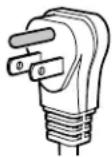
This appliance is equipped with a three-prong (grounding) polarized plug for your protection against possible shock hazards.
Where a two-prong wall receptacle is encountered, contact a qualified electrician and have it replaced with a properly grounded three-prong receptacle in accordance with all local codes and ordinances.

WARNING!
Electrocution hazard.
Electrical grounding required.
- Do not remove the round grounding prong from the plug.
- Do not use extension cords or ungrounded (two prong) adapters.
- Do not use a power cord that is frayed or damaged.
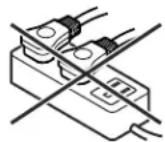
- Do not use a power strip.
Failure to follow these instructions may result in fire, electrical shock or death.
Safety Regulations
The appliance is designed to cool, freeze and store food and to make ice. It is designed as a household appliance.
IMPORTANT
The appliance is not intended for outdoor use.
The appliance is manufactured to operate within specific ambient temperature limits according to its climate rating.
The climate rating indicates the ambient temperature at which the appliance may be operated in order to achieve full refrigeration performance.
Climate Rating Ambient Temperature
SN-T 50°F to 109°F (10°C to 43°C)
IMPORTANT
Do not operate the appliance outside the specified ambient temperature range.
- The refrigerant circuit has been tested for leaks.
- The appliance complies with current safety regulations
CAN/CSA C22.2 No.60335-1-11
UL 60335-1 Fifth Edition
CAN/CSA C22.2 No. 60335-2-24-06
UL 60335-2-24 First Edition
We recommend cleaning the appliance before turning it on for the first time. See Cleaning.
Turn on the appliance several hours before loading it.
Do not load with frozen food until the temperature shows approximately 0^ F ( -18^ C).

ARNING!
Do not allow children to play with the appliance. Children must not climb, sit or stand on the racks or door.
Failure to follow these instructions may result in death or serious injury.
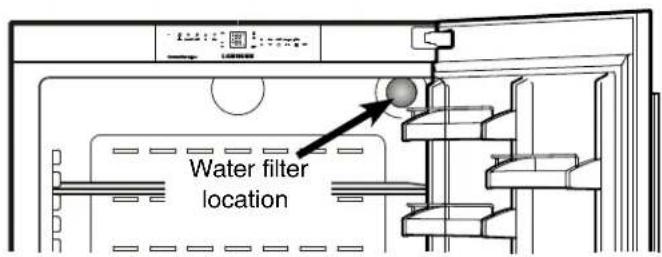
Water Filter - Figure 1
Before turning on the appliance install the water filter provided in the interior rear wall of the refrigerator compartment. This ensures good ice cube quality and keeps the water circuit free of solids such as sand.
text_image
Water filter locationFigure 1
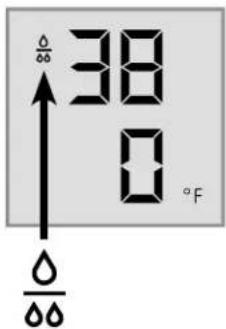
Replace the filter when the drop symbol appears on the temperature display.
Filters can be obtained from your Liebherr Dealer or Distributor.
text_image
38 0 °F ↑ O O O
WARNING
To avoid the risk of bacteria growth, the water filter must be changed when the waterdrop symbol appears on the display!
IMPORTANT NOTE
It is not necessary to turn off the water supply when removing or installing the water filter.
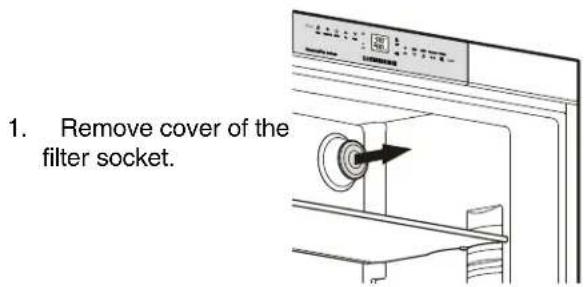
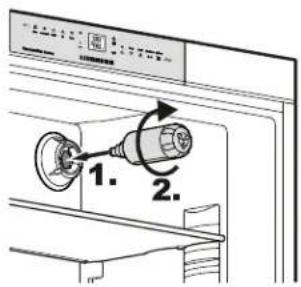
Installing the Water Filter -
Figures 2, 3
text_image
1. Remove cover of the filter socket.Figure 2
- Insert the filter and turn it 90° clockwise.
text_image
1. 2.Figure 3
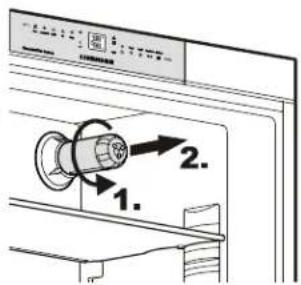
Removing the Water Filter - Figure 4
- Turn the filter 90° counterclockwise and remove.
text_image
Diagram showing a washing machine with labeled parts and directional arrows indicating motion or sequence.Figure 4
Description of Appliance and Equipment - Figure 5
text_image
Alarm SuperCool On/Off Up Down 88 °C S -88 °C Up Down On/Off SuperFrost IceMaker ** *** *** *** *** *** *** *** *** *** *** *** *** *** *** *** *** *** *** *** *** *** *** *** *** *** *** *** *** *** *** *** *** *** *** *** *** *** *** *** *** *** *** *** *** *** *** *** *** *** *** * 0.0000000000000000000000000000000000000000000000000000000000000000000000000000000000000000000000000000 PremiumPlus BioFresh NoFrost LIEBHERR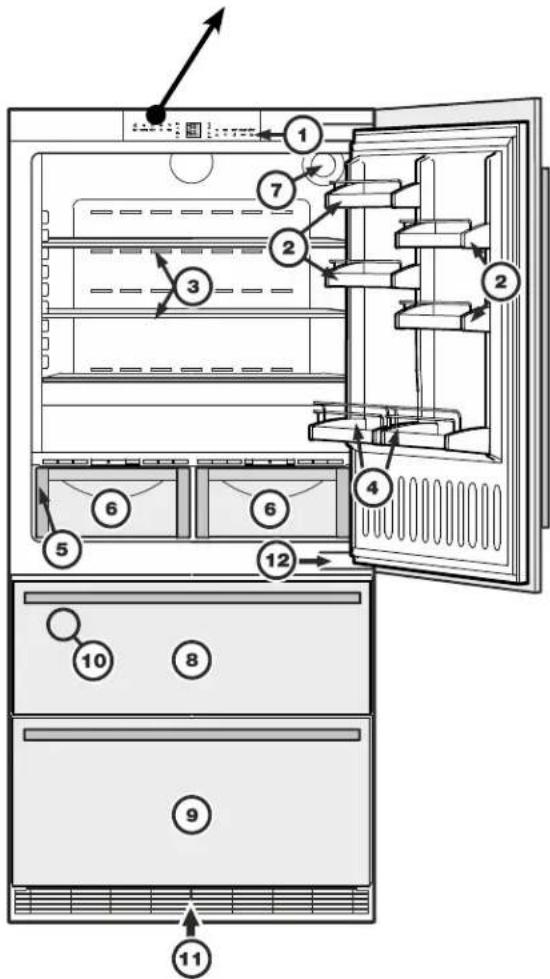
text_image
Diagram of an open refrigerator with numbered compartments and labeled parts, showing internal structure and ventilation directions.Figure 5
Description of refrigerator
(1) Operating and control elements
(2) Adjustable door racks
(3) Adjustable shelves
(4) Gallon rack
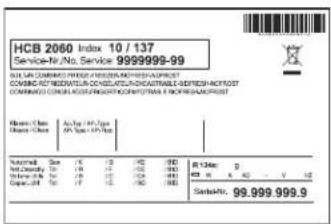
(5) Model plate → (behind the BioFresh drawer on the left hand side)
(6) BioFresh drawers
(7) Water filter
text_image
HCB 2060 Index 10 / 137 Service-IV/No. Service: 9999999-99 HCB COMPANY POWER RESOURCES INC./HCB/POST COMMUNIC TECHNOLOGIES & TECHNOLOGIES & TECHNOLOGIES COMMAND COORDINARY WORK INCOME & OPERATING PROFIT HCB Company (HCB) (HCB) (HCB) Name: Company Name Stock Code: 99.999.999.9Description of freezer
(8) Upper freezer drawer
(9) Lower freezer drawer
(10) Ice maker (in the interior of the upper freezer drawer)
(11) Ventilation grille
(12) Lower hinge
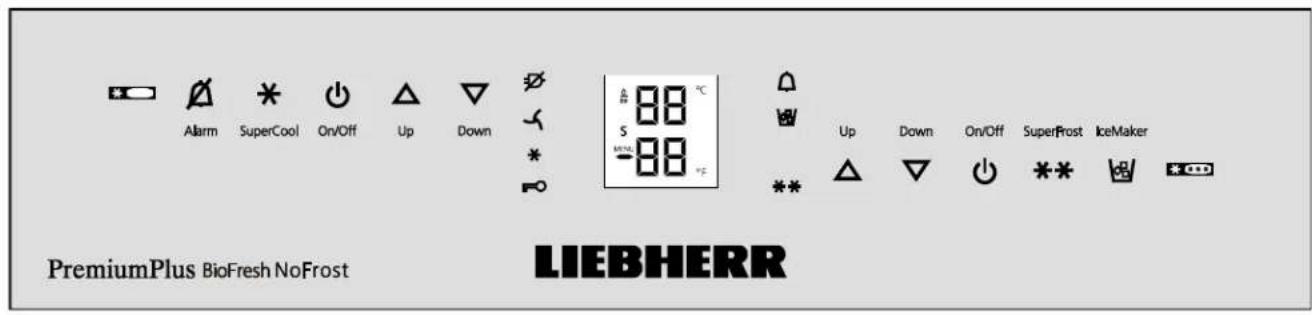
Operating and Control Elements - Figure 6, Figure 7
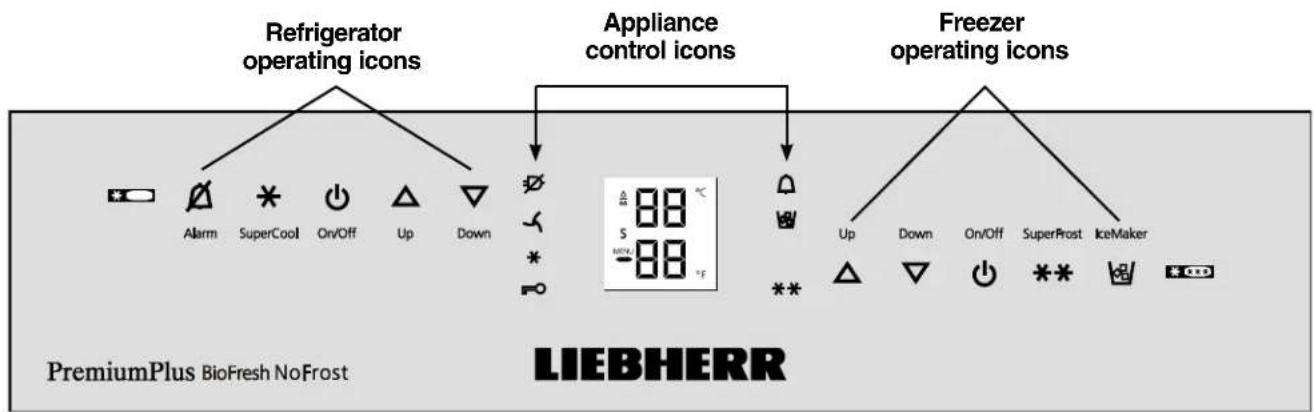
The electronic control panel uses touch capacitance technology. Any function can be activated by a fingertip on the symbol of the operating icons.
The exact contact point is between the symbol and its label On/Off
flowchart
graph TD
    A["Refrigerator operating icons"] --> B["Appliance control icons"]
    B --> C["Freezer operating icons"]
    subgraph Refrigerator operating icons
        D["Alarm"] --> E["*"]
        F["SuperCool"] --> G["On/Off"]
        H["Up"] --> I["Down"]
    end
    subgraph Appliance control icons
        J["√"] --> K["+"]
        L["×"] --> M["="]
        N["•"] --> O["+"]
        P["•"] --> Q["="]
        R["•"] --> S["+"]
    end
    subgraph Freezer operating icons
        T["Up"] --> U["Down"]
        V["On/Off"] --> W["SuperFrost"]
        X["IceMaker"] --> Y["+"]
    end
    style Refrigerator operating icons fill:#f9f,stroke:#333
    style Appliance control icons fill:#ccf,stroke:#333
    style Freezer operating icons fill:#cfc,stroke:#333
    note right of B "88 °C"
    note left of B "LIEBHERR"
Figure 6
Refrigerator operating icons

Alarm mute (refrigerator and freezer)

SuperCool

Refrigerator On/Off

Temperature Up control (to increase the refrigerator temperature)

Temperature Down control (to reduce the refrigerator temperature)
Appliance control icons

Power Failure LED

Air Filter LED
When this LED lights up the air filter in the toe kick area has to be cleaned.

SuperCool LED

Child lock LED

Alarm LED

IceMaker On LED

SuperFrost LED
Freezer operating icons

Temperature Up control (to increase the freezer temperature)

Temperature Down control (to reduce the freezer temperature)

Freezer On/Off

SuperFrost

IceMaker On/Off
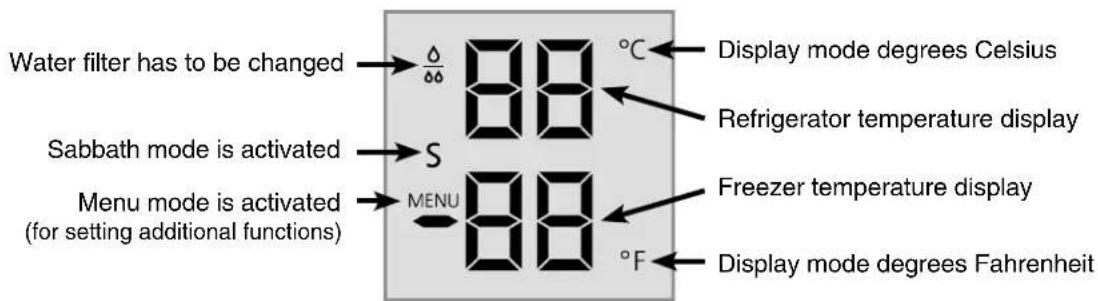
Temperature and control display
text_image
Water filter has to be changed → △/▽▽ 88 °C Sabbath mode is activated → S Menu mode is activated (for setting additional functions) → MENU 88 °F Display mode degrees Celsius Refrigerator temperature display Freezer temperature display Display mode degrees FahrenheitFigure 7
Turning the Appliance On and Off - Figure 8
Clean the appliance before turning it on for the first time. See Cleaning.
Do not place frozen food in the freezer until the temperature shows at least 0^ F / -18^ C. The refrigerator and freezer compartments can be operated separately.
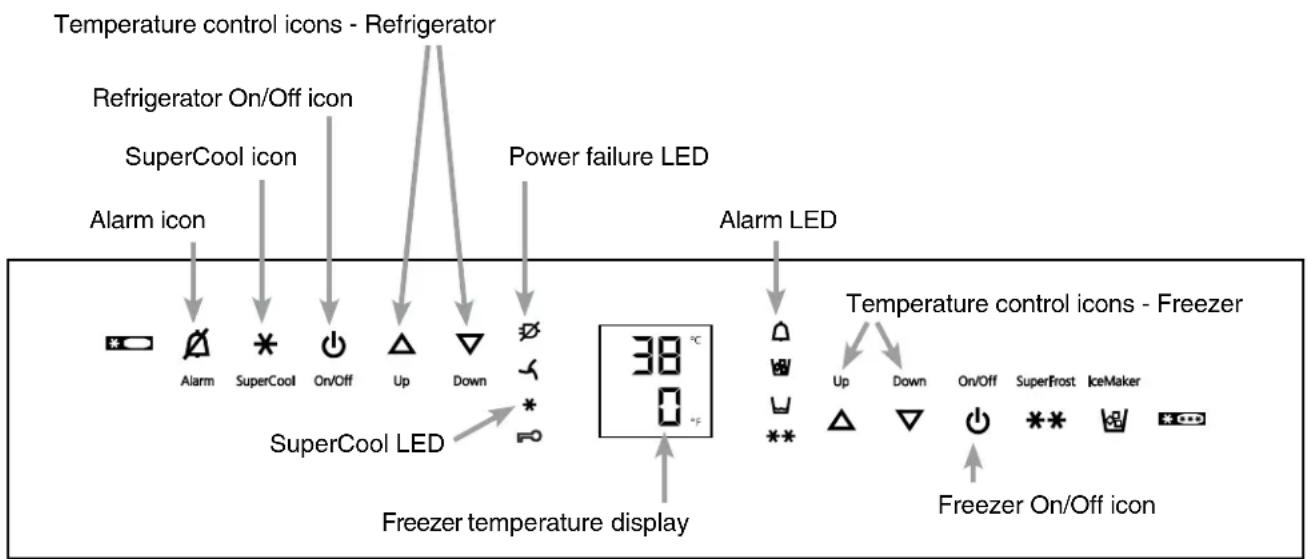
- Turning on: Touch the Refrigerator On/Off icon and the Freezer On/Off icon so the Temperature Displays light up.
- Turning off: To turn off the refrigerator or freezer, touch the corresponding On/Off icon for approximately 3 seconds so the temperature display and interior lights go out.
Setting the Temperature - Figure 8
The appliance is pre-set for normal operation. We recommend temperatures of 38^ F ( 3^ C) in the refrigerator and 0^ F (-18°C) in the freezer.
To reduce the temperature:
Touch the DOWN icon on the left to reduce the refrigerator temperature and the DOWN icon on the right to reduce the freezer temperature.
To increase the temperature:
Touch the UP icon on the left to increase the refrigerator temperature and on the right to increase the freezer temperature.
- While you are entering the temperature, the set temperature will flash on the display.
- When you touch the temperature setting icons for the first time, the most recent setting is displayed.
- You can change the settings in increments of 1^ F ( 1^ C) by briefly touching the icons again. If the icons are held, the temperature setting will change faster.
- Approximately five seconds after the icon has been released, the display will automatically show the actual freezing or cooling temperature.
- You can change the temperatures:
- In the refrigerator – between 37°F and 45°F (3°C and 7°C) and
- In the freezer – between -15°F and 7°F (-27°C and -14°C).
flowchart
graph TD
    A["Alarm icon"] --> B["SuperCool Icon"]
    B --> C["On/Off Icon"]
    C --> D["Up"]
    D --> E["Down"]
    E --> F["Power failure LED"]
    F --> G["SuperCool LED"]
    G --> H["Freezer temperature display"]
    I["Alarm LED"] --> J["Up"]
    J --> K["Down"]
    K --> L["On/Off Icon"]
    L --> M["SuperFrost Icon"]
    M --> N["IceMaker Icon"]
    O["Temperature control icons - Refrigerator"] --> P["Refrigerator On/Off Icon"]
    Q["Freezer On/Off icon"] --> R["Freezer Temperature display"]
Figure 8
Temperature Display - Figure 8
In normal operation, the following settings will be displayed:
• the average refrigerator temperature
• the warmest frozen food temperature.
When starting up for the first time or when the appliance is warm, dashes will appear in the freezer temperature display until the temperature in the freezer compartment is 32^ F ( 0^ C).
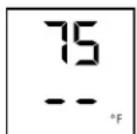
It will take between three and eight hours for the required temperature, 0^ F or 38^ F ( -18^ C or 3^ C) to be reached and displayed permanently in the display, depending on the ambient conditions and the temperature setting.
The display will flash:
• If you change the temperature or
- If the temperature rises by several degrees, indicating cold loss, e.g. if you place fresh, "warm" food in the freezer or if you remove or repack frozen food, the temperature may rise for a short time due to warm air flowing into the freezer.
- If "F1" to "F5" appears in the display, the appliance has a fault. Have the fault number available when you contact the customer service department.
Power Failure/Frost-Control Display - Figure 8
If the power failure LED is lit, this means the freezer temperature has risen too high during the last few hours or days due to a power failure. The freezer temperature display flashes at the same time.
- If you touch the Alarm icon now, the highest temperature registered during the power failure will be displayed.
- Check the quality of the food in case it has become too warm or even defrosted.
- The highest temperature will appear for approximately one minute. After that, the actual temperature in the freezer will reappear.
The display can be turned off by touching the Alarm icon again.
Audible Alarm Signal - Figure 8
The audible alarm signal helps to protect frozen food and to save energy.
The audible alarm signal is switched off by touching the alarm icon.
Audible door alarm
This sounds when the door has been left open for longer than about 180 seconds. The sound switch-off function is active as long as the door is left open. The alarm automatically switches back to standby when the door is shut.
Audible/visual temperature alarm
It always sounds if the freezer temperature is not low enough. The temperature display and the alarm LED flash at the same time.
This can be caused by:
- warm, fresh food being placed in the freezer;
- too much warm air from the outside entering when rearranging or removing frozen food,
- a fault in the appliance.
The temperature display will continue to flash until the cause of the alarm has been rectified. It will then stop flashing and light up continually. The audible warning signal is now automatically reset.
SuperCool - Figure 8
Touching the SuperCool icon switches the refrigerator compartment to maximum cooling. It is recommended particularly if you wish to cool large quantities of food, drinks, freshly baked goods or meals rapidly.
- Turning on: Touch the SuperCool icon briefly so the LED ✕ turns on. The refrigerator temperature will drop to its lowest value.
IMPORTANT
The SuperCool function uses slightly more energy. After approximately six hours, however, the refrigerator switches back automatically to normal energy-saving operation. If required, the SuperCool function can be turned off sooner.
- Turning off: Touch the SuperCool icon again until the LED ✱ turns off.
Setup Mode
In the setup mode you can activate the following functions:
$$ 5 = \text { Sabbath mode } $$
$$ \mathbb {C} = \text { Child lock } $$
$$ F = \text { Drop symbol reset } $$
$$ = \text { Ice maker function test (for service personnel only) } $$
$$ E = \text { Water quantity for ice cube tray } $$
$$ b = \text { BioFresh temperature adjustment } $$
$$ \square = \text { Temperature display mode } $$
$$ \mathsf {h} = \text { Display brightness } $$
$$ \mathsf {H} = \text { Lower hinge heating control } $$
$$ \cap = \text { Reset air filter LED } $$
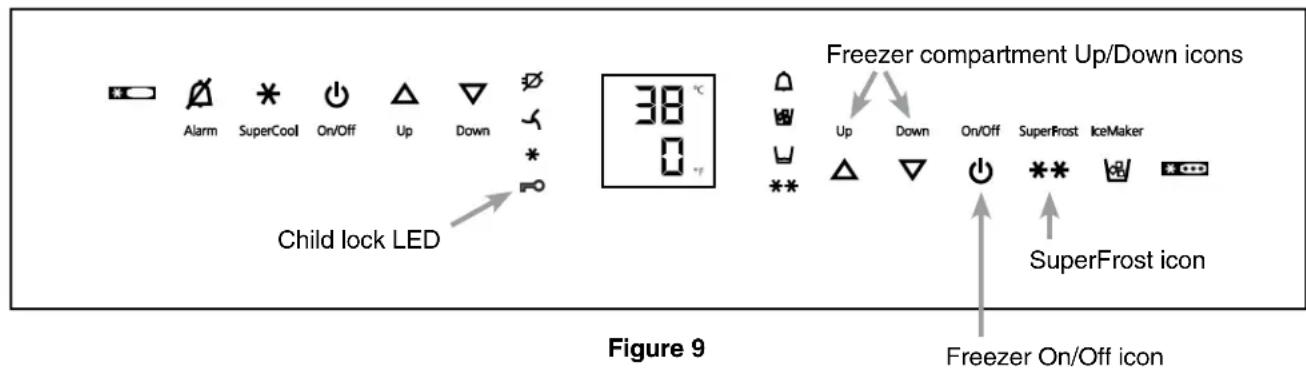
How to activate the setup mode - Figure 9
- Touch the SuperFrost icon for approximately five seconds
- the SuperFrost LED** turns on for 5 seconds
- after 5 seconds 5 will flash in the display.
The appliance is in the setup mode now.
You can select the setup mode functions by touching the freezer compartment Up/Down icons.
Note
In the setup mode the display will flash continuously.
Exit setup mode:
- Touch the freezer compartment On/Off icon. The appliance will change back to normal operation.
5 = Sabbath mode
This feature considers the Religious requirements on Sabbath or Holidays. When the Sabbath mode is active some functions of the electronic controls are switched off.
The door can be opened and closed at any time.
• The lighting remains off.
- The cooling fan remains in its actual state: If it is on it remains on, if it is off it remains off.
• There is no door alarm.
• There is no temperature alarm.
- Defrost cycles are independent of the number of times and length of door openings.
- The unit will return into Sabbath Mode after a power failure.
How to activate the Sabbath mode
- Activate the setup mode by touching the SuperFrost icon for 5 seconds.
- the display shows 5
- Touch the SuperFrost icon

flowchart
graph LR
    A["- the display shows"] --> B["Box 51"]
- Touch the SuperFrost icon again

flowchart
graph LR
    A["the display shows"] --> B["MENU"]
    C["the Sabbath mode is activated."] --> B
- Exit setup mode by touching the freezer compartment On/Off icon.
Sabbath mode switches off automatically after 120 hours if it is not manually switched off beforehand.
How to deactivate the Sabbath mode
- Activate the setup mode by touching the SuperFrost icon for 5 seconds.
- the display shows 5
- Touch the SuperFrost icon

text_image
- the display shows → 50- Touch the SuperFrost icon again

text_image
- the 5 symbol → [S ← MENU 5] in the display disappears.the Sabbath mode is deactivated.
- Exit setup mode by touching the freezer compartment On/Off icon.
C = Child lock
The child lock is designed to protect the appliance from being turned off accidentally.
How to activate the child lock
- Activate the setup mode by touching the SuperFrost icon for 5 seconds
- Touch the freezer compartment Down icon until C appears in the freezer temperature display.
- Touch the SuperFrost icon
- the display shows
- Touch the SuperFrost icon again
- the LED 📄 is lit and the child lock is activated.
- Exit setup mode by touching the freezer compartment On/Off icon.

How to deactivate the child lock
- Activate the setup mode by touching the SuperFrost icon for 5 seconds.
- the display shows
- Touch the SuperFrost icon
- the display shows
- Touch the SuperFrost icon again
- the LED ➕ goes out. The child lock is deactivated.
- Exit setup mode by touching the freezer compartment On/Off icon.


F = Drop symbol reset
After the water filter has been changed the drop symbol on the display must be reset.
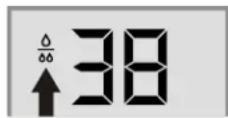
How to reset the drop symbol
- Activate the setup mode by touching the SuperFrost icon for 5 seconds.
- Touch the freezer compartment Down icon until F appears in the freezer temperature display.
- Touch the SuperFrost icon
- the display shows
- Touch the SuperFrost icon again
- the display shows
• The drop symbol disappears. - Exit setup mode by touching the freezer compartment On/Off icon.
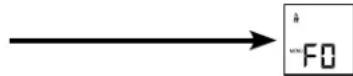
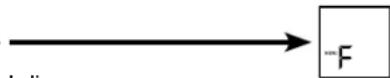
= Ice maker function test
Activation by service personnel only.
text_image
Alarm SuperCool On/Off Up Down Child lock LED 38 °C 0 °F Freezer compartment Up/Down icons Up Down On/Off SuperFrost IceMaker ** SuperaFrost icon Freezer On/Off icon Figure 9Setup Mode - Figure 10
E = Water quantity for ice cube tray
If the ice cubes produced by the ice maker are too small, the inflowing water quantity can be adjusted.
How to adjust the water quantity
- Activate the setup mode by touching the SuperFrost icon for 5 seconds.
- Touch the freezer compartment Down icon until E appears in the freezer temperature display.
- Touch the SuperFrost icon
- the display shows
- Touch the freezer compartment Up icon once only so E4 appears in the display.

IMPORTANT
Do not increase for more than one step. If the adjusted value is too high, the ice cube tray of the ice maker could overflow.
- Touch the SuperFrost icon again.
- Exit setup mode by touching the freezer compartment On/Off icon.
Check the ice cube size within the next days. If the ice cubes are still smaller than desired, follow the steps above again.
b = Biofresh temperature adjustment
You can adjust the temperature in the BioFresh drawers.
How to adjust the Biofresh temperature
- Activate the setup mode by touching the SuperFrost icon for 5 seconds.
- Touch the freezer compartment Down icon until b appears in the freezer temperature display.
- Touch the SuperFrost icon
- the display shows
- Touch freezer compartment
Up/Down icons to select
b6-b9 to increase the temperature, b4-b1 to reduce the temperature.

IMPORTANT
At values b4 - b1 the temperature in the drawers can drop below 32^ F ( 0^ C). Stored goods could freeze.
- Touch the SuperFrost icon at the desired value.
- Exit setup mode by touching the freezer compartment On/Off icon.
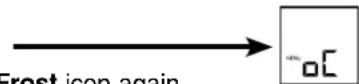
□ = Temperature display mode
You can choose the unit of temperature for the display in degrees Fahrenheit or degrees Celsius.
Note
The factory setting is degrees Fahrenheit.
How to change the temperature display to degrees Celsius
- Activate the setup mode by touching the SuperFrost icon for 5 seconds.
- Touch the freezer compartment Down icon until □ appears in the freezer temperature display.
- Touch the SuperFrost icon
- the display shows
- Touch the SuperFrost icon again
- the temperature reading is now displayed in degrees Celsius.
- Exit setup mode by touching the freezer compartment On/Off icon.
Note
To change the temperature display back to degrees Fahrenheit, follow the steps above.
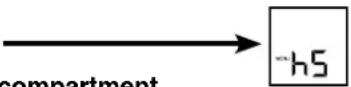
h = Display brightness
How to adjust the display brightness
- Activate the setup mode by touching the SuperFrost icon for 5 seconds.
- Touch the freezer compartment Down icon until h appears in the freezer temperature display.
- Touch the SuperFrost icon
- the display shows
- Touch the freezer compartment
Up/Down icons to select
h 0 = minimum to
= maximum brightness
- Touch the SuperFrost icon at the desired value.
- Exit setup mode by touching the freezer compartment On/Off icon.
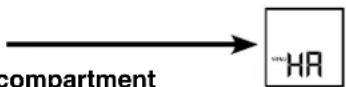
H = Lower hinge heating control
If condensed water appears in the lower hinge area or on the base plate between refrigerator and freezer compartment, increase the output of the heating located behind the base plate.
The factory setting is set to HA = medium output
How to change the heating output
- Activate the setup mode by touching the SuperFrost icon for 5 seconds
- Touch the freezer compartment Down icon until H appears in the freezer temperature display.
- Touch the SuperFrost icon
- the display shows
- Touch freezer compartment
Up/Down icons to select
HR = at slight condensation
H I = at heavy condensation
HO = heating off
- Touch the SuperFrost icon at the desired value.
- Exit setup mode by touching the freezer compartment On/Off icon.
Note
With normal ambient conditions no condensation will appear. With high humidity and low ambient temperature this feature helps to prevent condensation.
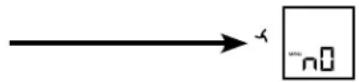
n = Reset air filter LED
After the air filter in the toe kick area has been cleaned the air filter LED must be reset. For how to clean the air filter refer to chapter "Cleaning".
How to reset the air filter LED
- Activate the setup mode by touching the SuperFrost icon for 5 seconds.
- Touch the freezer compartment Down icon until appears in the freezer temperature display.
- Touch the SuperFrost icon
- the display shows
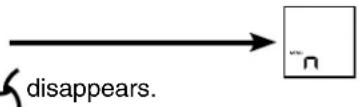
- Touch the SuperFrost icon again
- the display shows
• The air filter LED disappears. - Exit setup mode by touching the freezer compartment On/Off icon.
Freezer compartment Up/Down icons
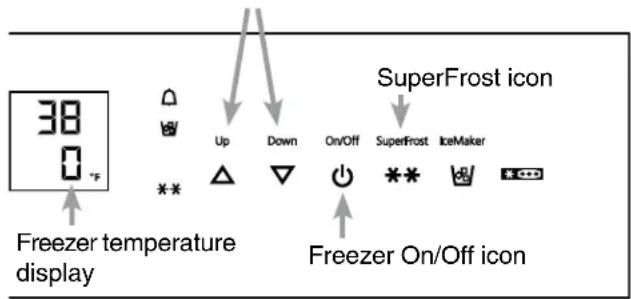
text_image
38 0 °F Up Down On/Off SuperFrost icon SuperFrost IceMaker ** * Freezer temperature display Freezer On/Off iconFigure 10
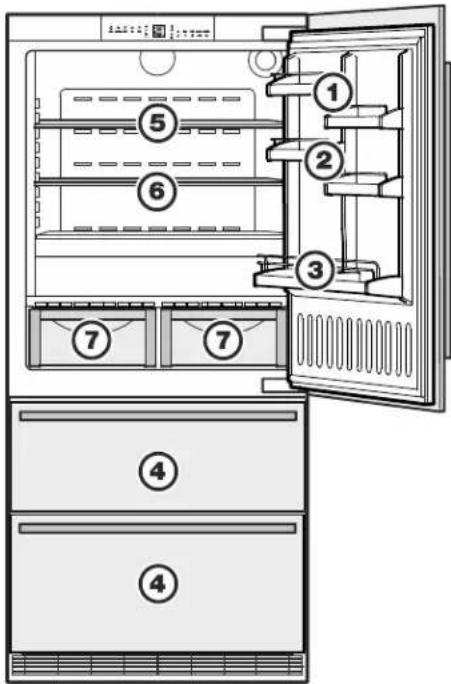
Arranging Food - Figure 11
text_image
Diagram of an open refrigerator with numbered compartments and labeled doors for identificationFigure 11
(1) Butter, cheese
(2) Eggs
(3) Gallon containers, cans, drinks, bottles
(4) Frozen food, ice cubes
(5) Meat and sausage products, dairy products
(6) Baked goods, pre-cooked meals
(7) Fruit, vegetables, salad (at high humidity setting)
Meat and sausage products, dairy products (at low humidity setting). Refer to chapter "Biofresh Compartment" for explanation.
IMPORTANT
- Liquids and food which give off or absorb odors and flavors should always be stored covered or in closed containers.
- High-percentage alcohols should be tightly sealed and stored upright.
- Fruit, vegetables and salad can be stored unpacked in the bins.
Shelf Arrangement
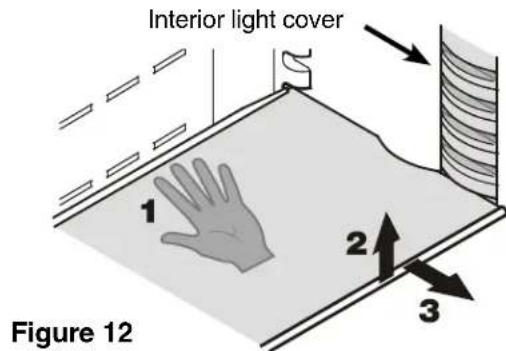
Repositioning the shelves - Figure 12
- Hold the shelf underneath with your hand to avoid from tipping down backwards when removing.
- Lift the shelf at the front.
- Remove the shelf forward until the circular cutout of the shelf is in line with the interior light cover.
- Lift the shelf up or down and replace in the desired position.
text_image
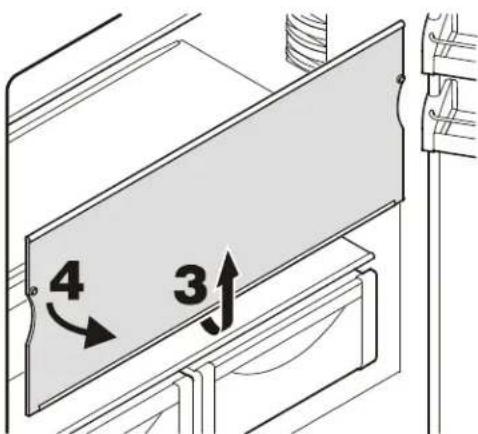
Interior light cover 1 2 3 Figure 12Removing the shelves - Figure 13
- Follow the first three steps in the chapter above.
- Lift the shelf down and stop just over the upper vegetable bin.
- Move the front of the shelf upwards until the shelf is in a vertical position.
- Turn the shelf out at left and remove.
text_image
4 3↑Figure 13
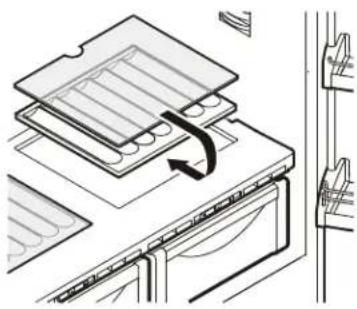
Bottle tray
The tray above the BioFresh compartment can be used for storing bottles horizontally.
Remove glass plate and reinsert under the tray - Figure 14.
natural_image
Diagram of a kitchen appliance with a tray and door, showing internal components and a rotation arrow (no text or symbols)Figure 14
Interior Light - Figure 17
The interior light is located at the left, right and top in the refrigerator compartment and above each drawer in the freezer compartment.
It turns on if the refrigerator door or one freezer drawer is opened.
Figure 17
text_image
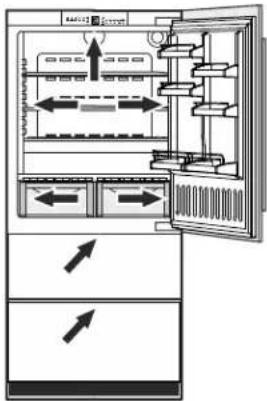
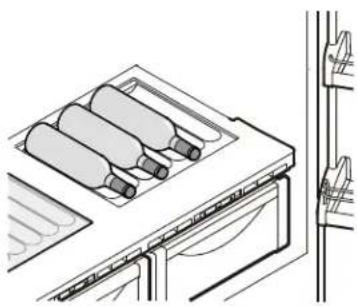
Diagram of a refrigerator interior showing airflow direction and component placement with arrows indicating movementThe cavities in the plate ensures secure placement of the bottles - Figure 15.
IMPORTANT
When storing tall bottles horizontally, the gallon rack must be relocated to a higher position.
natural_image
Diagram of a kitchen appliance with three cylindrical bottles on top, showing internal structure and exterior panel (no text or symbols)Figure 15
The light turns off automatically if the refrigerator door or one freezer drawer has been opened for approximately 15 minutes. The audible alarm sounds at the same time.
The light intensity of the LED light corresponds to laser class 1/1M.
IMPORTANT
The light cover may only be removed by customer service staff.
CAUTION!
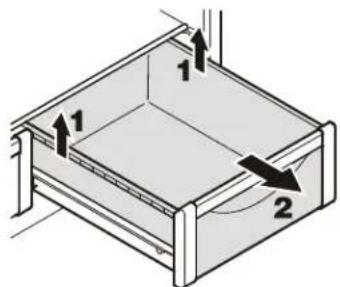
To remove the BioFresh drawer
Pull the drawer straight out, grip at the back and lift out - Figure 16.
To install the BioFresh drawer
Place the drawer on the rails. The rails must be fully extended and aligned with the front of the drawer. Slide the drawer in.
text_image
Diagram of a 3D box with labeled parts and directional arrows indicating movement or forceFigure 16
Risk of eye damage.
If the cover is removed, do not look directly at the light through optical lenses from a close distance.
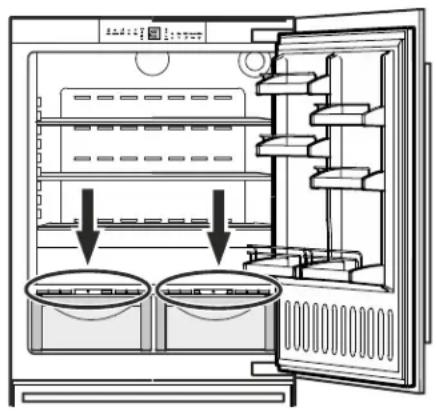
BioFresh Compartment - Figure 18
The BioFresh compartment maintains food freshness up to 3 times longer than in standard refrigerators.
The constant temperature just above 32^ F ( 0^ C) and the adjustable humidity provides the ideal storage conditions for different types of food.
The temperature of the BioFresh compartment (simultaneously) can be adjusted.
Refer to chapter Setup Mode - b = Biofresh temperature adjustment
Figure 18
natural_image
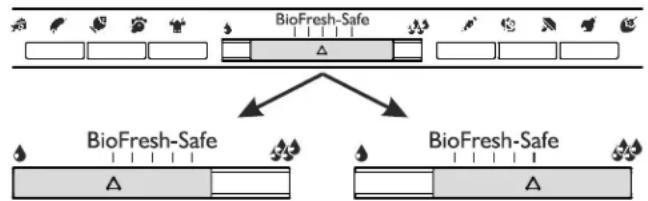
Diagram of an open refrigerator with two circular compartments and arrows indicating interior components (no text or symbols)Humidity selection
flowchart
graph TD
    A["Sample"] --> B["BioFresh-Safe"]
    B --> C["Process Unit 1"]
    B --> D["Process Unit 2"]
    C --> E["Output"]
    D --> F["Output"]
Slide control to left
This setting is suitable for dry or wrapped food like dairy products, meat, fish, cold cuts.
Slide control to right
This setting is suitable for storing unwrapped food with a high moisture content such as salad, vegetables and fruit.
Notes
- The humidity in the compartment depends on the moisture content of the food and the frequency a drawer is opened.
- The fresher the product and the higher its quality, the longer the storage life.
- Unwrapped food should be stored separately. Wrap food if there is not enough space in the drawers. To avoid bacterial spoilage, different types of meat should not come into contact with each other. Keep meat packed separately.
- The following products should not be stored in the BioFresh compartment: hard cheese, potatoes, cold-sensitive vegetables such as cucumber, eggplant, avocados, semi-ripe tomatoes, zucchini, and all cold-sensitive tropical fruits such as pineapple, bananas, grapefruit, melons, mangoes, papaya, etc.
Storage Times
for food in the BioFresh compartment:
Dry setting
| butter | up to 30 days |
| cheese, soft | up to 30 days |
| milk, fresh | up to 7 days |
| sausage, cold cuts | up to 7 days |
| fish | up to 4 days |
| shellfish | up to 3 days |
| poultry up to 5 days | |
| pork | |
| large portions | up to 7 days |
| cut up | up to 5 days |
| beef | up to 7 days |
| game | up to 7 days |
Humid setting
| Vegetables, salad | |
| artichokes up to 21 days | |
| asparagus up to 14 days | |
| broccoli up to 14 days | |
| Brussels sprouts up to 30 days | |
| cabbage up to 180 days | |
| carrots up to 150 days | |
| cauliflower up to 21 days | |
| celery up to 30 days | |
| chicory up to 30 days | |
| Chinese cabbage up to 14 days | |
| curly kale up to 14 days | |
| fennel up to 21 days | |
| garlic | up to 180 days |
| green onions | up to 7 days |
| herbs | up to 30 days |
| iceberg salad, endives, lamb's lettuce | up to 21 days |
| kohlrabi | up to 14 days |
| leeks | up to 60 days |
| lettuce | up to 10 days |
| mushrooms | up to 7 days |
| peas | up to 10 days |
| radicchio | up to 21 days |
| radishes | up to 14 days |
| savoy cabbage | up to 60 days |
| spinach | up to 7 days |
Fruit
| apples | up to 180 days |
| apricots | up to 14 days |
| bilberries | up to 14 days |
| blackberries | up to 8 days |
| cherries | up to 14 days |
| black and red currants | up to 21 days |
| dates (fresh) | up to 60 days |
| figs (fresh) | up to 7 days |
| gooseberries | up to 21 days |
| grapes up to 90 days | |
| kiwi fruits | up to 120 days |
| peaches | up to 30 days |
| pears | up to 120 days |
| plums | up to 21 days |
| quinces | up to 90 days |
| raspberries | up to 5 days |
| rhubarb | up to 21 days |
| strawberries | up to 5 days |
Freezer Compartment Description
The ice maker is located in the upper drawer on the left side.
The ice cubes fall out of the ice maker into the drawer.
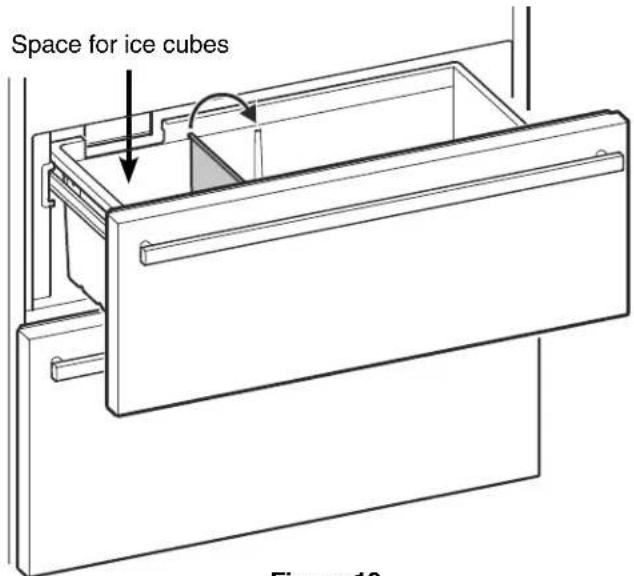
The upper drawer is divided by a partition wall for storing ice cubes in the left part of the drawer (Figure 19).
If you need more ice cube storage space, pull up the partition wall and refit on the adjacent rail (Figure 19).
If you need the whole drawer for ice cube storage, the partition can be removed by pulling it upwards and out.
If you need the whole upper drawer for freezing and storing food, turn off the ice maker (see chapter "Turning the Ice Maker On and Off").
The bottom drawer is intended for freezing and storing food. Ice cubes can also be stored in this drawer.
text_image
Space for ice cubes Figure 10Figure 19
Removing the Freezer Compartment Containers
The containers of both freezer drawers can be removed.
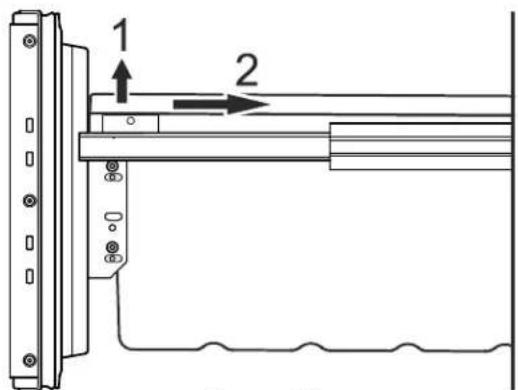
- Unlatch the container on the left and right corners by pulling upwards (1) - Figure 20.
- Slide the container backwards (2) - Figure 20.
text_image
1 2Figure 20
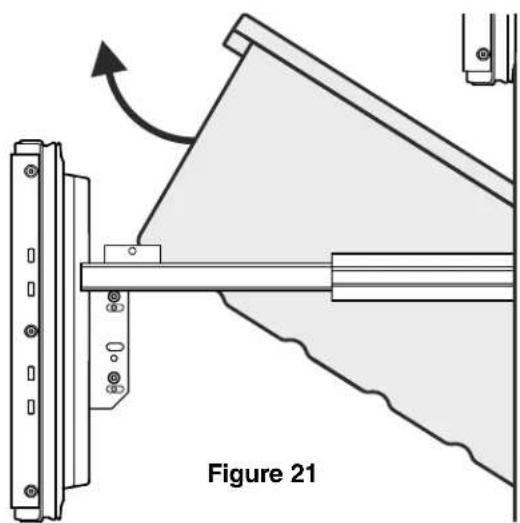
- Tilt the container at an angle and remove - Figure 21.
natural_image
Technical diagram of a mechanical assembly with labeled component 'Figure 21' and directional arrow (no readable text or symbols)Install the container in the reverse order.
Freezing
Fresh food should be frozen completely and as rapidly as possible. This is provided by the SuperFrost feature and ensures that the nutritional value, appearance and flavor of the food remains intact.
Freezing with SuperFrost -
Figure 22
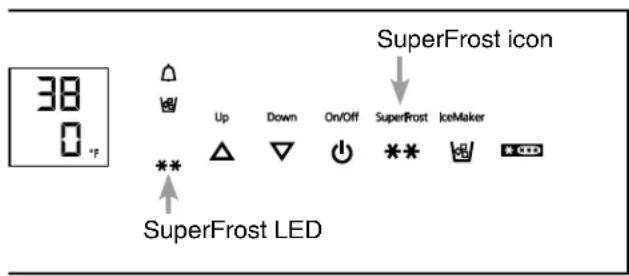
- Touch the SuperFrost icon briefly so the LED** turns on.
- Wait 24 hours.
- Then place the fresh food inside the freezer.
- The SuperFrost function turns off automatically. Depending on the quantity of food placed in the freezer, this will normally be between 30 and a maximum of 65 hours.
The freezing process is now complete; the
SuperFrost LED ** will turn off, and the freezer will change back to normal energy-saving operation.
IMPORTANT
You should not turn on the SuperFrost function:
• when placing frozen food in the freezer;
- when freezing up to approximately 4-1/2 lbs (2 kg) fresh food daily.
text_image
38 0 °F Up Down On/Off SuperFrost icon SuperFrost LED SuperFrost IceMakerFigure 22
Freezing and Storage
- Pack frozen food in standard freezer bags or reusable plastic, metal or aluminum containers.
- Do not allow fresh food which is to be frozen to come into contact with food already frozen. Always keep packages dry in order to avoid them sticking together.
- Always write the date and contents on the package and do not exceed the stated storage time for the food. This prevents spoiling.
- Pack food which you are freezing yourself in quantities right for your household. To ensure the food freezes right through quickly, the following quantities should not be exceeded per package:
- fruit, vegetables: up to 2-1/4 lbs (1 kg);
- meat: up to 5-1/2 lbs (2.5 kg).
- Do not freeze bottles and cans which contain carbonated drinks as they might burst. Drinks can be cooled down quickly, but take the bottles out of the freezer compartment after an hour at the most.
- Only take out as much food as needed for thawing. Cook food which has been thawed as quickly as possible. Frozen food can be thawed in the following ways:
- in a microwave oven
- in the refrigerator: the safer way to thaw food because there is less chance of bacteria growth. Use this method for high density food such as roasts or poultry.
Safety Instructions and Warnings for the Automatic Ice Maker
- The ice maker is designed exclusively to make ice cubes in quantities needed by a household.
- All repairs and work on the ice maker may only be done by customer service personnel or other appropriately trained personnel.
- Do not consume or use the first three batches of ice. This applies both to using the appliance for the first time and also using it after it has not been used for a long period of time.
- The manufacturer cannot accept liability for damage caused by equipment or water lines between the solenoid valve and the water supply.
- The ice maker will only make ice cubes if the freezer compartment is operating and both freezer drawers are completely closed.
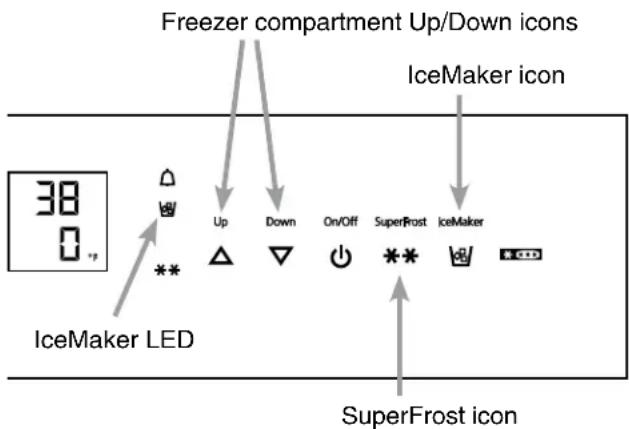
Turning the Ice Maker On and Off (Figure 23)
To turn the ice maker on
- Touch the IceMaker icon so the IceMaker LED comes on.
To turn the ice maker off
If you do not need any ice cubes, the ice maker can be turned off independently of the freezer compartment.
- Touch the IceMaker icon so the IceMaker LED goes out.
Ice maker at vacations
See chapter "Vacation tips"
Ice Maker Description
After you start the ice maker for the first time, it may take up to 24 hours before the first ice cubes are ready.
The ice cubes fall out of the ice maker into the drawer (see chapter "Freezer compartment description").
IMPORTANT
The first three batches of ice must not be consumed or used.
When the ice reaches a certain level in the drawer, the appliance stops producing ice automatically.
The production capacity is 100 - 120 ice cubes in 24 hours at a temperature of 0^ F (-18°C) inside the freezer compartment.
To have the maximum capacity of approx. 150 ice cubes in 24 hours, activate the SuperFrost function.
Be aware that this increases the energy consumption because the compressor will run constantly.
Note
If the IceMaker LED flashes, the ice maker is not being supplied with water. Check if the shut off valve of the water supply is opened.
text_image
Freezer compartment Up/Down icons IceMaker icon 38 0 °# Up Down On/Off SuperFrost IceMaker IceMaker LED SuperFrost iconFigure 23
Defrosting
Refrigerator compartment
The refrigerator compartment defrosts automatically. The water that forms on the rear wall drains into a reservoir at the back of the appliance and evaporates automatically through the compressor heat.
Freezer compartment
The NoFrost system automatically defrosts the freezer compartment. Any moisture will collect on the evaporator and freeze. It will periodically defrost and evaporate.
Cleaning
WARNING!
- To prevent possible injury due to an electrical shock, be sure to disconnect the power cord or turn off the circuit breaker before cleaning the appliance.
- To avoid injury or damage, do not use steam cleaning equipment to clean the appliance.
- To avoid short-circuits, ensure no cleaning water penetrates into the electrical components when cleaning the appliance. Do not use a sponge or cloth that is overly wet.
Do not use abrasive or scouring sponges. Do not use concentrated cleaning agents. Never use abrasive or acid cleaners or chemical solvents.
- Remove all food from the refrigerator and freezer compartments and store in a cool place temporarily. Store frozen food in other freezers if available.
- Remove the door racks as shown in Figure 24.
- Remove The BioFresh drawers as shown in Figure 16.
- Remove glass shelves as shown in Figure 13.
- Remove the freezer drawer containers as shown in Figure 20 and Figure 21.
- A compound of lukewarm water and dishwasher detergent is recommended for cleaning the appliance and equipment parts.
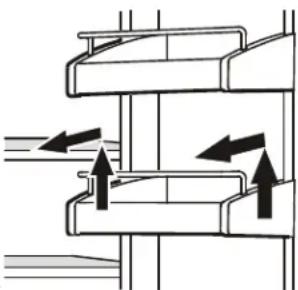
natural_image
Pure mechanical diagram showing two parallel plates with directional arrows indicating movement or force (no text or symbols)Figure 24
IMPORTANT
Do not clean the equipment parts in a dishwasher. Strips of these parts could get loose.
• Dry all parts well with a cloth.
- Do not damage or remove the model plate on the inside of the appliance. It is very important for servicing your appliance.
• Install all equipment parts and replace the food in the appliance.
• Turn the appliance on.
Cleaning instructions for stainless steel panels
Keep your stainless steel looking new by cleaning with a good quality stainless steel cleaner or polish monthly. High quality stainless steel cleaners and conditioners are commercially available.
Do not clean with steel wool pads or abrasive pads. Do not use cleaners that are not for use on stainless steel, such as glass, tile or counter cleaners. These types of cleaners can damage the surface permanently.
Cleaning the Air Filter
- Open the bottom freezer drawer and unscrew the ventilation grille - Figure 25.
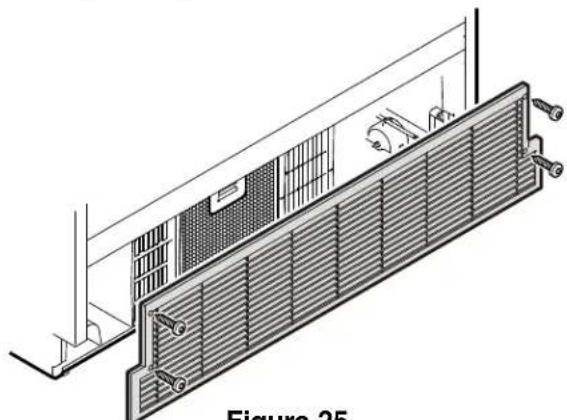
natural_image
Technical line drawing of a ventilation duct system with mounting brackets and ventilation grilles (no text or symbols)Figure 25
- Clean the filter in a dishwasher or by hand with lukewarm water and dishwasher detergent.
• Install the air filter in the reverse order.
• Install the ventilation grille.
• Install all equipment parts and replace the food in the appliance. - Turn the appliance on.
- Reset the air filter LED.
Refer to chapter Setup Mode -Ω = Reset air filter LED
- Push down the button of the air filter, tilt to the front and remove - Figure 26.
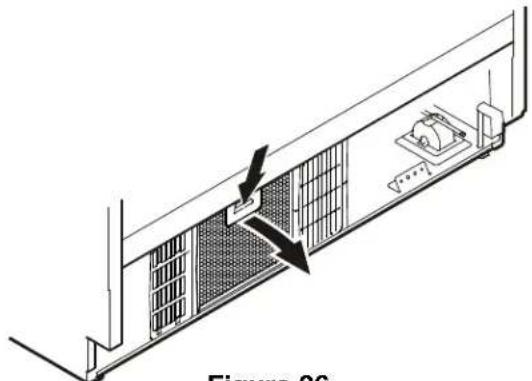
natural_image
Technical line drawing of a server rack with ventilation grilles and a door, showing no text or symbolsFigure 26
Vacation Tips (Figure 27)
Short vacations
It is not necessary to turn off the refrigerator and freezer if you will be away for less than four weeks.
- Shut off the water supply to the ice maker.
When the IceMaker LED starts blinking, the remaining water in the supply line is in the ice maker.
- Leave the ice maker on and working for one day so that the remaining ice cubes are ejected.
- Touch the IceMaker icon so that the IceMaker LED goes out.
- Transfer all ice cubes to the right part of the drawer or to the bottom drawer.
• Use all perishables. - Freeze other items.
Long vacations
If you will be away for a month or more:
- Shut off the water supply to the ice maker.
When the IceMaker LED starts blinking, the remaining water in the supply line is in the ice maker.
- Leave the ice maker on and working for one day so that the remaining ice cubes are ejected.
- Touch the IceMaker icon so that the IceMaker LED goes out.
- Remove all ice cubes from the drawer and dispose of them.
- Remove all food from the refrigerator and freezer compartments.
• Turn off the refrigerator and freezer compartments.
• Clean the appliance. Refer to Cleaning. - Leave the door and both freezer drawers open to prevent unpleasant odors. This will also keep mold from building up.
Turning on the ice maker after vacation
- Open the water supply to the ice maker.
- Touch the IceMaker icon so that the IceMaker LED comes on.
IMPORTANT
Do not consume or use the first three batches of ice after the ice maker has not been used for longer than one week.
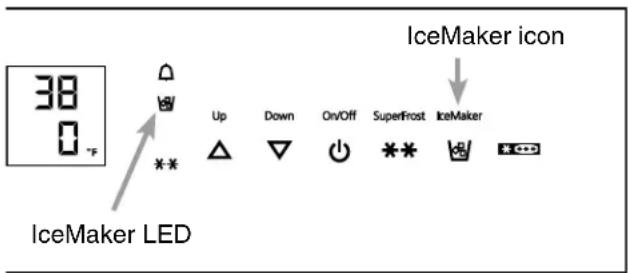
text_image
38 0 °F IceMaker LED Up Down On/Off SuperFrost IceMaker IceMaker iconFigure 27
Troubleshooting
Your appliance is designed and manufactured for a long life and reliable operation.
If a problem occurs during operation, check whether it is due to an operating error. Please note that even during the warranty period, some repair costs may be your responsibility.
You may be able to correct the following faults by checking the possible causes yourself:
| Problem Possible Cause and Remedy | |
| Appliance does not work, display is off | - Is the appliance turned on properly?- Is the power cord properly inserted in the outlet?- Is the circuit breaker or fuse in operating condition? |
| The interior light does not come on | - Is the appliance turned on? |
| Motor seems to run too long | - Is the ambient temperature too hot? See Safety Regulations.- Has the appliance been opened too often or left open too long?- A large amount of food has been added.- Unit is in SuperCool mode. Verify unit is in normal operation mode. |
| The temperature is not cold enough | - Is the temperature setting correct? See Setting The Temperature.- Has an excessive amount of fresh food been placed in the appliance?- Does a separately installed thermometer show the correct reading?- Is the ventilation system working properly?- Is the appliance set up too close to a heat source? |
| Freezer temperature display shows two dashes “- -”. | The freezer temperature display will only show temperatures that are below freezing.When initially starting the freezer, it will not be below freezing. It will take three to five hours (depending on ambient conditions) for freezing temperatures to be achieved and thus displayed numerically.This may also occur after a power failure. |
Ice Maker Troubleshooting
You may be able to correct the following faults yourself:
| Problem Possible Cause and Remedy | |
| Ice maker cannot be turned on | Is the appliance connected to the electrical outlet? |
| Ice maker is not making any ice | - Is the ice maker turned on?- Is the water supply line open?- Are both freezer drawers closed properly? |
Customer Service
If none of the above possible causes apply, and you can not rectify the fault yourself, contact your nearest customer service representative.
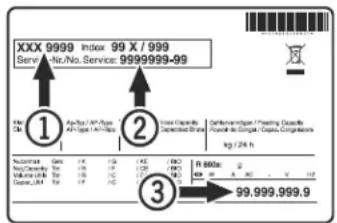
Indicate the type (1) of appliance, service number (2) and the appliance / serial number (3) as indicated on the model plate.
text_image
XXX 9999 Index 99 X / 999 Serv./No. Service: 9999999-99 ① A/R/P/ A/R Type A/R Type = A/R Type ② Inse Decaite Decaite (Société) Type Decaite (Société) Type Kg / 24 h ③ 99.999.999.9The position of the model plate is shown in the section entitled Description of the Appliance.
Appliance Information
Record this information when the appliance is installed.
Type Designation: ____
Service Number: ____
Appliance / Serial Number: ____
Date of Purchase: ____
Where Purchased: ____
LIEBHERR WARRANTY PLAN
FULL TWO YEAR WARRANTY
For two years from the date of original purchase, your Liebherr warranty covers all parts and labor to repair or replace any part of the product which proves to be defective in materials or workmanship.
FULL FIVE YEAR WARRANTY
For five years from the date of original purchase, your Liebherr warranty covers all parts and labor to repair or replace any components that prove to be defective in materials or workmanship in the sealed system. The “Sealed System” means only the compressor, condenser, evaporator, drier and all connecting tubing.
LIMITED 6TH THROUGH 12TH YEAR WARRANTY
From the 6th through 12th year from the date of original purchase, your Liebherr warranty covers all parts that prove to be defective in materials or workmanship in the Sealed System (parts only).
TERMS APPLICABLE TO EACH WARRANTY
All service provided by Liebherr under the warranty must be performed by authorized Liebherr service representatives, unless otherwise specified by Liebherr. Service will be provided in the home during normal business hours. This warranty applies only to products installed for normal residential use. Details regarding a non-residential warranty are available on request.
The warranty applies only to products installed in Canada and any one of the fifty states of the United States or the District of Columbia. This warranty does not cover any parts or labor to correct any defect caused by negligence, accident or improper use, maintenance, installation, service or repair, including but not limited to improper removal and reinstallation of the condensing unit.
THE WARRANTIES DESCRIBED ABOVE ARE MADE EXPRESSLY IN LIEU OF ANY OTHER WARRANTIES, EXPRESSED OR IMPLIED, INCLUDING ANY IMPLIED WARRANTY OF MERCHANTABILITY OR FITNESS FOR A PARTICULAR PURPOSE, AND OF ANY OTHER OBLIGATION OR LIABILITY ON THE PART OF LIEBHERR. IN NO EVENT SHALL LIEBHERR BE LIABLE FOR SPECIAL, INCIDENTAL OR CONSEQUENTIAL DAMAGES ARISING FROM THE BREACH OF THESE WARRANTIES OR ANY OTHER WARRANTIES, WHETHER EXPRESS, IMPLIED OR STATUTORY.
Some States do not allow the exclusion or limitation of incidental or consequential damages so the above limitation or exclusion may not apply to you. This warranty gives you specific legal rights and you may also have other rights which vary from State to State.
To receive parts and/or service and the name of the Liebherr authorized service representative nearest you, contact your Liebherr dealer or distributor or contact the Liebherr designated national service provider:
in the US: Service-appliances.us@liebherr.com, or call 1-866-LIEBHER or 1-866-543-2437 in Canada: www.euro-parts.ca, or call 1-888-LIEBHER, 1-888-543-2437.
For Service in the U.S.
Liebherr Service Center
Toll Free: 1-866-LIEBHER or 1-866-543-2437
Email: Service-appliances.us@liebherr.com
PlusOne Solutions, Inc.
3501 Quadrangle Blvd, Suite 120
Orlando, FL 32817
For Service in Canada
Liebherr Service Center
Toll Free: 1-888-LIEBHER or 1-888-543-2437
www.euro-parts.ca
EURO-PARTS CANADA
39822 Belgrave Road
Belgrave, Ontario, N0G 1E0
Phone: (519) 357-3320
Fax: (519) 357-1326