
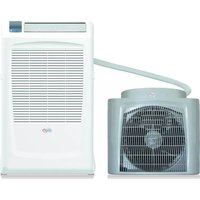
Polifemo Brizo - Air conditioner Argoclima - Free user manual and instructions
Find the device manual for free Polifemo Brizo Argoclima in PDF.


| Product Type | Portable Evaporative Air Cooler with Fan and Mist |
| Model | Polifemo Brizo |
| Brand | Argoclima |
| Power Supply | 220-240 V~ / 50 Hz |
| Fan Speeds | 4 speeds (1-4) |
| Fan Modes | Normal, Nature, Sleeping |
| Misting Function | Yes, ultrasonic nebulizer with demineralized water |
| Oscillation | Yes, horizontal rotation (grille) |
| Timer | Up to 8 hours (off timer and preset) |
| Control Panel | Touch-sensitive buttons |
| Remote Control | Yes, with battery (AAA x2, not included) |
| Water Tank Capacity | Not specified (typical ~1-2 L) |
| Water Tank Refill | Removable rear tank, fill to max level |
| Water Type | Demineralized water only |
| Auto Shut-off (Sleep Mode) | After 8 hours |
| Auto Shut-off (Inactivity) | After 15 hours (except Sleep mode) |
| Display Off | After 40 seconds of inactivity |
| Cleaning | Wipe exterior with soft damp cloth; clean tank daily |
| Safety Features | Overheat protection, water shortage protection, child lock (not mentioned) |
| Operating Temperature | Up to 40°C |
| Package Contents | Unit, remote control, manual |
| Country of Origin | Made in China |
Frequently Asked Questions - Polifemo Brizo Argoclima
User questions about Polifemo Brizo Argoclima
0 question about this device. Answer the ones you know or ask your own.
Ask a new question about this device
Download the instructions for your Air conditioner in PDF format for free! Find your manual Polifemo Brizo - Argoclima and take your electronic device back in hand. On this page are published all the documents necessary for the use of your device. Polifemo Brizo by Argoclima.
USER MANUAL Polifemo Brizo Argoclima
natural_image
White portable air conditioner with fan and control panel (no visible text or symbols)OPERATING
INSTRUCTIONS
Read the instructions carefully before operating the appliance or carrying out maintenance operations.
Observe all the safety instructions; failure to observe the instructions may lead to accidents and/or damage.
GENERAL SAFETY INFORMATION
- Only use this appliance as described in this manual. Any other use not recommended by the manufacturer may cause fire, electric shock or injury to people.
- Make sure that the type of mains power complies with the electrical requirements of the appliance (220-240 V\~/50 Hz).
- This appliance can be used by children aged from 8 years and above and people with reduced physical, sensory or mental capabilities or lack of experience and knowledge if they have been given supervision or instruction concerning use of the appliance in a safe way and understand the hazards involved.
• Children shall not play with the appliance. - Cleaning and user maintenance shall not be made by children without supervision.
- This product is not a toy. Children should be adequately supervised to ensure that they do not play with the appliance.
- Disconnect the mains power when the appliance is not used or for cleaning operations.
• This product is only for household use
In the event of any problems, switch off the appliance immediately, do not attempt to repair it, and take it to your local After-Sales Service Centre.
Do not remove or replace individual parts, as this could affect product safety.

natural_image
Line drawing of a vertical stand-mounted device with a curved arm and cable, no text or symbols present
Do not disassemble the appliance!
Do not touch the power cord with wet or damp hands; risk of electric shock.

Do not insert objects into the appliance grilles.This could cause leaks, short-circuits and damage to the product.  Warning!!! Do not touchRisk of electric shock! Warning!!! Do not touchRisk of electric shock! | Do not spray flammable substances or pesticides near the product as they could damage it.  Prohibited! Prohibited! |
Do not use the appliance if the cord or plug is damaged. Do not attempt to change the power cord yourself. If the power cord is damaged, it must be replaced by the manufacturer, dealer or a similarly qualified person so as to avoid any safety risks. [IMAGE]Warning!!! Do not touchRisk of electric shock! [IMAGE]Warning!!! Do not touchRisk of electric shock! | Do not bend or stand heavy objects on the power cord.   Warning!!! Do not touchRisk of electric shock! Warning!!! Do not touchRisk of electric shock! |
Turn the switch off and unplug before carrying out any maintenance work or moving the appliance.Always unplug from the socket when the appliance is not in use.  Compulsory! Compulsory! | To disconnect the appliance, press the OFF button and unplug from the socket. Only pull on the plug.Do not pull the cord. Otherwise the cable may be damaged or leaks, etc. may occur.   Warning!!! Do not touchRisk of electric shock! Warning!!! Do not touchRisk of electric shock! |
Do not pour water over the product: risk of shortcircuits and damage to the product.
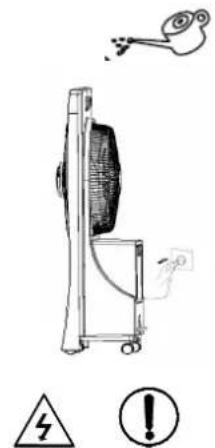
Warning!!! Do not touch Risk of electric shock!
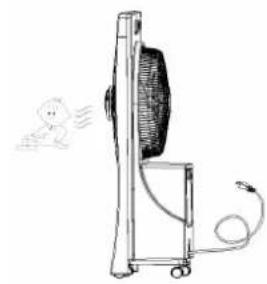
Do not leave the airflow directed towards children for long periods of time: it is not good for their health.
natural_image
Simple line drawing of a desktop electric fan with a cartoon character nearby (no text or symbols)
Prohibited!
DESCRIPTION OF PARTS
FRONT VIEW

REAR VIEW

- Soft touch control panel 7. Rear grille
- Air guide louver 8. Blade
- Mist disk 9. Water tank
- Front panel 10. Rear panel
- Base 11. Push for tank opening
-
Castor 12. Drain plug
-
Power cord
HOW TO USE THE APPLIANCE
The appliance does not need to be installed.
When the product it's used for first time, tear off the tape stuck on the unit and take out the paper tube in the water tank. Position the unit on a flat, stable surface and connect the power cord to a suitable power socket (220-240 V\~/50HZ).
When you move the appliance, use the handle on the back do not tilt or shake the unit to prevent the water from overflowing. Do not use this product in an area with high humidity, rich of dust or with a temperature exceeding 40^ C. This product can be used both as a fan, with 4 modes (Normal, Nature and Sleeping) and 4 fan speed options and as nebulizer.
MISTING FUNCTION
In this case the rear tank should be filled with demineralized water, up to but not exceeding the maximum level as indicated.
Through a high-frequency vibration (not audible and not harmful to people) the water under the tank is nebulized and sucked into the tube up to the misting plate where it is emitted into the room.
There is no need to heat or to add any chemical agent. The refreshing action of water can give a sense of well-being when the environment is dry. It's not possible to activate the misting function without water in the water tank. Do not fill the water directly on water channel or in the mist outlet, do not block the mist outlet during operation. When the water below the tank falls below the minimum level, the appliance emits a sound and the nebulizer switches off.
CONTROL PANEL AND AVAILABLE FUNCTIONS

All the buttons on the control panel are touch-sensitive: a light touch is enough to select the functions.
FAN ON/OFF: After putting through the power, touch the button Fan On/Off to turn on or turn off the fan.
MODE setting: Under unit on status, touch this button to change the sequence Normal -> Natural -> Sleeping with corresponding indicator on.
- Normal: Fan speed is constant
- Natural: Fan speed will automatically change, alternating periods of low, mediumg and high speed
- Sleeping: Fan speed will automatically change, alternating periods of low, medium and high speed according to preset program. The unit is defaulted to be turned off after 8 hours if any operation is performed.
SPEED: There are 4 ventilation speed: 1, 2, 3, 4. Under unit on status, touch with button to increase the fan speed from 1 (minimum speed) to 4 (maximum speed) with the corresponding indicator on. Touching again speed 4 it returns to speed 1.
TIMER/PRESET:
TIMER: Under unit on status, touching button Timer/Preset on control panel or on remote control, will be possible to set the timer off time in the sequence of 1 -> 2 -> 3 -> 4 -> 5 -> 6 -> 7 -> 8 -> cancel. The corresponding indicator will be on the panel.
PRESET: Under stand by status, touching the button Timer/Preset on the control panel or on the remote control will be possible to set the number of hours after which the product will start working with the following sequence (expressed in hours of operation) 1 -> 2 -> 3 -> 4 -> 5 -> 6 -> 7 -> 8 -> cancel. The indicator corresponding the selected sequence will be on on the panel.
MIST ON/OFF: Under unit on status touch this button to turn on or turn off this function. Humidity function it remains activated even when the operating period ends. The timer must therefore be deactivated manually if you do not wish it to remain active. Mist does not have Timer and Preset setting.
ROTATION: Under unit on status touch this button to turn on or turn off the grille rotation, the indicator will be on on the panel.
DISPLAY OFF Function: Under working status, if there is no operation after 40s, all the indicators will turn off. Press any button (except Fan ON/OFF button) to reactivate the indicator.
AUTO OFF Function: If there is no operation for consecutive 15h under any working status (except Sleeping mode) the unit will be turned off authomatically.
REMOTE CONTROL

The functions of the remote control correspond exactly to the functions of the control panel.
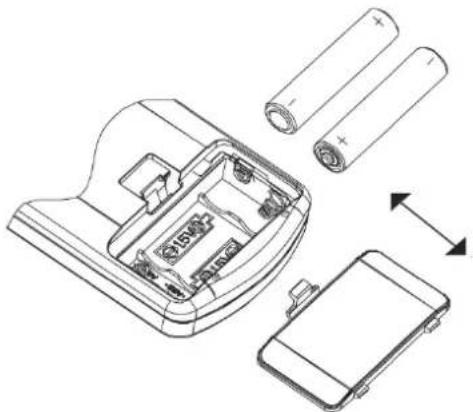
- Slide the cover open in the direction indicated by the arrow.
- Insert the batteries (AAA, LR03, 1,5 V - not provided) into the remote control and make sure the poles match.
- Put the cover back on.
- Point the remote control towards the receiver on the air conditioner.
- The remote control should be positioned within 6 metres from the receiver.
- There must be no obstacles between the remote control and the receiver.
- Do not drop or launch the remote control.
- Do not leave the remote control under strong sunlight or heating devices and other source of heat.
- Remove the batteries from the remote control when the latter is not used for a long time.
- If no sound is heard and the transmission symbol on the display does not flash, the batteries must be
replaced.
-
If the system resets when the remote control button is pressed, the electrical signal is poor and the batteries must be replaced.
-
Flat batteries must be disposed of correctly.
N.B.:
* The image depicts a general remote control, which contains nearly all the function keys. These may be of a slightly different material (depending on the model).
natural_image
Technical line drawing of a battery pack assembly with cylindrical batteries and internal components (no text or symbols)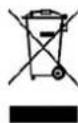
INFORMATION FOR THE CORRECT DISPOSAL OF BATTERIES IN ACCORDANCE WITH EUROPEAN DIRECTIVE 2006/66/EC and amendments Directive 2013/56/EC
Replace batteries when they are depleted. At the end of their life, batteries must be disposed of separately from unsorted waste. They must be taken to designated recycling centres or returned to a retailer providing this service. Separate disposal of batteries prevents potential negative effects on the environment and human health due to inadequate disposal, and also allows for recovering and recycling their constituent materials, resulting in significant savings in terms of energy and resources. The separate disposal obligation is underlined by the crossed-out dustbin symbol appearing on the battery. Illegal disposal of the product by the user implies administrative sanctions applied as per current regulations.
FILLING THE WATER TANK
THE TANK MUST BE FILLED WITH DEMINERALIZED WATER IN ODER TO OPERATE THE APPLIANCE IN MISTING MODE.
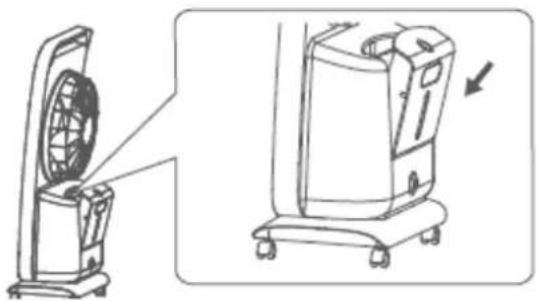
Place the unit on a stable and flat surface, to fill the tank follow the instructions below: Press the button on the upper side of the tank and remove it from its seat.

natural_image
Line drawing of two air purifiers with one fan and one motor, shown from different angles (no text or symbols)Plug to be unscrewed to drain the water generated by the humidification process
Unscrew the cap of the tank, fill it with clean demineralized water up to the maximum limit indicated on the tank and close the cap.

natural_image
Simple line drawing of a rectangular object with a small protrusion and a north arrow, no text or symbols present.Nut of the water tank
Reposition the tank in its seat and close.
natural_image
Technical line drawing of a portable air conditioner unit with front and side views (no text or symbols)MAINTENANCE AND STORAGE
WARNING: ALWAYS UNPLUG THE APPLIANCE BEFORE CLEANING OR MAINTENANCE PROCEDURES.
IMPORTANT: DO NOT SUBMERGE THE PRODUCT IN WATER.
Cleaning the outside surface of the appliance
Use a soft cloth to remove any dust from the product.
If this is not enough, use a soft cloth dampened with water and a mild detergent at a temperature not exceeding 50^ C. Let the
appliance dry completely before using it.
Do not use corrosive detergents or solvents such as petrol. Do not wash the appliance with water. Do not use oils, chemical substances or other items that may damage the surface to clean it.
Use a vacuum cleaner to remove dust from the air inlet/outlet grilles.
Cleaning the tank
Take out the tank once removed and fill it with water, shake it, empty it, repeat this operation several times.
Dry the tank with a cloth.
Water tank must be changed every day.
STORAGE
If the appliance is not used for prolonged periods, disconnect the power cord and store the appliance with this manual in its original packaging, in a cool and dry place. Remove the battery of remote control in case of prolonged activity.
TROUBLESHOOTING
| PROBLEM | POSSIBLE CAUSES | SOLUTION |
| Mist On/OFF indicator flickers, buzzer beeps, no mist | - No water in the water tank, water-lacking protection- The whole unit inclines, so that the float in the low water level- Enter protection mode | - Fill water to the water tank- Place the unit on a flat and solid surface and keep it stable- Pull out the plug of power cord and insert the plug again |
| There is water accumulated on the floor after activating Mist function for a while | The air circulation in the environment is not adequate and the humidity in the environment is high, therefore the water particles cannot spread and accumulate on the floor near the unit | - Keep good air circulation or turn on the fan function- It's recommended to not turn on the humidification function when the ambient humidity is high |
| Water leakage at the base | - During the moving the unit, the unit shakes too much or inclines too much- Water tank has cracks | - When moving the unit, keep the unit stable and make sure it is in small inclination angle- Bring the unit to the maintenance center to replace the water tank |
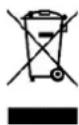
INFORMATION FOR CORRECT DISPOSAL OF THE PRODUCT IN ACCORDANCE WITH EUROPEAN DIRECTIVE 2002/96/EC
When this appliance reaches the end of its useful life, it must not be disposed of with household waste. It must be delivered to appropriate separated waste disposal plants or to dealers that provide a similar service. Separate waste disposal of an electrical appliance prevents potential negative effects on the environment and human health resulting from inadequate disposal, and also allows the materials from which it is made to be recovered and recycled in order to achieve significant savings in terms of energy and resources. The separate
disposal obligation is underlined by the crossed-out dustbin symbol appearing on the product. Illegal disposal of the product by the user shall result in the application of administrative sanctions as defined by current regulations.

improve your life
www.argoclima.com
MADE IN CHINA



- OPERATING
- INSTRUCTIONS
- GENERAL SAFETY INFORMATION
- DESCRIPTION OF PARTS
- HOW TO USE THE APPLIANCE
- MISTING FUNCTION
- CONTROL PANEL AND AVAILABLE FUNCTIONS
- TIMER/PRESET:
- REMOTE CONTROL
- INFORMATION FOR THE CORRECT DISPOSAL OF BATTERIES IN ACCORDANCE WITH EUROPEAN DIRECTIVE 2006/66/EC and amendments Directive 2013/56/EC
- FILLING THE WATER TANK
- THE TANK MUST BE FILLED WITH DEMINERALIZED WATER IN ODER TO OPERATE THE APPLIANCE IN MISTING MODE.
- MAINTENANCE AND STORAGE
- WARNING: ALWAYS UNPLUG THE APPLIANCE BEFORE CLEANING OR MAINTENANCE PROCEDURES.
- Cleaning the outside surface of the appliance
- Cleaning the tank
- STORAGE
- INFORMATION FOR CORRECT DISPOSAL OF THE PRODUCT IN ACCORDANCE WITH EUROPEAN DIRECTIVE 2002/96/EC
Brand : Argoclima
Model : Polifemo Brizo
Category : Air conditioner