BH1S - Microphone JZ Microphones - Free user manual and instructions
Find the device manual for free BH1S JZ Microphones in PDF.


User questions about BH1S JZ Microphones
0 question about this device. Answer the ones you know or ask your own.
Ask a new question about this device
Download the instructions for your Microphone in PDF format for free! Find your manual BH1S - JZ Microphones and take your electronic device back in hand. On this page are published all the documents necessary for the use of your device. BH1S by JZ Microphones.
USER MANUAL BH1S JZ Microphones
BH Series Microphones Owners Manual
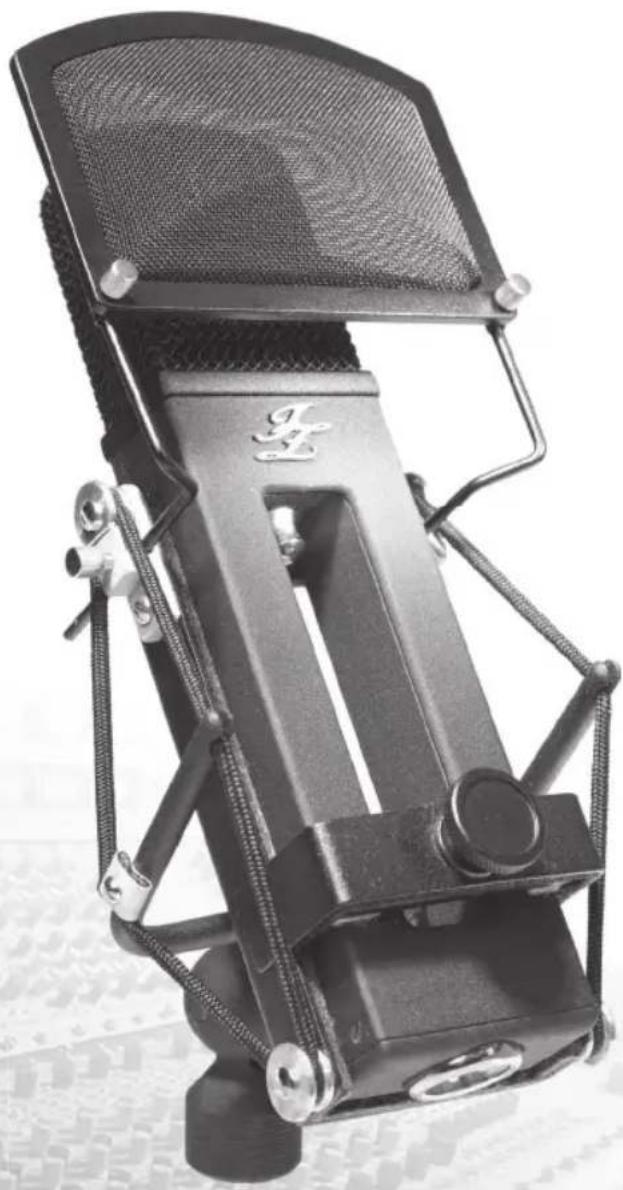
natural_image
Close-up of a black audio recording device with mesh grille and adjustable knobs (no visible text or symbols)BH Series Microphones Owners Manual
Safety Precautions
Detailed safety precautions:
Please read all safety precautions and operating instructions before attempting to operate the unit. Keep all safety precautions and operating instructions for future reference.
Water and moisture:
Condenser microphones are extremely moisture-sensitive. Never use your microphone in close proximity to water (e.g. bath tubs, wash basins, sinks, washing machines, pools, etc.).
Damage:
Take care not to drop your microphone as this can lead to severe damage. JZ Microphones assume no liability for any damage caused by the user.
Service and care:
After each use, remove the microphone from its mount and wipe the microphone down with a soft cloth and place it back into its protective casing (included with the microphone).
Never open the microphone as it will void warranty!
Refer all servicing to qualified and manufacturer's appointed personnel. Servicing is required when the microphone is damaged in any way, such as liquid has been spilled or objects have been fallen into the microphone, the microphone has been exposed to rain or moisture, microphone does not operate normally or has been dropped. Never remove grille covers in order to service microphone capsule. The capsule system does not contain any user serviceable parts.
Usage:
Only use attachments or accessories specified by the manufacturer. Check if packing contains all of the items listed. If any of these items are missing, contact your nearest JZ Microphones dealer or JZ Microphones directly.
Always turn down the levels (means no sound) of the microphone preamp or console while connecting or disconnecting the microphone to avoid possible damage to your speakers or headphones and your hearing.
BH Series Microphones Owners Manual
BH Series Microphones Set Up
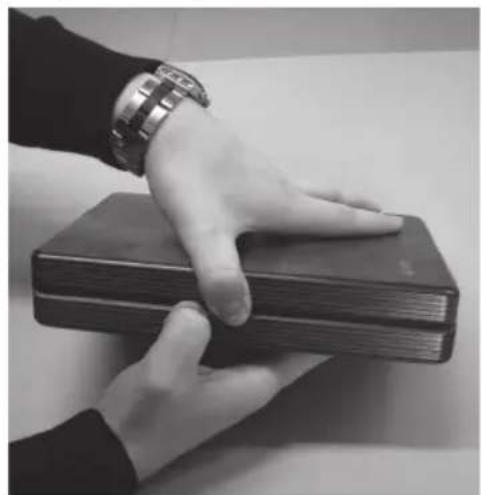
- Firmly hold the wooden case and use your thumbs to open it. (see pictures)
natural_image
Black-and-white photo of two hands resting on a stack of books (no visible text or symbols)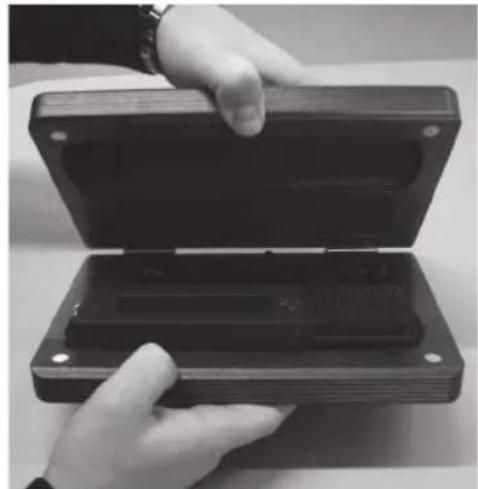
natural_image
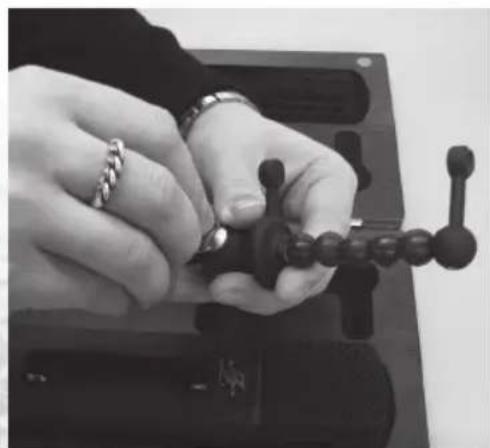
Close-up of hands holding an open black electronic device case (no visible text or symbols)- Replace the shipping screw from included shock-mount with the included thumb screw. To unscrew the shipping screw use either the included thumb screw or appropriate screw driver, or you can use the coin if you have one with you. (see pictures)
natural_image
Close-up of hands assembling a mechanical component with a chain and ball (no visible text or symbols)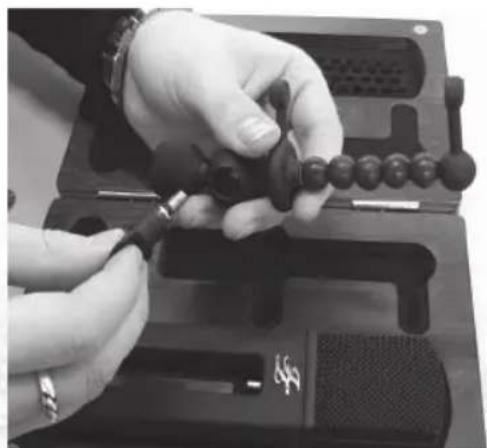
natural_image
Close-up of hands assembling a black mechanical component with a tool (no visible text or symbols)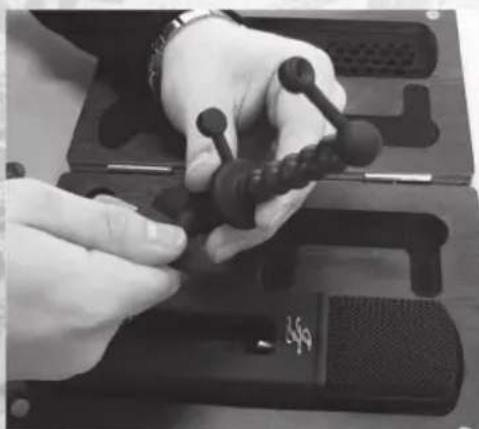
natural_image
Close-up of hands using a handheld device to adjust a black object, no visible text or symbolsBH Series Microphones Owners Manual
BH Series Microphones Set Up
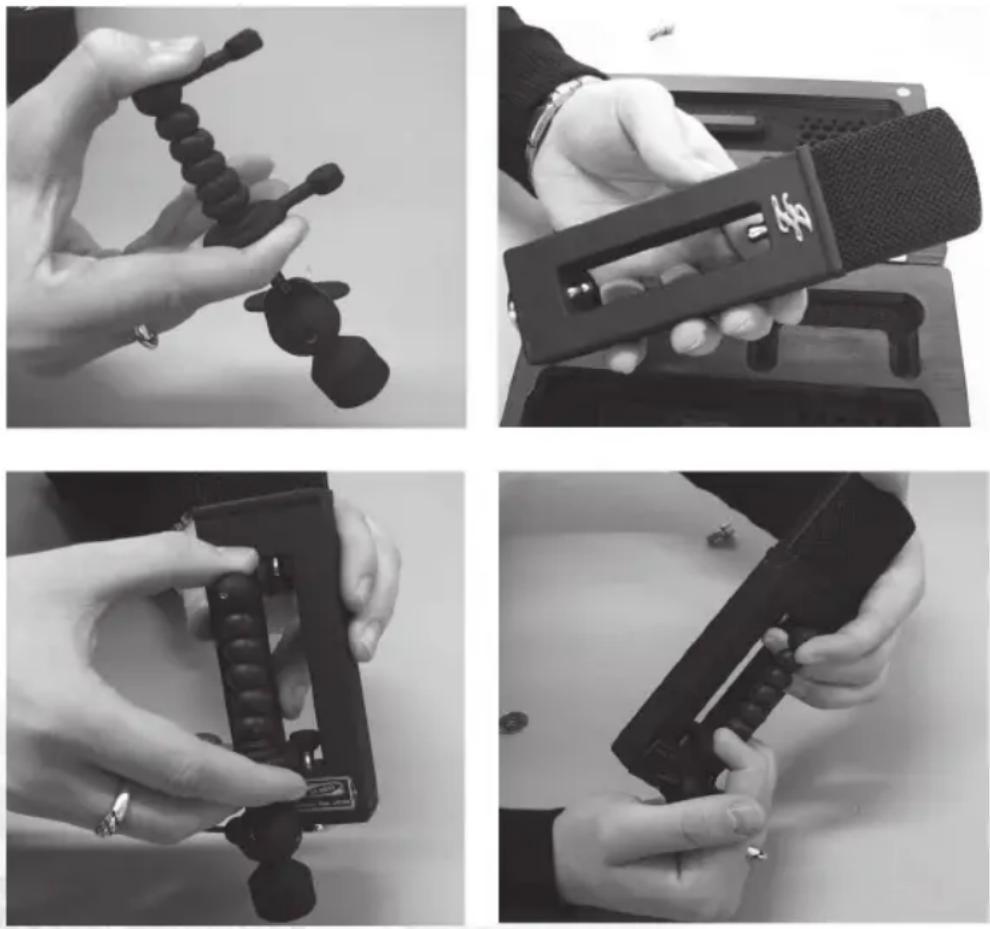
- Mount the shock-mount on the microphone stand. When it is done, take your BH microphone, squeeze the shock-mount so it's both circular ends fi ts the two metal pins inside BH microphone and accurately apply the microphone on the shock-mount and ensure that microphone sits safe on the shock-mount (see pictures)
- Included shock-mount gives you the opportunity to position and angle your microphone to the sound source in many various ways for desired results to be achieved (see pictures)
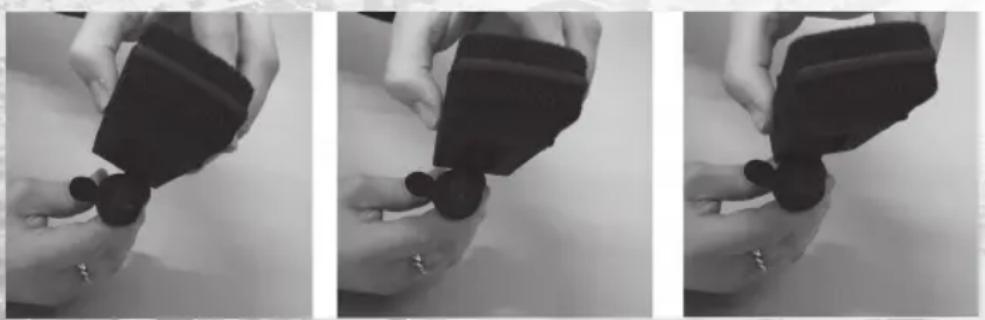
Tip: When using your BH series microphones on drum overheads you can apply included shock-mount from the front of the microphone.
BH Series Microphones Owners Manual
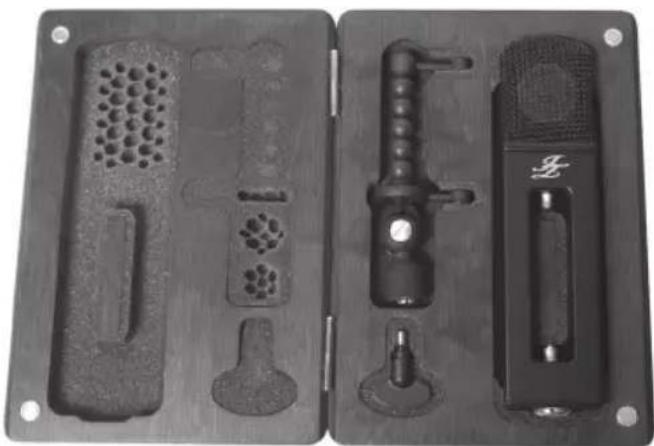
All BH series microphones come in a wooden case with included FREE standard BH shock-mount and thumb screw for it to replace a shock-mounts` shipping screw for easy adjustment when positioning the microphone. This standard shock-mount fi ts to BH series microphones only. Included shock-mount can be attached to any standard microphone stand.
natural_image
Two black metal mold cases with various mechanical components, no visible text or symbolsBH series packing includes:
1 x Wooden case
1 x BH series microphone
1 x standard shock-mount
1 x Thumb screw
1 x User Manual
1 x Warranty sheet
Installation:
Before mounting your shock-mount on a microphone stand replace the shipping screw from the shock-mount with included thumb screw for easy operation. Squeeze the shock-mount and carefully put on the microphone.
There is removable adapter in your shock-mount which lets you mount it on mic stands with either metric (Europe) or imperial-gauge threads (North America). Make sure that your microphone is standing safe on the shock-mount.
The angle of the microphone to the sound source influences the sound of your recording; therefore, experiment with different positions until you achieve the desired sound.
As all our microphones are extremely high quality, we recommend to use a highest quality balanced XLR microphone cables in connection with highest quality microphone preamps to grant cleanest signal path from the sound source to your recording equipment.
BH Series Microphones Owners Manual
BH series microphone models
The BH series includes 4 microphone models with different capsules, polar pattern and pad options:
BH1s
Large diaphragm condenser microphone
GDC2 capsule
Class A discrete electronics
3 polar patterns: cardioid, figure of 8, omni
-10 and -20dB PAD
Lifetime warranty
BH1
Large diaphragm condenser microphone.
GDC2 capsule
Class A discrete electronics
3 polar patterns: cardioid, figure of 8, omni
5 year warranty
BH2
Large diaphragm condenser microphone
GDC1 capsule
Class A discrete electronics
Fixed cardioid polar pattern
5 year warranty
BH3
Large diaphragm condenser microphone
GDC1 capsule
Class A discrete electronics
Fixed cardioid polar pattern
-5 and -10 dB PAD
5 year warranty
All BH series microphones operate on 48 volt phantom power.
BH Series Microphones Owners Manual
The Golden Drop Capsule (GDC)
One of the most important components in every microphone is the capsule, its design and how it transforms the reproduced sound in to electric energy, giving a soul to your recording.
Golden Drop technology is Innovative capsules diaphragm sputtering method, where a lot of tiny and different sized golden dots are systematically sputtered on the capsules diaphragm. It is invention of Juris Zarins and is applied to most of JZ Microphones products.
Advantages of Golden Drop technology
With applied Golden Drop technology, capsules diaphragm is lighter therefore it moves and gets to its default position faster than the same capsules diaphragm without Golden Drop technology, imagine handling the truck compared to sports car, in other words lighter diaphragm can detect and deliver much faster changes in musical content.
It gives more clarity, precision, less colorations and distortions in frequency response. When applied, Golden Drop technology can improve the sonic characteristics of any type of ordinary capsule giving more realistic picture of your recording.
BH Series microphones use 2 types of GDC
1. Single large diaphragm 27 mm GDC (GDC1)
GDC1 is single large diaphragm Golden Drop microphone capsule. GDC1 is applied only to our fixed cardioid BH2 and BH3 microphones.
2. Two separate and back to back placed large diaphragms 27mm GDC (GDC2)
GDC2 is two separate and back to back placed single large diaphragm Golden Drop microphone capsules combination.
Innovative GDC2 was developed for our fl agship BH series microphones to have polar pattern options, where unwanted interaction between both diaphragms is maximally reduced (due to air gap between the capsules) to have improved polar pattern response, plus has all advantages from GDC diaphragm sputtering technology to deliver the captured sound fi eld in more accurate way.
GDC2 is not working in cardioid polar pattern mode. Only frontal capsule is working in cardioid mode.
GDC2 is applied only to our multi-pattern BH1s and BH1 microphones.
BH Series Microphones Owners Manual
Electronics
All JZ Microphones products use Class A discrete electronics, where all components are tested and measured for a maximum performance and grants to the audio signal cleanest path and extremely low self noise properties before any recording gear. All components are hand soldered by our engineers to avoid overheating of selected parts. While soldering the components, either it is done by un-experienced engineer or bad programmed machine, overheating can ruin specifications of very carefully selected electronic part.
BH series microphones are tube-less at this point, therefore electronic circuit is designed to work perfectly without tube as modern electronics is developed to manage the signal path without it.
BH series microphones are transformer-less, therefore electronics are designed to have maximum performance with minimum self noise without the transformer.
BH1s and BH3 series microphones comes with a PAD switch to have an option to lower the signal level from -5dB to -20dB depending on microphone model. Our PAD switch is applied to microphone electronics circuit right after the capsule which avoids to cut low and high frequencies destroying the signal quality, instead it just lovers the signal level allowing capsule to handle high SPL's and keeping the signal unaffected.
Important is that in most cases the microphone can handle high signal level but the microphone preamplifi ers can't. That is why we care about your pre-amplifi er and made a BH1s and BH3 microphones with pad option.
BH series microphones share basically the same electronic parts. Every BH series microphone except BH1s use component selection with tolerance 1.5% in differences between them (only 35% of 1000 parts can pass 1.5% tolerance test)
Components selected for BH1s have tolerance 0.4 % and are custom-made from those 1.5% parts therefore we are giving lifetime warranty for all BH1s microphones.
Electronic circuit design and component selection for every JZ Microphones product is done according to the capsule properties and its special needs to grant the best possible performance and extremely low self noise before any gear in the recording chain.
BH Series Microphones Owners Manual
Technical Specifications
BH2 and BH3 series microphones
| Transducer type | electrostatic |
| Operating principal | pressure gradient |
| Diaphragms active diameter | 27 mm |
| Frequency range | 20 Hz to 20 kHz |
| Polar pattern | Cardioid |
| Pad switch | -5/-10dB (only for BH3 microphones) |
| Output impedance | 50 ohms |
| Rated load impedance | >100 ohms |
| Suggested load impedance | >250 ohms |
| Sensitivity at 1000 Hz into 1000 ohms load | 21 mV/Pa |
| S/N Ratio CCIR 468-3 weighted | 76,5 dB |
| S/N Ratio DIN/IEC 651 A-weighted | 87,5 db-A |
| Equivalent noise level DIN/IEC A-weighted | 6,5 dB-A |
| Maximum SPL for 0.5% THD at 1000 ohm load | 134,5 dB |
| Dynamic range of the microphone preamplifier | 128 db |
| Phantom powering voltage on pins 2 & 3 of XLR | +48 V (+/-4 V) |
| Current consumption | 1,5 mA |
| Output connector | 3-pin XLR male, gold plated contacts |
| Signal polarity | positive toward pressure on a frontal diaphragm produces positive polarity voltage on XLR pin #2 relatively to pin #3 |
| Dimensions | 203 x 51 x 28 |
BH1s and BH1 series microphones
| Transducer type | electrostatic |
| Operating principal | pressure gradient |
| Diaphragms active diameter | 2 x 27 mm |
| Frequency range | 20 Hz to 20 kHz |
| Polar pattern | Cardioid/Omni/Figure of 8 |
| Pad switch | -10/-20dB (only for BH1s microphones) |
| Output impedance | 50 ohms |
| Rated load impedance | >250 ohms |
| Suggested load impedance | 1000 ohms |
| Sensitivity at 1000 Hz into 1000 ohms load | 18 mV/Pa |
| S/N Ratio CCIR 468-3 weighted | 75,5 dB |
| S/N Ratio DIN/IEC 651 A-weighted | 86,5 db-A |
| Equivalent noise level DIN/IEC A-weighted | 7,5 dB-A |
| Maximum SPL for 0.5% THD at 1000 ohm load | 134,5 dB |
| Dynamic range of the microphone preamplifier | 127 dB |
| Phantom powering voltage on pins 2 & 3 of XLR | +48 V (+/-4 V) |
| Current consumption | 1,5 mA |
| Output connector | 3-pin XLR male, gold plated contacts |
| Signal polarity | positive toward pressure on a frontal diaphragm produces positive polarity voltage on XLR pin #2 relatively to pin #3 |
| Dimensions | |
| 203 x 51 x 28 |
BH Series Microphones Owners Manual
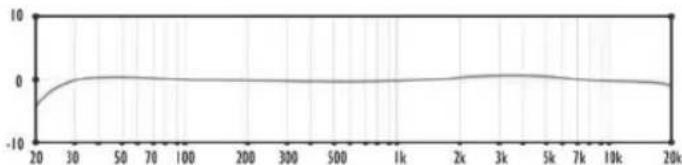
Frequency response graphs
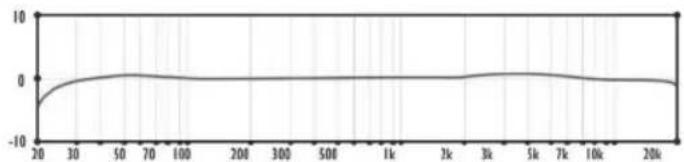
BH1S & BH1 cardioid, figure of 8, omni
line
| X-Axis (Value) | Y-Axis (Value) | |---|---| | 20 | -5 | | 30 | -2 | | 50 | 1 | | 70 | 1 | | 100 | 0 | | 200 | 0 | | 300 | 0 | | 500 | 0 | | 1k | 0 | | 2k | 0 | | 3k | 1 | | 5k | 1 | | 7k | 0 | | 10k | 0 | | 20k | -1 |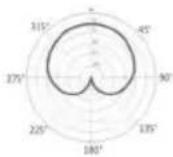
line
| x | y | | ---- | ----- | | 20 | -5.0 | | 30 | 0.0 | | 50 | 0.5 | | 70 | 0.0 | | 100 | -0.5 | | 200 | -1.0 | | 300 | -0.5 | | 500 | -0.5 | | 1k | -0.5 | | 2k | -0.5 | | 3k | -0.5 | | 5k | -0.5 | | 7k | -0.5 | | 10k | -0.5 | | 20k | -1.0 |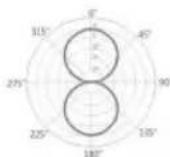
line
| x | y | | ---- | ----- | | 20 | -5.0 | | 30 | 0.0 | | 50 | 0.0 | | 70 | 0.0 | | 100 | 0.0 | | 200 | 0.0 | | 300 | 0.0 | | 500 | 0.0 | | 1k | 0.0 | | 2k | 0.0 | | 3k | 0.0 | | 5k | 0.0 | | 7k | 0.0 | | 10k | 0.0 | | 20k | 0.0 |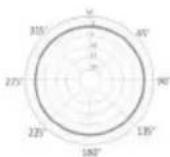
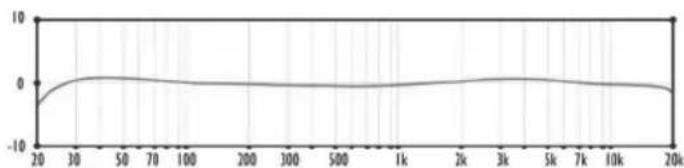
BH3 & BH2 cardioid
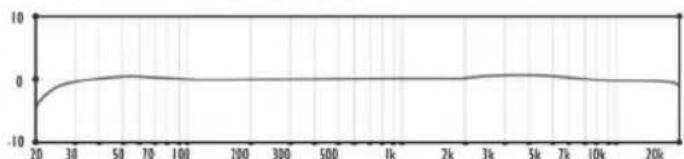
line
| x | y | | ---- | ----- | | 20 | -5.0 | | 30 | 0.0 | | 50 | 0.5 | | 70 | 0.0 | | 100 | 0.0 | | 100 | 0.0 | | 300 | 0.0 | | 500 | 0.0 | | 1k | 0.0 | | 2k | 0.0 | | 3k | 0.5 | | 5k | 0.0 | | 7k | 0.0 | | 10k | 0.0 | | 20k | 0.0 |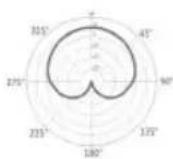
JZ Microphones
General contacts:
Address: Gaujas street 30, Marupe
LATVIA, LV-2167
Tel: +37167246648
Fax: +37167246649
E-mail: info@jzmic.com