THERMALTAKE ToughDesk 300 RGB - Office

ToughDesk 300 RGB - Office THERMALTAKE - Free user manual and instructions

Find the device manual for free ToughDesk 300 RGB THERMALTAKE in PDF.

📄 4 pages English EN Download 💬 AI Question 10 questions ⚙️ Specs
Notice THERMALTAKE ToughDesk 300 RGB - page 1
Pick your language and provide your email: we'll send you a specifically translated version.
Product Type Motorized Height-Adjustable Standing Desk
Brand Thermaltake
Model ToughDesk 300 RGB
Color Black
Material Steel frame, desktop surface (MDF or similar)
Dimensions (Desk Top) Approximately 55.1 x 29.5 inches (140 x 75 cm)
Height Adjustment Range 28.3 to 47.2 inches (720 to 1200 mm)
Weight Capacity Up to 176 lbs (80 kg)
Product Weight Approximately 77 lbs (35 kg)
Power Supply AC adapter (100-240V, 50/60Hz)
Motor Type Dual electric motors
Adjustment Speed Approximately 1.5 inches/s (38 mm/s)
Memory Presets 4 programmable height positions
RGB Lighting Addressable RGB LEDs on front edge, compatible with Thermaltake software
RGB Controller Remote control or software via USB
USB Ports 2 x USB 3.0 on the desk
Cable Management Built-in cable tray underneath desktop
Anti-Collision Yes, with reverse function on obstacle detection
Warranty 2-year limited warranty (may vary by region)
Recommended Cleaning Wipe with a soft, damp cloth; avoid abrasive cleaners
Safety Certification UL, CE, FCC (typical)

Frequently Asked Questions - ToughDesk 300 RGB THERMALTAKE

How do I assemble the ToughDesk 300 RGB?
The desk comes with a detailed manual. Generally, you attach the legs to the desktop, mount the motor control box, and connect cables. It's recommended to have two people for assembly due to weight.
How can I adjust the height of the desk?
Use the control panel on the desk. Press the up/down arrows to adjust continuously. You can also set up to four memory presets by pressing the memory button and a number.
How do I control the RGB lighting?
The RGB lighting can be controlled via the included remote or through software (downloadable from Thermaltake's website) connected via USB. You can change colors, patterns, and sync with other Thermaltake RGB products.
What is the weight capacity of the desk?
The ToughDesk 300 RGB can support up to 176 lbs (80 kg) evenly distributed. Exceeding this limit may cause instability or damage.
Does the desk have anti-collision protection?
Yes, the desk features an anti-collision system. If it encounters an obstacle while moving, it will automatically reverse direction to prevent injury or damage.
Can I use the desk with a dual monitor setup?
Yes, the desk is spacious enough for a dual monitor setup. However, ensure the total weight of monitors and other equipment does not exceed the 80 kg limit.
How do I clean the desk?
Use a soft, damp cloth to wipe the surface. Avoid harsh chemicals or abrasive sponges. For the RGB strip, gently dust with a dry microfiber cloth.
What should I do if the desk does not move or makes unusual noises?
First, check the power connection and ensure the control panel is not blocked. If noise persists, the motor may be overworked due to uneven load. Try redistributing weight. If problems continue, contact Thermaltake support.
Are replacement parts available for the ToughDesk 300 RGB?
Yes, Thermaltake sells replacement parts such as motors, control panels, and power adapters. Contact their customer service or visit the official website.
Can I sync the RGB lighting with other Thermaltake products?
Yes, the desk is compatible with Thermaltake's RGB software (like TT RGB Plus) and can sync lighting effects with other compatible devices such as fans, keyboards, and mice.

User questions about ToughDesk 300 RGB THERMALTAKE

0 question about this device. Answer the ones you know or ask your own.

Ask a new question about this device

The email remains private: it is only used to notify you if someone responds to your question.

No questions yet. Be the first to ask one.

Download the instructions for your Office in PDF format for free! Find your manual ToughDesk 300 RGB - THERMALTAKE and take your electronic device back in hand. On this page are published all the documents necessary for the use of your device. ToughDesk 300 RGB by THERMALTAKE.

USER MANUAL ToughDesk 300 RGB THERMALTAKE

TT RGB Plus Alexa Skill Sengs SOP

Go to www.amazon.com and log in use a Amazon account.

Next to the search bar, Click the "All" tab and select "Alexa Skills".
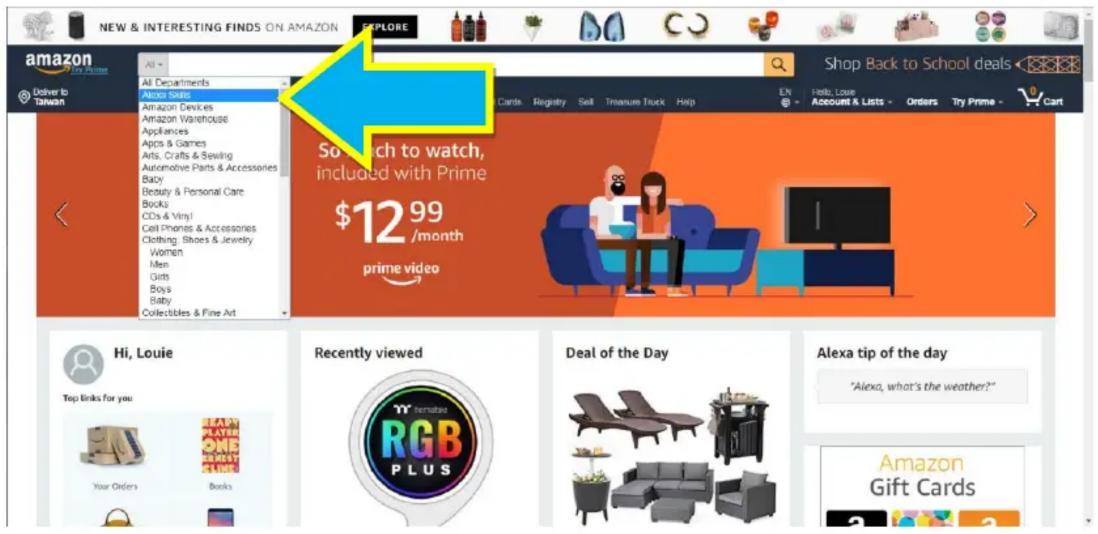
NEW & INTERESTING FINDS ON AMAZON EXPLORE amazon Deliver to Taiwan All Departments Amazon Skills Amazon Devices Amazon Warehouse Appliances Apps & Games Arts, Crafts & Sewing Automotive Parts & Accessories Baby Beauty & Personal Care Books CDs & Vinyl Cell Phones & Accessories Clothing, Shoes & Jewelry Women Men Gifts Boys Baby Collectibles & Fine Art Shop Back to School deals EN Help, Love Account & Lists Orders Try Prime - Cart Search to watch, included with Prime $12.99 /month prime video Hi, Louie Top links for you: Your Orders Recently viewed YAMANUAO RGB PLUS Deal of the Day Alexa tip of the day "Alexa, what's the weather?" Amazon Gift Cards

Search "TT RGB Plus" and Select this skill.
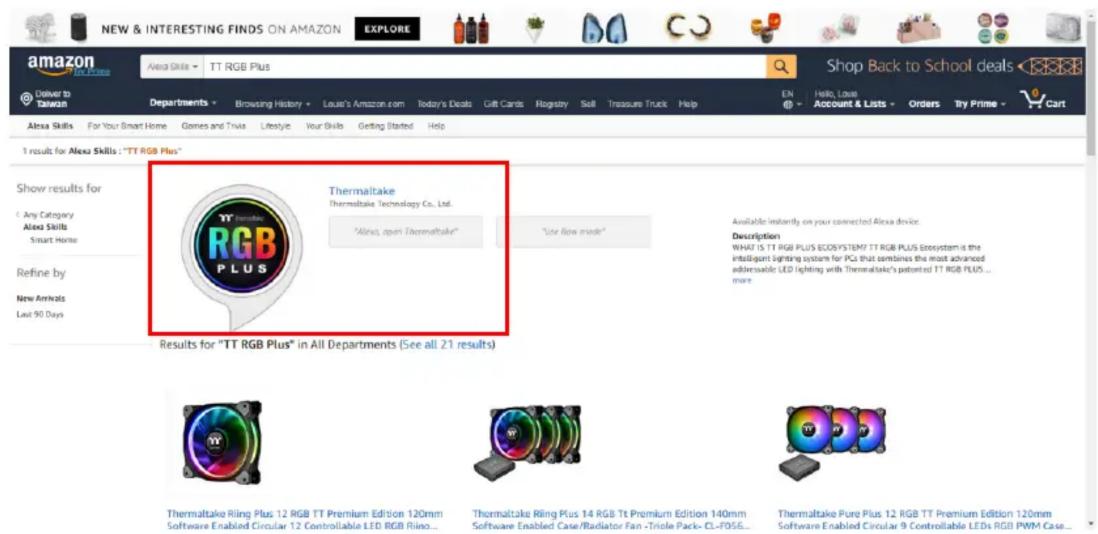
NEW & INTERESTING FINDS ON AMAZON EXPLORE amazon Deliver to Taiwan Alexa Skills - TT RGB Plus Departments Browsing History Louis's Amazon.com Today's Deals Gift Cards Rogistry Soft Treasure Truck Help Shop Back to School deals EN Hello, Loans Account & Lists Orders Try Prime Car 1 result for Alexa Skills : "TT RGB Plus" Show results for Any Category Alexa Skills Smart Home Refine by New Animals Last 90 Days Thermaltake Thermaltake Technology Co., Ltd. "Alexa, open Thermaltake" "Use flow mode" Available instantly on your connected Alexa device. Description WHAT IS TT RGB PLUS Ecosystem? TT RGB PLUS Ecosystem is the Intelligent lighting system for PCs that combines the most advanced adviscable LED lighting with Thermaltake's patented TT RGB PLUS ... more. Results for "TT RGB Plus" in All Departments (See all 21 results) Thermaltake Riling Plus 12 RGB TT Premium Edition 120mm Software Enabled Circular 12 Controllable LED RGB Rling... Thermaltake Riling Plus 14 RGB Tt Premium Edition 140mm Software Enabled Case/Radiator Fan -Triole Pack- CL-F056... Thermaltake Pure Plus 12 RGB TT Premium Edition 120mm Software Enabled Circular 9 Controllable LEDs RGB PWM Case...

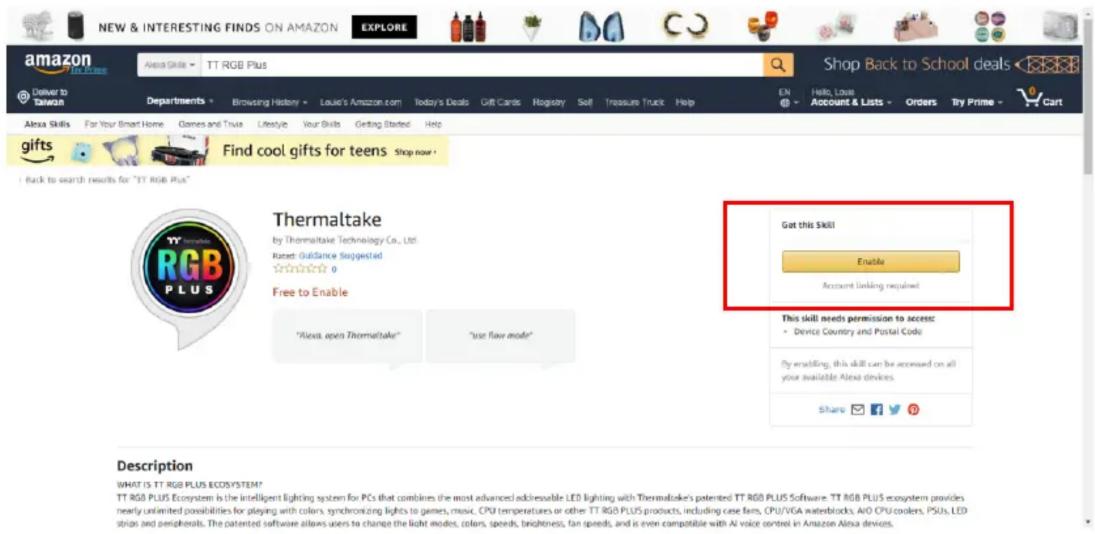
Click "Enable".

NEW & INTERESTING FINDS ON AMAZON EXPLORE amazon TTL RGB Plus Delivery to Taiwan Departments Browsing History Louie's Amazon.com Today's Deals Gift Cards Registry Soft Treasure Truck Help Shop Back to School deals En Hello, Loan Account & Lists Orders Try Prime - Cart Alaia Skills For Your Smart Home Games and Toys Lifestyle Your Skills Getting Started Help Alaia Skills For Your Smart Home Games and Toys Lifestyle Your Skills Getting Started Help Alaia Skills For Your Smart Home Games and Toys Lifestyle Your Skills Getting Started Help Alaia Skills For Your Smart Home Games and Toys Lifestyle Your Skills Getting Started Help Alaia Skills For Your Smart Home Games and Toys Lifestyle Your Skills Getting Started Happ Alaia Skills Find cool gifts for teens Shop now + I back to search results for "TT RGB Plus" Thermaltake by Thermaltake Technology Co., Ltd. Raced Guidance Suggested 0 Free to Enable "Alexa open Thermaltake" "use flow mode" Got this Skill Enable Account linking required This skill needs permission to access: • Device Country and Postal Code By enabling, this skill can be accessed on all your available Alexa devices. Share 📋 📋 📋 Description WHAT IS TT RGB PLUS Ecosystem? TT RGB PLUS Ecosystem is the intelligent lighting system for PCs that combines the most advanced addressable LED lighting with Thermaltake's patented TT RGB PLUS Software. TT RGB PLUS ecosystem provides nearly unlimited possibilities for playing with colors, synchronizing lights to games, music, CPU temperatures or other TT RGB PLUS products, including case fans, CPU/VGA waterblocks, A/O CPU coders, PSUs, LED stops and peripherals. The patented software allows users to change the light modes, colors, speeds, brightness, fan speeds, and is even compatible with AI voice centres in Amazon Alexa devices.

The skill requires access to the country and postal code that is congured with the Alexa device. Please allow and click “Save Permissions”.
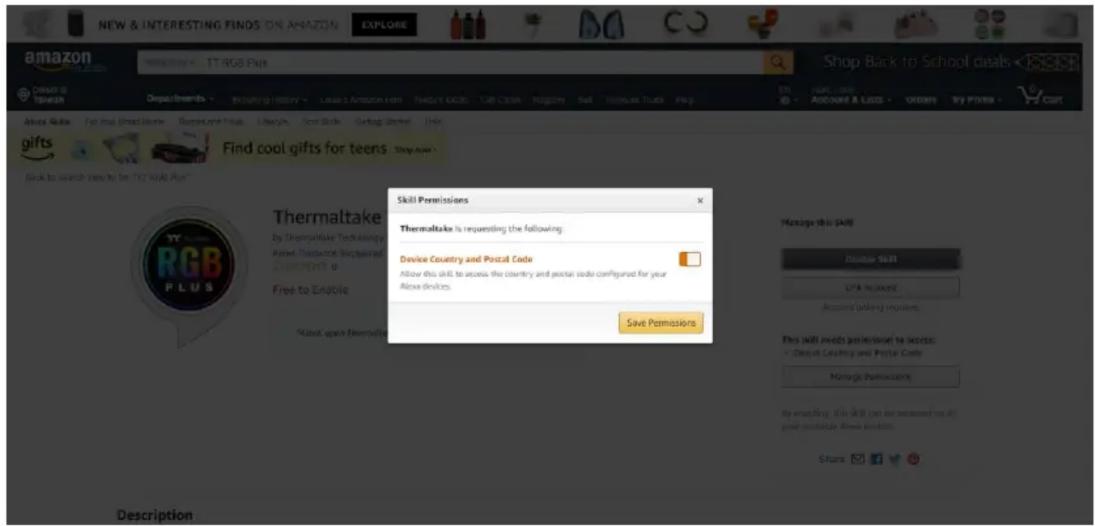
NEW & INTERESTING FINDS ON AMAZON SHOP Back to School deals amazon TT AGS Plus Deluxe by Tikesh Departurements Loading History Leave Amazon.com Tweet #4000 Call Close Religion Sell Welcome Trucks Help Ask Rules For the Great Home Refresh, new House Libraries Send Skills Getting Started Help Gifts Find cool gifts for teens Shop now Back to search teen to be "YY" RAIL Plus" Thermaltake is requesting the following: Device Country and Postal Code Allow this skill to access the country and postal code configured for your Alkai devices. Save Permissions Skill Permissions Thermaltake is requesting the following: Device Country and Postal Code Allow this skill to access the country and postal code configured for your Alkai devices. Manage this skill Double Skill DIF & No Count Account Linking requirements This skill needs permission to access: - Digital Country and Postal Code Manage permissions By answering (this skill can be recommended on all your available Alkai instructions. Share 17 20

Noce: Please allow this page to show pop-ups, to launch TT RGB Plus "Login/Sign Up" page.
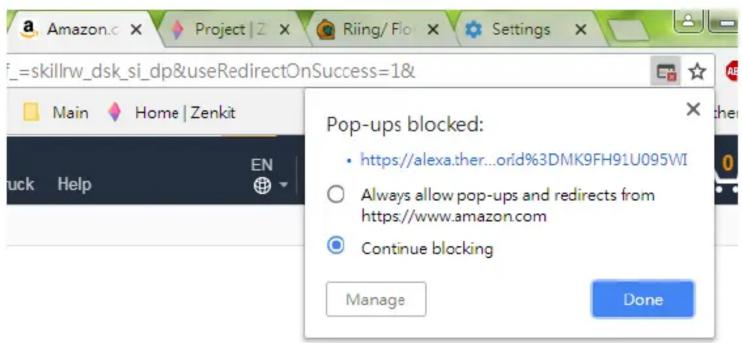
Pop-ups blocked: • https://alexa.ther...orid%3DMK9FH91U095WI ○ Always allow pop-ups and redirects from https://www.amazon.com ● Continue blocking Manage Done

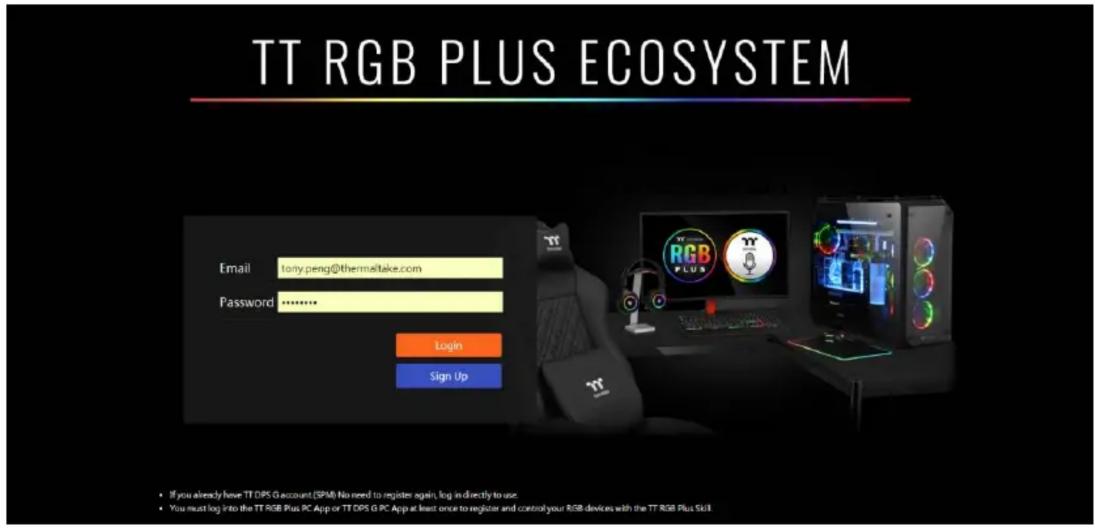
Login or Sign up the TT Account.

TT RGB PLUS ECOSYSTEM Email lonty.peng@thermeltake.com Password ******** Login Sign Up • If you already have TT DPS G account (SPM) No need to register again, log in directly to use. • You must log into the TT RGB Plus PC App or TT DPS G PC App at least once to register and control your RGB devices wish the TT RGB Plus Skill

* If you already have a TT DPS G (SPM) account, there is NO need to register again. Please log in using your exisng TT DPS G account.
* You must log into the TT RGB Plus PC App or TT DPS G PC App at least once to register and control your RGB devices with the TT RGB Plus Skill.

Within TT RGB Plus Soware, Click the gear icon to expand a drop menu and Select "TT Login"
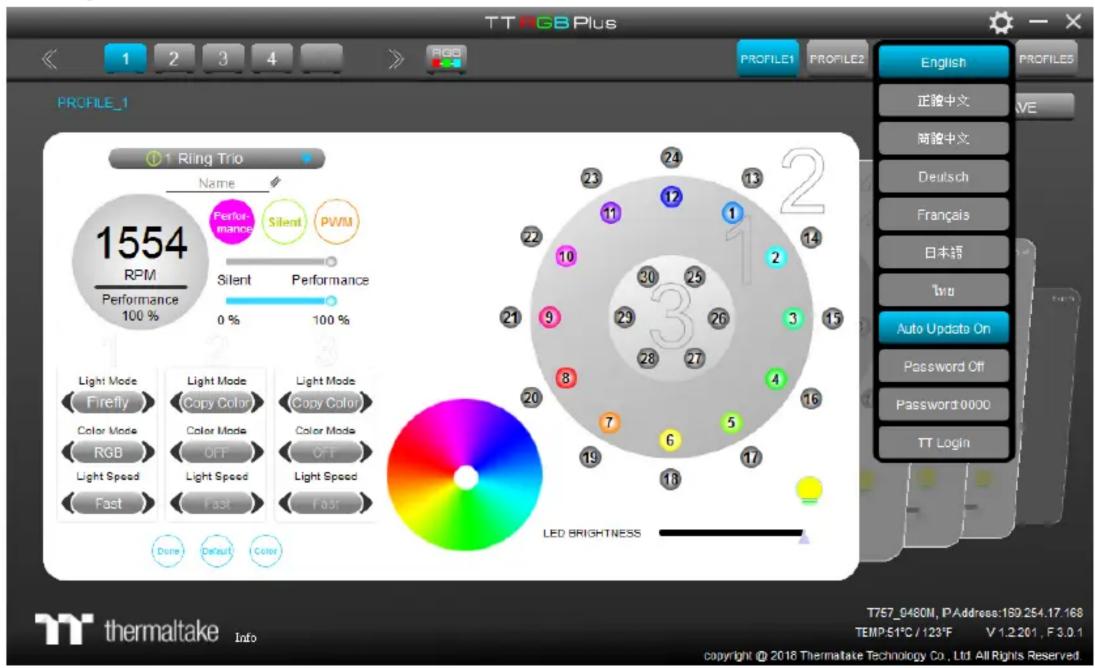
TT RGB Plus PROFILE_1 1 Ring Trio Name 1554 RPM Performance 100 % Performance Silent PWM Silent Performance 0 % 100 % Light Mode Firefly Color Mode RGB Light Speed Fast Light Mode Copy Color Color Mode OFF Light Speed Fast Light Mode Copy Color Color Mode OFF Light Speed Fast LED BRIGHTNESS English 正验中文 VE 畸验中文 Deutsch Français 日本語 Tru Auto Update On Password Off Password 0000 TT Login thermaltake Info T757_0460M, P Address:189.254.17.168 TEMP:51°C / 123°F V 1.2.201, F 3.0.1 copyright © 2018 Thermaltake Technology Co., Ltd All Rights Reserved

Use your created or exisng account to log in.
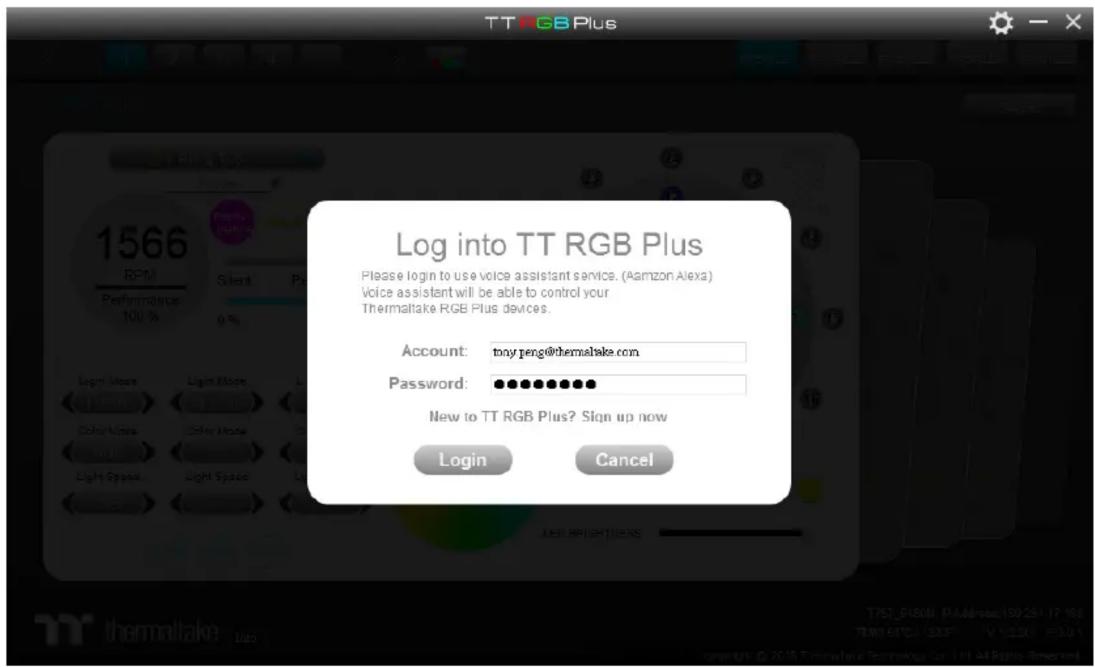
TT RGB Plus Log into TT RGB Plus Please login to use voice assistant service. (Amazon Alexa) Voice assistant will be able to control your Thermaltake RGB Plus devices. Account: tony.peng@thermaltake.com Password: ••••••••••• New to TT RGB Plus? Sign up now Login Cancel

Once the login is successful and Alexa is paired, "Server Connected" is displayed on the boom right within the TT RGB Plus Soware.
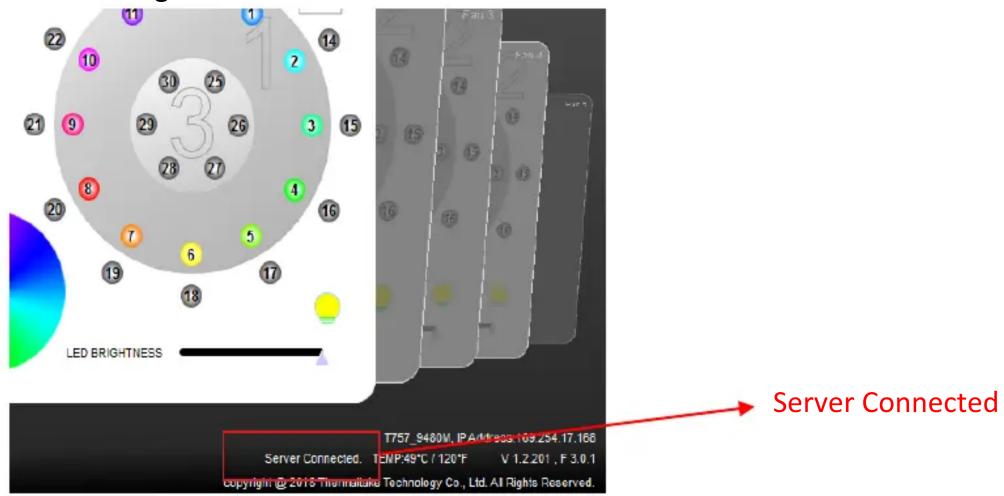
LED BRIGHTNESS Server Connected T757_9480W, IP Address 169.254.17.166 Server Connected. TENP:49°C / 120°F V 1.2.201 , F 3.0.1 Copyright © 2013 Technolomics Technology Co., Ltd. All Rights Reserved.

Table of contents Click a title to access it
Manual assistant
Powered by Anthropic
Waiting for your message
Product information

Brand : THERMALTAKE

Model : ToughDesk 300 RGB

Category : Office