
C6150DTN - Printer OKI - Free user manual and instructions
Find the device manual for free C6150DTN OKI in PDF.


User questions about C6150DTN OKI
0 question about this device. Answer the ones you know or ask your own.
Ask a new question about this device
Download the instructions for your Printer in PDF format for free! Find your manual C6150DTN - OKI and take your electronic device back in hand. On this page are published all the documents necessary for the use of your device. C6150DTN by OKI.
USER MANUAL C6150DTN OKI
text_image
PRINTING SOLUTIONSExceptional performance with professional HD Color output for your workgroup
C6150n
C6150dn
C6150dtn
C6150hdn
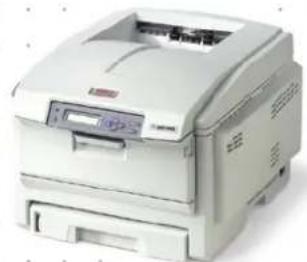
natural_image
Exterior view of a white paper printer with no visible text or symbols on its body
natural_image
Office interior with employees working at desks and computers, no visible text or signageIdeal for businesses that need the power and control of a high-end workgroup color printer in a compact package.
Highlights:
• High Definition Color Printing technology for sharp detail and rich, dramatic color
- Fastest in their class: color output at up to 26 ppm; black & white at up to 32 ppm ^1
- Time to first page as fast as 9 seconds color, 8 seconds black & white ^1
- 1200 x 600 dpi resolution for crisp, clear output
- Models available with duplex (2-sided) printing, additional paper capacity, and 40 GB hard disk drive standard
•PCL ^® 6, PCL 5 and PostScript ^® 3" emulations
• 10/100 Base-T Network connectivity standard
- Handles media from 3" x 5" cards, 4" x 6" and 5" x 7" photo paper, to banner-size sheets
- Single Pass Color™ Digital technology for printing up to 80 lb. cover stock (216 gsm) and banner sheets up to 8.5" x 48"
• Security features including data encryption, password protection, and document and hard disk erasure
- Convenient operator panel displays toner levels, provides printer/network status, and enables printer and network settings changes
• 2-piece consumables for low Total Cost of Ownership in color and mono ^3
- 1-Year limited warranty with Overnight Exchange on printer ^3 ; 5-Year limited warranty on LED printheads
• Live, toll-free technical support 24/7/365 ^3
High-definition color. Exceptional workgroup performance.
Your workgroups are looking for spectacular documents; you want a great return on your printer investment. No problem. C6150 Series Digital Color printers from OKI Printing Solutions are the answer. They combine fast, high-quality color output with standard features such as automatic duplex (2-sided) printing (C6150dn, -dtn and -hdn), extra paper capacity (C6150dtn), a 40 GB hard disk drive (C6150hdn), plus our legendary reliability.
High Definition (HD) Color Printing technology – All C6150 Series printers utilize this unique process for breathtaking output on regular copy paper and glossy media.
Building on the OKI Printing Solutions heritage of color printing innovation, HD Color Printing technology combines multilevel LED printheads and microfine toner to render deep, saturated colors, fine detail, and precise toner placement.
Rich color pages at up to 26 per minute ^1 – The C6150 Series delivers crisp 1200 x 600 dpi color output, with the first page printing in as little as 9 seconds. ^1 Black & white pages print at up to 32 ppm, the first in as little as 8 seconds. ^1 The C6150 Series supports both PCL ^® and PostScript ^® emulations.
Exceptional paper handling – All C6150 Series models have a paper capacity of at least 400 sheets: a 300-sheet paper tray plus built-in 100 sheet multi-purpose tray for labels, envelopes, transparencies, and cover stock up
to 80 lb.(216 gsm). Use it to print everything from 3" x 5" cards, 4" x 6" and 5" x 7" photo paper, to banner-size sheets up to 8.5" wide by four feet in length.
Since the more sheets a printer holds means fewer user interventions, the C6150 Series can further increase your productivity: the standard paper capacity of the C6150dtn is 930 sheets with a 530-sheet 2nd tray—and the 2nd tray is an option on the other models.
Workgroup connectivity built in – Share the advantages and efficiencies of any or all of the C6150 Series models through the internal OkiLAN® 10/100 Base-T print server. Or make them personal printers by connecting through the parallel port or high-speed USB 2.0 port.
Unmatched warranty support – We're so confident in the reliable performance of the C6150 Series that we provide an industry-leading 5-year warranty on its printheads, and a 1-year limited printer warranty with Overnight Exchange and optional coverage extensions. ^3
Of course, if you need technical assistance, you can speak to a live expert located in North America—24/7/365—by calling 800.OKI.DATA (800.654.3282) at any time. ^3
1 Published performance results based on laboratory testing. Individual results may vary.
^2 Printers ship with complete set of 2,000-page “starter” toner cartridges. 6,000-page Color and 8,000-page Black toner cartridges are available.
^3 Available in the U.S. and Canada only. ^4 Optional on other models.
The C6150 Series: your best choice for accurate color output, a high level of security, and a better bottom line.
Digital Color printers from OKI Printing Solutions deliver more than brilliant output at best-in-class speeds. The C6150 Series also gives you control—over the quality of your output, the degree of your security, and the extent of your printing costs.
C6150 Series models offer a long list of features that can improve your image, peace of mind and profitability. Here are some value-added examples:
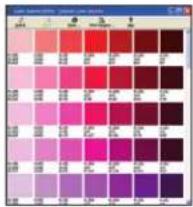
Color Swatch
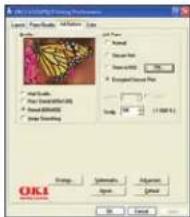
Easily match custom colors to the color values on your C6150 Series printer. Select a simple swatch to print a basic set of colors then match the values in your application. Select a custom swatch and set the Hue, Saturation and Lightness to target your custom color.
text_image
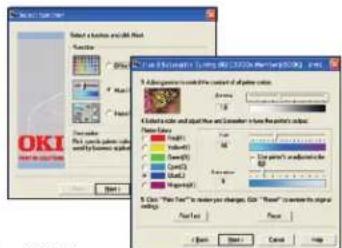
Color palette selection grid with RGB and HSL values, showing color intensity variationsColor Correct
Makes it easy to adjust colors commonly found in applications such as Microsoft® Word, Excel and PowerPoint®. It also lets you adjust the overall color of a print by controlling the lightness, darkness and contrast of images, and the intensity and lightness of the colors.
text_image
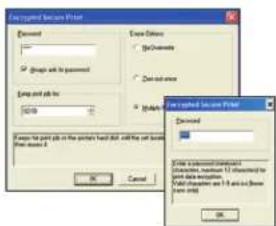
OKI Select a function and all other Action Effect Impact Change Show options to select the functions or options in the main function. Select action and adjust the function and consider how the functions are: Main Options Color: Yield: Size: Width: Vertical: Horizontal: Vertical: Vertical: Vertical: Vertical: Vertical: Vertical: Vertical: Vertical: Vertical: Vertical: Vertical: Vertical: Vertical: Vertical: Vertical: Vertical: Vertical: Vertical: Vertical: Vertical: Vertical: Vertical: Vertical: Vertical: Vertical: Vertical: Vertical: Vertical: Vertical: Vertical: Vertical: Vertical: Vertical: Vertical: Vertical: Vertical: Vertical: Vertical: Vertical: Vertical: Vertical: Vertical: Vertical: Vertical: Vertical: Vertical: Vertical: Vertical: Vertical: Vertical: Horizontal Horizontal Horizontal Horizontal Horizontal Horizontal Horizontal Horizontal Horizontal Horizontal Horizontal Horizontal Horizontal Horizontal Horizontal Horizontal Horizontal Horizontal Horizontal Horizontal Horizontal Horizontal Horizontal Horizontal Horizontal Horizontal Horizontal Horizontal Horizontal Horizontal Horizontal Horizontal Horizontal Horizontal Horizontal Horizontal Horizontal Horizontal Horizontal Horizontal Horizontal Horizontal Horizontal Horizontal Horizontal Horizontal Horizontal Horizontal Horizontal Horizontal HorizontalC6150 Series models equipped with a 40 GB hard disk drive (standard on the C6150hdn; optional on the other models) provide enhanced security features that include Encrypted Secure Print:
• 256-Bit Encryption
Enables secure passage of sensitive documents from PC to printer, with processing and output requiring PIN identification. (Requires hard disk drive.)
text_image
Embedded Print Wizard Download Save Options [ ] [ ] [ ] [ ] [ ] [ ] [ ] [ ] [ ] [ ] [ ] [ ] [ ] [ ] [ ] [ ] [ ] [ ] [ ] [ ] [ ] [ ] [ ] [ ] [ ] [ ] [ ] [ ] [ ] [ ] [ ] [ ] [ ] [ ] [ ] [ ] [ ] [ ] [ ] [ ] [ ] [ ] [ ] [ ] [ ] [ ] [ ] [ ] [ ] [ ] [ ] [ ] [ ] [ ] [ ] [ ] [ ] [ ] [ ] [ ] [ ] [ ] [ ] [ ] [ ] [ ] [ ] [ ] [ ] [ ] [ ] [ ] [ ] [ ] [ ] [ ] [ ] [ ] [ ] [ ] [ ] [ ] [ ] [ ] [ ] [ ] [ ] [ ] [ ] [ ] [ ] [ ] [ ] [ ] [ ] [ ] [ ] [ ] [ ] [ ] [ ] ( ) 0 Cancel Add to the following: Delete the following: Delete the following: Delete the following: Delete the following: Delete the following: Delete the following: Delete the following: Delete the following: Delete the following: Delete the following: Delete the following: Delete the following: Delete the following: Delete the following: Delete the following: Delete the following: Delete the following: Delete the following: Delete the following: Delete the following: Delete the following: Delete the following: Delete the following: Delete the following: Delete the following: Delete the following:- Job Timeout
If not retrieved within a certain time (pre-set by the user), the document is sanitized (cleared) from the hard disk.
- MAC Validation
The Message Authentication Code (MAC) is PC-encrypted into a document's printing data to prevent the file from being tampered with after it is sent to the printer. The printer reads the code and, if any alterations to the file are detected, issues a warning and cancels the job.
- Secure Erase
Ordinarily, simply deleting a document leaves traces of the contents on a printer's hard drive. This feature totally removes the document from the hard disk drive, erasing all vestiges of a sensitive file or, if desired, sanitizing the entire disk drive.
text_image
A: 3D Image Properties Layer: Image Style, Altitude, Size Color Mode: • Normal • Dense Pattern • Smooth Color • Smooth Texture • Smooth Smooth • Smooth Smooth OK CancelJob Accounting
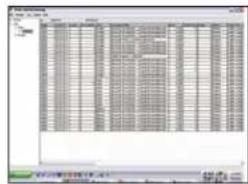
Enables tracking of color and mono printing costs, easy monitoring of printing activity, and greater control of printer usage. It generates reports for administrative, bill-back or cost-accounting purposes. User permissions can be assigned and are stored on the printer—not on the network—so the system is totally secure.
text_image
Scanned screenshot of a Chinese software interface showing a grid-based data table with columns and rows, likely from an old file or spreadsheet.If you're looking for high speed, high quality, and a high level of control in printers that will perform to your unique demands, the C6150 Series from OKI Printing Solutions has exactly what you want.
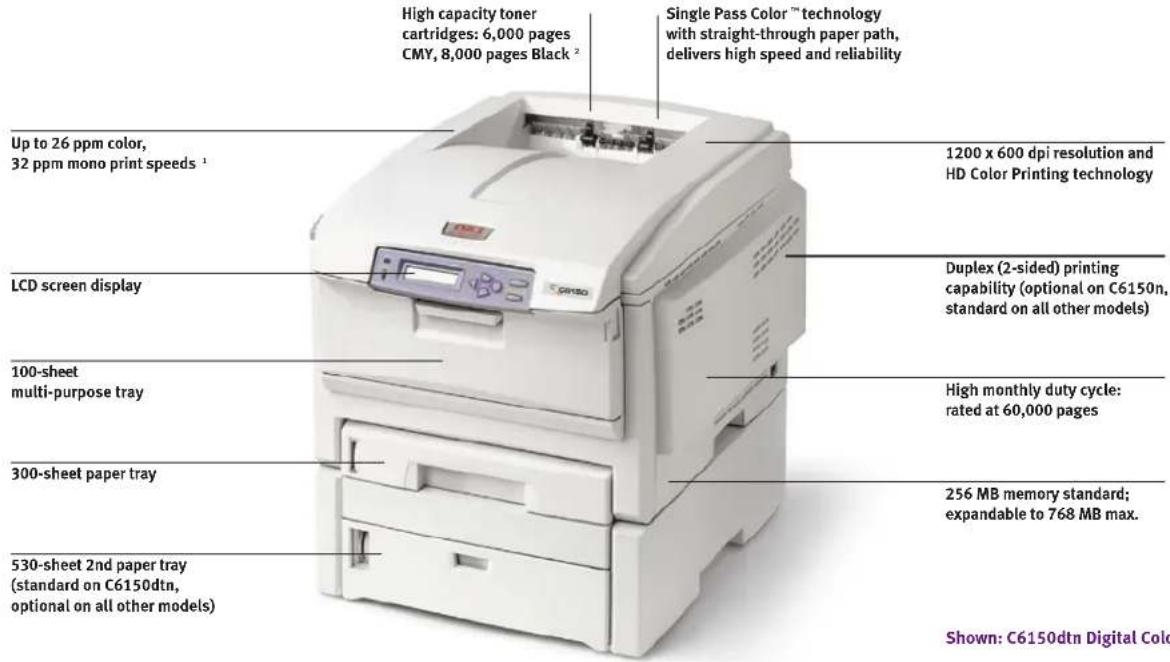
THE C6150 SERIES AT A GLANCE
text_image
High capacity toner cartridges: 6,000 pages CMY, 8,000 pages Black² Single Pass Color™ technology with straight-through paper path, delivers high speed and reliability Up to 26 ppm color, 32 ppm mono print speeds¹ LCD screen display 100-sheet multi-purpose tray 300-sheet paper tray 530-sheet 2nd paper tray (standard on C6150dtn, optional on all other models) 1200 x 600 dpi resolution and HD Color Printing technology Duplex (2-sided) printing capability (optional on C6150n, standard on all other models) High monthly duty cycle: rated at 60,000 pages 256 MB memory standard; expandable to 768 MB max. Shown: C6150dtn Digital ColoShown: C6150dtn Digital Color Printer
C6150 Series
Specifications
Performance
- Print Speed: Up to 26 ppm Color; up to 32 ppm Mono ^1
- Time to First Page: As fast as 9 sec. Color; 8 sec. Mono ^1
• Processor: 500 MHz PowerPC CPU
• HD Color Printing Technology: Combines multilevel LED printheads and microfine toner for sharp detail and rich color depth
• Print Resolution: 1200 x 600 dpi
• Duty Cycle: Up to 60,000 pg./mo. - Duplex (2-Sided) Printing: Standard on C6150dn, C6150dtn and C6150hdn; optional on C6150n
Productivity Solutions
• Web-based Printer Management:
PrintSuperVision and OkiLAN ^® Embedded Web Server
- Direct PDF Printing: Supports PDF v1.5; requires hard disk drive (standard on C6150hdn)
Security Solutions
- Encrypted Secure Printing (requires Hard Disk Drive ^2 ): PIN/password-enabled; AES 256-bit encryption; Secure Erase (DOD5220.22-M compliant); Message Authentication Code (MAC)
• Network Security: IP address filtering, MAC address filtering, SNMP v3, SSL/TLS, IPP over SSL/TLS, email authentication, Protocol lockouts
Cost Containment Solutions
- Job Accounting Software: Tracks color/mono pages by individual or department
• Color Access Policy Manager: Allows control over color printing access and converts unauthorized color print jobs to black & white
Compatibility
- Emulations: PCL® 6, PCL 5; PostScript® 3™; IBM® PPR; Epson® FX
- Operating Systems: Standalone and network – Windows ^ Vista ^ , XP, Server 2003, 2000; Mac ^ support – Classic OS 9.x and higher, OS X 10.2 and higher; UNIX ^ ; Linux
Connectivity
• Network Interface: OkiLAN® 10/100 Base-T Internal Ethernet Print Server
• Network Protocols: TCP/IP, NetBeus, NetWave, Ethertalk
- Local Ports: USB v2.0; Parallel
Memory
• Standard: 256 MB
• Maximum: 768 MB
• Memory Storage: 40 GB Hard Disk Drive standard on C6150hdn; optional on other models
Resident Typefaces
- Scalable: 87 PCL fonts and 136 PostScript fonts
• PCL Bitmap Fonts: OCR-A/B
• Bar Codes: USPS, UPC-A/E, Code 39/128
Paper Handling
- Paper Input: 400 sheets standard with 300-sheet Legal/Letter/Universal Tray and 100-sheet Multi-Purpose Tray; 930 sheets max. with 530-sheet 2nd Paper Tray (standard on C6150dtn; optional on other models)
- Multi-Purpose Tray: Standard 100-sheet; handles overhead transparencies, envelopes, mailing label stock, and banners
- Paper Sizes (Min./Max.): Main Tray 4.1" x 5.8"/8.5" x 14"; 2nd Tray 5.8" x 8.3/8.5" x 14"; Multi-Purpose Tray 3" x 5"/8.5" x 48" banner
- Paper Weight: Main Tray 20 lb. - 32 lb. bond (75 - 120 gsm); 2nd Tray 20 lb. - 47 lb. bond (75 - 176 gsm); manual feed 20 lb. bond - 54 lb. bond/80 lb. cover (75 - 216 gsm); duplex 20 lb. - 28 lb. bond (75 - 105 gsm)
Environmental
- Size (WxDxH): 17.1" x 22.1" x 13.4" (43.5 cm x 56.3 cm x 34.0 cm)
• Weight: Printer only – 57.3 lb. (26.0 kg)
• Power Consumption: Idle 100W, Typical 490W, Peak 1200W
• Acoustics: Operating – Color 53.8 dB, Mono 55.6 dB; Standby – 37 dB
Supplies
- Toner Cartridges and Image Drums: Separate Black, Cyan, Magenta and Yellow
- Toner Cartridge Life: 6,000 pages CMY, 8,000 pages Black ^3
• Image Drum Life: Approximately 20,000 pages ^4
Warranty
• Printer: 1-Year limited with Overnight Exchange ^5
• Digital LED Printheads: 5-Year limited warranty
For more information on Digital Color Printers and supplies from OKI Printing Solutions, including OKIcare® Extended Service Programs: 1-800-OKI-DATA (800-654-3282).
1 Published performance results based on laboratory testing. Individual results may vary.
^2 Requires hard disk drive for optimal functionality. Standard on C6150hdn; optional on other models.
^3 Based on ISO 19798. Printers ship with a complete set of 2,000-page “starter” toner cartridges.
^4 Estimated life, based on 3 pages per job.
^5 Available in the U.S. and Canada only.
Ordering Information
Description Part Numbers
C6150n 120V (Multilingual) 62430401
C6150n 230V (Multilingual) 62430402
C6150dn 120V (Multilingual) 62430403
C6150dn 230V (Multilingual) 62430404
C6150dtn 120V (Multilingual) 62430405
C6150dtn 230V (Multilingual) 62430406
C6150hdn 120V (Multilingual) 62430407
C6150hdn 230V (Multilingual) 62430408
Options
Duplex (2-Sided Printing) Unit 43830001
530-sheet 2nd Paper Tray 43347601
Memory Expansion:
256 MB DIMM 70051601
512 MB DIMM 70051701
40 GB Hard Disk Drive 70043502
Supplies
Toner Cartridges:
Cyan Toner Cartridge 6,000 pg. 43865719
Magenta Toner Cartridge 6,000 pg. 3 43865718
Yellow Toner Cartridge 6,000 pg. ^3 43865717
Black Toner Cartridge 8,000 pg. 3 43865720
Image Drum Kits:
| Cyan Image Drum Kit | 20,000 pg. ^ | 43381719 |
| Magenta Image Drum Kit | 20,000 pg. ^ | 43381718 |
| Yellow Image Drum Kit | 20,000 pg. ^ | 43381717 |
| Black Image Drum Kit | 20,000 pg. ^ | 43381720 |
OKIcare® Overnight Exchange Warranties ^5
| U.S. | Canada | |
| C6150 Srs. 2-Yr Warranty | 58265801 | 58265811 |
| C6150 Srs. 3-Yr Warranty | 58265802 | 58265812 |
OKIcare® On-Site Warranties
| U.S. | Canada | |
| C6150 Srs. Upgrade to On-Site | 58265602 | 58265612 |
| C6150 Srs. 2-Yr On-Site Wty. | 58263501 | 58263511 |
| C6150 Srs. 3-Yr On-Site Wty. | 58263502 | 58263512 |
Print Media Sheets Per Box
| Bright White Proofing Sheets (32 lb.): | ||
| 8.5" x 11" | 500 | 52206101 |
| Ultra High Gloss Sheets (8.5" x 11"): | ||
| 100 | 52208901 | |
| 250 | 52208902 | |
Premium Color Transparency Film 50 52205701
| Premium Card Stock (8.5" x 11"): | ||
| 60 lb. Cover | 250 | 52205601 |
| 90 lb. Index | 250 | 52205602 |
110 lb. Index 250 52205603
| SynFlexTM Paper (Waterproof and Tear-resistant): | ||
| 8.5" x 11" | 100 | 52205901 |
| Premium Envelopes (size #10): | 100 | 52206301 |
| 500 | 52206302 |
| Banner Paper (8.5" x 35.4") | 100 | 52206002 |






WWW.OKIPRINTINGSOLUTIONS.COM
Specifications are subject to change without notice.
© 2009 Oki Data Americas, Inc. OKI Reg. T.M., M.D. M.R., OKIcare, OkiLAN Reg. T.M., Oki Electric Industry Co., Ltd. High Definition Color logo T.M., Single Pass Color T.M. and design Reg. T.M., Oki Data Corp. Synflex, Overnight Exchange logo T.M., Oki Data Americas, Inc. PCL Reg. T.M., Hewlett Packard Co. Microsoft, PowerPoint, Windows, Windows NT Reg. T.M., Microsoft Corp. PostScript Reg. T.M., PostScript 3 T.M., Adobe Systems, Inc. Mac Reg. T.M., Apple Inc. UNIX Reg. T.M., The Open Group. USB-IF logo T.M., Universal Serial Bus Implementers Forum, Inc. ENERGY STAR Reg. T.M., U.S. EPA
Printed in the USA
MS15922/0709
OKI®
PRINTING SOLUTIONS