
MULTI V ARNU09GVEA4 - Water pump LG - Free user manual and instructions
Find the device manual for free MULTI V ARNU09GVEA4 LG in PDF.


User questions about MULTI V ARNU09GVEA4 LG
0 question about this device. Answer the ones you know or ask your own.
Ask a new question about this device
Download the instructions for your Water pump in PDF format for free! Find your manual MULTI V ARNU09GVEA4 - LG and take your electronic device back in hand. On this page are published all the documents necessary for the use of your device. MULTI V ARNU09GVEA4 by LG.
USER MANUAL MULTI V ARNU09GVEA4 LG
Please read this manual carefully before operating your set and retain it for future reference. Installation work must be performed in accordance with the national wiring standards by authorized personnel only.
This equipment shall be provided with a supply conductor complying with the national regulation.
Original instruction (R410A/R32)
[Representative] LG Electronics Inc. EU Representative : LG Electronics European Shared Service Center B.V. Krijgsman 1, 1186 DM Amstelveen, The Netherlands
[Manufacturer] LG Electronics Inc. Changwon 2nd factory 84, Wanam-ro, Seongsan-gu, Changwon-si, Gyeongsangnam-do, KOREA
text_image
Barcode image with black and white vertical bars, no visible text or symbols beyond the patternMFL67870252
Rev.02_050219
EAC

www.lg.com
Copyright © 2017 - 2019 LG Electronics Inc. All Rights Reserved.
TABLE OF CONTENTS
3 SAFETY PRECAUTIONS
8 Preparing for Operation
8 Usage
8 Cleaning and Maintenance
8 Service
9 OPERATING INSTRUCTIONS
9 Forced Operation
9 Auto Restart Function
10 MAINTENANCE AND SERVICE
10 Ceiling Cassette - 1Way (Plasma + Grille Type)
11 Ceiling Cassette - 1Way (Plasma + Panel Type)
12 Ceiling Cassette - 2Way
13 Ceiling Cassette - 4Way
14 Ceiling Concealed Duct & Fresh Air Intake Unit
15 Concealed Floor Standing
16 Art Cool Gallery Series
18 Wall Mounted
19 Convertible
20 Console
21 When the air conditioner is not going to be used for a long time
21 Operation Tips
22 Before you call for service...
Safety Precautions
The following symbols are displayed on indoor and outdoor units
 | Read the precautions in this manual carefully before operating the unit. |  | This appliance is filled with flammable refrigerant (R32) |
 | This symbol indicates that the Operation Manual should be read carefully. |  | This symbol indicates that a service personnel should be handling this equipment with reference to the Installation Manual. |
To prevent injury to the user or other people and property damage, the following instructions must be followed.
■ Incorrect operation due to ignoring instruction will cause harm or damage. The seriousness is classified by the following indications.

WARNING
This symbol indicates the possibility of death or serious injury.

CAUTION
This symbol indicates the possibility of injury or damage to properties only.
■ Meanings of symbols used in this manual are as shown below.
 | Be sure not to do. |
 | Be sure to follow the instruction. |

WARNING
Installation
- Do not use a defective or underrated circuit breaker. Use this appliance on a dedicated circuit.
- There is risk of fire or electric shock.
- For electrical work, contact the dealer, seller, a qualified electrician, or an Authorized Service Center.
- Do not disassemble or repair the product. There is risk of fire or electric shock.
• Always ground the product.
- There is risk of fire or electric shock.
- Install the panel and the cover of control box securely.
- There is risk of fire or electric shock.
- Always install a dedicated circuit and breaker.
- Improper wiring or installation may cause fire or electric shock
- Use the correctly rated breaker or fuse.
- There is risk of fire or electric shock.
- Do not modify or extend the power cable.
- There is risk of fire or electric shock.
- Do not install, remove, or re-install the unit by yourself (customer).
- There is risk of fire, electric shock, explosion, or injury.
- Be cautious when unpacking and installing the product.
- Sharp edges could cause injury. Be especially careful of the case edges and the fins on the condenser and evaporator.
- For installation, always contact the dealer or an Authorized Service Center.
- There is risk of fire, electric shock, explosion, or injury.
- Do not install the product on a defective installation stand.
- It may cause injury, accident, or damage to the product.
- Do not turn on the breaker or power under condition that front panel, cabinet, top cover, control box cover are removed or opened.
- Otherwise, it may cause fire, electric shock, explosion or death.
- Be sure the installation area does not deteriorate with age.
- If the base collapses, the air conditioner could fall with it, causing property damage, product failure, and personal injury.
- Use a vacuum pump or Inert (nitrogen) gas when doing leakage test or air purge. Do not compress air or Oxygen and Do not use Flammable gases.
Otherwise, it may cause fire or explosion.
- There is the risk of death, injury, fire or explosion.
- The appliance shall be stored in a well-ventilated area where the room size corresponds to the room area as specified for operation. (for R32)
- Ducts connected to an appliance shall not contain an ignition source. (for R32)
- The appliance shall be stored in a room without continuously operating ignition sources (for example: open flames, an operating gas appliance or an operating electric heater.)
- Keep any required ventilation openings clear of obstruction.
Operation
• Take care to ensure that power cable could not be pulled out or damaged during operation.
- There is risk of fire or electric shock.
- Do not place anything on the power cable.
- There is risk of fire or electric shock.
- Do not touch(operate) the product with wet hands.
- There is risk of fire or electrical shock.
- Do not place a heater or other appliances near the power cable.
- There is risk of fire and electric shock.
- Do not allow water to run into electric parts.
- It may cause There is risk of fire, failure of the product, or electric shock.
- Do not store or use flammable gas or combustibles near the product.
- There is risk of fire or failure of product.
- Do not use the product in a tightly closed space for a long time.
- Oxygen deficiency could occur.
- When flammable gas leaks, turn off the gas and open a window for ventilation before turn the product on.
- Do not use the telephone or turn switches on or off. There is risk of explosion or fire.
- If strange sounds, small or smoke comes from product. Turn the breaker off or disconnect the power supply cable.
- There is risk of electric shock or fire.
- Stop operation and close the window in storm or hurricane.
If possible, remove the product from the window before the hurricane arrives. - There is risk of property damage, failure of product, or electric shock.
- Do not open the inlet grill of the product during operation.
(Do not touch the electrostatic filter, if the unit is so equipped.) - There is risk of physical injury, electric shock, or product failure.
- When the product is soaked (flooded or submerged), contact an Authorized Service Center.
- There is risk of fire or electric shock.
- Be cautious that water could not enter the product.
- There is risk of fire, electric shock, or product damage.
- Ventilate the product from time to time when operating it together with a stove, etc.
- There is risk of fire or electric shock.
- Turn the main power off when cleaning or maintaining the product.
- There is risk of electric shock.
• Take care to ensure that nobody could step on or fall onto the outdoor unit. - This could result in personal injury and product damage.
- Do not let the air conditioner run for a long time when the humidity is very high and a door or a window is left open.
- Moisture may condense and wet or damage furniture.
- Do not turn on the breaker or power under condition that front panel, cabinet, top cover, control box cover are removed or opened.
- Otherwise, it may cause fire, electric shock, explosion or death.
CAUTION
Installation
- Always check for gas (refrigerant) leakage after installation or repair of product.
- Low refrigerant levels may cause failure of product.
• Install the drain hose to ensure that water is drained away properly.
- A bad connection may cause water leakage.
- Keep level even when installing the product.
- To avoid vibration or water leakage.
- Use two or more people to lift and transport the product.
- Avoid personal injury.
- Any person who is involved with working on or breaking into a refrigerant circuit should hold a current valid certificate from an industry accredited assessment authority, which authorises their competence to handle refrigerants safely in accordance with an industry recognised assessment specification. (for R32)
- The appliance shall be stored so as to prevent mechanical damage from occurring.
- Do not install the product where the noise or hot air from the outdoor unit could damage the neighborhoods.
- It may cause a problem for your neighbors.
Operation
- Do not expose the skin directly to cool air for long periods of time. (Don't sit in the draft.)
- This could harm to your health.
- Do not use the product for special purposes, such as preserving foods, works of art, etc. It is a consumer air conditioner, not a precision refrigeration system.
- There is risk of damage or loss of property.
- Do not block the inlet or outlet of air flow.
- It may cause product failure.
- Use a soft cloth to clean. Do not use harsh detergents, solvents, etc.
- There is risk of fire, electric shock, or damage to the plastic parts of the product.
- Do not touch the metal parts of the product when removing the air filter. They are very sharp!
- There is risk of personal injury.
- Do not step on or put anything on the product. (outdoor units)
- There is risk of personal injury and failure of product.
- Always insert the filter securely. Clean the filter every two weeks or more often if necessary.
- A dirty filter reduces the efficiency of the air conditioner and could cause product malfunction or damage.
- Do not insert hands or other objects through the air inlet or outlet while the product is operated.
- There are sharp and moving parts that could cause personal injury.
- Do not drink the water drained from the product.
- It is not sanitary and could cause serious health issues.
- Use a firm stool or ladder when cleaning or maintaining the product.
- Be careful and avoid personal injury.
- Servicing shall only be performed as recommended by the equipment manufacturer. Maintenance and repair requiring the assistance of other skilled personnel shall be carried out under the supervision of the person competent in the use of flammable refrigerants. (for R32)
- This appliance is not intended for use by persons (including children) with reduced physical, sensory or mental capabilities or lack of experience and knowledge, unless they have been given supervision or instruction concerning use of the appliance by a person responsible for their safety.
- Children should be supervised to ensure that they do not play with the appliance.
- This appliance can be used by children aged from 8 years and above and persons with reduced physical, sensory or mental capabilities or lack of experience and knowledge if they have been given supervision or instruction concerning use of the appliance in a safe way and understand the hazards involved.
Children shall not play with the appliance. Cleaning and user maintenance shall not be made by children without supervision.
- If the supply cord is damaged, it must be replaced by the manufacturer, its service agent or similarly qualified persons in order to avoid a hazard.
- Do not touch refrigerant pipe and water pipe or any internal parts while the unit is operating or immediately after operation.
- It can cause a burn or frostbite.
Prior to Operation
Preparing for Operation
- Contact an installation specialist for installation.
- Use a dedicated circuit.
Usage
- Being exposed to direct airflow for an extended period of time could be hazardous to your health. Do not expose occupants, pets, or plants to direct airflow for extended periods of time.
- Due to the possibility of oxygen deficiency, ventilate the room when used together with stoves or other heating devices.
- Do not use this air conditioner for non-specified special purposes (e.g. preserving precision devices, food, pets, plants, and art objects). Such usage could damage the items.
Cleaning and Maintenance
- Do not touch the metal parts of the unit when removing the filter. Injuries can occur when handling sharp metal edges.
- Do not use water to clean inside the air conditioner. Exposure to water can destroy the insulation, leading to possible electric shock.
- When cleaning the unit, first make sure that the power and breaker are turned off. The fan rotates at a very high speed during operation. There is a possibility of injury if the unit's power is accidentally triggered on while cleaning inner parts of the unit.
Service
For repair and maintenance, contact your authorized service dealer.
Operating Instructions
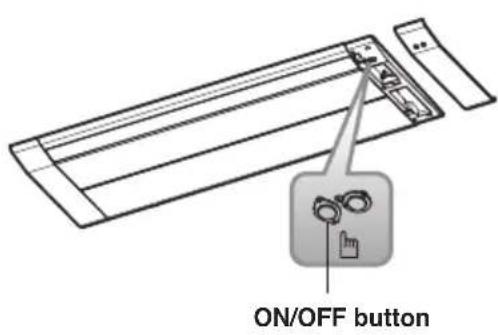
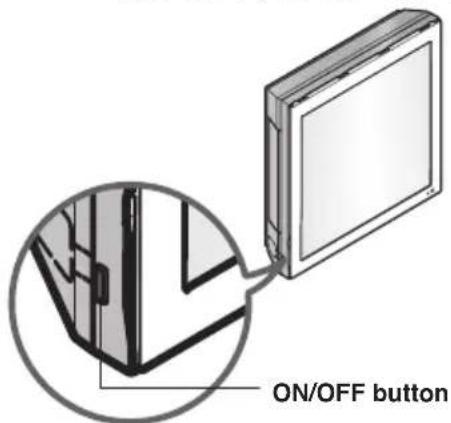
Forced Operation
Operation procedures when the remote control can't be used.
Press the tact switch (ON/OFF button) for 2 seconds.
If you want to stop operation, press again the tact switch.
In case the power comes on again after power failure on the forced operation mode, the operating conditions are automatically set as follows: During forced operation, the initial mode continues.
text_image
ON/OFF button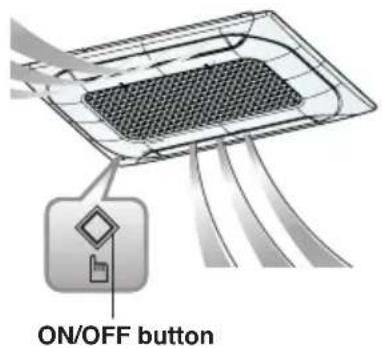
text_image
ON/OFF button
text_image
ON/OFF button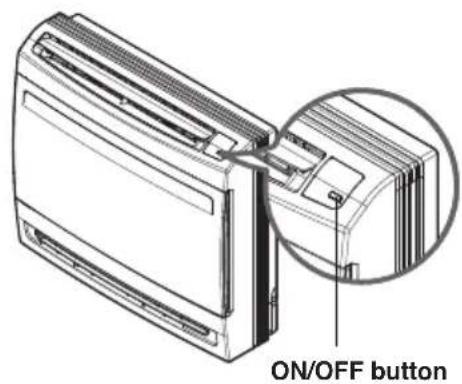
text_image
ON/OFF button* The feature may be changed according to the type of model.
| Cooling Model | Heat pump model | |||
| Room Temperature <21 °C | 21 °C ≤ Room Temperature <24 °C | Room Temperature ≥24 °C | ||
| Operating mode | Cooling Heating | Dehumidification Cooling | ||
| Indoor Fan Speed | High High High | High | ||
| Setting temperature | 22 °C 24 °C | -22 °C | ||
Auto Restart Function
In case the power comes on again after a power failure, auto restarting operation is the function to operate procedures automatically to the previous operating conditions.
Maintenance and Service
Ceiling Cassette - 1Way (Plasma + Grille Type)
CAUTION
Before performing any maintenance, turn off the main power to the system.
Grille, Case, and Remote Control
☐ Turn the system off before cleaning. To clean, wipe with a soft, dry cloth. Do not use bleach or abrasives.
NOTE
Supply power must be disconnected before cleaning the indoor unit.
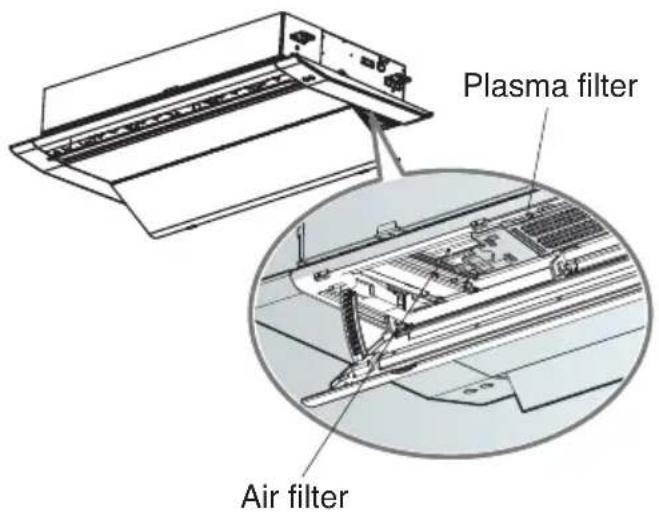
Air Filter
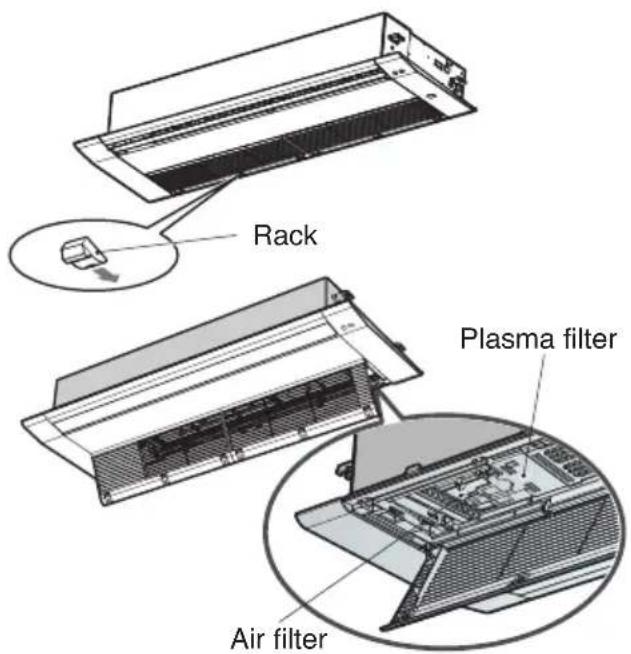
The air filters behind the front grille should be checked and cleaned once every 2 weeks or more often if necessary.
text_image
Rack Plasma filter Air filterTT chassis : 6 EA Rack TU chassis : 4 EA Rack
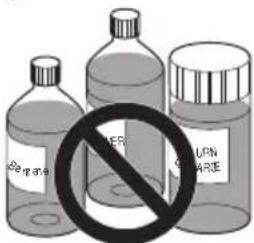
□Never use any of the followings:
• Water hotter than 40 °C. Could cause deformation and/or discoloration.
• Volatile substances. Could damage the surfaces of the air conditioner.
text_image
No ###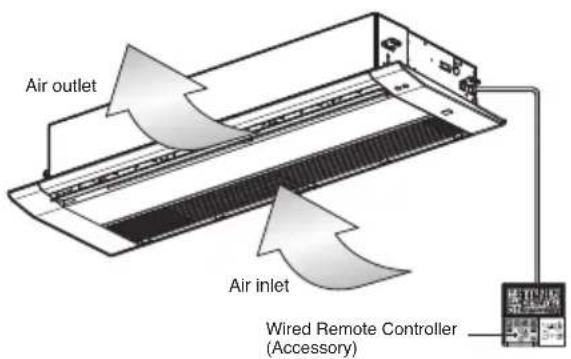
text_image
Air outlet Air inlet Wired Remote Controller (Accessory)- Remove air filters.
☐ Take hold of the tab and pull slightly forward to remove the filter.
CAUTION
When the air filter is to be removed, do not touch the metal parts of the indoor unit. It may cause an injury.
- Remove plasma filter.
☐ Unscrew 2 screws from plasma filter.
- Clean dirt from the air filter using a vacuum cleaner or washing with water.
☐ If dirt is conspicuous, wash with a neutral detergent in lukewarm water.
☐ If hot water (50 °C or more) is used, it may be deformed.
- After washing with water, dry well in the shade.
☐ Do not expose the air filter to direct sunlight or heat from a fire when drying it.
- Install plasma filter and air filter.
Ceiling Cassette - 1Way (Plasma + Panel Type)
CAUTION
Before performing any maintenance, turn off the main power to the system.
Panel, Case, and Remote Control
☐ Turn the system off before cleaning. To clean, wipe with a soft, dry cloth. Do not use bleach or abrasives.
NOTE
Supply power must be disconnected before cleaning the indoor unit.
Air Filter
The air filters behind the front grille should be checked and cleaned once every 2 weeks or more often if necessary.
text_image
Plasma filter Air filterTT chassis : 6 EA Rack TU chassis : 4 EA Rack
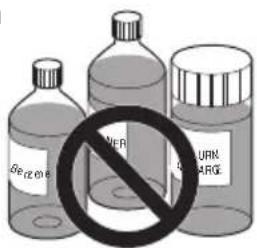
□ Never use any of the followings:
• Water hotter than 40 °C. Could cause deformation and/or discoloration.
• Volatile substances. Could damage the surfaces of the air conditioner.
text_image
Beizene POTER LUMEN PUMPAGE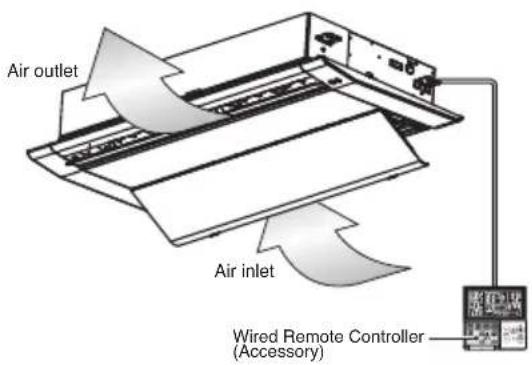
text_image
Air outlet Air inlet Wired Remote Controller (Accessory)- Remove air filters.
☐ Take hold of the tab and pull slightly forward to remove the filter.
CAUTION
When the air filter is to be removed, do not touch the metal parts of the indoor unit. It may cause an injury.
- Remove plasma filter.
☐ Unscrew 2 screws from plasma filter.
- Clean dirt from the air filter using a vacuum cleaner or washing with water.
☐ If dirt is conspicuous, wash with a neutral detergent in lukewarm water.
☐ If hot water (50 °C or more) is used, it may be deformed.
- After washing with water, dry well in the shade.
☐ Do not expose the air filter to direct sunlight or heat from a fire when drying it.
- Install plasma filter and air filter.
Ceiling Cassette - 2Way
CAUTION
Before performing any maintenance, turn off the main power to the system.
Grille, Case, and Remote Control
☐ Turn the system off before cleaning. To clean, wipe with a soft, dry cloth. Do not use bleach or abrasives.
NOTE
Supply power must be disconnected before cleaning the indoor unit.
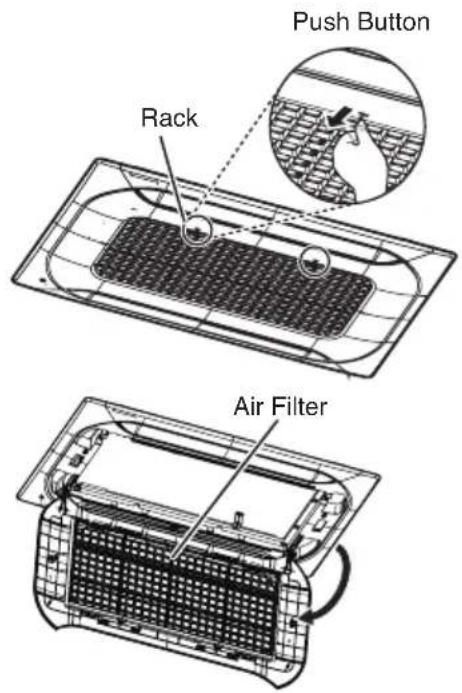
Air Filters
The air filters behind the front grille should be checked and cleaned once every 2 weeks or more often if necessary.
text_image
Push Button Rack Air Filter■ Never use any of the followings:
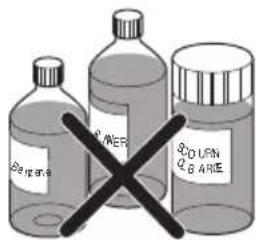
• Water hotter than 40 °C. Could cause deformation and/or discoloration.
• Volatile substances. Could damage the surfaces of the air conditioner.
text_image
Aerogran RIVER BOLUM BARE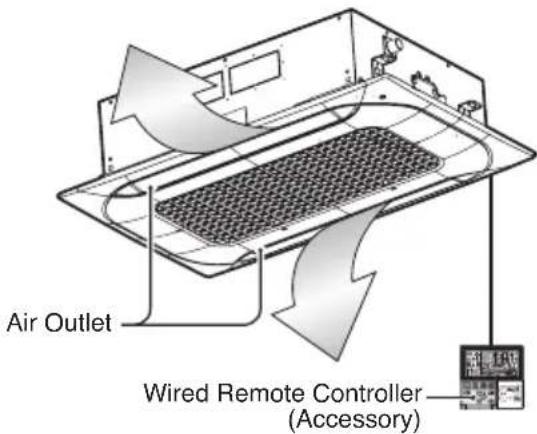
text_image
Air Outlet Wired Remote Controller (Accessory)- Remove the Air filters.
■ Take hold of the tab and pull slightly forward to remove the filter.
CAUTION
When the air filter is to be removed, do not touch the metal parts of the indoor unit. It may cause an injury.
- Clean dirt from the air filter using a vacuum cleaner or washing with water.
■ If dirt is conspicuous, wash with a neutral detergent in lukewarm water.
■ If hot water (50 °C or more) is used, it may be deformed.
- After washing with water, dry well in the shade.
■ Do not expose the air filter to direct sunlight or heat from a fire when drying it.
- Install the air filter.
Ceiling Cassette - 4Way
CAUTION
Before performing any maintenance, turn off the main power to the system.
Grille, Case, and Remote Control
☐ Turn the system off before cleaning. To clean, wipe with a soft, dry cloth. Do not use bleach or abrasives.
NOTE
Supply power must be disconnected before cleaning the indoor unit.
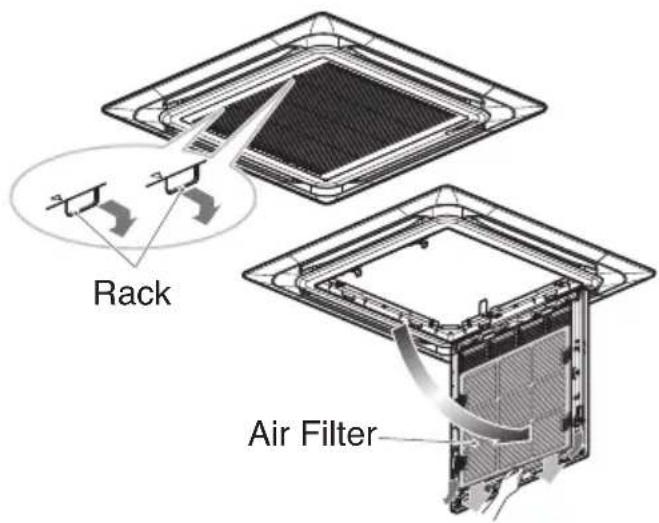
Air Filters
The air filters behind the front grille should be checked and cleaned once every 2 weeks or more often if necessary.
text_image
Rack Air Filter■ Never use any of the followings:
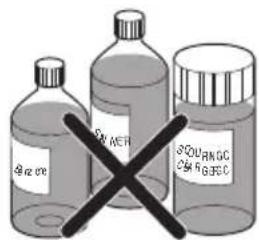
• Water hotter than 40 °C. Could cause deformation and/or discoloration.
• Volatile substances. Could damage the surfaces of the air conditioner.
text_image
SIN MEF SOUTRNGC CM RGSIC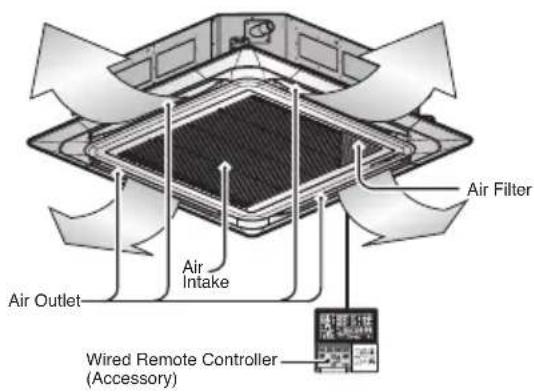
text_image
Air Filter Air Intake Air Outlet Wired Remote Controller (Accessory)- Remove the Air filters.
■ Take hold of the tab and pull slightly forward to remove the filter.
CAUTION
When the air filter is to be removed, do not touch the metal parts of the indoor unit. It may cause an injury.
- Clean dirt from the air filter using a vacuum cleaner or washing with water.
■ If dirt is conspicuous, wash with a neutral detergent in lukewarm water.
■ If hot water (50 °C or more) is used, it may be deformed.
- After washing with water, dry well in the shade.
■ Do not expose the air filter to direct sunlight or heat from a fire when drying it.
- Install the air filter.
Ceiling Concealed Duct & Fresh Air Intake Unit
CAUTION
Before performing any maintenance, turn off the main power to the system.
Grille, Case, and Remote Control
☐ Turn the system off before cleaning. To clean, wipe with a soft, dry cloth. Do not use bleach or abrasives.
NOTE
Supply power must be disconnected before cleaning the indoor unit.
Air Filter
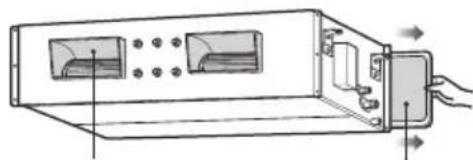
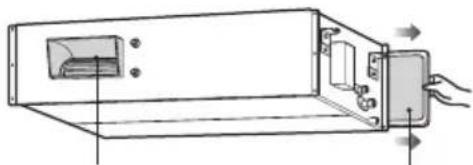
The air filters behind Indoor unit (the suction side) should be checked and cleaned once every 2 weeks or more often if necessary.

text_image
Air-Filter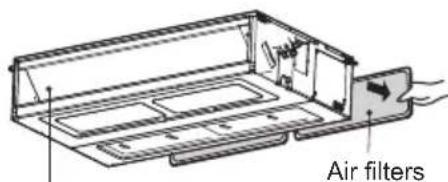
text_image
Air filtersAir outlet vents
natural_image
Diagram of a device with ports and connectors, showing internal components and directional arrows (no text or symbols)Air outlet vent
Air filters
natural_image
Technical line drawing of a mechanical device with internal components and directional arrows indicating motion (no text or symbols)Air outlet vent
Air filters
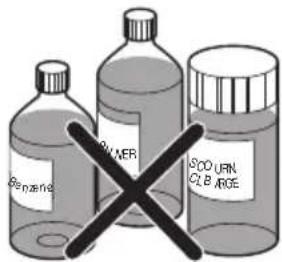
□ Never use any of the followings:
• Water hotter than 40 °C Could cause deformation and/or discoloration.
• Volatile substances
Could damage the surfaces of the air conditioner.
text_image
Benzene RUMER SOD URN CL BARGE- Remove the Air filters.
■ Take hold of the tab and pull slightly forward to remove the filter.
CAUTION
When the air filter is to be removed, do not touch the metal parts of the indoor unit. It may cause an injury.
- Clean dirt from the air filter using a vacuum cleaner or washing with water.
■ If dirt is conspicuous, wash with a neutral detergent in lukewarm water.
If hot water (50 °C or more) is used, it may be deformed.
- After washing with water, dry well in the shade.
■ Do not expose the air filter to direct sunlight or heat from a fire when drying it.
- Install the air filter.
Concealed Floor Standing

CAUTION
Before performing any maintenance, turn off the main power to the system.
Grille, Case, and Remote Control
☐ Turn the system off before cleaning. To clean, wipe with a soft, dry cloth. Do not use bleach or abrasives.
NOTE
Supply power must be disconnected before cleaning the indoor unit.
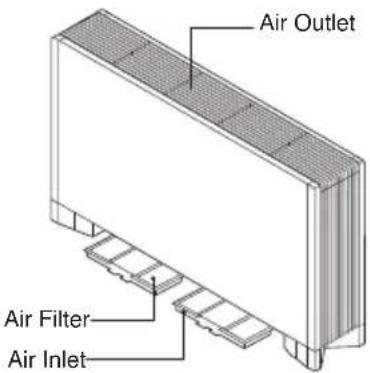
Air Filter
The air filters bottom Indoor unit (the suction side) should be checked and cleaned once every 2 weeks or more often if necessary.
text_image
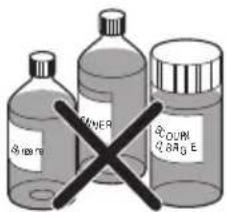
Air Outlet Air Filter Air Inlet□ Never use any of the followings:
• Water hotter than 40 °C
Could cause deformation and/or discoloration.
• Volatile substances
Could damage the surfaces of the air conditioner.
text_image
SHEN SHENER COCON E-
Clean the filter with a vacuum or warm, soapy water.
-
If very dirty, wash with a solution of detergent in lukewarm water.
-
If hot water (50 °C or more) is used, filter may be deformed.
-
After washing with water, dry well in the shade.
- Re-install the air filter.
Art Cool Gallery Series
CAUTION
Before performing any maintenance, turn off the main power to the system, disconnect the circuit breaker and unplug the power cord.
Clean the unit with a soft dry cloth. Do not use bleach or abrasives.
CAUTION
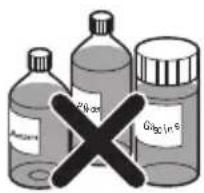
Never use any of these
• Water hotter than 40 °C. It may cause deformation and discoloration.
- Volatile substances. They may damage the surface of the air conditioner.
Air Filters
The air filters behind the front panel / grill should be checked and cleaned once in every 2 weeks or more often if necessary. To remove the filters see the self explanatory diagrams for each model type. Clean the filters with a vacuum cleaner or warm soapy water. If dirt is not easily removed, wash with a solution of detergent in luke warm water. Dry well in shade after washing and reinstall the filters back in place.
Plasma Filters
The plasma filters behind the air filter should be checked and cleaned once in every 3 months or more often if necessary. To remove the filters see the self explanatory diagrams for each model type. Clean the filters with a vacuum cleaner. If it is dirty wash it with water and dry well in shade an install back in place.
Deodorizer Filters
Remove the deodorizer filters behind the air filter and expose them in direct sunlight for 2 hours.
And then insert these filters into original position.
text_image
Gasoline Water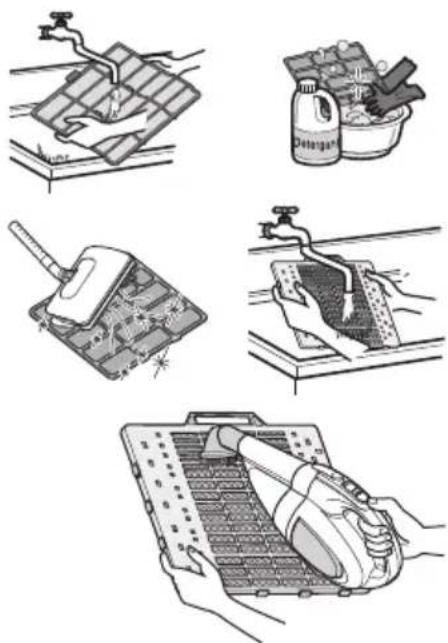
natural_image
Illustration of five different cleaning and cleaning techniques: surface water treatment, spray bottle, circuit board installation, handwashing, and cleaning device (no text or symbols present)Removal of Filters
Art Cool Type :
Pull out the upper section of front panel and lift it up. Take out a filter with front panel held.
With PUSH button pressed, pull out grip to take out a plasma filter. Dry it completely in the shade after cleaning.
Then set a plasma filter and a filter orderly. Put the hook of front panel onto the hanger, in order to close the front panel.
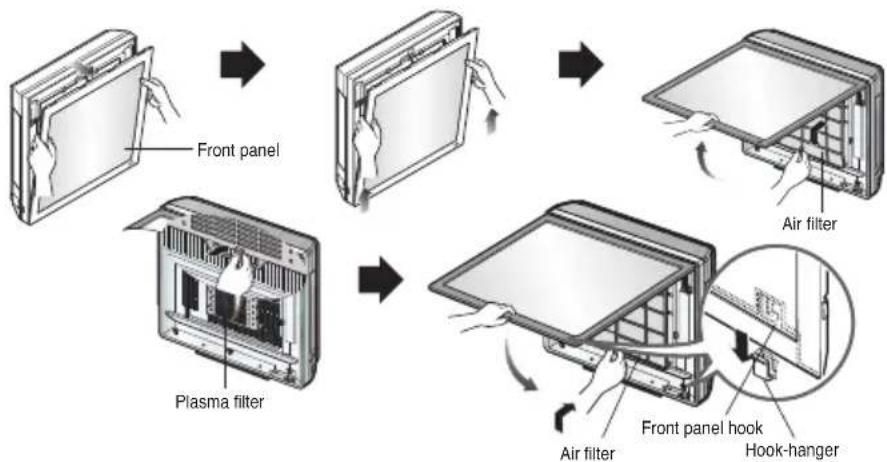
flowchart
graph TD
    A["Front panel"] --> B["Plasma filter"]
    B --> C["Air filter"]
    C --> D["Front panel hook"]
    D --> E["Hook-hanger"]
CAUTION
Don't touch this plasma filter within 10 seconds after opening the inlet grille, it may cause an electric shock.
How to replace picture & photograph
- Turn off power and then open the upper part of front panel.

natural_image
Illustration of a hand inserting a card into a rectangular frame (no text or symbols)- Pull out the both links of lower part of front panel, as described in the below picture.
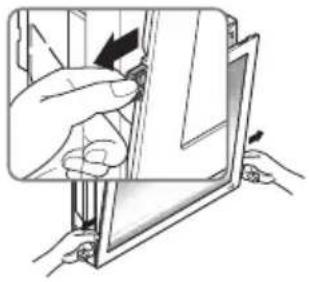
natural_image
Illustration of hands installing or adjusting a device panel with arrows indicating motion (no text or symbols)- Push and close the top part of the front panel and then pull the bottom part of the panel forward until it is secured.
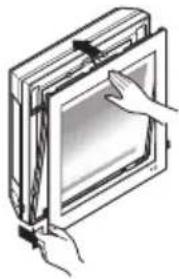
natural_image
Illustration of hands inserting a rectangular device into a screen (no text or symbols visible)- Take out picture.
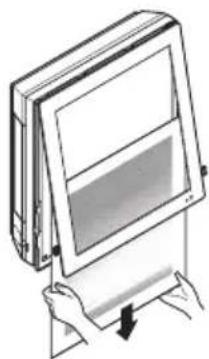
natural_image
Illustration of hands holding a rectangular panel with a screen, no text or symbols present- Turn upside-down of the picture and turn over mat, then take off a protective tape attached at the mat.
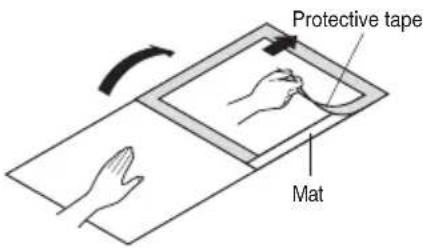
text_image
Protective tape Mat- Place the picture/photograph between the exited picture and mat. (Recommended size of a photo/picture: 450 mm x 450 mm)
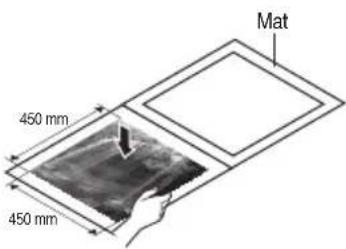
text_image
Mat 450 mm 450 mm- Cover mat and press down with hand(s) until contacting closely.
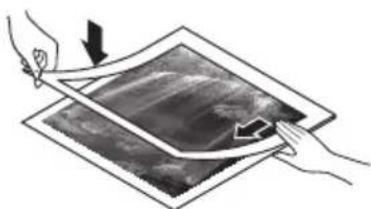
natural_image
Illustration of two hands holding a tablet with arrows indicating motion or movement (no text or symbols)- Slide the photo graph/drawing requested under both hanger parts as following, and fix them. Press the front panel lightly to close.
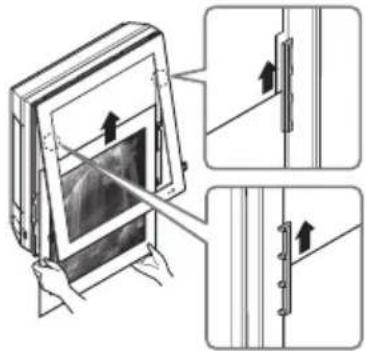
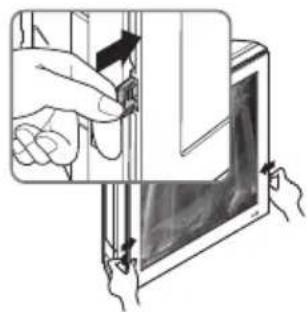
text_image
Technical diagram showing a device with directional arrows indicating assembly or movement, including a close-up of the screen and side panels.- Push both links of lower part of panel inside and fix it. Then turn on.
natural_image
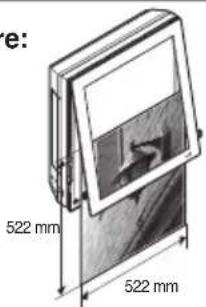
Illustration of hands interacting with a tablet device (no text or symbols visible)※ In case a mat is not used, recommended size of a photo/picture:
522 mm × 522 mm
When powering on after replacing filter and picture, the front panel doesn't intervene.
text_image
e: 522 mm 522 mmWall Mounted
CAUTION
Before performing any maintenance, turn off the main power to the system.
Never use any of the followings:
- Water hotter than 40 °C. Could cause deformation and/or discoloration.
- Volatile substances. Could damage the surfaces of the air conditioner.
Air Filters
The air filters behind the front panel / grill should be checked and cleaned once in every 2 weeks or more often if necessary. To remove the filters see the self explanatory diagrams for each model type. Clean the filters with a vacuum cleaner or warm soapy water. If dirt is not easily removed, wash with a solution of detergent in luke warm water. Dry well in shade after washing and reinstall the filters back in place.
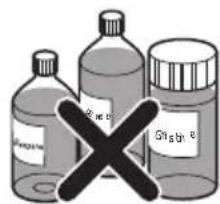
text_image
Benzene Methane Glycine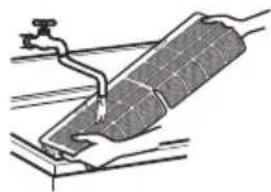
natural_image
Diagram of a solar panel installation with a water tap and pipe (no text or symbols)Clean the air filter
Clean the air filter once every 2 weeks or more if necessary.
- Turn off the power and unplug the power cord.
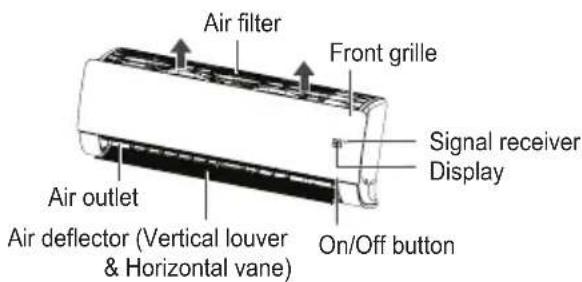
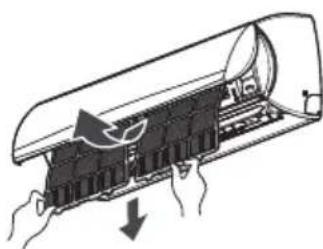
- 5\~24 kBtu/h : Hold the knob of air filter, Lift it up slightly.
30\~36 kBtu/h : Open the front panel as shown.
5\~24 kBtu/h
30\~36 kBtu/h
text_image
Air filter Front grille Signal receiver Display Air outlet Air deflector (Vertical louver & Horizontal vane) On/Off button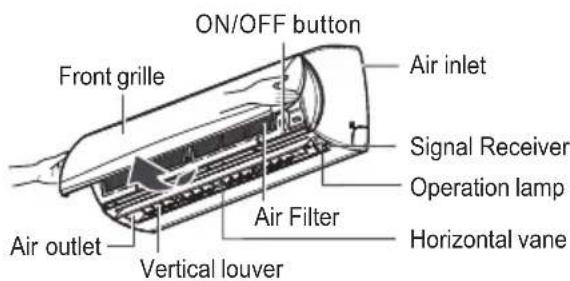
text_image
ON/OFF button Front grille Air inlet Signal Receiver Operation lamp Air outlet Vertical louver Air Filter Horizontal vane* The feature can be changed according to type of model.
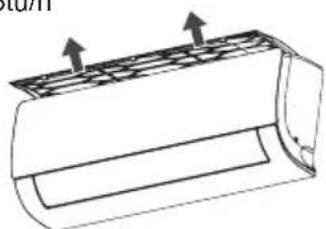
- 5\~24 kBtu/h : Hold the knob of air filter, Lift it up slightly and remove it from the unit.
30\~36 kBtu/h : Pull the filter tab slightly forward to remove the air filter.
5\~24 kBtu/h
natural_image
Technical line drawing of a cylindrical mechanical component with two upward arrows indicating force or direction (no text or symbols)30\~36 kBtu/h
natural_image
Diagram of a door with hands holding a component, showing internal structure and airflow direction (no text or symbols)* The feature can be changed according to type of model.
- Clean the filter with a vacuum cleaner or with warm water.
- If dirt is difficult to remove, wash the filter in lukewarm water with detergent.
- Dry the filter in the shade.
NOTE
The air filter can be broken when it is bended.
Convertible
CAUTION
Before performing any maintenance, turn off the main power to the system.
Grille, Case, and Remote Control
☐ Turn the system off before cleaning.
To clean, wipe with a soft, dry cloth. Do not use bleach or abrasives.
NOTE
Supply power must be disconnected before cleaning the indoor unit.
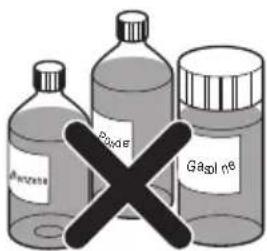
□ Never use any of the followings:
- Water hotter than 40 °C. Could cause deformation and/or discoloration.
• Volatile substances
Could damage the surfaces of the air conditioner.
text_image
Alkaline Poxide GasolineAIR FILTERS
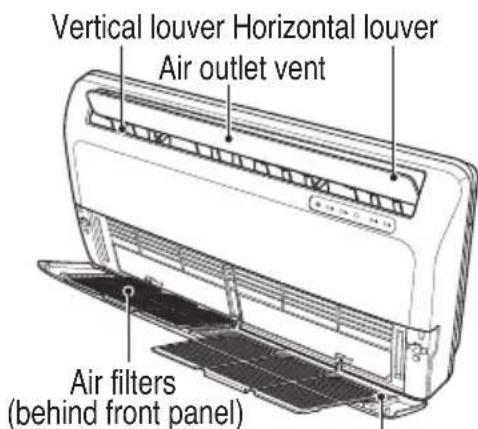
The air filters behind the front grille should be checked and cleaned once in every 2 weeks or more often if necessary.
- Lift the front access panel and pull the filter tab slightly forward to remove the filter.
-
Clean the filter with a vacuum cleaner or warm, soapy water.
-
If dirt is conspicuous, wash with a solution of detergent in lukewarm water.
-
If hot water (40 °C or more) is used, it may be deformed.
-
After washing with water, dry well in the shade.
- Re-install the air filter.
text_image
Vertical louver Horizontal louver Air outlet vent Air filters (behind front panel)Air inlet vent
Console
CAUTION
Before performing any maintenance, turn off the main power to the system, disconnect the circuit breaker and unplug the power cord.
Cleaning of Panel and filters
Clean the unit with a soft dry cloth. Do not use bleach or abrasives.
CAUTION
Never use any of these
- Water hotter than 40 °C. It may cause deformation and discoloration.
- Volatile substances. They may damage the surface of the air conditioner.
Air Filters
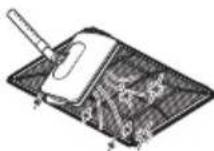
The air filters behind the front panel / grill should be checked and cleaned once in every 2 weeks or more often if necessary. To remove the filters see the self explanatory diagrams below. Clean the filters with a vacuum cleaner or warm soapy water. If dirt is not easily removed, wash with a solution of detergent in luke warm water.
Dry well in shade after washing and reinstall the filters back in place.
Allergy Filter
Remove the Allergy Filter behind the air filter and expose them in direct sunlight for 2 hours.
And then insert these filters into original position.
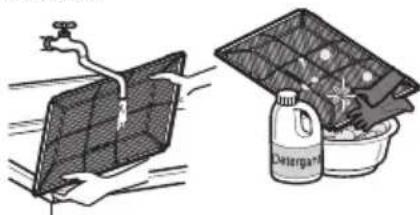
natural_image
Illustration showing a water tap spraying a solar panel and a cleaning bag with a container filled with food (no text or symbols)Removal of Grille
- Open the front grille by pulling forward
- Then pull out the link of grille from groove in front panel.
- Then pull out 2 hinges of grille from grooves in front panel.
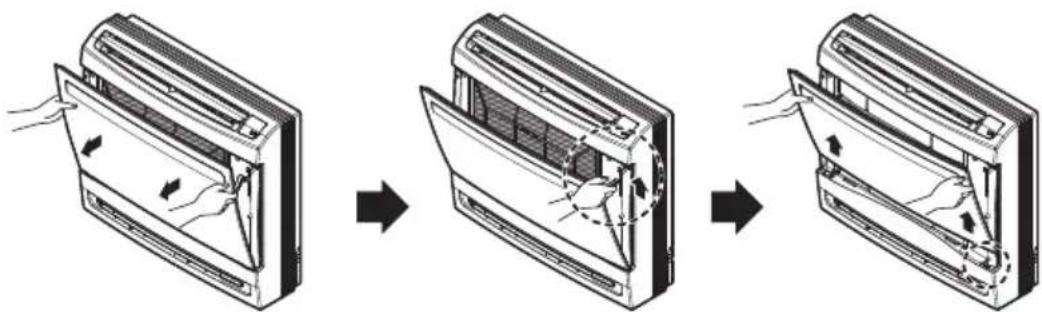
text_image
Diagram illustrating the process of air conditioner ventilation system, showing three sequential steps with airflow arrows.Removal of Filters
- Pull down the filter tab slightly to remove the air filter.
- Hold the tabs of the frame, and remove the claws in 4 places.
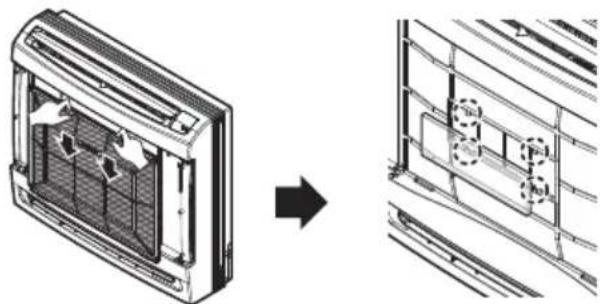
natural_image
Diagram showing airflow or heat transfer from a rectangular device into a grid-like structure, with no visible text or symbols.When the air conditioner is not going to be used for a long time
When it is not going to be used for a long time.

Operate the air conditioner at the following settings for 2 to 3 hours.
- Type of operation: Fan operation mode.
• This will dry out the internal mechanisms.

Turn off the breaker.

CAUTION
Turn off the breaker when the air conditioner is not going to be used for a long time.
Dirt may collect and may cause a fire.
Helpful information
The air filters and your electric bill. If the air filters become clogged with dust, the cooling capacity will drop, and 6 % of the electricity used to operate the air conditioner will be wasted.
When the air conditioner is to be used again.

Clean the air filter and install it in the indoor unit.

Check that the air inlet and outlet of the indoor/outdoor unit are not blocked.

Check that the ground wire is connected correctly. It may be connect to the indoor unit side.
Operation Tips
Do not overcool the room.
This is not good for the health and wastes electricity.
Make sure that the doors and windows are shut tight.
Avoid opening doors and windows as much as possible to keep the cool air in the room.
Keep blinds or curtains closed.
Do not let direct sunshine enter the room when the air conditioner is in operation.
Clean the air filter regularly.
Blockages in the air filter reduce the airflow and lower cooling and dehumidifying effects. Clean at least once every two weeks.
Keep the room temperature uniform.
Adjust the vertical and horizontal airflow direction to ensure a uniform temperature in the room.
Ventilate the room occasionally.
Since windows are kept closed, it is a good idea to open them and ventilate the room now and then.
Before you call for service...

Troubleshooting Tips! Save time and money!
Check the following points before requesting repairs or service.... If the malfunction persist, please contact your dealer.
| The air conditioner does not operate. | The room has a peculiar odor. | It seems that condensation is leaking from the air conditioner. | Air conditioner does not operate for about 3 minutes when restart. |
| Have you made a mistake in timer operation?Has the fuse blown or has the circuit breaker been tripped? | Check that this is not a damp smell exuded by the walls, carpet, furniture or cloth items in the room. | Condensation occurs when the airflow from the air conditioner cools the warm room air. | This is the protector of the mechanism.Wait about three minutes and operation will begin. |
| Does not cool or heat effectively. | The air conditioner operation is noisy. | Crack sound is heard. | Remote control display is faint, or no display at all. |
| Is the air filter dirty?See air filter cleaning instructions.The room may have been very hot when the room air conditioner was first turned on.Allow time for it to cool down.Has the temperature been set incorrectly?Are the indoor unit's air inlet or outlet vents obstructed? | For a noise that sounds like water flowing.- This is the sound of freon flowing inside the air conditioner unit.For a noise that sounds like the compressed air releasing into atmosphere.- This is the sound of the dehumidifying water being processed inside the air conditioning unit. | This sound is generated by the expansion/constriction of the front panel, etc. due to changes of temperature. | Are the batteries depleted?Are the batteries inserted in the opposite (+) and (-) directions? |
NOTE
• Water resistant: The outdoor side of this appliance is WATER RESISTANT.
The indoor side is not water resistant and should not be exposed to excess water.
- Some functions may not be supported, depending on the model.

LG
Life's Good