
WF-T80FS - Washing machine LG - Free user manual and instructions
Find the device manual for free WF-T80FS LG in PDF.


User questions about WF-T80FS LG
0 question about this device. Answer the ones you know or ask your own.
Ask a new question about this device
Download the instructions for your Washing machine in PDF format for free! Find your manual WF-T80FS - LG and take your electronic device back in hand. On this page are published all the documents necessary for the use of your device. WF-T80FS by LG.
USER MANUAL WF-T80FS LG
Please read this manual carefully before operating your set and retain it for future reference
T7070TDDL T7508TEDLL T8008TEDLH T8567TEELR T10RRF21V1
T7008TDDLP T7508TEDLH T8067TEELH T8567TEELK
T7270TDDL T7567TEELH T8067TEELR T8567TEEL3
T7208TDDLH T7567TEELR T8067TEELK T8567TEEL5
T72CMG22P T7567TEEL3 T8067TEEL3 T9003TEELK
T7267TDELH T7567TEELK T8067TEEL5 T9003TEELR
READ THIS MANUAL
Inside you will find many helpful hints on how to use and maintain your washer properly. Just a little preventive care on your part can save you a great deal of time and money over the life of your washer. You will find many answers to common problems in the Troubleshooting section. If you review our chart of Troubleshooting Tips first, you may not need to call for service at all.
Page No
| Introduction | Product Features | 3 |
| Safety Information 4 | ||
| Identification of Parts 10 | ||
| Function Information 11 | ||
| Before Starting to Wash | Preparation Before Washing 12 | |
| Use of Water, Detergent, Bleach and Softener | 13 | |
| Special Guide for Stain Removal | 16 | |
| Function of each Button 18 | ||
| Washing Programs* | FUZZY Wash (Normal Wash) 22 | |
| GENTLE (WOOL/SAREE) Wash | 22 | |
| QUICK WASH 22 | ||
| STRONG (JEANS) Wash 22 | ||
| EXTRA RINSE / SMART RINSE 22 | ||
| FAVORITE Wash | 24 | |
| SILENT Wash | 24 | |
| SOAK Wash 25 | ||
| ECO WASH 27 | ||
| AQUA RESERVE Wash | 27 | |
| Voice Feature Usage* | Hi-tech voice guided module 28 | |
| Additional Function Program* | TUB CLEAN 29 | |
| AIR DRY | 30 | |
| Option Washing | 31 | |
| DELAY START (RESERVATION) Wash | 32 | |
| Other Useful Functions | 33 | |
| Installation | Placing, Leveling and Installation | 34 |
| Connecting Hose | 35 | |
| Care and Maintenance | Grounding Method | 37 |
| Cleaning and Maintenance | 38 | |
| Use of Handle Locker | 39 | |
| Troubleshooting | Common washing problems | 40 |
| Troubleshooting | 41 | |
| SmartDiagnosisTM | 42 | |
| Features & Specifications | Features & Specifications | 43 |
| Installation Check Sheet | Installation Check Sheet | |
| Terms of Warranty | Terms of Warranty |
* Product feature may vary according to different models. Refer page 43 for modelwise features for your purchased model.
Droduct Features\*

Washer doesn't operate while the lid is opened. If the lid is opened during the wash, rinse or spin cycles, the operation stops for safety.
VOICE INSTRUCTIONS
● A hi-tech voice module guides user through entire washing process, gives demo, gives safety guidelines and also alerts you in case of any operating errors.
1 sensor
- The sensor automatically detects the quantity of a Detergent put by a user and the temperature and the quality of water to make the best washing algorithm for washing and rinsing, which can give the best washing effect.
SMART RINSE
- The purpose of this cycle is to optimize detergent residues during the washing and rinsing cycles, in order to implement this effect, the washer adds more rinsing times by I-sensor. Rinse can be added until max 5 times.
EXTRA RINSE
- The purpose of this cycle is to reduce detergent residues during the washing and rinsing cycles. In order to implement this effect the washer adds one rinsing cycle. (Total 3 rinsing cycles)
JET SPRAY#
● A technology uniquely designed to spray inlet water with greater force to penetrate deep into the clothes of bring out the best washing and rinsing performance.
FUZZY logic control
- A built-in load sensor automatically detects the laundry load and a microprocessor optimizes washing conditions such as ideal WATER LEVEL and washing time.

flowchart
graph LR
    A["START"] --> B["SENSING"]
    B --> C["SETTING"]
    C --> D["WASHING"]
    D --> E["AUTO POWER OFF"]
- Advanced technology is built into the Electronic Control System which ensures the best washing result.
TurboDrum washing
- When "Punch + 3" washing wings turn, the washing tub turns in the opposite direction. This makes the both sides current of water which improve wash-performance by rubbing clothes strongly.
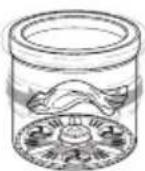
3 Step washing
- 3 step washing makes the best washing performance with low tangling.
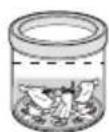
Rubbing

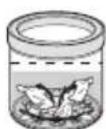
Rubbing and Shaking

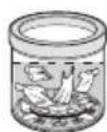
Shaking and Disentangling
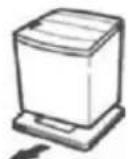
NOTE : Be sure to remove the product from the carton base, otherwise the machine will not be able to operate properly.
* Product feature may vary according to different models. Refer page 43 for modelwise features for your purchased model.
# Works during Wash cycle in Fuzzy & Aqua Reserve from WL 1 to 7 and during Rinse cycle in Fuzzy, Eco & Aqua Reserve Programs at all water levels. Jet Spray performance may vary with Inlet water pressure, for optimum results pressure should be >0.9 Bar

afety Information
Read carefully and thoroughly go through this booklet as it contains important safety information that will protect the user from unexpected dangers and prevent potential damages to the product.
This booklet is divided into 2 parts: Warning and Caution.

: This is a warning sign specifying user's applications which might be dangerous.

: This is a sign specifying ‘Strictly Forbidden’ applications.

WARNING

CAUTION
: Failure to comply with the instructions under this sign may result in major physical injuries or death.
: Failure to comply with the instructions under this sign may result in minor physical injuries or damages to the product.

WARNING
- Under certain conditions hydrogen gas may be produced in a water heater that has not been used for two weeks or more. Hydrogen gas can be explosive under these circumstances. If the HOT water has not been used for two weeks or more, prevent the possibility of damage or injury by turning on all Hot water faucets and allowing them to run for several minutes. Do this before using any electrical appliance which is connected to the HOT water system. This simple procedure will allow any built-up hydrogen gas to escape. Since the gas is flammable, do not smoke or use an open flame or appliance during this process.
PROPER INSTALLATION

CAUTION
- The base opening must not be obstructed by carpeting when the washing machine is installed on a carpeted floor.
- Install or store where it will not be exposed to temperature below freezing or exposed to the weather (Rain / Water Splash).
If the product is exposed to such conditions, electric shock, fire, break down or deformation may occur. - Properly ground washer to confirm with all governing codes and ordinances. Follow details in Installation Instructions.
If not grounded properly, break down and leakage of electricity may occur, which may cause electric shock. - Machine must be positioned so that the plug is accessible.
If the plug is placed between the wall and the machine, it may get damaged, possibly causing fire or electric shock. - Make sure the plug is completely pushed into the outlet.
Failure to do so may cause electric shock and fire due to overheating. - Do not connect ground to a gas pipe.
It can cause explosion. - Do not connect ground to telephone wires or lightning rods.
This may be dangerous during electrical storms. - Washer shall be placed in dry areas specifically during rainy season.
Humid conditions may cause rusting which may result in product failure.

रक्षा जानकारी
- Use this appliance only for its intended purpose as described in this Owner's Manual.
- The laundry process can reduce the flame retardancy of fabrics. To avoid such a result, carefully follow the garment manufacturer's wash and care instructions.
- To minimize the possibility of electric shock, unplug this appliance from the power supply or disconnect the washer at the household distribution panel by removing the fuse or switching off the circuit breaker before attempting any maintenance or cleaning.
NOTE
Pressing Power button to turn off does NOT disconnect the appliance from the power supply.
• Make sure that drainage is working properly.
If water is not drained properly, your floor may get flooded.
Flooded floors may induce electricity leakage, further resulting in electric shock or fire.
- If, during spinning, opening the lid does not stop the tub within about 15 seconds, immediately discontinue operating the machine.
| WHEN USING THE WASHER |  WARNING WARNING |
| This appliance is not intended for use by persons (including children) with reduced physical, sensory or mental capabilities, or lack of experience and knowledge, unless they have been given supervision or instruction concerning use of the appliance by a person responsible for their safety.Do not use a plug socket and wiring equipment for more than their rated capacity.Exceeding the limit may lead to electric shock, fire , break down, and/or deformation of parts.Do not mix chlorine bleach with other household chemicals such as toilet cleaners, rust removers, acids (such as vinegar) or product containing ammonia.Mixing different chemicals can produce toxic gases which may cause death.Do not wash or dry articles that have been cleaned in, washed in, soaked in, or spotted with combustible or explosive substances (such as wax, oil, paint, gasoline, dry-cleaning solvents, kerosene, etc). Do not add these substances to the wash water.Do not use or place these substances around your washer or dryer during operation.It may ignite or explode.AVoid electric heater, candle light, cigarette light, bug smoker, etc. near the machine.It may ignite or deform the plastic part. | |
| WHEN NOT IN USE |  CAUTION CAUTION |
| Turn off water faucets to relieve pressure on hoses and valves and to minimize leakage if a break or rupture should occur. Check the condition of the fill hoses; they may need replacement after 5 years.When the air temperature is high and the water temperature is low, condensation may occur and thus wet the floor.Wipe off dirt or dust on the contacts of the power plug.Using unclean power plug may cause fire.Before discarding a washer, or removing it from service, remove the washer lid to prevent children from hiding inside.Children may be trapped and suffocated if the lid is left intact.Do not attempt to repair or replace any part of this appliance unless specifically recommended in this Owner's Manual, or in published user-repair instructions that you understand and have the skills to carry out.Operating the machine with improperly replaced parts may be a cause for fire or electric shock.Do not tamper with controls.It may lead to electric shock, fire , break down, deformation.Do not yank the power cord in an attempt to disconnect the power plug.Securely hold the power plug to unplug the machine.Failure to observe these instructions may cause electric shock or fire due to short-circuit.When you are cleaning the washing machine, do not apply water directly to any part of the washing machine.It will cause short circuit and electric shock. |
WARNING
CAUTION
- Turn off water faucets to relieve pressure on hoses and valves and to minimize leakage if a break or rupture should occur. Check the condition of the fill hoses; they may need replacement after 5 years.
- When the air temperature is high and the water temperature is low, condensation may occur and thus wet the floor.
- Wipe off dirt or dust on the contacts of the power plug.
- Before discarding a washer, or removing it from service, remove the washer lid to prevent children from hiding inside.
dentification of Parts
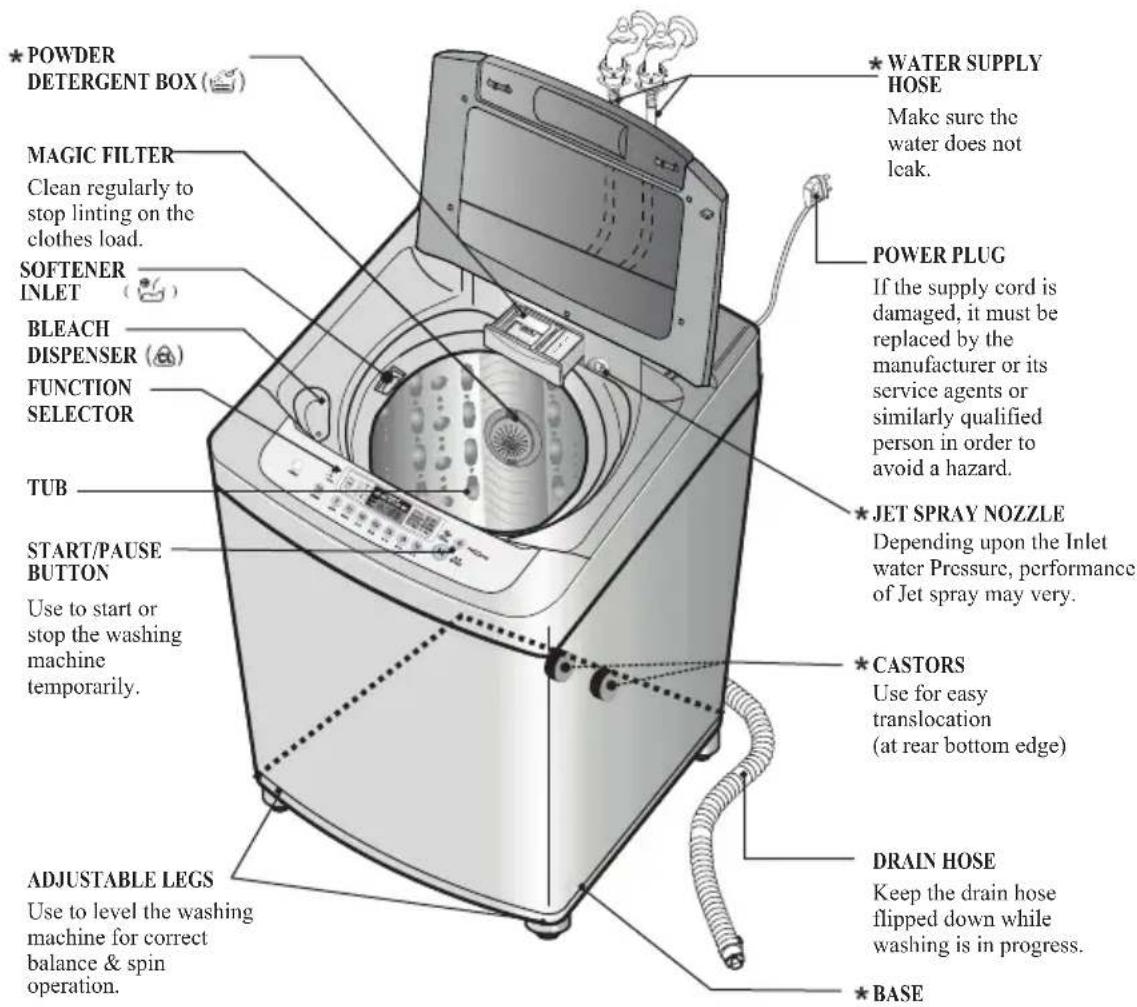
Body
text_image
POWER PLUG If the supply cord is damaged, it must be replaced by the manufacturer or its service agents or similarly qualified person in order to avoid a hazard. JET SPRAY NOZZLE Depending upon the Inlet water Pressure, performance of Jet spray may very. CASTORS Use for easy translocation (at rear bottom edge) DRAIN HOSE Keep the drain hose flipped down while washing is in progress. BASE WATER SUPPLY HOSE Make sure the water does not leak. MAGIC FILTER Clean regularly to stop linting on the clothes load. SOFTENER INLET BLEACH DISPENSER FUNCTION SELECTOR TUB START/PAUSE BUTTON Use to start or stop the washing machine temporarily. ADJUSTABLE LEGS Use to level the washing machine for correct balance & spin operation.Accessories
Water supply hoses
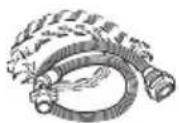
1 Each for COLD and HOT water
Drain hose
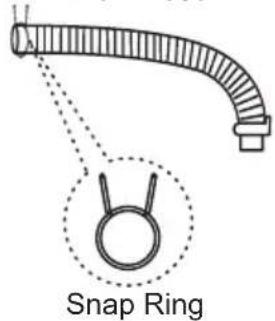
text_image
Snap RingAnti-rat cover
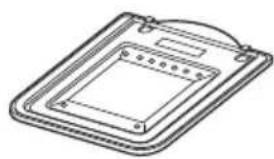
natural_image
Isometric line drawing of a rectangular electronic device with a central square and mounting bracket (no text or symbols)NOTE
* Parts can be different according to the model.

unction Information\*
Our machine provides various washing methods which suits various conditions and types of laundry.
Different types of laundry washing
FUZZY (NORMAL) Wash
Use this Program for everyday washing e.g. sheets, towels, T-shirts (refer to page 22)
STRONG (JEANS) Wash
Use this Program for heavily soiled durable garments.g. overalls, jeans
Thick and heavy clothes or those which are excessively dirty like jeans or working uniforms can be washed. (refer to page 22)
SMART RINSE
Use this program to get better rinsing performance. (refer to page 22)
EXTRA RINSE
Use this program to get better rinsing performance. (refer to page 22)
GENTLE (WOOL/SAREE) Wash
Delicate clothes (lingerie, woolens, saree, etc.) which may be easily damaged can be washed. (refer to page 22)
The machine washable woolens or saree are specifically made to prevent damage during machine-washing.
Most hand-knitted garments are not machine washable, so recommend you to hand wash them.
- For the washing instruction, check the clothing label before wash.
- A neutral detergent is recommended for the woolens or saree.
- Do not use a tumble dryer to prevent damage.
- To avoid direct sunlight, cover up the clothes with towels during natural dry.
Some woolens or sweater may clog a drain hose by their lint, so recommend you to use spin only after hand-wash them.
ECO WASH
Use this program to save water consumption (refer to page 27)
FAVORITE Wash
This setting allows you to store your FAVORITE wash conditions in the normal cycle memory. (refer to page 24)
SILENT Wash
Use this program to wash quietly at night. (refer to page 24)
AQUA RESERVE Wash
Use this program to prevent automatic draining of water at the end of cycle.(refer to page 27)
Washing according to the condition of laundry
QUICK WASH
QUICK WASH can be selected to wash lightly soiled clothes of less than 2.0 kg in short time. (refer to page 22)
SOAK Wash
SOAK Wash can be selected to wash heavily soiled laundry by soaking in water for some time to remove dirt and grime. (refer to page 26)
Other washing method
TUB CLEAN
Use this program to clean the inside of washing machine especially Inner tub & Outer tub(refer to page 29)
DELAY START Wash
DELAY START Wash is used to delay the finishing time of the operation.
The number of hours to be delayed can be set by the user accordingly (refer to page 32)
OPTION WASH
When the user needs only SPIN, RINSE/SPIN,RINSE, WASH/RINSE, WASH, WASH/RINSE/SPIN. (refer to page 31)
* Product feature may vary according to different models. Refer page 43 for modelwise features for your purchased model.
D Preparation Before Washing
Care Labels
Look for a care label on your clothes. This will tell you about the fabric content of your garment and how it should be washed.
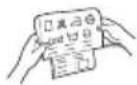
Sort clothes into loads that can be washed with the same wash cycle, Water Temperature and spin speed.
Sorting
To get the best results, different fabrics need to be washed in different ways.
• SOIL (Heavy, Normal, Light)
Separate clothes according to the type and amount of soil.
• COLOR (Whites, Lights, Darks)
Separate white fabrics from colored fabrics.
• LINT (Lint Producers, Collectors)
Separate lint producers and lint collectors.
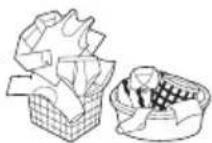
Lint Producers
Terry cloth, Towels, Nappies, Diapers
Lint Collectors
Synthetics, Socks
Check before Loading
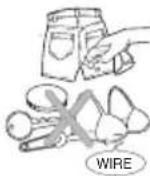
- Check all pockets to make sure that they are empty. Things such as nails, hairclips,, matches, pens, coins, and keys can damage both your washer and your clothes.
- Mend any torn garments or loose buttons. Tears or holes may become larger during washing.
- Remove belts, underwires, etc. to prevent damage to the machine or your clothes.
- Pretreat any dirt and stains.
• Make sure the clothes are washable in water.
- Check the washing instructions.
- Remove tissue from pockets.
Pretreatment on stains or heavy soil
- Pretreat shirt collars and cuffs with a pre-wash product or liquid Detergent when placing them in the washer. Before washing treat special stains with bar soaps, liquid Detergent or a paste of water and granular Detergent.
- Use a pretreat soil and stain remover. Treat stains AS SOONAS POSSIBLE. The longer they are left the harder they are to remove.
(For more detail refer to page16)
Loading
Do not wash fabrics containing flammable materials (waxes, cleaning fluids etc.)
Load Size
The WATER LEVEL should just cover the clothes. Adjust the load size accordingly. Loosely load clothes not higher than the top row of holes in the washer tub. To add items after washer has started, press Start button and submerge additional items. Close the lid and press Start button again to restart.
WARNING / चेतावनी
Fire Hazard
Never place items in the washer that are dampened with gasoline or other flammable fluids. No washer can completely remove oil. Do not dry anything that has ever had any type of oil on it (including cooking oils). Doing so can result in death, explosion, or fire.
आग का खतरा
Light and Large-sized clothing
Clothes like down and woollens are light weight, large and float easily. Use nylon net* and wash them in asmall amount of water. If the laundry floats during the wash cycle, it may become damaged. Use dissolved Detergent to prevent the detergent from clumping.
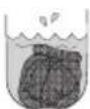
Long laundry items
Use nylon nets* for long, DELICATE items. For laundry with long strings or long length, a net will prevent tangling during washingFasten zippers, hook, and strings to make that these items don't snag on other clothes
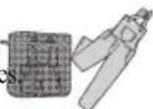
* Nylon net is not supplied by LG.

se of Water, Detergent, Bleach and Softener
Using Water
Amount of WATER LEVEL\*
- This machine detects the quantity of laundry automatically, then set the WATER LEVEL and proper amount of Detergent.
- When you select a wash program, the WATER LEVEL will be shown on the control panel.
- The following table shows the amount of water level.
- When the WATER LEVEL is automatically detected, it may differ depending on the quantity of laundry even though the same WATER LEVEL is indicated on the control panel.
| WATER-DETERGENT | |
| 9 | FULL |
| 7 | 8 |
| 5 | 6 |
| 3 | 4 |
| 1 | 2 |
| Water - Detergent | |
For model T7070TDDL T7008TDDLP T7270TDDL
NOTE
[Minimum water amount]
It depends on laundry load and washer mode. Or manually you can pour a certain amount water into tub directly to some height. That's because if water level reaches to the some height sensed by washer itself, washer automatically operates. In other words, it is needed to pour water to the point when washer start operating.
Inlet Water Temperature
- You can change the Inlet Water Temperature by pressing the INLET TEMP. button. (refer to page 18)
(Machine does not have internal heater, water temp. indicates the temp of inlet water feeded to machine) - The temperature of the water impacts the effectiveness of all laundry additives and therefore, the cleaning results.
We recommend temperatures of: - HOT 49\~60°C...(120-140°F) White items, diapers, underclothing and heavily soiled, colorfast items.
- WARM 29\~40°C...(85-105 F) Most items
- COLD* 18\~24°C...(65-75 F) Only very bright colors with light soil.
- When washing in COLD water additional steps may be needed:
- Adjust Detergent amount and pre-dissolve Detergent in WARMwater
- Pretreat spots and stains
- Soak heavily soiled items
- Use appropriate bleach
*Temperature below 18°C...(65°F) will not activate laundry additives and may cause lint, residue, poor cleaning, etc.
In addition, Detergent manufactures and care labels defineCOLD water as 26\~29°C...(80-85 F).
If the temperature of the water in the tub is too cold for your hands, the detergent will not activate and clean effectively.
NOTE
If iron is present in the water the clothes may become an all-over yellow or they may be stained with brown or orange spots or streaks. Iron is not always visible. Installation of water softener or an iron filter may be necessary for severe cases.
Using Detergent
Detergent
Follow the Detergent package directions. Using too little Detergent is a common cause of laundry problems. Use more Detergent if you have hard water, large loads, greasy or oily soils or lower Water Temperature.
Choosing the right Detergent
We recommend the use of domestic Detergent, (powder, liquid or concentrated). Soap flakes or granulated soap powders should not be used in your washing machine. When washing woolens remember to ais Detergent suitable for washing woolens.
* Water level indicator may vary according to the model. Check your purchased model with the figure provided above.
Water Level and Amount of Detergent
• Concentrated detergent: 20g per 30 liters of water.
- Regular synthetic detergent: 30g per 30 liters of water.
- When sensing water levels automatically, the amount of detergent can differ according to the amount of laundry even at the same water level.
- For synthetic detergent, use one that generates less bubbles. This type of detergent is specially designed for washers
- In case of using liquid detergent, dissolve it with water (detergent: water=1:1) and deposit it through the bleach deposit hole
- The correct amount of detergent will vary depending on the amount of soil in your clothes. (Jeans and work clothes may need more detergent, while bath towels usually need less.)
- For liquid and concentrated detegants, follow the recommendations of the detergent manufacturer.
| Water Level | Amount of Water | Amount of laundry | Amount of Water | Amount of laundry | |
| FULL | 65 | Less than ** | 82 | Less than ** | |
| 9 | 61 | Less than 4.0kg | 80 | 4.6~5.5kg or less | |
| 8 | 51 | Less than 3.5kg | 78 | 4.1~4.5kg or less | |
| 7 | 42 | Less than 3.0kg | 76 | 3.1~4.0kg or less | |
| 6 | 38 | Less than 2.5kg | 73 | 2.6~3.0kg or less | |
| 5 | 34 | Less than 2.0kg | 70 | 2.1~2.5kg or less | |
| 4 | 32 | Less than 1.5kg | 64 | 1.6~2.0kg or less | |
| 3 | 29 | Less than 1.0kg | 54 | 1.1~1.5kg or less | |
| 2 | 29 | Less than 0.6kg | 43 | 0.7~1.0kg or less | |
| 1 | 23 | Less than 0.3kg | 39 | 0.6kg or less |
Applicable for models 7.5kg and lesser
Applicable for models 8kg and above
** Rated Capacity of Model
Note : To check you are using the correct amount of Detergent, lift the lid of your machine about half-way through the wash. There should be a thin layer of foam over the surface of the water. Lots of foam may look good, but it does not contribute to cleaning your clothes. No foam means not enough Detergent has been used, soil and lint can settle back on the clothes or the washing machine. If excess Detergent is used, the rinse will not be efficient. Also, it could cause environmental pollution, so use it accordingly.
Adding the detergent\*
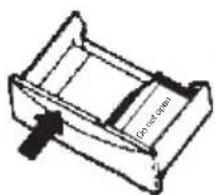
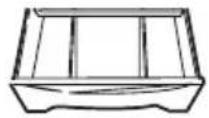
Add measured detergent to the detergent compartment of the dispenser drawer. We recommend the use of powdered detergent in the dispenser when using a delay wash function.
Detergent is flushed through the dispenser at the beginning of the wash phase. Detergent usage may need to be adjusted for water temperature, water hardness, size and soil level of the load.
Avoid using too much detergent in your washer, as it can lead to oversuding and detergent residue being left on the clothes.
text_image
Do not openOR
Using Liquid Bleach
- Check clothing care label for special instruction and separate the laundry to be bleached.
• Dilute liquid chlorine bleach.
• Measure the recommended amount of liquid bleach carefully following instructions on the bottle. - Before starting thewasher, pour measured amount of bleach directly into bleach dispenser. Avoid splashing or overfilling. Powdered bleach should be mixed with water before pouring
Bleach dispenser (CL)
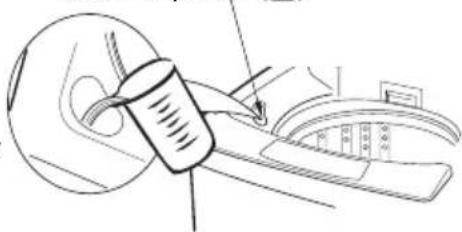
natural_image
Line drawing of a mechanical device with a cylindrical component and a curved panel (no text or symbols)NOTE
■ Never pour undiluted liquid bleach directly onto clothes or intowash basket.
This may cause change of color or damage the laundry
■ Do not mix chlorine bleach with ammonia or acids such as vinegar and/or rust remove Mixing can release a toxic gas which may cause death.
■ Do not pour powdered bleach into bleach dispenser.
* Part may vary according to model.
Using Fabric Softener
• Dilute fabric softener with water.
Undiluted fabricsoftener may result in spots that look like oil stains.
- Measure and add the recommended amount of fabrisoftener into the compartment marked with thissymbol( ).
Follow manufacturer's direction.
Fabric softener is automatically dispensed in the final rinswith indication beep.
If you want extra rinse, you must add fabrisoftener manually when indication beep rings in the final rinse.
This maximize the fabricsoftener function.
- Do not overfill. The dispenser hold max 35ml.
Never add more than 35ml.
Overfilling can cause early dispensing of the fabric softener which could result in stained clothes.
A cup with a pouring spout will help you avoid spilling.
- The effect of adding fabricsoftener may vary according to its viscosity. Thstickier fabric softener makes its effect the lower. For sticky fabricsoftener it is recommended that it be diluted with water, then be manually correct time to dispense manually is optionally applied to some models. Please keep mind that fabricsoftener has to be diluted with water before dispensed and never poured directly on clothes.
Softener dispenser( 📄 )
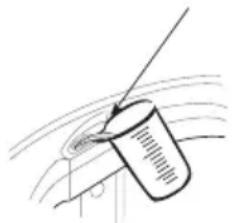
natural_image
Simple line drawing of a cylindrical object with a diagonal line extending from it, no text or symbols present.Attention
- Do not mix with detergent or bleach.
- Never pour fabricsoftener directly on clothes. It may stain them.
- Do not stop the washer during the first spin for timely dispensing.
- Option washing is not designed to be used with fabrisoftener dispenser.
Scrud (Waxy Build up)
Scrud is the name given to the waxy build-up that can occur within any washer when the fabrisoftener comes into contact with Detergent. This build-up is not brought about by a fault in the machine.
If scrud is allowed to build-up in the machine it can result in stains on you clothes or an unpleasant smell in your washer.
If you wish to use fabric softener we recommend
• Using fabric softener sparingly.
- When filling the dispenser, do not splash or overfill.
- Clean dispenser as soon as thecycle is finished.
- Clean your machine regularly (refer to page 29 or 39)
- Cold water washing increases the chance of this build-up occurring. We recommend a regular WARMr HOT wash e.g. every 5th wash should beat least awarm one.
- Fabricsoftener of thinner consistency is less likely to leave residue on the dispenser and contribute to build-up.

pecial Guide for Stain Removal
WARNING
Do not use or mix liquid chlorine bleach with other household chemicals such as toilet cleaners, rust removers, acid or products containing ammonia. These mixtures can produce dangerous fumes which can cause serious injury or death.
To reduce the risk of fire or serious injury to persons or property, comply with the basic warnings listed below:
- Read and comply with all instructions on stain removal products.
- Keep stain removal products in their original labeled containers and out of children's reach
• Thoroughly wash any utensil used. - Do not combine stain removal products, especially ammonia and chlorine bleach. Dangerous fumes may result.
- Never wash items which have been previously cleaned in, washed in, soaked in or spotted with gasoline, dry cleaning solvents or other flammable or explosive substances because they give off vapors that could ignite or explode.
- Never use highly flammable solvents, such as gasoline, inside the home. Vapors can explode on contact with flames or sparks.
चेतावनी
For successful stain removal:
- Remove stains promptly.
- Determine the kind of stain, then follow the recommended treatment in the stain removal chart below
- To pretreat stains, usea prewash product, liquid Detergent, or a paste made from granular Detergent and water.
- Use COLD water on unknown stains because HOT water can set stains.
- Check care label instructions for treatments to avoid on specific fabrics.
- Check for color fastness by testing stain remover on an inside seam.
- Rinse and wash items after stain removal.

Follow fabric care label instructions
| Stain Removal | |
| STAIN | TREATMENT |
| Adhesive tape, chewing gum, rubber cement | Apply ice. Scrape off excess, Placstain face down on paper towels. Saturat with prewash stain removor nonflammable dry cleaning fluid. |
| Baby formula, dairy products, egg | Use product containing enzymes to pretreat or soak stains. |
| Beverages (coffee, tea, soda, juice, alcoholic beverages) | Pretreat stain. Wash using COLD water and bleach safe for fabric. |
| Blood | Rinse with COLDwater. Rubwith bar soap. Or pretreat or soak with product containing enzymes. Wash using bleach safe for fabric. |
| Candle wax, crayon | Scrape off surfacewax, Placestain facdown between paper towels. Presswith warm iron until wax isabsorbed. Replace paper towels frequently.Treatremaining stainwith prewash stain remover or nonflammable dry cleaning fluid. Hand washto removesolvent. Wash using bleach safe forfabric. |
| Chocolate | Pretreat or soak inWARM water using product containing enzyme.Wash usingbleach safe for fabric. |
| Collar or cuff soil, cosmetics | Pretreat with prewash stain removor rub with bar soap. |
| Dye transfer on white fabric | Use packaged color remover. Wash using bleach saffor fabric. |
| Grass | Pretreat or soak in WARM water using product containing enzymes. Washing bleach safe for fabric. |
| Grease, oil, tar (butter, fats, salad dressing, cooking oils, car grease motor oils) | Scrape residue from fabric. Pretreat. Wash using hottewater safe for fabric. For heavy stain and tar, apply nonflammable dry cleaning fluidoback of stain. Replacdowels under stain frequently. Rinse through Wash using hottest water safe for fabric |
| Ink | Some inks may be impossible to remove.Washing may set sominks. Use prewash stain remover, denatured alcohol or nonflammable dry cleaning fluid |
| Mildew, scorch | Wash with chlorine bleach isafe for fabric, or soak in oxygen bleach and HOT water before washing.Badly mildewed fabrics mabe Permanently damaged. |
| Mud | Brush off dry mud. Pretreat soak with productcontaining enzymes. |
| Mustard, tomato | Pretreat with prewash stain removeWash using bleach safe for fabric. |
| Nail polish | May be impossible to remove. Placstain face down on papetowels. Applynail polish remover to back of stain. Repeat, replacing papetowels frequently.Do notuse on acetate fabrics. |
| Paint, varnish | WATER BASED: Rinse fabric in cool water while stain is wet. Wash. Once paint is dry, it cannot be removed. OIL BASED & VARNISH: Use solvent recommended on can label. Rinse thoroughly before washing. |
| Rust, brown or yellow discoloration | For spots, use rust remover safe for fabriFor discoloration of an entire load, upphosphateDetergent and nonchlorine bleachDo not use chlorine bleach because it may intensify discoloration. |
| Shoe polish | LIQUID: Pretreat with a paste of granular Detergent and water. PASTE: Scrape residue from fabric. Pretreat with prewash stain remover or nonflammable dry cleaning fluid. Rub Detergent into dampened area, Wash using bleach safe for fabric. |

unction of each Button#
Applicable for all models except T7070TDDL, T7008TDDLP, T7270TDDL
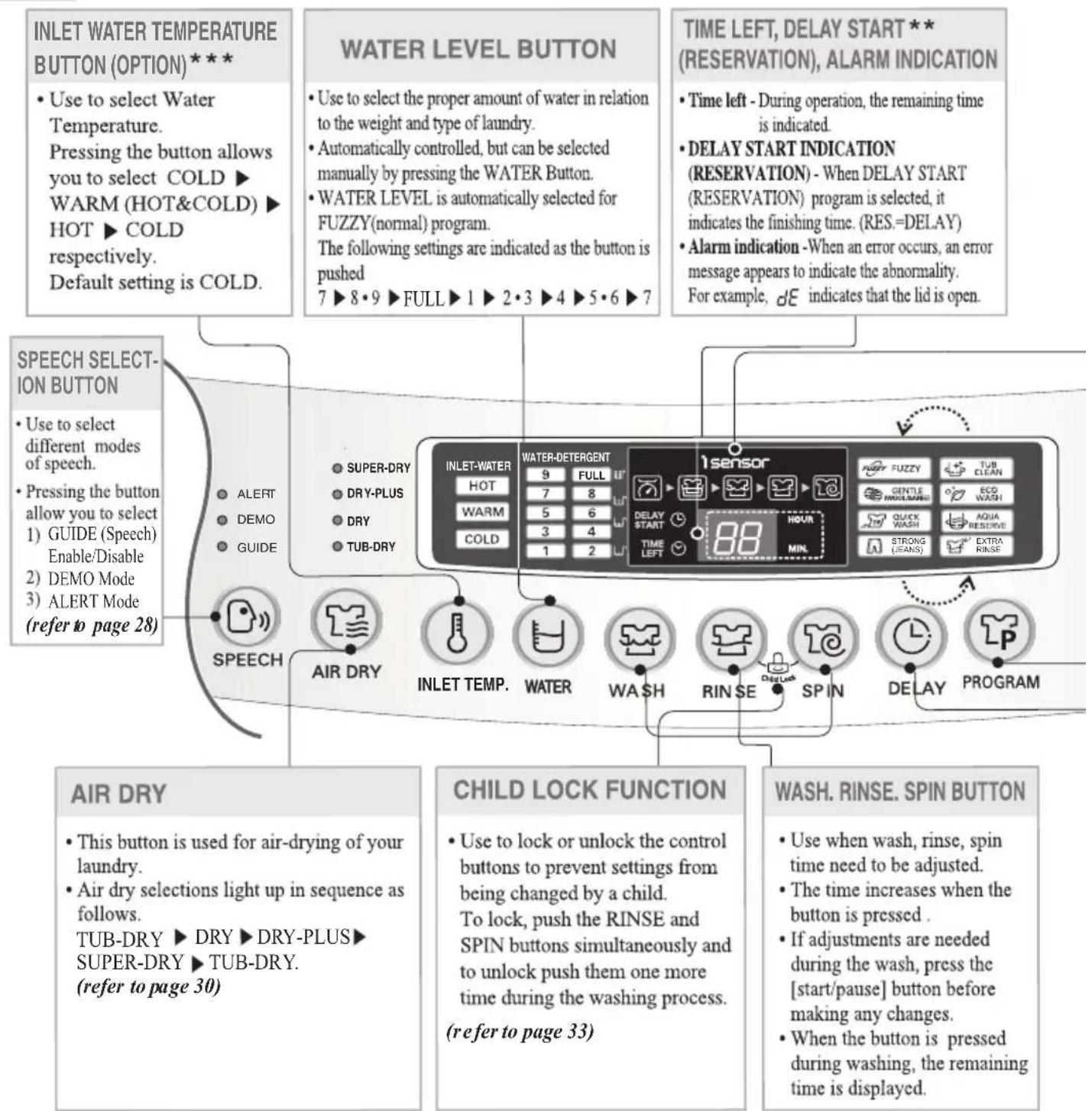
text_image
INLET WATER TEMPERATURE BUTTON (OPTION) *** • Use to select Water Temperature. Pressing the button allows you to select COLD ▶ WARM (HOT&COLD) ▶ HOT ▶ COLD respectively. Default setting is COLD. WATER LEVEL BUTTON • Use to select the proper amount of water in relation to the weight and type of laundry. • Automatically controlled, but can be selected manually by pressing the WATER Button. • WATER LEVEL is automatically selected for FUZZY(normal) program. The following settings are indicated as the button is pushed 7 ▶ 8 • 9 ▶ FULL ▶ 1 ▶ 2 • 3 ▶ 4 ▶ 5 • 6 ▶ 7 TIME LEFT, DELAY START ** (RESERVATION), ALARM INDICATION • Time left - During operation, the remaining time is indicated. • DELAY START INDICATION (RESERVATION) - When DELAY START (RESERVATION) program is selected, it indicates the finishing time. (RES.=DELAY) • Alarm indication -When an error occurs, an error message appears to indicate the abnormality. For example, dE indicates that the lid is open. SPEECH SELECTION BUTTON • Use to select different modes of speech. • Pressing the button allow you to select 1) GUIDE (Speech) Enable/Disable 2) DEMO Mode 3) ALERT Mode (refer to page 28) AIR DRY • This button is used for air-drying of your laundry. • Air dry selections light up in sequence as follows. TUB-DRY ▶ DRY ▶ DRY-PLUS ▶ SUPER-DRY ▶ TUB-DRY. (refer to page 30) CHILD LOCK FUNCTION • Use to lock or unlock the control buttons to prevent settings from being changed by a child. To lock, push the RINSE and SPIN buttons simultaneously and to unlock push them one more time during the washing process. (refer to page 33) WASH. RINSE. SPIN BUTTON • Use when wash, rinse, spin time need to be adjusted. • The time increases when the button is pressed . • If adjustments are needed during the wash, press the [start/pause] button before making any changes. • When the button is pressed during washing, the remaining time is displayed.NOTE
* For optimizing the washing algorithm, the displaying time may be changed during washing-increased by 8 minutes at maximum and decreased by 4 minutes at maximum.
* If the Detergent quantity is put more than the standard, for increasing the rinsing performance, it automatically adds rinsing, and the remaining time may be increased.
* The standard detected by the sensor changing the algorithm is set by the normal standard. It may not be same to the washing habit of a specific user. So, it does not matter that the user uses it according to her/his washing habit.
* The sensor for a Detergent quantity is designed to detect based on a synthetic Detergent powder. If you put a liquid one or a natural one or too much bleaching agent, the detecting ability of the sensor may be decreased.
# Product feature may vary according to different models. Refer page 43 for modelwise features for your purchased model.
*** Not applicable for T7208TDDLH, T72CMG22P, T7508TEDLL, T7508TEDLH and T8008TEDLH
WASHING CONDITION INDICATOR (Applicable for i-sensor models only)
- It only operates in FUZZY Program.
- During being detected by the sensor, the LED flashes green, orange and red in turn. And, after detecting, the LED lights a specific color according to the detecting condition as follows:
* If the current washing condition (Detergent quantity, Water Temperature, water quality, etc.) is determined as better than the standard one, it optimizes the algorithm to save the energy by decreasing washing time/strength, and the LED automatically turns to red.
* If the current washing condition is determined as worse than the standard one, it optimizes the algorithm by increasing washing time/strength, and the LED automatically turns to orange.
* If the current washing condition is determined as equal to the standard one, the algorithm has no change and the LED turns to green
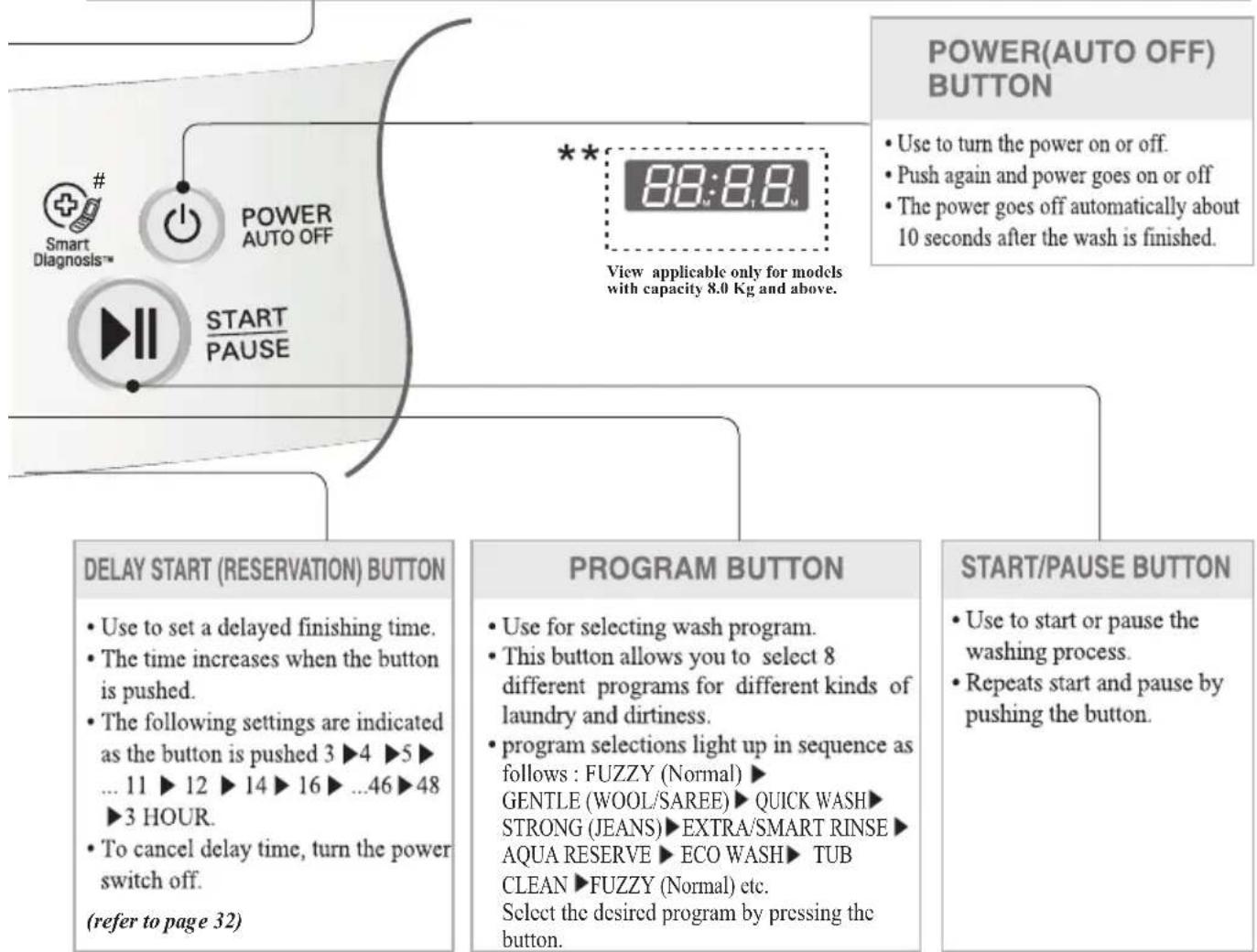
flowchart
graph TD
    A["POWER(AUTO OFF) BUTTON"] --> B["View applicable only for models with capacity 8.0 Kg and above."]
    B --> C["POWER AUTO OFF"]
    C --> D["START PAUSE"]
    D --> E["DELAY START (RESERVATION) BUTTON"]
    E --> F["• Use to set a delayed finishing time.<br>• The time increases when the button is pushed.<br>• The following settings are indicated as the button is pushed 3 ▶4 ▶5 ▶... 11 ▶12 ▶14 ▶16 ▶...46 ▶48 ▶3 HOUR.<br>• To cancel delay time, turn the power switch off.<br>(refer to page 32)"]
    F --> G["PROGRAM BUTTON"]
    G --> H["• Use for selecting wash program.<br>• This button allows you to select 8 different programs for different kinds of laundry and dirtiness.<br>• program selections light up in sequence as follows : FUZZY (Normal) ▶GENTLE (WOOL/SAREE) ▶ QUICK WASH ▶STRONG (JEANS) ▶ EXTRA/SMART RINSE ▶AQUA RESERVE ▶ ECO WASH ▶ TUB CLEAN ▶ FUZZY (Normal) etc.<br>Select the desired program by pressing the button."]
    H --> I["START/PAUSE BUTTON"]
    I --> J["• Use to start or pause the washing process.<br>• Repeats start and pause by pushing the button."]
* Because the detecting ability of the sensor may be decreased by using it for a long time, periodically use TUB CLEAN course to clean the tub. (refer to page 29)
* Even if the water level or the water temperature are changed by the user in FUZZY(Normal) Program, the sensor will still work. The sensor algorithm may differ according to models.
* Do not press any three or four buttons simultaneously, it may cause malfunctioning.
Do not match above picture with your purchased model, the Control Panel may differ according to different models.
Product feature may very according to different models. Refer page 43 for modelwise features for your purchase model.
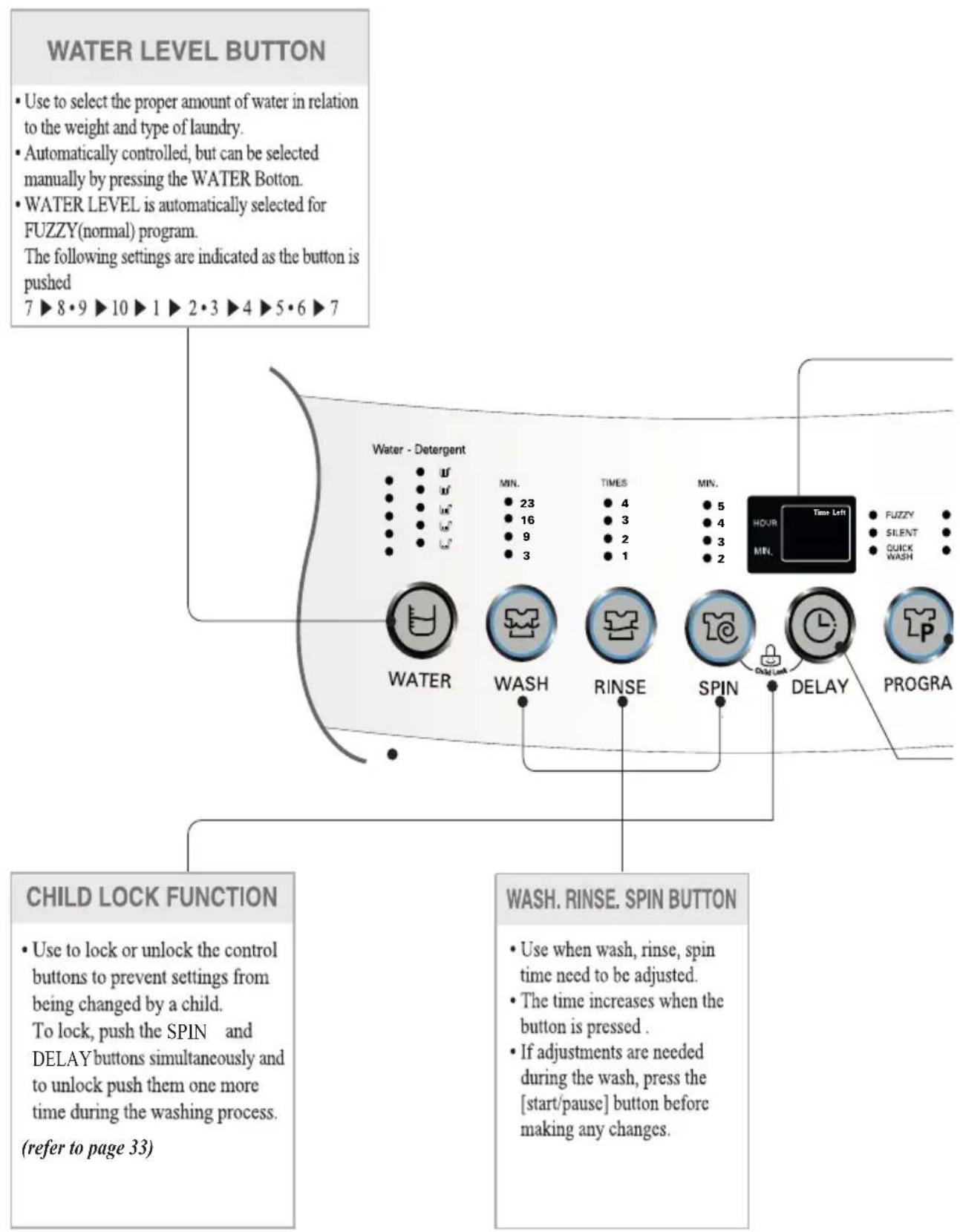
text_image
WATER LEVEL BUTTON • Use to select the proper amount of water in relation to the weight and type of laundry. • Automatically controlled, but can be selected manually by pressing the WATER Botton. • WATER LEVEL is automatically selected for FUZZY(normal) program. The following settings are indicated as the button is pushed 7 ▶ 8 • 9 ▶ 10 ▶ 1 ▶ 2 • 3 ▶ 4 ▶ 5 • 6 ▶ 7 Water - Detergent MIN. 23 16 9 3 TIMES 4 3 2 1 MIN. 5 4 3 2 HOUR MIN. Time Left Fuzzy SILENT QUICK WASH WATER WASH RINSE SPIN DELAY PROGRA CHILD LOCK FUNCTION • Use to lock or unlock the control buttons to prevent settings from being changed by a child. To lock, push the SPIN and DELAY buttons simultaneously and to unlock push them one more time during the washing process. (refer to page 33) WASH. RINSE. SPIN BUTTON • Use when wash, rinse, spin time need to be adjusted. • The time increases when the button is pressed . • If adjustments are needed during the wash, press the [start/pause] button before making any changes.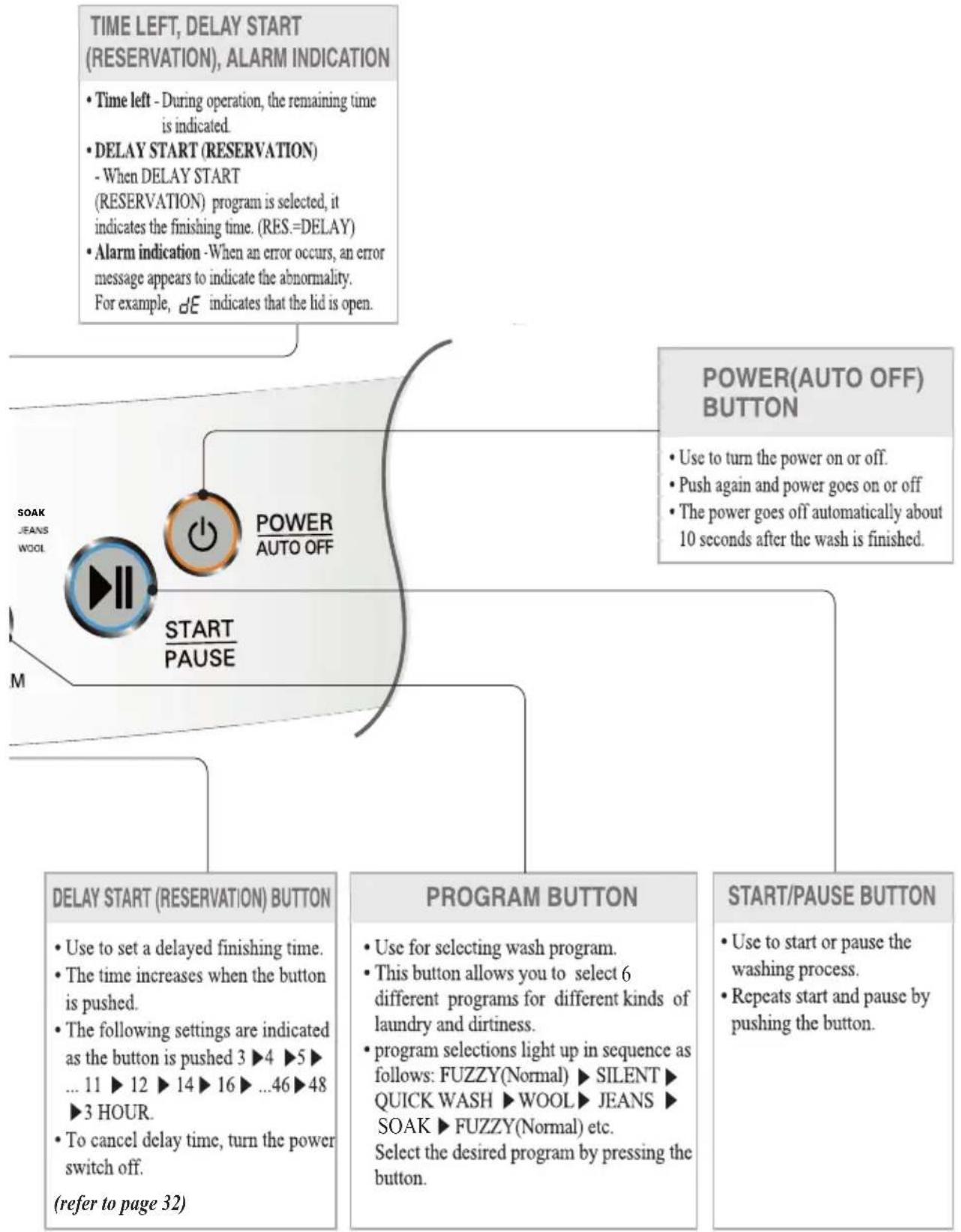
flowchart
graph TD
    A["TIME LEFT, DELAY START (RESERVATION), ALARM INDICATION"] --> B["• Time left - During operation, the remaining time is indicated"]
    B --> C["• DELAY START (RESERVATION) - When DELAY START (RESERVATION) program is selected, it indicates the finishing time. (RES.=DELAY)"]
    C --> D["• Alarm indication -When an error occurs, an error message appears to indicate the abnormality. For example, dE indicates that the lid is open."]
    E["POWER(AUTO OFF) BUTTON"] --> F["• Use to turn the power on or off"]
    F --> G["• Push again and power goes on or off"]
    G --> H["• The power goes off automatically about 10 seconds after the wash is finished."]
    I["START/PAUSE BUTTON"] --> J["• Use to start or pause the washing process"]
    J --> K["• Repeats start and pause by pushing the button."]
    L["POWER/AUTO PAUSE"] --> M["• Use to set a delayed finishing time"]
    M --> N["• The time increases when the button is pushed"]
    N --> O["• The following settings are indicated as the button is pushed 3 ▶4 ▶5 ▶... 11 ▶12 ▶14 ▶16 ▶...46 ▶48 ▶3 HOUR."]
    O --> P["• To cancel delay time, turn the power switch off. (refer to page 32)"]
    Q["PROGRAM BUTTON"] --> R["• Use for selecting wash program"]
    R --> S["• This button allows you to select 6 different programs for different kinds of laundry and dirtiness"]
    S --> T["• program selections light up in sequence as follows: FUZZY(Normal) ▶ SILENT ▶ QUICK WASH ▶ WOOL ▶ JEANS ▶ SOAK ▶ FUZZY(Normal) etc. Select the desired program by pressing the button."]
| Washing Programs |  [DCY41] [DCY41] |  |  F F | Add the Detergent | ||
 FUZZY (Normal Wash)Used for normal loads, this mode automatically selects the most appropriate conditions and completes the sequence in one operation. The built-in sensor detects the size of the load and the ideal wash power & wash, rinse and spin times are set accordingly. FUZZY (Normal Wash)Used for normal loads, this mode automatically selects the most appropriate conditions and completes the sequence in one operation. The built-in sensor detects the size of the load and the ideal wash power & wash, rinse and spin times are set accordingly. |  |  |  | |||
| • Add the appropriate quantity of Detergent as indicated by the WATER LEVEL next to WATER DETERGENT. Or follow the Detergent manufacturer's instructions | ||||||
 GENTLE (WOOL/SAREE)Use this program for washing delicate fabrics such as lingerie woolens and saree (wash only "water washable" clothes) Before washing your woolens or saree check the care label for the washing instructions. GENTLE (WOOL/SAREE)Use this program for washing delicate fabrics such as lingerie woolens and saree (wash only "water washable" clothes) Before washing your woolens or saree check the care label for the washing instructions. |  |  |  |  | ||
| • Select the GENTLE (WOOL/ SAREE) program on the control panel. | ||||||
 QUICK WASHUse this mode when washing lightly soiled clothes for a short time. The highly recommended laundry amount is under 2.0kg. QUICK WASHUse this mode when washing lightly soiled clothes for a short time. The highly recommended laundry amount is under 2.0kg. |  |  |  |  | ||
| • Select the QUICK WASH program on the Control panel. | ||||||
 STRONG (JEANS)Use Jean program when washing Jeans of different sizes STRONG (JEANS)Use Jean program when washing Jeans of different sizes | |  |  |  | ||
| • Spread the jean evenly in the tub | • Select the STRONG (JEANS) program on the control panel. | |||||
| [TZWWD] EXTRA /SMART RINSE /RINSEUse this program to increase rinsing performance. This would include underwear and baby clothes. If someone has sensitive skin or skin trouble,use this program. |  |  |  |  | ||
| Select the • EXTRA RINSE / SMART RINSE program on the Control panel. | ||||||
(Normal Wash)
GENTLE
WOOL/SAREE)
QUICK WASH
STRONG (JEANS)
EXTRA /SMART
RINSE / RINSE
* Product feature may vary according to different models. Refer page 43 for modelwise features for your purchased model.
 | START PAUSE | START PAUSE | Close the lid | Finish | Caution & Note |
| [78SH]The pulsator rotates for 8 seconds to detect the laundry load.Then the WATER LEVEL and the amount of Detergent to be used will be shown and water will be supplied. | [60CC]Water will be supplied for 2 minutes after the start of the wash to supplement the water the laundry has absorbed. | [X256]When the wash program ends, the buzzer will ring for 10 seconds before the Power goes off automatically. | ·If water is already in the tub, or putting wet laundry into the tub before starting will increase the WATER LEVEL.With lightweight bulky loads, WATER LEVEL can be set low.Changes to water Temperature (HOT/COLD) and water level are possible during operation.(refer to page 18) |
 |  |  | ·When setting the WATER LEVEL manually, do not set to Medium to prevent damage to laundry. It should always be high.Washing with HOT water may damage the laundry (Water is set to cold automatically). Ensure that the load is under 2kg.In order to avoid damage to laundry, the spin cycle may appear slow. This also avoids wrinkles and clothing may still contain some water. This is normal. |
 |  |  | ·When static pressure of water is more than 2kg/cm^2 , the QUICK WASH course will be within 19min. |
 |  |  | |
 |  |  |

AVORITE Wash\*
Pressing the FAVORITE button allows you to store your FAVORITE wash conditions in the normal cycle memory and then recall it for use at a later time.
1 Press the POWER (AUTO OFF) button to turn power on.

POWER AUTO OFF
2 Select the FAVORITE program.

PROGRAM
3 Select your FAVORITE wash conditions.
- Press the WATER TEMP. button to select wash Water Temperature.
- Press the WATER LEVEL button to select WATER LEVEL.
- Press the WASH button, the RINSE button & the SPIN button to select wash time, rinse times & spin time respectively you want to store.
4 Press the START/PAUSE button to store & start your FAVORITE wash cycle.
Power turns off automatically after wash.

START PAUSE
NOTE
To recall your FAVORITE cycle.
- Press POWER on.
- Select the FAVORITE cycle by pressing the PROGRAM.
- Press the START/PAUSE button. Then the wash cycle starts.

ILENT Wash\*
Use this program to wash quietly in SILENT especially during late night and dawn.
1 Press the POWER (AUTO OFF) button to turn power on.

POWER AUTO OFF
2 Press the PROGRAM button to select SILENT program.

PROGRAM
3 Add the laundry into the washing tub.
4 Press the START/PAUSE button.

START PAUSE
5 Add the Detergent and close the lid.
NOTE
- SILENT program takes longer washing time than FUZZY(Normal) program.
• To reduce noise in spinning, spin rpm is lower than normal spinning rpm. So the laundry has more moisture than normal.
* Product feature may vary according to different models. Refer page 43 for modelwise features for your purchased model.

OAK Wash
Use this mode to wash normal clothes or thick and heavy clothes which are excessively dirty. SOAK mode can be used with FUZZY or STRONG (JEANS) or AQUA RESERVE or ECO WASH or EXTRA /SMART Rinse program.
1 Press the POWER (AUTO OFF) button to turn power on.

POWER AUTO OFF
2 Press the PROGRAM button to select the washing program.

PROGRAM
• SOAK will not work in GENTLE (WOOL/SAREE) and QUICK WASH, TUB CLEAN Program.
3 Press the WASH button, to select SOAK program.

WASH
- Keep pressing the WASH button until the light turns on 'SOAK' and 'WASH' simultaneously as next image.
• SOAK program only works when wash time is 40, 50 or 60 minutes.

4 Add the laundry and press the START/PAUSE button.

START PAUSE
• The WATER LEVEL will be shown and water will be supplied.
5 Add the Detergent.
6 Close the lid. • Water will be supplied for 2 minutes after the start of the wash to supplement the absorbed water by the laundry.
Finish
- When the wash program ends, the buzzer will ring for 10 seconds before the Power goes off automatically.
NOTE
• Order of Soak-Wash timing
Soak-Wash

flowchart
graph LR
    A["14 min"] --> B["15 min"]
    B --> C["18 min"]
    C --> D["21 min"]
    D --> E["25 min"]
    E --> F["40 min"]
    F --> G["50 min"]
    G --> H["60 min"]
    H --> I["Lamp Off"]
    I --> J["3 min"]
    J --> K["6 min"]
    K --> L["9 min"]
    L --> M["10 min"]
    M --> N["13 min"]
- Select soaking time 40 minutes, 50 minutes, or 60 minutes (including washing time) by pressing the Wash button repeatedly.
- If necessary, select the times of Rinse and the time for Spinning by pressing the Rinse or Spin buttons till you reach the desired times.

OAK Wash\*
Use this mode to wash normal clothes or thick and heavy clothes which are excessively dirty.
1 Press the POWER (AUTO OFF) button to turn power on.

POWER AUTO OFF
2 Press the PROGRAM button to select the SOAK Program.

PROGRAM
3 Add the laundry and press the START/PAUSE button.

START PAUSE
• The WATER LEVEL will be shown and water will be supplied.
4 Add the Detergent.
| 5 | Close the lid. | • Water will be supplied for 2 minutes after the start of the wash to supplement the absorbed water by the laundry. |
| Finish | • When the wash program ends, the buzzer will ring for 10seconds before the Power goes off automatically. |
NOTE
- Wash timing cannot be set to zero in SOAK Program.
- If necessary, select the times of Rinse and the time for Spinning by pressing the Rinse or Spin buttons till you reach the desired times.
• This process is applicable only for T7070TDDL, T7008TDDLP & T7270TDDL

CO Wash\*
Use this program to save water consumption.
1 Press the POWER (AUTO OFF) button to turn power on.

POWER AUTO OFF
2 Select the PROGRAM button to select ECO WASH program

PROGRAM
3 Add the laundry into the washing tub.
4 Press the START/PAUSE button

START PAUSE
5 Add the detergent & close the lid.
NOTE
• ECO Wash is recommended program designed to minimize water consumption for normally soiled clothing.
• For water saving we recommend to use 5 to 8 Water level.

QUA RESERVE Wash\*
Use this program to reuse the water for second round of wash load
1 Press the POWER (AUTO OFF) button to turn power on.

POWER AUTO OFF
2 Press the PROGRAM button to select AQUA RESERVE program.

PROGRAM
3 Add the laundry into the washing tub.
4 Press the START/PAUSE button.

START PAUSE
5 Add the Detergent and close the lid.
NOTE
• Do not keep water hold for long time after the end of cycle. This may cause bad odour and damage the laundry.
- SPIN function cannot be done in AQUA RESERVE wash program.
* Product feature may vary according to different models. Refer page 43 for modelwise features for your purchased model.

voice Feature Usage (Only for speech models)
This has mainly three modes.
(1) GUIDE MODE (Default)
As soon as Power Button is switched ON, the machine will playback the following messages -

Getting started
For Fuzzy mode, press START.
For Manual mode, select Program and other options.
Note : Wait for 2 second after pressing Power Button.
Now if you press START Button then Washing Machine will be started in Fuzzy Mode (For detail refer to page 22) or you can select your programme by pressing PROGRAMME button and you will hear following message.

Select programme
Note : Speech message will be playback only once after pressing any button. After pressing button again, buzzer sound will be heard.
You can select the desired programme by pressing and seeing the lightened programme on control panel.
Similarly on pressing other buttons on Control Panel, machine will playback about the pressed button. For example, on selecting the WATER button, machine will playback following message -

Select water level
Note : For understanding function of each button please refer to page 18.
(2) DEMO MODE
On selecting the DEMO Mode the machine will explain the FUZZY WASH MODE and then MANUAL WASH MODE. The DEMO will be repeated by two times and then comes back to GUIDE MODE.
(3) ALERT MODE
On selecting the ALERT Mode the machine will explain the important safety guidelines required for smooth operation of the unit like levelling, water leakage, filter cleaning etc. (For details please read this manual carefully).
This will be repeated two times and then machine will return back to GUIDE MODE.
GUIDE SELECTION ON/OFF
Press SPEECH Button for turning ON or OFF the voice.
VOLUME CONTROL
You can select two level of SPEECH volume.
MEDIUM (Default) HIGH
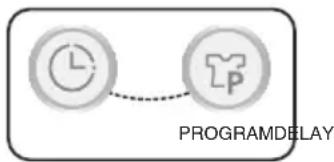
This can be selected by pressing DELAY & PROGRAM button simultaneously.
LANGUAGE CONTROL
You can select two different languages as per your choice.
ENGLISH (Default) HINDI
For selection press SPEECH and AIR DRY button simultaneously.
flowchart
graph LR
    A["Clock Icon"] --> B["Program Delay Icon"]
    style A fill:#f9f,stroke:#333
    style B fill:#bbf,stroke:#333
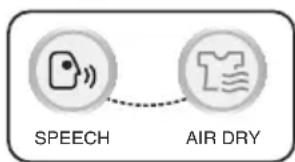
flowchart
graph LR
    A["SPEECH"] --> B["AIR DRY"]
    style A fill:#f9f,stroke:#333
    style B fill:#bbf,stroke:#333
SELF-DIAGNOSTIC ERROR MODE
The machine will display and playback the error messages if there is any error in machine for your suitable action. (For detail refer to page 41)
TUB CLEAN\*
If scrud is allowed to build-up in the machine it can result in stains on your clothes or unpleasant smell in your washer.
Scrud is the wax build-up that can occur within any washer when the fabric softener comes into contact with Detergent, and according to particular degree of dirtiness or quality of water to be use, in these case, use this program to clean inner tub and outer tub.
1 Press the POWER (AUTO OFF) button to turn power on.

2 Press the PROGRAM button to select the TUB CLEAN program.

PROGRAM
※ Ex-Large WATER is set automatically.
3 Press the START/PAUSE button. • Left time is displayed.

START PAUSE
4 After 10 minutes of water supplement. Add the oxygenated bleach (about 300m ).
- Do not use Detergent box.
- Do not place any laundry inside tub.
5 Close the lid.
- When the lid is open the machine will not operate, and an alarm signal will remind you to close the lid.
NOTE
- Before using this program remove lint inside lint filter.
- When using this program, do not place any laundry inside tub.
• This program takes about 3 hours to be completed.
• After using this program, remove dirt inside filter.
• After finishing this program, open the lid to remove irritant odour. - Do not pour bleach into the tub directly. It might cause damage to the tub.
- Do not leave diluted oxygenated bleach inside tub for long time, as it may rust the tub.
- Use this program once in every month.
- Do not use this program repeatedly.
*Product feature may vary according to different models. Refer page 43 for modelwise features for your purchased model.

IR DRY\*
AIR DRY for your laundry.
1 Press the POWER (AUTO OFF) button to turn power on.

POWER AUTO OFF
2 Press the AIR DRY button to select the desired timing.

3 Press the START/PAUSE button.

START PAUSE
4 Close the lid.
NOTE
- Select "Air Dry" 30min' TUB DRY
-Use this mode to keep inner tub from getting dirty caused by remaining moisture.
- Do not place any laundry inside tub.
- Use this mode once a week.
Caution: For better performance, put drain hose down to the floor so that water inside will be completely drained out.
- Select "Air Dry" above 1 hour
- Use this mode to reduce the drying time by minimizing remaining moisture on the laundry.
- In general, this is very effective on synthetic items(100% polyester).
- Do place laundry which is evenly distributed(Under 2kg).
- For normal clothes : Select 1 hour
- For synthetic items(100% polyester): Select 2 hours.

ption Washing
When you only need the SPIN, RINSE/SPIN,RINSE, WASH/RINSE, WASH, WASH/RINSE/SPIN these can be set manually.
1 Press the POWER (AUTO OFF) button to turn power on.

POWER AUTO OFF
| 2 | Only Wash | Only Rinse | Only Spin |
Press theWASHbutton to select the desired timing. ---- ---- | Press theRINSEbutton to select the desired no. of rinse cycles. ----RINSE ----RINSE | Press theSPINbutton to select the desired time of spin. ----SPIN ----SPIN | |
| Only Wash,Rinse | Only Rinse,Spin | Only Drain | |
Press theWASHbutton to select the desired timing. WASHPress theRINSEbutton to select the desired time of rinse. WASHPress theRINSEbutton to select the desired time of rinse. ----RINSEYou can use this option for preventing wrinkles of laundry ----RINSEYou can use this option for preventing wrinkles of laundry | Press theRINSEbutton to select the desired time of rinse. ----RINSEPress theSPINbutton to select the desired time of spin. ----RINSEPress theSPINbutton to select the desired time of spin. ----SPIN ----SPIN | When you want to only drain, pressSPINbutton. ----SPINThen pressSTART/PAUSEbutton. ----SPINThen pressSTART/PAUSEbutton. ----START PAUSEWait until the water in the washing tub drains completely and then pressPOWERbutton to finish the activity. ----START PAUSEWait until the water in the washing tub drains completely and then pressPOWERbutton to finish the activity. |
3 Press the WATER LEVEL button, to control the water level according to the amount of laundry. If you do not choose anything, it is set the middle water level automatically. (Not applicable for only spin process).

WATER LEVEL
4 Add the laundry into the washing tub.
5 Press the START/PAUSE button.

START PAUSE
6 Add the detergent and close the lid. (Add detergent only where wash cycle is selected)
NOTE
- When a RINSE, WASH/RINSE, WASH option is selected, after the wash is completed the water will not be drained off. If you wish to drain the water, press SPIN button after that press the START/PAUSE button and wait until the water in the tub has drained completely.
- If you do not specify the water level, then Medium will be automatically selected.
- If only Rinse is selected, the process will start from Water Supply.

ELAY START (RESERVATION) Wash
DELAY START (RESERVATION) Wash is used to delay the finishing time of the operation. The hours to be delayed can be set by the user accordingly. The time on the display is the finishing time, not the start time.
1 Press the POWER (AUTO OFF) button to turn power on.

POWER AUTO OFF
2 Press the PROGRAM button to select the washing program.

PROGRAM
- Select the program for laundry on the Control panel. This program will not work in GENTLE (WOOL/SAREE) and TUB CLEAN Program.
3 Press the DELAY START (RESERVATION) button.
- The light with 'DELAY START' turn on and 'TIME LEFT' will be marked.
- Press the button repeatedly to set the desired finishing time. For example, To finish washing in 9 hours from now, by make the number 9 pressing the DELAY START (RESERVATION) button repeatedly.
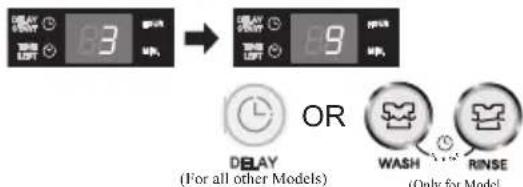
text_image
3 9 OR DBLAY (For all other Models) WASH RINSE (Only for Model)- The light will 'DELAY' turn on and 'TIME LEFT' will be marked.
- Press the button repeatedly to set the desired finishing time. For example, To finish washing in 9 hours from now, by make the number 9 pressing the DELAY START
(RESERVATION) button repeatedly.
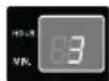

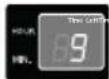

(Only for Model T7070TDDL, T7008TDDLP & T7270TDDL)
• The light will 'DELAY' turn on and 'TIME LEFT' 83:00 will be marked.
- Press the button repeatedly to set the desired finishing time. For example, To finish washing in 9 hours from now, by make the number 9:00 pressing the DELAY START
(RESERVATION) button repeatedly.


(Only for Models with capacity 8.0kg and above)
4 Add the laundry and press the START/PAUSE button.

START PAUSE
- When you press the START/PAUSE button the light will blink.
5 Add the Detergent.
6 Close the lid.
Finish
• Water will be supplied for 2 minutes after the start of the wash to supplement the water the laundry has absorbed.
• The washing will be finished according to the delayed time.
NOTE
- Finishing time can be delayed from 3\~48 hours. Delaying from 3\~12 hours can be done in 1 hour time intervals and from 12\~48 hours in 2 hour time intervals.
- If the lid is open, the machine will not work, and an alarm signal will alarm to remind you to close the lid.
• To select washing time, rinsing times, spinning time, water level, hot/cold or wash program manually, press the DELAY START (RESERVATION) button and select the desired option. Then press the START/PAUSE button. - When the laundry cannot be taken out immediately after the wash program ends, it is better to omit the spinning program. (The laundry will be wrinkled if left for a long time after spinning.)
*Product feature may vary according to different models. Refer page 43 for modelwise features for your purchased model.

ther Useful Functions
Child Lock Function
If you want to lock all the keys to prevent settings from being changed by a child, you can use the child lock option.
How to Lock
1 Press the POWER (AUTO OFF) button.

POWER AUTO OFF
- Turn Power on.
2 Press the START/PAUSE button to start washing.

START PAUSE
• After all washing conditions are set according to the manual.
3A Press both the RINSE button and the SPIN button simultaneously, and hold till "CL" blink.
- During the wash program, all the buttons are locked until washing is completed or child-lock function is deactivated manually.
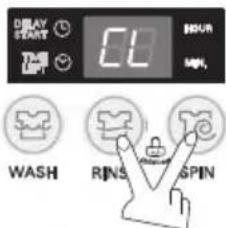
text_image
ARRAY START 01 HOUR MIN. WASH RINS SPIN(For all other Models)
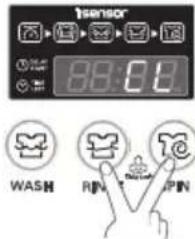
text_image
SENSOR 88:00 WASH RIN PIN(Only for Model with capacity 8.0kg and above)
If you want to unlock during wash, press both the RINSE and the SPIN button simultaneously again.
3B Press both the SPIN button and the DELAY button simultaneously, and hold till "CL" blink.
- During the wash program, all the buttons are locked until washing is completed or child-lock function is deactivated manually.
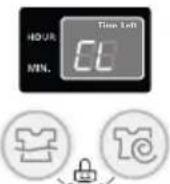
SPIN DELAY
(Only for Model T7070TDDL, T7008TDDLP, T7270TDDL)
How to Unlock
If you want to unlock during wash, press both the SPIN and the DELAY button simultaneously again.
NOTE
- “ [L]” & the remaining time are alternatively shown on the display while they are locked.
Mute Option
If you want to use the washing machine without alarm signal sounds, press both the WASH and SPIN buttons simultaneously.
To make buzzer work, press both the WASH and SPIN buttons simultaneously one more time.
Seeing Remaining Time
To see the remaining time for each process, first press START/PAUSE button and then press one of the WASH, RINSE and SPIN buttons.

lacing, Leveling and Installation
Please ensure that transit restraint has been removed before operating your machine.
Improper installation of the washer may cause noise and malfunctioning.
Note : 1. The ventilating openings in the base area must not be obstructed by carpeting when the washing machine is installed on a carpeted floor.
- Install the washing machine on a level and firm surface.
How to adjust leveling
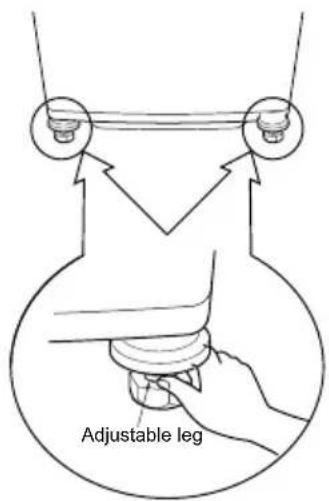
text_image
Adjustable legTurn the adjustable legs to set the washer horizontal (Both the front legs).
Don't add anything under back side legs.
Distance between drain hose and the wall
Distance between drain hose and the wall should be more than 10cm, and the distance between the other part or the rear part and the wall should be more than 2 cm.
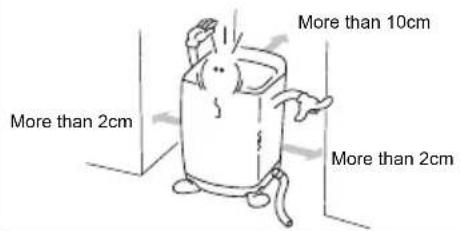
text_image
More than 2cm More than 2cm More than 10cm More than 2cmAnti-rat cover installation
Insert the Anti rat cover firmly from back side side of washing machine.
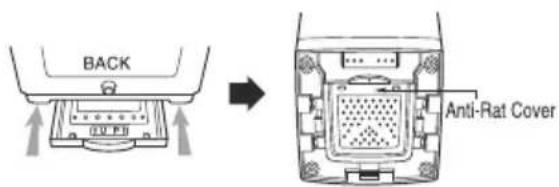
text_image
BACK Anti-Rat Cover
Installation area
Install the washer on flat and firm surface.
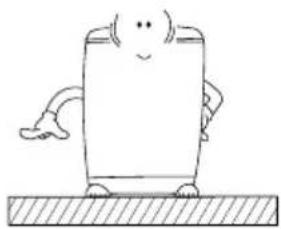
natural_image
Simple line drawing of a cartoon character sitting on a textured surface (no text or symbols)
Checking level
The Basement is not flat, fill the water just touching the Pulsator and see uniform distribution. If not, adjust the legs as shown in the figure.
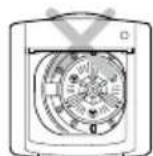
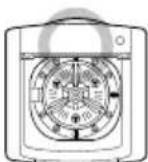
Top View

Checking Proper placement
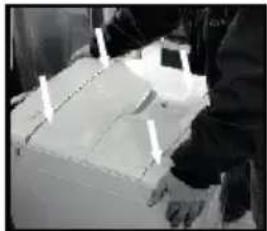
natural_image
Close-up of a person's legs and feet wearing gloves, with white markers indicating measurement points (no visible text or symbols)Press the corners of the machine diagonally as shown in the figure, If any movement is observed, adjust the legs for proper leveling.
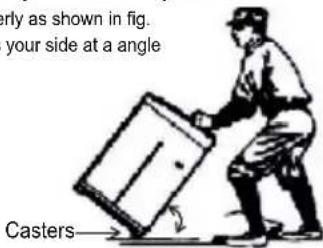
# Moving of the Machine
Casters are provided for easy translocation of your machine
* Grip the machines properly as shown in fig.
* Tilt the machine towards your side at a angle 45^ 55^ .
text_image
erly as shown in fig. your side at a angle Casters—Note: * Be careful that you should not drop the machine.
* Never move the machine on casters when there is load inside.
Caution
If the power is supplied from a cord extension set or generator, the cord extension set or electrical portable outlet device should be positioned so that it is not exposed to splashing or ingress of moisture.
# Casters are available in selected models only. Please refer Table on page 43 for your purchased model.

onnecting Hose
Water Supply Hose
Normal Type
(Normal tap without thread & one touch type inlet hose.)
1 Separate Middle connector from Water Supply Hose
Separate Middle connector from theWater Supply Hose by pulling the Pressing Rod and the Pressing Handle that is attached to theWater Supply Hose
Middle connector
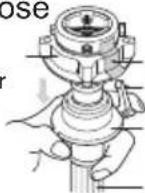
Fixed Sticker Pressing Handle Pressing Rod
Water Supply Hose
2 Loosen the fixed nuts to connect the connector to the tap
Untighten thescrew of the connector so that the tap can be placed in the middle.
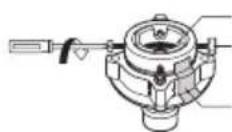
Rubber packing screw
Fixed sticker
NOTE
In case tap is too large. If the tap diameter is too large or isquare, untighten the 4 screws and remove the guide plate. Then follow step1
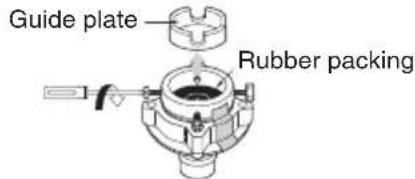
text_image
Guide plate Rubber packing3 Fixing Connectors to the Tap
Push the upper connector up till the rubber packing is in tight contact with the tap. Then tighten the 4 screws
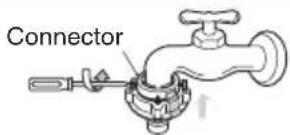
text_image
Connector4 Fixing Upper Connector and Middle Connector
Remove the fixed sticker in between the Upper and Middle Connectors. Tighten the connectors by holding one connector and twist middle connector to the right.
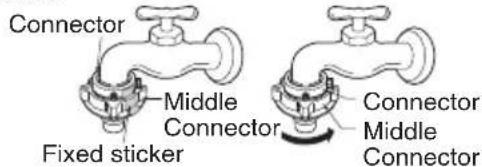
text_image
Connector Middle Connector Fixed sticker Connector Middle Connector5 Connecting Middle Connector and Water Supply Hose
Press down the pressing rod of the Water Supply Hose which was separated from middleconnector (refer to Step1) and then join it to the middle connector.
Water Supply Hose
Pressing rod
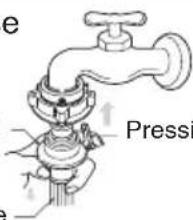
text_image
e PressiPressing handle
6 Check for water leakage
After connecting the other end of hose to machine open the tap to check for any water leakage. If the connection leaks, close the tap and start again from step 1. If you skip step 1, water leakage may occur.
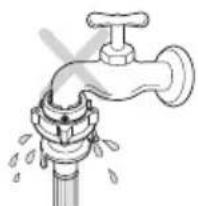
natural_image
Illustration of a faucet with water droplets falling (no text or symbols)Remove foreign substances (dirt, sand or sawdust)
After connecting inlet hose to water faucets, turn on the water faucets to flush out foreign substances (dirt, sand or sawdust) in the water lines. Let water drain into a bucket, and check the water condition.
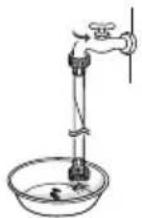

NOTE
* For your safety and for extended product life, use only authorized components. The manufacturer is not responsible for product malfunction or accidents caused by the use of separately purchased unauthorized parts.
* Use new hoses when you install the washing machine. Do not reuse old hoses. Use only the inlet hoses provided with the washer. LG does not recommend the use of aftermarket hoses.
• Periodically check the hoses for cracks, leaks and wear, and replace the hoses every 5 years.
* Do not stretch the water hoses intentionally, and make sure that they are not crushed by other objects.
Connecting Water Supply Hose to the machine
- Connect the water supply hose to inlet valve of the washing machine, and then lock it by turning the hose connecting part.
- Check to see if there is a rubber seal inside the connector.
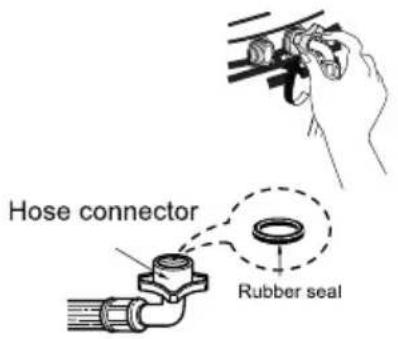
text_image
Hose connector Rubber sealDrain Hose
How to connect the drain hose
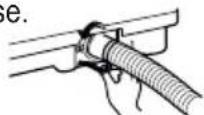
1 Insert the drain hose to the connecting area at the body.
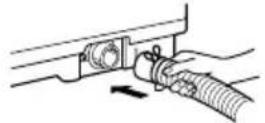
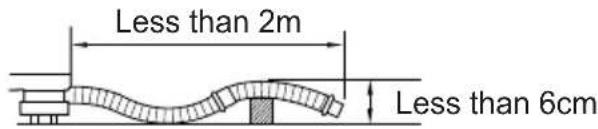
text_image
Less than 2m Less than 6cmThe hose is placed over a doorsill.
The hose is clogged by alien substances.
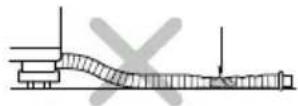
Make sure that the hose is not crushed.
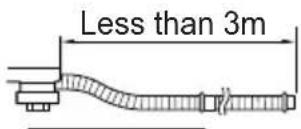
text_image
Less than 3mExtension hose is used.
- Press the hose clip.
- While pressing, push the hose towards the body.
- Release the hose clip after pushing the hose.
Less than 10 ~cm
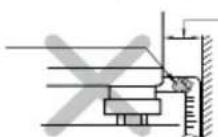
Make sure that the hose is not crushed between the wall and the washer
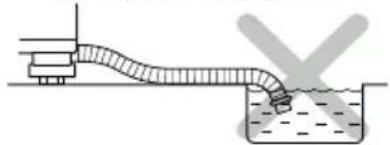
natural_image
Simple line drawing of a mechanical setup with a pipe and container, no text or symbols presentAvoid submerging the end of hose.

rounding Method
Earth wire should be connected.
If the earth wire is not connected, there is possible a danger of electric shock caused by the current leakage.
Grounding Method with Ground insertspace Terminal
If the AC current outlet hasa ground terminal, then separate grounding is not required.
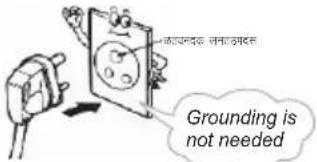
text_image
Grounding is not needed
CAUTION / सावधानी
Concerning the Power Cord
Most appliances recommend they be placed upon a dedicated circuit; that is, a single outlet circuit which powers only that appliance and has no additional outlets or branch circuits. Check the specification page of this owner's manual to be certain. Do not overload wall outlets. Overloaded wall outlets, loose or damaged wall outlets, extension cords, frayed power cords, or damaged or cracked wire insulation are dangerous. Any of these conditions could result in electric shock or fire. Periodically examine the cord of your appliance, and if its appearance indicates damage or deterioration, unplug it, discontinue use of the appliance, and have the cord replaced with an exact replacement part by an authorized servicer. Protect the power cord from physical or mechanical abuse, such as being twisted, kinked, pinched, closed in a door, or walked upon. Pay particular attention to plugs, wall outlets, and the point where the cord exits the appliance
Other Grounding Method
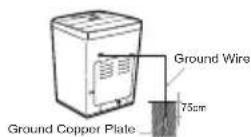
Burying Copper Plate
Connect the Ground Wire to a Ground Copper Plate and bury it more than 75cm in the ground.
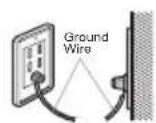
Using Ground Wire
Connect the ground Wire to the socket provided exclusively for Grounding.
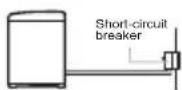
Using a Short Circuit Breaker
If grounding methods described above are not possible, a separate circuit breaker should be employed and installed by a qualified electrician.
Disposal of your old appliance (as per e-waste Rules)
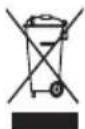
- When this crossed out wheeled bin symbol is depicted on the product and its operator's manual, it means the product is covered by the e-waste Management and Handling Rules, 2011 and are meant to be recycled, dismantled, refurbished or disposed off.
2. Do's
a. The product is required to be handed over only to the authorized recycler for disposal.
b. Keep the product in isolated area, after it becomes non-functional/un-repairable so as to prevent its accidental breakage.
Don't :
a. The product should not be opened by the user himself/herself, but only by authorized service personnel.
b. The product is not meant for re-sale to any unauthorized agencies/scrap dealer/kabariwalah.
c. The product is not meant for mixing into household waste stream.
d. Do not keep any replaced spare part(s) from the product in exposed area.
-
Any disposal through unauthorized agencies/person will attract action under Environment (Protection) Act 1986.
-
To locate a nearest collection centre or call for pick-up (limited area only) for disposal of this appliance, please contact Toll Free No. 1800-180-9999 for details. All collection centre and pick up facilities are done by third parties with LG Electronics India Pvt. Ltd. Merely as a facilitator.
For more detailed information, please visit: http://www.lg.com/in
leaning and Maintenance
Cold water washing
- If you always use COLD water, we recommend that a WARM or HOT wash be used at a regular intervals e.g. every 5th wash should be at least a WARM one.
When you have finished
- Turn off taps to prevent the chance of flooding should a hose burst.
• Always unplug the power cord after use.
When water supply into the tub is not clean or the filter is clogged with particles (such as sand), clean the filter in the inlet valve occasionally.
(The figure of power cord and water tap may vary)
To Clean the Filter in the Inlet Valve

Close the tap before turning off the power. Select both HOT/COLD and then press the [START/PAUSE] button to remove water from the machine completely.
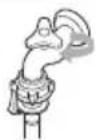

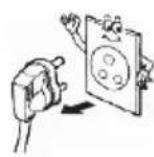
Turn off the power before pulling out the cord.

After Stopping the water supply, Remove inlet hose connected to the machine and pull out the filter as shown.
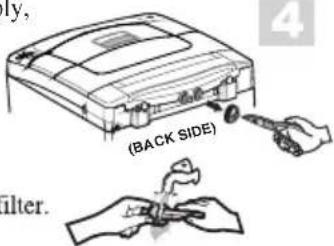
text_image
ly, (BACK SIDE) filter.
Replace the filter after cleaning it.
Then use a brush to clean the filter.
NOTE
- Before cleaning the filter, the impurities in the water supply hose should be removed.
To Clean the Magic Filter
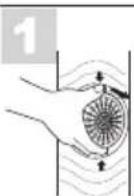


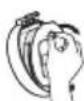
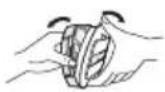
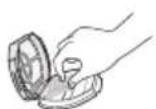
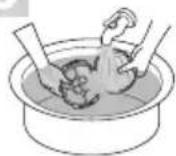
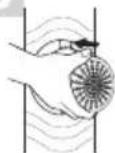
NOTE
- If the magic filter is damaged, purchase a new one from LG Authorised Service Center.
When there is a fear of freezing
- Close the water taps and remove the Water Supply Hose.
- Remove the water which remains in the water supply.
- Lower the drain hose and drain the water in the bowl and the drain hose by spinning.
If frozen
- Remove the water supply hose, and immerse it in HOT water at approx.. 40^ .
- Pour approx.. 2 liters of HOT water at approx.. 40^ , into the bowl and let it stand for 10 minutes.
- Connect the water supply hose to the water tap and confirm that the washing machine performs the supply and drainage of water.
Wash Inner-tub Leave the lid open after washing to allow moisture to evaporate. If you want to clean the inner-tub use a clean soft cloth dampened with liquid Detergent, then rinse. (Do not use harsh or gritty cleaners.)
Inlet Hoses Hoses connecting washer to faucet should be replaced every 5 years.
Exterior Immediately wipe off any spills. Wipe with damp cloth. Try not to hit surface with sharp objects.
Long Vacations Be sure water supply is shut off at faucets. Drain all water from hoses if weather will be below freezing.

leaning and Maintenance
Cleaning the Insideof your Washer
If you use fabric softener or do regular COLD water washing, it is very important that you occasionally clean the inside of your washer.
• Fill your washer with HOT water.
- Add about two cups of a powdered Detergent that contains phosphate.
- Let it operate for several minutes.
- Stop the washer, open the lid and leave it to soak overnight.
• After soaking, drain the washer and run it through a normal cycle.
Or use TUB CLEAN PROGRAM periodically.
We do not recommend that you wash clothes during this procedure.
Products that might damage your washing machine
- Concentrated bleaches and diaper sanitizer will cause damage to the paintwork and components of your washer.
- Hydrocarbon solvents i.e. petrol, paint thinners and lacquer thinners, etc. can dissolve plastic and blister paint (Be careful when washing garments stained with these solvents as they are flammable DO NOT put them in washer or dryer.)
- Some pretreatment sprays or liquids can damage your washer's control panel.
- Use of dyes in your washer may cause staining of the plastic components. The dye will not damage the machine but we suggest you thoroughly clean your washer afterwards. We do not recommend the use of dye strippers in your washer.
- Do not use your washer lid as a work surface.

se of Handle Locker
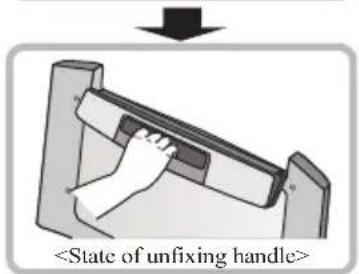
You can use handle hold function if you like to use. Handle hold function is operated by holder under the handle.
- Slide holder to left/right side until you listen to "Click" sound to holding handle.
- Do opposite to loose the Handle handing.
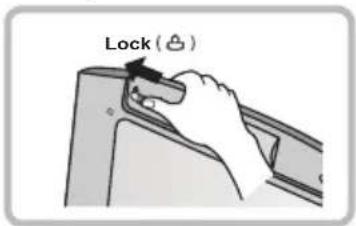
text_image
Lock (☐)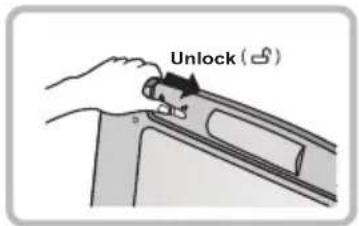
text_image
Unlock (☐)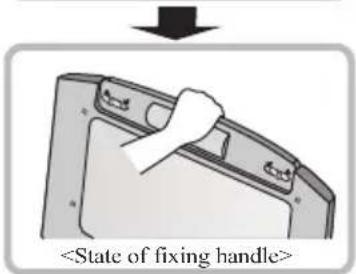
text_image
text_image
NOTE
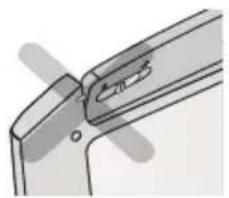
- While operating the Lid Door, always confirm that Handle Lock is in Fixed position as shown in below picture because if it is not locked completely then there is Risk of falling objects.
- If Lid Door is closed while Handle is not completely locked, "dE" error may occur during operation.
- If possible, It is always recommended to use handle in Locked state.
natural_image
Pure mechanical component diagram without any text, numbers, or symbols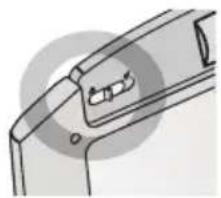
natural_image
Diagram of a mechanical component with internal slots and mounting holes (no text or symbols)Many washing problems involve poor soil & stain removal, residues of lint and scum, and fabric damage. For satisfactory washing results, follow these instructions.
WASH PROBLEM
| Problems | PossibleCauses | Solutions & Preventive Measures |
| Poor soil removal | Not enough DetergentWash Water Temperature too low.Overloading the washerIncorrect wash cycleIncorrect sortingPretreat stain not done | Use correct amount of Detergent for load size, amount of soil and water hardness.Use WARM or HOT water for normal soil.Different Water Temperature may be required according to soil type. (refer to page 13)Reduce load size.Wash with STRONG (JEANS) or SOAK & STRONG (JEANS) wash cycle for heavy soiled laundry.Separate heavily soiled items from lightly soiled ones.Pretreat stain and heavy soil according to directions shown on page 12. |
| Blue Stains | Undiluted fabric softener dispensed directly onto fabric | Rub the stain with bar soap.Do not overfill fabric softener dispenser and do not pour liquid fabric softener directly onto fabric.See page 15 for more instructions. |
| Black or gray marks on clothes | A buildup caused by the interaction of fabric softener and Detergent can flake off and mark clothesNot enough Detergent | Keep the recommendations against Scrud(waxy buildup). (refer to scrud page15.)Use correct amount of Detergent for load size, amount of so and water hardness. |
| Yellow or brown rust stains | Iron or manganese in water supply, water pipes, or water heater | To restore discolored load of whites, use rust remover safe for fabric.Install nonprecipitating water softener or an iron filter in your water supply system for an ongoing problem.Before washing, run water for a few minutes to clear lines. |
| Lint | Incorrect sortingTissues left in pocketOverloading the washer | Wash lint giverseg. towels, flannelette sheets, eparately from lint collectoreg. synthetic fabrics and remove tissues in pockets before wash. See page 12 for sorting and caring before loading.Do not overload the washer |
| Residue or Detergent | Overloading the washerUndissolved DetergentUse too much Detergent | Do not overload the washer.SomeDetergents need to be pre-dissolved, check theDetergent instructions. Try pre-dissolving theDetergent.IncreaseWater Temperature usingHOT water safe for fabric.Use proper amount of Detergent. |
| Holes, tears, or snags | Incorrect use of chlorine bleach.Unfastened zippers, hooks, bucklesRibs, tears and broken threadsOverloading the washerDegradation of fabric | Never pour chlorine bleach directly on fabric.See page 14 for adding liquid bleach.Fasten zippers, hooks, and buckles.Remove objects in pockets. See page 12 for caring before loading.Do not overload the washer. |

roubleshooting
Self-diagnostic error mode
The machine will display and playback the error messages if there is any error in machine for your suitable action.
| Symptom Error Display | Checkup | |
| Water Supply Failure | 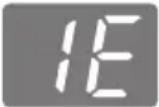 | • Is the water tap shut off?• Is the water supply cut off?• Is the tap or water supply hose frozen?• Is the water pressure low or is the filter of the inlet valve clogged with impurities?• Is the Hot hose connected to cold?• Is the Cold hose connected to hot? |
| Drainage Failure | 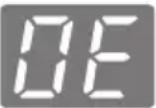 | • Is the drain hose positioned correctly?• Is the drain hose bent or placed too high?• Is the internal part of the hose or drain pump (only pump model) clogged with impurities?• Check if electric power has gone off? |
| Spin Failure | 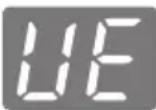 | • Is the laundry evenly balanced?• Is the washing machine placed on a flat surface.? |
| Door(Lid) Open | 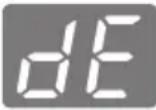 | • Is the lid closed? |
| Internal sensing failure | 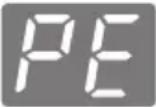 | • Please call your nearest LG Electronics service center for help. |
| Power failure | 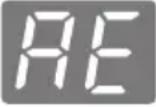 | |
| Overflow failure | 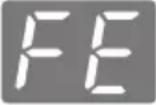 | |
Troubleshooting
\* Using SmartDiagnosis™
- Only use this feature when instructed to do so by the call center. The transmission sound is similar to a fax machine, and so has no meaning except to the call center.
- SmartDiagnosis™ cannot be activated if the washer does not power up. If this happens, then troubleshooting must be done without SmartDiagnosis™.
If you experience problems with your washer, call to Customer information center. Follow the call center agent's instructions, and do the following steps when requested:
1 Press the POWER button to turn on the washer. Do not press any other buttons or turn the cycle selector knob.
2 When instructed to do so by the call center, place the mouthpiece of your phone just above to the Smartdiagnosis ^™ symbol near to Power Button.
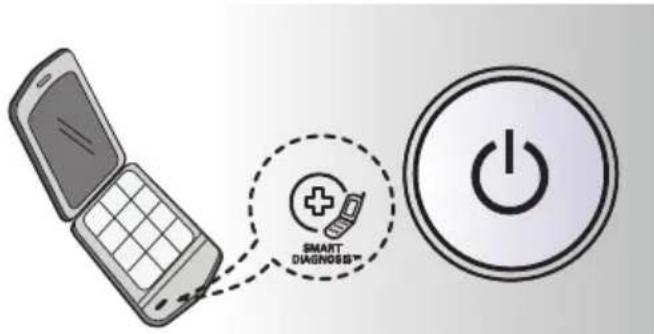
text_image
SMART DIAGNOSIS™ POWER3 Press and hold the INLET TEMP. button for three seconds, while holding the phone mouthpiece to the icon or POWER button.
Keep the phone in place until the tone transmission has finished. This takes about 6 seconds, and the display will count down the time.
- For best results, do not move the phone while the tones are being transmitted.
- If the call center agent is not able to get an accurate recording of the data, you may be asked to try again.
- Pressing the POWER button during the transmission will shut off the SmartDiagnosis™.
5 Once the countdown is over and the tones have stopped, resume your conversation with the call center agent, who will then be able to assist you using the information transmitted for analysis at the call center.
Smart Diagnosis is a troubleshooting feature designed to assist, not replace, the traditional method of troubleshooting through service calls.
The effectiveness of this feature depends upon various factors, including, but not limited to, the reception of the cellular phone being used for transmission, any external noise that may be present during the transmission, and the acoustics of the room where the machine is located.
Accordingly, LG does not guarantee that Smart Diagnosis would accurately troubleshoot any given issue
* Product feature may vary according to different models. Refer page 43 for modelwise features for your purchased model.
Water Tap Pressure should be between 30-800 Kpa (0.3 - 8.0 kg/cm²)
* In our continuing effort to improve the quality of our appliances, it may be necessary to make changes to the appliance without revising this manual.
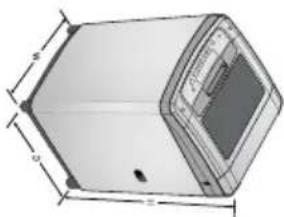
natural_image
Technical line drawing of a rectangular electronic device with dimensions labeled (no text or symbols present)| Feature and Specification | |||||||||||||||||||||||||||||||||||||||||||||||||||||||||||||||||||||||||||||||||||||||||||||||||||||||||||||||||||||||||||||||||||||||||||||||||||||||||||||||||||||||||||||||||||||||||||||||||||||||||||||||||||||||||||||||||||||||||||||||||
| Model | Capacity (Kg) | Fuzzy | Smart | Extra | I-Sensor | Spray | Dry | Child | Diagnosis | Inlet Water Level Selection | Water Level Selection | Castors | Speech | Aqua | Silent | ECO | Delay | Quick | Favorite Wash | Strong Clean | Tooh | Soak | Gente (Wool/Saree) | Centile | Weight (kg) | Dimension (W x D x H) mm | 17070TDDL | 6.2 kg | 172CMG22P | 6.2 kg | 172CMG22P | 6.2 kg | 172CMG22P | 6.2 kg | 172CMG22P | 172CMG22P | 172CMG22P | 172CMG22P | 172CMG22P | 172CMG22P | 172CMG22P | 172CMG22P | 172CMG22P | 172CMG22P | 172CMG22P | 172CMG22P | |||||||||||||||||||||||||||||||||||||||||||||||||||||||||||||||||||||||||||||||||||||||||||||||||||||||||||||||||||||||||||||||||||||||||||||||||||||||||||||||||||||||||||||||||||||||||||||||||||
| 17070TDDL | 6.0 kg | 17008TDDL | 6.0 kg | 172CMG22P | 6.2 kg | 172CMG22P | 6.2 kg | 172CMG22P | 6.2 kg | 172CMG22P | 6.2 kg | 172CMG22P | 6.2 kg | 172CMG22P | 6.2 kg | 172CMG22P | 6.2 kg | 172CMG22P | 6.2 kg | 17008TDDL P | 6.0 kg | 17008TDDL P | 172CMG22P | 172CMG22P | 172CMG22P | 172CMG22P | 172CMG22P | 172CMG22P | 172CMG22P | 172CMG22P | 172CMG22P | 172CMG22P | 172CMG22P | ||||||||||||||||||||||||||||||||||||||||||||||||||||||||||||||||||||||||||||||||||||||||||||||||||||||||||||||||||||||||||||||||||||||||||||||||||||||||||||||||||||||||||||||||||||||||||||||||||||||||||||||||
| 117CMG22P | 6.2 kg | 172CMG22P | 6.2 kg | 172CMG22P | 6.2 kg | 172CMG22P | 6.2 kg | 172CMG22P | 6.2 kg | 172CMG22P | 6.2 kg | 172CMG22P | 6.2 kg | 172CMC22P | 6.2 kg | 172CMG22P | 6.2 kg | 172CMG22P | 6.2 kg | 172CMG22P | 6.2 kg | 172CMG22P | 6.2 kg | 172CMG22P | 6.2 kg | 172CMG22P | 6.2 kg | 172CMG23P | 6.2 kg | 172CMG22P | 6.2 kg | 172CMG22P | 6.2 kg | 172CMG22P | 6.2 kg | 172CMG22P | 6.2 kg | 172CMG22P | 6.2 kg | 172CMG22P | 6.2 kg | 172CMG22P | |||||||||||||||||||||||||||||||||||||||||||||||||||||||||||||||||||||||||||||||||||||||||||||||||||||||||||||||||||||||||||||||||||||||||||||||||||||||||||||||||||||||||||||||||||||||||||||||||||||||
| X | X | X | X | X | X | X | X | X | X | X | X | X | X | X | X | X | X | X | X | X | X | X | X | X | X | X | X | X | X | X | X | X | X | X | X | X | X | X | X | X | X | X | X | X | X | X | X | X | X | Y | X | X | X | X | X | X | X | X | X | X | X | X | X | X | X | X | X | X | X | X | X | X | X | X | X | X | X | X | X | X | X | X | X | X | X | X | X | X | X | X | X | X | X | X | X | X | X | X | X | x | X | X | X | X | X | X | X | X | X | X | X | X | X | X | X | X | X | X | X | X | X | X | X | X | X | X | X | X | X | X | X | X | X | X | X | X | X | X | X | X | X | X | X | X | X | X | X | X | X | 590 x 606 x 960 | |||||||||||||||||||||||||||||||||||||||||||||||||||||||||||||||||||||||||||||||||||||||||||

LG
Life's Good
MFL68921103