
AR18TVCAAWKXCB - Air-conditioner SAMSUNG - Free user manual and instructions
Find the device manual for free AR18TVCAAWKXCB SAMSUNG in PDF.


User questions about AR18TVCAAWKXCB SAMSUNG
0 question about this device. Answer the ones you know or ask your own.
Ask a new question about this device
Download the instructions for your Air-conditioner in PDF format for free! Find your manual AR18TVCAAWKXCB - SAMSUNG and take your electronic device back in hand. On this page are published all the documents necessary for the use of your device. AR18TVCAAWKXCB by SAMSUNG.
USER MANUAL AR18TVCAAWKXCB SAMSUNG
• Thank you for purchasing this Samsung air conditioner.
- Before operating this unit, please read this user manual carefully and retain it for future reference.
Safety Information 4
Safety Information 4
At a Glance 11
Indoor Unit Overview 11
Display 12
Remote Control Overview 13
Replacing the remote control batteries 13
Remote Control Operation 14
Selecting an operation mode 14
To set the temperature • To adjust the fan speed • To adjust the airflow direction 15
Smart Features 16
Power Smart Features 16
Wind-Free Cooling function 16
AI Auto mode 17
Auto mode 18
Cool mode 19
Dry mode • Fan mode 20
Variety Smart Features 21
Fast function 21
Motion detect function 22
Quiet function • Beep function 24
Display lighting function • Wi-Fi function (SmartThings app) 25
Energy-Saving Features 26
Electricity consumption check 26
Eco function 27
Timed on/ Timed off function 28
good'sleep function 29
Cleaning and Maintenance 30
| Schedule | 30 |
| Cleaning | 31 |
| Appendix | 37 |
| Troubleshooting | 37 |
| SmartThings app 39 |
Correct Disposal of This Product (Waste Electrical & Electronic Equipment)
(Applicable in countries with separate collection systems)
This marking on the product, accessories or literature indicates that the product and its electronic accessories (e.g. charger, headset, USB cable) should not be disposed of with other household waste at the end of their working life. To prevent possible harm to the environment or human health from uncontrolled waste disposal, please separate these items from other types of waste and recycle them responsibly to promote the sustainable reuse of material resources.
Household users should contact either the retailer where they purchased this product, or their local government office, for details of where and how they can take these items for environmentally safe recycling.
Business users should contact their supplier and check the terms and conditions of the purchase contract. This product and its electronic accessories should not be mixed with other commercial wastes for disposal.

Correct disposal of batteries in this product
This marking on the battery, manual or packaging indicates that the batteries in this product should not be disposed of with other household waste at the end of their working life. Where marked, the chemical symbols Hg, Cd or Pb indicate that the battery contains mercury, cadmium or lead above the reference levels in EC Directive 2006/66.

WARNING: Read This Manual
Read and follow all safety information and instructions before installation, use, or maintenance of this appliance. Incorrect installation, use, or maintenance of this appliance can result in death, serious injury, or property damage. Keep these instructions with this appliance. This manual is subject to change. For the latest version, visit www.samsung.com.
Because the instructions in this manual cover various models, the characteristics of your air conditioner may differ slightly from those described. If you have any questions, please contact your service provider or visit www.samsung.com.
Notices and notes
To make you aware of safety messages and highlighted information, we use the following notices and notes throughout this manual:

WARNING
Hazards or unsafe practices that may result in severe personal injury or death.

CAUTION
Hazards or unsafe practices that may result in minor personal injury or property damage.

IMPORTANT
Information of special interest

NOTE
Supplementary information that may be useful
natural_image
Two simple line icons: an open book with an 'i' symbol on the top, and a closed book with stacked pages below (no text or symbols)The user and installer guides should be read carefully.
The user and installer guides should be read carefully.
FOR GENERAL
This appliance is not intended for use by persons (including children) with reduced physical, sensory or mental capabilities, or lack of experience and knowledge, unless they have been given supervision or instruction concerning use of the appliance by a person responsible for their safety. Children should be supervised to ensure that they do not play with the appliance.
FOR INSTALLATION

WARNING
Use a power cord with this product's power specifications or higher and use the power cord for this appliance only. In addition, do not use an extension cord.
• Extending the power cord may result in electric shock or fire.
- Do not use an electric transformer. This may result in electric shock or fire.
• If the voltage/frequency/rated current condition is different, it may cause fire.
The installation of this appliance must be performed by a qualified technician or service company.
- Failing to do so may result in electric shock, fire, explosion, problems with the product, or injury and may also void warranty on the installed product.
Install an Isolation Switch next to the Air Conditioner (but not on the panels of the Air Conditioner) and circuit breaker dedicated to the air conditioner.
• Failing to do so may result in electric shock or fire.
Fix the outdoor unit firmly so that the electric part of the outdoor unit is not exposed.
- Failing to do so may result in electric shock, fire, explosion, or problems with the product.
Do not install this appliance near a heater, or inflammable material. Do not install this appliance in a humid, oily or dusty location, in a location exposed to direct sunlight and water (or rain). Do not install this appliance in a location where gas may leak.
• This may result in electric shock or fire.
Never install the outdoor unit in a location such as on a high external wall where it could fall.
- If the outdoor unit falls, it may result in injury, death or property damage.
This appliance must be properly grounded. Do not ground the appliance to a gas pipe, plastic, water pipe, or telephone line.
- Failing to do so may result in electric shock, fire, and explosion.
• Make sure to use a socket-outlet with ground.

CAUTION
Install your appliance on a level and hard floor that can support its weight.
- Failing to do so may result in abnormal vibrations, noise, or problems with the product.
Install the drain hose properly so that water drains correctly. - Failing to do so may result in water overflowing and property damage. Avoid adding drain to waste pipes as odours may arise in the future.
When installing the outdoor unit, make sure to connect the drain hose so that draining is performed correctly.
- The water generated during heating by the outdoor unit may overflow and result in property damage.
In particular, in winter, if a block of ice falls, it may result in injury, death or property damage.
Do not install the product in a place where thermo-hygrostat is needed (such as server room, machinery room, computer room, etc.)
- Those places do not provide guaranteed operation condition of the product therefore performance can be poor in these places.
FOR POWER SUPPLY

WARNING
When the circuit breaker is damaged, contact your nearest service centre.
Do not pull or excessively bend the power line. Do not twist or tie the power line. Do not hook the power line over a metal object, place a heavy object on the power line, insert the power line between objects, or push the power line into the space behind the appliance.
• This may result in electric shock or fire.
If the supply cord is damaged, it must be replaced by the manufacturer, its service agent or similarly qualified persons in order to avoid a hazard.

CAUTION
When not using the air conditioner for a long period of time or during a thunder/lightning storm, cut the power at the circuit breaker.
- Failing to do so may result in electric shock or fire.
FOR USING

WARNING
If the appliance is flooded, please contact your nearest service centre.
- Failing to do so may result in electric shock or fire.
If the appliance generates a strange noise, a burning smell or smoke, cut off the power supply immediately and contact the nearest service centre.
• Failing to do so may result in electric shock or fire.
In the event of a gas leak (such as propane gas, LP gas, etc.), ventilate immediately without touching the power line. Do not touch the appliance or power line.
- Do not use a ventilating fan.
• A spark may result in an explosion or fire.
To reinstall the air conditioner, please contact your nearest service centre.
- Failing to do so may result in problems with the product, water leakage, electric shock, or fire.
- Delivery service for the product is not provided. If you reinstall the product in another location, additional construction expenses and an installation fee will be charged.
- Especially, when you wish to install the product in an unusual location such as in an industrial area or near the seaside where it is exposed to salt in the air, please contact your nearest service centre.
Do not touch the circuit breaker with wet hands.
• This may result in electric shock.
Do not turn the air conditioner off with the circuit breaker while it is operating.
- Turning the air conditioner off and then on again with the circuit breaker may cause a spark and result in electric shock or fire.
After unpacking the air conditioner, keep all packaging materials well out of the reach of children, as packaging materials can be dangerous to children.
• If a child places a bag over its head, it may result in suffocation.
Do not touch the airflow blade with your hands or fingers during heating.
• This may result in electric shock or burns.
Do not insert your fingers or foreign substances into the air inlet/outlet of the air conditioner.
- Take special care that children do not injure themselves by inserting their fingers into the product.
Do not strike or pull the air conditioner with excessive force.
• This may result in fire, injury, or problems with the product.
Do not place an object near the outdoor unit that allows children to climb onto the machine.
• This may result in children seriously injuring themselves.
Do not use this air conditioner for long periods of time in badly ventilated locations or near infirm people.
- Since this may be dangerous due to a lack of oxygen, open a window at least once an hour.
If any foreign substance such as water has entered the appliance, cut off the power supply and contact the nearest service centre.
- Failing to do so may result in electric shock or fire.
Do not attempt to repair, disassemble, or modify the appliance yourself.
- Do not use any fuse (such as copper, steel wire, etc.) other than the standard fuse.
- Failing to do so may result in electric shock, fire, problems with the product, or injury.

CAUTION
Do not place objects or devices under the indoor unit.
• Water dripping from the indoor unit may result in fire or property damage.
Check that the installation frame of the outdoor unit is not broken at least once a year.
- Failing to do so may result in injury, death or property damage.
To prevent personal injury, make sure that you change the directions of the horizontal airflowblades after stopping the movements of the vertical airflowblade. (In case of adjusting the horizontal airflow manually)
Do not install the product in a ship or a vehicle (such as a campervan).
- Salt, vibration or other environmental factor may cause the product malfunction, electric shock or fire.
Do not stand on top of the appliance or place objects (such as laundry, lighted candles, lighted cigarettes, dishes, chemicals, metal objects, etc.) on the appliance.
• This may result in electric shock, fire, problems with the product, or injury.
Do not operate the appliance with wet hands.
• This may result in electric shock.
Do not spray volatile material such as insecticide onto the surface of the appliance.
- As well as being harmful to humans, it may also result in electric shock, fire or problems with the product.
Do not drink the water from the air conditioner.
• The water may be harmful to humans.
Do not hit, shake, drop, or attempt to disassemble the remote control.
When replacing the remote control batteries, keep them out of the reach of infants.
• If an infant eats batteries, contact a doctor immediately.
When replacing the remote control batteries, be careful not to get the battery fluid on your skin.
• Battery fluid is harmful to humans.
Do not touch the pipes connected with the product.
• This may result in burns or injury.
Do not use this air conditioner to preserve precision equipment, food, animals, plants or cosmetics, or for any other unusual purposes.
• This may result in property damage.
Avoid directly exposing humans, animals or plants to the airflow from the air conditioner for long periods of time.
• This may result in harm to humans, animals or plants.
FOR CLEANING

WARNING
Do not clean the appliance by spraying water directly onto it. Do not use benzene, thinner or alcohol to clean the appliance.
• This may result in discolouration, deformation, damage, electric shock or fire.
Before cleaning or performing maintenance, cut off the power supply and wait until the fan stops.
- Failing to do so may result in electric shock or fire.

CAUTION
Take care when cleaning the surface of the heat exchanger of the outdoor unit since it has sharp edges.
- This should be done by a qualified technician. Please contact your installer or service centre.
Do not clean the inside of the air conditioner by yourself.
- For cleaning inside the appliance, contact your nearest service centre.
- When cleaning the filter, refer to the descriptions in the 'Cleaning' section.
- Failing to do so may result in damage, electric shock or fire.
- Make sure to prevent any injury from sharp edges of the surface when handling the heat exchanger.
Indoor Unit Overview
The appearance of the actual product may differ slightly from the image below.
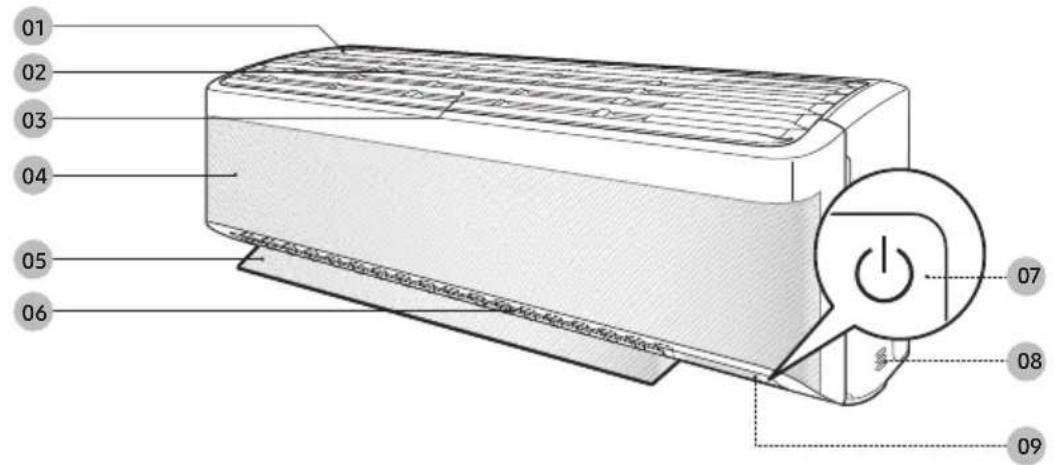
text_image
01 02 03 04 05 06 07 08 0901 Air intake
02 Air filter
03 Tri-care filter
04 Wind-Free panel
05 Airflow blade (up and down)
06 Airflow blade (left and right)
07 Power button/Remote control receiver
08 Room temperature sensor
09 Display
NOTE
- The product ships with two Tri-care filters and the manual included.
Display
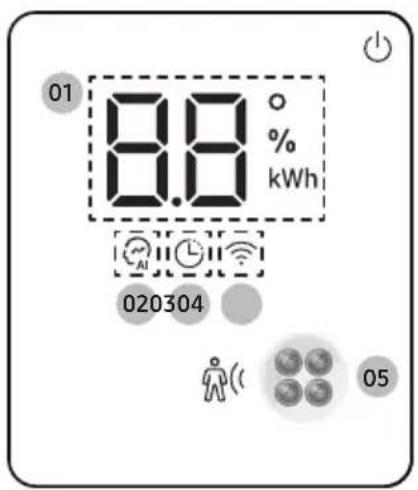
text_image
01 8.8 ° %, kWh 020304 0501 Temperature indicator (numeric) Filter reset indicator ☐ Electricity consumption indicator (numeric) Auto clean indicator ☐ :
02 AI Auto indicator
03 Timer indicator
good'sleep indicator
04 Wi-Fi indicator
05 Motion detect sensor

NOTE
- If the Wi-Fi indicator blinks for 10 seconds when operation starts, it means that the air conditioner is not connected to Wi-Fi. See "SmartThings app" on page 39 and connect the air conditioner to Wi-Fi.
- When connected to Wi-Fi, the air conditioner can gather and learn your user patterns so that it can run in AI Auto mode.
Most operating instructions in this manual require using the remote control.
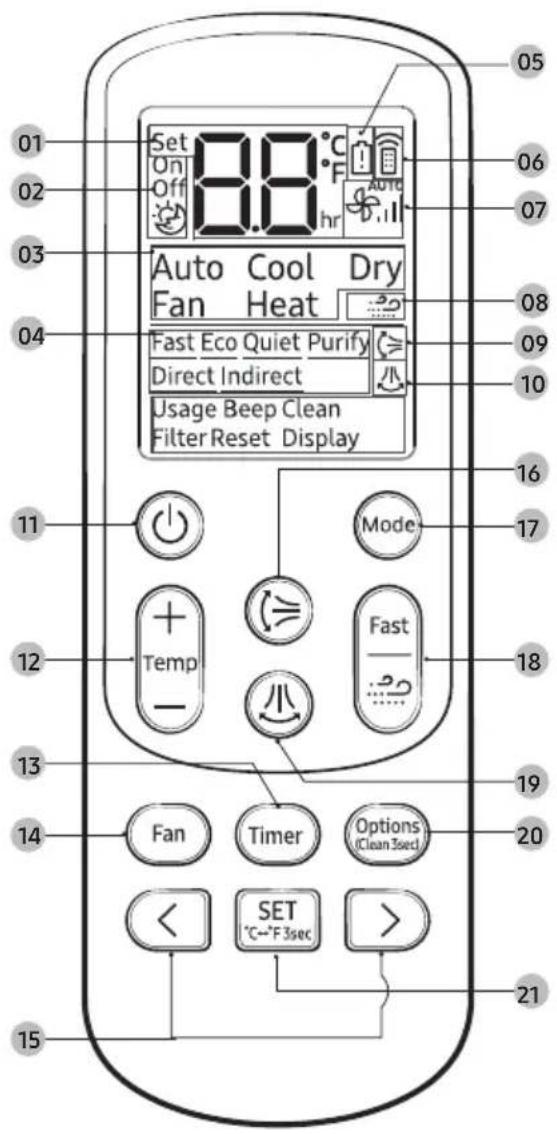
text_image
01 02 03 04 05 Set On Off 8.8 °C hr Auto Cool Dry Fan Heat Fast Eco Quiet Purify Direct Indirect Usage Beep Clean Filter Reset Display 11 Mode 12 Temp + - - - - - - - 13 14 Fan Timer Options (Clean 3sec) < SET °C←°F 3sec > 15 21 06 07 08 09 10 16 17 18 19 20 21Replacing the remote control batteries

text_image
Diagram showing battery assembly steps with numbered components: pin 1, pin 2, pin 3, and battery packTwo 1.5V AAA batteires
01 Set temperature indicator
02 Timer option indicator
03 Operation mode indicator
04 Options indicator
05 Low battery indicator
06 Transmit indicator
07 Fan speed indicator
08 Wind-Free indicator
09 Vertical air swing indicator
10 Horizontal air swing indicator
11 Power button
12 Temperature button
13 Timer button
14 Fan speed button
15 Direction button/Selection button
16 Vertical air swing button
17 Mode button
18 Fast/Wind-Free button
19 Horizontal air swing button
20 Options/Clean button
21 SET button/Temperature type button(°C↔°F)

NOTE
- Although Heat and Purify appear on the remote control display, they are not available on this model.
Remote Control Operation
You can use the air conditioner easily by selecting a mode and then by controlling the temperature, fan speed, and air direction.
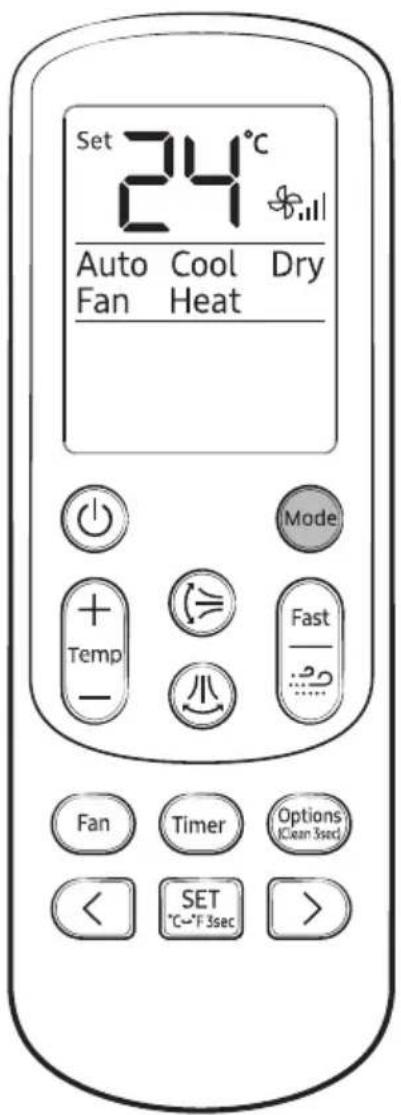
text_image
Set 24°C Auto Cool Dry Fan Heat Mode + Temp - Fast - Fan Timer Options (Clean 3sec) < SET > °C~F 3secSelecting an operation mode
To change the current mode between Auto, Cool, Dry and Fan, press the (Mode) button.
You can use AI Auto mode after Wi-Fi is connected.
NOTE
You can use the Cool, Dry modes in the following operation range.
| Mode Cool Dry | ||
| Indoor temperature | 16 °C to 32 °C 18 °C to 32 °C | - |
| Outdoor temperature | 16 °C to 46 °C 16 °C to 46 °C | |
| Indoor humidity | Relative humidity of 80 % or less ^1) |
1) If the air conditioner operates in Cool mode in a high-humidity environment for an extended period of time, condensation may occur.
You can switch between Celsius and Fahrenheit indications on the remote control.

▶ Press and hold for 3 or more seconds.
NOTE
- The temperature indications on the indoor unit are not switched.
- This function is canceled when the remote control batteries are replaced. In this case, run this function again.
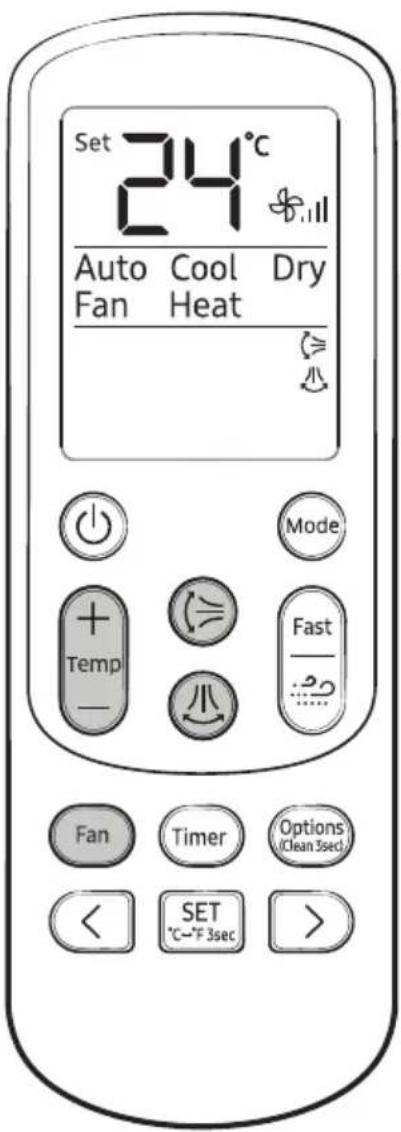
text_image
Set 24°C Auto Cool Dry Fan Heat Mode + Temp - Fast - Fan Timer Options (Clean 3sec) < SET °C→F 3sec > >To set the temperature
To control the temperature in each mode, press the (+)(Temperature) button:
| Mode Temperature control | |
| Al Auto/Auto/Cool Adjust by 1 °C from 16 °C to 30 °C. | |
| Dry Adjust by 1 °C from 18 °C to 30 °C. | |
| Fan No temperature control. |
Select from the following fan speeds in each mode:
| Mode Available fan speeds | |
| AI Auto/Auto/Dry | (Auto) |
| Cool/Fan | (Auto), (Low), (Med), (High), (Turbo) |
To adjust the airflow direction
Keep the airflow in a constant direction by stopping the movements of the vertical and horizontal airflow blades.
In operation ▶

or

NOTE
- If you adjust the vertical airflow blade manually, it may not close completely when you turn off the air conditioner.
• Always use the remote control to adjust the airflow blades. Do not move the blades by hand. They may not operate normally. - You cannot control the vertical airflow direction in Cool mode when the good'sleep function is on.
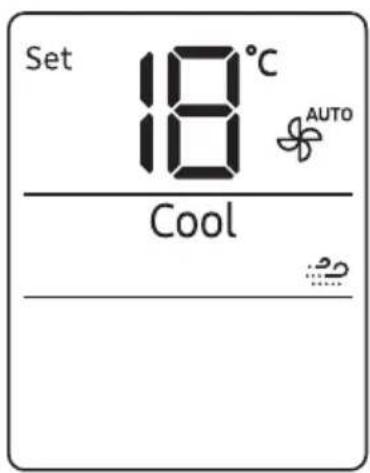
text_image
Set 18°C AUTO CoolWind-Free Cooling function
Use the Wind-Free Cooling function to enjoy a mild breeze coming through fine holes in the Wind-Free panel instead of air coming directly through the airflow blades.
In Cool/Dry/Fan mode ▶

NOTE
- To cancel this function, press the ⏻ (Wind-Free) button again.
- When the Wind-Free Cooling function is on, the air conditioner automatically controls the temperature and fan speed to keep your room mild and comfortable.
- When the Wind-Free Cooling function is canceled, the air conditioner returns to the original fan speed and air comes out of the airflow blades.
- In Cool mode, the recommended set temperature during the Wind-Free Cooling operation is 24 °C to 26 °C.
- You can use the Wind-Free Cooling function in Cool, Dry, or Fan mode.
- You cannot select the Quiet function during the Wind-Free Cooling operation.
- Selecting the Wind-Free Cooling function cancels the Fast, Eco, and airflow direction ( ≥slant ) functions.
text_image
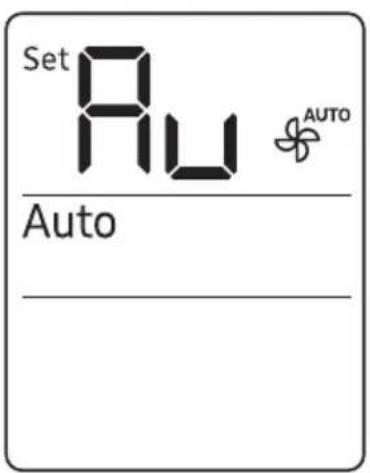
Set Au AUTO AutoAI Auto mode
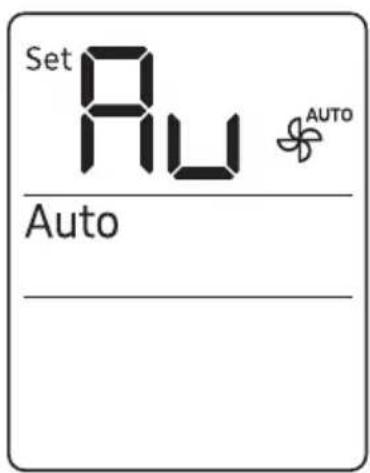
Use AI Auto mode to automatically operate any of Cool, Dry and Wind-Free Cooling modes depending on the learned user patterns gathered from an external server via Wi-Fi module. The favourite temperature and operation mode are also set based on the current temperatures (indoor/outdoor) and the gathered user patterns.


Select Auto.

NOTE
- You can use this mode after Wi-Fi is connected. Otherwise, Auto mode is activated.
- In AI Auto mode, the AI (AI Auto) and Wi-Fi indicators appears on the display of the indoor unit.
- If the gathered user patterns are not sufficient, the set temperature is set to 24 °C.
- The set temperature is controlled within the range of 22 °C to 26 °C in Al Auto mode. You can also change it manually.
- When you press Mode (Mode) in AI Auto mode, the mode is cancelled.
- If you change the set temperature in AI Auto mode, it automatically changes back to the AI comfort temperature after 1 hour.
text_image
Set Au AUTO AutoAuto mode
Use Auto mode to perform the powerful cooling function to automatically reach the desired temperature. When the difference between the room temperature and the set temperature decreases, the air conditioner controls the fan speed and airflow direction.
NOTE
- If Wi-Fi cannot be connected or the Wi-Fi function is not supported, this Auto mode is automatically activated instead of AI Auto mode.
- When the room temperature is higher than the set temperature, the air conditioner automatically produces cool air.
- When the room temperature is lower than the set temperature, the air conditioner automatically produces warm air.
text_image
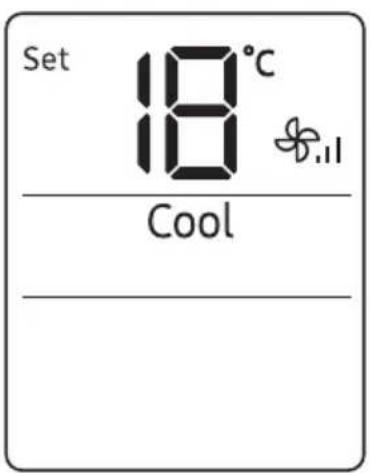
Set 18°C 18 CoolCool mode
Use Cool mode to stay cool in hot weather.


elect Cool.

NOTE
-
For comfort, keep the temperature difference between the indoor and outdoor air within 5 °C.
• After selecting Cool mode, select the desired function, temperature, and fan speed. -
To cool more quickly, select a lower temperature and a faster fan speed.
- To save energy, select a higher temperature and a slower fan speed.
- As the room temperature nears the set temperature, the compressor motor will slow down to save energy.
text_image
Set 24°C AUTO Dry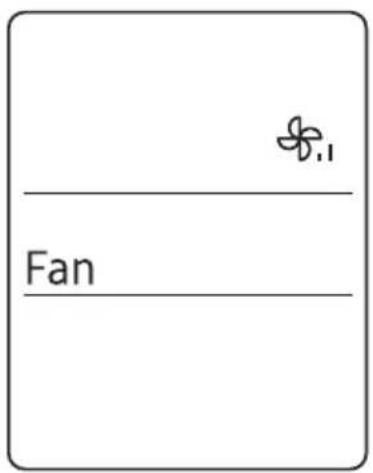
text_image
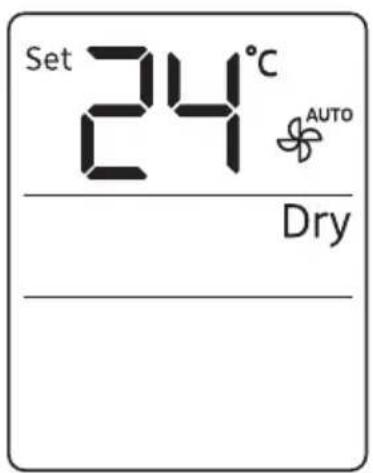
FanDry mode
Use Dry mode in rainy or humid weather.
NOTE
- The proper set temperature range for dehumidifying operation is 24 to 26 °C. If you feel that the current humidity seems high, use a lower set temperature.
Fan mode
Use Fan mode to run the air conditioner like a floor fan, providing a breeze without cooling.

NOTE
- If the air conditioner will not be used for an extended period of time, run it in Fan mode for 3 to 4 hours to dry the internal components.
- The outdoor unit does not operate in Fan mode. This is normal and not a fault with the air conditioner.
text_image
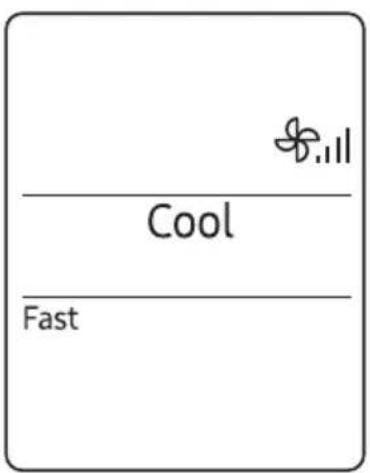
Cool FastFast function
Use the Fast function to quickly cool your room. This function is the most powerful cooling function provided by the air conditioner. You can select this function in Cool mode.
NOTE
- You can change the airflow direction, but you cannot change the set temperature and the fan speed.
- Selecting the Fast function cancels the Wind-Free Cooling, Eco, good'sleep, and Quiet functions.
• You can also start the Fast function from the Options menu:

flowchart
graph TD
    A["In Cool mode"] --> B["Options\n(Clean 3sec)"]
    B --> C["<"]
    B --> D[">"]
    E["Select Fast."] --> F["SET\n°C~°F 3sec"]
text_image
Set 24 Cool Direct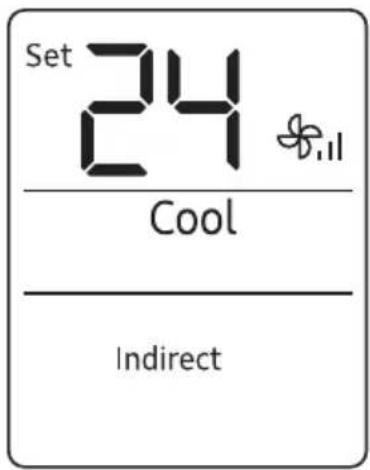
text_image
Set 24 Cool IndirectMotion detect function
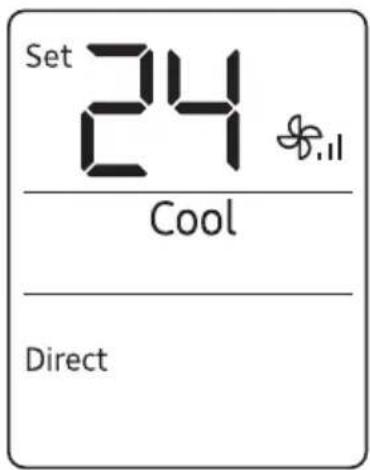
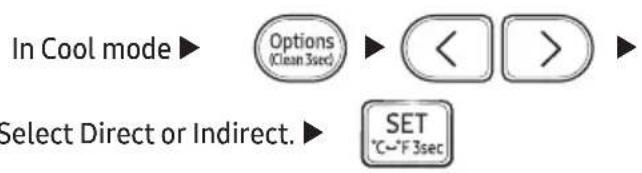
Use the motion detect function to make the air conditioner detect human motions and blow air directly or indirectly. With no detect, energy-saving mode is operated.
flowchart
graph TD
    A["Options\n(Clean 3sec)"] --> B["<<"]
    B --> C[">>"]
    D["SET\n°C~°F 3sec"] --> E["Select Direct or Indirect."]
- When Direct wind is selected
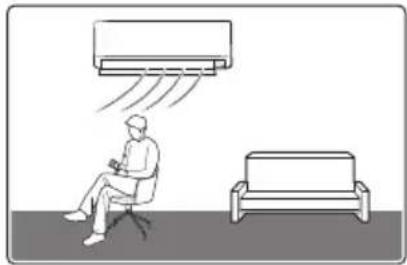
natural_image
Illustration of a person seated in an office chair with a large air conditioner emitting vapor, next to a small sofa (no text or symbols)- Wind is sent in the detected direction.
- When human motions are detected everywhere
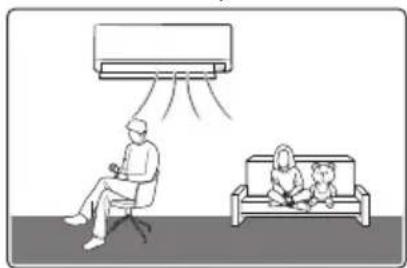
natural_image
Illustration of a person sitting on a chair watching an air conditioner, with another person seated on a bench watching (no text or symbols present)- In case of Direct wind, the air conditioner blows left and right swing airflow. In case of Indirect wind, centre airflow.
- When Indirect wind is selected
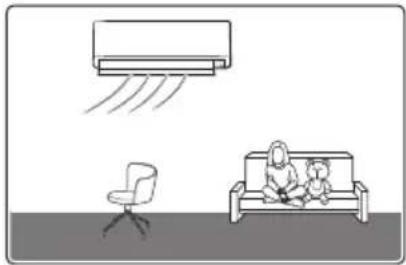
natural_image
Illustration of a household with a sofa, an air conditioner, and a chair (no text or symbols)- Wind is sent in the opposite direction of detect.
- When human motions are not detected
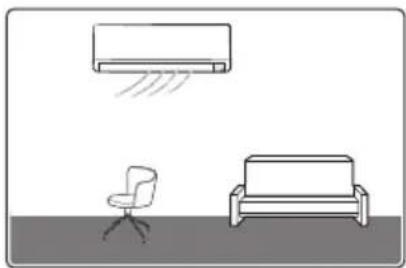
natural_image
Simple line drawing of a room with a wall-mounted air conditioner, a chair, and a sofa (no text or symbols)- When no human motions are detected for about 20 minutes, Energy-saving mode starts and the set temperature can change to up to 28^ .
- When human motions are detected in Energy-saving mode, the previous operation restarts.

NOTE
- The motion detect function operates only in Cool mode.
- The motion detect sensor can detect human motions within 5 m. It may not detect human motions outside the range.
- If any obstacle exists in front of the sensor or the site is subject to direct sunlight or wind, the sensor may not operate properly.
- The motion detect sensor can more easily detect the side to side motions of a person than the back and forth motions.
- The motion detect sensor is located at the bottom right of the product. Therefore, when a person is located around the center of the product, the sensor recognizes that the person is located at the left and the product blows air accordingly.
- Some areas around the center of the sensor may not be detected.
- The motions of a warm-blooded pet, swinging heater, or robot cleaner can be recognized as human motions.
- When a person stops movement within the detectable range, it may not be detected.
- Because the motion detect sensor can recognize movement of heats, it may not operate when a person turns backwards, exposes the skin less or is blocked by obstacles such as laundry.
- The sensor's sensitivity may be lowered depending on the thickness of clothes.
- If you change the current mode, airflow direction, or optional function, the motion detect function is canceled.
- If a person takes body motions in the same place or there is no movement for a long time, it is recognized as an absence.
- If there are little motions such as in cases of infants and patients, or if little motions continue such as in cases of sleeping and movie watching, it can be recognized as an absence.
- Do not place a large object, heating appliance, or humidifier near the product.
- Do not touch the sensor. Failing to do so may result in product damage or malfunction.
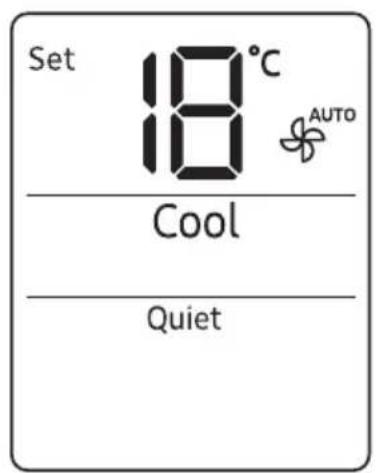
text_image
Set 18°C AUTO Cool Quiet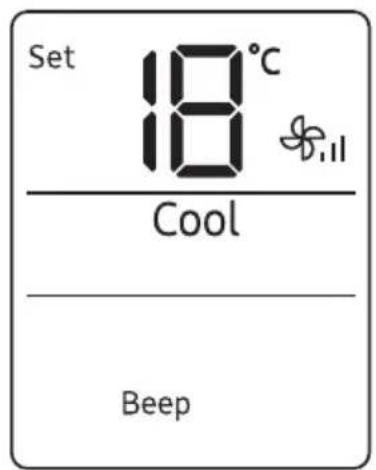
text_image
Set 18°C Cool BeepQuiet function
Use the Quiet function to reduce the unit's operating noise. You can select this function in Cool mode.
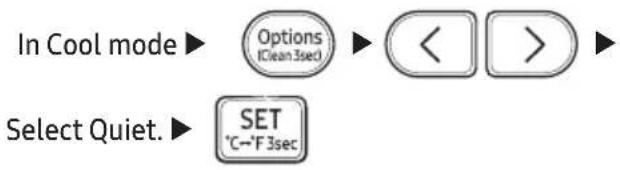
flowchart
graph TD
    A["In Cool mode"] --> B["Options\n(Clean 3sec)"]
    B --> C["<<"]
    C --> D[">>"]
    E["Select Quiet."] --> F["SET\n°C~°F 3sec"]
NOTE
- You can change the set temperature and the airflow direction, but you cannot change the fan speed.
- Selecting the Quiet function cancels the Wind-Free Cooling, Eco, good'sleep, and Fast functions.
Beep function
Use the Beep function to turn on or off the beep that sounds when you press a button on the remote control.

flowchart
graph LR
    A["Options\n(Clean 3sec)"] --> B["Select Beep."]
    B --> C["SET\n°C--F 3sec"]
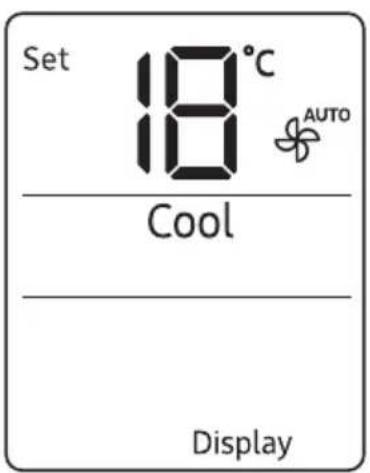
text_image
Set 18°C 18 AUTO Cool Display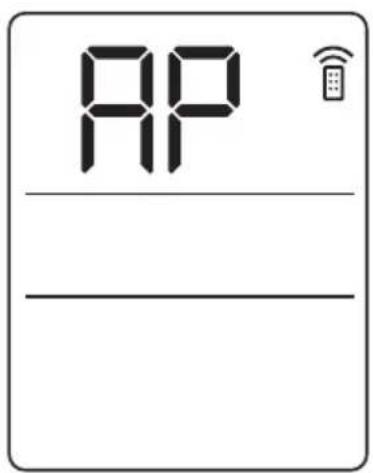
text_image
APDisplay lighting function
Use the Display lighting function to turn on or off the lighting of the indoor unit display.

NOTE
- If you change the current mode or function when the Display lighting function is on, the display lighting turns on for 5 seconds and then turns off again.
- To turn off the Display lighting function, run the method above again or turn the product off and on.
Wi-Fi function (SmartThings app)
Turn on the Wi-Fi function to pair your smartphone with the air conditioner.
In operation ▶ Timer ▶ Press and hold for 4 or more seconds.
NOTE
- When you turn on the Wi-Fi function, your smartphone pairs with the air conditioner, the (Transmit) indicator blinks, and AP appears on the remote control display for a few seconds.
- Once your smartphone is connected with the air conditioner, you can control it via the wireless Internet using the SmartThings app installed on your smartphone.
- For more information about how to prepare your smartphone for connection and how to control the air conditioner using the SmartThings app, see "SmartThings app" on page 39.
text_image
Set 18°C AUTO Cool UsageElectricity consumption check
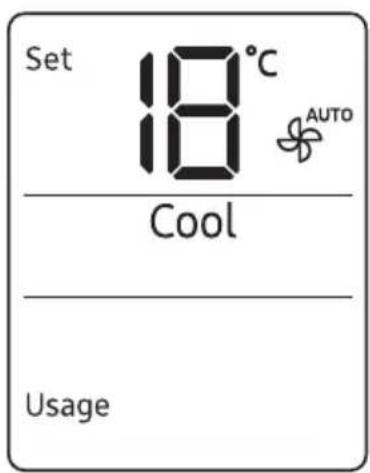
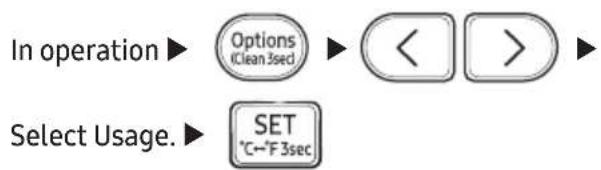
Use the Usage function to check the amount of electricity consumed by using the air conditioner. The amount consumed is displayed on the indoor unit display for a few seconds, and the set temperature appears.
flowchart
graph LR
    A["Options\nClean 5sec"] --> B["<<"]
    B --> C[">>"]
    D["Select Usage."] --> E["SET\n°C-~F 3sec"]
The value range displayed is between 0.1 kWh and 99 kWh. Electricity consumption is calculated from the moment the air conditioner turns on. The value is reset when the air conditioner turns off.
NOTE
- The usage shown on the indoor unit display may slightly differ from the amount of electricity actually consumed.
- You can view electricity consumption only when the air conditioner is operating.
text_image
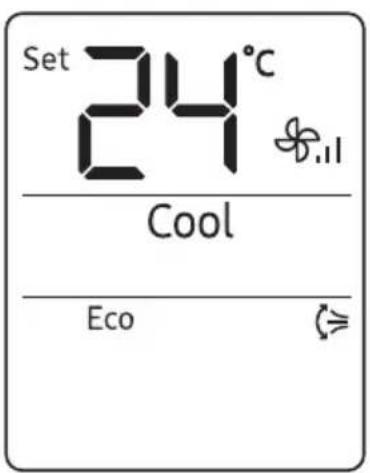
Set 24°C Cool EcoEco function
Use the Eco function to reduce electricity consumption while staying cool. You can select this function in Cool mode.
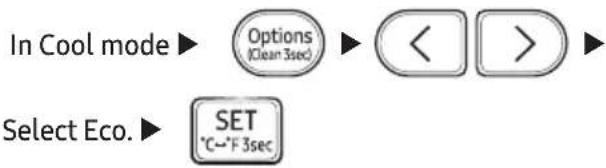
flowchart
graph TD
    A["In Cool mode"] --> B["Options (Clean 3sec)"]
    B --> C["<<"]
    C --> D[">>"]
    E["Select Eco."] --> F["SET °C~°F 3sec"]
NOTE
- When the Eco function starts, the pattern - - - - appears on the remote control for a few seconds and vertical air swing begins.
- You can change the set temperature, airflow direction, and fan speed.
- The allowed set temperatures while the Eco function is on are:
| Mode | Minumum set temperature | Maximum set temperature |
| Cool 24 °C | 30 °C |
- If you change the set temperature to be outside the allowed range for the current mode, the set temperature is automatically reset to be within the range.
- When you turn off the Eco function, the air swing continues. Use the ⏻ (Vertical air swing) or ⏻ (Horizontal air swing) button to turn it off.
- Selecting the Eco function cancels the Wind-Free Cooling, good'sleep, Fast, and Quiet functions.
text_image
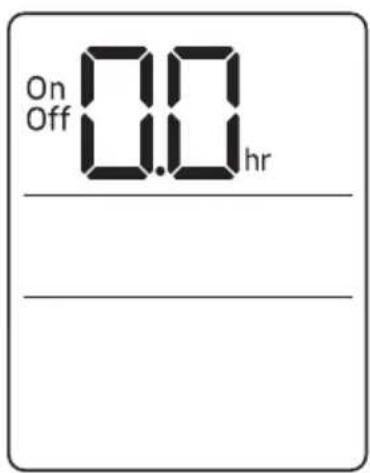
On Off 0.0 hrTimed on/ Timed off function
Use the Timed on/off function to turn the air conditioner on or off after a duration. Scheduling durations before the air conditioner turns on or off helps use the air conditioner economically.
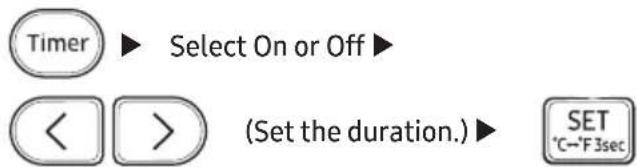
text_image
Timer ▶ Select On or Off ▶ ◀ ▶ (Set the duration.) ▶ SET °C~°F 3secNOTE
• To cancel the Timed on/off function, set the duration to 0.0.
- When you start the Timed on/off function, the (Timer) indicator appears on the indoor unit display.
• You can set the duration to from 0.5 hours to 24 hours.
- You cannot set the same duration for both Timed on and Timed off functions.
| Combining Timed on and Timed off | |
| When the air conditioner is off | Example: Timed on 3 hours, Timed off 5 hoursThe air conditioner turns on 3 hours after the last time you press theSET(SET) button to start the Timed on/off function, remains on for 2 hours, then turns off again. |
| When the air conditioner is on | Example: Timed on 3 hours, Timed off 1 hourThe air conditioner turns off 1 hour after the last time you press theSET(SET) button to start the Timed on/off function, remains off for 2 hours, then turns on again. |
text_image
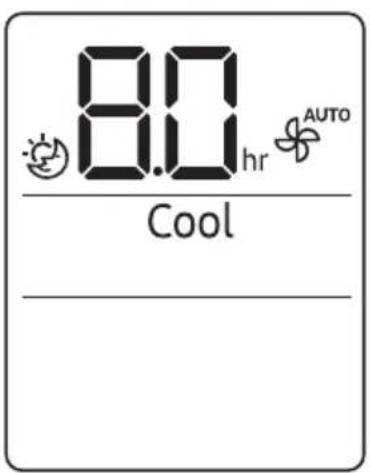
8.0 hr AUTO Cool _good'sleep function
Use the good'sleep function to save energy while you are sleeping. You can select this function in Cool mode.
text_image
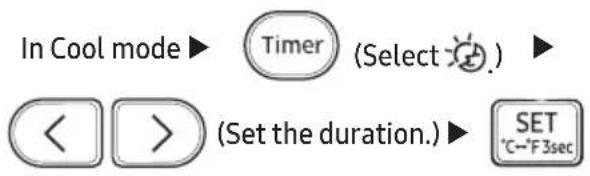
In Cool mode ▶ Timer (Select) ◀ > (Set the duration.) ▶ SET °C~F3secNOTE
- To cancel the good'sleep function, set the duration to 0.0.
- When you start the good'sleep function, the Ⓛ (Timer) indicator appears on the indoor unit display.
- You can set the duration to from 0.5 hours to 12 hours.
- The recommended set temperatures while the good'sleep function is on are:
| Mode | Recommended set temperature | Optimal set temperature |
| Cool 25 °C to 27 °C 26 °C | ||
- The good'sleep function can operate while the Wind-Free Cooling function is on.
- Selecting the good'sleep function cancels Eco, Fast, and Quiet functions.
| Task How often | By whom Instruction | ||
| Run the Auto clean function. | As needed Owner | "Auto clean function" on page 31. | |
| Clean the filter. Once | every two weeks Owner | "Cleaning the filter" on page 34. | |
| Replace the Tri-care filter. | Once every 3 years Owner | "Replacing the Tri-care filter" on page 35. | |
| Clean the Wind-Free panel | At least once a month Owner | "Cleaning the Wind-Free panel" on page 36. | |
| Clean the exterior of the indoor unit. | As needed Owner | "Cleaning the outside of the indoor unit" on page 33. | |
| Clean the exterior of the outdoor unit. | At least once a year Owner | "Cleaning the heat exchanger on the outdoor unit" on page 33. | |
| Replace the remote control batteries | As needed Owner | "Replacing the remote control batteries" on page 13. | |
| Apply corrosion inhibitor on outdoor unit. (Only if installed near salt water such as an ocean) | At least once a year Qualified technician | Contact your service provider. | |
| Clean inside the indoor or outdoor unit. | Once a year Qualified technician | Contact your service provider. | |
| Inspect the units, electrical connections, refrigerant tubes, and protections. | Once a year Qualified technician | Contact your service provider. |
Auto clean function
Use the Auto clean function if the indoor unit produces odors.
Activating Auto clean
To activate Auto clean, press the ⚫(Options) button for at least 3 seconds.
The indoor unit display shows:
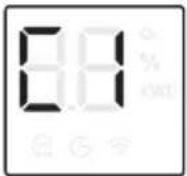
If the air conditioner is off, Auto clean starts immediately. If the air conditioner is running, Auto clean starts as soon as the air conditioner turns off.
NOTE
- You can also activate Auto clean from the Options menu:

- Once Auto clean is selected, it is always activated whenever the air conditioner turns off.
- Auto clean runs for 10 to up to 30 minutes depending on internal dry conditions. The indoor unit display shows the cleaning progress from 1% to 99% .
- If you start another function while Auto clean is progressing, Auto clean pauses and will resume when the other function stops.
- When Auto clean completes, the air conditioner turns off.
Canceling Auto clean
To cancel Auto clean while it is running, follow the procedure below:
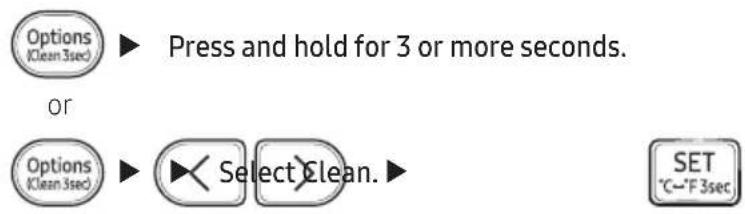
flowchart
graph TD
    A["Options (Clean 3sec)"] --> B["Press and hold for 3 or more seconds."]
    C["Options (Clean 3sec)"] --> D["Select Clean."]
    E["SET °C~°F 3sec"] --> D
NOTE
- Canceling Auto clean does not deactivate it.
Deactivating Auto clean
To deactivate Auto clean, follow the procedure below while the air conditioner is in operation or turned off:

flowchart
graph LR
    A["Options\n(Clean 3sec)"] --> B["Select Clean."]
    B --> C["SET\n°C~°F 3sec"]
text_image
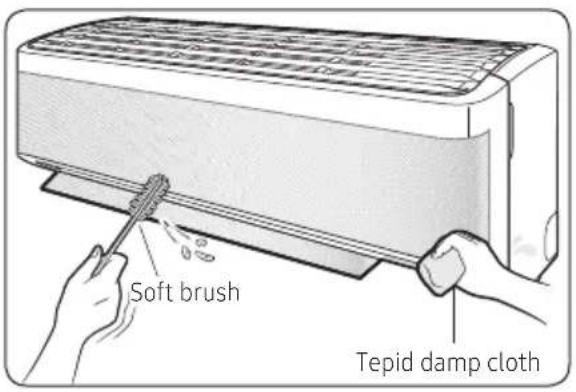
Soft brush Tepid damp clothCleaning the outside of the indoor unit
1 Turn off the air conditioner and wait until the fan stops.
2 Disconnect the power supply.
3 Use a soft brush or tepid damp cloth to clean the exterior.
WARNING
- Do not clean the appliance by spraying water directly onto it. Water entering the unit may result in electric shock or fire that could cause death, serious injury, or property damage:
CAUTION
- Do not use an alkaline detergent to clean the indoor unit display.
- Do not use sulphuric acid, hydrochloric acid, or organic solvents such as paint thinner, kerosene, acetone, benzene, or alcohol to clean the unit surfaces.
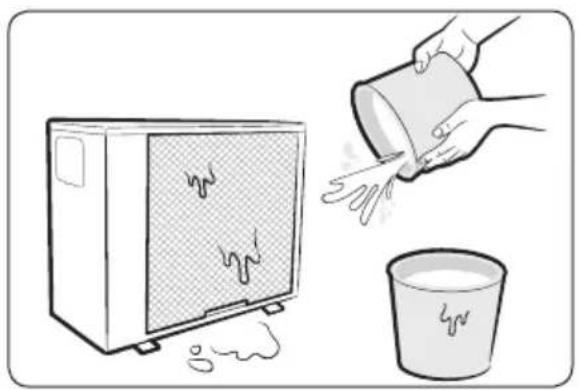
Cleaning the heat exchanger on the outdoor unit
1 Turn off the air conditioner and wait until the fan stops.
2 Disconnect the power supply.
3 Spray water on the heat exchanger to remove dust and other debris.
CAUTION
- Do not use sulphuric acid, hydrochloric acid, or organic solvents such as paint thinner, kerosene, acetone, benzene, or alcohol to clean the unit surfaces.
- If you need to inspect or clean the inside of the heat exchanger on the outdoor unit, contact a local service centre for help.
natural_image
Illustration of a microwave oven with steam rising, pouring liquid into a bucket (no text or symbols)Cleaning the filter
Clean the air filter every two weeks or when the C F (filter-cleaning reminder) appears on the indoor unit display. The time between cleanings may vary, depending on the usage and environmental conditions.
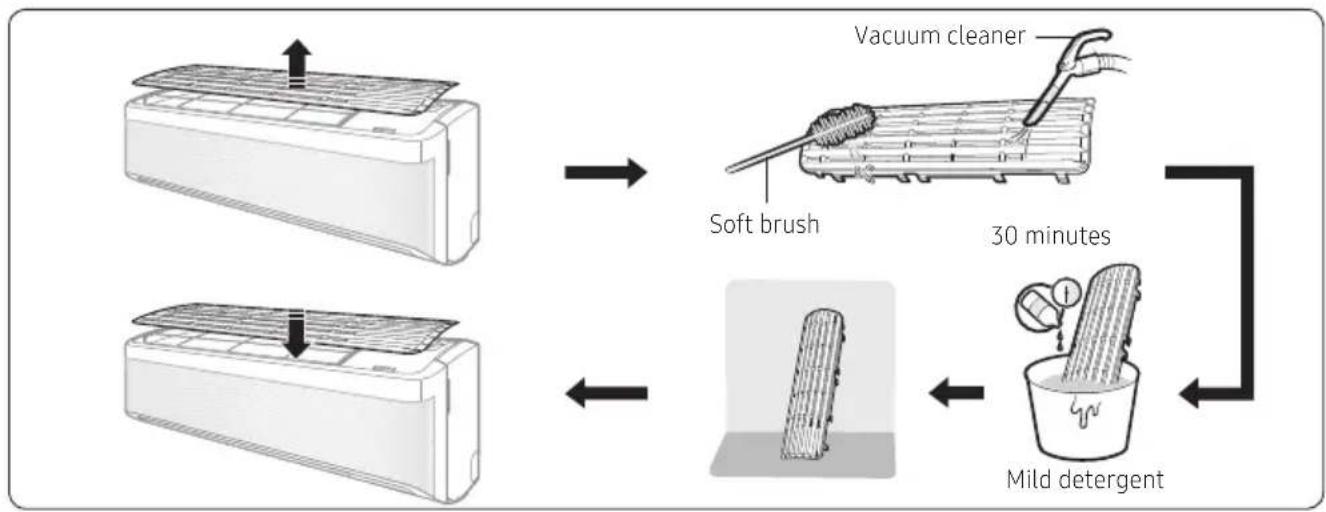
flowchart
graph TD
    A["Vacuum cleaner"] --> B["Soft brush"]
    B --> C["30 minutes"]
    C --> D["Mild detergent"]
1 Slide the filter off of the unit.
2 Use a soft brush or vacuum cleaner to remove any dust or debris on the filter.
3 Soak the filter in a solution of water and mild detergent for 30 minutes.
4 Rinse the filter and let it air dry in a well-ventilated area that is out of direct sunlight.
5 Reinstall the filter.
6 Reset the filter-cleaning reminder:

flowchart
graph LR
    A["In operation"] --> B["Options\n(Clean 3sec)"]
    B --> C["Select Filter Reset."]
    C --> D["SET\n°C→F 3sec"]

CAUTION
• Take care not to damage the filter during cleaning.
- Do not scrub the air filter with a hard-bristle brush or another cleaning utensil.
- Do not expose the air filter to direct sunlight when drying it.
Replacing the Tri-care filter
Slide a new Tri-care filter in the direction of arrow 2.
Replace Tri-care filters once every three years. Replacement cycle may differ depending on the environment and usage time.
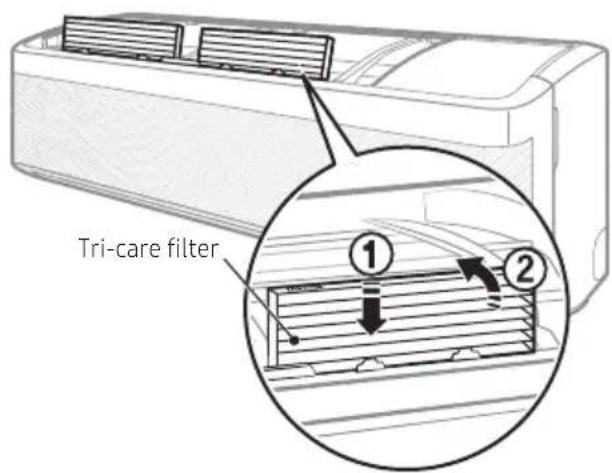
text_image
Tri-care filter ① ②
CAUTION
- Do not clean the Tri-care filter with water. Failing to do so may result in damage to the filter.

NOTE
• To replace a Tri-care filter, purchase a new one at a service centre.
- To use the Tri-care filter for a long time in an environment where fish cooking and smoking cause odour, ventilate the place by opening a window.
Cleaning the Wind-Free panel
Clean the Wind-Free panel at least once a month.
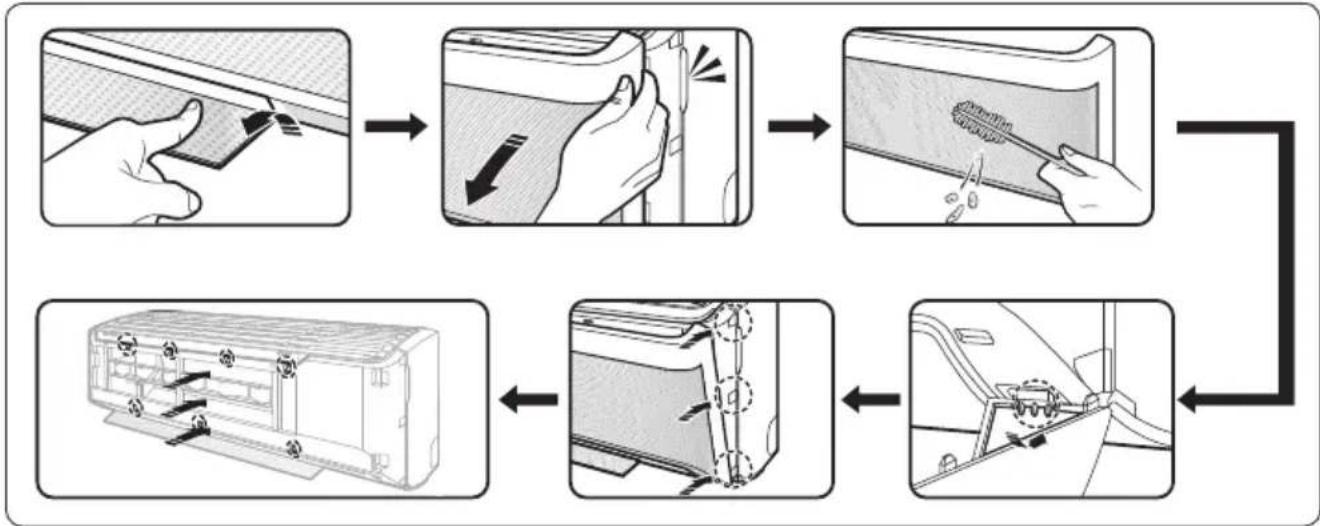
flowchart
graph TD
    A["Person opening a door"] --> B["Close-up of panel"]
    B --> C["Close-up of vent"]
    C --> D["Close-up of door with brush and screwdriver"]
    D --> E["Close-up of vent with valve and switch"]
    E --> F["Close-up of door with handle and screwdriver"]
1 Pull the airflow blade open.
2 Hold and pull both sides of the Wind-Free panel until it comes free from the air conditioner.
3 Use a soft brush or vacuum cleaner to remove any dust.
4 Hang the Wind-Free panel in the grooves at the bottom left and right.
5 Align the projections of the Wind-Free panel with the grooves at the top, middle, and bottom of the front panel.
6 After inserting the Wind-Free panel, press the top 4 places and the bottom 3 places by hand so that there is no gap to the panel.

CAUTION
- If you attach the Wind-Free panel without the airflow blade being open, it may become obstructed by the Wind-Free panel and may not open properly.
Troubleshooting
If the air conditioner is not operating normally, refer to the troubleshooting guide below.
| Problem Solution | |
| The air conditioner stops working. | Make sure the unit is receiving power.Check the circuit breaker. If it is flipped off, flip it on again and restart the unit. If the problem persists, contact your service provider.The Timed off function may have turned off the unit. Turn on the unit again. |
| Cannot change the temperature. | Check if the unit is in Fan or Fast mode. If so, you cannot change the set temperature; the unit automatically controls the set temperature. |
| Improper airflow temperature. | Check the set temperature. In Cool mode, cooling occurs only when the set temperature is lower than the current temperature.Use the (Temperature) button on the remote control to change the set temperature.Check if the air filter is blocked with dirt or debris. If the air filter is blocked, the cooling performance may decrease. Clean the air filter regularly (page 34).Check if the outdoor unit is covered or is installed near obstacles. Remove the coverings and obstacles.Check if doors or windows are open. This may cause poor circulation or performance. Close all doors and windows.Check if the pipe length between the units exceeds the maximum pipe length (see “Typical installation” in the Installation manual). If so, the cooling performance may decrease. |
| Cannot change the airflow direction. | Check if the good'sleep function is on in Cool mode. If so, you cannot control the airflow direction. |
| Cannot change the fan speed. | Check if the unit is in Auto, Dry, or Fast mode or the good'sleep function is on in Cool mode. In these conditions, you cannot control the fan speed; the unit automatically controls the fan speed. |
| The remote control does not work. | Replace the batteries in the remote control.Make sure the remote control can send an unobstructed signal to the unit.Keep bright lights away from the unit. Light from fluorescent bulbs or neon signs may interrupt the signal from the remote control. |
| The Timed on/off function does not work. | Make sure to press the SET (SET) button on the remote control when setting the timer. |
| The indicator on the remote control blinks continuously. | Press the (Power) button to turn off the unit, or disconnect the power plug.If the indicator light on the remote control continues blinking, contact your service provider. |
| Odors are coming from the unit during regular operation. | If the unit is operating in a smoky area, ventilate the room or operate the unit in Fan mode for 3 to 4 hours. There are no components in the unit that produce a strong odor.Check if the drain lines are clean. Clean them regularly. |
| The remote control display shows an error message. | If the indoor unit indicator blinks, write down the error code. Contact your service provider and provide them with the error code. |
| The unit is generating noise. | It is normal for the unit to generate some noise while operating. If the pipe length between the units is less than 3 m and no coil was used (see “Typical installation” in the Installation manual), additional noise may be transmitted from the outdoor unit to the indoor unit via the piping. |
| Water drips from the pipe connections on the outdoor unit. | Condensation may develop when the ambient temperature or humidity changes significantly. This is normal. |
The SmartThings app may change without prior notice to improve product usability and performance. Use the SmartThings app on your smartphone to control the air conditioner via the wireless Internet. To remotely control the air conditioner, you need to connect your smartphone to the air conditioner. If already connected, skip to "Step 6. Controlling the air conditioner with your smartphone" on page 40.
Step 1. Checking the requirements for connection
Before connecting your smartphone with the air conditioner, make sure that the following requirements are met:
- Wi-Fi access point: 2.4 GHz Wi-Fi access point only
- The air conditioner and you smartphone must be within the coverage of the same Wi-Fi access point and connected to it. After the connection, you can control the air conditioner from any place via various wireless networks such as Wi-Fi, 3G, LTE and 5G.
- Recommended Android phones: Android 6.0 or later, at least 2 GB RAM
• Supported Apple phones: iOS 10.0 or later, iPhone 6 or later - Android tablets and iPads are not supported.
Step 2. Connecting your smartphone to the Wi-Fi network
1 Turn on the Wi-Fi access point.
2 Tap Settings → Wi-Fi on your smartphone.
3 Tap the Wi-Fi switch to activate it, and then select the 2.4 GHz Wi-Fi access point to connect to.
4 If needed, enter the password for the access point.
5 Tap Advanced.
6 Top the Switch to mobile data switch to deactivate it.
Step3. Installing the SmartThings app
If the SmartThings app is not installed on your smartphone, follow the procedure below. If installed, skip to "Step 4. Configuring the SmartThings app" on page 39.
1 Launch Play Store or App Store.
2 Tap the search field, and then search for "SmartThings".
3 Tap INSTALL for the found SmartThings app item.
4 Select Agree.
Step 4. Configuring the SmartThings app
After the SmartThings app is installed, follow the procedure below to configure it. If already configured, skip to "Step 5. Connecting your smartphone to the air conditioner" on page 40.
1 Launch the SmartThings app.
2 When you see pop-up windows asking for location, Wi-Fi, Bluetooth permissions, tap Start.
3 Tap Log In.
4 If you have no Samsung account, tap Add account to create your Samsung account.
5 Log in to your Samsung account.
6 Consent to TERMS AND CONDITIONS.
7 When you see a pop-up window asking for access permission to location information, tap ALLOW.
Step 5. Connecting your smartphone to the air conditioner
1 Plug in the power cord of the air conditioner, and then turn on the power.
2 Launch the SmartThings app.
3 Tap Add device on the home screen of the SmartThings app.
4 Tap ADD DEVICE MANUALLY.
5 Tap Air conditioner > Room air conditioner.
6 Press the (Timer) button on the remote control for at least 4 seconds.
To notify that registration of the selected air conditioner to your Samsung account is in progress, the (Transmit) indicator blinks for several seconds and appears on the remote control display. When the connection is finished, the (Transmit) indicator turns off and disappears. A new device card for the selected air conditioner is added to the home screen of the SmartThings app.
Step 6. Controlling the air conditioner with your smartphone
1 Launch the SmartThings app.
2 On the home screen of the SmartThings app, tap the device card for the air conditioner, which was added when you proceeded with "Step 5. Connecting your smartphone to the air conditioner" on page 40.
3 Refer to the table on the next page and remotely control the air conditioner with your smartphone.
WARNING
- RF exposure warning statement – for keeping 20cm distance when installing this module.
-
Warning that this module should not be installed and operating simultaneously with other radio without additional evaluation or FCC filing.
-
Instruction for host system labeling, the host system should have proper label showing that it "Contains FCC ID : A3LSWL-B70F"
- Your device uses non-harmonised frequency and is intended for use in all European countries. The WLAN can be operated in the EU without restriction indoors, but cannot be operated outdoors in France.
Specifications
| Wi-Fi | |
| Frequency Range Transmitter Power(Max) | |
| 2412 - 2472 MHz 20 dBm |
Open Source Announcement
The software included in this product contains open source software. You may obtain the complete corresponding source code for a period of three years after the last shipment of this product by sending an email to mailto:oss.request@samsung.com.
It is also possible to obtain the complete corresponding source code in a physical medium such as a CD-ROM; a minimal charge will be required.
The following URL http://opensource.samsung.com/opensource/SMART_AT_051/seq/0 leads to the download page of the source code made available and open source license information as related to this product. This offer is valid to anyone in receipt of this information.
text_image
QR code image containing encoded data, no visible human-readable text| Category Function Description | ||
| Monitoring | Set temperature Displays the set temperature. | |
| Current temperature Displays the current temperature. | ||
| Control | Power Turns the air conditioner on or off. | |
| Mode Selects the desired operation. | ||
| Temperature Adjusts the indoor set temperature. | ||
| Fan Speed Sets the fan speed of operation mode. | ||
| Wind direction Sets the fan directions of operation mode. | ||
| Wind-Free Cooling Turns the Wind-Free Cooling function on or off. | ||
| Schedule | Sets the Timed on/off function.The maximum number of schedules you can set using the Timed on/off function is 10.The set times for the Timed on and Timed off functions must be different.Once the Timed on/off function is set, the setting remains even in you unplug the air conditioner and plug in it again. | |
| Options | Selects an option function of operation mode.The available options might be different depending on the air conditioner model.The fan speed and airflow direction are set automatically according to the selected options.For detailed information on the options of the product, see page 16 ~ 25. | |
| Settings | Sets additional functions.Press the Settings button on the control screen to check or set detailed information of air conditioner.The functions of Clean, Filter, and Beep can be set.When the Beep function is off, the beep sound from the device will be mute. | |
QUESTIONS OR COMMENTS?
| COUNTRY CALL | OR VISIT US ONLINE AT | |
| COLOMBIA | Bogotá en el 600 12 72Sin costo en todo el país 01 8000 112 112Y desde tu celular #726 | www.samsung.com/co/support |
| PANAMA 800-01 | 01 | www.samsung.com/latin/support (Spanish)www.samsung.com/latin_en/support (English) |
| ECUADOR 1-800- | SAMSUN (72-6786) | www.samsung.com/latin/support (Spanish)www.samsung.com/latin_en/support (English) |
| CHILE 800-SAMSUNG(726-7864) www.samsung.com/cl/support | ||