
VSB050 - Network card / adapter VIEWSONIC - Free user manual and instructions
Find the device manual for free VSB050 VIEWSONIC in PDF.


| Product Type | USB Wireless Adapter (Wi-Fi + Bluetooth) |
| Model | VSB050 (EZC-5201BS) |
| Wireless Standards | IEEE 802.11a/b/g/n/ac |
| Frequency Bands | 2.4 GHz (up to 150 Mbps), 5 GHz (up to 433 Mbps) |
| Bluetooth Version | Bluetooth 4.2 (Windows only, supports BLE and backward compatible) |
| Interface | USB 2.0 |
| Chipset | Realtek RTL8821CU |
| Dimensions (L × W × H) | 33.3 mm × 20 mm × 8.8 mm |
| Weight | 4.2 g |
| Power Input | DC 5 V / 1 A |
| Power Consumption | 5 W |
| Operating Temperature | 0 °C to 40 °C |
| Storage Temperature | -20 °C to 70 °C |
| Operating Humidity | 10% to 90% non-condensing |
| LED Indicator | 1 LED for system status |
| Wireless Security | 64/128-bit WEP, WPA/WPA2, WPA-PSK/WPA2-PSK |
| Hotspot Function | Supported (Windows only) |
| Compatible OS | Windows 10/8/7/XP, macOS, Android 7+ (ViewSonic devices) |
| Certifications | FCC, CE, NCC, MIC, RoHS |
| Driver Installation | Auto (Windows 10) or manual from website |
Frequently Asked Questions - VSB050 VIEWSONIC
Note: Windows XP does not support Bluetooth.
User questions about VSB050 VIEWSONIC
0 question about this device. Answer the ones you know or ask your own.
Ask a new question about this device
Download the instructions for your Network card / adapter in PDF format for free! Find your manual VSB050 - VIEWSONIC and take your electronic device back in hand. On this page are published all the documents necessary for the use of your device. VSB050 by VIEWSONIC.
USER MANUAL VSB050 VIEWSONIC
> VSB050 (EZC-5201BS)
USB Wireless Adapter
User Guide
natural_image
Line drawing of a rectangular electronic device with two slots and a side panel (no text or symbols)IMPORTANT: Please read this User Guide to obtain important information on installing and using your product in a safe manner, as well as registering your product for future service. Warranty information contained in this User Guide will describe your limited coverage from ViewSonic® Corporation, which is also found on our web site at http://www.viewsonic.com in English, or in specific languages using the Regional selection box in the upper right corner of our website. "Antes de operar su equipo lea cu idadosamente las instrucciones en este manual"
Thank you for choosing ViewSonic®
As a world-leading provider of visual solutions, ViewSonic® is dedicated to exceeding the world's expectations for technological evolution, innovation, and simplicity. At ViewSonic®, we believe that our products have the potential to make a positive impact in the world, and we are confident that the ViewSonic® product you have chosen will serve you well.
Once again, thank you for choosing ViewSonic®!
> Contents
Scope 4
1.1 Document ....4
1.2 Product Feature....4
Requirements......5
2.1 Hardware Specification....5
2.1.1 Block Diagram.... 5
2.1.2 Hardware Interface 5
2.1.3 Electrical Characteristic....5
2.1.4 Wireless Specifications....6
2.2 Mechanical Requirements....6
2.3 Environmental Requirements....6
2.4 Certification Requirements......6
Introduction....7
3.1 Windows 10....8
3.2 Windows 8 / 7 / XP 8
3.3 MacOS 9
3.4 Android OS....10
Product informations....15
Regulatory and Service Information 16
Please read before proceeding 16
Compliance Information....16
FCC Compliance Statement.... 16
FCC Radiation Exposure Statement.... 17
CE Conformity for European Countries 17
European Union Regulatory Conformance 17
IC Warning Statement.... 18
Country Code Statement.... 18
For MPE Statement – Mobile device.... 18
IMPORTANT NOTE: 18
IC Radiation Exposure Statement: 18
Declaration of RoHS2 Compliance.... 19
Product Disposal at End of Product Life 19
Copyright Information....20
Customer Service 21
Limited Warranty 22
Mexico Limited Warranty 25
> Scope
1.1 Document
This document provides an overview of the requirements for the VSB050. The VSB050 is a USB Wireless adaptor, that supports both Wi-Fi 2.4G, 5G and Bluetooth 4.2 to add Wi-Fi, Bluetooth functionally to your laptops, desktop and Mac.
1.2 Product Feature
- Wireless Interface:
» 2.4GHz
- Complies IEEE 802.11b/g/n specification
- Supports 20/40MHz, up to 150Mbps data rate.
» 5GHz
- Complies IEEE 802.11a/n/ac specification
- Supports 20/40/80MHz, up to 433Mbps data rate.
- Wireless Security
- 64/128-bit WEP
- WPA/WPA2
- WPA-PSK/WPA2-PSK
- Bluetooth v4.2 (Windows only)
- Supports Bluetooth v4.2+HS, BLE and compatible with Bluetooth 1.2, 2.x+.
- Supports Bluetooth for class1 and class2 power level transmissions.
• Supported Wi-Fi hotspot (Windows only)
> Requirements
The following sections identify the detailed requirements of the VSB050.
2.1 Hardware Specification
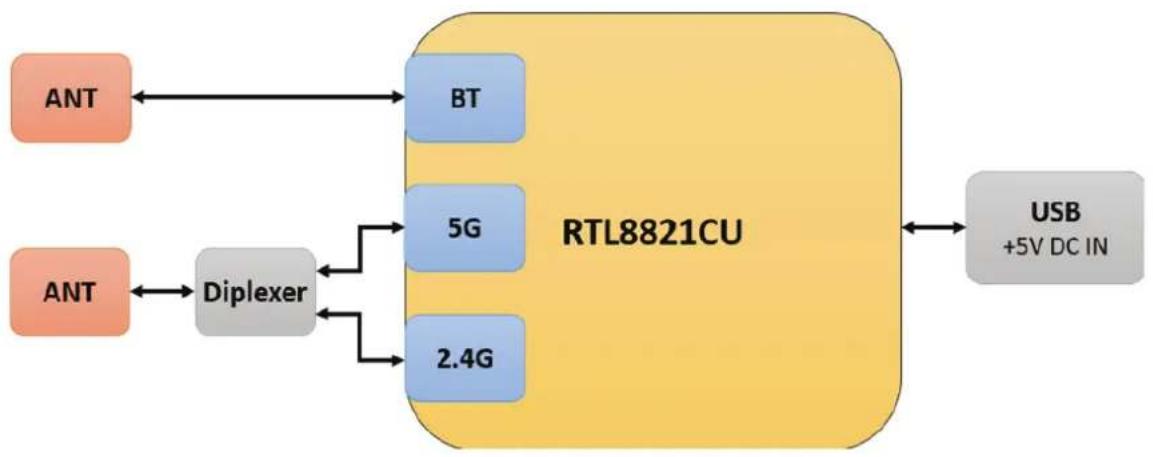
2.1.1 Block Diagram
flowchart
graph LR
    ANT --> BT
    ANT --> Diplexer
    BT --> RTL8821CU
    5G --> RTL8821CU
    2.4G --> RTL8821CU
    RTL8821CU --> USB["USB +5V DC IN"]
    Diplexer --> 5G
    Diplexer --> 2.4G
| Hardware Component Detailed Description | |
| 2.1.1.1 Chipset RTL8821CU |
2.1.2 Hardware Interface
| Feature Detailed Description | ||
| 2.1.2.1 USB Interface USB2.0 | ||
| 2.1.2.2 LED 1 | LED for system indicate | |
2.1.3 Electrical Characteristic
| Feature Detailed Description | ||
| 2.1.3.1 Power | Input DC 5V/1A | |
| 2.1.3.2 Power | Consumption 5W | |
2.1.4 Wireless Specifications
| Feature Detailed Description | ||
| 2.1.4.1 Wi-Fi | interface(2.4GHz) | Compatible with IEEE 802.11b specificationCompatible with IEEE 802.11g specificationCompatible with IEEE 802.11n specification |
| 2.1.4.2 Wi-Fi | interface(5GHz) | Compatible with IEEE 802.11ac specificationCompatible with IEEE 802.11n specification Compatible with IEEE 802.11a specification |
| 2.1.4.3 Bluetooth | Bluetooth v4.2+HS, BLE | |
| 2.1.4.4 Security | Open/WEP/WPA/WPA2 | |
2.2 Mechanical Requirements
| Feature Detailed Description | ||
| 2.2.1 Length | 33.3mm | |
| 2.2.2 Width | 20mm | |
| 2.2.3 Height | 8.8mm | |
| 2.2.4 Weight | 4.2g | |
2.3 Environmental Requirements
| Feature Detailed Description | ||
| 2.3.1 Operating Temperature Conditions | The product is capable of continuous reliable operation when operating in ambient temperature of 0 °C to +40°C. | |
| 2.3.2 Non-Operating Temperature Conditions | Neither subassemblies is damaged nor the operational performance be degraded when restored to the operating temperature after exposing to storage temperature in the range of -20 °C to +70 °C. | |
| 2.3.3 Operating Humidity conditions | The product is capable of continuous reliable operation when subjected to relative humidity in the range of 10% and 90% non-condensing. | |
| 2.3.4 Non-Operating Humidity Conditions | The product is not be damaged nor the performance be degraded after exposure to relative humidity ranging from 5% to 90% non-condensing. | |
2.4 Certification Requirements
| Feature Detailed Description | ||
| 2.4.1 EMC/Safety FCC, CE, NCC, MIC | ||
| 2.4.2 Other | RoHS | |
> Introduction
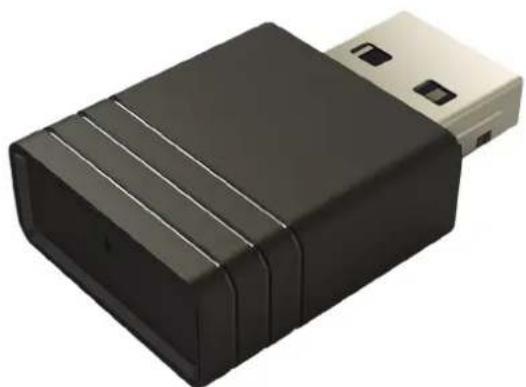
VSB050 (EZC-5201BS) is a USB Wireless Adapter that supports both 2.4G and 5G to add Wi-Fi functionality to your laptops and projectors. Furthermore, it's able to turn ethernet into wireless router that shares Wi-Fi for other devices. The Bluetooth transmitter and receiver attached in VSB050 (EZC-5201BS) allow your PC to connect to Bluetooth devices wirelessly. Enjoy your smart wireless life with VSB050 (EZC-5201BS)!
natural_image
Black USB connector with metallic contacts and a white top, isolated on white background (no text or symbols visible)
natural_image
Blue circular icon with white wireless signal tower symbol (no text or numbers)Wider Coverage

natural_image
Blue circular icon with white wireless signal waves (no text or symbols)Hot Spot

natural_image
Blue circular icon with white concentric arcs and a pointer, no text or symbols present.High Speed

natural_image
Blue circular icon with four white arrows pointing outward from a central point, no text or symbols present.MU-MIMO

natural_image
Blue circular icon with three horizontal white lines and dots, representing a server or data list (no text or symbols)Good Compatibility
3.1 Windows 10
The driver shall be installed automatically once the VSB050 (EZC-5201BS) USB is plugged in. Windows 10 supports Wi-Fi and Bluetooth driver of VSB050 (EZC-5201BS).
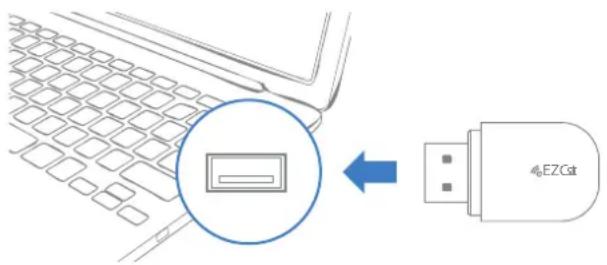
NOTE: If the driver failed to install automatically, please try to install it manually. (Please refer to Windows 8/7/XP installation method)
3.2 Windows 8 / 7 / XP
- Find the driver from VSB050 (EZC-5201BS) internal memory or download it at https://www.ezcast.com/app/ezcast/wifi-adapter/windows Double click "Installer.exe."
- Run the installation of Wi-Fi driver.
For Bluetooth, please run the installation of Bluetooth driver with internet connection.
NOTE: Windows XP does NOT support the Bluetooth driver of VSB050 (EZC-5201BS).
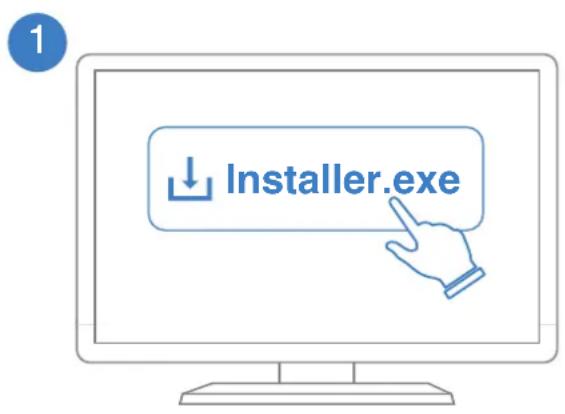
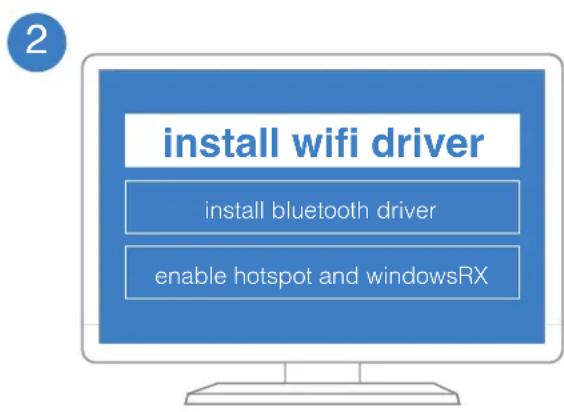
2
3.3 MacOS
The Wi-Fi driver shall be installed manually from our website: https://www.ezcast.com/app/ezcast/ezc-5200/macos (please select EZC-5200 for VSB050 (EZC-5201BS)
NOTE: MacOS does NOT support the Bluetooth driver of VSB050 (EZC-5201BS).
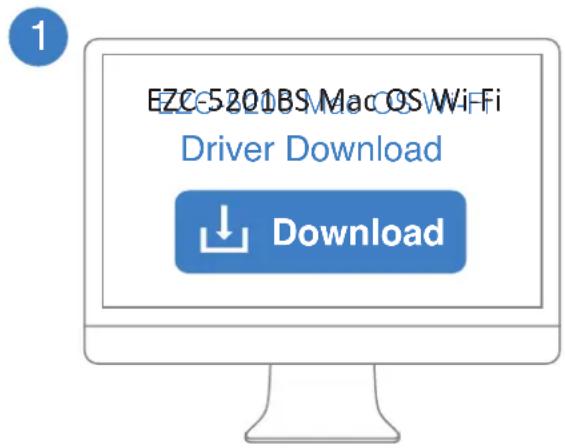
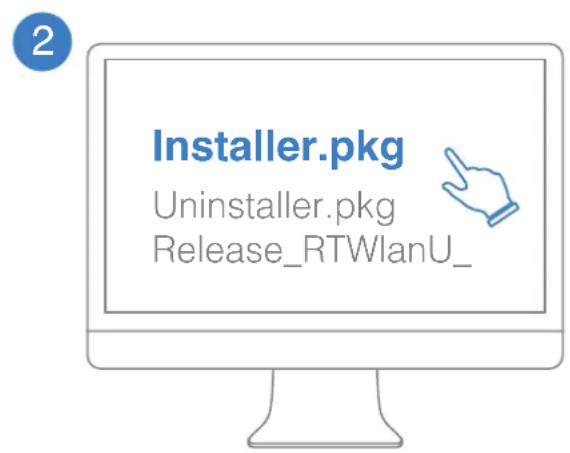
Scan the QRcode for more information

3.4 Android OS
Compatible Devices
VSB050 supports ViewSonic Android devices, but driver needs to be pre-installed in system by ViewSonic and supported devices listed as below. The list will be updated as upcoming new models become available.
- IFP30 series
- IFP50-2 series
- IFP50-3 series
- IFP50-4 series
- IFP70 series
- myViewBoard Box
• myViewBoard Mouse - CDE20 series
- EP5542T
NOTE: VSB050 only supports Android 7 or above devices, so **couldn't support CDE10 series.
Enable Wireless & Network Settings
- Plug VSB050 USB dongle into the USB port of ViewSonic Android Device.
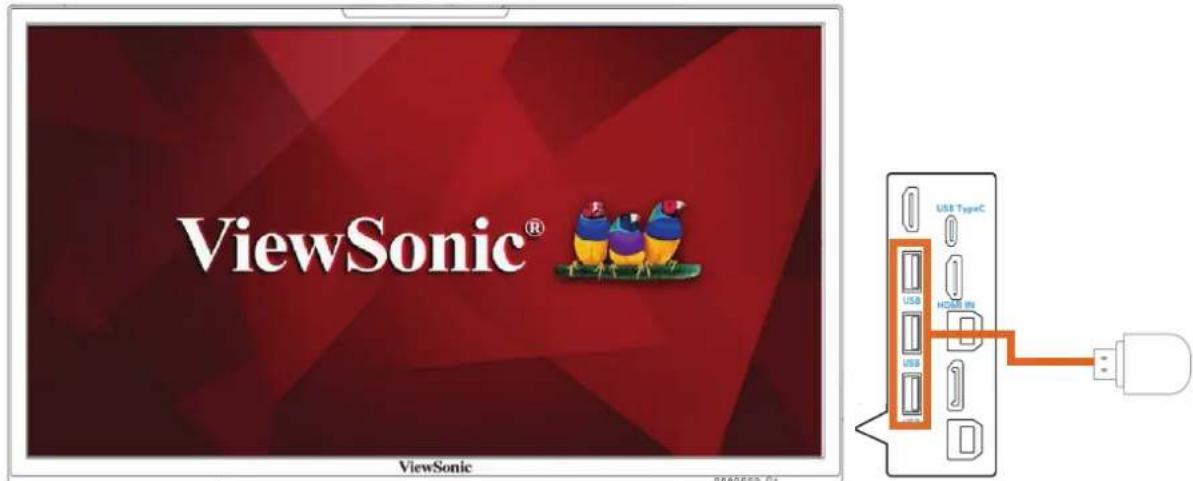
NOTE: To make sure VSB050 dongle works properly, update the latest version of software available for your android device.
- When VSB050 USB dongle is plugged-in, Wi-Fi, Wi-Fi Hotspot, and BT settings will appear under Settings/Wireless & Networks menu.
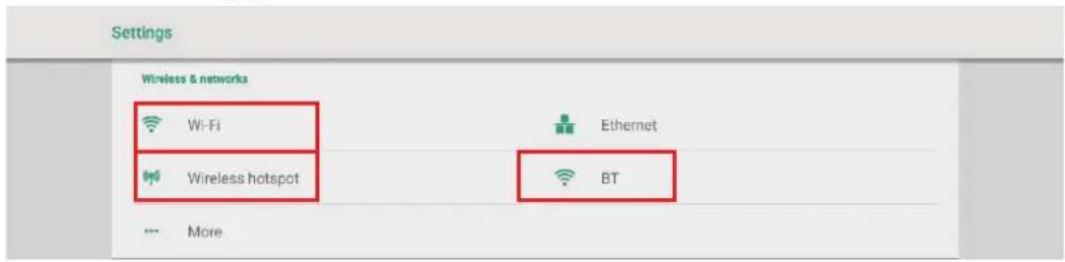
Connect to a Wi-Fi network
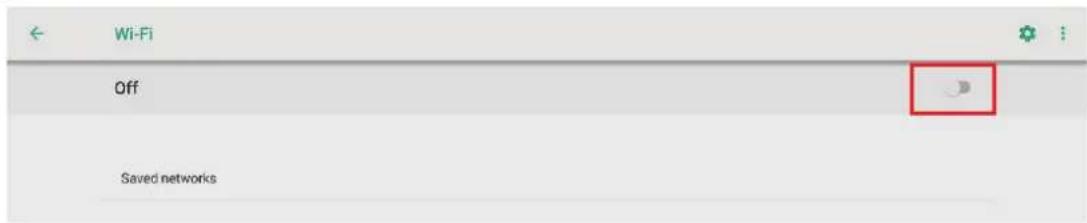
a. Go to Settings > Wireless & networks > Wi-Fi > tap the toggle button to turn on Wi-Fi.
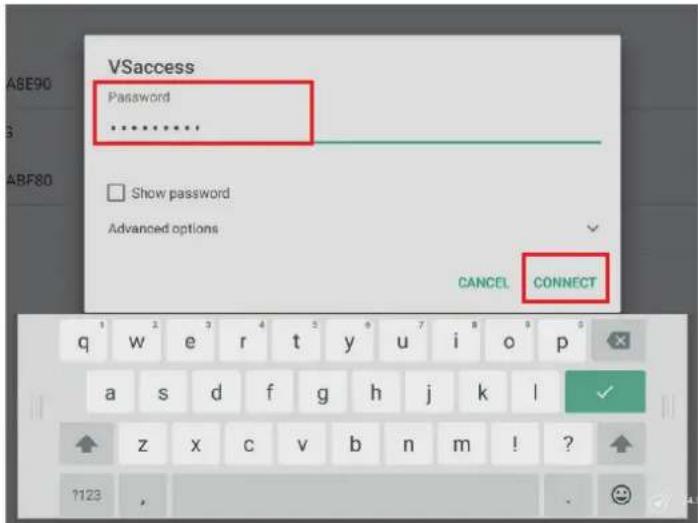
b. Tap one network from the available Wi-Fi network list then input the password and tap Connect button.
Share Data Network through Wi-Fi Hotspot
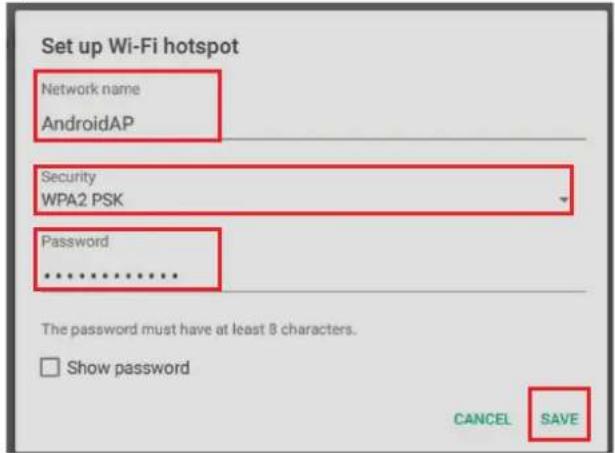
a. Go to Settings > Wireless & networks > Wireless hotspot > tap toggle button to turn on Portable Wi-Fi hotspot.

b. When other devices try to connect the hotspot, users are required to input the password. Tap Set up Wi-Fi hotspot to change the network name, security type, and password and tap Save button.
Connect to a BT device
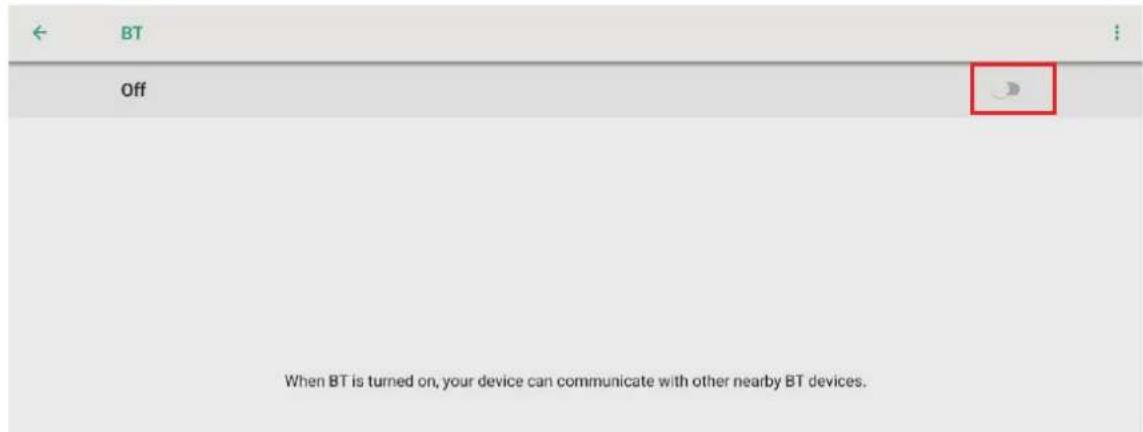
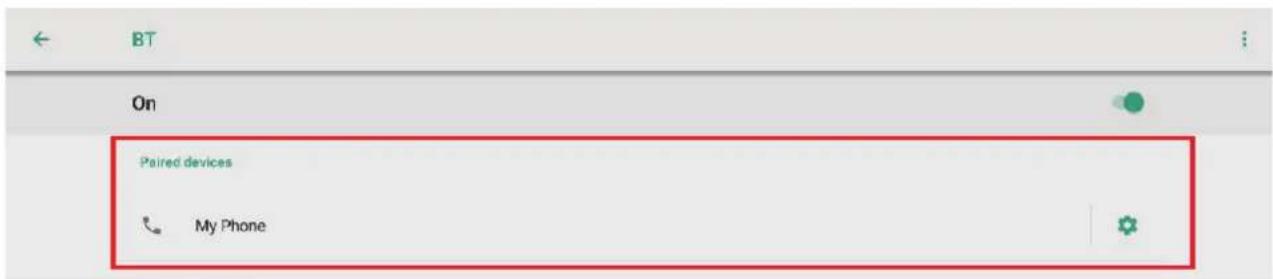
a. Go to Settings > Wireless & networks > BT > Tap the toggle button to turn on Bluetooth.
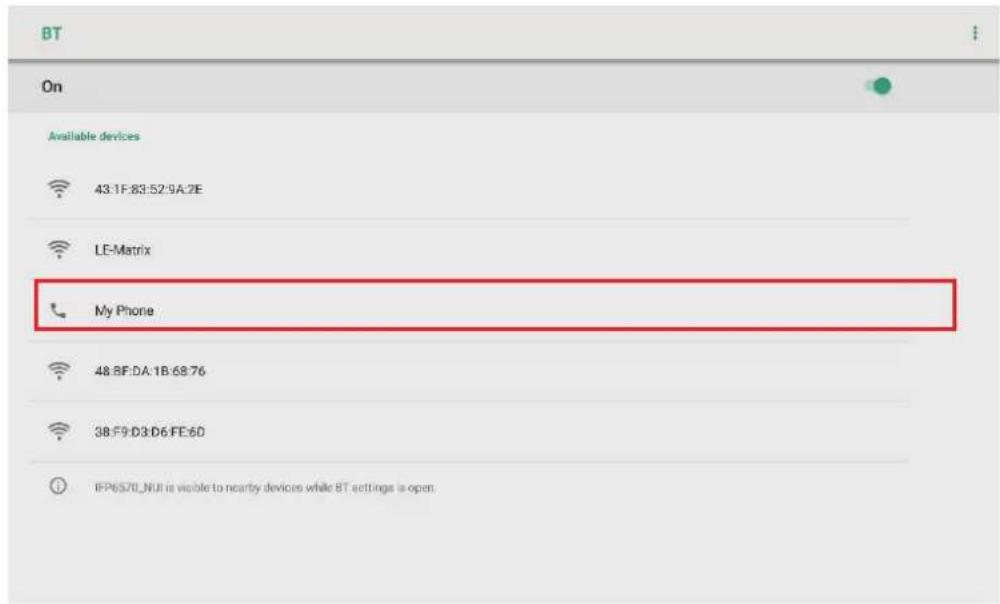
b. When Bluetooth is enabled, a list of available Bluetooth devices will appear. Tap a device to select it.
c. A paring request message will appear on both Android device and the requested device with the same BT paring code. Tap on PAIR to pair with the device.
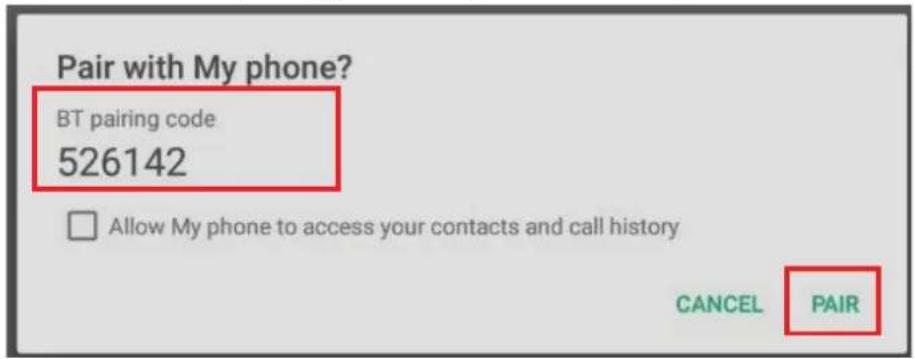
d. When the Android device paired with the other device, the device name will appear in the Paired devices list.
©2019 Actions Microelectronics Co., Ltd. All right reserved. EZCast are trademarks of Actions Microelectronic Co., Ltd., registered in US, Europe, and other countries. Other product and company names mentioned herein may be trademarks other respective companies.
FCC STATEMENT
- This device complies with Part 15 of the FCC Rules. Operation is subject to the following two conditions:
(1) This device may not cause harmful interference.
(2) This device must accept any interference received, including
interference that may cause undesired operation.
- Changes or modifications not expressly approved by the party responsible for compliance could void the user's authority to operate the equipment.
NOTE: This equipment has been tested and found to comply with the limits for a Class B digital device, pursuant to Part 15 of the FCC Rules. These limits are designed to provide reasonable protection against harmful interference in a residential installation.
NOTE: This equipment generates uses and can radiate radio frequency energy and, if not installed and used in accordance with the instructions, may cause harmful interference to radio communications. However, there is no guarantee that interference will not occur in a particular installation. If this equipment does cause harmful interference to radio or television reception, which can be determined by turning the equipment off and on, the user is encouraged to try to correct the interference by one or more of the following measures: Reorient or relocate the receiving antenna. Increase the separation between the equipment and receiver.
NOTE: Connect the equipment into an outlet on a circuit different from that to which the receiver is connected. Consult the dealer or an experienced radio/TV technician for help.
FCC Radiation Exposure Statement
This equipment complies with FCC radiation exposure limits set forth for an uncontrolled environment. This equipment should be installed and operated with minimum distance 20cm between the radiator & your body
Product informations
| Transmission 600Mbps | |
| Antenna Onboard | |
| Standard IEEE 802.11b/g/n/a/ac | |
| Driver Auto installation | |
| Interface USB 2.0 | |
| Bluetooth Bluetooth 4.2 |
> Regulatory and Service Information
Please read before proceeding
- Do not store your device in temperatures higher than 50^ (122°F).
- The operating temperature for this device is from 0^ (32°F) to 35^ (95°F).
Compliance Information
This section addresses all connected requirements and statements regarding regulations. Confirmed corresponding applications shall refer to nameplate labels and relevant markings on the unit.
FCC Compliance Statement
This device complies with part 15 of FCC Rules. Operation is subject to the following two conditions: (1) this device may not cause harmful interference, and (2) this device must accept any interference received, including interference that may cause undesired operation. This equipment has been tested and found to comply with the limits for a Class B digital device, pursuant to part 15 of the FCC Rules.
These limits are designed to provide reasonable protection against harmful interference in a residential installation. This equipment generates, uses, and can radiate radio frequency energy, and if not installed and used in accordance with the instructions, may cause harmful interference to radio communications. However, there is no guarantee that interference will not occur in a particular installation. If this equipment does cause harmful interference to radio or television reception, which can be determined by turning the equipment off and on, the user is encouraged to try to correct the interference by one or more of the following measures:
- Reorient or relocate the receiving antenna.
- Increase the separation between the equipment and receiver.
- Connect the equipment into an outlet on a circuit different from that to which the receiver is connected.
- Consult the dealer or an experienced radio/TV technician for help.
Changes or modifications not expressly approved by the party responsible for compliance could void the user's authority to operate the equipment.
The antenna(s) used for this transmitter must not be collocated or operating in conjunction with any other antenna or transmitter.
The device was tested and complies to measurement standards and procedures specified in FCC CFR Tile 47 Part 15 Subpart C
FCC Radiation Exposure Statement
This equipment complies with FCC radiation exposure limits set forth for an uncontrolled environment. End users must follow the specific operating instructions for satisfying RF exposure compliance.
This transmitter must not be co-located or operating in conjunction with any other antenna or transmitter. This equipment should be installed and operated with a minimum distance of 20 centimeters between the radiator and your body.
The users manual or instruction manual for an intentional or unintentional radiator shall caution the user that changes or modifications not expressly approved by the party responsible for compliance could void the user's authority to operate the equipment.
CE Conformity for European Countries

The device complies with the EMC Directive 2014/30/EU and Low Voltage Directive 2014/35/EU. and Radio Equipment Directive 2014/53/EU.
The following information is only for EU-member states:
The mark shown to the right is in compliance with the Waste Electrical and Electronic Equipment Directive 2012/19/EU (WEEE). The mark indicates the requirement NOT to dispose of the equipment as unsorted municipal waste, but use the return and collection systems according to local law.
If the batteries, accumulators and button cells included with this equipment, display the chemical symbol Hg, Cd, or Pb, then it means that the battery has a heavy metal content of more than 0.0005% Mercury, or more than 0.002% Cadmium, or more than 0.004% Lead.


European Union Regulatory Conformance
The equipment complies with the RF Exposure Requirement 2014/53/EU, Council Recommendation of 16 April 2014 on the limitation of exposure of the general public to electromagnetic fields (0-300 GHz). This equipment meets the following conformance standards: EN301489-1, EN301489-17, EN60950-1, EN300328.
We, hereby, declare that this Wi-Fi radio is in compliance with the essential requirements and other relevant provisions of Directive 2014/53/EU.
IC Warning Statement
This device complies with Industry Canada license- exempt RSS standard(s). Operation is subject to the following two conditions: (1) this device may not cause interference, and (2) this device must accept any interference, including interference that may cause undesired operation of the device.
For product available in the USA/Canada market, only channel 1\~11 can be operated. Selection of other channels is not possible.
For MPE Statement – Mobile device
IMPORTANT NOTE:
IC Radiation Exposure Statement:
This equipment complied with IC RSS-102 radiation exposure limits set forth for an uncontrolled environment. This equipment should be installed and operated with minimum distance 20cm between the radiator & your body. The device for the band 5150-5825 MHz is only for indoor usage to reduce potential for harmful interference to co-channel mobile satellite systems.
Declaration of RoHS2 Compliance
This product has been designed and manufactured in compliance with Directive 2011/65/EU of the European Parliament and the Council on restriction of the use of certain hazardous substances in electrical and electronic equipment (RoHS2 Directive) and is deemed to comply with the maximum concentration values issued by the European Technical Adaptation Committee (TAC) as shown below:
| Substance | Proposed Maximum Concentration | Actual Concentration |
| Lead (Pb) 0.1% < 0.1% | ||
| Mercury (Hg) 0.1% < 0.1% | ||
| Cadmium (Cd) 0.01% < 0.01% | ||
| Hexavalent Chromium ( Cr6^+ ) 0.1% < 0.1% | ||
| Polybrominated biphenyls (PBB) 0.1% < 0.1% | ||
| Polybrominated diphenyl ethers (PBDE) 0.1% < 0.1% | ||
| Bis(2-ethylhexyl) phthalate (DEHP) 0.1% < 0.1% | ||
| Butyl benzyl phthalate (BBP) 0.1% < 0.1% | ||
| Dibutyl phthalate (DBP) 0.1% < 0.1% | ||
| Diisobutyl phthalate (DIBP) 0.1% < 0.1% |
Certain components of products as stated above are exempted under the Annex III of the RoHS2 Directives as noted below:
• Copper alloy containing up to 4% lead by weight.
- Lead in high melting temperature type solders (i.e. lead-based alloys containing 85% by weight or more lead).
- Electrical and electronic components containing lead in a glass or ceramic other than dielectric ceramic in capacitors, e.g. piezoelectronic devices, or in a glass or ceramic matrix compound.
- Lead in dielectric ceramic in capacitors for a rated voltage of 125V AC or 250V DC or higher.
Product Disposal at End of Product Life
ViewSonic® respects the environment and is committed to working and living green. Thank you for being part of Smarter, Greener Computing. Please visit the ViewSonic® website to learn more.
USA & Canada:
http://www.viewsonic.com/company/green/recycle-program/
Europe:
http://www.viewsoniceurope.com/eu/support/call-desk/
Taiwan:
Copyright© ViewSonic® Corporation, 2020. All rights reserved.
Macintosh and Power Macintosh are registered trademarks of Apple Inc.
Microsoft, Windows, and the Windows logo are registered trademarks of Microsoft Corporation in the United States and other countries.
ViewSonic ^® , the three birds logo, OnView, ViewMatch, and ViewMeter are registered trademarks of ViewSonic ^® Corporation.
VESA is a registered trademark of the Video Electronics Standards Association. DPMS, DisplayPort, and DDC are trademarks of VESA.
ENERGY STAR ^® is a registered trademark of the U.S. Environmental Protection Agency (EPA).
Disclaimer: ViewSonic® Corporation shall not be liable for technical or editorial errors or omissions contained herein; nor for incidental or consequential damages resulting from furnishing this material, or the performance or use of this product.
In the interest of continuing product improvement, ViewSonic® Corporation reserves the right to change product specifications without notice. Information in this document may change without notice.
No part of this document may be copied, reproduced, or transmitted by any means, for any purpose without prior written permission from ViewSonic® Corporation.
VSB050_UG_ENG_1a_20191125
Customer Service
For technical support or product service, see the table below or contact your reseller.
NOTE: You will need the product's serial number.
| Country/ Region Website Country/ Region Website | |||
| Asia Pacific & Africa | |||
| Australia | www.viewsonic.com/au/ | Bangladesh | www.viewsonic.com/bd/ |
| 中国 (China) | www.viewsonic.com.cn | 香港(繁體中文) | www.viewsonic.com/hk/ |
| Hong Kong (English) | www.viewsonic.com/hk-en/ | India | www.viewsonic.com/in/ |
| Indonesia | www.viewsonic.com/id/ | Israel | www.viewsonic.com/il/ |
| 日本 (Japan) | www.viewsonic.com/jp/ | Korea | www.viewsonic.com/kr/ |
| Malaysia | www.viewsonic.com/my/ | Middle East | www.viewsonic.com/me/ |
| Myanmar | www.viewsonic.com/mm/ | Nepal | www.viewsonic.com/np/ |
| New Zealand | www.viewsonic.com/nz/ | Pakistan | www.viewsonic.com/pk/ |
| Philippines | www.viewsonic.com/ph/ | Singapore | www.viewsonic.com/sg/ |
| 臺灣 (Taiwan) | www.viewsonic.com/tw/ | ประเทศไทย | www.viewsonic.com/th/ |
| Việt Nam | www.viewsonic.com/vn/ | South Africa & Mauritius | www.viewsonic.com/za/ |
| Americas | |||
| United States | www.viewsonic.com/us | Canada | www.viewsonic.com/us |
| Latin America | www.viewsonic.com/la | ||
| Europe | |||
| Europe | www.viewsonic.com/eu/ | France | www.viewsonic.com/fr/ |
| Deutschland | www.viewsonic.com/de/ | Қазақстан | www.viewsonic.com/kz/ |
| Россия | www.viewsonic.com/ru/ | España | www.viewsonic.com/es/ |
| Türkiye | www.viewsonic.com/tr/ | Україна | www.viewsonic.com/ua/ |
| United Kingdom | www.viewsonic.com/uk/ | ||
Limited Warranty
ViewSonic® Wireless Presentation Gateway
What the warranty covers:
ViewSonic® warrants its products to be free from defects in material and workmanship during the warranty period. If a product proves to be defective in material or workmanship during the warranty period, ViewSonic® will, at its sole option, and as your sole remedy, repair or replace the product with a similar product. Replacement Product or parts may include remanufactured or refurbished parts or components. The repair or replacement unit or parts or components will be covered by the balance of the time remaining on the customer's original limited warranty and the warranty period will not be extended. ViewSonic® provides no warranty for any third-party software whether included with the product or installed by the customer, installation of any unauthorized hardware parts or components (e.g. Projector Lamps). (Please refer to: "What the warranty excludes and does not cover" section).
How long the warranty is effective:
ViewSonic® displays are warranted for between 1 and 3 years, depending on your country of purchase, for all parts including the light source and for all labor from the date of the first consumer purchase.
Who the warranty protects:
This warranty is valid only for the first consumer purchaser.
What the warranty excludes and does not cover:
- Any product on which the serial number has been defaced, modified, or removed.
- Damage, deterioration, or malfunction resulting from:
» Accident, misuse, neglect, fire, water, lightning, or other acts of nature, unauthorized product modification, or failure to follow instructions supplied with the product.
» Repair or attempted repair by anyone not authorized by ViewSonic®.
» Damage to or loss of any programs, data, or removable storage media.
» Normal wear and tear.
» Removal or installation of the product.
- Software or data loss occurring during repair or replacement.
- Any damage of the product due to shipment.
- Causes external to the product, such as electric power fluctuations or failure.
- Use of supplies or parts not meeting ViewSonic's specifications.
- Failure of owner to perform periodic product maintenance as stated in the User Guide.
- Any other cause which does not relate to a product defect.
- Damage caused by static (non-moving) images displayed for lengthy periods of time (also referred to as image burn-in).
- Software - Any third-party software included with the product or installed by the customer.
- Hardware/Accessories/Parts/Components – Installation of any unauthorized hardware, accessories, consumable parts or components (e.g. Projector Lamps).
- Damage to, or abuse of, the coating on the surface of the display through inappropriate cleaning as described in the product User Guide.
- Removal, installation, and set-up service charges, including wall-mounting of the product.
How to get service:
- For information about receiving service under warranty, contact ViewSonic® Customer Support (Please refer to the “Customer Service” page). You will need to provide your product’s serial number.
- To obtain warranty service, you will be required to provide: (a) the original dated sales slip, (b) your name, (c) your address, (d) a description of the problem, and (e) the serial number of the product.
- Take or ship the product, freight prepaid, in the original container to an authorized ViewSonic® service center or ViewSonic®.
- For additional information or the name of the nearest ViewSonic® service center, contact ViewSonic®.
Limitation of implied warranties:
There are no warranties, express or implied, which extend beyond the description contained herein including the implied warranty of merchantability and fitness for a particular purpose.
Exclusion of damages:
ViewSonic's liability is limited to the cost of repair or replacement of the product. ViewSonic® shall not be liable for:
- Damage to other property caused by any defects in the product, damages based upon inconvenience, loss of use of the product, loss of time, loss of profits, loss of business opportunity, loss of goodwill, interference with business relationships, or other commercial loss, even if advised of the possibility of such damages.
- Any other damages, whether incidental, consequential or otherwise.
- Any claim against the customer by any other party.
- Repair or attempted repair by anyone not authorized by ViewSonic®.
Effect of state law:
This warranty gives you specific legal rights, and you may also have other rights which vary from state to state. Some states do not allow limitations on implied warranties and/or do not allow the exclusion of incidental or consequential damages, so the above limitations and exclusions may not apply to you.
Sales outside the U.S.A. and Canada:
For warranty information and service on ViewSonic® products sold outside of the U.S.A. and Canada, contact ViewSonic® or your local ViewSonic® dealer.
The warranty period for this product in mainland China (Hong Kong, Macao, and Taiwan Excluded) is subject to the terms and conditions of the Maintenance Guarantee Card.
For users in Europe and Russia, full details of warranty provided can be found at: http://www.viewsonic.com/eu/ under "Support/Warranty Information".
Mexico Limited Warranty
ViewSonic® Wireless Presentation Gateway
What the warranty covers:
ViewSonic® warrants its products to be free from defects in material and workmanship, under normal use, during the warranty period. If a product proves to be defective in material or workmanship during the warranty period, ViewSonic® will, at its sole option, repair or replace the product with a like product. Replacement product or parts may include remanufactured or refurbished parts or components & accessories.
How long the warranty is effective:
ViewSonic® LCD displays are warranted for between 1 and 3 years, depending on your country of purchase, for all parts including the light source and for all labour from the date of the first consumer purchase.
Who the warranty protects:
This warranty is valid only for the first consumer purchaser.
What the warranty excludes and does not cover:
- Any product on which the serial number has been defaced, modified or removed.
- Damage, deterioration, or malfunction resulting from:
» Accident, misuse, neglect, fire, water, lightning, or other acts of nature, unauthorized product modification, unauthorized attempted repair, or failure to follow instructions supplied with the product.
» Causes external to the product, such as electrical power fluctuations or failure.
» Use of supplies or parts not meeting ViewSonic®'s specifications.
» Normal wear and tear.
» Any other cause which does not relate to a product defect.
- Any product exhibiting a condition commonly known as “image burn-in” which results when a static image is displayed on the product for an extended period of time.
- Removal, installation, insurance, and set-up service charges.
How to get service:
For information about receiving service under warranty, contact ViewSonic® Customer Support (Please refer to the attached “Customer Service” page). You will need to provide your product’s serial number, so please record the product information in the space provided below on your purchase for your future use. Please retain your receipt of proof of purchase to support your warranty claim.
For Your Records
Product Name: Model Number:
Document Number: Serial Number:
Purchase Date: Extended Warranty Purchase? (Y/N)
If so, what date does warranty expire?
- To obtain warranty service, you will be required to provide (a) the original dated sales slip, (b) your name, (c) your address, (d) a description of the problem, and (e) the serial number of the product.
- Take or ship the product, in the original container packaging, to an authorized ViewSonic® service center.
- Round trip transportation costs for in-warranty products will be paid by ViewSonic®.
Limitation of implied warranties:
There are no warranties, express or implied, which extend beyond the description contained herein including the implied warranty of merchantability and fitness for a particular purpose.
Exclusion of damages:
ViewSonic®’s liability is limited to the cost of repair or replacement of the product. ViewSonic® shall not be liable for:
- Damage to other property caused by any defects in the product, damages based upon inconvenience, loss of use of the product, loss of time, loss of profits, loss of business opportunity, loss of goodwill, interference with business relationships, or other commercial loss, even if advised of the possibility of such damages.
- Any other damages, whether incidental, consequential or otherwise.
- Any claim against the customer by any other party.
- Repair or attempted repair by anyone not authorized by ViewSonic®.
| Contact Information for Sales & Authorized Service (Centro Autorizado de Servicio) within Mexico: | |
| Name, address, of manufacturer and importers:México, Av. de la Palma #8 Piso 2 Despacho 203, Corporativo Interpalmas,Col. San Fernando Huixquilucan, Estado de MéxicoTel: (55) 3605-1099 http://www.viewsonic.com/la/soporte/index.htm | |
| NÚMERO GRATIS DE ASISTENCIA TÉCNICA PARA TODO MÉXICO: 001.866.823.2004 | |
| Hermosillo:Distribuciones y Servicios Computacionales SA de CV.Calle Juarez 284 local 2Col. Bugambilias C.P: 83140Tel: 01-66-22-14-9005E-Mail: disc2@hmo.megared.net.mx | Villahermosa:Compumantenimietnos Garantizados, S.A. de C.V.AV. GREGORIO MENDEZ #1504COL, FLORIDA C.P. 86040Tel: 01 (993) 3 52 00 47 / 3522074 / 3 52 20 09E-Mail: compumantenimientos@prodigy.net.mx |
| Puebla, Pue. (Matriz):RENTA Y DATOS, S.A. DE C.V. Domicilio:29 SUR 721 COL. LA PAZ72160 PUEBLA, PUE.Tel: 01(52).222.891.55.77 CON 10 LINEASE-Mail: datos@puebla.megared.net.mx | Veracruz, Ver.:CONEXION Y DESARROLLO, S.A DE C.V. Av.Americas # 419ENTRE PINZÓN Y ALVARADOFracc. Reforma C.P. 91919Tel: 01-22-91-00-31-67E-Mail: gacosta@qplus.com.mx |
| Chihuahua:Soluciones Globales en ComputaciónC. Magisterio # 3321 Col. MagisterialChihuahua, Chih.Tel: 4136954E-Mail: Cefeo@soluglobales.com | Cuernavaca:Compusupport de Cuernavaca SA de CVFrancisco Leyva # 178 Col. Miguel HidalgoC.P. 62040, Cuernavaca MorelosTel: 01 777 3180579 / 01 777 3124014E-Mail: aquevedo@compusupportcva.com |
| Distrito Federal:QPLUS, S.A. de C.V.Av. Coyoacán 931Col. Del Valle 03100, México, D.F.Tel: 01(52)55-50-00-27-35E-Mail : gacosta@qplus.com.mx | Guadalajara, Jal.:SERVICRECE, S.A. de C.V.Av. Niños Héroes # 2281Col. Arcos Sur, Sector Juárez44170, Guadalajara, JaliscoTel: 01(52)33-36-15-15-43E-Mail: mmiranda@servicrece.com |
| Guerrero Acapulco:GS Computación (Grupo Sesicomp)Progreso #6-A, Colo Centro39300 Acapulco, GuerreroTel: 744-48-32627 | Monterrey:Global Product ServicesMar Caribe # 1987, Esquina con Golfo PérsicoFracc. Bernardo Reyes, CP 64280Monterrey N.L. MéxicoTel: 8129-5103E-Mail: aydeem@gps1.com.mx |
| MERIDA:ELECTROSERAv Reforma No. 403Gx39 y 41Mérida, Yucatán, México CP97000Tel: (52) 999-925-1916E-Mail: rrrb@sureste.com | Oaxaca, Oax.:CENTRO DE DISTRIBUCION YSERVICIO, S.A. de C.V.Murguía # 708 P.A., Col. Centro, 68000, OaxacaTel: 01(52)95-15-15-22-22Fax: 01(52)95-15-13-67-00E-Mail. gpotai2001@hotmail.com |
| Tijuana:STDAv Ferrocarril Sonora #3780 L-CCol 20 de NoviembrTijuana, Mexico | FOR USA SUPPORT:ViewSonic® Corporation381 Brea Canyon Road, Walnut, CA. 91789 USATel: 800-688-6688E-Mail: http://www.viewsonic.com |

natural_image
Illustration of three colorful birds perched on a green surface (no text or symbols)ViewSonic®

- > VSB050 (EZC-5201BS)
- Thank you for choosing ViewSonic®
- > Contents
- Scope 4
- Requirements......5
- Introduction....7
- Regulatory and Service Information 16
- > Scope
- Document
- Product Feature
- - Wireless Interface:
- - Wireless Security
- - Bluetooth v4.2 (Windows only)
- • Supported Wi-Fi hotspot (Windows only)
- > Requirements
- Hardware Specification
- Block Diagram
- Hardware Interface
- Electrical Characteristic
- Wireless Specifications
- Mechanical Requirements
- Environmental Requirements
- Certification Requirements
- > Introduction
- Windows 10
- Windows 8 / 7 / XP
- MacOS
- Android OS
- Compatible Devices
- Enable Wireless & Network Settings
- Connect to a Wi-Fi network
- Share Data Network through Wi-Fi Hotspot
- Connect to a BT device
- FCC STATEMENT
- FCC Radiation Exposure Statement
- Product informations
- > Regulatory and Service Information
- Please read before proceeding
- Compliance Information
- FCC Compliance Statement
- CE Conformity for European Countries
- The following information is only for EU-member states:
- European Union Regulatory Conformance
- IC Warning Statement
- For MPE Statement – Mobile device
- IMPORTANT NOTE:
- IC Radiation Exposure Statement:
- Declaration of RoHS2 Compliance
- Certain components of products as stated above are exempted under the Annex III of the RoHS2 Directives as noted below:
- Product Disposal at End of Product Life
- USA & Canada:
- Europe:
- Taiwan:
- Customer Service
- Limited Warranty
- ViewSonic® Wireless Presentation Gateway
- What the warranty covers:
- How long the warranty is effective:
- Who the warranty protects:
- What the warranty excludes and does not cover:
- How to get service:
- Limitation of implied warranties:
- Exclusion of damages:
- Effect of state law:
- Sales outside the U.S.A. and Canada:
- Mexico Limited Warranty
- For Your Records
Brand : VIEWSONIC
Model : VSB050
Category : Network card / adapter