BCS52S - Pregnant Adastra - Free user manual and instructions
Find the device manual for free BCS52S Adastra in PDF.


User questions about BCS52S Adastra
0 question about this device. Answer the ones you know or ask your own.
Ask a new question about this device
Download the instructions for your Pregnant in PDF format for free! Find your manual BCS52S - Adastra and take your electronic device back in hand. On this page are published all the documents necessary for the use of your device. BCS52S by Adastra.
USER MANUAL BCS52S Adastra
Item ref: 953.164, 953.165UK
User Manual
natural_image
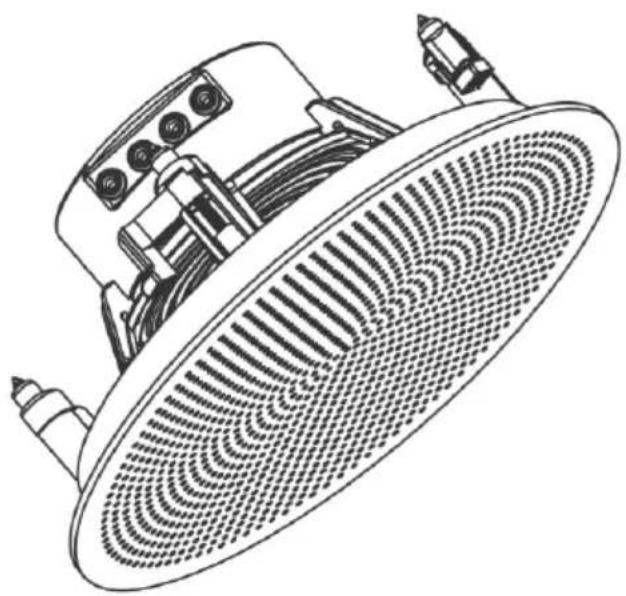
Technical line drawing of a showerhead with mesh pattern and mounting bracket (no text or symbols)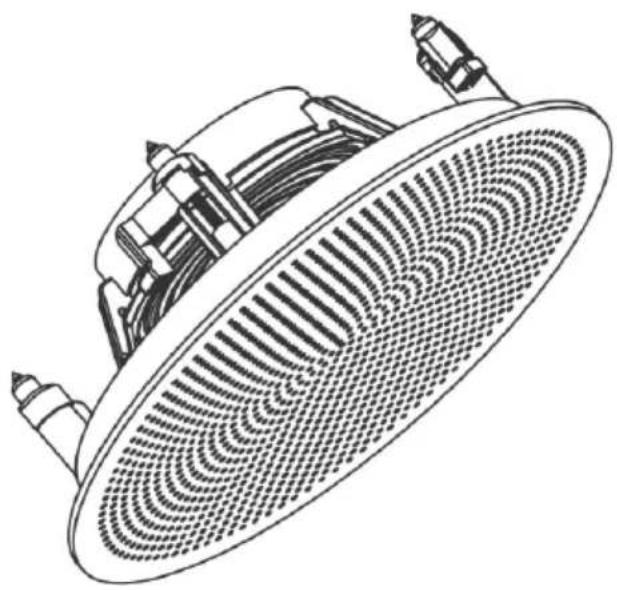
natural_image
Technical line drawing of a circular fan or showerhead with internal grid pattern (no text or symbols)Version 1.3

Caution: Please read this manual carefully before operating
Damage caused by misuse is not covered by the warranty
Introduction
Thank you for choosing the Adastra BCS-series Bluetooth ceiling speaker set for your ceiling speaker installation. This unit is designed to provide a discreet and expandable solution for background music or other sound application. Please read this manual to gain the best results from your product and avoid damage through misuse.
SAFETY SYMBOL AND MESSAGE CONVENTIONS

| CAUTIONRISK OF ELECTRIC SHOCKDO NOT OPEN | AVISRISQUE DE CHOC ELECTRIQUE NE PASOUVRIR |


This symbol indicates that dangerous voltage constituting a risk of electric shock is present within this unit

This symbol indicates that there are important operating and maintenance instructions in the literature accompanying this unit.
Warning
To prevent the risk of fire or electric shock, do not expose any components to rain or moisture.
If liquids enter the housing, disconnect the mains immediately, allow unit to dry out and have checked by qualified personnel before use. Avoid impact, extreme pressure or heavy vibration.
No user serviceable parts inside.
Do not open the case except for removing the front grille for installation.
Refer all servicing to qualified service personnel.
Safety
- The power supply provided in the package is adequate to power the active speaker with its satellite connected. If further sets are to be used, each set must be powered from its own power supply. If connecting directly to a ring main, this must be done by a qualified electrical installer.
Placement
- The active and passive unit contained in this set are suitable for mounting into a false ceiling or partition wall, provided that there is adequate depth to accommodate the rear housing and that the material is strong enough to safely support the weight of each unit.
Cleaning
• Use a soft cloth with a neutral detergent to clean the panel as required.
- Do not use solvents for cleaning the unit.
Installation
The BCS-system is supplied as a set of two speakers – one active and one passive. Decide where the active speaker is to be situated and bear in mind that it may be the target for a Bluetooth sending device and will need to be connected to the mains using the power supply included.
Carefully mark out and cut a hole (check cut-out diameter in spec.) for each speaker, ensuring that there is enough headroom to accommodate the rear housing of each speaker.
The BCS-series set is supplied with a fig.8 speaker cable. Feed the bare wire ends of this cable through the hole for the active speaker and feed the crimped end through the hole for the passive speaker.
Connect the crimp connectors onto the + and – tabs of the passive speaker (there is one large and one small to avoid incorrect connection) and make a note of the colour coding on the speaker cable for + and – terminals, which will need to be matched on the active unit.
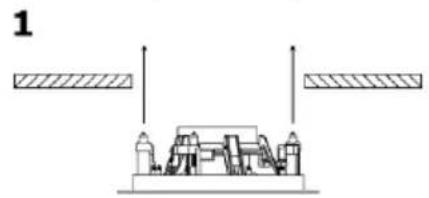
Install the passive speaker as follows:
natural_image
Pure mechanical diagram showing two parallel plates with a central component and two vertical supports (no text or symbols)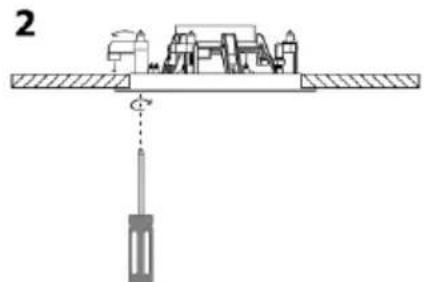
text_image
2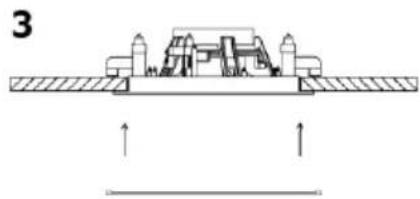
natural_image
Technical diagram of a mechanical assembly with no visible text or symbols- With the grille removed, position the passive speaker into its hole in the ceiling or wall, ensuring that the wire is not trapped and is clear of the dog-ear clamps.
- Use a cross head screwdriver to turn the 4 dog-ear clamps outward in turn, then continue turning the screwdriver to draw the dog-ear clamps toward the ceiling or wall supporting surface, taking care not to over-tighten the clamps.
- Once secured, replace the magnetic grille by simply lifting it up to the speaker.
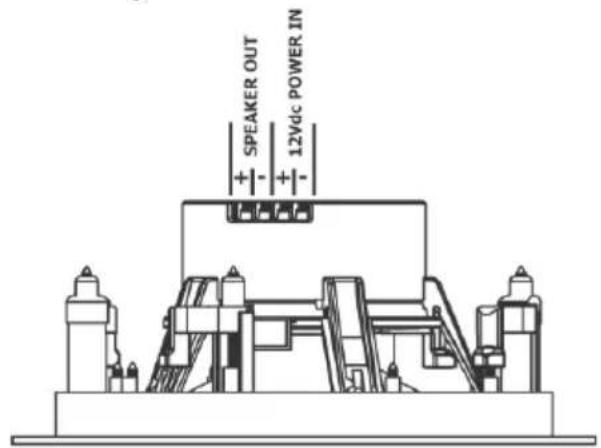
For the active speaker, all connections must be in place before positioning the speaker into the ceiling or wall.
text_image
SPEAKER OUT 12Vdc POWER IN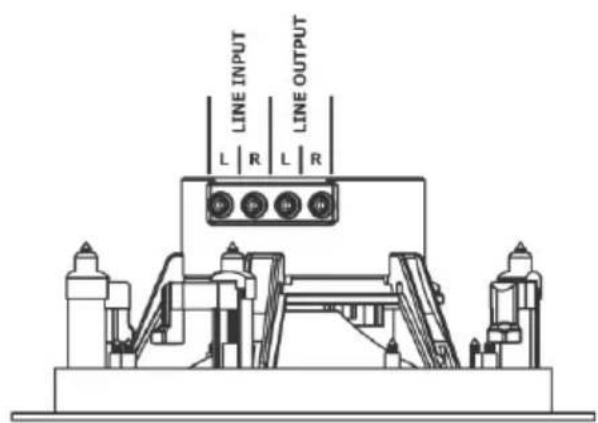
text_image
LINE INPUT LINE OUTPUT L | R L | RTake the bare ends of the speaker lead from the passive speaker and connect to the terminals on the active speaker marked "PASSIVE SPEAKER", ensuring the polarity (+ and -) matches the previously made connections to the passive speaker.
If a wired audio input is to be fed to the speakers, connect using a stereo RCA lead and feed this through the ceiling or wall hole for the active speaker.
Likewise, if this audio signal or the Bluetooth input is to be fed to further active speakers, feed another stereo RCA lead through the ceiling or wall hole for the active speaker to the area where it will be needed.
Connect the supplied 12Vdc power adaptor to the mains supply in the ceiling or wall using the included fig.8 mains lead. Alternatively, if connecting directly into the ring main, be sure to isolate the mains supply (this method should only be executed by a qualified electrical installer). Feed the DC lead from the power supply through the ceiling or wall hole for the active speaker.
Before installing the active speaker, decide if it will be acting as a Bluetooth receiver.
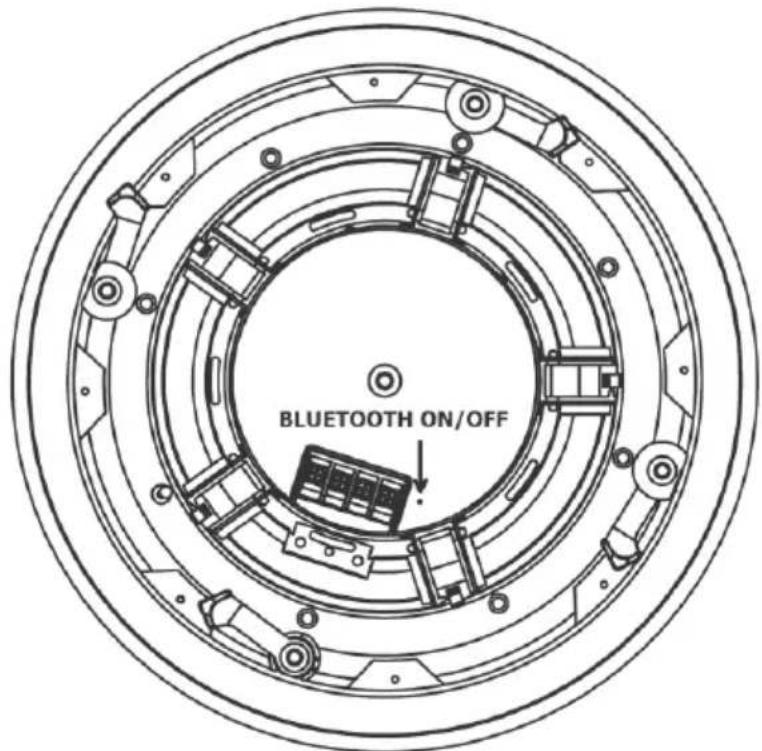
It is possible to switch the Bluetooth function off using an on/off switch inside the housing of the active speaker.
This may be useful if installing multiple sets of ceiling speakers to be operated by a single Bluetooth audio source and to avoid confusion about which speaker to pair with.
The Bluetooth switch is accessed via a small hole on the rear panel of the speaker as shown opposite. Operate the switch by pushing a paperclip or fine pin through the hole.
Finally, connect the DC power from the supplied power adaptor to the 12Vdc + and - terminals (a short DC jack lead is provided for convenience).
text_image
BLUETOOTH ON/OFFWhen all input and output connections are complete, install the active speaker into the wall or ceiling using the same method as for the passive speaker.
Operation
When both active and passive speakers are installed into the ceiling or wall, power up the speakers from the mains and if the Bluetooth is switched on, an audible notification will be played through the speakers.
If the audio source is a line input into the active speaker, ensure that the volume is fully turned down on the audio source (CD player, mp3 player, mixer or another BCS-series active speaker) and start playback while gradually increasing the volume to hear the sound output from the speakers.
Ensure that any further connected sets of BCS-series ceiling speakers are also reproducing the sound output. If not, check the line level audio connections are the correct way around.
Increase the volume at the audio source to the required level.
Bluetooth
If the Bluetooth function is switched on, a smart phone or tablet computer may be paired with the active speaker of the BCS-series set to playback audio tracks wirelessly.
Pair the smartphone or tablet by scanning for available Bluetooth devices and selecting to pair with "Adastra BCS**S" (where "**" is the speaker size 52 or 65). If there is more than one Bluetooth ID called "BCS**S", it may mean that the Bluetooth function needs to be deactivated on some active speakers that are acting as "slave" sets (i.e. receiving audio from another BCS-series set).
Once pairing is complete and confirmed that it is connected for media audio, turn the volume fully down on the smartphone or tablet and play an audio track.
Gradually increase the volume until the sound output can be heard through the speakers and continue until the required volume level is reached.
Only one device may be paired with a BCS-series set at any one time, so it is necessary to unpair a device before connecting a new device.
Maintenance
If any connections need to be changed, the active and passive speakers can be removed from the ceiling or wall by removing the grille and unscrewing the 4 clamp screws in turn, until the clamps are released and turned inward. Take care when extracting the speaker from the hole to avoid damage to the speaker and supporting surface. Make any necessary adjustments and re-install the speaker(s) again when completed.
When not in use, stop any audio playback and power down the BCS-series ceiling speakers from the mains power supply.
Specifications
| Model | BCS52S | BCS65S |
| Output power: max. | 2 x 20W | 2 x 25W |
| Output power: rms | 2 x 15W | 2 x 20W |
| LF driver | 135mm∅ (5.25") | 165mm∅ (6.5") |
| Frequency response | 80Hz - 20kHz | 70Hz - 20kHz |
| Dimensions active | 97 x 205mm∅ | 98 x 234mm∅ |
| Dimensions passive | 76 x 205mm∅ | 77 x 234mm∅ |
| Weight (per set) | 1.78kg | 1.91kg |
| Mounting depth active | 95mm | 100mm |
| Mounting depth passive | 75mm | 80mm |
| Cutout (each speaker) | 180mm∅ | 202mm∅ |
| Impedance | 4Ω (each speaker) | |
| Power supply | In-line 100-240Vac/12Vdc 5000mA PSU (included) | |
| HF driver | 12mm (0.5") neodymium dome tweeter | |
| Sensitivity | 89dB | |
| Dispersion angle | 160° | |
| Bluetooth version | 4.2 | |
| Housing material | ABS plastic | |
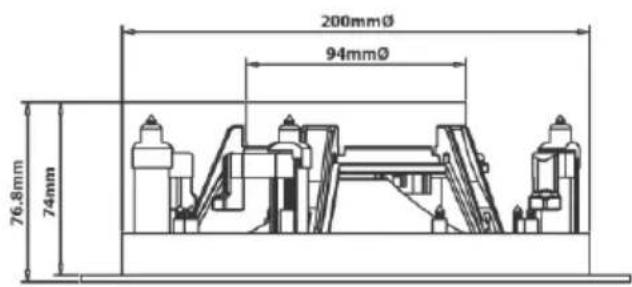
text_image
200mmØ 94mmØ 76,8mm 74mm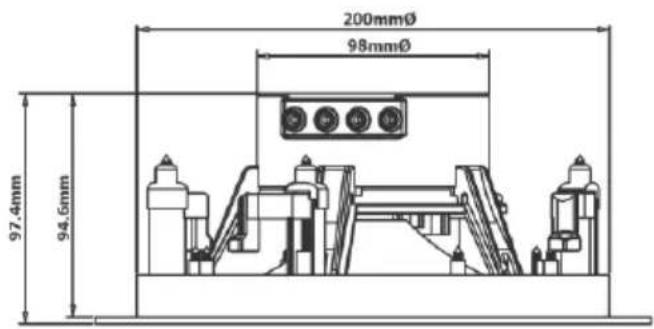
text_image
200mmØ 98mmØ 97.4mm 94.5mm
text_image
CE UK CADisposal: The "Crossed Wheelie Bin" symbol on the product means that the product is classed as Electrical or Electronic equipment and should not be disposed with other household or commercial waste at the end of its useful life. The goods must be disposed of according to your local council guidelines.
Hereby, AVSL Group Ltd. declares that the radio equipment type 953.164UK and 953.165UK are in compliance with Directive 2014/53/EU
The full text of the EU declaration of conformity for 953.164UK is available at the following internet address: http://www.avsl.com/assets/exportdoc/9/5/953164UK%20CE.pdf The full text of the EU declaration of conformity for 953.165UK is available at the following internet address: http://www.avsl.com/assets/exportdoc/9/5/953165UK%20CE.pdf
Errors and omissions excepted. Copyright© 2021. AVSL Group Ltd. Unit 2-4 Bridgewater Park, Taylor Rd. Manchester. M41 7JQ AVSL (EUROPE) Ltd, Unit 3D North Point House, North Point Business Park, New Mallow Road, Cork, Ireland.