
CHARGING PLATE DT-600 - Wireless Charger NOKIA - Free user manual and instructions
Find the device manual for free CHARGING PLATE DT-600 NOKIA in PDF.


| Product type | Wireless charger (charging station) |
| Brand | NOKIA |
| Model | CHARGING PLATE DT-600 |
| Number of simultaneously chargeable devices | Up to 5 |
| Built-in fixed cables | 2 cables with Nokia 2.0 mm plug, 1 micro-USB cable |
| Additional USB connectors | 2 standard USB ports (for included cables) |
| Max output power (micro-USB and USB) | 1200 mA |
| Power supply | AC adapter (included), wall connection |
| Indicator light | Blue light when device is on |
| On/off switch | Power key |
| Frame material | Aluminum (may contain traces of nickel) |
| Maintenance | Clean with a soft, dry, clean cloth; do not use liquids |
| Recycling | Do not dispose of with household waste; take to a collection point |
| Nickel warning | The frame and plugs contain nickel; avoid prolonged skin contact if sensitive |
| Cable storage | Fixed cables stored under the cover; USB cables coiled on top |
Frequently Asked Questions - CHARGING PLATE DT-600 NOKIA
User questions about CHARGING PLATE DT-600 NOKIA
0 question about this device. Answer the ones you know or ask your own.
Ask a new question about this device
Download the instructions for your Wireless Charger in PDF format for free! Find your manual CHARGING PLATE DT-600 - NOKIA and take your electronic device back in hand. On this page are published all the documents necessary for the use of your device. CHARGING PLATE DT-600 by NOKIA.
USER MANUAL CHARGING PLATE DT-600 NOKIA
Nokia Charging Plate DT-600
Issue 1.2
C
© 2010 Nokia. All rights reserved.
Nokia, Nokia Connecting People and the Nokia Original Accessories logo are trademarks or registered trademarks of Nokia Corporation.
Introduction
With the Nokia Charging Plate DT-600, you can simultaneously charge the battery in five compatible devices.
The DT-600 device has three fixed charging cables that can be stored under the cover: two cables with a Nokia 2.0 mm charger plug and one cable with a micro-USB plug. In addition, the device has two standard USB connectors for the supplied charging cables.
Use the supplied cables only with the DT-600 device. Do not use any other cables with it.
Read this user guide carefully before using the DT-600 device. Also, read the user guide for the devices that you charge with the DT-600 device.
This product may contain small parts. Keep them out of the reach of small children.

Warning: The aluminum frame and plugs of this device may contain a small
amount of nickel. Persons who are sensitised to nickel may have symptoms from prolonged skin contact with the frame and the plugs.
Get started
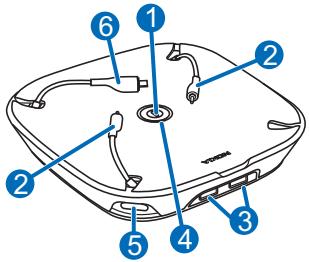
The DT-600 device contains the following parts shown on the title page: power key (1), 2.0 mm charger plugs (2), USB charger connectors (3),
indicator light (4), power connector (5), and micro-USB charger connector (6).
Select a cable for your device
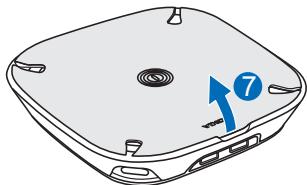
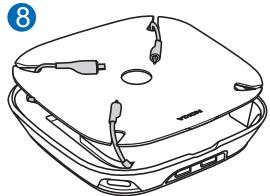
To connect a fixed charging cable to your compatible Nokia device, open the cover by lifting it above the USB connectors (7), and thread the desired cables through the slots in the corners of the cover (8).
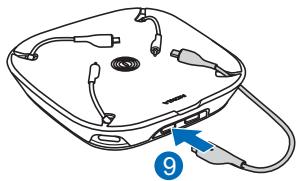
To use a supplied USB charging cable, select the correct cable for your device. For details, see the user guide of your device. Connect the cable to either USB connector (9).
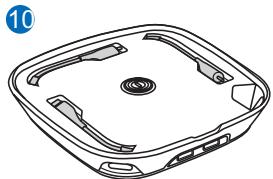
To store the fixed cables, open the cover, and insert the cables into their slots (10).
To store the USB charging cables that you have connected to the DT-600 device, thread the cables through the opening in a corner of the cover, and place them on the cover.
Charge the battery of your device
You can use the DT-600 device to charge the battery in five devices at the same time.
The micro-USB plug and the USB connectors provide up to 1200mA of power. Make sure the device that you connect to the plug or one of these connectors supports this amount of power. For details, see the user guide of your device.
-
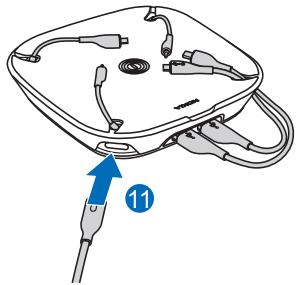
Connect the power cord to the DT-600 device (11) and then to the wall outlet.
-
Connect the charging cables of the DT-600 device to your compatible devices.
- To switch on the DT-600 device, press the power key. The blue indicator light is displayed.
- Check the charge level from the connected device.
- When the battery in the connected device is fully charged, disconnect the device from the charging cable.
- When you are not using the DT-600 device, press the power key to switch it off.
Take care of your device
Handle your device and accessories with care. The following suggestions help you protect your warranty coverage.
-
Keep the device dry. Precipitation, humidity, and all types of liquids or moisture can contain minerals that corrode electronic circuits. If your device gets wet, allow it to dry completely.
-
Do not use or store the device in dusty or dirty areas. Moving parts and electronic components can be damaged.
- Do not store the device in high temperatures. High temperatures can shorten the life of the device and warp or melt plastics.
- Do not store the device in cold temperatures. When the device warms to its normal temperature, moisture can form inside the device and damage electronic circuits.
- Do not attempt to open the device other than as instructed in the user guide.
- Do not drop, knock, or shake the device. Rough handling can break internal circuit boards and mechanics.
- Only use a soft, clean, dry cloth to clean the surface of the device.
- Do not paint the device. Paint can clog the moving parts and prevent proper operation.
Recycle
Always return your used electronic products, batteries, and packaging materials to dedicated collection points. This way you help prevent uncontrolled waste disposal and promote the recycling of materials. Check product environmental information and how to recycle your Nokia products at www.nokia.com/werecycle, or with a mobile device, www.nokia.mobi/werecycle.

The crossed-out wheeled-bin symbol on your product, battery, literature, or packaging reminds you that all electrical and electronic products, batteries,
and accumulators must be taken to separate collection at the end of their working life. This requirement applies in the European Union. Do not dispose of these products as unsorted municipal waste. For more information on the environmental attributes of your device, see www.nokia.com/ecodeclaration.
Brand : NOKIA
Model : CHARGING PLATE DT-600
Category : Wireless Charger