
ZWF01483WR - Washing machine ZANUSSI - Free user manual and instructions
Find the device manual for free ZWF01483WR ZANUSSI in PDF.


User questions about ZWF01483WR ZANUSSI
0 question about this device. Answer the ones you know or ask your own.
Ask a new question about this device
Download the instructions for your Washing machine in PDF format for free! Find your manual ZWF01483WR - ZANUSSI and take your electronic device back in hand. On this page are published all the documents necessary for the use of your device. ZWF01483WR by ZANUSSI.
USER MANUAL ZWF01483WR ZANUSSI
Settings 9
Before first use 9 ____
Daily use 9
Hints and tips_12 ____
Care and cleaning 13
Troubleshooting 15
Technical Data____17
Subject to change without notice.
⚠ Safety information
Before the installation and use of the appliance, carefully read the supplied instructions. The manufacturer is not responsible if an incorrect installation and use causes injuries and damages.
Always keep the instructions with the appliance for future reference.
Children and vulnerable people safety
- This appliance can be used by children aged from 8 years and above and persons with reduced physical, sensory or mental capabilities or lack of experience and knowledge if they have been given supervision or instruction concerning use of the appliance in a safe way and understand the hazards involved.
- Do not let children play with the appliance.
- Keep all packaging away from children.
- Keep all detergents away from children.
- Keep children and pets away from the appliance door when it is open.
- Cleaning and user maintenance shall not be made by children without supervision.
General Safety
- Do not change the specification of this appliance.
- Obey the maximum load volume of 10 kg (refer to the “Programme chart” chapter).
-
The operating water pressure (minimum and maximum) must be between 0,5 bar (0,05 MPa) and 8 bar (0,8 MPa).
-
The ventilation openings in the base (if applicable) must not be obstructed by a carpet.
- The appliance is to be connected to the water mains using the new supplied hose-sets. Old hose sets must not be reused.
- If the supply cord is damaged, it must be replaced by the manufacturer, its Authorised Service Centre or similarly qualified persons in order to avoid a hazard.
- Before maintenance, deactivate the appliance and disconnect the mains plug from the mains socket.
- Do not use water spray and steam to clean the appliance.
- Clean the appliance with a moist soft cloth. Only use neutral detergents. Do not use abrasive products, abrasive cleaning pads, solvents or metal objects.
Safety instructions
Installation
- Remove all the packaging and the transit bolts.
- Keep the transit bolts. When you move the appliance again you must block the drum.
- Always be careful when you move the appliance because it is heavy. Always wear safety gloves.
- Do not install or use a damaged appliance.
- Obey the installation instruction supplied with the appliance.
- Do not install or use the appliance where the temperature is less than 0 °C or where it is exposed to the weather.
- Make sure that the floor where you install the appliance is flat, stable, heat resistant and clean.
- Do not install the appliance where the appliance door can not be fully opened.
- Make sure that there is air circulation between the appliance and the floor.
- Adjust the feet to have the necessary space between the appliance and the carpet.
- Do not install the appliance where the appliance door can not be fully opened.
Electrical Connection
- The appliance must be earthed.
-
Always use a correctly installed shockproof socket.
-
Make sure that the electrical information on the rating plate agrees with the power supply. If not, contact an electrician.
- Do not use multi-plug adapters and extension cables.
- Make sure not to cause damage to the mains plug and to the mains cable. Should the mains cable need to be replaced, this must be carried out by our Authorised Service Centre.
- Connect the mains plug to the mains socket only at the end of the installation. Make sure that there is access to the mains plug after the installation.
- Do not touch the mains cable or the mains plug with wet hands.
- Do not pull the mains cable to disconnect the appliance. Always pull the mains plug.
- Only for UK and Ireland: The appliance has a 13 amp mains plug. If it is necessary to change the fuse in the mains plug, use a 13 amp ASTA (BS 1362) fuse.
- This appliance complies with the E.E.C. Directives.
Water connection
- Make sure not to cause damage to the water hoses.
- Before you connect the appliance to new pipes or pipes not used for a long time, let the water flow until it is clean.
- The first time you use the appliance, make sure that there is no leakage.
Use

WARNING!
Risk of injury, electrical shock, fire, burns or damage to the appliance.
- Use this appliance in a household only.
- Obey the safety instructions on the detergent packaging.
- Do not put flammable products or items that are wet with flammable products in, near or on the appliance.
- Make sure that you remove all metal objects from the laundry.
Product description
- Do not put a container to collect possible water leakage under the appliance. Contact the Authorised Service Centre to ensure which accessories can be used.
- Do not touch the glass of the door while a programme operates. The glass can be hot.
Disposal

WARNING!
Risk of injury or suffocation.
- Disconnect the appliance from the mains supply.
- Cut off the mains cable and discard it.
- Remove the door catch to prevent children and pets to get closed in the appliance.
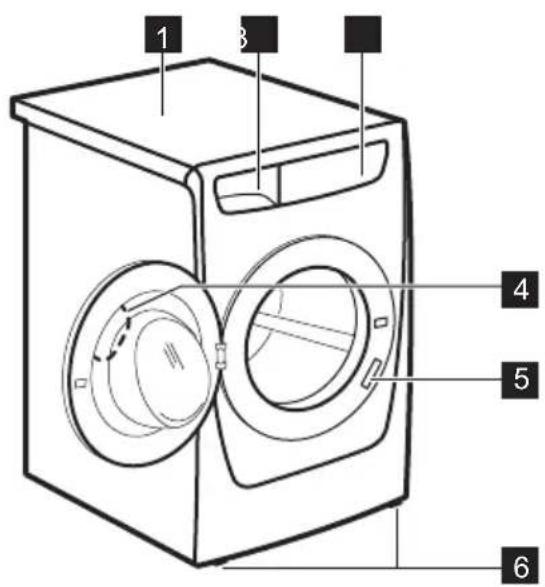
Appliance overview
text_image
1 3 4 5 6Installation on suspended flooring
Suspended wooden floors are particularly susceptible to vibration.
To help prevent vibration we recommend you place a waterproof wood panel, at least 15 mm thick under the appliance, secured to at least 2
1 Worktop
2 Detergent dispenser
3 Control panel
4 Door handle
5 Rating plate
6 Feet for the appliance level
floor beams with screws, the wood panel must extend beyond the front feet.
If possible install the appliance in one of the corners of the room, where the floor is more stable.
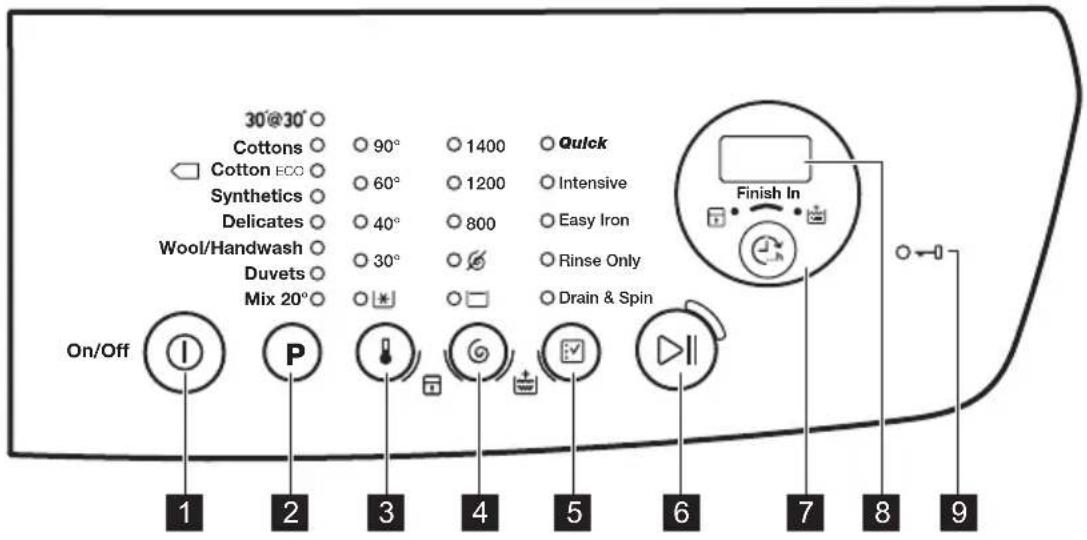
Control panel description
text_image
30°@30° Cottons ○ 90° ○ 1400 ○ Quick Cotton ECO ○ 60° ○ 1200 ○ Intensive Synthetics ○ 40° ○ 800 ○ Easy Iron Delicates ○ 30° ○ ☑ Wool/Handwash ○ Duvets ○ Mix 20° ○ □ ○ On/Off 1 2 3 4 5 6 7 8 9 Finish In1 On / Off button ① (On/Off)
2 Programme selection touchpad P
3 Temperature touchpad
4 Spin selection touchpad
5 Options selection touchpad √
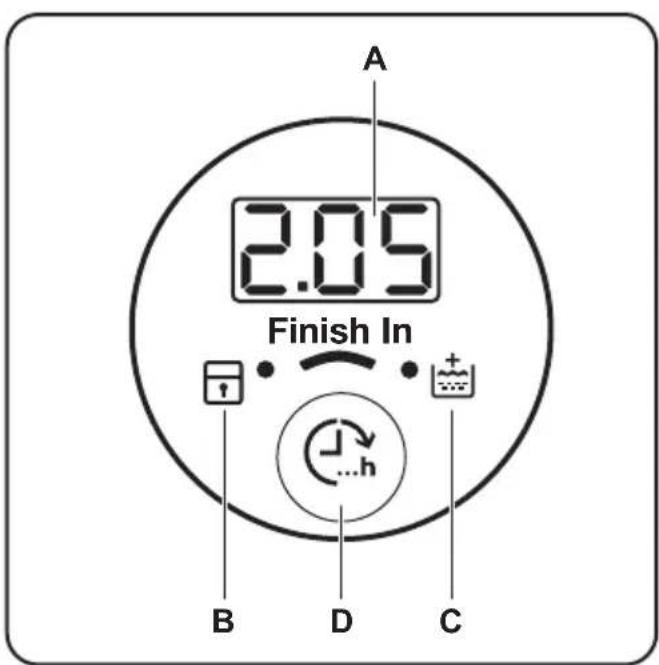
Display
text_image
A 2.05 Finish In B D C6 Start/Pause touchpad ▷||
7 Finish in touchpad ⏻ (Finish In)
8 Display
9 Door locked indicator
A) The time area:
- 1.25: the programme duration
- 3h: the "finish in" time
- E20: the alarm codes
- Err: the message of error
- ☐: the programme is completed.
B) The child lock indicator:
- The indicator comes on when you activate this device.
C) The extra rinse indicator:
- The indicator comes on when you activate this option.
D) The Finish In touchpad.
Programme Chart
| Programme Temperature range | Maximum load Maximum spin speed | Programme description (Type of load and soil level) |
| 30' @ 30°30 °C | 3 kg800 rpm | A short cycle for synthetics and delicate items with light soil level or for items to freshen up. |
| Cottons90 °C - Cold | 10 kg1400 rpm | White cotton and coloured cotton. Normal soil and light soil. |
| Cotton Eco ^1) 60 °C - 40 °C | 10 kg1400 rpm | White cotton and colour-fast cotton. Normal soil. The energy consumption decreases and the time of the washing programme is extended. |
| Synthetics60 °C - Cold | 4 kg1200 rpm | Synthetic items or mixed fabric items. Normal soil. |
| Delicates40 °C - Cold | 4 kg1200 rpm | Delicate fabrics as acrylics, viscose, polyester items. Normal soil. |
| Wool/Handwash40 °C - Cold | 2 kg1200 rpm | Machine washable wool, hand washable wool and delicate fabrics with «hand washing» care symbol. ^2) |
| Duvets60 °C - Cold | 3 kg800 rpm | Special programme for one synthetic blanket, duvet, bedspread and so on. |
| Mix 20°20 °C | 2 kg1200 rpm | Special programme for cotton, synthetic and mixed fabrics with light soil. Set this programme to decrease the energy consumption. Make sure that the detergent is for low temperature in order to have good washing results ^3) . |
1) Standard programmes for the Energy Label consumption values. According to regulation 1061/2010, these programmes are respectively the «Standard 60°C cotton programme» and the «Standard 40°C cotton programme». They are the most efficient programmes in terms of combined energy and water consumption for washing normally soiled cotton laundry.

The water temperature of the washing phase may differ from the temperature declared for the selected programme.
2) During this cycle the drum rotates slowly to ensure a gentle washing. It can seem that the drum doesn't rotate or doesn't rotate properly. Consider this as a normal functioning of the appliance.
3) No temperature indicator is on.
Programme options compatibility
| Programme | Quick1) | Intensive | Easy Iron | Rinse Only | Drain & Spin | |||||
| 30' @ 30° ■ | ■■■ | |||||||||
| Cottons ■■■■■■■■ | ||||||||||
| Cotton Eco ■■■■ | ■■■■ | |||||||||
| Synthetics ■■■■■■■■ | ||||||||||
| Delicates ■■■■ ■■■■ | ||||||||||
| Wool/Hand-wash | ||||||||||
| Duvets ■■ | ■■■■ | |||||||||
| Mix 20° ■■■ ■ ■■■ |
1) When you set this option, we recommend that you decrease the quantity of the laundry. It is possible to keep the full load but the washing results can be unsatisfactory. Recommended load: cotton: 5 kg, synthetics and delicates: 2,5 kg.
Consumption values

The data of this table are approximate. Different causes can change the data: the quantity and type of laundry, the water and ambient temperature.

At programme start the display shows the duration programme for the maximum load capacity. During the washing phase the programme duration is automatically calculated and can be greatly reduced if the laundry load is lower than the maximum load capacity (e.g. Cotton 60°C, maximum load capacity 10 kg, the programme duration exceeds 2 hours; real load 1 kg, the programme duration don't reach 1 hour). When the appliance is calculating the real programme duration a dot blinks in the display.
| Programmes Load (kg) | Energy consumption (kWh) | Water consumption (litre) | Approximate programme duration (minutes) | Remaining moisture (%)1) |
| Cottons 60 °C | 10 | 2,04 | 87 | 177 |
| Cottons 40 °C | 10 | 1,04 | 83 | 177 |
| Synthetics 40 °C | 4 | 0,77 | 61 | 122 |
| Delicates 40 °C | 4 | 0,56 | 75 | 83 |
| Wool/Handwash 30 °C | 2 | 0,30 | 63 | 57 |
| Standard cotton programmes | ||||
| Standard 60 °C cotton | 10 | 1,21 | 57 | 238 |
| Standard 60 °C cotton | 5 | 0,84 | 44 | 209 |
| Standard 40 °C cotton | 5 | 0,72 | 42 | 201 |
1) At the end of spin phase.
The information given in the chart above are in compliance with the EU Commission regulation 1015/2010 implementing directive 2009/125/EC.
Options
Temperature
With this option you can change the default temperature.
Indicator ☑ cold water.
The indicator of the set temperature comes on.
Spin
With this option you can change the default spin speed.
The indicator of the set speed comes on.
Additional spin options:
No Spin
- Set this option to deactivate all spin phases. Only the drain phase is available.
- The related indicator comes on.
- Set this option for very delicate fabrics.
- The rinses phase uses more water for some washing programmes.
Rinse Hold
- Set this option to prevent the laundry creases.
- The related indicator comes on.
- There is a water in the drum when the programme is completed.
- The drum turns regularly to prevent the laundry creases.
- The door stays locked. You must drain the water to unlock the door.

To drain the water refer to 'At the end of the programme'.
Quick
With this option you can decrease the programme duration.
Use this option for items with light soil or items to refresh.
The related indicator comes on.
Intensive
With this option you can wash very soiled laundry.
The washing cycle lasts longer with this option.
The related indicator comes on.
Easy Iron
The appliance carefully washes and spins the laundry to prevent the creases.
The appliance decreases the spin speed, uses more water and adapts the programme duration to the type of laundry.
The related indicator comes on.
Rinse Only
With this option you can perform only a last rinse of a selected washing programme.
If you set also the Extra Rinse function (the appliance adds two or more rinses.
The related indicator comes on.
Drain & Spin
With this option you can perform the spin and drain cycle.
The spin phase is suitable to the washing programme you set.

If you set also the No Spin (6) option, the appliance only drains.
Finish In
With this option you can set the number of hours in which you would like your washing programme to be completed.
You can set from minimum 3 hours to maximum 20 hours.
The display shows the number of hours and the indicator above the button 📋 is on.
Extra Rinse
With this option you can add some rinses to a washing programme.
Settings
Extra Rinse
With this option you can permanently have an extra rinse when you set a new programme.
- To activate/deactivate this option touch the buttons and at the same time until the indicator comes on/goes off.
Child Lock
With this option you can prevent that the children play with the control panel.
- To activate/deactivate this option, touch the buttons and at the same time until the indicator comes on/goes off. Activate this option after you touch the button ▷: the buttons are locked (except for the button ⏻).
Before first use
- Put a small quantity of detergent in the compartment for washing phase.
- Set and start a programme for cotton at the highest temperature without laundry.
Daily use

WARNING!
Refer to Safety chapters.
Use this option for persons allergic to detergents and in areas where the water is soft. The related indicator comes on. ^1
This option stays active even when you switch off the appliance.
Acoustic signals
The acoustic signals operate when:
- The programme is completed.
- The appliance has a malfunction.
To deactivate/activate the acoustic signals, touch the buttons P and at the same time for 4 seconds.
If you deactivate the acoustic signals, they continue operate when the appliance has a malfunction.
This removes all possible dirt from the drum and the tub.
Loading the laundry
Open the water tap. Connect the mains plug to the mains socket.
- Pull the door handle to open the appliance door.
- Put the laundry in the drum, one item at a time.
- Shake the items before you put them in the appliance.
Make sure not to put too much laundry in the drum. Refer to max. loads indicated in "Programme chart".
- Close the door.
text_image
Safety warning symbol with warning sign, circular diagram, and cross indicating no crossing
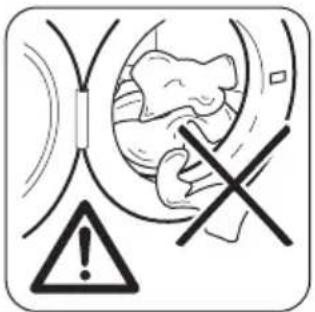
CAUTION!
Make sure that no laundry stays between the seal and the door. There is a risk of water leakage or damage to the laundry.
Using detergent and additives
text_image
Softener MAX-
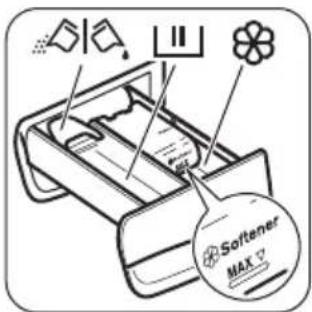
Measure out the detergent and the fabric conditioner.
-
Carefully close the detergent drawer.
Detergent compartments
 | Detergent compartment for washing phase.If you use liquid detergent, put it immediately before you start the programme. |
 | Compartment for liquid additives (fabric conditioner, starch). CAUTION!Do not exceed the MAX level. CAUTION!Do not exceed the MAX level. |
 | Flap for powder or liquid detergent. |
CAUTION!
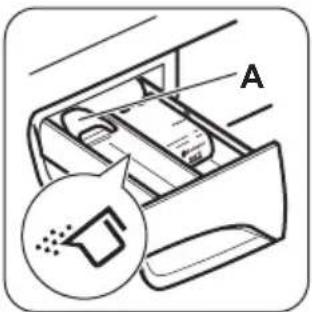
Liquid or powder detergent
text_image
AThe default position of the flap is A (powder detergent).
natural_image
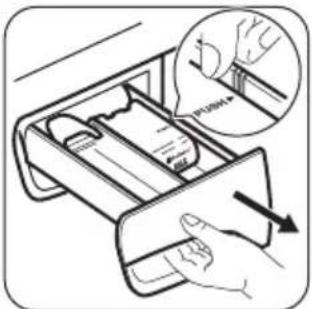
Illustration of a hand inserting a device into a drawer with an arrow indicating direction (no text or symbols present)To use liquid detergent: 1. Remove the drawer. Push the drawer edge in the place with the arrow (PUSH) to remove the drawer easily.

text_image
B- Adjust the flap in position B.
- Put back the drawer in the recess.

When you use the liquid detergent:
- Do not use gelatinous or thick liquid detergents.
- Do not put more liquid then 120 ml.
- Do not set the delay start.
text_image
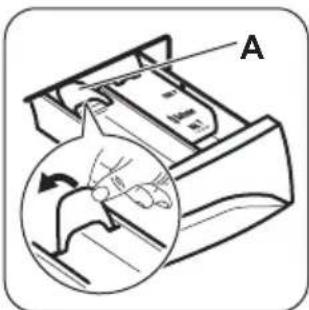
AWhen the flap is in position B and you want to use powder detergent:
- Remove the drawer.
- Adjust the flap in position A.
-
Put back the drawer in the recess.
-
Measure out the detergent and the fabric conditioner.
- Put the detergent and the fabric conditioner into the compartments.
- Carefully close the detergent drawer.
Activating the appliance
Press and hold for a couple of seconds the ① button to activate or deactivate the appliance.
A tune sounds when the appliance is activated.
The appliance performs a start up animation.
The animation quickly shows each washing programme and the default temperature and spin settings.
The display shows the word On.
Setting a programme
- Touch the programme button and set the programme:
- The indicator of the button flashes.
- The display shows the programme duration.
- If necessary, change the temperature and the spin speed or add available options. When you activate an option, the indicator of the set option comes on.
If you set something incorrect, the display shows the message Err
Starting a programme without the Finish In option
Touch the button ▷∥
- The indicator of the button stops to flash and stays on.
- The programme starts, the door locks, the indicator is on.
- The drain pump can operate for a short time at the beginning of the washing cycle.

After approximately 15 minutes from the start of the programme:
- The appliance adjusts automatically the programme duration agree with the laundry load.
- The display shows the new value.
Starting a programme with the Finish In option
-
Touch the button again and again to choose the number of hours in which you want the washing cycle to be finished. The display shows the number of hours you set (e.g. 3) and the indicator above the button is on to show that his option is active.
-
Touch the button ▷∥ • The door is locked.
- The appliance starts the countdown. - When the countdown is completed, the programme starts automatically.
You can cancel or change the set of the Finish In option before you touch the button ▷. After touching the button ▷ you can only cancel the Finish In option.
To cancel the the Finish In option:
a. Touch the button to set the appliance to pause. The indicator of button flashes.
b. Touch the button until the indicator above this button goes off. Touch the button again to start the programme immediately.
Interrupting a programme and changing the options
You can change only some options before they operate.
- Touch ▷||
The indicator of this button flashes.
-
Change the options. If you change any option the Finish In option (if set) will be disabled.
-
Touch again.
The programme continues.
Cancelling a programme
-
Press the button for some seconds to cancel the programme and to deactivate the appliance.
-
Press the same button again to activate the appliance. Now, you can set a new washing programme.
The appliance does not drain the water. The water left in a drum can be used for the next washing cycle.
Opening the door
While a programme (or the ) operates, the appliance door is locked. The indicator is on.

CAUTION!
If the temperature and level of the water in the drum are too high, you cannot open the door.
To open the door during the first minutes of the cycle (or when the ⏻ operates):
- Touch the button to pause the appliance.
- Wait until the indicator goes off.
- You can open the door.
- Close the door and touch the button again. The programme (or the continues.)
At the end of the programme
- The appliance stops automatically.
- The acoustic signal operates (if it is activated).
- In the display comes on.
- The indicator of the button goes off.
- The door lock indicator goes off.
- You can open the door.
- Remove the laundry from the appliance. Make sure that the drum is empty.
- Press the button for some seconds to deactivate the appliance.
- Close the water tap.
- Keep the door and the detergent drawer ajar, to prevent the mildew and odours.
The washing programme is completed, but there is water in the drum:
- The drum turns regularly to prevent the creases in the laundry.
- The indicator flashes to remind you to drain the water.
- The door lock indicator is on. The indicator of button flashes. The door stays locked.
Hints and tips
The laundry load
- Divide the laundry in: white, coloured, synthetics, delicates and wool.
- Obey the washing instructions that are on the laundry care labels.
- Do not wash together white and coloured items.
- You must drain the water to open the door.
Draining the water:
-
To drain the water.
-
Touch the button .The appliance drains the water and spins with the maximum spin speed for selected washing programme.
-
Alternatively, touch the button to change the spin speed and then touch the button. The appliance drains the water and spins. If you set, the appliance only drains.
-
When the programme is completed and the door lock indicator goes off, you can open the door.
-
Press the button for some seconds to deactivate the appliance.
The appliance drains and spins automatically after approximately 18 hours (except for Wool programme).
AUTO-OFF option
The AUTO-OFF stand-by option automatically deactivates the appliance to decrease the energy consumption. All the indicators and the display go off when :
- You do not use the appliance for 5 minutes before you touch ▷∥
Press the button to activate the appliance again.
■ After 5 minutes from the end of the washing programme.
Press the button to activate the appliance again.
The display shows the end of the last set programme.
Touch the button P if you want to set a new cycle.
- Some coloured items can discolour with the first wash. We recommend that you wash them separately for the first times.
- Button up pillowcases, close zippers, hooks and poppers. Tie up belts.
- Empty the pockets and unfold the items.
-
Turn inside out multilayered fabrics, wool and items with painted illustrations.
-
Remove hard stains.
- Wash with a special detergent heavy soil stains.
- Be careful with the curtains. Remove the hooks or put the curtains in a washing bag or pillowcase.
- Do not wash in the appliance laundry without hems or with cuts. Use a washing bag to wash small and/or delicate items (e.g. underwired bras, belts, tights, etc.).
- A very small load can cause balance problems with the spin phase. If this occurs, adjust manually the items in the tub and start the spin phase again.
Stubborn stains
For some stains, water and detergent is not sufficient.
We recommend that you remove these stains before you put the items in the appliance.
Special stain removers are available. Use the special stain remover that is applicable to the type of stain and fabric.
Detergents and additives
- Only use detergents and additives specially made for washing machines:
– powder detergents for all types of fabric, - powder detergents for delicate fabrics (40 °C max) and woollens,
– liquid detergents, preferably for low temperature wash programmes (60 °C max) for all types of fabric, or special for woollens only. - Do not mix different types of detergents.
Care and cleaning

WARNING!
Refer to Safety chapters.
External cleaning
Clean the appliance only with soap and warm water. Fully dry all the surfaces.

CAUTION!
Do not use alcohol, solvents or chemical products.
- To help the environment, do not use more than the correct quantity of detergent.
- Obey the instructions that you find on the on packaging of these products.
- Use the correct products for the type and colour of the fabric, the programme temperature and the level of soil.
- If your appliance has not the detergent dispenser with the flap device, add the liquid detergents with a dosing ball (supplied by the detergent's manufacturer).
Ecological hints
- Set a programme without the prewash phase to wash laundry with normal soil.
- Always start a washing programme with the maximum load of laundry.
- If necessary, use a stain remover when you set a programme with a low temperature.
- To use the correct quantity of the detergent, check the water hardness of your domestic system
Water hardness
If the water hardness in your area is high or moderate, we recommend that you use a water softener for washing machines. In areas where the water hardness is soft it is not necessary to use a water softener.
To know the water hardness in your area, contact your local water authority.
Use the correct quantity of the water softener. Obey the instructions that you find on the packaging of the product.
Descaling
If the water hardness in your area is high or moderate, we recommend that you use a water descaling product for washing machines.
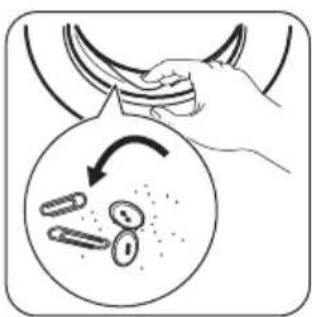
Regularly examine the drum to prevent limescale and rust particles.
To remove rust particles use only special products for washing machine. Do this separately from the laundry wash.

Always obey the instructions that you find on the packaging of the product.
Maintenance wash
With the low temperature programmes it is possible that some detergent stays in the drum. Make regularly a maintenance wash. To do this:
- Remove the laundry from the drum.
- Set the cotton programme with the highest temperature with a small quantity of detergent.
Door seal
natural_image
Illustration of a hand holding a bag with an arrow pointing to three oval objects inside, no text or symbols present.Regularly examine the seal and remove all objects from the inner part.
Cleaning the detergent dispenser
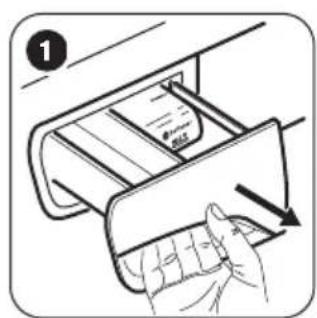
natural_image
Illustration of a hand inserting a card into a device (no text or symbols visible)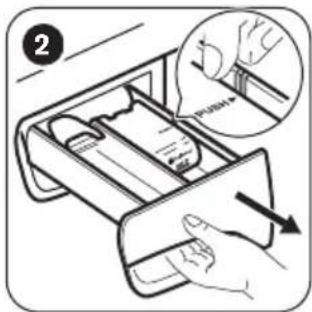
text_image
2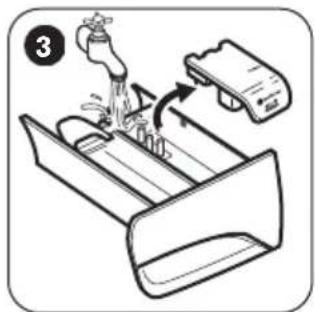
text_image
Diagram showing a cleaning or cleaning process with labeled step 3 and directional arrows indicating flow or movement.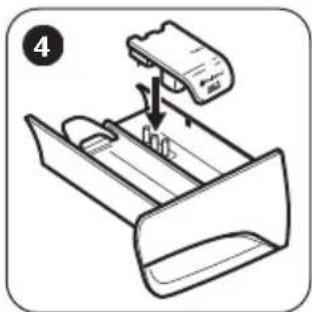
natural_image
Diagram of a printer or scanner device with a paper feeding into a tray (no text or symbols visible)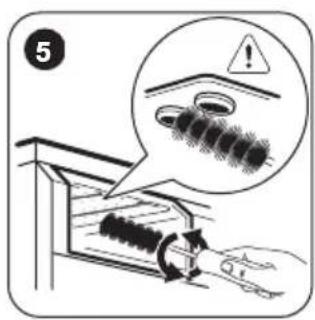
text_image
5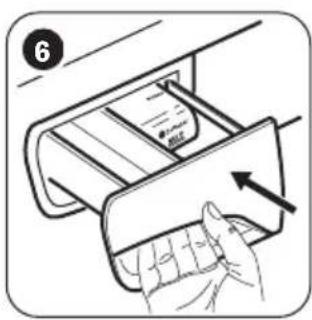
natural_image
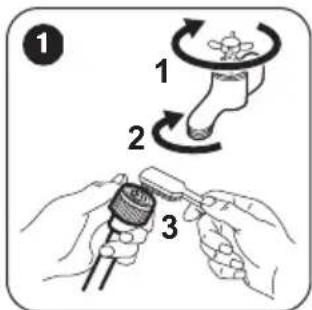
Illustration of a hand inserting a card into a drawer with an arrow indicating direction (no text or symbols)Cleaning the inlet hose and the valve filter
text_image
Diagram illustrating three-step medical procedure for foot manipulation, showing finger rotation and manual tool insertion.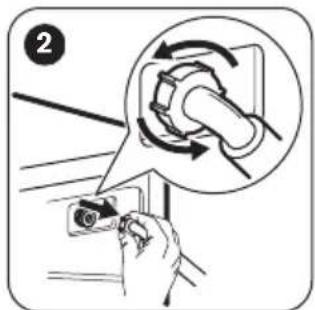
text_image
Diagram showing a hand holding a device with a magnified view of the device's rotation around it, labeled with number 2.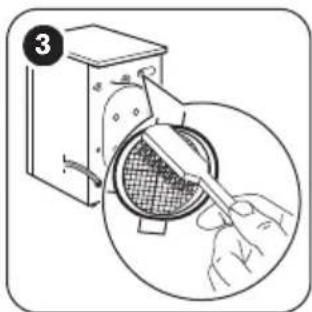
text_image
3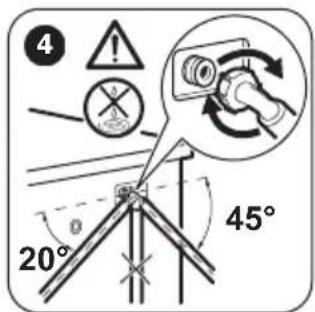
text_image
4 20° 45°Frost precautions
If the appliance is installed in an area where the temperature can be less than 0 °C , remove the remaining water from the inlet hose and the drain pump.

Do this procedure also when you want to do the emergency drain.
- Disconnect the mains plug from the mains socket.
- Remove the water inlet hose.
- Remove the drain hose from the rear support and unhook it from sink or spigot.
- Put the ends of the drain and inlet hose in a container. Let the water flow out of the hoses.
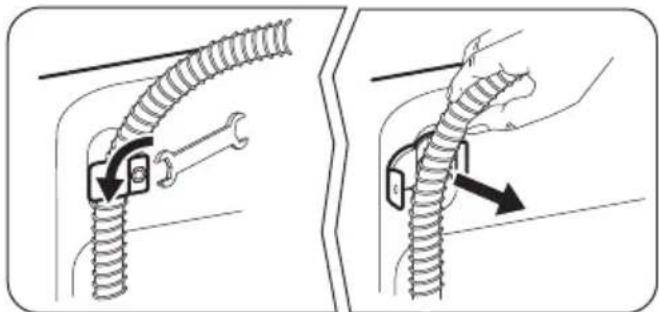
natural_image
Two-step diagram showing a cable being inserted into a spring, with no text or symbols present.- When no more water flows, install the inlet hose and the drain hose again.

WARNING!
Make sure that the temperature is more than 0 °C before you use the appliance again. The manufacturer is not responsible for damages caused by low temperatures.
Troubleshooting

WARNING!
Refer to Safety chapters.
Introduction
The start of the appliance does not occur or it stops during operation.
First try to find a solution to the problem (refer to the table). If not, contact the Authorised Service Centre.
With some problems, the acoustic signals operate and the display shows an alarm code:
- E10 - The appliance does not fill with water properly.
- The appliance does not drain the water.
- The appliance door is open or not closed correctly. Please check the door!
-
- EHO mains supply is unstable. Wait until the mains supply is stable.
- No communication between electronic elements of the appliance. Switch off and switch on again.

WARNING!
Deactivate the appliance before you do the checks.
Possible failures
| Problem Possible solution | |
| The programme does not start. | Make sure that the mains plug is connected to the mains socket.Make sure that the appliance door is closed.Make sure that there is not a damaged fuse in the fuse box.Make sure that the Start/Pause has been pressed.If the delay start is set, cancel the setting or wait for the end of count-down.Deactivate the Child Lock function if it is on. |
| The appliance does not fill with water properly. | Make sure that the water tap is open.Make sure that the pressure of the water supply is not too low. For this information, contact your local water authority.Make sure that the water tap is not clogged.Make sure that the filter of the inlet hose and the filter of the valve are not clogged. Refer to “Care and cleaning”.Make sure that the inlet hose has no kinks or bends.Make sure that the connection of the water inlet hose is correct. |
| The appliance does not drain the water. | ·Make sure that the sink spigot is not clogged.·Make sure that the drain hose has no kinks or bends.·Make sure that the connection of the drain hose is correct.·Set the drain option if you set a programme without drain phase.·Set the drain option if you set an option which ends with water in the drum.·If above mentioned solutions do not help, contact the Authorised Service Centre (as the filter of the drain pump may be clogged). |
| The spin phase does not operate or the washing cycle lasts longer than usually. | ·Adjust manually the items in the tub and start the spin phase again. This problem may be caused by balance problems.·Set the spin option.·Set the drain option if you set an option which ends with water in the drum.·If above mentioned solutions do not help, contact the Authorised Service Centre (as the filter of the drain pump may be clogged). |
| There is water on the floor. | ·Make sure that the couplings of the water hoses are tight and there is not water leakages.·Make sure that the water inlet hose and the drain hose have no damages.·Make sure you use the correct detergent and the correct quantity of it. |
| You cannot open the appliance door. | ·Make sure that the washing programme is finished.·Set the drain or the spin option if there is water in the drum.·Do the emergency drain procedure. See "Frost precautions" (in "Care and Cleaning" chapter). |
| The appliance makes an unusual noise. | ·Make sure the levelling of the appliance is correct. Refer to 'Installation instruction'.·Make sure that the packaging and/or the transit bolts are removed. Refer to 'Installation instruction'.·Add more laundry in the drum. The load may be too small. |
| The appliance fills with water and drain immediately. | ·Make sure that the drain hose is in the correct position. The end of the hose may be too low. Refer to 'Installation instruction'. |
| The cycle is shorter than the time displayed. | ·The appliance calculates a new time according to the laundry load. See the 'Consumption Values' chapter. |
| The cycle is longer than the time displayed. | ·An unbalanced laundry load increases the duration time. This is a normal behaviour of the appliance. |
| The washing results are not satisfactory. | ·Increase the detergent quantity or use a different detergent.·Use special products to remove the stubborn stains before you wash the laundry.·Make sure that you set the correct temperature.·Decrease the laundry load. |
| You cannot set an option. | ·Make sure that you press only the wanted touch button(s). |
After the check, activate the appliance. The programme continues from the point of interruption.
If the problem occurs again, contact the Authorised Service Centre.
If the display shows other alarm codes. Deactivate and activate the appliance. If the problem continues, contact the Authorised Service Centre.
Service
We recommend the use of original spare parts.
Technical Data
When contacting the Authorised Service Centre, make sure that these data are available. You can find the information on the rating plate: model (Mod.), PNC (Prod.No.), Serial number (Ser.No.).
| Dimension Width/ Height/ Depth/ Total depth | 600 mm/ 850 mm/ 600 mm/ 660 mm | |
| Electrical connection Voltage | Overall powerFuseFrequency | 230-240 V2200 W13 A50 Hz |
| Level of protection against ingress of solid particles and moisture ensured by the protective cover, except where the low voltage equipment has no protection against moisture | IPX4 | |
| Water supply pressure1) | MinimumMaximum | 0,5 bar (0,05 MPa)8 bar (0,8 MPa) |
| Water supply2) | Cold water | |
| Maximum Load Cotton 10 kg | ||
| Energy Efficiency Class A+++ | ||
| Spin Speed Maximum 1400 rpm | ||
1) The appliance works correctly if the water pressure is not less than 0.05 MPa (0.5 bar). If you can not connect the water inlet hose to the cold water tap of the primary hydraulic system, connect it to your domestic cold water storage system. Make sure not to have more than a distance of 5.02 m (16.5 ft) between the appliance inlet hose and the bottom of the water storage tank.
2) Connect the water inlet hose to a water tap with a 3/4" thread.
ENVIRONMENTAL CONCERNS
Recycle the materials with the symbol .Put the packaging in applicable containers to recycle it. Help protect the environment and human health and to recycle waste of electrical and electronic appliances. Do not dispose appliances marked with the symbol with the household waste. Return the product to your local recycling facility or contact your municipal office.

www.zanussi.com/shop


CE