9105 - Watch Skmei - Free user manual and instructions
Find the device manual for free 9105 Skmei in PDF.


User questions about 9105 Skmei
0 question about this device. Answer the ones you know or ask your own.
Ask a new question about this device
Download the instructions for your Watch in PDF format for free! Find your manual 9105 - Skmei and take your electronic device back in hand. On this page are published all the documents necessary for the use of your device. 9105 by Skmei.
USER MANUAL 9105 Skmei
➢ 13 Digits LCD Display, Display Hour, Minute, Second, Month, Day, Year and Week
▶ Automatic Calendar(2000\~2099)
Dual Time
➢ 12 / 24H format selectable, Auto Calendar
Daily Alarm, Chime hourly and SNZ
➢ 1/100 second to 23 hour 59.99 second Chronograph with split functions, 12 groups of LAP segment timing
▶ Countdown function
EL backlight
Touch-tone
B. Operational Manual
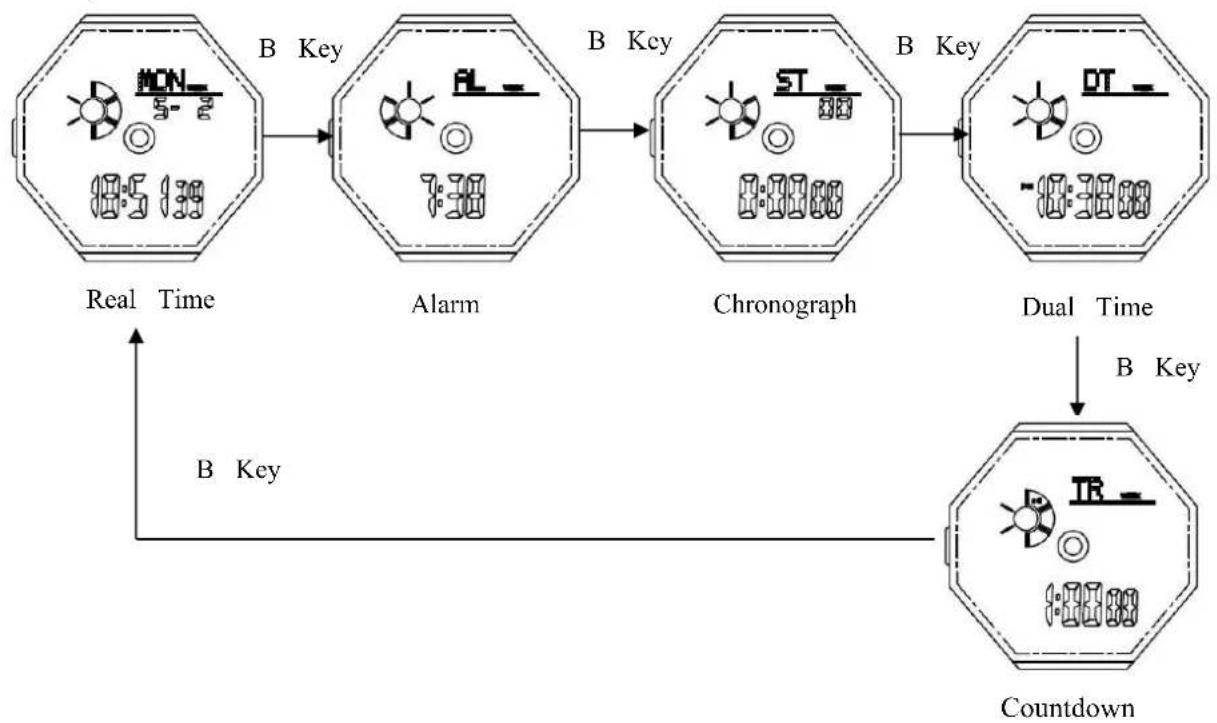
flowchart
graph TD
    A["Real Time"] --> B["Alarm"]
    B --> C["Chronograph"]
    C --> D["Dual Time"]
    D --> E["Countdown"]
    style A fill:#f9f,stroke:#333
    style B fill:#ccf,stroke:#333
    style C fill:#cfc,stroke:#333
    style D fill:#fcc,stroke:#333
    style E fill:#cff,stroke:#333
- At any mode, press A key EL backlight for 3s.
- Press B to change the display mode
- In real time mode press D key to switch 12 hours or 24 hours display.
- Real Time and date
Time Setting
a). Press and hold C key for 2s to time setting mode and "Second" flashing, Press B key to following sequence :
CRH123 MOVEMENT INSTRUCTION
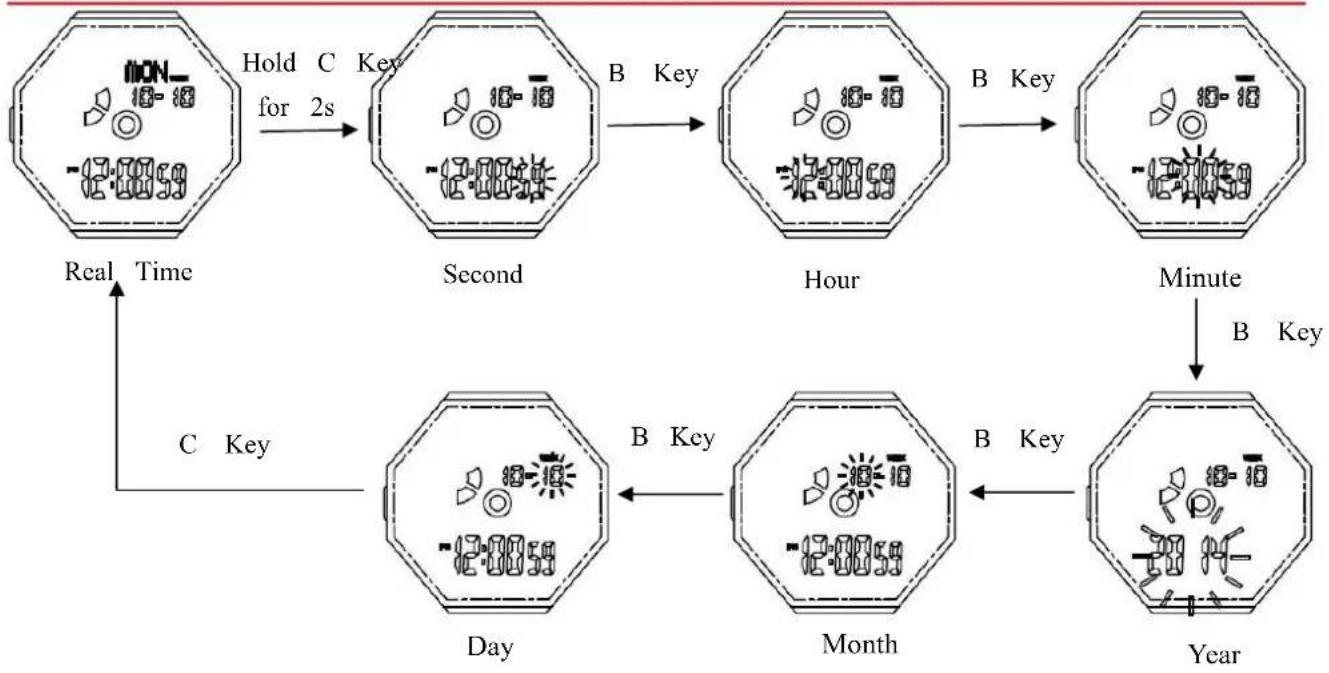
flowchart
graph TD
    A["Clock with clock symbol"] -->|Hold C for 2s| B["Second"]
    B -->|B Key| C["Hour"]
    C -->|B Key| D["Minute"]
    D -->|B Key| E["Year"]
    E -->|B Key| F["Month"]
    F -->|B Key| G["Day"]
    G -->|C Key| A
    style A fill:#f9f,stroke:#333
    style B fill:#f9f,stroke:#333
    style C fill:#f9f,stroke:#333
    style D fill:#f9f,stroke:#333
    style E fill:#f9f,stroke:#333
    style F fill:#f9f,stroke:#333
    style G fill:#f9f,stroke:#333
    style H fill:#fff,stroke:#333
b).Press D key while the seconds are in the range of 30 to 59, resetting them to 00 and add minutes. While the seconds are in the range of 00 to 29, the minutes won't be changed.
c). Press D key to adjust the value increment, hold down D key to quickly adjust.
d) Press C key to return to Real Time Mode.
e) In setting mode. 1 minute No key operation automatically exit setting, return to real time disp mode.
5. Dual Time Mode
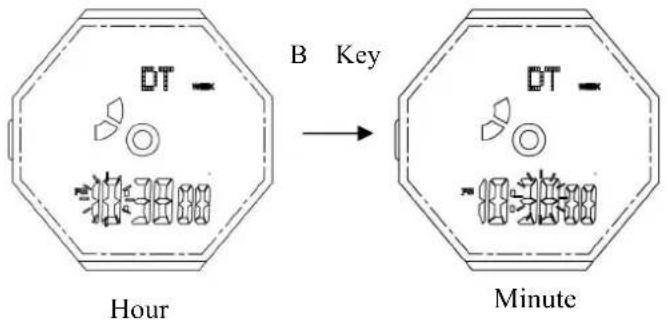
In the real time mode, Press B key 3 times to enter Dual Time Mode, Press and hold C k select "Hour" setting, Press B key to select "Minute" setting,
text_image
B Key DT Hour DT Minute➢ Press D key to adjust the value increment, hold down D key to quickly adjust.
➢ Press C key again to finish setting, and return to Dual Time displaying mode.
In setting mode. 1 minute No key operation automatically exit setting, return to Dual Time displaying mode.
The second of Dual Time is the same as real time
6. Daily Alarm
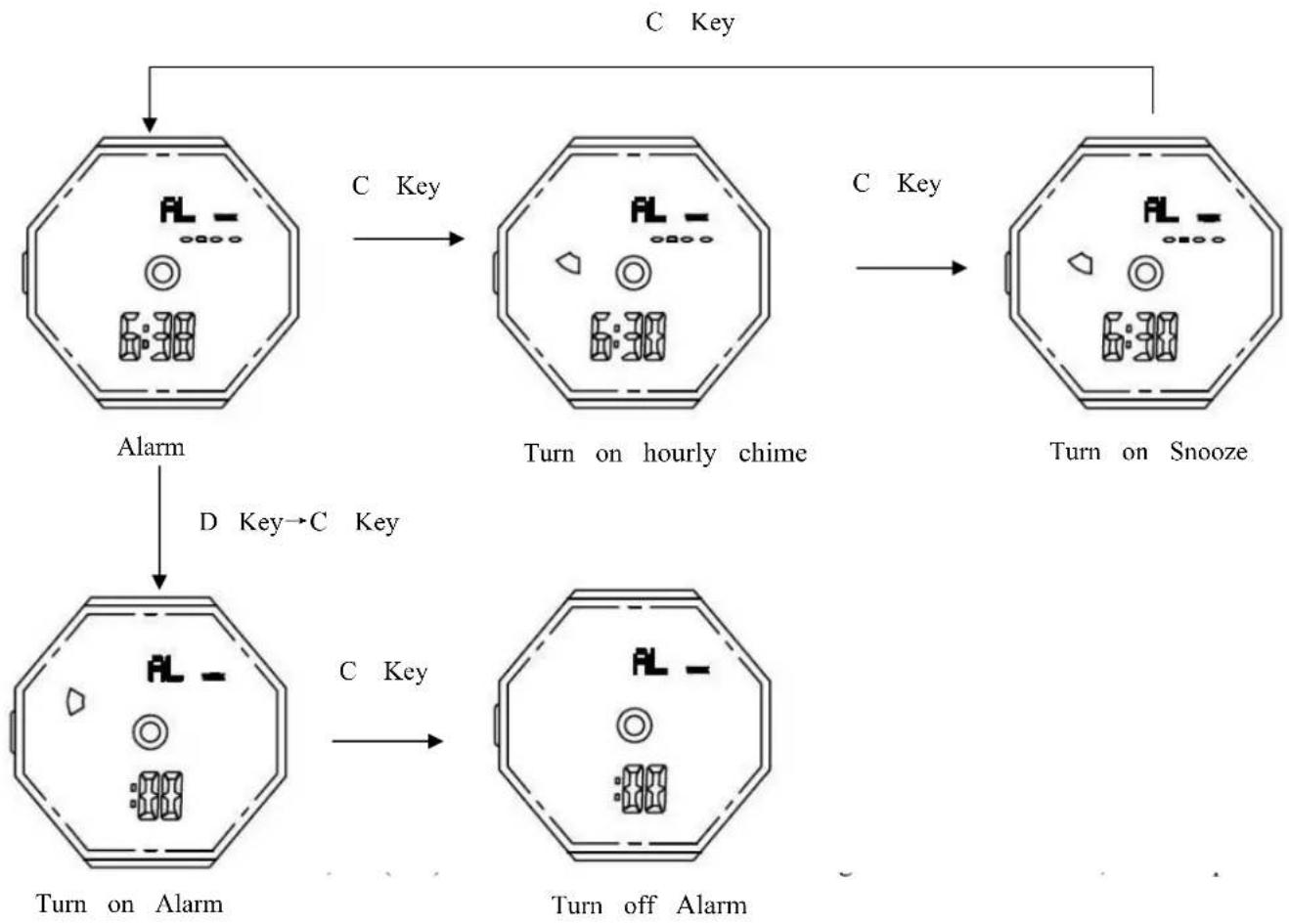
➢ Turn On / Off Alarm, Chime and Snooze
a) In Alarm mode, Press D and then Press C key to turn on/off Alarm ( ),
b) In Alarm Mode, press C to turn on/off hourly chime( 🔑 ) and snooze("SNZ"),
flowchart
graph TD
    A["Alarm"] -->|D Key→C Key| B["Turn on Alarm"]
    B -->|C Key| C["Turn off Alarm"]
    A -->|C Key| D["Turn on hourly chime"]
    D -->|C Key| E["Turn on Snooze"]
    E --> F["C Key"]
    style A fill:#f9f,stroke:#333
    style B fill:#f9f,stroke:#333
    style C fill:#f9f,stroke:#333
    style D fill:#f9f,stroke:#333
    style E fill:#f9f,stroke:#333
    style F fill:#f9f,stroke:#333
Alarm Mode:
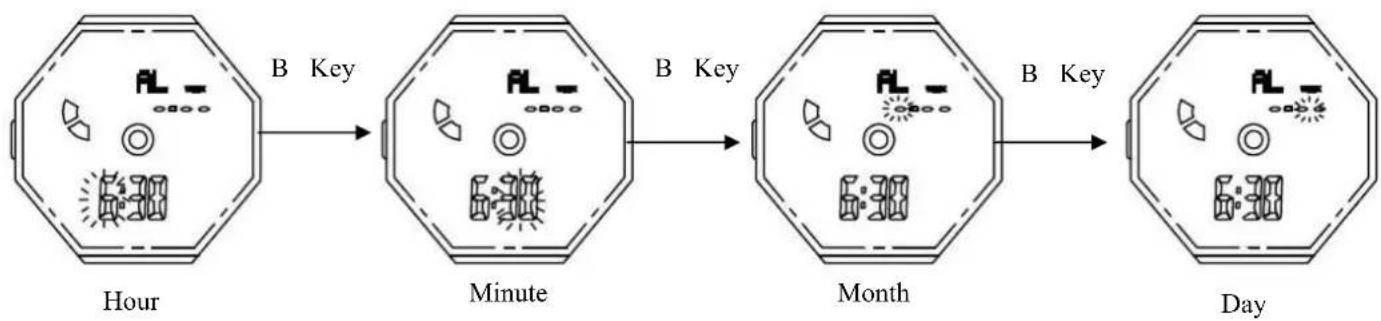
In alarm mode, press and hold C key for 2 seconds to enter the alarm time setting state, then press B key to select the setting items as follows:
flowchart
graph LR
    A["Hour"] -->|B Key| B["Minute"]
    B -->|B Key| C["Month"]
    C -->|B Key| D["Day"]
➢ Press D key to adjust the value increment, hold down D key to quickly adjust.
➢ Press C key to return to Alarm Mode.
In setting mode. No any key operation then will back to alarm display mode automatically after 1 minute.
Remarks:
When you need a daily alarm, do not enter a number at the bottom of the screen. Please set it to "- - - -".
When you need a specify month alarm, you need to enter the number "12- - - " at the bottom of the screen.
CRH123 MOVEMENT INSTRUCTION
When you need a specify day alarm, you need to enter the number "---30" on the bottom of the screen.
When you need a specify date alarm, you need to enter the number, such as "12-30" at the bottom of the screen.
When Alarm is ON, the BB-BB - ring sounds for 10 seconds, the alarm when the screen symbol " flashing, press any key to stop.
Snooze function:
In the Snooze function, The symbol "SNZ" is still flashing on the screen when the alarm stopped
, snooze rings every 5minutes,total ring 6 times.
When the snooze is ringing, press any key is to stop all the after snooze function.
7. Chronograph mode
The measurement range of chronograph is 23 hours 59 minutes 59.99 seconds, when reach the maximum, the chronograph re-count from "0"
➢ Chronograph LAP segment timing can remember 12 groups.
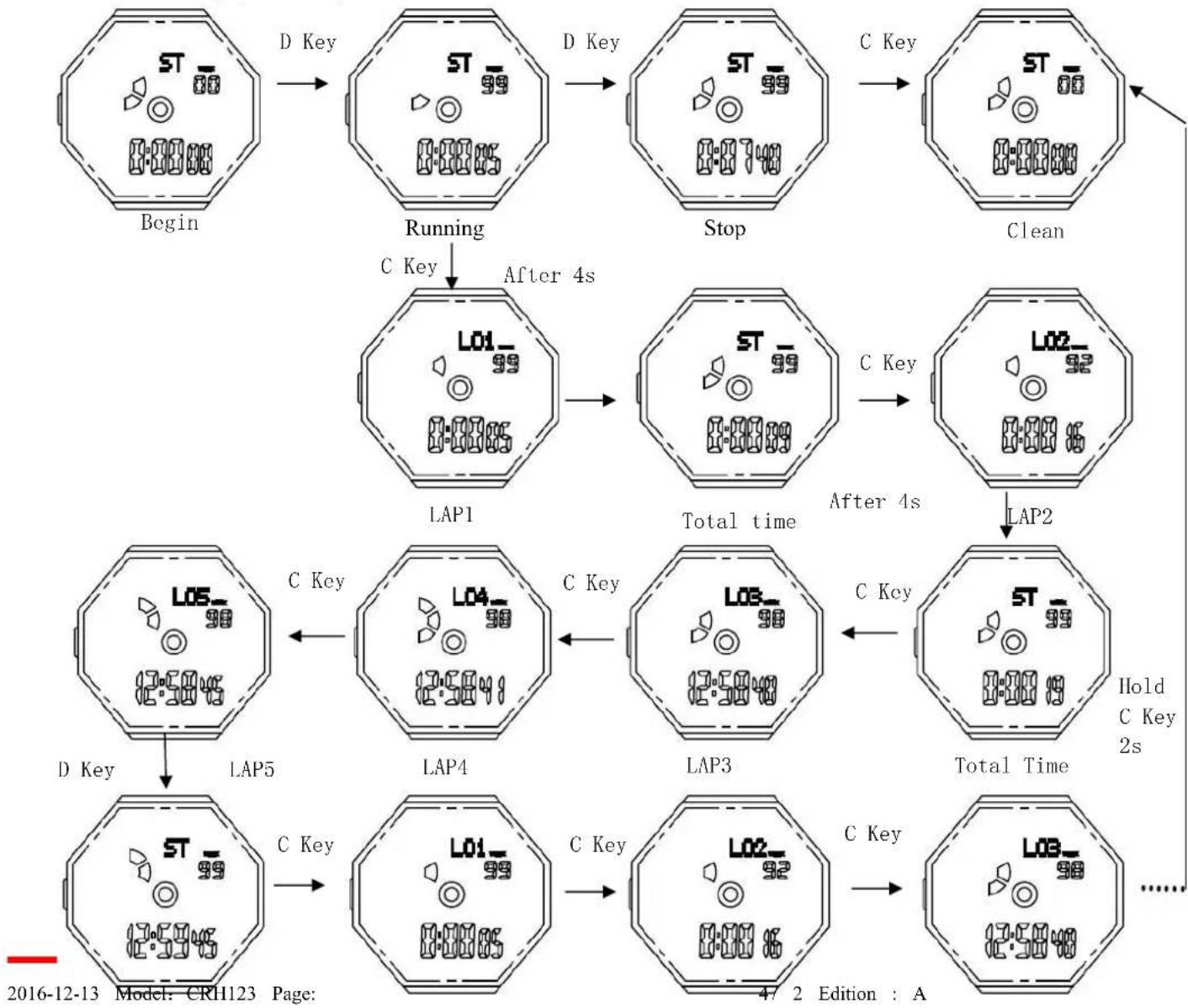
When running the Chronograph:
➢ Press D key to Start/Stop running ;When stop, press C key to zero.
When running, press C key to split counting. Press C key again to next LAP split counting.
In the split counting, press D key to stop counting, Press C key to view the memory mode, again to continue to view the next memory.
When exit split count, hold on C key for 2 seconds to zero.
When running, press B key to return to Real Time mode, and it runs at back.
flowchart
graph TD
    A["Begin"] -->|D Key| B["Running"]
    B -->|C Key| C["LAP1"]
    C -->|After 4s| D["Stop"]
    D -->|C Key| E["LAP2"]
    E -->|After 4s| F["Total time"]
    F --> G["LAP3"]
    G -->|C Key| H["LAP4"]
    H -->|C Key| I["LAP5"]
    I -->|D Key| J["End"]

    style A fill:#f9f,stroke:#333
    style B fill:#f9f,stroke:#333
    style C fill:#f9f,stroke:#333
    style D fill:#f9f,stroke:#333
    style E fill:#f9f,stroke:#333
    style F fill:#f9f,stroke:#333
    style G fill:#f9f,stroke:#333
    style H fill:#f9f,stroke:#333
    style I fill:#f9f,stroke:#333
    style J fill:#f9f,stroke:#333
Stop
Review LAP1
LAP 2
LAP3
8. Countdown mode
The display range of the timer is 1 minute to 23hour 59minute.
In the countdown mode
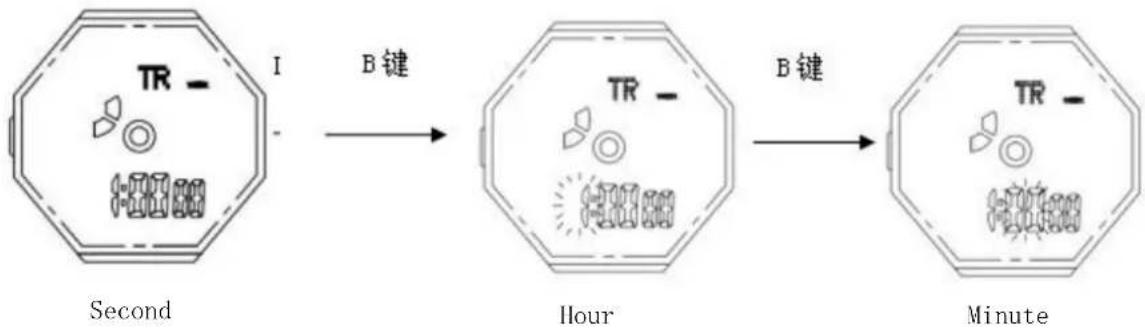
➢ Press and hold C key for 2s to time setting mode and "Seconds" flashes. Press B key to select "Hour", then Press B key "Minute" setting.
flowchart
graph LR
    A["Second: TR -"] -->|B键| B["Hour"]
    B -->|B键| C["Minute"]
➢ Press D key to adjust the value increment, hold down D key to quickly adjust.
➢ Press C key to confirm, press B key return to the real time mode.
In setting mode. No any key operation then will back to countdown mode automatically after 1
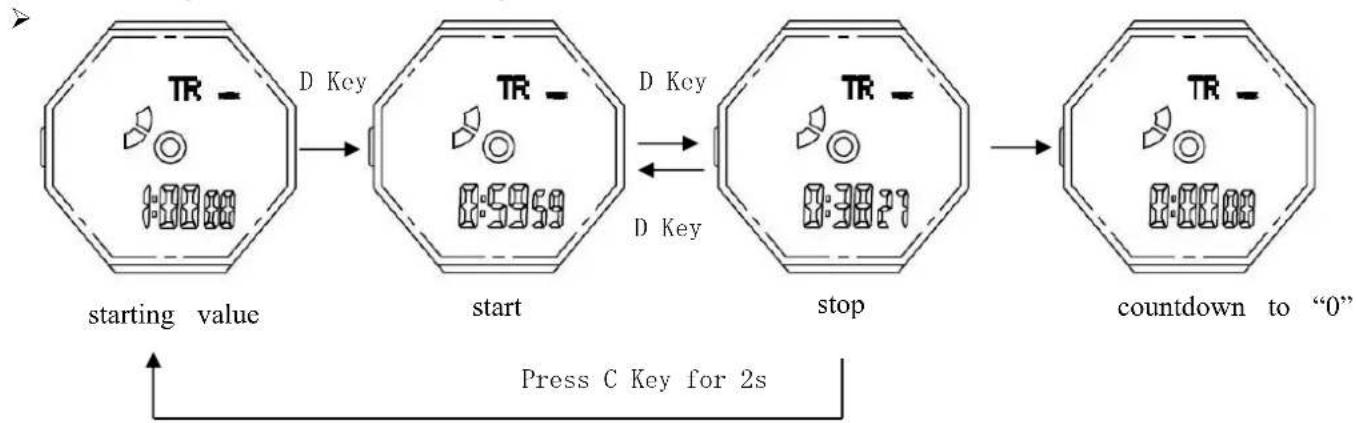
➢ Press D key to Start/Stop counting. Press C key for 2s to starting value when stop counting. Press C key for 2s again back to the setting mode.
flowchart
graph LR
    A["starting value"] --> B["start"]
    B --> C["stop"]
    C --> D["countdown to "0""]
    D --> E["Press C Key for 2s"]
    style A fill:#f9f,stroke:#333
    style B fill:#f9f,stroke:#333
    style C fill:#f9f,stroke:#333
    style D fill:#f9f,stroke:#333
When the countdown stop to zero, the BB-BB - ring sounds for 15 seconds, press any key to stop the ring, when the ring stop, the countdown time will automatically return to the initial setting time.
C. Specifications
➢ Module Size : Φ37.2mm
➢ Module Thickness (include buzzer): 9.2mm
➢ Operational Temperature Range : -10°C\~+60°C
➢ Operational Voltage : 3.0V
➢ Accuracy : ±45sec/month
➢ Battery Code : CR2025(capacitance: 170m Ah)
➢ static average current : ≤1.5u A (static maximum curren8.5 u A)
➢ Alarm average current : ≤2mA (Alarm maximum current 5.0mA
CRH123 MOVEMENT INSTRUCTION
▶ EL lighten average current
➢ Battery life (85%)
(Battery life calculate according to EL lighten four times each day for 3 seconds each time, alarm for 60 seconds each day)