
BXIR2400E - Drill BLACK & DECKER - Free user manual and instructions
Find the device manual for free BXIR2400E BLACK & DECKER in PDF.


| Product Type | Corded Hammer Drill |
| Brand | Black & Decker |
| Model | BXIR2400E |
| Power Supply | 800 W, 230 V ~ 50 Hz |
| No-Load Speed | 0 - 2800 RPM |
| Impact Rate | 0 - 44800 BPM |
| Chuck Size | 13 mm (1/2") keyless |
| Drilling Capacity (Steel) | 13 mm |
| Drilling Capacity (Wood) | 30 mm |
| Drilling Capacity (Concrete) | 16 mm |
| Weight | 2.1 kg |
| Dimensions (L x W x H) | 300 x 80 x 220 mm |
| Protection Class | Class II (Double insulated) |
| Variable Speed Trigger | Yes, with lock-on button |
| Rotation Direction | Forward/Reverse |
| Hammer Function | Yes, switchable |
| Depth Stop | Adjustable |
| Auxiliary Handle | Included |
| Belt Clip | Included |
| Maintenance | Keep vents clean; replace carbon brushes when worn |
| Safety Features | Lock-on button, safety guard, double insulation |
| Spare Parts Availability | Chuck, brushes, switch, power cord available |
| Reparability Index | High (user-serviceable parts) |
Frequently Asked Questions - BXIR2400E BLACK & DECKER
User questions about BXIR2400E BLACK & DECKER
0 question about this device. Answer the ones you know or ask your own.
Ask a new question about this device
Download the instructions for your Drill in PDF format for free! Find your manual BXIR2400E - BLACK & DECKER and take your electronic device back in hand. On this page are published all the documents necessary for the use of your device. BXIR2400E by BLACK & DECKER.
USER MANUAL BXIR2400E BLACK & DECKER
BXIR2400E
BXIR2600E
BXIR2800E
_
| _
一
1
flowchart
graph TD
    A["MAX"] --> B["u_aui"]
    B --> C["u_ig10"]
    C --> D["woci·s1k"]
    D --> E["synthetic"]
    E --> F["..."]

ENGLISH
(Original instructions)
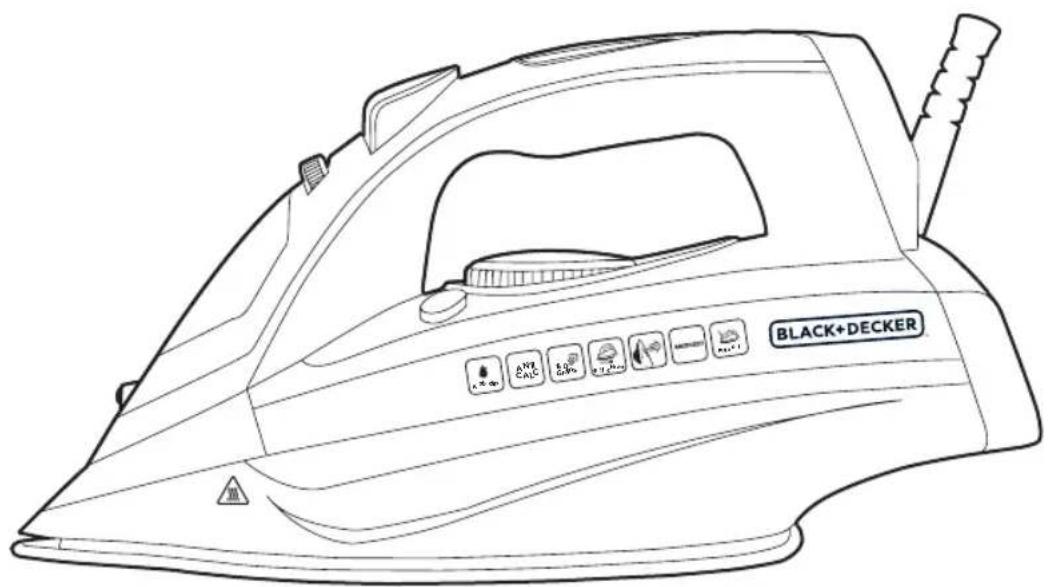
STEAM IRON
BXIR2400E, BXIR2600E, BXIR2800E
Dear customer,
Many thanks for choosing to purchase a BLACK + DECKER brand product.
Thanks to its technology, design and operation and the fact that it exceeds the strictest quality standards, a fully satisfactory use and long product life can be assured.
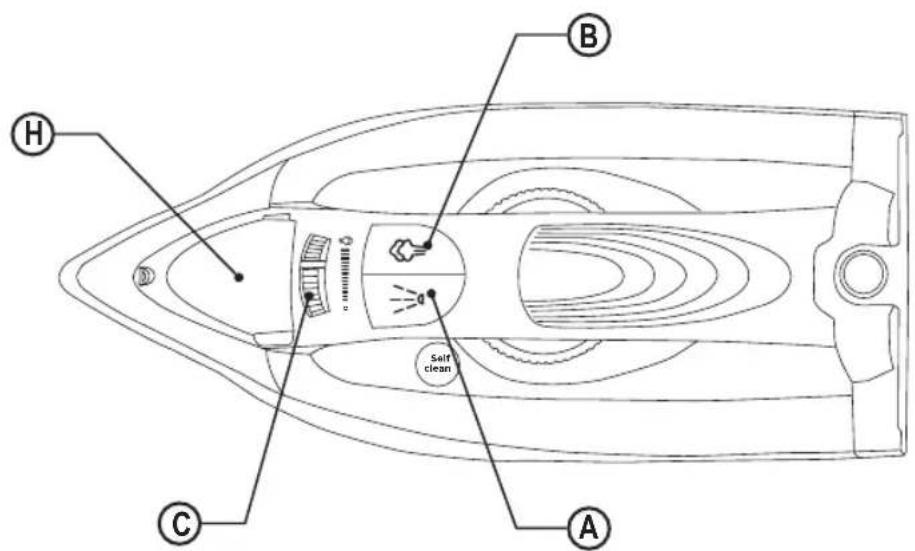
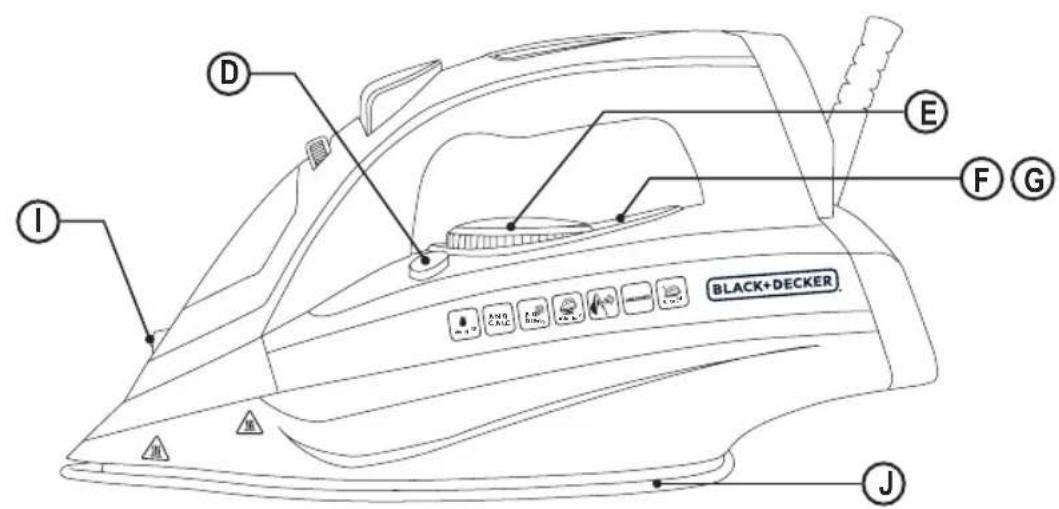
DESCRIPTION
A Spray button
B Steam blast button
C Steam flow control
D Auto-cleaning button
E Temperature regulator
F Pilot light
G Auto-off indicator lamp *
H Filling spout
I Spray nozzle
J Soleplate
*Only available on BXIR2800E
Read these instructions carefully before switching on the appliance and keep them for future reference. Failure to follow and observe these instructions may result in an accident.
SAFETY ADVICE AND WAR- NINGS
- The appliance should be used and placed on a flat and stable surface.
- When the appliance is placed on its support, make sure that the surface on which it is placed is stable.
- Do not leave the appliance unattended while it is connected to the mains supply.
- This appliance can be used by people unused to its handling, disabled people if they have been given
supervision or instruction concerning use of the appliance in a safe way and understand the hazards involved.
- Cleaning and user maintenance must not be done by children unless supervised.
- Keep the appliance and its cable out of reach of children under the age of eight.
- This appliance is not a toy. Children should be supervised to ensure that they do not play with the appliance.
- Do not use the appliance if it has been dropped, if there are visible signs of damage or if it has a leak.
-
The temperature of the accessible surfaces may be high when the appliance is in use.
If the mains connection is damaged, it must be replaced. Take the appliance to an authorised Technical Assistance Service In order to prevent any danger, do not attempt to dismantle or repair it yourself. -
Unplug the appliance from the mains before refilling the water tank.
- Ensure that the voltage indicated on the nameplate matches the mains voltage before plugging in the appliance.
- Connect the appliance to a 16 amp earthed mains socket.
- The appliance's plug must fit into the mains socket properly. Do not modify the plug. Do not use plug adaptors.
- Do not use or store the appliance outdoors.
Do not leave the appliance out in the rain or exposed to moisture. If water gets into the appliance, this will increase the risk of electric shock. - Do not stretch the mains cable. Never use the mains
(Original instructions)
ENGLISH
cable to lift, carry or unplug the appliance.
- Do not wrap the cable around the appliance.
- Ensure that the electric cable does not get trapped or tangled.
- Do not allow the connection cable to hang freely or to come into contact with the appliance's hot surfaces.
- Check the condition of the mains cable. Damaged or twisted cables increase the risk of electric shock.
Do not touch the plug with wet hands.
- Do not use the appliance if the cable or plug is damaged.
If any of the appliance casings breaks, immediately disconnect the appliance from the mains to prevent the possibility of an electric shock.
- Do not touch any heated parts, as this may cause serious burns.
Use and care:
- Fully unroll the appliance’s power cable before each use.
- Do not use the appliance if the accessories attached to it are defective. Replace them immediately.
- Do not use the appliance if the on/off switch does not work.
◆ Use the appliance handle/s, to lift or move it.
Do not use the appliance at an angle or turn it over.
- Do not turn the appliance over while it is in use or connected to the mains.
- To keep the non-stick coating in good condition, do not use metal or pointed utensils on it.
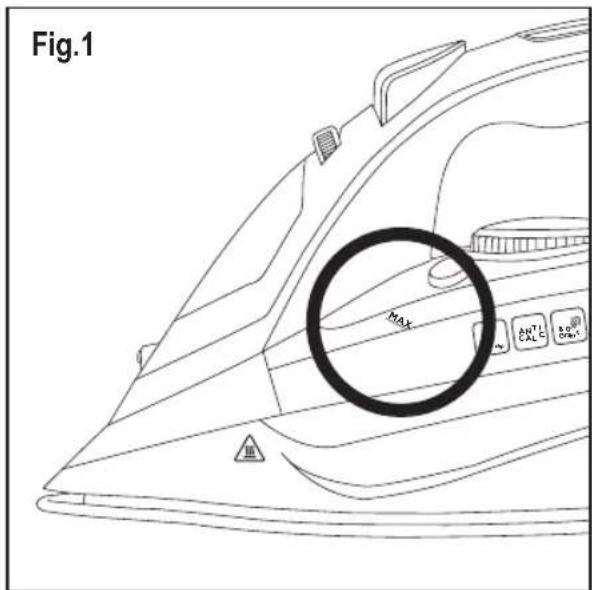
◆ Respect the MAX level indicator. (Fig.1)
- Unplug the appliance from the mains when not in use and before undertaking any cleaning task.
- This appliance is for household use only, not professional or industrial use.
- Store this appliance out of reach of children and/or those with reduced physical, sensorial or mental abilities or who are unfamiliar with its use
- Do not store or transport the appliance if it is still hot.
If the iron is left in its housing at maximum temperature for prolonged periods, this may cause discolouration, which will not affect appliance operation in any way.
- To ensure that the iron functions correctly, keep the soleplate scratch free and do not use it on metal objects (e.g. the ironing board, buttons, zips...)
The use of distilled water is recommended, especially if the water in your area contains any type of silt or is "hard" (contains calcium or magnesium).
- Check that the lid is closed properly before switching the appliance on.
- Never leave the appliance connected and unattended if
is not in use. This saves energy and prolongs the life of the appliance.
- Never rest the appliance on a surface while in use.
- Do not use the appliance on any part of the body of a person or animal.
- Do not use the appliance on pets or animals.
- Do not use the appliance to dry garments of any kind.
- Turning the thermostat control to the minimum (MIN) setting does not guarantee that the iron is switched off completely.
Service:
- Make sure that the appliance is serviced only by specialist personnel, and that only original spare parts or accessories are used to replace existing parts/accessories.
- Misuse or failure to follow the instructions may be dangerous and renders the manufacturer's guarantee null and void.
INSTRUCTIONS FOR USE
Before use:
- Peel off appliance’s protective film.
- Make sure that all the product's packaging has been removed.
- Some parts of the appliance have been lightly greased, consequently, the appliance may give off a light smoke the first time it is used. After a short time, this smoke will disappear.
◆ Prepare the appliance according to the function you wish to use:
Filling with water:
- It is essential to have filled the tank with water to be able to work with steam.
◆ Open the lid on the filling spout.
◆ Fill the tank, taking care to respect the MAX level (Fig.1).
◆ Close the filling spout lid.
Use:
◆ Unroll the cable completely before plugging it in.
- Connect the appliance to the mains.
- Turn the thermostat control to the desired temperature position.
- Do not use temperatures higher than those indicated on the garments to be ironed.
ENGLISH
(Original instructions)
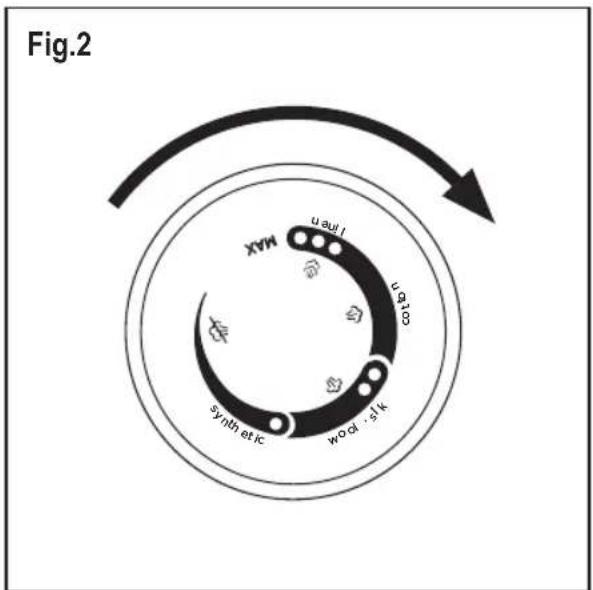
- Temperature for synthetic fibres (Polyester, Nylon...).
● Temperature for silk, wool. (Minimum temperature for ironing with steam)
●●● Temperature for cotton.
Max Temperature for linen.
If garment has various kinds of fibres, select the temperature for the fibre that requires the lowest temperature. (For example, select the temperature for polyester for a fabric made out of 60% polyester and 40% cotton).
- Wait until the pilot light (F) has gone out, indicating that the appliance has reached an adequate temperature.
During use the pilot light (F) will automatically flash on and off, indicating that the heating elements are operating in order to maintain the desired temperature.
Dry ironing:
- The appliance has a steam flow regulator which, when set to 1, allows dry ironing (without steam).
Steam Ironing:
- It is possible to iron with steam whenever the tank has water and the adequate temperature is selected.
Steam flow control:
- The appliance has a (C) control knob for adjusting the steam flow.
Spray:
- The spray can be used in both steam and dry ironing.
- Press the spray button (A) to use this operation.
- The spray button has to be pressed repeatedly to release the first spray.
Steam blast:
- This function provides extra steam for removing creases.
- Press the steam blast button (B). Wait a few seconds until the steam penetrates the fibres of the garment before pushing the button again. For optimum steam quality, do not apply more than three successive blasts.
- The spray button has to be pressed repeatedly to release the first spray.
Vertical ironing:
It is possible to iron hanging curtains, items of clothing on their own hanger, etc. To do so, follow these instructions:
- Select the iron's maximum temperature by turning the
iron's temperature regulator clockwise. (Fig 2)
- Iron from top to bottom while pressing the steam control (B). Important: for cotton and linen, it is recommended to put the base of the iron in contact with the material. For other more delicate fabrics, it is recommended to keep the base of the iron a few centimetres away.
Auto-off function (auto-off): \*
For the purpose of saving energy, the appliance switches to auto-off mode (auto-off) if it is not moved for a particular period of time. When this happens, a beep will sound and the auto-off indicator light (G) will flash, indicating that this function is activated.
- Auto-off in horizontal position: after about 30 seconds without moving the appliance.
- Auto-off in upright position: after about 8 minutes without moving the appliance.
- To return to normal operation, simply move the appliance again.
*Only available on BXIR2800E
Once you have finished using the appli- ance:
- Select the minimum position (MIN) using the thermostat control.
◆ Unplug the appliance from the mains. - Remove the water from the water tank.
- Clean the appliance
CLEANING
- Unplug the appliance from the mains and let it cool down before performing any cleaning task.
- Clean the appliance using a damp cloth with a few drops of detergent and then dry it.
Do not use solvents, or products with an acid or base pH such as bleach, or abrasive products, for cleaning the appliance. - Do not immerse the appliance in water or any other liquid, or place it under a running tap.
Self-cleaning function:
It is important to self-clean the appliance at least once a month to remove calcium and any other built-up minerals inside the iron.
- Fill the water tank to its maximum level, as indicated in the “filling with water” section.
◆ Place the iron in an upright position, plug in to the mains
and select maximum temperature.
Leave the appliance to heat up until the pilot light indicates that it has reached its consigned temperature.
- Unplug the appliance and place it in the sink.
- Press and hold the self-clean button.
- Let the water flow out through the steam vents in the base, while lightly shaking the appliance.
- Release the button after a minute or when the tank becomes empty.
Leave the iron in the upright position until it has cooled.
- The product does not contain concentrations of substances that could be considered harmful to the environment.
This symbol means that if you wish to dispose of the product once its useful life has ended, it must be deposited with an authorised waste management agent for the selective collection of Waste Electrical and Electronic Equipment (WEEE)
\* How to deal with lime scale incrustations:
- For the appliance to work correctly it should be kept free of lime scale or magnesium incrustations caused by the use of hard water.
- To prevent this kind of problem, we recommend the use of water with low lime or magnesium mineralisation.
- Homemade solutions are not recommended for de-scaling this appliance, such as the use of vinegar.

This symbol indicates that the surface may heat up during use.
This appliance complies with Directive 2014/35/EC on Low Voltage, with Directive 2014/30/EU on Electromagnetic Compatibility, with Directive 2011/65/EU on restrictions on the use of certain dangerous substances in electrical and electronic appliances and with Directive 2009/125/EC on the ecological design requirements applicable to products related to energy.
FAULTS AND REPAIR
Take the appliance to an authorised technical support service if problems arise. Do not try to dismantle or repair it, as this may be dangerous.
- If the mains cable has been damaged, it must be replaced, proceed as in the case of a fault.
WARRANTY AND TECHNICAL ASSISTANCE
- This product enjoys the recognition and protection of the legal guarantee in accordance with current legislation. To enforce your rights or interests you must go to any of our official technical assistance services.
You can find the closest one by accessing the following web link: http://www.2helpu.com/. - You can also request related information, by contacting us (see the last page of the manual).
- You can download this instruction manual and its updates at http://www.2helpu.com/.
For EU product versions and/or in the case that it is requested in your country:
Ecology and recyclability of the product
- The packaging materials for this appliance are included in a collection, classification and recycling system. Should you wish to dispose of them, use the appropriate public containers for each type of material.
FRANÇAIS
(Instructions initiales)
FER À REPASSER VAPEUR
BXIR2400E, BXIR2600E, BXIR2800E
Cher Client,
BXIR2400E, BXIR2600E, BXIR2800E
BXIR2400E, BXIR2600E, BXIR2800E
Egregio cliente,
BXIR2400E, BXIR2600E, BXIR2800E
BXIR2400E, BXIR2600E, BXIR2800E
Caro cliente:
BXIR2400E, BXIR2600E, BXIR2800E
Geachte klant:
BXIR2400E, BXIR2600E, BXIR2800E
Szanowny Kliencie,
BXIR2400E, BXIR2600E, BXIR2800E
Αξιότιμε πελάτη:
BXIR2400E, BXIR2600E, BXIR2800E
Уважаемый клиент!
BXIR2400E, BXIR2600E, BXIR2800E
Stimate client,
BXIR2400E, BXIR2600E, BXIR2800E
Уважаеми клиенти,

- ENGLISH
- (Original instructions)
- STEAM IRON
- Dear customer,
- DESCRIPTION
- SAFETY ADVICE AND WAR- NINGS
- Use and care:
- Service:
- INSTRUCTIONS FOR USE
- Before use:
- Filling with water:
- Use:
- Dry ironing:
- Steam Ironing:
- Steam flow control:
- Spray:
- Steam blast:
- Vertical ironing:
- Auto-off function (auto-off): \*
- Once you have finished using the appli- ance:
- CLEANING
- Self-cleaning function:
- \* How to deal with lime scale incrustations:
- FAULTS AND REPAIR
- WARRANTY AND TECHNICAL ASSISTANCE
- For EU product versions and/or in the case that it is requested in your country:
- Ecology and recyclability of the product
- FRANÇAIS
- (Instructions initiales)
- FER À REPASSER VAPEUR
- Cher Client,
- Egregio cliente,
- Caro cliente:
- Geachte klant:
- Szanowny Kliencie,
- Αξιότιμε πελάτη:
- Уважаемый клиент!
- Stimate client,
- Уважаеми клиенти,
Brand : BLACK & DECKER
Model : BXIR2400E
Category : Drill