
MW1801 - Réfrigérateur à boissons LIEBHERR - Free user manual and instructions
Find the device manual for free MW1801 LIEBHERR in PDF.


| Product Type | Beverage Refrigerator (Wine Cooler) |
| Model | MW1801 |
| Power Supply | 110-120 VAC, 15/20 A circuit, grounded |
| Temperature Range | 41°F to 68°F (5°C to 20°C) |
| Climate Rating | SN-ST (50°F to 100°F ambient) |
| Capacity | Up to 75 bottles (0.75L Bordeaux) |
| Number of Shelves | 5 wooden pull-out shelves |
| Shelf Max Load | 44 lbs (20 kg) per shelf |
| Interior Light | LED presentation light, adjustable brightness (20%-100%) |
| Fan | Interior circulation fan, switchable for humidity control |
| Sabbath Mode | Yes, STAR-K Kosher certified |
| SmartDevice | Optional SmartDeviceBox for connectivity (Wi-Fi) |
| Refrigerant | R600a (flammable, environmentally friendly) |
| Air Filter | Replaceable carbon filter for improved air quality |
| Dust Filter | Cleanable filter in toe kick area |
| Serving Shelf | Pull-out serving shelf for bottles and glasses |
| Bottle Holders | Included for maximum bottle storage |
| Security | Child lock (key lock optional), anti-tip |
| Defrost | Automatic defrost |
| Noise Level | Approx. 35 dB (typical for wine coolers) |
| Dimensions (H x W x D) | 34" x 18" x 24" (estimated, refer to manual for exact) |
| Weight | Approx. 100 lbs (estimated) |
Frequently Asked Questions - MW1801 LIEBHERR
User questions about MW1801 LIEBHERR
0 question about this device. Answer the ones you know or ask your own.
Ask a new question about this device
Download the instructions for your Réfrigérateur à boissons in PDF format for free! Find your manual MW1801 - LIEBHERR and take your electronic device back in hand. On this page are published all the documents necessary for the use of your device. MW1801 by LIEBHERR.
USER MANUAL MW1801 LIEBHERR
natural_image
Technical line drawing of a dual-panel refrigerator with open doors and internal compartments (no text or symbols)MW 18.. / MW 24..
7085 822-01
Table of Contents Page
Please Read and Follow these Instructions.... 2
California Proposition 65 ...... 3
Disposal of Old Appliance 3
Disposal of this Appliance 3
Disposal of Packaging Material.... 3
Important Safety Information.... 4
R600a Refrigerant 5
Electrical Safety 6
Safety Regulations....6
Description of the Appliance 7
Control Panel 8
Switching the Appliance On 8
Changing Language and Temperature Unit....8
Main Menu 9
Setting the Temperature....9
Fan 10
Presentation Light....10
SabbathMode....11
Switching the Appliance Off....11
Maintenance Message 12
Maintenance Confirmation....12
Setup Menu....13
SmartDeviceBox....15
Description of the SmartDevice Displays....16
Alarm Messages....16
Storage Diagram....18
Equipment....19
Cleaning 21
Removing and Inserting the Wooden Shelves ...... 21
Maintenance Menu 23
Maintenance 24
Additional Functions 26
Troubleshooting 29
Customer Service 29
Appliance Information....29
Please Read and Follow these Instructions
These instructions contain Danger, Warning, and Caution notes.
This information is important for safe and efficient installation and operation.
Always read and comply with all Danger, Warning, and Caution notes!

Danger indicates a hazard which will cause serious injury or death if precautions are not followed.

Warning indicates a potentially hazardous situation which, if not avoided, could result in death or serious injury.

Caution indicates a potentially hazardous situation which, if not avoided, may result in minor or moderate injury.
IMPORTANT
This indicates information that is especially relevant to a problem-free installation and operation.
IMPORTANT
All types and models are subject to continuous improvement. The manufacturer reserves the right to make modifications to the shape, equipment, and technology.
California Proposition 65
- This product contains chemicals known to the state of California to cause cancer or reproductive harm.
- This product can expose you to chemicals including Diisononyl Phthalate (DINP) which is known to the State of California to cause cancer. For more information go to www.P65Warnings.ca.gov.
- This product can expose you to chemicals including Diisodecyl Phthalate (DIDP) which is known to the State of California to cause birth defects or other reproductive harm. For more information go to www.P65Warnings.ca.gov.
Disposal of Old Appliance

Risk of child entrapment.
Child entrapment and suffocation are not problems of the past.
Junked or abandoned refrigerators are still dangerous – even if they will sit for “just a few days.”
If you are getting rid of your old refrigerator, please follow these instructions to help prevent accidents.
Before you discard old appliances:
• Take off the doors.
- Leave the shelves in place so that children may not easily climb inside.
- Cut off the power cord from the discarded appliance. Discard separately from the appliance.
- Be sure to follow your local requirements for disposal of appliances.
Contact the trash collection agency in your area for additional information.
Disposal of this Appliance
This appliance contains flammable gases within the refrigeration circuit and insulation foam.
Contact the municipality or disposal company in your area for information on approved recycling or disposal.
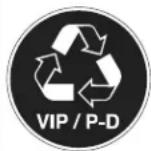
This label or a similar one can be located on the rear of the appliance. It refers to the foamed-in panels in the door and/or the housing. This notice only applies for recycling. Do not remove the label.
Disposal of Packaging Material
The packaging is designed to protect the appliance and individual components during transport and is made of recyclable materials.

Keep packaging materials away from children. Polythene sheets and bags can cause suffocation!
If possible, please recycle packaging material at a recycling facility.
Important Safety Information
- WARNING: Keep ventilation openings, in the appliance enclosure or in the built-in structure, clear of obstruction.
- WARNING: Do not use mechanical devices or other means to accelerate the defrosting process, other than those recommended by the manufacturer.
- WARNING: Do not damage the refrigerant circuit.
- WARNING: The power cord must not be damaged while installing the appliance.
- WARNING: Multi-sockets or distributor strips and other electronic devices (such as halogen transformers) must not be positioned and operated at the rear of appliances.
- WARNING: Danger of injury through electric shock! There are live parts under the cover. Only have the interior LED light replaced or repaired by customer service staff or trained personnel.
- WARNING: Risk of injury from the LED lamp. The light intensity of the LED light complies with laser class RG 2. If the cover is defective, do not look directly at the light through optical lenses from close distance. This may damage your eyes.
- WARNING: This appliance must be secured as described in the Use and Care Manual (Installation Instructions) to rule out any potential risks due to its instability.
-
WARNING: Do not use electrical appliances inside the food storage compartments of the appliance, unless they are of the type recommended by the manufacturer.
-
Any repairs and work on the appliance should only be performed by the customer service department. Unauthorized work may be dangerous to the user. The power source cable should only be changed or replaced by the customer service department.
Component parts and power cords shall be replaced with like components performed by factory authorized service personnel only.
- Do not stand on the toe kick, drawers or doors or use them to support anything else.
- This appliance is not intended for use by persons (including children) with reduced physical, sensory or mental capabilities or lack of experience and knowledge unless they have been given initial supervision or instruction concerning use of the appliance by a person responsible for their safety. Children should be supervised to ensure that they do not play with the appliance.
- Do not store explosive substances such as aerosol cans with a flammable propellant in this appliance.
- To prevent injury and damage to property, the appliance should only be installed by two people.
- Check the appliance for signs of damage after unpacking. Contact the supplier if it is damaged. Do not connect the appliance to the mains power supply.
- Avoid prolonged skin contact with cold surfaces (e.g., chilled/frozen products). If necessary, take safety action (e.g., gloves).
• Do not consume food which has been stored
for too long; it could cause food poisoning.
- Any repairs and work on the appliance should only be performed by the customer service department or other trained personnel. The same applies to changing the power cord.
- Only perform repair and other work on the appliance when the plug has visibly been disconnected.
- Only install, connect, and dispose of the appliance as described in this Use and Care Manual.
- In the event of a fault, pull out the plug or switch off the fuse.
- When disconnecting the appliance from the power source, pull it out by the plug, never pull on the cable.
- If you have a lockable appliance, do not keep the key near the appliance or within reach of children.
- The appliance is designed for use in enclosed rooms. Do not operate the appliance outdoors or in areas where there is moisture or splashing water.
- Do not use the interior LED light to light the room. The interior LED light is only designed to illuminate the interior of the appliance.
- Do not allow naked flames or ignition sources to enter the appliance.
- Alcoholic drinks or other vessels containing alcohol should be sealed tightly for storage.
R600a Refrigerant

The refrigerant R600a contained within the appliance is environmentally friendly, but flammable. Leaking refrigerant can ignite.
Electrical Safety
Connect this appliance to a 15 amp or 20 amp, 110-120 VAC, circuit which is grounded and protected by a circuit breaker or fuse.
We recommend using a dedicated circuit for this appliance to prevent circuit overload and the chance of interruption to the appliance.
This appliance is equipped with a three-prong (grounding) polarized plug for your protection against possible shock hazards.
Where a two-prong wall receptacle is encountered, contact a qualified electrician and have it replaced with a properly grounded three-prong receptacle in accordance with all local codes and ordinances.

Electrocution hazard.
Electrical grounding required.
- Do not remove the round grounding prong from the plug.
- Do not use extension cords or ungrounded (two prong) adapters.
- Do not use a power cord that is frayed or damaged.
- Do not use a power strip.
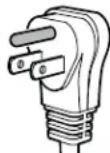
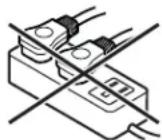
Failure to follow these instructions may result in fire, electrical shock or death.
Safety Regulations
This appliance is intended to be used in household and similar applications.
This includes, for example, use
- in staff kitchenettes, bed and breakfast establishments,
- by guests in cottages, hotels, motels and other forms of accommodation,
- in catering and similar services in the wholesale trade.
IMPORTANT
The appliance is not intended for outdoor use.
The appliance is manufactured to operate within specific ambient temperature limits according to its climate rating.
The climate rating indicates the ambient temperature at which the appliance may be operated in order to achieve full refrigeration performance.
Climate Rating Ambient Temperature
SN-ST 50°F to 100°F (10°C to 38°C)
IMPORTANT
Do not operate the appliance outside the specified ambient temperature range.
- The refrigerant circuit has been tested for leaks.
- The appliance complies with current safety regulations
CAN/CSA C22.2 No. 60335-2-24 / UL 60335-2-24
CAN/CSA C22.2 No. 60335-1 / UL 60335-1
We recommend cleaning the appliance before turning it on for the first time. See Cleaning.
Turn on the appliance several hours before loading it.

Do not allow children to play with the appliance. Children must not climb, sit or stand on the shelves or door.
Failure to follow these instructions may result in death or serious injury.
Description of the Appliance
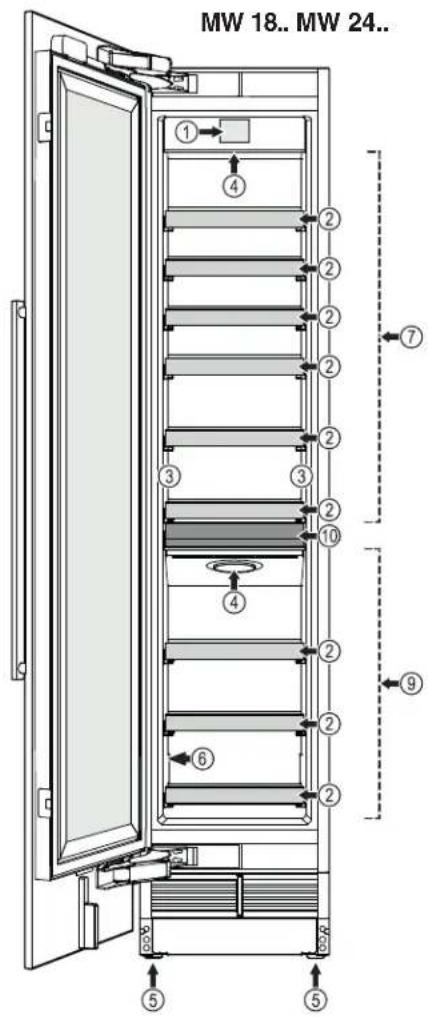
(1) Control panel
(2) Pull-out shelf
(3) Presentation light
(4) Air filter
(5) Adjustable-height feet
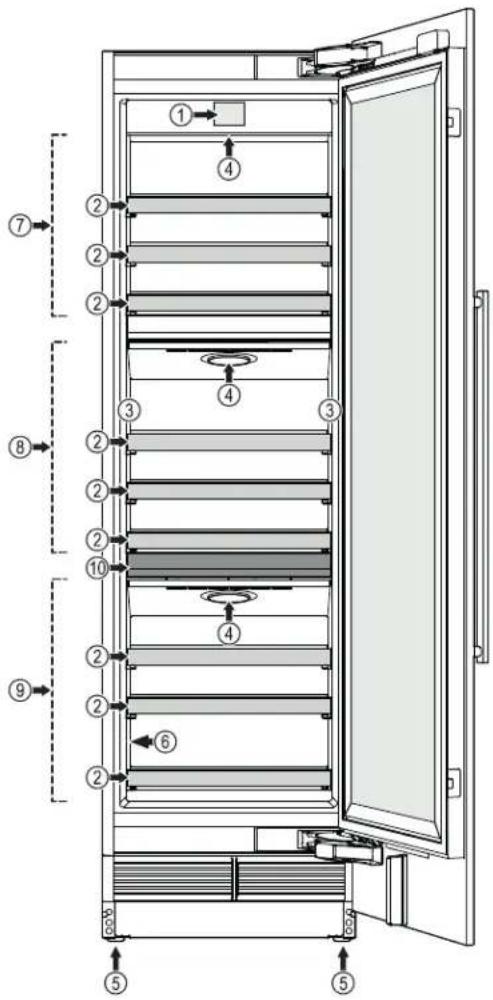
(6) Model plate
(7) Top zone
(8) Middle zone (MW 24.. only)
(9) Bottom zone
(10) Serving shelf
Control Panel
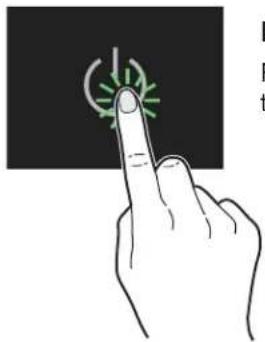
Three different actions to operate the control panel.
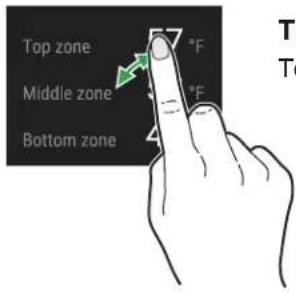
Touch
Touch to activate functions.
natural_image
Hand pointing at a green circular icon on a black background (no text or symbols)Press
Press for approx. 2 seconds to activate functions.
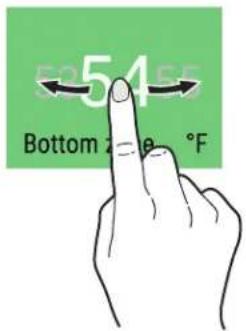
Slide
Slide to right or left to navigate in the menu or to search for values.
Switching the Appliance On
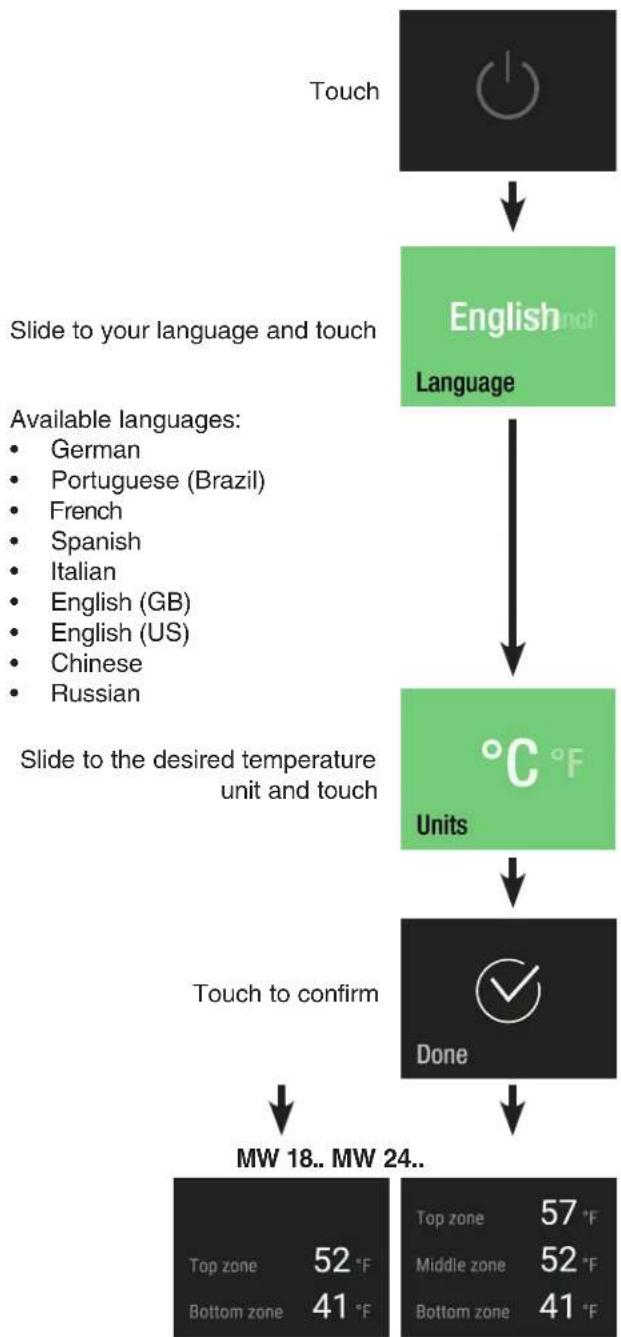
flowchart
graph TD
    A["Touch"] --> B["English Language"]
    B --> C["°C °F Units"]
    C --> D["Done"]
    D --> E["MW 18.. MW 24.."]
    F["Available languages: <br>• German <br>• Portuguese (Brazil) <br>• French <br>• Spanish <br>• Italian <br>• English (GB) <br>• English (US) <br>• Chinese <br>• Russian"] --> C
    G["Touch to confirm"] --> D
    H["Top zone 52 °F<br>Bottom zone 41 °F"] --> D
    I["Top zone 57 °F<br>Middle zone 52 °F<br>Bottom zone 41 °F"] --> D
Changing Language and Temperature Unit
For future changes of language and temperature unit, the appliance must be switched off and on again (customer settings will not be deleted).
Main Menu
Slide through the main menu. The following functions are available.
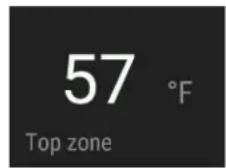
Temperature display for top zone and temperature setting.
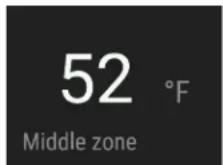
Temperature display for middle zone and temperature setting (MW 24.. only).
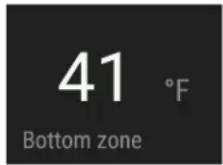
Temperature display for bottom zone and temperature setting.
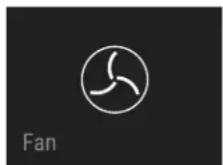
Switching the fan on and off.
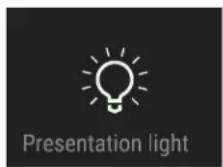
Adjusting the presentation light brightness.
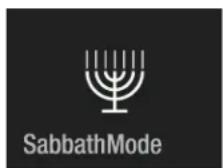
Appliance operating mode for Sabbath and holidays. Complies with STAR-K Kosher Certification.
Switching the appliance on or off.
Describes how to replace the filters and clean the dust filter.
Allows the adjustment of display brightness and includes the appliance information (service number, model name, serial number).
Setting the Temperature
The standard setting is 54°F (all zones).
The various zones can be adjusted independently of each other.
Slide to the required zone. Touch
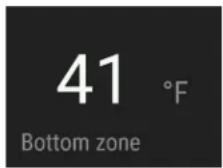
Slide to the desired target temperature and touch
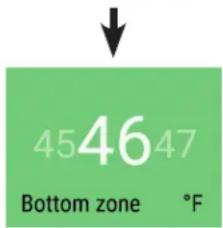
The number flashing at the bottom right shows the actual interior temperature. It disappears when the target temperature is reached.
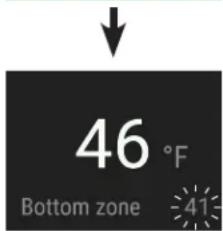
Close the appliance door.
MW 18..
Display when the door is opened again.
MW 24..
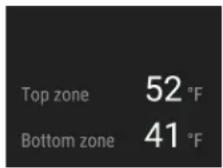
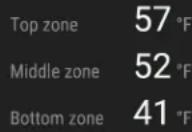
The temperature display will flash if the actual interior temperature differs from the target temperature. It will stop flashing when the target temperature has been reached.
If you place a large quantity of unchilled wine in the appliance, the set temperature differential may be active for a lengthy period (up to 24 hours) before the set temperature is reached.
The temperature can be set between 41^ F and 68^ F.
Fan
The interior fan ensures a constant and even interior temperature, and a suitable climate for wine storage.
Switching on the fan (all zones) will further increase the humidity in the appliance, which has a particularly positive effect for long-term storage.
The increased level of humidity prevents the corks from drying out.
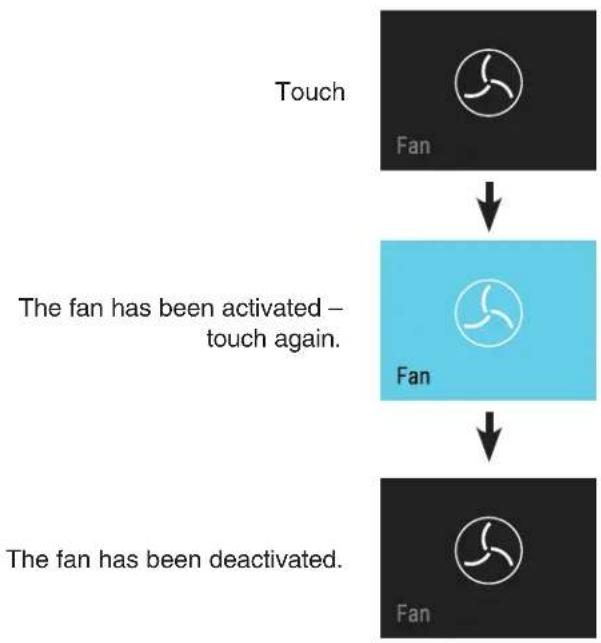
flowchart
graph TD
    A["Touch Fan"] --> B["The fan has been activated – touch again."]
    B --> C["The fan has been deactivated."]
Presentation Light
The presentation light is located on the left and right of the compartment. It will switch on when the appliance door is opened or can be switched on permanently.
Adjusting the Brightness of the Presentation Light
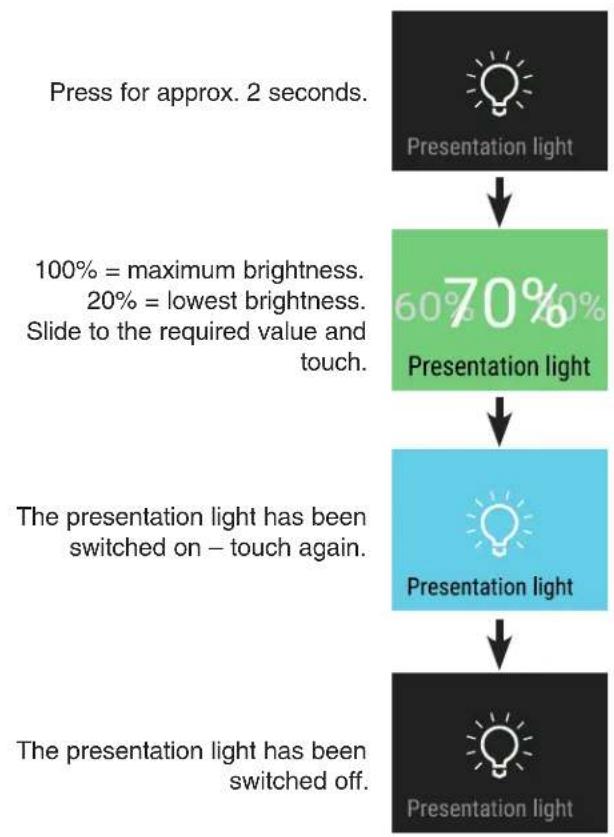
flowchart
graph TD
    A["Press for approx. 2 seconds."] --> B["Presentation light"]
    B --> C["100% = maximum brightness, 20% = lowest brightness. Slide to the required value and touch."]
    C --> D["70% Presentation light"]
    D --> E["The presentation light has been switched on – touch again."]
    E --> F["Presentation light"]
    F --> G["The presentation light has been switched off."]
Switching on the Presentation Light
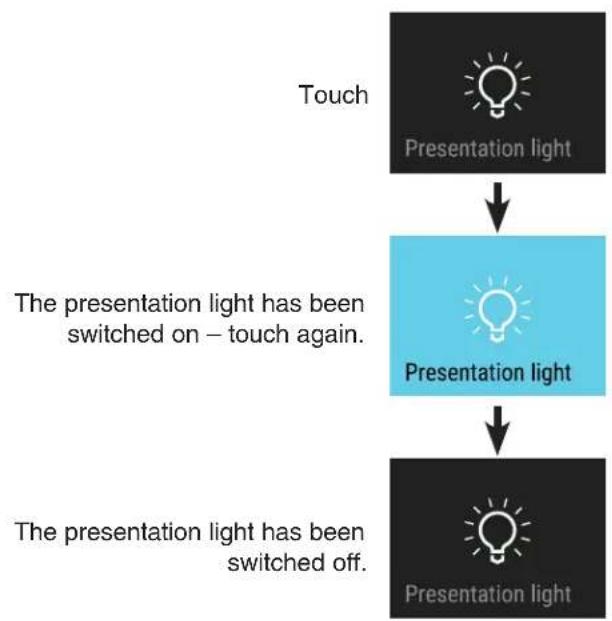
flowchart
graph TD
    A["Touch"] --> B["Presentation light"]
    B --> C["The presentation light has been switched on – touch again."]
    C --> D["Presentation light"]
    D --> E["The presentation light has been switched off."]
SabbathMode
When SabbathMode is active, some functions of the electronic features are switched off to comply with STAR-K Kosher Certification.
• The lighting remains off.
• There is no door alarm.
• There is no temperature alarm.
- The unit will return to SabbathMode after a power failure.
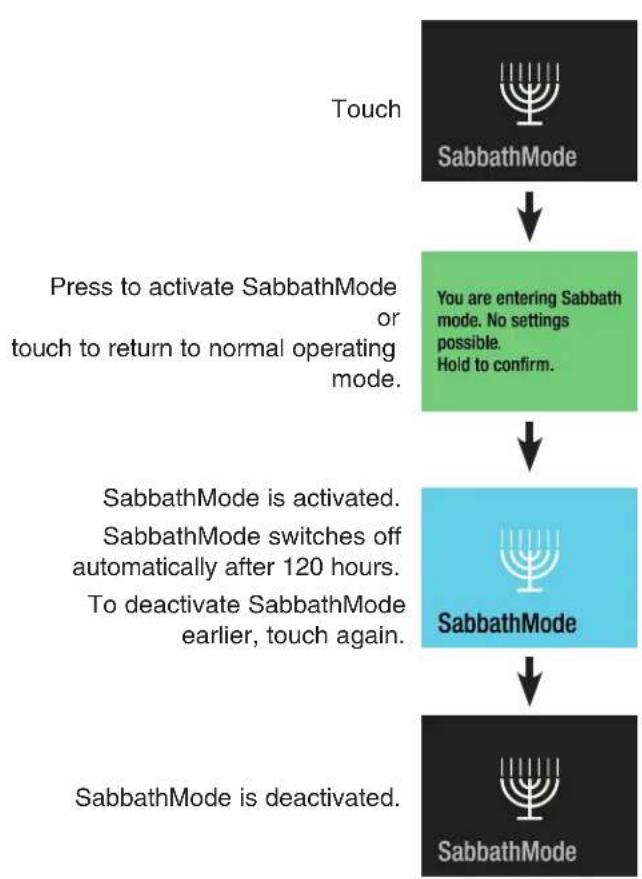
flowchart
graph TD
    A["Touch"] --> B["SabbathMode"]
    B --> C["Press to activate SabbathMode or touch to return to normal operating mode."]
    C --> D{You are entering Sabbath mode. No settings possible. Hold to confirm.}
    D --> E["SabbathMode is activated. SabbathMode switches off automatically after 120 hours. To deactivate SabbathMode earlier, touch again."]
    E --> F["SabbathMode is deactivated."]
Switching the Appliance Off
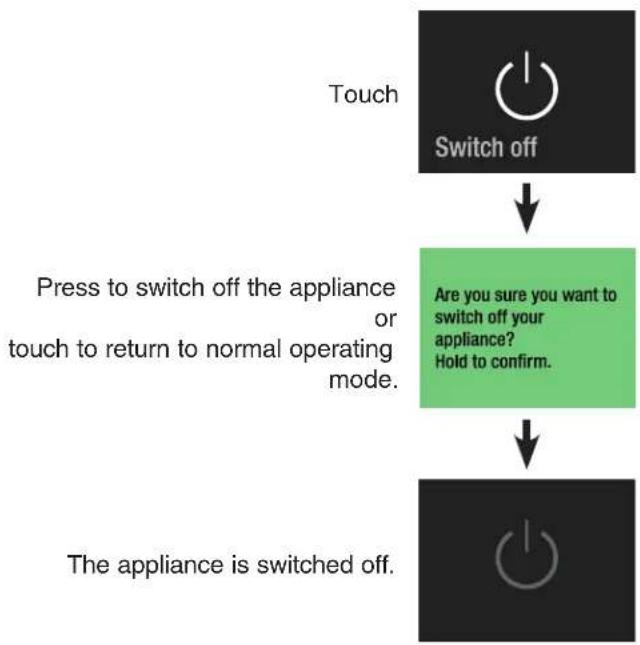
flowchart
graph TD
    A["Touch"] --> B["Switch off"]
    B --> C["Press to switch off the appliance or touch to return to normal operating mode."]
    C --> D{Are you sure you want to switch off your appliance? Hold to confirm.}
    D --> E["The appliance is switched off."]
Maintenance Message
The maintenance message will sound at regular intervals while the appliance is operating. The dust filter requires cleaning.
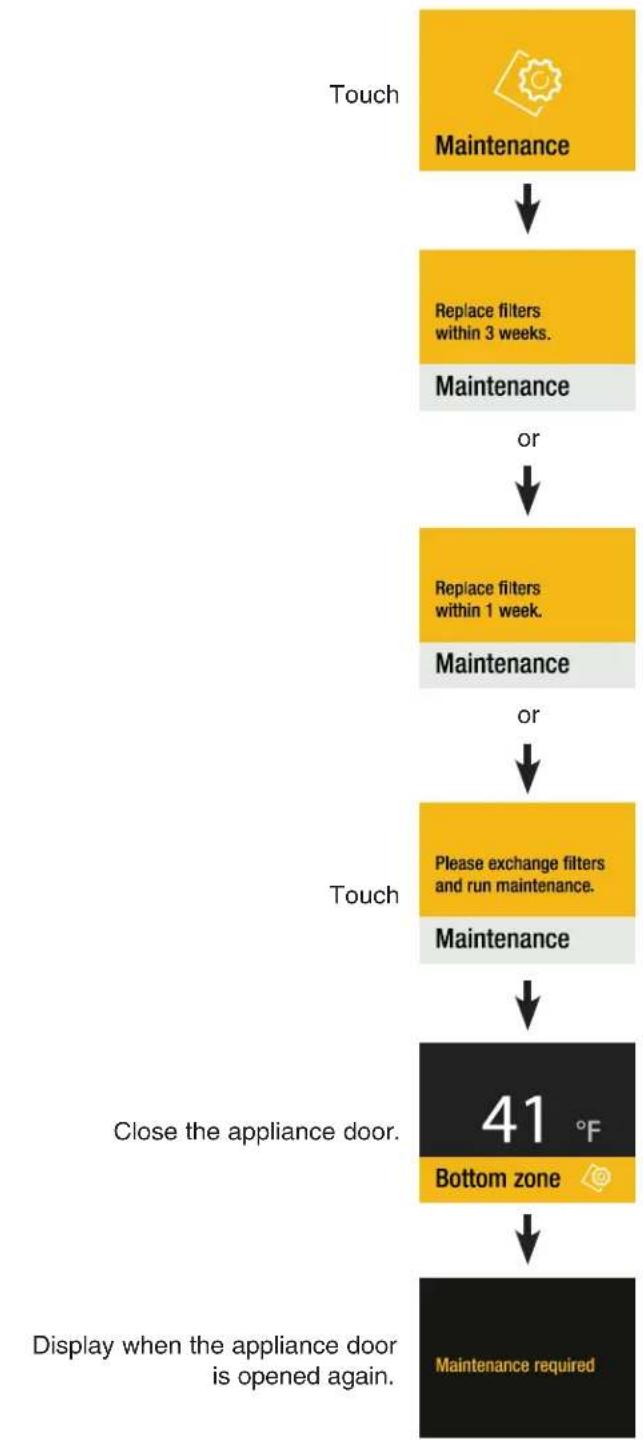
flowchart
graph TD
    A["Touch"] --> B["Maintenance"]
    B --> C["Replace filters within 3 weeks."]
    C --> D["Maintenance"]
    D --> E["or"]
    E --> F["Replace filters within 1 week."]
    F --> G["Maintenance"]
    G --> H["or"]
    H --> I["Please exchange filters and run maintenance."]
    I --> J["Maintenance"]
    J --> K["Close the appliance door. 41 °F Bottom zone"]
    K --> L["Display when the appliance door is opened again. Maintenance required"]
Obtain air filter from your dealer and complete the maintenance procedure.
Maintenance Confirmation
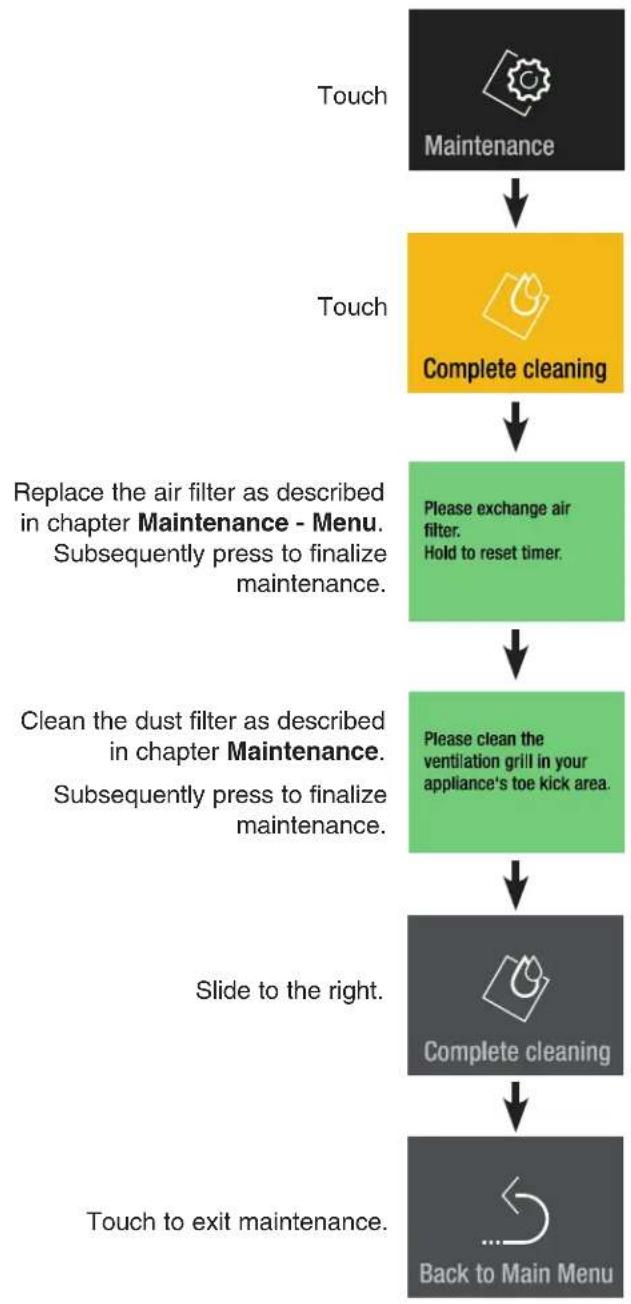
flowchart
graph TD
    A["Touch"] --> B["Maintenance"]
    B --> C["Complete cleaning"]
    C --> D["Please exchange air filter. Hold to reset timer."]
    D --> E["Please clean the ventilation grill in your appliance's toe kick area."]
    E --> F["Complete cleaning"]
    F --> G["Back to Main Menu"]
    H["Replace the air filter as described in chapter Maintenance - Menu. Subsequently press to finalize maintenance."] --> C
    I["Clean the dust filter as described in chapter Maintenance. Subsequently press to finalize maintenance."] --> E
    J["Slide to the right."] --> F
    K["Touch to exit maintenance."] --> G
Setup Menu
Includes the adjustment for display brightness, language, units, activation of the SmartDeviceBox and the device information.
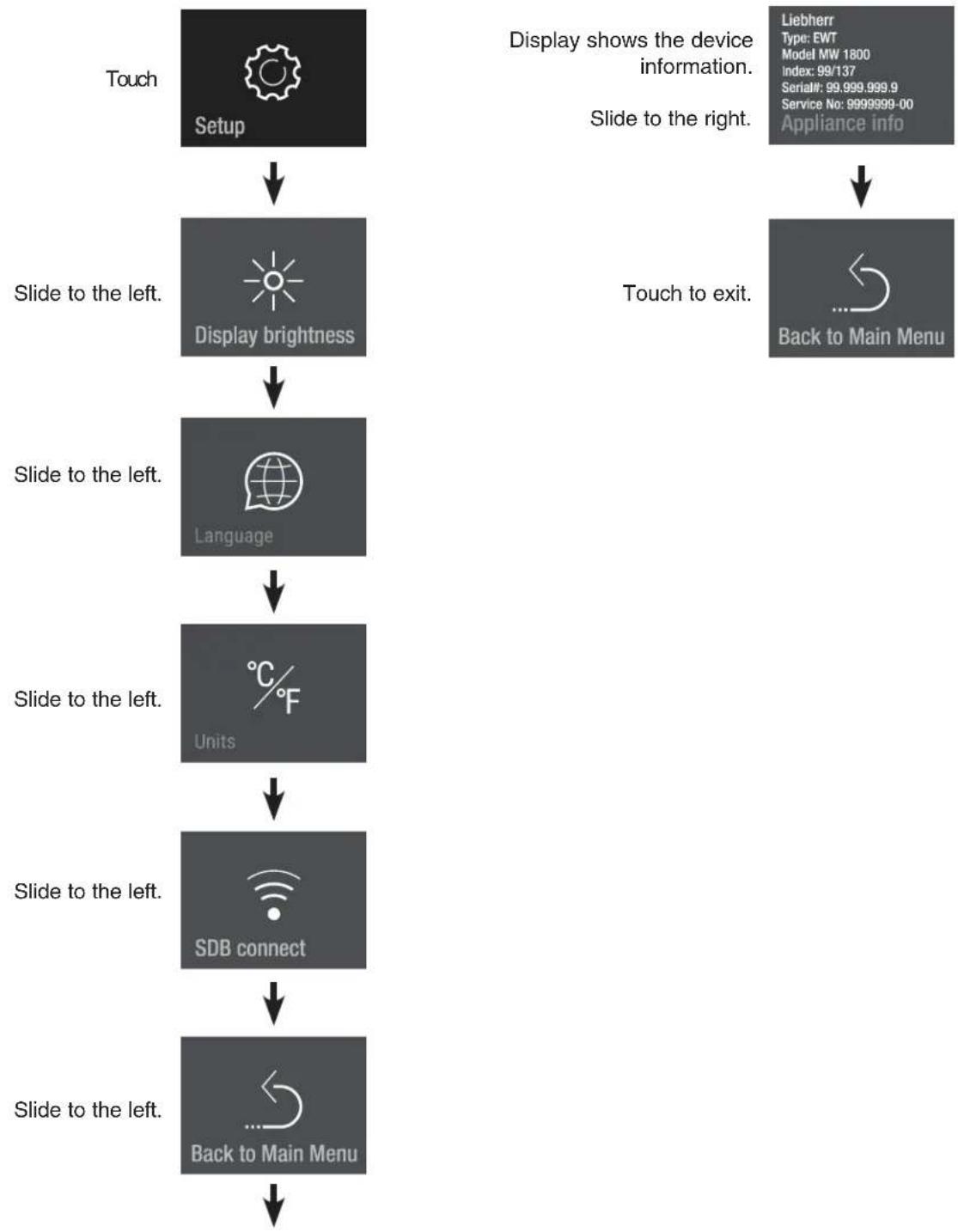
flowchart
graph TD
    A["Touch Setup"] --> B["Slide to the left. Display brightness"]
    B --> C["Slide to the left. Language"]
    C --> D["Slide to the left. Units"]
    D --> E["Slide to the left. SDB connect"]
    E --> F["Slide to the left. Back to Main Menu"]
Display Brightness Language
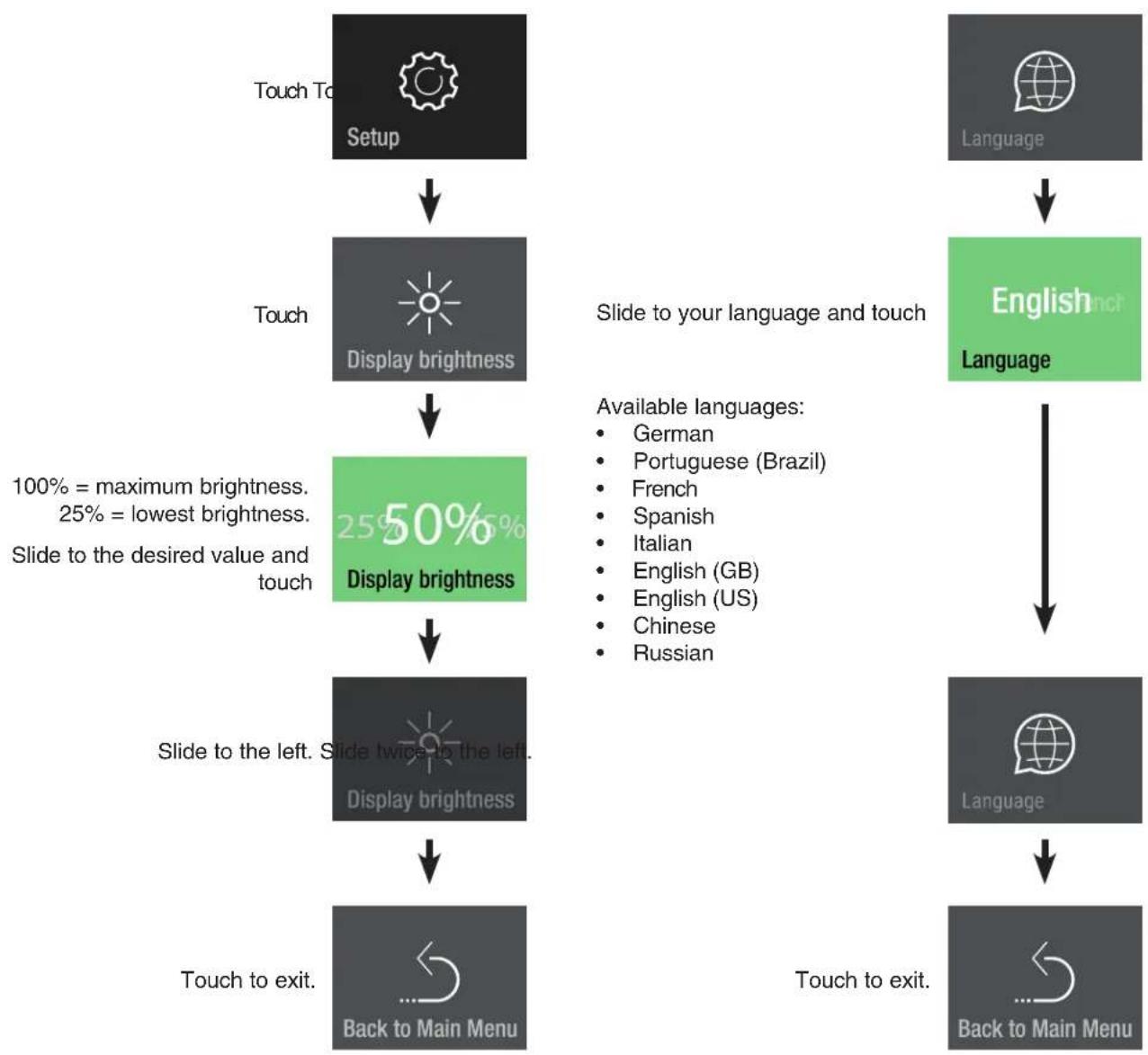
flowchart
graph TD
    A["Setup"] --> B["Display brightness"]
    B --> C["25% 50% Display brightness"]
    C --> D["Slide to the left. Slide twice to the left. Display brightness"]
    D --> E["Touch to exit. Back to Main Menu"]
    F["Language"] --> G["English/not Language"]
    G --> H["Language"]
    H --> I["Back to Main Menu"]
    style A fill:#999,stroke:#333
    style F fill:#999,stroke:#333
    style G fill:#999,stroke:#333
    style H fill:#999,stroke:#333
    style I fill:#999,stroke:#333
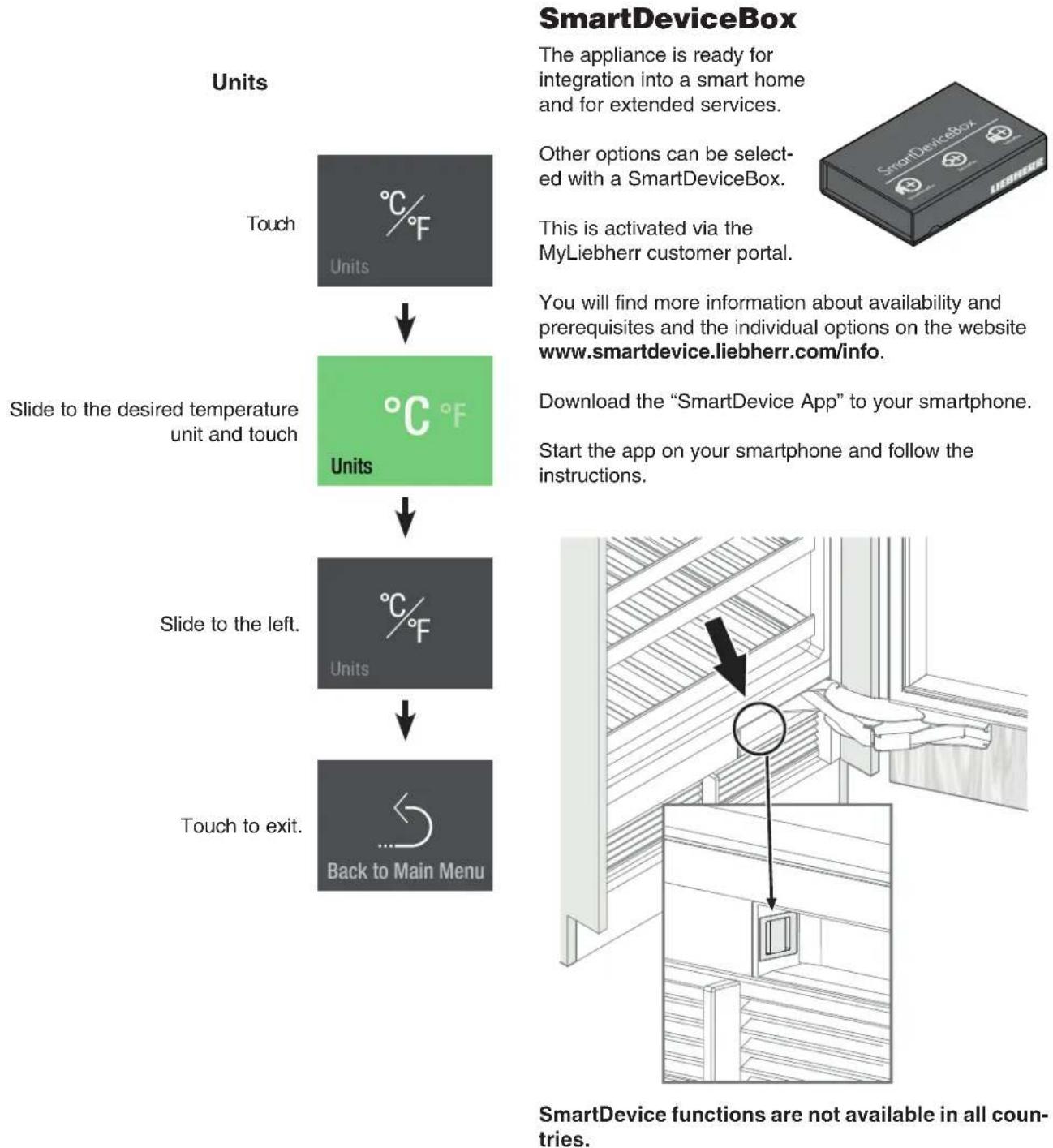
flowchart
graph TD
    A["Touch"] --> B["Units: °C/F"]
    B --> C["Slide to the desired temperature unit and touch: °C/F Units"]
    C --> D["Slide to the left: °C/F Units"]
    D --> E["Touch to exit: Back to Main Menu"]
Description of the SmartDevice Displays
SmartDeviceBox is inserted.
Hold to configure now.
SDB inserted
Display to start the WLAN connection.
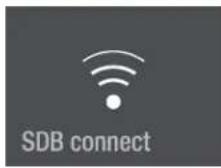
The symbol flashes.
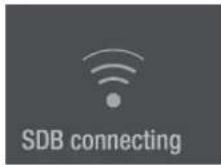
Connection to WLAN is in progress.
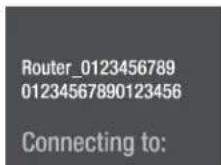
The router credentials are displayed.
Appliance is connected to WLAN.
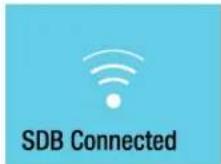
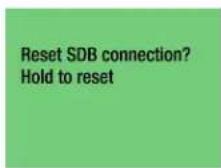
Connection reset
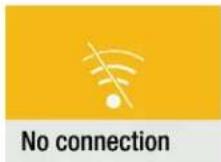
This message informs you of any router or Internet problems.
Alarm Messages
Door Open Alarm
Door has been left open for longer than about 180 seconds.
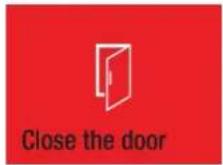
Action
Close the appliance door.
Temperature Alarm
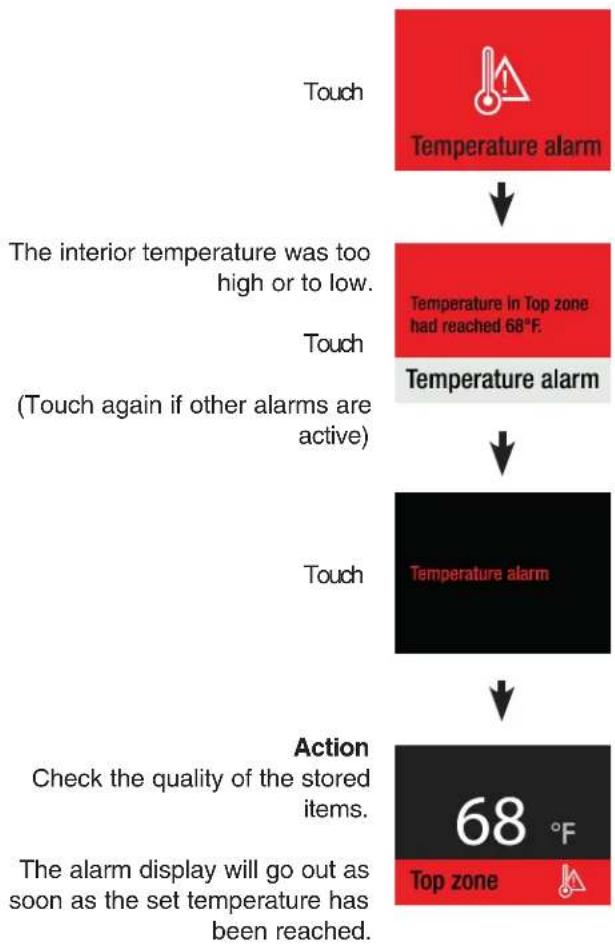
flowchart
graph TD
    A["Touch"] --> B["Temperature alarm"]
    B --> C["The interior temperature was too high or to low."]
    C --> D["Touch (Touch again if other alarms are active)"]
    D --> E["Temperature alarm"]
    E --> F["Action"]
    F --> G["Check the quality of the stored items."]
    G --> H["The alarm display will go out as soon as the set temperature has been reached."]
    H --> I["68 °F Top zone"]
Power Alarm
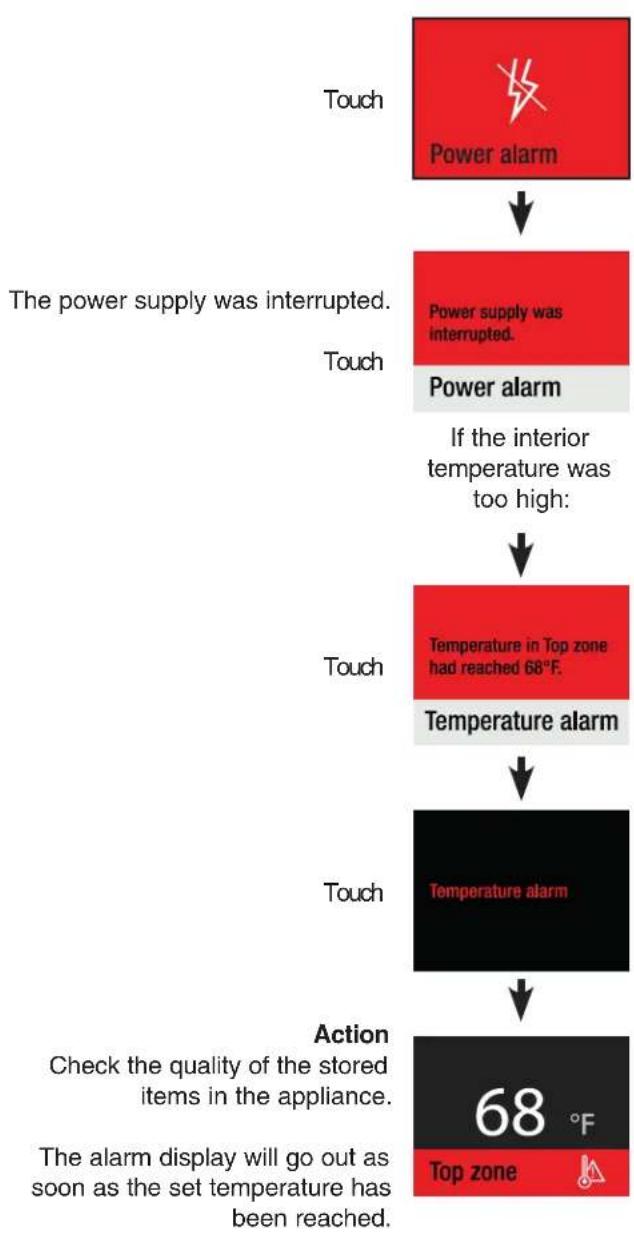
flowchart
graph TD
    A["Touch"] --> B["Power alarm"]
    B --> C["The power supply was interrupted."]
    C --> D["Touch"]
    D --> E["Power supply was interrupted."]
    E --> F["If the interior temperature was too high:"]
    F --> G["Touch"]
    G --> H["Temperature in Top zone had reached 68°F."]
    H --> I["Temperature alarm"]
    I --> J["Touch"]
    J --> K["Temperature alarm"]
    K --> L["Action"]
    L --> M["Check the quality of the stored items in the appliance."]
    M --> N["The alarm display will go out as soon as the set temperature has been reached."]
    N --> O["68 °F Top zone"]
Electronic Fault Alarm
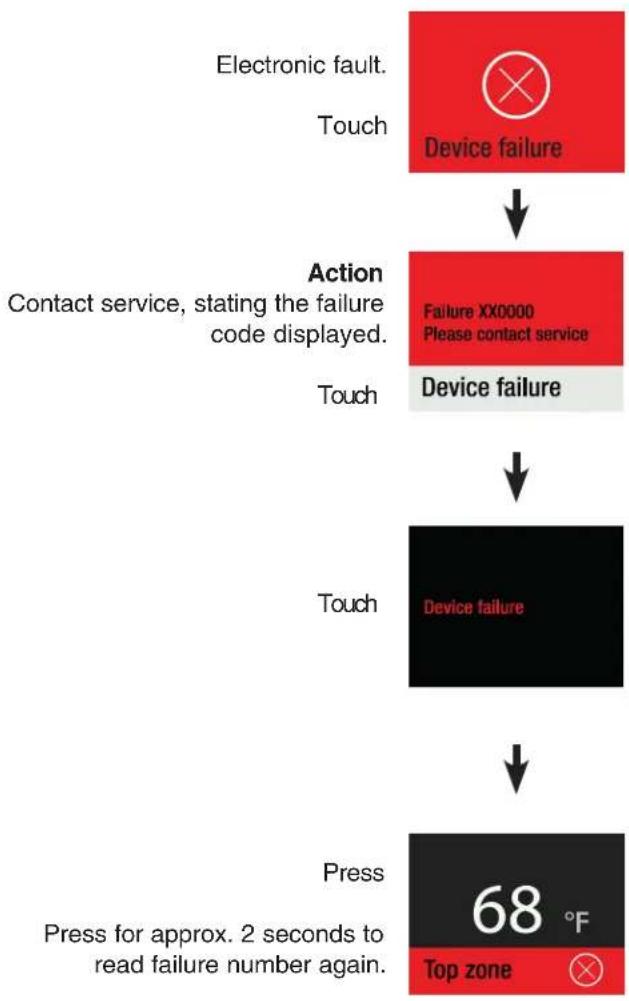
flowchart
graph TD
    A["Electronic fault. Touch"] --> B["Device failure"]
    B --> C["Action Contact service, stating the failure code displayed. Touch"]
    C --> D["Failure XX0000 Please contact service Device failure"]
    D --> E["Device failure"]
    E --> F["Press Press for approx. 2 seconds to read failure number again. Top zone 68 °F"]
Storage Diagram
for 0.75 l Bordeaux bottles to standard NF H 35-124
MW 18..
Number of bottles
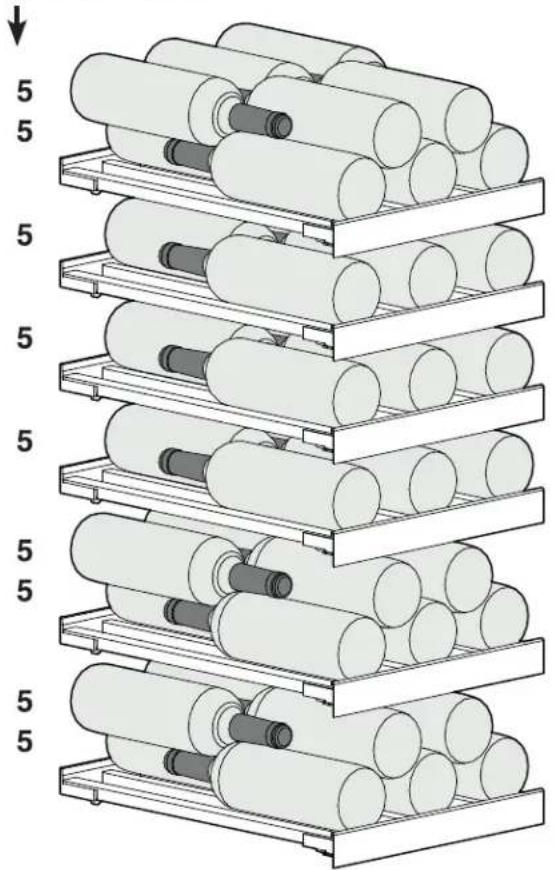
natural_image
Stacked cylindrical rollers in a rack system, no text or symbols visible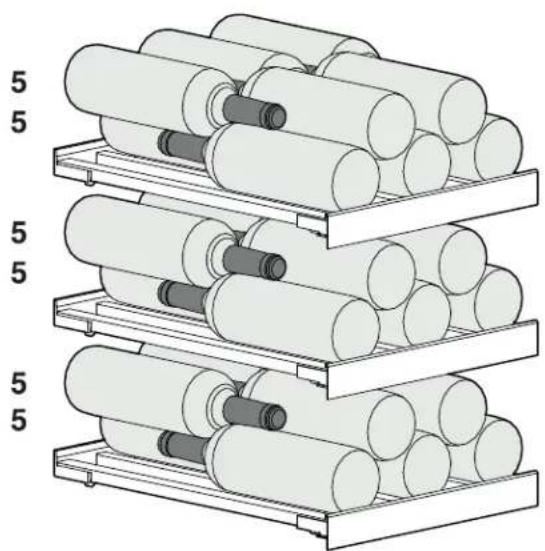
natural_image
Stacked cylindrical rollers on metal racks, no text or symbols visibleTotal 75 bottles
MW 24..
Number of bottles
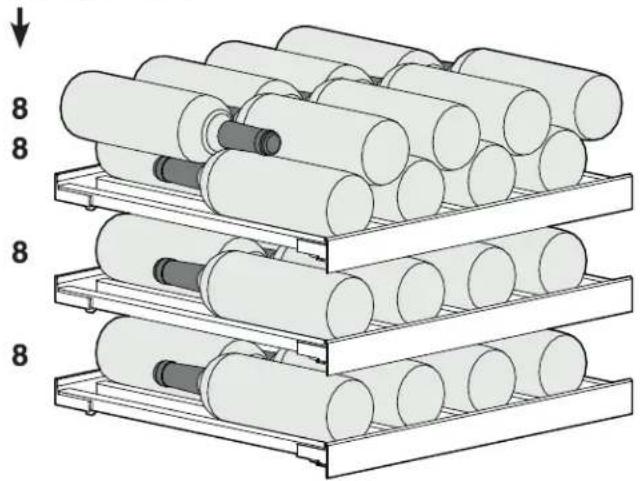
natural_image
Stacked cylindrical rollers in a rack system, no text or symbols visible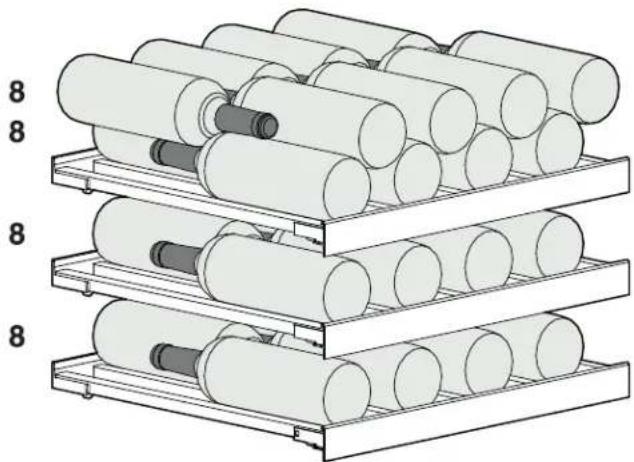
natural_image
Stacked cylindrical rollers on metal racks, no text or symbols visible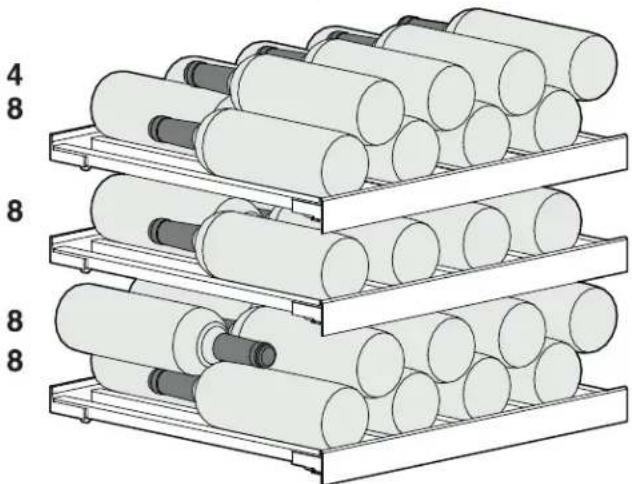
natural_image
Stacked cylindrical rollers in a rack system, no text or symbols visibleTotal 100 bottles
IMPORTANT
The maximum load per wooden shelf is 44 lbs (20 kg).
Equipment
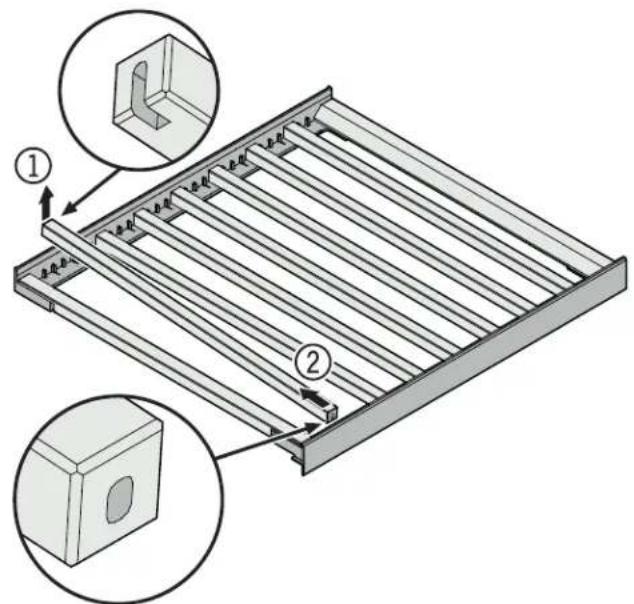
Pull-out Shelf
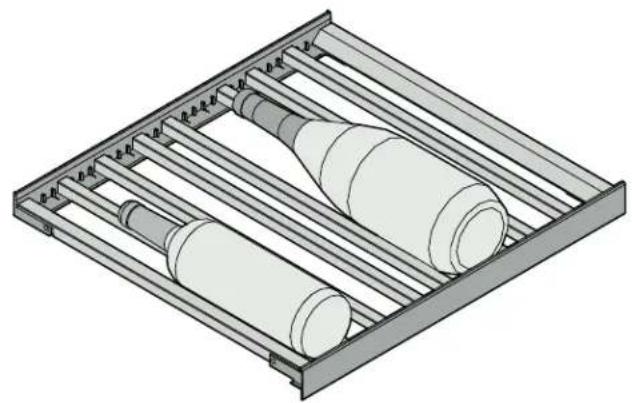
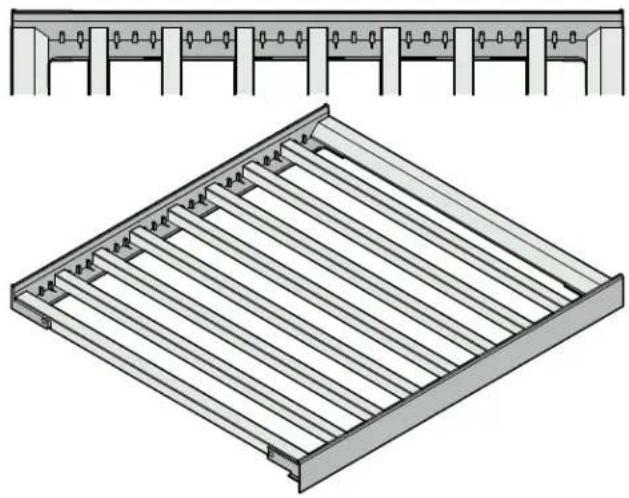
The bars can be removed and repositioned to store larger or smaller bottles.
Raise the bar at the rear (1) and pull it out (2).
natural_image
3D technical illustration of a mechanical assembly with cylindrical components and a tray (no text or symbols)Bar Configuration for Maximum Number of Bottles
natural_image
Technical illustration of a structural frame with parallel slats and connection points (no text or symbols)Serving Shelf
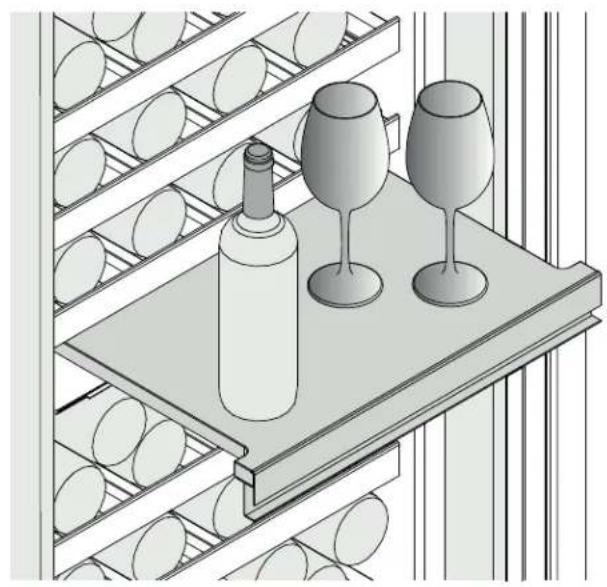
The serving shelf can be pulled out to provide a surface to hold bottles and glasses.
natural_image
Illustration of wine bottles and three glasses on a shelf (no text or symbols)Bottle Holder
Insert the supplied bottle holders to house the maximum number of bottles.
Insert the bottle holder between the bars (1), turn it (2), and slide it towards the outside (3).
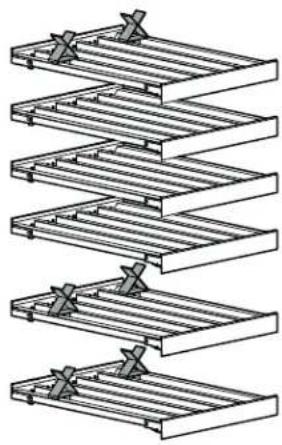
Then slide the bottle holder to position X = \~3" (80 mm) as shown in the illustration.
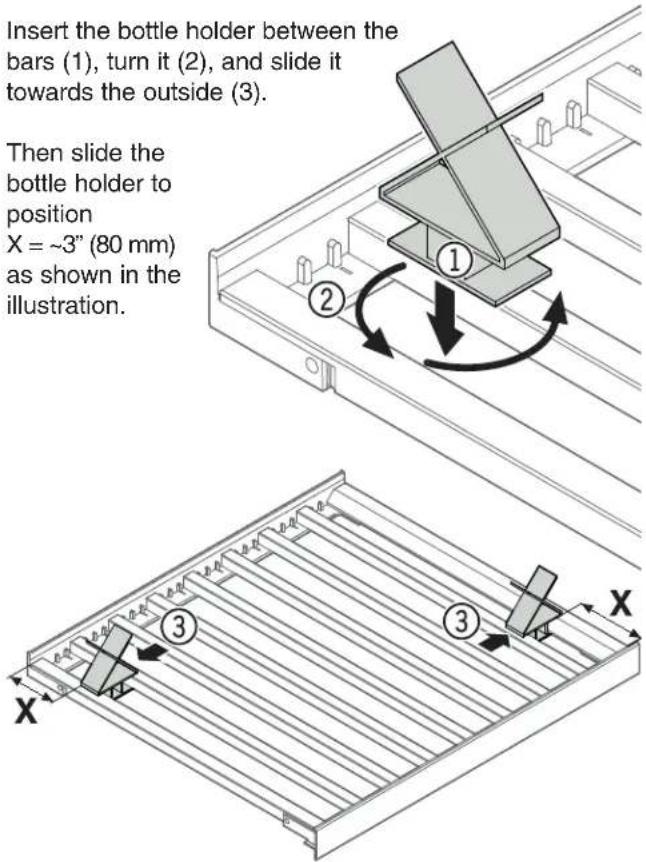
Positioning the bottle holder for the maximum number of bottles:
MW 18.. MW 24..
natural_image
Diagram of a multi-tiered ladder structure with horizontal bars and connectors (no text or symbols)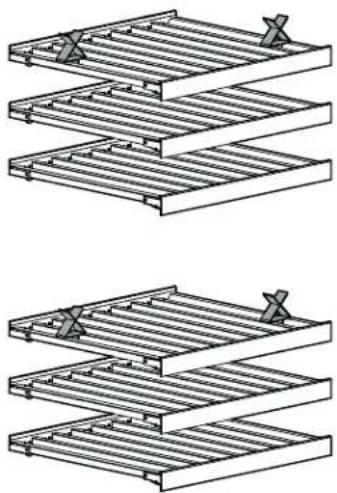
natural_image
Two identical line drawings of a multi-tiered metal shelving unit, showing structural components and mounting brackets (no text or symbols)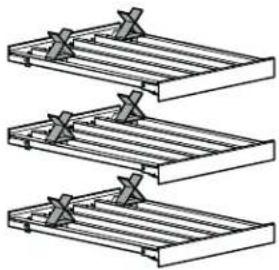
natural_image
Three identical mechanical truss structures with metal clamps and cross marks, no text or symbols present.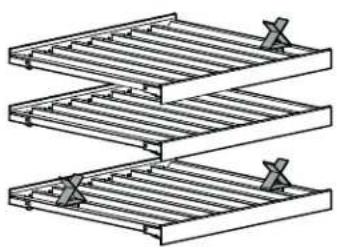
natural_image
Diagram of two stacked metal racks with clamps, no text or symbols presentCleaning
WARNING!
Before cleaning, always disconnect the appliance from the power source. Pull out the plug or switch off the fuse!
If the door is left open for a lengthy period, the temperature in the appliance's compartments may rise dramatically.
- Clean the interior, equipment, and external walls using lukewarm water and a little detergent. Never use chemical solvents or cleaning products with contain sand or acid.
- Use a glass cleaner to clean the glass surfaces, and a conventional stainless steel cleaning product for stainless steel surfaces.
CAUTION!
Risk of damage to the appliance components and risk of injury due to hot steam.
Do not use steam cleaning equipment to clean the appliance!
• Make sure that no water gets into the electrical parts or the ventilation grille.
• Dry everything well with a cloth.
- Do not damage or remove the model plate on the inside of the appliance – it is important for customer service purposes.
If the appliance is left empty for a lengthy period, it must be switched off, defrosted, cleaned, and dried, and the door is to be held open to prevent mold formation.
Removing and Inserting the Wooden Shelves
The wooden shelves can be removed for easier cleaning of the inside of the appliance.
Removing the Wooden Shelf
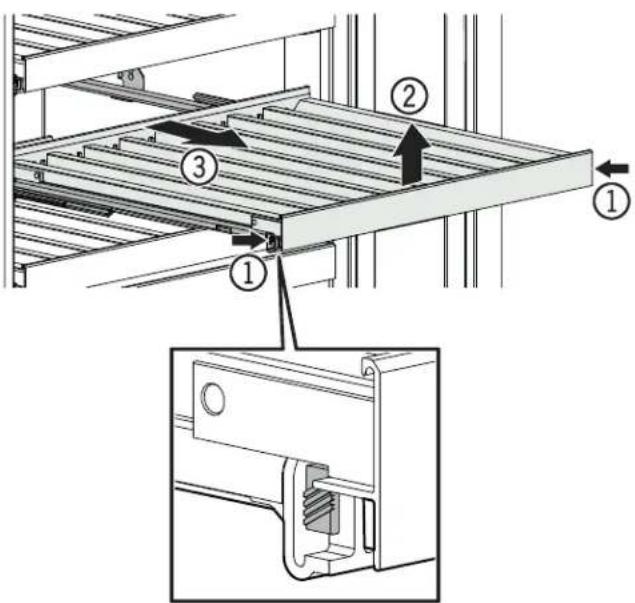
Pull out the wooden shelf, press the sides (1) gently, lift it upwards (2), and pull it out forwards (3).
Inserting the Wooden Shelf
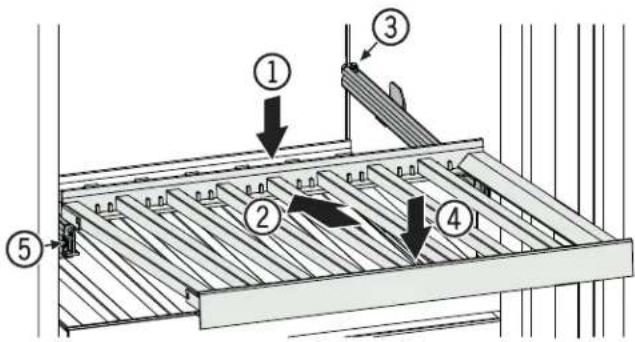
Position the wooden shelf at the rear (1), slide it backwards on the rails (2), attach it at the end (3), and then press it downwards (4) until the shelf engages in the rails (5).
Removing the Serving Shelf Inserting the Serving Shelf
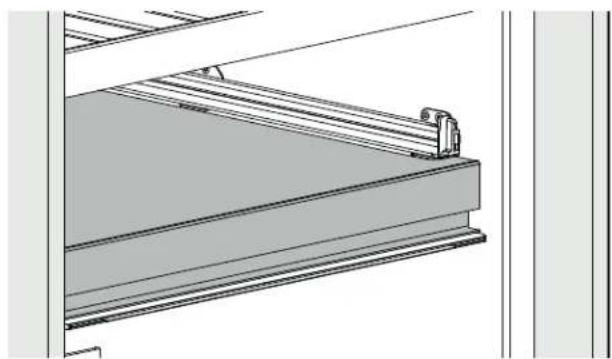
To remove the serving shelf, first remove the wooden shelf above the serving shelf.
natural_image
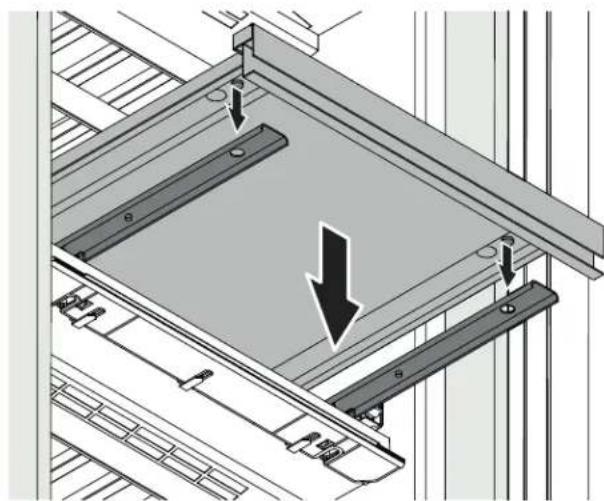
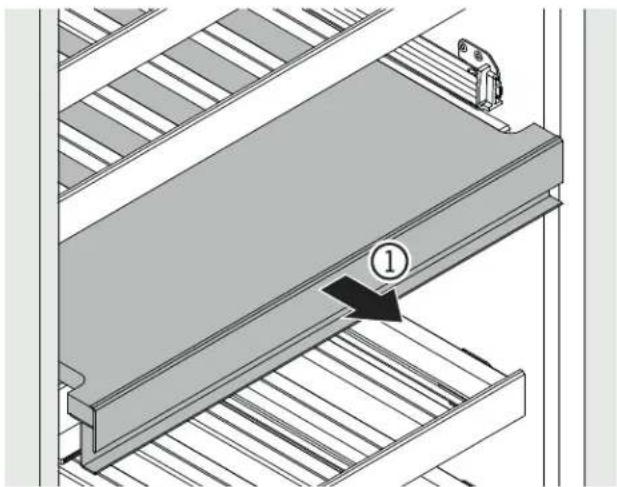
Technical line drawing of a structural beam with support bracket and vertical supports (no text or symbols)Pull out the serving shelf a little (1), lift the front upwards (2) to release the magnetic connection, and pull it out forward (3).
Place the serving shelf on the rails. The bolts on the underside of the serving shelf must engage in the rails to be positioned precisely.
natural_image
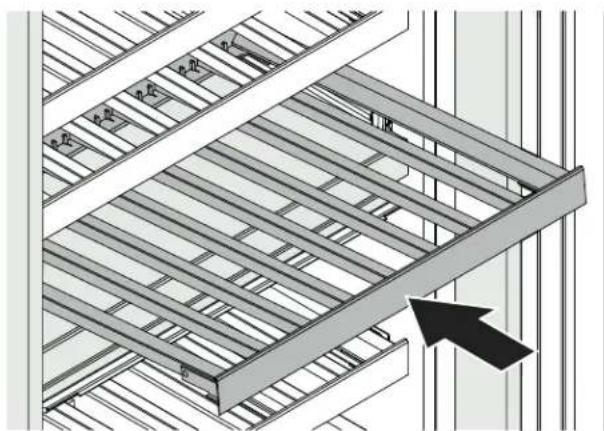
Technical diagram showing a structural assembly with two downward-pointing arrows indicating force or movement (no text or symbols present)Insert the wooden shelf above the serving shelf.
natural_image
Technical diagram of a mechanical assembly with layered components and a numbered component (no text or symbols)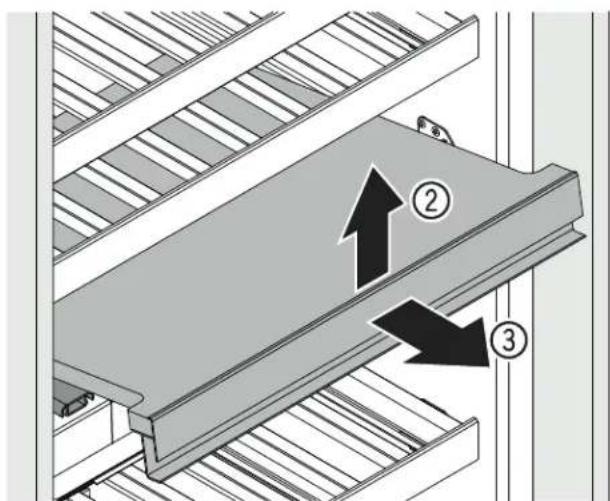
Maintenance Menu
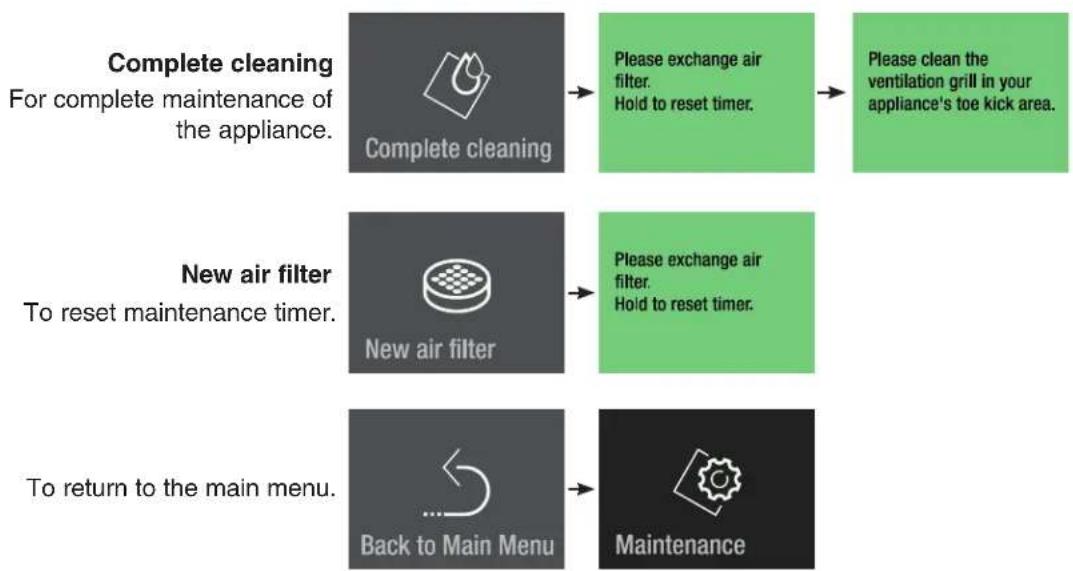
Maintenance can be carried out independently of the specified regular intervals. The maintenance menu includes the following steps.
flowchart
graph TD
    A["Complete cleaning\nFor complete maintenance of the appliance."] --> B["Complete cleaning"]
    B --> C["Please exchange air filter.\nHold to reset timer."]
    C --> D["Please clean the ventilation grill in your appliance's toe kick area."]
    E["New air filter\nTo reset maintenance timer."] --> F["New air filter"]
    F --> G["Please exchange air filter.\nHold to reset timer."]
    G --> H["To return to the main menu."]
    H --> I["Back to Main Menu"]
    I --> J["Maintenance"]
Maintenance
New Air Filter
Wine will constantly adjust to the ambient conditions.
The quality of the air therefore plays a vital role in storage.
The filter should be changed in at least the specified maintenance intervals.
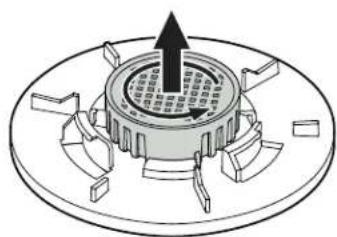
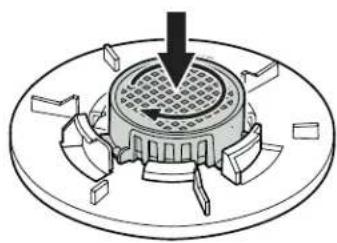
Turn the air filter counterclockwise and remove.
natural_image
Diagram of a mechanical component with a central hub and surrounding blades (no text or symbols)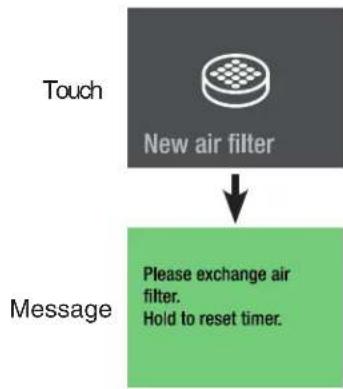
flowchart
graph TD
    A["Touch"] --> B["New air filter"]
    B --> C["Message"]
    C --> D["Please exchange air filter. Hold to reset timer."]
Insert the new air filter and turn it clockwise until it engages.
natural_image
Diagram of a mechanical component with a central circular structure and directional arrows, no text or symbols present.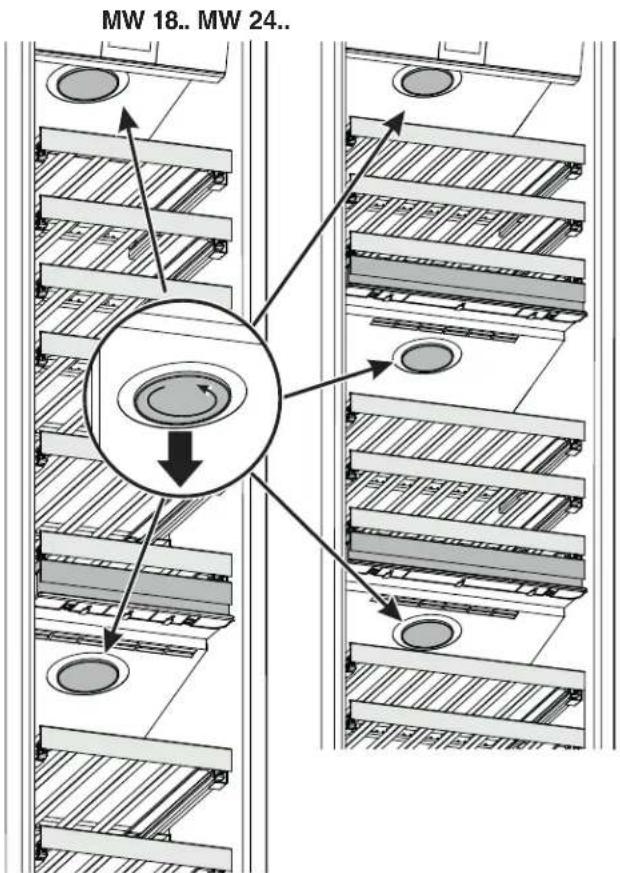
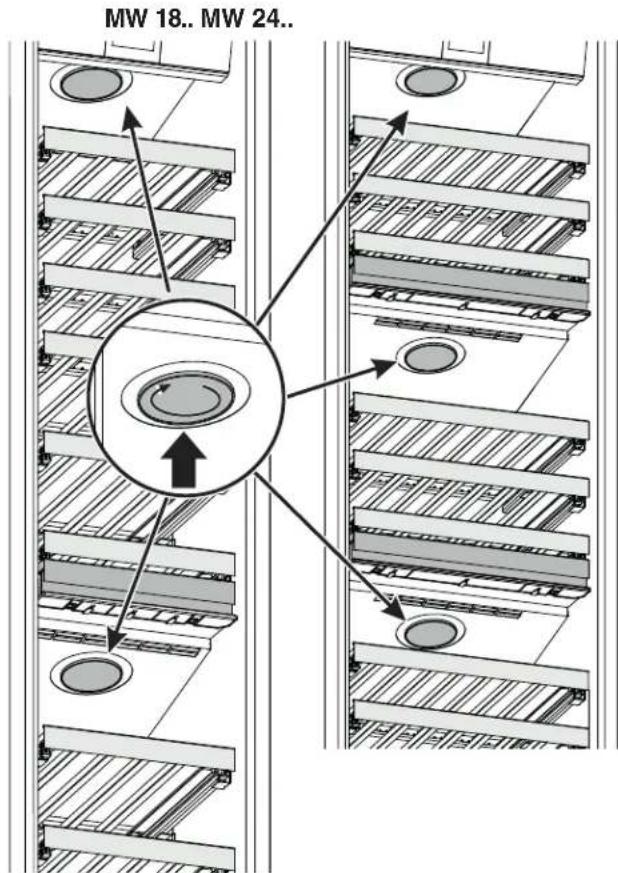
Fit the cover and turn it clockwise until it engages.
Turn the cover counterclockwise and remove.
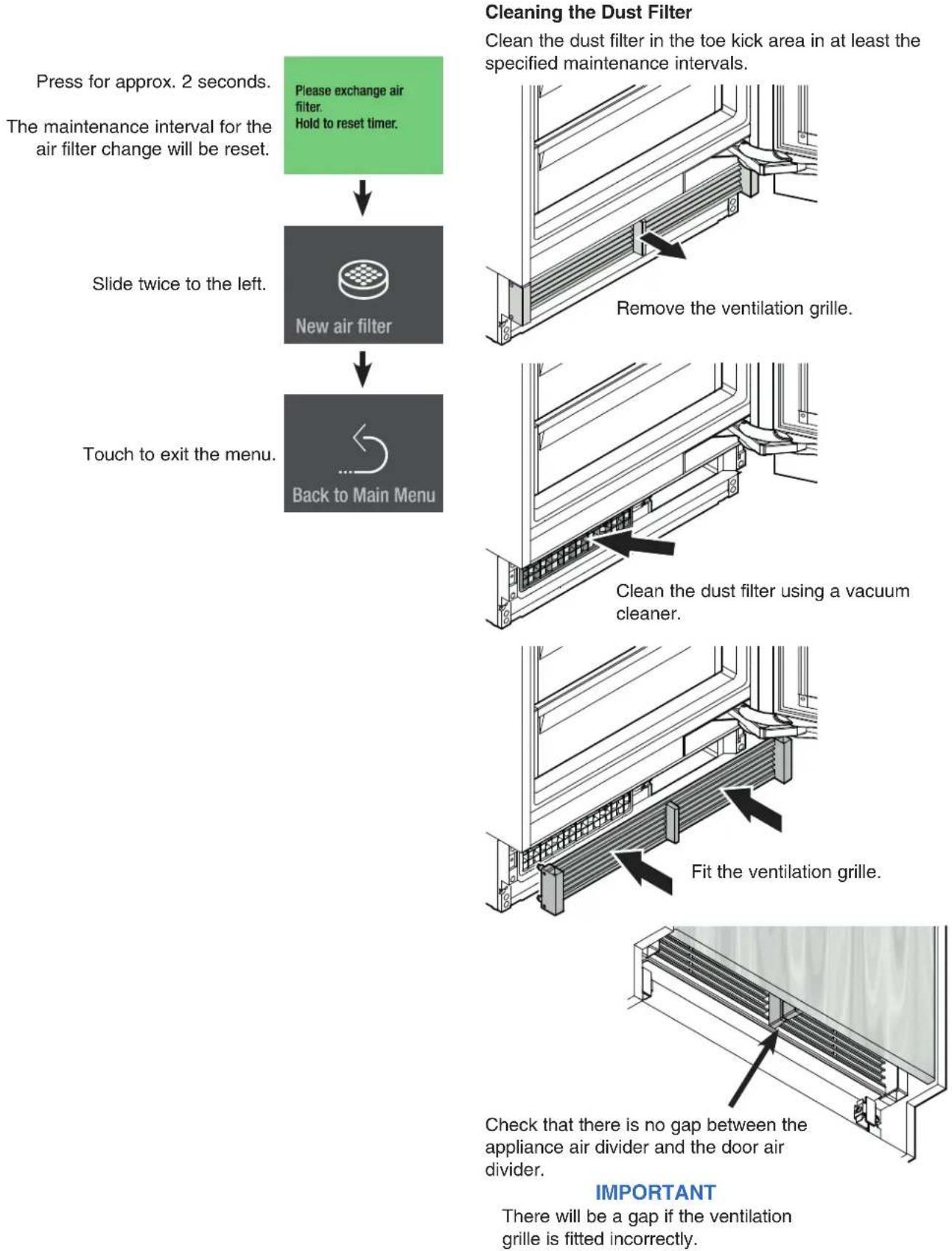
Press for approx. 2 seconds.
The maintenance interval for the air filter change will be reset.
Please exchange air filter.
Hold to reset timer.
Slide twice to the left.
New air filter
Touch to exit the menu.
Back to Main Menu
Cleaning the Dust Filter
Clean the dust filter in the toe kick area in at least the specified maintenance intervals.
Check that there is no gap between the appliance air divider and the door air divider.
IMPORTANT
There will be a gap if the ventilation grille is fitted incorrectly.
Additional Functions
Activating the defrost function manually Reset to factory setting DemoMode
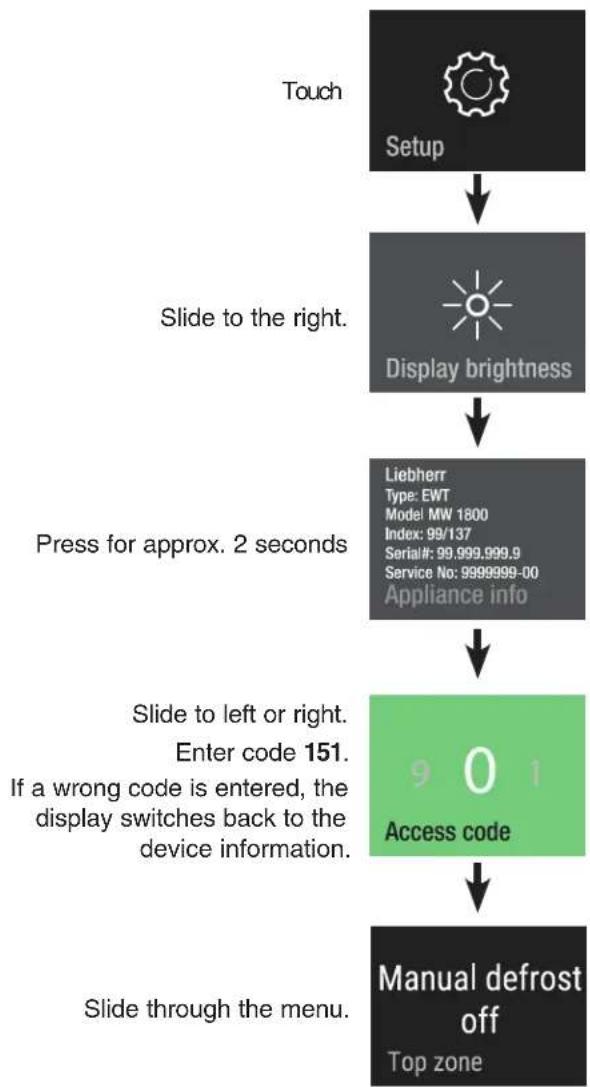
flowchart
graph TD
    A["Touch Setup"] --> B["Slide to the right. Display brightness"]
    B --> C["Press for approx. 2 seconds"]
    C --> D["Slide to left or right. Enter code 151. If a wrong code is entered, the display switches back to the device information."]
    D --> E["Access code 901"]
    E --> F["Manual defrost off Top zone"]
Manual Defrost
The appliance defrosts automatically. The defrost function can be activated manually for service applications.
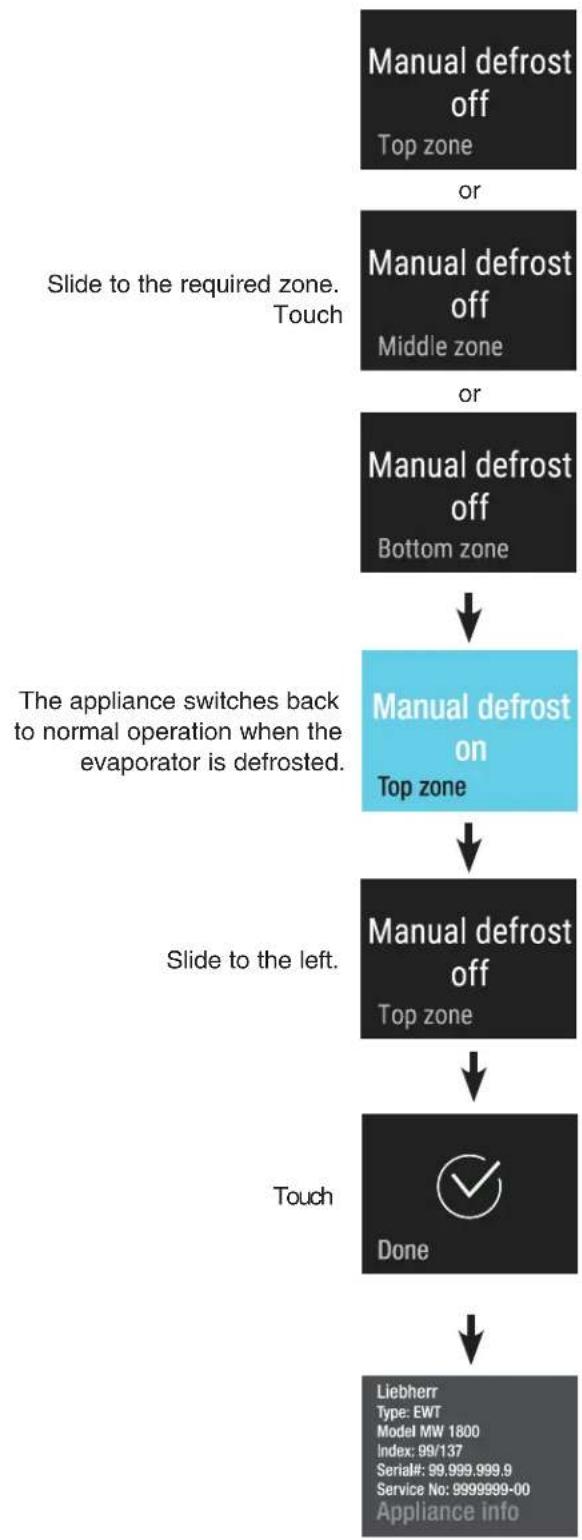
flowchart
graph TD
    A["Manual defrost off\nTop zone"] -->|or| B["Manual defrost off\nMiddle zone"]
    B -->|or| C["Manual defrost off\nBottom zone"]
    C --> D["Manual defrost on\nTop zone"]
    D --> E["Manual defrost off\nTop zone"]
    E --> F["Done"]
    F --> G["Liebherr\nType: EWT\nModel MW 1800\nIndex: 99/137\nSerial#: 99.999.999.9\nService No: 9999999-00\nAppliance info"]
    H["Slide to the required zone.\nTouch"] --> B
    I["The appliance switches back to normal operation when the evaporator is defrosted."] --> D
    J["Slide to the left."] --> E
    K["Touch"] --> F
Reset
The electronic control can be reset to factory settings using this function.
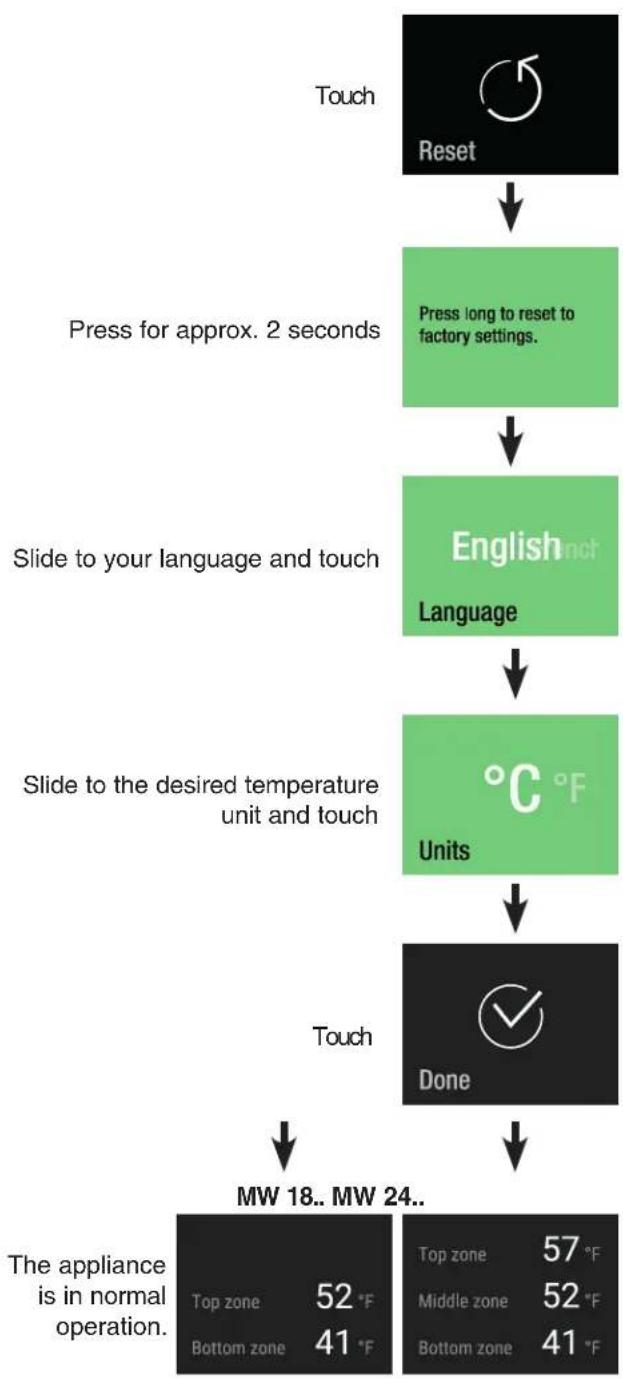
flowchart
graph TD
    A["Touch"] --> B["Reset"]
    B --> C["Press for approx. 2 seconds"]
    C --> D["English Language"]
    D --> E["Units"]
    E --> F["Done"]
    F --> G["MW 18.. MW 24.."]
    H["The appliance is in normal operation."] --> I["Top zone 52 °F\nBottom zone 41 °F"]
    J["Top zone 57 °F\nMiddle zone 52 °F\nBottom zone 41 °F"] --> K["Done"]
DemoMode
DemoMode can be activated for presenting the appliance at exhibitions or in showrooms as if it were in normal operating mode.
Activating DemoMode
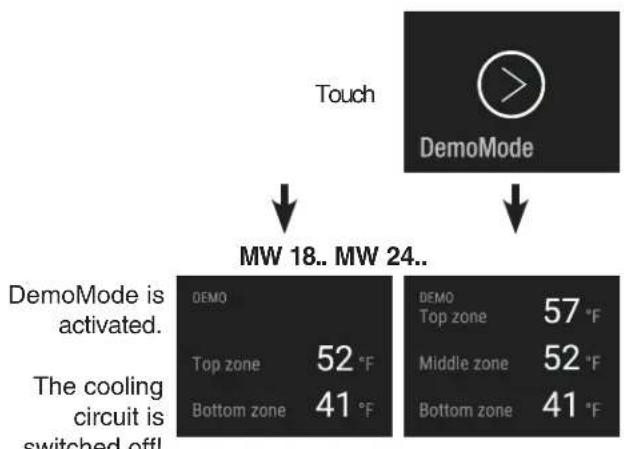
flowchart
graph TD
    A["Touch"] --> B["MW 18.. MW 24.."]
    B --> C["DemoMode"]
    C --> D["The cooling circuit is switched off!"]
    style A fill:#000,stroke:#fff,color:#fff
    style B fill:#000,stroke:#fff,color:#fff
    style C fill:#000,stroke:#fff,color:#fff
    style D fill:#fff,stroke:#000,stroke-width:2px
Deactivating DemoMode
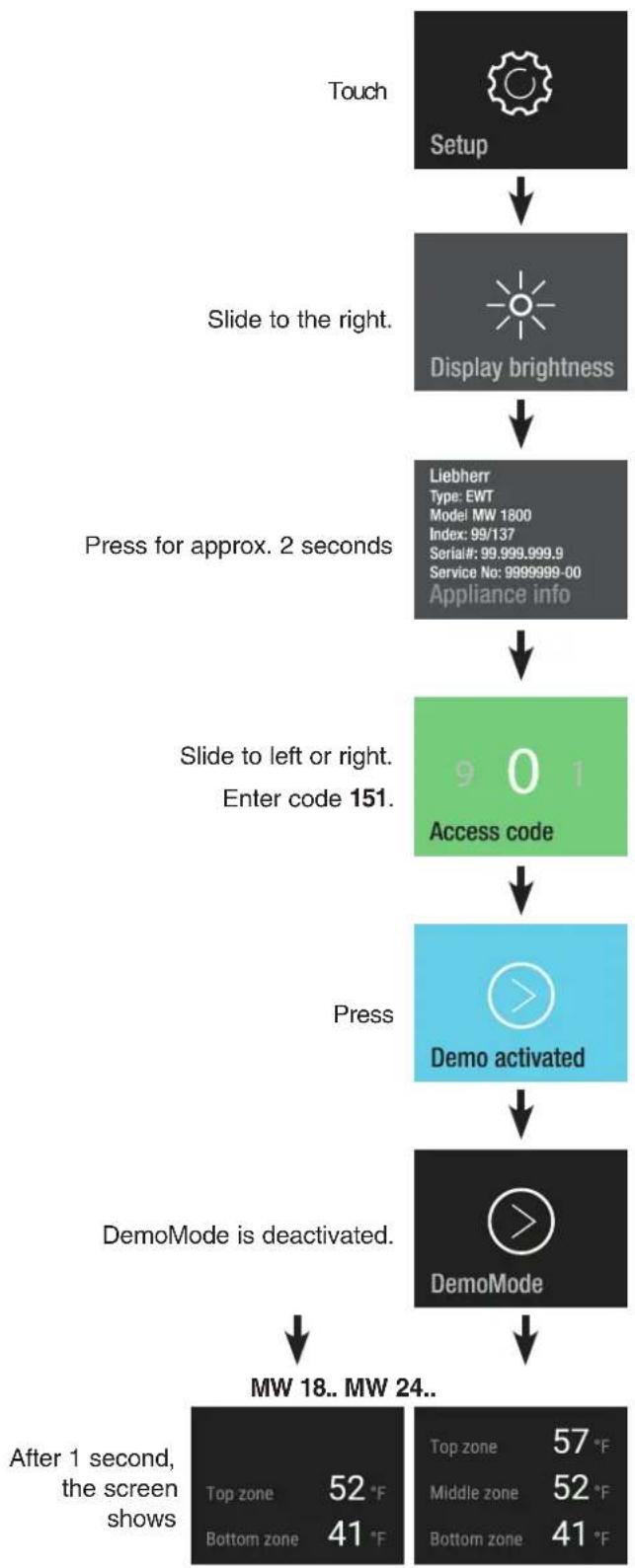
flowchart
graph TD
    A["Touch Setup"] --> B["Slide to the right. Display brightness"]
    B --> C["Press for approx. 2 seconds"]
    C --> D["Slide to left or right. Enter code 151. Access code"]
    D --> E["Press Demo activated"]
    E --> F["DemoMode is deactivated."]
    F --> G["MW 18.. MW 24.. After 1 second, the screen shows Top zone 52 °F Bottom zone 41 °F Top zone 57 °F Middle zone 52 °F Bottom zone 41 °F"]
Troubleshooting
If a problem occurs during operation, check whether it is due to an operating error. Please note that even during the warranty period, some repair costs may be your responsibility.
You may be able to correct the following faults by checking the possible causes yourself:
| Problem Possible Cause and Remedy | |
| Appliance does not work, display is off. | - Is the appliance turned on properly?- Is the power cord properly inserted in the outlet?- Is the circuit breaker or fuse in operating condition? |
| The interior light does not come on. | - Is the appliance turned on? |
| Motor seems to run too long. | - Is the ambient temperature too high? See Safety Regulations.- Has the appliance been opened too often or left open too long? |
| The temperature is not cold enough. | - Is the temperature setting correct? See Setting the Temperature.- Has an excessive amount of wine been placed in the appliance?- Does a separately installed thermometer show the correct reading?- Is the ventilation system working properly?- Is the appliance set up too close to a heat source? |
| The fans inside the appliance are running even though the fan function has been deactivated and the compressor (refrigeration unit) is idle. | - This is a normal operating state depending on the set interior temperature and ambient temperature at the place of installation. |
Customer Service
If none of the above possible causes apply, and you can not rectify the fault yourself, contact your nearest customer service representative.
Indicate the type (1) of appliance, service number (2) and the appliance/serial number (3) as indicated on the model plate or in the device information in the setup menu of the electronic control system.
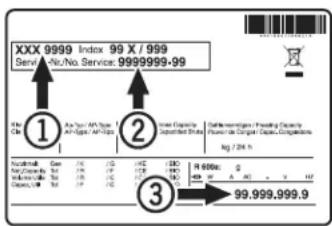
The position of the model plate is shown in the section entitled Description of the Appliance.
Appliance Information
Record this information when the appliance is installed.
Type Designation: ____
Service Number: ____
Appliance/Serial Number: ____
Date of Purchase: ____
Where Purchased: ____
For Service in the U.S.
Liebherr Service Center
Toll Free: 1-866-LIEBHER or 1-866-543-2437
Email: Service-appliances.us@liebherr.com
PlusOne Solutions, Inc.
3501 Quadrangle Blvd, Suite 120
Orlando, FL 32817
For Service in Canada
Liebherr Service Center
Toll Free: 1-888-LIEBHER or 1-888-543-2437
www.euro-parts.ca
EURO-PARTS CANADA
39822 Belgrave Road
Belgrave, Ontario, N0G 1E0
Phone: (519) 357-3320
Fax: (519) 357-1326


www.liebherr-appliances.com