
WeLoop Hey 3S - Smartwatch Xiaomi - Free user manual and instructions
Find the device manual for free WeLoop Hey 3S Xiaomi in PDF.


| Product Type | Smartwatch |
| Brand | Xiaomi (WeLoop) |
| Model | Hey 3S |
| Display Type | AMOLED |
| Display Size | 1.28 inches |
| Dimensions (without strap) | 45 x 37 x 10.3 mm |
| Weight (without strap) | 35 g |
| Strap Material | Silicone |
| Water Resistance | 5 ATM (50 meters) |
| Battery Capacity | 200 mAh |
| Battery Life (typical use) | 7 days |
| Charging Method | Magnetic charging cradle |
| Connectivity | Bluetooth 5.0 |
| GPS | Built-in GPS |
| Heart Rate Monitor | Optical |
| Other Sensors | Accelerometer, Gyroscope, Barometer |
| Notifications | Call, SMS, App alerts |
| Compatible OS | Android 5.0+ / iOS 10.0+ |
| Main Functions | Step counting, Sleep tracking, Heart rate, Sports modes, GPS tracking |
| Maintenance & Cleaning | Wipe with soft cloth, avoid harsh chemicals |
| Safety | Keep away from extreme heat, do not disassemble |
| Spare Parts & Repairability | Replacement straps available; battery not user-replaceable |
Frequently Asked Questions - WeLoop Hey 3S Xiaomi
User questions about WeLoop Hey 3S Xiaomi
0 question about this device. Answer the ones you know or ask your own.
Ask a new question about this device
Download the instructions for your Smartwatch in PDF format for free! Find your manual WeLoop Hey 3S - Xiaomi and take your electronic device back in hand. On this page are published all the documents necessary for the use of your device. WeLoop Hey 3S by Xiaomi.
USER MANUAL WeLoop Hey 3S Xiaomi
- Installing the strap, charging and turning on the device.
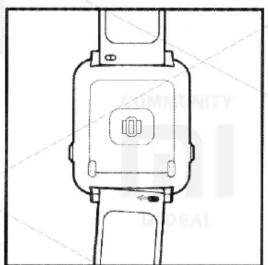
natural_image
Technical line drawing of a mechanical device with no visible text or symbolsA tight strap is installed at the top, a long strap is installed from the bottom.
To install or remove the strap, press and move it to the right side of the movable eyelet.
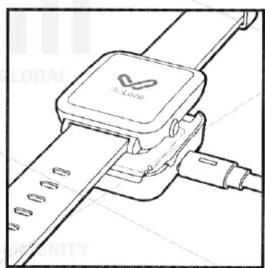
natural_image
Line drawing of a smartwatch with a strap and cable connector (no text or symbols)The device is activated by charging, or by pressing the button on the right side of the clock.
Use the appropriate charger with a charging voltage of 5V, it takes about 3 hours to fully charge the device. It is not recommended to use universal batteries to charge the device.
- Description of the buttons
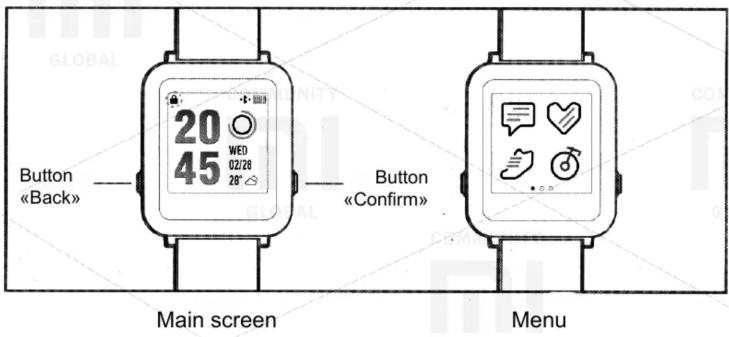
* Press any button or turn the wrist to unlock the clock, after the lock icon disappears, the clock is unlocked, you can control the clock using the touch screen.
* When the main screen is displayed, press the «Confirm» button to go to the menu.
* Press the «Confirm» button for 10 seconds to reset the clock.
3. GPS
Smart-watch Hey 3S has a built-in high-precision GPS-module, before using outdoors in the «Sport» mode, synchronize data with the application on the smartphone, this will improve the accuracy of GPS and increase the speed of locating. When searching for a location for better reception of the GPS signal, it is necessary to be outdoors in the open air, in places with the least number of obstacles.
- Pulse
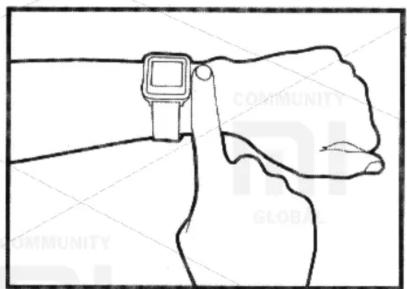
natural_image
Line drawing of a hand wearing a smartwatch, with no text or symbols presentThe Hey 3S smart watch has a pulse measurement module for monitoring the pulse at rest and during exercise. For the best result of measuring the pulse at rest, the degree of belt tension should be such that one finger can be inserted, for a correct measurement of the pulse, the watch should be above the wrist level at a distance equal to the width of the finger. For a more accurate measurement of the pulse during movement, it is necessary to tighten the strap so that the bracelet does not move, do a warm-up before performing physical exercises.
* The pulse measurement function is only used to monitor daily activity, but should not be used for medical purposes.
Rules of warranty service
| Warranty return within 7 days | If you have questions about the quality of the device that affects its operation within 7 days from the date of purchase (receipt), you can return the device |
| Guaranteed exchange within 15 days | If you have questions about the quality of the device that affects its operation within 15 days from the date of purchase (receipt), you can exchange the device |
| Warranty repair for 1 year | If you have questions about the quality of the device that affects its operation within 12 months from the date of purchase (receipt), you can use the services of warranty repair |
| Full time service maintenance | WeLoop's entire product line is serviced on an ongoing basis, for maintenance of devices with expired warranty period and with damages due to human factors, the corresponding fee for work and materials will be written off |
- Touch Control
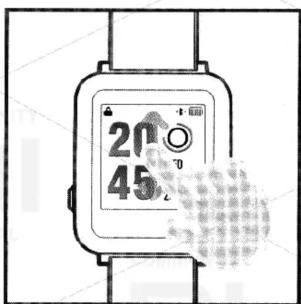
Slide your finger up or down to switch to the status of the destination, weather, reminders, or QR code.
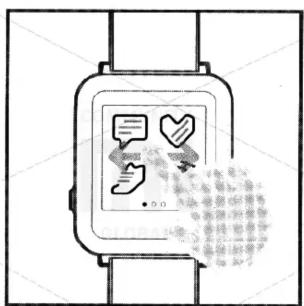
Swipe left or right to scroll through the menus.
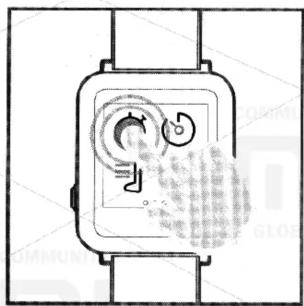
natural_image
Diagram of a smartwatch with a circular button and waveform, no text or symbols presentClick on the icon to go to the corresponding submenu.

Displaying Messages

Heart rate measurements

Run

Bicycle riding

Stopwatch

Timer

Music Management

Change the dial

Phone search

Settings
6. Scan the QR code to download the application
Scan QR Code]
After scanning the QR code, select «Open with a browser» to go to the download page.

7. Connecting the device
After downloading the application, and registering the account, search and connect the device.
One Smart Hey 3S clock connects only to one smartphone, after the connection is completed, you can receive notifications about incoming calls, synchronize data to display them in applications, and so on. On smartphones based on Android, you need to provide the appropriate permission in the notification center, for specific configuration steps, see the «Device» page in the application, click on «Problem Solving» to find the method of configuration according to your smartphone model. Without connecting to a smartphone, the Hey 3S smart watch also stores data about the status of your activity and the pulse at rest.
8. Daily Care
If, after exercise, your wrists are sweating, gently wipe your wrists and watch, then put on the watch again. Using soap or liquid for washing hands periodically clean the surface of the watch. The place where the watch contacts the skin should be dry, in case of allergic reactions or other skin irritations, remove the watch.
Warranty service
If there are claims to the quality of components that did not arise due to human factors, a guarantee exchange (for a similar device model) is carried out within 15 days from the date of purchase (receipt), the warranty period is 1 year. To obtain warranty repair, you do not need to provide a sales receipt, only the device code is needed, warranty services for the WeLoop product line are now provided only in mainland China. Scan the QR code in order to subscribe to the public account of WeLoop, for solution of warranty and operational issues you can refer to online support.
Warranty service is not provided in the following cases:
- The warranty period is exhausted;
- Damage due to carelessness, mistakes or abuse (use at high temperature, high pressure and other harsh conditions, malfunctioning and external damage resulting from compression, impact or fall)
- Self-disassembly, repair or re-equipment; Self-disassembly and assembly of the device, repair of the device or re-equipment of the device;
- Use of non-original parts or components;
- Use that contradicts the requirements of the user's manual;
- The warranty does not cover the natural wear of the exterior (except for individual cases reported separately), but this does not affect the provision of warranty service;
- Lack of receipt, impossibility to confirm that the device is within the warranty period;
- Other damage caused by force majeure (fire, earthquake, lightning strike, etc.)
- At the moment, warranty service is provided only in the territory of mainland China (Note: for more information on warranty service, see the official WeLoop website in the «Warranty service» section)