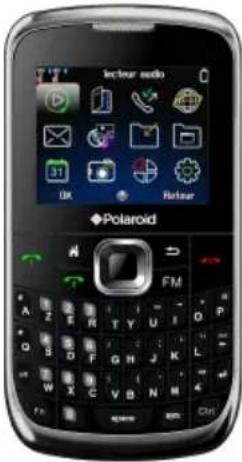
PRO1021 - Smartphone POLAROID - Free user manual and instructions
Find the device manual for free PRO1021 POLAROID in PDF.


| Product Type | Smartphone |
| Brand | Polaroid |
| Model | PRO1021 |
| Network Technology | GSM 900 / 1800 |
| SIM Type | Dual SIM (both stand-by) |
| Dimensions | 107 x 58.5 x 12.5 mm |
| Weight | Approx. 80 g (with battery) |
| Display Type | QCIF, 65k colors |
| Display Size | 2.0 inches |
| Resolution | 176 x 220 pixels |
| Battery Capacity | 600 mAh Li-Ion 3.7V |
| Standby Time | Up to 200 hours |
| Talk Time | Up to 4 hours |
| Camera | VGA (back camera), front camera (self mode) |
| Internal Memory | 64 MB NAND |
| Expandable Memory | microSD up to 16 GB |
| Connectivity | Bluetooth, GPRS, USB Micro 5-pin |
| Audio | Polyphonic (MIDI, MP3), speakerphone, 3.5mm earphone jack |
| SAR Value | GSM900: 1.486 W/Kg, GSM1800: 0.867 W/Kg |
| CPU | MTK6252 |
| Languages | Up to 4 languages |
| Additional Features | FM radio, torch light, alarm, calculator, calendar, world time, auto power on/off, keypad lock, games, e-book reader |
| Safety | Read safety instructions; keep dry; use original battery/charger; do not disassemble |
Frequently Asked Questions - PRO1021 POLAROID
User questions about PRO1021 POLAROID
0 question about this device. Answer the ones you know or ask your own.
Ask a new question about this device
Download the instructions for your Smartphone in PDF format for free! Find your manual PRO1021 - POLAROID and take your electronic device back in hand. On this page are published all the documents necessary for the use of your device. PRO1021 by POLAROID.
USER MANUAL PRO1021 POLAROID
GSM/GPRS Mobile Phone
PRO1021 USER MANUAL
Questions?
Need some help?
This manual should help you
understand your new product
If you still have questions
call our help line:
234(0)4-17 63 29 25

or visit
www.polaroid.com
Polaroid
SAFETY INSTRUCTIONS
Read these safety instructions before using your device and store them for possible future reference.
BATTERY, CHARGER ET ACCESSORIES
If the charger cord is damaged, have it repaired by the manufacturer, its service or a similarly qualified person in order to avoid any hazard.
The charger is not intended for use by persons (including children) with reduced physical, sensory or mental capacity. Persons who have not read the manual, unless they have received explanations by a person responsible for their safety and supervision should not use this unit.
Children should be monitored to ensure that they do not play with the charger.
The charger should always be readily accessible.
The device should not be exposed to dripping or splashing water.
No objects filled with liquids such as vases shall be placed on the device.
Always leave a minimum distance of 10 cm around the unit to ensure sufficient ventilation.
Naked flame sources, such as candles, should not be placed on top of the device.
The device is intended for use only in a temperate climate.
CAUTION: Danger of explosion if battery is incorrectly replaced or not replaced by the same type or equivalent.
The battery should not be exposed to excessive heat such as sunshine, fire or similar.
Different types of batteries, new and used batteries should not be mixed.
The battery must be installed according to the polarity.
If the battery is worn, it must be removed from the product.
The battery must be disposed of safely. Always use the collection bins provided (check with your dealer) to protect the environment.
The European directive 2002/96/EC on Waste Electrical and Electronic Equipment (WEEE), requires that old household electrical appliances must not be disposed of in the normal unsorted municipal
waste stream. It is asked to dispose of them in a repository for this purpose for recycling.
SWITCH OFF IN RESTRICTED AREAS
Switch the phone off where the use of mobile telephones is not allowed or where there is a risk of causing interference or danger, for example on board an aircraft, near medical equipment, fuel, chemicals or blasting sites.
ROAD SAFETY COMES FIRST
Check the current laws and regulations regarding the use of mobile phones in the areas where you drive.
• Do not handle the telephone when driving.
• Concentrate fully on the driving
• Use a hands-free kit whenever possible
- Leave the road and park up before making or receiving a call, if the driving conditions allow.
- Radio signals could affect some of the car's electronic systems such as the audio stereo and alarm systems.
- If the car is equipped with an airbag, do not hinder its deployment with fixed or wireless equipment. This could result in serious injury due to inadequate performance.
INTERFERENCE
All wireless devices are susceptible to interference which may affect their performance.
AUTHORISED PERSONNEL
Only qualified people are authorised to install or repair this product
ACCESSORIES
Only use batteries, chargers and other accessories which are compatible with this equipment. Do not connect incompatible products.
KEEP THE EQUIPMENT DRY
This equipment is not water proof. Keep it dry.
CHILDREN
Keep your phone in a safe place, out of the reach of young children. The telephone contains small parts that may present a choking hazard.
EMERGENCY CALLS
Emergency numbers may not be available on all cellular networks. Therefore you shouldn't solely depend on the mobile phone to make an emergency call. Check with your local service provider.
Precautions for use
This mobile phone meets guidelines concerning the exposure to radio waves.
Your mobile phone is a radio transmitter and receiver. It was designed to meet the limits recommended by international guidelines to limit the exposure to radio waves. These guidelines were developed by and independent scientific organisation, The ICNIRP; and include safety margins designed to ensure the protection of all, regardless of age and health.
The recommendations on exposure guidelines for mobile phones employ a unit of measure known as the Specific absorption rate or SAR. The SAR limit defined in the ICNIRP recommendations is 2.0 watts/kilogramme (W/kg) averaged over 10 grams of tissue. In tests to determine the SAR, the equipment is used in standard usage positions at its highest certified power level in all tested frequency bands. The actual SAR level of a device in use may be lower that the maximum value because the equipment is designed to only use the necessary power required to reach the network. That amount changes depending on a number of factors such as the distance from a network base station.
Radio frequency interference
Radio frequency output from electronic devices can interfere with other electronic equipment and cause mulfunctions. Although this phone has been deigned in accordance with EU regulations on radio frequency emission, telephone wireless transmitters and electrical circuits can cause interference with other electronic equipment. We therefore recommend taking the following precautions:
Aircraft : Wireless equipment can cause interference in aircraft.
• Turn off your telephone before boarding the aircraft
- Do not use on the ground until allowed to do so by the flight crew.
Vehicles: Telephone radio frequency emissions can affect the electronic systems of motor vehicles. In relation to your vehicle, check with the manufacturer or dealer.
Medical implants :
Medical equipment manufacturers recommend a minimum distance of 15 centimetres between a wireless device and an implanted medical device such as a pacemaker or defibrillator to avoid any interference with the medical device. It is recommended that people
fitted with such devices :
-Always keep wireless equipment more than 15cm away from the medical device.
-Never carry wireless equipment in a breast pocket.
-Place such equipment at the opposite ear to the medical device.
-Turn off the wireless equipment if they think it is interfering with their device
-Follow the instructions provided by the medical implant manufacturer.
If you are fitted with a medical implant and have any questions related to the use of your mobile/wireless equipment, you should consult your doctor
Hearing :
Warning: Using a headset risks not be able to correctly hear outside sounds. Do not use a headset when it could endanger your safety. Some mobile devices can interfere with the proper operation of hearing aids.
Other medical devices :
Radio transmitting equipment including mobile phones may interfere with the proper operation of insufficiently protected medical equipment. Consult a doctor or the medical equipment manufacturer to find out out whether the equipment is sufficiently protected from external radio wave signals. Turn of your device where required by regulations, particularly in hospitals.
Health facilities: Hospitals and health facilities may be using equipment which is particularly sensitive to external radio frequency emissions. Turn off the telephone when staff or notices tell you to.
Blasting sites and marked areas :
Turn off your device in potentially explosive areas. Follow all official instructions. Sparks in such areas can cause an explosion or a fire, resulting in serious injury or death. Turn off your equipment in petrol/gas stations, especially when near the fuel pumps. Strictly follow usage restrictions in fuel depots, chemical plants or in places using explosives.
Potentially explosive areas are often, but not always, clearly signed. These include areas where it is normally considered advisable to turn of vehicle engines, the area below deck on ships, chemical storage or
transfer plants, and areas where the air contains chemical products or particles, such as grain, dust and metal powder. Check with the makers of LPG (such as propane or butane) vehicles that the device can be used safely in their vicinity.
All our phones conform to international standards and regulations, and if need be national ones, with a view to limiting user exposure to electromagnetic fields. These standards and regulations were adopted after the completion of extensive scientific research. This research established no link between the use of the mobile phone and any adverse effects on health if the device is used in accordance with standard practices.
However if you would like to reduce the level of exposure to radio frequency radiation you can follow the following rules :
-Call when reception conditions are good to lessen the amount of radiation. To do this, avoid calling from underground car parks or when travelling by train or car.
-Call when the telephone connection is at its best (displayed by maximum bars of network reception)
-Use a hands-free kit to ensure the phone is kept away from pregnant women'sbellys and adolescents' lower abdomens.
Operating environment
This equipment conforms to the recommendations on the exposure to radio waves when it is used in its normal position next to the ear or at a minimal distance of 1.5cm. When a case, belt clip or holder is used to carry the phone on the body, these should not contain metal and should position the equipment slightly away from the body.
Sending data files or messages requires a good quality network connection. The sending of files or messages can be delayed until such a connection becomes possible. Follow the instructions according to the delay as the transmission hasn't been achieved.
Compliance Statement
Hereby, Market Maker Brand Licensing declares that the appliance [ref article] complies with the essential requirements and other relevant provisions of Directive 1999/5/CE. The declaration of conformity can be viewed at the following address:
Market Maker Brand Licensing
81 ART NATIONALE 7
69570 DARDILLY - FRANCE
Chapter 1 Phone Introduction
1.1 SIM Card
Before you use your phone, you must insert your SIM card. It's your key to enter into the GSM network.
1.2 Battery
The new battery needs to be charged for at least 5 hours for the first time even though the battery displays fully. Since the second time, just charge the battery until you see the sign on the display is full.
1.3 Power on/off
Press and hold the Power Key to turn on/off the phone.
*Note: if "Emergency number" appears, it means you are out of the service area of the network. But you can still make emergency calls.
1.4 StatusIcons
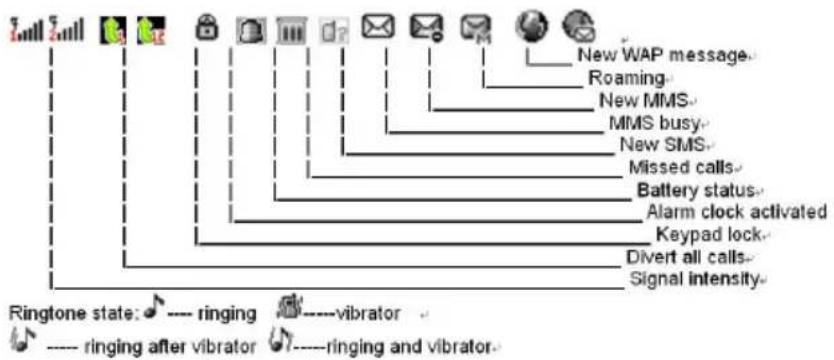
flowchart
graph TD
    A["Ringtone state: ♪---- ringing"] --> B["Ringtone after vibrator ⬇----ringing and vibrator"]
    C["Signal intensity"] --> D["Divert all calls"]
    E["Keypad lock"] --> F["Alarm clock activated"]
    G["Battery status"] --> H["Missed calls"]
    I["MMS busy"] --> J["New SMS"]
    K["New WAP message"] --> L["Roaming"]
    M["○"] --> N["○"]
Chapter 2 Menu Details
2.1 Message
u Write Message: SMS / MMS( no bigger than 100KB, before using MMS, we must choose the correct Profile—Network provider first.)
u Inbox
u Outbox
u Drafts
u Sentbox
u Delete message
2.2 Contacts / Phonebook
Users can view contacts / Search a contact/ edit the contacts / delete the contacts / Call the contacts / Send Message to the contacts / Copy the contacts / Move the contacts;
Users can also set groups for different contacts.
In this function, users can check the memory status of both SIM and phone.
2.3 Call logs
I Call history:
Dialed calls / Received calls / Missed calls
I Delete calls from Dialed calls / Received calls / Missed calls; or
delete all.
I Call timers
2.4 Settings
I SIM modes: Dual SIM open / Only SIM1 open / Only SIM2 open;
I Phone setting: Time& Date / Scheduled Power ON & OFF / Languages / Default Input / Wall paper / Screen savier / Key definitions / LCD backlight settings.
I Internet: Network selection / Preferences
I Security Setting: SIM lock / Phone Lock / Keypad lock / Change Password.
Connectivity: Bluetooth / Data Account
I Restore Facotry Default, Password: 1122
2.5 Multimedia
u Image Viewer: support JPG, GIF picture browser.
u Audio player
This mobile phone is able to play audio formats of MP3, MIDI.
u Video player
This mobile phone is able to play video formats of MP4, 3GP.
u FM radio
This mobile phone supports FM radio. Please plugin earphone before using.
u Camera, this phone configured with a VGA camera on the back. Camera options
| Option Description | |
| Self mode | Activate/deactivate the front camera |
| To album: | View the saved pictures and the “+/-” on the screen are invalid. |
| Camera settings | Shutter tone: Sound effect I, II, III and OFF |
| Exposure compensation: -4 ~ +4 | |
| Avoid flicker: 50Hz (default), 60Hz | |
| Shooting delay: 5sec, 10sec, 15sec or OFF. | |
| Sequence setting: Single, three, five or OFF. | |
| Image setting | Image size: 640*480, 320*240, 160*120, 240*180 |
| Image quality: intermediate, high, low | |
| White balance | Auto, sunlight, tungsten lamp, fluorescent, cloudy, and incandescent. |
| Scene mode | Auto, night mode |
| Special effect setting | Five options are available |
| Image frame | Two options are available and you can also disable the image frame |
| Storage path | Memory card |
| Reset Rest | store the default settings |
2.6 File Manager
Insert Micro SD Card to browse all files.
2.7 Fun & Games
It has build-in games with Help function.
I E-Book reader
I Game – Sokoban
2.8 Profiles
Standard / Silent / Meeting / Outdoor / My profile.
Users can set ringtones, Tone volume, Alert type, Ring type, Answer mode.
2.9 Tools
u Calendar
u Alarm
u Calculator
u Torch light: Press and hold "OK" key to switch on the Torch light; press and hold again to switch off.
2.10 Attention:
u Do not approach the phone to Fire, Water, Liquid, Static.
u Keep the phone away from dusty and dirty.
u Don't drop, crash the phone.
u Unpainted.
u User the original battery and charger for your satety.
u Don't open the phone if you have any trouble, turn to our technician for help.
Chapter 3 Trouble shooting
| Failure | Reason |
| Can't switch on | 1? The battery has been run out;2? The battery isn't installed properly. |
| SIM card error | 1? SIM card is dirty. Clean the SIM card.2? Re-install the SIM card.3? SIM card is damaged. Please change a new one.4? (SIM2 is same) |
| Weak signal | Check the icon of signal strength, where four strips indicate the strongest signal and two or less strips indicate weak signal.(SIM2 is same) |
| Can't make calls | (I) You have set to hide your own number, but the network operator doesn't support this service.(II). The ambient has strong interference.(III). You have enabled call barring.(IV). You have activated Line 2, but the network operator doesn't support this service. |
| Can't charge the battery | (I). The battery may be over discharged and it takes a while to charge after connected to the charger.(II) Battery performance has decreased. |
| Can't connect to network | (I). The signal is too weak, or there is radio interference.(II). Check whether the SIM card is installed properly, whether the contact is poor or whether the card is damaged? Please contact your network operator if the SIM card is damaged. |
| The photos taken are too dark | (I) The brightness is too low;(II) The environment is too dark |
| The photos taken are blurry | (I) The object is moving; (II) Your hand shakes when you press the shutter |
| The photos taken are distorted | The object is too close |
| Can't access service menu | The SIM card doesn't support |
Chapter 4 Technical specification
| General | Network | Dual-band: GSM 900 / 1800 |
| SIM | Dual SIM | |
| Size | Dimensions | 107*58.5*12.5MM |
| Weight | AROUND 80G ( with battery) | |
| Display | Type | QCIF , 65k COLOR |
| Size | 2.0Inches; resolution: 176*220 | |
| Sound | Alert types | Polyphonic (MIDI, MP3 formats) |
| Speakerphone | Yes | |
| EarphoneJack | YES | |
| Memory | Phonebook | 200 records |
| Call records | 20 dialed calls, 20 missed calls,20 | |
| received calls | ||
| Internal | 64Mb NAND | |
| Card slot | MicroSD (TransFlash), up to 16GB | |
| Data | GPRS | YES |
| Infrared port | NO | |
| USB | Micro 5-PIN USB | |
| Camera | Camera | Yes, back VGA camera |
| Features | CPU | MTK6252 |
| Languages | Max 4 languages | |
| Messaging | SMS, MMS | |
| Call transfer | YES | |
| Browser | YES, WAP | |
| Radio | YES | |
| Bluetooth | YES | |
| Games | YES, 1-2 games | |
| Colors | Black, silver | |
| Java | NO | |
| Video AVI, MP4, 3GP | ||
| Music MIDI, MP3 | ||
| Picture JPG, GIF | ||
| Others | Alarm; Calculator; Calendar; World Time; Auto power on/off; Keypad Lock. | |
| SAR | GSM900 1.486W/Kg | |
| GSM1800 0.867W/Kg | ||
| Battery life | Capacity 600mAh | |
| Stand-by Up to 200 hrs | ||
| Talk time | Up to 4 hrs | |
| Kind of Battery | Rechargeable battery LI-Ion3.7V | |
| Charger technical data | IMPUT: AC 100V - 240V- 50~60Hz, 0.5A OUTPUT: DC5V | |
PLR IP Holdings, LLC, its licensees and affiliates, fully support all electronic waste initiatives. As responsible stewards of the environment, and to avoid violating established laws, you should properly dispose of this product in compliance with all applicable regulations, directives or other governances in the area where you reside. Please check with local authorities or the retailer where you purchased this product to determine a location where you can appropriately dispose of the product.
THE DISPOSAL OF ELECTRICAL AND ELECTRONIC EQUIPMENT WASTE PRODUCTS ON THE PART OF FINAL USERS IN THE EUROPEAN UNION
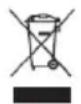
This symbol on the product or on the container indicates that this product cannot be eliminated with the general waste. The user is responsible for eliminating this kind of waste by throwing them away at a “recycling point” specifically for electrical and electronic waste. Selective collection and electrical equipment recycling contribute to preserve natural resources and warrant waste recycling to protect environment and health. In order to receive further information about electrical and electronic waste collecting and recycling, contact your
Local Council, the service of household waste or the establishment where the product was acquired.
CE

At full volume, prolonged listening to the portable audio device may damage the user's hearing.
Polaroid and Polaroid & Pixel are trademarks of PLR IP Holdings, LLC, used under license. All other trademarks are the property of the respective owner, who has not sponsored, endorsed or approved this product. PLR IP Holdings, LLC does not manufacture this product or provide any Manufacturer's warranty or support.
Copyright © 2011. All rights reserved. This product is manufactured, distributed,
and sold by Market Maker Brand Licensing, 79 route nationale 7, 69570 Dardilly, France
For warranty information and technical support, please call 33 + (0)437 63 29 25 or visit www.polaroid.com.
Product features, specifications and appearances are subject to change without notice.
Polaroid