NXS-9750 3G - Uncategorized SMSEagle - Free user manual and instructions
Find the device manual for free NXS-9750 3G SMSEagle in PDF.


User questions about NXS-9750 3G SMSEagle
0 question about this device. Answer the ones you know or ask your own.
Ask a new question about this device
Download the instructions for your Uncategorized in PDF format for free! Find your manual NXS-9750 3G - SMSEagle and take your electronic device back in hand. On this page are published all the documents necessary for the use of your device. NXS-9750 3G by SMSEagle.
USER MANUAL NXS-9750 3G SMSEagle
The materials used in this publication are copyright and are not to be duplicated, copied, or used without the prior consent of the copyright holder. Technical specifications are subject to change without prior notice being given.
CONTENTS
1. GET READY TO START 5
What's in The BOX....6
Prepare for first start....7
2. USING SMSEAGLE 10
Get to know with Connectors, Ports and LEDs.... 11
Basic Operations.... 12
SMSEagle features....12
SMSEagle plugins.... 13
Autoreply plugin....13
Network Monitoring plugin....13
Email to SMS plugin.... 17
SMS to Email plugin.... 18
Callback URL plugin 20
SMS Forward 21
Periodic SMS....22
Digital input/output (DI/DO) 23
Multimodem features 26
SMSEagle API 27
Plugins and integration manuals for NMS & Auth systems 71
Connecting directly to SMSEagle database....72
SNMP agent....73
Database cleaning scripts.... 76
Failover (HA-cluster) feature....77
3. TROUBLESHOOTING 80
Verification of LEDs 81
Checking the device logs 81
When the device is not reachable....81
Restoring factory defaults 82
5. SERVICE AND REPAIR....83
Warranty 84
Service 84
6. TECH SPECS AND SAFETY INFORMATION....85
Technical Specifications....86
Important Safety Information 88
FCC compliance statement....89
Canadian regulatory statement 89
Disposal and recycling information 90
- GET READY TO START
What's in The BOX
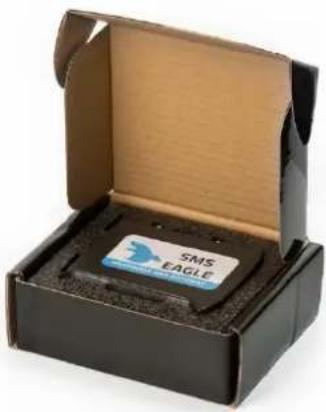
Your SMSEagle box contains:
• SMSEagle hardware SMS gateway
- 2x external omnidirectional 3.5dBi GSM antenna (with magnetic foot)
• AC/DC power supply (input voltage: 100-240V)
- Warranty card
natural_image
Open black box containing a small SIM EAGLE tag with a blue logo, no visible text or symbols on the main subject.Prepare for first start
Your SMSEagle is designed so that you can set it up quickly and start using it right away. Follow the steps below to get started.
Step 1: Connect 3G antenna
Plug in both antenna connectors to the device. Make sure the antennas remain with 20cm spacing from each other.
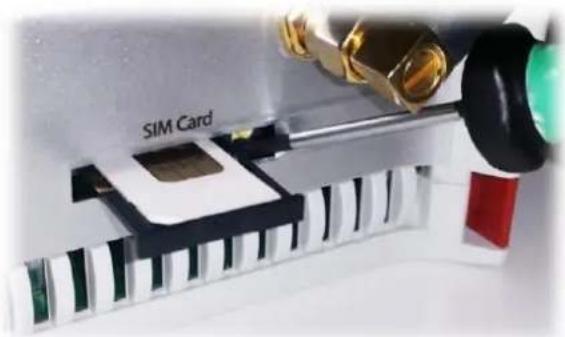
Step 2: Insert SIM Card
Please install SIM Card when the device is SWITCHED OFF. SIM Card slot is located at the bottom of the device. Use a ball-pen or small screwdriver to eject SIM Card tray. Insert card into tray and push it gently into slot.
natural_image
Close-up of a SIM Card with mechanical components and a piano keyboard (no readable text or symbols)Step 3: Power the device
The device is powered with AC/DC power supply adaptor delivered in the box. The device needs a power source of 12V DC to 30V with 27W power.
In order to power the device simply plug in a connector from AC/DC adaptor into the device.

text_image
Power source 12-30 V DC Pin 1 Vcc GNDStep 4: Configure IP settings
text_image
SMS EAGLE 2024-01-03 18:00:57 2024-01-03 18:00:57 2024-01-03 18:00:57 2024-01-03 18:00:57 2024-01-03 18:00:57 2024-01-03 18:00:56 2024-01-03 18:00:56 2024-01-03 18:00:56 2024-01-03 18:00:56 2024-01-03 18:00:56 2024-01-03 18:00:55 2024-01-03 18:00:55 2024-01-03 18:00:55 2024-01-03 18:00:55 2024-01-03 18:00:55 2024-01-03 18:00:54 2024-01-03 18:00:54 2024-01-03 18:00:54 2024-01-03 18:00:54 2024-01-03 18:00:54 2024-01-03 18:00:53 2024-01-03 18:00:53 2024-01-03 18:00:53 2024-01-03 18:00:53 2024-01-03 18:00:53 2024-01-03 18:00:52 2024-01-03 18:00:52 2024-01-03 18:00:52 2024-01-03 18:00:52 2024-01-03 18:00:51 2024-01-03 18:00:51 2024-01-03 18:00:51 2024-01-03 18:00:51 2024-01-03 18:00:51 2024-01-03 18:00:56 2024-01-03 18:00:56 2024-01-03 18:00:56 2024-01-03 18:00:56 2024-01-03 18:06 2024-01-03 18:99 2024-01-03 18:99 2024-01-03 18:99 2024-01-03 18:99 2024-01-03 18:99 2024-01-99 2024-99 29/99/99/99/99/99/99/99/99/99/99/99/99/99/99/99/99/99/99/99/99/99/99/99/99/99/99/99/99/99/99/99/99/99/96/96/96/96/96/96/96/96/96/96/96/96/96/96/96/96/96/96/96/96/96/96/96/96/96/96/96/96/96/96/96/96/96/96SMSEAGLE DEFAULT NETWORK CONFIGURATION:
DHCP CLIENT IS ON
(IP ADDRESS WILL BE OBTAINED AUTOMATICALLY FROM YOUR DHCP SERVER)
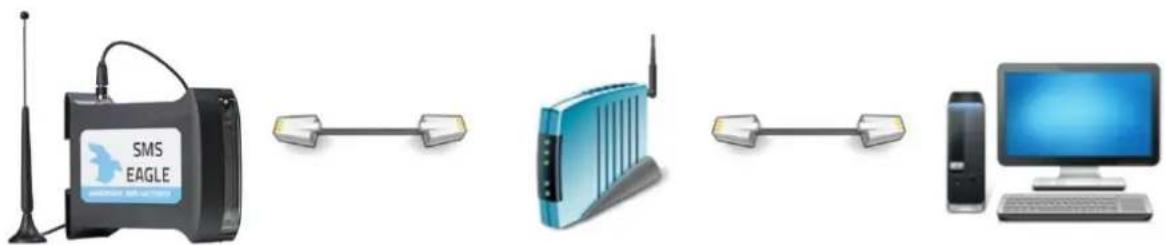
A) ) CONNECT SMSEAGLE TO YOUR LAN AND OBTAIN IP ADDRESS AUTOMATICALLY
- connect the device to your LAN using Ethernet cable
o SMSEagle will obtain IP address automatically from your DHCP - read assigned IP address on your DHCP server
B) OR SET IP ADDRESS FOR SMSEAGLE MANUALLY
○ connect a display using HDMI connector, connect a keyboard to USB port (note: cables are not provided)
- login to the SSH console using root credentials (these were provided with your device)
edit configuration file with command: mcedit /mnt/nand-user/smseagle/syscfg change the following lines: HOST_IP= (set IP address for your device) GW_IP= (default gateway IP address) NET_MASK= (set subnet mask) START_DHCP=Y (set to START_DHCP=N to disable DHCP client)
- save and exit the file
- shutdown the device
- now connect SMSEagle to your LAN using Ethernet cable
C) LOG IN TO SMSEAGLE
text_image
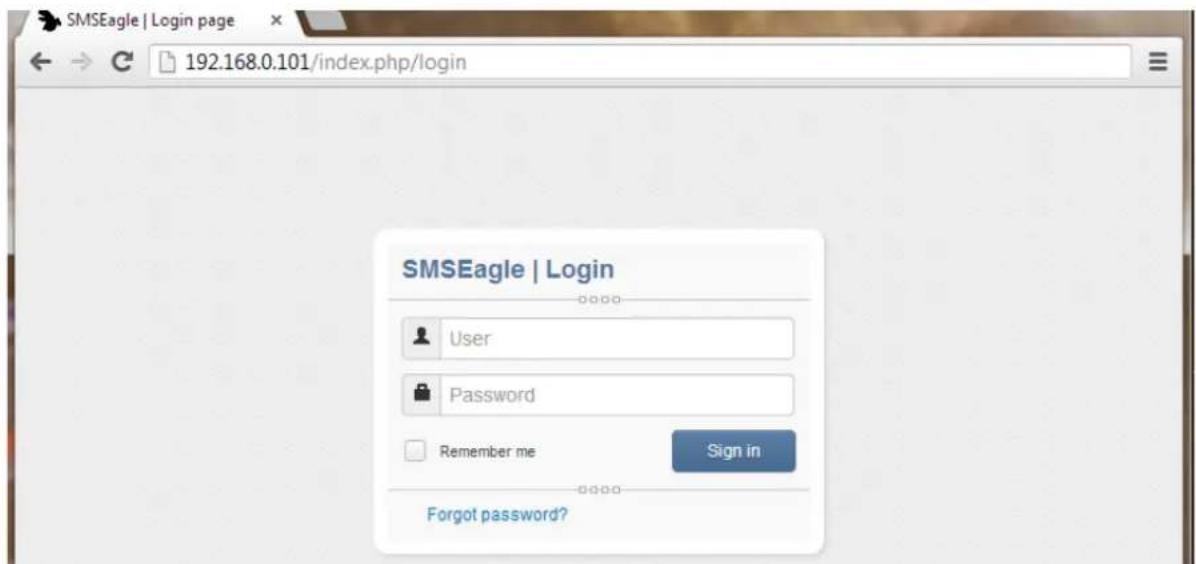
SMSEagle | Login page 192.168.0.101/index.php/login SMSEagle | Login User Password Remember me Sign in Forgot password?Open an internet browser on your PC and go to the IP address assigned to your gateway
SMSEAGLE DEFAULT USER IS:
Username: admin
Password: password
Login to application with above username and password.
D) CONFIGURE STATIC IP SETTINGS (OPTIONAL)
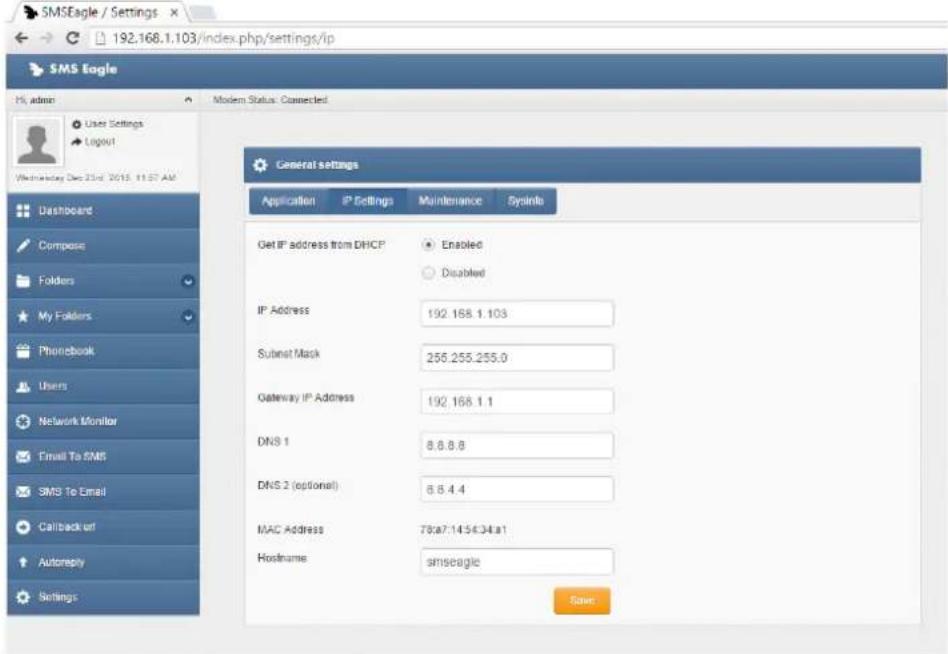
Click on menu position "Settings" and navigate to tab "IP Settings".
text_image
SMS Eagle / Settings 192.168.1.103/index.php/settings/ip SMS Eagle Hi admin User Settings Logout Wednesday Dec 23rd 2015 11:57 AM Dashboard Compose Folders My Folders Phonebook Users Network Monitor Final To SMS SMS To Email Callback off Autoreply Settings Modern Status: Connected General settings Application IP Settings Maintenance Systine Get IP address from DHCP Enabled Disabled IP Address 192.168.1.103 Subset Mask 255.255.255.0 Gateway IP Address 192.168.1.1 DNS 1 8.8.8.8 DNS 2 (optional) 8.8.4.4 MAC Address 78:a7.14:56:34:a1 Hostname smseagle SaveDisable DHCP server. Enter your IP settings.
Press "Save" button.

E) SETTING SIM-CARD PIN NUMBER
This step should ONLY be done if your SIM-card(s) requires PIN.
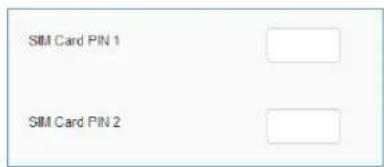
If your SIM-card(s) requires PIN number at startup, go to Settings > Maintenance Tab. Enter your PIN number in the field "SIM Card PIN 1/2":
text_image
SIM Card PIN 1 SIM Card PIN 2Press "Save" button.

text_image
Antenna (2nd Optional) USB PWR USER RDY RST SW SIM 1 SIM 2 SIM Card (2nd Slot Optional) Connector Ethernet HDMI| Element | Label | Description |
| Connector 1 | C1 | Power connector and serial ports |
| SIM Card Slot | SIM1, SIM2 (optional) | SIM card slot(s) |
| HDMI port | HDMI | HDMI port (cable not included) |
| USB port | USB | USB port (cable not included) |
| Ethernet Port | ETH | Ethernet RJ45 socket |
| Antenna | ANT | Antenna socket |
| Power LED | PWR | LED indicating power-on |
| User LED | USER | LED for user application purpose (not used) |
| SIM1,2 LEDs | 3G modem 1,3G modem 2 (optional) | LED indicator for modem status |
| Ready LED | RDY | LED indication device status |
| Reset | RST | Switch for rebooting the device |
| User Switch | SW | Switch for restoring to factory settings |
Basic Operations
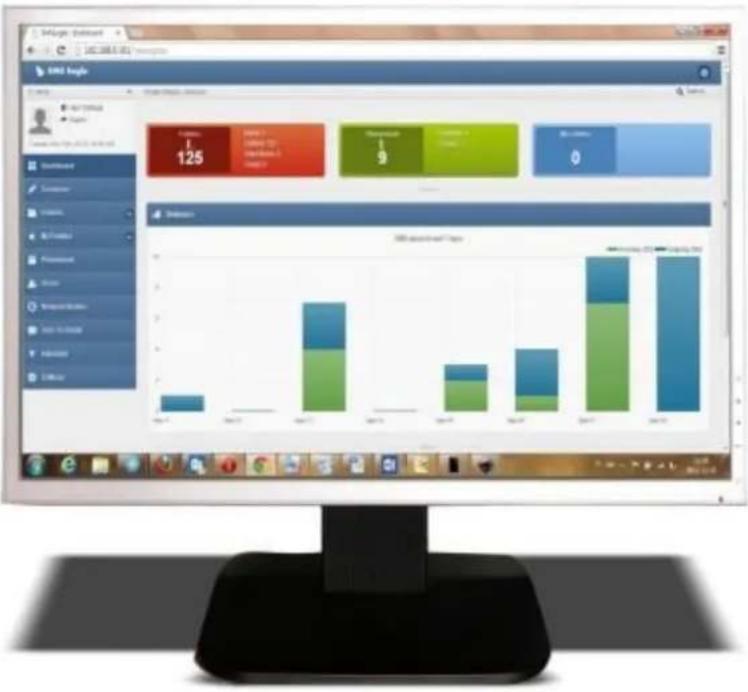
SMSEagle is capable to work in various screen resolutions, making it accessible for wide range of devices: computers, laptops, tablets, smartphones, etc.
bar
| Category | 2017 | 2018 | | :--- | :--- | :--- | | Electronics | 125 | 1 | | Automotive | 9 | 0 | | Automotive (Other) | 0 | 0 | | Other | 0 | 0 | | Other (Total) | 0 | 0 | | Total Sales | 1.3 | 1.6 | | Total Sales (Total) | 1.4 | 1.7 | | Total Sales (Total) | 1.5 | 1.8 | | Total Sales (Total) | 1.6 | 1.9 | | Total Sales (Total) | 1.7 | 2.0 | | Total Sales (Total) | 1.8 | 2.1 | | Total Sales (Total) | 1.9 | 2.2 | | Total Sales (Total) | 2.0 | 2.3 | | Total Sales (Total) | 2.1 | 2.4 | | Total Sales (Total) | 2.2 | 2.5 | | Total Sales (Total) | 2.3 | 2.6 | | Total Sales (Total) | 2.4 | 2.7 | | Total Sales (Total) | 2.5 | 2.8 | | Total Sales (Total) | 2.6 | 2.9 | | Total Sales (Total) | 2.7 | 3.0 | | Total Sales (Total) | 2.8 | 3.1 | | Total Sales (Total) | 2.9 | 3.2 | | Total Sales (Total) | 3.0 | 3.3 | | Total Sales (Total) | 3.1 | 3.4 | | Total Sales (Total) | 3.2 | 3.5 | | Total Sales (Total) | 3.3 | 3.6 | | Total Sales (Total) | 3.4 | 3.7 | | Total Sales (Total) | 3.5 | 3.8 | | Total Sales (Total) | 3.6 | 3.9 | | Total Sales (Total) | 3.7 | 4.0 | | Total Sales (Total) | 3.8 | 4.1 | | Total Sales (Total) | 3.9 | 4.2 | | Total Sales (Total) | 4.0 | 4.3 | | Total Sales (Total) | 4.1 | 4.4 | | Total Sales (Total) | 4.2 | 4.5 | | Total Sales (Total) | 4.3 | 4.6 | | Total Sales (Total) | 4.4 | 4.7 | | Total Sales (Total) | 4.5 | 4.8 | | Total Sales (Total) | 4.6 | 4.9 | | Total Sales (Total) | 4.7 | 5.0 | | Total Sales (Total) | 4.8 | 5.1 | | Total Sales (Total) | 4.9 | 5.2 | | Total Sales (Total) | 5.0 | 5.3 | | Total Sales (Total) | 5.1 | 5.4 | | Total Sales (Total) | 5.2 | 5.5 | | Total Sales (Total) | 5.3 | 5.6 | | Total Sales (Total) | 5.4 | 5.7 | | Total Sales (Total) | 5.5 | 5.8 | | Total Sales (Total) | 5.6 | 5.9 | | Total Sales (Total) | 5.7 | 6.0 | | Total Sales (Total) | 5.8 | 6.1 | | Total Sales (Total) | 5.9 | 6.2 | | Total Sales (Total) | 6.0 | 6.3 | | Total Sales (Total) | 6.1 | 6.4 | | Total Sales (Total) | 6.2 | 6.5 | | Total Sales (Total) | 6.3 | 6.6 | | Total Sales (Total) | 6.4 | 6.7 | | Total Sales (Total) | 6.5 | 6.8 | | Total Sales (Total) | 6.6 | 6.9 | | Total Sales (Total) | 6.7 | 7.0 | | Total Sales (Total) | 6.8 | 7.1 | | Total Sales (Total) | 6.9 | 7.2 | | Total Sales (Total) | 7.0 | 7.3 | | Total Sales (Total) | 7.1 | 7.4 | | Total Sales (Total) | 7.2 | 7.5 | | Total Sales (Total) | 7.3 | 7.6 | | Total Sales (Total) | 7.4 | 7.7 | | Total Sales (Total) | 7.5 | 7.8 | | Total Sales (Total) | 7.6 | 7.9 | | Total Sales (Total) | 7.7 | 8.0 | | Total Sales (Total) | 7.8 | 8.1 | | Total Sales (Total) | 7.9 | 8.2 | | Total Sales (Total) | 8.0 | 8.3 | | Total Sales (Total) | 8.1 | 8.4 | | Total Sales (Total) | 8.2 | 8.5 | | Total Sales (Total) | 8.3 | 8.6 | | Total Sales (Total) | 8.4 | 8.7 | | Total Sales (Total) | 8.5 | 8.8 | | Total Sales (Total) | 8.6 | 8.9 | | Total Sales (Total) | 8.7 | 9.0 | | Total Sales (Total) | 8.8 | 9.1 | | Total Sales (Total) | 8.9 | 9.2 | | Total Sales (Total) | 9.0 | 9.3 | | Total Sales (Total) | 9.1 | 9.4 | | Total Sales (Total) | 9.2 | 9.5 | | Total Sales (Total) | 9.3 | 9.6 | | Total Sales (Total) | 9.4 | 9.7 | | Total Sales (Total) | 9.5 | 9.8 | | Total Sales (Total) | 9.6 | 9.9 | | Total Sales (Total) | 9.7 | 10.0 | | Total Sales (Total) | 9.8 | -0 | | Total Sales (Total) - Automotive & Computer Services, Inc., Ltd., Inc., Inc., Inc., Inc., Inc., Inc., Inc., Inc., Inc., Inc., Inc., Inc., Inc., Inc., Inc., Inc., Inc., Inc., Inc., Inc., Inc., Inc., Inc., Inc., Inc., Inc., Inc., Inc., Inc., Inc., Inc., Inc., Inc., Inc., Inc., Inc., Inc., Inc., Inc., Inc., Inc., Inc., Inc., Inc., Inc., Inc., Inc., Inc., Inc., Inc., inc, Inc, Inc, Inc, Inc, Inc, Inc, Inc, Inc, Inc, Inc, Inc, Inc, Inc, Inc, Inc, Inc, Inc, Inc, Inc, Inc, Inc, Inc, Inc, Inc, Inc, Inc, Inc, Inc, Inc, Inc, Inc, Inc, Inc, Inc, Inc, Inc, Inc, Inc, Inc, Inc, Inc, Inc, Inc, Inc, Inc, Inc, Inc, Inc, Inc, Inc,Inc, Inc, Inc, Inc, Inc, Inc, Inc, Inc, Inc, Inc, Inc, Inc, Inc, Inc, Inc, Inc, Inc, Inc, Inc, Inc, Inc, Inc, Inc, Inc, Inc,Inc,Inc,Inc,Inc,Inc,Inc,Inc,Inc,Inc,Inc,Inc,Inc,Inc,Inc,Inc,Inc,Inc,Inc,Inc,Inc,Inc,Inc,Inc,Inc,Inc,Inc,Inc,Inc,Inc,Inc,Inc,Inc,Inc,Inc,Inc,Inc,Inc,Inc,Inc,Inc,Inc,Inc,Inc,Inc,Inc,Inc,Inc,Inc,Inc,Inc,INC| Note: The data is extracted from the image and displayed in a separate table using the same table format as shown in the code.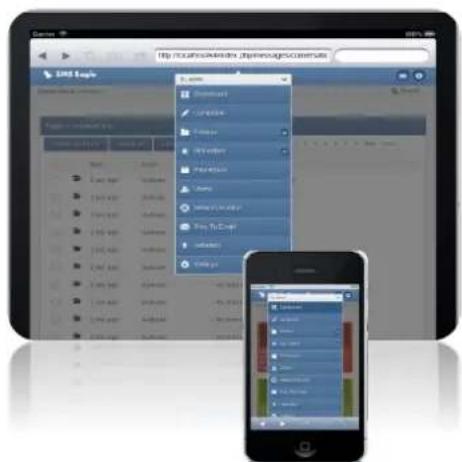
text_image
http://localhost/index.php/express/revenue/ URL Page 1. www. 2. http://www.103.com 3. www.103.com 4. www.103.com 5. www.103.com 6. www.103.com 7. www.103.com 8. www.103.com 9. www.103.com 10. www.103.com 11. www.103.com 12. www.103.com 13. www.103.com 14. www.103.com 15. www.103.com 16. www.103.com 17. www.103.com 18. www.103.com 19. www.103.com 20. www.103.com 21. www.103.com 22. www.103.com 23. www.103.com 24. www.103.com 25. www.103.com 26. www.103.com 27. www.103.com 28. www.103.com 29. www.103.com 30. www.103.com 31. www.103.com 32. www.103.com 33. www.103.com 34. www.103.com 35. www.103.com 36. www.103.com 37. www.103.com 38. www.103.com 39. www.103.com 40. www.103.com 41. www.103.com 42. www.103.com 43. www.103.com 44. www.103.com 45. www.103.com 46. www.103.com 47. www.103.com 48. www.103.com 49. www.103.com 50. www.103.com 51. www.103.com 52. www.103.com 53. www.103.com 54. www.103.com 55. www.103.com 56. www.103.com 57. www.103.com 58. www.103.com 59. www.103.com 60. www.103.com 61. www.103.com 62. www.103.com 63. www.103.com 64. www.103.com 65. www.103.com 66. www.103.com 67. www.103.com 68. www.103.com 69. www.103.com 70. www.103.com 71. www.103.com 72. www.103.com 73. www.103.com 74. www.103.com 75. www.103.com 76. www.103.com 77. www.103.com 78. www.103.com 79. www.103.com 80. www.103.com 81. www.103.com 82. www.103.com 83. www.103.com 84. www.103.com 85. www.103.com 86. www.103.com 87. www.103.com 88. www.103.com 89. www.103.com 90. www.103.com 91. www.103.com 92. www.103.com 93. www.103.com 94. www.103.com 95. www.103.com 96. www.103.com 97. www.103.com 98. www.103.com 99. www.103.comOpen a web browser on your device, type in SMSEagle's IP address (as set in previous chapter). At login screen type in your username/password. Default username and password is given in chapter First Start.
SMSEagle features
- Sending & Receiving SMS (managing messages with Inbox, Outbox, Sent Items)
- Smartphone-like conversation mode (messages are nicely grouped by phone number). You can easily track history of what you send and receive
- Sending to single numbers, contacts or groups from phonebook
• SMS Scheduling by specified date and time or delay - Message templates (save & edit your own templates)
• Phonebook (single contacts, private and public groups of contacts)
• Multiuser support (each user has access to a private Inbox, Outbox, Sent Items)
• Unicode support (support of national characters)
• 3G modem watchdog installed
• Failover support (HA cluster of 2 devices)
• Modem failover mechanism (for built-in modems)
• Device failover support (HA cluster of 2 devices)
SMSEagle plugins
Basic features of SMSEagle software are extended by plugins that provide extra features to the software. Below you will find a description of plugins available in each SMSEagle device. All plugins are an integral part of SMSEagle software. That means that all described plugins are installed in a standard software of SMSEagle device and are available for free.
Autoreply plugin
If the plugin is set to 'Active' SMSEagle responds to each received message with automatic fixed text response. Text response can be defined within plugin settings. If within last 10 minutes text response has been already sent to a given phone number, text response is not being sent again to that number.
text_image
Autoreply settings Enable Autoreply Yes Text of autoreply message Thank you. We will contact you soon... SaveScreenshot from autoreply settings
Network Monitoring plugin
SMSEagle is equipped with powerful (yet simple to use) network services monitoring features. With that features you can monitor any service that has listening port open. SMSEagle is trying to connect to each defined port in Network Monitoring feature and sends defined SMS alert when port is unavailable. Below you will find a brief overview of plugin capabilities.

Network Monitor
| No. | Task Name | Host | Test Type | Scl |
| 1 | Lotus Notes | 10.20.154.23 | ICMP (ping) | Dis bel 23: 05: |
| 2 | Remote www service | www.smseagle.eu | Port: 80 | Dis bel 23: 05: |
| 3 | SMTP Mail Server | 10.20.154.231 | Port: 25 | Alv |
| 4 | Sharepoint | 10.20.154.29 | ICMP (ping) | Alv |
• see a settings' overview for all of your tasks
- check which server/service is currently unavailable
• see when a specific server/service was last down (last downtime)
- check what happened at last downtime (see server/service response)
• edit/delete your tasks
• disable tasks when needed (e.g. when doing a machine upgrades)
Define what you want to monitor in each task
Add Monitoring Task
Task Name: Lotus Notes
Host: 10.20.154.23
(IP addr
Test type: ICMP (ping)
© Specified service port
Port number: 0 (TCP port number)
Connect Timeout: 30 (In seconds, increase th
Active: always on disable between specified hours
- choose a name for the task
- enter a host (IP address or Hostname)
• choose ICMP (ping) to monitor a server with ICMP protocol
• ...or PORT to monitor your service on a selected port (SMSEagle will check if port is open) - increase a default timeout value for busy servers (by default we set it to 30 seconds)
Define a schedule
Add Monitoring Task
Port number:
0
(TCP port number)
Connect Timeout:
30
(In seconds, increase this
Active: © always on
disable between specified hours
Disable from:
23

55
to:
05
00
SMS Recipient:
○ Phonebook public group(s)
Single number(s)
615123123
SMS sent when:
host/service goes down
host/service goes up after
• choose if task should be always enabled...
• ...or disable it in chosen times (during a night, when a machine goes through planned restarts, during resource intensive backups, etc.)
• enter a phone number or choose a group of users to send your SMS alert to
- select when to send SMS alert (when host/service goes down, when host/service goes up after failure)
Define a SMS alert message
SMS Text: This is automatic alert from SMSEagle Network-monitor. Alert from task: {TASKNAME}. Error was: {RESPONSE} Time generated: {TIMESTAMP}
Placeholders for SMS Text:
{TASKNAME} - name of monitoring task
{HOST} - host
{RESPONSE} - error response from server/service
{TIMESTAMP} - error timestamp
Define your SMS messages when host or service becomes unavailable/comes back to life. Choose field placeholders for your SMS text:
• {TASKNAME} – puts a taskname inside SMS text
- {HOST} – hostname or IP address
- {RESPONSE} – message received (in case of no response from server/service)
- {TIMESTAMP} – timestamp of an error
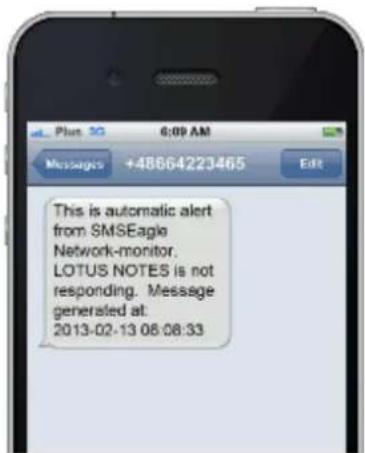
Receive SMS alerts
text_image
This is automatic alert from SMSEagle Network-monitor. LOTUS NOTES is not responding. Message generated at: 2013-02-13 08:08:33• be immediately alerted when your services/servers go down (or go up after failure)
• give yourself a chance to react quickly
Go to our website www.smseagle.eu for more details of this plugin.
Email to SMS plugin
Email To SMS plugin allows you to convert an email to SMS message.
BASIC USAGE
If the plugin is enabled, email sent to the email address:
PHONE_NUMBER@[IP_ADDRESS_OF_SMSEAGLE] will be converted to SMS message.
PHONE_NUMBER is a destination phone number
IP_ADDRESS_OF_SMSEAGLE is the IP address of your device.
The text of the email is the text of the SMS message (optionally you can append email subject at the beginning of SMS message).
Example: email message sent to the address: 123456789@[192.168.0.101] will be converted to SMS message and delivered to phone number 123456789.
SEND TO USERNAME/GROUP
Email sent to the email address:
NAME_IN_PHONEBOOK@[IP_ADDRESS_OF_SMSEAGLE] will be converted to SMS message and will be sent to a user or users group from SMSEagle's phonebook.
NAME_IN_PHONEBOOK is a username or group name (must be a public group) from SMSEagle's phonebook
IP_ADDRESS_OF_SMSEAGLE is the IP address of your device.
The text of the email is the text of the SMS message (optionally you can append email subject at the beginning of SMS message).
Example: email message sent to the address: db-admins@[192.168.0.101] will be converted to SMS message and delivered to all members of db-admin group. The db-admin group must be defined in your SMSEagle phonebook.
USING FQDN IN EMAIL ADDRESS
It is also possible to use Fully Qualified Domain Name in an email address sent to SMSEagle box (eg.: 123456789@mydomain.com). Please refer to our FAQ article: How do I configure Email2SMS plugin to accept FQDN email addresses for more details.
text_image
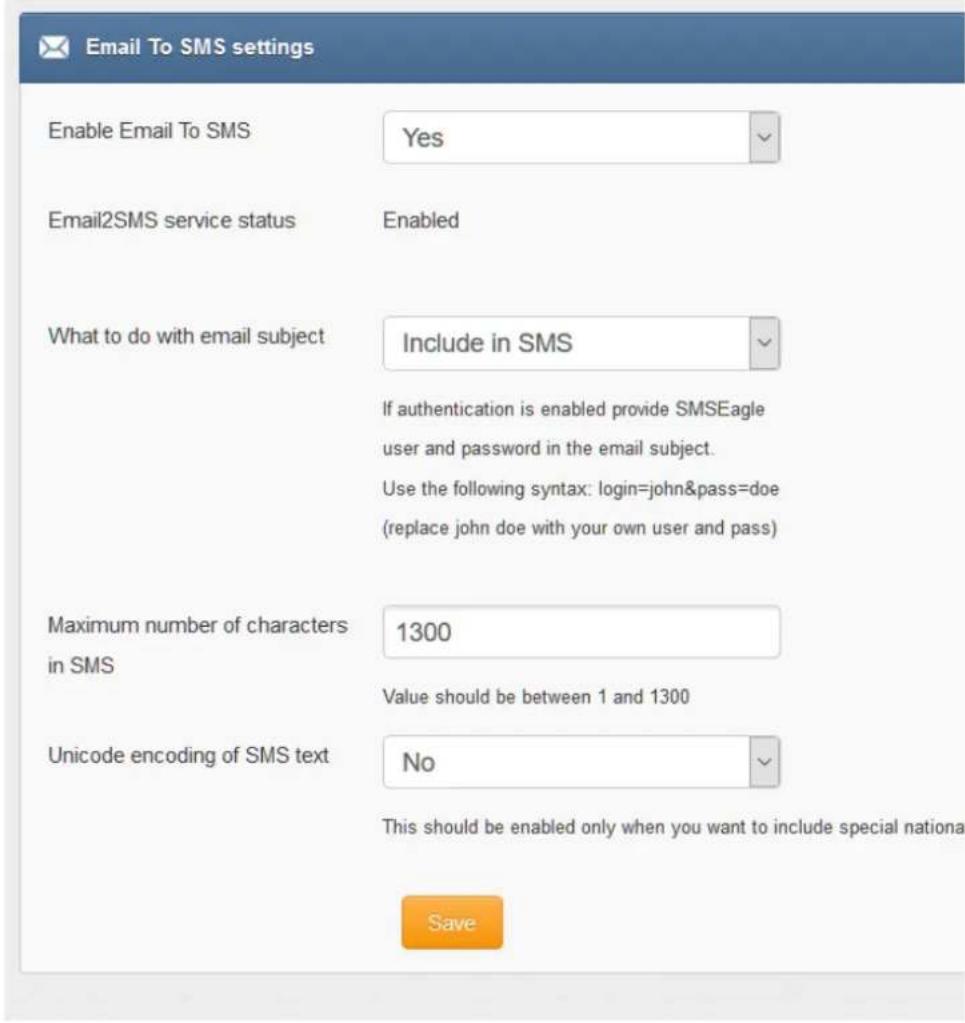
Email To SMS settings Enable Email To SMS Yes Email2SMS service status Enabled What to do with email subject Include in SMS If authentication is enabled provide SMSEagle user and password in the email subject. Use the following syntax: login=john&pass=doe (replace john doe with your own user and pass) Maximum number of characters in SMS 1300 Value should be between 1 and 1300 Unicode encoding of SMS text No This should be enabled only when you want to include special nationa SaveScreenshot from Email to SMS settings
• if you want to use the plugin, set 'Email2sms active' to 'Yes'
- if you want to include a subject of an email in SMS message, set 'What to do with email subject' setting to 'Include in SMS'. The email subject will be appended at the beginning of SMS message
- if you want to use user authentication, set 'What to do with email subject' setting to 'Use for authentication'. If user authentication is enabled, provide in a subject of an email your login and password in the following form: login=john&pass=doe
- the text of an email will be cropped to the value 'Maximum number of characters'. Maximum allowed length of SMS message is 1300 characters
- if you want to include in SMS message special national characters (like ääaöß 我) set "Unicode encoding of SMS text" to 'Yes'
SMS to Email plugin
SMS to Email plugin allows you to forward your SMS messages to email address.
The plugin can be used in two modes:
a. forwarding of incoming SMS to email of last sender (so called Two-way Email2SMS & SMS2Email) In this mode, when SMSEagle receives incoming SMS, it checks if earlier anyone was sending SMS to the number from incoming SMS using Emai2SMS. If last sender is found, the incoming SMS is
forwarded to the email address of last sender. If no last sender is found, then the incoming message is forwarded to a default email address given in plugin settings.
b. It forwards all the incoming messages to one fixed email address.
In this mode all incoming SMS messages are forwarded to always the same email address.
Plugin uses an external SMTP server for sending emails.
text_image
SMS to Email Settings Enable forwarding to email No Type of email forwarding To fixed email address Forward to Email address contact@example.com Email subject Incoming SMS on SMSEagle Enter your SMTP server settings for sending emails (required): SMTP Host mail.example.com SMTP Port 587 SMTP Connection encryption none Username user Leave blank if SMTP authentication is not required Password •••••••••• Leave blank if SMTP authentication is not required Sender email user@example.com SaveScreenshot from SMS to Email settings
- if you want to use the plugin, set 'Enable forwarding to email' to 'Yes'
- choose a type of email forwarding: "To email of last sending user" (so called "Two-way Email2SMS & SMS&Email") or "To fixed email address"
• enter an email address to which incoming SMS messages are to sent
• enter SMTP configuration for your SMTP server that will be used for sending emails
Callback URL plugin
Callback URL plugin allows you to forward incoming SMS message to a defined URL address. If the plugin is enabled, on each incoming SMS message SMSEagle will trigger HTTP request to a defined URL. HTTP request can be of type GET or POST.
text_image
Callback url settings Enable callback of custom url on incoming SMS URL http://www.example.com/mycallback.php URL method POST API key of your service (optional) You can set additional API key that is expected by your service (to Parameter description The request sent via a GET/POST to your URL have the foll sender: Sender numbertimestamp: Time when SMSEagle received the message in text: Content of the SMS messagemsgid: SMSEagle message id oid: Value of OID identifier assigned to outgoing message w apikey: API key of your service (optional) SMSEagle will be expecting HTTP response: 200 [OK] Request string example for HTTP GET: ?sender=48601123123×tamp=20140531092257&msgi Test URL SaveScreenshot from Callback URL settings
- If you want to use the plugin, set 'Enable callback' to 'Yes'
- 'URL' field defines remote address of your callback script
- With 'URL method' you can choose whether callback to your URL will be done with HTTP GET or POST method
- Optionally you can define API key value. This will be passed to your callback URL in parameter 'apikey'. If you leave the field blank, 'apikey' parameter will not be passed to your callback URL
- 'Test URL' button allows to test whether your Callback URL configuration is correct. SMSEagle will make a callback request with test parameters and will verify the response of remote server
SMS Forward
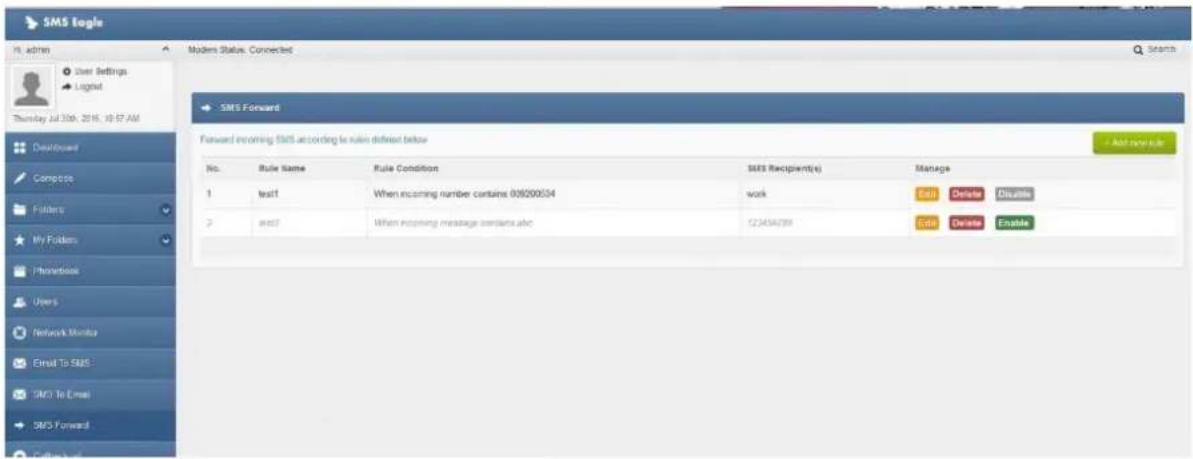
The plugin “SMS forward” allows to forward incoming SMS messages to one/may recipients according to defined rules.
Plugin "SMS Forward" allows to add many forwarding rules. Each rule can be enabled or disabled by user.
text_image
SMS Eagle User Settings Logical Thursday Jul 30th, 2016, 10:57 AM Debtforward Compos Folders My Folders Phonebook Users Network Monitor Email To SMS SMS To Email SMS Forward CMS Forward Forward incoming SMS according to rule defined below No. Rule Name Rule Condition SMS Recipient(s) Manage 1 self When incoming number contains 009200534 wk Edit Delete Disable 2 self When incoming message confirms abc 023454789 Edit Delete Enable Add any ruleScreenshot from plugin window
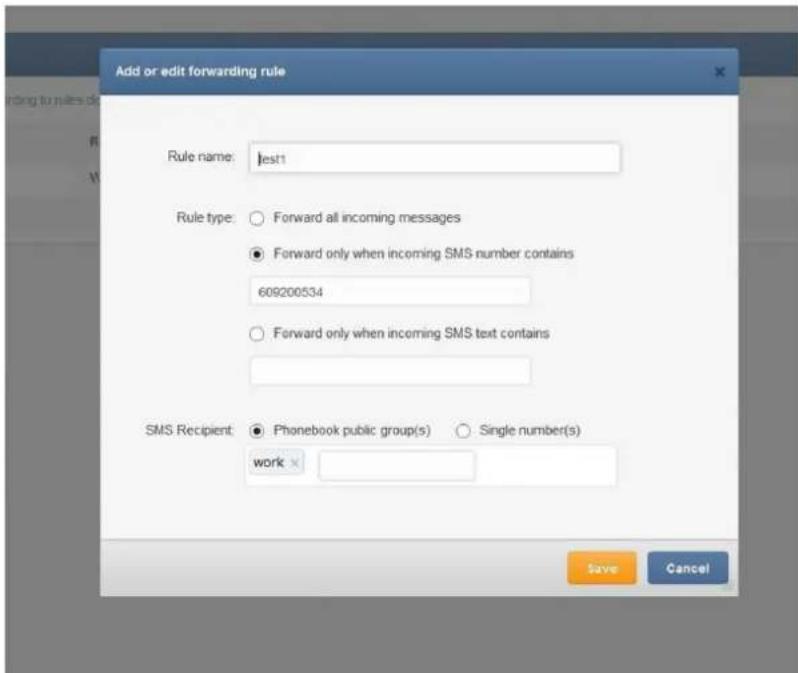
For each rule user can define:
- When incoming SMS should be forwarded (Rule type) and to what number(s) the message should be forwarded (SMS Recipient).
- When defining a rule user can choose SMS recipient (who gets the forwarded SMS).
- It can be either phone number or name of group from phonebook.
- User may define many forwarding rules in the plugin.
• Each rule is processed independently. - There is a possibility to enable/disable each rule.
text_image
Add or edit forwarding rule Rule name: test1 Rule type: ○ Forward all incoming messages ● Forward only when incoming SMS number contains 609200534 ○ Forward only when incoming SMS text contains SMS Recipient: ● Phonebook public group(s) ○ Single number(s) work Save CancelScreenshot form "Add/edit forwarding rule"
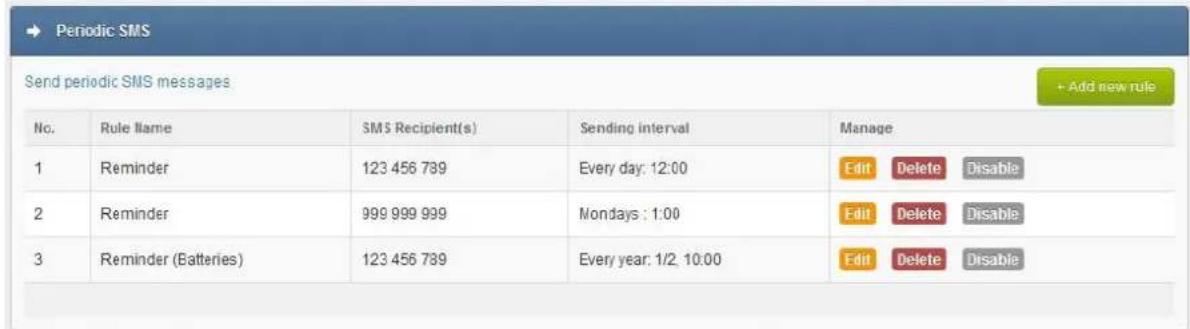
Periodic SMS
The plugin "Periodic SMS" allows to send SMS messages at a desired time interval. User may define many sending rules, and each rule will be processed independently.
Plugin "Periodic SMS" allows to add many sending rules. Each rule can be enabled or disabled by user.
text_image
Periodic SMS Send periodic SMS messages No. Rule llame SMS Recipient(s) Sending interval Manage 1 Reminder 123 456 789 Every day: 12:00 Edit Delete Disable 2 Reminder 999 999 999 Nondays : 1:00 Edit Delete Disable 3 Reminder (Batteries) 123 456 789 Every year: 1/2, 10:00 Edit Delete DisableScreenshot from plugin window
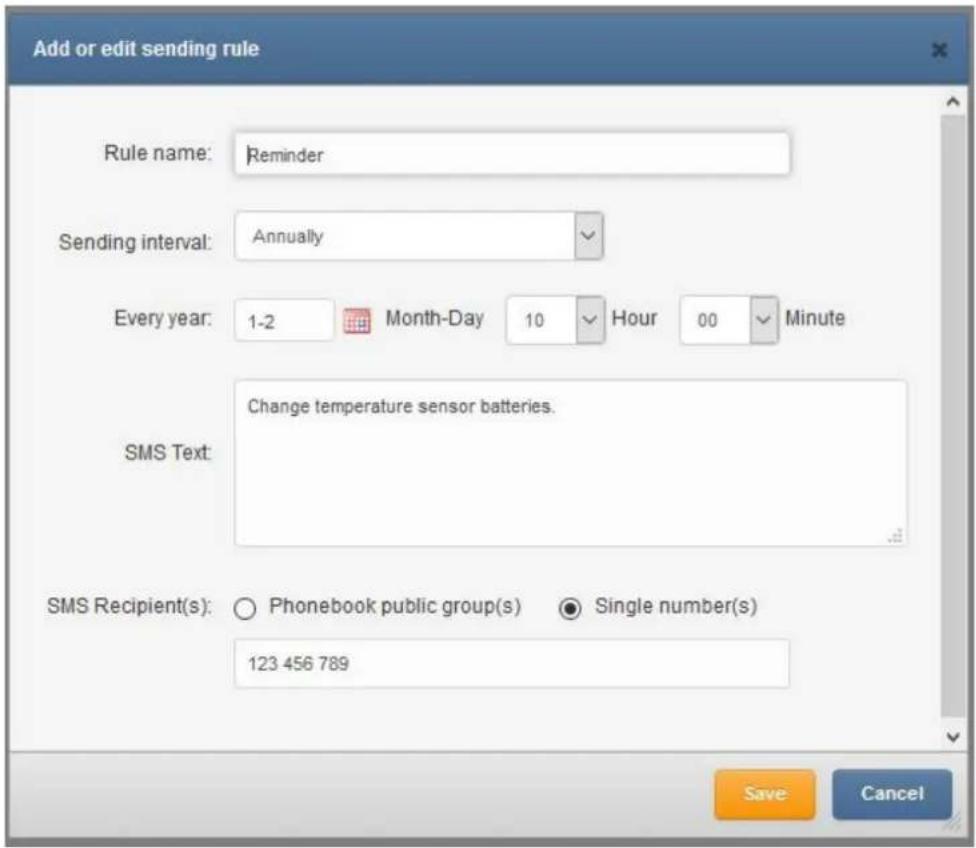
For each rule the user can define:
- The rule name
- Sending interval (Hourly, Daily, Weekly, Monthly or Annually)
• The content of the SMS text
• The recipients, sending SMS to a single number or a group from phonebook
text_image
Add or edit sending rule Rule name: Reminder Sending interval: Annually Every year: 1-2 Month-Day 10 Hour 00 Minute SMS Text: Change temperature sensor batteries. SMS Recipient(s): Phonebook public group(s) Single number(s) 123 456 789 Save CancelScreenshot from "Add new rule" window
Digital input/output (DI/DO)
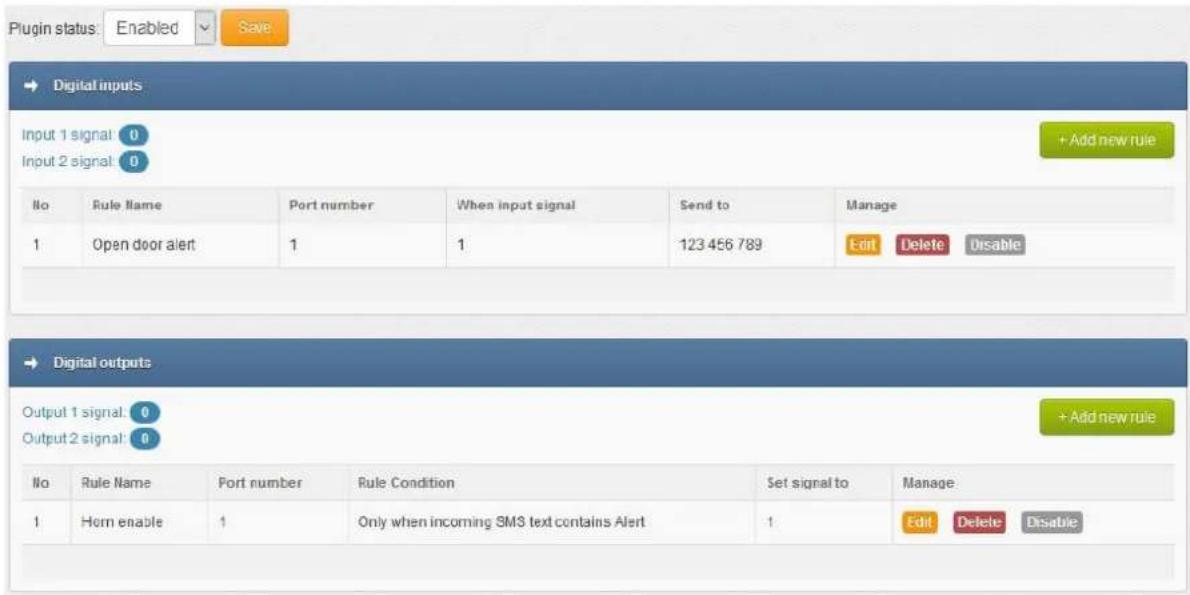
The NXS-family of SMSEagle devices is equipped with 2 digital inputs (DI) and 2 digital outputs (DO). The digital inputs can be used to receive signals from outside sensors or devices and automatically trigger sending of SMS message based on input state. On the other hand the digital outputs may be used to activate external devices connected to the outputs when certain SMS messages are received by SMSEagle.
The logical states of inputs and outputs of SMSEagle NXS-family of devices are represented by the following voltages:
| Logical level | Voltage |
| LOW (0) | 0 V |
| HIGH (1) | +5V |
The plugin "Digital input/output" allows you to define rules that control the behaviour of digital inputs/outputs on SMSEagle device. User may define several processing rules for both inputs and outputs.
text_image
Plugin status: Enabled Save Digital inputs Input 1 signal: 0 Input 2 signal: 0 No Rule Name Port number When input signal Send to Manage 1 Open door alert 1 1 123 456 789 Edit Delete Disable Digital outputs Output 1 signal: 0 Output 2 signal: 0 No Rule Name Port number Rule Condition Set signal to Manage 1 Horn enable 1 Only when incoming SMS text contains Alert Edit Delete DisableScreenshot from plugin window
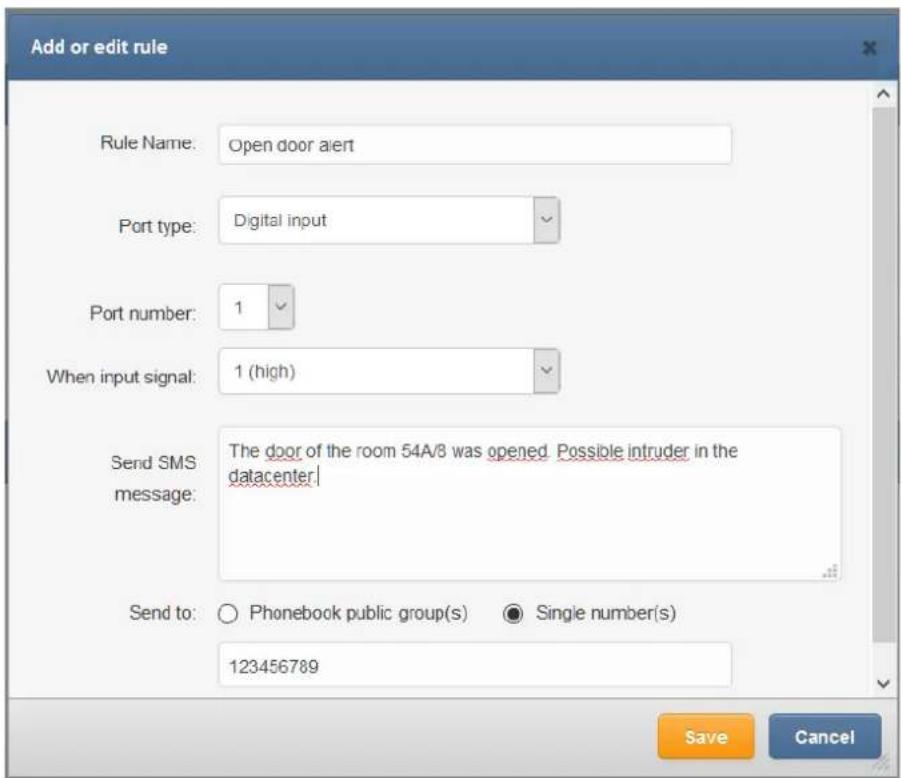
DIGITAL INPUTS
For each processing rule for digital input user can define:
- The rule name
- Port number (1,2)
• State of input signal that will trigger sending of SMS message (field "When input signal")
• SMS text (field "Send SMS message")
- The recipients phone number(s) separated with comma or group(s) from phonebook (field "Send to")
text_image
Add or edit rule Rule Name: Open door alert Port type: Digital input Port number: 1 When input signal: 1 (high) Send SMS message: The door of the room 54A/8 was opened. Possible intruder in the datacenter Send to: ○ Phonebook public group(s) ● Single number(s) 123456789 Save CancelDIGITAL OUTPUTS
For each processing rule for digital output user can define:
- The rule name
- Port number (1,2)
- On what condition digital output should be set (all incoming messages, when incoming SMS number contains or when incoming SMS text contains given value)
• State of output signal that will be triggered by incoming SMS message
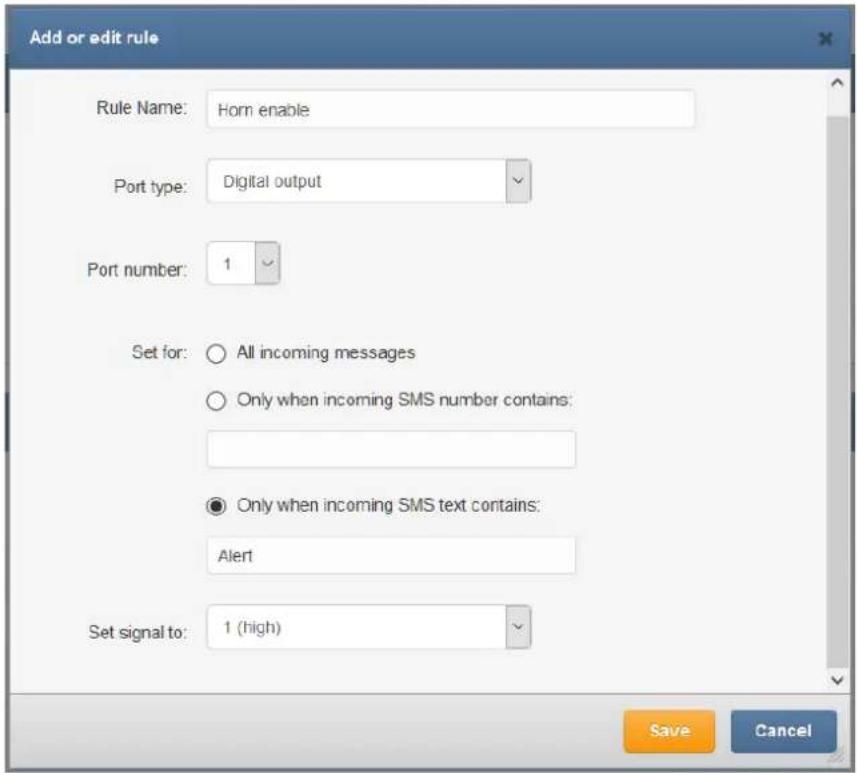
text_image
Add or edit rule Rule Name: Horn enable Port type: Digital output Port number: 1 Set for: ○ All incoming messages ○ Only when incoming SMS number contains: ● Only when incoming SMS text contains: Alert Set signal to: 1 (high) Save CancelScreenshot from digital output "Add or edit rule" window
WARNING: There is no over-voltage protection on the board. Randomly plugging wires and power sources into your digital inputs may kill it. Digital outputs has a current efficiency of 200mA. Consider using a relay for high power output devices.
Multimodem features
SMSeagle NXS-9750 is equipped with two built-in modems. You can manage modem settings in web-gui menu Settings > Maintenance Tab. There are following options available for multimodem device:
Multimodem selection strategy
Round-robin

Enable modem failover mechanism
No

If this feature is enabled, when one modem stops working other will automatically take over his job. This feature requires at least two active SIM cards in the device.
Save
Multimodem selection strategy
This setting is responsible for modem choice strategy when sending SMS messages from SMSEagle. The following options are possible:
- Round-robin In this strategy modems are selected sequentially one-by-one when sending out SMS messages. This means that device sends messages using modem1 > modem2 > modem1 > modem2, etc.
- SIM1 as Master modem In this strategy modem1 is always selected when sending out SMS messages. If failover is enabled (see below) modem2 will be always used as a backup in failover strategy
- SIM2 as Master modem In this strategy modem1 is always selected when sending out SMS messages. If failover is enabled (see below) modem2 will be always used as a backup in failover strategy
Enable modem failover mechanism
If this setting is enabled, when one modem stops working other will automatically take over his job. This feature requires at least two active SIM cards in the device. The health check for each modem is performed with 5 minutes frequency. If during a health check a modem is not connected to network the other will automatically take over his jobs (including messages waiting in Outbox folder).
SMSEagle API
SMSEagle has powerful built-in HTTP API functionalities. REST API is dedicated for integration of SMSEagle with any external system or application. Below you will find a detailed description of API functionalities.
Please note, that SMSEagle API supports both HTTP and HTTPS protocol.
For your convenience sample usage of SMSEagle's API in most popular programming languages are available at: http://www.smseagle.eu/code-samples/
1. Send SMS: HTTP GET method
HTTP GET METHOD:
https://url-of-smseagle/index.php/http_api/send_sms
PARAMETERS:
| Parameter | Description |
| login | your user to login to SMSEagle |
| pass | your password to login to SMSEagle |
| to | recipient telephone number (or numbers separated with comma) |
| message | your SMS message |
| date | (optional parameter) date and time in format YYYYmmDDHHMM (YYYY – year, mm – month, DD – day, HH – hour, MM – minute). If this parameter is not null SMS will be scheduled for sending at the given date and time |
| highpriority | (optional parameter) 0 = normal priority, 1 = SMS will have higher priority in Outbox queue when processed by GSM-modem |
| unicode | (optional parameter) 0 = no Unicode encoding (default), 1 = SMS will be encoded using Unicode (you can send national characters) |
| flash | (optional parameter) 0 = normal SMS (default), 1 = SMS will be sent as flash message |
| oid | (optional parameter) This attribute specifies a user-defined unique ID that is assigned to a message-recipient pair. The oid is a varchar(36) that uniquely identifies a message sent to a particular recipient (particular phone number). The value of this ID allows client applications to match incoming reply messages to outgoing messages. If no oid was assigned to the outgoing message this attribute will have a value of null for incoming message |
| responsetype | (optional parameter) text = format response as text (default), xml = format response as XML object |
EXAMPLES:
https://url-of-smseagle/index.php/http api/send sms?
login=john&pass=doe&to=1234567&message=mymessage
https://url-of-smseagle/index.php/http api/send sms?
login=john&pass=doe&to=1234567&message=mymessage&date=201401152132
https://url-of-smseagle/index.php/http_api/send_sms?login=john&pass=doe&to=1234567&message=mymessage&highpriority=1
RESPONSE:
Response: OK; ID=[ID of message in outbox]
Sample response: OK; ID=297
Response (when wrong logindata): Invalid login or password
Response (when wrong parameters): Wrong parameters
RESPONSE (XML):
Response:
<xml>
    <message_id>[ID of message in outbox]</message_id>
    <status>ok</status>
</xml>

Sample response:
<xml>
    <message_id>297</message_id>
    <status>ok</status>
</xml>

Response (when wrong logindata):
<xml>
    <error_text>Invalid login or password</error_text>
    <status>error</status>
</xml>

Response (when wrong parameters):
<xml>
    <error_text>Wrong parameters</error_text>
    <status>error</status>
</xml>
Important notice: You must encode URL before sending it to gateway if you use national characters in SMS message text.
2. Send SMS: JSONRPC method
HTTP POST METHOD:
https://url-of-smseagle/index.php/jsonrpc/sms
PARAMETERS:
| Parameter | Description |
| login | your user to login to SMSEagle |
| pass | your password to login to SMSEagle |
| to | recipient telephone number (or numbers separated with comma) |
| message | your SMS message |
| date | (optional parameter) date and time in format YYYYmmDDHHMM (YYYY – year, mm – month, DD – day, HH – hour, MM – minute). If this parameter is not null SMS will be scheduled for sending at the given date and time |
| highpriority | (optional parameter) 0 = normal priority, 1 = SMS will have higher priority in Outbox queue when processed by GSM-modem |
| unicode | (optional parameter) 0 = no Unicode encoding (default), 1 = SMS will be encoded using Unicode (you can send national characters) |
| flash | (optional parameter) 0 = normal SMS (default), 1 = SMS will be sent as flash message |
| responsetype | (optional parameter) simple = format response as simple object with one result field (default), extended = format response as extended JSON object |
SAMPLE BODY:
{"method":"sms.send_sms",
"params":{"login":"john","pass":"doe","to":"481234567","message":"My message"}}
or
{"method":"sms.send_sms",
"params":{"login":"john","pass":"doe","to":"481234567","message":"My message","date":"201401152132"}}
or
{"method":"sms.send_sms",
"params":{"login":"john","pass":"doe","to":"481234567","message":"My message","highpriority":"1"}}
RESPONSE:
Response: {"result": "OK; ID=[ID of message in outbox]"}
Sample response: {"result": "OK; ID=297"}
Response (when wrong logindata): {"result": "Invalid login or password"}
Response (when wrong parameters): {"result": "Wrong parameters"}
RESPONSE (EXTENDED):
Response:
{"result": {"message_id":"[ID of message in outbox]", "status":"ok"}}
Sample response: {"result": {"message_id":"748","status":"ok"}}
Response (when wrong logindata):
{"result": {"error_text":"Invalid login or password","status":"error"}}
Response (when wrong parameters):
{"result": {"error_text":"Wrong parameters","status":"error"}}
3. Send SMS to a group: HTTP GET method
HTTP GET METHOD:
https://url-of-smseagle/index.php/http_api/send_togroup
| Parameter | Description |
| login | your user to login to SMSEagle |
| pass | your password to login to SMSEagle |
| groupname | group name defined in your SMSEagle Phonebook. The group must be defined as Public |
| message | your SMS message |
| date | (optional parameter) date and time in format YYYYmmDDHHMM (YYYY – year, mm – month, DD – day, HH – hour, MM – minute). If this parameter is not null SMS will be scheduled for sending at the given date and time |
| highpriority | (optional parameter) 0 = normal priority, 1 = SMS will have higher priority in Outbox queue when processed by GSM-modem |
| unicode | (optional parameter) 0 = no Unicode encoding (default), 1 = SMS will be encoded using Unicode (you can send national characters) |
| flash | (optional parameter) 0 = normal SMS (default), 1 = SMS will be sent as flash message |
| responsetype | (optional parameter) text = format response as text (default), xml = format response as XML object |
EXAMPLES:
https://url-of-smseagle/index.php/http_api/send_togroup?login=john&pass=doe&groupname=admins&message=mymessage
https://url-of-smseagle/index.php/http_api/send_togroup?login=john&pass=doe&groupname=admins&message=mymessage&date=201401152132
https://url-of-smseagle/index.php/http_api/send_togroup?login=john&pass=doe&groupname=admins&message=mymessage&highpriority=1
RESPONSE (XML):
Response:
<xml>
    <message_id>[ID of message in outbox]</message_id>
    <status>ok</status>
</xml>
Sample response:
xml
<?xml>
    <message_id>297</message_id>
    <status>ok</status>
</xml>

Response (when wrong logindata):
<?xml>
    <error_text>Invalid login or password</error_text>
    <status>error</status>
</xml>
Response (when wrong parameters):
<xml>
    <error_text>Wrong parameters</error_text>
    <status>error</status>
</xml>
4. Send SMS to a group: JSONRPC method
HTTP POST METHOD:
https://url-of-smseagle/index.php/jsonrpc/sms
| Parameter | Description |
| login | your user to login to SMSEagle |
| pass | your password to login to SMSEagle |
| groupname | group name defined in your SMSEagle Phonebook. The group must be defined as Public |
| message | your SMS message |
| date | (optional parameter) date and time in format YYYYmmDDHHMM (YYYY – year, mm – month, DD – day, HH – hour, MM – minute). If this parameter is not null SMS will be scheduled for sending at the given date and time |
| highpriority | (optional parameter) 0 = normal priority, 1 = SMS will have higher priority in Outbox queue when processed by GSM-modem |
| unicode | (optional parameter) 0 = no Unicode encoding (default), 1 = SMS will be encoded using Unicode (you can send national characters) |
| flash | (optional parameter) 0 = normal SMS (default), 1 = SMS will be sent as flash message |
| responsetype | (optional parameter) simple = format response as simple object with one result field (default), extended = format response as extended JSON object |
EXAMPLES:
{"method":"sms.send_togroup",
"params":{"login":"john","pass":"doe","groupname":"admins","message":"mymessage"}}

or
{"method":"sms.send_togroup",
"params":{"login":"john","pass":"doe","groupname":"admins","message":"mymessage","date":"201401152132"}}

or
{"method":"sms.send_togroup",
"params":{"login":"john","pass":"doe","groupname":"admins","message":"mymessage","highpriority":"1"}}
RESPONSE:
Response: {"result": "OK; ID=[ID of message in outbox]"}
Sample response: {"result": "OK; ID=[297]"}
Response (when wrong logindata): {"result": "Invalid login or password"}
Response (when wrong parameters): {"result": "Wrong parameters"}
RESPONSE (EXTENDED):
Response:
{"result": {"message_id":"[ID of message in outbox]", "status":"ok"}}
Sample response: {"result": {"message_id":"748","status":"ok"}}
Response (when wrong logindata):
{"result": {"error text":"Invalid login or password","status":"error"}}
Response (when wrong parameters):
{"result": {"error_text":"Wrong parameters","status":"error"}}
5. Send binary SMS: HTTP GET method
HTTP GET METHOD:
https://url-of-smseagle/index.php/http_api/send_binary_sms
PARAMETERS:
| Parameter | Description |
| login | your user to login to SMSEagle |
| pass | your password to login to SMSEagle |
| to | recipient telephone number (or numbers separated with comma) |
| udh | UDH header for the message (in hex format) |
| data | binary message (in hex format) |
| responsetype | (optional parameter) text = format response as text (default), xml = format response as XML object |
EXAMPLES:
https://url-of-smseagle/index.php/http_api/send_binary_sms?login=john&pass=doe&to=1234567&udh=0605040B8423F0&data=EA0601AE02056A0045C60C037777772E736D736561676C652E657500080103534D534561676C65000101
RESPONSE:
Response: OK; ID=[ID of message in outbox]
Sample response: OK; ID=297
Response (when wrong logindata): Invalid login or password
Response (when wrong parameters): Wrong or missing >>udh<< parameter
Response (when wrong parameters): Wrong or missing >>data<< parameter
RESPONSE (XML):
Response:
<xml>
    <message_id>[ID of message in outbox]</message_id>
    <status>ok</status>
</xml>
Sample response:
<xml>
    <message_id>297</message_id>
    <status>ok</status>
</xml>

Response (when wrong logindata):
<xml>
    <error_text>Invalid login or password</error_text>
    <status>error</status>
</xml>

Response (when wrong parameters):
<xml>
    <error_text>Wrong or missing >>udh<< parameter </error_text>
    <status>error</status>
</xml>

Response (when wrong parameters):
<xml>
    <error_text>Wrong or missing >>data<< parameter </error_text>
    <status>error</status>
</xml>
6. Send binary SMS: JSONRPC method
HTTP POST METHOD:
https://url-of-smseagle/index.php/jsonrpc/sms
PARAMETERS:
| Parameter | Description |
| login | your user to login to SMSEagle |
| pass | your password to login to SMSEagle |
| to | recipient telephone number (or numbers separated with comma) |
| udh | UDH header for the message (in hex format) |
| data | binary message (in hex format) |
| responsetype | (optional parameter) simple = format response as simple object with one result field (default), extended = format response as extended JSON object |
EXAMPLES:
{"method":"sms.send_binary_sms", "params":{"login":"john","pass":"doe","to":"1234567","udh":"0605040B8423F0","data":"EA0601AE02056A0045C60C037777772E736D736561676C652E657500080103534D534561676C65000101"}}
RESPONSE:
Response: {"result": "OK; ID=[ID of message in outbox]"}
Sample response: {"result": "OK; ID=297"}
Response (when wrong logindata): {"result": "Invalid login or password"}
Response (when wrong parameters): {"result": "Wrong or missing >>udh<< parameter"}
Response (when wrong parameters): {"result": "Wrong or missing >>data<< parameter"}
RESPONSE (EXTENDED):
Response:
{"result": {"message_id":"[ID of message in outbox]", "status":"ok"}}
Sample response: {"result": {"message_id":"748","status":"ok"})
Response (when wrong logindata):
{"result": {"error_text":"Invalid login or password","status":"error"}}
Response (when wrong parameters):
{"result": {"error_text":"Wrong or missing >>udh<< parameter","status":"error"}}
Response (when wrong parameters):
{"result": {"error_text":"Wrong or missing >>data<< parameter", "status":"error"}}
7. READ SMS: HTTP GET METHOD
HTTP GET METHOD:
https://url-of-smseagle/index.php/http_api/read_sms
| Parameter | Description |
| login | your user to login to SMSEagle |
| pass | your password to login to SMSEagle |
| folder | one of the following: inbox, outbox, sentitems |
| idfrom | (optional) minimal message-id |
| from | (optional) telephone number of SMS sender (for inbox) |
| to | (optional) telephone number of SMS receiver (for sentitems) |
| datefrom | (optional) date and time in format YYYYmmDDHHMMSS (YYYY – year, mm – month, DD – day, HH – hour, MM – minutes, SS – seconds). Show only messages sent/received on this date/time and later |
| dateto | (optional) date and time in format YYYYmmDDHHMMSS (YYYY – year, mm – month, DD – day, HH – hour, MM – minutes, SS – seconds). Show only messages sent/received on this date/time and earlier |
| limit | (optional) how many messages to show |
| unread | (optional) 1 = show only unread messages |
| responsetype | (optional parameter) text = format response as text (default), xml = format response as XML object |
EXAMPLES:
Show all messages from inbox:
https://url-of-smseagle/index.php/http_api/read_sms?login=john&pass=doe&folder=inbox
Show all unread messages from inbox:
https://url-of-smseagle/index.php/http_api/read_sms?login=john&pass=doe&folder=inbox&unread=1
Show messages from sentitems folder with id=1234 and higher. Limit number of messages to 5:
https://url-of-smseagle/index.php/http_api/read_sms?
login=john&pass=doe&folder=sentitems&idfrom=1234&limit=5
Show messages from inbox folder with sender phone number +481234567: https://url-of-smseagle/index.php/http_api/read_sms? login=john&pass=doe&folder=inbox&from=+481234567
Show messages from sentitems folder with receiver phone number 7654321 and datetime from 2014-12-24 08:10:00 to 2014-12-31 23:59:59: https://url-of-smseagle/index.php/http_api/read_sms? login=john&pass=doe&folder=sentitems&to=7654321&datefrom=20141224081000 &dateto=20141231235959
RESPONSE:
Sample responses: inbox folder, sentitems folder
Response (when no data): No data to display
Response (when wrong logindata): Invalid login or password
Response (when wrong parameters): Wrong parameters
RESPONSE (XML):
Sample response (inbox folder):
    <xml>
    <messages>
    <item>
    <UpdatedInDB>2016-11-17 13:23:47</UpdatedInDB>
    <ReceivingDateTime>2015-01-20 16:13:57</ReceivingDateTime>
    <Text>005400650073007400200032</Text>
    <SenderNumber>1234567</SenderNumber>
    <Coding>Default_No_Compression</Coding>
    <UDH/>
    <SMSCNumber>+48790998250</SMSCNumber>
    <Class>-1</Class>
    <TextDecoded>Test 2</TextDecoded>
    <ID>14</ID>
    <RecipientID/>
    <Processed>t</Processed>
    <id_folder>1</id_folder>
    <readed>true</readed>
    <last_reply/>
    <oid/>
    </item>
    <item>
    <UpdatedInDB>2016-11-17 13:36:10</UpdatedInDB>
    <ReceivingDateTime>2016-06-16 14:47:10</ReceivingDateTime>
<Text>004F00640070002000320020</Text>
<SenderNumber>1234</SenderNumber>
<Coding>8bit</Coding>
<UDH/>
<SMSCNumber>+48790998250</SMSCNumber>
<Class>-1</Class>
<TextDecoded>8b123sad</TextDecoded>
<ID>24</ID>
<RecipientID>smseagle1</RecipientID>
<Processed>t</Processed>
<id_folder>1</id_folder>
<readed>true</readed>
<last_reply>Admin</last_reply>
<oid/>
</item>
</messages>
<status>ok</status>
</xml>
Response (when no data):
<xml>
    <error_text>No data to display</error_text>
    <status>error</status>
</xml>
Response (when wrong logindata):
<xml>
    <error_text>Invalid login or password</error_text>
    <status>error</status>
</xml>
Response (when wrong parameters):
<xml>
    <error_text>Wrong parameters</error_text>
    <status>error</status>
</xml>
8. READ SMS: JSONRPC METHOD
HTTP POST METHOD:
https://url-of-smseagle/index.php/jsonrpc/sms
| Parameter | Description |
| login | your user to login to SMSEagle |
| pass | your password to login to SMSEagle |
| folder | one of the following: inbox, outbox, sentitems |
| idfrom | (optional) minimal message-id |
| from | (optional) telephone number of SMS sender (for inbox) |
| to | (optional) telephone number of SMS receiver (for sentitems) |
| datefrom | (optional) date and time in format YYYYmmDDHHMMSS (YYYY – year, mm –month, DD – day, HH – hour, MM – minutes, SS – seconds). Show only messages sent/received on this date/time and later |
| dateto | (optional) date and time in format YYYYmmDDHHMMSS (YYYY – year, mm – month, DD – day, HH – hour, MM – minutes, SS – seconds). Show only messages sent/received on this date/time and earlier |
| limit | (optional) how many messages to show |
| unread | (optional) 1 = show only unread messages |
| responsetype | (optional parameter) simple = format response as simple object with one result field (default), extended = format response as extended JSON object |
EXAMPLES:
Show all messages from inbox:
{"method":"sms.read sms",
"params": {"login":"john","pass":"doe","folder":"inbox"}}
Show all unread messages from inbox:
{"method":"sms.read sms",
"params": {"login":"john","pass":"doe","folder":"inbox","unread":"1"}}
Show messages from sentitems folder with id=1234 and higher. Limit number of messages to 5:
{"method":"sms.read_sms",
"params": {"login":"john","pass":"doe","folder":"sentitems","idfrom":"1234","limit":"5"}}
Show messages from inbox folder with sender phone number +481234567:
{"method":"sms.read_sms",
"params": {"login":"john","pass":"doe","folder":"inbox","from":"481234567"}}
Show messages from sentitems folder with receiver phone number 7654321 and datetime from 2014-12-24 08:10:00 to 2014-12-31 23:59:59:
{"method":"sms.read sms",
Sample response (inbox folder):
{"result": [
{"UpdatedInDB":"2016-11-14 10:15:58","ReceivingDateTime":"2015-01-20
16:13:57", "Text":"005400650073007400200032","SenderNumber":"+4812345678
9", "Coding": "Default No Compression", "UDH": "", "SMSCNumber": "+4879099825
0", "Class": "-1", "TextDecoded": "Test
2", "ID": "14", "RecipientID": "", "Processed": "t", "id folder": "1", "readed":
"true", "last reply": null, "oid": null},
{"UpdatedInDB":"2016-11-14 10:15:58","ReceivingDateTime":"2016-06-16"
14:27:10", "Text":"004F0064007000200031","SenderNumber":"+48987654321","
Coding":"Default_No_Compression","UDH":"","SMSCNumber":"+48790998250","Class":"-1","TextDecoded":"Odp
1","ID":"23","RecipientID":"smseagle1","Processed":"t","id_folder":"1","readed":"true","last_reply":"Tester","oid":"234234"},
{"UpdatedInDB":"2016-11-14 10:15:58","ReceivingDateTime":"2016-06-16 14:47:10","Text":"004F00640070002000320020","SenderNumber":"1234","Coding":"8bit","UDH":"","SMSCNumber":"+48790998250","Class":"-
1","TextDecoded":"8b123sad","ID":"24","RecipientID":"smseagle1","Processed":"t","id_folder":"1","readed":"true","last_reply":"Tester","oid":""
}]
Response (when no data): {"result": "No data to display"}
Response (when wrong logindata): {"result": "Invalid login or password"}
Response (when wrong parameters): {"result": "Wrong parameters"}
RESPONSE (EXTENDED):
Sample response (sentitems folder):
{"result": {"messages":[
{"UpdatedInDB":"2014-12-05 11:58:03","InsertIntoDB":"2014-12-05 10:57:38","SendingDateTime":"2016-06-16 14:27:49","DeliveryDateTime":null,"Text":"0074006500730074","DestinationNumber":"123456789","Coding":"Default_No_Compression","UDH":"","SMSCNumber":"+48602951111","Class":"1","TextDecoded":"test","ID":"61","Sender ID":"smseagle1","SequencePosition":"1","Status":"SendingError","StatusError":"-1","TPMR":"-1","RelativeValidity":"255","CreatorID":"admin","id_folder":"3},
{"UpdatedInDB":"2016-06-16 14:48:56","InsertIntoDB":"2016-06-16 12:48:45","2016-06-16 14:48:56","DeliveryDateTime":null,"Text":"0074006500730074006F007500740 033","Coding":"Default_No_Compression","UDH":"","SMSCNumber":"+48602951 111","Class":"- 1","TextDecoded":"testout3","ID":"384","SenderID":"smseagle1","Sequence Position":"1","Status":"SendingOKNoReport","StatusError":"- 1","TPMR":"250","RelativeValidity":"255","CreatorID":"admin","id_folder":"3"}],
"status":"ok"}}
Response (when no data):
{"result": {"error_text":" No data to display ", "status":"error"}}
Response (when wrong logindata):
{"result": {"error_text":"Invalid login or password","status":"error"}}
Response (when wrong parameters):
{"result": {"error_text":"Wrong or missing >>udh<< parameter","status":"error"}}
9. Delete SMS: HTTP GET method
HTTP GET method:
https://url-of-smseagle/index.php/http_api/delete_sms
| Parameter | Description |
| login | your user to login to SMSEagle |
| pass | your password to login to SMSEagle |
| folder | one of the following: inbox, outbox, sentitems |
| idfrom | minimal id of message |
| idto | maximal id of message |
| responsetype | (optional parameter) text = format response as text (default), xml = format response as XML object |
EXAMPLES:
Delete message with id=1234 from inbox:
https://url-of-smseagle/index.php/http_api/delete_sms?login=john&pass=doe&folder=inbox&idfrom=1234&idto=1234
Delete messages with id 1234 - 1250 from inbox: https://url-of-smseagle/index.php/http_api/delete_sms?login=john&pass=doe&folder=inbox&idfrom=1234&idto=1250
Delete all messages from outbox:
https://url-of-smseagle/index.php/http_api/delete_sms?login=john&pass=doe&folder=outbox&idfrom=1&idto=999999999
RESPONSE:
Response: OK
Response (when delete operation was not successful): Error
Response (when wrong logindata): Invalid login or password
RESPONSE (XML):
Response:
<xml>
    <status>ok</status>
</xml>

Response (when delete operation was not successful):
<xml>
    <status>error</status>
</xml>

Response (when wrong logindata):
<xml>
<error_text>Invalid login or password</error_text>
<status>error</status>
</xml>
10. Delete SMS: JSONRPC method
HTTP POST METHOD:
https://url-of-smseagle/index.php/jsonrpc/sms
| Parameter | Description |
| login | your user to login to SMSEagle |
| pass | your password to login to SMSEagle |
| folder | one of the following: inbox, outbox, sentitems |
| idfrom | minimal id of message |
| idto | maximal id of message |
| responsetype | (optional parameter) simple = format response as simple object with one result field (default), extended = format response as extended JSON object |
EXAMPLES:
Delete message with id=1234 from inbox:
{"method":"sms.delete_sms",
"params":{"login":"john","pass":"doe","folder":"inbox","idfrom":"1234""idto":"1234"}}
Delete messages with id 1234 - 1250 from inbox:
{"method":"sms.delete_sms",
"params":{"login":"john","pass":"doe","folder":"inbox","idfrom":"1234", "idto":"1250"}}
Delete all messages from outbox:
{"method":"sms.delete_sms",
"params":{"login":"john","pass":"doe","folder":"outbox","idfrom":"1","idto":"999999999"}}
RESPONSE:
Response: {"result": "OK"}
Response (when delete operation was not successful): {"result": "Error"}
Response (when wrong logindata): {"result": "Invalid login or password"}
RESPONSE (EXTENDED):
Response: {"result":{"status":"ok"}}
Response (when delete operation was not successful):
{"result":{"status":"error"}}
Response (when wrong logindata):
{"result": {"error_text":"Invalid login or password","status":"error"}}
11. Get outgoing queue length: HTTP GET method
HTTP GET method:
https://url-of-smseagle/index.php/http_api/get_queue_length
| Parameter | Description |
| login | your user to login to SMSEagle |
| pass | your password to login to SMSEagle |
| responsetype | (optional parameter) text = format response as text (default), xml = format response as XML object |
EXAMPLES:
https://url-of-smseagle/index.php/http_api/get_queue_length?login=john&pass=doe
RESPONSE:
Response: [number of messages in database that wait to be processed by GSM-modem]
Sample response: 7
Response (when wrong logindata): Invalid login or password
Response (when wrong parameters): Wrong parameters
RESPONSE (XML):
Response:
<xml>
    <queue_length>
    [number of messages in database that wait to be processed by GSM-modem]
    </queue_length>
    <status>ok</status>
</xml>

Sample response:
<xml>
    <queue_length>7</queue_length>
    <status>ok</status>
</xml>

Response (when wrong logindata):
<xml>
    <error_text>Invalid login or password</error_text>
    <status>error</status>
</xml>

Response (when wrong parameters):
<xml>
    <error_text>Wrong parameters</error_text>
    <status>error</status>
</xml>
12. Get outgoing queue length: JSONRPC method
HTTP POST METHOD CALL:
https://url-of-smseagle/index.php/jsonrpc/sms
| Parameter | Description |
| login | your user to login to SMSEagle |
| pass | your password to login to SMSEagle |
| responsetype | (optional parameter) simple = format response as simple object with one result field (default), extended = format response as extended JSON object |
BODY:
{"method":"sms.get_queue_length", "params":{"login":"john","pass":"doe"}}
RESPONSE:
Response: {"result": [number of messages in database that wait to be processed by GSM-modem]}
Sample response: {"result":7}
Response: {"result": "Invalid login or password"}
Response: {"result": "Wrong parameters"}
RESPONSE (EXTENDED):
Response:
{"result":{"queue_length":[number of messages in database that wait to be processed by GSM-modem], "status":"ok"}}
Sample response: {"result": {"queue_length":"419","status":"ok"}}
Response (when wrong logindata):
{"result": {"error_text":"Invalid login or password","status":"error"}}
Response (when wrong parameters):
{"result": {"error text":"Wrong parameters","status":"error"}}
13. Get inbox length: HTTP GET method
HTTP GET METHOD:
https://url-of-smseagle/index.php/http_api/get inbox_length
| Parameter | Description |
| login | your user to login to SMSEagle |
| pass | your password to login to SMSEagle |
| responsetype | (optional parameter) text = format response as text (default), xml = format response as XML object |
EXAMPLES:
https://url-of-smseagle/index.php/http_api/get_inbox_length?login=john&pass=doe
RESPONSE:
Response: [number of messages in database Inbox folder]
Sample response: 3
Response (when wrong logindata): Invalid login or password
Response (when wrong parameters): Wrong parameters
RESPONSE (XML):
Response:
<xml>
    <queue_length>
    [number of messages in database Inbox folder]
    </queue_length>
    <status>ok</status>
</xml>
Sample response:
<xml>
    <inbox_length>3</inbox_length>
    <status>ok</status>
</xml>
Response (when wrong logindata):
<xml>
    <error_text>Invalid login or password</error_text>
    <status>error</status>
</xml>
Response (when wrong parameters):
<xml>
    <error_text>Wrong parameters</error_text>
    <status>error</status>
</xml>
14. Get inbox length: JSONRPC method
HTTP POST METHOD:
https://url-of-smseagle/index.php/jsonrpc/sms
| Parameter | Description |
| login | your user to login to SMSEagle |
| pass | your password to login to SMSEagle |
| responsetype | (optional parameter) simple = format response as simple object with one result field (default), extended = format response as extended JSON object |
EXAMPLES:
{"method":"sms.get_inbox_length", "params":{"login":"john","pass":"doe"}}
RESPONSE:
Response: {"result": "[number of messages in database Inbox folder]"}
Sample response: 3
Response (when wrong logindata): {"result": "Invalid login or password"}
Response (when wrong parameters): {"result": "Wrong parameters"}
RESPONSE (EXTENDED):
Response:
{"result":{"inbox_length":[number of messages in database Inbox folder],"status":"ok"}}
Sample response: {"result": {"inbox_length":"3","status":"ok"}}
Response (when wrong logindata):
{"result": {"error text":"Invalid login or password","status":"error"}}
Response (when wrong parameters):
{"result": {"error text":"Wrong parameters","status":"error"}}
15. Get sentitems length: HTTP GET method
HTTP GET METHOD:
https://url-of-smseagle/index.php/http_api/get_inbox_length
| Parameter | Description |
| login | your user to login to SMSEagle |
| pass | your password to login to SMSEagle |
| responsetype | (optional parameter) text = format response as text (default), xml = format response as XML object |
EXAMPLES:
https://url-of-smseagle/index.php/http_api/get_sentitems_length?login=john&pass=doe
RESPONSE:
Response: [number of messages in database Sentitems folder]
Sample response: 21
Response (when wrong logindata): Invalid login or password
Response (when wrong parameters): Wrong parameters
RESPONSE (XML):
Response:
[number of messages in database Inbox folder]
</sentitems_length>
<status>ok</status>
</xml>

Sample response:
<xml>
    <sentitems_length>21</sentitems_length>
    <status>ok</status>
</xml>

Response (when wrong logindata):
<xml>
    <error_text>Invalid login or password</error_text>
    <status>error</status>
</xml>

Response (when wrong parameters):
<xml>
    <error_text>Wrong parameters</error_text>
    <status>error</status>
</xml>
16. Get sentitems length: JSONRPC method
HTTP POST METHOD:
https://url-of-smseagle/index.php/jsonrpc/sms
| Parameter | Description |
| login | your user to login to SMSEagle |
| pass | your password to login to SMSEagle |
| responsetype | (optional parameter) simple = format response as simple object with one result field (default), extended = format response as extended JSON object |
EXAMPLES:
{"method":"sms.get_sentitems_length", "params":{"login":"john","pass":"doe"}}
RESPONSE:
Response: {"result": "[number of messages in database Sentitems folder]"}
Sample response: {"result": "21"}
Response (when wrong logindata): {"result": "Invalid login or password"}
Response (when wrong parameters): {"result": "Wrong parameters"}
RESPONSE (EXTENDED):
Response:
{"result":{"sentitems_length":[number of messages in database Sentitems folder],"status":"ok"}}
Sample response: {"result": {"sentitems_length":"21","status":"ok"}}
Response (when wrong logindata):
{"result": {"error text":"Invalid login or password","status":"error"}}
Response (when wrong parameters):
{"result": {"error_text":"Wrong parameters","status":"error"}}
17. Get GSM signal strength: HTTP GET method
SAMPLE QUERY:
https://url-of-smseagle/index.php/http_api/get_gsmsignal
| Parameter | Description |
| login | your user to login to SMSEagle |
| pass | your password to login to SMSEagle |
| modem_no | (optional parameter) modem number to be queried (default = 1). Used only in multimodem devices |
| responsetype | (optional parameter) text = format response as text (default), xml = format response as XML object |
EXAMPLES:
https://url-of-smseagle/index.php/http_api/get_gsmsignal?login=john&pass=doe&modem_no=1
RESPONSE:
Response: GSM signal strength in percent (values between 0-100). If GSM modem is disconnected from GSM network, method returns -1
Sample response: 74
Response (when wrong logindata): Invalid login or password Response (when wrong parameters): Wrong parameters
RESPONSE (XML):
Response:
xml
<?xml>
    <signal_strength>
    [GSM signal strength in percent (values between 0-100)]
    </signal_strength>
    <status>ok</status>
</xml>

Sample response:
<?xml>
    <signal_strength>74</signal_strength>
    <status>ok</status>
</xml>

Response (when wrong logindata):
<?xml>
    <error_text>Invalid login or password</error_text>
    <status>error</status>
</xml>

Response (when wrong parameters):
<?xml>
<error_text>Wrong parameters</error_text>
<status>error</status>
</xml>
18. Get GSM signal strength: JSONRPC method
HTTP POST METHOD CALL:
https://url-of-smseagle/index.php/jsonrpc/sms
| Parameter | Description |
| login | your user to login to SMSEagle |
| pass | your password to login to SMSEagle |
| modem_no | (optional parameter) modem number to be queried (default = 1). Used only in multimodem devices |
| responsetype | (optional parameter) simple = format response as simple object with one result field (default), extended = format response as extended JSON object |
BODY:
{"method":"signal.get_gsmsignal", "params":{"login":"john","pass":"doe"}}
RESPONSE:
Response: {"result": GSM signal strength in percent: values between 0-100. If GSM modem is disconnected from GSM network, method returns -1}
Sample response: ("result": 7)
Response: {"result": "Invalid login or password"}
Response: {"result": "Wrong parameters"}
RESPONSE (EXTENDED):
Response:
{"result":{"signal_strength":[number of messages in database Sentitems folder],"status":"ok"}}
Sample response: {"result": {"signal_strength":"7","status":"ok"}}
Response (when wrong logindata):
{"result": {"error_text":"Invalid login or password","status":"error"}}
19. Phonebook group create: HTTP GET method
HTTP GET METHOD:
https://url-of-smseagle/index.php/http_api/group_create
| Parameter | Description |
| login | your user to login to SMSEagle |
| pass | your password to login to SMSEagle |
| groupname | name for the created group |
| public | (optional parameter) 0 = private group, 1 = public group |
| responsetype | (optional parameter) text = format response as text (default), xml = format response as XML object |
EXAMPLES:
https://url-of-smseagle/index.php/http_api/group_create?
login=john&pass=doe&groupname=myusers&public=1
RESPONSE:
Response: OK; ID=[ID of created group]
Sample response: OK; ID=5
Response (when wrong logindata): Invalid login or password
Response (when wrong parameters): Wrong or missing >>groupname<< parameter
RESPONSE (XML):
Response:
Sample response:
Response (when wrong logindata):
Response (when wrong parameters):
20. Phonebook group create: JSONRPC method
HTTP POST METHOD:
https://url-of-smseagle/index.php/jsonrpc/sms
| Parameter | Description |
| login | your user to login to SMSEagle |
| pass | your password to login to SMSEagle |
| groupname | name for the created group |
| public | (optional parameter) 0 = private group, 1 = public group |
| responsetype | (optional parameter) simple = format response as simple object with one result field (default), extended = format response as extended JSON object |
EXAMPLES:
{"method":"phonebook.group_create", "params":{"login":"john","pass":"doe","groupname":"myusers","public":"1"}}
RESPONSE:
Response: {"result": "OK; ID=[ID of created group]"}
Sample response: {"result": "OK; ID=5"}
Response (when wrong logindata): {"result": "Invalid login or password"}
Response (when wrong parameters): {"result": "Wrong or missing >>groupname<< parameter"}
RESPONSE (EXTENDED):
Response:
{"result": {"group_id":"[ID of created group]", "status":"ok"}}
Sample response: {"result": {"group_id":"748","status":"ok"}}
Response (when wrong logindata):
{"result": {"error_text":"Invalid login or password","status":"error"}}
Response (when wrong parameters):
{"result": {"error_text":"Wrong parameters","status":"error"}}
21. Phonebook group read: HTTP GET method
HTTP GET METHOD:
https://url-of-smseagle/index.php/http_api/group_read
| Parameter | Description |
| login | your user to login to SMSEagle |
| pass | your password to login to SMSEagle |
| public | (optional parameter) 0 = private group (default value), 1 = public group |
| uid | (optional parameter) id of user who created the group |
| responsetype | (optional parameter) text = format response as text (default), xml = format response as XML object |
EXAMPLES:
https://url-of-smseagle/index.php/http_api/group_read?login=john&pass=doe&public=1&uid=12
RESPONSE:
Sample response: link
Response (when no data): No data to display
Response (when wrong logindata): Invalid login or password
Response (when wrong parameters):
Wrong or missing >>uid<< parameter
Wrong or missing >>public<< parameter
RESPONSE (XML):
Sample response:
xml
<xml>
    <groups>
    <item>
    <Name>private</Name>
    <ID>2</ID>
    <id_user>2</id_user>
    <is_public>true</is_public>
    </item>
    <item>
    <Name>Everyone</Name>
    <ID>3</ID>
    <id_user>1</id_user>
    <is_public>true</is_public>
    </item>
    <item>
    <Name>work</Name>
    <ID>4</ID>
    <id_user>1</id_user>
    <is_public>true</is_public>
    </item></groups>
    <status>ok</status>
    </xml>

Response (when no data):
    <xml>
    <error_text>No data to display</error_text>
    <status>error</status>
    </xml>

Response (when wrong logindata):
    <xml>
    <error_text>Invalid login or password</error_text>
    <status>error</status>
    </xml>

Response (when wrong parameters):
    <xml>
    <error_text>Wrong or missing >>uid<< parameter</error_text>
    <status>error</status>
    </xml>

Response (when wrong parameters):
    <xml>
    <error_text>Wrong or missing >>public<< parameter</error_text>
    <status>error</status>
22. Phonebook group read: JSONRPC method
HTTP POST METHOD:
https://url-of-smseagle/index.php/jsonrpc/sms
| Parameter | Description |
| login | your user to login to SMSEagle |
| pass | your password to login to SMSEagle |
| public | (optional parameter) 0 = private group (default value), 1 = public group |
| uid | (optional parameter) id of user who created the group |
| responsetype | (optional parameter) simple = format response as simple object with one result field (default), extended = format response as extended JSON object |
EXAMPLES:
{"method":"phonebook.group_read", "params":{"login":"john","pass":"doe","public":"1","uid":"12"}}
RESPONSE:
Sample response:
{"result": [
    {"Name":"private","ID":"2","id_user":"1","is_public":"true"},
    {"Name":"Everyone","ID":"3","id_user":"1","is_public":"true"},
    {"Name":"work","ID":"4","id_user":"2","is_public":"true"}
]}
Response (when no data): {"result": "No data to display"}
Response (when wrong logindata): {"result": "Invalid login or password"}
Response (when wrong parameters):
{"result": "Wrong or missing >>uid<< parameter"}
{"result": "Wrong or missing >>public<< parameter"}
RESPONSE (EXTENDED):
Sample response:
{"result": [{"groups":[
{"Name":"private","ID":"2","id_user":"1","is_public":"true"},
{"Name":"Everyone","ID":"3","id_user":"1","is_public":"true"},
{"Name":"work","ID":"4","id_user":"2","is_public":"true"}
], "status":"ok"}}
Response (when no data):
{"result": {"error_text":"No data to display","status":"error"}}
Response (when wrong logindata):
{"result": {"error_text":"Invalid login or password","status":"error"}}
Response (when wrong parameters):
{"result": {"error text":"Wrong or missing >>uid<< parameter","status":"error"}}
{"result": {"error_text":"Wrong or missing >>public<< parameter","status":"error"}}
23. Phonebook group update: HTTP GET method
HTTP GET METHOD:
https://url-of-smseagle/index.php/http_api/group_update
| Parameter | Description |
| login | your user to login to SMSEagle |
| pass | your password to login to SMSEagle |
| group_id | id of existing group |
| groupname | name for the group |
| public (optional parameter) | 0 = private group, 1 = public group |
| responsetype | (optional parameter) text = format response as text (default), xml = format response as XML object |
EXAMPLES:
https://url-of-smseagle/index.php/http_api/group_update?login=john&pass=doe&group_id=2&groupname=myusers&public=1
RESPONSE:
Response: OK
Response (when wrong logindata): Invalid login or password
Response (when wrong parameters):
Wrong or missing >>groupname<< parameter
Wrong or missing >>group_id<< parameter
Response (when group_id is wrong): Group with the given id does not exist
RESPONSE (XML):
Response:
<xml>
    <status>ok</status>
</xml>
Response (when wrong logindata):
<xml>
    <error_text>Invalid login or password</error_text>
    <status>error</status>
</xml>
Response (when wrong parameters):
<xml>
    <error_text>Wrong or missing >>groupname<< parameter</error_text>
    <status>error</status>
</xml>

<xml>
    <error_text>Wrong or missing >>group_id<< parameter</error_text>
    <status>error</status>
</xml>
Response (when group_id is wrong):
<xml>
    <error_text>Group with the given id does not exist</error_text>
    <status>error</status>
</xml>
24. Phonebook group update: JSONRPC method
HTTP POST METHOD:
https://url-of-smseagle/index.php/jsonrpc/sms
| Parameter | Description |
| login | your user to login to SMSEagle |
| pass | your password to login to SMSEagle |
| group_id | id of existing group |
| groupname | name for the group |
| public (optional parameter) | 0 = private group, 1 = public group |
| responsetype | (optional parameter) simple = format response as simple object with one result field (default), extended = format response as extended JSON object |
EXAMPLES:
{"method":"phonebook.group_update", "params":{"login":"john","pass":"doe","group_id":"2","groupname":"myusers","public":"1"}}
RESPONSE:
Response: {"result": "OK"}
Response (when wrong logindata): {"result": "Invalid login or password"}
Response (when wrong parameters):
{"result": "Wrong or missing >>groupname<< parameter"}
{"result": "Wrong or missing >>group_id<< parameter"}
Response (when group_id is wrong): {"result": "Group with the given id does not exists"}
RESPONSE (EXTENDED):
Response: {"result":{"status":"ok"}}
Response (when wrong logindata):
{"result": {"error_text":"Invalid login or password","status":"error"}}
Response (when wrong parameters):
{"result": {"error text":"Wrong or missing >>groupname<< parameter","status":"error"}}
{"result": {"error_text":"Wrong or missing >>group_id<< parameter","status":"error"}}
Response (when group_id is wrong):
{"result": {"error_text":"Group with the given id does not exists","status":"error"}}
25. Phonebook group delete: HTTP GET method
HTTP GET METHOD:
https://url-of-smseagle/index.php/http_api/group_delete
| Parameter | Description |
| login | your user to login to SMSEagle |
| pass | your password to login to SMSEagle |
| group_id | id of existing group |
| groupname | name of existing group |
| responsetype | (optional parameter) text = format response as text (default), xml = format response as XML object |
EXAMPLES:
https://url-of-smseagle/index.php/http_api/group_delete?login=john&pass=doe&group_id=2&groupname=myusers
RESPONSE:
Response: OK
Response (when wrong logindata): Invalid login or password
Response (when wrong parameters):
Wrong or missing >>groupname<< parameter
Wrong or missing >>group_id<< parameter
Response (when group_id is wrong): Group with the given id and name does not exist
RESPONSE (XML):
Response:
<xml>
    <status>ok</status>
</xml>
Response (when wrong logindata):
<xml>
    <error_text>Invalid login or password</error_text>
    <status>error</status>
</xml>

Response (when wrong parameters):
<xml>
    <error_text>Wrong or missing >>groupname<< parameter</error_text>
    <status>error</status>
</xml>

<xml>
    <error_text>Wrong or missing >>group_id<< parameter</error_text>
    <status>error</status>
</xml>

Response (when group_id is wrong):
<xml>
    <error_text>Group with the given id does not exist</error_text>
    <status>error</status>
</xml>
26. Phonebook group delete: JSONRPC method
HTTP POST METHOD:
https://url-of-smseagle/index.php/jsonrpc/sms
| Parameter | Description |
| login | your user to login to SMSEagle |
| pass | your password to login to SMSEagle |
| group_id | id of existing group |
| groupname | name of existing group |
| responsetype | (optional parameter) simple = format response as simple object with one result field (default), extended = format response as extended JSON object |
EXAMPLES:
{"method":"phonebook.group_delete", "params":{"login":"john","pass":"doe","group_id":"2","groupname":"myusers"}}
RESPONSE:
Response: {"result": "OK"}
Response (when wrong logindata): {"result": "Invalid login or password"}
Response (when wrong parameters):
{"result": "Wrong or missing >>groupname<< parameter"}
{"result": "Wrong or missing >>group_id<< parameter"}
Response (when group_id is wrong): {"result": "Group with the given id and name does not exist"}
RESPONSE (EXTENDED):
Response: {"result":{"status":"ok"}}
Response (when wrong logindata):
{"result": {"error_text":"Invalid login or password","status":"error"})
Response (when wrong parameters):
{"result": {"error_text":"Wrong or missing >>groupname<< parameter","status":"error"}}
{"result": {"error_text":"Wrong or missing >>group_id<< parameter","status":"error"}}
Response (when group\_id is wrong):
{"result": {"error_text":"Group with the given id does not exists","status":"error"}}
27. Phonebook group add contact: HTTP GET method
HTTP GET METHOD:
https://url-of-smseagle/index.php/http_api/group_addcontact
| Parameter | Description |
| login | your user to login to SMSEagle |
| pass | your password to login to SMSEagle |
| group_id | id of existing group (or id's separated with comma) |
| contact_id | id of contact. The contact will be added to the group |
| responsetype | (optional parameter) text = format response as text (default), xml = format response as XML object |
EXAMPLES:
https://url-of-smseagle/index.php/http_api/group_addcontact?
login=john&pass=doe&group_id=2&contact_id=1
RESPONSE:
Response: OK
Response (when wrong logindata): Invalid login or password
Response (when wrong parameters):
Wrong or missing >>group_id<< parameter
Wrong or missing >>contact_id<< parameter
Response (when id is wrong):
Group with the given id does not exist
Contact with the given id does not exist
RESPONSE (XML):
Response:
</xml>

Response (when wrong logindata):
<xml>
    <error_text>Invalid login or password</error_text>
    <status>error</status>
</xml>

Response (when wrong parameters):
<xml>
    <error_text>Wrong or missing >>group_id<< parameter</error_text>
    <status>error</status>
</xml>

<xml>
    <error_text>Wrong or missing >>contact_id<< parameter</error_text>
    <status>error</status>
</xml>

Response (when id is wrong):
<xml>
    <error_text>Group with the given id does not exist</error_text>
    <status>error</status>
</xml>

<xml>
    <error_text>Contact with the given id does not exist</error_text>
    <status>error</status>
</xml>
28. Phonebook group add contact: JSONRPC method
HTTP POST METHOD:
https://url-of-smseagle/index.php/jsonrpc/sms
| Parameter | Description |
| login | your user to login to SMSEagle |
| pass | your password to login to SMSEagle |
| group_id | id of existing group (or id's separated with comma) |
| contact_id | id of contact. The contact will be added to the group |
| responsetype | (optional parameter) simple = format response as simple object with one result field (default), extended = format response as extended JSON object |
EXAMPLES:
{"method":"phonebook.group_addcontact", "params":{"login":"john","pass":"doe","group_id":"2","contact_id":"1"}}
RESPONSE:
Response: {"result": "OK"}
Response (when wrong logindata): {"result": "Invalid login or password"}
Response (when wrong parameters):
{"result": "Wrong or missing >>group_id<< parameter"}
{"result": "Wrong or missing >>contact_id<< parameter"}
Response (when id is wrong):
{"result": "Group with the given id does not exists"}
{"result": "Contact with the given id does not exists"}
RESPONSE (EXTENDED):
Response: {"result":{"status":"ok"}}
Response (when wrong logindata):
{"result": {"error_text":"Invalid login or password","status":"error"}}
Response (when wrong parameters):
{"result": {"error_text":"Wrong or missing >>group_id<< parameter","status":"error"}}
{"result": {"error_text":"Wrong or missing >>contact_id<< parameter","status":"error"}}
Response (when id is wrong):
{"result": {"error_text":"Group with the given id does not exists","status":"error"}}
{"result": {"error_text":"Contact with the given id does not exists","status":"error"}}
29. Phonebook group remove contact: HTTP GET method
HTTP GET METHOD:
https://url-of-smseagle/index.php/http_api/group_removecontact
| Parameter | Description |
| login | your user to login to SMSEagle |
| pass | your password to login to SMSEagle |
| group_id | id of existing group (or id's separated with comma) |
| contact_id | id of contact. The contact will be removed from the group |
| responsetype | (optional parameter) text = format response as text (default), xml = format response as XML object |
EXAMPLES:
https://url-of-smseagle/index.php/http_api/group_removecontact?login=john&pass=doe&group_id=2&contact_id=1
RESPONSE:
Response: OK
Response (when wrong logindata): Invalid login or password
Response (when wrong parameters):
Wrong or missing >>group_id<< parameter
Wrong or missing >>contact_id<< parameter
Response (when id is wrong):
Group with the given id does not exist
Contact with the given id does not exist
RESPONSE (XML):
Response:
<xml>
    <status>ok</status>
</xml>

Response (when wrong logindata):
<xml>
    <error_text>Invalid login or password</error_text>
    <status>error</status>
</xml>

Response (when wrong parameters):
<xml>
    <error_text>Wrong or missing >>group_id<< parameter</error_text>
    <status>error</status>
</xml>

<xml>
    <error_text>Wrong or missing >>contact_id<< parameter</error_text>
    <status>error</status>
</xml>

Response (when id is wrong):
<xml>
    <error_text>Group with the given id does not exist</error_text>
    <status>error</status>
</xml>

<xml>
    <error_text>Contact with the given id does not exist</error_text>
    <status>error</status>
</xml>
30. Phonebook group remove contact: JSONRPC method
HTTP POST METHOD:
https://url-of-smseagle/index.php/jsonrpc/sms
| Parameter | Description |
| login | your user to login to SMSEagle |
| pass | your password to login to SMSEagle |
| group_id | id of existing group (or id's separated with comma) |
| contact_id | id of contact. The contact will be removed from the group |
| responsetype | (optional parameter) simple = format response as simple object with one result field (default), extended = format response as extended JSON object |
EXAMPLES:
{"method":"phonebook.group_removecontact", "params":{"login":"john","pass":"doe","group_id":"2","contact_id":"1"}}
RESPONSE:
Response: {"result": "OK"}
Response (when wrong logindata): {"result": "Invalid login or password"}
Response (when wrong parameters):
{"result": "Wrong or missing >>group_id<< parameter"}
{"result": "Wrong or missing >>contact_id<< parameter"}
Response (when id is wrong):
{"result": "Group with the given id does not exists"}
{"result": "Contact with the given id does not exists"}
RESPONSE (EXTENDED):
Response: {"result":{"status":"ok"}}
Response (when wrong logindata):
{"result": {"error_text":"Invalid login or password","status":"error"}}
Response (when wrong parameters):
{"result": {"error_text":"Wrong or missing >>group_id<< parameter","status":"error"}}
{"result": {"error_text":"Wrong or missing >>contact_id<< parameter","status":"error"}}
Response (when id is wrong):
{"result": {"error_text":"Group with the given id does not exists","status":"error"}}
{"result": {"error_text":"Contact with the given id does not exists","status":"error"}}
31. Phonebook contact create: HTTP GET method
HTTP GET METHOD:
https://url-of-smseagle/index.php/http_api/contact_create
| Parameter | Description |
| login | your user to login to SMSEagle |
| pass | your password to login to SMSEagle |
| contactname | name for the created contact |
| number | telephone number for the created contact |
| public | (optional parameter) 0 = private contact, 1 = public contact (default value) |
| responsetype | (optional parameter) text = format response as text (default), xml = format response as XML object |
EXAMPLES:
https://url-of-smseagle/index.php/http_api/contact_create?login=john&pass=doe&contactname=johndoe&number=12345678&public=1
RESPONSE:
Response: OK; ID=[ID of created contact]
Sample response: OK; ID=2
Response (when wrong logindata): Invalid login or password
Response (when wrong parameters):
Wrong or missing >>contactname<< parameter
Wrong or missing >>number<< parameter
RESPONSE (XML):
Response:
<xml>
    <contact_id>[ID of created contact]</contact_id>
    <status>ok</status>
</xml>
Sample response:
<xml>
    <contact_id>2</contact_id>
    <status>ok</status>
</xml>
Response (when wrong logindata):
<xml>
    <error_text>Invalid login or password</error_text>
    <status>error</status>
</xml>
Response (when wrong parameters):
xml
<xml>
    <error_text>Wrong or missing >>contactname<< parameter</error_text>
    <status>error</status>
</xml>

<xml>
    <error_text>Wrong or missing >>number<< parameter</error_text>
    <status>error</status>
</xml>
32. Phonebook contact create: JSONRPC method
HTTP POST METHOD:
https://url-of-smseagle/index.php/jsonrpc/sms
| Parameter | Description |
| login | your user to login to SMSEagle |
| pass | your password to login to SMSEagle |
| contactname | name for the created contact |
| number | telephone number for the created contact |
| public | (optional parameter) 0 = private contact 1 = public contact (default value) |
| responsetype | (optional parameter) simple = format response as simple object with one result field (default), extended = format response as extended JSON object |
EXAMPLES:
{"method":"phonebook.contact_create", "params":{"login":"john","pass":"doe","contactname":"johndoe","number":"12345678","public":"1"}}
RESPONSE:
Response: {"result": "OK; ID=[ID of created contact]"}
Sample response: {"result": "OK; ID=2"}
Response (when wrong logindata): {"result": "Invalid login or password"}
Response (when wrong parameters):
{"result": "Wrong or missing >>contactname<< parameter"}
{"result": "Wrong or missing >>number<< parameter"}
RESPONSE (EXTENDED):
Response:
{"result": {"contact_id":"[ID of created contact]", "status":"ok"}}
Sample response: {"result": {"contact_id":"2","status":"ok"}}
Response (when wrong logindata):
{"result": {"error text":"Invalid login or password","status":"error"}}
Response (when wrong parameters):
{"result": {"error_text":"Wrong or missing >>contactname<< parameter"}, "status":"error"}}
{"result": {"error_text":"Wrong or missing >>number<< parameter","status":"error"}}
33. Phonebook contact read: HTTP GET method
HTTP GET METHOD:
https://url-of-smseagle/index.php/http_api/contact_read
| Parameter | Description |
| login | your user to login to SMSEagle |
| pass | your password to login to SMSEagle |
| public | (optional parameter) 0 = private contacts (default value), 1 = public contacts |
| uid | (optional parameter) id of user who created the contact |
| responsetype | (optional parameter) text = format response as text (default), xml = format response as XML object |
EXAMPLES:
https://url-of-smseagle/index.php/http_api/contact_read?
login=john&pass=doe&public=1&uid=12
RESPONSE:
Sample response: link
Response (when no data): No data to display
Response (when wrong logindata): Invalid login or password
Response (when wrong parameters):
Wrong or missing >>uid<< parameter
Wrong or missing >>public<< parameter
RESPONSE (XML):
Sample response:
xml
<xml>
<contacts>
    <item>
    <ID>2</ID>
    <GroupID>-1</GroupID>
    <Name>John Doe</Name>
    <Number>123123123</Number>
    <id_user>1</id_user>
    <is_public>true</is_public>
    </item>
    <item>
    <ID>4</ID>
    <GroupID>-1</GroupID>
    <Name>Jan Nowak</Name>
    <Number>4215456456</Number>
    <id_user>1</id_user>
    <is_public>true</is_public>
    </item>
    <item>
    <ID>5</ID>
(GroupID>-1</GroupID>
<Name>Andy</Name>
<Number>+441234155931</Number>
<id_user>1</id_user>
<is_public>true</is_public>
</item>
</contacts>
<status>ok</status>
</xml>

Response (when no data):
<xml>
    <error_text>No data to display</error_text>
    <status>error</status>
</xml>

Response (when wrong logindata):
<xml>
    <error_text>Invalid login or password</error_text>
    <status>error</status>
</xml>

Response (when wrong parameters):
<xml>
    <error_text>Wrong or missing >>uid<< parameter</error_text>
    <status>error</status>
</xml>

<xml>
    <error_text>Wrong or missing >>public<< parameter</error_text>
    <status>error</status>
</xml>
34. Phonebook contact read: HTTP GET method
HTTP POST METHOD:
https://url-of-smseagle/index.php/jsonrpc/sms
| Parameter | Description |
| login | your user to login to SMSEagle |
| pass | your password to login to SMSEagle |
| public | (optional parameter) 0 = private contacts (default value), 1 = public contacts |
| uid | (optional parameter) id of user who created the contact |
| responsetype | (optional parameter) simple = format response as simple object with one result field (default), extended = format response as extended JSON object |
EXAMPLES:
{"method":"phonebook.contact_read", "params":{"login":"john","pass":"doe","public":"1","uid":"12"}}
RESPONSE:
Sample response:
{"result":[
{"ID":"2","GroupID":"-1","Name":"John Doe","Number":"123123123","id_user":"1","is_public":"false"},
{"ID":"4","GroupID":"-1","Name":"JanNowak","Number":"4215456456","id_user":"1","is_public":"false"},
{"ID":"5","GroupID":"-
1","Name":"Andy","Number":"+441234155931","id_user":"1","is_public":"false"}
]}
Response (when no data): {"result": "No data to display"}
Response (when wrong logindata): {"result": "Invalid login or password"}
Response (when wrong parameters):
{"result": "Wrong or missing >>uid<< parameter"}
{"result": "Wrong or missing >>public<< parameter"}
RESPONSE (EXTENDED):
Sample response:
{"result":{"contacts":[
{"ID":"2","GroupID":"-1","Name":"John
Doe","Number":"123123123","id_user":"1","is_public":"false"},
{"ID":"4","GroupID":"-1","Name":"Jan
Nowak","Number":"4215456456","id_user":"1","is_public":"false"},
{"ID":"5","GroupID":"-
1","Name":"Andy","Number":"+441234155931","id_user":"1","is_public":"false"}
], "status":"ok"}}
Response (when no data):
{"result": {"error_text":"No data to display","status":"error"}}
Response (when wrong logindata):
{"result": {"error_text":"Invalid login or password","status":"error"}}
Response (when wrong parameters):
{"result": {"error_text":"Wrong or missing >>uid<< parameter","status":"error"}}
{"result": {"error_text":"Wrong or missing >>public<< parameter","status":"error"}}
35. Phonebook contact update: HTTP GET method
HTTP GET METHOD:
https://url-of-smseagle/index.php/http_api/contact_update
| Parameter | Description |
| login | your user to login to SMSEagle |
| pass | your password to login to SMSEagle |
| contact_id | id of existing contact |
| contactname | name for the contact |
| number | phone number for the contact |
| public (optional parameter) | 0 = private group, 1 = public group |
| responsetype | (optional parameter) text = format response as text (default), xml = format response as XML object |
EXAMPLES:
https://url-of-smseagle/index.php/http_api/contact_update?login=john&pass=doe&contact_id=4&contactname=johnlord&number=123456789&public=1
RESPONSE:
Response: OK
Response (when wrong logindata): Invalid login or password
Response (when wrong parameters):
Wrong or missing >>contactname<< parameter
Wrong or missing >>contact_id<< parameter
Wrong or missing >>number<< parameter
Response (when contact_id is wrong): Contact with the given id does not exist
RESPONSE (XML):
Response:
<xml>
    <status>ok</status>
</xml>
Response (when wrong logindata):
<xml>
    <error_text>Invalid login or password</error_text>
    <status>error</status>
</xml>
Response (when wrong parameters):
<xml>
    <error_text>Wrong or missing >>contactname<< parameter</error_text>
    <status>error</status>
</xml>

<xml>
    <error_text>Wrong or missing >>contact_id<< parameter</error_text>
    <status>error</status>
</xml>

<xml>
    <error_text>Wrong or missing >>number<< parameter</error_text>
    <status>error</status>
</xml>

Response (when contact_id is wrong):
<xml>
    <error_text>Contact with the given id does not exist</error_text>
    <status>error</status>
</xml>
36. Phonebook contact update: JSONRPC method
HTTP POST METHOD:
https://url-of-smseagle/index.php/jsonrpc/sms
| Parameter | Description |
| login | your user to login to SMSEagle |
| pass | your password to login to SMSEagle |
| contact_id | id of existing contact |
| contactname | name for the contact |
| number | phone number for the contact |
| public (optional parameter) | 0 = private group, 1 = public group |
| responsetype | (optional parameter) simple = format response as simple object with one result field (default), extended = format response as extended JSON object |
EXAMPLES:
{"method":"phonebook.contact_update", "params":{"login":"john","pass":"doe","contact_id":"4","contactname":"johnlord","number":"123456789","public":"1"}}
RESPONSE:
Response: {"result": "OK"}
Response (when wrong logindata): {"result": "Invalid login or password"}
Response (when wrong parameters):
{"result": "Wrong or missing >>contactname<< parameter"}
{"result": "Wrong or missing >>contact_id<< parameter"}
{"result": "Wrong or missing >>number<< parameter"}
Response (when contact_id is wrong): {"result": "Contact with the given id does not exists"}
RESPONSE (EXTENDED):
Response: {"result":{"status":"ok"}}
Response (when wrong logindata):
{"result": {"error_text":"Invalid login or password","status":"error"})
Response (when wrong parameters):
{"result": {"error_text":"Wrong or missing >>contactname<< parameter","status":"error"}}
{"result": {"error_text":"Wrong or missing >>contact_id<< parameter","status":"error"}}
{"result": {"error_text":"Wrong or missing >>number<< parameter","status":"error"}}
Response (when contact\_id is wrong):
{"result": {"error_text":"Contact with the given id does not exists","status":"error"}}
37. Phonebook contact delete: HTTP GET method
HTTP GET METHOD:
https://url-of-smseagle/index.php/http_api/contact_delete
| Parameter | Description |
| login | your user to login to SMSEagle |
| pass | your password to login to SMSEagle |
| contact_id | id of existing contact |
| contactname | name of existing contact |
| responsetype | (optional parameter) text = format response as text (default), xml = format response as XML object |
EXAMPLES:
https://url-of-smseagle/index.php/http api/contact delete?
login=john&pass=doe&contact_id=4&contactname=johnlord
RESPONSE:
Response: OK
Response (when wrong logindata): Invalid login or password
Response (when wrong parameters):
Wrong or missing >>contactname<< parameter
Wrong or missing >>contact_id<< parameter
Response (when contact_id is wrong): Contact with the given id and name does not exist
RESPONSE (XML):
Response:
<xml>
    <status>ok</status>
</xml>

Response (when wrong logindata):
<xml>
    <error_text>Invalid login or password</error_text>
    <status>error</status>
</xml>

Response (when wrong parameters):
<xml>
    <error_text>Wrong or missing >>contactname<< parameter</error_text>
    <status>error</status>
</xml>

<xml>
    <error_text>Wrong or missing >>contact_id<< parameter</error_text>
    <status>error</status>
</xml>

Response (when contact_id is wrong):
<xml>
    <error_text>Contact with the given id and name does not exist </error_text>
    <status>error</status>
</xml>
38. Phonebook contact delete: JSONRPC method
HTTP POST METHOD:
https://url-of-smseagle/index.php/jsonrpc/sms
| Parameter | Description |
| login | your user to login to SMSEagle |
| pass | your password to login to SMSEagle |
| contact_id | id of existing contact |
| contactname | name of existing contact |
| responsetype | (optional parameter) simple = format response as simple object with one result field (default), extended = format response as extended JSON object |
EXAMPLES:
{"method":"phonebook.contact_delete", "params":{"login":"john","pass":"doe","contact_id":"4","contactname":"johnlord"}}
RESPONSE:
Response: {"result": "OK"}
Response (when wrong logindata): {"result": "Invalid login or password"}
Response (when wrong parameters):
{"result": "Wrong or missing >>contactname<< parameter"}
{"result": "Wrong or missing >>contact_id<< parameter"}
Response (when contact_id is wrong): {"result": "Contact with the given id and name does not exists"}
RESPONSE (EXTENDED):
Response: {"result":{"status":"ok"}}
Response (when wrong logindata):
{"result": {"error_text":"Invalid login or password","status":"error"}}
Response (when wrong parameters):
{"result": {"error_text":"Wrong or missing >>contactname<< parameter","status":"error"}}
{"result": {"error_text":"Wrong or missing >>contact_id<< parameter","status":"error"}}
Response (when contact_id is wrong):
{"result": {"error_text":"Contact with the given id and name does not exists","status":"error"}}
Plugins and integration manuals for NMS & Auth systems
SMSEagle has a number of ready-to-use plugins and integration manuals for an easy and quick integration of SMSEagle device with external software (Network Monitoring Systems, Authentication Systems and other). The list grows constantly and is published on SMSEagle website. For a complete and up-to-date list of plugins please go to: http://www.smseagle.eu/integration-plugins/
Connecting directly to SMSEagle database
SMSeagle's database operates on PostgreSQL database engine. It is possible to connect to the database from external application using the following credentials:
POSTGRESQL DATABASE CREDENTIALS
Host: IP address of your SMSEagle
Database name: smseagle
User: postgres
Password: postgreeagle
SNMP agent
"Simple Network Management Protocol (SNMP) is an Internet-standard protocol for managing devices on IP networks. It is used mostly in network management systems to monitor network-attached devices for conditions that warrant administrative attention" (source: Wikipedia).
SMSeagle device has a built-in Net-SNMP agent. The SNMP agent provides access to Linux Host MIB tree of the device, and additionally (using extension NET-SNMP-EXTEND-MIB) allows access to custom metrics specific to SMSEagle.
Available SNMP metrics that describe a state of a SMSEagle device are:
| Metric name | Description | OID |
| GSM_Signal | Returns GSM signal strength in percent. Value range: 0-100. If modem is disconnected from GSM network GSM_Signal returns 0. | .1.3.6.1.4.1.8072.1.3.2.3.1.2.11.71.83.77.95.83.105.103.110.97.108.49 |
| FolderOutbox_Total | Returns number of SMS messages in Outbox folder (outgoing queue length) | .1.3.6.1.4.1.8072.1.3.2.3.1.2.18.70.111.108.100.101.114.79.117.116.98.111.120.95.84.111.116.97.108 |
| FolderInbox_Total | Returns number of SMS messages in Inbox folder | .1.3.6.1.4.1.8072.1.3.2.3.1.2.17.70.111.108.100.101.114.73.110.98.111.120.95.84.111.116.97.108 |
| FolderSent_Last24H | Returns number of SMS messages sent from the device within last 24 hours | .1.3.6.1.4.1.8072.1.3.2.3.1.2.18.70.111.108.100.101.114.83.101.110.116.95.76.97.115.116.50.52.72 |
| FolderSent_Last1M | Returns number of SMS messages sent from the device within last month | .1.3.6.1.4.1.8072.1.3.2.3.1.2.17.70.111.108.100.101.114.83.101.110.116.95.76.97.115.116.49.77 |
| FolderSent_Last24HSend Err | Returns number of SMS messages sent with error within last 24h. Error occurs when GSM modem cannot send SMS message or message is rejected by GSM carrier (mostly happens when a credit on pre-paid SIM card is over) | .1.3.6.1.4.1.8072.1.3.2.3.1.2.25.70.111.108.100.101.114.83.101.110.116.95.76.97.115.116.50.52.72.83.101.110.100.69.114.114 |
RESULT VALUES
- Using OID
Result values for each custom metric are available and can be fetched from OID given in table above.
• Using textual name
Alternatively result values for each custom metric can be fetched using textual names from OID tree under: NET-SNMP-EXTEND-MIB::nsExtendOutputFull."[METRIC NAME]"
For example:
Result value for parameter GSM_Signal:
NET-SNMP-EXTEND-MIB::nsExtendOutputFull."GSM_Signal"
If your chosen SNMP tool cannot access NET-SNMP-EXTEND-MIB objects, you can download MIB definitions from: http://www.smseagle.eu/download/NET-SNMP-EXTEND-MIB.txt
READING RESULT VALUES
In order to test-read the parameter values from SNMP agent you can use any tools available for SNMP protocol (for example: NET-SNMP library for Linux or iReasoning MiB-Browser for Windows).
EXAMPLE OF READING GSM\_SIGNAL VALUE USING NET-SNMP LIBRARY
a) Command for reading the result value:
snmpget -v 2c -c public localhost
.1.3.6.1.4.1.8072.1.3.2.3.1.2.11.71.83.77.95.83.105.103.110.97.108.49
Result:
NET-SNMP-EXTEND-MIB::nsExtendOutputFull."GSM_Signal" = STRING: 54
Comment: GSM Signal strength value is 54%
EXAMPLE OF READING FOLDEROUTBOX\_TOTAL VALUE USING NET-SNMP LIBRARY (AND TEXTUAL NAME OF METRIC)
a) Command for reading the result value:
snmpget -v 2c -c public ip-of-smseagle 'NET-SNMP-EXTEND-MIB::nsExtendOutputFull."FolderOutbox_Total"'
Result:
NET-SNMP-EXTEND-MIB::nsExtendOutputFull."FolderOutbox_Total" = STRING: 0
Comment: Number of SMS messages waiting in outbox queue is 0
EXAMPLE OF READING SYSTEMUPTIME FROM LINUX HOST USING NET-SNMP LIBRARY
a) Command for reading the result value:
snmpget -v 2c -c public ip-of-smseagle system.sysUpTime.0
Result:
DISMAN-EVENT-MIB::sysUpTimeInstance = Timeticks: (216622) 0:36:06.22
Comment: Linux system is up for 36 hours, 6.22 minutes
EXAMPLE OF BROWSING SMSEAGLE EXTENSION PARAMETERS IN MIB TREE USING NET-SNMP LIBRARY
a) Command for reading the result value:
snmpwalk -v 2c -c public ip-of-smseagle .1.3.6.1.4.1.8072.1.3.2.3.1.2
Result:
NET-SNMP-EXTEND-MIB::nsExtendOutputFull."GSM_Signal" = STRING: 54
NET-SNMP-EXTEND-MIB::nsExtendOutputFull."FolderInbox_Total" = STRING: 15
NET-SNMP-EXTEND-MIB::nsExtendOutputFull."FolderSent_Last1M" = STRING: 19
NET-SNMP-EXTEND-MIB::nsExtendOutputFull."FolderOutbox_Total" = STRING: 0
NET-SNMP-EXTEND-MIB::nsExtendOutputFull."FolderSent_Last24H" = STRING: 0
NET-SNMP-EXTEND-MIB::nsExtendOutputFull." FolderSent_Last24HSendErr" = STRING: 0
EXAMPLE OF BROWSING SMSEAGLE EXTENSION PARAMETERS IN MIB TREE USING MIB-BROWSER
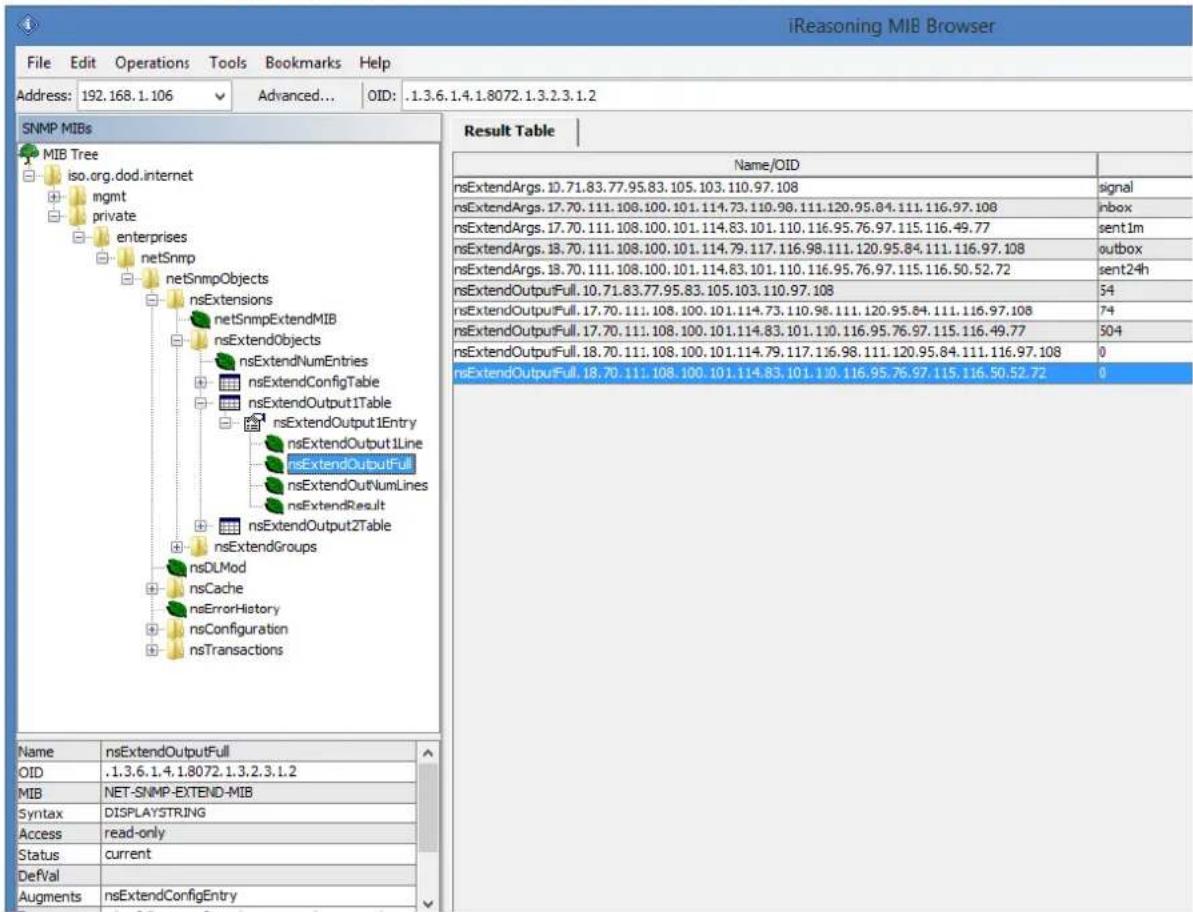
text_image
iReasoning MIB Browser File Edit Operations Tools Bookmarks Help Address: 192.168.1.106 Advanced... OID: .1.3.6.1.4.1.8072.1.3.2.3.1.2 SNMP MIBs MIB Tree iso.org.dod.internet mgmt private enterprises netSnmp netSnmpObjects nsExtensions netSnmpExtendMIB nsExtendObjects nsExtendNumEntries nsExtendConfigTable nsExtendOutput1Table nsExtendOutput1Entry nsExtendOutput1Line nsExtendOutputFull nsExtendOutNumLines nsExtendResult nsExtendOutput2Table nsExtendGroups nsDLMod nsCache nsErrorHistory nsConfiguration nsTransactions Result Table Name/OID nsExtendArgs. 10.71.83.77.95.83.105.103.110.97.108 signal nsExtendArgs. 17.70.111.108.100.101.114.73.110.98.111.120.95.84.111.116.97.108 inbox nsExtendArgs. 17.70.111.108.100.101.114.83.101.110.116.95.76.97.115.116.49.77 sentlm nsExtendArgs. 18.70.111.108.100.101.114.79.117.116.98.111.120.95.84.111.116.97.108 outbox nsExtendArgs. 18.70.111.108.100.101.114.83.101.110.116.95.76.97.115.116.50.52.72 sent24h nsExtendOutputFull 10.71.83.77.95.83.105.103.110.97.108 54 nsExtendOutputFull 17.70.111.108.100.101.114.73.110.98.111.120.95.84.111.116.97.108 74 nsExtendOutputFull 17.70.111.108.100.101.114.83. 101. 1 504 nsExtendOutputFull 18,70, nsExtendOutputFull: \( { \underline{ } } \) , \( { \underline{ } } \) , \( { \underline{ } } \) , \( { \underline{ } } \) , \( { \underline{ } } \) , \( { \underline{ } } \) , \( { \underline{ } } \) , \( { \underline{ } } \) , \( { \underline{ } } \) , \( { \underline{ } } \) , \( { \underline{ } } \) nsExtendOutputFull: \( { \underline{ } } \) , \( { \underline{ } } \) , \( { \underline{ } } \) , \( { \underline{ } } \) , \( { \underline{ } } \) , \( { \underline{ } } \) , \( { \underline{ } } \) , \( { \underline{ } } \) , \( { \underline{ } } \) , \( { \underline{ } } \) ; nsExtendOutputFull: \( { \underline{ } } \) , \( { \underline{ } } \) , \( { \underline{ } } \) , \( { \underline{ } } \) , \( { \underline{ } } \) , \( { \underline{ } } \) , \( { \underline{ } } \) , \( { \underline{ } } \) , \( { \underline{ } } \) ; nsExtendOutputFull: \( { \underline{\hspace{2cm}}} \) , \( { \hspace{2cm}} \) , \( { \hspace{2cm}} \) , \( { \hspace{2cm}} \) , \( { \hspace{2cm}} \) ; nsExtendOutputFull: \( { \hspace{2cm}} \) , \( { \hspace{2cm}} \) , \( { \hspace{2cm}} \) ; nsExtendOutputFull: \( { \hspace{2cm}} \) , \( { \hspace{2cm}} \) ; nsExtendOutputFull: \( { \hspace{2cm}} \) , \( { \hspace{2cm}} \) ; nsExtendOutputFull: \( { \hspace{2cm}} \) , \( { \hspace{2cm}} \) ; nsExtendOutputFull: \( { \hspace{2cm}} \) ,\( { \hspace{2cm}} \) ; nsExtendOutputFull: \( { \hspace{2cm}} \) ,\( { \hspace{2cm}} \); nsExtendOutputFull: \( { \hspace{2cm}} \),\( { \hspace{2cm}} \); nsExtendOutputFull: \( { \hspace{2cm}} \),\( { \hspace{2cm}} \); nsExtendOutputFull: \( { \hspace{2cm}} \),\( { \hspace{2cm}} \); nsExtendOutputFull: \( { \hspace{2cm}} \),\( { \hspace{2cm}} \); nsExtendOutputFull: \( { {\hspace{2cm}}}^{*}{}_{\mathrm{{OD}}}{}_{\mathrm{{OD}}}{}_{\mathrm{{OD}}}{}_{\mathrm{{OD}}}{}_{\mathrm{{OD}}}{}_{\mathrm{{OD}}}{}_{\mathrm{{OD}}}{}_{\mathrm{{OD}}}{}_{\mathrm{{OD}}}{}_{\mathrm{{OD}}}{}_{\mathrm{{OD}}}{}_{\mathrm{{OD}}}{}_{\mathrm{{OD}}}{}_{\mathrm{{OD}}}{}_{\mathrm{{OD}}}{}_{{OD}}{}_{\mathrm{{OD}}}{}_{\mathrm{{OD}}}{}_{\mathrm{{OD}}}{}_{\mathrm{{OD}}}{}_{\mathrm{{OD}}}{}_{\mathrm{{OD}}}{}_{\mathrm{{OD}}}{}_{\mathrm{{OD}}}{}_{\mathrm{{OD}}}{}_{\mathrm{{OD}}}{}_{\mathrm{{OD}}}{}_{\mathrm{{OD}}}{}_{\mathrm{{OD}}}{}_{\mathrm{{OD}}}{} _{{OD}}{}_{\mathrm{{OD}}}{}_{\mathrm{{OD}}}{}_{\mathrm{{OD}}}{}_{\mathrm{{OD}}}{}_{\mathrm{{OD}}}{}_{\mathrm{{OD}}}{}_{\mathrm{{OD}}}{}_{\mathrm{{OD}}}{}_{\mathrm{{OD}}}{}_{\mathrm{{OD}}}{}_{\mathrm{{OD}}}{}_{\mathrm{{OD}}}{}_{\mathrm{{OD}}}{}_{\mathrm{{MOD}}}{}_{\mathrm{{MOD}}}{}_{\mathrm{{MOD}}}{}_{\mathrm{{MOD}}}{}_{\mathrm{{MOD}}}{}_{\mathrm{{MOD}}}{}_{\mathrm{{MOD}}}{}_{\mathrm{{MOD}}}{}_{\mathrm{{MOD}}}{}_{\mathrm{{MOD}}}{}_{\mathrm{{MOD}}}{}_{\mathrm{{MOD}}}{}_{\mathrm{{MOD}}}{}_{\mathrm{{MOD}}}{}_{\mathrm{{MOD}}}~\\n\nName nsExtendOutputFull OID .I,3,6, I,4, I,8,O72, I,3,2,3, I,2 MIB NET-SNMP-EXTEND-MIB Syntax DISPLAYSTRING Access read-only Status current DefVal Augments nsExtendConfigEntryDatabase cleaning scripts
We have added some useful scripts which may be used to delete SMS messages from database through Linux CLI.
Scripts are located at following directory:
/mnt/nand-user/scripts/
- db_delete – script for deleting SMS from folders Inbox, SentItems older than provided date.
Usage:
./db delete YYYYMMDDhhmm
- db_delete_7days – script for deleting SMS from folders Inbox, Sentitems older than 7 days.
Usage:
./db_delete_7days
- db_delete_allfolders – script for cleaning PostgreSQL database folders (Inbox, SentItems,
Outbox). Specially designed to run periodically through cron. Usage:
./db delete allfolders
- db_delete_select - script for deleting SMS from chosen database folder (Inbox, Outbox,
SentItems, Trash). Usage:
./db_delete_select {inbox|outbox|sentitems|trash}
Adding script to system cron daemon
1) Create a file inside /etc/cron.d/ directory with your desired name (eg. pico db_cleaner)
2) Example content of this file:
0 0 1 * * root /mnt/nand-user/scripts/db_delete_allfolders
This will run cleaning script every 1 ^st day of month.
Failover (HA-cluster) feature
"High-availability clusters (also known as HA clusters or fail over clusters) are groups of computers (...) that can be reliably utilized with a minimum of down-time. They operate by using high availability software to harness redundant computers in groups or clusters that provide continued service when system components fail. Without clustering, if a server running a particular application crashes, the application will be unavailable until the crashed server is fixed. HA clustering remedies this situation by detecting hardware/software faults, and immediately restarting the application on another system or whole node without requiring administrative intervention, a process known as failover." (source: Wikipedia)
SMSEagle NXS family has its own HA-cluster feature. For service to work you need at least 2 gateways ('aka' nodes). Our service monitors devices working in cluster and detects faults with following functions:
- Apache2 WWW server
- PostgreSQL database
- SNMP agent
- Modem software (Gammu-SMSD daemon)
- Accessibility (response to ping) of whole node.
Every node in a cluster can have one of three states:
• Master: first healthy node which became available in a cluster, and is accessible through Virtual IP
• Backup: second healthy node in a cluster, ready and waiting for replacing Master when needed
- Fault: node with detected service fault
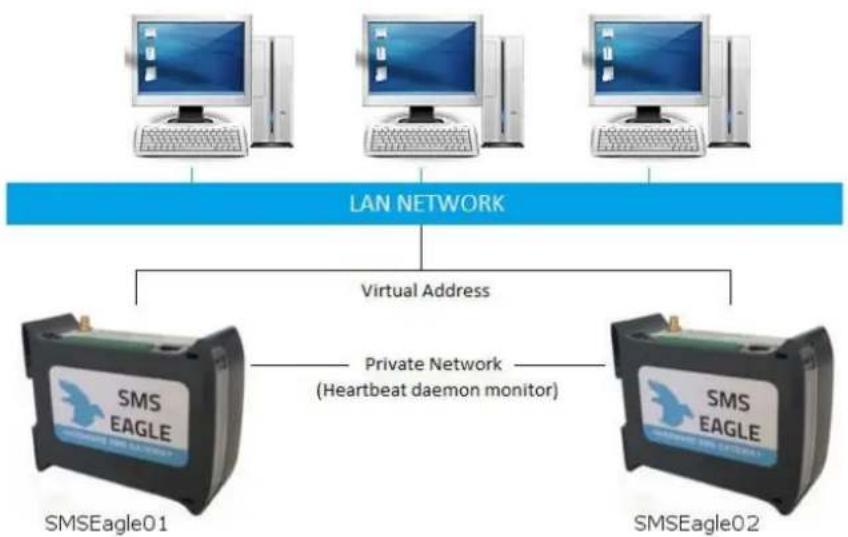
Basically devices (nodes) should see each other on the network. By default HA-nodes use 224.0.0.18 IP address for VRRP (Virtual Router Redundancy Protocol) for communication between two nodes for health check. If nodes are on the same network (same subnet & IP range) there is no need for any network configuration. If two nodes are behind firewalls, make sure firewall is configured to accept multicast and VRRP protocol (IP Protocol #112).
When the daemon running at MASTER device detects failure of at least one described features it immediately automatically switches cluster's IP assignment to the BACKUP device (node) providing continuous usage of the SMSEagle HA-cluster for the user.
HOW TO CONFIGURE FAILOVER (HA-CLUSTER):
Failover cluster can be easily configured using web-gui. Configuration can be done in menu "Settings" > tab "Failover". For each device in failover cluster:
• enter virtual IP address in the field "Virtual IP Address"
- set "Enable Failover cluster" to "Yes".
Save configuration. Reboot each device after saving.
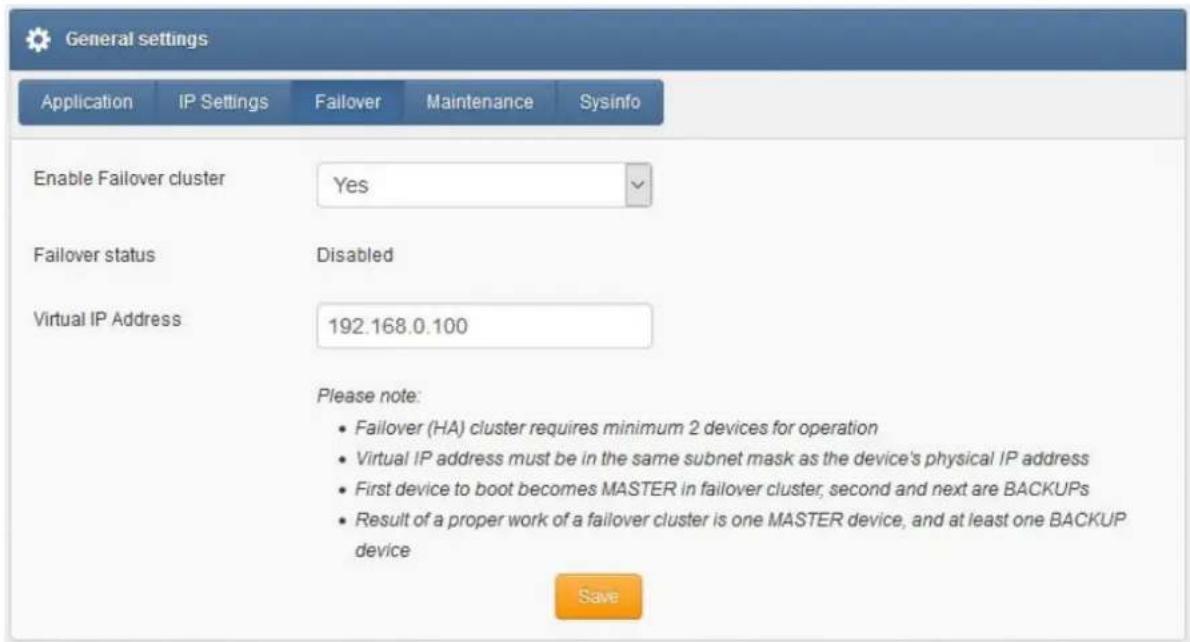
text_image
General settings Application IP Settings Failover Maintenance Sysinfo Enable Failover cluster Yes Failover status Disabled Virtual IP Address 192.168.0.100 Please note: • Failover (HA) cluster requires minimum 2 devices for operation • Virtual IP address must be in the same subnet mask as the device's physical IP address • First device to boot becomes MASTER in failover cluster, second and next are BACKUPs • Result of a proper work of a failover cluster is one MASTER device, and at least one BACKUP device SaveScreenshot from "General settings-Failover"
A device that boots first becomes MASTER in failover cluster, second and next devices are BACKUPs. In the cluster you have one MASTER device and at least one BACKUP device (depending of number of nodes). The HA-cluster will automatically switch between physical devices depending on the node health-check.
After correct configuration of the HA-cluster you should access the cluster via its Virtual IP address.
Alternatively configuration may be also made using Linux command line:
- Log in via SSH using root account
- Navigate to: cd /mnt/nand-user/smseagle/keepalived/
- Configuration script:
./failover
SMSEagle Failover Cluster feature presents:
Usage /mnt/nand-user/smseagle/keepalived/failover [start] | [stop] | [status] |
[config VIRTUAL_IP_ADDRESS]
where:
- start: add failover cluster to autorun and start the service
- stop: remove failover cluster from autorun and stops the service
- status: check the status of failover clusters node
- config: set up Virtual IP Address
- First run:
./failover config VIRTUAL_IP_ADDRESS
This will setup your Virtual IP address for your cluster
- Then run:
./failover start
which will run the Failover service
- You can check device state with:
./failover status
- You can always disable service with:
./failover stop
Above commands have to be done on each device (node) of HA-cluster!
After correct configuration of HA-cluster you should access the whole cluster via its Virtual IP address. In the cluster you have one MASTER device and at least one BACKUP device (depending of number of nodes). The HA-cluster will automatically switch between physical devices depending on the node health-check.
SNMP-MONITORING
Failover feature uses KEEPALIVED-MIB for SNMP monitoring
EXAMPLE OF READING DEVICE CLUSTER STATE VALUE USING NET-SNMP LIBRARY
a) Command for reading the result value:
snmpget -v 2c -c public ip-of-smseagle .1.3.6.1.4.1.9586.100.5.2.3.1.4.1
Result:
KEEPALIVED-MIB::vrrpInstanceState.1 = INTEGER: master(2)
Comment: Current device state is master
- TROUBLESHOOTING
To make sure that the device is working properly, follow the three steps:
- Verification of LEDs
- Checking the device configuration (IP Settings)
- Check the device logs (description below)
Verification of LEDs
Normal operation of the device is signaled by LEDs as follows:
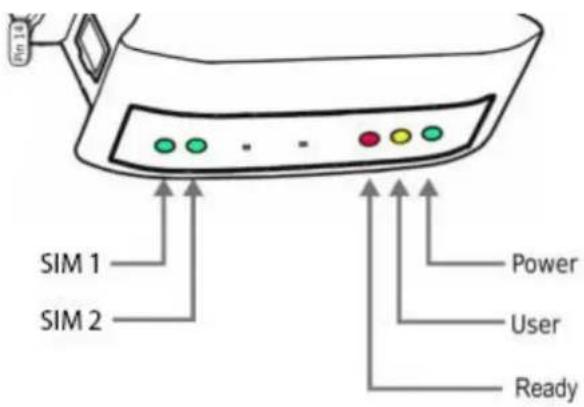
text_image
SIM 1 SIM 2 Power User ReadyLED
Correct operation
| Power (PWR) | Continuously lit |
| User | Blinks during flashdisk read/write |
| Ready (RDY) | Blinking |
| SIM1 | Slow flashing in stand-by mode, Quick flashing when modem 1 in use |
| SIM2 (optional) | Slow flashing in stand-by mode, Quick flashing when modem 2 in use |
Checking the device logs
SMSEagle operates on Linux system. Linux system log is available under menu position "Settings" > "Logs". In case of any problems with the device this log is a valuable source of troubleshooting information.
Please attach information from this log when contacting with SMSEagle Support Team.
When the device is not reachable
- Check if the device is correctly connected to the network. Check LED status of RJ45 socket.
- In the case when the device does not respond due to a malfunction or incorrect user settings please reboot the device by disconnecting and connecting power source (or pressing Reset switch).
- If you still cannot connect with the device, it is possible to restore to factory IP settings by using the SW button.
Restoring factory defaults
This action restores the following settings to default values: IP settings, timezone settings, database content, Linux OS users/passwords
In order to restore factory defaults proceed with the following steps:
| LED signaling | USER actions | System reaction |
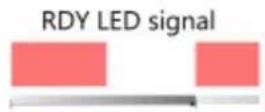 | 1. When the device is ready to operate | |
| 2. Press and hold SW button for 10 seconds | Restore service is counting down. | |
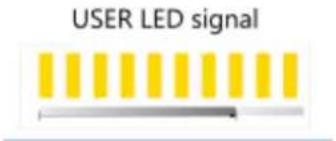 | 3. Release SW button after 10 seconds.User LED will begin to blink. | System is reading factory defaults.Factory settings are being applied to the device. |
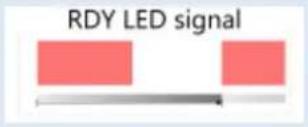  | 4. Wait until system reboots.Default settings are restored. | System is going for a reboot. |
Please note, that after reboot the device will be finishing the process of factory reset, therefore it can take longer for the system to start.
- SERVICE AND REPAIR
Warranty
Your SMSEagle comes with 14 days of post-sales technical support (including assistance in integration with external software) and one year of hardware repair warranty coverage. For a detailed information on warranty terms and conditions check warranty card that comes with your device or follow the link: www.smseagle.eu/docs/general_warranty_terms_and_conditions.pdf
Service
Before contacting with support team, be sure that you have read Troubleshooting section of this manual. SMSEagle Support Team is available by email or telephone.
Support Email: support@smseagle.eu
Support telephone: +48 796 200 723
The support service is provided by:
Proximus Software
ul. Piątkowska 163,
60-650 Poznan, Poland
WHEN CONTACTING SUPPORT TEAM, BE PREPARED TO PROVIDE THE FOLLOWING INFORMATION:
System Information
To get information about your SMSEagle, login to SMSEagle web interface, and proceed to menu "Settings" > "Sysinfo". You will find there information about application version, and database version, modem IMEI.
System Logs
In order to access the logs content, login to SMSEagle web interface, and proceed to menu "Settings" > "Sysinfo". If possible copy the log data and provide to support team when requested.
MAC address
Each SMSEagle device has its unique MAC address. MAC address is printed on the device body. Alternatively it can be also checked in SMSEagle web interface, menu "Settings" > "IP Settings".
- TECH SPECS AND SAFETY INFORMATION
Technical Specifications
Hardware Specification
• Processor type: Broadcom BCM2835 ARM11 0.7GHz SoC
• 512 MB SDRAM @ 400 MHz
• Network interface: Ethernet 10/100 TX (1xRJ45)
- 4GB Flash disk
- 1x USB 2.0 port
- 1x HDMI port
- 2x RS232 serial ports
- 2x DO/DI GPIO ports
• RTC Clock: RTC 240B SRAM, Watchdog timer
• Humidity & temperature sensor
• Power consumption: max 47W
- Noise level: Fan-less
• Dimensions: (width x depth x height) 35 x 120 x 101 mm
- Weight: 350g
• Casing: ABS, DIN rail installation
- Operating parameters:
○ Operating temperature: 10 \~ 60°C
o Humidity: 5 \~ 95% RH (no condensation)
- 2 x Modem 3G:
○ Waveband: GSM, UMTS
- GSM/GPRS quad-band 850/900/1800/1900 MHz
○ UMTS 800/850/900/AWS1700/1900/2100 MHz,
- Antenna connector: SMA
• Country of origin: European Union (Poland)
Power Supply
AC line input
Voltage ranges: 100–240 V alternating current (AC)
Frequency: 50–60Hz single phase
GSM Antenna
2x Omnidirectional 3.5dBi antenna with magnetic foot
Cable length 3m
Sending/Receiving Throughput
• Incoming transmission rate: up to 60 SMS/min
• Outgoing transmission rate: up to 40 SMS/min
- API send SMS requests: 60 SMS/min (messages are queued for sending in a built-in database)
Software Platform
- Operating system: Linux kernel 4.1
• built-in Apache2 web server
• built-in PostgreSQL database server
• built-in Postfix email server
• built-in Failover (HA-cluster) service - watchdog mechanism for 3G modem
• modern responsive web interface
Important Safety Information
This chapter provides important information about safety procedures. For your safety and that of your equipment, follow these rules for handling your device.
WARNING: Incorrect storage or use of your device may void the manufacturer's warranty. Failure to follow these safety instructions could result in fire, electric shock, or other injury or damage.
Always take the following precautions.
Disconnect the power plug from AC power source or if any of the following conditions exist:
• the power cord or plug becomes frayed or otherwise damaged
- you spill something into the case
• the device is exposed to rain or any other excess moisture
• the device has been dropped or the case has been otherwise damaged
DISCLAIMER: The manufacturer is not responsible for any damages caused by inappropriate installation, not maintaining the proper technical condition or using a product against its destination.
The manufacturer excludes all liability for damages arising out of or in connection with your use of the equipment. This includes, without limitation, direct loss, loss of business or profits (whether or not the loss of such profits was foreseeable, arose in the normal course of things or you have advised this Company of the possibility of such potential loss) or any other direct or indirect, consequential and incidental damages. The above exclusions and limitations apply only to the extent permitted by law.
FCC compliance statement
This device complies with part 15 of the FCC rules. Operation is subject to the following two conditions:
(1) This device may not cause harmful interference, and
(2) this device must accept any interference received, including interference that may cause undesired operation.
Note:
This equipment has been tested and found to comply with the limits for a Class A device, pursuant to part 15 of the FCC Rules. These limits are designed to provide reasonable protection against harmful interference in a business/commercial non-residential environment. However, there is no guarantee that interference will not occur in a particular installation. If this equipment does cause harmful interference to radio or television reception, which can be determined by turning the equipment off and on, the user is encouraged to try to correct the interference by one or more of the following measures:
- Reorient or relocate the receiving antenna.
- Increase the separation between the equipment and receiver.
- Connect the equipment to an outlet on a circuit different from that to which the receiver is connected.
- Consult the dealer or an experienced radio/TV technician for help.
Important:
This equipment generates, uses, and can radiate radio frequency energy and, if not installed and used in accordance with the manufacturer's instruction manual, may cause harmful interference with radio communications. Operation of this equipment in a residential area is likely to cause harmful interference, in which case you will be required to correct the interference at your own expense. The FCC regulations provide that changes or modifications not expressly approved by SMSEagle™ could void your authority to operate this equipment. This product has demonstrated EMC compliance under conditions that included the use of compliant peripheral devices (antennas) and shielded cables between system components. It is important that you use compliant peripheral devices and shielded cables between system components to reduce the possibility of causing interference to radios, televisions, and other electronic devices.
Canadian regulatory statement
This device complies with Industry Canada license-exempt RSS standard(s). Operation is subject to the following two conditions:
(1) this device may not cause interference, and
(2) this device must accept any interference, including interference that may cause undesired operation of the device.
This Class A digital apparatus meets the requirements of the Canadian Interference-Causing Equipment Regulations.
CAN ICES-3 (A)/NMB-3(A)
Disposal and recycling information
Your SMSEagle device contains lithium-ion battery for RTC backup. Dispose of the device and/or battery in accordance with local environmental laws and guidelines.
European Union—Disposal Information

The symbol above means that according to local laws and regulations your product and/or its battery shall be disposed of separately from household waste. When this product reaches its end of life, take it to a collection point designated by local authorities. The separate collection and recycling of your product and/or its battery at the time of disposal will help conserve natural resources and ensure that it is recycled in a manner that protects human health and the environment.