
7350A - Monitor GENELEC - Free user manual and instructions
Find the device manual for free 7350A GENELEC in PDF.


| Product Type | Active Subwoofer (SAM) |
| Model | 7350A |
| Brand | Genelec |
| Dimensions (H x W x D) | 465 x 305 x 280 mm (18.3 x 12.0 x 11.0 in) |
| Weight | 13.2 kg (29.1 lb) |
| Amplifier Power | 150 W (Class D) |
| Frequency Response | 19 Hz – 85 Hz (with crossover) |
| Bass Management Architecture | Distributed Bass Management (DBM) |
| Input Types | Analog XLR, AES/EBU digital |
| Output Types | AES/EBU digital pass-through |
| Crossover Frequency | Adjustable via GLM software (default 85 Hz) |
| LFE Channel | Available (input 4), with selectable gain (0 dB / +10 dB) |
| GLM Compatibility | Yes (Smart Active Monitor system) |
| Compatible Monitors | 8320, 8330, 8340, 8350, 8351, 1237, 1238, etc. (DBM monitors) |
| Pass Through Mode | On/Off (for digital audio) |
| Crossover Setting | Individual or Global |
| Power Supply | 100-240 V AC, 50/60 Hz |
| Standby Power Consumption | < 0.5 W |
| Recommended Maintenance | Keep vents clear, clean with dry cloth, avoid moisture |
| Safety Features | Overload protection, short-circuit protection |
| Spare Parts & Repairability | Contact Genelec service for genuine parts |
| General Information | Part of Genelec SAM series, designed for professional studio use |
Frequently Asked Questions - 7350A GENELEC
User questions about 7350A GENELEC
0 question about this device. Answer the ones you know or ask your own.
Ask a new question about this device
Download the instructions for your Monitor in PDF format for free! Find your manual 7350A - GENELEC and take your electronic device back in hand. On this page are published all the documents necessary for the use of your device. 7350A by GENELEC.
USER MANUAL 7350A GENELEC
Bass Management User Guide
Centralized & Distributed Architectures
April 2016
Genelec Bass Management User Guide
Centralized & Distributed Architectures
The purpose of this Application Note is to provide further insights into centralized and distributed bass management architectures as well as to provide a practical user guide about the inter-compatibility between various Genelec Smart Active Monitor (SAM) systems.
The terminology used in this document is as follows:
- Legacy monitors featuring Non-Distributed Bass Management (N-DBM) include the following SAM products: 8240, 8250, 8260, 1238CF.
- Legacy subwoofers include the following SAM products: 7260, 7270, 7271. They feature Centralized Bass Management (CBM), meaning the subwoofer defaults to High Pass filtering its outputs. Legacy subwoofers have the additional possibility to be set to a “Pass-Through Mode” while the Low Pass crossover is engaged. This function is most often used when linking multiple subwoofers together, but is also important when subwoofers are combined with DBM monitors.
- Latest monitors and subwoofers featuring Distributed Bass Management (DBM) include the following SAM products.
Monitors: 8320, 8330, 8340, 8350, 8351, 1237, 1238, 1238AC, 1238DF, 1234, 1236. Subwoofers: 7350, 7360, 7370.
Table of Contents:
A. The principle of Bass Management
B. Centralized Bass Management Architecture (CBM)
C. Distributed Bass Management Architecture (DBM)
D. Subwoofer Models and Bass Management Architectures
E. SAM Subwoofer – System Settings User Guide
A. The principle of Bass Management
The term Bass management means that full bandwidth audio channels are low-pass filtered and combined in order to be reproduced by one or more subwoofers. Additionally in the multichannel audio realm, an additional LFE (low frequency effects) channel can also be combined with the low frequency content.
A Bass Management system uses either analogue electronic circuitry or software-based DSP filtering which will filter low frequency information from the main channels and route that information to one, or more, subwoofer feed.
The outputs of the bass management system are directed to two directions: the subwoofer as mentioned above and the main monitors.
Bass management provides several benefits:
- The subwoofer extends the system frequency response down to the lower limit of the audible range
- The monitors can produce a higher maximum sound level when not reproducing low frequencies
- It is possible to optimize the low frequency reproduction by selecting an adequate subwoofer location in the room
- The monitors can be placed with more freedom to control the acoustical environment and to improve the quality of the audio reproduction
- The subwoofer's output is aligned in level and phase with the monitors allowing flat and accurate reproduction down to 19 Hz and across the crossover point
- The LFE channel output level (0 or +10 dB re. main channels) can be selected for accurate reproduction depending on the final encoded audio format
- The ability to bypass the subwoofer allows evaluation of the audible impact of the subwoofer
B. Centralized Bass Management Architecture (CBM)
The so-called centralized bass management architecture places all audio signal filtering resources in one central location, the subwoofer bass management unit. This means that all bass-managed subwoofer outputs provide filtered audio signals:
- A low-pass-filtered signal output to the subwoofer driver
- A number of high-pass-filtered outputs for each individual monitor(s)
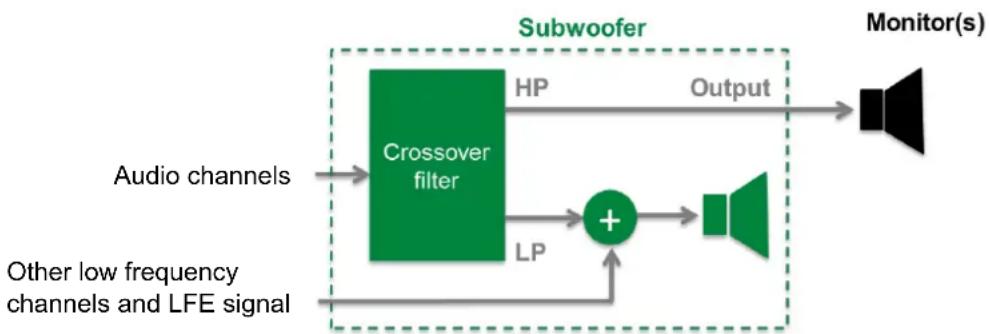
flowchart
graph LR
    A["Audio channels"] --> B["Crossover filter"]
    C["Other low frequency channels and LFE signal"] --> B
    B --> D["HP"]
    B --> E["LP"]
    D --> F["+"]
    E --> F
    F --> G["Output"]
    G --> H["Monitor(s)"]
    style B fill:#90EE90,stroke:#333
    style H fill:#00BFFF,stroke:#333
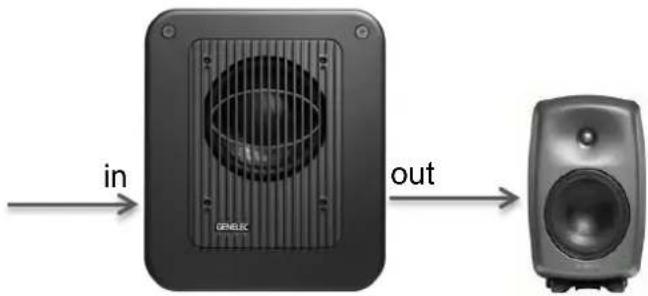
One consequence of using the centralized bass management architecture is that it is mandatory that all audio signal cabling must first go to the subwoofer containing the bass management unit. Then, each respective audio signal cable will go to each relevant monitor input.
C. Distributed Bass Management Architecture (DBM)
The so-called distributed bass management architecture shares the audio signal filtering resources between the filtering occurring in the subwoofer bass management unit and the filtering occurring in each individual monitor. This means that each monitor and subwoofer filter locally and individually the necessary signal using, of course, the same nominal crossover frequency.
- The subwoofer filter provides only a low-pass-filtered signal output for the subwoofer driver
- The output from the subwoofer is not modified, but is an exact copy of the input signal and this applies to both the analog and AES/EBU inputs
• Each monitor applies a high-pass filter to its input signal
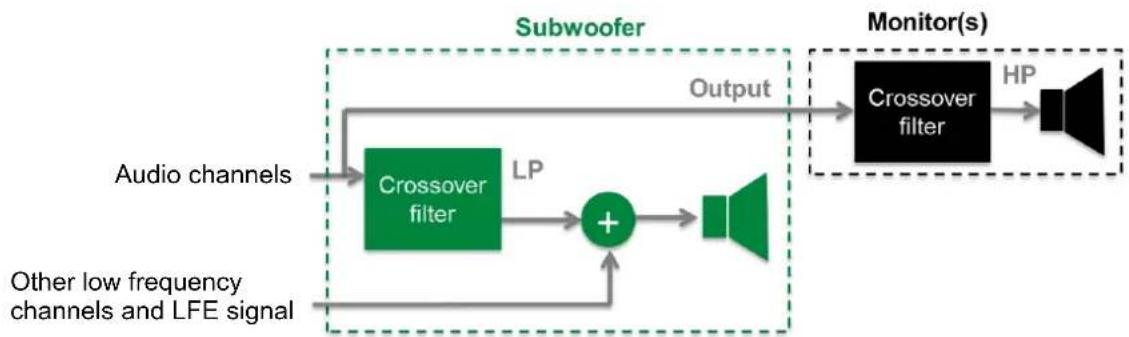
flowchart
graph LR
    A["Audio channels"] --> B["Crossover filter"]
    B --> C["LP"]
    C --> D["+"]
    E["Other low frequency channels and LFE signal"] --> D
    D --> F["Speaker"]
    G["Output"] --> H["Crossover filter"]
    H --> I["HP"]
    I --> J["Speaker"]
    style A fill:#90EE90
    style B fill:#90EE90
    style C fill:#90EE90
    style D fill:#90EE90
    style E fill:#90EE90
    style F fill:#90EE90
    style G fill:#90EE90
    style H fill:#90EE90
    style I fill:#90EE90
    style J fill:#90EE90
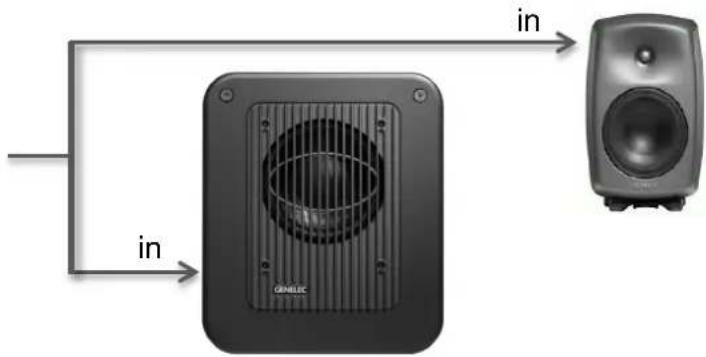
The distributed bass management architecture allows the audio signal cabling to go:
a) First to the subwoofer and then feed all output signals to the respective monitor(s) – (Genelec default cabling scheme recommendation).
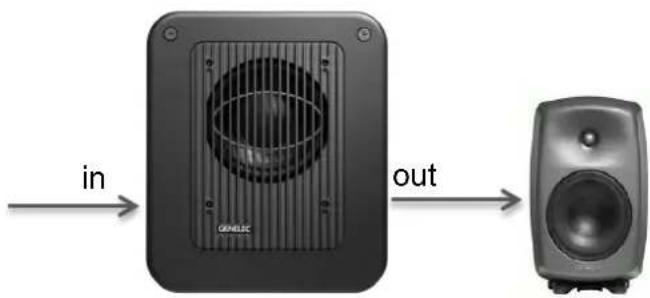
b) In parallel via a split cable to feed both the subwoofer and each appropriate monitor.
D. Subwoofer Models and Bass Management Architectures
| Subwoofer model | Centralized BM | Distributed BM |
| 7040 | ||
| 7060 | ||
| 7070 | X | |
| 7071 | ||
| 7073 | ||
| 7050 | X | |
| 7260 SAM | ||
| 7270 SAM | X | X(pass through mode) |
| 7271 SAM | ||
| 7350 SAM | X | |
| 7360 SAM | X(analog audio wiring in stand-alone mode) | X |
| 7370 SAM |
Table 1. Subwoofer bass management architectures.
E. SAM Subwoofer – System Settings User Guide
The combination of Legacy monitors (N-DBM), Legacy subwoofers and Latest monitors and subwoofers (DBM) present some challenges in connectivity, cabling and GLM 2.0 software system settings.
The following user guide aims to provide a simple checklist chart covering all possible combinations and scenarios. The terminology used in the table below is:
Crossover setting (individual or global):
Forces the same crossover frequency setting in all monitors and subwoofers (setting 'global'). When 'global' is selected and the subwoofer bass management settings are changed, all monitors with 'global' selected will follow the changes. When 'individual' is selected in a subwoofer or monitor, it will not follow changes made to the subwoofer bass management settings at any other part of the system.
Pass Through Mode:
The 'Pass Through Mode' setting defaults to OFF. You can force the subwoofer AES/EBU outputs to 'Pass Through Mode' ON. This sends a bit accurate AES/EBU copy to all outputs.
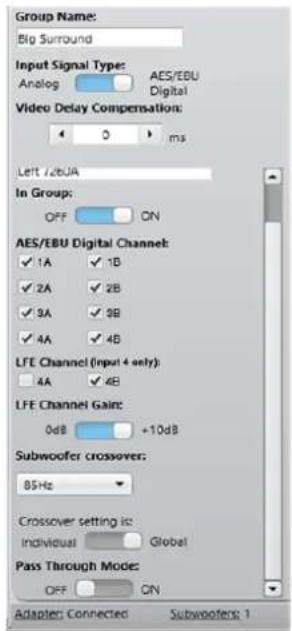
| Subwoofer / Monitor Combination | What to do in the Subwoofer Edit Panel | What to do in the Legacy Monitor (N-DBM) Edit Panel | What to do in the Latest Monitor (DBM) Edit Panel |
| Latest Monitors (DBM): Compact SAM (7350, 8320, 8330) | Nothing. (Subwoofer Crossover is defaulted to Global). | N/A. | Nothing. |
| Legacy Subwoofer with any Latest monitors (DBM) | Subwoofer Crossover is defaulted to Global.Pass Through Mode button should be set to ON. | N/A. | Nothing. |
| Legacy Subwoofer together with Legacy Monitors (N-DBM) and Latest Monitors (DBM).Example: 7270 with 1237s (LCR) and 8240/8250 (RL/RR) | First set Subwoofer Crossover from Global to Individual.Pass Through Mode set to OFF (default). | Nothing. (High pass is provided by the subwoofer). | Set each Latest Monitor (DBM) Crossover to "Full Band".The meaning "Full band" indicates there is no DBM filter activated and that the Latest monitor is ready to accept a Legacy Sub High-pass signal. |
| Special Case:Legacy Subwoofer together with Legacy Monitors (N-DBM) and 8330s (DBM).Example: 7260 with 8240s (LCR) and 8330s (RL/RR). | Leave Subwoofer Crossover defaulted to Global.Pass Through Mode set to OFF (default). | Nothing. (High pass is provided by the subwoofer). | When 8330s are used with Legacy Subwoofers, you must wire digital audio signals first to the 8330s and then loop their outputs to the Legacy Sub. |
Table 2. Subwoofer bass management user guide.
GENELEC®
the sonic reference
Genelec Oy
Olivitie 5
FI-74100 lisalmi
Finland
T +358 17 83 881
F +358 17 81 2267
genelec@genelec.com
www.genelec.com

- Bass Management User Guide
- Centralized & Distributed Architectures
- Genelec Bass Management User Guide
- Table of Contents:
- The principle of Bass Management
- Centralized Bass Management Architecture (CBM)
- Distributed Bass Management Architecture (DBM)
- SAM Subwoofer – System Settings User Guide
- Pass Through Mode:
Brand : GENELEC
Model : 7350A
Category : Monitor