
18 - Software FILEMAKER - Free user manual and instructions
Find the device manual for free 18 FILEMAKER in PDF.


User questions about 18 FILEMAKER
0 question about this device. Answer the ones you know or ask your own.
Ask a new question about this device
Download the instructions for your Software in PDF format for free! Find your manual 18 - FILEMAKER and take your electronic device back in hand. On this page are published all the documents necessary for the use of your device. 18 by FILEMAKER.
USER MANUAL 18 FILEMAKER
FileMaker 18 Certification
Study Guide
Introduction
The FileMaker 18 Certified Developer credential demonstrates to clients, peers and management that you have achieved an essential level of knowledge, experience, and skills in developing on the FileMaker Platform.
This study guide is designed to help you prepare for the test. It covers the eight FileMaker Platform knowledge domains that are assessed by the certification exam. Although this guide divides the tasks and review questions into knowledge areas, questions are presented randomly during the exam. This guide contains three sections for each knowledge area:
- The objectives or statements that you should be able to demonstrate completely.
- Links to FileMaker Help topics and other resources to review.
- Questions that represent the kinds of knowledge tested on the exam and answers to those questions. The exam consists of multiple choice questions.
How to Use This Guide
We recommend that you use this guide to determine what to study as you prepare for the test in the following ways:
- Read each objective. You should be prepared to be able to accomplish the task each objective states.
- Answer each question to your best ability.
a. Read the FileMaker Pro Advanced Help topics and other preparation resources to find the answer.
b. Figure out your best answer to the question. Compare it to the answer given.
Exam Details
The FileMaker 18 Certification exam is computer-based and offered in Pearson VUE testing locations worldwide.
Here are the FileMaker 18 Certification exam details:
• There is a non-disclosure agreement and tutorial. You have 10 minutes to complete them.
• There are 60 scored technical questions. You have 110 minutes to complete them.
• The exam uses a random pool of multiple-choice questions. Some questions ask for more than one answer.
- Candidates taking the English test in countries where English is not an official language will automatically have an extra 30 minutes added to the exam seating time.
- You may not access any resources or references during the exam.
If you have questions about the exam, visit FAQs for FileMaker Certification.
1. Technical Specifications 5 - 10 %
- Describe the product technical specifications for the FileMaker 18 Platform.
- Identify the browsers that are supported for FileMaker WebDirect.
- Describe the available web publishing options for FileMaker Server (e.g., FileMaker WebDirect, CWP, PHP, FileMaker API, etc.).
- Describe which live back-end data sources are supported for ESS.
- Describe the key elements of deploying a custom app using the FileMaker iOS App SDK.
Preparation resources
Technical Specifications
FileMaker Server Technical Specifications
FileMaker Pro and Pro Advanced Technical Specifications
FileMaker Go Technical Specifications
FileMaker Knowledge Base articles
Which ODBC data sources/drivers are supported with External SQL Data Sources?
iOS App SDK Instructions
Questions
- What are the system requirements for FileMaker Pro and FileMaker Server?
- What are the supported browsers for FileMaker WebDirect?
- What are the supported external SQL data sources?
Answers
- The FileMaker platform is supported on
a. FileMaker Server
i. Windows Server 2016 Datacenter Edition and Standard Edition (with Desktop Experience)
ii. Windows Server 2012 R2 Standard Edition with Update
iii. macOS Mojave 10.14
iv. macOS High Sierra 10.13
b. FileMaker Pro
i. Windows 10 Pro Edition and Enterprise Edition
ii. Windows 8.1 Standard Edition and Pro Edition
iii. Windows 7 SP1 Pro Edition and Ultimate Edition
iv. macOS Mojave 10.14
v. macOS High Sierra 10.13
- FileMaker WebDirect
i. Safari 12.x
ii. Mobile Safari iOS 12.x minimum
iii. Chrome 73 minumum
iv. Mobile: Chrome 73 on Android 7.x minimum
v. Internet Explorer 11.x
vi. Microsoft Edge 44
- The supported external SQL data sources are:
a. Microsoft SQL Server 2017, 2016, 2014
b. MySQL Community Server 5.7.21
c. Oracle 12c R2, 12c R1, 11gR2
d. IBM i 7.3 (AS/400), DB2 version 11.1
e. PostgreSQL 9.6.12
f. Note: IBM and Postgres are not supported in FileMaker Cloud for AWS.
2. Defining Database Schema 10 - 15 %
- Describe and apply auto-entry options.
- Describe the field types available in FileMaker.
- Identify the mechanisms and behaviors of validation options and describe the possible outcomes when one is triggered.
- Use a storage option to achieve a desired result.
- Given a particular relationships graph and scenario, define a result.
- Given a scenario, define the appropriate relationship to achieve a desired result.
- Use ESS to integrate data from an external data source and properly design a schema.
Preparation resources
Guide
FileMaker Go Development Guide
FileMaker Pro Advanced Help topics and subtopics
Defining and changing fields
Setting options for Fields
About container fields
Working with related tables
Accessing external data sources
Questions
- What are five of the auto-entry options available for fields?
- The auto-entry field options for a calculated value include a checkbox that says "Do not replace existing value (if any)." How does unchecking this box change the field's behavior?
- What is an index for a field? Describe the two indexes available in FileMaker Pro 18 Advanced. Are there field types that cannot be indexed?
-
What methods of setting a field with data are not considered data-entry for the purposes of field level validation?
-
List the order in which the following actions occur:
a. A field is exited
b. A field's value is changed
c. The value is saved
d. The value is validated
-
A hosted FileMaker file contains a container field that is stored globally, and it holds the company's logo. This field is placed on all report layouts. In a preferences table, the developer inserts the logo into the container field. A user reports that the logo is not on any of the reports. What caused this? How can it be fixed?
-
A custom app contains tables for Teachers and Classes. A teacher teaches many classes. How would you set up the data structure—the Relationships Graph and any additional tables—to show all the classes a teacher teaches?
-
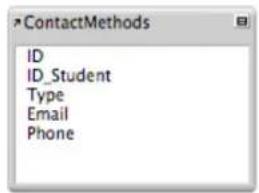
In a FileMaker file, there is a table called ContactMethods. The table occurrence Students_ContactsMethods is related to the Students table occurrence, as shown below.
text_image
ContactMethods ID ID_Student Type Email Phone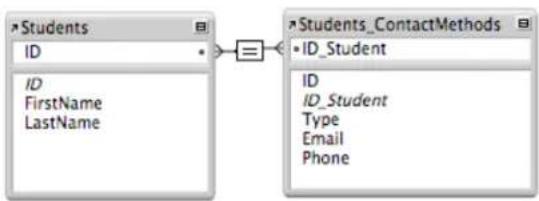
flowchart
graph LR
    A["Students"] --> B["Students_ContactMethods"]
    A --> C["ID"]
    A --> D["ID"]
    A --> E["ID"]
    A --> F["ID"]
    A --> G["ID"]
    A --> H["ID"]
    A --> I["ID"]
    A --> J["ID"]
    A --> K["ID"]
    A --> L["ID"]
    A --> M["ID"]
    A --> N["ID"]
    A --> O["ID"]
    A --> P["ID"]
    A --> Q["ID"]
    A --> R["ID"]
    A --> S["ID"]
    A --> T["ID"]
    A --> U["ID"]
    A --> V["ID"]
    A --> W["ID"]
    A --> X["ID"]
    A --> Y["ID"]
    A --> Z["ID"]
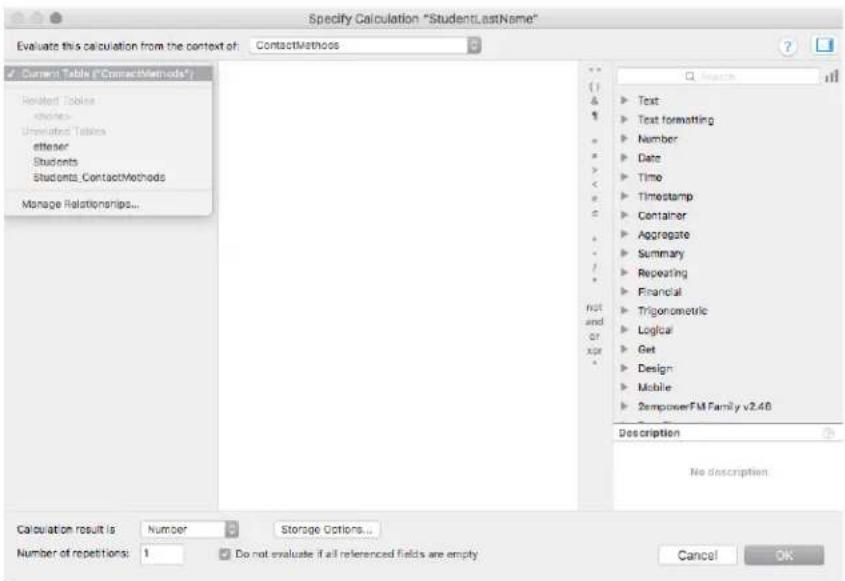
A developer wants to add a calculated field in the ContactsMethods table that stores the last name of the related Student. When setting up the calculation, she discovers the Students table occurrence is not related.
text_image
Specify Calculation "StudentLastName" Evaluate this calculation from the context of: ContactMethods Current Table ("ConnectMethods") Related Tables changes Unrelated Tables etheser Students Students_ContactMethods Manage Relationships... Text Text formatting Number Date Time Timestamp Container Aggregate Summary Repeating Financial Trigonometric Logical Get Design Mobile 2impowerFM Family v2.48 Description No description Calculation result is Number Storage Options... Number of repetitions: 1 Do not evaluate if all referenced fields are empty Cancel OkWhat would she need to do to have access to fields from the Students table?
- Does each table in a file need to have a table occurrence on the Relationships Graph?
Answers
- A field's auto-enter options include:
a. A calculation
b. Record-creation data
c. Record-modification data
d. A serial number
e. The value from the same field of the last active record
f. A static piece of data
g. A looked-up value
- When you uncheck the "Do not replace existing value (if any)" checkbox, data in the field will be overwritten when one of the fields referenced in the calculation is modified.
- An index is a sorted list of the unique words or values in a field. Indexes are used in finds and relationships. There are two types of indexes:
a. Value indexes
i. Can be created for text, number, date, time, timestamp fields, as well as stored calculation fields that return these data types.
ii. Used for relating records and searches in these kinds of fields
b. Word Indexes
i. Only created for text fields and stored calculation fields that return text.
ii. A list of the unique words in a field.
iii. Used in searches.
Container fields, summary fields, any field with global storage, and unstored calculations cannot be indexed.
- The following actions are not considered data entry for field validation purposes:
a. Replacing field contents
b. Importing records
c. Setting a field during a script
- The order of the actions:
a. A field's value is changed
b. The value is validated
c. The value is saved
d. The field is exited
- A field with global storage retains the last value set when the file was closed on a local computer, and global storage is unique to each user of the file.
The developer has two options. He can remove the file from FileMaker Server, insert the logo into the container field, close the file, and host it again. Or, he can store the logo in a container field with regular storage and write a script that runs when the file is opened that inserts the logo into the container field with global storage.
- To show all the classes a teacher teaches, a join table, possibly called "Schedule" is needed. A record in this table represents the association of a teacher with a class.

flowchart
graph LR
    A["Teachers"] --> B["Schedule"]
    B --> C["Classes"]
    A -->|ID| A
    A -->|Name| A
    A -->|Period| A
    B -->|ID_Teacher ID_Class| B
    B -->|ID_Teacher ID_Class| B
    B -->|-ID| B
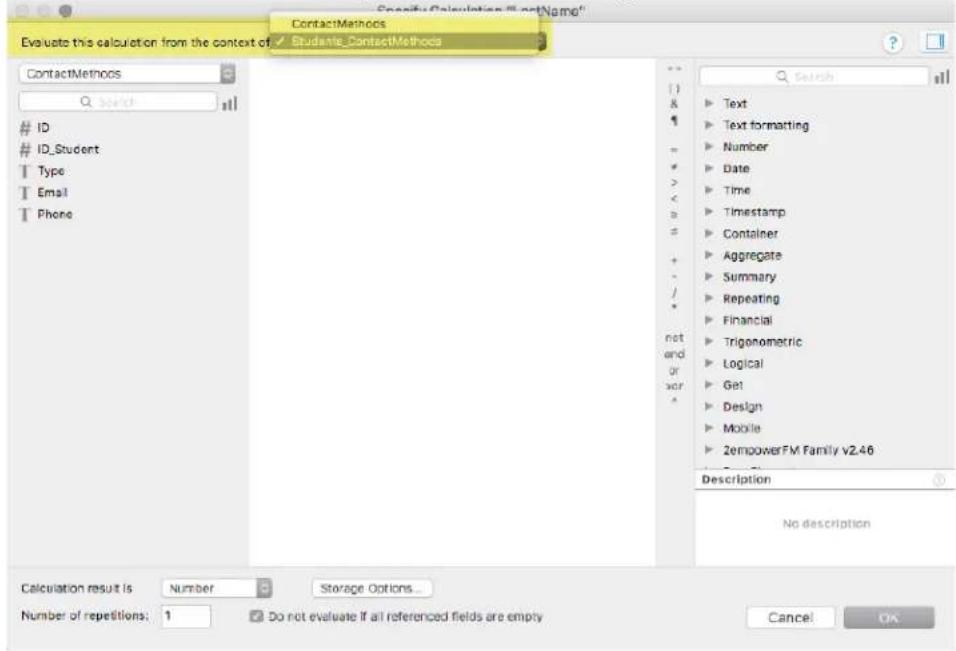
- The developer needs to change the context from which this calculation will evaluate. That is done at the top of the calculation dialog.
text_image
Evaluate this calculation from the context of ContactMethods Students_ContactMethods Search ID ID_Student Type Email Phone Text Text formatting Number Date Time Timestamp Container Aggregate Summary Repeating Financial Trigonometric Logical Get Design Mobile ZempowerFM Family v2.46 Description No description Calculation result is Number Storage Options... Number of repetitions: 1 Do not evaluate if all referenced fields are empty Cancel OKChanging the context to the Students_ContactMethods table occurrence will allow the developer to create this calculation field.
- No. You can delete any table occurrence.
3. Building Layouts 10 - 15 %
- Describe the implications of linking a layout to a specific table occurrence.
- Identify how a portal can display data from more than one relationship away, and some of the various behaviors that can be assigned to a portal.
- Describe which field/layout object behaviors can be modified.
- Describe the types and attributes of script triggers.
- Given a scenario, identify the implications of choosing a particular trigger type.
- Identify the properties, use, and capabilities of themes, object styles, and states.
- Describe the setup and behavior of layout parts.
- Identify the implications of layout design across different clients.
Preparation resources
FileMaker Pro Advanced Help topics and subtopics
Creating and managing layouts and reports
Editing objects, layout parts, and the layout background
Working with related tables
Deciding where to place related fields
Navigating in web viewers
Creating charts from data
Sorting records by subsummary values
Script triggers reference
Navigation script steps reference
Questions
- The phrase "Context is king" is at the core of FileMaker. How does this idea affect FileMaker actions such as scripting, data entry, and layout creation?
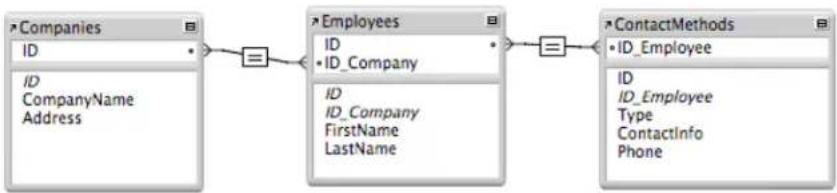
- A custom app has three tables: Companies, Employees, and Contact Methods.
flowchart
graph LR
    A["Companies"] --> B["Employees"]
    B --> C["ContactMethods"]
    A -->|ID| A1["ID"]
    A -->|ID| A2["ID"]
    A -->|ID| A3["ID"]
    B -->|ID_Company| B1["ID_Company"]
    B -->|ID_Company| B2["ID_Company"]
    B -->|ID_Company| B3["ID_Company"]
    B -->|ID_Company| B4["ID_Company"]
    B -->|ID_Company| B5["ID_Company"]
    B -->|ID_Company| B6["ID_Company"]
    B -->|ID_Company| B7["ID_Company"]
    B -->|ID_Company| B8["ID_Company"]
    B -->|ID_Company| B9["ID_Company"]
    B -->|ID_Company| B10["ID_Company"]
    B -->|ID_Company| B11["ID_Company"]
    B -->|ID_Company| B12["ID_Company"]
    B -->|ID_Company| B13["ID_Company"]
    B -->|ID_Company| B14["ID_Company"]
    B -->|ID_Company| B15["ID_Company"]
    B -->|ID_Company| B16["ID_Company"]
    B -->|ID_Company| B17["ID_Company"]
    B -->|ID_Company| B18["ID_Company"]
    B -->|ID_Company| B19["ID_Company"]
    B -->|ID_Company| B20["ID_Company"]
    B -->|ID_Company| B21["ID_Company"]
    B -->|ID_Company| B22["ID_Company"]
    B -->|ID_Company| B23["ID_Company"]
    B -->|ID_Company| B24["ID_Company"]
    B -->|ID_Company| B25["ID_Company"]
    B -->|ID_Company| B26["ID_Company"]
    B -->|ID_Company| B27["ID_Company"]
    B -->|ID_Company| B28["ID_Company"]
    B -->|ID_Company| B29["ID_Company"]
    B -->|ID_Company| B30["ID_Company"]
    B -->|ID_Company| B31["ID_Company"]
    B -->|ID_Company| B32["ID_Company"]
    B -->|ID_Company| B33["ID_Company"]
    B -->|ID_Company| B34["ID_Company"]
    B -->|ID_Company| B35["ID_Company"]
    B -->|ID_Company| B36["ID_Company"]
    B -->|ID_Company| B37["ID_Company"]
    B -->|ID_Company| B38["ID_Company"]
    B -->|ID_Company| B39["ID_Company"]
    B -->|ID_Company| B40["ID_Company"]
    B -->|ID_Company| B41["ID_Company"]
    B -->|ID_Company| B42["ID_Company"]
    B -->|ID_Company| B43["ID_Company"]
    B -->|ID_Company| B44["ID_Company"]
    B -->|ID_Company| B45["ID_Company"]
    B -->|ID_Company| B46["ID_Company"]
    B -->|ID_Company| B47["ID_Company"]
    B -->|ID_Company| B48["ID_Company"]
    B -->|ID_Company| B49["ID_Company"]
    B -->|ID_Company| B50["ID_Company"]
    B -->|ID_Company| B51["ID_Company"]
    B -->|ID_Company| B52["ID_Company"]
    B -->|ID_Company| B53["ID_Company"]
    B -->|ID_Company| B54["ID_Company"]
    B -->|ID_Company| B55["ID_Company"]
    B -->|ID_Company| B56["ID_Company"]
    B -->|ID_Company| B57["ID_Company"]
    B -->|ID_Company| B58["ID_Company"]
    B -->|ID_Company| B59["ID_Company"]
    B -->|ID_Company| B60["ID_Company"]
The employee John Smith has three records in the ContactMethods table for cell phone, work email, and personal email, entered in that order (in the ContactInfo field). If a portal to Employees is placed on the Companies layout, and the field ContactMethods::ContactInfo is placed in the portal, what would you see in that field for John Smith? How would you change the portal on the Companies layout to be able to view all ContactMethods records for each employee?
- What are the three options for the data source of a chart object? Explain how each differ in terms of the way the data is gathered.
-
What object attributes can be modified in the Objects tab?
-
A developer uses the Objects tab to hide an object so she can work with other objects on the layout. What circumstances will cause the object to become visible again?
-
A field has a themed style called "Edit_Left" that is set to be left-aligned with 12pt gray text. What are two ways that this style can be overridden?
-
A FileMaker file has a custom style for a field called "Label_Right", which is styled as right-aligned, 10pt, and red. The developer wants to use this style on another layout, so he copies the object's style using the Copy the object's style button and selects another field on another layout. He uses the Paste a style button. What happens?
-
A phone number field on a layout needs to have a script trigger on it that checks to see if the field contains an entire phone number in the proper format. If the user enters "2123" in that field, how can you set up the script to prevent the user from leaving the field and saving the data?
-
List the order in which these object script triggers run: OnObjectModify, OnObjectEnter, OnObjectValidate, OnObjectExit, OnObjectSave.
-
On a report layout, a chart summarizing groups of records is placed in the top navigation part. What data will be displayed on the chart for the current found set?
Answers
-
In FileMaker, context refers to the underlying table occurrence of a layout, the current found set, and the current record. Almost every action in FileMaker operates from the current context, so if the context is incorrect, you are likely to get unexpected results. For example, consider a script intended to delete a Student record. The Delete Record/Request script step will simply delete the currently active record, so if the script were to run while the current context was a teacher or class record, a record in the wrong table would be deleted. You can change or check the current context using a variety of script steps, including Go to Layout and Go to Related Record.
-
In this scenario, you would only see the first related ContactMethod for each related contact. For John Smith, it would show only cell phone. To view all of ContactInfo records, the portal's context would need to be changed to ContactMethods. This action would result in all three of John Smith's ContactMethods records being visible in the portal, and all ContactMethods for all other company employees.
-
A chart's data can be gathered in the following three ways:
a. Current Found Set - data sets contain one element from each record (or subgroup, like a subsummary report) in the found set.
b. Current Record (delimited data) - data set provided by return-delimited lists. These can be built or gathered using text functions or fields that contain return-delimited values.
c. Related Records - data sets contain one element for each record (or subgroup) in a set of records related to the current record.
-
Using the Objects tab, you can modify an object's name, conditional formatting (if applicable), script triggers (if applicable), and stacking order.
-
An object hidden with the Objects tab will always be visible in Browse mode. It will also be visible in Layout mode if the file is closed and reopened.
-
A field's themed style can be overridden by local formatting or by conditional formatting.
-
When copying a style from one layout to another, the style is not copied. The attributes are copied and applied as local formatting.
-
To prevent the user from saving a phone number with an incorrect format, you would set an OnObjectSave trigger for the field. The associated script would check to see if the value in the field is correct in terms of format and length. If not, then the script would have an Exit Script [False] step, thereby cancelling the event and not allowing the value to be saved.
-
The order is:
a. OnObjectEnter
b. OnObjectModify
c. OnObjectValidate
d. OnObjectSave
e. OnObjectExit
- When a chart set up to chart the "Current Found Set" is placed on a top navigation part, you will see data from the first record of each outermost group of the sorted records.
4. Working with Calculations 15 - 20 %
- Identify proper expression syntax, logic, and order of operations.
- Describe the behavior and use of calculation functions.
- Describe the behavior and use of custom functions.
Preparation resources
FileMaker Pro Advanced Help topics and subtopics
Working with formulas and functions
Functions reference
About custom functions
Questions
- In a calculation formula, what is the difference between using the operators “&”, “+”, and “and”?
- A developer built a recursive custom function called "CF_AddDots":
Case ( numOfDots > 0 ;
CF_AddDots ( text & "." ;
numOfDots - 1 );
text )
What will this function return: CF_AddDots ("FileMaker" ; 3)?
- For the following calculations, write down the result.
a. Position ("Fred Millstone"; "e"; 1; 2)
b. Round (56.32; 1)
c. FilterValues ("Red¶Green¶Blue"; "White¶Blue¶Red")
- Given the field Assignees that contains a list of four values, what is the difference between the results for MiddleValues (Assignees; 2; 1) and GetValue (Assignees; 2)?
- What are some reasons for using a custom function?
- Given this JSON data
)(json = "\"Person\":[\"Age\":42, \"First\":\"John\", \"Last\":\"Smith\", \"Age\":39, \"First\":\"Jane\", \"Last\":\"Jones\"]
What is the result of each of these functions?
a. JSONFormatElements (\$json)
b. JSONListValues (\\json ; "Person")
c. JSONGetElement (\$json ; "Person[1].Last")
- What will the function below return?
While (
    [
    i = 1;
    text = "FileMaker"
    ];
    i < 4;
    [
    text = text & ".";
    i = i + 1
    ];
    text
)
Answers
- Here are the differences:
a. "&" concatenates strings together.
i. Example: Students::First & " " & Students::Last
b. The "+" symbol is used to add values together
i. Example: 4 + 5
c. The word "and" is used in logical functions
i. Example: if (Get(CurrentDate) > Date(6;1;2018) and Students::Gender = "Male")
-
CF_AddDots("FileMaker"; 3) will return "FileMaker..."
-
The returned value of each calculation is:
a. Position ("Fred Millstone"; "e"; 1; 2): 14
b. Round (56.32; 1): 56.3
c. FilterValues ("Red"Green"Blue"; "White"Blue"Red"); "Red"Blue"
- The MiddleValues() function includes a carriage return after each value. GetValue () does not include the return character
a. MiddleValues (Assignees ; 2; 1) =
b. GetValue (Assignees ; 2) =
-
A custom function might be created as a place to store often-used logic, such as finding the age of a person based on her birthday or cleaning up a phone number format. Rather than repeating the logic over and over, it is set up once and called wherever needed. Another kind of custom function, recursive functions, can be created. These functions perform complex tasks, such as parsing individual letters of a word into separate lines, and returning the result. This allows a developer to perform the calculation and get the result in one step.
-
The returned value of each calculation is
a. Human readable JSON:
{
    "Person" :
    [
    {
    "Age": 42,
    "First": "John",
    "Last": "Smith"
    },
    {
    "Age": 39,
    "First": "Jane",
    "Last": "Jones"
    }
    ]
}
b. A return delimited list of each element in the Person array:
{"Age":42,"First":"John","Last":"Smith"}
{"Age":39,"First":"Jane","Last":"Jones"}
c. The Last element from the second item in the array (JSON arrays are 0 based):
Jones
- The function will return "FileMaker..."
5. Writing Scripts 15 - 20 %
- Given a scenario, identify the use of core algorithm techniques.
- Identify the use of core scripting features of the FileMaker Platform.
- Describe how context and context changes can affect script behaviors when retrieving or updating data in related or unrelated tables and/or when navigating between tables or windows.
- Describe the considerations required when writing scripts for a multi-user environment.
- Describe the tools and techniques for troubleshooting scripts.
- Identify the implications of writing scripts for different clients or environments.
Preparation Resources
FileMaker Pro Advanced Help topics and subtopics
Automating tasks with scripts
Script steps reference
Paths in server-side scripts
Debugging scripts
FileMaker Server Help topic
Running FileMaker scripts
Questions
- What are the implications of using the Set Error Capture [On] script step?
- A custom app contains a script, shown below, that is supposed to find a set of People records using City as a criteria. Users report a problem. They expect to see a dialog that says "There are no records for that criteria." when entering a city that does not exist in the system, but instead they are left with a blank screen. Explain what the problem is and how it should be fixed.
1
2
3 Go to Layout [ "People" (People) ; Animation: None ]
4 Set Error Capture [ On ]
5 Enter Find Mode [ Pause: Off ]
6 Set Field [ People::City ; zSystem::City_g ]
7 Perform Find [ ]
8 Sort Records [ With dialog: Off ]
9 If [ Get ( LastError ) > 0 ]
10    Show Custom Dialog [ "Message" ; "There are no records for that criteria.¶" ]
11 End If
- In a custom app containing people and contact methods, there is a script that deletes all the related contact methods for an individual person record. The script, shown below, is triggered by a button on a layout linked to the People table occurrence.
<h1 id="go-to-the-persons-contact-methods">Go to the person's contact methods</h1>
Go to Related Record [ Show only related records ;
From table: "People_Contacts" ; Using layout: "Contacts" (Contacts) ;
New window ]
<h1 id="delete-all-the-contact-methods">Delete all the contact methods</h1>
Delete All Records [ With dialog: Off ]
<h1 id="close-the-related-record-window">Close the related record window.</h1>
Close Window [ Current Window ]
Describe what will happen if this script is run on a People record with no related contact method records.
-
A file contains a script for updating product records with current sales information. A user needs to run this script, but her privilege set doesn't allow her to edit any product records. How could this script be set up to allow her to perform this action?
-
Script A sets the variable \ID to the primary key of the current record. Then it calls Script B as a subscript. What are some options for getting the value of \ID into Script B?
-
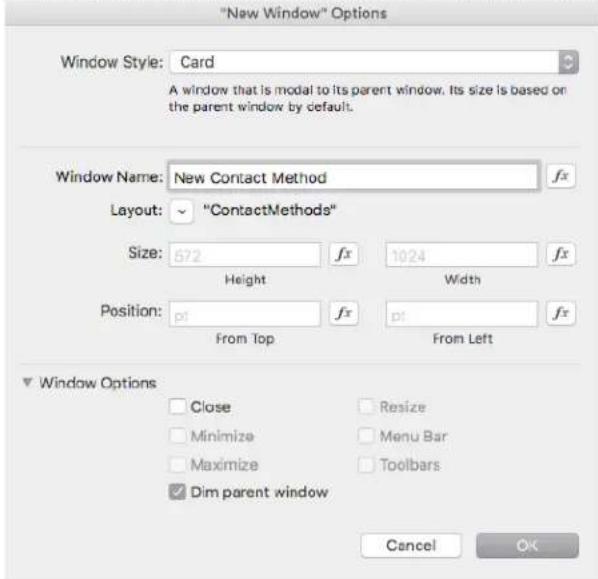
A script contains a New Window script step set up as follows:
text_image
"New Window" Options Window Style: Card A window that is modal to its parent window. Its size is based on the parent window by default. Window Name: New Contact Method Layout: "ContactMethods" Size: 572 fx 1024 fx Height Width Position: pt fx pt fx From Top From Left Window Options Close Resize Minimize Menu Bar Maximize Toolbars Dim parent window Cancel OKWhat should the layout include to ensure the user is not stuck on the card window when calling this script in FileMaker Pro Advanced? How is this different than in FileMaker Go?
- Can you choose the location of a PDF to be saved when using the script step Save Records as PDF in FileMaker WebDirect?
-
You need to write a script that deletes all records from a table called "Temp_Invoices." Related records from a related table called "Temp_InvoiceLineItems" should also to be deleted, and the relationship is set up to cascade delete the invoice line items records. To ensure all Temp_Invoice records and related Temp_InvoiceLineItems records are deleted, which script step should be used: Truncate Table or Delete All Records.
-
What version of the ODBC driver should be used when running a FileMaker Server scheduled script that includes the Import Records using an ODBC data source?
- For FileMaker WebDirect, how do you set the options for the Save Records as PDF script step?
- What can you do with the Create Data File, Open Data File, and Write to Data File script steps?
Answers
- The Set Error Capture [On] script step suppresses any error dialogs from being shown to the user and allows the script to keep running. This could result in accidentally altering data in some unexpected way.
- The Get (LastError) function returns the error of the immediately preceding step. In the script above, this function is called after the Sort Records step, so it returns any error of that step, not from the Find Records step. To fix this problem, the developer could move the Sort Records script step to after the Get(LastError) check.
- If this script is run on a person record with no related contact methods records, line 14 will fail and the layout context will not change. Line 16 will then delete all the records in the found set in the People table. Finally, line 18 will close the window the user was on.
-
This script can be given the ability to run with full access privileges. This can be set by right-clicking on a script name and choosing "Grant Full Access Privileges" or by choosing that option in the Scripts menu.
-
Variables with a single \$ are local to that script only. There are several ways Script B could have access to the data.
a. Pass the variable into Script B as a script parameter and use the Get(ScriptParameter) function to retrieve that value.
b. Change the local variable (\ID) to a global variable (\\$ID) and reference this variable in the subscript.
c. Set a field with global storage with this value and use that field's value in the subscript.
-
Since the option to close the window is not checked in the options, it is vital to have a button that will close the window by a script. Card windows are modal to their parent window in FileMaker Pro Advanced. In FileMaker Go, a card window can be closed by tapping into the gray area of the background window. If you do not select the Close option, users have no way to close the card unless you include a script (for example, assigned to a button in the Card) that performs the Close Window script step.
-
No. FileMaker WebDirect downloads the PDF to the browser's default download folder.
-
The Truncate Table script step will delete all the records of the current table, but will not delete child records even if the relationship is set up to do cascading deletes. The Delete All Records script will delete all records in the current found set and trigger any cascading deletes.
-
FileMaker Server scheduled scripts require the 64-bit version of the ODBC driver to be installed on the server machine.
-
The options for the Save Records as PDF script step are not supported in a script for FileMaker WebDirect. Instead, the Print Setup script step will set these options.
-
Create custom log files or export data in a custom format.
6. Securing FileMaker Systems 10 - 15 %
- Describe how accounts, privilege sets, and authentication interact.
- Describe how to control access and manage security in custom apps through privilege sets.
- Describe how encryption and external file protection is used to protect FileMaker data.
- Describe how to secure a custom app for deployment.
Preparation resources
Guides
FileMaker 18 Security Guide
FileMaker Server 18 Installation and Configuration Guide Installation Quick Start and Administering FileMaker
Server sections
FileMaker ODBC and JDBC Guide
FileMaker Pro Advanced Help topics and subtopics
Protecting databases
Using ODBC and JDBC with FileMaker Pro
Accessing external data sources
Adding and selecting table occurrences
FileMaker Server Help topics and subtopics
Securing your data
FileMaker Knowledge Base articles
Proactive and Passive security warning improvements in FileMaker Pro and FileMaker Pro Advanced
Configuring Security for FileMaker 17 and 18
Questions
- FileMaker Security can be defined as figure out who the user is, and figure out what the user can see and do. What part(s) of FileMaker security is the "who"? What part(s) of FileMaker security is the "what"?
- What extended privilege must be enabled so that users can connect to a custom app using FileMaker Go, FileMaker WebDirect, and via the FileMaker Data API?
- George uses a custom app with these tables: Customers, CustomerContacts, Invoices, InvoiceLineItems, and Products. His job is to update customer records with new information, such as new contacts, a change of address, etc. Occasionally he needs to add customers to the system, but he should not be able to delete them. He doesn't need to create or edit invoices. He does need to view them, however. George's account is linked to a privilege set called "CustomerEntry". Describe how this privilege set should be set up to give him access only to the customer area for working with those records.
- A FileMaker file sits on a physical server machine. What are three ways to ensure the file cannot be opened by unauthorized users in the event the machine on which it resides is stolen?
- What are the two default FileMaker accounts present in any new file? List four attributes of each account in a new file.
- A custom app contains a Web Viewer object. This Web Viewer uses the FMP Protocol to run a script in FileMaker Pro Advanced. A user, however, reports a bug. Clicking on a link that references that fmpurl in the Web Viewer shows an error message. What should be done to allow the link in a Web Viewer to run?
- If a FileMaker file contains multiple accounts using oAuth authentication, which account is used when the user opens the file?
Answers
1. FileMaker Security:
a. the "who" consists of
i. FileMaker Accounts
ii. External authentication through oAuth or External Accounts (via Open Directory or Active Directory)
b. The "what" consists of
i. Privilege Sets
ii. Extended Privileges
2. The required extended privilege for each client:
a. FileMaker Go -fmapp
b. FileMaker Web Direct - fmwebdirect
c. FileMaker Data API - fmrest
3. The privilege "CustomerEntry" should include the following access in the privileges:
a. Records Access:
i. Customers: View, Edit, Create
ii. CustomerContacts: View, Edit, Create, Delete
iii. Invoices: View
iv. InvoiceLineltems: View
v. Products: View (to see product data displayed in Invoice line items)
b. Layouts Access:
i. Any layouts with Customers or CustomerContacts as the underlying table: view only for layouts and modifiable for records
ii. Any layouts with Invoices or InvoiceLine Items as the underlying table: view only for layouts and records
iii. Any layouts with Products as the underlying table: no access for layouts and records
4. The three ways are:
a. Encryption at Rest. This feature makes sure that the database is encrypted while residing on a machine, and this provides one measure of security if the physical machine is stolen.
b. Do not allow the file to open automatically using any level of account.
c. Require full access privileges to create external references to this file.
5. There are two default accounts: Admin and Guest
a. Admin
i. [Full Access] privilege set
ii. No password
iii. Used to log into the database automatically
iv. Fully editable
v. Can be renamed
vi. Can give it a password
vii. Can be made inactive
viii. Can be deleted
b. Guest:
i. Enables a user to log in with no specific account information
ii. [Read-Only Access] privilege set
iii. Inactive
iv. Not fully editable
v. Cannot delete
vi. Cannot change its name
vii. Cannot give it a password
- By default for all accounts, the "fmurscript" extended privilege is disabled. This privilege should be enabled so that a link in a Web Viewer is able to run a script in FileMaker Pro Advanced.
- The first matching account in the authentication order.
7. Deploying Custom Apps 10 - 15 %
- Describe the available configurations, location, and administrative options for all FileMaker Server and FileMaker Cloud for AWS components.
- Describe the key elements of FileMaker Server installation, deployment, configuration, administration, troubleshooting, and monitoring.
- Describe best practices for effective and secure back-ups.
- Describe the key elements of using server-side scripting.
- Describe the options for deploying a custom app to FileMaker Go.
- Describe the differences between deploying a custom app to FileMaker WebDirect and FileMaker Pro Advanced or FileMaker Go.
Preparation resources
Guide
FileMaker Server 18 Installation and Configuration Guide
FileMaker WebDirect 18 Guide
FileMaker Go 18 Development Guide
FileMaker Server Help topics and subtopics
New features in FileMaker Server 18
Using the Deployment assistant on a worker machine
Notifications settings
Database and backup folder settings
Monitoring FileMaker Server
Scheduling administrative tasks
FileMaker Go Help topics and subtopics
Transfer files
FileMaker Knowledge Base article
General hardware considerations for FileMaker Server
Questions
- A scheduled back up can be set to run every hour during the day. What does FileMaker Server do with a file that has not changed between consecutive backups?
- Progressive backups are a type of backup that can reduce the impact of backups on FileMaker Server performance. How does this backup type accomplish that?
-
FileMaker server can be installed on multiple machines: a master and one or many worker machines. In a multiple machine configuration, which elements of FileMaker Server are installed on the master machine? Which elements are installed on the worker(s)?
-
What information can be found by looking at the Top Call Statistics?
-
A script called "Process Data" performs some operation on the found set of data. It is called from a parent script called "Update Report". The subscript runs as expected in FileMaker Pro Advanced using the Perform Script [Process Data] script step, but fails when it runs on the server using Perform Script on Server [Process Data ; Wait for Completion]. It does not return the calculated data for the report. What might cause the script to run differently using Perform Script on Server?
-
When installing FileMaker Server in a multi-machine deployment, which do you install and configure first, the master or the worker(s)?
- What are the choices for deploying a custom app to FileMaker Go?
Answers
- A scheduled backup checks to see if a file has been changed. If not, the schedule creates a hard link to a previous backup.
- Progressive backups start by making a complete backup of all databases and are stored in a folder of your choice. After that, the schedule only copies changed blocks from the hosted file to the backup folder every time it is run. A progressive backup keeps two backups—a timestamped file available for use and an in-progress copy that accumulates the changes.
- The components of FileMaker Server are: The Web Server, the Web Publishing Engine, Database Server, and the Admin Server. During a multiple-machine deployment, all the components are installed on the master machine, and the Web Server and the Web Publishing Engine are installed on each worker machine.
- The Top Call Statistics log describes the 25 slowest client requests. You can see what a specific user was doing and how long it took to process the request in microseconds.
- When a script is run using Perform Script on Server, FileMaker Server opens a session and runs the script. This opening procedure will open to the layout specified in the File Options menu, as well as run any onFirstWindowOpen script triggers before running the actual "Process Data" script. If the script does not have a Go to Layout script step as well as the correct found record or set of records, it will attempt to perform the steps on the layout and with the records the script lands on. To fix this, ensure that the subscript contains steps that navigate to the correct layout and find the correct records. To return data to the parent script, use the Exit Script step and pass the data as a Script Result.
- The master machine must be configured first.
- A custom app can be deployed in the following ways:
a. Hosted on FileMaker Server
b. Transferred to the device using iTunes
c. Transferred to the device using a sharing option such as Mail, AirDrop, iCloud Sharing or other third-party sharing methods.
8. Data Integration 5 - 10 %
- Describe the formats and methods to import data into FileMaker files.
- Describe the formats and methods to export data from FileMaker files.
- Describe the methods for integrating FileMaker with web services.
- Describe how to connect to external data sources and how to integrate them into a custom app.
Preparation resources
FileMaker Pro Advanced Help topics and subtopics
Saving, importing, and exporting data
Accessing external data sources
Supported import/export file formats
Question
- What are three things you can do with a shadow table, including its fields and records? What are three things you cannot do with a shadow table?
Answer
- Here is what you can and cannot do with the fields and records in an ODBC data source:
a. Can do
i. Display the data on FileMaker layouts
ii. Add unstored calculation fields to perform calculations on the ODBC data.
iii. Add summary fields to summarize the data in the ODBC source
iv. Add, change, delete external data if your permissions in the ODBC source all it.
v. Create relationships between fields in FileMaker and the ODBC fields (or columns).
vi. Specify the primary key of an ODBC table (this process is done during the set up of the ODBC source).
vii. Use the records in value lists.
b. Cannot do
i. Add additional text, number, date fields to the table inside FileMaker.
ii. Change the schema of the ODBC data source.
iii. Make use of field indexes.