
IS3050 - Motion detector HONEYWELL - Free user manual and instructions
Find the device manual for free IS3050 HONEYWELL in PDF.


| Product Type | Passive Infrared (PIR) Motion Detector |
| Brand | Honeywell |
| Model | IS3050 |
| Technology | Passive Infrared with dual slope temperature compensation |
| Detection Range | 53 ft x 72 ft (16 m x 22 m) |
| Mounting Height | 6'9" to 8'9" (2.1 m - 2.7 m); optimal 7'6" (2.3 m) |
| Dimensions (H x W x D) | 3.86 in x 2.24 in x 1.71 in (9.8 cm x 5.7 cm x 4.35 cm) |
| Weight | 3 oz (85 g) net |
| Power Supply | 9.0-15 VDC (UL: 9.5-15 VDC); 11 mA typical, 13 mA max; AC ripple 3 Vpp at 12 VDC |
| Alarm Relay | Energized Form A; 30 mA, 25 VDC, 22 Ω max resistance; alarm duration 3 seconds |
| Tamper Protection | Cover and wall tamper (NC with cover installed); Form A; 30 mA, 25 VDC |
| Operating Temperature | 14°F to 131°F (-10°C to 55°C) |
| Relative Humidity | 5% to 93% non-condensing |
| RFI Immunity | 20 V/m (10-1000 MHz), 15 V/m (1000-2700 MHz) |
| White Light Immunity | 6,500 Lux typical |
| Fluorescent Light Filter | 50/60 Hz |
| LED Indications | Power up: slow blink; Walk test: ON; Normal: OFF; Trouble: fast blink |
| Flashlight Feature | Activates walk test by swinging bright light within 4 ft (1.2 m); available first 24 hours after power-up |
| Approvals | FCC Part 15 Class B, IC ICES-003, UL 639, ULC S306-03, SIA-PIR-01 |
| Accessories | Swivel mount brackets (SMB-10, SMB-10C, SMB-10T), Fresnel lens kit (DT8-G2), cables (22 AWG 4 or 6 conductor) |
| Installation Requirements | Indoor, on wooden stud or solid wood; power-limited output from UL listed control unit or power supply |
| Cleaning Instructions | Clean lens with soft dry cloth; do not use solvents or abrasive cleaners |
Frequently Asked Questions - IS3050 HONEYWELL
User questions about IS3050 HONEYWELL
0 question about this device. Answer the ones you know or ask your own.
Ask a new question about this device
Download the instructions for your Motion detector in PDF format for free! Find your manual IS3050 - HONEYWELL and take your electronic device back in hand. On this page are published all the documents necessary for the use of your device. IS3050 by HONEYWELL.
USER MANUAL IS3050 HONEYWELL
IS3050 Passive Infrared Motion Sensor - Installation Instructions
QUICK LINKS
| Mounting Location Guidelines | Wire the Sensor | Troubleshooting |
| Open the Sensor | Walk Test the Sensor | Sensor Specifications |
| Mount the Sensor | Detection Patterns | Accessories |
| Sensor Components and Settings | Relay Operation | Approval Listings |

SELECT THE MOUNTING LOCATION
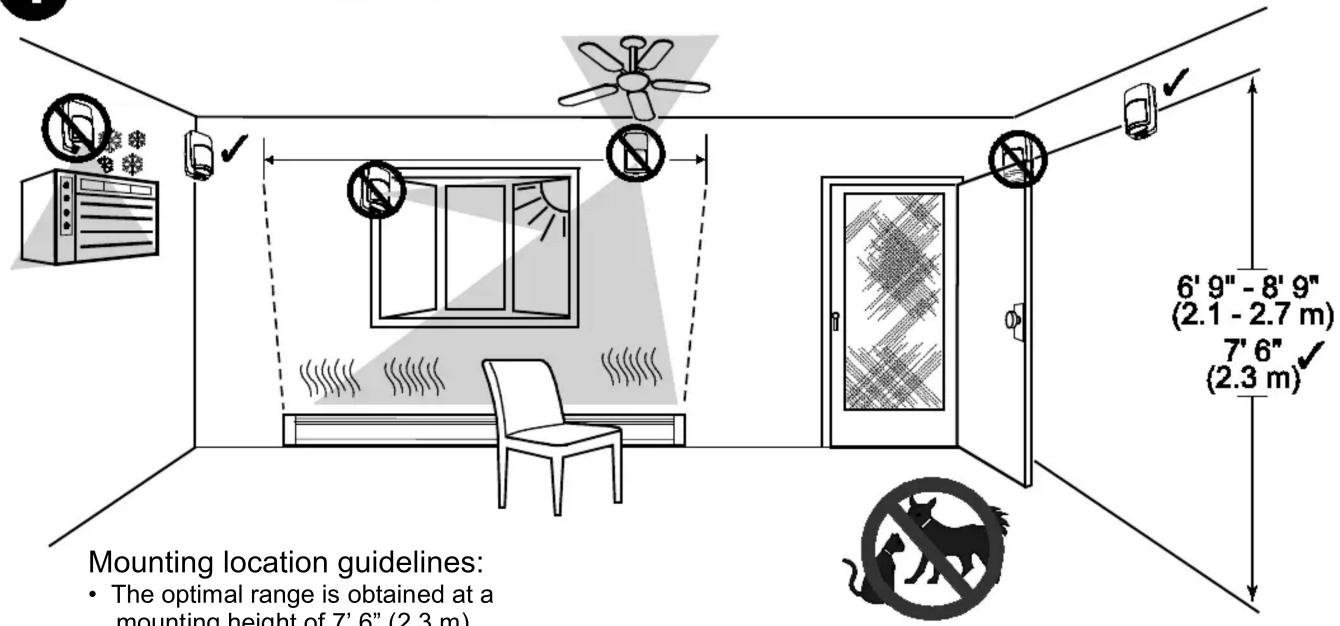
Mounting location guidelines:
- The optimal range is obtained at a mounting height of 7' 6" (2.3 m).
- Allow a clear line-of-sight to all areas to protect.
- Do not directly face windows.
- Not for use in applications with pets.
- Avoid close proximity to moving machinery, fluorescent lights, and heating/cooling sources.


OPEN THE SENSOR
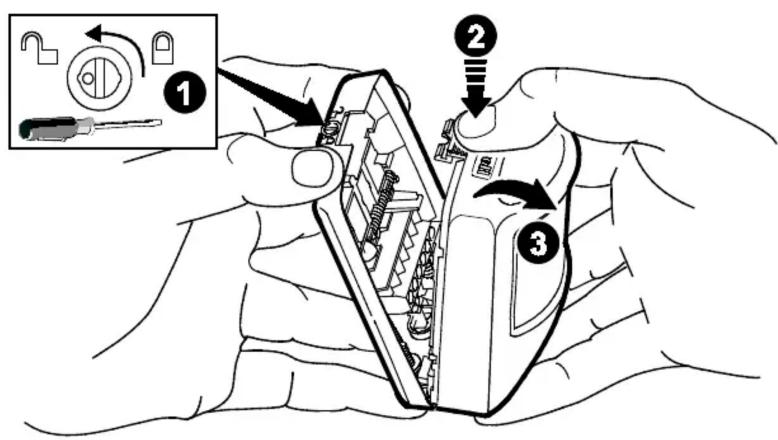
- Turn the arrow to point to the Unlock symbol.
- Press firmly on housing latch.
- Gently separate the front and rear housing.

![3 MOUNT THE SENSOR A #6 x 1" (3.5 mm x 25 mm) B #8 x 1" (3.5 mm x 25 mm) • [A] = Wall mounting holes. • [B] = Corner mounting holes. • The rear tamper plate MUST be mounted to a stud, solid wood, or with a robust wall anchor.](/content/2026/05/813177/images/8a242f54bca561373f5dbd3c00b72c4b7b78d6e68812fc9a34cfbcc1ec8f30ab.jpg)
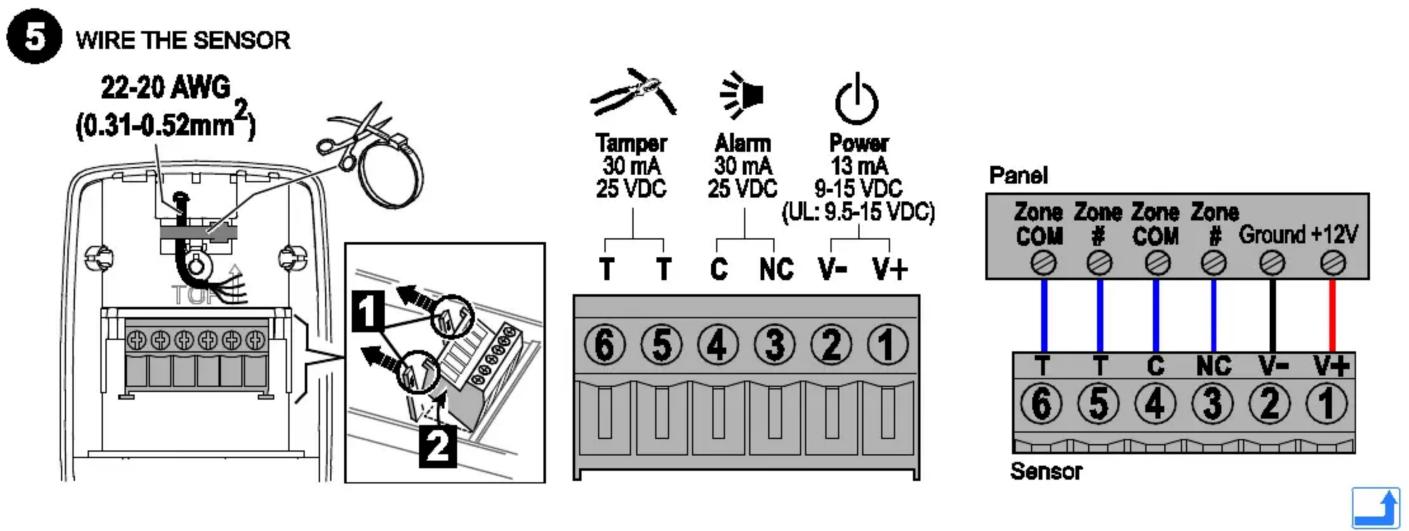

WALK TEST THE SENSOR AND ADJUST AS NEEDED
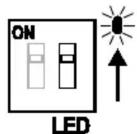
| LED | Power Up | Walk Test | Normal | Trouble |
| Red | Slow Blink | ON Alarm | ON Alarm | Fast Blink |
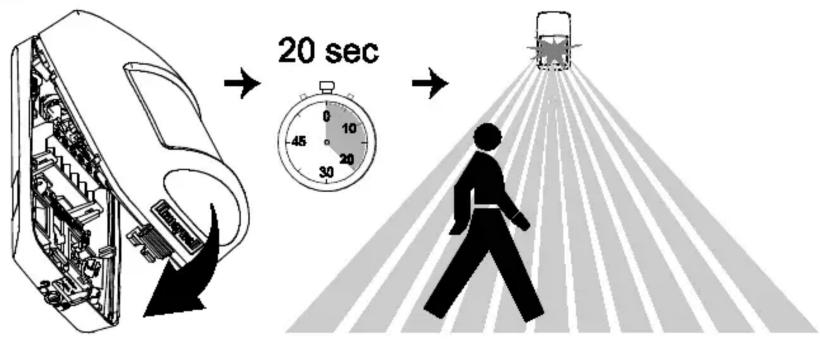
- Close the sensor and apply power to the sensor. Initialization is complete when the LED stops flashing slowly (about 20 seconds).
- Walk through the detection area and observe the LED.
Walk test mode is active for 10 minutes, then automatically exits test mode, disables the LED and enters normal operation mode. For an additional 10 minute walk test, enable walk test mode again with the flashlight feature.
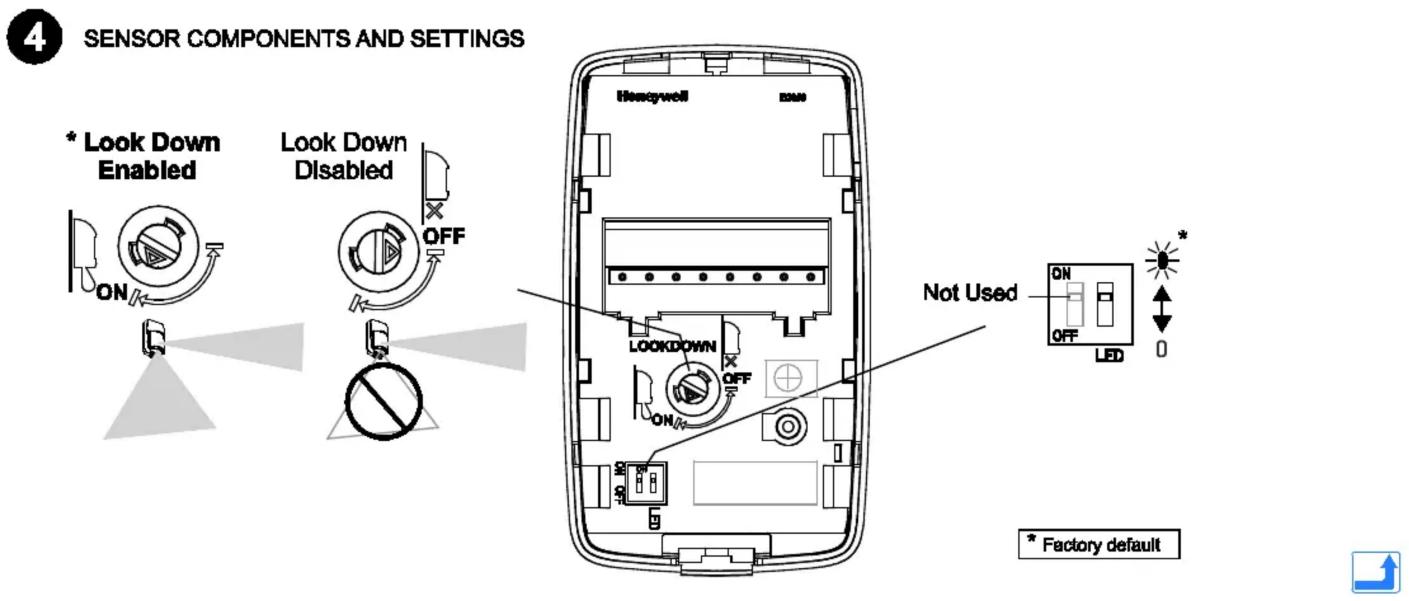
Note: During power up and walk test modes the LED is active regardless of the LED Enable/Disable Dip switch setting.
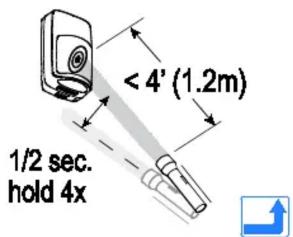
Flashlight Feature:
- Use a flashlight with a bright light beam, and stand within 4' (1.2 m) of the sensor.
- Swing the light beam past the sensor IR window 3-5 times, holding the beam on the window for 0.5 second each pass.
The flashlight feature is only available for the first 24 hours after first power up.

DETECTION PATTERNS
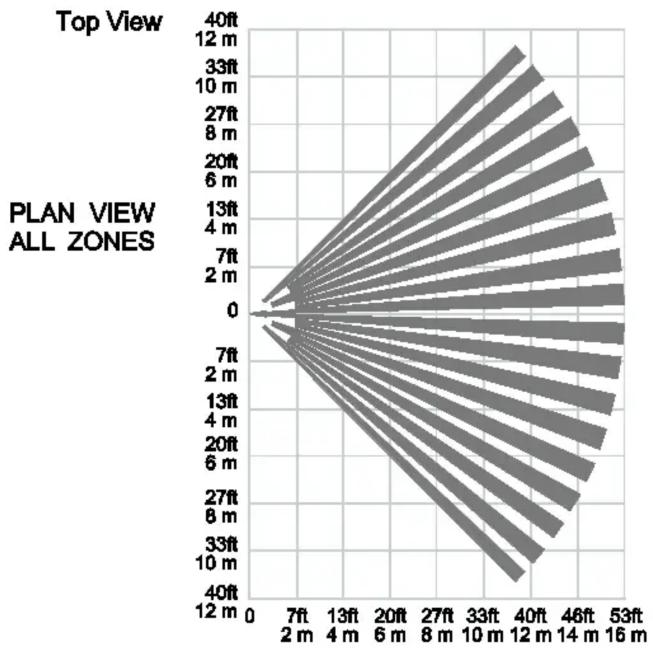
radar
| Plan View | Top View | | --------- | -------- | | 0 | 0 | | 7ft | 0 | | 2m | 0 | | 4m | 0 | | 7ft | 0 | | 13ft | 0 | | 20ft | 0 | | 27ft | 0 | | 33ft | 0 | | 40ft | 0 | | 46ft | 0 | | 53ft | 0 | | 12m | 0 | | 13ft | 0 | | 14m | 0 | | 16m | 0 | | 2m | 0 | | 4m | 0 | | 6m | 0 | | 8m | 0 | | 10m | 0 | | 12m | 0 | | 13ft | 0 | | 14m | 0 | | 16m | 0 | | 27ft | 0 | | 33ft | 0 | | 40ft | 0 | | 46ft | 0 | | 53ft | 0 | | 12m | 0 | | 13ft | 0 | | 14m | 0 | | 16m | | 2m | 0 | | 4m | 0 | | 6m | 0 | | 8m | 0 | | 10m | 0 | | 12m | 0 | | 13ft | 0 | | 14m | 0 | | 16m | 0 | | 20ft | 0 | | 27ft | 0 | | 33ft | 0 | | 40ft | 0 | | 46ft | 0 | | 53ft | 0 | | 12m | 0 | | 13ft | 0 | | 14m } (approximate values) for all zones; the chart displays a single data series with values ranging from ~0 to ~40 ft. The chart is labeled 'PLAN VIEW ALL ZONES' at the bottom.Side View
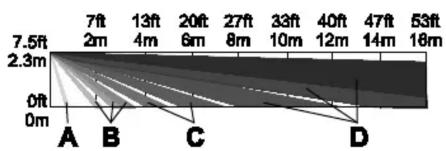
Zones
| A | 2 Look-down |
| B | 18 Lower |
| C | 20 Intermediate |
| D | 54 Long |

RELAY OPERATION
| SENSOR STATUS | |||
| Normal | Intrusion | Trouble1 | |
| Alarm Relay | Closed | Open | Open |
^1 For information on Trouble conditions, see the Troubleshooting section.
TROUBLESHOOTING

| NORMAL | TROUBLE* | |
| Self-Test Failure1 | ||
| Alarm Relay | Closed | Open |
| Red LED | Off | Flashing |
\*TROUBLE CONDITIONS:
Self-Test Failure conditions:
- PIR self-test failure: The sensor is disabled.
- Temperature compensation failure: The temperature compensation is disabled.
Depending on the Trouble condition, take the following corrective actions:
- Verify the power supply is sufficient (at least 9V at the sensor).
• Cycle power to the sensor.
- Walk test the sensor.
If the Trouble condition does not clear, replace the sensor.
SPECIFICATIONS

Range: 53' x 72' / 16 m x 22 m
Wall Mounting Height: 6'9" - 8'9" (2.1 m - 2.7 m); Optimal 7'6" (2.3 m)
Power: 9.0-15 VDC (UL: 9.5-15); 11 mA typical, 13 mA maximum; AC Ripple: 3 V peak-to-peak at nominal 12 VDC
Alarm Relay: Energized Form A; 30 mA, 25 VDC, 22 Ohms resistance maximum. Alarm Relay Duration: 3 seconds
Tampers: Cover & Wall; (NC with cover installed) Form A; 30 mA, 25 VDC
RFI Immunity: 20V/m 10-1000MHz, 15V/m 1000-2700MHz
PIR White Light Immunity: 6,500 Lux typical
Fluorescent light filter: 50 Hz / 60 Hz.
Operating Temperature: 14° to 131° F / -10° to 55° C
Relative Humidity: 5 to 93% (UL tested at 93%); non-condensing
Temperature Compensation: Advanced Dual Slope
Dimensions: 3.86" H x 2.24" W x 1.71" D /
9.8 cm H x 5.7 cm W x 4.35 cm D
Weight: 3 oz / 85 g (net weight)

ACCESSORIES
| SMB-10*(P/N 0-000-110-01) | Swivel Mount Bracket |
| SMB-10C*(P/N 0-000-111-01) | Swivel Mount Ceiling Bracket |
| SMB-10T*(P/N 0-000-155-01) | Swivel Mount Bracket w/Tamper |
| DT8-G2 Lens Kit(P/N DT8G2LENS5PK) | Replacement Fresnel Lens Kit – 5 Pack |
| Cable* (P/N 1103) | General purpose, Solid 22 AWG, 4 conductor |
| Cable* (P/N 1104) | General purpose, Stranded 22 AWG, 4 conductor |
| Cable* (P/N 1106) | General purpose, Solid 22 AWG, 6 conductor |
| Cable* (P/N 1107) | General purpose, Stranded 22 AWG, 6 conductor |
* These accessories have not been evaluated by UL.
For the latest documentation and online support information, please go to:
http://www.security.honeywell.com/hsc/resources/MyWebTech/
For the latest U.S. warranty information, please go to: www.honeywell.com/security/hsc/resources/wa or
Please contact your local authorized Honeywell representative for product warranty information.
APPROVAL LISTINGS

• FCC part 15, Class B verified
• IC ICES-003, Class B verified
- UL 639
- ULC S306-03
- SIA-PIR-01 Passive Infrared detector standard features for false alarm immunity.
Product must be tested at least once each year.
All wiring must be in accordance with: the National Electrical Code (ANSI/NFPA70); the Canadian Electrical Code, Part I (where applicable); UL681, Standard for Installation and Classification of Burglar and Holdup Alarm Systems; ULC-S302, Standard for Installation and Classification of Burglar Alarm Systems for Financial and Commercial Premises, Safes and Vaults; ULC-S310, Standard for Installation and Classification of Residential Burglar Alarm Systems; local codes and the authorities having jurisdiction.
The products are intended to be powered by a power-limited output of a UL/CUL Listed Burglar Alarm control unit, or via a Listed UL603/ULC-S318 power-limited power supply that provides 4 hours of standby power.
The sensor must be mounted indoors, within the protected premises, and on a wooden stud, solid wood or with a robust wall anchor.
UL Note: All interconnecting devices must be UL Listed.
FEDERAL COMMUNICATIONS COMMISSION STATEMENTS
The user shall not make any changes or modifications to the equipment unless authorized by the Installation Instructions or User's Manual. Unauthorized changes or modifications could void the user's authority to operate the equipment.
CLASS B DIGITAL DEVICE STATEMENT
This equipment has been tested to FCC requirements and has been found acceptable for use. The FCC requires the following statement for your information:
This equipment generates and uses radio frequency energy and if not installed and used properly, that is, in strict accordance with the manufacturer's instructions, may cause interference to radio and television reception. It has been type tested and found to comply with the limits for a Class B computing device in accordance with the specifications in Part 15 of FCC Rules, which are designed to provide reasonable protection against such interference in a residential installation. However, there is no guarantee that interference will not occur in a particular installation. If this equipment does cause interference to radio or television reception, which can be determined by turning the equipment off and on, the user is encouraged to try to correct the interference by one or more of the following measures:
• Reorient the receiving antenna until interference is reduced or eliminated.
- Move the radio or television receiver away from the receiver/control.
- Move the antenna leads away from any wire runs to the receiver/control.
- Plug the receiver/control into a different outlet so that it and the radio or television receiver are on different branch circuits.
- Consult the dealer or an experienced radio/TV technician for help.
INDUSTRY CANADA CLASS B STATEMENT
This Class B digital apparatus complies with Canadian ICES-003.
This device complies with Part 15 of the FCC Rules, and RSS210 of Industry Canada. Operation is subject to the following two conditions: (1) This device may not cause harmful interference, and (2) This device must accept any interference received, including interference that may cause undesired operation.
Brand : HONEYWELL
Model : IS3050
Category : Motion detector