DT-IPTV-QAM-ASI-4HC - Radio Data-Tronix - Free user manual and instructions
Find the device manual for free DT-IPTV-QAM-ASI-4HC Data-Tronix in PDF.


User questions about DT-IPTV-QAM-ASI-4HC Data-Tronix
0 question about this device. Answer the ones you know or ask your own.
Ask a new question about this device
Download the instructions for your Radio in PDF format for free! Find your manual DT-IPTV-QAM-ASI-4HC - Data-Tronix and take your electronic device back in hand. On this page are published all the documents necessary for the use of your device. DT-IPTV-QAM-ASI-4HC by Data-Tronix.
USER MANUAL DT-IPTV-QAM-ASI-4HC Data-Tronix
USER GUIDE AND MANUAL
4-Input Independent Output Allocation Encoder-Modulator with ASI
MODEL: DT-IPTV-QAM-ASI-4HC
Version 1.0
Last Update: 06-11-2019

text_image
DATA-TRONIX® DT-IPTV-QAM-ASI-4HC 4-Input Independent Output Allocation Encoder-Modulator NB NACE BRANDS AB OUT Encoder Status 1 2 3 4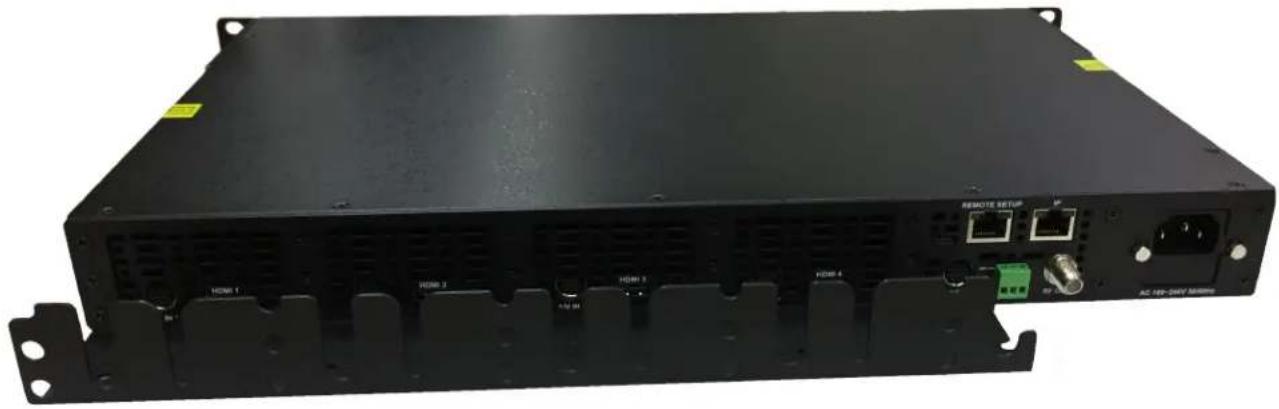
natural_image
Front view of a black network equipment rack with labeled ports and connectors (no readable text beyond labels)
natural_image
Close-up of network cables and server racks with a 'NB' logo, no readable text or symbols on the main subject.NACE Brands is the leading brand of satellite downlink products, cable headend systems, fiber optics, wire, cable, and related connectivity products with integrators. With a global presence in cable and satellite infrastructure products and multimedia technology systems, NACE Brands is the brand of choice for the cable and satellite distribution industry.
Having been in business for over 25 years, NACE brands has become the partner of choice for many integrators. Integrators choose NACE Brands because of our exceptional live technical service, our industry leading sales and technical support, and our full portfolio of complimentary product lines. We know that we can help you with any projects you have because we have the people, the experience, and the products to be the integrator's choice.
• 24/7/365 Live Technical Service Support
• Expertly Trained and Highly Knowledgeable Sales and Support Team
• Full Product Line of Cable and Satellite Infrastructure Products
- Customized Site-Survey Process to Ensure Project Success
Table of Contents
Safety Precautions 4
Package Contents ....5
Product Description ....6
Specifications 7
Device Programming and Setup: 8
Installation....8
Unpacking and Inspection 8
Hardware Installations and Connections 8
Connecting to the GUI Interface: 8
Factory Default IP: 192.168.1.9....8
Encoder Setup....9
After connecting the device to the "Web Management" port located on the rear of the device and
connecting to a PC/Laptop....9
Enter Device's IP address in web browser to access the Overview Page....9
Overview Page of DT-IPTV-QAM-ASI-4HC 9
System Parsing / Response Time: 9
Encoder Programming and Setup via GUI Interface: 9
GUI Login Password: 9
IP Streaming Setup 11
Enabling IP Streams 11
Disabling IP Streams....11
RF Setup....12
Output Setup 12
ASI Control: 14
Disable RF/QAM....14
Application Notes 14
Network Configuration....14
Management IP Setup: 14
Streaming IP Setup: 15
Administration.... 15
Reboot Device: 15
Reset to Default: 15
Saving your configuration files....15
Backup: 15
Restore/Upload saved file configurations:....16
Change Password: 16
Private Address Ranges, IPv4....16
Product Notes: 17
Warranty....17
Safety Precautions
The presence of this symbol: ⚠ is to alert the installer and user to the presence of uninsulated dangerous voltages within the product’s enclosure that may be of sufficient magnitude to produce a risk of electric shock.
TO REDUCE THE RISK OF FIRE OR ELECTRIC SHOCK, DO NOT EXPOSE THIS DEVICE TO RAIN OR MOISTURE. DO NOT OPEN THE UNIT. REFER SERVICING TO QUALIFIED PERSONNEL ONLY.
➢ DO NOT apply power to the unit until all connections have been made, all components have been installed and all wiring has been properly terminated.
DO NOT terminate, change or uninstall any wiring without first disconnecting the unit's power adapter from the device.
This device is supplied with the appropriately rated power supply. The use of any other power supply could cause damage and invalidate the manufacturer's warranty.
➢ DO NOT connect the power cord to the device if the power cord is damaged.
➢ DO NOT cut the power cord.
➢ DO NOT plug the power cord into an AC outlet until all cables and connections to the device have been properly connected.
The device should be installed in an environment consistent with its operating temperature specifications. Placement next to heating devices and ducts is to be avoided as doing so may cause damage. The device should not be placed in areas of high humidity.
DO NOT cover any of the device's ventilation openings.
DO NOT cover or obstruct the device's fan or fan openings.
If the device has been in a cold environment allow it to warm to room temperature for at least 2 hours before connecting to an AC outlet.

Package Contents
This package contains:
• DT-IPTV-QAM-ASI-4HC Encoder / Modulator
- One power cable
• Five Mini Din 10pin/6 RCA Cables
• Four HDMI Cables
- User Guide and Manual
Inspect the package before starting installation to ensure there is no damage and all supplied contents are present.
Product Description
The DT-IPTV-QAM-ASI-4HC Encoder/Modulator provides a dynamic independent DVB-C Annex B QAM output along with 4 IP and ASI (MPTS) streams making it ideal for any commercial RF system. The high quality HD design allows for watching action packed movies and sports channels on any HDTV. The DT-IPTV-QAM-ASI-4HC Encoder/Modulator is a feature rich Digital Encoding platform allowing it to be deployed in a variety of installations. This space saving design delivers up to 4 High Quality HD/SD QAM channels in a single 1RU space.
☐ 2 Frequency Independent QAM outputs
□ High resolution up to 1080i (MPEG-2) / 1080p (H.264)
☐ 3 VCN (Virtual Channel Number) modes
□ GUI for easy setup and control
☐ HDMI, Component / Composite via DIN cable
□ Up to 4 selectable SPTS IP streams
□ Up to 4 selectable ASI streams with MPTS output
□ MPEG-2 or H.264 (AVC) Video (selectable) output
□ EAS functionality
□ 43dB typical MER
□ Closed captioning support
□ +40 dBmV RF Output
□ Rack mountable 1RU height
*Based on program Mbps requirements
Specifications
| VIDEO/AUDIO INPUTS | |
| HDMI | X4 HDMI 1.4v |
| Mini DIN | X4 [Component & Composite Video / Audio input (combined)] |
| VIDEO FORMATS | |
| Resolution | 1080p (H.264 Only), 1080i, 720p, 576p, 576i, 480p, 480i |
| VIDEO / AUDIO COMPRESSION | |
| Video Codes MPEG-2 MP@HL | |
| Video Codecs H.264 (HD) | >1080p30, HP@Level 4.2 / ≤1080p30, HP@Level 4 >720p30, HP@Level 3.2 / ≤720p30, HP@Level 3.1 |
| Video Codecs H.264 (SD) | Frame rate >30, MP@Level 3.1 / ≤30, Level 3 |
| Audio Codecs | MPEG-1 Layer II / AAC / AC-3 pass through |
| VIDEO Bitrate | |
| MPEG-2 | SD: 1 to 8Mbps / HD: 10 to 15.7Mbps |
| H.264 | SD: 1 to 4Mbps / HD: 4 to 8Mbps |
| RF Output | |
| Channel Plan | Varies by country |
| Output Level | +40 dBmV |
| Output Impedance | 75 ohm |
| Level Adjustment | 0~-20dB |
| Modulation Modes | 256 QAM / 64 QAM |
| QAM Type | DVB-C Annex B |
| Channel Allocation Type | Independent |
| VCN Mode | 3 Modes supported |
| MER | 43dB typical |
| IP | |
| Streaming Protocols | UDP/RTP Unicast, Multicast |
| Stream Types | 4 SPTS |
| Stream Control | Enable / Disable control per stream |
| Connector | 1 GbE IP stream |
| ASI Support | |
| Stream Type | Single output (1 MPTS stream carrying up to 4 programs) |
| EAS Support | |
| Connection | Dry contact |
| Audio/Video Input | DIN |
| General | |
| Local Monitoring | LED system indicators (Power & 4 Encoder status LEDs) |
| Web Management | 1 RJ-45 10/100 Management |
| GUI Supported | Microsoft Edge, Firefox, Chrome, Safari |
| Password Protected | GUI: Changeable |
| Fan Cooled | Internal |
| Power Supply | 12VDC 7.5 Amp |
| Consumption 34W typical | |
| Dimension | 482.7mm x 286mm x 44.2mm / 1RU 19" EIA(Housing Body: 438mm x 286mm x 44.2mm) |
*Subject to change without notifications
Device Programming and Setup:
Installation
System Installer must adhere to Article 820-40 of the NEC that provides guidelines for proper grounding and specifies that the cable ground shall be connected to the grounding system of the building, as close to the point of cable entry as possible.
Unpacking and Inspection
Each unit is shipped factory tested. Ensure all items are removed from the container prior to discarding any packing material.
Thoroughly inspect the unit for shipping damage with particular attention to connectors and controls. If there is any sign of damage to the unit or damaged or loose connectors contact your distributor immediately. Do not put the equipment into service if there is any indication of defect or damage.
Hardware Installations and Connections
It is highly recommended that quality cables and connectors be used for all video and audio source connections.
- The unit is designed to be rack mounted in a standard E1A19" rack.
- The unit comes standard with HDMI and DIN inputs (Component and Composite video inputs). The DT-IPTV-QAM-ASI-4HC encoder / modulator is intelligently designed to detect the video input from the video source. HDMI Connection: Connect the HDMI cable(s) from the video source(s) into the HDMI input(s). Or, Connect the DIN Cable to the back of the encoder as required using the DIN to DIN or DIN to breakout cable.
- Repeat this step for each video source connection required.
- Be sure the connections for each source are consistent with the unit's inputs (IN1...IN4).
- Use a quality 75Ω coaxial cable with “F” connectors from the unit’s RF OUT jack to the distribution system (combiner or reverse splitter) or directly to a television.
- Connect the included power cord to the unit's POWER plug.
- Connect the power cord to an appropriately rated AC power outlet.
Connecting to the GUI Interface:
Factory Default IP: 192.168.1.9
- Connect an Ethernet cable directly (no Cross Over cable required) to the Web Management Port on the rear panel of the encoder or connect the Ethernet cable to an Ethernet switch. Connect an Ethernet Cable to your PC/Laptop.
- Modify your PC/Laptop IP address to 192.168.1.11.
- Enter '192.168.1.9' into your web browser.
- Enter GUI and make required device changes.
- Save all changes as required, upload and reboot for changes to take effect.
- Verify parameters then end web session.
Encoder Setup
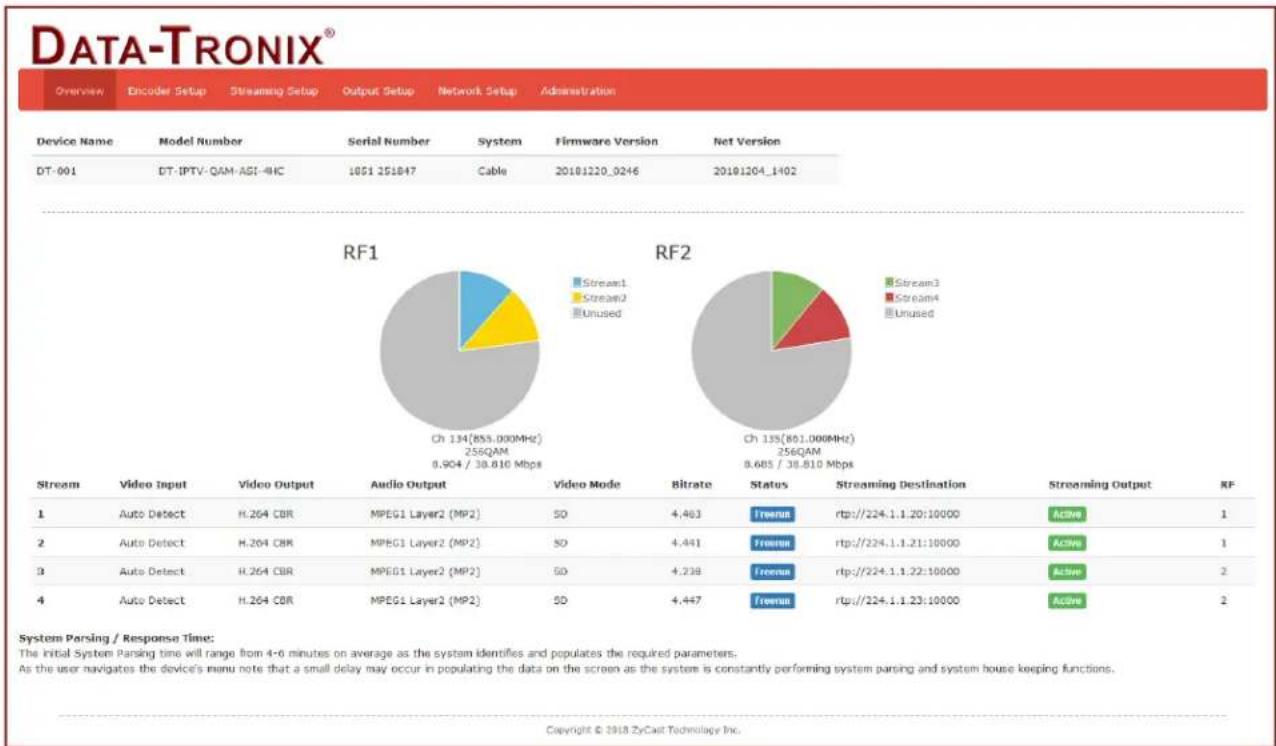
After connecting the device to the "Web Management" port located on the rear of the device and connecting to a PC/Laptop. Enter Device's IP address in web browser to access the Overview Page.
pie
RF1 and RF2 | Stream | Video Input | Video Output | Audio Output | Video Mode | Bitrate | Status | Streaming Destination | Streaming Output | RF | |---|---|---|---|---|---|---|---|---|---| | 1 | Auto Detect | H.264 CBR | MPEG1 Layer2 (MP2) | SO | 4,463 | freeman | rtp://224.1.1.20:10000 | Active | 1 | | 2 | Auto Detect | H.264 CBR | MPEG1 Layer2 (MP2) | SO | 4,441 | freeman | rtp://224.1.1.21:10000 | Active | 1 | | 3 | Auto Detect | H.264 CBR | MPEG1 Layer2 (MP2) | SO | 4,238 | freeman | rtp://224.1.1.22:10000 | Active | 2 | | 4 | Auto Detect | H.264 CBR | MPEG1 Layer2 (MP2) | SO | 4,447 | freeman | rtp://224.1.1.23:10000 | Active | 2 | System Parsing / Response Time: The Initial System Parsing time will range from 4-6 minutes on average as the system identifies and populates the required parameters. As the user navigates the device's menu note that a small delay may occur in populating the data on the screen as the system is constantly performing system parsing and system house keeping functions. Copyright © 2018 ZyCall Technology Inc.Overview Page of DT-IPTV-QAM-ASI-4IIC
The Overview page of DT-IPTV-QAM-ASI-4HC shows inputs 1-4 system status including: Video Source parameter, Video Output setting, Audio Output, Bitrate, and more.
The Overview page provides a quick snapshot of the DT-IPTV-QAM-ASI-4HC when fully functioning.
System Parsing / Response Time:
The initial System Parsing time will vary as the system identifies and populates the required parameters.
As the user navigates the device's menu note that a small delay may occur in populating the data on the screen as the system is constantly performing system parsing and system upkeep functions.
Encoder Programming and Setup via GUI Interface:
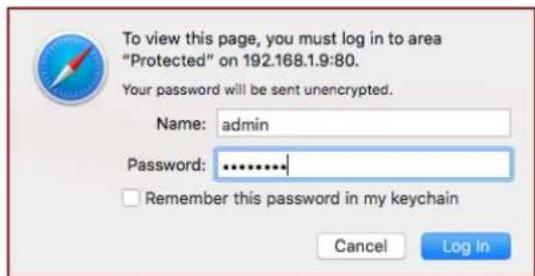
Select the Encoder Setup Tab; you will then be prompted to enter the user name and password for device.
GUI Login Password:
Default User Name: admin
Default Password: Admin123
Note: To change the Password for the GUI go to the Administration Tab.
text_image
To view this page, you must log in to area "Protected" on 192.168.1.9:80. Your password will be sent unencrypted. Name: admin Password: ******** Remember this password in my keychain Cancel Log In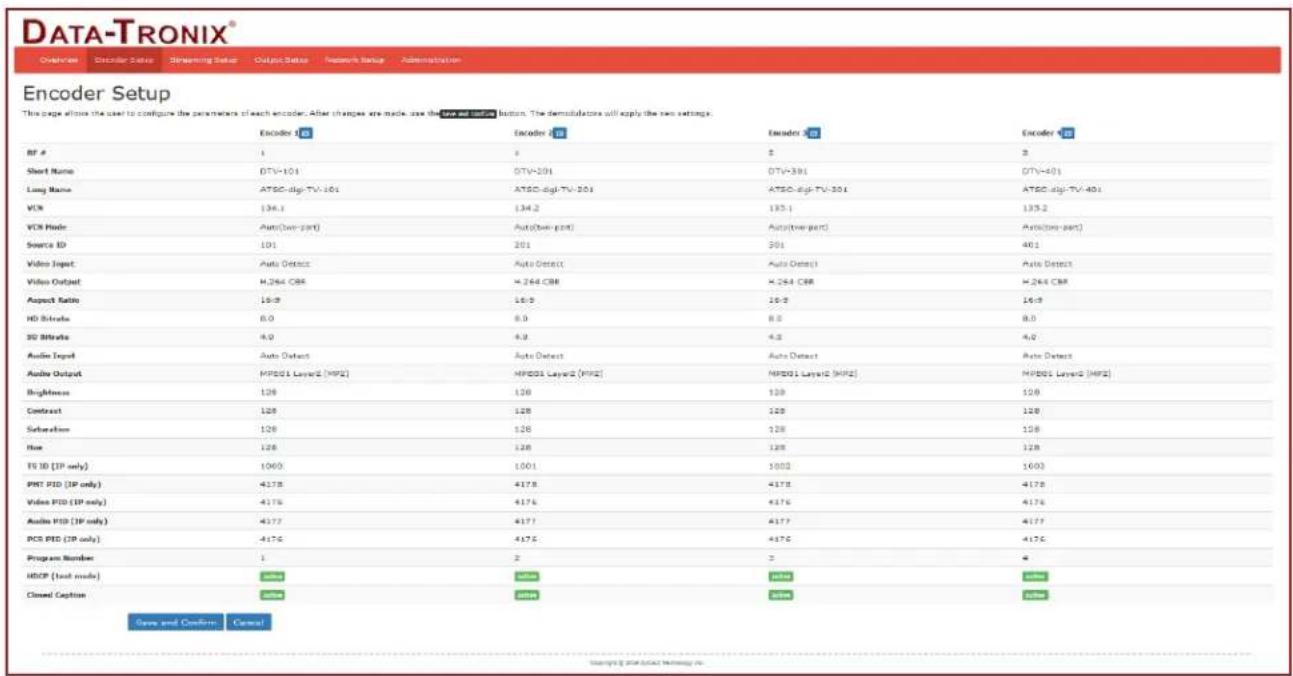
text_image
DATA-TRONIX® Encoder Setup This page allows the user to configure the parameter of each encoder. After these are made, use the "Data set" button. The distributors will apply the two settings. Encoder SET Encoder SET Encoder SET RF # 1 3 5 8 Short Name DTV+101 DTV+201 DTV+301 DTV+401 Long Name ATSC-digi-TV-101 ATSC-digi-TV-201 ATSC-digi-TV-301 ATSC-digi-TV-401 VOL 134.1 134.2 135.1 135.2 VOS Mode Auto(Two-part) Auto(Two-part) Auto(Two-part) Auto(Two-part) Source ID 101 201 301 401 Video Input Auto Output Auto Detect Auto Detect Auto Detect Video Output H264 CBR H264 CBR H264 CBR H264 CBR Aspect Ratio 16:9 16:9 16:9 HD Bitrate 8.0 8.0 8.0 8.0 SD Bitrate 8.0 8.0 8.0 8.0 Audio Input Auto Detect Auto Detect Auto Detect Auto Detect Audio Output MPDS1 Layer2 (MPD) MPDS1 Layer2 (MPD) MPDS1 Layer2 (MPD) Brightness 126 126 126 126 126 Contrast 126 126 126 126 126 Subtraction 126 126 126 126 126 Flow 126 126 126 126 126 TS ID (IP only) 1060 1001 1000 1000 PNT PID (IP only) 4178 4178 4178 4178 Video PID (IP only) 4178 4178 4178 4178 Audio PID (IP only) 4177 4177 4177 4177 PCS PID (IP only) 4176 4176 4176 4176 Program Number 1 2 3 4 HSCP (Load mode) Status Status Status Status Closed Caption Status Status Status Save and Confirm CancelEncoder Setup Page of DT-IPTV-QAM-ASI-4HC
Encoder Setup page allows the integrator to select and set the parameters needed for each stream.
1. Select the "Edit" Icon:


text_image
Encoder Setup This page allows the user to configure the parameters of each encoder. After changes are made, use the save and confirm button. The demodulators will apply the new settings. Encoder 1 Encoder 2 Encoder 3 Encoder 42. Select and set the specific parameters settings as required.
Note: you can select and set all the parameters for all the encoders at one time.
3. After setting all the required parameters- Select the edit icon again.
Note: All changed parameters will be shown in red. Pictured Below.
| Encoder 1 G | Encoder 2 G | Encoder 3 G | Encoder 4 G | |
| RF # | 1 | 1 | 2 | 2 |
| Short Name | DTV-101 | DTV-201 | DTV-301 | DTV-401 |
| Long Name | ATSC-digi-TV-101 | ATSC-digi-TV-201 | ATSC-digi-TV-301 | ATSC-digi-TV-401 |
| VCN | RGA | RGA | RGA | RGA |
| VCN Mode | tensionate | tensionate | tensionate | tensionate |
| Source ID | 101 | 201 | 301 | 401 |
| Video Input | Auto Detect | Auto Detect | Auto Detect | Auto Detect |
| Video Output | H.264 CBR | H.264 CBR | H.264 CBR | H.264 CBR |
| Aspect Ratio | 16:9 | 16:9 | 16:9 | 16:9 |
| HD Bitrate | LIF | LIF | LIF | LIF |
| SD Bitrate | 4.0 | 4.0 | 4.0 | 4.0 |
| Audio Input | Auto Detect | Auto Detect | Auto Detect | Auto Detect |
| Audio Output | MPEG-AC | MPEG1 Layer2 (MP2) | MPEG1 Layer2 (MP2) | MPEG1 Layer2 (MP2) |
- Select "Active/Inactive" to activate for remaining parameters as required.
- Select "Save and Confirm" to save all changed parameters.
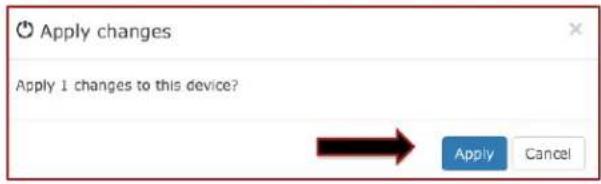
- Select "Apply" in the pop-up window.
text_image
Apply changes Apply 1 changes to this device? Apply CancelIP Streaming Setup
text_image
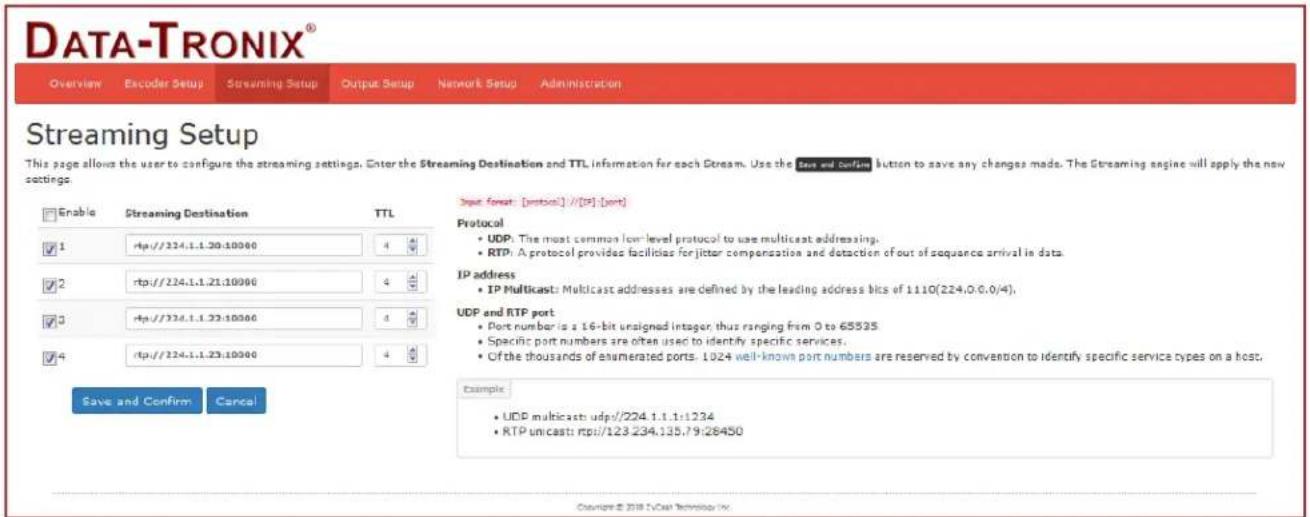
DATA-TRONIX® Overview Encoder Setup Streaming Setup Output Setup Network Setup Administration Streaming Setup This page allows the user to configure the streaming settings. Enter the Streaming Destination and TTL information for each Stream. Use the State and Confining button to save any changes made. The Streaming engine will apply the new settings. Enable Streaming Destination TTL ✓ 1 http://224.1.1.20:10000 4 ✓ 2 http://224.1.1.21:10000 4 ✓ 3 http://224.1.1.22:10000 4 ✓ 4 http://224.1.1.23:10000 4 Save and Confirm Cancel Input format [protocol] //[IP] [port] Protocol • UDP: The most common low-level protocol to use multicast addressing. • RTP: A protocol provides facilities for jitter compensation and detection of out-of-sequence arrival in data. IP address • IP Multicast: Multicast addresses are defined by the leading address bits of 1110(224.0.0.0/4). UDP and RTP port • Port number is a 16-bit unsigned integer, thus ranging from 0 to 65535 • Specific port numbers are often used to identify specific services. • Of the thousands of enumerated ports, 1024 well-known port numbers are reserved by convention to identify specific service types on a host. Example • UDP multicast udps//224.1.1.1:1234 • RTP umicast: rtp//123.234.135.79:28450 Copyright © 2018 T-Cast Technology Inc.Streaming Setup Page of DT-IPTV-QAM-ASI-4HC
Enabling IP Streams
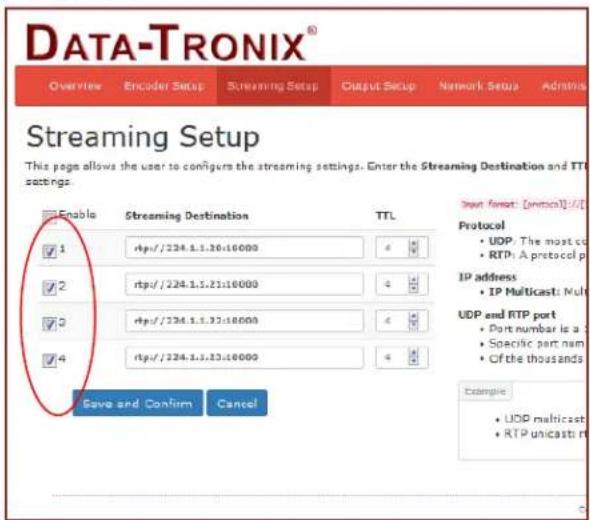
- Enable the Stream by selecting the check box 1-4. Note: All streams can be enabled at the same time by using the "master" checkbox.
- Enter the stream Destination IP [example: udp://224.1.1.4:1234].
- Set the TTL value.
- Select 'Save and Confirm' once all the streams are setup.
Disabling IP Streams
The DT-IPTV-QAM-ASI-4HC offers the user a SPTS output stream. Each Stream can be disabled as required.
To disable an IP Stream "unchecked" the checkbox in front of the appropriate IP Stream_ID (1-4).
text_image
DATA-TRONIX® Overview Encoder Setup Streaming Setup Output Setup Network Setup Admins Streaming Setup This page allows the user to config the streaming settings. Enter the Streaming Destination and TTI settings. Enable Streaming Destination TTL ✓ 1 rtp://224.1.1.10:10000 4 ✓ 2 rtp://224.1.1.21:10000 4 ✓ 3 rtp://224.1.1.32:10000 4 ✓ 4 rtp://224.1.1.33:10000 4 Save and Confirm Cancel Down format: [optional]:/I/ Protocol • UDP: The most co • RTP: A protocol p IP address • IP Multicast: Mult UDP and RTP port • Port number is a • Specific port nam • Of the thousands Example • UDP multicast • RTP unicast mRF Setup
Output Setup
text_image
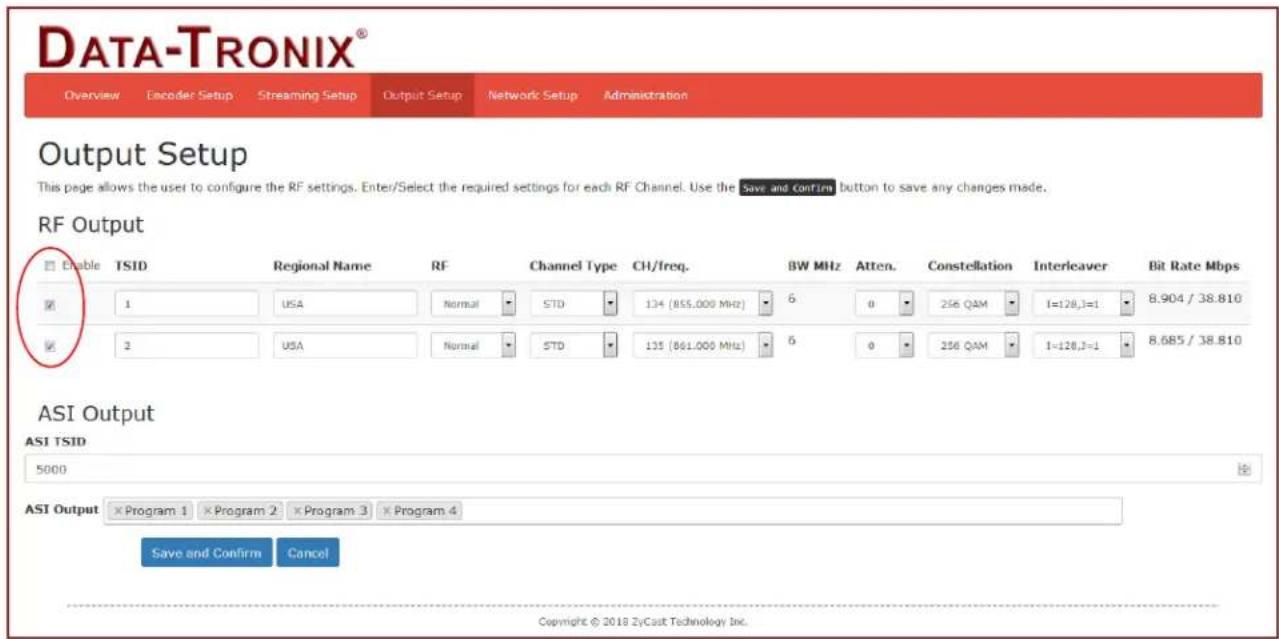
DATA-TRONIX® Overview Encoder Setup Streaming Setup Output Setup Network Setup Administration Output Setup This page allows the user to configure the RF settings. Enter/Select the required settings for each RF Channel. Use the Save and confirm button to save any changes made. RF Output Enable TSID Regional Name RF Channel Type CH/freq. BW MHz Atten. Constellation Interleaver Bit Rate Mbps 1 USA Normal STD 134 (855,000 MHz) 6 0 256 QAM I=128,1=1 8.904 / 38.810 2 USA Normal STD 135 (861,000 MHz) 6 0 256 QAM I=128,1=1 8.685 / 38.810 ASI Output ASI TSID 5000 ASI Output Program 1 Program 2 Program 3 Program 4 Save and Confirm Cancel Copyright © 2018 ZyCast Technology Inc.Output Setup Page of DT-IPTV-QAM-ASI-4HC
Use the Output Setup Page to setup each RF Output.
The DT-IPTV-QAM-ASI-4HC offers the integrator the ability to set the output channel independently of the other output channels of the DT-IPTV-QAM-ASI-4HC Encoder. This professional parameter allows the integrator greater flexibility for placing video streams within the system. Each RF/QAM (2 streams per RF) can be allocated independently.
- Select RF Output Setup from the menu.
- Enable/Disable RF1-RF2 by checking or unchecking Checkbox (as required).
- Modify the RF TSID (as required).
- Select and Set RF Type.
- Select and Set Channel Type.
- Select and Set Ch/Freq required.
- Select and Set Attenuation (if required).
- Select and Set required Constellation.
- Modify Interleaver (if required).
- Modify ASI TS_ID (if required)
- Select / Remove any ASI Program/Stream (as required).
- Save and confirm all changes have been made.
Note: The DT-IPTV-QAM-ASI-4HC allows the integrator the ability to set the output channels independently of the other 3 output channels.
Example 1: Example 1 shows RF1-RF2 with a large frequency separation.
RF1
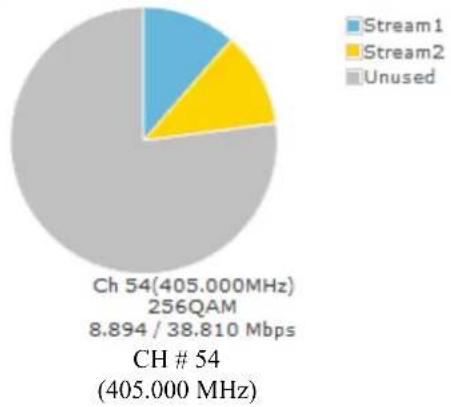
pie
| Category | Value | |---|---| | Unused | 405.000 MHz | | Stream1 | 8.894 / 38.810 Mbps | | Stream2 | 256QAM | | CH # 54 | 405.000 MHz |RF2
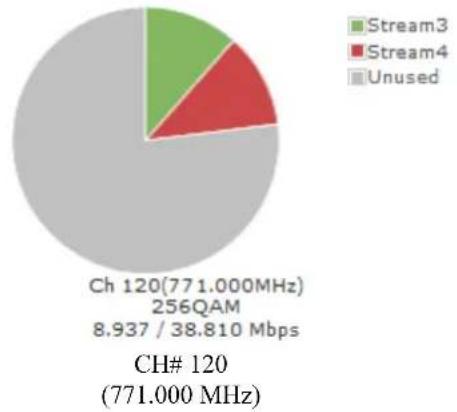
pie
| Category | Value | |---|---| | Unused | 256QAM | | Stream3 | 8.937 / 38.810 Mbps | | Stream4 | (unlabeled segment) | | Ch 120 (771.000MHz) | 256QAM | | CH# 120 (771.000 MHz) | (unlabeled segment) |Example 2: Example 2 shows RF1-RF2 with a small frequency separation.
RF1
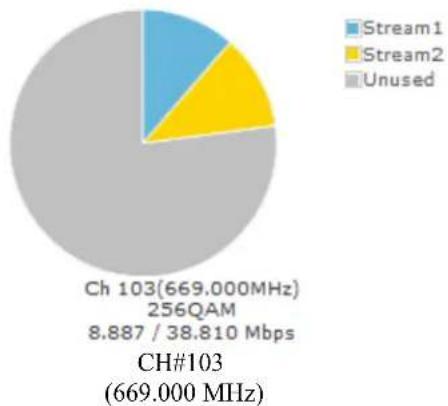
pie
| Category | Value | |---|---| | Unused | 669.000 MHz | | Stream1 | 8.887 / 38.810 Mbps | | Stream2 | 256QAM | | Ch 103 | 669.000 MHz | | CH#103 | 669.000 MHz |RF2
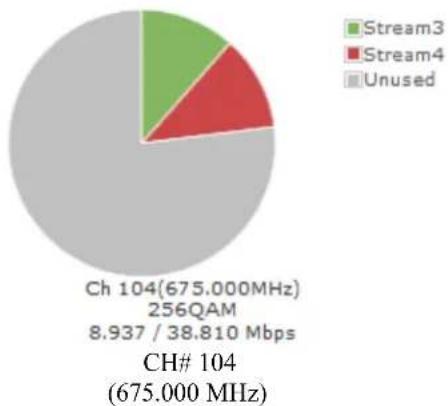
pie
| Category | Value | Description | | :--- | :--- | :--- | | Unused | 256QAM | 8.937 / 38.810 Mbps | | Stream3 | 8.937 | | | Stream4 | 8.937 | | | Ch 104 | 675.000 MHz | 675.000 MHz | | CH# 104 | 675.000 MHz | |Note: If the RF is disabled, the frequency will not be occupied.
- If a stream is disabled, the stream will occupy the channel frequency even if not present in the RF diagram.
ASI Control:
The DT-IPTV-QAM-ASI-4HC offers the integrator a MPTS ASI output stream.
- Modify the ASI TS_ID as required.
- Remove/Add ASI streams as required.
- Select Save and Confirm to save all modified parameters.
Disable RF/QAM
The DT-IPTV-QAM-ASI-4HC offers the integrator the ability to disable a RF QAM. To disable a RF (QAM) output, "unchecked" the checkbox associated with the RF QAM.
Application Notes
When installing more than 1 device into a system, each device must have a unique RF TS_ID and ASI TS_ID.
We highly recommend you save your encoder configuration files.
Note: See Administration tab for how to backup device settings.
Network Configuration
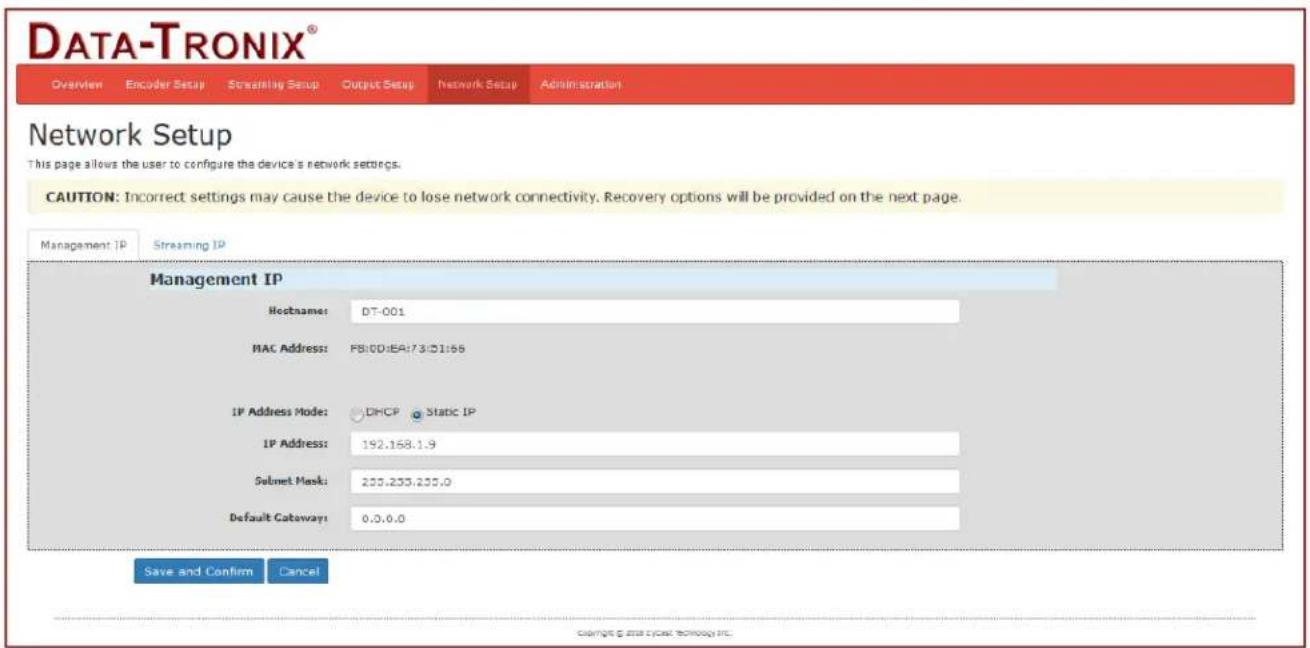
Management IP Setup:
text_image
DATA-TRONIX® Overview Encoder Setup Streaming Setup Output Setup Network Setup Administration Network Setup This page allows the user to configure the device's network settings. CAUTION: Incorrect settings may cause the device to lose network connectivity. Recovery options will be provided on the next page. Management IP Streaming IP Management IP Hostname: DT-001 MAC Address: FS:DD:EA:73:D1:56 IP Address Mode: DHCP Static IP IP Address: 192.168.1.9 Selnet Mask: 255.233.235.0 Default Cataway: 0.0.0.0 Save and Confirm CancelNetwork Setup Page of DT-IPTV-QAM-ASI-4HC
Use the Network Setup to configure the device's Management Port's IP address (GUI address) of the device, Subnet Mask, Gateway, Enable/Disable DHCP, and set Host Name.
Save and Confirm: Once all parameters are set remember to Save and confirm all changes.
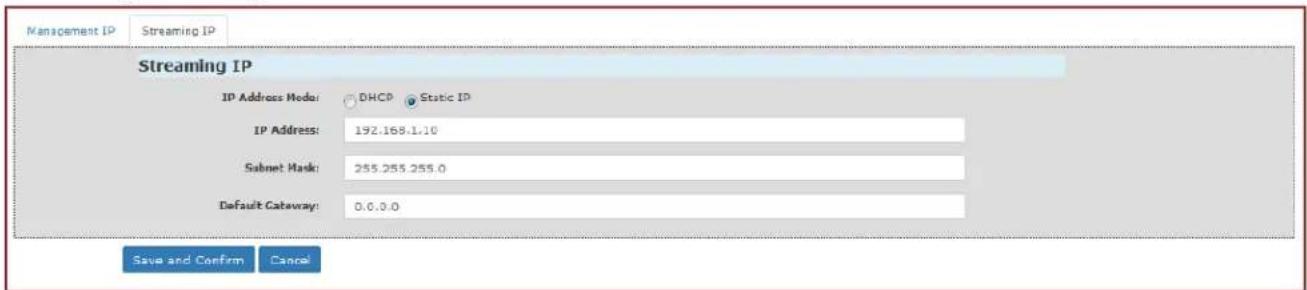
Streaming IP Setup:
text_image
Management IP Streaming IP Streaming IP IP Address Mode: DHCP Static IP IP Address: 192.168.1.10 Sabet Mask: 255.255.255.0 Default Catabay: 0.0.0.0 Save and Confirm CancelUse the Streaming IP tab to modify the Streaming IP port of the device as required.
Save and Confirm: Once all parameters are set remember to Save and confirm all changes have been made.
Administration
text_image
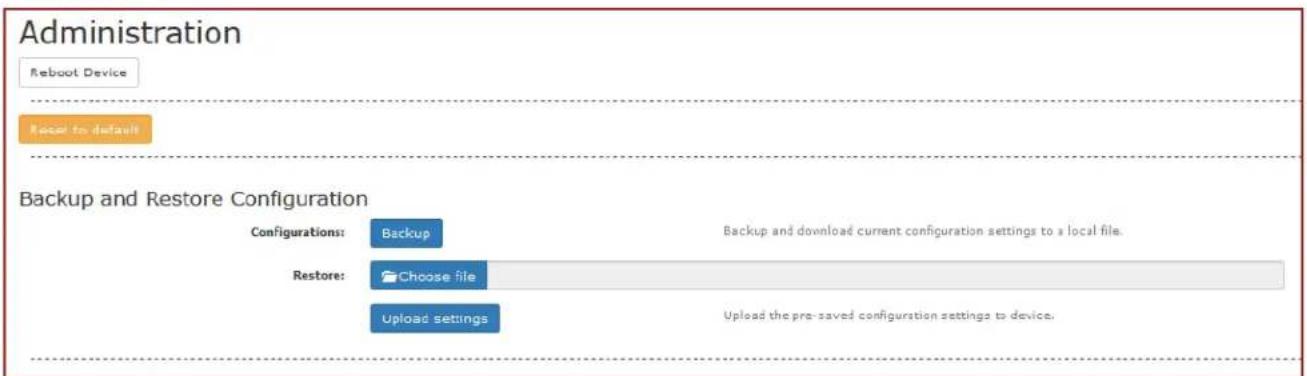
Administration Reboot Device Reset to default Backup and Restore Configuration Configurations: Backup Backup and download current configuration settings to a local file. Restore: Choose file Upload settings Upload the pre-saved configuration settings to device.Administration Setup Page of DT-IPTV-QAM-ASI-4HC
Reboot Device:
Use the Reboot command button to reboot the device.
Note: Any unsaved changes will be lost.
Reset to Default:
Use the Reset to Default button to reset all parameters to original factory settings.
Saving your configuration files
We highly recommend you save your configuration files. Simply select the "Backup" button and the configuration files will be saved to your computer.
Backup:
We highly recommend saving your device's setting.
- Select Administration.
- Select Backup from the menu.
- Locate and name file for future use.
Restore/Upload saved file configurations:
- Select Administration.
- Select "Choose file" menu.
- Locate the required file to be imported.
- Select "Upload" to import the selected file into the device.
- Remember to save and backup any and all changes.
Change Password:
Use the Change Password section to change or modify the device's password as desired.
Change Password
CAUTION: The new password must contain:
- 6\~8 characters
- At least one digit
- At least one uppercase character
- At least one lowercase character
Old Password:
New Password:
Retype New Password:
Save and Confirm
After changing the password use the Save and Confirm button. The browser will redirect to the Overview page allowing the user to use the new password.
Save and Confirm new password.
Private Address Ranges, IPv4
Private IPv4 addresses are addresses set aside by the IANA (Internet Assigned Numbers Authority) for use within networks that will not directly communicate or not be seen by the internet. These private addresses cannot be used on the Internet or be used to communicate with the Internet. ISP's filter out and delete packets using private IP addresses. Any organization that uses private IP addresses on devices that communicate with the internet must use a device that performs Network Address Translation.
Anyone can use private addresses and they are not required to seek permission to use them. Again, networks using private IP addresses cannot communicate directly with the internet.
There are three blocks of addresses that are set aside by IANA for use in private internets and are not publicly routable on the global internet:
| Private Class A Range: 10.0.0.0 | - | 10.255.255.255 |
| Private Class B Range: 172.16.0.0 | - | 172.31.255.255 |
| Private Class C Range: 192.168.0.0 | - | 192.168.255.255 |
It is important to note that only some of the 172.xx.xx.xx and the 192.xx.xx.xx address ranges are designated for private use. The remaining addresses are public and can be routable via the global Internet.
More information regarding private addresses can be found at http://www.iana.org and https://www.arin.net
DT-IPTV-QAM-ASI-4HC | Manual V1.0 | 06112019
Product Notes:
Warranty
DATATRONIX 1-Year Limited Warranty
DATATRONIX. (the "Company") warrants to the Original Purchaser that the item purchased is free from defects in workmanship or material under normal use. This warranty starts on the date of shipment of the hardware to the Original Purchaser.
During the warranty period, the Company agrees to repair or replace, at its sole option, without charge to Original Purchaser, any defective component. To obtain service, the Original Purchaser must return the item to the Company properly packaged for shipping. All defective products must be returned to the Company within thirty (30) days of failure. Products must be returned with a description of the failure and Return Merchandise Authorization (RMA) number supplied by the Company. To receive a RMA number and a return shipping address on where to deliver the hardware, call 610-429-1821. The shipping, and insurance charges incurred in shipping to the Company will be paid by Original Purchaser, and all risk for the hardware shall remain with the Original Purchaser until such time as Company takes receipt of the hardware. Upon receipt, the Company will promptly repair or replace the defective unit, and then return said unit to Original Purchaser, shipping prepaid. The Company may use reconditioned or like-new parts or units, at its sole option, when repairing any hardware. Repaired products shall carry the same amount of outstanding warranty as from original purchase. Any claim under the warranty must include dated proof of purchase or invoice. In any event, the Company's liability for defective hardware is limited to repairing or replacing the hardware.
This warranty is contingent upon proper use of the hardware by Original Purchaser and does not cover: if damage is due to Acts of God (including fire, flood, earthquake, storm, hurricane or other natural disaster), accident, unusual physical, electrical, or electromechanical stress, modifications, neglect, misuse, operation with media not approved by the Company, tampering with or altering of the hardware, riot, war, invasion, act of foreign enemies, hostilities (regardless of whether war is declared), civil war, rebellion, revolution, insurrection, military or usurped power or confiscation, terrorist activities, nationalization, government sanction, blockage, embargo, labor dispute, strike, lockout or interruption or failure of electricity, air conditioning, or humidity control, internet, network, or telephone service
The warranties given herein, together with any implied warranties covering the hardware, including any warranties of merchantability or fitness for a particular purpose, are limited in duration to one year from the date of shipment to the Original Purchaser. Jurisdictions vary with regard to the enforceability of warranty limitations, and you should check the laws of your local jurisdiction to find out whether the above limitation applies to you.
The Company shall not be liable to your for loss of data, loss of profits, lost savings, special, incidental, consequential, indirect, or other similar damages arising from breach of warranty, breach of contract, negligence, or other legal action even if the Company or its agent has been advised of the possibility of such damages, or for any claim brought against your by another party. Jurisdictions vary with regard to the enforceability of provisions excluding or limiting liability for incidental or consequential damages. You should check the laws of your local jurisdiction to find out whether the above exclusion applies to you.
This warranty allocates risks of product failure between Original Purchaser and the Company. The Company's hardware pricing reflects this allocation of risk and the limitations of liability contained in this warranty. The warranty set forth above is in lieu of all other express warranties, whether oral or written. The agents, employees, distributors, and dealers of the Company are not authorized to make modification to this warranty, or additional warranties binding on the Company. Accordingly, additional statements such as dealer advertising or presentations, whether oral or written, do not constitute warranties by the Company and should not be relied upon.
This warranty gives you specific legal rights. You may also have other rights which vary from one jurisdiction to another.