Thunderbolt 3 mini Dock - Support voiture CalDigit - Free user manual and instructions
Find the device manual for free Thunderbolt 3 mini Dock CalDigit in PDF.


User questions about Thunderbolt 3 mini Dock CalDigit
0 question about this device. Answer the ones you know or ask your own.
Ask a new question about this device
Download the instructions for your Support voiture in PDF format for free! Find your manual Thunderbolt 3 mini Dock - CalDigit and take your electronic device back in hand. On this page are published all the documents necessary for the use of your device. Thunderbolt 3 mini Dock by CalDigit.
USER MANUAL Thunderbolt 3 mini Dock CalDigit
text_image
CalDigit HDMI HDMI USB 3.0 USB 2.0 CalDigitMINI/ Thunderbolt™ 3 DUAL HDMI
USER GUIDE
For more information visit www.CalDigit.com
Table of Contents
Section 1 : General Information
General Use Warnings 3
Safety Warnings 3
System Requirements 4
In the Box 4
Thunderbolt™ 3 Mini Dock Diagram 5
Section 2 : Using the Thunderbolt™ 3 Mini Dock
Compatibility 6
Using the Thunderbolt 3 Mini Dock 6
Configuring Dual Monitors 6
Supported Resolutions for Dual Monitors 7
Ethernet 7
USB 7
FAQs 8
Section 3 : Technical Support and Warranty Information
Technical Support 9
Warranty 9
1. General Information
General Use Warnings
- Please read the Thunderbolt™ 3 MiniDock manual thoroughly and familiarize yourself with the product before use.
- Avoid using the Thunderbolt™ 3 Mini Dock in extremely hot and cold environments. A safe operating temperature range is between 32^ - 158^ (0°C - 70°C).
- Avoid using the Thunderbolt™ 3 Mini Dock in humid environments. Moisture and condensation can accumulate in the device and cause damage to the electrical components.
Safety Warnings
- Keep the Thunderbolt™ 3 Mini Dock away from liquids and moisture. Exposure to liquids can result in damaging the unit, electric shock, and result in a fire hazard.
- If your Thunderbolt™ 3 Mini Dock gets wet while it is still off, do not connect it to the Thunderbolt 3 or USB-C port. In the case of any issue with the device do not attempt to repair or open the device yourself. Doing so can result in personal injury damage the device and will void the warranty. If you have any issues please contact CalDigit Technical Support
System Requirements
Thunderbolt™ 3 computers macOS 10.12 Sierra or later Windows 10 or later
In the Box
1 x CalDigit Thunderbolt™ 3 Mini Dock -Dual HDMI
text_image
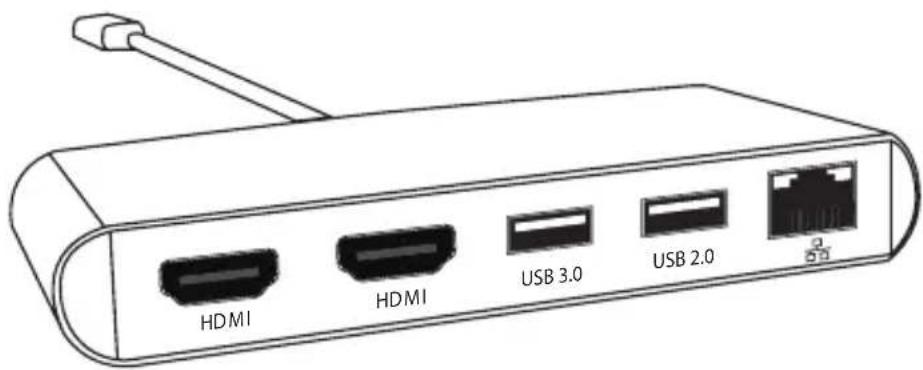
HDMI HDMI USB 3.0 USB 2.0Thunderbolt™ 3 Mini Dock Diagram
Mini Dock - Dual HDMI
text_image
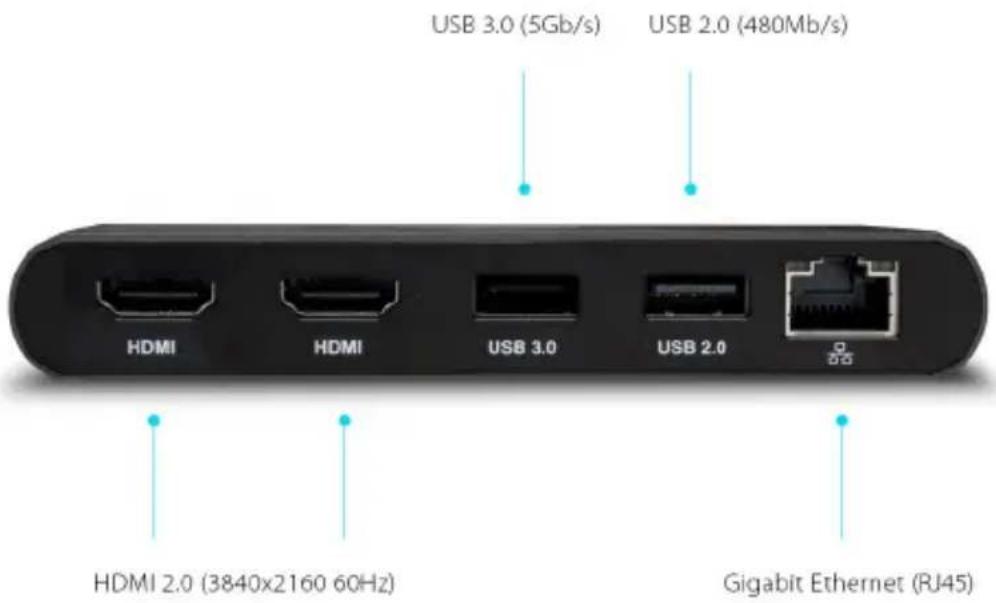
USB 3.0 (5Gb/s) USB 2.0 (480Mb/s) HDMI HDMI USB 3.0 USB 2.0 HDMI 2.0 (3840x2160 60Hz) Gigabit Ethernet (RJ45)2. Using the Thunderbolt™ 3 Mini Dock
Compatibility
The Thunderbolt™ 3 Mini Dock is compatible with the following computers.
| ThunderboltTM 3Mini Dock Dual HDMI | |
| ThunderboltTM 3 Mac | √ |
| ThunderboltTM 3 PC | √ |
| USB-C Mac X | |
| USB-C PC X |
Using the Thunderbolt™ 3 Mini Dock Dual HDMI
- Plug the tethered Thunderbolt™ 3 cable from the Thunderbolt™ 3 Mini Dock into your laptop's Thunderbolt™ 3 port.
- Connect your monitor's HDMI cables into the HDMI connectors on the Thunderbolt™ 3 Mini Dock.
- Your monitors will be instantly recognized.
- Plug your USB and Gigabit Ethernet cables into the appropriate ports on the Thunderbolt™ 3 Mini Dock.
Configuring Dual Monitors
You can add two external monitors to the Thunderbolt™ 3 Mini Dock at up to 4K@60Hz resolution.
The dual monitors can be in both mirrored or extended modes.
Check your OS's display settings on how to configure dual monitors
| NOTE | The ThunderboltTM 3 Mini Dock supports dual display functionality. However, the actual resolutions are limited by GPU, OS, Driver and Firmware. Please refer to the tables below for general information. Some Windows ThunderboltTM 3 systems are limited to one external monitor support through the ThunderboltTM 3 port, please check with the system manufacturer for more information. |
Supported Resolutions for Dual Monitors
| Resolution Video Display Frequency Dual Monitor | ||
| 2K (2560 x 1600) 60 Hz | Yes | |
| Full HD (1920 x 1080p) 60 Hz | Yes | |
| 4K 60 Hz | Yes | |
| 2K (2560 x 1600) 30 Hz | Yes | |
| Full HD (1920 x 1080p) 30 Hz | Yes | |
Ethernet
The Thunderbolt™ 3 Mini Docks have a single Gigabit Ethernet port to connect to a Gigabit Ethernet network. Your computer will connect to whichever network is connected to the Thunderbolt™ 3 Mini Dock by default. On macOS these settings can be changed in the "Network" section under "System Preferences". The Ethernet port also supports wake-on-LAN which allows your computer to wake from standby remotely via the network.
USB
The Thunderbolt™ 3 Mini Dock's USB ports support the following performance levels.
| ThunderboltTM 3 Mini Dock Dual HDMI | |
| No. USB Ports 2 | |
| USB | USB-A 3.0 (5Gb/s). 5V/0.9A. Supports UASP. USB-A 2.0 (480Mb/s). 5V/0.5A. |
Frequently asked questions (FAQ)
1. Can the Mini Dock support the Apple USB SuperDrive?
Answer: NO
2. Will my external drive bus-power through the Mini Dock?
Answer: Yes, if your external hard drive is designed to be bus-powered it will do so through the Mini Dock.
The USB-A 3.0 port on the Mini Dock provides up to 4.5W power (5V/0.9A) to the device.
The USB-A 2.0 port on the Mini Dock provides up to 2.5W power (5V/0.5A) to the device.
If your bus-powered device or drive requires more power than the Mini Dock can support, it will not work properly.
3. Will the Mini Dock work when connected to a non-Thunderbolt™ 3 laptop or tablet such as a USB-C laptop or iPad Pro 2018?
Answer: No, the Mini Dock is only compatible with the Thunderbolt™ 3 host connection.
CalDigit Thunderbolt™ 3 Mini Dock Specifications
Product Dimension and Weight
• Height : 0.74 inches (18.8 mm)
• Width : 4.88 inches (124 mm)
• Depth : 2.55 inches (65 mm)
• Cable : 7.87 inches (200 mm)
• Weight: 5.1 oz (145g)
Interface
- 1 x Thunderbolt™ 3
- 2 x HDMI 2.0. Supports HDCP 2.2.
- 1 x USB-A 3.0 (5Gbps). Supports UASP.
• 1 x USB-A 2.0 (480Mb/s) - 1 x Gigabit Ethernet

natural_image
Close-up of a black USB router with ports labeled HDM, USB 10, and USB 2.8 (no additional text or symbols visible)Power
Bus-Powered
System Requirements
Thunderbolt ^TM 3 computers
macOS 10.12 Sierra or later
Windows 10 or later
Environment
Operating Temperature: 32^ F – 158^ F ( 0^ C - 70^ C).
Storage Temperature: -40^ - 257^ ( -40^ - 125^ ).
3. Technical Support and Warranty Information
Technical Support
If you run into any issues while using your Thunderbolt™ 3 Mini Dock, please contact CalDigit Technical Support.
- Email: support@caldigit.com
• Phone: (714) 572-6668
• Website: https://www.CalDigit.com/Support
When contacting CalDigit Technical Support, make sure to be at your computer and have the following information available:
- Your Thunderbolt™ 3 Mini Dock serial number
- Operating system and version
- Computer make and model
- Devices being used on the Thunderbolt™ 3 Mini Dock
Warranty Information
- The Thunderbolt™ 3 Mini Dock is covered by a 2-year limited warranty.
- For detailed CalDigit warranty information please visit our website: https://www.CalDigit.com/Warranty
Please visit www.caldigit.com for more information on all CalDigit products.
Specifications and package contents are subject to change without notice.
Thunderbolt™ and the Thunderbolt™ logo are trademarks of Intel Corporation in the U.S. and/or other countries. HDMI, the HDMI logo and High-Definition Multimedia Interface are trademarks or registered trademarks of HDMI Licensing LLC. All other trademarks mentioned are the property of their respective owners.