
Phantom II Pro - Microphone ART - Free user manual and instructions
Find the device manual for free Phantom II Pro ART in PDF.


| Product Type | Two-Channel 48V Phantom Power Supply |
| Brand | ART (Applied Research & Technology) |
| Model | Phantom II Pro |
| Input Connections | 2 x Female XLR |
| Output Connections | 2 x Male XLR |
| Phantom Power Voltage | 48 Volts DC typical |
| Current Limiting Resistors | 6.98 kOhms (1%) |
| Power Source | 9V Battery (IEC 6LR61, ANSI-1604A Alkaline recommended) or External 7.5-12V AC/DC, any polarity, <150 mA |
| Current Drain (No Load) | 10 mA |
| Current Drain (Full Load) | 45 mA typical (2 microphones) |
| Battery Life | >10 hours with Alkaline battery (typical full load) |
| Dimensions (HxWxD) | 1.85 x 4.6 x 3.9 inches (47 x 117 x 99 mm) |
| Weight | 0.82 lbs (0.37 kg) |
| Case Material | Rugged extruded aluminum |
| Switch Type | LED lighted On/Off push button |
| Circuitry | Low power, high efficiency CMOS; low noise, low distortion |
| Warranty | 3 years limited (USA only) |
| Compliance | CE |
| Maintenance | Protect from excessive dirt, dust, heat, vibration; do not open; no user serviceable parts |
| Safety | Grounding required; do not defeat power cord ground; refer servicing to qualified personnel |
Frequently Asked Questions - Phantom II Pro ART
User questions about Phantom II Pro ART
0 question about this device. Answer the ones you know or ask your own.
Ask a new question about this device
Download the instructions for your Microphone in PDF format for free! Find your manual Phantom II Pro - ART and take your electronic device back in hand. On this page are published all the documents necessary for the use of your device. Phantom II Pro by ART.
USER MANUAL Phantom II Pro ART
Two Channel 48 Volt Phantom Power Supply
Artcessories
User's Manual

APPLIED RESEARCH AND TECHNOLOGY
IMPORTANT SAFETY INSTRUCTION – READ FIRST

This symbol, whenever it appears, alerts you to the presence of uninsulated dangerous voltage inside enclosure-voltage that may be sufficient to constitute risk of shock.

This symbol, whenever it appears, alerts you to important operating and maintenance instructions in the accompanying literature. Please read the manual.
Read Instructions: Retain safety and operating instructions for future reference. Heed all warnings printed here and on the equipment. Follow the operating instructions printed in this user guide.
Do not open: There are no user serviceable parts inside. Refer any service work to qualified technical personnel only.
Grounding: Only connect the unit to equipment with properly grounded mains power. Do not defeat the grounding and polarization means of the power cord plug of the connected equipment. Do not remove or tamper with the ground connection on the power cord of the connected equipment.
Environment: Protect from excessive dirt, dust, heat, and vibration when operating and storing. Avoid tobacco ash, drink spillage and smoke, especially that associated with smoke machines.
Handling: Protect the controls from damage during transit. Use adequate padding if you need to ship the unit. To avoid injury to yourself or damage to the equipment, take care when lifting, moving or carrying the unit.
Servicing: Refer servicing to qualified technical personnel.
Installation: Install the unit in accordance with the instructions printed in the user guide.
INTRODUCTION:
Thanks for purchasing Applied Research and Technology's PHANTOMIIPRO offering a superb level of sound quality. The PHANTOMIIPRO is designed to do one thing and do it well. It provides clean, reliable phantom power for one or two condenser microphones in a rugged, compact, and portable unit. Innovative low power circuitry generates the higher voltage necessary for powering microphones while maximizing battery life.
The PHANTOMIIPro installs inline between your microphone and a balanced line input on your gear. Balanced lines offer increased immunity to external electrical noise, such as hum. Since a balanced system minimizes induced noise, it is the preferred method of connecting audio gear, especially when long lengths of cable are used.
The PHANTOMIIPro is an invaluable tool in application areas including (but not limited to!): home or professional recording studios, live sound, PA, permanent installs, DJ, AV, podcasting and broadcasting. Use it with mixers, audio processors, digital audio workstations or anywhere you need phantom power for your mics.
FEATURES:
- XLR connectors for balanced inputs and outputs
- Low power, high efficiency CMOS circuitry for long battery life using a standard 9-Volt battery (Alkaline recommended)
- Can be powered with an external power supply for operation from AC mains
- Rugged extruded aluminum case with easily accessible battery compartment
• LED lighted On/Off switch - Low noise, low distortion circuitry
INSTALLATION and OPERATION:
- Install a battery in the unit by unscrewing the knurled fastener to open the 9V BATTERY compartment and snapping the connector on to the battery. Alternatively, connect an external power supply to the EXTERNAL POWER jack. The PHANTOMIIPro is protected in case both sources of power are applied at the same time.
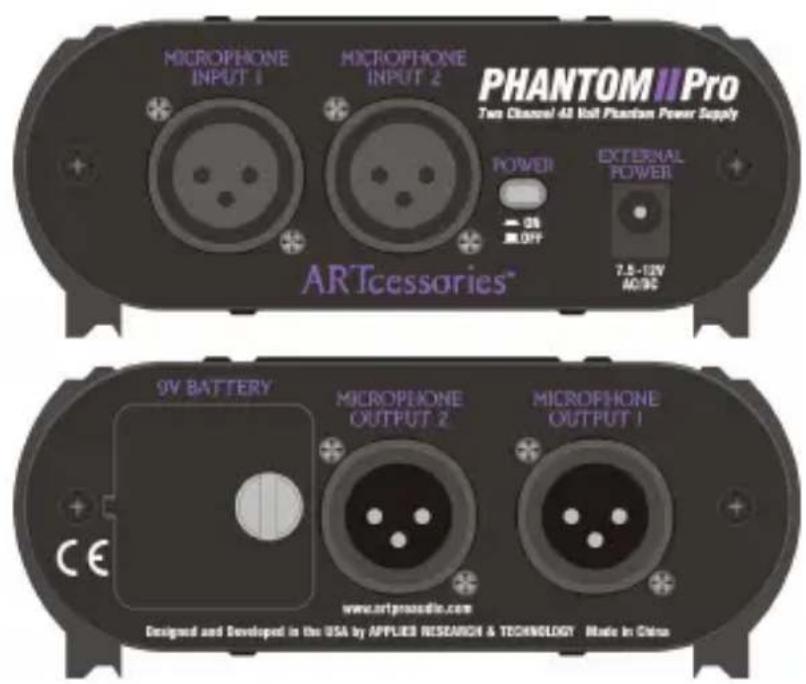
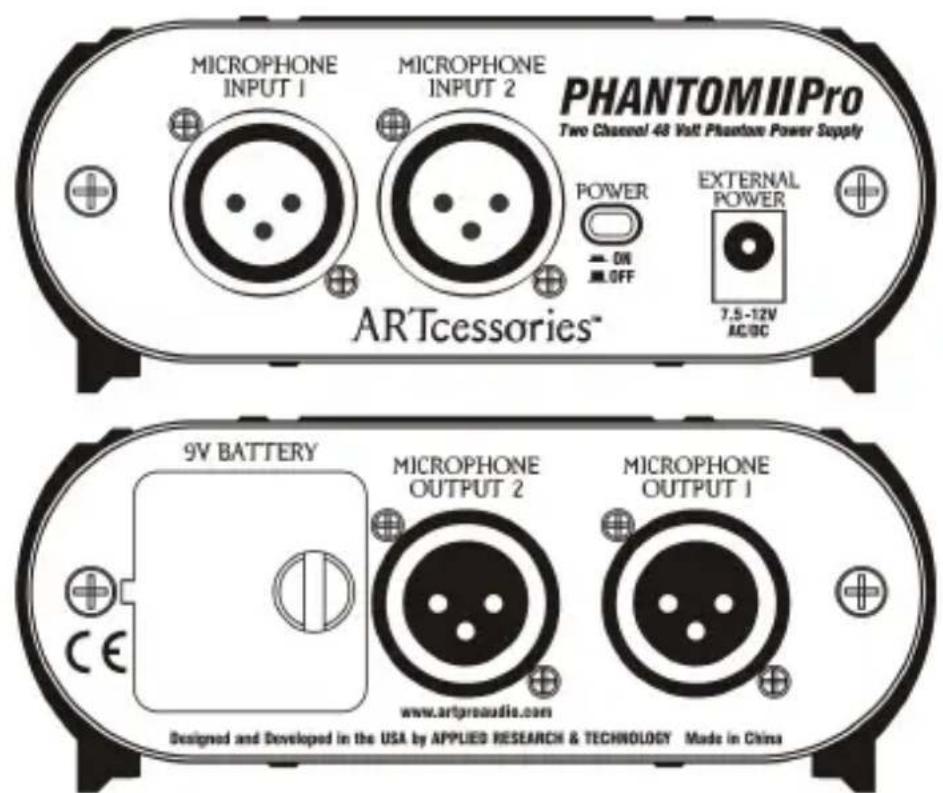
- Connect the cable from your microphone to the MICROPHONE INPUT 1 or 2 female XLR connector on the front panel.
- Connect another balanced line cable between the corresponding MICROPHONE OUTPUT 1 or 2 male XLR connector on the rear panel and the balanced inputs of your audio gear.
- Repeat for a second microphone if desired.
- Turn on the PHANTOMIIPro by pushing in the front panel POWER button. The button will light, indicating power is applied to the unit. When using a battery for power, be sure to turn the unit off when not using it in order to maximize battery life.
- If connecting the PHANTOMIIPro to another piece of equipment with its own phantom power, be sure to turn off the phantom power on that piece of equipment.
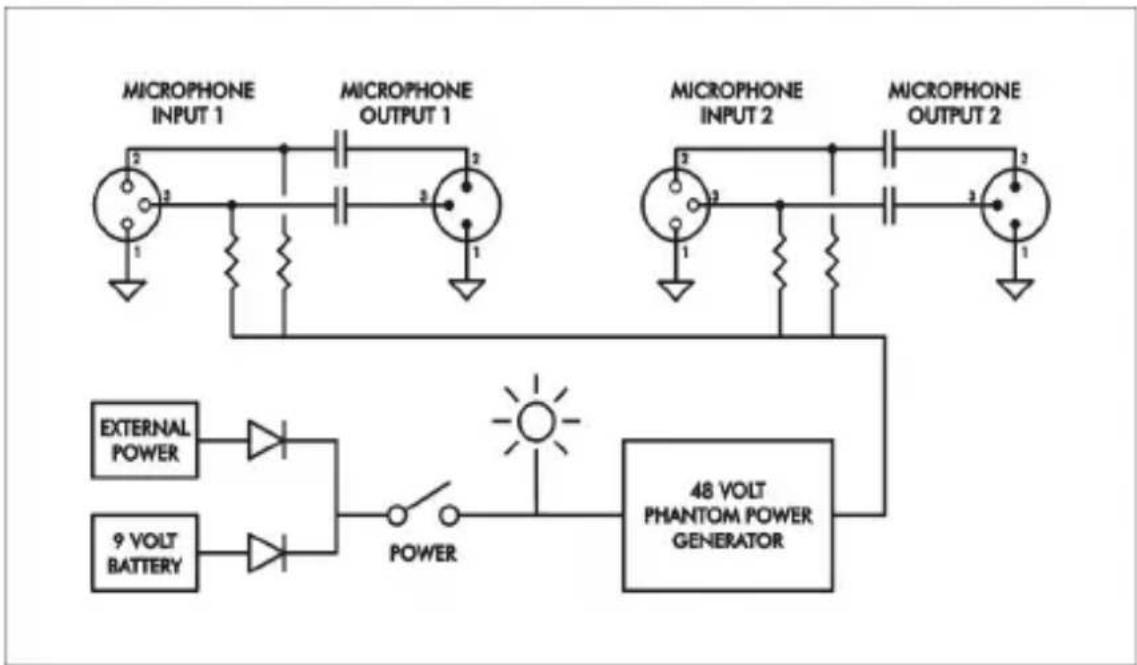
flowchart
graph TD
    A["MICROPHONE INPUT 1"] --> B["Resistors"]
    C["MICROPHONE OUTPUT 1"] --> D["Resistors"]
    E["MICROPHONE INPUT 2"] --> F["Resistors"]
    G["MICROPHONE OUTPUT 2"] --> H["Resistors"]
    I["9 VOLT BATTERY"] --> J["Switch"]
    K["EXTERNAL POWER"] --> L["Diode"]
    M["48 VOLT PHANTOM POWER GENERATOR"] --> N["Power"]
    O["External Power"] --> P["Diode"]
    Q["Power"] --> R["Sun"]
Signal Flow Chart
SPECIFICATIONS:
Input Connections: Female XLR (2)
Output Connections: Male XLR (2)
Phantom Power Voltage: 48 Volts DC typical
Current Limiting Resistors: 6.98k Ohms (1%)
Power Source: 9V battery (IEC 6LR61,
ANSI-1604A type
Alkaline recommended)
or external supply 7.5-
12 V AC/DC, Any
Polarity, < 150 mA
Current Drain: 10 mA - no load, 45 mA
typical (full load - 2
microphones)
Battery Life: >10 hours with Alkaline
Battery - typical (full
load)
Dimensions HxWxD (in): 1.85 x 4.6 x 3.9
HxWxD(mm): 47 x 117 x 99
Weight (lbs/kg): 0.82 / 0.37
WARRANTY INFORMATION:
Limited Warranty (USA only)
Applied Research and Technology will provide warranty and service for this unit in accordance with the following warrants:
Applied Research and Technology, (ART) warrants to the original purchaser that this product and the components thereof will be free from defects in workmanship and materials for a period of three years from the date of purchase. Applied Research and Technology will, without charge, repair or replace, at its option, defective product or component parts upon prepaid delivery to the factory service department or authorized service center, accompanied by proof of purchase date in the form of a valid sales receipt.
Exclusions
This warranty does not apply in the event of misuse or abuse of the product or as a result of unauthorized alterations or repairs. This warranty is void if the serial number is altered, defaced, or removed.
ART reserves the right to make changes in design or make additions to or improvements upon this product without any obligation to install the same on products previously manufactured.
ART shall not be liable for any consequential damages, including without limitation damages resulting from loss of use. Some states do not allow limitations of incidental or consequential damages, so the above limitation or exclusion may not apply to you. This warranty gives you specific rights and you may have other rights, which
vary, from state to state. The warranty terms listed above are only valid within the United States of America. For units purchased outside the United States, an authorized distributor of Applied Research and Technology will provide service. For information on warranty and service policies outside of the U.S., please contact your local distributor.
Please fill in the following information for your reference:
Date of purchase: ____
Purchased from: ____
SERVICE:
The following information is provided in the unlikely event that your unit requires service.
- Be sure that the unit is the cause of the problem. Check to make sure that the unit has power supplied, that all cables are connected correctly, and that the cables themselves are in working condition. You may want to consult with your dealer for assistance in troubleshooting or testing your particular configuration.
- If you believe that the ART unit is at fault, go to www.artproaudio.com. Select "Support", then "Return Authorization Request" to request a return authorization number.
- If you are returning the unit for service, pack the unit in its original carton or a reasonable substitute. The original packaging may not be suitable as a shipping carton, so consider putting the packaged unit in another box for shipping. Print the RA number clearly on the outside of the shipping box. Print your return shipping address on the outside of the box.
- Include with your unit: a note with the RA number and your contact information, including a return shipping address (we cannot ship to a P.O. box) and a daytime phone number, and a description of the problem, preferably attached to the top of the unit. Also include a copy of your purchase receipt.
www.artproaudio.com
E-mail: support@artproaudio.com
© 2014 Applied Research & Technology
PHANTOMIIPro
P2P-5004-101
V1.3

Brand : ART
Model : Phantom II Pro
Category : Microphone