
CINESSD - Flash Memory DJI - Free user manual and instructions
Find the device manual for free CINESSD DJI in PDF.


| Brand | DJI |
| Model | CINESSD |
| Product Type | Flash Memory (SSD) |
| Capacity | 120 GB / 240 GB / 480 GB |
| Dimensions | 105.5 mm × 27 mm × 7 mm |
| Weight | 42.5 g |
| Operating Temperature | 0 to 40 °C |
| Storage Temperature | -40 to 85 °C |
| Relative Humidity | 5 to 95 %, without condensation |
| Compatibility | DJI devices (e.g., Inspire 2) |
| Main Function | File storage without quality loss |
| File Export | Via CINESSD Reader and USB cable to computer |
| File Deletion | Via formatting in the DJI GO 4 app |
| Warning | Do not insert or eject while powered on |
| Warning | Keep away from magnetic and electric fields |
| Warning | Avoid direct exposure to sunlight, heat, liquids |
| Warning | Do not apply pressure or drop |
| Spare Parts | Use only official DJI parts |
| Repairability | Repair only by DJI |
| Website | www.dji.com |
Frequently Asked Questions - CINESSD DJI
User questions about CINESSD DJI
0 question about this device. Answer the ones you know or ask your own.
Ask a new question about this device
Download the instructions for your Flash Memory in PDF format for free! Find your manual CINESSD - DJI and take your electronic device back in hand. On this page are published all the documents necessary for the use of your device. CINESSD by DJI.
USER MANUAL CINESSD DJI

Contents
EN Quick Start Guide 2
CHS 快速入门指南 7
CHT 快速入門指南 11
JP クイックスタートガイド 15
KR 뭁 스타트 가이드 20
DE Kurzanleitung 25
Congratulations on purchasing your new DJI™ product. The information in this document affects your safety and your legal rights and responsibilities. Read this entire document carefully to ensure proper configuration before use. Failure to read and follow instructions and warnings in this document may result in serious injury to yourself or others, damage to your DJI product, or damage to other objects in the vicinity. This document and all other collateral documents are subject to change at the sole discretion of DJI.
By using this product, you hereby signify that you have read this disclaimer and warning carefully and that you understand and agree to abide by the terms and conditions herein. You agree that you are solely responsible for your own conduct while using this product, and for any consequences thereof. You agree to use this product only for purposes that are proper and in accordance with all applicable laws, rules, and regulations, and all terms, precautions, practices, policies and guidelines DJI has made and may make available.
DJI accepts no liability for damage, injury or any legal responsibility incurred directly or indirectly from the use of this product. The user shall observe safe and lawful practices including, but not limited to, those set forth in this document. Notwithstanding above, your statutory rights under applicable national legislation are not affected by this disclaimer.
DJI is a trademark of SZ DJI TECHNOLOGY CO., LTD. (abbreviated as “DJI”) and its affiliated companies. Names of products, brands, etc., appearing in this
document are trademarks or registered trademarks of their respective owner companies. This product and document are copyrighted by DJI with all rights reserved. No part of this product or document shall be reproduced in any form without prior written consent of or authorization from DJI.
Warnings
- DO NOT insert or eject the DJI CINESSD™ when it is powered on.
- DO NOT place the DJI CINESSD next to strong magnetic or electric fields, or else your data may be damaged or lost.
- Keep the DJI CINESSD away from direct sunlight or other heat sources.
- Liquid spills may cause permanent damage to the DJI CINESSD.
- DO NOT apply external pressure to the DJI CINESSD.
- Dropping the DJI CINESSD may result in permanent damage.
- Only use genuine DJI parts or parts certified by DJI. Unauthorized parts or parts from non-DJI-certified manufacturers may cause system malfunction and compromise safety.
- Ensure the DJI CINESSD and its components are free from contamination (e.g. water, oil, soil and sand).
Introduction
The DJI CINESSD* is a high performance storage device designed for storing files in a lossless format.
Usage
Using an INSPIRE TM 2 as an example.
Storing Files
- Power off the aircraft.
- Insert the CINESSD into the aircraft. If the CINESSD is not detected, check if it is inserted correctly.
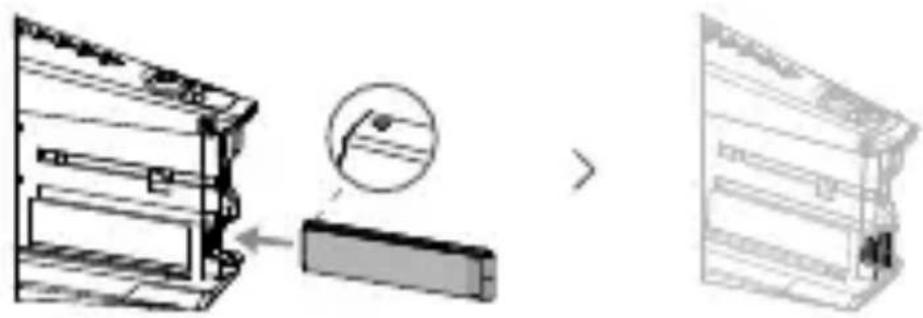
- Power on the aircraft.
- Information about the CINESSD will be available in the DJI GO™ 4 app*.
* For more information, please visit the official DJI website and read the Inspire 2 User Manual.
Exporting Files
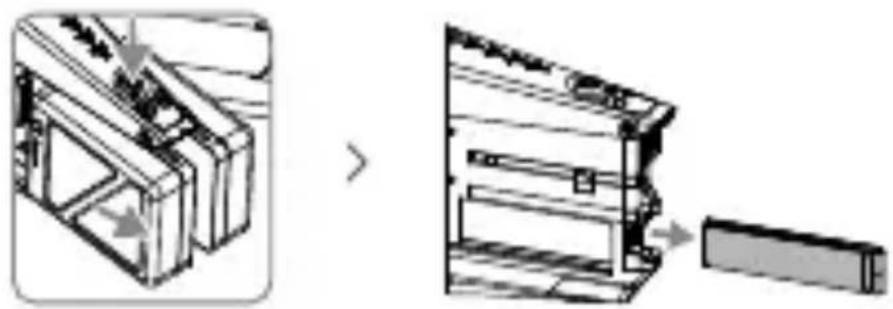
- Power off the aircraft. Remove the batteries and then the CINESSD.
- Insert the CINESSD into the DJI CINESSD Station, then connect the station to a computer via a USB cable.
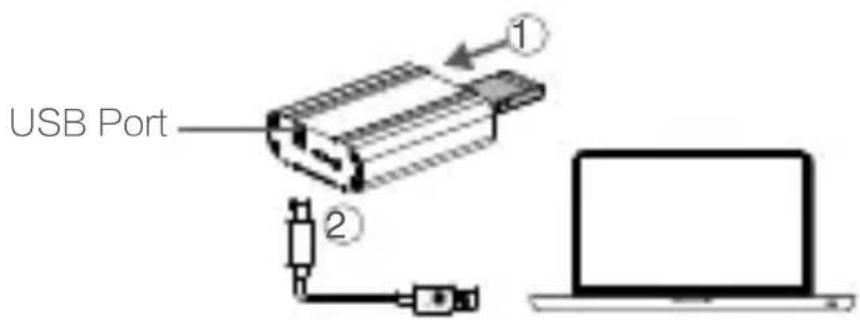
- When connected, an icon named "DJI_A" followed by a number sequence will appear. Click to start the file export.
- Safely remove the station before unplugging it from your computer.

No additional software is required for exporting data from the CINESSD. You may also use the following DJI software based on your system.
* Windows: DJI Camera Exporter.
• Mac: DJI CINELIGHT™.

• DO NOT remove the CINESSD when it is powered on.
- Insert the CINESSD before connecting the station to the computer.
• The station icon will vary based on your computer operating system.
Deleting Files
To guarantee the high performance of the DJI CINESSD, the station only supports file exporting. To delete files, please insert the CINESSD into the aircraft and launch the DJI GO 4 app to format the CINESSD to free up storage space.

Ensure to back up your files before formatting the DJI CINESSD.
Specifications
EN
Capacity 120 GB/ 240 GB/ 480 GB
Size 105.5 mm×27 mm×7 mm
Weight 42.5 g
| OperationTemperature Range | 32° to 104° F (0° to 40° C) |
| Storage Temperature Range | -40° to 185° F (-40° to 85 °C) |
Humidity 5% to 95%, non-condensing
Copyright © 2016 DJI All Rights Reserved.
Disclaimer
- Turn on the drone.
- Information about the CINESSD can be found in the DJI GO™ 4* app.
This device complies with Part 15 of the FCC Rules. Operation is subject to the following two conditions:
(1) This device may not cause harmful interference, and (2) This device must accept any interference received, including interference that may cause undesired operation.
Any changes or modifications not expressly approved by the party responsible for compliance could void the user's authority to operate the equipment.
EU Compliance Statement:
SZ DJI TECHNOLOGY CO., LTD. hereby declares that this device is in compliance with the essential requirements and other relevant provisions of the EMC Directive.
A copy of the EU Declaration of Conformity is available online at www.dji.com/euro-compliance
14th floor, West Wing, Skyworth Semiconductor Design Building NO.18 Gaoxin South 4th Ave, Nanshan District, Shenzhen, Guangdong, China
Manufacturer: SZ DJI TECHNOLOGY CO., LTD.
If you have any questions about this document, please contact DJI by sending a message to
DocSupport@dji.com.
Brand : DJI
Model : CINESSD
Category : Flash Memory