
MD-1 - Audio accessory NOKIA - Free user manual and instructions
Find the device manual for free MD-1 NOKIA in PDF.


| Product type | Audio stand (Music Stand) for Nokia phone |
| Brand | Nokia |
| Model | MD-1 |
| Power supply | Nokia ACP-12 mains charger (included) |
| Phone connectivity | Pop-Port™ connector for compatible Nokia phones |
| External audio connectivity | 3.5 mm jack socket for CD player, portable player, etc. |
| Speakers | Built-in stereo speakers |
| Microphone | Built-in microphone for hands-free calls |
| FM antenna | Built-in wire antenna (unfold for better reception) |
| Volume control | Volume dial on the stand + phone volume buttons |
| Answer/End button | Allows answering/ending a call, voice activation, FM station or track scrolling |
| Charging function | Charges the phone when connected and the stand is powered |
| Compatibility | Nokia phones with Pop-Port connector (check with retailer) |
| Color | Black (estimated) |
| Maintenance and cleaning | Do not use chemical products; wipe with a soft, dry cloth |
| Safety | Use only Nokia approved charger; do not connect incompatible products |
| Repairability | Service by qualified personnel only |
| Water resistance | Not water resistant; keep dry |
Frequently Asked Questions - MD-1 NOKIA
User questions about MD-1 NOKIA
0 question about this device. Answer the ones you know or ask your own.
Ask a new question about this device
Download the instructions for your Audio accessory in PDF format for free! Find your manual MD-1 - NOKIA and take your electronic device back in hand. On this page are published all the documents necessary for the use of your device. MD-1 by NOKIA.
USER MANUAL MD-1 NOKIA
DECLARATION OF CONFORMITY
We, NOKIA CORPORATION, declare under our sole responsibility that the product MD-1 is in conformity with the provisions of the following Council Directive: 1999/5/EC. A copy of the Declaration of Conformity can be found at http://www.nokia.com/phones/declaration_of_conformity/.

Copyright © 2004 Nokia. All rights reserved.
Nokia, Nokia Connecting People, and Pop-Port are registered trademarks of Nokia Corporation. Other product and company names mentioned herein may be trademarks or tradenames of their respective owners.
Nokia operates a policy of continuous development. Nokia reserves the right to make changes and improvements to any of the products described in this document without prior notice. Nokia reserves the right to revise this document or withdraw it at any time without prior notice.
Under no circumstances shall Nokia be responsible for any loss of data or income or any special, incidental, consequential or indirect damages howsoever caused.
The availability of particular products may vary by region. Please check with the Nokia dealer nearest to you.
9235363 / Issue 1
FOR YOUR SAFETY
Read these simple guidelines. Not following them may be dangerous or illegal. Read the complete user guide for further information.

QUALIFIED SERVICE
Only qualified personnel may install or repair this product.

WATER-RESISTANCE
Your device is not water-resistant. Keep it dry.

CONNECTING TO OTHER DEVICES
When connecting to any other device, read its user guide for detailed safety instructions. Do not connect incompatible products.
Power supply
Check the model number of any charger before use with this device. This device is intended for use when supplied with power from an ACP-12 charger.

Warning: Use only chargers approved by Nokia for use with this particular enhancement. The use of any other types may invalidate any approval or warranty, and may be dangerous.
For availability of approved chargers, please check with your dealer.
When you disconnect the power cord of any enhancement, grasp and pull the plug, not the cord.
1. Introduction
Read this user guide carefully before using the Nokia Music Stand. More detailed information is provided in the user guide of your phone. Do not use this user guide in place of the user guide of your phone, which provides important safety and maintenance information.
The Nokia Music Stand improves audio quality for listening to music and the radio. The music stand can be used with compatible Nokia phones. To check the compatibility of your Nokia phone, contact your dealer or Nokia Customer Care.
With the music stand you can:
- Listen to the radio or Music player of your phone through the music stand.
For more information on using your radio or Music player, consult the user guide of your phone. - Connect a standard CD player, Music player, or other audio device.
- Use the music stand as a loudspeaker. For example, you can connect your phone to the stand during a call and continue talking.
- Use all functions of your phone normally while the phone is connected. You can also use the volume and Answer/End buttons of the music stand.
Note that music or the radio is muted when there is an incoming call.
- Charge your phone while the phone is connected to the stand.
All the above actions require your Nokia Music Stand to be receiving power from an ACP-12 charger.
2. Connecting your phone to Nokia Music Stand
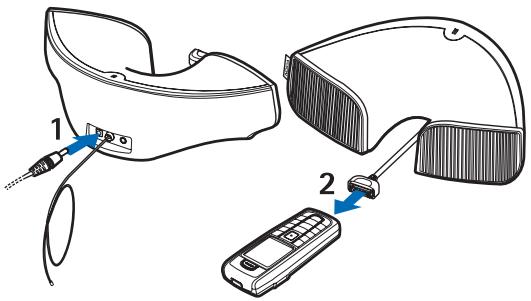
- Connect the music stand to an ACP-12 charger, and plug the charger into a wall socket whenever the music stand is in use.
- Connect the Pop-Port™ connector to the phone. You can use your phone normally. For example, you can answer an incoming call.
When you do not want to hold the phone, you can place it flat on top of the music stand.
3. Nokia Music Stand parts
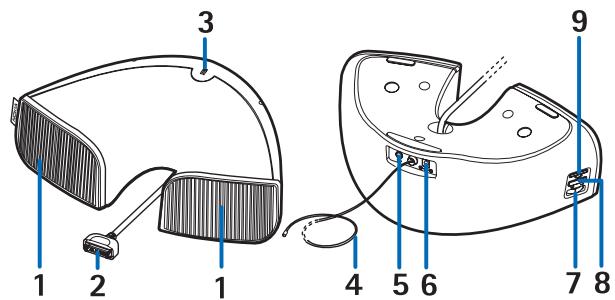
- Loudspeakers
- Pop-Port connector
- Microphone
- FM antenna. Extend the antenna cord fully to ensure the best radio reception. The quality of the radio reception varies by location. If there is disturbance, try different antenna locations.
- Connector for external audio devices, such as a CD or music player.
- Charger connector
- Volume control to adjust the music stand volume. You can also adjust the volume by using the volume key of the phone. The volume level of the phone affects the volume level of the stand.
-
Answer/End button
-
To answer or end a call, press this button. You can also answer a call using the phone keys.
- To activate voice recognition, press and hold this button.
- To scroll radio channels upwards when no call is in progress, press this button.
-
To scroll music tracks upwards when an external audio device has been connected to the music stand, press this button.
-
Power indicator
CARE AND MAINTENANCE
Your device is a product of superior design and craftsmanship and should be treated with care. The suggestions below will help you protect your warranty coverage.
- Keep the device dry. Precipitation, humidity and all types of liquids or moisture can contain minerals that will corrode electronic circuits.
- Do not use or store the device in dusty, dirty areas. Its moving parts and electronic components can be damaged.
- Do not store the device in hot areas. High temperatures can shorten the life of electronic devices and warp or melt certain plastics.
- Do not store the device in cold areas. When the device returns to its normal temperature, moisture can form inside the device and damage electronic circuit boards.
- Do not drop, knock, or shake the device. Rough handling can break internal circuit boards and fine mechanics.
- Do not use harsh chemicals, cleaning solvents, or strong detergents to clean the device.
- Do not paint the device. Paint can clog the moving parts and prevent proper operation.
- Use only the supplied or an approved replacement antenna. Unauthorised antennas, modifications, or attachments could damage the device and may violate regulations governing radio devices.
All of the above suggestions apply equally to your device, battery, charger, or any enhancement. If any device is not working properly, take it to the nearest authorized service facility for service.
Brand : NOKIA
Model : MD-1
Category : Audio accessory