Boogie Buddy - Support voiture KitSound - Free user manual and instructions
Find the device manual for free Boogie Buddy KitSound in PDF.


| Product Type | Bluetooth Speaker |
| Brand | KitSound |
| Model | Boogie Buddy (KSBOG) |
| Bluetooth Version | V4.1 |
| Bluetooth Range | Up to 10 meters |
| Driver | 1 x 40 mm |
| Frequency Response | 150 Hz – 20 kHz |
| Signal-to-Noise Ratio | ≥ 85 dB |
| Play Time | Up to 3 hours |
| Charging Time | Up to 2 hours (first charge up to 3 hours) |
| Power Supply | USB charging via Micro USB port |
| Battery Type | Lithium Polymer (non-replaceable) |
| Audio Source | Bluetooth, Micro SD card (up to 32 GB) |
| Controls | Multi-function button (MFB), Volume+/Next, Volume-/Previous |
| Call Handling | Answer (short press MFB), Decline (long press MFB) |
| LED Indicator | Red while charging, off when charged; blue flashing in pairing mode, solid when paired |
| Dimensions (Approx.) | About 10 cm diameter (estimated) |
| Weight (Approx.) | About 200 g (estimated) |
| Material | Plastic |
| Care Instructions | Clean with soft dry cloth; do not submerge, drop, open, or expose to extreme temperatures |
| Safety Warnings | Do not dispose of battery with general waste; recycle responsibly |
| Compliance | EU Directive 2014/53/EU |
| Country of Origin | Made in China |
Frequently Asked Questions - Boogie Buddy KitSound
User questions about Boogie Buddy KitSound
0 question about this device. Answer the ones you know or ask your own.
Ask a new question about this device
Download the instructions for your Support voiture in PDF format for free! Find your manual Boogie Buddy - KitSound and take your electronic device back in hand. On this page are published all the documents necessary for the use of your device. Boogie Buddy by KitSound.
USER MANUAL Boogie Buddy KitSound
All trademarks are acknowledged as the property of their respective owners. Unless otherwise stated their use does not imply that the trademark owner is affiliated with KitSound or endorses the products herein.
Products showing the 'Crossed Through' wheelie bin symbol must be recycled separately from household waste at the end of their useful life. Please DO NOT dispose of this appliance in normal household waste. Your local appliance retailer may operate a 'take-back' scheme when you are ready to purchase a replacement product, alternatively contact your local government authority for further help and advice on where to take your appliance for recycling.
Please recycle this packaging responsibly.


Do not dispose of Lithium Polymer batteries with general waste. Please return it to battery recycling collection point
JB. 6094-a/Made in China. © KitSound is a trademark of Kondor Limited, 2018. Christchurch, Dorset, BH23 4FL, UK

text_image
ks® KITSOUNDBOOGIE BUDDY BLUETOOTH® SPEAKER
USER MANUAL
Please read this manual carefully before use.
Box contents
• KS Boogie Buddy Bluetooth speaker
- USB charge cable
- User manual
Functions
- Multi-function button (MFB)
- Volume+ / Next track
- Volume- / Previous track
- Micro USB charging port
- LED indicator
- Micro SD card slot
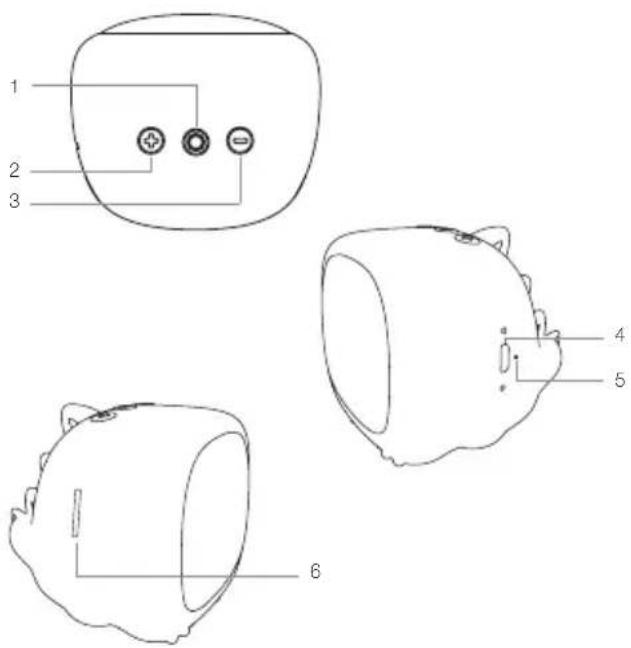
text_image
1 2 3 4 5 6Instructions for use
Charging the speaker
Give the speaker a full charge before its first use.
-
Connect the USB charging cable supplied, to the Micro USB charging port (4) and plug into power
-
The LED indicator (5) will be red whilst charging which will take up to 2 hours
-
Once fully charged the LED indicator (5) will turn off
Note: Allow up to 3 hours for the first charge.
Pairing the speaker to your device
- Press the MFB (1) to turn the speaker on. It will enter pairing mode, with the LED indicator (5) flashing blue quickly
- Turn your iOS, Android, or Windows device's Bluetooth ON and search for new devices
- Select 'KS Boogie'. If asked for a passcode, enter '0000', and the device will pair. The LED indicator (5) will be solid blue once device paired
Re-pairing or pairing new devices
- Turn Bluetooth connectivity off on any previously paired devices
- Follow the 'Pairing the speaker to your device' instructions
- If a previously paired device is not present within the Bluetooth range then the speaker will re-enter pairing mode
Call handling
| Answer a call short press MFB (1) to answer |
| Decline a call long press MFB (1) to decline |
Using a Micro SD Card to play music on your speaker
- Press the MFB (1) to turn the speaker on. Insert a micro SD card into the Micro SD card slot (6)
- The music on the micro SD card will automatically begin to play
- If you want to switch back to Bluetooth mode – double click the MFB (1) and follow the 'Pairing the speaker to your device' instructions
Playing music on your speaker
When connected via Bluetooth, play the music on your device and the sound will play through the speaker. Some devices may require you to select the audio output.
| Play/Pause Press MFB (1) |
| Volume +/- Short press Volume+ (2) or Volume- (3). The volume can also be adjusted on your device |
| Track change Long press Next track (2) or Previous track (3). You can also skip tracks on your device |
Please note:
Your device will have an internal amplifier and if it is playing digital files like MP3s it will also have an integrated DAC (Digital Audio Converter). If you turn the volume up to 100%, your device will be sending a distorted signal. To avoid this, and to get the best quality from the speaker, we recommend that you do not run your device any higher than 95% volume. Some devices output higher than others, so you may need to reduce the volume if you experience distortion.
Care for your Boogie Buddy
Please DON'T:
- Submerge the Boogie Buddy speaker in water
- Drop the Boogie Buddy speaker as this will invalidate your warranty
- Open up the Boogie Buddy speaker. There are no user serviceable parts inside
- Expose the Boogie Buddy speaker to extreme temperatures or rapid changes of hot to cold or vice versa
Please DO:
- Clean the Boogie Buddy speaker with a soft dry cloth and no detergents
Specifications
| Works with Bluetooth V4.1 | |
| Bluetooth connectivity distance up to 10 m | |
| S/N ≥ 85 dB | |
| Frequency response 150 Hz – 20 kHz | |
| Drivers 1 x 40 mm | |
| Play time up to 3 hours | |
| Charging time up to 2 hours | |
| Maximum Micro SD card size 32 GB | |
Troubleshooting
We hope you've now got all the information you need to get started, but if you're having problems with anything, please feel free to contact us at: support @kitsound.co.uk
Hereby, Kondor Ltd declares that the radio equipment type, KSBOG Boogie Buddy Bluetooth speaker, is in compliance with Directive 2014/53/EU.
The full text of the EU declaration of conformity is available at the following internet address:
http://kondor.co.uk/product-documents
The use and operation of this speaker is beyond our control. Warranty of the KS Boogie Buddy is limited to defects caused by faulty manufacture or defects in materials only. No warranty whatsoever is given or implied for damage caused by the user under any circumstances.
This does not affect your statutory rights.
Please do not attempt to open this product. There are no user serviceable parts inside, in particular if your product has an embedded, non-replaceable battery, do not attempt to access or remove the battery as this may cause personal injury and will damage the product.
Making any attempt to open the product or carry out repair voids any and all warranties.
The Bluetooth ^® word mark and logos are registered trademarks owned by the BluetoothSIG, Inc. and any use of such marks by Kondor Ltd. is under license. Other trademarks and trade names are those of their respective owners.
We apologise for any inconvenience caused by minor inconsistencies in these instructions, which may occur as a result of product improvement and development.