Dyno - Smartwatch Coolpad - Free user manual and instructions
Find the device manual for free Dyno Coolpad in PDF.


User questions about Dyno Coolpad
0 question about this device. Answer the ones you know or ask your own.
Ask a new question about this device
Download the instructions for your Smartwatch in PDF format for free! Find your manual Dyno - Coolpad and take your electronic device back in hand. On this page are published all the documents necessary for the use of your device. Dyno by Coolpad.
USER MANUAL Dyno Coolpad
natural_image
Close-up of a blue and yellow smartwatch with a silver headband (no visible text or symbols)User Manual
Table of Contents
HELLO FROM COOLPAD....1
GETTING STARTED....2
Device Layout....2
Charging the Battery....3
Power Smartwatch On & Off....3
SOS Feature....3
Linking the Smartwatch to the Coolpad Dyno App ....4
USING THE COOLPAD DYNO APP ......6
Coolpad Dyno App Home Screen....6
Contacts....6
Making a Call to the Smartwatch....7
Sending a Message to the Smartwatch....8
Checking Smartwatch Location 8
USING THE SMARTWATCH 9
Smartwatch Home Screen....9
Call....9
Chat 10
Add Friend 10
Step Tracker 11
Alarm 11
Settings....12
GET UPDATES....13
Specs & Hardware....14
In-box Contents 15
Declaration of Hazardous Substances .... 16
HEALTH AND SAFETY INFORMATION......17
Important Health Information and Safety Precautions....17
TIA Safety Information....24
Safety Information....27
Consumer Information on SAR....29
IC 32
Children's Privacy 34
TRADEMARKS AND COPYRIGHTS......35
STANDARD LIMITED WARRANTY ....36
Severability 39
Hello from Coolpad
Thank you for purchasing your Coolpad Dyno™ Smartwatch! Please follow these simple but important instructions for optimal use of your new device.
We offer self-service for our smart terminal device users. Please visit the Coolpad Americas official website (at www.dynokids.com) for more information on supported product models. Information on the website takes precedence.
Getting Started
Get off to a running start with your new Coolpad Dyno Smartwatch!
Device Layout
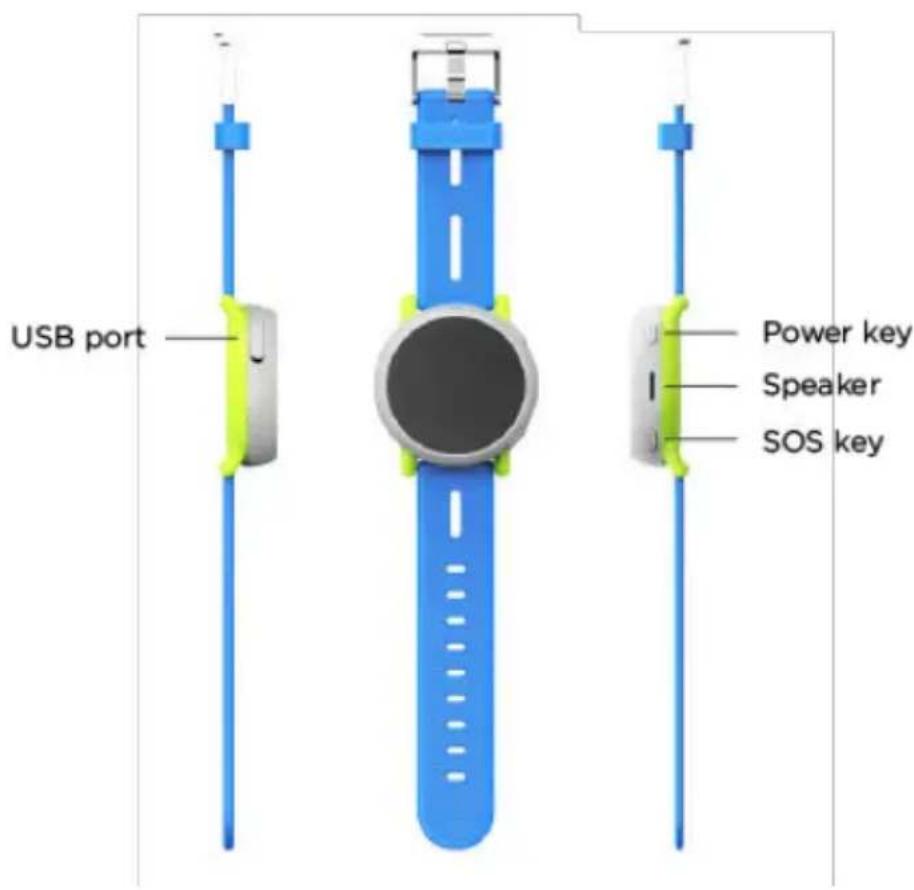
text_image
USB port Power key Speaker SOS keyCharging the Battery
-
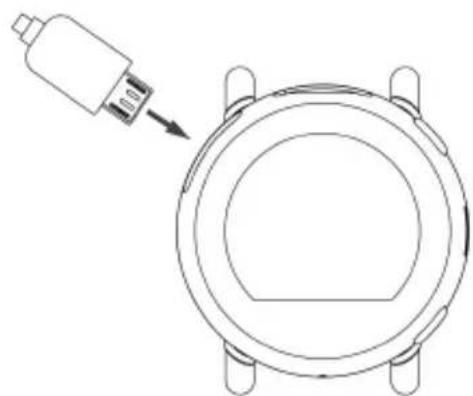
Connect the micro USB side of the data cable to the USB port on your device. This is located on the top left side of the smartwatch.
-
Connect the USB end to the travel adapter.
-
Connect the travel adapter to an electrical outlet to fully charge the smartwatch.
natural_image
Technical line drawing of a mechanical component with a cylindrical housing and mounting holes (no text or symbols)Power Smartwatch On & Off
• Press and hold the Power key to turn the smartwatch on/off.
• Press and hold the Power key for 10 seconds to restart the smartwatch.
- Press the Power key to turn the screen on when the screen is off.
• Press the Power key to return to the home screen while using the smartwatch.
• Press the Power key to mute an incoming call.
SOS Feature
The SOS feature allows your child to call the Primary Administrator for help in the event of an emergency.
- Press and hold the SOS key for 5 seconds to enable the SOS feature.
- The smartwatch will automatically call the Primary Administrator.
Note:
- If the call is not answered, the smartwatch will prompt your child to confirm if he or she wants to call 911. After the 911 call is made, the smartwatch will be able to receive calls from any number for 10 minutes.
- Swipe right to cancel enabling SOS feature.
- Press the SOS key to return to the previous screen while using the smartwatch.
- During a call, press the Power key to turn the volume up, and the SOS key to turn the volume down.
Linking the Smartwatch to the Coolpad Dyno App
The smartwatch must be linked to the Coolpad Dyno app for normal usage. The Coolpad Dyno app is available for Android OS 7.0 (or higher) in the Google Play Store or iOS 10 (or higher) in the Apple App Store. The app is free, but data usage may apply when downloading and using the app.
The first person who installs the Coolpad Dyno app on a smartphone and completes the registration will automatically become the Primary Administrator. Trusted members will also need to install and register with the Coolpad Dyno app for tracking and messaging features.
Step One: Download and install the Coolpad Dyno app on your smartphone If you want to be the Primary Administrator, download and install the Coolpad Dyno app on your smartphone.
Step Two: Register as the Primary Administrator using the Coolpad Dyno app
- Open the Coolpad Dyno app on your smartphone.
- Tap Create Account. Enter name, phone number, email address and password to register an account.
- You will receive a verification email. Click the link and your account will be verified.
- Once your account is verified, you will be able to register as the Primary Administrator.
Note: The smartphone must have Internet access to complete registration. Use the phone number of your smartphone instead of the smartwatch phone number when registering with the app.
Step Three: Connect your smartphone to the smartwatch
- In the app, enter your child's details, including name, birth date and photo.
- Scan the QR code displayed on the smartwatch and the ICCID number of the smartwatch will be automatically entered.
- Choose the service plan for the smartwatch.
- Registration is now complete. The smartwatch will be activated and display the home screen.
Note: After you register your account with the Coolpad Dyno app and pair it to the smartwatch, the smartwatch will be linked to your email account. Your email account is only used to facilitate logging into your account and no personal information will be disclosed.
Using the Coolpad Dyno App
Coolpad Dyno App Home Screen
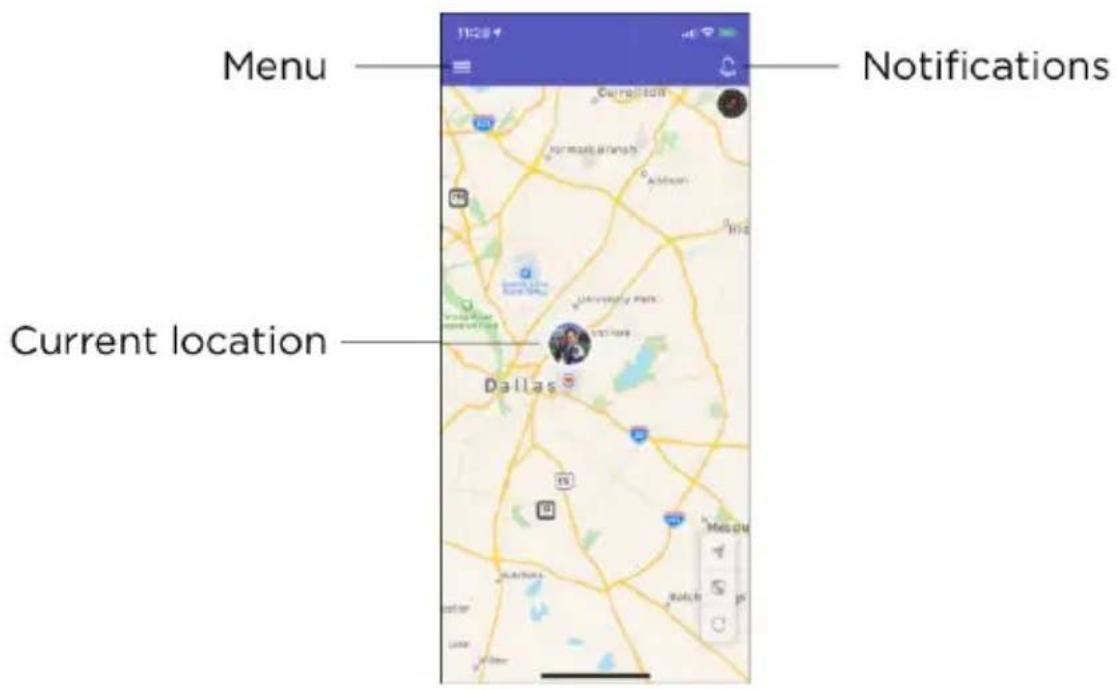
text_image
Menu Notifications Current location DallasContacts
Primary Administrator and trusted members can make calls and send messages to the smartwatch and receive calls and messages from the smartwatch.
Non-trusted members can only make calls to and receive calls from the smartwatch. They cannot use the app or send messages to the smartwatch. Friends that have a Dyno Smartwatch can make calls to and receive calls from other Dyno smartwatches.
Adding contacts
As the Primary Administrator, you can add the contacts from the Coolpad Dyno app.
- Tap Menu ≡ on the top left of the app home screen.
- Tap Contacts and tap
- Enter the new contact's information.
- Tap . √
Note: If you enable Trusted Member when entering the contact's information, such contact will receive an invitation email. By clicking the link, he or she agrees to be a trusted member of the smartwatch.
Deleting contacts
To remove a contact from the smartwatch:
- Tap Menu ≡ on the top left of the app home screen.
- Tap Contacts and tap the contact you want to delete.
- Scroll down to the bottom of the screen and tap Delete contact.
- Tap OK to confirm.
Making a Call to the Smartwatch
Primary Administrator and trusted members can make a call to the smartwatch from the Coolpad Dyno app or from their smartphone. Non-trusted members can only make a call from a phone.
- To call the smartwatch from the Coolpad Dyno app, tap Current location on the app home screen and tap Call.
• To call the smartwatch from a phone, dial the smartwatch phone number.
Sending a Message to the Smartwatch
Primary Administrator and trusted members can send text and voice messages to the smartwatch from the Coolpad Dyno app.
- Tap Menu ≡ on the top left of the app home screen.
- Tap Messages and tap the smartwatch name.
- Tap and hold ↓ to record a voice message, and release it to send the voice message. Or enter the text message and tap ▶
Checking Smartwatch Location
The smartwatch's current location can be seen on the home screen of the app. Tap Current location, you will see how long ago the location of the smartwatch was tracked, and the approximate location of the smartwatch.
Note: When the smartwatch is located in a place where GPS isn't available or if the smartwatch is turned off or runs out of battery, the Coolpad Dyno app cannot display current location information.
Using the Smartwatch
Smartwatch Home Screen
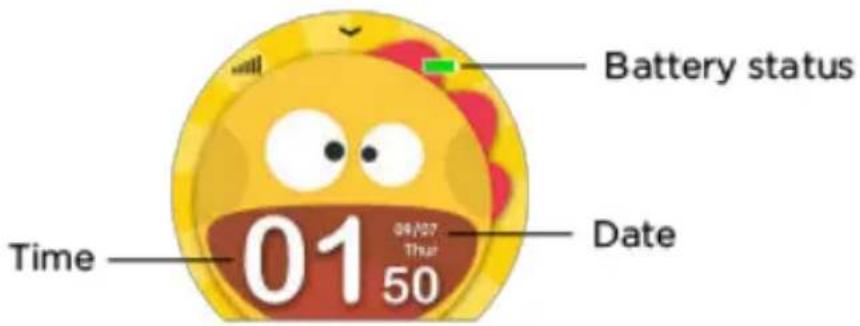
text_image
Battery status Time 01 09/27 17:34 50 DateCall
Making a call
- On the smartwatch home screen, swipe left and tap the Call screen.
- Tap the name of the contact.
- Tap to confirm calling.
Answering a call
To answer an incoming call, tap

To reject an incoming call, tap

natural_image
Cartoon dinosaur with a cheerful expression under a blue sky, mountains in the background, and 'Call' text at bottom (no other readable symbols or text)Chat
-
On the smartwatch home screen, swipe left and tap the Chat screen.
-
Tap the name of the contact.
-
Tap and hold 🔒 to record a voice message and release it to send the voice message. Swipe left to view pre-set messages. Tap the pre-set message to send.
natural_image
Cartoon illustration of a yellow dinosaur with a speech bubble and a small cat, labeled 'Chat' at the bottom (no other text or symbols)Add Friend
-
On the smartwatch home screen, swipe left and tap the Add Friend screen.
-
Tap Add Friend to start searching.
-
After the Primary Administrator of the friend's smartwatch approves the request, the friend will be added as a non-trusted member.

natural_image
Colorful cartoon illustration of three smiling children's faces with a 'Add Friend' text below (no other symbols or text)Step Tracker
- On the smartwatch home screen, swipe right and tap the Step Tracker screen.
- Here you can view the daily steps.
natural_image
Circular icon featuring a yellow dinosaur with red spots against a blue sky and mountain background, labeled 'Step Tracker' below (no other text or symbols)Alarm
- On the smartwatch home screen, swipe right and tap the Alarm screen.
- Tap the alarm to view details, including reminding time, repeat cycle and alarm name.
Note: The alarm can only be set on the Coolpad Dyno app.
natural_image
Circular app icon with a smiling yellow smiley face and 'Alarm' text, set against a blue sky with mountains and clouds (no readable text beyond the icon itself)Settings
- On the smartwatch home screen, swipe right and tap the Settings screen.
- Here you can adjust the volume, brightness, change language and ringtone, and update the software version.
natural_image
Circular icon with a yellow cartoon character inside a red gear ring, labeled 'Settings' at the bottom (no additional text or symbols)Get Updates
Get updates, user guides and more information about your Coolpad Dyno Smartwatch at www.dynokids.com.
Discover what's going on right now in news, trends, techniques & other cool stuff by connecting with us on social media:


@CoolpadAmericas
Specs & Hardware
| Specifications | ||
| Dimensions | 1.86 x 0.58 inches | |
| Antenna | Built-in | |
| Network Mode | GSM, UMTS and LTE | |
| Screen Parameters | ||
| Type | Screen Size | Resolution |
| TFT | 1.22 inches | 240x204 |
| Accessories | ||
| Battery | Battery Type | Lithium Ion Rechargeable Battery |
| Rated Capacity | 605 mAh | |
| Nominal Voltage | 3.85 V | |
Note: The battery capacity is subject to update and change.
In-box Contents
| No. | Name | Quantity |
| 1 | Device | 1 |
| 2 | Battery (Non-Removable) | 1 |
| 3 | USB Cable | 1 |
| 4 | Health & Safety Warranty Card | 1 |
| 5 | Quick Start Guide | 1 |
| 6 | Registration Insert |
Note: The items supplied with the device and any available accessories may vary depending on the region or service provider.
Declaration of Hazardous Substances
| Parts Name | Toxic or hazardous substances or elements | ||||||
| Plumbum (Pb) | Mercury (Hg) | Cadmium (Cd) | Chromium VI (Cr(VI)) | Polybrominated Biphenyls (PBB) | Polybrominated Diphenyl Ethers (PBDE) | ||
| PCB Board and Accessories | ○ | ○ | ○ | ○ | ○ | ○ | |
| Plastics | ○ | ○ | ○ | ○ | ○ | ○ | |
| Metals | ○ | ○ | ○ | ○ | ○ | ○ | |
| Battery | ○ | ○ | ○ | ○ | ○ | ○ | |
| Other | ○ | ○ | ○ | ○ | ○ | ○ | |
| ○: indicates that the content of the toxic or hazardous substance in all homogeneous materials is within the limit of the SJ/T11363-2006 standard. | |||||||
| ×: indicates that the content of the toxic or hazardous substance in some homogeneous materials exceeds the limit of the SJ/T11363-2006 standard. | |||||||
 | The Environmentally Friendly Use Period of this product is 20 years, as shown by the symbol on the left. The Environmentally Friendly Use Period of replaceable parts, such as battery, may be different from that of the product. The Environmentally Friendly Use Period is valid only when the product is operated under the conditions defined in this User Guide. | ||||||
Health and Safety Information
Important Health Information and Safety Precautions
When using this product, the safety precautions below must be taken to avoid possible legal liabilities and damages. Retain and follow all product safety and operating instructions.
Observe all warnings in the product operating instructions. To reduce the risk of bodily injury, electric shock, fire and damage to the equipment, closely observe all of the following precautions.
Safety Precautions for Proper Grounding Installation
Caution: Connecting to improperly grounded equipment can result in an electric shock to either you or your device. This product is equipped with a USB Cable for connecting to a desktop or notebook computer. Be sure your computer is properly grounded before connecting this product to the computer. The power supply cord of a desktop or notebook computer has an equipment-grounding conductor and a grounding plug. The grounding plug must be plugged into an appropriate outlet which is properly installed and grounded in accordance with all local codes and ordinances.
Safety Precautions for Power Supply Unit
Use the correct external power source. A product should be operated only from the type of power source indicated on the electrical ratings label. If you are not sure of the type of power source required, consult your authorized service provider or local power company.
For a product that operates from battery power or other sources, refer to the operating instructions that are included with the product.
Electrical Safety
This product is intended for use when supplied with power from the designated battery or power supply unit. Other usage may be dangerous and will invalidate any approval given to this product. Handle battery packs carefully. This product contains a Li-ion battery. There is a risk of fire and burns if the battery pack is handled improperly. Do not attempt to open or service the battery pack. Do not disassemble, crush, puncture, short external contacts or circuits, dispose of in fire or water, or expose a battery pack to temperatures higher than 60^ C ( 140^ F).
Note: Danger of explosion if battery is incorrectly replaced. Replace only with specified batteries. Recycle or dispose of used batteries according to all applicable local regulations, or in accordance with the instructions in the reference guide.
Follow these other specific precautions:
Follow these other specific precautions:
- Keep the battery or device dry and away from water or any liquid as it may cause a short circuit.
- The device should be connected only to products that bear the USB-IF logo or have completed the USB-IF compliance program.
- Keep metal objects away so they do not come in contact with the battery or its connectors as it may lead to short circuit during operation.
- Always keep the battery out of the reach of babies and small children to avoid swallowing. Consult a doctor immediately if the battery is swallowed.
- Do not use a battery that appears damaged, deformed, discolored, has any rust on its casing, if it overheats, and/or if it emits a foul odor.
- Use of an unqualified battery or charger may present a risk of fire, explosion, leakage or other hazard.
- Only use the battery with a charging system that has been qualified with the system
per this standard: IEEE-Std-1725-200x.
- Avoid dropping the device or battery. If the device or battery is dropped, especially on a hard surface causing damage, take it to a service center for inspection.
- If the battery leaks: Do not allow the leaking fluid to come in contact with eyes. If contact occurs, DO NOT rub the eyes. Rinse with clean water immediately and seek medical advice. Do not allow the leaking fluid to come in contact with skin or clothing. If contact occurs, flush the affected area immediately with clean water and seek medical advice. Take other precautions to keep a leaking battery away from fire as there is a danger of ignition or explosion.
Safety Precautions for Direct Sunlight
Store this product away from excessive moisture and extreme temperatures. Do not leave the product or its battery inside a vehicle or in places where the temperature may exceed 60^ C ( 140^ F), such as on a car dashboard, window sill, or behind glass that is exposed to direct sunlight or strong ultraviolet light for extended periods of time. This may damage the product, overheat the battery, or pose a risk to the vehicle.
Environmental Restrictions
Do not use this product in gas stations, fuel depots, chemical plants or where blasting operations are in progress, or in potentially explosive atmospheres such as fueling areas, fuel storehouses, below deck on boats, chemical plants, fuel or chemical transfer or storage facilities, and areas where the air contains chemicals or particles, such as grain, dust, or metal powders. Please be aware that sparks in such areas could cause an explosion or fire resulting in bodily injury or even death.
Aircraft Safety
Due to the possible interference caused by this product to an aircraft's navigation system and its communications network, using this device's device function on board an airplane is prohibited in most countries.
Safety Precautions for RF Exposure
- Use of non-original, non-manufacturer-approved accessories may violate your local RF exposure guidelines and should be avoided.
- Use only original, manufacturer-approved accessories when such accessories contain metal of any kind.
- Avoid using your device near strong electromagnetic sources, such as microwave ovens, sound speakers, TV and radio.
- Avoid using your device near metal structures (for example, the steel frame of a building).
Explosive Atmospheres
When in an area with a potentially explosive atmosphere or where flammable materials exist, the device should be turned off and the user should obey all signs and instructions. Sparks in such areas could cause an explosion or fire resulting in bodily injury or even death. Users are advised not to use the equipment at refueling points such as service or gas stations, and are reminded of the need to observe restrictions on the use of radio equipment in fuel depots, chemical plants, or where blasting operations are in progress. Areas with a potentially explosive atmosphere are often, but not always, clearly marked such as fueling areas, below deck on boats, fuel or chemical transfer or storage facilities, and including, but not limited to areas where the air contains chemicals or particles such as grain, dust, or metal powders.
Interference with Medical Equipment Functions
This product may cause medical equipment to malfunction. The use of this device is prohibited in most hospitals and medical clinics for which regulations and rules are commonly posted in such facilities. In these instances, turn your device OFF as health care facilities frequently use equipment that is adversely affected by RF energy. If you use any personal medical device(s), consult the manufacturer of your device(s) to determine if the device(s) is adequately shielded from external RF energy. Your health care provider may be able to assist you in obtaining this information.
Non-ionizing Radiation
Your device has an internal antenna. This product should be operated in its normal-use position to ensure the radiative performance and safety from interference. As with other mobile radio transmitting equipment, users are advised that for satisfactory operation of the equipment and for personal safety, it is recommended that no part of the human body should come too close to the antenna during equipment operation.
Use only the supplied integral antenna. Use of unauthorized or modified antennas may impair call quality and damage the device, causing loss of performance and SAR levels exceeding the recommended limits, as well as causing non-compliance with local and national regulatory requirements. In order to limit RF energy exposure and to ensure optimal device performance, operate the device only it its normal-use position. Contact with the antenna area may impair call quality and cause your device to operate at a higher power level than needed which can reduce antenna performance and battery life.
Battery Information and Precautions
To assure product safety, there shall be precautions below.
Danger!
- Use compatible chargers and follow the specified conditions when charging the cell.
- Use the cell only with the specified equipment.
- Do not put or store cell together with metal articles such as necklaces, hairpins, coins, or screws.
- Do not short circuit the (+) and (-) terminals with metal conductors.
- Do not place cell in a device with the (+) and (-) in a reverse way.
- Do not penetrate cell with a sharp articles such as a needle.
- Do not disassemble the cell.
- Do not weld the cell directly.
- Do not use a seriously damaged or deformed cell.
- Thoroughly read the user's manual before use, Inaccurate handling of lithium ion cell may result in heat, fire, explosion, damage or the capacity loss of the cell.
Warning!
- Do not put cell into a heating vessel, washing machine or high-pressure container.
- Do not use cell with primary batteries, or batteries of a different package, type, or brand.
- Stop charging the cell if charging is not completed within the specified time.
-Stop using the cell if abnormal heat, odor, discoloration, deformation or abnormal condition is detected during use, charge, or storage. - Keep away from cell immediately when leakage or foul odor is detected.
- Wash well with clean water immediately if liquid leaks onto your skin or clothes.
- If liquid leaking from the cell gets into your eyes, do not rub your eyes. Wash them well with clean water and call physician immediately.
Caution!
- Store batteries out of reach of children so that they are not accidentally swallowed or handled.
- If younger children use the cell, their guardians should explain the proper handling.
- Be sure to read the user's manual and cautions on handling thoroughly before using the cell.
- Batteries have cycle life. Replace failed cell with a new cell that is the same brand immediately after normal life cycle expiration, or if expiration has occurred prematurely.
Store battery in a low-humidity and low-temperature environment if the battery won't be used for an extended period of time. - Keep it far away from articles or materials with static electric charges while the cell is charged, used or stored.
- Wipe with a dry cloth before using the cell if the terminals of the cell become dirty.
Safety Instructions for Charging
Please read the following information carefully.
- The maximum ambient temperature of the charger shall not exceed 40^ C (104 degrees F).
- The charger shall be installed according to specification. The current of load and output power shall not exceed the following value:
Input: AC100-240V\~ 50/60Hz 0.15A
Output: DC5V-1A
FCC Notice and Cautions
This device and its accessories comply with Part 15 of FCC Rules.
Operation is subject to the following conditions:
(1) This device and its accessories may not cause harmful interference.
(2) This device and its accessories must accept any interference received, including interference that may cause undesired operation.
Part 15.21 Statement:
Changes or modifications that are not expressly approved by the manufacturer could void the user's authority to operate the equipment.
Part of Statement 15.105:
This equipment has been tested and found to comply with the limits for a class B digital device, pursuant to Part 15 of the FCC Rules. These limits are designed to provide reasonable protection against harmful interference in a residential installation. This equipment generates, uses, and can radiate radio frequency energy and, if not installed and used in accordance with the instructions, may cause harmful interference to radio communications. However, there is no guarantee that interference will not occur in a particular installation. If you experience interference with reception (e.g., television), determine if this equipment is causing the harmful interference by turning the equipment off and then back on to see if the interference is affected.
If necessary, try correcting the interference by one or more of the following measures:
- Reorient or relocate the receiving antenna.
- Increase the separation between the equipment and receiver.
- Connect the equipment into an outlet on a circuit different from that to which the receiver is connected.
- Consult the dealer or an experienced radio/TV technician for further assistance.
TIA Safety Information
The following is the complete TIA Safety Information for wireless handheld devices:
Exposure to Radio Frequency Signal
Your wireless handheld portable device is a low-power radio transmitter and receiver. When
ON, it receives and sends out Radio Frequency (RF) signals. In August 1996, the Federal Communications Commissions (FCC) adopted RF exposure guidelines with safety levels for handheld wireless devices. Those guidelines are consistent with the safety standards previously set by both U.S. and international standards ‘bodies, as follows:
ANSI C95.1 (1992) *
NCRP Report 86 (1986)
ICNIRP (1996)
* American National Standards Institute; National Council on Radiation Protection and Measurements; International Commission on Non-Ionizing Radiation Protection. Those standards were based on comprehensive and periodic evaluations of the relevant scientific literature. For example, over 120 scientists, engineers, and physicians from universities, government health agencies, and industry reviewed the available body of research to develop the ANSI Standard (C95.1). The design of your device complies with the FCC guidelines (and those standards).
Antenna Care
Use only the supplied or approved replacement antenna. Unauthorized antennas, modifications, or attachments could damage the device and may violate FCC regulations.
Pacemakers
The Health Industry Manufacturers Association recommends that a minimum separation of six (6) inches be maintained between a handheld wireless device and a pacemaker to avoid potential interference with the pacemaker. These recommendations are consistent with the independent research by and recommendations of Wireless Technology Research.
Persons with pacemakers:
- Should ALWAYS keep the device more than six (6) inches from their pacemaker
when the device is turned ON;
- Should not carry the device in a breast pocket;
- Should use the ear opposite the pacemaker to minimize the potential for interference;
- Should turn the device OFF immediately if there is any reason to suspect that interference is occurring.
Electronic Devices
Most modern electronic equipment is shielded from RF signals but some equipment or devices might not be.
Hearing Aids
Some digital wireless devices may interfere with hearing aids. In the event of such interference, you please consult your service provider, or call customer service regarding alternatives.
Other Medical Devices
If you use other personal medical devices, consult the device manufacturer to determine if it is adequately shielded from external RF energy, or your health care provider may be able to advice about any harmful device interactions.
Vehicles
RF signals may affect improperly installed or inadequately shielded electronic systems in motor vehicles. Be certain to contact the manufacturer or representative regarding this as well as manufacturer of any additional vehicle equipment.
Posted facilities
Turn your device OFF in any facility where posted notices so require.
For Vehicles Equipped with an Air Bag
DO NOT place objects, including installed or portable wireless equipment, in the area over the air bag or in the air bag deployment area. If in-vehicle wireless equipment is improperly installed and the air bag inflates, serious injury could result since air bags inflate with great force.
Safety Information
Please read and observe the following information for safe and proper use of your device and to prevent damage. Also, keep the user guide in an accessible place after reading it for ease in locating it for future reference.
Violation of the instructions may cause minor or serious damage to the product.
- Do not disassemble, open, crush, bend or deform, puncture or shred your equipment.
- Do not modify or remanufacture your equipment. Do not attempt to insert foreign objects into the battery. Do not immerse your equipment in water or other liquids, or expose it to water or other liquids, fire, explosions or other hazards.
- Do not short-circuit the battery or allow metallic conductive objects to contact the battery terminals.
- Avoid dropping the device. If the device is dropped on a hard surface or elsewhere, take it to a service center for inspection if damage is suspected.
Charger and Adapter Safety
- Only use compatible battery charger so as to avoid serious damage to your device.
- When traveling abroad, only use compatible battery pack charger along with the correct device adapter.
Battery Information: Care and Proper Disposal
- Please dispose of your battery properly or take it to your local wireless carrier for recycling.
- The battery doesn't need to be empty before recharging, and can be recharged several hundred times. Replace the battery when it no longer provides acceptable performance.
- Do not disassemble or short-circuit the battery.
- Keep the battery's metal contacts clean.
- Recharge the battery after long periods of non-use to maximize battery life. Note: Battery life will vary due to usage patterns and environmental conditions.
- Use of extended backlighting, Browser, and data connectivity kits affect battery life as well as talk/standby times.
- The self-protection function of the battery cuts the power of the device when its operation is in an abnormal state. In this case, remove the battery from the device, reinstall it, and turn the device on.
Explosion, Shock, and Fire Hazards
- Do not put your device in a place that is subject to excessive dust, and always keep the minimum required distance between the power cord and heat sources.
- Unplug the power cord prior to cleaning your device, and clean the power plug pin when necessary.
- When using the power plug, ensure that it's firmly connected.
- Placing the device in a pocket or bag without covering the device receptacle (power plug pin), metallic articles (e.g.: coins, paperclips, pens) may short-circuit the device. Always cover the receptacle when not in use.
- Metallic articles that come into contact with the device may short-circuit the + and - battery terminals (metal strips) which may result in battery damage, or even an
explosion.
General Notice
- Using a damaged battery or placing a battery in your mouth may cause serious injury.
- Placing items containing magnetic strip components (e.g.: credit cards, device cards, bank books, subway tickets) near your device may damage the data stored in the magnetic strips.
- Talking on the device for long periods of time may reduce call quality due to heat generation.
- Do not immerse your device in water. If this happens, immediately turn the device OFF and remove the battery. If the device does not work, take it to an authorized Service Center.
- Do not paint your device.
- Device data, including contact information, ringtones, text messages, voice messages, pictures or videos, etc., may be inadvertently deleted due to careless use, device repair, or software upgrades. Please back up your important device numbers and all other vital data. Note: Neither the manufacturer nor any person or entity associated therewith is liable for any damages whatsoever due to loss of any or all data stored on any of your devices.
- When using the device in public places, set the ringtone to vibration so you don't disturb others.
- Do not turn your device on or off while the device is in close proximity to your ear.
Consumer Information on SAR
This Model Device Meets the Government's Requirements for Exposure to Radio Waves.
Your wireless device is a radio transmitter and receiver. It is designed and manufactured not to exceed the emission limits for exposure to radiofrequency (RF) energy set by the Federal Communications Commission (FCC) of the U.S. Government. These FCC exposure limits are derived from the recommendations of two expert organizations, the National Council on Radiation Protection and Measurement (NCRP) and the Institute of Electrical and Electronics Engineers (IEEE). In both cases, the recommendations were developed by scientific and engineering experts drawn from industry, government, and academia after extensive reviews of the scientific literature related to the biological effects of RF energy. The exposure limit for wireless mobile devices employs a unit of measurement known as the Specific Absorption Rate, or SAR. The SAR is a measure of the rate of absorption of RF energy by the human body expressed in units of watts per kilogram (W/kg). The FCC requires wireless devices to comply with a safety limit of 1.6 watts per kilogram (1.6 W/kg). The FCC exposure limit incorporates a substantial margin of safety to give additional protection to the public and to account for any variations in measurements. Tests for SAR are conducted using standard operating positions specified by the FCC with the device transmitting at its highest certified power level in all tested frequency bands. Although SAR is determined at the highest certified power level, the actual SAR level of the device while operating can be well below the maximum value. Because the device is designed to operate at multiple power levels to use only the power required to reach the network, generally, the closer you are to a wireless base station antenna, the lower the power output. Before a device model is available for sale to the public, it must be tested and certified to the FCC that it does not exceed the limit established by the government adopted requirement for safe exposure. The tests are performed in positions and locations (e.g., at the ear and worn on the body) as required by the FCC for each model. This device was tested for typical body-worn operations with the back of the
device kept 0.39 inches (1.0 cm) between the user's body and the back of the device. To comply with FCC RF exposure requirements, a minimum separation distance of 0.39 inches (1.0 cm) must be maintained between the user's body and the back of the device. Third-party belt clips, holsters, and similar accessories containing metallic components should not be used.
Body-worn accessories that cannot maintain 0.39 inches (1.0 cm) separation distance between the user's body and the back of the device, and have not been tested for typical body-worn operations may not comply with FCC RF exposure limits and should be avoided. The FCC has granted an Equipment Authorization for this model device with all reported SAR levels evaluated as in compliance with the FCC RF emission guidelines.
The highest SAR value for this model device when tested for use next to the mouth is 1.47 W/kg and when worn on the body, as described in this user's manual, is 1.23 W/kg. While there may be differences between SAR levels of various devices and at various positions, they all meet the government requirement for safe exposure.
SAR information on this model device is on file with the FCC and can be found under the Display Grant section of http://www.fcc.gov/oet/ea/fccid/ after searching on FCC ID: R38YL301A.
To find information that pertains to a particular model device, this site uses the device FCC ID number which is usually printed somewhere on the case of the device. Sometimes it may be necessary to remove the battery pack to find the number. Once you have the FCC ID number for your device, follow the instructions on the website and it should provide values for typical or maximum SAR for that device.
Additional information on Specific Absorption Rates (SAR) can be found on the Cellular
Telecommunications Industry Association (CTIA) website at http://www.ctia.org/ In the United States and Canada, the SAR limit for mobile devices used by the public is 1.6 watts/kg (W/kg) averaged over one gram of tissue. The standard incorporates a substantial margin of safety to give additional protection for the public and to account for any variations in measurements.
IC
This device complies with Industry Canada licence-exempt RSS standard(s). Operation is subject to the following two conditions: (1) this device may not cause interference, and (2) this device must accept any interference, including interference that may cause undesired operation of the device.
Note: Some content and services accessible through this device belong to third parties and are protected by copyright, patent, trademark and/or other intellectual property laws. Such content and services are provided solely for your personal noncommercial use. You may not use any content or services in a manner that has not been authorized by the content owner or service provider. Without limiting the foregoing, unless expressly authorized by the applicable content owner or service provider, you may not modify, copy, republish, upload, post, transmit, translate, sell, create derivative works, exploit, or distribute in any manner or medium any content or services displayed through this device.
"THIRD PARTY CONTENT AND SERVICES ARE PROVIDED "AS IS." NEITHER COOLPAD NOR ANY AFFILIATE THEREOF (COLLECTIVELY, "COOLPAD")
WARRANT IN ANY MANNER CONTENT OR SERVICES SO PROVIDED, EITHER EXPRESSLY OR IMPLIEDLY, FOR ANY PURPOSE. COOLPAD EXPRESSLY DISCLAIMS ANY IMPLIED WARRANTIES, INCLUDING BUT NOT LIMITED TO, WARRANTIES OF MERCHANTABILITY OR FITNESS FOR A PARTICULAR PURPOSE AND NON-INFERINGEMENT. COOLPAD DOES NOT GUARANTEE THE ACCURACY, VALIDITY, TIMELINESS, LEGALITY, OR COMPLETENESS OF ANY CONTENT OR SERVICE MADE AVAILABLE THROUGH THIS DEVICE AND UNDER NO CIRCUMSTANCES, INCLUDING NEGLIGENCE, SHALL COOLPAD BE LIABLE, WHETHER IN CONTRACT OR TORT, FOR ANY DIRECT, INDIRECT, INCIDENTAL, SPECIAL OR CONSEQUENTIAL DAMAGES, ATTORNEY FEES, EXPENSES, OR ANY OTHER DAMAGES ARISING OUT OF, OR IN CONNECTION WITH, ANY INFORMATION CONTAINED IN, OR AS A RESULT OF THE USE OF ANY CONTENT OR SERVICE BY YOU OR ANY THIRD PARTY, EVEN IF ADVISED OF THE POSSIBILITY OF SUCH DAMAGES."
Third party services may be terminated or interrupted at any time, and Coolpad makes no representation or warranty that any content or service will remain available for any period of time. Content and services are transmitted by third parties by means of networks and transmission facilities over which Coolpad has no control. Without limiting the generality of this disclaimer, Coolpad expressly disclaims any responsibility or liability for any interruption or suspension of any content or service made available through this device. Coolpad is neither responsible nor liable for customer service related to the content and services. Any question or request for service relating to the content or services should be made directly to the respective content and service provider.
Children's Privacy
For Coolpad to continue to provide you and your child the best service, we need to collect your child's personal information. Personal information collected may include but not be limited to the name, birthday, email address, and phone number of the user. It can also include opinions, spending habits, IP address, photos and digital images, and email and text messages.
In accordance with US federal law, Children's Online Privacy Protection Act ("COPPA") and Canadian law and the Personal Information Protection and Electronic Documents Act ("PIPEDA") your consent in required for the collection of such personal information in lieu of your child, including cases such as when:
- Giving access to features that allow the sharing of personal information in a public setting or with other users (e.g. chat, image of face, recording of voice, full name, telephone number, any personal information in voice recording);
• Giving a child access to third party plug-in features; - Collecting and uploading a child’s geolocation information;
- Collecting or using a child's personal information and sending the child ongoing newsletters or other alerts (e.g. push notifications);
- Collecting a child's personal information in connection with any other features or activities;
- Collecting and using a persistent identifier, unless such persistent identifier is used for internal support purposes only;
Sharing a child's personal information with third parties;
- Collecting or using a child's personal information for significantly new purposes not previously consented to by you.
Once consent has been given, you can withdraw your consent and ask us to not collect any further information and/or delete previously collected information, at any time.
We share some data with third parties, specifically for providing services essential to the functionality of the Dyno Smartwatch. The list of such third parties can be found at https://coolpad.us/privacy-policy/. You have the right to ask us not to share data with any third parties. However, in such instances, we may not be able to provide all services and functionalities, for example the geolocation service provided by Google.
Trademarks and Copyrights
©2019 Coolpad Technologies, Inc. Coolpad is a registered trademark of Yulong Computer Telecommunication Scientific (Shenzhen) Co., Ltd. All rights reserved. All other trademarks cited herein are the property of their respective owners. Screenshots and
product images are simulated; they may differ from the actual product and are subject to change. Reproduction, transfer, distribution of the contents herein in any manner without the prior written permission of Coolpad Technologies, Inc. is prohibited. Coolpad Technologies, Inc. reserves the right to add, modify or delete, any of the content herein or withdraw this document at any time without prior notice and without assigning any reasons thereof.
Standard Limited Warranty
(This standard Limited Warranty supersedes and replaces for all purposes the Standard Limited Warranty that appears in the enclosed documentation, if any) COOLPAD TECHNOLOGIES, INC. ("COOLPAD") warrants that COOLPAD's devices and
accessories enclosed herein ("Products") are free from defects in material and workmanship under normal use and service for the period commencing upon the date of purchase by the first consumer purchaser and continuing for the following specified period of time after that date:
| Device | 12 months |
| Battery | 6 months |
| Other Accessories (If included in the box set) | 3 months |
This Limited Warranty is conditioned upon proper use of the Products. This Limited Warranty does not cover: (a) defects or damage resulting from accident, misuse, abnormal use, abnormal conditions, improper storage, exposure to liquid, moisture, dampness, sand or dirt, neglect, or unusual physical, electrical or electromechanical stress; (b) scratches, dents and cosmetic damage, unless caused by COOLPAD; (c) defects or damage resulting from excessive force or use of a metallic object when pressing on a touch screen; (d) equipment from which the serial number and/or the enhancement data code have been removed, defaced, damaged, altered, made illegible, and/or otherwise tampered with; (e) ordinary wear and tear; (f) defects or damage resulting from the use of Product in conjunction or connection with accessories, products, or ancillary/peripheral equipment not furnished or approved by COOLPAD; (g) defects or damage resulting from improper testing, operation, maintenance, installation, service, or adjustment not furnished or approved by COOLPAD; (h) defects or damage resulting from external causes such as collision with an object, fire, flooding, dirt, windstorm, lightning, earthquake, exposure to weather conditions, theft, blown fuse, or improper use of any electrical source; (i) defects or damage resulting from cellular signal reception or transmission, viruses and/or other software problems
introduced into the Product; or (j) Product used or purchased outside the United States. This Limited Warranty covers batteries only if battery capacity falls below 80% of rated capacity or the battery leaks, and this Limited Warranty does not cover any battery if: (i) the battery has been charged by a non-compatible battery charger; (ii) any of the seals on the battery are broken or show evidence of tampering; or (iii) the battery has been used in equipment other than the COOLPAD device for which it is specified.
During the applicable warranty period, provided the Product subject to the warranty claim is returned in accordance with the terms of this Limited Warranty, COOLPAD will repair or replace such Product, at COOLPAD'S sole option, without charge. COOLPAD may, at COOLPAD's sole option, use rebuilt, reconditioned, or new parts or components when repairing any Product, or may replace the Product with a rebuilt, reconditioned or new Product. All other repaired/replaced Products will be warranted for a period equal to the remainder of the original Limited Warranty on the original Product or for ninety (90) days, whichever is longer. All replaced Products, parts, components, boards and equipment shall become the property of COOLPAD. Except to any extent expressly allowed by applicable law, transfer or assignment of this Limited Warranty is prohibited.
To obtain service under this Limited Warranty, you must return the Product to an authorized device service facility in an adequate container for shipping, accompanied by the sales receipt or comparable proof of sale showing the original date of purchase, the serial number of the Product and the seller's name and address. To obtain assistance on where to deliver the Product, please call COOLPAD Customer Care at 1-877-606-5753. If COOLPAD determines that any Product is not covered by this Limited Warranty, you must pay all parts, shipping, and labor charges for the repair or return of such Product.
You should keep a separate backup copy of any contents of the Product before delivering
the Product to COOLPAD for warranty service, as some or all of the contents may be deleted or reformatted during the course of warranty service.
THIS LIMITED WARRANTY SETS OUT THE FULL EXTENT OF COOLPAD'S RESPONSIBILITIES, AND THE EXCLUSIVE REMEDY REGARDING THE PRODUCTS. ALL DISPUTES WITH COOLPAD ARISING IN ANY WAY FROM THIS LIMITED WARRANTY OR THE SALE, CONDITION OR PERFORMANCE OF THE PRODUCTS SHALL BE RESOLVED EXCLUSIVELY BY ANY COURT WITH COMPETENT JURISDICTION. Any such dispute shall not be combined or consolidated with a dispute involving any other person's or entity's Product or claim, and specifically, without limitation of the foregoing, shall not under any circumstances proceed as part of a class action. The laws of the State of California, without reference to its choice of laws principles, shall govern the interpretation of the Limited Warranty and all disputes arising out of the products or services.
This settlement of disputes also applies to claims against COOLPAD'S employees, contractors, agents, and/or other representatives, as well as any of all of its affiliated entities, regardless of place of incorporation, if any such claim arises from the Product's sale, condition or performance. Notwithstanding the foregoing, neither this warranty nor provision of any Product shall, in and of itself, provide for in persona jurisdiction over any of COOLPAD's employees, contractors, agents, and/or other representatives, or over its affiliated entities.
Severability
If any portion of this Limited Warranty is held to be illegal or unenforceable, such partial illegality or unenforceability shall not affect the enforceability of the remainder of the Limited
Warranty.
Coolpad Technologies, Inc.
6175 Main St., Suite 290
Frisco, TX 75034
Customer Service: 1-877-606-5753