
BLUETOOTH HEADSET BH-500 - Audio accessory NOKIA - Free user manual and instructions
Find the device manual for free BLUETOOTH HEADSET BH-500 NOKIA in PDF.


| Product type | Bluetooth stereo headset |
| Brand | Nokia |
| Model | BH-500 |
| Wireless technology | Bluetooth 2.0 |
| Supported Bluetooth profiles | Headset 1.1, Handsfree 1.5, A2DP 1.0, AVRCP 1.0 |
| Maximum range | 10 meters (30 feet) |
| Talk time | Up to 8 hours |
| Standby time | Up to 200 hours |
| Music playback time | Up to 8 hours |
| Charging time | About 2 hours |
| Battery type | Built-in rechargeable (non-removable) |
| Indicator light | LED: yellow (charging), green (full charge), blue (connected), red (low battery) |
| Water resistance | Resistant to rain, do not immerse |
| Main functions | Hands-free calls, music listening, playback control, volume control, reject/call waiting |
| Number of pairable devices | Up to 8 |
| Simultaneous connection | 1 phone and 1 music player |
| Care and cleaning | Clean with a soft cloth, avoid chemicals. If exposed to sweat or salt water, rinse with fresh water and dry. |
| Safety | Do not use in dangerous situations. Keep away from children. Contains magnetic parts, keep away from credit cards. |
| Spare parts and repairability | Non-removable battery, replacement by authorized center. Earpieces and tips included. |
| Compatible chargers | AC-3, AC-4, DC-4 (Nokia) |
Frequently Asked Questions - BLUETOOTH HEADSET BH-500 NOKIA
User questions about BLUETOOTH HEADSET BH-500 NOKIA
0 question about this device. Answer the ones you know or ask your own.
Ask a new question about this device
Download the instructions for your Audio accessory in PDF format for free! Find your manual BLUETOOTH HEADSET BH-500 - NOKIA and take your electronic device back in hand. On this page are published all the documents necessary for the use of your device. BLUETOOTH HEADSET BH-500 by NOKIA.
USER MANUAL BLUETOOTH HEADSET BH-500 NOKIA
Nokia Bluetooth Headset BH-500 User Guide
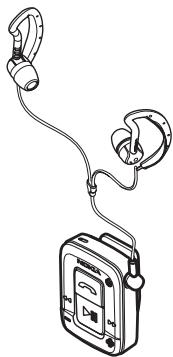
DECLARATION OF CONFORMITY
We, NOKIA CORPORATION declare under our sole responsibility that the product HS-39W is in conformity with the provisions of the following Council Directive: 1999/5/EC. A copy of the Declaration of Conformity can be found at http://www.nokia.com/phones/ declaration_of_conformity/.
C€0560
© 2006 Nokia. All rights reserved.
Reproduction, transfer, distribution or storage of part or all of the contents in this document in any form without the prior written permission of Nokia is prohibited.
Nokia and Nokia Connecting People are registered trademarks of Nokia Corporation. Other product and company names mentioned herein may be trademarks or tradenames of their respective owners.
Bluetooth is a registered trademark of Bluetooth SIG, Inc.
Nokia operates a policy of continuous development. Nokia reserves the right to make changes and improvements to any of the products described in this document without prior notice.
Under no circumstances shall Nokia be responsible for any loss of data or income or any special, incidental, consequential or indirect damages howsoever caused.
The contents of this document are provided "as is". Except as required by applicable law, no warranties of any kind, either express or implied, including, but not limited to, the implied warranties of merchantability and fitness for a particular purpose, are made in relation to the accuracy, reliability or contents of this document. Nokia reserves the right to revise this document or withdraw it at any time without prior notice.
The availability of particular products may vary by region. Please check with the Nokia dealer nearest to you.
Unauthorized changes or modifications to this device may void the user's authority to operate the equipment.
Export Controls
This device may contain commodities, technology or software subject to export laws and regulations from the US and other countries. Diversion contrary to law is prohibited.
- Introduction 4
Bluetooth wireless technology. 4
Water-resistance 4
- Get started.. 6
Chargers 6
Charge the battery. 7
Switch the headset on or off 7
Pair the headset. 8
Pair with a phone that has a compatible music player feature... 8
Pair with a phone and a music player. 8
Disconnect the headset. 9
Reconnect the headset. 9
- Basic use 10
Headphones 10
Adjust the volume. 10
Call handling. 10
Listen to music 11
Use the headset with several paired devices. 12
Lock or unlock the keys 12
Clear the settings or reset the headset 12
- Battery information 13
Care and maintenance 14
1. Introduction
You can use the Nokia Bluetooth Headset BH-500 to listen to music with your compatible music player and make and answer calls with your compatible mobile phone. The music player can be the music player feature of your phone or a separate music playing device.
Read this user guide carefully before using the headset. Also read the user guide for your phone, which provides important safety and maintenance information, and the user guide for your music playing device. Keep the headset out of reach of small children.
Bluetooth wireless technology
The headset can be connected to a compatible mobile phone or music player that supports Bluetooth wireless technology. This technology makes it possible to connect compatible devices without cables. In a Bluetooth connection, the headset and the other device should be within 10 meters (30 feet) of each other. Connections can be subject to interference from obstructions, such as walls, or other electronic devices.
This headset is compliant with Bluetooth Specification 2.0 supporting the following profiles: Headset Profile 1.1, Handsfree Profile 1.5, Advanced Audio Distribution Profile 1.0, and Audio Video Remote Control Profile 1.0. Check with the manufacturers of other devices to determine their compatibility with this device.
There may be restrictions on using Bluetooth technology in some locations. Check with your local authorities or service provider.
Water-resistance
-
You can use this device, with the supplied headphones, in the rain, but do not submerge it in water. If you use alternative headphones, then the device may not be water-resistant.
-
If the device has been exposed to sweat or salt water, wash it immediately with freshwater to avoid corrosion. The device must be carefully wiped dry.
2. Get started
The headset contains the following parts:
Powerkey1
- Microphone (2)
Indicator light (3)
Call key (4)
Rewind key (5)
Volume down key (6)
- Charger connector with a protective cap (7)
- Play/pause key (8)
Volume up key (9)
- Fast forward key (10)
- Headphone connector (11)
- Headphones with earplugs (12)
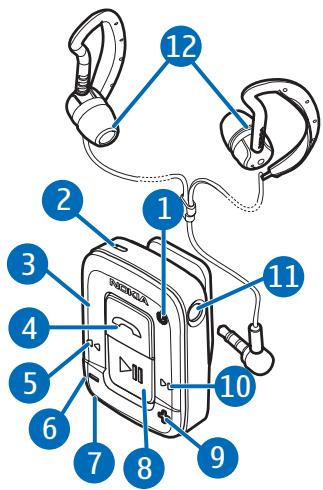
Before using the headset, you must charge the battery and pair the headset with a compatible phone. If your phone does not have a music player feature, you also need to pair the headset with your music player.

Note: Parts of the headset are magnetic. Metallic materials may be attracted to the headset. Do not place credit cards or other magnetic storage media near the headset, because information stored on them may be erased.
Chargers
Check the model number of any charger before use with this device. The headset is intended for use with the AC-3, AC-4, and DC-4 chargers.

Warning: Use only chargers approved by Nokia for use with this particular enhancement. The use of any other types may invalidate any approval or warranty and may be dangerous.
For availability of approved enhancements, please check with your dealer. When you disconnect the power cord of any enhancement, grasp and pull the plug, not the cord.
Charge the battery
This headset has an internal, nonremovable, rechargeable battery. Do not attempt to remove the battery from the device as you may damage the headset.
- Connect the charger to a wall outlet.
- Open the protective cap of the charger connector, and connect the charger cable to the headset.
The indicator light is yellow during charging. If the indicator light is not yellow, check the charger connection. If charging does not start, disconnect the charger, plug it in again, and retry.
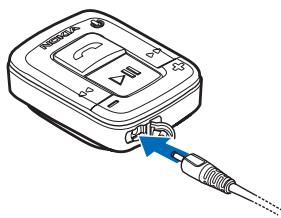
Charging the battery fully may take up to 2 hours. When the battery is fully charged, the indicator light turns green.
- Disconnect the charger from the headset and the wall outlet.
The fully charged battery has power for up to 8 hours of talktime, up to 200 hours of standby time, and up to 8 hours of music playing time. However, the times may vary when used with different mobile phones or other compatible Bluetooth devices, usage settings, usage styles, and environments.
When the battery is running out of power, the headset beeps every 20 seconds, and the indicator light flashes red. Recharge the battery.
Switch the headset on or off
To switch on, press and hold the power key. The headset beeps, and the indicator light briefly flashes green. When the headset is connected to a paired phone and is ready for use, the indicator light flashes blue slowly.
To switch off, press and hold the power key. The headset beeps, and the indicator light briefly flashes red.
Pair the headset
Pair with a phone that has a compatible music player feature
If your phone has a compatible music player feature, you can use the headset to make and answer calls and to listen to music from the phone.
- Switch on your phone.
- Ensure that the headset is off. If it is on, switch it off.
- Press and hold the power key of the headset until the indicator light flashes blue rapidly.
- Activate the Bluetooth feature on the phone, and set the phone to search for Bluetooth devices. See the user guide of your phone for instructions.
- Select the headset (Nokia BH-500) from the list of found devices.
- Your phone should ask for a Bluetooth passcode. Enter the passcode (0000) on your phone. In some phones you may need to make the Bluetooth connection separately after pairing. You only need to pair the headset with your phone once.
If the pairing is successful and the headset is connected with your phone, the indicator light of the headset flashes blue.
Pair with a phone and a music player
If your phone does not have a compatible music player feature, you can separately pair the headset with your phone and a compatible music player. After pairing and connecting the headset with your phone, do as follows:
- Switch off the headset.
-
Switch on the music player.
-
Press and hold the power key of the headset until the indicator light flashes blue rapidly.
-
Follow the pairing instructions in the user guide for your music player. When the music player asks for a device to pair, select Nokia BH-500 from the list. If you are asked for a Bluetooth passcode, enter 0000 on the music player.
If your music player does not have a keypad, the device may use the Bluetooth passcode 0000 by default. If this is not the case, see the user guide of your music player to change the default Bluetooth passcode to 0000.
If the pairing is successful and the headset is connected with your music player, the indicator light of the headset flashes blue.
Disconnect the headset
To disconnect the headset from your phone or music player, switch off the headset, or follow the instructions in the user guide for your phone or music player. You do not need to delete the pairing with the headset to disconnect it.
Reconnect the headset
To connect the headset to your phone, switch on the headset, or make the connection in the Bluetooth menu of your phone. To connect the headset to your music player, press and hold the play/pause key.
If you have a Nokia phone, you can set it to connect with the headset automatically when the headset is switched on. On your Nokia phone, change your paired device settings in the Bluetooth menu.
3. Basic use
Headphones
The headset comes with a pair of headphones and three pairs of earpads. Select the earpads that fit best for your ears, and push them onto the earplugs, with the wider end first.
Plug the headphones into the.
headphone connector. Ensure that
the headphone plug is fully inserted into the connector. Slide the earlops behind your ears, and insert the earplugs into your ears. Attach the headset to your clothing with the clip behind the headset, as close to your mouth as possible for optimal audio quality.
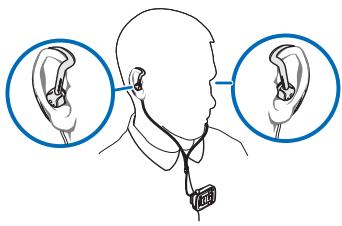

Warning: When using the headset your ability to hear outside sounds may be affected. Do not use the headset where it can endanger your safety.
Adjust the volume
Press the volume up key to increase or the volume down key to decrease the volume during a call or while listening to music.
Call handling
To make a call when the headset is connected to the phone, use your phone in the normal way.
If your phone supports last number redialing with this device, press the call key twice briefly while no call is in progress.
If your phone supports voice dialing with this device, press and hold the call key when no call is in progress, and proceed as instructed in the user guide of your phone.
To answer a call, press the call key, or use the phone keys. To reject the call, press the call key twice.
To end a call, press the call key, or use the phone keys.
To mute or unmute the microphone during a call, press the volume up and volume down keys at the same time.
To switch a call from the headset to your phone or vice versa, press and hold the call key, or use the respective function in your phone.
Listen to music
To listen to music, the headset must be connected to a paired phone that has a compatible music player feature, or to a separate music player.
When the headset is connected to a phone but not to a music player, the headset can only be used to make and answer calls if the phone does not have a compatible music player feature.
To connect the headset to the last used music player, press and hold the play/pause key of the headset when the headset is on.
The available music functions depend on your music player.
If you answer or make a call while listening to the music player, the music is paused until you end the call.

Warning: Listen to music at a moderate level. Continuous exposure to high volume may damage your hearing.
To play music, select a track on your music player, or press the fast forward or rewind key on your headset to select the track. To start playing, press the play/pause key.
To pause or resume playing, press the play/pause key. To stop playing, press the play/pause key twice.
To move to the next track, press the fast forward key. To move to the previous track, press the rewind key twice.
To rewind or fast forward the current track, press and hold the respective key on the headset.
Use the headset with several paired devices
You can pair the headset with up to eight phones and music players in total but connect it to only one phone and music player at a time.
If you have paired the headset with several phones, the first paired phone is the default phone. When you switch on the headset, it tries to connect to the default phone if the phone is located within 10 meters (30 feet). If the headset cannot connect to the default phone, the headset first tries to connect to the last used phone, then to the other paired phones.
If you have paired the headset with several music players, to switch between the paired players, press the rewind and fast forward keys at the same time.
Lock or unlock the keys
To lock or unlock all the headset keys, briefly press the power key. If you answer a call, the keys are unlocked until you end the call.
Clear the settings or reset the headset
To clear the pairing and volume settings, switch off the headset, and press the power key until the indicator light starts to alternately flash red, green, and blue.
If the headset stops functioning, although it has been charged, you need to reset it. Press and hold the power key, and, at the same time, plug the headset into a charger. The reset does not clear your pairing and volume settings.
4. Battery information
Your device is powered by a rechargeable battery. The full performance of a new battery is achieved only after two or three complete charge and discharge cycles. The battery can be charged and discharged hundreds of times, but it will eventually wear out. Recharge your battery only with Nokia approved chargers designated for this device.
Unplug the charger from the electrical plug and the device when not in use. Do not leave the device connected to a charger, since overcharging may shorten the battery lifetime. If left unused, a fully charged battery will lose its charge over time.
Use the battery only for its intended purpose. Never use any charger or battery that is damaged.
Leaving the device in hot or cold places, such as in a closed car in summer or winter conditions, will reduce the capacity and lifetime of the battery. Always try to keep the battery between 15^ and 25^ (59°F and 77°F). A device with a hot or cold battery may not work temporarily, even when the battery is fully charged. Battery performance is particularly limited in temperatures well below freezing.
Do not dispose of batteries in a fire as they may explode. Batteries may also explode if damaged. Dispose of batteries according to local regulations. Please recycle when possible. Do not dispose as household waste.
Care and maintenance
Your device is a product of superior design and craftsmanship and should be treated with care. The suggestions below will help you protect your warranty coverage.
- Keep all accessories and enhancements out of the reach of small children.
- Do not attempt to remove the battery from the device. Nokia recommends to take it to the nearest authorized service facility for replacement of the battery.
- Do not use or store the device in dusty, dirty areas. Its moving parts and electronic components can be damaged.
- Do not store the device in hot areas. High temperatures can shorten the life of electronic devices, damage batteries, and warp or melt certain plastics.
- Do not store the device in cold areas. When the device returns to its normal temperature, moisture can form inside the device and damage electronic circuit boards.
- Do not attempt to open the device other than as instructed in this guide.
- Do not drop, knock, or shake the device. Rough handling can break internal circuit boards and fine mechanics.
- Do not use harsh chemicals, cleaning solvents, or strong detergents to clean the device.
- Do not paint the device. Paint can clog the moving parts and prevent proper operation.
Use chargers indoors.
All of the above suggestions apply equally to your device, battery, charger, or any enhancement. If any device is not working properly, take it to the nearest authorized service facility for service.
- Nokia Bluetooth Headset BH-500 User Guide
- DECLARATION OF CONFORMITY
- C€0560
- Export Controls
- Introduction
- Bluetooth wireless technology
- Water-resistance
- Get started
- Chargers
- Charge the battery
- Switch the headset on or off
- Pair the headset
- Pair with a phone that has a compatible music player feature
- Pair with a phone and a music player
- Disconnect the headset
- Reconnect the headset
- Basic use
- Headphones
- Adjust the volume
- Call handling
- Listen to music
- Use the headset with several paired devices
- Lock or unlock the keys
- Clear the settings or reset the headset
- Battery information
- Care and maintenance
Brand : NOKIA
Model : BLUETOOTH HEADSET BH-500
Category : Audio accessory