
TM005X-M - Weather Station MEADE - Free user manual and instructions
Find the device manual for free TM005X-M MEADE in PDF.


| Product Type | Wireless Thermo-Hygrometer Weather Station |
| Brand | Meade |
| Model | TM005X-M |
| Indoor Temperature Range | -5.0°C to +50.0°C / 23.0°F to 122.0°F |
| Indoor Humidity Range | 20% to 95% RH |
| Remote Temperature Range (Alkaline Batteries) | -20.0°C to +70.0°C / -4.0°F to 158°F |
| Remote Temperature Range (Lithium Batteries) | -38.8°C to +70.0°C / -38.0°F to 158°F |
| Remote Humidity Range | 20% to 95% RH |
| Temperature Resolution | 0.1°C / 0.2°F |
| Humidity Resolution | 1% |
| Transmission Frequency | 433 MHz |
| Transmission Range | Up to 100 feet (30 meters) |
| Transmission Cycle | Approximately 45 seconds |
| Number of Remote Sensors Supported | Up to 3 (one included) |
| Display Type | LCD with comfort level indicators |
| Power Supply (Main Unit) | 2 x AA 1.5V batteries (not included) |
| Power Supply (Remote Sensor) | 2 x AA 1.5V batteries (not included) |
| Dimensions (Main Unit) | 4.33 x 4.86 x 1.08 inches |
| Dimensions (Remote Sensor) | 2.37 x 4 x 1 inch |
| Mounting Options | Wall mount or desktop (main unit); wall mount (remote sensor) |
| Low Battery Indicator | Yes |
| Comfort Level Indicators | Comfort, Wet, Dry |
| Auto-Scan Feature | Yes |
| Memory Function | Min/Max temperature and humidity recall and clear |
| Care and Cleaning | Do not immerse in water; clean with soft cloth; avoid abrasive cleaners |
| FCC Compliance | Part 15 of FCC Rules |
Frequently Asked Questions - TM005X-M MEADE
User questions about TM005X-M MEADE
0 question about this device. Answer the ones you know or ask your own.
Ask a new question about this device
Download the instructions for your Weather Station in PDF format for free! Find your manual TM005X-M - MEADE and take your electronic device back in hand. On this page are published all the documents necessary for the use of your device. TM005X-M by MEADE.
USER MANUAL TM005X-M MEADE
Meade Instruments Corp.
27 Hubble
Irvine, CA 92618 U.S.A.
© 2010 Meade Instruments Corporation. All Rights Reserved.
All user manual contents and information are subject to change.
TM005X-M
USER MANUAL
TABLE OF CONTENTS
| INTRODUCTION | 3 |
| PRODUCT OVERVIEW | 3 |
| REMOTE SENSOR | 6 |
| BEFORE YOU BEGIN | 7 |
| BATTERY INSTALLATION | 8 |
| LOW BATTERY WARNING | 8 |
| GETTING STARTED | 9 |
| CHECKING REMOTE AND INDOOR | |
| TEMPERATURE AND HUMIDITY | 9 |
| COMFORT LEVEL INDICATORS | 11 |
| MAXIMUM AND MINIMUM MEMORY | 12 |
| AUTO-SCANNING | 12 |
| LOST COMMUNICATION | 13 |
| TRANSMISSION COLLISION | 14 |
| PRECAUTIONS | 14 |
| SPECIFICATIONS | 14 |
| FCC STATEMENT | 16 |
| DECLARATION OF CONFORMITY | 17 |
| BATTERY SAFETY INFORMATION | 17 |
| STANDARD WARRANTY INFORMATION | 18 |
INTRODUCTION
Thank you for selecting a Meade Instruments wireless thermo-hygrometer with remote sensor. This device monitors and displays temperature and humidity for both indoor and outdoors, from up to three remote locations.
Meade Instruments is the world's leading designer and manufacturer of telescopes for professional and amateur astronomers – famous for its innovative, high performance telescopes at affordable prices. Meade Instruments now brings that same passion for innovation and high performance to its own line of precision, feature rich weather stations.
In this package you will find:
• One (1) main unit (receiver)
• One (1) remote sensor (transmitter) TS33-M
• One (1) user manual
Please keep this manual handy as you use your new product. It comes with practical step-by-step instructions, as well as technical specifications and precautions you should know.
PRODUCT OVERVIEW
MAIN UNIT
FEATURES
- Wireless transmission of temperature and humidity from the remote sensor to the main unit from up to 100 feet (30 meters) away
- Indoor temperature and relative humidity display
- Remote temperature and relative humidity display
• Auto scan feature
• Comfort level indicator - User-selectable temperature display in Celsius or Fahrenheit
• Memory for indoor and remote temperature and humidity readings
• Wall mount or desktop option
• Low battery indicator
FRONT VIEW
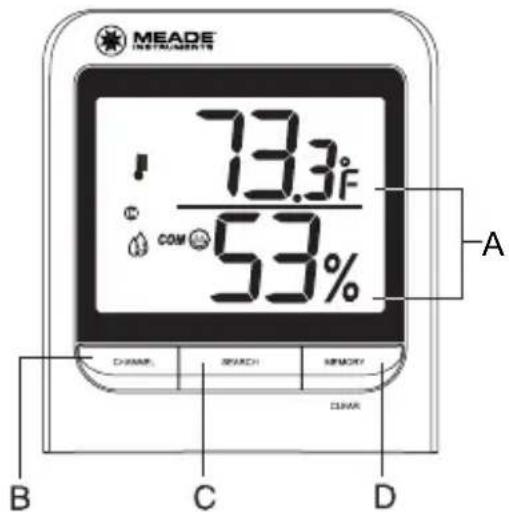
A. TEMPERATURE AND HUMIDITY INFORMATION IN A TWO LINE LCD DISPLAY
B. CHANNEL BUTTON
- Selects the desired remote channel or indoor readings
C. SEARCH BUTTON
- Enables remote sensors signal search
D. MEMORY BUTTON
- Toggles between current, minimum and maximum readings of the indoor and remote temperature and humidity
- Clears the maximum and minimum memory of registered temperature and humidity
REAR VIEW
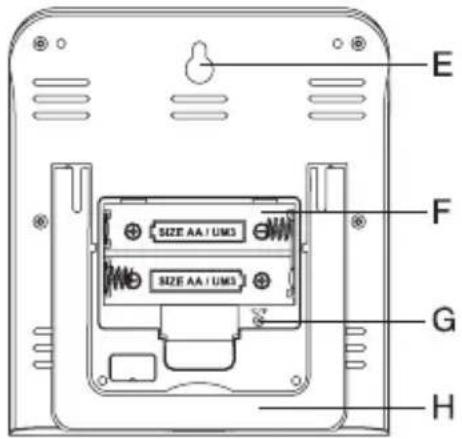
E. WALL-MOUNT RECESSED HOLE
- Keeps the main unit on the wall
F. BATTERY COMPARTMENT
• Accommodates 2 (two) AA 1.5V alkaline batteries (User supplied).
G. °C/°F SWITCH (located inside the battery compartment)
- Selects temperature display in Celsius or Fahrenheit
H. UNFOLDING TABLE STAND
• Supports the main unit on the flat surface
REMOTE SENSOR
FEATURES
- Remote temperature and humidity transmission to the main unit via 433 MHz signal
• 100 feet (30 meters) transmission range without interference
• LCD display of measured temperature and humidity
• Three (3) channels selection - Selection of the temperature display in Celsius or Fahrenheit
- Case can be wall mounted using built-in hanger
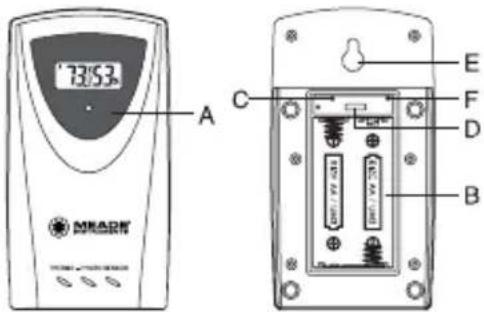
A. LED INDICATOR
- Flashes once when the remote sensor transmits a reading to the main unit.
- Flashes twice when battery power is low.
B. BATTERY COMPARTMENT
- Holds two AA-size batteries (User supplied).
C. RESET
- Resets all readings
D. CHANNEL SWITCH
- Selects the desired channel
E. WALL-MOUNT RECESSED HOLE
- Keeps the remote sensor on the wall
F. °C/ °F SELECTOR
- Selects the temperature display in Celsius or Fahrenheit
BEFORE YOU BEGIN
- The remote sensor can be placed indoors or outdoors; the main unit must be placed indoors.
- We recommend using alkaline batteries for the remote sensor and main unit when temperatures are above 32°F (0°C) . We recommend using AA lithium batteries for the remote sensor when temperatures are below 32°F (0°C) .
- Avoid using rechargeable batteries. (Rechargeable batteries cannot maintain correct power requirements).
- Insert batteries before first use, matching the polarity in the battery compartment.
- ALWAYS install batteries in the remote sensor before the main unit.
- Press RESET after each battery change with a paper clip or similar tool.
- During an initial setup, place the main unit as close as possible to the remote sensor.
- After reception is established (the remote temperature will appear on the main unit's display), position the remote sensor and the main unit within the effective transmission range of 100 feet (30 meters).
NOTE:
- Avoid pressing any buttons on the main unit before the remote temperature is displayed for about 2 minutes.
- The effective operating range may be influenced by the surrounding building materials and how the receiver and transmitter are positioned.
- Place the remote sensor so that it faces the main unit (receiver), minimizing obstructions such as doors, walls, and furniture.
- Though the remote sensors are weather-resistant, they should be placed away from direct sunlight, rain or snow.
NOTE:
When the temperature falls below freezing, the batteries in the outdoor remote sensor may have reduced voltage supply and a shorter effective range. We recommend using lithium batteries at temperatures of 32° F ( 0° C) and below.
BATTERY INSTALLATION REMOTE SENSOR
NOTE: Install the batteries; select the channel and temperature in C° or F° before mounting the remote sensor.
- Remove the screws from the battery compartment with a small Phillips screwdriver.
- Set the channel. The switch is located in the battery compartment. Channel 1 is typically selected if only one remote sensor is being used.
• Install 2 “AA” size alkaline batteries (not included) matching the polarities shown in the battery compartment. - Replace the battery compartment door and secure the screws.
- Secure the remote sensor in the desired location.
MAIN UNIT
- Open the battery compartment door.
- Install 2 batteries (UM-3 or "AA" size 1.5V) matching the polarity as shown in the battery compartment.
- Replace the battery compartment door.
LOW BATTERY WARNING
A low-battery indicator [◆◆] will appear on the indoor or remote temperature and humidity reading line of the main unit warning that the corresponding batteries need replacement.
GETTING STARTED
After batteries are installed; remote sensor will transmit temperature readings at 45 second intervals. The main unit may take up to two minutes to receive the initial readings. Upon successful reception, remote temperature will appear on the larger section of the main unit's display (the default remote channel is channel one). The main unit will automatically update readings at 45-second intervals.
If no signal is received from the remote sensor within two minutes, dashes [- - - ] will be displayed. Press and hold the SEARCH button on the main unit for two seconds to initiate another signal search.
CHECKING REMOTE AND INDOOR TEMPERATURE AND HUMIDITY
The default display shows the indoor temperature and humidity information (temperature is on the top, and humidity is on the bottom line). The IN icon indicates that the unit is displaying the indoor readings.
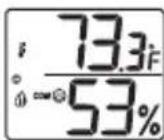
The remote temperature and humidity for channel one, two and three can be recalled by pressing CHANNEL button.
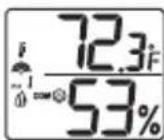
The wave icon is located above the remote channel number and indicates the reception status from the remote sensor.
The following three types of reception status may be displayed:
| The Unit is in searching mode |  |
| Temperature readings are securely registered |  |
| No signals. |  |
NOTE: If the indoor or remote temperature and/or humidity goes above or below operating range stated in specifications, the main unit's display will show dashes "..."
COMFORT LEVEL INDICATORS
The Wireless Thermo-Hygrometer is capable of detecting and displaying the present comfort levels for the surrounding environment. The environmental comfort level is detected, interpreted and displayed on the main unit's display based on the combination of the current indoor and remote temperature and humidity readings. The four following comfort levels may be shown:
(comfort), (wet), (dry) and No Indicator.
| Indicator displays | Temperature Range | Humidity Range | Shows current condition |
 | 20°C to 25°C (68°F to 77°F) | 40%RH-70%RH | Ideal range for both relative humidity and temperature |
 | -5°C + 50°C (23°F - 122°F) | OVER 70%RH | Contains excess moisture |
 | -5°C + 50°C (23°F - 122°F) | Below 40%RH | Contains inadequate moisture |
| No Indicator | Less than 20°C (68°F) or More than 25°C (77°F) | 40%RH to 70%RH | No comment |
MAXIMUM AND MINIMUM MEMORY
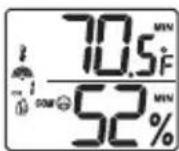
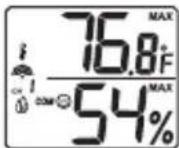
The maximum and minimum record of the indoor and remote temperature and humidity will be automatically stored in the memory of the main unit (receiver).
To display the minimum, maximum or the current reading press the MEMORY button after desired mode (indoor or remote) is selected. If no button is pressed for the next 15 seconds, the unit will return to the current temperature and humidity display for applicable mode. To clear the memory, press and hold the MEMORY button for two seconds and all previously stored readings will be erased.
AUTO-SCANNING
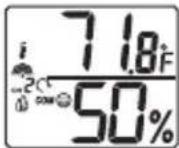
Press and hold the CHANNEL button for 2 seconds – the icon “○” will appear on the main unit display above the COMFORT LEVEL indicator. The indoor temperature and all 3 remote temperatures will be displayed one-by-one automatically for 4 seconds each in the following sequence: Indoor Channel 1, Channel 2 and Channel 3.
To exit from scanning mode, press and hold the CHANNEL button for 2 seconds, and the icon “Q” will disappear, returning the main unit display to the default display mode.
LOST COMMUNICATION
If the main unit display mode for the remote sensor reading shows dashes (- - -), press and hold the SEARCH button for 2 seconds to begin a new signal search (the signal search icon will flash above the remote channel number).
If the signal isn't received within two minutes, please make sure that:
• The remote sensor is in its proper location.
- The distance between main unit and remote sensor is not over 100 feet (30 meters).
- The path between units is clear of obstacles. Shorten the distance if necessary.
- Fresh batteries are installed correctly in both remote sensor and main unit.
- Batteries were inserted into the remote unit first and the main unit next.
If there is still no communication, please perform the following steps:
- Bring the main unit and remote sensor close together.
- Remove the four (4) small screws from the back of the remote sensor with a small Phillips screwdriver and open the battery compartment.
- Remove the batteries from the battery compartment and reinstall them in the same manner. Remote sensor LED indicator will flash showing transmission of the signal.
- Remove the batteries from the main unit and reinstall them in the same manner.
- The remote temperature appeared on the main unit's display will show that transmission is being received successfully.
TRANSMISSION INTERFERENCE
Signals from other household devices such as wireless doorbells, home security systems, and entry control may interfere with this product or cause temporary reception interruption. This is normal and will not affect the general performance of the product. The transmission and reception of the temperature readings will resume once the interference subsides.
PRECAUTIONS
This product is engineered to give you years of satisfactory service if handled carefully. Here are a few precautions:
- Do not immerse the units in water.
- Do not clean the units with abrasive or corrosive materials. They may scratch the plastic parts and corrode the electronic circuits.
- Do not subject the product to excessive force, shock, dust, temperature, or humidity, which may result in malfunctions, shorter lifespan, damaged batteries, and damaged parts.
- Do not tamper with the units internal components. Doing so will invalidate the warranty and may cause damage. These units contain no user-serviceable parts.
- Use only fresh batteries. Do not mix new and old batteries.
- Read the user's manual thoroughly before operating the units.
SPECIFICATIONS
Main Unit
Indoor Temperature
Optimal operating range:
-5.0°C to +50.0°C/23.0°F to 122.0°F
Temperature resolution: 0.1°C/0.2°F
User-selectable (F° or C°) temperature display
Indoor Humidity
Optimal operating range: 20% to 95%
Humidity resolution: 1%
Comfort Level Indicator – Comfort, Wet and Dry
Maximum number of remote sensors: 3 (one included)
Low battery indicator
Wall Mount or Desktop option
Remote Sensor
Remote Temperature
Optimal operating range with alkaline batteries:
-20.0°C to +70.0°C/-4.0°F to +158°F
Optimal operating range with lithium batteries:
-38.8°C to +70.0°C/-38.0°F to +158°F
Temperature resolution: 0.1°C/0.2°F
Remote Humidity
Optimal operating range: 20% to 95%
Humidity resolution: 1%
Low battery indicator
RF Transmission Frequency: 433 MHz
RF transmission range: Maximum 100 feet (30 meters)
Temperature transmission cycle: approximately 45 seconds
Power
Main unit: 2 AA size 1.5V batteries (not included)
Remote Sensor: 2 AA size 1.5V batteries
(not included)
Dimensions
Main unit: 4.33(L) x 4.86(H) x 1.08(D) inches
Remote sensor: 2.37(L) x 4(H) x 1(D) inch
FCC STATEMENT
This device complies with Part 15 of the FCC Rules. Operation is subject to the following two conditions: (1) This device may not cause harmful interference, and (2) This device must accept any interference received, including interference that may cause undesired operation.
Warning: Changes or modifications to this unit not expressly approved by the party responsible for compliance could void the user's authority to operate the equipment.
NOTE: This equipment has been tested and found to comply with the limits for a Class B digital device, pursuant to Part 15 of the FCC Rules. These limits are designed to provide reasonable protection against harmful interference in a residential installation. This equipment generates, uses and can radiate radio frequency energy and, if not installed and used in accordance with the instructions, may cause harmful interference to radio communications.
However, there is no guarantee that interference will not occur in a particular installation. If this equipment does cause harmful interference to radio or television reception, which can be determined by turning the equipment off and on, the user is encouraged to try to correct the interference by one or more of the following measures:
□ Reorient or relocate the receiving antenna.
☐ Increase the separation between the equipment and receiver.
□ Connect the equipment into an outlet on a circuit different from that to which the receiver is connected.
□ Consult the dealer or an experienced radio/TV technician for help.
DECLARATION OF CONFORMITY
We
Name: Meade Instruments Corp.
Address: 27 Hubble, Irvine, CA 92618
Telephone No.: 1-949-451-1450
declare that the product
Product No.: TM005X-M
Product Name: Wireless Thermo-Hygrometer
Manufacturer: Hideki Electronics Ltd.
Address: Unit 2304-06, 23/F Riley House, 88 Lei Muk Road, Kwai Chung, New Territories, Hong Kong is in conformity with Part 15 of the FCC Rules.
Operation is subject to the following two conditions: This device may not cause harmful interference.
This device must accept any interference received, including interference that may cause undesired operation.
The information above is not to be used as a contact for support or sales. Please call our customer service (refer to the Standard Warranty Information) for all injuries instead.
Battery Safety Information
• Always purchase the correct size (4 x 1.5V AA, 15A/15AC ANSI, LR6 IEC), (2 x ANSI/NEDA-5004LC, IEC-CR2032) and grade of battery most suitable for the intended use.
- Replace all batteries of a set at the same time.
- Clean the battery contacts and also those of the device prior to battery installation.
- Ensure the batteries are installed correctly with regard to polarity (+ and -).
- Remove the batteries from any weather station which is not to be used for an extended period of time.
- Remove used batteries promptly.
- Do not mix old batteries with new batteries.
- Do not mix alkaline, lithium, standard (Carbon Zinc), or rechargeable (Nickel Cadmium) batteries.
CAUTION:
- If batteries or parts are swallowed, see a doctor immediately.
STANDARD WARRANTY INFORMATION
This product is warranted by Meade Instruments Corp. (MIC) to be free of defects in materials and workmanship for a period of ONE YEAR from date of original retail purchase in the U.S.A. MIC will repair or replace the product, or part thereof, found upon inspection by MIC to be defective, provided the defective part or product is returned to MIC, freight prepaid, with proof of purchase. This warranty applies to the original purchaser only and is non-transferable. Meade products purchased outside North America are not included in this warranty.
RGA Number Required: Prior to the return of any product or part, a Return Goods Authorization (RGA) number must be obtained by writing to Meade's Customer Service Department or by calling 800-626-3233. Each returned part or product must include a written statement detailing the nature of the claimed defect, as well as the owner's name, address, phone number, and a copy of the original sales invoice. This warranty is not valid in cases where the product has been abused or mishandled, where unauthorized repairs have been attempted or performed, or where depreciation of the product is due to normal wear-and-tear. MIC specifically disclaims special, indirect, or consequential damages or lost profits, which may result from a breach of this warranty. Any implied warranties which cannot be disclaimed are
hereby limited to a term of one year from the date of purchase by the original retail purchaser. This warranty gives you specific rights. You may have other rights which vary from state to state.
MIC reserves the right to change product specifications or to discontinue products without prior notice.
This warranty supersedes all previous Meade product warranties.

- INTRODUCTION
- PRODUCT OVERVIEW
- MAIN UNIT
- FEATURES
- FRONT VIEW
- CHANNEL BUTTON
- SEARCH BUTTON
- MEMORY BUTTON
- WALL-MOUNT RECESSED HOLE
- BATTERY COMPARTMENT
- °C/°F SWITCH (LOCATED INSIDE THE BATTERY COMPARTMENT)
- UNFOLDING TABLE STAND
- REMOTE SENSOR
- LED INDICATOR
- RESET
- CHANNEL SWITCH
- °C/ °F SELECTOR
- BEFORE YOU BEGIN
- NOTE
- BATTERY INSTALLATION REMOTE SENSOR
- LOW BATTERY WARNING
- GETTING STARTED
- CHECKING REMOTE AND INDOOR TEMPERATURE AND HUMIDITY
- COMFORT LEVEL INDICATORS
- MAXIMUM AND MINIMUM MEMORY
- AUTO-SCANNING
- LOST COMMUNICATION
- TRANSMISSION INTERFERENCE
- PRECAUTIONS
- SPECIFICATIONS
- POWER
- DIMENSIONS
- FCC STATEMENT
- DECLARATION OF CONFORMITY
- BATTERY SAFETY INFORMATION
- CAUTION
- STANDARD WARRANTY INFORMATION
Brand : MEADE
Model : TM005X-M
Category : Weather Station