
Dual Charge Station - Uncategorized Hori - Free user manual and instructions
Find the device manual for free Dual Charge Station Hori in PDF.


| Product Type | Dual Charging Station for Xbox Wireless Controllers |
| Brand | Hori |
| Model | Dual Charge Station |
| Compatibility | Xbox Series X|S, Xbox One, Xbox Elite Wireless Controller |
| Charging Station Dimensions | 58 × 198 × 38 mm |
| Charging Station Weight | 120 g |
| Cable Length | 0.6 m |
| Battery Pack Dimensions | 30 × 51 × 19 mm |
| Battery Pack Weight | 48 g |
| Charging Time | Approximately 3 hours for 1 battery pack, 6 hours for 2 |
| Battery Life | Approximately 20 hours per charge |
| Charging Method | USB connection to Xbox console or USB port |
| LED Indicators | Orange (charging), Green (fully charged), Red (battery low ≤10%) |
| Included Items | Charging station, 2 battery packs, 4 battery covers (2 for Xbox Series X|S, 2 for Xbox One/Elite) |
| Protection Circuit | Built-in; orange LED blinks when activated |
| Power Source | USB (5V) |
| Certifications | FCC Part 15 Class B |
| Warranty | 90 days (US), 30 days via retailer then contact HORI (EU) |
| Cleaning | Soft dry cloth only; no chemicals |
Frequently Asked Questions - Dual Charge Station Hori
User questions about Dual Charge Station Hori
0 question about this device. Answer the ones you know or ask your own.
Ask a new question about this device
Download the instructions for your Uncategorized in PDF format for free! Find your manual Dual Charge Station - Hori and take your electronic device back in hand. On this page are published all the documents necessary for the use of your device. Dual Charge Station by Hori.
USER MANUAL Dual Charge Station Hori
Thank you for purchasing this product. Before using this product please read the instructions carefully. After reading the instruction manual, please keep it for reference.
Caution

Caution
Parents/Guardians: Please read the following information carefully.
- This product contains small parts. Keep away from children under 3 years old.
- Keep this product away from small children or infants. Seek medical attention immediately if any small parts are swallowed.
- Discontinue use if you notice unusual heat, smoke, noise, or smell coming off of the product.
- Do not cover product with cloth. Doing so may cause overheating.
- Do not put water or foreign substances inside this product. Doing so may cause fire, electric shock, or malfunction.
- Please check that the connectors are clean before use. If the product needs cleaning, use a soft dry cloth only.
- Do not use this product when there is a risk of lightning storm to avoid fire, electric shock, or malfunction.
- Please disconnect after use or before maintenance to avoid fire or electric shock.
- Do not twist or bundle the cables.
- Do not get this product wet. This may cause an electric shock or malfunction.
- Do not modify or damage the cables as this may cause a fire or electric shock.
- Do not place anything on top of this product.
- Long cord. Strangulation hazard.
- Do not place on unstable surface.
- Keep this product away from dusty or humid areas.
- Do not apply strong impact or weight on the product.
- Do not pull roughly or bend the cable of the product.
- Do not disassemble, modify or attempt to repair this product.
- Do not use the USB plug when it's covered with dust.
- Do not place this product near heat sources or leave under direct sunlight for an extended period. Overheating may cause malfunction.
- If product needs cleaning, use only a soft dry cloth. Do not use any chemical agents like benzene or thinner.
- Do not use this product for anything other than its intended purpose. We are not responsible for any accidents or damages in the event of use other than the intended purpose.
Battery Precautions
- If batteries leak, do not touch the acid with your bare hands.
- Do not disassemble, heat, modify, change, or put batteries in fire or water. Damage or leakage of liquid may cause injury or burns.
- This device may stop functioning or lose range when the battery is depleted.
- The charge and discharge life of the internal battery of this product is approx. 500 times. Battery life depends on storage method, usage, environment, etc.
- If a fully charged battery's use time is significantly decreased, the battery life may be deteriorated.
- Be sure to recharge at least once a year to maintain function even when not used for a long time.
About the Protection Circuit
This product includes a built-in protection circuit. When the protection circuit activates, an orange LED will blink and stop the product from charging. When the product is at this state unplug it and inspect to see if it is damaged or overheating. If you cannot determine the issue, please stop using the product and contact HORI customer support.
Included
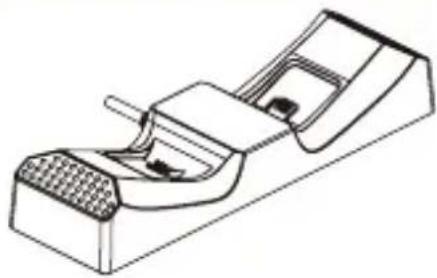
natural_image
Technical line drawing of a mechanical component with textured base and internal structure (no text or symbols)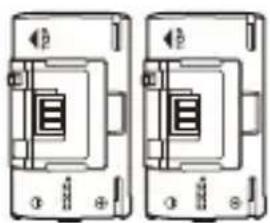
natural_image
Two identical electrical circuit diagrams showing a two-port switch or relay device with no text or symbols.Battery Pack × 2 Charging Station
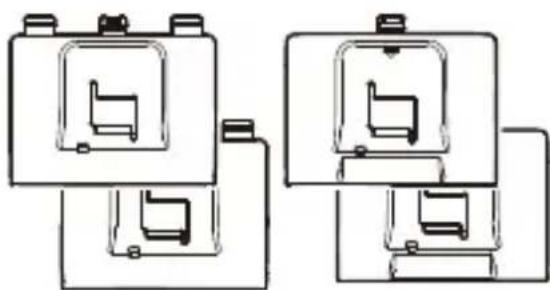
natural_image
Pure mechanical component diagrams without any text, numbers, or symbolsBattery Cover × 4 (For Xbox Series X|S controller × 2 / For Xbox One or Xbox Elite Wireless controller × 2)
Platform
Wireless Controller
(Xbox Series X|S / Xbox One / Xbox Elite Wireless Controller)
This product is designed for the Xbox Series X|S, but it can also be used with the Xbox One and Xbox Elite Wireless Controller by following the instructions in this manual.
How to Use
How to connect the Charging Station
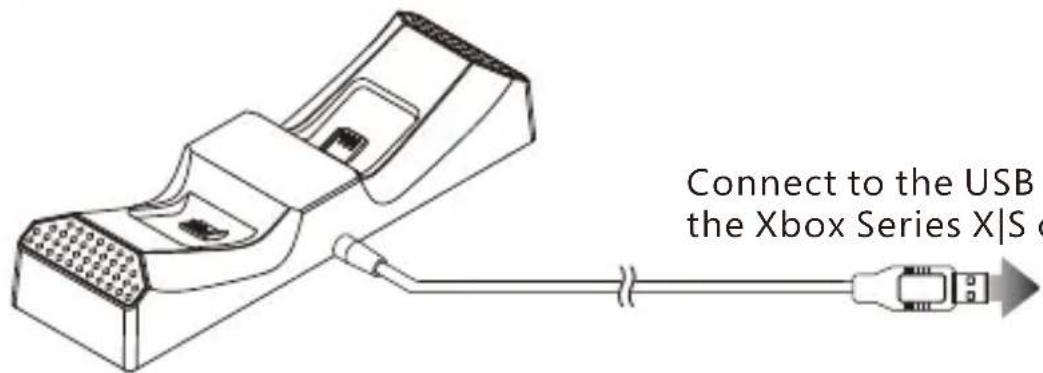
text_image
Connect to the USB the Xbox Series X|S cConnect to the USB port of the Xbox Series X|S console.
How to charge controllers
text_image
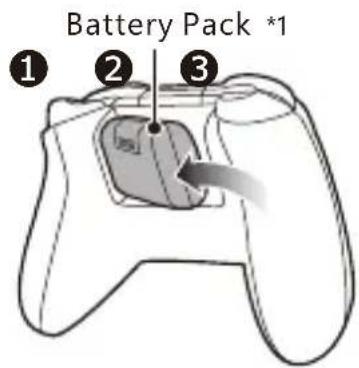
Battery Pack *1 ① ② ③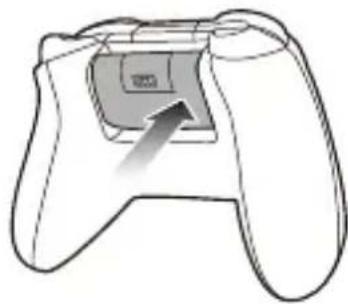
natural_image
Line drawing of a game controller with an arrow pointing to the pad area (no text or symbols)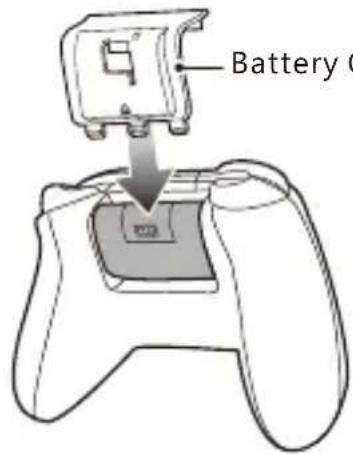
text_image
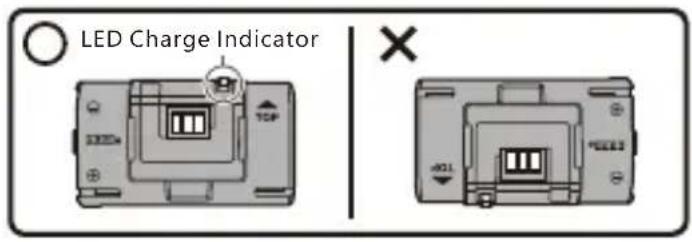
Battery C*1 Properly insert the battery pack aligned correctly. If it is inserted incorrectly, the battery will not charge and may cause malfunction.
*2 Please use the correct battery cover for the Xbox Series X|S, Xbox One, or Xbox Elite Wireless controller.
text_image
LED Charge Indicator X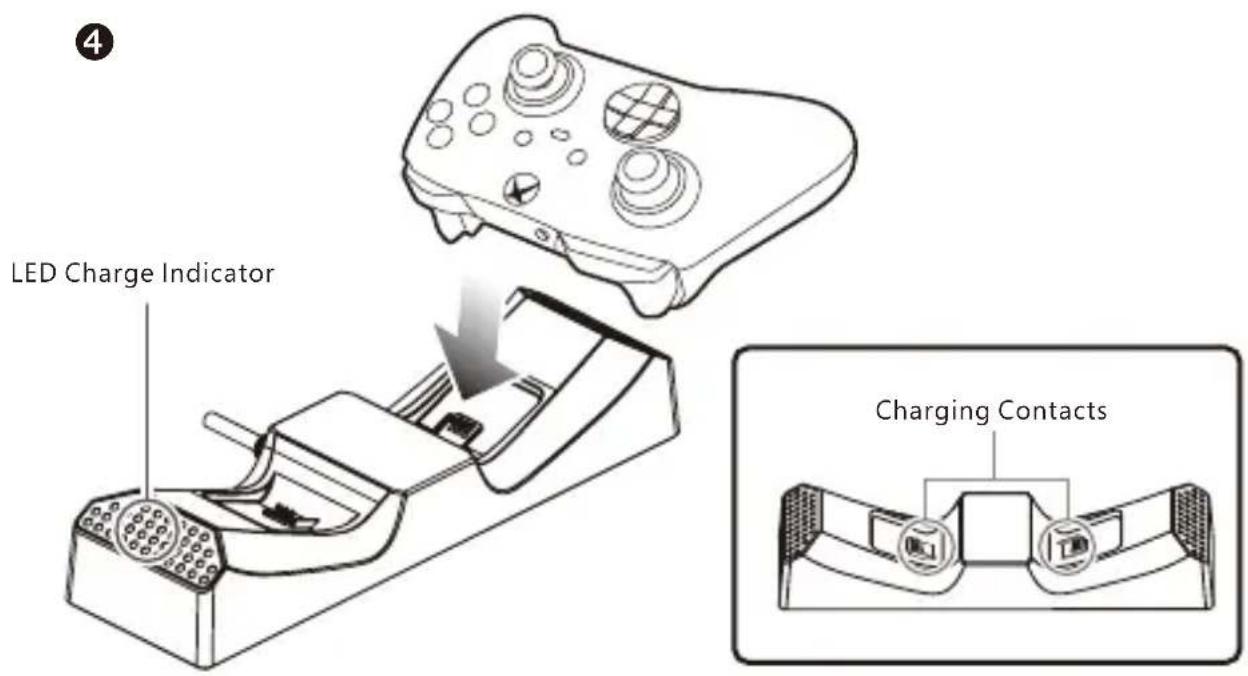
text_image
LED Charge Indicator Charging ContactsHow to charge the Battery Pack
1
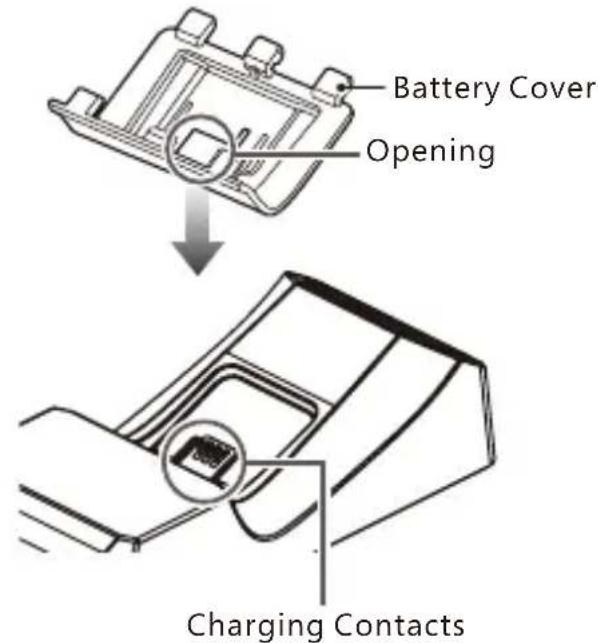
text_image
Battery Cover Opening Charging Contacts2
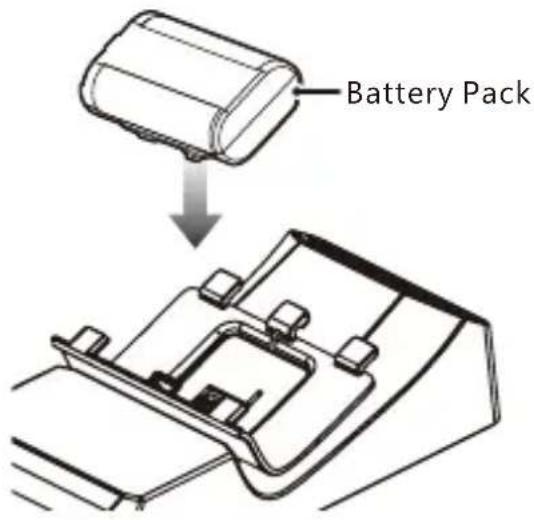
text_image
Battery PackChecking the Charging Status
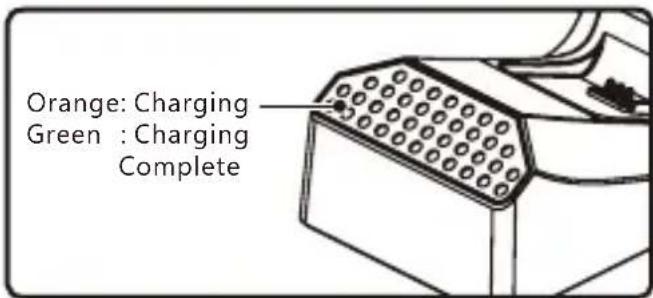
text_image
Orange: Charging Green : Charging CompleteThe LED Charge Indicator on the Charging Station displays the charging status.
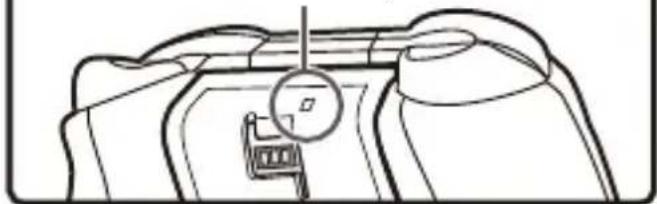
The LED Charge Indicator on the battery pack will turn red when the battery life is 10% or less.
natural_image
Line drawing of a mechanical component with a circular dial and a chair, no text or symbols presentMain Features
Charging Station
External Dimensions: 58×198×38mm
Weight: 120g
Cable Length: 0.6m
Battery Pack
External Dimensions: 30×51×19mm
Weight: 48g
Charging Time: 3 hours (For 2 controllers: 6 hours)
Battery Life: 20 hours
* Charging time is approximate. Charging time varies.
THE FCC WANTS YOU TO KNOW
This device complies with part 15 of the FCC Rules. Operation is subject to the following two conditions: (1) This device may not cause harmful interference, and (2) this device must accept any interference received, including interference that may cause undesired operation.
NOTE: This equipment has been tested and found to comply with the limits for a Class B digital device, pursuant to part 15 of the FCC Rules. These limits are designed to provide reasonable protection against harmful interference in a residential installation. This equipment generates, uses and can radiate radio frequency energy and, if not installed and used in accordance with the instructions, may cause harmful interference to radio communications. However, there is no guarantee that interference will not occur in a particular installation. If this equipment does cause harmful interference to radio or television reception, which can be determined by turning the equipment off and on, the user is encouraged to try to correct the interference by one or more of the following measures:
- Reorient or relocate the receiving antenna.
- Increase the separation between the equipment and receiver.
- Connect the equipment into an outlet on a circuit different from that to which the receiver is connected.
- Consult the dealer or an experienced radio/TV technician for help.
The normal function of the product may be disturbed by strong electro-magnetic interference. If so, simply reset the product to resume normal operation by following the instruction manual (How to connect). In case the function does not resume, please relocate to an area which does not have electro-magnetic interference to use the product.
The wires are not to be inserted into socket-outlets.
The packaging must be retained since it contains important information.
PRODUCT DISPOSAL INFORMATION
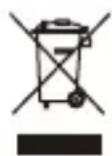
Where you see this symbol on any of our electrical products or packaging, it indicates that the relevant electrical product or battery should not be disposed of as general household waste in Europe. To ensure the correct waste treatment of the product and battery, please dispose of them in accordance with any applicable local laws or requirements for disposal of electrical equipment or batteries. In so doing, you will help to conserve natural resources and improve standards of environmental protection in treatment and disposal of electrical waste. Applicable to EU countries and Turkey only.
EU and Turkey only
US
Warranty
HORI warrants to the original purchaser that the product purchased new in its original packaging shall be free of any defects in material and workmanship for a period of 90 days from the original date of purchase. If the warranty claim cannot be processed through the original retailer please contact HORI customer support directly at infous@hori.jp. Please visit http://stores.horiusa.com/policies/ for warranty details.
EU
Warranty
For all warranty claims made within the first 30 days after purchase, please check with the retailer where the original purchase was made for details. If the warranty claim cannot be processed through the original retailer or for any other inquiries pertaining to our products, please contact HORI customer support directly at infoeu@hori.jp.
- The image on the package may differ from the actual product.
- The manufacturer reserves the right to change the product design or specifications without notice.
- Microsoft, Xbox, Xbox "Sphere" Design, Xbox Series X|S, Xbox One are trademarks of the Microsoft group of companies.
- HORI & HORI logo are registered trademarks of HORI.
MADE IN CHINA