
TotalClean AP-DT10-SA - Air purifier HOMEDICS - Free user manual and instructions
Find the device manual for free TotalClean AP-DT10-SA HOMEDICS in PDF.


| Product Type | Air Purifier |
| Brand | Homedics |
| Model | TotalClean AP-DT10-SA |
| Power Supply | Mains |
| Filtration Technology | HEPA filter, activated carbon filter, pre-filter |
| Main Functions | 3 speeds (low, medium, high), ionizer, UV-C technology, timer (4/8/12 h), essential oil tray |
| Effective Area | 55,2 m²/h (595,2 ft²/h) |
| Airflow | 134,1 m³/h (4761,6 ft³/h) |
| Air changes per hour | 1 time per hour for a room of 55,2 m² (height 2,43 m) |
| Filter replacement indicator | Yes, lights up when filter needs to be changed |
| Pre-filter maintenance | Vacuum once a month |
| HEPA filter replacement | Every 12 months (normal use) |
| Replacement filter | AP-T10FL (HoMedics) |
| Essential oil tray | Yes, with 3 pads included (ref. ARM-PAD3) |
| Safety | Ozone production < 0,05 ppm; caution for pets |
| Spare parts available | HEPA filter, oil tray, diffuser pads |
Frequently Asked Questions - TotalClean AP-DT10-SA HOMEDICS
User questions about TotalClean AP-DT10-SA HOMEDICS
0 question about this device. Answer the ones you know or ask your own.
Ask a new question about this device
Download the instructions for your Air purifier in PDF format for free! Find your manual TotalClean AP-DT10-SA - HOMEDICS and take your electronic device back in hand. On this page are published all the documents necessary for the use of your device. TotalClean AP-DT10-SA by HOMEDICS.
USER MANUAL TotalClean AP-DT10-SA HOMEDICS
LEADERS IN HEALTH & WELLBEING

Register your product today at www.homedics.co.uk/product-registration
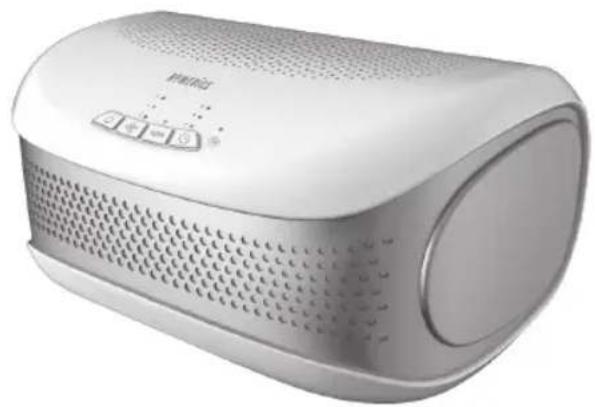
natural_image
White portable electronic device with perforated grille and control buttons (no visible text or symbols)TOTAL CLEAN AIRPURIFIER
instruction manual
3YEARGUARANTEE
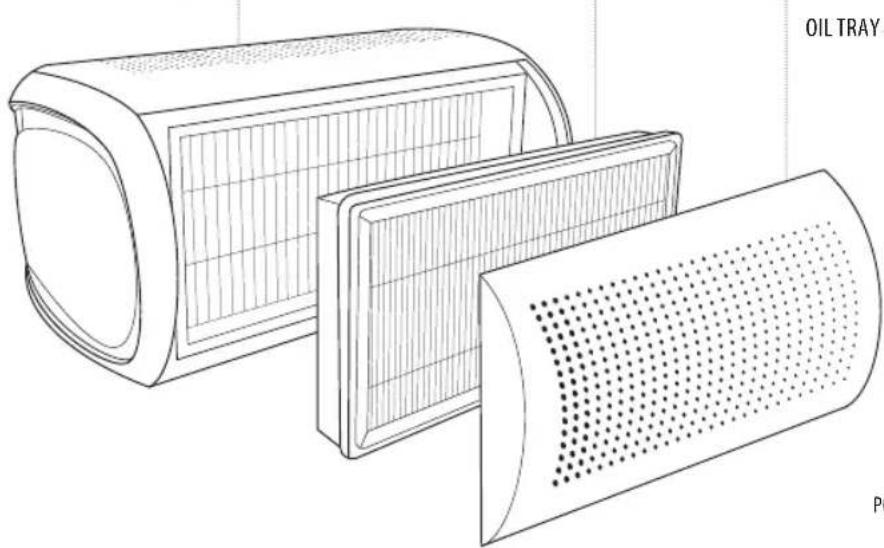
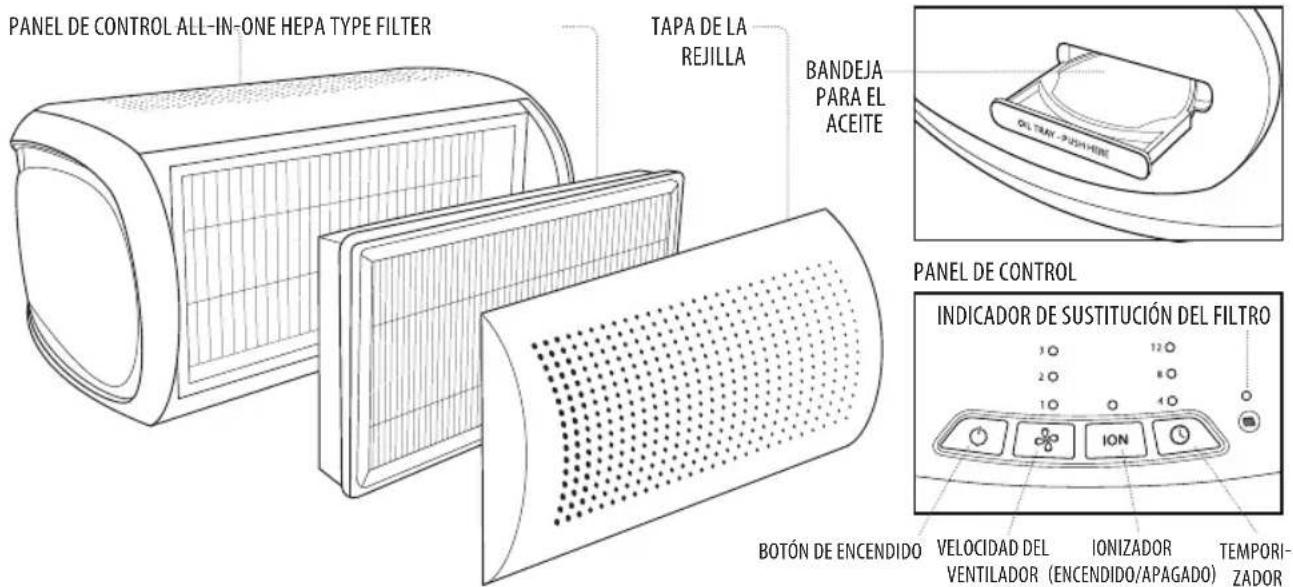
CONTROL PANEL ALL-IN-ONE HEPA TYPE FILTER GRILLE COVER
natural_image
Technical line drawing of a cylindrical oil tray with grid pattern and perforated surface (no text or symbols)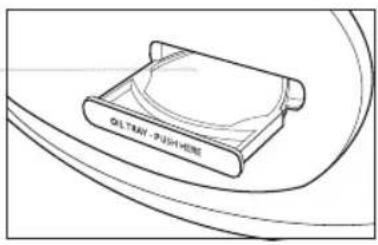
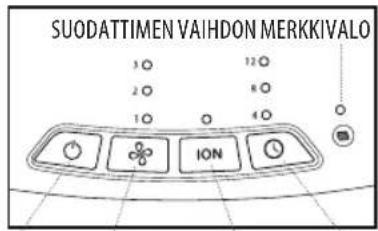
CONTROL PANEL
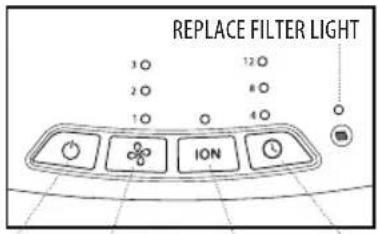
POWER
FAN SPEED
IONISER ON/OFF TIMER
Removes up to 99% of airborne particles as small as 0.3 microns, such as allergens, pollen, dust, germs, pet dander, odour, mould spores, and smoke from air that passes through the filter.
CARBON ODOUR FILTRATION
Reduces household odours and VOCs (volatile organic compounds)/gases as shown by independent laboratory testing.
PRE-FILTER
Captures large particles.
IONISER WITH ON/OFF
When on, the ioniser assists in the air purification process.
3 SPEEDS
Low, medium, and high speeds.
BUILT-IN TIMER
Choose from 4, 8, or 12 hours.
REPLACE FILTER INDICATOR
Illuminates when it is time to replace the filter.
SUGGESTED ROOM SIZE
55.2 M²/H/595.2 FT²/H. Portable air purifiers will be more effective in rooms where all the doors and windows are closed.
AIR CHANGES PER HOUR
This air purifier will purify the air in a 55.2 M ^2 /595.2 FT ^2 room (assuming an 2.43 M/8 FT ceiling) once per hour on high speed in a closed room. The airflow rate is 134.1 M ^3 /H / 4761.6 F ^3 /H
OIL TRAY
Includes 3 essential oil pads. Use with essential oil (not included) to deliver scent into the air.
OPERATING INSTRUCTIONS
BEFORE TURNING THE UNIT ON
• Take the air purifier out of the box and remove the clear protective plastic bag.
- Place the air purifier on a firm, level surface.
- Plug the power cord into a standard AC outlet.
POWER BUTTON AND FAN SPEED SETTINGS
- To turn the air purifier on, press the power button.
- This air purifier has 3 fan speed settings: low (1), medium (2), and high (3). The higher the fan speed setting, the faster the air will be purified. To select or change fan speed, press the fan speed ✿ button until the desired setting is reached.
IONISER SETTING WITH ON/OFF
Ion particles have a positive or negative charge that attach to airborne particles, making them easier to be captured by the filtration system. Press the ioniser ION button to turn the ioniser on. The blue light will glow to indicate the ioniser is in use. Press the ioniser ION button again to turn the ioniser off.
NOTE: Dust particles may accumulate on surfaces around the air purifier when the ioniser is in use. These dust particles can be vacuumed or wiped away with a soft, damp cloth.
NOTE: You may hear occasional popping sounds when the ioniser is used. This is normal.
NOTE: The ioniser produces less ozone than the UL-established limits of 0.05 ppm. Ozone may be harmful around birds and small pets. To prevent ozone buildup, use the ioniser feature in a well-ventilated area.
TIMER
Press the timer ⏻ button until the desired timer setting is lit on the display. The timer ⏻ button will cycle through the following settings: 4 hours, 8 hours, 12 hours, and off. To cancel the timer at any time, press the timer ⏻ button until all timer LEDs are off. The air purifier will run continuously when the timer function is off.
OIL TRAY
Use essential oil (not included) to deliver scent into the air.
NOTE: For use with the included HoMedics essential oil pads only. Do not add essential oils anywhere else in the unit as it may cause damage.
NOTE: Do not leave a filled essential oil pad in the air purifier if it will be out of use for a long period of time.
ARE ESSENTIAL OILS SAFE TO USE AROUND PETS?
We should always exercise caution when using essential oils around our pets. Keep all essential oil and aromatherapy products (like diffusers) out of reach of pets. Keep open bottles away from pets to avoid internal consumption. We do not recommend the topical use of essential oils on pets, as they have a strong sense of smell and cannot get rid of the oil if they don't like it or it is disturbing them. When diffusing essential oils around pets, always diffuse in a well-ventilated area and leave an option for them to remove themselves from the space, such as leaving a door open. Every animal is different, so carefully observe how each animal responds when introducing an essential oil for the first time. If irritation occurs, discontinue the use of the essential oil. We recommend seeking medical attention if ingestion of essential oil occurs.
ADDING ESSENTIAL OILS
This air purifier has been certified by the European Centre for Allergy Research Foundation (ECARF) as an allergy-friendly product. Please note that allergy friendliness is no longer guaranteed if the Essential Oil Scent Tray function is used, since essential oils may lead to allergic reactions.
WARNING: Putting oil anywhere but the oil tray will damage the air purifier.
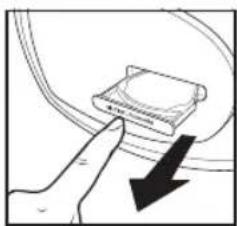
- The oil tray is located on the left side of the air purifier.
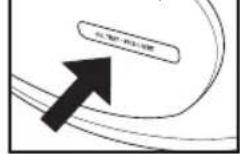
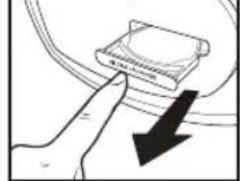
- Push to open and remove the tray.
natural_image
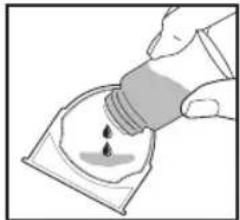
Illustration of a hand pointing at a device with a black arrow indicating downward motion (no text or symbols)- Place 1 aroma pad (3 included) into the oil tray.
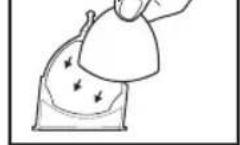
-
Add 5–7 drops of essential oil to the pad. You may use more or less depending on personal preference. On the pad and NOT directly into the tray.
-
Place the oil tray back in its compartment and push to close. The scent will start automatically when the air purifier is turned on.
WARNING: Only place es
FILTER REPLACEMENT
REPLACE FILTER LIGHT
The replace filter light illuminates when it is time to replace the HEPA-type filter based on the air purifier's hours of use.
REPLACING THE HEPA-TYPE FILTER
For optimal performance, replace every 12 months under normal usage conditions. Once the filter has been replaced, press and hold the ioniser ION button for 3 seconds to reset the indicator.
-
Unplug the air purifier. Open the filter grille cover on the back of the unit by pulling the tab located at the bottom of the cover.
-
Pull up until the grille easily slides away from the unit.
-
Pull the tabs to remove the old filter.
-
Install a new genuine HoMedics replacement filter with the white side facing out (tabs will be visible).
-
Align the tab at the top of the grille cover with the top of the unit. Gently push the grille cover until it snaps back into place.
-
Plug the power cord into a standard AC outlet. Press and hold the ioniser the indicator.
ION button for 3 seconds
CLEANING & MAINTENANCE
CLEANING THE HEPA-TYPE FILTER
NOTE: For best performance,
vacuum the HEPA-type filter once a month under normal usage.
- Unplug the air purifier.
- Remove the HEPA-type filter as described in the Replacing
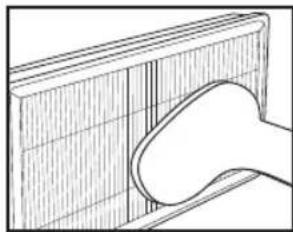
- Vacuum the white side of the HEPA-type filter using the brush attachment of your vacuum cleaner, cleaning it thoroughly.
- Place the HEPA-type filter back into the air purifier and close grille.
- Plug the power cord into a standard AC outlet.
natural_image
Line drawing of a hand holding a curved object against a grid-patterned background (no text or symbols)TO CLEAN THE OIL TRAY
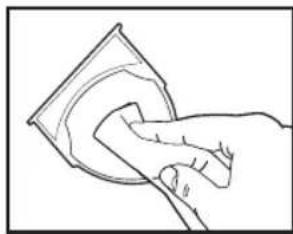
Open the oil tray and remove the pad. Essential oil pads should be changed when switching to a different essential oil scent. If continuing to use the same scent, set the essential oil pad aside for reuse. Wipe down the inside of the
oil tray with a soft cloth. Place the essential oil pad back in the tray and close.
NOTE: Leave the essential oil pad out of the oil tray when storing.
natural_image
Line drawing of a hand cleaning a circular object (no text or symbols)FOR BEST PERFORMANCE
- NEVER use water or any household cleaners or detergents to clean the HEPA-type filter.
- Clean off the outside of the unit with a dry cloth as needed.
- NEVER use water, wax, polish, or any chemical solution to clean the outside of the unit.
- Clean off the grille cover using a damp cloth or the brush attachment of your vacuum as needed.
• Vacuum the pre-filter monthly under normal usage conditions. - Replace the HEPA-type filter every 12 months under normal usage conditions.
• Always use a genuine HoMedics replacement filter for optimal performance.
To purchase genuine HoMedics replacement/spare parts please visit www.homedics.co.uk
3 Pack of aroma pads - ARM-PAD3
Aroma tray - AP-DT10ARMTR
HEPA filter - AP-DT10FL
TROUBLESHOOTING
| PROBLEM POSSIBLE CAUSE SOLUTION | ||
| Unit will not operate · Unit is not plugged inPower button not pressedNo power to unit | Plug unit inPress the power button to turn the power onCheck fuses, try a different outlet | |
| Reduced airflow · The back grille may be blockedPre-filter needs vacuumingThe filter needs to be replaced | Check to make sure nothing is blocking the back grille and air outletVacuum the pre-filter with the brush attachment of your vacuum cleanerReplace the filter | |
| Reduced odour removal · The filter needs to be replaced · Replace the filter | ||
| Excessive noise · The unit is not level · Place the unit on a flat, level surface | ||
| Replace filter light remains lit after filter replacement | · The replace filter indicator needs to be reset | · Press and hold the ioniser button for 3 seconds until the replace filter light turns off |
CARACTÉRISTIQUES DU PRODUIT
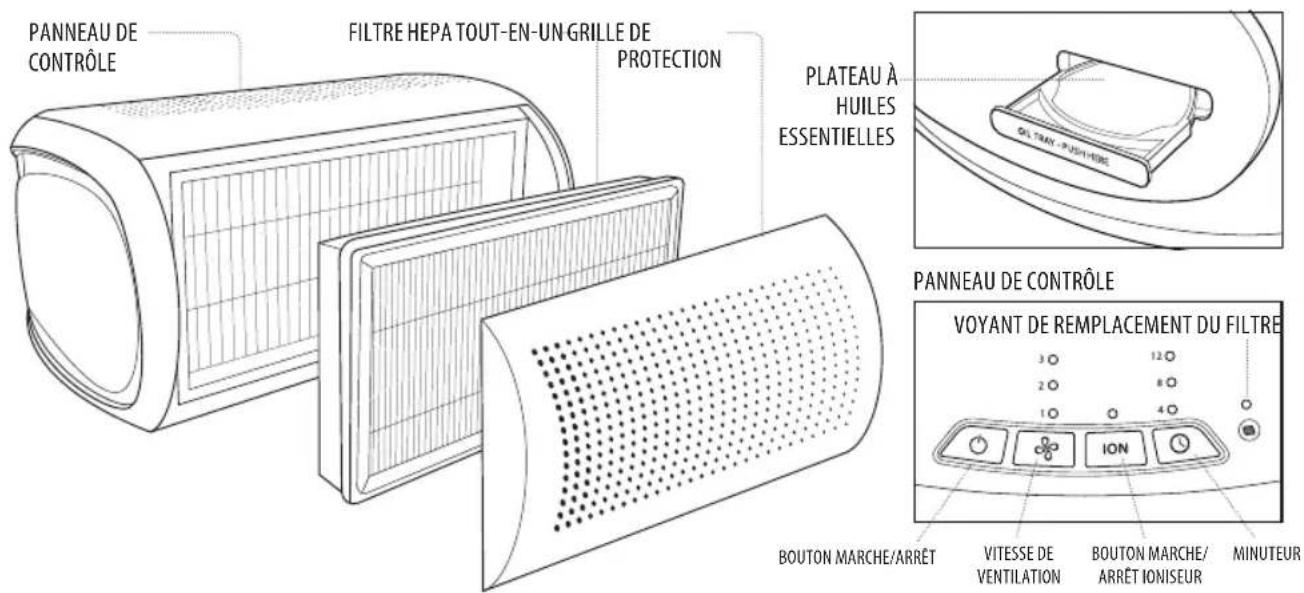
SYSTÈME DE FILTRATION HEPA TOUT-EN-UN
FILTRATION HEPA TOUT-EN-UN
natural_image
Hand pointing at a device component with a black arrow indicating downward motion (no text or symbols)natural_image
Illustration of a hand holding a small object with arrows indicating motion or force (no text or symbols)natural_image
Illustration of a hand pouring liquid into a container with a droplet (no text or symbols)natural_image
Hand holding a small electronic component with an arrow pointing to it (no text or symbols visible)REPLACEMENT DU FILTRE
VOYANT DE REMPLACEMENT DU FILTRE
natural_image
Line drawing of a hand holding a textured object with vertical stripes (no text or symbols)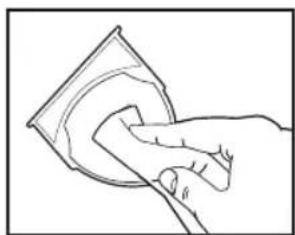
natural_image
Line drawing of a hand cleaning a circular object (no text or symbols)natural_image
Diagram showing a finger pressing a component with a black arrow indicating downward motion (no text or symbols)natural_image
Illustration of a hand holding a small object with arrows indicating motion or force (no text or symbols)natural_image
Illustration of a hand pouring liquid into a container with a droplet (no text or symbols)natural_image
Hand holding a small electronic component with a black arrow pointing to it (no text or symbols visible)natural_image
Diagram of a hand holding a curved object over a grid-patterned panel (no text or symbols)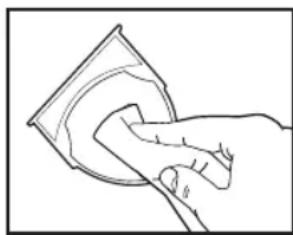
natural_image
Line drawing of a hand cleaning a circular object with a cloth (no text or symbols)FEHLERBEHEBUNG
HEPA-Filter - AP-DT10FL
natural_image
Diagram showing a finger pointing at a device with a downward arrow indicating force or direction (no text or symbols present)natural_image
Illustration of a hand holding a small object with arrows indicating motion or force (no text or symbols)natural_image
Illustration of a hand pouring liquid into a container with a droplet (no text or symbols)natural_image
Hand holding a small electronic component with an arrow pointing to it (no text or symbols visible)natural_image
Line drawing of a hand holding a curved object against a grid-patterned background (no text or symbols)LIMPIEZA DE LA BANDEJA PARA EL ACEITE
natural_image
Line drawing of a hand cleaning a circular object (no text or symbols)natural_image
Diagram showing a finger pointing at a device with a black arrow indicating direction (no text or symbols present)natural_image
Illustration of a hand holding a small object with arrows indicating motion or force (no text or symbols)natural_image
Illustration of a hand pouring liquid into a container with a droplet (no text or symbols)natural_image
Hand holding a small electronic component with a black arrow pointing to it (no text or symbols visible)natural_image
Diagram of a hand holding a curved object against a grid-patterned surface (no text or symbols)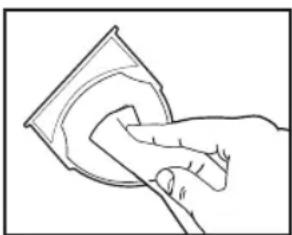
natural_image
Line drawing of a hand cleaning a circular object (no text or symbols)
natural_image
Line drawing of a hand cleaning a circular object (no text or symbols)RICERCA E RISOLUZIONE DEI PROBLEMI
natural_image
Illustration of a hand pouring liquid into a container with a droplet (no text or symbols)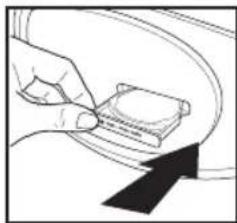
natural_image
Hand pressing a button on a car wheel (no text or symbols visible)natural_image
Line drawing of a hand holding a curved object against a grid-patterned background (no text or symbols)DE OLIETRAY REINIGEN
natural_image
Line drawing of a hand cleaning a circular object (no text or symbols)VOOR DE BESTE PRESTATIE
HEPA-filter - AP-DT10FL
PROBLEMEN OPLOSSEN
natural_image
Illustration of a finger pressing a device on a curved surface with a downward arrow (no text or symbols)natural_image
Illustration of a hand holding a small object with arrows indicating motion or force (no text or symbols)natural_image
Illustration of a hand pouring liquid into a container with a droplet (no text or symbols)natural_image
Hand holding a small electronic component with a curved arrow pointing to it (no text or symbols visible)natural_image
Line drawing of a hand holding a curved object against a grid-patterned background (no text or symbols)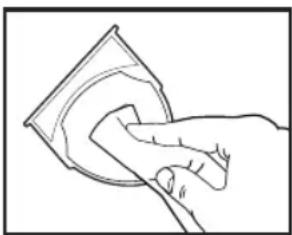
natural_image
Line drawing of a hand cleaning a circular object with a cloth (no text or symbols)WSKAZÓWKI ZAPEWNIAJĄCE NAJLEPSZE DZIAŁANIE
natural_image
Hand pointing at a device component with a black arrow indicating downward motion (no text or symbols)natural_image
Illustration of a hand holding a small object with arrows indicating motion or force (no text or symbols)natural_image
Illustration of a hand pouring liquid into a container with a droplet (no text or symbols)natural_image
Hand holding a small electronic component with an arrow pointing to it (no text or symbols visible)natural_image
Line drawing of a hand holding a sheet of paper with visible grid lines (no text or symbols)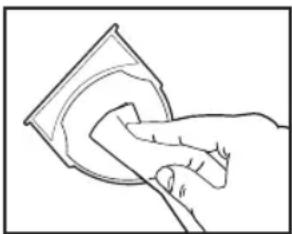
natural_image
Line drawing of a hand cleaning a circular object (no text or symbols)ŘEŠENÍ POTÍŽÍ
natural_image
Hand pointing at a device with a black arrow indicating downward motion (no text or symbols)natural_image
Illustration of a hand holding a small object with arrows indicating movement or force (no text or symbols)natural_image
Illustration of a hand pouring liquid into a container with a droplet (no text or symbols)natural_image
Hand holding a small electronic component with an arrow pointing to it (no text or symbols visible)natural_image
Line drawing of a hand holding a tool near a grid-patterned panel (no text or symbols)natural_image
Line drawing of a hand cleaning a circular object with a cloth (no text or symbols)natural_image
Technical line drawing of a cylindrical device with grid pattern and perforated surface (no text or symbols)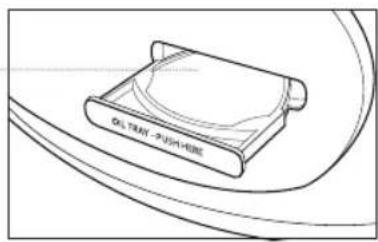
KONTROLLPANEL
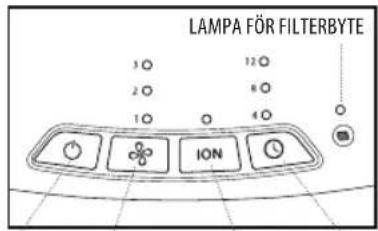
AV/PÅ FLÄKTHASTIGHET JONISERARE PÅ/AV TIMER
ALLT-I-ETT-FILTRERINGSSYSTEM AV HEPA-TYP
FILTRERING AV HEPA-TYP
natural_image
Hand pointing at a device with a black downward arrow indicating compression or disassembly (no text or symbols present)natural_image
Illustration of a hand holding a bag with arrows indicating force or movement (no text or symbols)natural_image
Illustration of a hand pouring liquid into a container with a droplet (no text or symbols)natural_image
Hand holding a small electronic component with an arrow pointing to it (no text or symbols visible)natural_image
Line drawing of a hand holding a curved object against a grid-patterned background (no text or symbols)3-pack aromkuddar - ARM-PAD3
Aromfack - AP-DT10ARMTR
HEPA-filter - AP-DT10FL
FELSÖKNING
KONTROLLPANEL
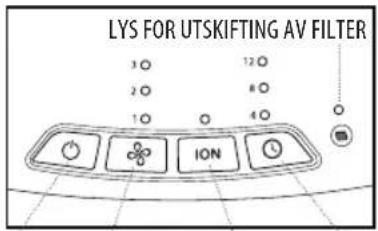
STR∅M
VIFTEHAS-
TIGHET
IONISERER
AV/PÅ
TIDSBRYTER
ALT-I-ETT HEPA-TYPE-FILTRERINGSSYSTEM
HEPA-TYPE-FILTRERING
F∅R APPARATET SLÅS PÅ
- Ta luftrenseren ut av esken og fjern den gjennomsiktige, beskyttende plastposen.
- Plasser luftrenser på en fast, jevn overflate.
- Koble strømledningen til en standard stikkontakt.
STR∅MKNAPP OG INNSTILLINGER FOR VIFTEHASTIGHET
IONISERER-INNSTILLING MED AV-PÅ-FUNKSJON
- Oljebeholderen er plassert på venstre side av luftrenseren.
natural_image
Diagram showing a finger pressing a component with a downward arrow indicating force or direction (no text or symbols)natural_image
Illustration of a hand holding a small object with arrows pointing to it, no text or symbols present- Plasser én aromapute (tre er inkludert) i oljebeholderen.
natural_image
Illustration of a hand pouring liquid into a container with a droplet (no text or symbols)natural_image
Hand holding a small electronic component with a curved arrow pointing to it (no text or symbols visible)natural_image
Line drawing of a hand holding a textured object over a grid-patterned surface (no text or symbols)SLIK RENGJ∅R DU OLJEBEHOLDEREN
natural_image
Line drawing of a hand cleaning a circular object with a cloth (no text or symbols)FOR BEST YTELSE
HEPA-filter - AP-DT10FL
FEILS∅KINGSVEILEDNING
natural_image
Technical line drawing of a cylindrical device with grid pattern and perforated panel, labeled 'ÖLJY LOKERO' (no other text or symbols)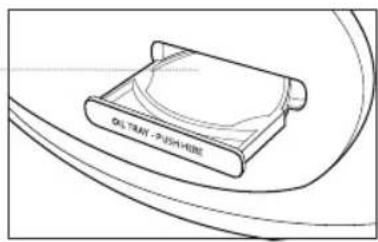
OHJAUSPANEELI
VIRTA TUULETTIMEN IONISAATTORI AJASTIN KIERROSNOPEUS PÄÄLLE/POIS
ALL-IN-ONE-HEPA-SUODATUSJÄRJESTELMÄ HEPA-SUODATUS
natural_image
Diagram showing a finger pressing a component with a black arrow indicating downward motion (no text or symbols)natural_image
Illustration of a hand holding a small object with arrows indicating motion or force (no text or symbols)natural_image
Illustration of a hand pouring liquid into a container with a droplet (no text or symbols)natural_image
Hand holding a small electronic component with a black arrow pointing to it (no text or symbols visible)natural_image
Diagram of a hand holding a curved object against a grid-patterned surface (no text or symbols)natural_image
Line drawing of a hand cleaning a circular object (no text or symbols)PARHAAN SUORITUSKYVYN VARMISTAMINEN
Somerhill Business Park, Tonbridge, Kent TN11 0GP, UK
Customer Support: +44(0) 1732 378557
support@homedics.co.uk

- TOTAL CLEAN AIRPURIFIER
- CARBON ODOUR FILTRATION
- PRE-FILTER
- IONISER WITH ON/OFF
- SPEEDS
- BUILT-IN TIMER
- REPLACE FILTER INDICATOR
- SUGGESTED ROOM SIZE
- AIR CHANGES PER HOUR
- OIL TRAY
- OPERATING INSTRUCTIONS
- BEFORE TURNING THE UNIT ON
- POWER BUTTON AND FAN SPEED SETTINGS
- IONISER SETTING WITH ON/OFF
- TIMER
- ARE ESSENTIAL OILS SAFE TO USE AROUND PETS?
- ADDING ESSENTIAL OILS
- FILTER REPLACEMENT
- REPLACE FILTER LIGHT
- REPLACING THE HEPA-TYPE FILTER
- CLEANING & MAINTENANCE
- CLEANING THE HEPA-TYPE FILTER
- TO CLEAN THE OIL TRAY
- FOR BEST PERFORMANCE
- TROUBLESHOOTING
- CARACTÉRISTIQUES DU PRODUIT
- SYSTÈME DE FILTRATION HEPA TOUT-EN-UN
- FILTRATION HEPA TOUT-EN-UN
- REPLACEMENT DU FILTRE
- VOYANT DE REMPLACEMENT DU FILTRE
- LIMPIEZA DE LA BANDEJA PARA EL ACEITE
- RICERCA E RISOLUZIONE DEI PROBLEMI
- DE OLIETRAY REINIGEN
- VOOR DE BESTE PRESTATIE
- WSKAZÓWKI ZAPEWNIAJĄCE NAJLEPSZE DZIAŁANIE
- ŘEŠENÍ POTÍŽÍ
- ALLT-I-ETT-FILTRERINGSSYSTEM AV HEPA-TYP
- FILTRERING AV HEPA-TYP
- ALT-I-ETT HEPA-TYPE-FILTRERINGSSYSTEM
- HEPA-TYPE-FILTRERING
- F∅R APPARATET SLÅS PÅ
- STR∅MKNAPP OG INNSTILLINGER FOR VIFTEHASTIGHET
- IONISERER-INNSTILLING MED AV-PÅ-FUNKSJON
- SLIK RENGJ∅R DU OLJEBEHOLDEREN
- FOR BEST YTELSE
- FEILS∅KINGSVEILEDNING
- ALL-IN-ONE-HEPA-SUODATUSJÄRJESTELMÄ HEPA-SUODATUS
- PARHAAN SUORITUSKYVYN VARMISTAMINEN
Brand : HOMEDICS
Model : TotalClean AP-DT10-SA
Category : Air purifier