AK Ripper MKII - Uncategorized Astell&Kern - Free user manual and instructions
Find the device manual for free AK Ripper MKII Astell&Kern in PDF.


| Product Type | CD Ripper |
| Brand | Astell&Kern |
| Model | AK Ripper MKII |
| Model Number | PEM15 |
| Dimensions (W x H x D) | 5.86" x 5.86" x 1.92" (149 x 149 x 49 mm) |
| Weight | 35.3 oz (1,000 g) |
| Body Color | Gun Metal |
| Body Material | Aluminum |
| Supported Audio Formats for Ripping | WAV, FLAC |
| Power Input | Micro-USB (5V, 2A or greater dedicated adapter) |
| Connection to AK380 | Via AK380 Cradle (sold separately) or dedicated cable |
| Ripping Modes | Automatic and Manual |
| Metadata Retrieval | Gracenote database (requires Wi-Fi) |
| Error Correction | Yes, selectable in settings (may reduce ripping speed) |
| CD Types Supported | Audio CD only (not SACD, Blu-ray, or DVD) |
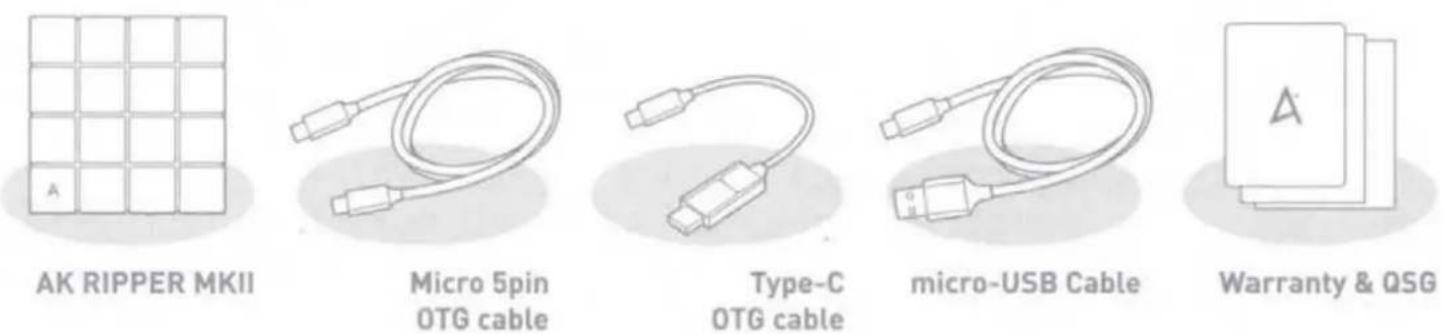
| Package Contents | CD Ripper, OTG cable, power adapter (if included), documentation |
| Warranty (EU) | 2 years for player console, 90 days for accessories |
| Warranty (Non-EU) | 1 year for player console, 90 days for accessories |
Frequently Asked Questions - AK Ripper MKII Astell&Kern
User questions about AK Ripper MKII Astell&Kern
0 question about this device. Answer the ones you know or ask your own.
Ask a new question about this device
Download the instructions for your Uncategorized in PDF format for free! Find your manual AK Ripper MKII - Astell&Kern and take your electronic device back in hand. On this page are published all the documents necessary for the use of your device. AK Ripper MKII by Astell&Kern.
USER MANUAL AK Ripper MKII Astell&Kern
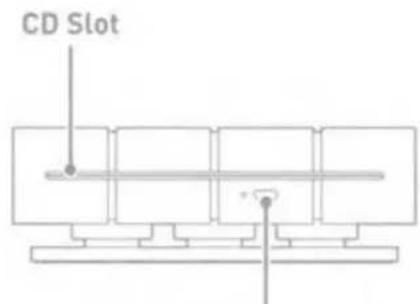
AK RIPPER MKII at a Glance
text_image
CD SlotEject Button
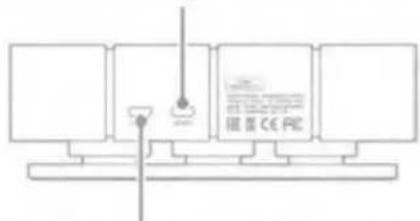
micro-USB port for the AK380 Cradle and AK portable connection
text_image
RE: CE PEPower Port (micro-USB port for connecting a power supply)
• The AK380 can be connected to the AK RIPPER MKII via the AK380 Cradle.
• To use the AK RIPPER MKII, a dedicated adapter of 5V 2A or greater must be connected to the micro-USB port. (If the AK380 Cradle is connected to a dedicated adapter of 5V 2A or greater, a separate power supply does not need to be plugged into the AK RIPPER MKII.)
Package Contents
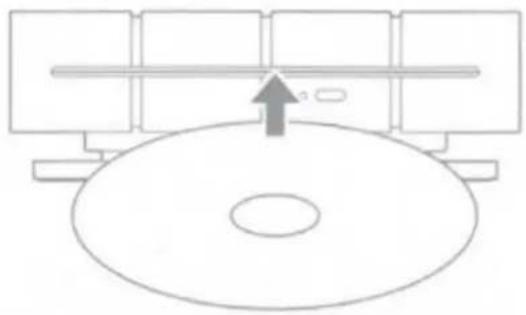
Inserting/Ejecting a CD
- Gently insert a CD with the label side up into the CD slot of the AK RIPPER MKII.
- Press the Eject button to remove a CD from the AK RIPPER MKII.
natural_image
Simple line drawing of a circular object with a horizontal bar and an arrow pointing upward (no text or symbols)- The AK RIPPER MKII does not support CD playback.
- Some noise may occur when inserting or ripping a CD depending on its condition.
- Do not use excessive force when inserting a CD. Doing so may damage the product or CD.
- Incorrectly inserting a CD may cause product malfunction or cause the CD to become stuck.
• A damaged or dirty CD may cause problems. - Do not eject a CD while it is in use. Doing so may damage the product or CD.
AK RIPPER MKII Power On/Off
- After connecting the AK portable device and AK RIPPER MKII with a dedicated cable, press [CD ripping icon] on the notification bar to use AK CD-RIPPER.
-
With AK RIPPER MKII turned on, press [CD ripping icon] on the notification bar to stop using AK RIPPER MKII.
-
Connections may be unstable when using cables other than the OTG cable provided.
- If power is forcibly turned off while AK RIPPER is connected, AK RIPPER MKII and the inserted CD may be damaged.
- AK RIPPER MKII supports Audio CD, but not SACD/Blu-ray/DVD.
Automatic CD Ripping
- In [Menu-Settings-CD Ripping], turn on automatic CD ripping function.
- Connect AK RIPPER MKII and insert CD.
- Metadata (ID3 tags) for the inserted CD will be retrieved via Gracenote if Wi-Fi is turned on.
- CD ripping will begin automatically after the metadata has been downloaded.
- When finished, press [OK] when prompted to complete the automatic CD ripping process.
Manual CD Ripping
- In [Menu-Settings-CD Ripping], turn off automatic CD ripping function.
- When you connect AK RIPPER MKII and insert a CD, [CD Ripping] will appear at the bottom of the notification bar or [CD Ripping] menu will be activated on the home screen.
- Press [CD Ripping] and select file format FLAC or WAV to rip.
- The Gracenote database will be searched for matching CD metadata after the file format is selected.
- When the database search is complete, press [Start] to begin CD ripping.
CD Ripping Results
- ●: Indicates that CD ripping is complete, or that CD ripping was successfully completed after encountering an error via error correction.
- X: Indicates that the song currently being ripped can be canceled by user.
-
!: Indicates that CD ripping failed due to an error that can't be corrected, such as a scratched CD. Also indicates that CD ripping was canceled by user.
-
To search the Gracenote database, the device must be connected to Wi-Fi. Database access time may vary depending on the network environment.
- Please note that metadata for certain CDs may not be available on the Gracenote database.
- You cannot access the Home screen while CD ripping is in progress.
- The AK Connect service will be disabled during CD ripping. The service will automatically restart when CD ripping is completed. CD Music playback is disabled during ripping.
- You can set the desired file format and ripping speed from the [Menu - Settings - CD Ripping] menu.
- Several attempts at correction will be made for data with errors when the feature is enabled under [Menu - Settings - CD Ripping - Error Correction]. Please note that the CD ripping speed will be affected when this feature is enabled.
ENGLISH | Gracenote® End User License Agreement
This application or device contains software from Gracenote, Inc. of Emeryville, California ("Gracenote"). The software from Gracenote [the "Gracenote Software"] enables this application to perform disc and/or file identification and obtain music-related information, including name, artist, track, and title information ("Gracenote Data") from online servers or embedded databases (collectively,
"Gracenote Servers") and to perform other functions. You may use Gracenote Data only by means of the intended End-User functions of this application or device.
You agree that you will use Gracenote Data, the Gracenote Software, and Gracenote Servers for your own personal non-commercial use only. You agree not to assign, copy, transfer or transmit the Gracenote Software or any Gracenote Data to any third party. YOU AGREE NOT TO USE OR EXPloit GRACENOTE DATA, THE GRACENOTE SOFTWARE, OR GRACENOTE SERVERS, EXCEPT AS EXPRESSLY PERMITTED HEREIN.
You agree that your non-exclusive license to use the Gracenote Data, the Gracenote Software, and Gracenote Servers will terminate if you violate these restrictions. If your license terminates, you agree to cease any and all use of the Gracenote Data, the Gracenote Software, and Gracenote Servers. Gracenote reserves all rights in Gracenote Data, the Gracenote Software, and the Gracenote Servers, including all ownership rights. Under no circumstances will Gracenote become liable for any payment to you for any information that you provide. You agree that Gracenote, Inc. may enforce its rights under this Agreement against you directly in its own name.
The Gracenote service uses a unique identifier to track queries for statistical purposes. The purpose of a randomly assigned numeric identifier is to allow the Gracenote service to count queries without knowing anything about who you are. For more information, see the web page for the Gracenote Privacy Policy for the Gracenote service.
The Gracenote Software and each item of Gracenote Data are licensed to you "AS IS." Gracenote makes no representations or warranties, express or implied, regarding the accuracy of any Gracenote Data from in the Gracenote Servers. Gracenote reserves the right to delete data from the Gracenote Servers or to change data categories for any cause that Gracenote deems sufficient. No warranty is made that the Gracenote Software or Gracenote Servers are error-free or that functioning of Gracenote Software or Gracenote Servers will be uninterrupted. Gracenote is not obligated to provide you with new enhanced or additional data types or categories that Gracenote may provide in the future and is free to discontinue its services at any time.
GRACENOTE DISCLAIMS ALL WARRANTIES EXPRESS OR IMPLIED, INCLUDING, BUT NOT LIMITED TO, IMPLIED WARRANTIES OF MERCHANTABILITY, FITNESS FOR A PARTICULAR PURPOSE, TITLE, AND NON-INFRINGEMENT. GRACENOTE DOES NOT WARRANT THE RESULTS THAT WILL BE OBTAINED BY YOUR USE OF THE GRACENOTE SOFTWARE OR ANY GRACENOTE SERVER. IN NO CASE WILL GRACENOTE BE LIABLE FOR ANY CONSEQUENTIAL OR INCIDENTAL DAMAGES OR FOR ANY LOST PROFITS OR LOST REVENUES.
© Gracenote, Inc. 2009
Specifications
| Product Name | AK RIPPER MKII | CD Ripping Audio Format | WAV, FLAC |
| Model | PEM15 | Dimensions | 5.86"[149mm][W] x 5.86"[149mm][H] x 1.92"[49mm][D] |
| Body Color | Gun Metal | Weight | 35.3 oz [1,000g] |
| Body Material | Aluminum |
© Gracenole, Inc. 2009
natural_image
Dark, flat surface with no visible text, symbols, or markingsWARRANTY
Astell&Kern
THIS WARRANTY CARD IS VALID ONLY FOR SERVICE ON PRODUCTS PURCHASED IN EU AND NON-EU EUROPEAN COUNTRIES.
For other countries, please contact the Store/Dealer where purchased.
Thank you for purchasing an iriver product. All iriver products come with one-year limited warranty against defects in materials and workmanship from the original date of purchase from an authorized agent.
iriver's warranty covers only those defects which arise as a result of normal use of the product. And the customer shall NOT have any claim under this warranty for repair or adjustment expenses if;
- The product is repaired or altered unless done or approved by iriver.
- The problem is cause by using in violation of any operating or handling instructions provided by iriver.
- The problem is caused by unusual physical or electrical stress, misuse, abuse power shortage, or negligence.
- The problem is caused by a fire or other natural calamity.
- The warranty period has expired.
Warranty Period
| Iriver product | Duration of Limited Warranty | |
| EU Countries | Non-EU Countries | |
| Player console | 2 Year | 1 Year |
| Accessories | 90 Days | 90 Days |
| Refund or Exchange | 30 Days | 30 Days |
If you have any problems or suggestions with this product, please contact one of the following.
URL:http://www.iriver.com/https://www.astellnkern.com
THIS WARRANTY CARD IS VALID ONLY FOR SERVICE ON PRODUCTS PURCHASED IN NORTH AMERICA.
For other countries, please contact the Store/Dealer where purchased.
Thank you for purchasing an iriver product. All iriver products come with one-year limited warranty against defects in materials and workmanship from the original date of purchase from an authorized agent.
iriver's warranty covers only those defects which arise as a result of normal use of the product. And the customer shall NOT have any claim under this warranty for repair or adjustment expenses if;
- The product is repaired or altered unless done or approved by iriver
- The problem is cause by using in violation of any operating of handling instructions provided by iriver.
- The problem is caused by unusual physical or electrical stress, misuse, abuse, power shortage, or negligence.
- The problem is caused by a fire or other natural calamity.
- The *warranty period has expired.
Warranty Period
| Iriver product | Duration of Limited Warranty |
| North America | |
| Player console | 1 Year |
| Accessories | 90 Days |
| Refund or Exchange | 30 Days |
If you have any problems or suggestions with this product, please contact one of the following.
URL: http://www.iriver.com/ https://www.astellinkern.com