
Aurora - Pregnant iFi Audio - Free user manual and instructions
Find the device manual for free Aurora iFi Audio in PDF.


| Product Type | All-in-One Wireless Music System |
| Brand | iFi Audio |
| Model | Aurora |
| Power Supply | AC 100V-240V (IEC) or 12V DC (for car/yacht) |
| Amplifier Technology | PureEmotion hybrid circuit with 6N3P valve preamp and current multiplier power amp |
| DAC | 32-bit ESS Sabre DAC |
| Room Correction | Automatic Room Tailoring (ART) using 6 ultrasonic sensors, analog signal processing |
| Audio Modes | ART mode (automatic) and Audiophile mode (manual TrueBass and SoundSpace) |
| Bass System | Dual downward-firing passive radiators with TrueBass, tuneable down to 27Hz |
| SoundSpace | Analogue sound-matrix technology for immersive soundstage |
| Connectivity | WiFi (WPS), Bluetooth, AirPlay, Ethernet/LAN, DLNA/UPNP |
| Inputs | RCA/Coaxial, 3.5mm AUX, Optical, Coaxial, Host USB type A, Micro SDHC (up to 128GB) |
| Streaming Services | Spotify (incl. Connect), TIDAL, Napster, QQ Music, and more via MUZO Player App |
| Supported Audio Formats | MP3, FLAC, WAV, AAC, up to 192kHz/32-bit |
| Control | Front touch bar, remote control, MUZO Player App (iOS/Android) |
| Display | OLED display with tube window |
| Protection | Auto-Protection mode to prevent clipping at high volume |
| Remote Control | Included with infrared |
| Placement | Level, non-slip surface; avoid obstructions and liquids |
Frequently Asked Questions - Aurora iFi Audio
User questions about Aurora iFi Audio
0 question about this device. Answer the ones you know or ask your own.
Ask a new question about this device
Download the instructions for your Pregnant in PDF format for free! Find your manual Aurora - iFi Audio and take your electronic device back in hand. On this page are published all the documents necessary for the use of your device. Aurora by iFi Audio.
USER MANUAL Aurora iFi Audio
Thank you for purchasing the AURORA 'Wireless Music System.' It was designed for the modern home with future-proofed connectivity. There are multiple ways to enjoy it so please refer to the Quick Start card and/or User Manual to begin.
Setup:
- Ensure that the Aurora is placed on a level, non-slip surface.
- Never obstruct the unit or place it near any objects or liquids that may damage the unit.
iFi audio suggests downloading and installing the MUZO Player App* on your iOS/Android device first to enable you to operate the playback options on the Aurora.
Automatic Room Tailoring (ART) / Audiophile modes
By holding down the ART button on the front panel for 2 secs, it is possible to alternate between ART or Audiophile modes.
ART mode – Automatic Room Tailoring in operation. Just input/volume need to be selected. Audiophile mode – ART is switched off. Manual selection of TrueBass and SoundSpace.
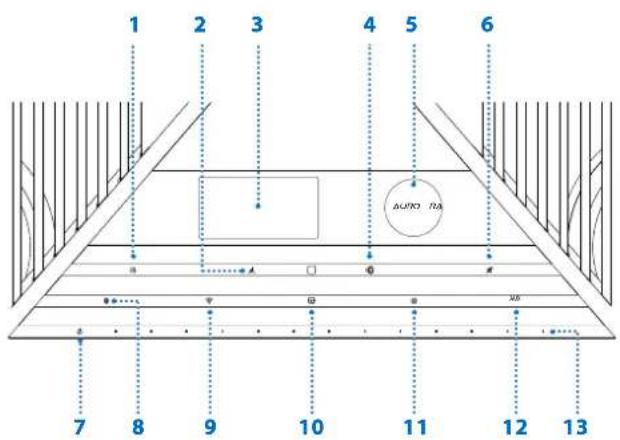
- Brightness
- Automatic Room Tailoring (Hold: Switch ART / Audiophile modes)
- OLED display
- TrueBass
- Tube
- Mute
- Power
- Bluetooth (Hold: Pairing)
- WiFi (Hold: WiFi Reset / WPS)
- Coaxial input
- Optical input
- AUX
- Volume
Note: Auto-Protection mode
When the Aurora is playing at an excessively high volume, it may enter 'Auto-Protection' mode (volume level will be automatically reduced) to avoid 'clipping' so that the driver units and the amplifier are not damaged. No harm to the equipment should ensue.
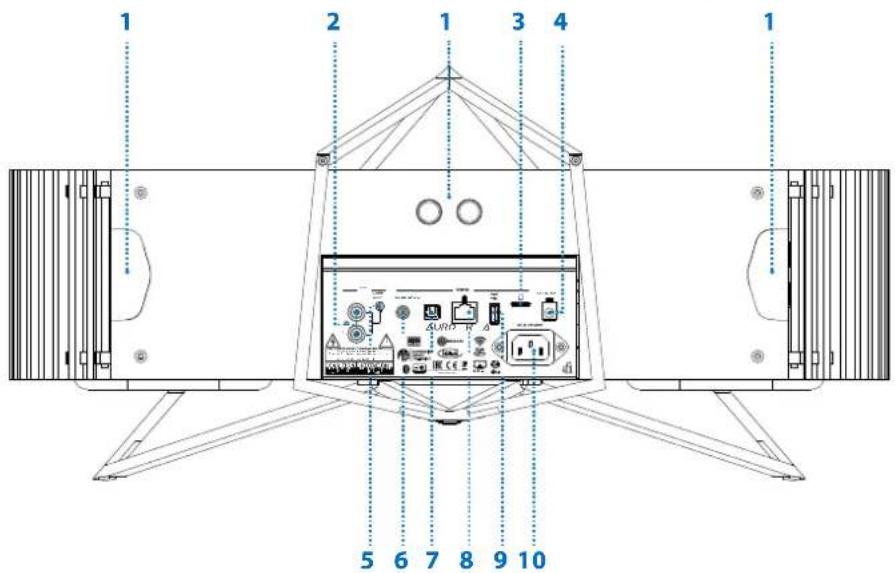
- Automatic Room Tailoring (ART Ultrasonic Sonar)
- RCA(AUX) input
- Micro SDHC
-
DC (12V) Power Supply (e.g. car, yachts)
-
3.5mm(AUX) input
- Coaxial input
- Optical input
- LAN input
- Host USB 'A' input
- AC (100V-240V) IEC Power Supply
ifi
Connection:
- The rear IEC or 12v socket is for connecting to a power source.
- For a wired Internet connection, connect a LAN/Ethernet cable from the Aurora to the router.
-
For a wireless Internet connection, if your router has a WPS button, simply press and pair.
-
If your router does not have WPS, please follow the instructions below:
-
In the MUZO Player App*, select 'Add new device' and follow the on-screen instructions
- Press WiFi (WPS) button on the front panel of the Aurora
- On an iOS/Android device, search the Aurora network 'iFi_Hi_ResAudio' and join
- In the MUZO Player App* select the home WiFi network name and enter your password
-
The Aurora will then automatically connect to the home WiFi network
-
For a wireless Bluetooth connection, hold (2S) BT button to pair.
Quick Start Guide
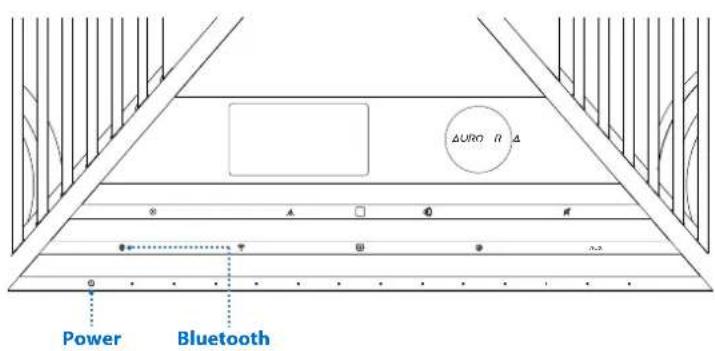
Connect power cable
- Power ON (via AC power cable or 12V/20A source such as marine mains power)
- Select Bluetooth input on the Aurora
- Pair via 'iFi Hi-Res audio' on your Smart device Bluetooth menu
- Once paired, select the music app such as Spotify or Apple Music.
Enjoy!
For technical questions or support you can reach one of our Tech Team here: https://support.ifi-audio.com/
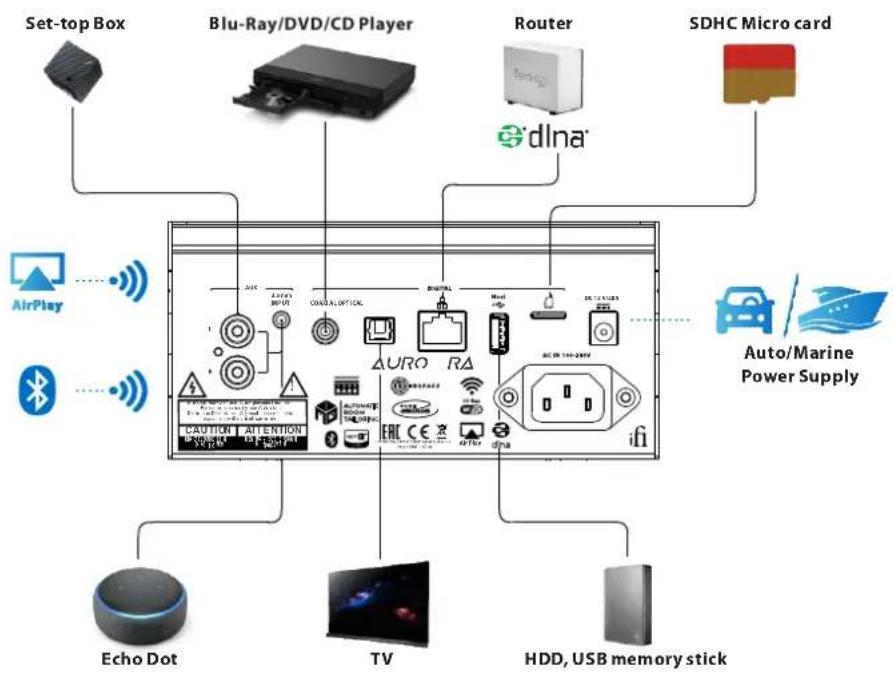
flowchart
graph TD
    A["Set-top Box"] --> B["Blu-Ray/DVD/CD Player"]
    B --> C["Router"]
    C --> D["SDHC Micro card"]
    D --> E["AirPlay"]
    D --> F["Bluetooth"]
    D --> G["Auto/Marine Power Supply"]
    G --> H["Echo Dot"]
    G --> I["TV"]
    G --> J["HDD, USB memory stick"]

- Infrared window
- Power
- Mute
- Volume control
- Previous/Next (only available in WiFi mode*)
- Play/Pause
- Brightness
- Input
- ART Auto Room Tailoring (HOLD for 3 secs to switch between ART/Audiophile modes)
- TrueBass
- Battery compartment
*Depends on the software player support

Volume Control
Volume can be adjusted by using the front touch bar on the Aurora, the included remote control or the MUZO Player App*.
Input selection
Analogue Inputs
RCA/Co-axial – connect left & right cables from an analogue source such as a CD player.
3.5mm – connect via 3.5mm cable for analogue signal input or to use Alexa to control the Aurora.
Digital Inputs
All files from 192kHz/32-Bit from MP3 to FLAC can be played directly through the Aurora via the MUZO Player App* or DLNA compatible server software.
WiFi – use the MUZO Player App* to connect the Aurora to the local WiFi system to stream Spotify, TIDAL, Napster, QQ Music and many more.
Bluetooth – press Bluetooth pairing button and look for 'iFi Aurora'.
Airplay – connect via Airplay to enjoy audio playback from iPhone, iPad, and Mac computers.
Source Host USB type 'A' – connect an external hard disk drive (HDD), USB memory stick or similar to play music. These must be formatted as FAT32**.
Drive must not draw large amounts of power. (A mechanical HDD should be self-powered).
Ethernet/LAN cable – connect an Ethernet/LAN cable for a wired connection directly from a router or Network Attached Storage (NAS) source. Use the MUZO Player App* to stream Spotify (incl. Connect), TIDAL, Napster, QQ Music and many more.
Optical - derive signal input straight from a TV so the Aurora acts as a sound bar.
Coaxial – connect an SPDIF source such as a Blu-ray player.
Micro SDHC card slot – play music files (WAV, FLAC, AAC, Mp3). Supported up to 128GB. This must be formatted as FAT32**.
Notes
* Aurora supports UPNP/DLNA.
UPNP support means a wide range of apps can be used for server and control. A few are mentioned below but they are many others. We suggest simply using the one you prefer.
AudioNet Remote Control Point http://en.audionet.de/apps/rcp/
Linn Open Source Apps: http://oss.linn.co.uk/
dBPoweramp Asset UPNP: http://www.dbpoweramp.com/asset-upnp-dlna.htm

\*\* FAT32 - formatting past the Windows 32GB limit
1) The Aurora reads FAT32 only (not NTFS/ExFat/HPF+)
2) OS X formats FAT32 regardless of size.
3) Windows OS by itself is unable to format a drive above 32GB. Third party utilities are required. "FAT32 Formatter" is a basic portable GUI tool that can format drive larger than 32GB. http://www.ridgecrop.demon.co.uk/index.htm?guiformat.htm
*** Wired is always more preferable to Wireless especially when it comes to reception of higher bandwidth music. If you live in a densely populated area, we recommend the use of a wired network (connect Aurora to router via LAN/Ethernet cable).
For technical questions or support you can reach one of our Tech Team here: https://support.ifi-audio.com/

AUTOMATIC ROOM TAILORING
Why room correction? Because the room is always the 'final component' in the audio chain. The same system will have a different sonic signature if placed along a room compared to if it was placed across a room. This is mainly due to the sound waves 'reflecting' differently and this impacts what we hear. For maximum musical enjoyment, we need well thought out room correction for any audio system.
This is EVEN more prevalent with a one-box solution such as the Aurora as all similar one-box products sound like a mono source because they are....a mono source.
Therefore, the Aurora has built-in 'Auto Room Tailoring' (ART). Once the unit has been placed in the desired location, all the listener needs to do is to press the 'ART' button on the front panel. Using its rear, left and right ultrasonic sensors, the Aurora will automatically set itself up and, after a few seconds, will be ready to play music that fills the room with the spaciousness akin to using a pair of stereo speakers.
How ART works
1) Using the six ultrasonic sensors, it measures the distance to the walls using ultrasound. The distance affects the low frequency response of the speaker and also our 3D room sound system.
2) It then applies frequency response corrections and adjustment to the 3D system based upon the distances measured.
3) Result - consistent realistic sound and a truly spacious sound field with widely varying placement and no damage wrought by over use of DSP (Digital Sound Processing) as all of this is done in the analogue domain.
ifi

The Aurora proudly uses ASP (Analogue Signal Processing) in its room correction system. This means it is uniquely positioned to play music that is unaltered despite using room correction. Most room correction uses DSP.
iFi does not use DSP of this kind in any of its produc ts. The Aurora incorporates sound-matrix technologies that operate entirely in the analogue domain.
SoundSpace is one such technology – this combines the drive unit array with a proprietary configuration which adjusts the channel outputs from specific drivers at certain frequencies. It is based upon classic, tried and trusted recording methodologies.
SoundSpace is fundamental to the Aurora's immersive, room-filling performance, enabling the soundstage to extend beyond the confines of the cabinet with expansive width, height and depth. This gives music a tangible sense of scale and space from two, correctly positioned speakers you simply wouldn't expect from an all-in-one music system.

TrueBass is another proprietary sound-tuning technology that operates strictly in the analogue domain. The depth and quality of bass supplied by all-in-one lifestyle systems often leaves a lot to be desired. The TrueBass system, incorporating the two downward-firing bass radiators, ensures that the Aurora delivers genuine bass with realistic depth and definition. Dual-level depth control means you can adjust the bass response according to taste – down to a deeply impressive 27Hz – so that everything from timpani, to a bass guitar, to an electronic bassline is conveyed with power and poise.
With Aurora, you listen in YOUR way.
The passive radiators work like Helmholz resonators. In order to operate correctly in audible range they cover 25Hz - 60Hz only, they must be tuned to a very low frequency - approx. 18Hz - as the resonance causes a cut in output at the self-resonance frequency. Passive radiators often feature extra weights to tune them.
For our custom passive radiators, we selected a suitably heave material to achieve the correct resonance frequency. As an extra benefit, the carbon/ferrite alloy diaphragm, together with the foam layer, is very well dampened. It does not allow the sound from the back of the wideband drivers to escape through the passive radiator and colour the sound.
The carbon/ferrite alloy delivers the required acoustic parameters in a thinner device than other materials would. It is simply the 'appropriate tech' for our requirements.
ifi

At the heart of the Aurora, lies iFi's proprietary amp technology 'PureEmotion' - a hybrid circuit design comprising several key stages. The first of these - the preamp stage - incorporates a Russian 6N3P valve (visible through a window next to the OLED display). This takes the analogue audio signal delivered by the Aurora's DAC (Digital-to-Analogue Converter)
circuitry – based around a chip from ESS Technology's renowned 32-bit Sabre DAC family – and adds gain in preparation for further amplification, imbuing the sound with pure tonality, open imaging and natural fluidity. The resulting low-level signal then passes to the 'current multiplier circuit' power amp stage. This is a super high-speed power amplifier, one that is bespoke and developed in-house.
The iFi current multiplier circuit is entirely different because the switching frequency is fixed at an ultra-high level - around 1.5MHz, hence it has ultra-high resolution. This results in a high level of efficiency, multiplying the current supplied by the valve several thousand-fold, whilst maintaining far greater linearity and lower noise than typical switching amplifiers. Coupled to this is a low-pass circuit and a feedback loop, the latter ensuring the output frequency is ideal for the load, and everything is 'clock-locked' via iFi's GMT (Global Master Timing) circuit to ensure unerring precision. Even the audio-grade super-fast power supply is all globally locked in step.
This ingenious fusion of amp technologies enables a sound that combines purity of tone with a high level of engagement, speed and dynamic gusto, ensuring the emotive quality of music is delivered in full effect.






Balmoral Lodge,139-141 Cambridge Road, Southport, PR9 7LN. UK. ifi-audio.com

Brand : iFi Audio
Model : Aurora
Category : Pregnant