
Classic 400 Series - Air purifier BLUEAIR - Free user manual and instructions
Find the device manual for free Classic 400 Series BLUEAIR in PDF.


| Type | Air Purifier |
| Brand | Blueair |
| Model | Classic 400 Series |
| Dimensions (H x W x D) | 21.3 x 17 x 9.8 inches (540 x 432 x 250 mm) |
| Weight | 28.7 lbs (13 kg) |
| Power Supply | 120V, 60Hz, 12-150W |
| Noise Level | 25-50 dB(A) |
| CADR (Smoke/Dust/Pollen) | 350/350/350 CFM (595 m³/h) |
| Coverage Area | Up to 400 sq ft (37 m²) |
| Filter Type | HEPASilent™ particle filter |
| Filter Life | 6 months (24/7 operation) |
| Air Changes per Hour | 4 (at recommended room size) |
| Fan Speeds | 3 speeds + Auto mode |
| Control Type | Button control |
| Indicator | Filter replacement indicator |
| Certifications | AHAM Verifide, Energy Star |
| Warranty | 5 years (filter not included) |
| Included Accessories | Air purifier, particle filter, user manual |
| Special Features | Low energy consumption, quiet operation, easy filter change |
Frequently Asked Questions - Classic 400 Series BLUEAIR
User questions about Classic 400 Series BLUEAIR
0 question about this device. Answer the ones you know or ask your own.
Ask a new question about this device
Download the instructions for your Air purifier in PDF format for free! Find your manual Classic 400 Series - BLUEAIR and take your electronic device back in hand. On this page are published all the documents necessary for the use of your device. Classic 400 Series by BLUEAIR.
USER MANUAL Classic 400 Series BLUEAIR
User Manual - 400 series
natural_image
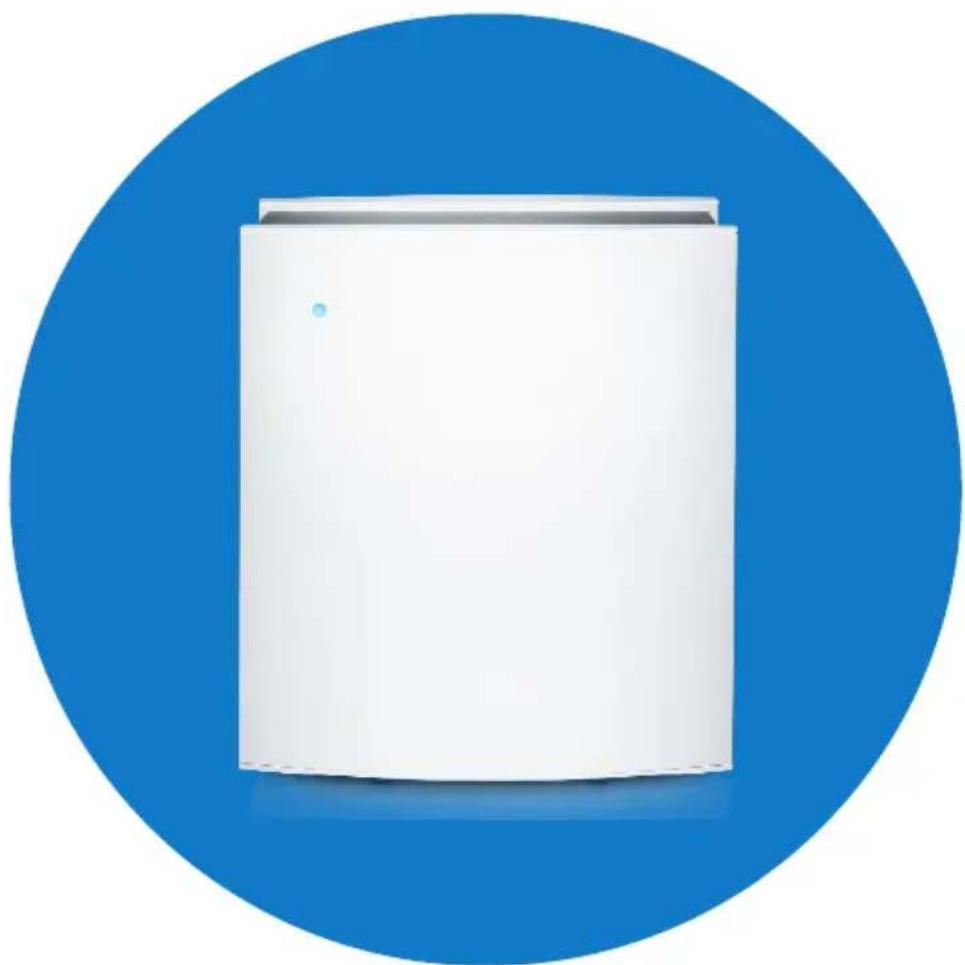
White cylindrical device against a blue circular background (no text or symbols visible)Before using Blueair Classic 400 series, please read this user manual carefully.
Note:
There may be local variations of these models.
Contents
General 4
Overview of unit 5.
Adjusting Ian (air flow) speed 5
Safety information 6
Placing the unit 7
Getting started 7
Control panel and touch buttons 8
Blueair Friend mobile app settings 9
Filters 10
Changing the filters 11
Care and Maintenance 12
Classic 480/405 technical specifications 13
General
Blueair 400 series
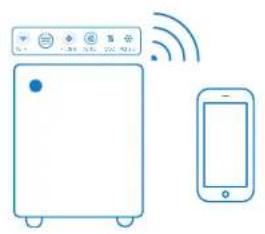
Blueair 400 series air purifiers are WI-FI enabled and are available in two models. The 480i models have built-in sensors for PM2.5, VOC, temperature/humidity, and the 405 models with no built-in sensors.
Adjustments to the air purifiers can be made manually anywhere and at any time, either via the touch buttons on the control panel located under the flip-up lid, or remotely via the Blueair Friend™ mobile app.
The air purifier can also be automatically regulated based on the air quality readings from the built-in sensors (480i), or the optional external air quality monitor Blucair Aware™ (405)
For more information on how to use your air purifier together with the Blueair Aware air quality monitor, please see the Blueair Aware owner's manual and the support information.
405 model4801 model
natural_image
Illustration of a smart air conditioner and smartphone connected via wireless signals (no text or symbols)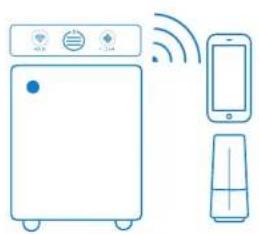
natural_image
Line drawing of a kitchen appliance with a refrigerator, smartphone, and washing machine (no text or symbols)Overview of unit
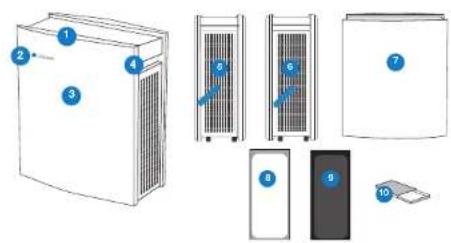
text_image
Diagram showing labeled components of a server rack system with numbered parts- Control panel
- Blue LED
- Front cover
- Handle
- Air inlet (right side)
- Air outlet (left side)
- Back cover
- Particle filter, or
- Smokestop ^14 filter
-
Kit box
-
welcome card
- user manual
- cleaning cloth
Adjusting fan (air flow) speed
Please refer to the table below to see the different options available for controlling your air purifier.
| Control options 480i 405 | ||
| Manual control via touch buttons on control panel | ||
| Remotory via the Blueair Friend mobile app. | ||
| Automoc based on air quality readings from the built in sensors. This function may be activated either via the touch button on the control panel or via the Blueair Friend mobile app. | ||
| Automoc based on air quality readings from the external air quality monitor Blueair Aware. This function is activated via the Blueair Friend mobile app. |
Maximum speed is recommended for fast initial cleaning, during the day or when the air is heavily polluted. Minimum speed is recommended for nighttime use.
Safety information
The Blueair 405 and 480i air purifiers are electrical appliances. Please read the safety instructions before use and take the necessary precautions to reduce the risk of fire, electric shock or injury. The Blueair Limited Warranty applies only if the unit is used according to these instructions.

WARNING: Indicates a hazardous situation that, if not avoided, could result in death or serious injury.
CAUTION: Indicates a hazardous situation that, if not avoided, could result in minor or moderate injury.
General

WARNING: To avoid a hazard, a damaged supply cable must always be replaced by the manufacturer, service agent or similarly qualified person.
- Use the grounded power cable provided with your Blueair air purifier unit to plug directly into an appropriate, grounded electrical outlet. (Refer to the rating label on your unit)
- Do not alter the plug in any way.
Intended use

CAUTION: Supervise children to ensure that they do not play with the appliance.
- This appliance is not intended for use by persons (including children) with reduced physical, sensory or mental capabilities, or lack of experience and knowledge, unless they have been given supervision or instruction concerning use of the appliance by a person responsible for their safety.
Warning: Changes or modifications to this unit not expressly approved by the party responsible for compliance could void the user's authority to operate the equipment.
NOTE: This equipment has been tested and found to comply with the limits for a Class B digital device, pursuant to Part 15 of the FCC Rules. These limits are designed to provide reasonable protection against harmful interference in a residential installation. This equipment generates, uses and can radiate radio frequency energy and, if not installed and used in accordance with the instructions, may cause harmful interference to radio communications.
However, there is no guarantee that interference will not occur in a particular installation. If this equipment does cause harmful interference to radio or television reception, which can be determined by turning the equipment off and on, the user is encouraged to try to correct the interference by one or more of the following measures:
- Recorient or relocate the receiving antenna.
- Increase the separation between the equipment and receiver.
- Connect the equipment into an outlet on a circuit different from that to which the receiver is connected.
- Consult the dealer or an experienced radio/TV technician for help.
This device complies with Part 15 of the FCC Rules. Operation is subject to the following two conditions: (1) this device may not cause harmful interference, and (2) this device must accept any interference received, including interference that may cause undesired operation.
This device complies with Industry Canada licence-exempt RSS standard(s). Operation is subject to the following two conditions: (1) this device may not cause interference, and (2) this device must accept any interference, including interference that may cause undesired operation of the device.
This Class B digital apparatus complies with Canadian ICES-003.
FCC RF Radiation Exposure Statement Caution: This Transmitter must be installed to provide a separation distance of at least 20 cm from all persons.


FOC ID: 2AEX3-4XXZ-CC IC ID: 20267-405
Placing the unit

Place the unit in a location where air can circulate freely in, out and around the unit.

Do not place the unit near sources of heat, such as radiators, fireplaces or ovens.

Do not place the unit closer than 4^ (10 cm) from another object.

Do not place the unit near wet areas, such as bathrooms or laundry rooms where it may come into contact with water.

Do not place the unit directly on or against soft furnishings such as bedding or linen.

Do not place the unit outdoors
Getting started
Connecting your air purifier - 480l and 405
Follow the instructions below to connect your air purifier to your Blueair Friend mobile app. You can then enable remote control.
Step 1
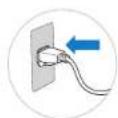
Plug the fixed power cable into a grounded wall outlet.
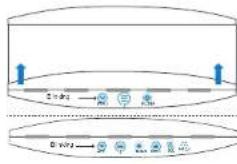
Open the flip-up lid and press the air-flow speed touch button. When the Wi-Fi symbol starts to blink, the air purifier can be paired with the Blueair Friend mobile app.
text_image
Binding WriteStep 2
Download the Blueair Friend mobile app to your smartphone from your app store (Apple App Store or Google Play).
Step 3
Connect your unit to your Blueair Friend mobile app. Start the app and follow the instructions. After connecting your air purifier to the Blueair Friend mobile app, you can use the app to control the unit remotely and adjust settings.
Control panel and touch buttons
The control panel and touch buttons are located under the flip-up lid (see Step 2 "Starting up the unit"). A grey circle around a touch button indicates that it is inactive. When the unit is turned on, all touch buttons on the control panel (except for airflow speed control); will dim down after 20 seconds. Tap the control panel and the touch buttons will light up again.
Classic 405 control panel touch buttons


M-F
Status grey - OFF (no Wi-Fi)

Status 1 blue bar - minimum speed

Status "blinking" - no connection. Wi-Fi ready to be connected.

Status 2 blue bars - medium speed

Status grey and blue Wi-Fi connected

Status 3 blue bars - maximum speed

Air flow speed control Status grey - OFF

Filter Status grey and blue - no replacement filter currently needed.

Status blue and all bars are grey the power cable is plugged in.

Status orange - replace filter and reset by pressing down for 5 seconds.
Classic 480i control panel touch buttons
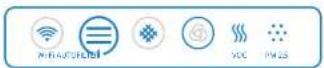

VOC indicator
Status blue - from excellent to
moderate pollution levels
Status orange - from slight to high
pollution levels

Auto speed
Status circle blue - unit is on
Status symbol grey - Auto speed OFF
Status symbol blue - Auto speed ON

PM2.5 indicator
Status blue - from excellent to moder-
ate pollution levels.
Status orange - from slight to high pol-
lution levels
See Blueair Friend mobile app for further information regarding pollution and threshold
levels
Blueair Friend mobile app settings
Please note that you must first add your air purifier unit to the Blueair Friend mobile app before you can control the following settings via the app:

Adjust airflow speed
Changes the fan speed between speed 1, 2 and 3.

Adjust LED intensity
Changes the LED intensity for those lamps that are visible.

Child lock
Regulates your ability to control the air purifier unit via the control panel on the unit.

Auto mode
Automatically controls the fan speed based on readings either from the built-in sensors ("i"
models only), or from the external air quality monitor Blueair Aware.

Night mode
Allows the activation/deactivation of certain settings at specific times.
Filters
General Information
The unit is delivered with one HEPASilent ^™ filter already installed.
Particle filters remove:


DustPM2.5 Pollen ParticlesPet dander Mold
Smokestop ^™ filters remove all the above pollutants, plus:

Dust mites Bacteria


Smoke

Chemicals

Cooking odors
IMPORTANT! Use only genuine Blueair filters to ensure proper function of your unit and to qualify for full warranty coverage.
Filter checklist
To make it easy to find the right filter in the future, please fill in the customer record below and keep this user manual for reference. The model number and serial number of this product can be found on the rating label on the bottom of the unit.
Model number
Retailer's name
Serial number
Retailer's address
Date of purchase Telephone number
Blueair filter subscription program
This convenient service is available in some countries – contact your local Blueair retailer to find out if you can join.
Changing the filters
IMPORTANT!
Always turn off and disconnect the unit from the supply mains before changing filters, cleaning or carrying out maintenance procedures.
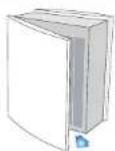
Step 1
Open the back door.
Step 2
Slide out the filter.
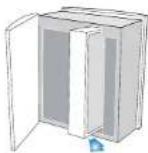
Step 3
Vacuum inside the unit with a soft brush attachment.
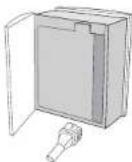
Step 4
Slide the replacement Blueair filter back into the unit.
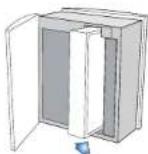
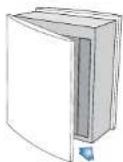
Step 5
Close the back door, plug in the unit and turn on.
The unit is now ready for use.
Care and maintenance
We recommend routine cleaning in order to keep your unit in top condition.
When changing filters
- Wipe clean the underside of the lid after removal.
- Vacuum the air inlet grille from the inside using a soft brush and/or other suitable attachment.
- Vacuum the small air inlets with a soft brush attachment.
General
- Wipe the exterior of the unit with a soft, clean, damp cloth.
- Never clean with gasoline, chemical solvents or corrosive material as these agents may damage the surface.
- Do not allow foreign objects to enter the ventilation or exhaust openings. This may cause electric shock or damage the unit.
- Do not try to repair or adjust any of the electrical or mechanical functions on your Blueair unit yourself. Contact your local dealer or Blueair for warranty information.
Help and support
If you have questions about Blueair Classic series, please visit www.blueair.com or contact your local Blueair retailer.
Warranty Information
The Blueair Limited Warranty applies only if the unit is used according to the instructions in this manual.
Classic 480i/405 technical specifications*
| CADR (cfm)**: | Smoke | Dust | Pollen | |
| 280 | 300 | 300 | ||
| Room size 434 sq.ft. (40 m) | q | |||
| Air Changes per Hour *** 5 | ||||
| Airflow (Speed 1-2-3) 120-200-350 cfm | ||||
| Size (HxWxD): 23 x 20 x 11 in. (590 x 500 x 275 mm) | ||||
| Product weight: 33 lbs (15 kg) | ||||
| Energy consumption(Speed 1-2-3)**** | 15-25-90 W | |||
| Sound pressure levels(Speed 1-2-3) | 32-42-52 dB(A) | |||
| Filter replacement indicator Yes | ||||
| Speed control options 1-2-3, non-touch, smartphone (Automode)405 | 1-2-3, non-touch, smartphone | |||
| Air quality sensors Built-in sensors for VOC, 432-5, temperature and humidity405 | No sensors - optional use with Biocair Aware | |||
| The entire unit can be recycled. | ||||
External network issues affecting the product performance are beyond the control of Bluesair. Please contact your Internet service provider for assistance.
* Specifications based on U.S. models (120 VAC, 60 Hz with particle filter)
The CADR indicates how much filtered air is delivered (airflow) by the air purifier operating at the highest setting, and how well the system removes tobacco smoke, dust and pollen pollutants from the air (efficiency). Tests are performed in accordance with ANSI/AHAM AC-1. The maximum possible CADR ratings according to this standard are: Tobacco Smoke: 450 cim. / Dust: 400 cim. / Polley: 450 cim.
Air changes per hour are calculated on the recommended room size, assuming 8-foot (2.4 m) ceilings. For smaller rooms, the air changes per hour will increase.
The available electrical power voltage and frequency affects the power consumption of the unit. The power consumption might therefore be different from the slated value.

Blueair
www.blueair.com
Blueair AB
Danderydsgatan 11
SE-114 26 Stockholm
Sweden
Tel: +46 8 679 45 00
Fax: +46 8 679 45 45
info@blueair.se
Blueair Inc.
Suite 1900,
100 N LaSalle Street
Chicago, IL 60602
Tel: +1 888 258 3247
Blueair India Pvt. Ltd.
Embassy of Sweden
Nyaya Marg, Chanakyapuri
New Dehli - 110021
Tel: +91 11 4606 7121
Fax: +91 11 4606 7120
india@blueair.se
Blueair (Shanghai) Trading Co. Ltd.
Rm 1005 City Gateway
No. 398 North Caoxi Road
Xuhui Distr, Shanghai
Tel: +86 21 6091 0981
Fax: +86 21 6091 0989
info@blueair.cn