
CTAI 9740C IN - Cooker BAUKNECHT - Free user manual and instructions
Find the device manual for free CTAI 9740C IN BAUKNECHT in PDF.


User questions about CTAI 9740C IN BAUKNECHT
0 question about this device. Answer the ones you know or ask your own.
Ask a new question about this device
Download the instructions for your Cooker in PDF format for free! Find your manual CTAI 9740C IN - BAUKNECHT and take your electronic device back in hand. On this page are published all the documents necessary for the use of your device. CTAI 9740C IN by BAUKNECHT.
USER MANUAL CTAI 9740C IN BAUKNECHT
natural_image
Close-up of a pair of white paper cloths with metal clips, no visible text or symbolsIstruzioni per l'uso Οδηγίες χρήσης Upute za uporabu Instrukcja obsługi Kasutusjuhised Lietošanas instrukcija
natural_image
Black and white photo of glass bottles with black caps, no visible text or symbols
natural_image
Black and white close-up of multiple glasses with blurred background (no text or symbols visible)Naudojimo instrukcija Návod k obsluze Инструкции за употреба Instrucțiuni privind siguranța Uputstva za upotrebu Návod na použitie
natural_image
Close-up of a white industrial or kitchen appliance with perforated ventilation slots and a handle (no visible text or symbols)natural_image
Diagram showing a mechanical assembly with a tilted plate and a downward arrow, no text or symbols present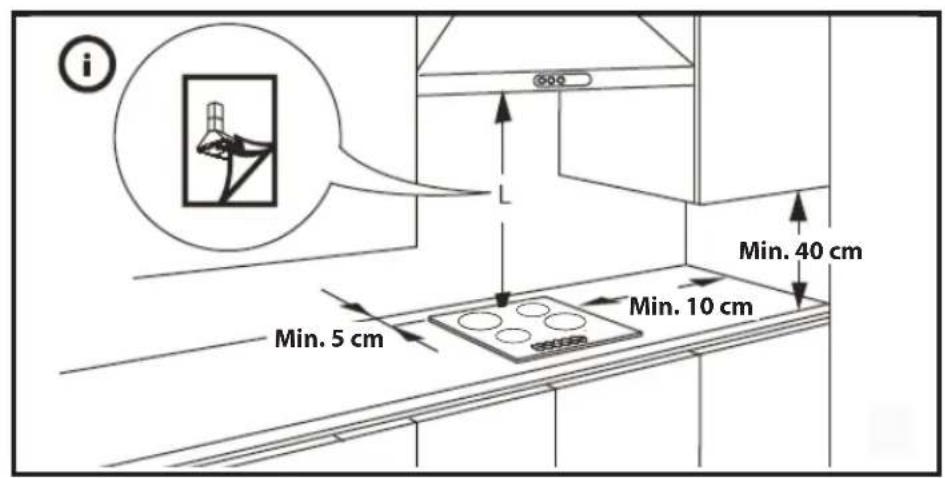
text_image
i Min. 5 cm Min. 10 cm Min. 40 cm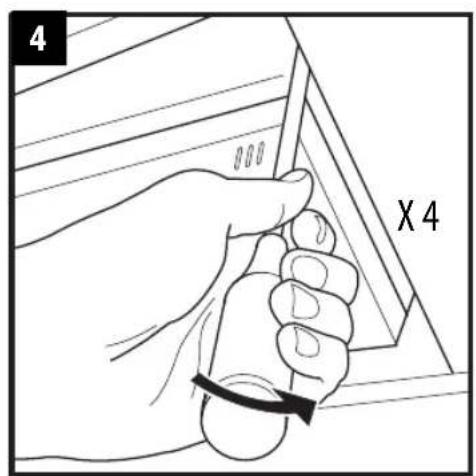
text_image
4 X 4
natural_image
Diagram showing a curved line with an arrow indicating direction, no text or symbols present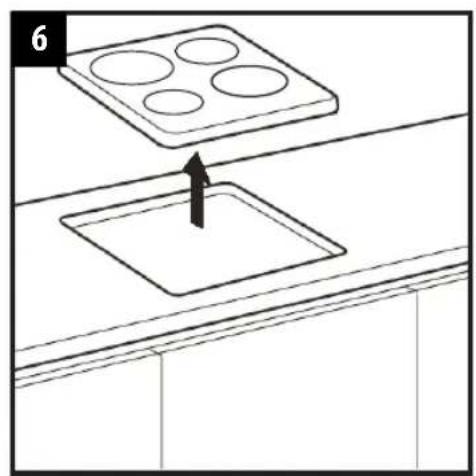
text_image
6IMPORTANT SAFETY INSTRUCTIONS
YOUR SAFETY AND THAT OF OTHERS IS VERY IMPORTANT
This manual and the appliance itself provide important safety messages, to be read and always observed.

This is the danger symbol, regarding safety, warning of potential risks to users and others.
All safety messages will be preceded by the danger symbol and the following words:

DANGER
Indicates a hazardous situation which, if not avoided, will result in serious injury.

WARNING
Indicates a hazardous situation which, if not avoided, could cause serious injury.
All messages relevant to safety specify the potential risk to which they refer and indicate how to reduce the risk of injury, damage and electric shocks due to incorrect use of the appliance. Make sure to comply with the following:
- Use protective gloves to perform all unpacking and installation operations.
- The appliance must be disconnected from the power supply before carrying out any installation operation.
- Installation and maintenance must be carried out by a specialised technician, in compliance with the manufacturer's instructions and the local safety regulations in force. Do not repair or replace any part of the appliance unless specifically stated in the user manual.
- The appliance must be earthed.
- The power cable must be long enough for connecting the appliance, fitted in the cabinet, to the power supply.
- For installation to comply with the current safety regulations, an omnipolar switch with minimum contact gap of 3mm is required.
- Do not use multi-sockets or extension cords.
- Do not pull the appliance's power cable.
- The electrical parts must not be accessible to the user after installation.
- The appliance is designed solely for domestic use for cooking food . No other use is permitted (e.g. heating rooms). The Manufacturer declines any liability for inappropriate use or incorrect setting of the controls.
- The appliance and its accessible parts become hot during use. Car e should be taken to avoid touching heating elements. Very young (0-3 years) and young children (3-8 years) shall be kept away unless continuously supervised.
- Children from 8 years and above and persons with reduced physical, sensor y or mental capabilities or lack of experience and knowledge can use this appliance only if they are supervised or have been given instructions on safe appliance use and if they understand the hazards involved. Children shall not play with the appliance. Cleaning and user maintenance shall not be made by children without supervision.
- Do not touch the appliance heating elements during and after use . Do not allow the appliance to come into contact with cloths or other flammable materials until all the components have cooled down completely.
- Do not place flammable materials on or near the appliance.
- Overheated oils and fats catch fire easily. Pay attention when cooking food products rich in fat and oil.
- A separator panel (not supplied) must be installed in the compartment under the appliance.
- If the surface is cracked, switch off the appliance to avoid the possibility of electric shock (only for appliances with glass surface).
- The appliance is not intended to be operated by means of an external timer or separate remote control system.
- Unattended cooking on a hob with fat or oil can be dangerous and may result in fire. NEVER try to extinguish a fire with water, but switch off the appliance and then cover flame e.g. with a lid or a fire blanket.
Danger of fire: do not store items on the cooking surfaces.
- Do not use steam cleaners.
- Metallic objects such as knives, forks, spoons and lids should not be placed on the hob surface since they can get hot.
- After use, switch off the hob element by its control and do not rely on the pan detector (only for induction appliances).
SAFEGUARDING THE ENVIRONMENT

Disposal of packing
The packing material is 100% recyclable and marked with the recycling symbol (☐). The various parts of the packing must not be dispersed in the environment, but disposed of in compliance with local regulations.
Disposal
This appliance is marked in conformity with European Directive 2012/19/EU on Waste Electrical and Electronic Equipment (WEEE).
By ensuring that this appliance is correctly disposed of, the user can help prevent potentially negative consequences for the environment and the health of people.
The symbol 📄 on the appliance or the accompanying documentation indicates that this product should not be treated as domestic waste but must be taken to an appropriate collection point for recycling WEEE.
Energy saving tips
For optimum results, it is advisable to:
- Use pots and pans with bottom width equal to that of the cooking zone.
- Only use flat-bottomed pots and pans.
- When possible, keep pot lids on during cooking.
- Use a pressure cooker to to save even more energy and time.
- Place the pot in the middle of the cooking zone marked on the hob.
ECO DESIGN DECLARATION
- This appliance meets the eco design requirements of european regulation N. 66/2014, in conformity to the european standard EN 60350-2.
BEFORE USE
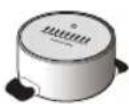
IMPORTANT: The cooking zones will not switch on if pots are not the right size. Only use pots bearing the symbol "INDUCTION SYSTEM" (Figure opposite). Place the pot on the required cooking zone before switching the hob on.
Using suitable pots, the cooking zones cannot be used at temperatures below 10^ C.
EXISTING POTS AND PANS

text_image
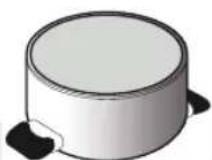
OK NOUse a magnet to check if the bottom of the pot is suitable for the induction hob: bottom of the pots and pans are unsuitable if not magnetically detectable.
- Make sure pots have a smooth bottom, otherwise they could scratch the hob. Check dishes.
- Never place hot pots or pans on the surface of the h ob's control panel. This could result in damage.
RECOMMENDED POT BOTTOM WIDTHS
Place the pot on the required cooking zone before switching the hob on.
For good cooking results, the diameter of the base of the pot should match the size of the hotplate.
| Diameter (cm) | Max (cm) | Min (cm) |
| 14.5 14.5 10 | 28 28 17 | |
| 18 18 12 30 | 30 17 | |
| 21 | 21 | 15 |
| 24 24 15 | ||
| 26 26 17 |
| Diameter (cm) | Max (cm) | Min (cm) |
| BRIDGE/CONNEXION | 39 - 18 | 12 |
Pan size
To determine the size of the pot please measure the base of the pot (see picture) and refer to recommended pots bottom width table, reported below, for perfect usage and correct pan detection. Each cooking zone has a minimum limit of detecting pans, which varies depending on the material of the pan
being used. You should therefore use the cooking zone that is most suitable for the diameter of your pan.
RECOMMENDED POT POSITION
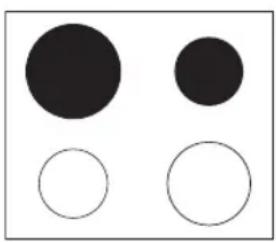
For best performance, when you use two pots simultaneously, put them according to the pictures below:
natural_image
Four circles of varying sizes and fill, no text or symbols present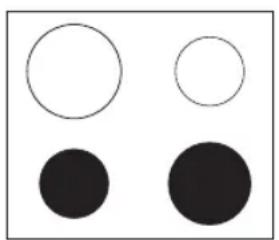
natural_image
Four geometric shapes: two white circles and three black circles arranged in a 2x2 grid (no text or symbols)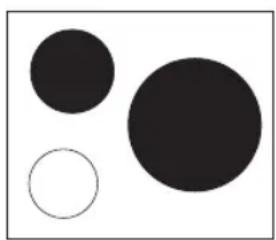
natural_image
Three solid circles of varying sizes on a white background, no text or symbols present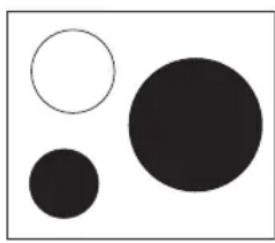
natural_image
Three solid circles of varying sizes and sizes, no text or symbols presentPOWER LEVEL TABLE
| Power level Type of cooking Level use | (indicating cooking experience and habits) | ||
| Max. power | Boost Fast heating | Ideal for rapidly increasing the temperature of food to fast boiling in the case of water or rapidly heating cooking liquids | |
| 9-7 | Frying - boiling | Ideal for browning, starting to cook, frying frozen products, fast boiling | |
| High power | Browning - slow frying - boiling - grilling | Ideal for slow frying, maintaining a high boil, cooking and grilling (short duration, 5-10 minutes) | |
| 7-5 | Browning - cooking - stewing - slow frying - grilling | Ideal for slow frying, maintaining a low boil, cooking and grilling (medium duration, 10-20 minutes), preheating | |
| Medium power | Cooking - stewing - slow frying - grilling | Ideal for stewing, maintaining a gentle boil, cooking and grilling (long duration) | |
| 4-3 | Cooking - simmering - thickening - creaming pasta | Ideal for prolonged cooking (rice, sauces, roasts, fish) with liquids (e.g. water, wine, broth, milk), creaming pasta | |
| Ideal for prolonged cooking (volumes of less than a litre: rice, sauces, roasts, fish) with liquids (e.g. water, wine, broth, milk) | |||
| Low power 2-1 | Melting - defrosting - keeping food hot - creaming risottos | Ideal for softening butter, gently melting chocolate, thawing small products and keeping just-cooked food hot (e.g. sauces, soups, minestrone) | |
| Ideal for keeping just-cooked food hot, creaming risottos and keeping serving dishes warm (with induction-suitable accessory) | |||
| OFF | Zero power | Support surface | Hob in standby mode or off (possible end-of-cooking residual heat, indicated by “H”) |
NOTE:
When making quick-cook foods that require perfect heat distribution (e.g. pancakes) on the 28 cm double cooking zone (where present), use pans no greater than 24 cm in diameter. For delicate cooking (for example, melting chocolate or butter) use the smaller diameter single zones.
INSTALLATION
After unpacking the product, check for any damage during transport. In case of problems, contact the dealer or the After-Sales Service.
For built-in dimensions and installation instruction, see the pictures in page 2.
PREPARING THE CABINET FOR FITTING

WARNING
- Install a separator panel under the hob.
- The lower part of the product must not be accessible after installation.
- Do not fit the separator panel if an undertop oven is installed.
• The distance between the underside of the appliance and the separator panel must respect the dimensions given in the figure.
- In order to ensure the correct operation of the product, do not obstruct the minimum required clearance between the hob and the top of the unit (min. 5 mm).
- If an undertop oven is installed, make sure the oven is equipped with a cooling system.
• Do not install the hob above a dishwasher or washing-machine, so that the electronic circuits do not come into contact with steam or moisture which could damage them.
- In the case of flush-mounted installation, call the After-Sales Service to request assembly of screws kit 4801 211 00112.
• To remove the hob, use a screwdriver (not provided) to prise off the perimeter clips on the underside of the appliance.
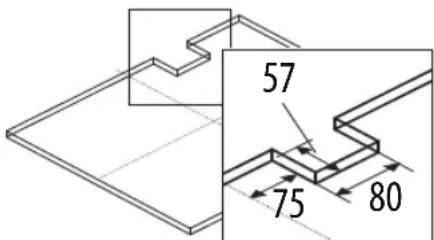
text_image
57 75 80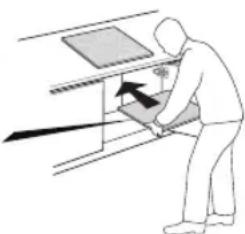
natural_image
Illustration of a person using a directional arrow to press or adjust equipment (no text or symbols visible)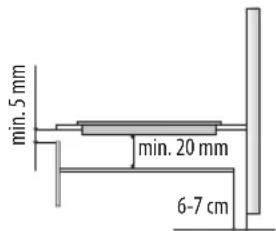
text_image
min. 5 mm min. 20 mm 6-7 cm
WARNING
- Disconnect the appliance from the power supply.
- Installation must be carried out by qualified personnel who know the current safety and installation regulations.
- The manufacturer declines all liability for provided in this chapter.
injury to persons or animals and for damage to property resulting from failure to observe the regulations
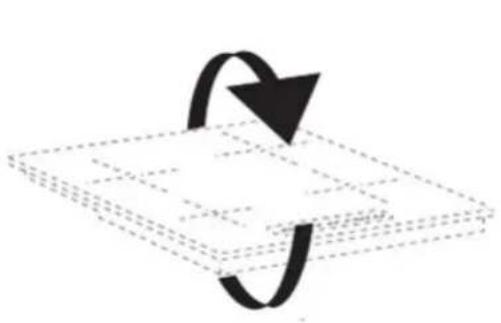
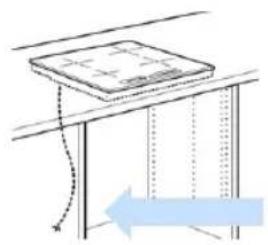
- The power cable must be long enough to allow w the hob to be removed from the worktop.
- Make sure the voltage specified on the dataplate located on the bottom of the appliance is the same as that of the home.
natural_image
Pure 3D geometric diagram showing a cube with dashed lines and an arrow indicating rotation (no text or symbols)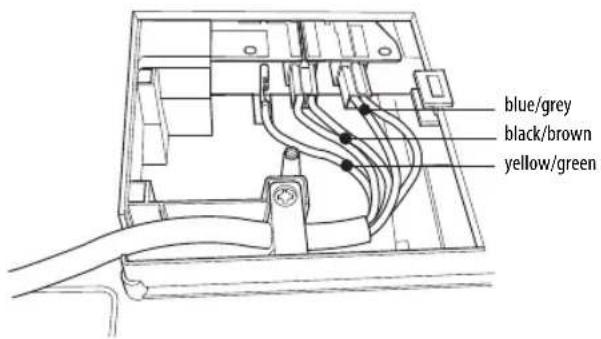
text_image
blue/grey black/brown yellow/green- Remove the terminal cover (A) by unscrewing the screw and insert the cover into the hinge (B) of the terminal.
- Plug the power cord into the clamp and connect the wires to the terminal block as shown in the wiring diagram located near the terminal.
- Secure the power cable with the cable clamp.
- Close the cover (C) and screw on the terminal with the screw removed.
For each connection to the network, the hob automatically checks for a few seconds.
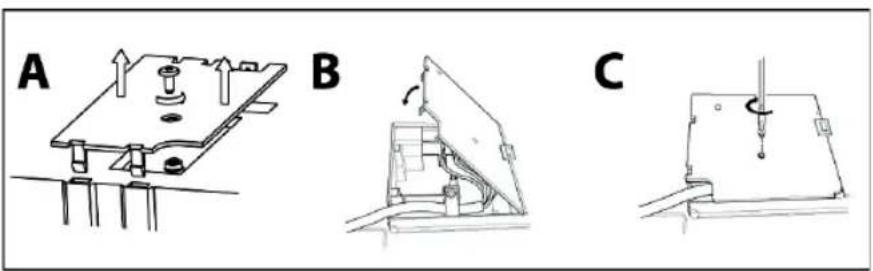
text_image
A B CConnection to main power
natural_image
Simple line drawing of a table with a curved arrow and dashed lines indicating direction (no text or symbols)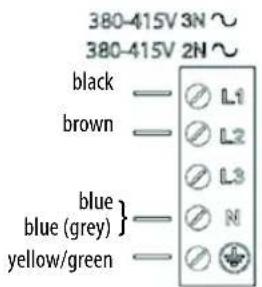
text_image
380-415V 3N ~ 380-415V 2N ~ black —○ L1 brown —○ L2 blue blue (grey) } —○ N yellow/green —○ ↓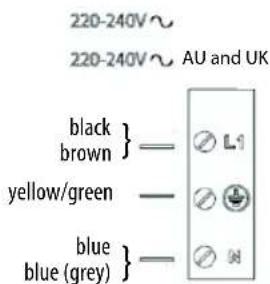
text_image
220-240V~ 220-240V~ AU and UK black brown } — ⏰ L1 yellow/green — ⏰ blue blue (grey) } — ⏰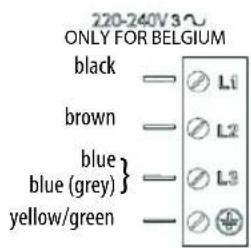
text_image
220-240V 3~ ONLY FOR BELGIUM black —— Ⓞ L1 brown —— Ⓞ L2 blue } —— Ⓞ L3 blue (grey) —— Ⓞ + yellow/green —— Ⓗ ⊕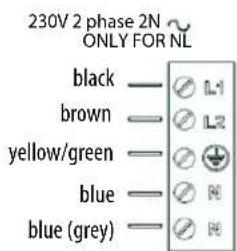
text_image
230V 2 phase 2N ONLY FOR NL black —○ L1 brown —○ L2 yellow/green —○ + blue —○ N blue (grey) —○ HControl Panel Description
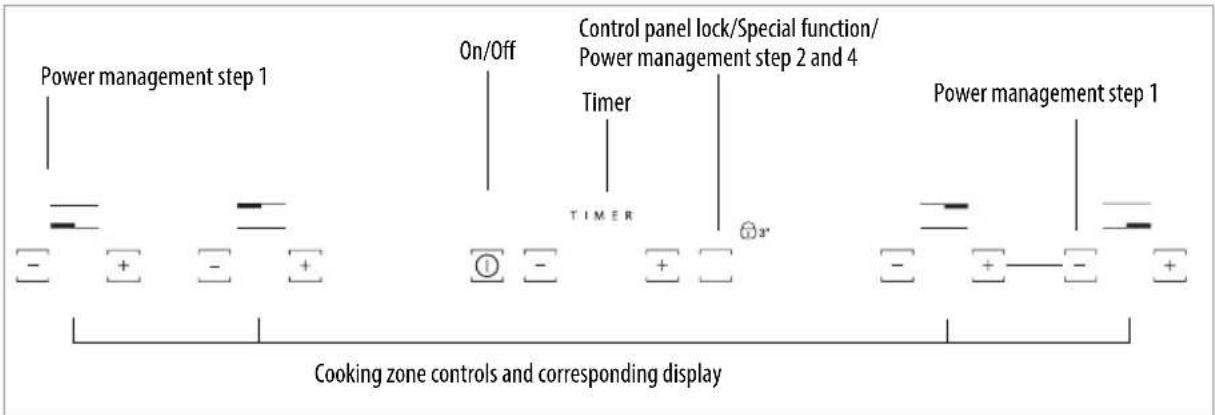
Control panel
text_image
Power management step 1 On/Off Timer TIMER Control panel lock/Special function/ Power management step 2 and 4 Power management step 1 Cooking zone controls and corresponding displaySwitching the hob ON/OFF
To switch the hob on, press the Ⓐ button for approx. 2 seconds until the cooking zone displays light up. To switch off, press the same button until the displays switch off. All the cooking zones are deactivated.
If the hob has been in use, the residual heat indicator "H" remains lit until the cooking zones have cooled down.
If within 10 seconds of switching on, no function is selected, the hob switches off automatically.
Switching on and adjusting cooking zones
Power indicator display
Selected cooking zone indication
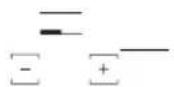
Cooking zone positioning
Place the pot on the cooking zone, switching the hob on, activate the required cooking zone by pressing the corresponding "+" button "0" appears on the display. It is possible to select the required power level, from min. 0 to max. 9, or booster "P" if available. To increase the power level, push the "+" button. To decrease the power level push the "-" button.
Deactivation of cooking zones
To switch off the cooking zone, press the corresponding "+" and "-" button for more than 3 seconds.
The cooking zone switches off and, if still hot, the letter "H" appears on the zone display.
Control panel lock
This function locks the controls to prevent accidental activation of the hob. To activate the control panel lock, switch the hob on and press the Lock function button for three seconds; an acoustic signal and a luminous indicator near the padlock symbol signal activation. The control panel is locked except for the switching off function. To deactivate the control lock, repeat the activation procedure. The luminous dot goes off and the hob is active again.
The presence of water, liquid spilled from pots or any objects resting on the button below the symbol can accidentally activate or deactivate the control panel lock.
Timer
The timer can be used to set the cooking time for a maximum of 99 minutes (1 hour and 39 minutes) for all the cooking zones. Select the cooking zone to be used with the timer, press the timer (see figure) and a beep signals the function. The display shows "00" and the LED indication comes on. The Timer value can be decreased and increased by keeping the slider function "+" and "-" buttons pressed. When the set time has elapsed, an acoustic signal sounds and the cooking zone switches off automatically. To deactivate the timer, keep the Timer button pressed for at least 3 seconds.
To set the timer for another zone, repeat the above steps. The timer display always shows the timer for the selected zone or the shortest timer.
To modify or deactivate the timer, press the cooking zone selection button for the timer in question.
Control panel warnings
Special functions (If available)
Some models have special functions:
Automatic function Ⓗ
The function automatically sets a power level suitable for maintaining a low boil. Activate this function after bringing to the boil, pressing the corresponding zone button first and then the button ○
Residual heat indicator.
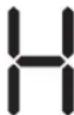
The hob is fitted with a residual heat indicator for each cooking zone. These indicators alert the user when cooking zones are still hot.
If the display shows H, the cooking zone is still hot. If the residual heat indicator of a given cooking zone is lit, that zone can be used, for example, to keep a dish warm or to melt butter.
When the cooking zone cools down, the display goes off.
Incorrect or missing pot indicator.
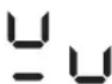
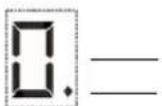
If you are using a pot that is not suitable, not correctly positioned or not of the correct dimensions for your induction hob, the message "no pot" will appear in the display (see figure at side). In these situations it is recommended to reposition the pot on the hob surface until you find the position of operation. If no pot is detected within 60 seconds, the hob switches off.
Fast boil function (Booster where it is available)
This function, only present on some cooking zones, makes it possible to exploit the hob's maximum power (for example to bring water to the boil very quickly). To activate the function, press the "+" button until "P" appears on the display. After 5 minutes' use of the booster function, the appliance automatically sets the zone to level 9.
BRIDGE/CONNEXTION ZONE
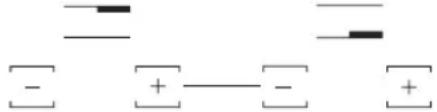
This function is used in case of big pots that the single zone can not satisfied, ex, fish, big pot for meat.
In order to active the BRIDGE/CONNEXTION ZONE, please press on + and - buttons simultaneously as shown in the picture below.
text_image
Diagram showing two sets of symbols: minus signs and plus signs, likely representing electric field lines or polarity."Power management" (Function where it is available)
Thanks to the "Power management" function, the user can set the maximum power the hob can reach, as required.
This setting is possible at any time and is maintained until the next change.
By setting the required maximum power, the hob automatically adjusts distribution in the various cooking zones, ensuring that this limit is never exceeded; with the advantage of also being able to manage all the zones simultaneously, but without overload problems.
4 maximum power levels are available and showed on display: 2.5 - 4.0 - 6.0 - 7.2 kW (7.2 kW is considered as max power of cooktop)
At the time of purchase, the hob is set to maximum power
After plugging the appliance into the electrical socket, in the first 60 seconds it is possible to set the required power level by running the following points:
| Step Control panel Display | ||
| 1 Press for approximately— | 3 seconds both Power management button (step 1) | |
| 2 Press the Power | Management button (step 2) to confirm the previous step | The display shows  |
| 3 Press to set the chosen level— [—] amongst the different options available | The light comes on together with the in-use lights for the individual cooking zones | |
| 4 Press the Power | Management button (step 4) to confirm the previous step | The display shows the set level which flashes for approximately 2 seconds; after which the hob emits an acoustic signal and then turns itself off; it is now ready for use |
In case of an error when setting the power, the symbol appears in the middle and an acoustic signal sounds for about 5 seconds. In this case repeat the configuration procedure from the beginning. If the error occurs again, contact the After-Sales Service.
During normal use, if the user tries to increase the maximum available power level when reached, the level of the zone in use flashes twice and an acoustic signal sounds.
To obtain a higher power in that zone, it is necessary to manually decrease the power level of one or more already active cooking zones.
Activation/deactivation of the acoustic signal
After switching the hob on, press and hold the "-" of the first cooking zone and the external button on the right simultaneously for at least five seconds ("as shown below").

text_image
TIMER 5 SecCLEANING

WARNING
- Do not use steam cleaners.
- Before cleaning, make sure the cooking zones are switche is not displayed.
d off and that the residual heat indicator ("H")
IMPORTANT: Do not use abrasive sponges or scouring pads. Their use could eventually ruin the glass.
• After each use, clean the hob (when it is cool) to remove any deposits and stains due to food residuals.
- Sugar or foods with a high sugar content damage the hob and must be immediately removed.
- Salt, sugar and sand could scra tch the glass surface.
• Use a soft cloth, absorbent kitchen paper or a specific hob cleaner (follow the Manufacturer's instructions).
- Liquid splillages on the cooking zones may make pan vibrate or move.
• Dry the hob thoroughly after cleaning it.
TROUBLESHOOTING GUIDE
- Read and follow the instructions given in the section "Instructions for use".
- Check that the electricity supply has not been shut off.
• Dry the hob thoroughly after cleaning it. - If, when the hob is switched on, alphanumeric codes appear on the display, consult the following table for instructions.
- If the hob cannot be switched off after using it, disconnect it from the power supply.
| ERROR CODE | DESCRIPTION | POSSIBLE CAUSES | ERROR ELIMINATION |
| C81, C82 | The control panel switches off because of excessively high temperatures | The internal temperature of electronic parts is too high | Wait for the hob to cool down before using it again. |
| C83 | The control panel indicates the error code hob off because of an issue on electronic circuit | Cooktop has been supplied with over voltage | Cooktop may be still used but call the After-Sales Service |
| C85 | Hob is not able to give power to the pot | Pot is not suitable to the induction hob Use another induction pot | |
| F02 or F04 or C84 | The connection voltage is wrong or issue to the power supply | The sensor detects a discrepancy between the appliance voltage and that of the mains supply | Disconnect the hob from the mains and check the electrical connection |
| F01, F05, F06, F07, F10, F12, F25, F33, F34, F36, F37, F46, F47, F48, F49, F58, F61, F62, F63, F72, F74, F77 | Disconnect the hob from the power supply.Wait a few seconds and plug it again.If the problem persists, call the After-Sales Service and specify the error code | ||
NOISES MADE BY THE HOB
The induction cooktops can generate a set of noise and vibration during normal operation, depending on the type of material and the processing of the food, such as those described below:
- Noi se contact: this type of vibration is due to the use of pots made of different materials superimposed.
• Sounds click at mid-lower power: this noise is produced in order to achieve the low-mid power required. - S ounds like rhythmic click: this noise is produced when operating several areas of cooking and / or high performance.
• Hissing weak: this noise is due to the type of container used and the quantity of food contained. - Back ground noise: the induction cooker is equipped with a fan aimed at cooling the electronic components and for this reason during operation and also for a few minutes after switching off the hob you hear the noise of the fan. Increase / decrease the cooking zones activated, the background noise of the fan may increase or decrease.
These conditions are normal and essential for the proper functioning of the induction system, they are not indication of failure or damage.
AFTER-SALES SERVICE
Before contacting the After-sales Service:
- See if you can solve the problem yourself with the help of the "Troubleshooting guide".
- Switch the appliance off and then on again it to see if the problem has been eliminated.
If the problem persists after the above checks, contact the nearest After-Sales Service.
Always specify:
- a brief description of the fault;
• the product type and exact model; - the Service number (the number after the word Service on the rating plate), located under the appliance (on the metal plate).
- your full address;
- your telephone number.
SERVICE
0000 000 00000
If any repairs are required, contact an authorised After-Sales Service Centre (to ensure the use of original spare parts and correct repairs). Spare parts are available for 10 years.
EAC


Made in Italy
Сделано в Италии
Италияда жасалган
Зроблено в Італії

400010905215
EN


07/16