
RunMi 90 Points Metal Suitcase - Suitcase Xiaomi - Free user manual and instructions
Find the device manual for free RunMi 90 Points Metal Suitcase Xiaomi in PDF.


| Product Type | Smart Metal Suitcase |
| Brand | Xiaomi (RunMi) |
| Model | LGSR2005RM (Silver) / LGGD2005RM (Metal) / LGBU2005RM (Blue) |
| Dimensions (interior) | 497 x 340 x 215 mm |
| Total Size (including handle and wheels) | 550 x 375 x 215 mm |
| Capacity | Approximately 31 liters |
| Weight | Approximately 4.4 kg |
| External Material | 100% Aluminum-Magnesium Alloy |
| Internal Material | 100% Polyester |
| Smart Lock | D-901, Bluetooth 4.0 |
| Connectivity | Bluetooth 4.0, compatible with Android/iOS 7.0 and above |
| Operating Temperature | -15°C to 55°C |
| Power Supply | Two AA batteries (1.5V, 550 mAh) |
| Battery Life | Approximately 1 year under normal usage |
| Wheel Type | 360-degree maneuverable wheels |
| Handle | Retractable with 4 positions |
| TSA Lock | Yes, integrated |
| Recommended Cleaning | Wipe with a dry towel; avoid prolonged rain exposure; do not use near heat or high acidity/humidity |
| Safety Precautions | Do not sit on suitcase; do not roll up stairs; do not rely solely on smart lock; avoid rough surfaces |
| Warranty Period | 12 months from purchase (with specific return/replacement policy) |
| Manufacturer | Shanghai RunMi Technology Co., Ltd. |
Frequently Asked Questions - RunMi 90 Points Metal Suitcase Xiaomi
User questions about RunMi 90 Points Metal Suitcase Xiaomi
0 question about this device. Answer the ones you know or ask your own.
Ask a new question about this device
Download the instructions for your Suitcase in PDF format for free! Find your manual RunMi 90 Points Metal Suitcase - Xiaomi and take your electronic device back in hand. On this page are published all the documents necessary for the use of your device. RunMi 90 Points Metal Suitcase by Xiaomi.
USER MANUAL RunMi 90 Points Metal Suitcase Xiaomi
Mi 90 Points Smart Metal Suitcase
The main parameters of the suitcase
The main parameters of Smart Module
Name: Mi 90 Points Smart Metal Suitcase;
Smart lock: D-901;
Model: LGSR2005RM / Silver, LGGD2005RM / Metal, LGBU2005RM / Blue;
Operating temperature: -15C - 55C;
Size: 497x340x215mm (total size 550x375x215mm);
CMIIT ID: 2016DP1367;
Capacity: about 31l;
Support: Bluetooth 4.0 Android or iOS 7.0 and higher systems;
Weight: about 4.4kg;
Type of wireless connectivity: Bluetooth 4.0;
Standard: Q31 / 0117000530C001-2016;
Power: 1.5V --- 550 mAh.
External material suitcase: 100% aluminum-magnesium alloy;
Internal material suitcase: 100% polyester.

External side of the suitcase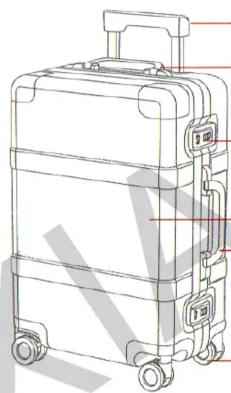
Extendable handle (four positions)
Upper handle
TSA lock
Aluminum-magnesium alloy
Side handle
Wheels, 360 degree maneuverability
Internal side of the suitcase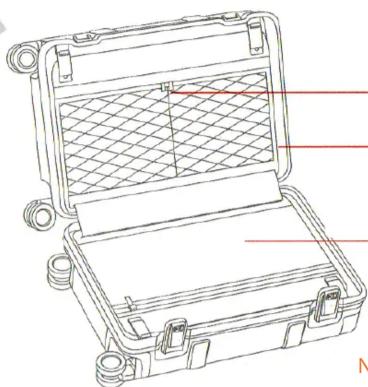
Zipper
Separating the inner pocket
Note: The lower internal zip pocket is intended only to repair the suitcase, so we recommend not to open and use it for your own purposes.
Lock/unlock manual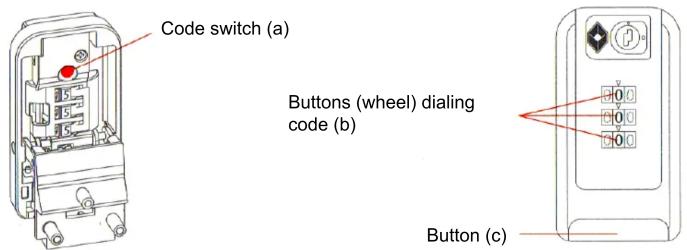
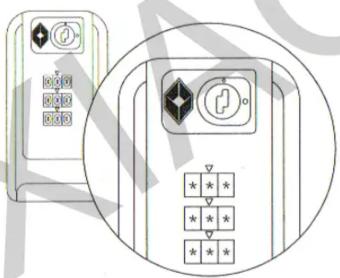
- Unlocking: Scroll the code wheels on the suitcase, set your selected combination, press the button, and the lock is unlocked.
- Locking: Close the lock and at the same time scroll the code wheels in random order. The lock is locked.
- Setting the password: The initial password is 0-0-0, which is the factory-set password of the suitcase, so you need to choose your own combination of three numbers. 3.1. The initial state of the lock (the current password of the suitcase is 0-0-0). 3.2. Use a pen or other similar pointed object (as shown in the left picture) on the opposite side of the lock to press and hold the installation button (a) until it clicks. 3.3. Rotate the code wheels (b) to select the desired combination of three digits (e.g., 8-8-8). 3.4. If you choose a new combination, press the button (c) and you will hear a clicking sound, the code switch (a) pops out, and the lock will lock.
- If you forget your password, you will not be able to open the suitcase by the usual means. So be sure to remember your password.
(In addition to the manual lock code lock, there is a Bluetooth support function. See the smart lock user manual.)
Smart lock manual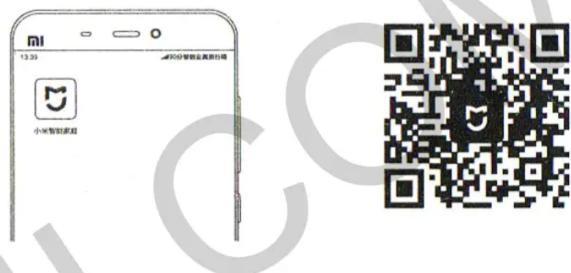
- Install the Mi Smart Home APP on your smartphone. To install the Mi Smart Home APP on your smartphone, scan the QR code shown on the right side.
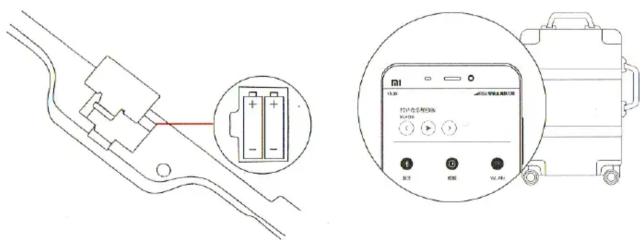
- Set the batteries and turn on Bluetooth on your phone. In the inner part of the Mi 90 Points Smart Metal Suitcase (hereinafter referred to as the suitcase), open the battery compartment and insert two AA batteries. The distance between the smartphone and the suitcase should be no more than 1 meter. Check the stability of the Wi-Fi signal and turn on Bluetooth on your phone.
3. Connect the smartphone to the suitcase
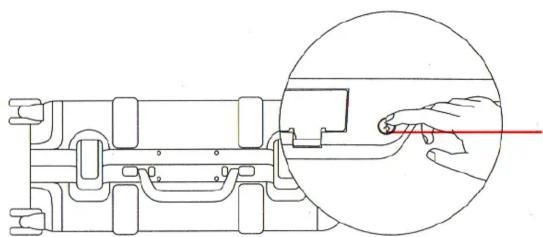
Open the Mi Smart Home APP, create your Mi account, following the instructions of the application, then find the suitcase in the list of devices. When the display prompts the interface for connection confirmation, press and hold the Bluetooth button, which is located inside the suitcase next to the battery compartment, for 3-5 seconds (as shown in the illustration). After performing all the actions in the application, you will receive a notification about the successful pairing of the devices.
4. Start to use
After pairing the devices, firstly, you must set the password in manual mode (see the manual unlock/lock instruction). Scroll the code wheels in random order and make sure that the lock is locked. Unlock the lock using the smart unlock.
5. Change the batteries
Bundled with the suitcase, you get two AA batteries. If the APP notifies you of insufficient charge, promptly change the batteries.
During normal frequency of use of the suitcase, you can use the batteries for 1 year. If you do not use the suitcase for a long time, remove the batteries.
Precautions
Precautions for the use of retractable suitcase handle
It is not recommended to lift the suitcase by holding its retractable handle.
During the movement of the suitcase, do not press or push the button of the retractable handle.
It is not recommended to leave a suitcase in the rain for a long time.
A suitcase is not completely waterproof. Sudden splashes of water will not harm it. But if your bag gets wet, please promptly wipe it with a dry towel to avoid it getting completely wet and water getting inside the suitcase.
Do not put the suitcase near sources of heat.
Warning: if you leave the suitcase near fire, a fireplace, or other heat sources, it can lead to deformation.
Do not leave the suitcase in areas with a high level of acidity or moisture.
Do not leave the suitcase in areas with a high level of acidity or humidity, since this may cause damage or breakage of the lock and its metal elements. As a result, the normal use of the suitcase becomes impossible.
Keep an eye on the suitcase if it is on the top shelf (for luggage).
As a result of the fall of suitcases or other luggage, you can get injured, it may break, or things you carry in it may be damaged. So keep an eye on your suitcase if it is placed on the top shelf designed for luggage.
Do not rely only on the distance unlock of the smart lock.
When connected to the smartphone, the device (smart lock) uses a radio signal. But in some cases, this kind of connection and unlocking of the lock is not reliable enough. In an emergency case, you should not rely only on the distance unlock of the smart lock.
Safety Tips
- Do not carry money and jewelry in a suitcase.
- Do not roll the suitcase up the stairs or steps. This may cause injury to the user or your suitcase can flip over and go wrong.
- Do not put the suitcase on problematic and rough surfaces to prevent it from tipping over, and, as a result, causing accidents.
- Do not sit on the bag, since it may cause it to tip over and injure the user.
Warranty:
Warranty servicing is carried out according to the law on «The rights of the consumer of China» and «Law on product quality of China». During the warranty period you have the right to repair, replace or return. For repair, replacement or return of goods, you must present a receipt.
Warranty service includes:
- Within 7 days of purchase, in case of any problem on the «fault list», the 90 Points service center will determine the cause of the problem, then you can choose a free replacement of the product or a refund.
- Within 8-15 days of purchase, in case of any problem on the «fault list», the 90 Points service center will determine the problem, then you can choose a free replacement of the product or repair.
- Within 12 months of purchase, in case of any problem on the «fault list», the 90 Points service center will determine the problem, then you have free repair.
Warning:
The conditions which are not included in warranty service:
- Repair of goods by unauthorized organizations or service centers.
- The warranty period has expired.
- Damage arising under force majeure circumstances.
- Damage that does not conform to the «List of faults» of the product service center.
- Damage that arose in connection with the human factor.
Warning:
- Warranty service is impossible if, as a result of natural deterioration, incorrect operation, or influence of other external factors, damage to a suitcase has arisen (for example, if as a result of travel by plane or other vehicle, damage, deformation, fracture, crack of the shell, scratches, corrosion, etc. have occurred).
- In order to protect your legitimate rights and interests, before you sign a document that confirms receipt of the goods, unpack and check the integrity of the device.
List of faults
| Product Name | List of faults |
| Mi 90 Points Smart Metal Suitcase | Improper operation of the functions, described in the manualProblems with work retractable handleProblems with suitcases wheelsProblems with the base of the main handleProblems synchronizing data with a certain device |
The presence of toxic and hazardous substances
| Detail name | Pb | Hg | Cd | Cr6+ | PBB | PBDE |
| External body | O | O | O | O | O | O |
| Metal body of the lock | O | O | O | O | O | O |
| Elements of sheet copper | X | O | O | O | O | O |
Data tables provided according to the provisions SJ/T 11364.
O: toxic and harmful substances in all components of the device are contained in an amount lower than the limit value according to the standard GB/T 26572. X: presence of toxic and hazardous substances, at least in one of the components of the device, in an amount that exceeds the threshold, according to GB/T 26572
To consult a specialist, please call technical support: 400-807-9090
(Work hours: Mon-Fri 9:00 - 18:00)
Weixin 90Points QQ 90Points
Manufacturer: OOO «Shanghai RunMi Technology»
Address: Floor 5, Building 14, CaoHeJing Park, 518, Shenzhuan Street, Songjiang District, Shanghai city
Address after-sales service: 3, Huadong Zhen Fenghuang Road, Huadu District, Guangzhou city, Guangdong Province
Xiaomi-Mi.com


- MI 90 POINTS SMART METAL SUITCASE
- THE MAIN PARAMETERS OF THE SUITCASE
- THE MAIN PARAMETERS OF SMART MODULE
- CONNECT THE SMARTPHONE TO THE SUITCASE
- START TO USE
- CHANGE THE BATTERIES
- PRECAUTIONS
- SAFETY TIPS
- WARRANTY
- WARRANTY SERVICE INCLUDES
- WARNING
- THE CONDITIONS WHICH ARE NOT INCLUDED IN WARRANTY SERVICE
- LIST OF FAULTS
- THE PRESENCE OF TOXIC AND HAZARDOUS SUBSTANCES
Brand : Xiaomi
Model : RunMi 90 Points Metal Suitcase
Category : Suitcase